EP2768756B1 - Elevator passenger interface including special assistance features - Google Patents
Elevator passenger interface including special assistance features Download PDFInfo
- Publication number
- EP2768756B1 EP2768756B1 EP11874355.8A EP11874355A EP2768756B1 EP 2768756 B1 EP2768756 B1 EP 2768756B1 EP 11874355 A EP11874355 A EP 11874355A EP 2768756 B1 EP2768756 B1 EP 2768756B1
- Authority
- EP
- European Patent Office
- Prior art keywords
- passenger
- destination
- assistance button
- audible
- button
- Prior art date
- Legal status (The legal status is an assumption and is not a legal conclusion. Google has not performed a legal analysis and makes no representation as to the accuracy of the status listed.)
- Active
Links
Images


Classifications
-
- B—PERFORMING OPERATIONS; TRANSPORTING
- B66—HOISTING; LIFTING; HAULING
- B66B—ELEVATORS; ESCALATORS OR MOVING WALKWAYS
- B66B1/00—Control systems of elevators in general
- B66B1/34—Details, e.g. call counting devices, data transmission from car to control system, devices giving information to the control system
- B66B1/46—Adaptations of switches or switchgear
-
- B—PERFORMING OPERATIONS; TRANSPORTING
- B66—HOISTING; LIFTING; HAULING
- B66B—ELEVATORS; ESCALATORS OR MOVING WALKWAYS
- B66B1/00—Control systems of elevators in general
- B66B1/34—Details, e.g. call counting devices, data transmission from car to control system, devices giving information to the control system
-
- B—PERFORMING OPERATIONS; TRANSPORTING
- B66—HOISTING; LIFTING; HAULING
- B66B—ELEVATORS; ESCALATORS OR MOVING WALKWAYS
- B66B1/00—Control systems of elevators in general
- B66B1/34—Details, e.g. call counting devices, data transmission from car to control system, devices giving information to the control system
- B66B1/46—Adaptations of switches or switchgear
- B66B1/461—Adaptations of switches or switchgear characterised by their shape or profile
- B66B1/463—Touch sensitive input devices
-
- B—PERFORMING OPERATIONS; TRANSPORTING
- B66—HOISTING; LIFTING; HAULING
- B66B—ELEVATORS; ESCALATORS OR MOVING WALKWAYS
- B66B2201/00—Aspects of control systems of elevators
- B66B2201/40—Details of the change of control mode
- B66B2201/401—Details of the change of control mode by time of the day
-
- B—PERFORMING OPERATIONS; TRANSPORTING
- B66—HOISTING; LIFTING; HAULING
- B66B—ELEVATORS; ESCALATORS OR MOVING WALKWAYS
- B66B2201/00—Aspects of control systems of elevators
- B66B2201/40—Details of the change of control mode
- B66B2201/402—Details of the change of control mode by historical, statistical or predicted traffic data, e.g. by learning
Definitions
- Elevator systems are in widespread use for carrying passengers between different levels in a building. Over the years, there have been a variety of advances and changes in elevator system components. One such advance has been in the area of passenger interfaces. Traditionally, hall call buttons allowed a passenger to request an elevator car to carry them up or down from their current location. More sophisticated devices have been introduced that allow a passenger to specify their intended destination before they board an elevator car. Such destination-entry systems present a variety of possibilities for configuring the passenger interface.
- a contemporary device that is well-suited for destination-entry passenger interfaces is a touch screen that displays information to a passenger and allows a passenger to make selections to communicate their intended destination to the elevator system.
- One advantage to touch screen displays is that they provide an ability to customize the display to meet passenger or building owner needs, for example.
- One drawback to touch screen displays is that they typically do not allow visually impaired or blind passengers to communicate their intended destinations to the elevator system. The nature of a touch screen display does not allow for tactical indicators that would assist a visually impaired or blind person to make an appropriate selection or to otherwise interact with the passenger interface device.
- WO 2007/046807 A1 discloses a method and system which enables a handicapped person to select a destination floor in an elevator using a single control.
- a regular control panel comprising buttons for a passenger to select depending on the floor he or she wants to go to
- a touch control is provided which is easy to reach and to handle by a handicapped person for selecting a desired floor.
- US 2004/000453 A1 discloses a computer controlled and responsive touch screen which reacts to activation of a handicapped-service request button to announce to passengers either to tap a screen numbers of times indicating a desired floor, to trace script numerals on a screen indicative of a desired floor, to move a finger across the screen and tap the screen when a number desired to represent a floor is announced, or to select a floor by tapping tactile representations of a floor selection keypad on a screen.
- An exemplary elevator passenger interface device includes the combination of features of claim 1.
- Particular embodiments may include any of the following optional features, alone or in combination:
- the controller may be configured to determine the passenger's intended destination to correspond to the most recently announced destination prior to the second time that the passenger pressed the assistance button.
- the controller may be configured to determine that the assistance button has been pressed and released prompt the passenger to press and hold the assistance button a second time until the passenger hears an audible announcement of the passenger's desired destination from the device, cause an audible announcement of a plurality of possible destinations to be provided to the passenger from the device, and determine the passenger's intended destination based on a timing that the assistance button is released relative to the audible announcement.
- the controller may be configured to determine the passenger's intended destination to correspond to the most recently announced destination prior to the when the passenger released the assistance button.
- the controller may be configured to determine that the assistance button is being pressed, prompt the passenger to hold the assistance button until the passenger hears an audible announcement of the passenger's desired destination from the device, cause an audible announcement of a plurality of possible destinations to be provided to the passenger from the device, and determine the passenger's intended destination based on a timing that the assistance button is released relative to the audible announcement.
- the controller may be configured to determine the passenger's intended destination to correspond to the most recently announced destination prior to the when the passenger released the assistance button.
- the controller may be configured to determine that the assistance button has been pressed, cause the device to provide an audible indication of a possible destination responsive to each subsequent press of the assistance button, prompt the passenger to press the assistance button repeatedly until the passenger hears an announcement of the passenger's intended destination and to hold the button in a pressed position when the intended destination is announced until the passenger hears a confirmation of the intended destination, provide an audible confirmation of a destination corresponding to an announced destination prior to the passenger holding the button in the pressed position, and determine the passenger's intended destination to be the destination of the confirmation.
- the controller may be configured to provide audible indications of possible destinations to the passenger responsive to determining that the assistance button has been pressed, provide an audible selection to the passenger of a plurality of possible starting destinations from which to begin the audible indications.
- An exemplary method of facilitating an elevator service request from at least one passenger includes the combination of features of claim 8.
- Particular embodiments may include any of the following optional features, alone or in combination:
- the method may comprise determining that the assistance button has been pressed and released; prompting the passenger to press and hold the assistance button a second time until the passenger hears an audible announcement of the passenger's desired destination from the device; causing an audible announcement of a plurality of possible destinations to be provided to the passenger from the device; and determining the passenger's intended destination based on a timing that the assistance button is released relative to the audible announcement.
- the method may comprise determining that the assistance button is being pressed; prompting the passenger to hold the assistance button until the passenger hears an audible announcement of the passenger's desired destination from the device; causing an audible announcement of a plurality of possible destinations to be provided to the passenger from the device; and determining the passenger's intended destination based on a timing that the assistance button is released relative to the audible announcement.
- the method may comprise determining that the assistance button has been pressed; causing the device to provide an audible indication of a possible destination responsive to each subsequent press of the assistance button; prompting the passenger to press the assistance button repeatedly until the passenger hears an announcement of the passenger's intended destination and to hold the button in a pressed position when the intended destination is announced until the passenger hears a confirmation of the intended destination; providing an audible confirmation of a destination corresponding to an announced destination prior to the passenger holding the button in the pressed position; and determining the passenger's intended estination to be the destination of the confirmation.
- the method may comprise providing audible indications of possible destinations to the passenger responsive to determining that the assistance button has been pressed; and providing an audible selection to the passenger of a plurality of possible starting destinations from which to begin the audible indications.
- Figure 1 schematically shows a passenger interface device 20.
- the example device 20 is useful for allowing a passenger to indicate a desired destination before the passenger boards an elevator car.
- the illustrated example is also useful within an elevator car to allow a passenger to make a selection regarding an intended destination after the passenger has boarded the elevator car.
- the passenger interface 20 includes a touch screen 22 that is configured to allow a passenger to make a selection or otherwise provide an indication of an intended destination.
- the passenger may obtain information by viewing the touch screen 22, by hearing audible announcements through a speaker 24, or both.
- a controller 26 is configured to determine the intended destination of a passenger who utilizes the touch screen 22 in an appropriate manner.
- the example of Figure 1 includes an assistance button 28 that is useful for allowing visually impaired or blind passengers to provide an indication of an intended destination.
- the assistance button 28 is also useful to assist passengers who may not be able to utilize the touch screen 22 for other reasons.
- the controller 26 determines when the assistance button 28 has been manipulated by a passenger and then subsequently manipulated by a passenger for purposes of determining the intended destination of that passenger.
- manipulating the assistance button 28 includes pressing the button, holding the button and releasing the button, for example.
- the controller 26 is configured or programmed to recognize different kinds of manipulations of the assistance button 28, depending on the particular embodiment, several of which are described below.
- the assistance button 28 allows a passenger who cannot interact through the touch screen 22 to provide an indication of an intended destination to the elevator system and to obtain information from the system through the speaker 24, for example.
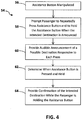
- Figure 2 includes a flowchart diagram 30 that summarizes one example technique for utilizing the assistance button 28.
- a determination is made at 32 that the assistance button 28 has been manipulated.
- the initial manipulation comprises a passenger pressing the assistance button 28.
- Such manipulation is interpreted by the controller 26 based upon switch operation, for example.
- the passenger is prompted to press the assistance button when the intended destination is announced.
- the controller 26 causes an audible announcement to be provided over the speaker 24 such as, "Please press the accessibility button when your desired floor is announced.”
- an audible announcement of a plurality of possible destinations is provided over the speaker 24, for example.
- the controller 26 determines when the assistance button is pressed during the sequence of destination announcements.
- the controller 26 determines the intended destination based on the timing of when the assistance button was pressed relative to the announcement. In this example, the most recently announced destination prior to the assistance button 28 being pressed is determined to be the passenger's intended destination.
- an audible confirmation and instructions are provided through the speaker 24 to the passenger to direct them to an appropriate elevator car.
- One example includes scheduling the assigned elevator car to remain at the landing where the passenger should board the car for an appropriate time that accommodates any extended walking time for the individual to arrive at the car and to board the car, for example.
- the controller 26 while the controller 26 is sequentially providing an audible announcement of the possible destinations, the controller determines whether the touch screen 22 has been touched.
- the controller in such an example accepts contact with the touch screen 22 as a selection of the most recently announced destination. This accommodates the possibility that a passenger begins the assistance operation by manipulating the assistance button 28 and then subsequently utilizing the touch screen, perhaps inadvertently, for making the selection regarding the intended destination.
- the controller 26 begins the audible announcements and provides an indication of each possible destination without detecting any selection made by a passenger, the assistance operation times out and the controller returns to normal operation.
- Figure 3 includes a flowchart diagram 40 that summarizes another example technique.
- the manipulation comprises the button being either pressed and held or pressed and released.
- the passenger is prompted to hold the assistance button 28 in a pressed position until the intended destination of that passenger is announced. In the case of the passenger still holding the button, the passenger will be prompted to continue to do so until the intended destination is announced. In a situation where the passenger has pressed and released the button 28, the passenger will be prompted to once again press the button and hold it until the intended destination is announced.
- the controller 26 causes audible announcements of a plurality of possible destinations to be provided over the speaker 24.
- One example includes a several second delay between the end of one destination announcement and the beginning of the next destination announcement. If the passenger releases the assistance button 28 after one of the destination announcements that is determined to be the intended destination as shown at 52.
- the passenger interface device 20 provides an audible and visual confirmation of the determined intended destination and provides information to the passenger to allow them to reach the appropriate elevator car in situations in which the passenger interface device 20 is located outside of an elevator car.
- the confirmation may simply provide an indication of the determined destination, or it may provide an indication of the amount of time the passenger should expect to wait until arriving at that destination.
- Figure 4 includes a flowchart diagram 54 summarizing another example technique.
- the determination is made that the assistance button has been manipulated.
- the passenger is prompted to repeatedly press the assistance button 28 and to hold the assistance button when the intended destination is announced.
- an audible announcement of a possible destination is provided responsive to each press of the assistance button 28. In other words, the passenger is prompted to repeatedly press the assistance button 28 to sequentially change the possible destination until the passenger hears an audible announcement of the intended destination, and then to hold the button in a pressed position responsive to that announcement.
- the controller 26 determines when the assistance button 28 is pressed and held.
- a confirmation is provided to the passenger, which is audible in this example, regarding the intended destination while the passenger is holding the assistance button 28.
- the passenger releases the assistance button 28 and proceeds to the appropriate elevator car based on information provided from the passenger interface 20 (or simply remains on the car in an embodiment in which the interface device 20 is within an elevator car).
- each of the examples mentioned above provides a different way of utilizing an assistance button 28 associated with a passenger interface device 20 that otherwise includes a touch screen 22 to allow passengers to obtain information regarding elevator service, and to provide an indication of requested elevator service.
- the controller 26 causes audible announcements to be provided to assist a visually impaired or blind passenger with obtaining the desired elevator service.
- the number of floors to which the passenger could be carried is relatively large. Some examples include selecting a destination or floor at which to begin the announcements to shorten the time during which the passenger is waiting to hear an announcement of the intended destination.
- the controller 26 begins the audible announcements using popular destinations. A determination regarding which destinations are popular may be gathered over time by the controller 26 by monitoring the number of selections of different destinations served by the elevator system. In another example, the controller 26 is preprogrammed to begin with preselected popular destinations.
- One example includes using destinations that are popular based on a time of day. For example, during lunch time hours, the floor or floors on which a cafeteria or restaurant is located will be presented as the first options when the possible destinations are announced to a passenger who has manipulated the assistance button 28. In some examples, the announcement will indicate "cafeteria" instead of or in addition to the floor designation. Near the end of the day, a lobby or exit level of the building is a more popular destination and that will be presented as one of the first announcements at an appropriate time.
- the controller 26 prompts the passenger to select a range of floors within which the passenger's intended destination is included.
- the controller 26 will prompt the passenger to choose a range of floors 1-10, 11-20, 21-30 or 31-40 by providing an appropriate indication to the passenger that will allow them to make that selection.
- the controller 26 begins to provide the announcement of possible destinations within that range. This allows a passenger to avoid having to hear audible announcements of floors 1-30 when the passenger desires to travel to floor 38, for example.
- the examples described above allow for utilizing a touch screen display for a passenger interface and facilitating interactions between a physically impaired, visually impaired or blind passenger and an elevator system so that all passengers can obtain elevator service even though a touch screen is used as the primary input component to allow passengers to provide an indication of desired elevator service.
- visually impaired and blind passengers are mentioned in the above examples, passengers having other disability or impairments that would hinder them from successfully using the touch screen 22 but who can manipulate the assistance button 28 will be able to obtain the desired elevator service.
Landscapes
- Engineering & Computer Science (AREA)
- Automation & Control Theory (AREA)
- Computer Networks & Wireless Communication (AREA)
- Indicating And Signalling Devices For Elevators (AREA)
- Elevator Control (AREA)
Description
- Elevator systems are in widespread use for carrying passengers between different levels in a building. Over the years, there have been a variety of advances and changes in elevator system components. One such advance has been in the area of passenger interfaces. Traditionally, hall call buttons allowed a passenger to request an elevator car to carry them up or down from their current location. More sophisticated devices have been introduced that allow a passenger to specify their intended destination before they board an elevator car. Such destination-entry systems present a variety of possibilities for configuring the passenger interface.
- A contemporary device that is well-suited for destination-entry passenger interfaces is a touch screen that displays information to a passenger and allows a passenger to make selections to communicate their intended destination to the elevator system. One advantage to touch screen displays is that they provide an ability to customize the display to meet passenger or building owner needs, for example. One drawback to touch screen displays, however, is that they typically do not allow visually impaired or blind passengers to communicate their intended destinations to the elevator system. The nature of a touch screen display does not allow for tactical indicators that would assist a visually impaired or blind person to make an appropriate selection or to otherwise interact with the passenger interface device.
-
WO 2007/046807 A1 discloses a method and system which enables a handicapped person to select a destination floor in an elevator using a single control. In addition to a regular control panel comprising buttons for a passenger to select depending on the floor he or she wants to go to, there is provided a touch control is provided which is easy to reach and to handle by a handicapped person for selecting a desired floor. -
US 2004/000453 A1 discloses a computer controlled and responsive touch screen which reacts to activation of a handicapped-service request button to announce to passengers either to tap a screen numbers of times indicating a desired floor, to trace script numerals on a screen indicative of a desired floor, to move a finger across the screen and tap the screen when a number desired to represent a floor is announced, or to select a floor by tapping tactile representations of a floor selection keypad on a screen. - The above problems are solved by a device according to claim 1 and by a method according to claim 8.
- An exemplary elevator passenger interface device includes the combination of features of claim 1.
- Particular embodiments may include any of the following optional features, alone or in combination:
- The controller may be configured to determine that the assistance button has been pressed and released prompt a passenger to press the assistance button a second time responsive to hearing an announcement corresponding to the passenger's intended destination, cause an audible announcement of a plurality of possible destinations to be provided to the passenger from the device, and determine the passenger's intended destination based on a timing of the second time that the passenger pressed the assistance button relative to the audible announcement.
- The controller may be configured to determine the passenger's intended destination to correspond to the most recently announced destination prior to the second time that the passenger pressed the assistance button.
- The controller may be configured to determine that the assistance button has been pressed and released prompt the passenger to press and hold the assistance button a second time until the passenger hears an audible announcement of the passenger's desired destination from the device, cause an audible announcement of a plurality of possible destinations to be provided to the passenger from the device, and determine the passenger's intended destination based on a timing that the assistance button is released relative to the audible announcement.
- The controller may be configured to determine the passenger's intended destination to correspond to the most recently announced destination prior to the when the passenger released the assistance button.
- The controller may be configured to determine that the assistance button is being pressed, prompt the passenger to hold the assistance button until the passenger hears an audible announcement of the passenger's desired destination from the device, cause an audible announcement of a plurality of possible destinations to be provided to the passenger from the device, and determine the passenger's intended destination based on a timing that the assistance button is released relative to the audible announcement.
- The controller may be configured to determine the passenger's intended destination to correspond to the most recently announced destination prior to the when the passenger released the assistance button.
- The controller may be configured to determine that the assistance button has been pressed, cause the device to provide an audible indication of a possible destination responsive to each subsequent press of the assistance button, prompt the passenger to press the assistance button repeatedly until the passenger hears an announcement of the passenger's intended destination and to hold the button in a pressed position when the intended destination is announced until the passenger hears a confirmation of the intended destination, provide an audible confirmation of a destination corresponding to an announced destination prior to the passenger holding the button in the pressed position, and determine the passenger's intended destination to be the destination of the confirmation.
- The controller may be configured to provide audible indications of possible destinations to the passenger responsive to determining that the assistance button has been pressed, provide an audible selection to the passenger of a plurality of possible starting destinations from which to begin the audible indications.
- An exemplary method of facilitating an elevator service request from at least one passenger includes the combination of features of claim 8.
- Particular embodiments may include any of the following optional features, alone or in combination:
- The method may comprise determining that the assistance button has been pressed and released; prompting a passenger to press the assistance button a second time responsive to hearing an announcement of the destination corresponding to the passenger's intended destination; causing an audible announcement of a plurality of possible destinations to be provided to the passenger from the device; and determining the passenger's intended destination based on a timing of the second time that the passenger pressed the assistance button relative to the audible announcement.
- The method may comprise determining that the assistance button has been pressed and released; prompting the passenger to press and hold the assistance button a second time until the passenger hears an audible announcement of the passenger's desired destination from the device; causing an audible announcement of a plurality of possible destinations to be provided to the passenger from the device; and determining the passenger's intended destination based on a timing that the assistance button is released relative to the audible announcement.
- The method may comprise determining that the assistance button is being pressed; prompting the passenger to hold the assistance button until the passenger hears an audible announcement of the passenger's desired destination from the device; causing an audible announcement of a plurality of possible destinations to be provided to the passenger from the device; and determining the passenger's intended destination based on a timing that the assistance button is released relative to the audible announcement.
- The method may comprise determining that the assistance button has been pressed; causing the device to provide an audible indication of a possible destination responsive to each subsequent press of the assistance button; prompting the passenger to press the assistance button repeatedly until the passenger hears an announcement of the passenger's intended destination and to hold the button in a pressed position when the intended destination is announced until the passenger hears a confirmation of the intended destination; providing an audible confirmation of a destination corresponding to an announced destination prior to the passenger holding the button in the pressed position; and determining the passenger's intended estination to be the destination of the confirmation.
- The method may comprise providing audible indications of possible destinations to the passenger responsive to determining that the assistance button has been pressed; and providing an audible selection to the passenger of a plurality of possible starting destinations from which to begin the audible indications.
- The various features and advantages of disclosed examples will become apparent to those skilled in the art from the following detailed description. The drawings that accompany the detailed description can be briefly described as follows.
-
-
Figure 1 schematically illustrates an example passenger interface device designed according to an embodiment of this invention. -
Figure 2 is a flowchart diagram summarizing one example operation of a passenger interface device designed according to an embodiment of this invention. -
Figure 3 is a flowchart diagram summarizing another example operation. -
Figure 4 is a flowchart diagram summarizing another example operation. -
Figure 1 schematically shows apassenger interface device 20. Theexample device 20 is useful for allowing a passenger to indicate a desired destination before the passenger boards an elevator car. The illustrated example is also useful within an elevator car to allow a passenger to make a selection regarding an intended destination after the passenger has boarded the elevator car. - The
passenger interface 20 includes atouch screen 22 that is configured to allow a passenger to make a selection or otherwise provide an indication of an intended destination. The passenger may obtain information by viewing thetouch screen 22, by hearing audible announcements through aspeaker 24, or both. Acontroller 26 is configured to determine the intended destination of a passenger who utilizes thetouch screen 22 in an appropriate manner. - The example of
Figure 1 includes an assistance button 28 that is useful for allowing visually impaired or blind passengers to provide an indication of an intended destination. The assistance button 28 is also useful to assist passengers who may not be able to utilize thetouch screen 22 for other reasons. Thecontroller 26 determines when the assistance button 28 has been manipulated by a passenger and then subsequently manipulated by a passenger for purposes of determining the intended destination of that passenger. For purposes of discussion, manipulating the assistance button 28 includes pressing the button, holding the button and releasing the button, for example. Thecontroller 26 is configured or programmed to recognize different kinds of manipulations of the assistance button 28, depending on the particular embodiment, several of which are described below. The assistance button 28 allows a passenger who cannot interact through thetouch screen 22 to provide an indication of an intended destination to the elevator system and to obtain information from the system through thespeaker 24, for example. -
Figure 2 includes a flowchart diagram 30 that summarizes one example technique for utilizing the assistance button 28. A determination is made at 32 that the assistance button 28 has been manipulated. In this example, the initial manipulation comprises a passenger pressing the assistance button 28. Such manipulation is interpreted by thecontroller 26 based upon switch operation, for example. At 34, the passenger is prompted to press the assistance button when the intended destination is announced. In one example, thecontroller 26 causes an audible announcement to be provided over thespeaker 24 such as, "Please press the accessibility button when your desired floor is announced." - As shown at 36, an audible announcement of a plurality of possible destinations is provided over the
speaker 24, for example. In one example, there is a several second delay between the end of one destination announcement and a beginning of the next destination announcement. The delay allows the passenger to press the assistance button after hearing the intended destination before the next announcement. At 38 thecontroller 26 determines when the assistance button is pressed during the sequence of destination announcements. At 40 thecontroller 26 determines the intended destination based on the timing of when the assistance button was pressed relative to the announcement. In this example, the most recently announced destination prior to the assistance button 28 being pressed is determined to be the passenger's intended destination. - In one example, once the
controller 26 determines the intended destination, an audible confirmation and instructions are provided through thespeaker 24 to the passenger to direct them to an appropriate elevator car. One example includes scheduling the assigned elevator car to remain at the landing where the passenger should board the car for an appropriate time that accommodates any extended walking time for the individual to arrive at the car and to board the car, for example. - In one example, while the
controller 26 is sequentially providing an audible announcement of the possible destinations, the controller determines whether thetouch screen 22 has been touched. The controller in such an example accepts contact with thetouch screen 22 as a selection of the most recently announced destination. This accommodates the possibility that a passenger begins the assistance operation by manipulating the assistance button 28 and then subsequently utilizing the touch screen, perhaps inadvertently, for making the selection regarding the intended destination. - In one example, if the
controller 26 begins the audible announcements and provides an indication of each possible destination without detecting any selection made by a passenger, the assistance operation times out and the controller returns to normal operation. -
Figure 3 includes a flowchart diagram 40 that summarizes another example technique. At 44 a determination is made that the assistance button 28 has been manipulated. In this case, the manipulation comprises the button being either pressed and held or pressed and released. At 46 the passenger is prompted to hold the assistance button 28 in a pressed position until the intended destination of that passenger is announced. In the case of the passenger still holding the button, the passenger will be prompted to continue to do so until the intended destination is announced. In a situation where the passenger has pressed and released the button 28, the passenger will be prompted to once again press the button and hold it until the intended destination is announced. - At 48, the
controller 26 causes audible announcements of a plurality of possible destinations to be provided over thespeaker 24. One example includes a several second delay between the end of one destination announcement and the beginning of the next destination announcement. If the passenger releases the assistance button 28 after one of the destination announcements that is determined to be the intended destination as shown at 52. - In one example, the
passenger interface device 20 provides an audible and visual confirmation of the determined intended destination and provides information to the passenger to allow them to reach the appropriate elevator car in situations in which thepassenger interface device 20 is located outside of an elevator car. For situations in which theinterface device 20 is inside of an elevator car, the confirmation may simply provide an indication of the determined destination, or it may provide an indication of the amount of time the passenger should expect to wait until arriving at that destination. -
Figure 4 includes a flowchart diagram 54 summarizing another example technique. At 56 the determination is made that the assistance button has been manipulated. At 58 the passenger is prompted to repeatedly press the assistance button 28 and to hold the assistance button when the intended destination is announced. At 60 an audible announcement of a possible destination is provided responsive to each press of the assistance button 28. In other words, the passenger is prompted to repeatedly press the assistance button 28 to sequentially change the possible destination until the passenger hears an audible announcement of the intended destination, and then to hold the button in a pressed position responsive to that announcement. - At 62 the
controller 26 determines when the assistance button 28 is pressed and held. At 64 a confirmation is provided to the passenger, which is audible in this example, regarding the intended destination while the passenger is holding the assistance button 28. After hearing the confirmation of the intended destination, the passenger releases the assistance button 28 and proceeds to the appropriate elevator car based on information provided from the passenger interface 20 (or simply remains on the car in an embodiment in which theinterface device 20 is within an elevator car). - Each of the examples mentioned above provides a different way of utilizing an assistance button 28 associated with a
passenger interface device 20 that otherwise includes atouch screen 22 to allow passengers to obtain information regarding elevator service, and to provide an indication of requested elevator service. In each of those examples, thecontroller 26 causes audible announcements to be provided to assist a visually impaired or blind passenger with obtaining the desired elevator service. - In some situations, the number of floors to which the passenger could be carried is relatively large. Some examples include selecting a destination or floor at which to begin the announcements to shorten the time during which the passenger is waiting to hear an announcement of the intended destination.
- In one example, the
controller 26 begins the audible announcements using popular destinations. A determination regarding which destinations are popular may be gathered over time by thecontroller 26 by monitoring the number of selections of different destinations served by the elevator system. In another example, thecontroller 26 is preprogrammed to begin with preselected popular destinations. - One example includes using destinations that are popular based on a time of day. For example, during lunch time hours, the floor or floors on which a cafeteria or restaurant is located will be presented as the first options when the possible destinations are announced to a passenger who has manipulated the assistance button 28. In some examples, the announcement will indicate "cafeteria" instead of or in addition to the floor designation. Near the end of the day, a lobby or exit level of the building is a more popular destination and that will be presented as one of the first announcements at an appropriate time.
- In another example, the
controller 26 prompts the passenger to select a range of floors within which the passenger's intended destination is included. In a 40 story building, for example, thecontroller 26 will prompt the passenger to choose a range of floors 1-10, 11-20, 21-30 or 31-40 by providing an appropriate indication to the passenger that will allow them to make that selection. Once the appropriate range has been selected, thecontroller 26 begins to provide the announcement of possible destinations within that range. This allows a passenger to avoid having to hear audible announcements of floors 1-30 when the passenger desires to travel tofloor 38, for example. - The examples described above allow for utilizing a touch screen display for a passenger interface and facilitating interactions between a physically impaired, visually impaired or blind passenger and an elevator system so that all passengers can obtain elevator service even though a touch screen is used as the primary input component to allow passengers to provide an indication of desired elevator service. Although visually impaired and blind passengers are mentioned in the above examples, passengers having other disability or impairments that would hinder them from successfully using the
touch screen 22 but who can manipulate the assistance button 28 will be able to obtain the desired elevator service. - The above examples contain various features that are not necessarily exclusive to one particular embodiment. In other words, it is possible to combine features from the disclosed examples.
- The preceding description is exemplary rather than limiting in nature. Variations and modifications to the disclosed examples may become apparent to those skilled in the art that do not necessarily depart from the essence of this invention. The scope of legal protection given to this invention can only be determined by studying the following claims.
Claims (13)
- An elevator passenger interface device (20), comprising:an assistance button (28); anda controller (26) configured to determine a destination requested by a passenger, anddetermine whether the assistance button (28) has been manipulated and then to determine a destination requested by a passenger from a subsequent manipulation of the assistance button,characterized in thatthe elevator passenger interface device (20) comprises a touch screen (22) configured to allow a passenger to indicate a request for elevator service by touching the screen;the assistance button (22) located near the touch screen (22); andin that the controller (26) is configured to provide an audible indication of possible destinations to a passenger responsive to determining that the assistance button (28) has been pressed, wherein the audible indications begin with at least one destination that has been selected as a first option based on a popularity of the at least one destination, the controller (26) being configured to select the at least one destination based on a time of day.
- The device (20) of claim 1, wherein the controller (26) is configured to determine that the assistance button (28) has been pressed and released, prompt a passenger to press the assistance button (28) a second time responsive to hearing an announcement corresponding to the passenger's intended destination,
cause an audible announcement of a plurality of possible destinations to be provided to the passenger from the device, and
determine the passenger's intended destination based on a timing of the second time that the passenger pressed the assistance button relative to the audible announcement. - The device (20) of claim 1 or 2, wherein the controller (26) is configured to determine that the assistance button (28) has been pressed and released, prompt the passenger to press and hold the assistance button (28) a second time until the passenger hears an audible announcement of the passenger's desired destination from the device,
cause an audible announcement of a plurality of possible destinations to be provided to the passenger from the device, and
determine the passenger's intended destination based on a timing that the assistance button is released relative to the audible announcement. - The device (20) of any of claims 1 to 3, wherein the controller (26) is configured to determine that the assistance button (28) is being pressed,
prompt the passenger to hold the assistance button (28) until the passenger hears an audible announcement of the passenger's desired destination from the device,
cause an audible announcement of a plurality of possible destinations to be provided to the passenger from the device, and
determine the passenger's intended destination based on a timing that the assistance button is released relative to the audible announcement. - The device (20) of any of claims 2 to 4, wherein the controller (26) is configured to determine the passenger's intended destination to correspond to the most recently announced destination prior to the when the passenger released the assistance button (28).
- The device (20) of any of claims 1 to 5, wherein the controller (26) is configured to determine that the assistance button (28) has been pressed,
cause the device to provide an audible indication of a possible destination responsive to each subsequent press of the assistance button (28),
prompt the passenger to press the assistance button (28) repeatedly until the passenger hears an announcement of the passenger's intended destination and to hold the button in a pressed position when the intended destination is announced until the passenger hears a confirmation of the intended destination,
provide an audible confirmation of a destination corresponding to an announced destination prior to the passenger holding the button in the pressed position, and determine the passenger's intended destination to be the destination of the confirmation. - The device (20) of any of claims 1 to 6, wherein the controller (26) is configured to provide audible indications of possible destinations to the passenger responsive to determining that the assistance button has been pressed, provide an audible selection to the passenger of a plurality of possible starting destinations from which to begin the audible indications.
- A method of facilitating an elevator service request from at least one passenger, comprising the steps of:providing a passenger interface device (20) having a touch screen (22) configured to allow a passenger to indicate a request for elevator service by touching the screen (22) and an assistance button (28) near the touch screen (22);determining a destination requested by a passenger responsive to a passenger touching an appropriate portion of the touch screen (22); and determining a destination requested by a passenger responsive to a passenger manipulating the assistance button (28) and then subsequently manipulating the assistance button (28);providing an audible indication of possible destinations to a passenger responsive to determining that the assistance button (28) has been pressed; andbeginning the audible indications with at least one destination that has been selected as a first option based on a popularity of the at least one destination particularly comprising selecting the at least one destination based on a time of day.
- The method of claim 8, comprising:determining that the assistance button (28) has been pressed and released;prompting a passenger to press the assistance button (28) a second time responsive to hearing an announcement of the destination corresponding to the passenger's intended destination;causing an audible announcement of a plurality of possible destinations to be provided to the passenger from the device; anddetermining the passenger's intended destination based on a timing of the second time that the passenger pressed the assistance button (28) relative to the audible announcement.
- The method of claim 8 or 9, comprising:determining that the assistance button (28) has been pressed and released;prompting the passenger to press and hold the assistance button (28) a second time until the passenger hears an audible announcement of the passenger's desired destination from the device;causing an audible announcement of a plurality of possible destinations to be provided to the passenger from the device; anddetermining the passenger's intended destination based on a timing that the assistance button is released relative to the audible announcement.
- The method of any of claims 8 to 10, comprising:determining that the assistance button (28) is being pressed;prompting the passenger to hold the assistance button (28) until the passenger hears an audible announcement of the passenger's desired destination from the device (20);causing an audible announcement of a plurality of possible destinations to be provided to the passenger from the device (20); and determining the passenger's intended destination based on a timing that the assistance button (28) is released relative to the audible announcement.
- The method of any of claims 8 to 11, comprising:determining that the assistance button (28) has been pressed;causing the device (20) to provide an audible indication of a possible destination responsive to each subsequent press of the assistance button (28);prompting the passenger to press the assistance button (28) repeatedly until the passenger hears an announcement of the passenger's intended destination and to hold the button (28) in a pressed position when the intended destination is announced until the passenger hears a confirmation of the intended destination;providing an audible confirmation of a destination corresponding to an announced destination prior to the passenger holding the button (28) in the pressed position; anddetermining the passenger's intended destination to be the destination of the confirmation.
- The method of any of claims 8 to 12, comprising:providing audible indications of possible destinations to the passenger responsive to determining that the assistance button (28) has been pressed; and providing an audible selection to the passenger of a plurality of possible starting destinations from which to begin the audible indications.
Applications Claiming Priority (1)
| Application Number | Priority Date | Filing Date | Title |
|---|---|---|---|
| PCT/US2011/056669 WO2013058734A1 (en) | 2011-10-18 | 2011-10-18 | Elevator passenger interface including special assistance features |
Publications (3)
| Publication Number | Publication Date |
|---|---|
| EP2768756A1 EP2768756A1 (en) | 2014-08-27 |
| EP2768756A4 EP2768756A4 (en) | 2015-06-17 |
| EP2768756B1 true EP2768756B1 (en) | 2016-12-07 |
Family
ID=48141193
Family Applications (1)
| Application Number | Title | Priority Date | Filing Date |
|---|---|---|---|
| EP11874355.8A Active EP2768756B1 (en) | 2011-10-18 | 2011-10-18 | Elevator passenger interface including special assistance features |
Country Status (6)
| Country | Link |
|---|---|
| US (1) | US9624071B2 (en) |
| EP (1) | EP2768756B1 (en) |
| JP (1) | JP5885850B2 (en) |
| CN (1) | CN103974888B (en) |
| ES (1) | ES2616093T3 (en) |
| WO (1) | WO2013058734A1 (en) |
Families Citing this family (17)
| Publication number | Priority date | Publication date | Assignee | Title |
|---|---|---|---|---|
| CN104773624B (en) * | 2014-01-15 | 2016-08-17 | 上海三菱电梯有限公司 | The purpose floor register method of elevator and device |
| WO2016099713A1 (en) * | 2014-12-16 | 2016-06-23 | Otis Elevator Company | System and method of initiating elevator service by entering an elevator call |
| PL3319892T3 (en) * | 2015-07-08 | 2020-06-01 | Inventio Ag | Operating panel for an elevator providing options of indicating additional floor information |
| JP6655518B2 (en) * | 2016-09-29 | 2020-02-26 | 株式会社日立製作所 | Destination floor registration device and elevator control system |
| JP6352492B1 (en) * | 2017-04-27 | 2018-07-04 | 東芝エレベータ株式会社 | Elevator operation panel and destination floor registration method |
| EP3395740B1 (en) | 2017-04-28 | 2020-11-04 | Otis Elevator Company | Audio orientation systems for elevator cars |
| US10647544B2 (en) | 2017-06-05 | 2020-05-12 | Otis Elevator Company | Elevator notifications on mobile device associated with user identification device |
| US10640329B2 (en) | 2017-06-05 | 2020-05-05 | Otis Elevator Company | Reassignment of elevators for mobile device users |
| EP3412613B1 (en) * | 2017-06-07 | 2024-03-13 | Otis Elevator Company | Hand detection for elevator operation |
| US10589960B2 (en) * | 2017-07-31 | 2020-03-17 | Otis Elevator Company | User device including secondary-touch elevator service request interface |
| CN110817617A (en) * | 2018-08-10 | 2020-02-21 | 奥的斯电梯公司 | Elevator passenger interface including special assist features |
| JP7524310B2 (en) * | 2019-08-28 | 2024-07-29 | インベンテイオ・アクテイエンゲゼルシヤフト | METHOD FOR OPERATING ELEVATOR OPERATING DEVICE WITH TOUCH-SENSITIVE SCREEN SYSTEM |
| AU2021330247B2 (en) * | 2020-08-31 | 2024-12-12 | Inventio Ag | Elevator system having elevator operating devices for passengers with limited mobility |
| EP4323299A1 (en) * | 2021-04-14 | 2024-02-21 | KONE Corporation | Control of multiple displays associated with an elevator system |
| JP7342983B2 (en) * | 2022-01-27 | 2023-09-12 | 三菱電機株式会社 | elevator system |
| JP7260024B1 (en) | 2022-03-18 | 2023-04-18 | フジテック株式会社 | elevator control system |
| US12623884B2 (en) * | 2022-05-20 | 2026-05-12 | Tk Elevator Innovation And Operations Gmbh | Systems and methods for touchless elevator cab requests |
Family Cites Families (22)
| Publication number | Priority date | Publication date | Assignee | Title |
|---|---|---|---|---|
| JP2000034066A (en) * | 1998-07-21 | 2000-02-02 | Hitachi Ltd | Elevator control device |
| JP4636643B2 (en) | 1999-01-29 | 2011-02-23 | インベンテイオ・アクテイエンゲゼルシヤフト | How to use the elevator equipment |
| JP2001002332A (en) * | 1999-06-22 | 2001-01-09 | Hitachi Ltd | Elevator floor reservation operation device and operation panel |
| JP2002037552A (en) * | 2000-07-24 | 2002-02-06 | Toshiba Corp | Registration device using elevator operation buttons |
| US6828918B2 (en) | 2000-11-29 | 2004-12-07 | International Business Machines Corporation | Personalized accessibility identification receiver/transmitter and method for providing assistance |
| JP2002274764A (en) * | 2001-03-05 | 2002-09-25 | Otis Elevator Co | Floor call sound registration method, and braille information notification device |
| US6902041B2 (en) | 2002-06-27 | 2005-06-07 | Jon E. Eccleston | Method and system to select elevator floors using a single control |
| US7207422B2 (en) * | 2003-04-01 | 2007-04-24 | Mitsubishi Denki Kabushiki Kaisha | Elevator call recording device |
| DE60336594D1 (en) | 2003-05-19 | 2011-05-12 | Otis Elevator Co | RECEIVING KNOB WITH TACTILE FEEDBACK |
| JP2005162465A (en) * | 2003-12-05 | 2005-06-23 | Mitsubishi Electric Corp | Elevator operation panel |
| WO2005118450A1 (en) | 2004-05-19 | 2005-12-15 | Otis Elevator Company | Correlating sounds to elevators serving destination floors |
| FI115521B (en) * | 2004-06-28 | 2005-05-31 | Kone Corp | Method for wireless input of call in lift, involves transmitting destination floor detail selected among received floor details, by calling person mobile phone, to control system of lift |
| JP2006088503A (en) * | 2004-09-24 | 2006-04-06 | Fuji Xerox Co Ltd | Image printer, image printing method, and program for making print job |
| FI20041690A0 (en) | 2004-12-30 | 2004-12-30 | Kone Corp | Lift system |
| JP2006188343A (en) * | 2005-01-07 | 2006-07-20 | Mitsubishi Electric Corp | Elevator call registration device |
| EP1943175A4 (en) | 2005-10-04 | 2011-08-31 | Otis Elevator Co | Wireless, self-contained elevator call request entry system |
| WO2007046807A1 (en) | 2005-10-20 | 2007-04-26 | Otis Elevator Company | Handicapped passenger interface with touch screen elevator destination entry device |
| WO2009056526A1 (en) * | 2007-10-29 | 2009-05-07 | Inventio Ag | Method for determining a destination call for use in a lift system and a lift system |
| EP2342153B1 (en) * | 2008-09-19 | 2014-01-01 | Inventio AG | Call input device for an elevator |
| AU2009294573B2 (en) * | 2008-09-19 | 2016-03-03 | Inventio Ag | Method for operating a lift system, call input device, lift system comprising a call input device of this type and method for retrofitting a lift system with a call input device of this type |
| EP2196425A1 (en) * | 2008-12-11 | 2010-06-16 | Inventio Ag | Method for discriminatory use of a lift facility |
| JP5562094B2 (en) * | 2010-03-30 | 2014-07-30 | テルモ株式会社 | Blood glucose measuring device |
-
2011
- 2011-10-18 EP EP11874355.8A patent/EP2768756B1/en active Active
- 2011-10-18 JP JP2014537034A patent/JP5885850B2/en active Active
- 2011-10-18 US US14/351,969 patent/US9624071B2/en active Active
- 2011-10-18 CN CN201180074301.3A patent/CN103974888B/en active Active
- 2011-10-18 WO PCT/US2011/056669 patent/WO2013058734A1/en not_active Ceased
- 2011-10-18 ES ES11874355.8T patent/ES2616093T3/en active Active
Non-Patent Citations (1)
| Title |
|---|
| None * |
Also Published As
| Publication number | Publication date |
|---|---|
| JP2014530157A (en) | 2014-11-17 |
| EP2768756A1 (en) | 2014-08-27 |
| US20140299421A1 (en) | 2014-10-09 |
| US9624071B2 (en) | 2017-04-18 |
| WO2013058734A1 (en) | 2013-04-25 |
| EP2768756A4 (en) | 2015-06-17 |
| CN103974888B (en) | 2017-12-15 |
| JP5885850B2 (en) | 2016-03-16 |
| ES2616093T3 (en) | 2017-06-09 |
| CN103974888A (en) | 2014-08-06 |
Similar Documents
| Publication | Publication Date | Title |
|---|---|---|
| US9624071B2 (en) | Elevator passenger interface including special assistance features | |
| EP1747162B1 (en) | Correlating sounds to elevators serving destination floors | |
| JP5271707B2 (en) | Communication of elevator reassignment information in group elevator system | |
| CN104640800B (en) | For providing the method and elevator device of destination call in elevator device | |
| JP2013184772A (en) | Elevator group control system | |
| WO2007046807A1 (en) | Handicapped passenger interface with touch screen elevator destination entry device | |
| JP2014177346A (en) | Elevator in which rough number of users can be registered | |
| EP3640181B1 (en) | Elevator passenger interface including special assistance features | |
| JP2013234050A (en) | Elevator control device and method | |
| CN107000972A (en) | By keying in the system and method that elevator call calls startup elevator service | |
| WO2018211561A1 (en) | Group management device for elevators | |
| JP2008515742A (en) | Passenger guidance using color signs | |
| JP6513775B1 (en) | Elevator system | |
| US12612284B2 (en) | Call input device with display and call input detection method for calling an elevator car | |
| CN105084136B (en) | Group's management elevator gear | |
| JP2634882B2 (en) | Elevator call registration device | |
| CN101531298A (en) | Elevator control system | |
| EP3718940B1 (en) | Elevator calling device and elevator system | |
| EP3401257A1 (en) | Car operating panel for an elevator car having at least two car doors | |
| JP2000034066A (en) | Elevator control device | |
| US20090283369A1 (en) | Communication of Service Disruption Information in a Group Elevator System | |
| JP6910453B2 (en) | Elevator and elevator landing guidance device | |
| CN101263071B (en) | Elevator group system, method of communicating with passengers and controlling elevator assignment in the system | |
| JPH06127850A (en) | Elevator to be managed by group | |
| JP2018165201A (en) | Destination floor registration device and elevator system |
Legal Events
| Date | Code | Title | Description |
|---|---|---|---|
| PUAI | Public reference made under article 153(3) epc to a published international application that has entered the european phase |
Free format text: ORIGINAL CODE: 0009012 |
|
| 17P | Request for examination filed |
Effective date: 20140515 |
|
| AK | Designated contracting states |
Kind code of ref document: A1 Designated state(s): AL AT BE BG CH CY CZ DE DK EE ES FI FR GB GR HR HU IE IS IT LI LT LU LV MC MK MT NL NO PL PT RO RS SE SI SK SM TR |
|
| DAX | Request for extension of the european patent (deleted) | ||
| RA4 | Supplementary search report drawn up and despatched (corrected) |
Effective date: 20150515 |
|
| RIC1 | Information provided on ipc code assigned before grant |
Ipc: B66B 1/34 20060101ALI20150508BHEP Ipc: B66B 1/46 20060101AFI20150508BHEP |
|
| GRAP | Despatch of communication of intention to grant a patent |
Free format text: ORIGINAL CODE: EPIDOSNIGR1 |
|
| INTG | Intention to grant announced |
Effective date: 20160714 |
|
| GRAS | Grant fee paid |
Free format text: ORIGINAL CODE: EPIDOSNIGR3 |
|
| GRAA | (expected) grant |
Free format text: ORIGINAL CODE: 0009210 |
|
| AK | Designated contracting states |
Kind code of ref document: B1 Designated state(s): AL AT BE BG CH CY CZ DE DK EE ES FI FR GB GR HR HU IE IS IT LI LT LU LV MC MK MT NL NO PL PT RO RS SE SI SK SM TR |
|
| REG | Reference to a national code |
Ref country code: GB Ref legal event code: FG4D |
|
| REG | Reference to a national code |
Ref country code: CH Ref legal event code: EP Ref country code: AT Ref legal event code: REF Ref document number: 851503 Country of ref document: AT Kind code of ref document: T Effective date: 20161215 |
|
| REG | Reference to a national code |
Ref country code: IE Ref legal event code: FG4D |
|
| REG | Reference to a national code |
Ref country code: DE Ref legal event code: R096 Ref document number: 602011033284 Country of ref document: DE |
|
| PG25 | Lapsed in a contracting state [announced via postgrant information from national office to epo] |
Ref country code: LV Free format text: LAPSE BECAUSE OF FAILURE TO SUBMIT A TRANSLATION OF THE DESCRIPTION OR TO PAY THE FEE WITHIN THE PRESCRIBED TIME-LIMIT Effective date: 20161207 |
|
| REG | Reference to a national code |
Ref country code: LT Ref legal event code: MG4D |
|
| REG | Reference to a national code |
Ref country code: NL Ref legal event code: MP Effective date: 20161207 |
|
| PG25 | Lapsed in a contracting state [announced via postgrant information from national office to epo] |
Ref country code: SE Free format text: LAPSE BECAUSE OF FAILURE TO SUBMIT A TRANSLATION OF THE DESCRIPTION OR TO PAY THE FEE WITHIN THE PRESCRIBED TIME-LIMIT Effective date: 20161207 Ref country code: LT Free format text: LAPSE BECAUSE OF FAILURE TO SUBMIT A TRANSLATION OF THE DESCRIPTION OR TO PAY THE FEE WITHIN THE PRESCRIBED TIME-LIMIT Effective date: 20161207 Ref country code: GR Free format text: LAPSE BECAUSE OF FAILURE TO SUBMIT A TRANSLATION OF THE DESCRIPTION OR TO PAY THE FEE WITHIN THE PRESCRIBED TIME-LIMIT Effective date: 20170308 Ref country code: NO Free format text: LAPSE BECAUSE OF FAILURE TO SUBMIT A TRANSLATION OF THE DESCRIPTION OR TO PAY THE FEE WITHIN THE PRESCRIBED TIME-LIMIT Effective date: 20170307 |
|
| REG | Reference to a national code |
Ref country code: AT Ref legal event code: MK05 Ref document number: 851503 Country of ref document: AT Kind code of ref document: T Effective date: 20161207 |
|
| PG25 | Lapsed in a contracting state [announced via postgrant information from national office to epo] |
Ref country code: FI Free format text: LAPSE BECAUSE OF FAILURE TO SUBMIT A TRANSLATION OF THE DESCRIPTION OR TO PAY THE FEE WITHIN THE PRESCRIBED TIME-LIMIT Effective date: 20161207 Ref country code: HR Free format text: LAPSE BECAUSE OF FAILURE TO SUBMIT A TRANSLATION OF THE DESCRIPTION OR TO PAY THE FEE WITHIN THE PRESCRIBED TIME-LIMIT Effective date: 20161207 Ref country code: RS Free format text: LAPSE BECAUSE OF FAILURE TO SUBMIT A TRANSLATION OF THE DESCRIPTION OR TO PAY THE FEE WITHIN THE PRESCRIBED TIME-LIMIT Effective date: 20161207 |
|
| REG | Reference to a national code |
Ref country code: ES Ref legal event code: FG2A Ref document number: 2616093 Country of ref document: ES Kind code of ref document: T3 Effective date: 20170609 |
|
| PG25 | Lapsed in a contracting state [announced via postgrant information from national office to epo] |
Ref country code: NL Free format text: LAPSE BECAUSE OF FAILURE TO SUBMIT A TRANSLATION OF THE DESCRIPTION OR TO PAY THE FEE WITHIN THE PRESCRIBED TIME-LIMIT Effective date: 20161207 |
|
| REG | Reference to a national code |
Ref country code: DE Ref legal event code: R082 Ref document number: 602011033284 Country of ref document: DE Representative=s name: SCHMITT-NILSON SCHRAUD WAIBEL WOHLFROM PATENTA, DE |
|
| PG25 | Lapsed in a contracting state [announced via postgrant information from national office to epo] |
Ref country code: EE Free format text: LAPSE BECAUSE OF FAILURE TO SUBMIT A TRANSLATION OF THE DESCRIPTION OR TO PAY THE FEE WITHIN THE PRESCRIBED TIME-LIMIT Effective date: 20161207 Ref country code: SK Free format text: LAPSE BECAUSE OF FAILURE TO SUBMIT A TRANSLATION OF THE DESCRIPTION OR TO PAY THE FEE WITHIN THE PRESCRIBED TIME-LIMIT Effective date: 20161207 Ref country code: RO Free format text: LAPSE BECAUSE OF FAILURE TO SUBMIT A TRANSLATION OF THE DESCRIPTION OR TO PAY THE FEE WITHIN THE PRESCRIBED TIME-LIMIT Effective date: 20161207 Ref country code: CZ Free format text: LAPSE BECAUSE OF FAILURE TO SUBMIT A TRANSLATION OF THE DESCRIPTION OR TO PAY THE FEE WITHIN THE PRESCRIBED TIME-LIMIT Effective date: 20161207 Ref country code: IS Free format text: LAPSE BECAUSE OF FAILURE TO SUBMIT A TRANSLATION OF THE DESCRIPTION OR TO PAY THE FEE WITHIN THE PRESCRIBED TIME-LIMIT Effective date: 20170407 |
|
| PG25 | Lapsed in a contracting state [announced via postgrant information from national office to epo] |
Ref country code: PT Free format text: LAPSE BECAUSE OF FAILURE TO SUBMIT A TRANSLATION OF THE DESCRIPTION OR TO PAY THE FEE WITHIN THE PRESCRIBED TIME-LIMIT Effective date: 20170407 Ref country code: PL Free format text: LAPSE BECAUSE OF FAILURE TO SUBMIT A TRANSLATION OF THE DESCRIPTION OR TO PAY THE FEE WITHIN THE PRESCRIBED TIME-LIMIT Effective date: 20161207 Ref country code: SM Free format text: LAPSE BECAUSE OF FAILURE TO SUBMIT A TRANSLATION OF THE DESCRIPTION OR TO PAY THE FEE WITHIN THE PRESCRIBED TIME-LIMIT Effective date: 20161207 Ref country code: IT Free format text: LAPSE BECAUSE OF FAILURE TO SUBMIT A TRANSLATION OF THE DESCRIPTION OR TO PAY THE FEE WITHIN THE PRESCRIBED TIME-LIMIT Effective date: 20161207 Ref country code: AT Free format text: LAPSE BECAUSE OF FAILURE TO SUBMIT A TRANSLATION OF THE DESCRIPTION OR TO PAY THE FEE WITHIN THE PRESCRIBED TIME-LIMIT Effective date: 20161207 Ref country code: BG Free format text: LAPSE BECAUSE OF FAILURE TO SUBMIT A TRANSLATION OF THE DESCRIPTION OR TO PAY THE FEE WITHIN THE PRESCRIBED TIME-LIMIT Effective date: 20170307 Ref country code: BE Free format text: LAPSE BECAUSE OF FAILURE TO SUBMIT A TRANSLATION OF THE DESCRIPTION OR TO PAY THE FEE WITHIN THE PRESCRIBED TIME-LIMIT Effective date: 20161207 |
|
| RAP2 | Party data changed (patent owner data changed or rights of a patent transferred) |
Owner name: OTIS ELEVATOR COMPANY |
|
| REG | Reference to a national code |
Ref country code: DE Ref legal event code: R097 Ref document number: 602011033284 Country of ref document: DE |
|
| REG | Reference to a national code |
Ref country code: FR Ref legal event code: PLFP Year of fee payment: 7 |
|
| PLBE | No opposition filed within time limit |
Free format text: ORIGINAL CODE: 0009261 |
|
| STAA | Information on the status of an ep patent application or granted ep patent |
Free format text: STATUS: NO OPPOSITION FILED WITHIN TIME LIMIT |
|
| 26N | No opposition filed |
Effective date: 20170908 |
|
| PG25 | Lapsed in a contracting state [announced via postgrant information from national office to epo] |
Ref country code: DK Free format text: LAPSE BECAUSE OF FAILURE TO SUBMIT A TRANSLATION OF THE DESCRIPTION OR TO PAY THE FEE WITHIN THE PRESCRIBED TIME-LIMIT Effective date: 20161207 Ref country code: SI Free format text: LAPSE BECAUSE OF FAILURE TO SUBMIT A TRANSLATION OF THE DESCRIPTION OR TO PAY THE FEE WITHIN THE PRESCRIBED TIME-LIMIT Effective date: 20161207 |
|
| PG25 | Lapsed in a contracting state [announced via postgrant information from national office to epo] |
Ref country code: MC Free format text: LAPSE BECAUSE OF FAILURE TO SUBMIT A TRANSLATION OF THE DESCRIPTION OR TO PAY THE FEE WITHIN THE PRESCRIBED TIME-LIMIT Effective date: 20161207 |
|
| REG | Reference to a national code |
Ref country code: CH Ref legal event code: PL |
|
| GBPC | Gb: european patent ceased through non-payment of renewal fee |
Effective date: 20171018 |
|
| REG | Reference to a national code |
Ref country code: IE Ref legal event code: MM4A |
|
| PG25 | Lapsed in a contracting state [announced via postgrant information from national office to epo] |
Ref country code: LU Free format text: LAPSE BECAUSE OF NON-PAYMENT OF DUE FEES Effective date: 20171018 Ref country code: GB Free format text: LAPSE BECAUSE OF NON-PAYMENT OF DUE FEES Effective date: 20171018 Ref country code: CH Free format text: LAPSE BECAUSE OF NON-PAYMENT OF DUE FEES Effective date: 20171031 Ref country code: LI Free format text: LAPSE BECAUSE OF NON-PAYMENT OF DUE FEES Effective date: 20171031 |
|
| REG | Reference to a national code |
Ref country code: FR Ref legal event code: PLFP Year of fee payment: 8 |
|
| PG25 | Lapsed in a contracting state [announced via postgrant information from national office to epo] |
Ref country code: MT Free format text: LAPSE BECAUSE OF NON-PAYMENT OF DUE FEES Effective date: 20171018 |
|
| PG25 | Lapsed in a contracting state [announced via postgrant information from national office to epo] |
Ref country code: IE Free format text: LAPSE BECAUSE OF NON-PAYMENT OF DUE FEES Effective date: 20171018 |
|
| PGFP | Annual fee paid to national office [announced via postgrant information from national office to epo] |
Ref country code: BE Payment date: 20181217 Year of fee payment: 4 |
|
| PG25 | Lapsed in a contracting state [announced via postgrant information from national office to epo] |
Ref country code: HU Free format text: LAPSE BECAUSE OF FAILURE TO SUBMIT A TRANSLATION OF THE DESCRIPTION OR TO PAY THE FEE WITHIN THE PRESCRIBED TIME-LIMIT; INVALID AB INITIO Effective date: 20111018 |
|
| PG25 | Lapsed in a contracting state [announced via postgrant information from national office to epo] |
Ref country code: CY Free format text: LAPSE BECAUSE OF NON-PAYMENT OF DUE FEES Effective date: 20161207 |
|
| PG25 | Lapsed in a contracting state [announced via postgrant information from national office to epo] |
Ref country code: MK Free format text: LAPSE BECAUSE OF FAILURE TO SUBMIT A TRANSLATION OF THE DESCRIPTION OR TO PAY THE FEE WITHIN THE PRESCRIBED TIME-LIMIT Effective date: 20161207 |
|
| PG25 | Lapsed in a contracting state [announced via postgrant information from national office to epo] |
Ref country code: AL Free format text: LAPSE BECAUSE OF FAILURE TO SUBMIT A TRANSLATION OF THE DESCRIPTION OR TO PAY THE FEE WITHIN THE PRESCRIBED TIME-LIMIT Effective date: 20161207 |
|
| PGFP | Annual fee paid to national office [announced via postgrant information from national office to epo] |
Ref country code: ES Payment date: 20211102 Year of fee payment: 11 |
|
| PG25 | Lapsed in a contracting state [announced via postgrant information from national office to epo] |
Ref country code: TR Free format text: LAPSE BECAUSE OF NON-PAYMENT OF DUE FEES Effective date: 20191018 |
|
| REG | Reference to a national code |
Ref country code: ES Ref legal event code: FD2A Effective date: 20231129 |
|
| PG25 | Lapsed in a contracting state [announced via postgrant information from national office to epo] |
Ref country code: ES Free format text: LAPSE BECAUSE OF NON-PAYMENT OF DUE FEES Effective date: 20221019 |
|
| PG25 | Lapsed in a contracting state [announced via postgrant information from national office to epo] |
Ref country code: ES Free format text: LAPSE BECAUSE OF NON-PAYMENT OF DUE FEES Effective date: 20221019 |
|
| PGFP | Annual fee paid to national office [announced via postgrant information from national office to epo] |
Ref country code: FR Payment date: 20250924 Year of fee payment: 15 |
|
| PGFP | Annual fee paid to national office [announced via postgrant information from national office to epo] |
Ref country code: DE Payment date: 20250923 Year of fee payment: 15 |