EP2642377A1 - Handheld device and homescreen management method thereof - Google Patents
Handheld device and homescreen management method thereof Download PDFInfo
- Publication number
- EP2642377A1 EP2642377A1 EP13001497.0A EP13001497A EP2642377A1 EP 2642377 A1 EP2642377 A1 EP 2642377A1 EP 13001497 A EP13001497 A EP 13001497A EP 2642377 A1 EP2642377 A1 EP 2642377A1
- Authority
- EP
- European Patent Office
- Prior art keywords
- display panel
- touch display
- homescreen
- image
- page image
- Prior art date
- Legal status (The legal status is an assumption and is not a legal conclusion. Google has not performed a legal analysis and makes no representation as to the accuracy of the status listed.)
- Granted
Links
Images



Classifications
-
- G—PHYSICS
- G06—COMPUTING OR CALCULATING; COUNTING
- G06F—ELECTRIC DIGITAL DATA PROCESSING
- G06F3/00—Input arrangements for transferring data to be processed into a form capable of being handled by the computer; Output arrangements for transferring data from processing unit to output unit, e.g. interface arrangements
- G06F3/01—Input arrangements or combined input and output arrangements for interaction between user and computer
- G06F3/03—Arrangements for converting the position or the displacement of a member into a coded form
- G06F3/041—Digitisers, e.g. for touch screens or touch pads, characterised by the transducing means
- G06F3/0412—Digitisers structurally integrated in a display
-
- G—PHYSICS
- G06—COMPUTING OR CALCULATING; COUNTING
- G06F—ELECTRIC DIGITAL DATA PROCESSING
- G06F3/00—Input arrangements for transferring data to be processed into a form capable of being handled by the computer; Output arrangements for transferring data from processing unit to output unit, e.g. interface arrangements
- G06F3/01—Input arrangements or combined input and output arrangements for interaction between user and computer
- G06F3/048—Interaction techniques based on graphical user interfaces [GUI]
- G06F3/0484—Interaction techniques based on graphical user interfaces [GUI] for the control of specific functions or operations, e.g. selecting or manipulating an object, an image or a displayed text element, setting a parameter value or selecting a range
- G06F3/0486—Drag-and-drop
-
- G—PHYSICS
- G06—COMPUTING OR CALCULATING; COUNTING
- G06F—ELECTRIC DIGITAL DATA PROCESSING
- G06F3/00—Input arrangements for transferring data to be processed into a form capable of being handled by the computer; Output arrangements for transferring data from processing unit to output unit, e.g. interface arrangements
- G06F3/01—Input arrangements or combined input and output arrangements for interaction between user and computer
- G06F3/048—Interaction techniques based on graphical user interfaces [GUI]
- G06F3/0487—Interaction techniques based on graphical user interfaces [GUI] using specific features provided by the input device, e.g. functions controlled by the rotation of a mouse with dual sensing arrangements, or of the nature of the input device, e.g. tap gestures based on pressure sensed by a digitiser
- G06F3/0488—Interaction techniques based on graphical user interfaces [GUI] using specific features provided by the input device, e.g. functions controlled by the rotation of a mouse with dual sensing arrangements, or of the nature of the input device, e.g. tap gestures based on pressure sensed by a digitiser using a touch-screen or digitiser, e.g. input of commands through traced gestures
- G06F3/04883—Interaction techniques based on graphical user interfaces [GUI] using specific features provided by the input device, e.g. functions controlled by the rotation of a mouse with dual sensing arrangements, or of the nature of the input device, e.g. tap gestures based on pressure sensed by a digitiser using a touch-screen or digitiser, e.g. input of commands through traced gestures for inputting data by handwriting, e.g. gesture or text
-
- H—ELECTRICITY
- H04—ELECTRIC COMMUNICATION TECHNIQUE
- H04M—TELEPHONIC COMMUNICATION
- H04M1/00—Substation equipment, e.g. for use by subscribers
- H04M1/72—Mobile telephones; Cordless telephones, i.e. devices for establishing wireless links to base stations without route selection
- H04M1/724—User interfaces specially adapted for cordless or mobile telephones
- H04M1/72469—User interfaces specially adapted for cordless or mobile telephones for operating the device by selecting functions from two or more displayed items, e.g. menus or icons
-
- H—ELECTRICITY
- H04—ELECTRIC COMMUNICATION TECHNIQUE
- H04M—TELEPHONIC COMMUNICATION
- H04M2250/00—Details of telephonic subscriber devices
- H04M2250/22—Details of telephonic subscriber devices including a touch pad, a touch sensor or a touch detector
Definitions
- the present invention relates to a handheld device and a homescreen management method thereof; and more particularly, the present invention relates to a handheld device and a homescreen management method thereof for managing homescreens of a user interface.
- handheld devices used by the general consumers have a plurality of homescreens for placement of objects by users.
- objects are applications (APPs), widgets, shortcuts and the like.
- APPs applications
- widgets widgets
- shortcuts shortcuts
- the new object is usually added into the last homescreen or inserted in some other homescreen having a blank block, and then manual ordering is performed by the user. For example, if the user's hantiheld device has seven homescreens in total and only the seventh homescreen has a blank block available for accommodating the new object, then the new object will be placed in the seventh homescreen having the blank block.
- the present invention provides a handheld device and a homescreen management method thereof.
- the handheld device of the present invention comprises a touch display panel and a processor.
- the touch display panel is configured to display a user interface, and sense a long pressing action of an object to generate a first touch signal.
- the processor is electrically connected with the touch display panel, and is configured to execute a homescreen management program according to the first touch signal, and enable the touch display panel to display a homescreen management interface corresponding to the homescreen management program, wherein the homescreen management interface comprises a page navigation area and a candidate object area, and the page navigation area comprises a first page image and the candidate object area comprises an object image.
- the touch display panel further senses a pressing action of the object to generate a second touch signal, and the processor adds the object image into the first page image according to the second touch signal.
- the homescreen management method of the present invention is for use in the aforesaid handheld device, and the handheld device comprises a touch display panel and a processor electrically connected to the touch display panel.
- the touch display panel is configured to display a user interface and sense a long pressing action of an object to generate a first touch signal
- the homcscieen management method is executed by the processor and comprises the following steps of: executing a homescreen management program according to the first touch signal; and enabling the touch display panel to display a homescreen management interface corresponding to the homescreen management program, wherein the homescreen management interface comprises a page navigation area and a candidate object area, and the page navigation area comprises a first page image and the candidate object area comprises an object image.
- the touch display panel further senses a pressing action of the object to generate a second touch signal
- the homescreen management method further comprises the following step of: adding the object image into the first page image according to the second touch signal.
- the handheld device and the homescreen management method thereof of the present invention sense the long pressing action of the user through the touch display panel and then the homescreen management program is executed by the processor, and the homescreen management program allows the user to conveniently manage an object in the candidate object area corresponding to homescreens.
- the user can manage the homescreens of the handheld device more user-friendly and more intuitively, and this allows for convenience in use.
- Embodiments according to the present invention may comprise any, in particular some or all, of the features mentioned herein in any technically possible combination.
- the devices according to the present invention, or components thereof are configured to carry out the method step(s) disclosed herein. Also, in some embodiments according to the present invention, a device, or component thereof, is provided or suggested for carrying out the method step(s) disclosed herein.
- FIG. 1 depicts a functional block diagram of the handheld device 1
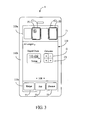
- FIG. 2 depicts a homescreen management interface 110 of the handheld device 1
- the handheld device 1 comprises a touch display panel 11 and a processor 13.
- the processor 13 is electrically connected with the touch display panel 11 .
- the touch display panel 11 displays a user interface, and senses a long pressing action of an object to generate a first touch signal S1.
- the long pressing action is to press a region of the touch display panel 11 which corresponds to a blank area of the user interface, and the object is a user's finger or some other object that can trigger the touch display panel 11 for sensing.
- the processor 13 executes a homescreen management program according to the first touch signal S1.
- the touch display panel 11 of the handheld device 1 displays a homescreen management interface 110 corresponding to the homescreen management program, and the user can proceed to manage the contents of homescreens.
- the present invention manages the contents of the homescreens will be described in detail.
- the homescreen management interface 110 comprises a page navigation area 110a, a candidate object area 110b and a group classification area 110c.
- the page navigation area 110a is configured to display images of the homescreens and at least comprises a first page image P1; the candidate object area 110b comprises at least an object image O; and the group classification area 110c comprises at least one object classification.
- the group classification area 110c comprises a widget classification T1, an application classification T2 and a shortcut classification T3.
- the candidate object area 110b immediately displays an object image of the classification. For example, if the user clicks the widget classification T1, then the candidate object area 110b will immediately display an object image of a widget belonging to the widget classification T1. It shall be particularly appreciated that, the way of performing group classification on objects by the present invention is not limited thereto.
- the touch display panel 11 further senses a pressing action of the user's finger to generate a second touch signal S2. Further speaking, the pressing action is to press a first region of the touch display panel 11 that corresponds to the object image O, with the first region being a relative position of the object image O in the homescreen management inteuace 110; and the pressing action further comprises sliding to a second region corresponding to the first page image P1 from the object image O along a path R between the object image O and the first page image P1 , with the second region being a relative position of the first page image P1 in the homescreen management interface 110. Furthermore, during the sliding along the path R, the touch display panel 11 displays the object image O at a gradually decreasing scale based on the sliding action.
- the processor 13 adds the object image O into the first page image P1 according to the second touch signal S2.
- the touch display panel 11 displays the object image O in the first page image P1 at an original scale of an object corresponding to the object image O to a first homescreen corresponding to the first page image P1, as shown in FIG. 2 .
- the processor 13 adds the object image O into the first page image P1
- the object corresponding to the object image O is also added into the first homescreen corresponding to the first page image P1.
- the user can easily add the object into the first homescreen without the need of executing ordering or additional complex management on the object.
- the page navigation area 110a further comprises a second page image P2, which may or may not be adjacent to the first page image P1.
- the processor 13 further determines that the second page image P2 contains no blank block according to the second touch signal S2 (i.e., in terms of a space of a second homescreen corresponding to the second page image P2), and thus adds the object image O into the first page image P1 which is closest to the second page image P2 and still has a blank block.
- a blank block refers to a space block in a homescreen where widgets, applications or shortcuts can be stored.
- FIG. 3 depicts a homescreen management interface 110 of a handheld device 1.
- the handheld device 1 of the second embodiment comprises the same elements as the handheld device 1 of the first embodiment, and can execute all the operations that can be executed by the handheld device 1 of the first embodiment, so the following description will focus on differences therebetween.
- the pressing action is to press or click a first region of the touch display panel 11 that corresponds to the object image O, with the first region being a relative position of the object image O in the homescreen management interface 110.
- the touch display panel 11 generates a fore touch signal S21.
- the pressing action further comprises pressing or clicking a second region (not shown) of the touch display panel 11 that corresponds to the first page image P1, with the second region being a relative position of the first page image P1 in the homescreen management interface 110.
- the touch display panel 11 generates an after touch signal S22.
- the processor 13 adds the object image O into the first page image P1 according to the fore touch signal S21 and the after touch signal S22. At this point, the object corresponding to the object image O is also added into the first homescreen corresponding to the first page image P1.
- the page navigation area 110a further comprises a second page image P2. If the processor 13 determines that the first page image P1 has a blank block but the second page image P2 has no blank block when the touch display panel 11 generates the fore touch signal S21, then the processor 13 enables the touch display panel 11 to display a first color frame C1 (e.g., a green frame) around the first page image P1 and display a second color frame C2 (e.g., a red frame) around the second page image P2 simultaneously so that the user can tell whether each of the page images has a blank block through the colors.
- a first color frame C1 e.g., a green frame
- a second color frame C2 e.g., a red frame
- the page navigation area 110a also comprises the second page image P2, which may or may not be adjacent to the first page image P1; however, the difference is that, the user originally desires to add the object image O into the second page image P2 but the second page image P2 has no blank block available for accommodating the object image O.
- the after touch signal S22 is generated in response to pressing or clicking on a third region (not shown) of the touch display panel 11 which corresponds to the second page image P2, with the third region being a relative position of the second page image P2 in the homescreen management interface 110.
- the second page image P2 has no blank block.
- the processor 13 determines that the second page image P2 contains no blank block according to the after touch signal S22 (i.e., in terms of a space of a second homescreen corresponding to the second page image P2), and thus adds the object image O into the first page image P1 which is closest to the second page image P2 and still has a blank block.
- a blank block refers to a space block in a homescreen where widgets, applications or shortcuts can be stored.
- the processor 13 determines that neither the current second page image P2 nor other page images (excluding the first page image P1) contain a blank block, then the first page image P1 is a new page image that is newly added by the processor 13. In this case, the processor 13 further enables the touch display panel 11 to display the first page image P1 in the page navigation area 110a, and adds the object image O into the first page image P1 according to the fore touch signal S21 and the after touch signal S22.
- the fore touch signal S21 may be generated in response to pressing or clicking on the second region of the touch display panel 11 which corresponds to the first page image P1
- the after touch signal S22 may be generated in response to pressing or clicking on the first region of the touch display panel 11 which corresponds to the object image O.
- the processor 13 adds the object image O into the first page image P1 according to the fore touch signal S21 and the after touch signal S22. At this point, the object corresponding to the object image O is also added into the first homescreen corresponding to the first page image P1.
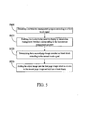
- a third embodiment of the present invention is a homescreen management method, a flowchart diagram of which is depicted in FIG. 4 .
- the homesereen management method is for use in a handheld device (e.g., the handheld device 1 of the first embodiment).
- the handheld device comprises a touch display panel and a processor.
- the processor is electrically connected to the touch display panel.
- the touch display panel displays a user interface and senses a long pressing action of an object to generate a first touch signal.
- the long pressing action is to press a region of the touch display panel which corresponds to a blank area of the user interface, and the object is a user's finger or some other object that can trigger the touch display panel for sensing. That is, when the user long presses the blank area of the user interface displayed by the touch display panel, the homescreen management method is executed by the processor. Firstly, step S400 is executed to execute a homescreen management program according to the first touch signal; and then step S410 is executed to enable the touch display panel to display a homescreen management interface corresponding to the homescreen management program.
- the homescreen management interface comprises a page navigation area, a candidate object area and a group classification area.
- the page navigation area is configured to display images of the homescreens and at least comprises a first page image; the candidate object area comprises at least an object image; and the group classification area comprises at least one object classification.
- the group classification area comprises a widget classification, an application classification and a shortcut classification.
- the candidate object area only displays an object image of the classification. For example, if the user clicks the widget classification, then the candidate object area will only display an object image of the widget classification. It shall be particularly appreciated that, the way of performing group classification on objects by the present invention is not limited thereto.
- step S420 is further executed to add the object image into the first page image according to the second touch signal.
- the processor adds the object image into the first page image
- the object corresponding to the object image is also added into the first homescreen corresponding to the first page image.
- the user can easily add the object into the first homescreen without the need of executing ordering or additional complex management on the object.
- the pressing action is to press a first region of the touch display panel that corresponds to the object image, with the first region being a relative position of the object image in the homescreen management interface; and the pressing action further comprises sliding to a second region corresponding to the first page image along a path between the object image and the first page image, with the second region being a relative position of the first page image in the homescreen management interface. Furthermore, during the sliding along the path, the touch display panel displays the object image at a gradually decreasing scale based on the sliding action.
- the processor adds the object image into the first page image according to the second touch signal.
- the touch display panel displays the object image in the first page image at an original scale of an object corresponding to the object image to a first homescreen corresponding to the first page image.
- the homescseen management method of the third embodiment can also execute all the operations and functions of the handheld device set forth in the first embodiment. How the homescreen management method of the third embodiment executes these operations and functions can be readily appreciated by those of ordinary skill in the art based on the explanation of the first embodiment, and thus will not be further described herein.
- a fourth embodiment of the present invention is a homescreen management method, a flowchart diagram of which is depicted in FIG. 5 .
- the homescreen management method is for use in a handheld device (e.g., the handheld device 1 of the first embodiment).
- the homescreen management method in the fourth embodiment firstly executes the same steps S400 and S410 as in the third embodiment.
- the page navigation area further comprises a second page image, which may or may not be adjacent to the first page image.
- Step S520 is executed to further determine, by the processor, that the second page image contains no blank block according to the second touch signal (i.e., in terms of a space of a second homescreen corresponding to the second page image).
- step S530 is executed to add the object image into the first page image which is closest to the second page image and still has a blank block.
- the blank block refers to a space block in a homescreen where widgets, applications or shortcuts can be stored.
- the homescreen management method of the fourth embodiment can also execute all the operations and functions of the handheld device set forth in the first embodiment. How the homescreen management method of the fourth embodiment executes these operations and functions can be readily appreciated by those of ordinary skill in the art based on the explanation of the first embodiment, and thus will not be further described herein.
- the user may also manage the contents of the homescreens through different pressing actions, which will be described with reference to a fifth embodiment.
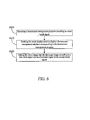
- a flowchart diagram of a homescreen management method according to the fifth embodiment of the present invention is depicted in FIG. 6 .
- the homescreen management method is for use in a handheld device (e.g., the handheld device 1 of the second embodiment).
- the homescreen management method in the fifth embodiment firstly executes the same steps S400 and S410 as in the third embodiment.
- the pressing action is to press or click a first region of the touch display panel that corresponds to the object image, with the first region being a relative position of the object image in the homescreen management interface.
- the touch display panel generates a fore touch signal.
- the pressing action further comprises pressing or clicking a second region of the touch display panel that corresponds to the first page image, with the second region being a relative position of the first page image in the homescreen management interface.
- the touch display panel generates an after touch signal.
- step S620 is then executed to add the object image into the first page image according to the fore touch signal and the after touch signal by the processor.
- the object corresponding to the object image is also added into the first homescreen corresponding to the first page image.
- the page navigation area further comprises a second page image.
- the step S620 further comprises the following step (not shown): determining that the first page image has a blank block but the second page image has no blank block according to the fore touch signal by the processor.
- the step S620 further comprises the following step (not shown): the processor enables the touch display panel to display a first color frame (e.g., a green frame) around the first page image and display a second color frame (e.g., a red frame) around the second page image simultaneously so that the user can tell whether each of the page images has a blank block through the colors.
- a first color frame e.g., a green frame
- a second color frame e.g., a red frame
- the page navigation area also comprises the second page image, which may or may not be adjacent to the first page image; however, the difference is that, the user originally desires to add the object image into the second page image but the second page image has no blank block available for accommodating the object image.
- the after touch signal is generated in response to pressing or clicking on a third region of the touch display panel which corresponds to the second page image, with the third region being a relative position of the second page image in the homescreen management interface.
- the second page image has no blank block.
- the step S620 further comprises the following step (not shown): the processor determines that the second page image contains no blank block according to the after touch signal (i.e., in terms of a space of a second homescreen corresponding to the steond page image), and thus adds the object image into the first page image which is closest to the second page image and still has a blank block.
- a blank block refers to a space block in a homescreen where widgets, applications or shortcuts can be stored.
- the page navigation area also comprises the second page image, which may or may not be adjacent to the first page image; however, the user originally desires to add the object image into the second page image, but the second page image has no blank block available for accommodating the object image.
- the after touch signal is generated in response to pressing or clicking on a third region of the touch display panel which corresponds to the second page image, with the third region being a relative position of the second page image in the homescreen management interface.
- the second page image has no blank block.
- the step S620 further comprises the following step (not shown): the processor adds the first page image and enables the touch display panel to further display the first page image in the page navigation area, and meanwhile, the processor adds the object image into the first page image according to the fore touch signal and the after touch signal.
- the fore touch signal may be generated in response to pressing or clicking on the second region of the touch display panel which corresponds to the first page image
- the after touch signal may be generated in response to pressing or clicking on the first region of the touch display panel which corresponds to the object image.
- the processor adds the object image into the first page image according to the fore touch signal and the after touch signal.
- the object corresponding to the object image is also added into the first homescreen corresponding to the first page image.
- the homescreen management method of the fifth embodiment can also execute all the operations and functions of the handheld device set forth in the second embodiment. How the homescreen management method of the fifth embodiment executes these operations and functions can be readily appreciated by those of ordinary skill in the art based on the explanation of the second embodiment, and thus will not be further described herein.
- the present invention allows the user to manage homescreens in a plurality of different pressing ways through use of the homescreen management interface provided by the homescreen management program. With the present invention, the user can manage the home screens more conveniently and more intuitively.
Landscapes
- Engineering & Computer Science (AREA)
- General Engineering & Computer Science (AREA)
- Theoretical Computer Science (AREA)
- Human Computer Interaction (AREA)
- Physics & Mathematics (AREA)
- General Physics & Mathematics (AREA)
- Computer Networks & Wireless Communication (AREA)
- Signal Processing (AREA)
- User Interface Of Digital Computer (AREA)
Abstract
Description
- The present invention relates to a handheld device and a homescreen management method thereof; and more particularly, the present invention relates to a handheld device and a homescreen management method thereof for managing homescreens of a user interface.
- Currently, handheld devices used by the general consumers (e.g., smart phones, tablet computers and notebook computers) have a plurality of homescreens for placement of objects by users. These objects are applications (APPs), widgets, shortcuts and the like. However, when a new object is to be added into such a handheld device, the new object is usually added into the last homescreen or inserted in some other homescreen having a blank block, and then manual ordering is performed by the user. For example, if the user's hantiheld device has seven homescreens in total and only the seventh homescreen has a blank block available for accommodating the new object, then the new object will be placed in the seventh homescreen having the blank block. Thereafter, if the user desires to move the new object to the first homescreen, then the new object must be moved from the seventh homescreen to the first homescreen all the way through the second to the sixth homescreens. Therefore, homescreen management in the conventional handheld devices is still not so user-friendly and intuitive.
- Accordingly, an urgent need exists in the art to provide a solution of managing homescreens of a handheld device more user-friendly to improve the convenience in use.
- In order to manage homescreens of the existing handheld devices more user-friendly and more intuitively, the present invention provides a handheld device and a homescreen management method thereof.
- The handheld device of the present invention comprises a touch display panel and a processor. The touch display panel is configured to display a user interface, and sense a long pressing action of an object to generate a first touch signal. The processor is electrically connected with the touch display panel, and is configured to execute a homescreen management program according to the first touch signal, and enable the touch display panel to display a homescreen management interface corresponding to the homescreen management program, wherein the homescreen management interface comprises a page navigation area and a candidate object area, and the page navigation area comprises a first page image and the candidate object area comprises an object image. The touch display panel further senses a pressing action of the object to generate a second touch signal, and the processor adds the object image into the first page image according to the second touch signal.
- The homescreen management method of the present invention is for use in the aforesaid handheld device, and the handheld device comprises a touch display panel and a processor electrically connected to the touch display panel. The touch display panel is configured to display a user interface and sense a long pressing action of an object to generate a first touch signal, and the homcscieen management method is executed by the processor and comprises the following steps of: executing a homescreen management program according to the first touch signal; and enabling the touch display panel to display a homescreen management interface corresponding to the homescreen management program, wherein the homescreen management interface comprises a page navigation area and a candidate object area, and the page navigation area comprises a first page image and the candidate object area comprises an object image. The touch display panel further senses a pressing action of the object to generate a second touch signal, and the homescreen management method further comprises the following step of: adding the object image into the first page image according to the second touch signal.
- As can be known from the above description, the handheld device and the homescreen management method thereof of the present invention sense the long pressing action of the user through the touch display panel and then the homescreen management program is executed by the processor, and the homescreen management program allows the user to conveniently manage an object in the candidate object area corresponding to homescreens. With the present invention, the user can manage the homescreens of the handheld device more user-friendly and more intuitively, and this allows for convenience in use.
- The detailed technology and preferred embodiments implemented for the subject invention are described in the following paragraphs accompanying the appended drawings for people skilled in this field to well appreciate the features of the claimed invention.
- Embodiments according to the present invention may comprise any, in particular some or all, of the features mentioned herein in any technically possible combination.
- In certain embodiments the devices according to the present invention, or components thereof, are configured to carry out the method step(s) disclosed herein. Also, in some embodiments according to the present invention, a device, or component thereof, is provided or suggested for carrying out the method step(s) disclosed herein.
-
-
FIG. 1 depicts a functional block diagram of a handheld device according to a first embodiment of the present invention; -
FIG. 2 depicts a homescreen management interface of the handheld device according to the first embodiment of the present invention; -
FIG. 3 depicts a homescreen management interface of a handheld device according to a second embodiment of the present invention; -
FIG. 4 depicts a flowchart diagram of a homescreen management method according to a third embodiment of the present invention; -
FIG. 5 depicts a flowchart diagram of a homescreen management method according to a fourth embodiment of the present invention; and -
FIG. 6 depicts a flowchart diagram of a homescreen management method according to a fifth embodiment of the present invention. - In the following descriptions, a handheld device and a homescreen management method thereof of the present invention will be explained with reference to embodiments thereof. However, these embodiments are not intended to limit the present invention to any environments, applications or implementations described in these embodiments. Therefore, description of these embodiments is only for purpose of illustration rather than to limit the present invention. It shall be appreciated that, in the following embodiments and the attached drawings, elements not directly related to the present invention are omitted from depiction.
- A
handheld device 1 according to a first embodiment of the present invention is shown inFIG. 1 andFIG. 2 .FIG. 1 depicts a functional block diagram of thehandheld device 1, andFIG. 2 depicts ahomescreen management interface 110 of thehandheld device 1. Thehandheld device 1 comprises atouch display panel 11 and aprocessor 13. Theprocessor 13 is electrically connected with thetouch display panel 11. - The
touch display panel 11 displays a user interface, and senses a long pressing action of an object to generate a first touch signal S1. The long pressing action is to press a region of thetouch display panel 11 which corresponds to a blank area of the user interface, and the object is a user's finger or some other object that can trigger thetouch display panel 11 for sensing. In other words, when the user long presses the blank area of the user interface displayed by thetouch display panel 11, theprocessor 13 executes a homescreen management program according to the first touch signal S1. In this case, thetouch display panel 11 of thehandheld device 1 displays ahomescreen management interface 110 corresponding to the homescreen management program, and the user can proceed to manage the contents of homescreens. Hereinafter, how the present invention manages the contents of the homescreens will be described in detail. - As shown in
FIG. 2 , thehomescreen management interface 110 comprises apage navigation area 110a, acandidate object area 110b and agroup classification area 110c. Thepage navigation area 110a is configured to display images of the homescreens and at least comprises a first page image P1; thecandidate object area 110b comprises at least an object image O; and thegroup classification area 110c comprises at least one object classification. In this embodiment, thegroup classification area 110c comprises a widget classification T1, an application classification T2 and a shortcut classification T3. Moreover, when the user clicks a certain classification, thecandidate object area 110b immediately displays an object image of the classification. For example, if the user clicks the widget classification T1, then thecandidate object area 110b will immediately display an object image of a widget belonging to the widget classification T1. It shall be particularly appreciated that, the way of performing group classification on objects by the present invention is not limited thereto. - Next, the
touch display panel 11 further senses a pressing action of the user's finger to generate a second touch signal S2. Further speaking, the pressing action is to press a first region of thetouch display panel 11 that corresponds to the object image O, with the first region being a relative position of the object image O in thehomescreen management inteuace 110; and the pressing action further comprises sliding to a second region corresponding to the first page image P1 from the object image O along a path R between the object image O and the first page image P1, with the second region being a relative position of the first page image P1 in thehomescreen management interface 110. Furthermore, during the sliding along the path R, thetouch display panel 11 displays the object image O at a gradually decreasing scale based on the sliding action. - Then, when the object image O is dragged to the first page image P1, the
processor 13 adds the object image O into the first page image P1 according to the second touch signal S2. In this case, thetouch display panel 11 displays the object image O in the first page image P1 at an original scale of an object corresponding to the object image O to a first homescreen corresponding to the first page image P1, as shown inFIG. 2 . - After the
processor 13 adds the object image O into the first page image P1, the object corresponding to the object image O is also added into the first homescreen corresponding to the first page image P1. Thus, with the present invention, the user can easily add the object into the first homescreen without the need of executing ordering or additional complex management on the object. - In addition, the
page navigation area 110a further comprises a second page image P2, which may or may not be adjacent to the first page image P1. Theprocessor 13 further determines that the second page image P2 contains no blank block according to the second touch signal S2 (i.e., in terms of a space of a second homescreen corresponding to the second page image P2), and thus adds the object image O into the first page image P1 which is closest to the second page image P2 and still has a blank block. Herein, a blank block refers to a space block in a homescreen where widgets, applications or shortcuts can be stored. - Furthermore, the user may also manage the contents of the homescreens through different pressing actions, and this will be described with reference to a second embodiment. Refer to both
FIG. 1 andFIG. 3 for the second embodiment of the present invention.FIG. 3 depicts ahomescreen management interface 110 of ahandheld device 1. Thehandheld device 1 of the second embodiment comprises the same elements as thehandheld device 1 of the first embodiment, and can execute all the operations that can be executed by thehandheld device 1 of the first embodiment, so the following description will focus on differences therebetween. - In the second embodiment, the pressing action is to press or click a first region of the
touch display panel 11 that corresponds to the object image O, with the first region being a relative position of the object image O in thehomescreen management interface 110. In this case, thetouch display panel 11 generates a fore touch signal S21. The pressing action further comprises pressing or clicking a second region (not shown) of thetouch display panel 11 that corresponds to the first page image P1, with the second region being a relative position of the first page image P1 in thehomescreen management interface 110. In this case, thetouch display panel 11 generates an after touch signal S22. - After the fore touch signal S21 and the after touch signal S22 of the second touch signal S2 are generated, the
processor 13 adds the object image O into the first page image P1 according to the fore touch signal S21 and the after touch signal S22. At this point, the object corresponding to the object image O is also added into the first homescreen corresponding to the first page image P1. - Furthermore, the
page navigation area 110a further comprises a second page image P2. If theprocessor 13 determines that the first page image P1 has a blank block but the second page image P2 has no blank block when thetouch display panel 11 generates the fore touch signal S21, then theprocessor 13 enables thetouch display panel 11 to display a first color frame C1 (e.g., a green frame) around the first page image P1 and display a second color frame C2 (e.g., a red frame) around the second page image P2 simultaneously so that the user can tell whether each of the page images has a blank block through the colors. - In other implementations, the
page navigation area 110a also comprises the second page image P2, which may or may not be adjacent to the first page image P1; however, the difference is that, the user originally desires to add the object image O into the second page image P2 but the second page image P2 has no blank block available for accommodating the object image O. In other words, the after touch signal S22 is generated in response to pressing or clicking on a third region (not shown) of thetouch display panel 11 which corresponds to the second page image P2, with the third region being a relative position of the second page image P2 in thehomescreen management interface 110. However, in this case, the second page image P2 has no blank block. Therefore, theprocessor 13 determines that the second page image P2 contains no blank block according to the after touch signal S22 (i.e., in terms of a space of a second homescreen corresponding to the second page image P2), and thus adds the object image O into the first page image P1 which is closest to the second page image P2 and still has a blank block. Herein, a blank block refers to a space block in a homescreen where widgets, applications or shortcuts can be stored. - Alternatively, if the
processor 13 determines that neither the current second page image P2 nor other page images (excluding the first page image P1) contain a blank block, then the first page image P1 is a new page image that is newly added by theprocessor 13. In this case, theprocessor 13 further enables thetouch display panel 11 to display the first page image P1 in thepage navigation area 110a, and adds the object image O into the first page image P1 according to the fore touch signal S21 and the after touch signal S22. - Similarly, in other implementations, the fore touch signal S21 may be generated in response to pressing or clicking on the second region of the
touch display panel 11 which corresponds to the first page image P1, and the after touch signal S22 may be generated in response to pressing or clicking on the first region of thetouch display panel 11 which corresponds to the object image O. Then, theprocessor 13 adds the object image O into the first page image P1 according to the fore touch signal S21 and the after touch signal S22. At this point, the object corresponding to the object image O is also added into the first homescreen corresponding to the first page image P1. - A third embodiment of the present invention is a homescreen management method, a flowchart diagram of which is depicted in
FIG. 4 . The homesereen management method is for use in a handheld device (e.g., thehandheld device 1 of the first embodiment). The handheld device comprises a touch display panel and a processor. The processor is electrically connected to the touch display panel. - The touch display panel displays a user interface and senses a long pressing action of an object to generate a first touch signal. The long pressing action is to press a region of the touch display panel which corresponds to a blank area of the user interface, and the object is a user's finger or some other object that can trigger the touch display panel for sensing. That is, when the user long presses the blank area of the user interface displayed by the touch display panel, the homescreen management method is executed by the processor. Firstly, step S400 is executed to execute a homescreen management program according to the first touch signal; and then step S410 is executed to enable the touch display panel to display a homescreen management interface corresponding to the homescreen management program.
- Further speaking, the homescreen management interface comprises a page navigation area, a candidate object area and a group classification area. The page navigation area is configured to display images of the homescreens and at least comprises a first page image; the candidate object area comprises at least an object image; and the group classification area comprises at least one object classification. In this embodiment, the group classification area comprises a widget classification, an application classification and a shortcut classification. Moreover, when the user clicks a certain classification, the candidate object area only displays an object image of the classification. For example, if the user clicks the widget classification, then the candidate object area will only display an object image of the widget classification. It shall be particularly appreciated that, the way of performing group classification on objects by the present invention is not limited thereto.
- Thereafter, the touch display panel further senses a pressing action of the object to generate a second touch signal. At this point, step S420 is further executed to add the object image into the first page image according to the second touch signal.
- After the processor adds the object image into the first page image, the object corresponding to the object image is also added into the first homescreen corresponding to the first page image. Thus, with the present invention, the user can easily add the object into the first homescreen without the need of executing ordering or additional complex management on the object.
- In an implementation, the pressing action is to press a first region of the touch display panel that corresponds to the object image, with the first region being a relative position of the object image in the homescreen management interface; and the pressing action further comprises sliding to a second region corresponding to the first page image along a path between the object image and the first page image, with the second region being a relative position of the first page image in the homescreen management interface. Furthermore, during the sliding along the path, the touch display panel displays the object image at a gradually decreasing scale based on the sliding action.
- Then, when the object image is dragged to the first page image, the processor adds the object image into the first page image according to the second touch signal. In this case, the touch display panel displays the object image in the first page image at an original scale of an object corresponding to the object image to a first homescreen corresponding to the first page image.
- In addition to the aforesaid steps, the homescseen management method of the third embodiment can also execute all the operations and functions of the handheld device set forth in the first embodiment. How the homescreen management method of the third embodiment executes these operations and functions can be readily appreciated by those of ordinary skill in the art based on the explanation of the first embodiment, and thus will not be further described herein.
- A fourth embodiment of the present invention is a homescreen management method, a flowchart diagram of which is depicted in
FIG. 5 . The homescreen management method is for use in a handheld device (e.g., thehandheld device 1 of the first embodiment). The homescreen management method in the fourth embodiment firstly executes the same steps S400 and S410 as in the third embodiment. - In this embodiment, the page navigation area further comprises a second page image, which may or may not be adjacent to the first page image. Step S520 is executed to further determine, by the processor, that the second page image contains no blank block according to the second touch signal (i.e., in terms of a space of a second homescreen corresponding to the second page image). Next, step S530 is executed to add the object image into the first page image which is closest to the second page image and still has a blank block. The blank block refers to a space block in a homescreen where widgets, applications or shortcuts can be stored.
- In addition to the aforesaid steps, the homescreen management method of the fourth embodiment can also execute all the operations and functions of the handheld device set forth in the first embodiment. How the homescreen management method of the fourth embodiment executes these operations and functions can be readily appreciated by those of ordinary skill in the art based on the explanation of the first embodiment, and thus will not be further described herein.
- In another implementation, the user may also manage the contents of the homescreens through different pressing actions, which will be described with reference to a fifth embodiment. A flowchart diagram of a homescreen management method according to the fifth embodiment of the present invention is depicted in
FIG. 6 . The homescreen management method is for use in a handheld device (e.g., thehandheld device 1 of the second embodiment). The homescreen management method in the fifth embodiment firstly executes the same steps S400 and S410 as in the third embodiment. - In the fifth embodiment, the pressing action is to press or click a first region of the touch display panel that corresponds to the object image, with the first region being a relative position of the object image in the homescreen management interface. In this case, the touch display panel generates a fore touch signal. The pressing action further comprises pressing or clicking a second region of the touch display panel that corresponds to the first page image, with the second region being a relative position of the first page image in the homescreen management interface. In this case, the touch display panel generates an after touch signal.
- After the fore touch signal and the after touch signal of the second touch signal are generated, step S620 is then executed to add the object image into the first page image according to the fore touch signal and the after touch signal by the processor. Thus, the object corresponding to the object image is also added into the first homescreen corresponding to the first page image.
- Furthermore, the page navigation area further comprises a second page image. When the touch display panel generates the fore touch signal, the step S620 further comprises the following step (not shown): determining that the first page image has a blank block but the second page image has no blank block according to the fore touch signal by the processor. In this case, the step S620 further comprises the following step (not shown): the processor enables the touch display panel to display a first color frame (e.g., a green frame) around the first page image and display a second color frame (e.g., a red frame) around the second page image simultaneously so that the user can tell whether each of the page images has a blank block through the colors.
- In other implementations, the page navigation area also comprises the second page image, which may or may not be adjacent to the first page image; however, the difference is that, the user originally desires to add the object image into the second page image but the second page image has no blank block available for accommodating the object image. In other words, the after touch signal is generated in response to pressing or clicking on a third region of the touch display panel which corresponds to the second page image, with the third region being a relative position of the second page image in the homescreen management interface. However, in this case, the second page image has no blank block. Therefore, the step S620 further comprises the following step (not shown): the processor determines that the second page image contains no blank block according to the after touch signal (i.e., in terms of a space of a second homescreen corresponding to the steond page image), and thus adds the object image into the first page image which is closest to the second page image and still has a blank block. Herein, a blank block refers to a space block in a homescreen where widgets, applications or shortcuts can be stored.
- In still other implementations, the page navigation area also comprises the second page image, which may or may not be adjacent to the first page image; however, the user originally desires to add the object image into the second page image, but the second page image has no blank block available for accommodating the object image. In other words, the after touch signal is generated in response to pressing or clicking on a third region of the touch display panel which corresponds to the second page image, with the third region being a relative position of the second page image in the homescreen management interface. However, in this case, the second page image has no blank block. Therefore, if the processor determines that neither the current second page image nor other page images (excluding the first page image) contain a blank block, then the step S620 further comprises the following step (not shown): the processor adds the first page image and enables the touch display panel to further display the first page image in the page navigation area, and meanwhile, the processor adds the object image into the first page image according to the fore touch signal and the after touch signal.
- Similarly, in other implementations, the fore touch signal may be generated in response to pressing or clicking on the second region of the touch display panel which corresponds to the first page image, and the after touch signal may be generated in response to pressing or clicking on the first region of the touch display panel which corresponds to the object image. Then, the processor adds the object image into the first page image according to the fore touch signal and the after touch signal. Likewise, the object corresponding to the object image is also added into the first homescreen corresponding to the first page image.
- In addition to the aforesaid steps, the homescreen management method of the fifth embodiment can also execute all the operations and functions of the handheld device set forth in the second embodiment. How the homescreen management method of the fifth embodiment executes these operations and functions can be readily appreciated by those of ordinary skill in the art based on the explanation of the second embodiment, and thus will not be further described herein.
- As can be known from the description of the aforesaid embodiments, the present invention allows the user to manage homescreens in a plurality of different pressing ways through use of the homescreen management interface provided by the homescreen management program. With the present invention, the user can manage the home screens more conveniently and more intuitively.
- The above disclosure is related to the detailed technical contents and inventive features thereof. People skilled in this field may proceed with a variety of modifications and replacements based on the disclosures and suggestions of the invention as described without departing from the characteristics thereof. Nevertheless, although such modifications and replacements are not fully disclosed in the above descriptions, they have substantially been covered in the following claims as appended.
Claims (18)
- A handheld device, comprising:a touch display panel, being configured to display a user interface, and sense a long pressing action of an object to generate a first touch signal; anda processor electrically connected with the touch display panel, being configured to execute a homescreen management program according to the first touch signal, and enable the touch display panel to display a homescreen management interface corresponding to the homescreen management program, wherein the homescreen management interface comprises a page navigation area and a candidate object area, and the page navigation area comprises a first page image and the candidate object area comprises an object image;wherein the touch display panel further senses a pressing action of the object to generate a second touch signal, and the processor adds the object image into the first page image according to the second touch signal.
- The handheld device as claimed in claim 1, wherein the pressing action is to press a first region of the touch display panel that corresponds to the object image and to slide to a second region corresponding to the first page image along a path between the object and the first page image.
- The handheld device as claimed in claim 1 or 2, wherein the touch display panel displays the object image at a gradually decreasing scale based on the pressing action.
- The handheld device as claimed in any preceding claim, in particular claim 1, wherein the pressing action is to press a first region of the touch display panel that corresponds to the object image, and then press a second region of the touch display panel that corresponds to the first page image;
wherein the second touch signal comprises a fore touch signal and an after touch signal, and the touch display panel generates the fore touch signal when the touch display panel senses that a pressing corresponds to the first region of the touch display panel which corresponds to the object image, and generates the after touch signal when the touch display panel senses that a pressing corresponds to the second region which corresponds to the first page image. - The handheld device as claimed in any preceding claim, in particular claim 1, wherein the pressing action is to press a first region of the touch display panel that corresponds to the first page image and then press a second region of the touch display panel that corresponds to the object image;
wherein the second touch signal comprises a fore touch signal and an after touch signal, and the touch display panel generates the fore touch signal when it senses a pressing corresponds to the first region that corresponds to the first page image, and generates the after touch signal when it senses a pressing corresponds to the second region of the touch display panel that corresponds to the object image. - The handheld device as claimed in any preceding claim, in particular claim 1, wherein the page navigation area further comprises a second page image, and the processor further determines that the second page image contains no blank block according to the second touch signal so as to add the object image into the first page image.
- The handheld device as claimed in any preceding claim, in particular claim 1 or claim 6, wherein the processor further enables the touch display panel to display a first color frame around the first page image, and display a second color frame around the second page image.
- The handheld device as claimed in any preceding claim, in particular claim 1, wherein the page navigation area further comprises a second page image, and the processor further determines that the second page image contains no blank block according to the second touch signal so as to enable the touch display panel to display the first page image in the page navigation area and add the object image into the first page image.
- The handheld device as claimed in any preceding claim, in particular claim 1, wherein the long pressing action is to press a region of the touch display panel which corresponds to a blank area of the user interface.
- A homescreen management method for use in a handheld device, the handheld device comprising a touch display panel and a processor electrically connected to the touch display panel, the touch display panel being configured to display a user interface and sense a long pressing action of an object to generate a first touch signal, and the home screen management method being executed by the processor and comprising the following steps of:executing a homescreen management program according to the first touch signal; andenabling the touch display panel to display a homescreen management interface corresponding to the homescreen management program, wherein the homescreen management interface comprises a page navigation area and a candidate object area, and the page navigation area comprises a first page image and the candidate object area comprises an object image;wherein the touch display panel further senses a pressing action of the object to generate a second touch signal, and the homescreen management method further comprises the following step of:adding the object image into the first page image according to the second touch signal.
- The homescreen management method as claimed in claim 10, wherein the pressing action is to press a first region of the touch display panel that corresponds to the object image and to slide to a second region corresponding to the first page image along a path between the object and the first page image.
- The homescreen management method as claimed in claim 10 or 11, wherein the touch display panel displays the object image at a gradually decreasing scale based on the pressing action.
- The homescreen management method as claimed in any one of claims 10 to 12, in particular claim 10, wherein the pressing action is to press a first region of the touch display panel that corresponds to the object image, and then press a second region of the touch display panel that corresponds to the first page image;
wherein the second touch signal comprises a fore touch signal and an after touch signal, and the touch display panel generates the fore touch signal when the touch display panel senses that a pressing corresponds to the first region of the touch display panel which corresponds to the object image, and generates the after touch signal when the touch display panel senses that a pressing corresponds to the second region corresponding to the first page image. - The homescreen management method as claimed in any one of claims 10 to 13, in particular claim 10, wherein the pressing action is to press a first region of the touch display panel that corresponds to the first page image and then press a second region of the touch display panel that corresponds to the object image;
wherein the second touch signal comprises a fore touch signal and an after touch signal, and the touch display panel generates the fore touch signal when the touch display panel senses that a pressing corresponds to the first region which corresponds to the first page image, and generates the after touch signal when the touch display panel senses that a pressing corresponds to the second region of the touch display panel which corresponds to the object image. - The homescreen management method as claimed in any one of claims 10 to 14, in particular claim 10, wherein the page navigation area further comprises a second page image, and the homescreen management method further comprises the following step in the step of adding the object image into the first page image:determining that the second page image contains no blank block according to the second touch signal so as to add the object image into the first page image.
- The homescreen management method as claimed in any one of claims 10 to 15, in particular claim 10 or claim 15, wherein the step of adding the object image into the first page image further comprises the following steps ofenabling the touch display panel to display a first color frame around the first page image; andenabling the touch display panel to display a second color frame around the second page image.
- The homescreen management method as claimed in any one of claims 10 to 16, in particular claim 10, wherein the page navigation area further comprises a second page image, and the homescreen management method further comprises the following step in the step of adding the object image into the first page image:determining that the second page image contains no blank block according to the second touch signal so as to enable the touch display panel to display the first page image in the page navigation area and add the object image into the first page image.
- The homesoreen management method as claimed in any one of claims 10 to 17, in particular claim 10 or claim 13, wherein the long pressing action is to press a region of the touch display panel which corresponds to a blank area of the user interface.
Applications Claiming Priority (1)
| Application Number | Priority Date | Filing Date | Title |
|---|---|---|---|
| US201261614677P | 2012-03-23 | 2012-03-23 |
Publications (2)
| Publication Number | Publication Date |
|---|---|
| EP2642377A1 true EP2642377A1 (en) | 2013-09-25 |
| EP2642377B1 EP2642377B1 (en) | 2019-12-25 |
Family
ID=48044514
Family Applications (1)
| Application Number | Title | Priority Date | Filing Date |
|---|---|---|---|
| EP13001497.0A Active EP2642377B1 (en) | 2012-03-23 | 2013-03-22 | Handheld device and homescreen management method thereof |
Country Status (4)
| Country | Link |
|---|---|
| US (1) | US9146634B2 (en) |
| EP (1) | EP2642377B1 (en) |
| CN (1) | CN103324434B (en) |
| TW (1) | TWI529607B (en) |
Families Citing this family (8)
| Publication number | Priority date | Publication date | Assignee | Title |
|---|---|---|---|---|
| KR20130046482A (en) * | 2011-10-28 | 2013-05-08 | 삼성전자주식회사 | Controlling method for basic screen and portable device supporting the same |
| US9747003B2 (en) | 2012-08-01 | 2017-08-29 | Blackberry Limited | Multiple-stage interface control of a mobile electronic device |
| US9665178B2 (en) * | 2012-08-01 | 2017-05-30 | Blackberry Limited | Selective inbox access in homescreen mode on a mobile electronic device |
| KR102188097B1 (en) | 2013-03-04 | 2020-12-07 | 삼성전자주식회사 | Method for operating page and electronic device thereof |
| CN106030486B (en) * | 2013-12-24 | 2020-02-21 | 宇龙计算机通信科技(深圳)有限公司 | Batch Processing Methods and Terminals |
| US10656784B2 (en) * | 2014-06-16 | 2020-05-19 | Samsung Electronics Co., Ltd. | Method of arranging icon and electronic device supporting the same |
| KR102218041B1 (en) * | 2014-06-17 | 2021-02-19 | 엘지전자 주식회사 | Mobile terminal |
| CN106293427B (en) * | 2015-05-14 | 2019-05-17 | 富泰华工业(深圳)有限公司 | User interface method of adjustment and electronic device |
Citations (1)
| Publication number | Priority date | Publication date | Assignee | Title |
|---|---|---|---|---|
| US20120030623A1 (en) * | 2010-07-30 | 2012-02-02 | Hoellwarth Quin C | Device, Method, and Graphical User Interface for Activating an Item in a Folder |
Family Cites Families (9)
| Publication number | Priority date | Publication date | Assignee | Title |
|---|---|---|---|---|
| US7934162B2 (en) * | 2001-09-28 | 2011-04-26 | Ntt Docomo, Inc. | Running state migration of platform specific graphical user interface widgets between heterogeneous device platforms |
| KR101391689B1 (en) | 2006-12-28 | 2014-05-07 | 삼성전자주식회사 | Method for providing menu comprising movable menu-set and multimedia device thereof |
| US8619038B2 (en) * | 2007-09-04 | 2013-12-31 | Apple Inc. | Editing interface |
| KR101320919B1 (en) * | 2008-01-29 | 2013-10-21 | 삼성전자주식회사 | Method for providing GUI by divided screen and multimedia device using the same |
| KR101537706B1 (en) * | 2009-04-16 | 2015-07-20 | 엘지전자 주식회사 | Mobile terminal and control method thereof |
| KR20100123108A (en) * | 2009-05-14 | 2010-11-24 | 삼성전자주식회사 | Operation method for icon position movement and portable device supporting the same |
| KR101613838B1 (en) * | 2009-05-19 | 2016-05-02 | 삼성전자주식회사 | Home Screen Display Method And Apparatus For Portable Device |
| CN102236516A (en) | 2010-04-30 | 2011-11-09 | 宏碁股份有限公司 | Electronic device and control method thereof |
| US8661369B2 (en) * | 2010-06-17 | 2014-02-25 | Lg Electronics Inc. | Mobile terminal and method of controlling the same |
-
2013
- 2013-03-22 US US13/848,963 patent/US9146634B2/en active Active
- 2013-03-22 CN CN201310096406.XA patent/CN103324434B/en active Active
- 2013-03-22 TW TW102110177A patent/TWI529607B/en active
- 2013-03-22 EP EP13001497.0A patent/EP2642377B1/en active Active
Patent Citations (1)
| Publication number | Priority date | Publication date | Assignee | Title |
|---|---|---|---|---|
| US20120030623A1 (en) * | 2010-07-30 | 2012-02-02 | Hoellwarth Quin C | Device, Method, and Graphical User Interface for Activating an Item in a Folder |
Non-Patent Citations (2)
| Title |
|---|
| "iPhone: The Missing Manual, Fourth Edition", 24 August 2010, O'REILLY MEDIA, INC., Sebastopol, CA 95472, USA, ISBN: 978-1-44-939365-6, article DAVID POGUE: "iPhone: The Missing Manual, Fourth Edition", XP055042248 * |
| SAMSUNG: "Samsung Galaxy tab 8.9 - Android tablet - User Manual", SAMSUNG'S USER MANUALS, 1 January 2011 (2011-01-01), pages 1 - 188, XP055023009, Retrieved from the Internet <URL:http://images.comparecellular.com/phones/1577/8.9-ug-eng.pdf> [retrieved on 20120326] * |
Also Published As
| Publication number | Publication date |
|---|---|
| US9146634B2 (en) | 2015-09-29 |
| TW201339953A (en) | 2013-10-01 |
| CN103324434A (en) | 2013-09-25 |
| CN103324434B (en) | 2018-05-22 |
| TWI529607B (en) | 2016-04-11 |
| EP2642377B1 (en) | 2019-12-25 |
| US20130249841A1 (en) | 2013-09-26 |
Similar Documents
| Publication | Publication Date | Title |
|---|---|---|
| EP3951578B1 (en) | Processing method, device and apparatus for split-screen display, and storage medium | |
| US9146634B2 (en) | Handheld device and homescreen management method thereof | |
| KR101597844B1 (en) | Interpreting ambiguous inputs on a touch-screen | |
| EP3076275B1 (en) | Method for opening file in file folder and terminal | |
| US10627990B2 (en) | Map information display device, map information display method, and map information display program | |
| US20100214239A1 (en) | Method and touch panel for providing tactile feedback | |
| US20150143285A1 (en) | Method for Controlling Position of Floating Window and Terminal | |
| US20140009413A1 (en) | Pressure-sensing touch method and touch display device thereof | |
| CA2850982C (en) | Method for controlling electronic spreadsheet on handheld touch device | |
| EP3336672A1 (en) | Method and apparatus for providing graphic user interface in mobile terminal | |
| US20100039449A1 (en) | Menu controlling method | |
| KR20140078629A (en) | User interface for editing a value in place | |
| US20170255357A1 (en) | Display control device | |
| US20120179963A1 (en) | Multi-touch electronic device, graphic display interface thereof and object selection method of multi-touch display | |
| WO2014042247A1 (en) | Input display control device, thin client system, input display control method, and recording medium | |
| US20120287059A1 (en) | Portable device and method for operating portable device | |
| US9927914B2 (en) | Digital device and control method thereof | |
| KR101686495B1 (en) | Display control device, thin-client system, display control method, and recording medium | |
| EP2911115A2 (en) | Electronic device and method for color extraction | |
| CN113268182B (en) | Application icon management method and electronic device | |
| US20130047110A1 (en) | Terminal process selection method, control program, and recording medium | |
| JP5882973B2 (en) | Information processing apparatus, method, and program | |
| US20150355819A1 (en) | Information processing apparatus, input method, and recording medium | |
| US20130254691A1 (en) | Operating a device with an interactive screen, and mobile device | |
| US20140351745A1 (en) | Content navigation having a selection function and visual indicator thereof |
Legal Events
| Date | Code | Title | Description |
|---|---|---|---|
| PUAI | Public reference made under article 153(3) epc to a published international application that has entered the european phase |
Free format text: ORIGINAL CODE: 0009012 |
|
| 17P | Request for examination filed |
Effective date: 20130322 |
|
| AK | Designated contracting states |
Kind code of ref document: A1 Designated state(s): AL AT BE BG CH CY CZ DE DK EE ES FI FR GB GR HR HU IE IS IT LI LT LU LV MC MK MT NL NO PL PT RO RS SE SI SK SM TR |
|
| AX | Request for extension of the european patent |
Extension state: BA ME |
|
| RBV | Designated contracting states (corrected) |
Designated state(s): AL AT BE BG CH CY CZ DE DK EE ES FI FR GB GR HR HU IE IS IT LI LT LU LV MC MK MT NL NO PL PT RO RS SE SI SK SM TR |
|
| RAX | Requested extension states of the european patent have changed |
Extension state: BA Payment date: 20140325 Extension state: ME Payment date: 20140325 |
|
| DAX | Request for extension of the european patent (deleted) | ||
| RAP1 | Party data changed (applicant data changed or rights of an application transferred) |
Owner name: HTC CORPORATION |
|
| GRAP | Despatch of communication of intention to grant a patent |
Free format text: ORIGINAL CODE: EPIDOSNIGR1 |
|
| STAA | Information on the status of an ep patent application or granted ep patent |
Free format text: STATUS: GRANT OF PATENT IS INTENDED |
|
| INTG | Intention to grant announced |
Effective date: 20190424 |
|
| GRAJ | Information related to disapproval of communication of intention to grant by the applicant or resumption of examination proceedings by the epo deleted |
Free format text: ORIGINAL CODE: EPIDOSDIGR1 |
|
| STAA | Information on the status of an ep patent application or granted ep patent |
Free format text: STATUS: EXAMINATION IS IN PROGRESS |
|
| GRAP | Despatch of communication of intention to grant a patent |
Free format text: ORIGINAL CODE: EPIDOSNIGR1 |
|
| STAA | Information on the status of an ep patent application or granted ep patent |
Free format text: STATUS: GRANT OF PATENT IS INTENDED |
|
| INTC | Intention to grant announced (deleted) | ||
| INTG | Intention to grant announced |
Effective date: 20190827 |
|
| GRAS | Grant fee paid |
Free format text: ORIGINAL CODE: EPIDOSNIGR3 |
|
| GRAA | (expected) grant |
Free format text: ORIGINAL CODE: 0009210 |
|
| STAA | Information on the status of an ep patent application or granted ep patent |
Free format text: STATUS: THE PATENT HAS BEEN GRANTED |
|
| AK | Designated contracting states |
Kind code of ref document: B1 Designated state(s): AL AT BE BG CH CY CZ DE DK EE ES FI FR GB GR HR HU IE IS IT LI LT LU LV MC MK MT NL NO PL PT RO RS SE SI SK SM TR |
|
| REG | Reference to a national code |
Ref country code: GB Ref legal event code: FG4D |
|
| REG | Reference to a national code |
Ref country code: CH Ref legal event code: EP |
|
| REG | Reference to a national code |
Ref country code: DE Ref legal event code: R096 Ref document number: 602013064265 Country of ref document: DE |
|
| REG | Reference to a national code |
Ref country code: AT Ref legal event code: REF Ref document number: 1217861 Country of ref document: AT Kind code of ref document: T Effective date: 20200115 |
|
| REG | Reference to a national code |
Ref country code: IE Ref legal event code: FG4D |
|
| REG | Reference to a national code |
Ref country code: NL Ref legal event code: FP |
|
| PG25 | Lapsed in a contracting state [announced via postgrant information from national office to epo] |
Ref country code: FI Free format text: LAPSE BECAUSE OF FAILURE TO SUBMIT A TRANSLATION OF THE DESCRIPTION OR TO PAY THE FEE WITHIN THE PRESCRIBED TIME-LIMIT Effective date: 20191225 Ref country code: BG Free format text: LAPSE BECAUSE OF FAILURE TO SUBMIT A TRANSLATION OF THE DESCRIPTION OR TO PAY THE FEE WITHIN THE PRESCRIBED TIME-LIMIT Effective date: 20200325 Ref country code: GR Free format text: LAPSE BECAUSE OF FAILURE TO SUBMIT A TRANSLATION OF THE DESCRIPTION OR TO PAY THE FEE WITHIN THE PRESCRIBED TIME-LIMIT Effective date: 20200326 Ref country code: LT Free format text: LAPSE BECAUSE OF FAILURE TO SUBMIT A TRANSLATION OF THE DESCRIPTION OR TO PAY THE FEE WITHIN THE PRESCRIBED TIME-LIMIT Effective date: 20191225 Ref country code: NO Free format text: LAPSE BECAUSE OF FAILURE TO SUBMIT A TRANSLATION OF THE DESCRIPTION OR TO PAY THE FEE WITHIN THE PRESCRIBED TIME-LIMIT Effective date: 20200325 Ref country code: SE Free format text: LAPSE BECAUSE OF FAILURE TO SUBMIT A TRANSLATION OF THE DESCRIPTION OR TO PAY THE FEE WITHIN THE PRESCRIBED TIME-LIMIT Effective date: 20191225 Ref country code: LV Free format text: LAPSE BECAUSE OF FAILURE TO SUBMIT A TRANSLATION OF THE DESCRIPTION OR TO PAY THE FEE WITHIN THE PRESCRIBED TIME-LIMIT Effective date: 20191225 |
|
| REG | Reference to a national code |
Ref country code: LT Ref legal event code: MG4D |
|
| PG25 | Lapsed in a contracting state [announced via postgrant information from national office to epo] |
Ref country code: RS Free format text: LAPSE BECAUSE OF FAILURE TO SUBMIT A TRANSLATION OF THE DESCRIPTION OR TO PAY THE FEE WITHIN THE PRESCRIBED TIME-LIMIT Effective date: 20191225 Ref country code: HR Free format text: LAPSE BECAUSE OF FAILURE TO SUBMIT A TRANSLATION OF THE DESCRIPTION OR TO PAY THE FEE WITHIN THE PRESCRIBED TIME-LIMIT Effective date: 20191225 |
|
| PG25 | Lapsed in a contracting state [announced via postgrant information from national office to epo] |
Ref country code: AL Free format text: LAPSE BECAUSE OF FAILURE TO SUBMIT A TRANSLATION OF THE DESCRIPTION OR TO PAY THE FEE WITHIN THE PRESCRIBED TIME-LIMIT Effective date: 20191225 |
|
| PG25 | Lapsed in a contracting state [announced via postgrant information from national office to epo] |
Ref country code: RO Free format text: LAPSE BECAUSE OF FAILURE TO SUBMIT A TRANSLATION OF THE DESCRIPTION OR TO PAY THE FEE WITHIN THE PRESCRIBED TIME-LIMIT Effective date: 20191225 Ref country code: PT Free format text: LAPSE BECAUSE OF FAILURE TO SUBMIT A TRANSLATION OF THE DESCRIPTION OR TO PAY THE FEE WITHIN THE PRESCRIBED TIME-LIMIT Effective date: 20200520 Ref country code: CZ Free format text: LAPSE BECAUSE OF FAILURE TO SUBMIT A TRANSLATION OF THE DESCRIPTION OR TO PAY THE FEE WITHIN THE PRESCRIBED TIME-LIMIT Effective date: 20191225 Ref country code: EE Free format text: LAPSE BECAUSE OF FAILURE TO SUBMIT A TRANSLATION OF THE DESCRIPTION OR TO PAY THE FEE WITHIN THE PRESCRIBED TIME-LIMIT Effective date: 20191225 |
|
| PG25 | Lapsed in a contracting state [announced via postgrant information from national office to epo] |
Ref country code: IS Free format text: LAPSE BECAUSE OF FAILURE TO SUBMIT A TRANSLATION OF THE DESCRIPTION OR TO PAY THE FEE WITHIN THE PRESCRIBED TIME-LIMIT Effective date: 20200425 Ref country code: SK Free format text: LAPSE BECAUSE OF FAILURE TO SUBMIT A TRANSLATION OF THE DESCRIPTION OR TO PAY THE FEE WITHIN THE PRESCRIBED TIME-LIMIT Effective date: 20191225 Ref country code: SM Free format text: LAPSE BECAUSE OF FAILURE TO SUBMIT A TRANSLATION OF THE DESCRIPTION OR TO PAY THE FEE WITHIN THE PRESCRIBED TIME-LIMIT Effective date: 20191225 |
|
| REG | Reference to a national code |
Ref country code: DE Ref legal event code: R097 Ref document number: 602013064265 Country of ref document: DE |
|
| PG25 | Lapsed in a contracting state [announced via postgrant information from national office to epo] |
Ref country code: ES Free format text: LAPSE BECAUSE OF FAILURE TO SUBMIT A TRANSLATION OF THE DESCRIPTION OR TO PAY THE FEE WITHIN THE PRESCRIBED TIME-LIMIT Effective date: 20191225 Ref country code: MC Free format text: LAPSE BECAUSE OF FAILURE TO SUBMIT A TRANSLATION OF THE DESCRIPTION OR TO PAY THE FEE WITHIN THE PRESCRIBED TIME-LIMIT Effective date: 20191225 Ref country code: DK Free format text: LAPSE BECAUSE OF FAILURE TO SUBMIT A TRANSLATION OF THE DESCRIPTION OR TO PAY THE FEE WITHIN THE PRESCRIBED TIME-LIMIT Effective date: 20191225 |
|
| PLBE | No opposition filed within time limit |
Free format text: ORIGINAL CODE: 0009261 |
|
| REG | Reference to a national code |
Ref country code: CH Ref legal event code: PL |
|
| STAA | Information on the status of an ep patent application or granted ep patent |
Free format text: STATUS: NO OPPOSITION FILED WITHIN TIME LIMIT |
|
| REG | Reference to a national code |
Ref country code: AT Ref legal event code: MK05 Ref document number: 1217861 Country of ref document: AT Kind code of ref document: T Effective date: 20191225 |
|
| PG25 | Lapsed in a contracting state [announced via postgrant information from national office to epo] |
Ref country code: SI Free format text: LAPSE BECAUSE OF FAILURE TO SUBMIT A TRANSLATION OF THE DESCRIPTION OR TO PAY THE FEE WITHIN THE PRESCRIBED TIME-LIMIT Effective date: 20191225 |
|
| 26N | No opposition filed |
Effective date: 20200928 |
|
| REG | Reference to a national code |
Ref country code: BE Ref legal event code: MM Effective date: 20200331 |
|
| PG25 | Lapsed in a contracting state [announced via postgrant information from national office to epo] |
Ref country code: LU Free format text: LAPSE BECAUSE OF NON-PAYMENT OF DUE FEES Effective date: 20200322 |
|
| PG25 | Lapsed in a contracting state [announced via postgrant information from national office to epo] |
Ref country code: LI Free format text: LAPSE BECAUSE OF NON-PAYMENT OF DUE FEES Effective date: 20200331 Ref country code: CH Free format text: LAPSE BECAUSE OF NON-PAYMENT OF DUE FEES Effective date: 20200331 Ref country code: AT Free format text: LAPSE BECAUSE OF FAILURE TO SUBMIT A TRANSLATION OF THE DESCRIPTION OR TO PAY THE FEE WITHIN THE PRESCRIBED TIME-LIMIT Effective date: 20191225 Ref country code: IE Free format text: LAPSE BECAUSE OF NON-PAYMENT OF DUE FEES Effective date: 20200322 Ref country code: IT Free format text: LAPSE BECAUSE OF FAILURE TO SUBMIT A TRANSLATION OF THE DESCRIPTION OR TO PAY THE FEE WITHIN THE PRESCRIBED TIME-LIMIT Effective date: 20191225 |
|
| PG25 | Lapsed in a contracting state [announced via postgrant information from national office to epo] |
Ref country code: BE Free format text: LAPSE BECAUSE OF NON-PAYMENT OF DUE FEES Effective date: 20200331 Ref country code: PL Free format text: LAPSE BECAUSE OF FAILURE TO SUBMIT A TRANSLATION OF THE DESCRIPTION OR TO PAY THE FEE WITHIN THE PRESCRIBED TIME-LIMIT Effective date: 20191225 |
|
| PG25 | Lapsed in a contracting state [announced via postgrant information from national office to epo] |
Ref country code: TR Free format text: LAPSE BECAUSE OF FAILURE TO SUBMIT A TRANSLATION OF THE DESCRIPTION OR TO PAY THE FEE WITHIN THE PRESCRIBED TIME-LIMIT Effective date: 20191225 Ref country code: MT Free format text: LAPSE BECAUSE OF FAILURE TO SUBMIT A TRANSLATION OF THE DESCRIPTION OR TO PAY THE FEE WITHIN THE PRESCRIBED TIME-LIMIT Effective date: 20191225 Ref country code: CY Free format text: LAPSE BECAUSE OF FAILURE TO SUBMIT A TRANSLATION OF THE DESCRIPTION OR TO PAY THE FEE WITHIN THE PRESCRIBED TIME-LIMIT Effective date: 20191225 |
|
| PG25 | Lapsed in a contracting state [announced via postgrant information from national office to epo] |
Ref country code: MK Free format text: LAPSE BECAUSE OF FAILURE TO SUBMIT A TRANSLATION OF THE DESCRIPTION OR TO PAY THE FEE WITHIN THE PRESCRIBED TIME-LIMIT Effective date: 20191225 |
|
| P01 | Opt-out of the competence of the unified patent court (upc) registered |
Effective date: 20230602 |
|
| PGFP | Annual fee paid to national office [announced via postgrant information from national office to epo] |
Ref country code: NL Payment date: 20250107 Year of fee payment: 13 |
|
| PGFP | Annual fee paid to national office [announced via postgrant information from national office to epo] |
Ref country code: DE Payment date: 20241231 Year of fee payment: 13 |
|
| PGFP | Annual fee paid to national office [announced via postgrant information from national office to epo] |
Ref country code: FR Payment date: 20250210 Year of fee payment: 13 |
|
| PGFP | Annual fee paid to national office [announced via postgrant information from national office to epo] |
Ref country code: GB Payment date: 20250102 Year of fee payment: 13 |