EP2633382B1 - Responding to the receipt of zoom commands - Google Patents
Responding to the receipt of zoom commands Download PDFInfo
- Publication number
- EP2633382B1 EP2633382B1 EP11835711.0A EP11835711A EP2633382B1 EP 2633382 B1 EP2633382 B1 EP 2633382B1 EP 11835711 A EP11835711 A EP 11835711A EP 2633382 B1 EP2633382 B1 EP 2633382B1
- Authority
- EP
- European Patent Office
- Prior art keywords
- magnification level
- zoom
- additional information
- information items
- displayed
- Prior art date
- Legal status (The legal status is an assumption and is not a legal conclusion. Google has not performed a legal analysis and makes no representation as to the accuracy of the status listed.)
- Active
Links
Images


Classifications
-
- G—PHYSICS
- G06—COMPUTING OR CALCULATING; COUNTING
- G06T—IMAGE DATA PROCESSING OR GENERATION, IN GENERAL
- G06T3/00—Geometric image transformations in the plane of the image
- G06T3/40—Scaling of whole images or parts thereof, e.g. expanding or contracting
-
- G—PHYSICS
- G06—COMPUTING OR CALCULATING; COUNTING
- G06F—ELECTRIC DIGITAL DATA PROCESSING
- G06F3/00—Input arrangements for transferring data to be processed into a form capable of being handled by the computer; Output arrangements for transferring data from processing unit to output unit, e.g. interface arrangements
- G06F3/01—Input arrangements or combined input and output arrangements for interaction between user and computer
- G06F3/048—Interaction techniques based on graphical user interfaces [GUI]
- G06F3/0481—Interaction techniques based on graphical user interfaces [GUI] based on specific properties of the displayed interaction object or a metaphor-based environment, e.g. interaction with desktop elements like windows or icons, or assisted by a cursor's changing behaviour or appearance
-
- G—PHYSICS
- G06—COMPUTING OR CALCULATING; COUNTING
- G06F—ELECTRIC DIGITAL DATA PROCESSING
- G06F3/00—Input arrangements for transferring data to be processed into a form capable of being handled by the computer; Output arrangements for transferring data from processing unit to output unit, e.g. interface arrangements
- G06F3/01—Input arrangements or combined input and output arrangements for interaction between user and computer
- G06F3/048—Interaction techniques based on graphical user interfaces [GUI]
- G06F3/0484—Interaction techniques based on graphical user interfaces [GUI] for the control of specific functions or operations, e.g. selecting or manipulating an object, an image or a displayed text element, setting a parameter value or selecting a range
-
- G—PHYSICS
- G06—COMPUTING OR CALCULATING; COUNTING
- G06F—ELECTRIC DIGITAL DATA PROCESSING
- G06F2203/00—Indexing scheme relating to G06F3/00 - G06F3/048
- G06F2203/048—Indexing scheme relating to G06F3/048
- G06F2203/04806—Zoom, i.e. interaction techniques or interactors for controlling the zooming operation
Definitions
- This specification relates to responding to the receipt of zoom commands.
- Publication US20020112237 A1 discloses that a navigation interface system generates a navigation map that organizes a plurality of information sources in an easy-to-use manner.
- the information sources are cable or satellite television stations, online music or video files, or the like.
- Publication WO2004102285 A2 discloses systems and methods that provide a control framework for organizing, selecting and launching media items including graphical user interface coupled with an optional free space control device for collection of the basic control primitives of point, click, scroll, hover and zoom which permit for easy and rapid selection of media items e.g., movies, songs, etc., from large collections.
- Publication WO03104965 A2 discloses that an electronic device comprises a display for displaying data stored on said electronic device; input means; sensing means for sensing the three-dimensional position of the input means relative to said device; and control means for controlling the data displayed on said display in dependence on the three-dimensional position of the input means relative to said device.
- Publication US2010162181 A1 discloses a touch-sensitive device accepts single-touch and multi-touch input representing gestures, and is able to changing a parameter of a gesture responsive to introduction or removal of a point of contact while the gesture is in progress.
- the operation associated with the gesture such as a manipulation of an on-screen object, changes in a predictable manner if the user introduces or removes a contact point while the gesture is in progress.
- the overall nature of the operation being performed does not change, but a parameter of the operation can change.
- this specification describes an apparatus comprising at least one processor at least one memory, having stored thereon computer-readable code, the at least one processor being configured under the control of the computer-readable code: to cause primary content to be displayed on a display, which comprises a touchscreen, with a first magnification level; to be responsive to an indication of a receipt of a first zoom command, the first zoom command being for causing alteration of the magnification level from the first magnification level to a second magnification level, to determine if the second magnification level is beyond a threshold magnification level; if it is determined that the second magnification level is not beyond the threshold magnification level, to cause the primary content to be displayed on the display with the second magnification level; and if it is determined that the second magnification level is beyond the threshold magnification level, to cause a first set of one or more additional information items relating to the primary content to be displayed on the display in addition to the primary content and to be responsive to a second zoom-out command
- this specification describes a method comprising: causing primary content to be displayed on a display with a first magnification level; responding to an indication of a receipt of a first zoom command, the first zoom command being for causing alteration of the magnification level from the first magnification level to a second magnification level, by determining if the second magnification level is beyond a threshold magnification level; if it is determined that the second magnification level is not beyond the threshold magnification level, causing the primary content to be displayed on the display with the second magnification level; and if it is determined that the second magnification level is beyond the threshold magnification level, causing a first set of one or more additional information items relating to the primary content to be displayed on the display in addition to the primary content and to be responsive to a second zoom-out command causing a second set of additional information items to be displayed instead of the first set of additional information items, and wherein a single user input corresponds to the first and the second zoom-
- this specification describes a non-transitory computer-readable storage medium having stored thereon computer-readable code, which, when executed by computing apparatus, causes the computing apparatus: to cause primary content to be displayed on a display with a first magnification level; to be responsive to an indication of a receipt of a first zoom command, the first zoom command being for causing alteration of the magnification level from the first magnification level to a second magnification level, to determine if the second magnification level is beyond a threshold magnification level; if it is determined that the second magnification level is not beyond the threshold magnification level, to cause the primary content to be displayed on the display with the second magnification level; and if it is determined that the second magnification level is beyond the threshold magnification level, to cause a first set of one or more additional information items relating to the primary content to be displayed on the display in addition to the primary content and to be responsive to a second zoom-out command causing a second set of additional information items to be displayed
- this specification describes computer-readable code, which when executed by a computing apparatus causes the computing apparatus to perform a method according to the second aspect.
- this specification describes an apparatus comprising: means for causing primary content to be displayed on a display with a first magnification level; means for responding to an indication of a receipt of a first zoom command, the first zoom command being for causing alteration of the magnification level from the first magnification level to a second magnification level, by determining if the second magnification level is beyond a threshold magnification level; means for causing the primary content to be displayed on the display with the second magnification level, if it is determined that the second magnification level is not beyond the threshold magnification level; and means for causing a first set of one or more additional information items relating to the primary content to be displayed on the display in addition to the primary content, if it is determined that the second magnification level is beyond the threshold magnification level and to be responsive to a second zoom-out command causing a second set of additional information items to be displayed instead of the first set of additional information items, and wherein a single user input corresponds to the
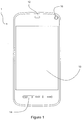
- Figure 1 illustrates an electronic device 1 in which apparatus according to example embodiments of the invention may be provided.
- the electronic device 1 is a portable electronic device 1. More specifically, the electronic device 1 is a mobile telephone 1.
- the electronic device 1 comprises a user-interface 10.
- the user interface 10 is operable to receive user inputs.
- the user interface 10 comprises a touch-sensitive display, or a touchscreen 10.
- the user interface 10 is operable also to display images for consumption by the user.
- the electronic device 1 also comprises a loudspeaker 12 for outputting audio signals to the user.
- the electronic device additionally comprises a plurality of depressible hardware keys 14, and a camera 16 for recording image data. It will be understood that the electronic device 1 also comprises components, such as a controller and one or more memories which are not externally visible.
- the electronic device 1 is a mobile telephone. However, it will be understood from the following description that the electronic device 1 may be of another type such as, but not limited to, a digital audio player, an e-reader, and a PDA.
- the user-interface 10 comprises a touchscreen, it will be understood that in different example embodiments the user interface may comprise, for example, one or more physical keys, a scroll wheel, a track ball, a touch pad, a dial or any combination of these. In such alternative example embodiments, the electronic device 1 may also comprise a separate non-touch-sensitive display for providing images and visual information to the user.
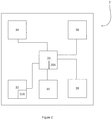
- Figure 2 is an electronic apparatus 2 according to example embodiments of the invention.
- the electronic apparatus 2 comprises a controller 20 and at least one memory 24.
- the controller 20 includes one or more processors 20A.
- the one or more processors 20A operate under the control of computer-readable code 22A, particularly an operating system and additional software, middleware or firmware modules, and software applications.
- the computer-readable code 22A is stored in the at least one memory 22.
- the controller 20 may also comprise one or more application specific integrated circuits (ASICs) (not shown).
- the at least one memory 22 may comprise one or more non-transitory memory media, such as but not limited to ROM, RAM and EEPROM or any combination thereof.
- the controller 20 is operable to cause stored data to be retrieved from the at least one memory 22.
- the controller 20 is operable also to cause data to be stored in the at least one memory 22.
- the apparatus 2 also comprises a display 24 for displaying content and information, in the form of images, text and video, to the user.
- the controller 20 is configured under the control of the computer-readable code 22A to control, by signals passed from the controller 20 to the display 24, the content and information displayed on the display 24.
- the apparatus 2 also comprises a user interface 26 for receiving user inputs and passing signals indicative of such to the controller 20.
- the user interface 26 may be touch sensitive transducer for detecting incidences of touch inputs on the touchscreen.
- the user interface may comprise, but is not limited to, a plurality of depressible hardware keys, a scroll wheel, a track ball, a slider, and an accelerometer or any other means suitable for receiving user inputs.
- the apparatus 2 is operable to receive zoom commands via the user interface 26. That is to say, the apparatus 2 is operable to recognise particular user inputs (zoom commands) as indications that the user wishes to alter the magnification level of an image displayed on the display 24.
- the apparatus 2 is configured to recognise a zoom-in command which indicates that the user wishes to cause the magnification level of content displayed on the display 24 to be increased.
- the apparatus 2 is configured also to recognise a zoom-out command which indicates that the user wishes to cause the magnification of content displayed on the display 24 to be reduced.
- the zoom commands may be provided by the user in many different ways.
- particular tactile gestures may be recognised as zoom commands.
- a pinching tactile gesture i.e. the sliding of two of the user's fingers along the surface of the touchscreen towards one another
- a reverse-pinching gesture i.e. the sliding of two of the user's fingers along the surface of the touch screen in a direction away from one another
- the zoom-in and zoom-out commands may be provided by applying a tactile input to virtual buttons presented on the touchscreen or in any other suitable way.
- the zoom commands may be provided, for example, by depressing hardware keys, scrolling a scroll wheel or a track ball, sliding a slider, or a combination of these.
- Other types of inputs such as shaking, tilting or squeezing a device, may also be used to provide zoom commands.
- the controller 20 is operable, under the control of the computer-readable code, to determine based on the signals received from the user interface 26 that a zoom command has been received.
- the controller 20 is operable also to determine the type of the received zoom command (i.e. whether it is a zoom-in command or a zoom-out command).
- the controller 20 is operable to cause the magnification level at which content and information are displayed on the display 24 to be altered in response to receiving from the user interface 26 a signal indicative of a zoom command.
- the apparatus 2 also comprises a transceiver 28 for transmitting and receiving data via radio frequency signals.
- the apparatus is able to communicate with networks such as the Internet and telephone networks.
- the controller 20 is operable to cause data that is received via the transceiver 28 to be displayed on the display 24.
- the apparatus 2 may also comprise an audio player 30.
- the audio player 30 is operable to cause data stored in the memory 22 to be provided via an audio output such as a loudspeaker or an audio socket (neither shown).
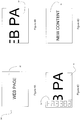
- Figures 3A to 3D illustrate a first example operation performed by apparatus according to example embodiments of the invention.
- Figures 3A to 3D are simplified illustrations of the content and information that are caused to be displayed on the display 24 throughout the operation.
- an internet page 32 which includes information derived from data received via the transceiver 28, is caused to be displayed on the display 24.
- the magnification level at which the internet page 32 is displayed is such that only a portion, and not all, of the internet page 32 is visible on the display 24.
- the controller 20 is aware of the current magnification level. For example, the controller 20 may maintain a magnification level field (not shown) within the memory 22, which may be updated to contain the current magnification level each time a zoom command is received and implemented.
- Figure 3B shows the display 24 following receipt of a zoom-out command.
- the controller 20 is responsive to the receipt of the zoom command (in this instance a zoom-out command) to check the current magnification level, for example, based on information in the magnification level field in the memory 22.
- the controller 20 uses the current magnification level to determine if alteration in accordance with the received zoom-command of the magnification level from the current magnification level would result in a new magnification level that is beyond a threshold magnification level.
- the threshold level for the minimum magnification may be, for example, a level at which all the information of the primary content (i.e. the content currently being viewed) is present on the display 24.
- the magnification level at which the internet page 32 is displayed is such that only a portion, and not all, of the internet page 32 is visible on the display 24. Consequently, subsequent to receiving a zoom-out command, the controller 20 determines that altering the magnification level in accordance with the received command would not result in a magnification level that is beyond the threshold magnification level. The controller 20 is responsive to this determination to alter the magnification level of the internet page 32 in accordance with the received zoom command. Thus, the controller 20 responds to the receipt of the zoom-out command by reducing the magnification level of the internet page 32.
- Figure 3C shows the display 24 following subsequent receipt of another zoom-out command.
- the controller 20 determines whether alteration of the magnification level in accordance with the received zoom command would result in a new magnification level that is beyond the threshold level.
- the internet page 32 is displayed at its lowest possible magnification level such that the entire page is visible on the display 24.
- the controller 20 determines that alteration of the current magnification level would result in a new level that is beyond the threshold level.
- the controller 20 does not alter the magnification level any further but instead causes one or more additional information items 34 to be displayed on the display 24.
- the additional information items 34 are not part of the internet page 32, but are related to the content of the internet page 32.
- the one or more additional information items 34 may include, but are not limited to: a link to a downloadable mobile application (an 'app') that is related to the currently viewed internet page; URLs recommended by the currently displayed internet page; links to other internet pages of a similar context which are often viewed by the user of the apparatus; links to popular internet pages viewed by other people who also view the currently displayed internet page; links to internet pages of users (for example, on social networking websites) who link to, or comment on the currently displayed internet page; other internet pages similar to the currently displayed internet page; links to interests and activities of other users who visit the currently displayed internet page; links to content stored within the memory 22 of the apparatus 2 that is related to the currently displayed internet page; and links to geographically proximate services (shops etc) that relate to the currently displayed internet page.
- a link to a downloadable mobile application an 'app'
- URLs recommended by the currently displayed internet page links to other internet pages of a similar context which are often viewed by the user of the apparatus
- the additional information items 34 are items that may be of interest to the user, and are determined based on the primary content that is currently being viewed by the user.
- the additional information items 34 may be collated from many different locations and in many different ways.
- the link to the mobile application may be provided by the service provider of the currently displayed page.
- the links to other internet pages that the user of the apparatus often views may be determined and provided by the apparatus 2 based on the user's browsing history.
- the links to other internet pages that are similar to the currently displayed internet page may be provided by third party servers.
- the geographically proximate services relating to the currently displayed page may be determined by comparing a location of the service (provided by a third party service) with a current location of the apparatus 20 determined using Cell ID or GPS.
- additional information items 34 are, in general, links to allow the user easily to access secondary content 36 that is related to the primary content, it will be appreciated that the additional information items 34 may alternatively be of other types.
- one or more of the additional information items 34 may be information, such as metadata, that is related to the currently viewed primary content.
- the additional information items 34 are overlaid on a left-hand side of the internet page 32.
- the additional information items 34 may be provided in any suitable way.
- the additional information items 34 may be displayed at any of the other edges or may be provided in a window at the centre of the display 24.
- the additional information items 34 may be caused to appear on the display 24 in any suitable way, for example by fading or sliding into view.
- the position of the primary content (i.e. the internet page 32) on the display 24 may be translated so as to make room on the display 24 for the additional information items 34.
- the magnification level of the primary content is maintained, but a portion of the primary content may become invisible to the user as it is translated to a position that is outside of the area of the display 24.
- Figure 3D shows the display following selection by the user of one of the additional information items 34, which is in this example a link to secondary content 36.
- the controller 20 may, when the one or more additional information items 34 are displayed, be responsive to receipt of a zoom-in command to cause the one or more additional information items to be removed from the display 43.
- the controller 20 may be responsive to receipt of a zoom command of a type which is opposite to that which caused the controller 20 to cause the additional information items 34 to be displayed, to cause the additional information items to be removed from the display 24.
- the controller 20 is operable, at the stage shown in Figure 3C , to respond to receipt of another zoom-out command by displaying a second different set of one or more additional information items.
- the second set of additional information items may be more or less relevant to the primary content currently displayed on the display 24 than was the first previous set.
- the controller 20 is operable to respond to receipt of the zoom-out command, when the first set of additional information items is already displayed, by causing the replacement of the first set with a second set of additional information items that are less strongly related to primary content than was the first set 38.
- input of the zoom-out command causes the expansion of the "range" of the additional information provided to the user, by making it less relevant to the primary content.
- the use of the zoom-out command in this way is analogous to its conventional use of expanding the view of primary content displayed on the display 34.
- Figures 4A to 4D illustrate a second example operation performed by an apparatus not according to example embodiments of the invention.
- Figures 4A to 4D are simplified illustrations of the content and information that are caused to be displayed on the display 24 throughout the operation.
- an internet page 32 is caused to be displayed on the display 24.
- the current magnification level is such that the entire internet page 32 is visible on the display 24.
- Figure 4B shows the state of the display 24 following receipt of a zoom-in command.
- the controller 20 responds to the receipt of the zoom-in command by determining whether the alteration of the magnification level in accordance with the received zoom command would result in a new magnification level that is beyond a threshold magnification level.
- the threshold level for the maximum magnification may be, for example, a level at which the primary content is magnified to such an extent that individual pixels of the primary content are easily discernable from one another or such that single words are no longer able to fit on the display.
- the controller 20 determines that the alteration of the magnification level in accordance with the received zoom command would not result in a magnification level that is beyond a threshold magnification level, and so alters the magnification level in accordance with the zoom-in command. As such, in Figure 4B , the magnification level is increased such that some but not all of the primary content 34 is visible on the display 24.
- Figure 4C shows the state of the display 24 following receipt of another zoom-in command.
- the controller 20 determines the alteration of the magnification level in accordance with the received zoom command would result in a magnification level that is beyond a threshold magnification level and so, instead of zooming-in further, causes one or more additional information items 34 to be displayed on the display 24.
- the additional information items 34 are as described above with reference to Figure 3C and may be provided on the display 24 also as described above.
- the controller 20 may be operable to respond to receipt of another zoom-in command following the provision of the one or more additional information items 34 by providing a second set of content items that are more (or less) related to the primary content displayed on the display 24.
- the controller 20 may be responsive to receipt of a zoom command of a different type to that which caused the controller 20 to cause the additional information items 34 to be displayed, to cause the additional information items 34 to be removed from the display 24.
- Figure 4D shows the display 24 following selection of the one of the one or more additional information items.
- the invention provides a new way of providing users with access to information and secondary content related to primary content currently being viewed.
- the user experience is improved as the user is able to navigate more quickly and more easily between different content both within the device and on the internet.
- the invention ensures that the related content is easily accessible via a command that is familiar to the user, but also that the one or more additional information items do not take up space on the display (which is particularly valuable in mobile devices such as mobile telephones etc.) unless the user specifically requests it via input of a zoom command.
- the invention introduces a new use of the zoom command, which is normally used to enable people to obtain a better view of the currently viewed primary content.
- the zoom command is used to enable easy access to and viewing of content and information which is not part of, but is related to the primary content.
- step S1 the controller 20 causes primary content to be displayed on the display 24.
- step S2 the controller 20 receives an indication of a zoom command, for example a zoom-out command, having been received from a user.
- a zoom command for example a zoom-out command
- step S3 the controller 20 determines if alteration of the magnification level in accordance with the received zoom command would result in the magnification level that exceeds a threshold level. This may be achieved by checking a current magnification level and a pre-defined threshold value.
- step S3 If a negative determination is returned in step S3, the operation proceeds to step S4, in which the magnification level at which the primary content is displayed on the display 24 is altered in accordance with the received zoom command.
- step S3 If a positive determination is received in step S3, the operation proceeds to step S5, in which one or more additional information items are caused to be displayed on the display 24 in addition to the primary content.
- This step may include causing a second set of additional information items to be displayed instead of the first set of additional information items, if the first set is already being displayed when the zoom command is received.
- a single user input may correspond to multiple zoom commands.
- the zoom command is a pinch, or reverse pinch, gesture
- the distance over which the user's fingers are slid corresponds to the amount of zoom they wish to be implemented.
- the input may be treated as multiple zoom commands with the operation of Figure 5 being performed sequentially for each command.
- the controller 20 will perform the operation of Figure 5 sequentially four times.
- the controller 20 may alter the magnification level in accordance with the zoom commands until doing so would result in the threshold level being exceeded, at which point it would cause the additional information items to be displayed.
- the controller 20 when the threshold is reached during a single user input which includes multiple zoom commands, the controller 20 may be operable to recognise this and not to cause the additional information items to be displayed. Instead, another separate user input may be required in order to cause the additional information items to be displayed. In this way, the additional information items are not displayed by mistake when the user is actually only attempting to cause the primary content to be zoomed in or out to the maximum level.
- the primary content is an internet page. It will be appreciated, however, that the primary content may be any other type of zoomable content.
- the primary content may be a document, such as a PDF or a word processor document, or a photograph.
- the one or more additional information items may include: metadata related to the document such as the creator of the document, the date it was created, the date it was last saved etc; links to related documents, for example, other documents with similar titles, other documents created at a similar time or by the same user; and links to internet pages that are relevant to the subject matter of the currently viewed document.
- the one or more additional content items may be, for example, links to other photos taken in a similar geographic location, the weather when the photo was taken, the favorite music of the photographer, services in geographic proximity to the location at which the photograph was taken, or a link to an internet auction sale of the camera model with which the picture was taken.
- the current magnification level of the primary content is maintained. According to some alternative embodiments, however, the magnification level may be changed in accordance with the type of zoom command that is received, in addition to the one or more additional information items being caused to be displayed.
Landscapes
- Engineering & Computer Science (AREA)
- Theoretical Computer Science (AREA)
- General Engineering & Computer Science (AREA)
- Physics & Mathematics (AREA)
- General Physics & Mathematics (AREA)
- Human Computer Interaction (AREA)
- User Interface Of Digital Computer (AREA)
- Controls And Circuits For Display Device (AREA)
Description
- This specification relates to responding to the receipt of zoom commands.
- Users of portable electronic devices such as mobile phones are using their devices with increasing regularity to view diverse content such as internet pages, photographs and documents. It is generally desired to improve the usability of devices such as mobile phones.
PublicationUS20020112237 A1 discloses that a navigation interface system generates a navigation map that organizes a plurality of information sources in an easy-to-use manner. In practical embodiments, the information sources are cable or satellite television stations, online music or video files, or the like.
PublicationWO2004102285 A2 discloses systems and methods that provide a control framework for organizing, selecting and launching media items including graphical user interface coupled with an optional free space control device for collection of the basic control primitives of point, click, scroll, hover and zoom which permit for easy and rapid selection of media items e.g., movies, songs, etc., from large collections.
PublicationWO03104965 A2 US2010162181 A1 discloses a touch-sensitive device accepts single-touch and multi-touch input representing gestures, and is able to changing a parameter of a gesture responsive to introduction or removal of a point of contact while the gesture is in progress. The operation associated with the gesture, such as a manipulation of an on-screen object, changes in a predictable manner if the user introduces or removes a contact point while the gesture is in progress. The overall nature of the operation being performed does not change, but a parameter of the operation can change. - According to a first aspect, claimed in
claim 1, this specification describes an apparatus comprising at least one processor at least one memory, having stored thereon computer-readable code,
the at least one processor being configured under the control of the computer-readable code: to cause primary content to be displayed on a display, which comprises a touchscreen, with a first magnification level; to be responsive to an indication of a receipt of a first zoom command, the first zoom command being for causing alteration of the magnification level from the first magnification level to a second magnification level, to determine if the second magnification level is beyond a threshold magnification level; if it is determined that the second magnification level is not beyond the threshold magnification level, to cause the primary content to be displayed on the display with the second magnification level; and if it is determined that the second magnification level is beyond the threshold magnification level, to cause a first set of one or more additional information items relating to the primary content to be displayed on the display in addition to the primary content and to be responsive to a second zoom-out command causing a second set of additional information items to be displayed instead of the first set of additional information items, and wherein a single user input corresponds to the first and the second zoom-out command and the single user input is a pinch gesture along a surface of the touchscreen. - According to a second aspect, claimed in
claim 6, this specification describes a method comprising:
causing primary content to be displayed on a display with a first magnification level; responding to an indication of a receipt of a first zoom command, the first zoom command being for causing alteration of the magnification level from the first magnification level to a second magnification level, by determining if the second magnification level is beyond a threshold magnification level; if it is determined that the second magnification level is not beyond the threshold magnification level, causing the primary content to be displayed on the display with the second magnification level; and if it is determined that the second magnification level is beyond the threshold magnification level, causing a first set of one or more additional information items relating to the primary content to be displayed on the display in addition to the primary content and to be responsive to a second zoom-out command causing a second set of additional information items to be displayed instead of the first set of additional information items, and wherein a single user input corresponds to the first and the second zoom-out command and the single user input is a pinch gesture along a surface of the touchscreen. - According to a third aspect, not claimed, this specification describes a non-transitory computer-readable storage medium having stored thereon computer-readable code, which, when executed by computing apparatus, causes the computing apparatus: to cause primary content to be displayed on a display with a first magnification level; to be responsive to an indication of a receipt of a first zoom command, the first zoom command being for causing alteration of the magnification level from the first magnification level to a second magnification level, to determine if the second magnification level is beyond a threshold magnification level; if it is determined that the second magnification level is not beyond the threshold magnification level, to cause the primary content to be displayed on the display with the second magnification level; and if it is determined that the second magnification level is beyond the threshold magnification level, to cause a first set of one or more additional information items relating to the primary content to be displayed on the display in addition to the primary content and to be responsive to a second zoom-out command causing a second set of additional information items to be displayed instead of the first set of additional information items, and wherein a single user input corresponds to the first and the second zoom-out command and the single user input is a pinch gesture along a surface of the touchscreen.
- According to a fourth aspect, as claimed in claim 11, this specification describes computer-readable code, which when executed by a computing apparatus causes the computing apparatus to perform a method according to the second aspect.
- According to a fifth aspect, not claimed, this specification describes an apparatus comprising:
means for causing primary content to be displayed on a display with a first magnification level; means for responding to an indication of a receipt of a first zoom command, the first zoom command being for causing alteration of the magnification level from the first magnification level to a second magnification level, by determining if the second magnification level is beyond a threshold magnification level; means for causing the primary content to be displayed on the display with the second magnification level, if it is determined that the second magnification level is not beyond the threshold magnification level; and means for causing a first set of one or more additional information items relating to the primary content to be displayed on the display in addition to the primary content, if it is determined that the second magnification level is beyond the threshold magnification level and to be responsive to a second zoom-out command causing a second set of additional information items to be displayed instead of the first set of additional information items, and wherein a single user input corresponds to the first and the second zoom-out command and the single user input is a pinch gesture along a surface of the touchscreen. - For a more complete understanding of example embodiments of the present invention, reference is now made to the following description taken in connection with the accompanying drawings in which:
-
Figure 1 is an electronic device in which an apparatus according to example embodiments of the invention may be provided; -
Figure 2 is a simplified schematic of an apparatus according an example embodiment of the invention; and -
Figures 3A to 3D illustrate a first example operation performed by an apparatus according example embodiments of the invention; -
Figures 4A to 4D illustrate a second example operation performed by an apparatus useful for understanding the invention; and -
Figure 5 is a flow chart depicting a method according to example embodiments of the invention; - In the description and drawings, like reference numerals refer to like elements throughout.
-
Figure 1 illustrates anelectronic device 1 in which apparatus according to example embodiments of the invention may be provided. In the example ofFigure 1 , theelectronic device 1 is a portableelectronic device 1. More specifically, theelectronic device 1 is amobile telephone 1. Theelectronic device 1 comprises a user-interface 10. Theuser interface 10 is operable to receive user inputs. In this example, theuser interface 10 comprises a touch-sensitive display, or atouchscreen 10. As such, in addition to receiving user inputs, theuser interface 10 is operable also to display images for consumption by the user. - The
electronic device 1 also comprises aloudspeaker 12 for outputting audio signals to the user. In the example ofFigure 1 , the electronic device additionally comprises a plurality ofdepressible hardware keys 14, and acamera 16 for recording image data. It will be understood that theelectronic device 1 also comprises components, such as a controller and one or more memories which are not externally visible. - In the example of
Figure 1 , theelectronic device 1 is a mobile telephone. However, it will be understood from the following description that theelectronic device 1 may be of another type such as, but not limited to, a digital audio player, an e-reader, and a PDA. Similarly, although in the example ofFigure 1 the user-interface 10 comprises a touchscreen, it will be understood that in different example embodiments the user interface may comprise, for example, one or more physical keys, a scroll wheel, a track ball, a touch pad, a dial or any combination of these. In such alternative example embodiments, theelectronic device 1 may also comprise a separate non-touch-sensitive display for providing images and visual information to the user. -
Figure 2 is anelectronic apparatus 2 according to example embodiments of the invention. Theelectronic apparatus 2 comprises acontroller 20 and at least onememory 24. - The
controller 20 includes one ormore processors 20A. The one ormore processors 20A operate under the control of computer-readable code 22A, particularly an operating system and additional software, middleware or firmware modules, and software applications. The computer-readable code 22A is stored in the at least onememory 22. Thecontroller 20 may also comprise one or more application specific integrated circuits (ASICs) (not shown). The at least onememory 22 may comprise one or more non-transitory memory media, such as but not limited to ROM, RAM and EEPROM or any combination thereof. - The
controller 20 is operable to cause stored data to be retrieved from the at least onememory 22. Thecontroller 20 is operable also to cause data to be stored in the at least onememory 22. - In the example of
Figure 2 , theapparatus 2 also comprises adisplay 24 for displaying content and information, in the form of images, text and video, to the user. Thecontroller 20 is configured under the control of the computer-readable code 22A to control, by signals passed from thecontroller 20 to thedisplay 24, the content and information displayed on thedisplay 24. - The
apparatus 2 also comprises auser interface 26 for receiving user inputs and passing signals indicative of such to thecontroller 20. In the example of a touchscreen device, such as that depicted inFigure 1 , theuser interface 26 may be touch sensitive transducer for detecting incidences of touch inputs on the touchscreen. According to other examples, the user interface may comprise, but is not limited to, a plurality of depressible hardware keys, a scroll wheel, a track ball, a slider, and an accelerometer or any other means suitable for receiving user inputs. - The
apparatus 2 is operable to receive zoom commands via theuser interface 26. That is to say, theapparatus 2 is operable to recognise particular user inputs (zoom commands) as indications that the user wishes to alter the magnification level of an image displayed on thedisplay 24. Theapparatus 2 is configured to recognise a zoom-in command which indicates that the user wishes to cause the magnification level of content displayed on thedisplay 24 to be increased. Theapparatus 2 is configured also to recognise a zoom-out command which indicates that the user wishes to cause the magnification of content displayed on thedisplay 24 to be reduced. - The zoom commands may be provided by the user in many different ways. In example embodiments which are provided in a touchscreen device, such as that in
Figure 1 , particular tactile gestures may be recognised as zoom commands. For example, a pinching tactile gesture (i.e. the sliding of two of the user's fingers along the surface of the touchscreen towards one another) may be recognised as a zoom-out command, and a reverse-pinching gesture (i.e. the sliding of two of the user's fingers along the surface of the touch screen in a direction away from one another) may be recognised as a zoom-in command. Alternatively, the zoom-in and zoom-out commands may be provided by applying a tactile input to virtual buttons presented on the touchscreen or in any other suitable way. In examples in which the device does not include a touchscreen, the zoom commands may be provided, for example, by depressing hardware keys, scrolling a scroll wheel or a track ball, sliding a slider, or a combination of these. Other types of inputs, such as shaking, tilting or squeezing a device, may also be used to provide zoom commands. - The
controller 20 is operable, under the control of the computer-readable code, to determine based on the signals received from theuser interface 26 that a zoom command has been received. Thecontroller 20 is operable also to determine the type of the received zoom command (i.e. whether it is a zoom-in command or a zoom-out command). Thecontroller 20 is operable to cause the magnification level at which content and information are displayed on thedisplay 24 to be altered in response to receiving from the user interface 26 a signal indicative of a zoom command. - In the example of
Figure 2 , theapparatus 2 also comprises atransceiver 28 for transmitting and receiving data via radio frequency signals. Thus, the apparatus is able to communicate with networks such as the Internet and telephone networks. Thecontroller 20 is operable to cause data that is received via thetransceiver 28 to be displayed on thedisplay 24. - According to some embodiments, the
apparatus 2 may also comprise anaudio player 30. Theaudio player 30 is operable to cause data stored in thememory 22 to be provided via an audio output such as a loudspeaker or an audio socket (neither shown). -
Figures 3A to 3D illustrate a first example operation performed by apparatus according to example embodiments of the invention.Figures 3A to 3D are simplified illustrations of the content and information that are caused to be displayed on thedisplay 24 throughout the operation. - In
Figure 3A , aninternet page 32, which includes information derived from data received via thetransceiver 28, is caused to be displayed on thedisplay 24. The magnification level at which theinternet page 32 is displayed, is such that only a portion, and not all, of theinternet page 32 is visible on thedisplay 24. Thecontroller 20 is aware of the current magnification level. For example, thecontroller 20 may maintain a magnification level field (not shown) within thememory 22, which may be updated to contain the current magnification level each time a zoom command is received and implemented. -
Figure 3B shows thedisplay 24 following receipt of a zoom-out command. Thecontroller 20 is responsive to the receipt of the zoom command (in this instance a zoom-out command) to check the current magnification level, for example, based on information in the magnification level field in thememory 22. Thecontroller 20 then uses the current magnification level to determine if alteration in accordance with the received zoom-command of the magnification level from the current magnification level would result in a new magnification level that is beyond a threshold magnification level. The threshold level for the minimum magnification (the zoom-out threshold) may be, for example, a level at which all the information of the primary content (i.e. the content currently being viewed) is present on thedisplay 24. - In
Figure 3A , the magnification level at which theinternet page 32 is displayed, is such that only a portion, and not all, of theinternet page 32 is visible on thedisplay 24. Consequently, subsequent to receiving a zoom-out command, thecontroller 20 determines that altering the magnification level in accordance with the received command would not result in a magnification level that is beyond the threshold magnification level. Thecontroller 20 is responsive to this determination to alter the magnification level of theinternet page 32 in accordance with the received zoom command. Thus, thecontroller 20 responds to the receipt of the zoom-out command by reducing the magnification level of theinternet page 32. -
Figure 3C shows thedisplay 24 following subsequent receipt of another zoom-out command. Upon receipt of this command, thecontroller 20 determines whether alteration of the magnification level in accordance with the received zoom command would result in a new magnification level that is beyond the threshold level. InFigure 3B , theinternet page 32 is displayed at its lowest possible magnification level such that the entire page is visible on thedisplay 24. As such, thecontroller 20 determines that alteration of the current magnification level would result in a new level that is beyond the threshold level. In response to this determination, thecontroller 20 does not alter the magnification level any further but instead causes one or moreadditional information items 34 to be displayed on thedisplay 24. Theadditional information items 34 are not part of theinternet page 32, but are related to the content of theinternet page 32. - The one or more
additional information items 34 may include, but are not limited to: a link to a downloadable mobile application (an 'app') that is related to the currently viewed internet page; URLs recommended by the currently displayed internet page; links to other internet pages of a similar context which are often viewed by the user of the apparatus; links to popular internet pages viewed by other people who also view the currently displayed internet page; links to internet pages of users (for example, on social networking websites) who link to, or comment on the currently displayed internet page; other internet pages similar to the currently displayed internet page; links to interests and activities of other users who visit the currently displayed internet page; links to content stored within thememory 22 of theapparatus 2 that is related to the currently displayed internet page; and links to geographically proximate services (shops etc) that relate to the currently displayed internet page. - In general, the
additional information items 34 are items that may be of interest to the user, and are determined based on the primary content that is currently being viewed by the user. Theadditional information items 34 may be collated from many different locations and in many different ways. For example, the link to the mobile application may be provided by the service provider of the currently displayed page. The links to other internet pages that the user of the apparatus often views may be determined and provided by theapparatus 2 based on the user's browsing history. The links to other internet pages that are similar to the currently displayed internet page may be provided by third party servers. The geographically proximate services relating to the currently displayed page may be determined by comparing a location of the service (provided by a third party service) with a current location of theapparatus 20 determined using Cell ID or GPS. - Although the above examples of the
additional information items 34 are, in general, links to allow the user easily to accesssecondary content 36 that is related to the primary content, it will be appreciated that theadditional information items 34 may alternatively be of other types. For example, one or more of theadditional information items 34 may be information, such as metadata, that is related to the currently viewed primary content. - In the example of
Figure 3C , theadditional information items 34 are overlaid on a left-hand side of theinternet page 32. However, theadditional information items 34 may be provided in any suitable way. For example, theadditional information items 34 may be displayed at any of the other edges or may be provided in a window at the centre of thedisplay 24. Theadditional information items 34 may be caused to appear on thedisplay 24 in any suitable way, for example by fading or sliding into view. - According to alternative example embodiments, the position of the primary content (i.e. the internet page 32) on the
display 24 may be translated so as to make room on thedisplay 24 for theadditional information items 34. In such embodiments, the magnification level of the primary content is maintained, but a portion of the primary content may become invisible to the user as it is translated to a position that is outside of the area of thedisplay 24.
Figure 3D shows the display following selection by the user of one of theadditional information items 34, which is in this example a link tosecondary content 36. - Although not shown in
Figures 3A to 3D , thecontroller 20 may, when the one or moreadditional information items 34 are displayed, be responsive to receipt of a zoom-in command to cause the one or more additional information items to be removed from the display 43. In other words, thecontroller 20 may be responsive to receipt of a zoom command of a type which is opposite to that which caused thecontroller 20 to cause theadditional information items 34 to be displayed, to cause the additional information items to be removed from thedisplay 24. - According to the invention as claimed the
controller 20 is operable, at the stage shown inFigure 3C , to respond to receipt of another zoom-out command by displaying a second different set of one or more additional information items. The second set of additional information items may be more or less relevant to the primary content currently displayed on thedisplay 24 than was the first previous set. In one example embodiment, thecontroller 20 is operable to respond to receipt of the zoom-out command, when the first set of additional information items is already displayed, by causing the replacement of the first set with a second set of additional information items that are less strongly related to primary content than was the first set 38. In this way, input of the zoom-out command causes the expansion of the "range" of the additional information provided to the user, by making it less relevant to the primary content. Thus, the use of the zoom-out command in this way is analogous to its conventional use of expanding the view of primary content displayed on thedisplay 34. -
Figures 4A to 4D illustrate a second example operation performed by an apparatus not according to example embodiments of the invention.Figures 4A to 4D are simplified illustrations of the content and information that are caused to be displayed on thedisplay 24 throughout the operation. - In
Figure 4A , aninternet page 32 is caused to be displayed on thedisplay 24. InFigure 4A , the current magnification level is such that theentire internet page 32 is visible on thedisplay 24. -
Figure 4B shows the state of thedisplay 24 following receipt of a zoom-in command. Thecontroller 20 responds to the receipt of the zoom-in command by determining whether the alteration of the magnification level in accordance with the received zoom command would result in a new magnification level that is beyond a threshold magnification level. The threshold level for the maximum magnification may be, for example, a level at which the primary content is magnified to such an extent that individual pixels of the primary content are easily discernable from one another or such that single words are no longer able to fit on the display. As is clear fromFigure 4B , thecontroller 20 determines that the alteration of the magnification level in accordance with the received zoom command would not result in a magnification level that is beyond a threshold magnification level, and so alters the magnification level in accordance with the zoom-in command. As such, inFigure 4B , the magnification level is increased such that some but not all of theprimary content 34 is visible on thedisplay 24. -
Figure 4C shows the state of thedisplay 24 following receipt of another zoom-in command. Thecontroller 20 determines the alteration of the magnification level in accordance with the received zoom command would result in a magnification level that is beyond a threshold magnification level and so, instead of zooming-in further, causes one or moreadditional information items 34 to be displayed on thedisplay 24. Theadditional information items 34 are as described above with reference toFigure 3C and may be provided on thedisplay 24 also as described above. - Similarly to the example of
Figures 3A to 3D , thecontroller 20 may be operable to respond to receipt of another zoom-in command following the provision of the one or moreadditional information items 34 by providing a second set of content items that are more (or less) related to the primary content displayed on thedisplay 24. - Also as in the example of
Figures 3A to 3D , thecontroller 20 may be responsive to receipt of a zoom command of a different type to that which caused thecontroller 20 to cause theadditional information items 34 to be displayed, to cause theadditional information items 34 to be removed from thedisplay 24. -
Figure 4D shows thedisplay 24 following selection of the one of the one or more additional information items. - As will be understood from the above-described example embodiments, the invention provides a new way of providing users with access to information and secondary content related to primary content currently being viewed. Thus, the user experience is improved as the user is able to navigate more quickly and more easily between different content both within the device and on the internet. Furthermore, the invention ensures that the related content is easily accessible via a command that is familiar to the user, but also that the one or more additional information items do not take up space on the display (which is particularly valuable in mobile devices such as mobile telephones etc.) unless the user specifically requests it via input of a zoom command. The invention introduces a new use of the zoom command, which is normally used to enable people to obtain a better view of the currently viewed primary content. In this invention, the zoom command is used to enable easy access to and viewing of content and information which is not part of, but is related to the primary content.
- Although the examples of
Figures 3A to 3D and4A to 4D have been described separately, it will be appreciated that the apparatus according to the invention may be operable to perform both operations. - Example operations according to the invention will now be described with reference to the flow diagram of
Figure 5 . - In step S1, the
controller 20 causes primary content to be displayed on thedisplay 24. - Next, in step S2, the
controller 20 receives an indication of a zoom command, for example a zoom-out command, having been received from a user. - Next in step S3, the
controller 20 determines if alteration of the magnification level in accordance with the received zoom command would result in the magnification level that exceeds a threshold level. This may be achieved by checking a current magnification level and a pre-defined threshold value. - If a negative determination is returned in step S3, the operation proceeds to step S4, in which the magnification level at which the primary content is displayed on the
display 24 is altered in accordance with the received zoom command. - If a positive determination is received in step S3, the operation proceeds to step S5, in which one or more additional information items are caused to be displayed on the
display 24 in addition to the primary content. This step may include causing a second set of additional information items to be displayed instead of the first set of additional information items, if the first set is already being displayed when the zoom command is received. - According to the claimed invention in which the user interface is a touchscreen, a single user input may correspond to multiple zoom commands. For example, where the zoom command is a pinch, or reverse pinch, gesture, the distance over which the user's fingers are slid corresponds to the amount of zoom they wish to be implemented.
- In such cases, the input may be treated as multiple zoom commands with the operation of
Figure 5 being performed sequentially for each command. As such, if a user input corresponds to four zoom commands, thecontroller 20 will perform the operation ofFigure 5 sequentially four times. Thus, thecontroller 20 may alter the magnification level in accordance with the zoom commands until doing so would result in the threshold level being exceeded, at which point it would cause the additional information items to be displayed. - Alternatively, in an example not in accordance with the invention as claimed, when the threshold is reached during a single user input which includes multiple zoom commands, the
controller 20 may be operable to recognise this and not to cause the additional information items to be displayed. Instead, another separate user input may be required in order to cause the additional information items to be displayed. In this way, the additional information items are not displayed by mistake when the user is actually only attempting to cause the primary content to be zoomed in or out to the maximum level. - In the examples above, the primary content is an internet page. It will be appreciated, however, that the primary content may be any other type of zoomable content. For example, the primary content may be a document, such as a PDF or a word processor document, or a photograph. In examples in which the primary content is a document, the one or more additional information items may include: metadata related to the document such as the creator of the document, the date it was created, the date it was last saved etc; links to related documents, for example, other documents with similar titles, other documents created at a similar time or by the same user; and links to internet pages that are relevant to the subject matter of the currently viewed document. In examples in which the primary content is a photograph, the one or more additional content items may be, for example, links to other photos taken in a similar geographic location, the weather when the photo was taken, the favorite music of the photographer, services in geographic proximity to the location at which the photograph was taken, or a link to an internet auction sale of the camera model with which the picture was taken.
- In the above described embodiments, when the one or more additional information items are caused to be displayed, the current magnification level of the primary content is maintained. According to some alternative embodiments, however, the magnification level may be changed in accordance with the type of zoom command that is received, in addition to the one or more additional information items being caused to be displayed.
- It should be realized that the foregoing embodiments should not be construed as limiting. Other variations and modifications will be apparent to persons skilled in the art upon reading the present application. Moreover, the disclosure of the present application should be understood to include any novel features or any novel combination of features either explicitly or implicitly disclosed herein or any generalization thereof and during the prosecution of the present application or of any application derived therefrom, new claims may be formulated to cover any such features and/or combination of such features.
Claims (12)
- Apparatus (1, 2) comprising:at least one processor (20A); andat least one memory (22), having stored thereon computer-readable code, the at least one processor (20A) being configured under the control of the computer-readable code:to cause primary content (34) to be displayed on a display (24), which comprises a touchscreen, with a first magnification level;to be responsive to an indication of a receipt of a first zoom-out command, the first zoom-out command being for causing alteration of the magnification level from the first magnification level to a second magnification level; andif it is determined that the second magnification level is beyond a threshold magnification level, to cause a first set of one or more additional information items relating to the primary content (34) to be displayed on the display (24) in addition to the primary content (34), andto be responsive to a second zoom-out command causing a second set of additional information items to be displayed instead of the first set of additional information items, and whereina single user input corresponds to the first and the second zoom-out command and the single user input is a pinch gesture along a surface of the touchscreen.
- Apparatus (1, 2) according to claim 1, the at least one processor being configured under the control of the computer-readable code:
to cause the first set of one or more additional information items to be overlaid on the primary content (34). - Apparatus (1, 2) according to any preceding claim, the at least one processor (20A) being configured under the control of the computer-readable code:subsequent to causing the first set of one or more additional information items to be displayed, to be responsive to an indication of a receipt of a zoom-in command to cause the first set of one or more additional information items to be removed from the display (24).
- Apparatus (1, 2) according to any preceding claim, wherein the one or more additional information items comprise at least one link to secondary content.
- A mobile terminal comprising the apparatus (1, 2) of any preceding claim.
- A method comprising:causing primary content (34) to be displayed on a display (24), which comprises a touchscreen, with a first magnification level;responding to an indication of a receipt of a first zoom-out command, the first zoom-out command being for causing alteration of the magnification level from the first magnification level to a second magnification level; andif it is determined that the second magnification level is beyond a threshold magnification level, causing a first set of one or more additional information items relating to the primary content (34) to be displayed on the display (24) in addition to the primary content (34), andto be responsive to a second zoom-out command causing a second set of additional information items to be displayed instead of the first set of additional information items, and whereina single user input corresponds to the first and the second zoom-out command and the single user input is a pinch gesture along a surface of the touchscreen.
- A method according to claim 6, comprising:
causing the first set of one or more additional information items to be overlaid on the primary content (34). - A method according to any of claims 6 to 7, comprising:
subsequent to causing the first set of one or more additional information items to be displayed, responding to an indication of a receipt of a zoom-in command by causing the first set of one or more additional information items to be removed from the display (24). - A method according to any of claims 6 to 8, wherein the primary content (34) is a webpage.
- A method according to any of claims 6 to 9, wherein the one or more additional information items comprise at least one link to secondary content.
- Computer-readable code, which when executed by a computing apparatus causes the computing apparatus to perform the method of any of claims 6 to 10.
- Apparatus according to any of claims 1 to 4, or mobile terminal according to claim 5, wherein the primary content (34) is a webpage.
Applications Claiming Priority (2)
| Application Number | Priority Date | Filing Date | Title |
|---|---|---|---|
| US12/915,291 US8791963B2 (en) | 2010-10-29 | 2010-10-29 | Responding to the receipt of zoom commands |
| PCT/IB2011/054142 WO2012056337A1 (en) | 2010-10-29 | 2011-09-21 | Responding to the receipt of zoom commands |
Publications (3)
| Publication Number | Publication Date |
|---|---|
| EP2633382A1 EP2633382A1 (en) | 2013-09-04 |
| EP2633382A4 EP2633382A4 (en) | 2016-08-24 |
| EP2633382B1 true EP2633382B1 (en) | 2018-05-02 |
Family
ID=45993227
Family Applications (1)
| Application Number | Title | Priority Date | Filing Date |
|---|---|---|---|
| EP11835711.0A Active EP2633382B1 (en) | 2010-10-29 | 2011-09-21 | Responding to the receipt of zoom commands |
Country Status (7)
| Country | Link |
|---|---|
| US (1) | US8791963B2 (en) |
| EP (1) | EP2633382B1 (en) |
| CN (1) | CN103262015B (en) |
| CA (1) | CA2816271C (en) |
| TR (1) | TR201809777T4 (en) |
| TW (1) | TWI575381B (en) |
| WO (1) | WO2012056337A1 (en) |
Families Citing this family (39)
| Publication number | Priority date | Publication date | Assignee | Title |
|---|---|---|---|---|
| US7469381B2 (en) | 2007-01-07 | 2008-12-23 | Apple Inc. | List scrolling and document translation, scaling, and rotation on a touch-screen display |
| US20120169776A1 (en) * | 2010-12-29 | 2012-07-05 | Nokia Corporation | Method and apparatus for controlling a zoom function |
| US8826191B1 (en) | 2011-01-05 | 2014-09-02 | Google Inc. | Zooming while page turning in document |
| KR101199618B1 (en) * | 2011-05-11 | 2012-11-08 | 주식회사 케이티테크 | Apparatus and Method for Screen Split Displaying |
| US9256361B2 (en) * | 2011-08-03 | 2016-02-09 | Ebay Inc. | Control of search results with multipoint pinch gestures |
| JP5858774B2 (en) * | 2011-12-26 | 2016-02-10 | キヤノン株式会社 | Display screen generation apparatus and control method thereof |
| KR20200067956A (en) * | 2012-03-21 | 2020-06-12 | 김시환 | Information display method in the smartphone display |
| US9483086B2 (en) | 2012-07-30 | 2016-11-01 | Sap Se | Business object detail display |
| US9658672B2 (en) | 2012-07-30 | 2017-05-23 | Sap Se | Business object representations and detail boxes display |
| US9123030B2 (en) | 2012-07-30 | 2015-09-01 | Sap Se | Indication of off-screen calendar objects |
| US20140028729A1 (en) * | 2012-07-30 | 2014-01-30 | Sap Ag | Scalable zoom calendars |
| US8832583B2 (en) | 2012-08-31 | 2014-09-09 | Sap Se | Visualizing entries in a calendar using the third dimension |
| US9081466B2 (en) | 2012-09-10 | 2015-07-14 | Sap Se | Dynamic chart control that triggers dynamic contextual actions |
| US9250781B2 (en) * | 2012-10-17 | 2016-02-02 | Sap Se | Method and device for navigating time and timescale using movements |
| US8972883B2 (en) | 2012-10-19 | 2015-03-03 | Sap Se | Method and device for display time and timescale reset |
| US9460089B1 (en) * | 2012-11-07 | 2016-10-04 | Amazon Technologies, Inc. | Flow rendering of annotation characters |
| CN103076955B (en) * | 2012-12-28 | 2015-07-15 | 小米科技有限责任公司 | Method, device and terminal for adjusting characters of application |
| US10691230B2 (en) * | 2012-12-29 | 2020-06-23 | Apple Inc. | Crown input for a wearable electronic device |
| US10275117B2 (en) | 2012-12-29 | 2019-04-30 | Apple Inc. | User interface object manipulations in a user interface |
| KR20140089816A (en) * | 2013-01-07 | 2014-07-16 | 삼성전자주식회사 | Image zooming method and terminal implementing the same |
| US11068128B2 (en) | 2013-09-03 | 2021-07-20 | Apple Inc. | User interface object manipulations in a user interface |
| US12287962B2 (en) | 2013-09-03 | 2025-04-29 | Apple Inc. | User interface for manipulating user interface objects |
| CN110262677B (en) | 2013-09-03 | 2022-08-09 | 苹果公司 | Computer-implemented method, electronic device, and computer-readable storage medium |
| US10545657B2 (en) | 2013-09-03 | 2020-01-28 | Apple Inc. | User interface for manipulating user interface objects |
| US10503388B2 (en) | 2013-09-03 | 2019-12-10 | Apple Inc. | Crown input for a wearable electronic device |
| US20150169513A1 (en) | 2013-12-13 | 2015-06-18 | AI Squared | Techniques for programmatic magnification of visible content elements of markup language documents |
| CN103699390A (en) * | 2013-12-30 | 2014-04-02 | 华为技术有限公司 | Image scaling method and terminal equipment |
| US10261670B2 (en) | 2014-03-14 | 2019-04-16 | Atronix Acquisition Corp. | Zooming user interface for a material handling control system |
| EP3147747A1 (en) | 2014-06-27 | 2017-03-29 | Apple Inc. | Manipulation of calendar application in device with touch screen |
| TWI676127B (en) | 2014-09-02 | 2019-11-01 | 美商蘋果公司 | Method, system, electronic device and computer-readable storage medium regarding electronic mail user interface |
| US10082892B2 (en) | 2014-09-02 | 2018-09-25 | Apple Inc. | Button functionality |
| CN106797493A (en) | 2014-09-02 | 2017-05-31 | 苹果公司 | Music user interface |
| US20160062571A1 (en) | 2014-09-02 | 2016-03-03 | Apple Inc. | Reduced size user interface |
| US10365807B2 (en) | 2015-03-02 | 2019-07-30 | Apple Inc. | Control of system zoom magnification using a rotatable input mechanism |
| US10008046B2 (en) | 2016-06-29 | 2018-06-26 | Here Global B.V. | Method, apparatus and computer program product for adaptive venue zooming in a digital map interface |
| US11435830B2 (en) | 2018-09-11 | 2022-09-06 | Apple Inc. | Content-based tactile outputs |
| DK179896B1 (en) | 2018-09-11 | 2019-08-30 | Apple Inc. | Indholds-baserede taktile outputs |
| CN112153451B (en) * | 2020-09-01 | 2022-04-12 | 广州汽车集团股份有限公司 | Vehicle use instruction display method and intelligent terminal |
| US12567415B2 (en) | 2023-05-09 | 2026-03-03 | Apple Inc. | Providing and controlling immersive three-dimensional environments |
Citations (1)
| Publication number | Priority date | Publication date | Assignee | Title |
|---|---|---|---|---|
| US20100162181A1 (en) * | 2008-12-22 | 2010-06-24 | Palm, Inc. | Interpreting Gesture Input Including Introduction Or Removal Of A Point Of Contact While A Gesture Is In Progress |
Family Cites Families (19)
| Publication number | Priority date | Publication date | Assignee | Title |
|---|---|---|---|---|
| US20010030667A1 (en) | 2000-04-10 | 2001-10-18 | Kelts Brett R. | Interactive display interface for information objects |
| US20020112237A1 (en) * | 2000-04-10 | 2002-08-15 | Kelts Brett R. | System and method for providing an interactive display interface for information objects |
| DE10237332A1 (en) * | 2001-08-15 | 2003-04-03 | I2 Technologies Inc | Search system for products allows limits of search based on parameters to be entered |
| GB0213215D0 (en) * | 2002-06-08 | 2002-07-17 | Lipman Robert M | Computer navigation |
| JP2004157869A (en) | 2002-11-07 | 2004-06-03 | Canon Inc | Mobile terminal |
| US20040268393A1 (en) * | 2003-05-08 | 2004-12-30 | Hunleth Frank A. | Control framework with a zoomable graphical user interface for organizing, selecting and launching media items |
| KR100817394B1 (en) | 2003-05-08 | 2008-03-27 | 힐크레스트 래보래토리스, 인크. | A control framework with a zoomable graphical user interface for organizing, selecting and launching media items |
| US8418075B2 (en) * | 2004-11-16 | 2013-04-09 | Open Text Inc. | Spatially driven content presentation in a cellular environment |
| US20070024646A1 (en) | 2005-05-23 | 2007-02-01 | Kalle Saarinen | Portable electronic apparatus and associated method |
| US7487447B1 (en) | 2005-05-25 | 2009-02-03 | Google Inc. | Web page zoom feature |
| KR100651368B1 (en) | 2005-09-15 | 2006-11-29 | 삼성전자주식회사 | Image control method according to the movement of mobile terminal |
| KR100782336B1 (en) * | 2006-06-13 | 2007-12-06 | 삼성전자주식회사 | Output control device and method of portable terminal |
| US20080098090A1 (en) | 2006-10-20 | 2008-04-24 | J.S.B.K. Inc. | Computer implemented system and methods for mapping using web-based content |
| US7889184B2 (en) | 2007-01-05 | 2011-02-15 | Apple Inc. | Method, system and graphical user interface for displaying hyperlink information |
| CN101378434A (en) | 2007-08-31 | 2009-03-04 | 鹏智科技(深圳)有限公司 | Apparatus and method for displaying picture |
| US20090177538A1 (en) | 2008-01-08 | 2009-07-09 | Microsoft Corporation | Zoomable advertisements with targeted content |
| US8504945B2 (en) * | 2008-02-01 | 2013-08-06 | Gabriel Jakobson | Method and system for associating content with map zoom function |
| US20090303254A1 (en) * | 2008-06-06 | 2009-12-10 | Sony Ericsson Mobile Communications Ab | Method of controlling a displaying of a graphical object on a display of a mobile electronic device and mobile electronic device |
| US9277164B2 (en) * | 2010-07-06 | 2016-03-01 | Mark Lane | Apparatus, system, and method for tagging objects in a video stream |
-
2010
- 2010-10-29 US US12/915,291 patent/US8791963B2/en active Active
-
2011
- 2011-09-21 CA CA2816271A patent/CA2816271C/en active Active
- 2011-09-21 TR TR2018/09777T patent/TR201809777T4/en unknown
- 2011-09-21 WO PCT/IB2011/054142 patent/WO2012056337A1/en not_active Ceased
- 2011-09-21 EP EP11835711.0A patent/EP2633382B1/en active Active
- 2011-09-21 CN CN201180059702.1A patent/CN103262015B/en active Active
- 2011-10-28 TW TW100139340A patent/TWI575381B/en active
Patent Citations (1)
| Publication number | Priority date | Publication date | Assignee | Title |
|---|---|---|---|---|
| US20100162181A1 (en) * | 2008-12-22 | 2010-06-24 | Palm, Inc. | Interpreting Gesture Input Including Introduction Or Removal Of A Point Of Contact While A Gesture Is In Progress |
Also Published As
| Publication number | Publication date |
|---|---|
| US8791963B2 (en) | 2014-07-29 |
| TW201232272A (en) | 2012-08-01 |
| CN103262015B (en) | 2016-06-01 |
| CA2816271A1 (en) | 2012-05-03 |
| CA2816271C (en) | 2017-07-11 |
| WO2012056337A1 (en) | 2012-05-03 |
| TWI575381B (en) | 2017-03-21 |
| EP2633382A1 (en) | 2013-09-04 |
| CN103262015A (en) | 2013-08-21 |
| TR201809777T4 (en) | 2018-07-23 |
| US20120105484A1 (en) | 2012-05-03 |
| EP2633382A4 (en) | 2016-08-24 |
Similar Documents
| Publication | Publication Date | Title |
|---|---|---|
| US8791963B2 (en) | Responding to the receipt of zoom commands | |
| CN101996047B (en) | User interface method and electronic equipment | |
| CN107071134B (en) | Mobile terminal | |
| US20130318437A1 (en) | Method for providing ui and portable apparatus applying the same | |
| CN108958580B (en) | A display control method and terminal device | |
| EP2690542A1 (en) | Display device and control method thereof | |
| CN108153900A (en) | A kind of image processing method and mobile terminal | |
| EP2693323B1 (en) | Method and apparatus for virtual tour creation in mobile device | |
| CN109471692B (en) | A display control method and terminal device | |
| US20120064946A1 (en) | Resizable filmstrip view of images | |
| CN110069181B (en) | Cross-folder file processing method, device, equipment and storage medium | |
| KR20150037209A (en) | A method for displaying a widget, a machine-readable storage medium and an electronic device | |
| EP2399186B1 (en) | Method and apparatus for displaying additional information items | |
| US20140237394A1 (en) | Apparatus and method for controlling messenger in terminal | |
| CN107153541A (en) | Browse interaction processing method and device | |
| JP2016511471A (en) | Method for controlling display of a plurality of objects by movement-related input to portable terminal and portable terminal | |
| WO2020134744A1 (en) | Icon moving method and mobile terminal | |
| WO2020156169A1 (en) | Display control method and terminal device | |
| KR101743295B1 (en) | Device and method for searching e-book in wireless terminal | |
| US20200210034A1 (en) | Electronic device and method of processing information in electronic device | |
| KR20150133045A (en) | Electronic device and method for displaying object | |
| KR20140110646A (en) | User termial and method for displaying screen in the user terminal | |
| CN108108098B (en) | Image selection method and mobile terminal | |
| US20170264959A1 (en) | Image display apparatus and method of displaying image | |
| HK1189070A (en) | Responding to the receipt of zoom commands |
Legal Events
| Date | Code | Title | Description |
|---|---|---|---|
| PUAI | Public reference made under article 153(3) epc to a published international application that has entered the european phase |
Free format text: ORIGINAL CODE: 0009012 |
|
| 17P | Request for examination filed |
Effective date: 20130524 |
|
| AK | Designated contracting states |
Kind code of ref document: A1 Designated state(s): AL AT BE BG CH CY CZ DE DK EE ES FI FR GB GR HR HU IE IS IT LI LT LU LV MC MK MT NL NO PL PT RO RS SE SI SK SM TR |
|
| DAX | Request for extension of the european patent (deleted) | ||
| REG | Reference to a national code |
Ref country code: HK Ref legal event code: DE Ref document number: 1189070 Country of ref document: HK |
|
| RAP1 | Party data changed (applicant data changed or rights of an application transferred) |
Owner name: NOKIA CORPORATION |
|
| RAP1 | Party data changed (applicant data changed or rights of an application transferred) |
Owner name: NOKIA TECHNOLOGIES OY |
|
| RA4 | Supplementary search report drawn up and despatched (corrected) |
Effective date: 20160721 |
|
| RIC1 | Information provided on ipc code assigned before grant |
Ipc: G06F 3/0481 20130101ALI20160715BHEP Ipc: G06F 3/0484 20130101ALI20160715BHEP Ipc: G06F 13/14 20060101ALI20160715BHEP Ipc: G06F 3/048 20060101AFI20160715BHEP Ipc: G06T 3/40 20060101ALI20160715BHEP |
|
| STAA | Information on the status of an ep patent application or granted ep patent |
Free format text: STATUS: EXAMINATION IS IN PROGRESS |
|
| 17Q | First examination report despatched |
Effective date: 20170601 |
|
| GRAP | Despatch of communication of intention to grant a patent |
Free format text: ORIGINAL CODE: EPIDOSNIGR1 |
|
| STAA | Information on the status of an ep patent application or granted ep patent |
Free format text: STATUS: GRANT OF PATENT IS INTENDED |
|
| INTG | Intention to grant announced |
Effective date: 20171201 |
|
| GRAS | Grant fee paid |
Free format text: ORIGINAL CODE: EPIDOSNIGR3 |
|
| GRAA | (expected) grant |
Free format text: ORIGINAL CODE: 0009210 |
|
| STAA | Information on the status of an ep patent application or granted ep patent |
Free format text: STATUS: THE PATENT HAS BEEN GRANTED |
|
| AK | Designated contracting states |
Kind code of ref document: B1 Designated state(s): AL AT BE BG CH CY CZ DE DK EE ES FI FR GB GR HR HU IE IS IT LI LT LU LV MC MK MT NL NO PL PT RO RS SE SI SK SM TR |
|
| REG | Reference to a national code |
Ref country code: GB Ref legal event code: FG4D |
|
| REG | Reference to a national code |
Ref country code: CH Ref legal event code: EP Ref country code: AT Ref legal event code: REF Ref document number: 995948 Country of ref document: AT Kind code of ref document: T Effective date: 20180515 |
|
| REG | Reference to a national code |
Ref country code: DE Ref legal event code: R096 Ref document number: 602011048120 Country of ref document: DE Ref country code: IE Ref legal event code: FG4D |
|
| REG | Reference to a national code |
Ref country code: FR Ref legal event code: PLFP Year of fee payment: 8 |
|
| REG | Reference to a national code |
Ref country code: NL Ref legal event code: MP Effective date: 20180502 |
|
| REG | Reference to a national code |
Ref country code: LT Ref legal event code: MG4D |
|
| PG25 | Lapsed in a contracting state [announced via postgrant information from national office to epo] |
Ref country code: ES Free format text: LAPSE BECAUSE OF FAILURE TO SUBMIT A TRANSLATION OF THE DESCRIPTION OR TO PAY THE FEE WITHIN THE PRESCRIBED TIME-LIMIT Effective date: 20180502 Ref country code: SE Free format text: LAPSE BECAUSE OF FAILURE TO SUBMIT A TRANSLATION OF THE DESCRIPTION OR TO PAY THE FEE WITHIN THE PRESCRIBED TIME-LIMIT Effective date: 20180502 Ref country code: LT Free format text: LAPSE BECAUSE OF FAILURE TO SUBMIT A TRANSLATION OF THE DESCRIPTION OR TO PAY THE FEE WITHIN THE PRESCRIBED TIME-LIMIT Effective date: 20180502 Ref country code: FI Free format text: LAPSE BECAUSE OF FAILURE TO SUBMIT A TRANSLATION OF THE DESCRIPTION OR TO PAY THE FEE WITHIN THE PRESCRIBED TIME-LIMIT Effective date: 20180502 Ref country code: BG Free format text: LAPSE BECAUSE OF FAILURE TO SUBMIT A TRANSLATION OF THE DESCRIPTION OR TO PAY THE FEE WITHIN THE PRESCRIBED TIME-LIMIT Effective date: 20180802 Ref country code: NO Free format text: LAPSE BECAUSE OF FAILURE TO SUBMIT A TRANSLATION OF THE DESCRIPTION OR TO PAY THE FEE WITHIN THE PRESCRIBED TIME-LIMIT Effective date: 20180802 |
|
| PG25 | Lapsed in a contracting state [announced via postgrant information from national office to epo] |
Ref country code: LV Free format text: LAPSE BECAUSE OF FAILURE TO SUBMIT A TRANSLATION OF THE DESCRIPTION OR TO PAY THE FEE WITHIN THE PRESCRIBED TIME-LIMIT Effective date: 20180502 Ref country code: RS Free format text: LAPSE BECAUSE OF FAILURE TO SUBMIT A TRANSLATION OF THE DESCRIPTION OR TO PAY THE FEE WITHIN THE PRESCRIBED TIME-LIMIT Effective date: 20180502 Ref country code: NL Free format text: LAPSE BECAUSE OF FAILURE TO SUBMIT A TRANSLATION OF THE DESCRIPTION OR TO PAY THE FEE WITHIN THE PRESCRIBED TIME-LIMIT Effective date: 20180502 Ref country code: HR Free format text: LAPSE BECAUSE OF FAILURE TO SUBMIT A TRANSLATION OF THE DESCRIPTION OR TO PAY THE FEE WITHIN THE PRESCRIBED TIME-LIMIT Effective date: 20180502 Ref country code: GR Free format text: LAPSE BECAUSE OF FAILURE TO SUBMIT A TRANSLATION OF THE DESCRIPTION OR TO PAY THE FEE WITHIN THE PRESCRIBED TIME-LIMIT Effective date: 20180803 |
|
| REG | Reference to a national code |
Ref country code: AT Ref legal event code: MK05 Ref document number: 995948 Country of ref document: AT Kind code of ref document: T Effective date: 20180502 |
|
| PG25 | Lapsed in a contracting state [announced via postgrant information from national office to epo] |
Ref country code: CZ Free format text: LAPSE BECAUSE OF FAILURE TO SUBMIT A TRANSLATION OF THE DESCRIPTION OR TO PAY THE FEE WITHIN THE PRESCRIBED TIME-LIMIT Effective date: 20180502 Ref country code: SK Free format text: LAPSE BECAUSE OF FAILURE TO SUBMIT A TRANSLATION OF THE DESCRIPTION OR TO PAY THE FEE WITHIN THE PRESCRIBED TIME-LIMIT Effective date: 20180502 Ref country code: DK Free format text: LAPSE BECAUSE OF FAILURE TO SUBMIT A TRANSLATION OF THE DESCRIPTION OR TO PAY THE FEE WITHIN THE PRESCRIBED TIME-LIMIT Effective date: 20180502 Ref country code: PL Free format text: LAPSE BECAUSE OF FAILURE TO SUBMIT A TRANSLATION OF THE DESCRIPTION OR TO PAY THE FEE WITHIN THE PRESCRIBED TIME-LIMIT Effective date: 20180502 Ref country code: EE Free format text: LAPSE BECAUSE OF FAILURE TO SUBMIT A TRANSLATION OF THE DESCRIPTION OR TO PAY THE FEE WITHIN THE PRESCRIBED TIME-LIMIT Effective date: 20180502 Ref country code: AT Free format text: LAPSE BECAUSE OF FAILURE TO SUBMIT A TRANSLATION OF THE DESCRIPTION OR TO PAY THE FEE WITHIN THE PRESCRIBED TIME-LIMIT Effective date: 20180502 Ref country code: RO Free format text: LAPSE BECAUSE OF FAILURE TO SUBMIT A TRANSLATION OF THE DESCRIPTION OR TO PAY THE FEE WITHIN THE PRESCRIBED TIME-LIMIT Effective date: 20180502 |
|
| REG | Reference to a national code |
Ref country code: DE Ref legal event code: R097 Ref document number: 602011048120 Country of ref document: DE |
|
| PG25 | Lapsed in a contracting state [announced via postgrant information from national office to epo] |
Ref country code: SM Free format text: LAPSE BECAUSE OF FAILURE TO SUBMIT A TRANSLATION OF THE DESCRIPTION OR TO PAY THE FEE WITHIN THE PRESCRIBED TIME-LIMIT Effective date: 20180502 |
|
| PLBE | No opposition filed within time limit |
Free format text: ORIGINAL CODE: 0009261 |
|
| STAA | Information on the status of an ep patent application or granted ep patent |
Free format text: STATUS: NO OPPOSITION FILED WITHIN TIME LIMIT |
|
| 26N | No opposition filed |
Effective date: 20190205 |
|
| PG25 | Lapsed in a contracting state [announced via postgrant information from national office to epo] |
Ref country code: MC Free format text: LAPSE BECAUSE OF FAILURE TO SUBMIT A TRANSLATION OF THE DESCRIPTION OR TO PAY THE FEE WITHIN THE PRESCRIBED TIME-LIMIT Effective date: 20180502 |
|
| REG | Reference to a national code |
Ref country code: CH Ref legal event code: PL |
|
| PG25 | Lapsed in a contracting state [announced via postgrant information from national office to epo] |
Ref country code: SI Free format text: LAPSE BECAUSE OF FAILURE TO SUBMIT A TRANSLATION OF THE DESCRIPTION OR TO PAY THE FEE WITHIN THE PRESCRIBED TIME-LIMIT Effective date: 20180502 |
|
| REG | Reference to a national code |
Ref country code: BE Ref legal event code: MM Effective date: 20180930 |
|
| PG25 | Lapsed in a contracting state [announced via postgrant information from national office to epo] |
Ref country code: LU Free format text: LAPSE BECAUSE OF NON-PAYMENT OF DUE FEES Effective date: 20180921 |
|
| PG25 | Lapsed in a contracting state [announced via postgrant information from national office to epo] |
Ref country code: CH Free format text: LAPSE BECAUSE OF NON-PAYMENT OF DUE FEES Effective date: 20180930 Ref country code: LI Free format text: LAPSE BECAUSE OF NON-PAYMENT OF DUE FEES Effective date: 20180930 Ref country code: BE Free format text: LAPSE BECAUSE OF NON-PAYMENT OF DUE FEES Effective date: 20180930 |
|
| PG25 | Lapsed in a contracting state [announced via postgrant information from national office to epo] |
Ref country code: AL Free format text: LAPSE BECAUSE OF FAILURE TO SUBMIT A TRANSLATION OF THE DESCRIPTION OR TO PAY THE FEE WITHIN THE PRESCRIBED TIME-LIMIT Effective date: 20180502 |
|
| PG25 | Lapsed in a contracting state [announced via postgrant information from national office to epo] |
Ref country code: MT Free format text: LAPSE BECAUSE OF NON-PAYMENT OF DUE FEES Effective date: 20180921 |
|
| PG25 | Lapsed in a contracting state [announced via postgrant information from national office to epo] |
Ref country code: HU Free format text: LAPSE BECAUSE OF FAILURE TO SUBMIT A TRANSLATION OF THE DESCRIPTION OR TO PAY THE FEE WITHIN THE PRESCRIBED TIME-LIMIT; INVALID AB INITIO Effective date: 20110921 Ref country code: PT Free format text: LAPSE BECAUSE OF FAILURE TO SUBMIT A TRANSLATION OF THE DESCRIPTION OR TO PAY THE FEE WITHIN THE PRESCRIBED TIME-LIMIT Effective date: 20180502 |
|
| PG25 | Lapsed in a contracting state [announced via postgrant information from national office to epo] |
Ref country code: CY Free format text: LAPSE BECAUSE OF FAILURE TO SUBMIT A TRANSLATION OF THE DESCRIPTION OR TO PAY THE FEE WITHIN THE PRESCRIBED TIME-LIMIT Effective date: 20180502 Ref country code: MK Free format text: LAPSE BECAUSE OF NON-PAYMENT OF DUE FEES Effective date: 20180502 |
|
| PG25 | Lapsed in a contracting state [announced via postgrant information from national office to epo] |
Ref country code: IS Free format text: LAPSE BECAUSE OF FAILURE TO SUBMIT A TRANSLATION OF THE DESCRIPTION OR TO PAY THE FEE WITHIN THE PRESCRIBED TIME-LIMIT Effective date: 20180902 |
|
| P01 | Opt-out of the competence of the unified patent court (upc) registered |
Effective date: 20230527 |
|
| PGFP | Annual fee paid to national office [announced via postgrant information from national office to epo] |
Ref country code: DE Payment date: 20250730 Year of fee payment: 15 |
|
| PGFP | Annual fee paid to national office [announced via postgrant information from national office to epo] |
Ref country code: TR Payment date: 20250912 Year of fee payment: 15 Ref country code: IT Payment date: 20250825 Year of fee payment: 15 |
|
| PGFP | Annual fee paid to national office [announced via postgrant information from national office to epo] |
Ref country code: GB Payment date: 20250731 Year of fee payment: 15 |
|
| PGFP | Annual fee paid to national office [announced via postgrant information from national office to epo] |
Ref country code: FR Payment date: 20250808 Year of fee payment: 15 |
|
| PGFP | Annual fee paid to national office [announced via postgrant information from national office to epo] |
Ref country code: IE Payment date: 20250812 Year of fee payment: 15 |