EP2575019A1 - Verfahren zum Zeigen auf einen elektronischen Inhaltsabschnitt - Google Patents
Verfahren zum Zeigen auf einen elektronischen Inhaltsabschnitt Download PDFInfo
- Publication number
- EP2575019A1 EP2575019A1 EP11306269A EP11306269A EP2575019A1 EP 2575019 A1 EP2575019 A1 EP 2575019A1 EP 11306269 A EP11306269 A EP 11306269A EP 11306269 A EP11306269 A EP 11306269A EP 2575019 A1 EP2575019 A1 EP 2575019A1
- Authority
- EP
- European Patent Office
- Prior art keywords
- input
- user interface
- graphical user
- specific area
- section
- Prior art date
- Legal status (The legal status is an assumption and is not a legal conclusion. Google has not performed a legal analysis and makes no representation as to the accuracy of the status listed.)
- Withdrawn
Links
Images

Classifications
-
- G—PHYSICS
- G06—COMPUTING OR CALCULATING; COUNTING
- G06F—ELECTRIC DIGITAL DATA PROCESSING
- G06F3/00—Input arrangements for transferring data to be processed into a form capable of being handled by the computer; Output arrangements for transferring data from processing unit to output unit, e.g. interface arrangements
- G06F3/01—Input arrangements or combined input and output arrangements for interaction between user and computer
- G06F3/048—Interaction techniques based on graphical user interfaces [GUI]
- G06F3/0487—Interaction techniques based on graphical user interfaces [GUI] using specific features provided by the input device, e.g. functions controlled by the rotation of a mouse with dual sensing arrangements, or of the nature of the input device, e.g. tap gestures based on pressure sensed by a digitiser
- G06F3/0488—Interaction techniques based on graphical user interfaces [GUI] using specific features provided by the input device, e.g. functions controlled by the rotation of a mouse with dual sensing arrangements, or of the nature of the input device, e.g. tap gestures based on pressure sensed by a digitiser using a touch-screen or digitiser, e.g. input of commands through traced gestures
- G06F3/04883—Interaction techniques based on graphical user interfaces [GUI] using specific features provided by the input device, e.g. functions controlled by the rotation of a mouse with dual sensing arrangements, or of the nature of the input device, e.g. tap gestures based on pressure sensed by a digitiser using a touch-screen or digitiser, e.g. input of commands through traced gestures for inputting data by handwriting, e.g. gesture or text
-
- G—PHYSICS
- G06—COMPUTING OR CALCULATING; COUNTING
- G06F—ELECTRIC DIGITAL DATA PROCESSING
- G06F3/00—Input arrangements for transferring data to be processed into a form capable of being handled by the computer; Output arrangements for transferring data from processing unit to output unit, e.g. interface arrangements
- G06F3/01—Input arrangements or combined input and output arrangements for interaction between user and computer
- G06F3/048—Interaction techniques based on graphical user interfaces [GUI]
- G06F3/0481—Interaction techniques based on graphical user interfaces [GUI] based on specific properties of the displayed interaction object or a metaphor-based environment, e.g. interaction with desktop elements like windows or icons, or assisted by a cursor's changing behaviour or appearance
- G06F3/0483—Interaction with page-structured environments, e.g. book metaphor
-
- G—PHYSICS
- G06—COMPUTING OR CALCULATING; COUNTING
- G06F—ELECTRIC DIGITAL DATA PROCESSING
- G06F2203/00—Indexing scheme relating to G06F3/00 - G06F3/048
- G06F2203/048—Indexing scheme relating to G06F3/048
- G06F2203/04808—Several contacts: gestures triggering a specific function, e.g. scrolling, zooming, right-click, when the user establishes several contacts with the surface simultaneously; e.g. using several fingers or a combination of fingers and pen
Definitions
- the present invention generally relates to e-book readers, and more particularly to content bookmarking methods.
- bookmarking solutions have been developed.
- One example of such a bookmarking solution consists in placing visual markers in the document in electronic form in order to mark sections of interest in the document. These visual markers maintain a fixed position in the document when the user scrolls or browses through the document.
- the present method relates to a method for marking a first section of a browse-able content displayed on a graphical user interface of an electronic device, said method comprising the steps of :
- Such a method enables retrieving a specific section of a document in electronic form with minimal user intervention.
- the method of the invention defines a browsing mode in which once the currently displayed section of a document is stored, the user can browse through the document and upon terminating the browsing mode, the section of the document that was stored when entering the browsing mode is displayed again.
- the first input is an input of a duration higher or equal to a pre-determined threshold duration.
- the first input is for example a clutch gesture.
- the position of the first input on the first specific area of the graphical user interface is intact.
- the user holds his finger on the first specific area of the graphical user interface for a pre-determined duration to trigger the browsing mode.
- the third input on the first specific area of the graphical user interface is a release of the first input on the first specific area of the graphical user interface.
- the user By removing his finger from the first specific area of the graphical user interface, the user terminates the browsing mode.
- the second input on the second specific area of the graphical user interface is a scrolling input.
- the invention concerns also an electronic device capable of marking a first section of a browse-able content displayed on a graphical user interface of the device, said device comprising means for:
- Such a device is for example a tablet or a mobile phone.
- one object of the invention concerns a computer program, in particular a computer program on or in an information medium or memory, suitable for implementing the method for wirelessly transferring data between a first and at least a second device by means of a radio signal of a pre-determined frequency object of the invention.
- This program can use any programming language, and be in the form of source code, binary code, or of code intermediate between source code and object code such as in a partially compiled form, or in any other desirable form for implementing the configuration method according to the invention.
- the information medium may be any entity or device capable of storing the program.
- the medium can comprise a storage means, such as a ROM, for example a CD ROM or a microelectronic circuit ROM, or else a magnetic recording means, for example a diskette (floppy disk) or a hard disk.
- the information medium may be a transmissible medium such as an electrical or optical signal, which may be conveyed via an electrical or optical cable, by radio or by other means.
- the program according to the invention may in particular be downloaded from a network of Internet type.
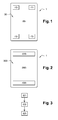
- Figure 1 represents a first embodiment of an electronic device 1 capable of running the method of the invention.
- Such an electronic device 1 is for example a Smartphone, a tablet, a laptop, etc.
- the electronic device 1 comprises a graphical user interface 30, e.g. a touch screen.
- four specific areas 10, 11, 12, 13 of the graphical user interface 30 are defined. They are located for example in the four corners of the graphical user interface 30 when the graphical user interface 30 is of rectangular shape. The rest of the surface 20 of the graphical user interface 30 constitute another specific area of the graphical user interface 30.
- Figure 2 represents a second embodiment of an electronic device 1 capable of running the method of the invention.
- the electronic device 1 comprises a graphical user interface 300.
- two specific areas 110, 120 of the graphical user interface are defined. They are of rectangular shape and are located for example at the top and the bottom of the graphical user interface 300 when the graphical user interface 300 is of rectangular shape.
- the rest of the surface 200 of the graphical user interface 300 constitute another specific area of the graphical user interface 30.
- Figure 3 shows a diagram representing the steps of the method of the invention as experienced by the user.
- an electronic document is displayed on the graphical user interface 30, 300.
- a document is for example a document comprising a plurality of pages such as an e-book, or a document that has a content large than the size of the graphical user interface 30, 300, such as a webpage.
- the user of the electronic device 1 whishes to browse through the document displayed on the graphical user interface 30, 300 while marking a first section of the document, e.g. a specific page of an e-book or a specific section of a webpage.
- a step E2 the user touches one of the specific area 10, 11, 12, 13, 110 or 120 of the graphical user interface 30, 300.
- This touch gesture may be a touch and hold gesture : the user holds his finger on the first specific area 10, 11, 12, 13, 110 or 120 of the graphical user interface 30, 300 for a pre-determined duration.
- a step E3 the user touches the other specific area 20, 200 in a scrolling gesture in order to browse through the content of the document.
- the user can scroll horizontally or vertically. For example, if the document is an e-book, the user will scroll horizontally. If the document is a webpage, the user will scroll vertically.
- Figure 4 shows a diagram representing the steps of the method of the invention when it is run by the electronic device 1.
- a first input on a first specific area 10, 1 1 , 12, 13, 110 or 120 of the graphical user interface 30, 300 is detected by detecting means of the electronic device 1.
- the detection of the first input triggers a browsing mode.
- the first input is an input of a duration higher or equal to a pre-determined threshold duration T.
- the duration of the first input is measure and compared to the threshold duration T. If the duration of the first input is higher or equal to the threshold duration T, then the electronic device 1 enters in the browsing mode.
- the position of the first input on the first specific area 10, 1 1 , 12, 13, 14, 110 or 120 of the graphical user interface30, 300 is intact.
- Such an input is for example a touch and hold input or a clutch input.
- a clutch input is an input with a pre-determined duration, i.e. it is not necessary to maintain the touch longer than the pre-determined duration.
- a first section of the document, displayed on the graphical user interface 30, 300, is stored in storing means of the electronic device 1.
- a second input on a second specific area 20, 200 of the graphical user interface 30, 300 is detected by detecting means of the electronic device 1. This second input causes a browsing through the content. Others sections of the document are then displayed on the graphical user interface 30, 300.
- the second input on the second specific area 20, 200 of the graphical user interface 30, 300 is a scrolling input or flipping input causing a browsing in the document.
- a third input on the first specific area 10, 11, 12, 13, 110 or 120 of the graphical user interface 30, 300 is detected by the detection means of the electronic device 1.
- the detection of the third input terminates the browsing mode.
- the third input on the first specific area 10, 11, 12, 13, 110 or 120 of the graphical user interface 30, 300 is a release of.the first input.
- a step F6 the first section of the document is displayed on the graphical user interface 30, 300.
- zooming on a section of a displayed document is usually done by detecting a pinching gesture, i.e. the detection of two simultaneous inputs of the graphical user interface 30, 300, the inputs moving toward or away from one another depending on whether the user whishes to zoom in or out.
- the device 1 Upon detection of two simultaneous inputs on the second specific area 20, 200 of the graphical user interface 30, 300, the device 1, while in the browsing mode, enters a zooming mode.
- the device 1 Upon detection of an input on the area of the graphical user interface 30, 300,on which the software link is displayed, the device 1, while in the browsing mode, launches another application, for example internet browser in order to displayed the linked content. When terminating the application, the device 1 terminates the browsing mode and displays the first section of the content.
- another application for example internet browser
- Figure 5 represents an electronic device 1 capable of running the method for marking a first section of a browsable content displayed on the graphical user interface30, 300 the electronic device 1.
- the electronic device 1 comprises detecting means 10 of a first input on a first specific area 10, 11, 12, 13, 110 or 120 of the graphical user interface 30, 300.
- the detecting means 10 are linked to the graphical user interface 30, 300.
- the first input being an input of a duration higher or equal to a pre-determined threshold duration T
- the electronic device 1 comprises means for measuring 11 the duration of the first input connected to the graphical user interface 30, 300 and the means 10. Connected to the means 11, the electronic device comprises means for comparing 12 the measured duration of the first input to a threshold duration T.
- the electronic device 1 Connected to the means 12, the electronic device 1 comprises means for storing 13 a first section of the document displayed on the graphical user interface 30, 300.
- the electronic device 1 comprises detecting means 14 of a second input on a second specific area 20, 200 of the graphical user interface 30, 300, connected to the graphical user interface 30, 300. This second input causes a browsing through the content. Others sections of the document are then displayed on the graphical user interface 30, 300.
- the detecting means 10 of the first input on a first specific area 10, 1 1 , 12, 13, 110 or 120 of the graphical user interface 30, 300 detects the third input as well.
Landscapes
- Engineering & Computer Science (AREA)
- General Engineering & Computer Science (AREA)
- Theoretical Computer Science (AREA)
- Human Computer Interaction (AREA)
- Physics & Mathematics (AREA)
- General Physics & Mathematics (AREA)
- User Interface Of Digital Computer (AREA)
Priority Applications (1)
| Application Number | Priority Date | Filing Date | Title |
|---|---|---|---|
| EP11306269A EP2575019A1 (de) | 2011-09-30 | 2011-09-30 | Verfahren zum Zeigen auf einen elektronischen Inhaltsabschnitt |
Applications Claiming Priority (1)
| Application Number | Priority Date | Filing Date | Title |
|---|---|---|---|
| EP11306269A EP2575019A1 (de) | 2011-09-30 | 2011-09-30 | Verfahren zum Zeigen auf einen elektronischen Inhaltsabschnitt |
Publications (1)
| Publication Number | Publication Date |
|---|---|
| EP2575019A1 true EP2575019A1 (de) | 2013-04-03 |
Family
ID=44947002
Family Applications (1)
| Application Number | Title | Priority Date | Filing Date |
|---|---|---|---|
| EP11306269A Withdrawn EP2575019A1 (de) | 2011-09-30 | 2011-09-30 | Verfahren zum Zeigen auf einen elektronischen Inhaltsabschnitt |
Country Status (1)
| Country | Link |
|---|---|
| EP (1) | EP2575019A1 (de) |
Citations (4)
| Publication number | Priority date | Publication date | Assignee | Title |
|---|---|---|---|---|
| US5463725A (en) * | 1992-12-31 | 1995-10-31 | International Business Machines Corp. | Data processing system graphical user interface which emulates printed material |
| US20110050591A1 (en) * | 2009-09-02 | 2011-03-03 | Kim John T | Touch-Screen User Interface |
| WO2011041547A1 (en) * | 2009-09-30 | 2011-04-07 | Georgia Tech Research Corporation | Systems and methods to facilitate active reading |
| US20110209102A1 (en) * | 2010-02-25 | 2011-08-25 | Microsoft Corporation | Multi-screen dual tap gesture |
-
2011
- 2011-09-30 EP EP11306269A patent/EP2575019A1/de not_active Withdrawn
Patent Citations (4)
| Publication number | Priority date | Publication date | Assignee | Title |
|---|---|---|---|---|
| US5463725A (en) * | 1992-12-31 | 1995-10-31 | International Business Machines Corp. | Data processing system graphical user interface which emulates printed material |
| US20110050591A1 (en) * | 2009-09-02 | 2011-03-03 | Kim John T | Touch-Screen User Interface |
| WO2011041547A1 (en) * | 2009-09-30 | 2011-04-07 | Georgia Tech Research Corporation | Systems and methods to facilitate active reading |
| US20110209102A1 (en) * | 2010-02-25 | 2011-08-25 | Microsoft Corporation | Multi-screen dual tap gesture |
Similar Documents
| Publication | Publication Date | Title |
|---|---|---|
| US9037991B2 (en) | Apparatus and method for digital content navigation | |
| US9304668B2 (en) | Method and apparatus for customizing a display screen of a user interface | |
| NL2007909C2 (en) | Method and apparatus of scrolling a document displayed in a browser window. | |
| CN103098011B (zh) | 项目显示方法和设备 | |
| US20180139317A1 (en) | Mobile computing terminal with more than one lock screen and method of using the same | |
| US10185488B2 (en) | Device and method for displaying information | |
| US10365785B2 (en) | Constraining display motion in display navigation | |
| US20130033524A1 (en) | Method for performing display control in response to eye activities of a user, and associated apparatus | |
| KR101163346B1 (ko) | 터치스크린 제어방법, 장치, 이를 위한 기록매체 및 이를 포함하는 사용자 단말 | |
| US20130198677A1 (en) | Touchscreen Display and Navigation | |
| US20120056832A1 (en) | Information processing device, information processing method, and information processing program | |
| US9170733B2 (en) | Information processing apparatus, information processing method, and non-transitory computer readable medium | |
| US20140181737A1 (en) | Method for processing contents and electronic device thereof | |
| CN102902450A (zh) | 终端及其显示数据的方法 | |
| KR101169560B1 (ko) | 터치스크린 제어방법, 장치, 이를 위한 기록매체 및 이를 포함하는 사용자 단말 | |
| JP7678910B2 (ja) | メディア内の視覚コンテンツを管理するユーザインタフェース | |
| US10228845B2 (en) | Previewing portions of electronic documents | |
| US20140068424A1 (en) | Gesture-based navigation using visual page indicators | |
| US9569085B2 (en) | Digital device displaying index information and method for controlling the same | |
| KR101370341B1 (ko) | 디스플레이장치 및 전자문서의 페이지선택방법 | |
| CN104123092A (zh) | 用于显示文档文件的计算机和方法 | |
| JP5596068B2 (ja) | 電子端末および書籍閲覧プログラム | |
| US20160132477A1 (en) | Digital intra-page bookmark for use with e-books | |
| CN103777860A (zh) | 移动终端和基于用户输入控制所述移动终端的方法 | |
| KR20190026516A (ko) | 컨텐츠 북마킹 방법 및 장치 |
Legal Events
| Date | Code | Title | Description |
|---|---|---|---|
| PUAI | Public reference made under article 153(3) epc to a published international application that has entered the european phase |
Free format text: ORIGINAL CODE: 0009012 |
|
| AK | Designated contracting states |
Kind code of ref document: A1 Designated state(s): AL AT BE BG CH CY CZ DE DK EE ES FI FR GB GR HR HU IE IS IT LI LT LU LV MC MK MT NL NO PL PT RO RS SE SI SK SM TR |
|
| AX | Request for extension of the european patent |
Extension state: BA ME |
|
| RAP1 | Party data changed (applicant data changed or rights of an application transferred) |
Owner name: ORANGE |
|
| STAA | Information on the status of an ep patent application or granted ep patent |
Free format text: STATUS: THE APPLICATION IS DEEMED TO BE WITHDRAWN |
|
| 18D | Application deemed to be withdrawn |
Effective date: 20131005 |