EP2573755A2 - Mobiles Endgerät und Auflösungskompatibilitätsverfahren dafür - Google Patents
Mobiles Endgerät und Auflösungskompatibilitätsverfahren dafür Download PDFInfo
- Publication number
- EP2573755A2 EP2573755A2 EP12006646A EP12006646A EP2573755A2 EP 2573755 A2 EP2573755 A2 EP 2573755A2 EP 12006646 A EP12006646 A EP 12006646A EP 12006646 A EP12006646 A EP 12006646A EP 2573755 A2 EP2573755 A2 EP 2573755A2
- Authority
- EP
- European Patent Office
- Prior art keywords
- resolution
- application
- compatibility mode
- set value
- lcd
- Prior art date
- Legal status (The legal status is an assumption and is not a legal conclusion. Google has not performed a legal analysis and makes no representation as to the accuracy of the status listed.)
- Ceased
Links
- 238000000034 method Methods 0.000 title claims abstract description 52
- 230000004044 response Effects 0.000 claims description 6
- 230000000694 effects Effects 0.000 abstract description 3
- 238000004891 communication Methods 0.000 description 24
- 230000006870 function Effects 0.000 description 20
- 238000010295 mobile communication Methods 0.000 description 9
- 230000005236 sound signal Effects 0.000 description 6
- 238000005516 engineering process Methods 0.000 description 5
- 230000004048 modification Effects 0.000 description 5
- 238000012986 modification Methods 0.000 description 5
- 230000008569 process Effects 0.000 description 5
- 238000012545 processing Methods 0.000 description 4
- 238000004458 analytical method Methods 0.000 description 3
- 230000005540 biological transmission Effects 0.000 description 3
- 230000008859 change Effects 0.000 description 3
- 238000010586 diagram Methods 0.000 description 3
- 239000004973 liquid crystal related substance Substances 0.000 description 3
- 238000012546 transfer Methods 0.000 description 3
- 230000001133 acceleration Effects 0.000 description 2
- 230000008878 coupling Effects 0.000 description 2
- 238000010168 coupling process Methods 0.000 description 2
- 238000005859 coupling reaction Methods 0.000 description 2
- 238000011161 development Methods 0.000 description 2
- 230000006872 improvement Effects 0.000 description 2
- 238000009434 installation Methods 0.000 description 2
- 230000003287 optical effect Effects 0.000 description 2
- 238000005457 optimization Methods 0.000 description 2
- 230000003068 static effect Effects 0.000 description 2
- 101150012579 ADSL gene Proteins 0.000 description 1
- 102100020775 Adenylosuccinate lyase Human genes 0.000 description 1
- 108700040193 Adenylosuccinate lyases Proteins 0.000 description 1
- 101100264195 Caenorhabditis elegans app-1 gene Proteins 0.000 description 1
- 238000003491 array Methods 0.000 description 1
- 230000000052 comparative effect Effects 0.000 description 1
- 238000013500 data storage Methods 0.000 description 1
- 238000001514 detection method Methods 0.000 description 1
- 238000012905 input function Methods 0.000 description 1
- 230000007774 longterm Effects 0.000 description 1
- 238000007726 management method Methods 0.000 description 1
- 238000005259 measurement Methods 0.000 description 1
- 230000007246 mechanism Effects 0.000 description 1
- 238000003909 pattern recognition Methods 0.000 description 1
- 238000013468 resource allocation Methods 0.000 description 1
- 238000001228 spectrum Methods 0.000 description 1
- 239000010409 thin film Substances 0.000 description 1
Images





Classifications
-
- G—PHYSICS
- G09—EDUCATION; CRYPTOGRAPHY; DISPLAY; ADVERTISING; SEALS
- G09G—ARRANGEMENTS OR CIRCUITS FOR CONTROL OF INDICATING DEVICES USING STATIC MEANS TO PRESENT VARIABLE INFORMATION
- G09G3/00—Control arrangements or circuits, of interest only in connection with visual indicators other than cathode-ray tubes
- G09G3/20—Control arrangements or circuits, of interest only in connection with visual indicators other than cathode-ray tubes for presentation of an assembly of a number of characters, e.g. a page, by composing the assembly by combination of individual elements arranged in a matrix no fixed position being assigned to or needed to be assigned to the individual characters or partial characters
- G09G3/34—Control arrangements or circuits, of interest only in connection with visual indicators other than cathode-ray tubes for presentation of an assembly of a number of characters, e.g. a page, by composing the assembly by combination of individual elements arranged in a matrix no fixed position being assigned to or needed to be assigned to the individual characters or partial characters by control of light from an independent source
- G09G3/36—Control arrangements or circuits, of interest only in connection with visual indicators other than cathode-ray tubes for presentation of an assembly of a number of characters, e.g. a page, by composing the assembly by combination of individual elements arranged in a matrix no fixed position being assigned to or needed to be assigned to the individual characters or partial characters by control of light from an independent source using liquid crystals
-
- G—PHYSICS
- G09—EDUCATION; CRYPTOGRAPHY; DISPLAY; ADVERTISING; SEALS
- G09G—ARRANGEMENTS OR CIRCUITS FOR CONTROL OF INDICATING DEVICES USING STATIC MEANS TO PRESENT VARIABLE INFORMATION
- G09G2340/00—Aspects of display data processing
- G09G2340/04—Changes in size, position or resolution of an image
- G09G2340/0407—Resolution change, inclusive of the use of different resolutions for different screen areas
-
- G—PHYSICS
- G09—EDUCATION; CRYPTOGRAPHY; DISPLAY; ADVERTISING; SEALS
- G09G—ARRANGEMENTS OR CIRCUITS FOR CONTROL OF INDICATING DEVICES USING STATIC MEANS TO PRESENT VARIABLE INFORMATION
- G09G2370/00—Aspects of data communication
- G09G2370/02—Networking aspects
- G09G2370/022—Centralised management of display operation, e.g. in a server instead of locally
Definitions
- This specification relates to a mobile terminal capable of being compatible with market applications having resolutions of various sizes of LCDs, and a resolution compatibility method thereof.
- Mobile terminals may be configured to perform various functions, for example, data and voice communication, capturing images or video, storing voice, reproducing music files via a speaker system, displaying images or video and the like. Some of mobile terminals may include an additional function of playing games, and other mobile terminals may be implemented as multimedia players. In addition, in recent time, mobile terminals can receive broadcast or multicast signals to allow viewing of video or television programs.
- a touch function of the mobile terminal is designed for a user unfamiliar to button/key input using a touch screen to conveniently execute operations of the mobile terminal.
- the touch function is becoming an important function of the terminal together with a user interface (UI), in addition to a simple input function.
- UI user interface
- LCDs include Quarter Video Graphic Array (QVGA) with resolution of 320x240, Half VGA (HVGA) with resolution of 480x320, Wide VGA (WVGA) with resolution of 800x480, quarter High Definition (qHD) with resolution of 960x540, HD with resolution of 1920x1080, extended Graphics Array (XGA) with resolution of 1024x768, and the like.
- QVGA Quarter Video Graphic Array
- HVGA Half VGA
- WVGA Wide VGA
- qHD quarter High Definition
- HD high Definition
- XGA extended Graphics Array
- the QVGA has the lowest resolution and the XGA has the highest resolution.
- terminal manufactures suffer from an increase in development costs when applications are developed for each type of LCD in consideration of various LCD sizes.
- terminal manufactures first develop an application for WVGA, and refactor the application using a multi-screen function to apply to other types of LCDs.
- this also requires to develop a separate application for each type of LCD (LCD resolution) because many incompatible LCDS are present.
- a resolution compatibility mode (or compatibility mode), in which an application supporting a specific resolution is able to be displayed at a different resolution without a screen broken, is used in mobile terminals.
- the resolution compatibility mode is set to "Off" as a default value. If an application with an incompatible resolution is displayed, a user may view a broke screen at least one time. Therefore, when the broken screen is displayed due to the difference of resolution, the user suffers from changing the compatibility mode setting from "Off" to "On” one by one after entrance into a display settings menu.
- the compatibility mode may disadvantageously remain in the "On” state, in spite of no need to set the mode to "On".
- the On/Off decision with respect to the resolution compatibility mode is manually performed individually based on a user's determination. This causes a trouble in ensuring compatibility of the resolution for each application.
- an aspect of the detailed description is to provide a mobile terminal capable of ensuring compatibility of Liquid Crystal Display (LCD) resolution for various types of applications, and a resolution compatibility method thereof.
- LCD Liquid Crystal Display
- Another aspect of the detailed description is to provide a mobile terminal capable of automatically executing setting of a resolution compatibility mode, and a resolution compatibility method thereof.
- Another aspect of the detailed description is to provide a mobile terminal capable of executing setting of a compatibility mode based on a user's usage pattern, and a resolution compatibility method thereof.
- a resolution compatibility method for a mobile terminal including checking a set state of a resolution compatibility mode upon execution of a market application, drawing an image of the market application at a virtual resolution when the resolution compatibility mode has been set, enlarging or reducing the drawn virtual image of the market application based on an actual LCD resolution, and displaying the enlarged or reduced market application image on a display unit.
- the resolution of the market application may be different from the actual LCD resolution.
- the virtual resolution may be one of Half VGA (HVGA), High Definition (HD) and extended Graphics Array (XGA), and the actual LCD resolution may include HVGA resolution, HD resolution and XGA resolution.
- HVGA Half VGA
- HD High Definition
- XGA extended Graphics Array
- the method may further include selecting a specific virtual standard resolution and a market application in the resolution compatibility mode.
- the virtual market application image may be drawn on a window and then enlarged on a canvas.
- a resolution compatibility method for a mobile terminal including downloading an application from a market, receiving an optimal set value of a resolution compatibility mode with respect to the downloaded application from a server, and displaying the application by executing the resolution compatibility mode based on the received optimal set value.
- the resolution compatibility mode of the application may be in a state set to "optimal" upon downloading the application.
- the optimal set value may be requested as a background for reception.
- the optimal set value may be a set value with respect to the resolution compatibility mode that users have the most frequently set for the corresponding application, or a set value decided based on an application version.
- the optimal set value may be decided by giving a different weight for each user or according to a time point that the user sets the value.
- a mobile terminal in accordance with a first exemplary embodiment including a memory configured to store at least one market application, a display unit configured to display the market application, and a controller configured to draw an image of the market application at a virtual resolution according to setting of a resolution compatibility mode when the corresponding market application is executed, and thereafter enlarge or reduce the drawn market application image based on an actual LCD resolution to display on the display unit.
- the resolution of the market application may be different from the actual LCD resolution.
- the virtual resolution may be one of Half VGA (HVGA), High Definition (HD) and extended Graphics Array (XGA), and the actual LCD resolution may include HVGA resolution, HD resolution and XGA resolution.
- HVGA Half VGA
- HD High Definition
- XGA extended Graphics Array
- the setting of the resolution compatibility mode may include a specific virtual standard resolution and a market application.
- the virtual market application image may be drawn on a window and then enlarged on a canvas.
- the controller may include a surface flinger configured to request LCD information from an Android framework when the market application is executed, so as to draw an image of the market application based on a virtual resolution provided from the Android framework, and an Android framework configured to provide the virtual resolution to the surface flinger, when the resolution compatibility mode has been set, in response to the request for the LCD information from the surface flinger.
- a mobile terminal including a memory, a display unit, and a controller configured to receive an optimal set value of a resolution compatibility mode from a server upon downloading an application from a market, execute the resolution compatibility mode based on the received optimal set value, and display the downloaded application on the display unit.
- the resolution compatibility mode of the application may in a state set to "optimal" upon downloading the application.
- the controller may request the optimal set value as a background for reception.
- the server may decide and manage the optimal set value based on a set value of the resolution compatibility mode that users have the most frequently set for the market application, or an application version.
- the server may give a different weight for each user or according to a time point that the user sets the value upon deciding the optimal set value.
- Mobile terminals may be implemented using a variety of different types of terminals. Examples of such terminals include mobile terminals, such as mobile phones, smart phones, notebook computers, digital broadcast terminals, Personal Digital Assistants (PDA), Portable Multimedia Players (PMP), navigators and the like, and stationary terminals, such as digital TVs, desktop computers and the like.
- mobile terminals such as mobile phones, smart phones, notebook computers, digital broadcast terminals, Personal Digital Assistants (PDA), Portable Multimedia Players (PMP), navigators and the like
- stationary terminals such as digital TVs, desktop computers and the like.
- the following description assumes that the terminal is a mobile terminal. However, it can be easily understood by those skilled in the art that the configuration according to the following description can be applied to the stationary terminals except for components particularly provided for mobility.
- FIG. 1 is a block diagram of a mobile terminal in accordance with one embodiment of the present invention.
- the mobile terminal 100 may comprise components, such as a wireless communication unit 110, an Audio/Video (A/V) input unit 120, a user input unit 130, a sensing unit 140, an output unit 150, a memory 160, an interface unit 170, a controller 180, a power supply 190 and the like.
- FIG. 1 shows the mobile terminal 100 having various components, but it is understood that implementing all of the illustrated components is not a requirement. Greater or fewer components may alternatively be implemented. Hereinafter, each component is described in sequence.
- the wireless communication unit 110 may typically include one or more components which permit wireless communications between the mobile terminal 100 and a wireless communication system or between the mobile terminal 100 and a network within which the mobile terminal 100 is located.
- the wireless communication unit 110 may include a broadcast receiving module 111, a mobile communication module 112, a wireless internet module 113, a short-range communication module 114, a position location module 115 and the like.
- the broadcast receiving module 111 receives a broadcast signal and/or broadcast associated information from an external broadcast managing entity via a broadcast channel.
- the broadcast channel may include a satellite channel and a terrestrial channel.
- the broadcast managing entity may indicate a server which generates and transmits a broadcast signal and/or broadcast associated information or a server which receives a pre-generated broadcast signal and/or broadcast associated information and sends them to the mobile terminal.
- Examples of broadcast associated information may include information associated with a broadcast channel, a broadcast program, a broadcast service provider, and the like.
- the broadcast signal may be implemented as a TV broadcast signal, a radio broadcast signal, and a data broadcast signal, among others.
- the broadcast signal may further include a data broadcast signal combined with a TV or radio broadcast signal.
- the broadcast associated information may indicate information related to a broadcast channel, a broadcast program or a broadcast service provider.
- the broadcast associated information may be provided via a mobile communication network, and received by the mobile communication module 112.
- broadcast associated information may be implemented in various formats.
- broadcast associated information may include Electronic Program Guide (EPG) of Digital Multimedia Broadcasting (DMB), Electronic Service Guide (ESG) of Digital Video Broadcast-Handheld (DVB-H), and the like.
- EPG Electronic Program Guide
- DMB Digital Multimedia Broadcasting
- ESG Electronic Service Guide
- DVD-H Digital Video Broadcast-Handheld
- the broadcast receiving module 111 may be configured to receive digital broadcast signals transmitted from various types of broadcast systems. Such broadcast systems may include Digital Multimedia Broadcasting-Terrestrial (DMB-T), Digital Multimedia Broadcasting-Satellite (DMB-S), Media Forward Link Only (MediaFLO), Digital Video Broadcast-Handheld (DVB-H), Integrated Services Digital Broadcast-Terrestrial (ISDB-T), and the like.
- the broadcast receiving module 111 may be configured to be suitable for every broadcast system transmitting broadcast signals as well as the digital broadcasting systems.
- Broadcast signals and/or broadcast associated information received via the broadcast receiving module 111 may be stored in a suitable device, such as a memory 160.
- the mobile communication module 112 transmits/receives wireless signals to/from at least one of network entities (e.g., base station, an external mobile terminal, a server, etc.) on a mobile communication network.
- the wireless signals may include audio call signal, video call signal, or various formats of data according to transmission/reception of text/multimedia messages.
- the wireless internet module 113 supports wireless Internet access for the mobile terminal. This module may be internally or externally coupled to the mobile terminal. Examples of such wireless Internet access may include Wireless LAN (WLAN), Wi-Fi, Wireless Broadband (Wibro), World Interoperability for Microwave Access (Wimax), High Speed Downlink Packet Access (HSDPA), and the like.
- WLAN Wireless LAN
- Wi-Fi Wireless Broadband
- Wibro Wireless Broadband
- Wimax World Interoperability for Microwave Access
- HSDPA High Speed Downlink Packet Access
- the short-range communication module 114 denotes a module for short-range communications. Suitable technologies for implementing this module may include BLUETOOTH, Radio Frequency IDentification (RFID), Infrared Data Association (Ir-DA), Ultra-WideBand (UWB), ZigBee, and the like.
- RFID Radio Frequency IDentification
- Ir-DA Infrared Data Association
- UWB Ultra-WideBand
- ZigBee ZigBee
- the position location module 115 denotes a module for detecting or calculating a position of a mobile terminal.
- An example of the position location module 115 may include a Global Position System (GPS) module.
- GPS Global Position System
- the GPS module can measure accurate time and distance respectively from more than three satellites so as to accurately calculate a current position of the mobile terminal based on such three different distances according to a triangulation scheme.
- a scheme may be used to obtain time information and distance information from three satellites and correct error by one satellite.
- the GPS module may continuously calculate a current position in real time so as to obtain speed information.
- the A/V input unit 120 is configured to provide audio or video signal input to the mobile terminal.
- the A/V input unit 120 may include a camera 121 and a microphone 122.
- the camera 121 receives and processes image frames of still pictures or video obtained by image sensors in a video call mode or a capturing mode. The processed image frames may be displayed on a display 151.
- the image frames processed by the camera 121 may be stored in the memory 160 or transmitted to the exterior via the wireless communication unit 110. Two or more cameras 121 may be provided according to the configuration of the mobile terminal.
- the microphone 122 may receive an external audio signal via a microphone while the mobile terminal is in a particular mode, such as a phone call mode, a recording mode, a voice recognition mode, or the like. This audio signal is processed into digital data. The processed digital data is converted for output into a format transmittable to a mobile communication base station via the mobile communication module 112 in case of the phone call mode.
- the microphone 122 may include assorted noise removing algorithms to remove noise generated in the course of receiving the external audio signal.
- the user input unit 130 may generate input data inputted by a user to control the operation of the mobile terminal.
- the user input unit 130 may include a keypad, a dome switch, a touchpad (e.g., static pressure/capacitance), a jog wheel, a jog switch and the like.
- a specific example can be one in which the touchpad is layered with the display 151 to be explained later so as to be in cooperation with the display 151, which is referred to as a touch screen.
- the sensing unit 140 provides status measurements of various aspects of the mobile terminal. For instance, the sensing unit 140 may detect an open/close status of the mobile terminal, a change in a location of the mobile terminal 100, a presence or absence of user contact with the mobile terminal 100, the location of the mobile terminal 100, acceleration/deceleration of the mobile terminal 100, and the like, so as to generate a sensing signal for controlling the operation of the mobile terminal 100. For example, regarding a slide-type mobile terminal, the sensing unit 140 may sense whether a sliding portion of the mobile terminal is open or closed.
- sensing functions such as the sensing unit 140 sensing the presence or absence of power provided by the power supply 190, the presence or absence of a coupling or other connection between the interface unit 170 and an external device, and the like.
- the sensing unit 140 may include a proximity sensor 141, which will be described later in relation to a touch screen.
- the sensing unit 140 includes a geomagnetic sensor to calculate a moving direction when a user moves, a gyro sensor to calculate a rotating direction, and an acceleration sensor.
- the interface unit 170 is generally implemented to couple the mobile terminal to external devices.
- the interface unit 170 may include, for example, wired/wireless headset ports, external charger ports, wired/wireless data ports, memory card ports, ports for coupling devices having an identification module, etc.), audio Input/Output (I/O) ports, video I/O ports, earphone ports, and the like.
- the identification module may be configured as a chip for storing various information required to authenticate an authority to use the mobile terminal 100, which may include a User Identity Module (UIM), a Subscriber Identity Module (SIM), a Universal Subscriber Identity Module (USIM), and the like.
- the device having the identification module (hereinafter, referred to as "identification device") may be implemented in a type of smart card.
- the identification device can be coupled to the mobile terminal 100 via a port.
- Such interface unit 170 may receive data from an external device, or provided with power and accordingly transfer the received data or power to each component within the mobile terminal 100 or transfer data of the mobile terminal 100 to an external device.
- the interface unit 170 may serve as a path for power to be supplied from an external cradle to the mobile terminal 100 when the mobile terminal 100 is connected to the external cradle or as a path for transferring various command signals inputted from the cradle by a user to the mobile terminal 100.
- Such various command signals or power inputted from the cradle may operate as signals for recognizing that the mobile terminal 100 has accurately been mounted to the cradle.
- the output unit 150 is configured to output an audio signal, a video signal or an alarm signal.
- the output unit 150 may include a display 151, an audio output module 152, an alarm 153, and the like.
- the display 151 may output information processed in the mobile terminal 100. For example, when the mobile terminal is operating in a phone call mode, the display 151 will provide a User Interface (UI) or a Graphic User Interface (GUI) which includes information associated with the call.
- UI User Interface
- GUI Graphic User Interface
- a touch screen can be configured as the display 151 and the touchpad are layered with each other to work in cooperation with each other.
- This configuration permits the display 151 to function both as an input device and as an output device.
- the display 151 may be implemented using, for example, a Liquid Crystal Display (LCD), a Thin Film Transistor-Liquid Crystal Display (TFT-LCD), an Organic Light-Emitting Diode (OLED), a flexible display, a three-dimensional (3D) display, or the like.
- Some of the displays can be configured to be transparent such that it is possible to see the exterior therethrough. These displays may be called transparent displays.
- a representative example of the transparent display may include a Transparent Organic Light Emitting Diode (TOLED), and the like.
- the mobile terminal 100 may include two or more of such displays 151 according to its embodiment.
- the mobile terminal 100 may simultaneously include an external display (not shown) and an internal display (not shown).
- the touch screen may be configured so as to detect a touch input pressure as well as touch input position and touch input area.
- the audio output module 152 may output audio data which is received from the wireless communication unit 110 in various modes including call-receiving mode, call-placing mode, recording mode, voice recognition mode, broadcast reception mode, and the like, or audio data stored in the memory 160. Also, the audio output module 152 may output an audio signal relating to a particular function (e.g., call received, message received, etc.) performed in the mobile terminal 100. The audio output module 152 may be implemented using a speaker, a buzzer, or the like.
- the alarm unit 153 outputs signals notifying occurrence of events from the mobile terminal 100.
- the events occurring from the mobile terminal 100 may include call received, message received, key signal input, touch input, and so on.
- the alarm unit 153 may output not only video or audio signals, but also other types of signals such as signals notifying occurrence of events in a vibration manner.
- the alarm unit 153 may output vibration to make a user recognize the event occurrence.
- the signal for notifying the event occurrence may be output through the display unit 151 or the audio output module 152.
- the memory 160 may store a program for the processing and control of the controller 180. Alternatively, the memory 160 may temporarily store input/output data (e.g., phonebook data, messages, still images, video and the like). Also, the memory 160 may store data related to various patterns of vibrations and audio output upon the touch input on the touch screen.
- input/output data e.g., phonebook data, messages, still images, video and the like.
- the memory 160 may store data related to various patterns of vibrations and audio output upon the touch input on the touch screen.
- the memory 160 may be implemented using any type of suitable storage medium including a flash memory type, a hard disk type, a multimedia card micro type, a memory card type (e.g., SD or DX memory), Random Access Memory (RAM), Static Random Access Memory (SRAM), Read-Only Memory (ROM), Electrically Erasable Programmable Read-only Memory (EEPROM), Programmable Read-only Memory (PROM), magnetic memory, magnetic disk, optical disk, and the like.
- the mobile terminal 100 may operate a web storage which performs the storage function of the memory 160 on the Internet.
- the controller 180 typically controls the overall operations of the mobile terminal 100. For example, the controller 180 performs the control and processing associated with telephony calls, data communications, video calls, and the like.
- the controller 180 may include a multimedia module 181 which provides multimedia playback.
- the multimedia module 181 may be configured as part of the controller 180 or as a separate component.
- the controller 180 can perform a pattern recognition processing so as to recognize writing or drawing input on the touch screen as text or image.
- the power supply 190 provides power required by various components under the control of the controller 180.
- the provided power may be internal power, external power, or combination thereof.
- the embodiments described herein may be implemented within one or more Application Specific Integrated Circuits (ASICs), Digital Signal Processors (DSPs), Digital Signal Processing Devices (DSPDs), Programmable Logic Devices (PLDs), Field Programmable Gate Arrays (FPGAs), processors, microprocessors, other electronic units designed to perform the functions described herein, or a selective combination thereof. In some cases, such embodiments are implemented by the controller 180.
- ASICs Application Specific Integrated Circuits
- DSPs Digital Signal Processors
- DSPDs Digital Signal Processing Devices
- PLDs Programmable Logic Devices
- FPGAs Field Programmable Gate Arrays
- processors microprocessors, other electronic units designed to perform the functions described herein, or a selective combination thereof.
- microprocessors other electronic units designed to perform the functions described herein, or a selective combination thereof.
- the embodiments such as procedures and functions may be implemented together with separate software modules each of which performs at least one of functions and operations.
- the software codes can be implemented with a software application written in any suitable programming language. Also, the software codes may be stored in the memory 160 and executed by the controller 180.
- the mobile terminal 100 shown in FIG. 1 may be configured to operate within a communication system which transmits data via frames or packets, including both wireless and wireline communication systems, and satellite-based communication systems.
- Such communication systems utilize different air interfaces and/or physical layers.
- air interfaces utilized by the communication systems include Frequency Division Multiple Access (FDMA), Time Division Multiple Access (TDMA), Code Division Multiple Access (CDMA), and Universal Mobile Telecommunications System (UMTS), the Long Term Evolution (LTE) of the UMTS, the Global System for Mobile Communications (GSM), and the like.
- FDMA Frequency Division Multiple Access
- TDMA Time Division Multiple Access
- CDMA Code Division Multiple Access
- UMTS Universal Mobile Telecommunications System
- LTE Long Term Evolution
- GSM Global System for Mobile Communications
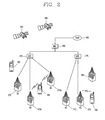
- a CDMA wireless communication system having a plurality of mobile terminals 100, a plurality of base stations (BSs) 270, base station controllers (BSCs) 275, and a mobile switching center (MSC) 280.
- the MSC 280 is configured to interface with a conventional Public Switch Telephone Network (PSTN) 290.
- PSTN Public Switch Telephone Network
- the MSC 280 is also configured to interface with the BSCs 275.
- the BSCs 275 are coupled to the base stations 270 via backhaul lines.
- the backhaul lines may be configured in accordance with any of several known interfaces including, for example, E1/T1, ATM, IP, PPP, Frame Relay, HDSL, ADSL, or xDSL.
- the plurality of BSCs 275 can be included in the system as shown in FIG. 2 .
- Each base station 270 may include one or more sectors, each sector having an omnidirectional antenna or an antenna pointed in a particular direction radially away from the base station 270. Alternatively, each sector may include two or more different antennas. Each base station 270 may be configured to support a plurality of frequency assignments, with each frequency assignment having a particular spectrum (e.g., 1.25 MHz, 5 MHz, etc.).
- the intersection of sector and frequency assignment may be referred to as a CDMA channel.
- the base stations 270 may also be referred to as Base Station Transceiver Subsystems (BTSs).
- BTSs Base Station Transceiver Subsystems
- the term "base station” may be used to refer collectively to a BSC 275, and one or more base stations 270.
- the base stations may also be denoted as "cell sites.” Alternatively, individual sectors of a given base station 270 may be referred to as cell sites.
- a broadcasting transmitter (BT) 295 transmits a broadcast signal to the mobile terminals 100 operating within the system.
- the broadcast receiving module 111 ( FIG. 1 ) is typically configured inside the mobile terminal 100 to receive broadcast signals transmitted by the BT 295.
- FIG. 2 further depicts several Global Positioning System (GPS) satellites 300.
- GPS Global Positioning System
- Such satellites 300 facilitate locating the position of at least one of plural mobile terminals 100.
- Two satellites are depicted in FIG. 2 , but it is understood that useful position information may be obtained with greater or fewer satellites than two satellites.
- the GPS module 115 FIG. 1 ) is typically configured to cooperate with the satellites 300 to obtain desired position information. It is to be appreciated that other types of position detection technology, (i.e., location technology that may be used in addition to or instead of GPS location technology) may alternatively be implemented. If desired, at least one of the GPS satellites 300 may alternatively or additionally be configured to provide satellite DMB transmissions.
- the base stations 270 receive sets of reverse-link signals from various mobile terminals 100.
- the mobile terminals 100 are engaging in calls, messaging, and executing other communications.
- Each reverse-link signal received by a given base station 270 is processed within that base station 270.
- the resulting data is forwarded to an associated BSC 275.
- the BSC 275 provides call resource allocation and mobility management functionality including the orchestration of soft handoffs between base stations 270.
- the BSCs 275 also route the received data to the MSC 280, which then provides additional routing services for interfacing with the PSTN 290.
- the PSTN 290 interfaces with the MSC 280
- the MSC 280 interfaces with the BSCs 275, which in turn control the base stations 270 to transmit sets of forward-link signals to the mobile terminals 100.
- the present disclosure provides a resolution compatibility mode (function) applicable to an LCD (HVGA) with lower resolution as well as LCDs (HD, XGA) with higher resolution than an LCD whose resolution is not a standard resolution (or reference resolution), without modification (change, variation) of an application, by virtually providing the standard resolution on the LCD without having the standard resolution.
- the standard resolution is a resolution designated in mobile terminals.
- WVGA resolution will be exemplarily described for the sake of explanation.
- the resolution compatibility mode may be set in a display setup menu of a user menu.
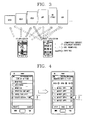
- FIG. 3 is a view showing compatibility or incompatibility of applications for LCD types.
- FIG. 4 is an exemplary view showing a process of setting a WVGA compatibility mode in a user menu.
- a list containing a plurality of compatibility modes and a plurality of market applications may be displayed on a screen.
- a specific compatibility mode for example, WVGA compatibility mode
- specific market applications for example, market App1 and market App4
- the WVGA compatibility mode may be automatically applied when the corresponding market applications are executed later.
- a compatibility mode setting item may not be displayed when a specific resolution is decided as a standard resolution.
- FIG. 5 is an exemplary view showing a process of displaying a market application on a screen when resolution of a market application is different from LCD resolution of the terminal according to the related art.
- a surface flinger of the application 10 may request LCD information (resolution and DPI) of a mobile terminal from an Android framework 20.
- the Android framework 20 is a module for executing Android-based applications, and may be stored in the memory 160.
- the controller 180 may control the Android framework 20.
- the Android framework 20 may inform the resolution of 720x 1280 and 320 DPI to the surface flinger of the application 10 because the current mobile terminal has HD LCD.
- the surface flinger of the application 10 may draw (output, display) an image of the specific application 10 on 720x 1280 window according to the corresponding LCD information (720x 1280 and 320 DPI).
- the drawn image may eventually be displayed on the display 151, namely, the HD LCD of the mobile terminal.
- the WVGA application may be displayed on the HD LCD with its layout broken.
- FIG. 6 is a view showing a resolution compatibility method in accordance with an exemplary embodiment of the present disclosure.
- a surface flinger of the application 10 requests LCD information (resolution and DPI) of a mobile terminal from an Android framework 20.
- the Android framework 20 may check whether or not a WVGA compatibility mode is in a set state, and if so, may inform to the surface flinger of the application 10 that the current LCD resolution of the mobile terminal is the WVGA resolution. That is, the Android framework 20 may provide 480x800 resolution and 240 DPI, other than 720x1280 resolution and 320 DPI, to the surface flinger of the application 10.
- the surface flinger of the application 10 may draw an image of the corresponding application on a window 30 of 480x800 other than 720x 1280. Afterwards, the image drawn on the window 30 may be enlarged on a canvas (not shown) by 1.5 times to be changed into HD resolution, finally being displayed on the display unit 151, namely, HD LCD of the mobile terminal. Therefore, even if the WVGA resolution of the market application 10 is different from the HD LCD resolution, the WVGA application may be normally displayed on the HD LCD with the layout unbroken.
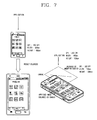
- FIG. 7 is a conceptual view of enlarging an application image according to a resolution compatibility mode in the resolution compatibility method.
- an application when an application is finally displayed on the display unit 151 in the related art, it may be enlarged or reduced based on LCD resolution.
- the application after displaying an application on a window based on virtual WVGA resolution, the application may be enlarged or reduced on a canvas based on actual LCD resolution, being displayed on the display unit 151.
- FIGS. 9A to 9C are views showing screen statuses upon applying the resolution compatibility method.
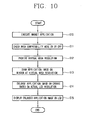
- FIG. 10 is a flowchart showing a resolution compatibility method in accordance with a first exemplary embodiment of the present disclosure.
- an application is stored in the memory 160
- an Android framework is included in the controller 180
- window and canvas are included in the display unit 151. Therefore, overall operations will be described based on the controller 180 and the display unit 151.
- the controller 180 may check a set state of a WVGA compatibility mode (S11). When it is checked that the WVGA compatibility mode is in a set state, the controller 180 may control the display unit 151 based on a virtual WVGA resolution provided from the Android framework (S12).
- the display unit 151 may then display an image of the corresponding application (i.e., virtual application image) on the window at the virtual WVGA resolution provided from the controller 180, and thereafter enlarge the application image on the canvas based on the current LCD resolution of the mobile terminal, finally displaying the enlarged application image (S13 to S15).
- an image of the corresponding application i.e., virtual application image
- the controller 180 may then display an image of the corresponding application (i.e., virtual application image) on the window at the virtual WVGA resolution provided from the controller 180, and thereafter enlarge the application image on the canvas based on the current LCD resolution of the mobile terminal, finally displaying the enlarged application image (S13 to S15).
- the present disclosure has illustrated the WVGA resolution as the virtual resolution for the sake of explanation.
- the present invention may not be limited to that, but may obtain the same effect even if HVGA, HD or XGA resolution is set as the virtual resolution.
- the present disclosure may provide a resolution compatibility mode (function) capable of being applied even to an LCD (HVGA) with lower resolution as well as an LCD (HD, XGA) with higher resolution than an LCD whose resolution is not a standard (reference) resolution, without modification of an application, by automatically providing the standard resolution on the LCD without having the standard resolution according to a user's usage pattern or an application version.
- a resolution compatibility mode function capable of being applied even to an LCD (HVGA) with lower resolution as well as an LCD (HD, XGA) with higher resolution than an LCD whose resolution is not a standard (reference) resolution, without modification of an application, by automatically providing the standard resolution on the LCD without having the standard resolution according to a user's usage pattern or an application version.
- FIG. 8 shows an example that an application with a specific resolution is displayed on an LCD with a different resolution according to setting of a resolution compatibility mode.
- an Off state of the resolution compatibility mode (e.g., WVGA compatibility mode)
- WVGA compatibility mode when an application with WVGA resolution is displayed on an LCD having a different resolution, namely, on one of HVGA, HD and XGA, the application screen may be reduced by being inclined in a specific direction (e.g., for HD and XGA) or overlapped or cut off (e.g., for HVGA), namely, a kind of screen breaking may be caused.
- the application when a user sets the resolution compatibility mode (e.g., from “Off” to “On"), the application may be displayed as like being displayed on a WVGA LCD, irrespective of the size (resolution) of the LCD, on which the application is currently displayed (i.e., the screen breaking is compensated for).
- the resolution compatibility mode e.g., from “Off” to "On
- the application may be displayed as like being displayed on a WVGA LCD, irrespective of the size (resolution) of the LCD, on which the application is currently displayed (i.e., the screen breaking is compensated for).
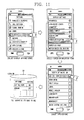
- FIG. 11 shows an example of setting a resolution compatibility mode through a display settings menu.
- a user may select a display settings menu from a settings menu, and select a screen optimization item from the selected display settings menu.
- a list containing a plurality of applications (downloaded from the market) is displayed, accordingly, the user may select a desired application to set a resolution compatibility mode therefor.
- Information related to the application for which the resolution compatibility mode has been set may be stored in a logical database (DB) 50.
- DB logical database
- the application with the WVGA resolution may be normally displayed even on an LCD with the HD resolution.
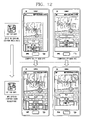
- FIG. 12 shows an example of applying a resolution compatibility mode according to an application version.
- an existing version of an application which supports only a specific resolution may be normally displayed to some degree only when the compatibility mode is on. That is, the application may be displayed so enough for the user to view it without inconvenience although not using an entire LCD screen.
- recently released applications are upgraded to support various resolutions, so they may be normally displayed even without setting the resolution compatibility mode.
- a displayed state on a screen may rather get worse than the mode not applied. In this case, the user may rather suffer from releasing the resolution compatibility mode.
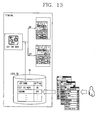
- FIG. 13 shows overall operations of adjusting resolution of an application according to a resolution compatibility mode set by a user.
- a user sets a resolution compatibility mode with respect to desired applications through menu setting, and the set information may be stored in the local DB 50. Accordingly, the controller 180 may display each of applications downloaded from an Android market by adjusting their resolutions according to a mode set state (On or Off) stored in the local DB 50.
- a mode set state On or Off
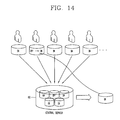
- FIG. 14 is a conceptual view of setting a resolution compatibility mode according to an exemplary embodiment.
- a set state of the resolution compatibility mode may depend on users. For example, some users may set the resolution compatibility mode with respect to the corresponding application to "On” and other users may set it to "Off".
- the preset disclosure may be configured such that a central server 60 collects and analyzes the set state of the resolution compatibility mode by each of many users, obtains an optimal set value of the resolution compatibility mode from the analysis result, advises the obtained optimal set value to each user, and provides a guide value to the users to conveniently set the resolution compatibility mode.
- the central server 60 may obtain the optimal set value of the resolution compatibility mode, overall taking the following various factors into account.
- a method using a value set by a plurality of users is a method for setting a value ("On” or "Off") (state) of the resolution compatibility mode, which is set by the most users with respect to the same application, as an optimal set value.
- a set state of the resolution compatibility mode is collected from 100 mobile terminals for analysis.
- the central server 60 sets the optimal set value for the resolution compatibility mode to "On", storing the set value in a DB (not shown).
- a version of an application is checked based on a name of the application, and the optimal set value is set to "On” if the version is a previous version whereas being set to "Off” if it is the latest version.
- a method for setting an optimal set value according to a user-based weight is to set the optimal set value by giving a weight to a value set by a credible user (e.g., manufacturer, power user, etc.) to.
- This method may be employed for the method using the value set by the plurality of users.
- a weight is given more to the latest set value. This method may also be employed for the method using the value set by the plurality of users.
- the central server 60 may set the optimal set value of the resolution compatibility mode with respect to each application, storing it in a DB (not shown).
- the resolution compatibility mode of the corresponding application is in a state set to "Optimal".
- Optimal indicates that the optimal set value received from the central server 60 will be used as a set value with respect to the resolution compatibility mode.
- the controller 180 of the user terminal may request the optimal set value for the corresponding application from the central server 60, and store the requested value in the local DB 50.
- the request and response for the optimal set value between the controller 180 and the central server 60 may be performed as background.
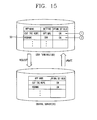
- FIG. 15 shows an example of transferring an optimal set value for a resolution compatibility mode between a user terminal and a central server.
- a resolution compatibility mode for the corresponding application may be set to three states of On, Off and Optimal. That is, when the new application is installed, the resolution compatibility mode is basically in a state set to "Optimal” as indicated with a reference numeral 1. Hence, the controller 180 may work the resolution compatibility mode in the "On" state based on the optimal set value received from the central server 60.
- the controller 180 may work the resolution compatibility mode in the "Off” state according to a user-set value with ignoring the optimal set value.
- the central server 60 stores optimal set values for a lot of applications, but a user terminal merely needs a set value for an application actually installed therein.
- the controller 180 of the user terminal may request for updating of optimal set values by transmitting an update list to the central server 60, and in turn, the central server 60 may transfer only optimal set values for the requested applications based on the updated list to each user terminal.
- the controller 180 may receive the optimal set value from the central server 60 upon initial installation of the application or periodically, and update the optimal set value stored in the local DB 50.
- the controller 180 may display a specific message for a user to determine whether or not to update the optimal set value.
- This mechanism of advising (recommending) the optimal set value may be applicable even to general set values without a limit to "resolution compatibility mode".
- the central server may collect information related to a mobile terminal, for example, an idle screen or ringtone usage pattern from each of plural users to manage popular idle screens or ringtones as data, thereby recommending them to a user in response to a request of the controller 180 when the user initially purchases a terminal.
- the controller 180 may request for user approval by outputting a message for checking whether or not to install the corresponding popular idle screen or ringtone.
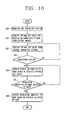
- FIG. 16 is a flowchart showing a resolution compatibility method in accordance with a second exemplary embodiment.
- a user may download a desired application from a market (e.g., market application) for installation (S20). Since a resolution compatibility mode for the downloaded application is in a state set to "Optimal", the controller 180 may request an optimal set value for the resolution compatibility mode from the central server 60 (S21). Then, the controller 180 may receive the optimal set value from the central server 60 and store the received optimal set value in a local server 50 of the memory 160 (S22). The request and reception of the optimal set value may be executed as a background.
- a desired application from a market (e.g., market application) for installation (S20). Since a resolution compatibility mode for the downloaded application is in a state set to "Optimal”, the controller 180 may request an optimal set value for the resolution compatibility mode from the central server 60 (S21). Then, the controller 180 may receive the optimal set value from the central server 60 and store the received optimal set value in a local server 50 of the memory 160 (S22). The request and reception of the optimal set value may be executed as a background
- the controller 180 may execute the resolution compatibility mode based on the stored optimal set value, displaying the market application on the display unit 151 (S23, S24).
- the controller 180 may change "Optimal" into a value (On or Off) set by the user, working the resolution compatibility mode based on the set value selected by the user other than the optimal set value (S26).
- controller 180 may periodically provide a list of set values stored in the local DB 50 to the central server 60, updating the set values.
- the application image when resolution of a market application is different from LCD resolution, the application image may be displayed on a window based on WVGA resolution and then enlarged and displayed based on an actual LCD resolution. This may provide an effect of displaying the application image with the same figure as displayed on the WVGA LCD and text and lines more clearly irrespective of an actual LCD size.
- the present disclosure may provide a user with a set value for a resolution compatibility mode of a market application or a set value required to operate a mobile terminal at a specific time point (upon downloading or purchasing), based on usage patterns of a plurality of users and versions of applications. This may allow the user to conveniently execute resolution matching or set a desired function (e.g., popular idle screen or ringtone).
- a desired function e.g., popular idle screen or ringtone
- the method can be implemented as computer-readable codes in a program-recorded medium.
- the computer-readable medium may include all types of recording devices each storing data readable by a computer system. Examples of such computer-readable media may include ROM, RAM, CD-ROM, magnetic tape, floppy disk, optical data storage element and the like. Also, the computer-readable medium may also be implemented as a format of carrier wave (e.g., transmission via an Internet).
- the computer may include the controller 180 of the mobile terminal.
Landscapes
- Engineering & Computer Science (AREA)
- Chemical & Material Sciences (AREA)
- Crystallography & Structural Chemistry (AREA)
- Physics & Mathematics (AREA)
- Computer Hardware Design (AREA)
- General Physics & Mathematics (AREA)
- Theoretical Computer Science (AREA)
- Controls And Circuits For Display Device (AREA)
- Telephone Function (AREA)
Applications Claiming Priority (2)
| Application Number | Priority Date | Filing Date | Title |
|---|---|---|---|
| KR1020110096580A KR101415770B1 (ko) | 2011-09-23 | 2011-09-23 | 이동 단말기 및 그의 lcd해상도 호환 방법 |
| KR1020120056271A KR101973991B1 (ko) | 2012-05-25 | 2012-05-25 | 이동 단말기 및 그의 해상도 호환 모드 설정방법 |
Publications (2)
| Publication Number | Publication Date |
|---|---|
| EP2573755A2 true EP2573755A2 (de) | 2013-03-27 |
| EP2573755A3 EP2573755A3 (de) | 2013-06-19 |
Family
ID=47290517
Family Applications (1)
| Application Number | Title | Priority Date | Filing Date |
|---|---|---|---|
| EP12006646.9A Ceased EP2573755A3 (de) | 2011-09-23 | 2012-09-21 | Mobiles Endgerät und Auflösungskompatibilitätsverfahren dafür |
Country Status (2)
| Country | Link |
|---|---|
| US (1) | US9401117B2 (de) |
| EP (1) | EP2573755A3 (de) |
Cited By (2)
| Publication number | Priority date | Publication date | Assignee | Title |
|---|---|---|---|---|
| EP2846242A1 (de) * | 2013-08-27 | 2015-03-11 | Samsung Electronics Co., Ltd | Verfahren zur Einstellung der Vergrößerung des Bildschirms einer elektronischen Vorrichtung, computerlesbares Speichermedium und elektronische Vorrichtung |
| CN106453914A (zh) * | 2016-10-31 | 2017-02-22 | 努比亚技术有限公司 | 一种信息处理方法及终端 |
Families Citing this family (7)
| Publication number | Priority date | Publication date | Assignee | Title |
|---|---|---|---|---|
| JP5878938B2 (ja) * | 2014-01-29 | 2016-03-08 | 株式会社ソニー・コンピュータエンタテインメント | 配信システム、配信方法、配信プログラム |
| US20150221286A1 (en) * | 2014-02-05 | 2015-08-06 | Sony Corporation | Content controlled display mode switching |
| JP1521556S (de) * | 2014-08-19 | 2015-04-13 | ||
| US9635638B1 (en) * | 2015-12-10 | 2017-04-25 | Lenovo Enterprise Solutions (Singapore) Pte. Ltd. | Recommending notification sounds that promote user acknowledgment to notifications |
| US10019309B2 (en) * | 2015-12-28 | 2018-07-10 | International Business Machines Corporation | Analytics-based dynamic adaptation of client-server mobile applications |
| JP6884797B2 (ja) * | 2016-03-31 | 2021-06-09 | 華為技術有限公司Huawei Technologies Co.,Ltd. | アプリケーションプログラム処理方法及び端末デバイス |
| US10748244B2 (en) * | 2017-06-09 | 2020-08-18 | Samsung Electronics Co., Ltd. | Systems and methods for stereo content detection |
Family Cites Families (11)
| Publication number | Priority date | Publication date | Assignee | Title |
|---|---|---|---|---|
| US5748866A (en) * | 1994-06-30 | 1998-05-05 | International Business Machines Corporation | Virtual display adapters using a digital signal processing to reformat different virtual displays into a common format and display |
| US20030063120A1 (en) * | 2001-09-28 | 2003-04-03 | Wong Hoi Lee Candy | Scalable graphical user interface architecture |
| JP2004336317A (ja) * | 2003-05-07 | 2004-11-25 | Sony Corp | 映像処理装置 |
| TWI271692B (en) * | 2003-07-26 | 2007-01-21 | Lg Electronics Inc | Apparatus and method for controlling brightness level of display |
| US8607287B2 (en) * | 2005-12-29 | 2013-12-10 | United Video Properties, Inc. | Interactive media guidance system having multiple devices |
| US8117554B1 (en) * | 2006-04-25 | 2012-02-14 | Parallels Holdings, Ltd. | Seamless integration of non-native widgets and windows with dynamically scalable resolution into native operating system |
| JP5104187B2 (ja) * | 2007-10-15 | 2012-12-19 | ソニー株式会社 | 映像音声設定情報管理装置、および、その処理方法ならびにプログラム |
| KR100989550B1 (ko) | 2007-12-31 | 2010-10-25 | (주)한국교육콘텐츠정보 | 인터넷상의 고해상도 인쇄출판장치 및 그 방법 |
| KR101000106B1 (ko) | 2008-11-26 | 2010-12-09 | 주식회사 케이티 | 이동 단말에서의 대기 화면 제공 방법 |
| KR20110032678A (ko) | 2009-09-23 | 2011-03-30 | 삼성전자주식회사 | 디스플레이장치, 시스템 및 그 해상도 제어방법 |
| US8516308B1 (en) * | 2011-03-09 | 2013-08-20 | Amazon Technologies, Inc. | Crash based incompatibility prediction for classes of mobile devices crash data |
-
2012
- 2012-09-21 EP EP12006646.9A patent/EP2573755A3/de not_active Ceased
- 2012-09-21 US US13/624,698 patent/US9401117B2/en not_active Expired - Fee Related
Non-Patent Citations (1)
| Title |
|---|
| "Screen Compatibility Mode | Android Developers", 20 July 2011 (2011-07-20), Retrieved from the Internet <URL:http://web.archive.org/web/20110720093730/http://developer.android.com/guide/practices/screen-compat-mode.html> [retrieved on 20170130] * |
Cited By (3)
| Publication number | Priority date | Publication date | Assignee | Title |
|---|---|---|---|---|
| EP2846242A1 (de) * | 2013-08-27 | 2015-03-11 | Samsung Electronics Co., Ltd | Verfahren zur Einstellung der Vergrößerung des Bildschirms einer elektronischen Vorrichtung, computerlesbares Speichermedium und elektronische Vorrichtung |
| US9633412B2 (en) | 2013-08-27 | 2017-04-25 | Samsung Electronics Co., Ltd. | Method of adjusting screen magnification of electronic device, machine-readable storage medium, and electronic device |
| CN106453914A (zh) * | 2016-10-31 | 2017-02-22 | 努比亚技术有限公司 | 一种信息处理方法及终端 |
Also Published As
| Publication number | Publication date |
|---|---|
| US9401117B2 (en) | 2016-07-26 |
| US20130076750A1 (en) | 2013-03-28 |
| EP2573755A3 (de) | 2013-06-19 |
Similar Documents
| Publication | Publication Date | Title |
|---|---|---|
| US9401117B2 (en) | Mobile terminal and resolution compatibility method thereof | |
| US9785325B2 (en) | Mobile terminal and application icon moving method thereof | |
| US9304208B2 (en) | Mobile terminal and GPS engine control method thereof | |
| US8171427B2 (en) | Mobile terminal and controlling method thereof | |
| EP2447819B1 (de) | Mobiles Endgerät und Steuerungsverfahren dafür | |
| US9338749B2 (en) | Mobile terminal and battery power saving mode switching method thereof | |
| EP2116927B1 (de) | Endgerät und Steuerungsverfahren dafür | |
| US8907899B2 (en) | Electronic device with touch device and method of executing functions thereof according to relative touch positions | |
| US8126431B2 (en) | Apparatus and method for setting communication service blocking mode in mobile terminal | |
| US20140040120A1 (en) | Mobile terminal and method of performing nfc payment using the mobile terminal | |
| US9197737B2 (en) | Mobile terminal and vibration power control method therof | |
| CN105426097B (zh) | 一种分屏大小实时调整方法及分屏装置 | |
| EP2602700A1 (de) | Mobiles Endgerät und Multitaskingverfahren dafür | |
| US9203948B2 (en) | Mobile terminal and controlling method thereof | |
| CN106559579B (zh) | 移动终端和cpu/gpu调度参数更新方法 | |
| CN105117241A (zh) | 固件升级方法及装置 | |
| WO2016155431A1 (zh) | 终端及其触控操作方法和装置、存储介质 | |
| CN106528576A (zh) | 页面搜索方法、终端及系统 | |
| CN106445830A (zh) | 应用程序运行环境检测方法及移动终端 | |
| KR101984091B1 (ko) | 이동 단말기 및 그의 어플리케이션에 대한 배터리 소모량 정보 제공방법 | |
| CN104834473A (zh) | 输入的方法及装置 | |
| KR101415770B1 (ko) | 이동 단말기 및 그의 lcd해상도 호환 방법 | |
| CN106033330B (zh) | 一种显示方法和终端设备 | |
| CN106650413A (zh) | 确定Root权限的方法及移动终端 | |
| KR101973991B1 (ko) | 이동 단말기 및 그의 해상도 호환 모드 설정방법 |
Legal Events
| Date | Code | Title | Description |
|---|---|---|---|
| PUAI | Public reference made under article 153(3) epc to a published international application that has entered the european phase |
Free format text: ORIGINAL CODE: 0009012 |
|
| AK | Designated contracting states |
Kind code of ref document: A2 Designated state(s): AL AT BE BG CH CY CZ DE DK EE ES FI FR GB GR HR HU IE IS IT LI LT LU LV MC MK MT NL NO PL PT RO RS SE SI SK SM TR |
|
| AX | Request for extension of the european patent |
Extension state: BA ME |
|
| PUAL | Search report despatched |
Free format text: ORIGINAL CODE: 0009013 |
|
| AK | Designated contracting states |
Kind code of ref document: A3 Designated state(s): AL AT BE BG CH CY CZ DE DK EE ES FI FR GB GR HR HU IE IS IT LI LT LU LV MC MK MT NL NO PL PT RO RS SE SI SK SM TR |
|
| AX | Request for extension of the european patent |
Extension state: BA ME |
|
| RIC1 | Information provided on ipc code assigned before grant |
Ipc: G09G 3/36 20060101AFI20130513BHEP |
|
| 17P | Request for examination filed |
Effective date: 20131218 |
|
| RBV | Designated contracting states (corrected) |
Designated state(s): AL AT BE BG CH CY CZ DE DK EE ES FI FR GB GR HR HU IE IS IT LI LT LU LV MC MK MT NL NO PL PT RO RS SE SI SK SM TR |
|
| 17Q | First examination report despatched |
Effective date: 20160113 |
|
| STAA | Information on the status of an ep patent application or granted ep patent |
Free format text: STATUS: THE APPLICATION HAS BEEN REFUSED |
|
| 18R | Application refused |
Effective date: 20170719 |