EP2566180B1 - Screening management system, screening management method and program product - Google Patents
Screening management system, screening management method and program product Download PDFInfo
- Publication number
- EP2566180B1 EP2566180B1 EP12175516.9A EP12175516A EP2566180B1 EP 2566180 B1 EP2566180 B1 EP 2566180B1 EP 12175516 A EP12175516 A EP 12175516A EP 2566180 B1 EP2566180 B1 EP 2566180B1
- Authority
- EP
- European Patent Office
- Prior art keywords
- screening
- playlist
- video content
- screened
- video
- Prior art date
- Legal status (The legal status is an assumption and is not a legal conclusion. Google has not performed a legal analysis and makes no representation as to the accuracy of the status listed.)
- Not-in-force
Links
Images




Classifications
-
- G—PHYSICS
- G06—COMPUTING OR CALCULATING; COUNTING
- G06Q—INFORMATION AND COMMUNICATION TECHNOLOGY [ICT] SPECIALLY ADAPTED FOR ADMINISTRATIVE, COMMERCIAL, FINANCIAL, MANAGERIAL OR SUPERVISORY PURPOSES; SYSTEMS OR METHODS SPECIALLY ADAPTED FOR ADMINISTRATIVE, COMMERCIAL, FINANCIAL, MANAGERIAL OR SUPERVISORY PURPOSES, NOT OTHERWISE PROVIDED FOR
- G06Q50/00—Information and communication technology [ICT] specially adapted for implementation of business processes of specific business sectors, e.g. utilities or tourism
- G06Q50/10—Services
-
- H—ELECTRICITY
- H04—ELECTRIC COMMUNICATION TECHNIQUE
- H04N—PICTORIAL COMMUNICATION, e.g. TELEVISION
- H04N21/00—Selective content distribution, e.g. interactive television or video on demand [VOD]
- H04N21/40—Client devices specifically adapted for the reception of or interaction with content, e.g. set-top-box [STB]; Operations thereof
- H04N21/47—End-user applications
- H04N21/482—End-user interface for programme selection
- H04N21/4825—End-user interface for programme selection using a list of items to be played back in a given order, e.g. playlists
-
- H—ELECTRICITY
- H04—ELECTRIC COMMUNICATION TECHNIQUE
- H04N—PICTORIAL COMMUNICATION, e.g. TELEVISION
- H04N21/00—Selective content distribution, e.g. interactive television or video on demand [VOD]
- H04N21/40—Client devices specifically adapted for the reception of or interaction with content, e.g. set-top-box [STB]; Operations thereof
- H04N21/41—Structure of client; Structure of client peripherals
- H04N21/4104—Peripherals receiving signals from specially adapted client devices
- H04N21/4122—Peripherals receiving signals from specially adapted client devices additional display device, e.g. video projector
-
- H—ELECTRICITY
- H04—ELECTRIC COMMUNICATION TECHNIQUE
- H04N—PICTORIAL COMMUNICATION, e.g. TELEVISION
- H04N21/00—Selective content distribution, e.g. interactive television or video on demand [VOD]
- H04N21/40—Client devices specifically adapted for the reception of or interaction with content, e.g. set-top-box [STB]; Operations thereof
- H04N21/41—Structure of client; Structure of client peripherals
- H04N21/414—Specialised client platforms, e.g. receiver in car or embedded in a mobile appliance
- H04N21/41415—Specialised client platforms, e.g. receiver in car or embedded in a mobile appliance involving a public display, viewable by several users in a public space outside their home, e.g. movie theatre, information kiosk
-
- H—ELECTRICITY
- H04—ELECTRIC COMMUNICATION TECHNIQUE
- H04N—PICTORIAL COMMUNICATION, e.g. TELEVISION
- H04N21/00—Selective content distribution, e.g. interactive television or video on demand [VOD]
- H04N21/80—Generation or processing of content or additional data by content creator independently of the distribution process; Content per se
- H04N21/85—Assembly of content; Generation of multimedia applications
- H04N21/854—Content authoring
- H04N21/8549—Creating video summaries, e.g. movie trailer
-
- H—ELECTRICITY
- H04—ELECTRIC COMMUNICATION TECHNIQUE
- H04N—PICTORIAL COMMUNICATION, e.g. TELEVISION
- H04N7/00—Television systems
- H04N7/16—Analogue secrecy systems; Analogue subscription systems
- H04N7/173—Analogue secrecy systems; Analogue subscription systems with two-way working, e.g. subscriber sending a programme selection signal
Definitions
- the present disclosure relates to a screening management system and a screening management method that manage screening of video content in a screening place such as a movie theater, and a program product that executes the screening management method.
- a storage unit called a video content accumulation library is prepared in the movie theater, and content of a movie main story, content of a trailer, content called a pre-show such as an advertisement, and the like are accumulated.
- a playlist of video contents is created based on a schedule for screening each piece of content in the movie theater, and screening of the accumulated contents is performed based on the playlist.
- FIG. 7 is a diagram showing an example of screening management using a playlist of the related art.
- a movie theater having two screens is assumed.
- On a first screen pre-show a, trailer b, and main story c are screened from 10:00 to 12:00. Screening of the same combination is performed from 13:00 to 15:00 and from 17:00 to 19:00. In this case, each screening is shown in playlist 1.
- pre-show a is screened at the time of screening from 10:00
- pre-show f is screened at the time of screening from 13:00
- pre-show g is screened at the time of screening from 17:00.
- the playlist is data indicating contents screened in a certain order.
- the same movie is continuously and repeatedly screened every day in a determined period, but the pre-show such as an advertisement is not related to the main story and is likely to be changed into other content. Even when there is replacement of such advertisement, update of the playlist is performed.
- FIG. 7 the example in which the movie theater has two screens is shown.
- a number of movie theaters having three or more screens continues to increase.
- the playlists are updated each time there is replacement of, for example, advertisements. Accordingly, in a screening management system of the related art, it is necessary to prepare a large number of playlists and movie screening management is complicated.
- US 2002/0122052 discloses a method of building a playlist for a digital cinema.
- a digitised version of a film is distributed to a central hub, and a theatre manager controls the loading of the film and the building of a playlist.
- a playlist builder interfaces with a compatibility checker to ensure o mismatching.
- the final playlist is configured to interface with a scheduler to allow presentation at the auditorium at a designated time.
- US2005/0015464 discloses a network video system that provides centralised control over the creation of a playlist for remotely located video displays.
- EP1708504 discloses a method for centrally organising the presentation of digitial advertising sequences.
- Preferred embodiments seek to provide a screening management system, a screening management method and a program product capable of partially changing video content with ease.
- a screening management system of the present disclosure includes a content accumulation unit for accumulating a plurality of video contents to be screened. Further, the screening management system includes a playlist management unit for managing a playlist defining an order of screening the video contents accumulated in the content accumulation unit and managing a file indicating one or a plurality of video contents to be screened in a specific place in the playlist. Further, the screening management system includes a schedule management unit for managing the playlist according to a screening time.
- the playlist is a list in which a plurality of frames are arranged, video content to be screened is indicated by a first frame among the plurality of frames, and the file is indicated by a second frame among the plurality of frames.
- a screening management method of the present disclosure includes accumulating a plurality of video contents to be screened; acquiring a playlist defining an order of screening the accumulated video contents; and managing the accumulated video contents and a file having one or a plurality of video contents of the video contents.
- the screening management method includes executing screening of video contents in an order indicated in the playlist according to a screening time.
- a list in which a plurality of frames are arranged is created as the playlist of this case, video content to be screened is indicated by a first frame among the plurality of frames, and the file is indicated by a second frame among the plurality of frames.
- a program product of the present disclosure includes processes of: accumulating a plurality of video contents to be screened; and acquiring a playlist defining an order of screening the accumulated video contents.
- the program product includes a process of managing the accumulated video contents and a file having one or a plurality of video contents of the video contents, and executing screening of video contents in an order indicated in the playlist according to a screening time.
- a list in which a plurality of frames are arranged is created as the playlist acquired through the process of acquiring the playlist.
- Video content to be screened is indicated by a first frame among the plurality of frames, and the file is indicated by a second frame among the plurality of frames.
- a part of video content to be screened with one playlist can be replaced with other video content by preparing a plurality of files corresponding to the second frame or updating the file.
- a part of video content to be screened with one playlist can be replaced with other video content.
- fine screening control such as replacement of partial content according to a screening time or a screening form, without increasing the number of playlists.
- replacement of the video of the pre-show can be performed by creating one playlist for screening video content of one main story, preparing a plurality of files corresponding to a pre-show part in the playlist, and changing the file corresponding to the pre-show part for every screening time.
- the movie theater of this example includes three screens 213, 223 and 233, as shown in FIG. 1 . Screening of a movie or the like is individually performed on each of the screens 213, 223 and 233 according to a playlist set for each screen.
- the movie theater includes a screening management system 100 that is a system for controlling all screening on the three screens, and the screening management system 100 performs screening management.
- the screening management system 100 includes an accumulation unit 110 for performing large capacity data storage.
- the accumulation unit 110 stores data of content of a movie supplied from a movie content distributor 91, data of content of a pre-show supplied from a pre-show distributor 92, or the like.
- Content of a main story of a movie, as well as content of a trailer of the movie is contained in the data of the content supplied from the movie content distributor 91.
- the content of the trailer of the movie may be supplied from the pre-show distributor 92.
- the accumulation unit 110 includes, for example, a plurality of hard disk drive devices.
- the screening management system 100 sends the accumulated data of the content to a screen management system prepared for each screen.
- a first screen management system 210 for controlling screening on the first screen 213, a second screen management system 220 for controlling screening on the second screen 223, and a third screen management system 230 for controlling screening on the third screen 233 are included.
- data of video content to be screened on the first screen 213 is sent to the first screen management system 210 according to a screening schedule of the first screen set in the screening management system 100.
- the received data of the video content is accumulated in an accumulation unit 211 in the system.
- a video projector 212 for the first screen projects the video to the screen 213 and executes screening.
- data of video content to be screened on the second screen 223 is sent to the second screen management system 220 according to a screening schedule for the second screen set in the screening management system 100.
- the received data of the video content is accumulated in an accumulation unit 221 in the system.
- a video projector 222 for the second screen projects the video to the second screen 223 and executes screening.
- data of video content to be screened on the third screen 233 is sent to the third screen management system 230 according to a screening schedule for the third screen set in the screening management system 100.
- the received data of the video content is accumulated in an accumulation unit 231 in the system.
- a video projector 232 for the third screen projects the video to the third screen 233 and executes screening.
- the movie content supplied from the movie content distributor 91 or the pre-show content supplied from the pre-show distributor 92 is supplied as encrypted data to the screening management system 100.
- This encrypted data is processed in an encrypted state in the screening management system 100 and sent to each of the screen management systems 210, 220 and 230. Also, decoding from encryption is performed in the screen management systems 210, 220 and 230.
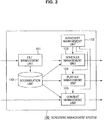
- the screening management system 100 includes a file management unit 101, an authority management unit 102, a schedule management unit 103, a playlist management unit 104, and a content management unit 105.
- the file management unit 101 receives data such as a screening schedule or a playlist from the outside, and accumulates the received data in the accumulation unit 110. Further, the accumulation unit 110 accumulates video content (movie main story, trailer, and pre-show). Further, the video content may be received via a communication line from, for example, a distributor. Alternatively, for example, a medium such as a hard disk having the content received from the distributor recorded thereon may be mounted on the accumulation unit 110 and the content may be accumulated.
- the schedule management unit 103 reads data of the schedule accumulated in the accumulation unit 110.
- the schedule management unit 103 performs screening management according to the read schedule.
- the playlist management unit 104 reads data of a playlist indicated by the schedule from the accumulation unit 110 and sends the data to the schedule management unit 103 so that a playlist executed by the schedule is determined.
- the content management unit 105 reads the video content accumulated in the accumulation unit 110 and sends the read video content to the indicated screen management system 210, 220 or 230.
- the authority management unit 102 determines authority of a manipulating person and the process is performed when corresponding management can be performed with the determined authority. For example, when a person having authority for the screening schedule makes a manipulation, schedule creation or modification in the schedule management unit 103 is permitted by the authority management unit 102. Further, for example, when the authority management unit 102 determines that authority of the manipulating person is authority to perform only update or creation of data on a pre-show (e.g., data of pack that will be described later), the corresponding manipulation is permitted by the authority management unit 102.
- a pre-show e.g., data of pack that will be described later
- FIG. 3 is an example of data managed by the schedule management unit 103 and the playlist management unit 104.
- the schedule management unit 103 has data of a schedule for each screening time of each screen.
- the data of each schedule contains a playlist number, and data of a frame-pack correspondence table.
- the frame-pack correspondence table is data indicating a correspondence between a frame in the playlist and a file called a pack.
- a movie of a main story is the same between the screening times, and only videos of the pre-shows to be screened before the movie of the main story is screened are different between the respective screening times.
- the playlist having the same number is designated in the schedule for each screening time.
- content corresponding to the pre-show is indicated by the data of the frame-pack correspondence table.
- the playlist having the same number is designated in each screening time.
- the playlist number is changed.
- the video of the pre-show is designated by the data of the frame-pack correspondence table.
- a playlist PL1 to be executed is indicated by the schedule.
- the frame-pack correspondence table shows that frame F11 corresponds to pack PK11 and frame F14 corresponds to pack PK12.
- a playlist PL1 to be executed is indicated by the schedule.
- This playlist PL1 is the same as the playlist for the screening time from 10:00 to 12:00 described above.
- a frame-pack correspondence table shows that frame F11 corresponds to a pack PK13 and frame F14 corresponds to pack PK12.
- Each playlist is shown as a set of a plurality of frames.
- playlist PL1 includes four frames F11, F12, F13 and F14.
- first frame F11 among the four frames F11, F12, F13 and F14, video content of a pre-show such as an advertisement video is shown.
- next frame F12 video content of a trailer is shown
- next frame F13 video content of a main story is shown.
- last frame F14 video content to be screened after the main story ends is shown.
- the screening is performed in order of the video content of frame F11, the video content of frame F12, the video content of frame F13, and the video content of frame F14.
- a structure using four such frames is one example.
- frame F14 corresponding to the video content to be screened after the main story ends may be omitted.
- a first half and a second half of the main story may be indicated as individual video contents by different frames.
- data indicating the video contents may be arranged in all the frames as in the above frame structure.
- the data indicating the video content is arranged in only some frames (the first frame).
- data indicating the video content is not arranged in the other frames (the second frame), which become so-called empty frames.
- each piece of video content is indicated by data in each frame.
- playlist PL1 shown in FIG. 3 content A and content B are indicated by frame F12, and content C is indicated by frame F13.
- contents A and B are the video contents of the trailers and content C is the video content of the main story.
- frame F11 indicating the video content of the pre-show and frame F14 indicating video content to be screened after the main story ends are empty frames in which there is no data indicating video content.
- the playlist management unit 104 manages the frame-pack correspondence table as well as such playlists.
- pack PK11 is shown as including video content U, video content V, and video content W.
- pack PK12 is shown as including video content X and video content Y.
- pack PK13 is shown as including video content V and video content Z.
- a plurality of video contents are arranged in one pack, but only one video content may be arranged in one pack.
- the pack corresponds to a file having a plurality of or one video content.
- the actual video content is not in the pack but is stored in the accumulation unit 110.
- content of the frame-pack correspondence table managed by the schedule management unit 103 and the pack managed by the playlist management unit 104 is managed by the authority management unit 102 to be updated or created only when a person having specific authority makes a manipulation.
- manipulation authority is assigned to only the pre-show distributor and not to a worker of the movie theater.
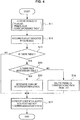
- one schedule in the schedule management unit 103 is acquired (step S11).
- the playlisf number and the frame-pack correspondence table added to the schedule are determined.
- the playlist is acquired from the playlist management unit 104 based on the playlist number added to the schedule (step S12). Further, a determination is made as to whether the schedule acquired in step S11 is data to which the frame-pack correspondence table has been added (step S13). If it is determined that the frame-pack correspondence table has been added, a determination is made as to whether there is a pack indicated by the frame-pack correspondence table (step S14).
- step S 15 video content in the pack is determined (step S15). Also, video contents indicated by the frames in the playlist and the video contents in the pack are arranged in a frame order, and the video contents are distributed to the screen management system corresponding to the schedule (step S 17). Further, in step S16, only a playback order of the video contents may be sent to the screen management system and then the corresponding video content, i.e., the video content indicated by the playback order, may be acquired by the screen management system.
- step S13 if it is determined in step S13 that the frame-pack correspondence table is not added to the playlist, the process proceeds to step S17. Further, if it is determined in step S14 that there is no pack indicated by the frame-pack correspondence table, the process also proceeds to step S17.
- step S 17 only the video contents indicated by the frames in the playlist are arranged in a frame order and the video contents are distributed to the screen management system corresponding to the schedule.
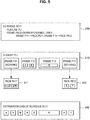
- schedule SC11 in which screening is performed from 10:00 on the first screen 213 is shown.
- information in which playlist PL1 is set and a frame-pack correspondence table shows that frame F11 is related to pack PK11 and frame F14 is related to pack PK12 is acquired as information 300.
- playlist PL1 is shown as including frames F11, F12, F13 and F14.
- frame F11 is a frame of a part corresponding to a pre-show
- frame F12 is a frame of a part corresponding to a trailer
- frame F13 is a frame corresponding to a main story
- frame F 14 is a frame of a part to be screened after the main story ends.
- Video content A and video content B are shown in frame F12 among the frames, and video content C is shown in frame F13. Further, frame F11 and frame F14 are empty frames in which video content is not shown.
- information 311 of pack PK11 corresponding to frame F11 and information 312 of pack PK12 corresponding to frame F14 are acquired based on the frame-pack correspondence table. Also, video content in each pack is video content corresponding to the empty frame.
- the video content of frame F11 includes video content U, video content V and video content W shown in pack PK11. Further, the video content of frame F14 includes video content X and video content Y shown in pack PK12.
- video contents to be screened in the schedule SC11 are video contents U, V, W, A, B, C, X and Y arranged in a frame order, as shown in information 320 in FIG. 5 .
- the video content is distributed from the screening management system 100 to the first screen management system 210.
- an order of screening the video contents in the information 320 is sent from the screening management system 100 to the first screen management system 210, and the first screen management system 210 acquires the corresponding video contents.
- FIG. 5 includes all the packs that are shown in the frame-pack correspondence table. On the other hand, there may be no data of the indicated pack in the determination in step S14 of the flowchart of FIG. 4 .
- FIG. 6 is a diagram showing a process in this case.
- video contents to be screened according to the schedule SC 11 are video contents U, V, W, A, B and C arranged in a frame order, as shown as information 330 in FIG. 6 .
- video contents are distributed from the screening management system 100 to the first screen management system 210.
- an order of screening video contents of the information 330 is sent from the screening management system 100 to the first screen management system 210, and the first screen management system 210 acquires the corresponding video contents.
- video content to be screened in a partial section in the playlist can be indicated by the file called a pack different from the playlist.
- basic screening forms such as a main story or a trailer at the time of movie screening are indicated by the playlist and the pre-show part that is likely to be changed each time screening is performed is indicated by the pack, it is possible to cope with a variety of screening forms without increasing the number of playlists.
- a manipulation to change or update the information of the pack is performed by the authority management unit 102 such that the manipulation by the worker of the movie theater is limited and only a person having particular authority to manipulate the part, such as the pre-show distributor, is allowed to do so. Accordingly, reliable and appropriate pre-show screening can be realized. That is, the movie theater that performs a screening manipulation is not related to a manipulation such as video selection at the time of screening the pre-show, such as an advertisement, and the screening is reliably performed as determined by the pre-show distributor. Thus, it is possible to prevent or at least impede trouble such as a specific advertisement video being not screened due to, for example, a wrong manipulation on the part of the movie theater.
- pre-show part is indicated by the pack
- the frame of the pre-show part and the frame of the part to be screened after the main story is screened among the frames shown in the playlist are shown as empty frames in the content of the packs.
- An application to the two frames is only one example. The above may be applied to other frames.
- a pack (file) in which the video content is arranged may be prepared.
- the authority management unit 102 limits the update or creation of the pack corresponding to the pre-show part to a specific manipulating person, the limit based on the authority is one example and the movie theater may also make a manipulation.
- the screening management system is connected to the screen management systems and the screening is performed using the screen management systems.
- a movie theater a screening theater
- a video is directly screened using a projector based on the schedule obtained by the screening management system.
- the playlist management unit 104 is provided and the playlist management unit 104 performs the playlist management and the management of the file called a pack.
- the management of the file called a pack may be performed by another management unit.
- the configuration of FIG. 2 is one example and the other processing units may execute, for example, the Management.
- the screening management system described in the embodiment may be configured, for example, by producing a program for executing the process shown in the flowchart of FIG. 4 and installing the program in a general-purpose computer device.
- present technology may also be configured as below.
Landscapes
- Engineering & Computer Science (AREA)
- Multimedia (AREA)
- Signal Processing (AREA)
- Business, Economics & Management (AREA)
- Human Computer Interaction (AREA)
- Databases & Information Systems (AREA)
- Computer Security & Cryptography (AREA)
- Tourism & Hospitality (AREA)
- General Health & Medical Sciences (AREA)
- Physics & Mathematics (AREA)
- Health & Medical Sciences (AREA)
- Human Resources & Organizations (AREA)
- Marketing (AREA)
- Primary Health Care (AREA)
- Strategic Management (AREA)
- Economics (AREA)
- General Business, Economics & Management (AREA)
- General Physics & Mathematics (AREA)
- Theoretical Computer Science (AREA)
- Two-Way Televisions, Distribution Of Moving Picture Or The Like (AREA)
- Management Or Editing Of Information On Record Carriers (AREA)
- Television Signal Processing For Recording (AREA)
Description
- The present disclosure relates to a screening management system and a screening management method that manage screening of video content in a screening place such as a movie theater, and a program product that executes the screening management method.
- In recent years, a system that performs screening by preparing digitalized video content and projecting the video content on a screen using a video projector, instead of screening using movie film of the related art, when the video content such as a movie is screened in a movie theater has become widespread.
- In the case of such a screening system, a storage unit called a video content accumulation library is prepared in the movie theater, and content of a movie main story, content of a trailer, content called a pre-show such as an advertisement, and the like are accumulated.
- Also, a playlist of video contents is created based on a schedule for screening each piece of content in the movie theater, and screening of the accumulated contents is performed based on the playlist.
-
FIG. 7 is a diagram showing an example of screening management using a playlist of the related art. In this example, a movie theater having two screens is assumed. On a first screen, pre-show a, trailer b, and main story c are screened from 10:00 to 12:00. Screening of the same combination is performed from 13:00 to 15:00 and from 17:00 to 19:00. In this case, each screening is shown inplaylist 1. - Meanwhile, on the second screen, the same trailer d and the same main story e are screened every time, but different pre-shows are screened every time. That is, pre-show a is screened at the time of screening from 10:00, pre-show f is screened at the time of screening from 13:00, and pre-show g is screened at the time of screening from 17:00.
- In this case, for screening on the second screen,
different playlists 2, 3 and 4 are shown each time screening is performed. The playlist is data indicating contents screened in a certain order. - In Japanese Patent Laid-Open Publication No.
2011-40885 - However, when screening in a movie theater is managed using playlists, the number of playlists increases according to screening forms and management is complicated. For example, in the example shown in
FIG. 7 , in the case of the first screen, screening of the same content is repeated every time. Accordingly, one playlist is sufficient. On the other hand, in the case of the second screen, content of the main story or the trailer screened is the same every time, but content of the pre-show such as an advertisement is different every screening time. Accordingly, a different playlist is necessary for each screening time. - Further, in the case of a movie as a main story, the same movie is continuously and repeatedly screened every day in a determined period, but the pre-show such as an advertisement is not related to the main story and is likely to be changed into other content. Even when there is replacement of such advertisement, update of the playlist is performed.
- In
FIG. 7 , the example in which the movie theater has two screens is shown. In fact, a number of movie theaters having three or more screens continues to increase. There are playlists corresponding to the number obtained by multiplying the number of screens by the number of screening combinations for each screen. Moreover, the playlists are updated each time there is replacement of, for example, advertisements. Accordingly, in a screening management system of the related art, it is necessary to prepare a large number of playlists and movie screening management is complicated. -
US 2002/0122052 discloses a method of building a playlist for a digital cinema. A digitised version of a film is distributed to a central hub, and a theatre manager controls the loading of the film and the building of a playlist. A playlist builder interfaces with a compatibility checker to ensure o mismatching. The final playlist is configured to interface with a scheduler to allow presentation at the auditorium at a designated time. -
US2005/0015464 discloses a network video system that provides centralised control over the creation of a playlist for remotely located video displays. -
EP1708504 discloses a method for centrally organising the presentation of digitial advertising sequences. - http://wiki.canby.k12.or.us/groups/ipodusergroup/wiki/18baf/Using_nested-playlists_to_mange_school-wide_iPod_deployments.html by Joseph Morelock relates to using nested playlists to manage school-wide iPod deployments.
- Preferred embodiments seek to provide a screening management system, a screening management method and a program product capable of partially changing video content with ease.
- Various respective aspects and features of the invention are defined in the appended claims. Combinations of features from the dependent claims may be combined with features of the independent claims as appropriate and not merely as explicitly set out in the claims.
- A screening management system of the present disclosure includes a content accumulation unit for accumulating a plurality of video contents to be screened. Further, the screening management system includes a playlist management unit for managing a playlist defining an order of screening the video contents accumulated in the content accumulation unit and managing a file indicating one or a plurality of video contents to be screened in a specific place in the playlist. Further, the screening management system includes a schedule management unit for managing the playlist according to a screening time. The playlist is a list in which a plurality of frames are arranged, video content to be screened is indicated by a first frame among the plurality of frames, and the file is indicated by a second frame among the plurality of frames.
- Further, a screening management method of the present disclosure includes accumulating a plurality of video contents to be screened; acquiring a playlist defining an order of screening the accumulated video contents; and managing the accumulated video contents and a file having one or a plurality of video contents of the video contents. The screening management method includes executing screening of video contents in an order indicated in the playlist according to a screening time.
- A list in which a plurality of frames are arranged is created as the playlist of this case, video content to be screened is indicated by a first frame among the plurality of frames, and the file is indicated by a second frame among the plurality of frames.
- Furthermore, a program product of the present disclosure includes processes of: accumulating a plurality of video contents to be screened; and acquiring a playlist defining an order of screening the accumulated video contents. The program product includes a process of managing the accumulated video contents and a file having one or a plurality of video contents of the video contents, and executing screening of video contents in an order indicated in the playlist according to a screening time.
- A list in which a plurality of frames are arranged is created as the playlist acquired through the process of acquiring the playlist. Video content to be screened is indicated by a first frame among the plurality of frames, and the file is indicated by a second frame among the plurality of frames.
- Thus, a part of video content to be screened with one playlist can be replaced with other video content by preparing a plurality of files corresponding to the second frame or updating the file.
- According to the present disclosure, a part of video content to be screened with one playlist can be replaced with other video content. Thus, it is possible to perform fine screening control such as replacement of partial content according to a screening time or a screening form, without increasing the number of playlists.
- For example, replacement of the video of the pre-show can be performed by creating one playlist for screening video content of one main story, preparing a plurality of files corresponding to a pre-show part in the playlist, and changing the file corresponding to the pre-show part for every screening time.
- The present invention will be described further, by way of example only, with reference to preferred embodiments thereof as illustrated in the accompanying drawings, in which:
-
FIG. 1 is a configuration diagram showing an example of an overall system according to an embodiment of the present disclosure; -
FIG. 2 is a configuration diagram showing an example of a screening management system according to an embodiment of the present disclosure; -
FIG. 3 is a diagram showing an example of data of each management unit according to an embodiment of the present disclosure; -
FIG. 4 is a flowchart showing a process example based on a schedule according to an embodiment of the present disclosure; -
FIG. 5 is a diagram showing an example of video content distribution based on a schedule according to an embodiment of the present disclosure; -
FIG. 6 is a diagram showing an example of video content distribution (when there is no pack corresponding to a frame) based on a schedule according to an embodiment of the present disclosure; and -
FIG. 7 is an illustrative diagram showing a screening control example using a playlist of the related art. - Hereinafter, preferred embodiments of the present disclosure will be described in detail with reference to the appended drawings. Note that, in this specification and the appended drawings, structural elements that have substantially the same function and structure are denoted with the same reference numerals, and repeated explanation of these structural elements is omitted.
- An example of an embodiment of the present disclosure will be described in the following order. 1. Configuration Example of Overall System (
FIG. 1 ) 2. Configuration Example of Screening Management System (FIG. 2 ) 3. Example of Data Managed by Each Management Unit (FIG. 3 ) 4. Execution Example According to Schedule (FIGS. 4 and5 ) 5. Example in Which There is No Pack Corresponding to Frame (FIG. 6 ) 6. Variant - First, a configuration of an overall system that manages screening in a movie theater will be described with reference to
FIG. 1 . - The movie theater of this example includes three
screens FIG. 1 . Screening of a movie or the like is individually performed on each of thescreens - The movie theater includes a
screening management system 100 that is a system for controlling all screening on the three screens, and thescreening management system 100 performs screening management. Thescreening management system 100 includes anaccumulation unit 110 for performing large capacity data storage. Theaccumulation unit 110 stores data of content of a movie supplied from amovie content distributor 91, data of content of a pre-show supplied from apre-show distributor 92, or the like. Content of a main story of a movie, as well as content of a trailer of the movie, is contained in the data of the content supplied from themovie content distributor 91. The content of the trailer of the movie may be supplied from thepre-show distributor 92. - The
accumulation unit 110 includes, for example, a plurality of hard disk drive devices. - Also, the
screening management system 100 sends the accumulated data of the content to a screen management system prepared for each screen. - That is, a first
screen management system 210 for controlling screening on thefirst screen 213, a secondscreen management system 220 for controlling screening on thesecond screen 223, and a thirdscreen management system 230 for controlling screening on thethird screen 233 are included. Also, data of video content to be screened on thefirst screen 213 is sent to the firstscreen management system 210 according to a screening schedule of the first screen set in thescreening management system 100. In the firstscreen management system 210, the received data of the video content is accumulated in anaccumulation unit 211 in the system. Using the video content accumulated by theaccumulation unit 211 of the firstscreen management system 210, avideo projector 212 for the first screen projects the video to thescreen 213 and executes screening. - Similarly, data of video content to be screened on the
second screen 223 is sent to the secondscreen management system 220 according to a screening schedule for the second screen set in thescreening management system 100. In the secondscreen management system 220, the received data of the video content is accumulated in anaccumulation unit 221 in the system. Using the video content accumulated by theaccumulation unit 221, avideo projector 222 for the second screen projects the video to thesecond screen 223 and executes screening. - Further, data of video content to be screened on the
third screen 233 is sent to the thirdscreen management system 230 according to a screening schedule for the third screen set in thescreening management system 100. In the thirdscreen management system 230, the received data of the video content is accumulated in anaccumulation unit 231 in the system. Using the video content accumulated by theaccumulation unit 231, avideo projector 232 for the third screen projects the video to thethird screen 233 and executes screening. - The movie content supplied from the
movie content distributor 91 or the pre-show content supplied from thepre-show distributor 92 is supplied as encrypted data to thescreening management system 100. This encrypted data is processed in an encrypted state in thescreening management system 100 and sent to each of thescreen management systems screen management systems - Next, a configuration of the
screening management system 100 will be described with reference toFIG. 2 . - The
screening management system 100 includes afile management unit 101, anauthority management unit 102, aschedule management unit 103, aplaylist management unit 104, and acontent management unit 105. Thefile management unit 101 receives data such as a screening schedule or a playlist from the outside, and accumulates the received data in theaccumulation unit 110. Further, theaccumulation unit 110 accumulates video content (movie main story, trailer, and pre-show). Further, the video content may be received via a communication line from, for example, a distributor. Alternatively, for example, a medium such as a hard disk having the content received from the distributor recorded thereon may be mounted on theaccumulation unit 110 and the content may be accumulated. - Also, the
schedule management unit 103 reads data of the schedule accumulated in theaccumulation unit 110. Theschedule management unit 103 performs screening management according to the read schedule. In this case, theplaylist management unit 104 reads data of a playlist indicated by the schedule from theaccumulation unit 110 and sends the data to theschedule management unit 103 so that a playlist executed by the schedule is determined. With execution of the playlist in theschedule management unit 103, thecontent management unit 105 reads the video content accumulated in theaccumulation unit 110 and sends the read video content to the indicatedscreen management system - When the management process in the
schedule management unit 103, theplaylist management unit 104, and thecontent management unit 105 is performed, theauthority management unit 102 determines authority of a manipulating person and the process is performed when corresponding management can be performed with the determined authority. For example, when a person having authority for the screening schedule makes a manipulation, schedule creation or modification in theschedule management unit 103 is permitted by theauthority management unit 102. Further, for example, when theauthority management unit 102 determines that authority of the manipulating person is authority to perform only update or creation of data on a pre-show (e.g., data of pack that will be described later), the corresponding manipulation is permitted by theauthority management unit 102. -
FIG. 3 is an example of data managed by theschedule management unit 103 and theplaylist management unit 104. - The
schedule management unit 103 has data of a schedule for each screening time of each screen. The data of each schedule contains a playlist number, and data of a frame-pack correspondence table. The frame-pack correspondence table is data indicating a correspondence between a frame in the playlist and a file called a pack. - In the case of the example shown in
FIG. 3 , for thefirst screen 213, a movie of a main story is the same between the screening times, and only videos of the pre-shows to be screened before the movie of the main story is screened are different between the respective screening times. When the movie of the main story is the same as described above, the playlist having the same number is designated in the schedule for each screening time. Also, content corresponding to the pre-show is indicated by the data of the frame-pack correspondence table. - Also, for the
second screen 223 and thethird screen 233, when the movie of the main story is the same for the screens between screening times, the playlist having the same number is designated in each screening time. When the movie of the main story is different, the playlist number is changed. Also, the video of the pre-show is designated by the data of the frame-pack correspondence table. - Specifically, for example, in a schedule SC11 for a screening time from 10:00 to 12:00 of the
first screen 213, a playlist PL1 to be executed is indicated by the schedule. Further, the frame-pack correspondence table shows that frame F11 corresponds to pack PK11 and frame F14 corresponds to pack PK12. - Further, in a schedule SC12 for a screening time from 13:00 to 15:00 of the
first screen 213, a playlist PL1 to be executed is indicated by the schedule. This playlist PL1 is the same as the playlist for the screening time from 10:00 to 12:00 described above. Further, a frame-pack correspondence table shows that frame F11 corresponds to a pack PK13 and frame F14 corresponds to pack PK12. - Next, the playlist managed by the
playlist management unit 104 will be described. - Each playlist is shown as a set of a plurality of frames. For example, playlist PL1 includes four frames F11, F12, F13 and F14. In the first frame F11 among the four frames F11, F12, F13 and F14, video content of a pre-show such as an advertisement video is shown. In the next frame F12, video content of a trailer is shown, and in the next frame F13, video content of a main story is shown. In the last frame F14, video content to be screened after the main story ends is shown. At the time of screening, the screening is performed in order of the video content of frame F11, the video content of frame F12, the video content of frame F13, and the video content of frame F14. Further, a structure using four such frames is one example. For example, frame F14 corresponding to the video content to be screened after the main story ends may be omitted. Further, a first half and a second half of the main story may be indicated as individual video contents by different frames.
- As the playlist, data indicating the video contents may be arranged in all the frames as in the above frame structure. However, in the case of the present embodiment, the data indicating the video content is arranged in only some frames (the first frame). Also, data indicating the video content is not arranged in the other frames (the second frame), which become so-called empty frames.
- Specifically, for example, in frame F12 indicating the video content of the trailer, and the frames F13 indicating the video content of the main story, each piece of video content is indicated by data in each frame. In playlist PL1 shown in
FIG. 3 , content A and content B are indicated by frame F12, and content C is indicated by frame F13. contents A and B are the video contents of the trailers and content C is the video content of the main story. - Also, frame F11 indicating the video content of the pre-show and frame F14 indicating video content to be screened after the main story ends are empty frames in which there is no data indicating video content.
- The
playlist management unit 104 manages the frame-pack correspondence table as well as such playlists. - That is, concrete content of the pack in the frame-pack correspondence table described above is shown. For example, pack PK11 is shown as including video content U, video content V, and video content W. Further, pack PK12 is shown as including video content X and video content Y. Further, pack PK13 is shown as including video content V and video content Z. In this example, a plurality of video contents are arranged in one pack, but only one video content may be arranged in one pack.
- Thus, the pack corresponds to a file having a plurality of or one video content. However, the actual video content is not in the pack but is stored in the
accumulation unit 110. - Further, content of the frame-pack correspondence table managed by the
schedule management unit 103 and the pack managed by theplaylist management unit 104 is managed by theauthority management unit 102 to be updated or created only when a person having specific authority makes a manipulation. Specifically, for example, manipulation authority is assigned to only the pre-show distributor and not to a worker of the movie theater. - Next, a process of instructing each screen management system to perform screening based on the data of the schedule in the
schedule management unit 103 will be described with reference to a flowchart ofFIG 4 . - First, one schedule in the
schedule management unit 103 is acquired (step S11). In this case, the playlisf number and the frame-pack correspondence table added to the schedule are determined. - Also, the playlist is acquired from the
playlist management unit 104 based on the playlist number added to the schedule (step S12). Further, a determination is made as to whether the schedule acquired in step S11 is data to which the frame-pack correspondence table has been added (step S13). If it is determined that the frame-pack correspondence table has been added, a determination is made as to whether there is a pack indicated by the frame-pack correspondence table (step S14). - If it is determined in step S 14 that there is a pack indicated by the frame-pack correspondence table, video content in the pack is determined (step S15). Also, video contents indicated by the frames in the playlist and the video contents in the pack are arranged in a frame order, and the video contents are distributed to the screen management system corresponding to the schedule (step S 17). Further, in step S16, only a playback order of the video contents may be sent to the screen management system and then the corresponding video content, i.e., the video content indicated by the playback order, may be acquired by the screen management system.
- Further, if it is determined in step S13 that the frame-pack correspondence table is not added to the playlist, the process proceeds to step S17. Further, if it is determined in step S14 that there is no pack indicated by the frame-pack correspondence table, the process also proceeds to step S17.
- Also, in
step S 17, only the video contents indicated by the frames in the playlist are arranged in a frame order and the video contents are distributed to the screen management system corresponding to the schedule. - Next, a concrete example of the schedule execution process described in the flowchart of
FIG. 4 will be described with reference toFIG. 5 . - In this example, schedule SC11 in which screening is performed from 10:00 on the
first screen 213 is shown. In this schedule SC11, information in which playlist PL1 is set and a frame-pack correspondence table shows that frame F11 is related to pack PK11 and frame F14 is related to pack PK12 is acquired asinformation 300. - Also,
detailed information 310 of playlist PL1 shown in theinformation 300 is acquired. - In the
detailed information 310 of playlist PL1, playlist PL1 is shown as including frames F11, F12, F13 and F14. In this example, frame F11 is a frame of a part corresponding to a pre-show, frame F12 is a frame of a part corresponding to a trailer, frame F13 is a frame corresponding to a main story, and frameF 14 is a frame of a part to be screened after the main story ends. - Video content A and video content B are shown in frame F12 among the frames, and video content C is shown in frame F13. Further, frame F11 and frame F14 are empty frames in which video content is not shown.
- In this case,
information 311 of pack PK11 corresponding to frame F11 andinformation 312 of pack PK12 corresponding to frame F14 are acquired based on the frame-pack correspondence table. Also, video content in each pack is video content corresponding to the empty frame. - Specifically, the video content of frame F11 includes video content U, video content V and video content W shown in pack PK11. Further, the video content of frame F14 includes video content X and video content Y shown in pack PK12.
- Accordingly, video contents to be screened in the schedule SC11 are video contents U, V, W, A, B, C, X and Y arranged in a frame order, as shown in
information 320 inFIG. 5 . In the arrangement of the video contents U, V, W, A, B, C, X and Y, the video content is distributed from thescreening management system 100 to the firstscreen management system 210. Alternatively, an order of screening the video contents in theinformation 320 is sent from thescreening management system 100 to the firstscreen management system 210, and the firstscreen management system 210 acquires the corresponding video contents. - Only the example of one schedule is shown in
FIG 5 . However, for example, as the schedule is changed, the frame-pack correspondence table is changed even in the same playlist and the video contents of frame F11 orframe F 14 are changed. That is, the video content to be screened in frame F11 corresponding to the pre-show or frame F14 to be screened after the main story ends may be changed into other video content. - The example of
FIG. 5 includes all the packs that are shown in the frame-pack correspondence table. On the other hand, there may be no data of the indicated pack in the determination in step S14 of the flowchart ofFIG. 4 . -
FIG. 6 is a diagram showing a process in this case. - The process is the same as that in
FIG. 5 untildetailed information 310 of playlist PL1 is acquired based oninformation 300 of the schedule. Here, in the case of F1G 6, information of the pack corresponding to frame F14 of playlist PL1 is assumed not to be set in theplaylist management unit 104. In this case, in a process of creating the schedule according to playlist PL1, frame F14 is deleted and video contents are arranged using only frames F11, F12 and F13. - Specifically, video contents to be screened according to the
schedule SC 11 are video contents U, V, W, A, B and C arranged in a frame order, as shown asinformation 330 inFIG. 6 . In the arrangement of the video contents U, V, W, A, B and C, video contents are distributed from thescreening management system 100 to the firstscreen management system 210. Alternatively, an order of screening video contents of theinformation 330 is sent from thescreening management system 100 to the firstscreen management system 210, and the firstscreen management system 210 acquires the corresponding video contents. - Further, in the example of
FIG. 6 , there is no pack. However, for example, even when there is data of the pack, the same process is performed if video content indicated by the pack has been not accumulated. - As the process shown in
FIG. 6 is performed, malfunction at the time of screening can be effectively prevented or at least impeded. Specifically, for example, since screening in the pre-show part includes advertisement, many video contents are often screened and it is difficult to check if preparation of video contents has been completed. Accordingly, some video contents are likely not to be screened due to deficiency of contents of the pack or non-accumulation of video contents. However, even if such a situation occurs, an accident of a video going partially undisplayed does not occur and the screening according to the schedule does not fail since a corresponding part is automatically skipped to perform screening. - As described above, as the present embodiment is applied, video content to be screened in a partial section in the playlist can be indicated by the file called a pack different from the playlist. Thus, as basic screening forms such as a main story or a trailer at the time of movie screening are indicated by the playlist and the pre-show part that is likely to be changed each time screening is performed is indicated by the pack, it is possible to cope with a variety of screening forms without increasing the number of playlists.
- A manipulation to change or update the information of the pack is performed by the
authority management unit 102 such that the manipulation by the worker of the movie theater is limited and only a person having particular authority to manipulate the part, such as the pre-show distributor, is allowed to do so. Accordingly, reliable and appropriate pre-show screening can be realized. That is, the movie theater that performs a screening manipulation is not related to a manipulation such as video selection at the time of screening the pre-show, such as an advertisement, and the screening is reliably performed as determined by the pre-show distributor. Thus, it is possible to prevent or at least impede trouble such as a specific advertisement video being not screened due to, for example, a wrong manipulation on the part of the movie theater. - Further, as the pre-show part is indicated by the pack, it is possible to update, for example, advertisements screened as pre-shows into other videos, without changing the playlist, only by the pre-show distributor updating content of the pack. Thus, it is possible to simply update the advertisements screened as pre-shows into other videos.
- Further, in the example of the embodiment described above, the frame of the pre-show part and the frame of the part to be screened after the main story is screened among the frames shown in the playlist are shown as empty frames in the content of the packs. An application to the two frames is only one example. The above may be applied to other frames. Further, while the data for specifying the video content has been arranged as content of the pack, a pack (file) in which the video content is arranged may be prepared.
- Further, while the
authority management unit 102 limits the update or creation of the pack corresponding to the pre-show part to a specific manipulating person, the limit based on the authority is one example and the movie theater may also make a manipulation. - Further, in the example of the embodiment described above, the screening management system is connected to the screen management systems and the screening is performed using the screen management systems. In the case of a movie theater (a screening theater) where there are a plurality of screens, such a system is adopted. However, in the case of a movie theater including only one screen, a video is directly screened using a projector based on the schedule obtained by the screening management system.
- Further, in the example of the embodiment described above, as a component of the screening management system shown in
FIG. 2 , theplaylist management unit 104 is provided and theplaylist management unit 104 performs the playlist management and the management of the file called a pack. On the other hand, the management of the file called a pack may be performed by another management unit. For the processing units that perform the other data management, the configuration ofFIG. 2 is one example and the other processing units may execute, for example, the Management. - Further, the example in which the screening management system is configured as a dedicated device has been shown in the example of the embodiment described above. On the other hand, the screening management system described in the embodiment may be configured, for example, by producing a program for executing the process shown in the flowchart of
FIG. 4 and installing the program in a general-purpose computer device. - Additionally, the present technology may also be configured as below.
- (1) A screening management system including:
- a content accumulation unit for accumulating a plurality of video contents to be screened;
- a playlist management unit for managing a playlist defining an order of screening the video contents accumulated in the content accumulation unit and managing a file indicating one or a plurality of video contents to be screened in a specific place in the playlist; and
- a schedule management unit for managing the playlist according to a screening time,
- wherein the playlist is a list in which a plurality of frames are arranged, and
- video content to be screened is indicated by a first frame among the plurality of frames, and the file is indicated by a second frame among the plurality of frames.
- (2) The screening management system according to (1), wherein:
- a frame-file correspondence table indicating a correspondence between the second frame and the file is added to the playlist for each screening time, and
- video content to be screened in the corresponding frame is changeable for each screening time by changing a file shown in the frame and file association table.
- (3) The screening management system according to (2), wherein:
- when there is no file or video content shown in the frame and file association table, a screening schedule is created with a corresponding part of the frame or the video content excluded.
- (4) The screening management system according to any one of (1) to (3), wherein:
- video content to be screened in a period of the second frame is updatable into other video content without changing the playlist by updating the file.
- (5) The screening management system according to any one of (1) to (4), wherein:
- video content indicated by the first frame among the plurality of frames indicated by the playlist and video content in a file indicated by the second frame are read from the content accumulation unit and sent to a screen management system prepared for each screen.
- (6) The screening management system according to any one of (1) to (5), including:
- an authority management unit,
- wherein only a person whose authority is recognized by the authority management unit performs update or creation of the file.
- (7) A screening management method including:
- accumulating a plurality of video contents to be screened;
- acquiring a playlist defining an order of screening the accumulated video contents;
- managing the accumulated video contents and a file having one or a plurality of the video contents, and executing screening of video contents in an order indicated by the playlist according to a screening time;
- creating a list in which a plurality of frames are arranged, as the playlist; and
- indicating video content to be screened using a first frame among the plurality of frames, and indicating the file using a second frame among the plurality of frames.
- (8) A program product for causing a computer to execute screening of video contents by causing the computer to execute processes of:
- accumulating a plurality of video contents to be screened;
- acquiring a playlist defining an order of screening the accumulated video contents; and
- managing the accumulated video contents and a file having one or a plurality of the video contents, and executing screening of video contents in an order indicated by the playlist according to a screening time;
- wherein a list in which a plurality of frames are arranged is created as the playlist acquired through the process of acquiring the playlist; and
- video content to be screened is indicated by a first frame among the plurality of frames, and the file is indicated by a second frame among the plurality of frames.
- It should be understood by those skilled in the art that various modifications, combinations, subcombinations and alterations may occur depending on design requirements and other factors insofar as they are within the scope of the appended claims or the equivalents thereof
- The present disclosure contains subject matter related to that disclosed in Japanese Priority Patent Application
JP 2011-186755
Claims (6)
- A screening management system (100) for controlling screening on a plurality of screens (213, 223, 233) comprising:a content accumulation unit (110) for accumulating a plurality of video contents to be screened;a playlist management unit (104) for managing a playlist defining an order of screening of video contents accumulated in the content accumulation unit (110) and for managing a pack file indicating one or more of the plurality of video contents to be screened in a specific place in the playlist, wherein the playlist is a list in which a plurality of slots are arranged, and wherein video content to be screened is indicated by the plurality of slots in the playlist, the slots either comprising an indication of video content to be screened or containing no indication of video content to be screened; anda schedule management unit for managing the playlist according to a screening time, wherein:said schedule management unit comprises a slot-file association table indicating a correspondence between said slots comprising no indication of video content and a pack file for said playlist and for each screening time, such thatvideo content to be screened in the corresponding slot is changeable for each screening time by changing a pack file shown in the slot-file association table,wherein the screening management system (100) comprises a content management unit (105) for reading video content indicated by the slots among the plurality of slots indicated by the playlist from the content accumulation unit and sending the read video content to one of a plurality of screen management systems (210, 220, 230) each of the plurality of the screen management systems (210, 220, 230) being configured to control screening on each of the respective plurality of screens (213, 223, 233).
- The screening management system according to claim 1, wherein:when there is no pack file or video content shown in the slot-file association table corresponding to one of said slots comprising no indication of video content to be screened said slot is deleted from said play list for said screening schedule.
- The screening management system according to claim 1, wherein:video content to be screened in a period of the slot comprising no indication of video content to be screened is updatable into other video content without changing the playlist by updating the pack file.
- The screening management system according to claim 1, comprising:an authority management unit (102) configured to determine the authority of a person to perform a process,wherein only a person whose authority is recognized by the authority management unit is permitted to perform update or creation of the file.
- A screening management method comprising:Replacement Main Requestaccumulating a plurality of video contents to be screened;acquiring a playlist defining an order of screening the accumulated video contents;managing the accumulated video contents and a pack file having one or more of the plurality of the video contents, and executing screening of video contents in an order indicated by the playlist according to a screening time using a slot-file association table;creating a list in which a plurality of slots are arranged, as the playlist; andindicating video content to be screened using the plurality of slots in the playlist, the slots either comprising an indication of video content to be screened or containing no indication of video content to be screened; wherein:the slot-file association table indicates a correspondence between said slots comprising no indication of video content to be screened and a pack file for said playlist and for each screening time such that video content to be screened is changeable for each screening time by changing a pack file shown in the slot-file association tablewherein video content indicated by the slots among the plurality of slots indicated by the playlist are read from the accumulated plurality of video contents to be screened and sent to one of a plurality of screen management systems, each of the plurality of the screen management systems (210, 220, 230) being configured to control screening on each of a respective plurality of screens.
- A program product for causing a computer to execute screening of video contents by causing the computer to execute the steps of the method according to claim 5.
Applications Claiming Priority (1)
| Application Number | Priority Date | Filing Date | Title |
|---|---|---|---|
| JP2011186755A JP2013051462A (en) | 2011-08-30 | 2011-08-30 | Screening management system, screening management method and program |
Publications (2)
| Publication Number | Publication Date |
|---|---|
| EP2566180A1 EP2566180A1 (en) | 2013-03-06 |
| EP2566180B1 true EP2566180B1 (en) | 2017-05-17 |
Family
ID=46682646
Family Applications (1)
| Application Number | Title | Priority Date | Filing Date |
|---|---|---|---|
| EP12175516.9A Not-in-force EP2566180B1 (en) | 2011-08-30 | 2012-07-09 | Screening management system, screening management method and program product |
Country Status (5)
| Country | Link |
|---|---|
| US (1) | US8958684B2 (en) |
| EP (1) | EP2566180B1 (en) |
| JP (1) | JP2013051462A (en) |
| KR (1) | KR20130024770A (en) |
| CN (1) | CN102970588A (en) |
Families Citing this family (5)
| Publication number | Priority date | Publication date | Assignee | Title |
|---|---|---|---|---|
| US10212463B2 (en) | 2013-03-15 | 2019-02-19 | Disney Enterprises, Inc. | Methods and systems for digital file distribution to theaters |
| CN104053021B (en) * | 2013-03-15 | 2018-09-07 | 迪斯尼企业公司 | Method and system for distributing from digital document to cinema |
| US8718445B1 (en) * | 2013-09-03 | 2014-05-06 | Penthera Partners, Inc. | Commercials on mobile devices |
| JP5581437B1 (en) * | 2013-12-24 | 2014-08-27 | 拓也 木全 | Video providing system and program |
| JP2018041291A (en) * | 2016-09-08 | 2018-03-15 | パナソニックIpマネジメント株式会社 | Data recording method |
Family Cites Families (16)
| Publication number | Priority date | Publication date | Assignee | Title |
|---|---|---|---|---|
| JP4120896B2 (en) * | 1996-11-28 | 2008-07-16 | ソニー株式会社 | Video editing apparatus and method |
| US20020122052A1 (en) * | 2001-03-02 | 2002-09-05 | Jason Reich | Apparatus and method for monitoring the status of a digital cinema system |
| US6982780B2 (en) * | 2001-03-02 | 2006-01-03 | Technicolor Digital Cinema, Llc | Apparatus and method for building a playlist |
| US8024766B2 (en) * | 2001-08-01 | 2011-09-20 | Ericsson Television, Inc. | System and method for distributing network-based personal video |
| US8381252B2 (en) * | 2003-07-15 | 2013-02-19 | Digi International Inc. | Network systems and methods to pull video |
| US6912039B2 (en) * | 2003-09-11 | 2005-06-28 | Eastman Kodak Company | Method for staging motion picture content by exhibitor |
| JP4612906B2 (en) * | 2003-09-12 | 2011-01-12 | キヤノン株式会社 | Method, apparatus and computer program for transmitting sequence |
| DE102005014990A1 (en) * | 2005-04-01 | 2006-10-05 | Richard Kummeth | Method and device for the central organization of the presentation of digitized commercial film sequences |
| US20090291246A1 (en) * | 2005-08-16 | 2009-11-26 | Hisashi Shoda | Optical recording medium, azo-type iron chelate coloring matter, and azo-type metal chelate coloring matter additive |
| US20070282898A1 (en) * | 2006-05-05 | 2007-12-06 | Real Digital Media, Llc | Automated local insertion of content into master playlist in digital signage networks |
| US8395751B2 (en) * | 2008-05-16 | 2013-03-12 | Thomson Licensing | Method and apparatus for pre-firing cues during a digital cinema presentation |
| KR20110029141A (en) * | 2008-06-30 | 2011-03-22 | 톰슨 라이센싱 | Method and apparatus for dynamic display for digital cinema |
| CN101620709A (en) * | 2008-07-02 | 2010-01-06 | 中国科学院声学研究所 | Method for supporting value added services of two-level digital movie release organizations |
| JP2011040885A (en) | 2009-08-07 | 2011-02-24 | Nec Corp | Movie screening control system, movie screening control method, and movie screening controller |
| JP5423489B2 (en) | 2010-03-08 | 2014-02-19 | 富士通株式会社 | Configuration information management apparatus, configuration information management apparatus dictionary generation method, and configuration information management apparatus dictionary generation program |
| US9876840B2 (en) * | 2011-05-09 | 2018-01-23 | Wyse Technology L.L.C. | Method and apparatus for dynamically generating media sequences on demand for HTTP live streaming |
-
2011
- 2011-08-30 JP JP2011186755A patent/JP2013051462A/en not_active Abandoned
-
2012
- 2012-07-09 EP EP12175516.9A patent/EP2566180B1/en not_active Not-in-force
- 2012-08-17 KR KR1020120089898A patent/KR20130024770A/en not_active Withdrawn
- 2012-08-22 US US13/591,459 patent/US8958684B2/en active Active
- 2012-08-23 CN CN2012103104766A patent/CN102970588A/en active Pending
Non-Patent Citations (1)
| Title |
|---|
| JOSEPH MORELOCK: "Using nested playlists to manage school-wide iPod deployments", 18 April 2010 (2010-04-18), pages 1 - 3, XP055153183, Retrieved from the Internet <URL:http://wiki.canby.k12.or.us/groups/ipodusergroup/wiki/18baf/Using_nested_playlists_to_manage_school-wide_iPod_deployments.html> [retrieved on 20141114] * |
Also Published As
| Publication number | Publication date |
|---|---|
| US8958684B2 (en) | 2015-02-17 |
| CN102970588A (en) | 2013-03-13 |
| KR20130024770A (en) | 2013-03-08 |
| JP2013051462A (en) | 2013-03-14 |
| US20130051760A1 (en) | 2013-02-28 |
| EP2566180A1 (en) | 2013-03-06 |
Similar Documents
| Publication | Publication Date | Title |
|---|---|---|
| US8666225B2 (en) | Digital cinema management device and digital cinema management method | |
| US8989384B2 (en) | Digital cinema management device and digital cinema management method | |
| US6812994B2 (en) | Streamlined methods and systems for scheduling and handling digital cinema content in a multi-theatre environment | |
| US20050076372A1 (en) | Method for rapidly changing digital content for a digital cinema house | |
| US7034916B2 (en) | Scheduling between digital projection and film projection corresponding to a predetermined condition | |
| AU2002244195B2 (en) | Apparatus and method for building a playlist | |
| US8958684B2 (en) | Screening management system, screening management method and program product | |
| KR101675444B1 (en) | A firmware updating apparatus and an mothod of the same | |
| US20100241509A1 (en) | Advertisement information delivery / display method, advertisement information delivery / display system, and computer program | |
| KR20060100384A (en) | Removable storage media for audio visual data | |
| US8565586B2 (en) | Recorder vacation mode | |
| EP2234110A1 (en) | Digital cinema management device and digital cinema management method | |
| TW201347519A (en) | User behavior based data population of devices | |
| CN102158358A (en) | Cinema management system | |
| EP1971908B1 (en) | Firmware updates on media | |
| US20120170907A1 (en) | System and method for streaming content to blu-ray devices | |
| JP2010278800A (en) | Content processing apparatus and content processing method | |
| CA2615872A1 (en) | Intelligent disaster recovery for digital cinema multiplex theaters | |
| JP2007156804A (en) | Information management apparatus and method, and program | |
| HK1147829A (en) | Digital cinema management device and digital cinema management method | |
| Hose et al. | Data transport and processing in a Digital Cinema Theatre System |
Legal Events
| Date | Code | Title | Description |
|---|---|---|---|
| PUAI | Public reference made under article 153(3) epc to a published international application that has entered the european phase |
Free format text: ORIGINAL CODE: 0009012 |
|
| 17P | Request for examination filed |
Effective date: 20120709 |
|
| AK | Designated contracting states |
Kind code of ref document: A1 Designated state(s): AL AT BE BG CH CY CZ DE DK EE ES FI FR GB GR HR HU IE IS IT LI LT LU LV MC MK MT NL NO PL PT RO RS SE SI SK SM TR |
|
| AX | Request for extension of the european patent |
Extension state: BA ME |
|
| 17Q | First examination report despatched |
Effective date: 20141124 |
|
| GRAP | Despatch of communication of intention to grant a patent |
Free format text: ORIGINAL CODE: EPIDOSNIGR1 |
|
| STAA | Information on the status of an ep patent application or granted ep patent |
Free format text: STATUS: GRANT OF PATENT IS INTENDED |
|
| INTG | Intention to grant announced |
Effective date: 20161209 |
|
| GRAS | Grant fee paid |
Free format text: ORIGINAL CODE: EPIDOSNIGR3 |
|
| GRAA | (expected) grant |
Free format text: ORIGINAL CODE: 0009210 |
|
| STAA | Information on the status of an ep patent application or granted ep patent |
Free format text: STATUS: THE PATENT HAS BEEN GRANTED |
|
| AK | Designated contracting states |
Kind code of ref document: B1 Designated state(s): AL AT BE BG CH CY CZ DE DK EE ES FI FR GB GR HR HU IE IS IT LI LT LU LV MC MK MT NL NO PL PT RO RS SE SI SK SM TR |
|
| REG | Reference to a national code |
Ref country code: GB Ref legal event code: FG4D |
|
| REG | Reference to a national code |
Ref country code: CH Ref legal event code: EP |
|
| REG | Reference to a national code |
Ref country code: IE Ref legal event code: FG4D |
|
| REG | Reference to a national code |
Ref country code: AT Ref legal event code: REF Ref document number: 895427 Country of ref document: AT Kind code of ref document: T Effective date: 20170615 |
|
| REG | Reference to a national code |
Ref country code: DE Ref legal event code: R096 Ref document number: 602012032482 Country of ref document: DE |
|
| REG | Reference to a national code |
Ref country code: NL Ref legal event code: MP Effective date: 20170517 |
|
| REG | Reference to a national code |
Ref country code: LT Ref legal event code: MG4D |
|
| REG | Reference to a national code |
Ref country code: AT Ref legal event code: MK05 Ref document number: 895427 Country of ref document: AT Kind code of ref document: T Effective date: 20170517 |
|
| PG25 | Lapsed in a contracting state [announced via postgrant information from national office to epo] |
Ref country code: LT Free format text: LAPSE BECAUSE OF FAILURE TO SUBMIT A TRANSLATION OF THE DESCRIPTION OR TO PAY THE FEE WITHIN THE PRESCRIBED TIME-LIMIT Effective date: 20170517 Ref country code: AT Free format text: LAPSE BECAUSE OF FAILURE TO SUBMIT A TRANSLATION OF THE DESCRIPTION OR TO PAY THE FEE WITHIN THE PRESCRIBED TIME-LIMIT Effective date: 20170517 Ref country code: ES Free format text: LAPSE BECAUSE OF FAILURE TO SUBMIT A TRANSLATION OF THE DESCRIPTION OR TO PAY THE FEE WITHIN THE PRESCRIBED TIME-LIMIT Effective date: 20170517 Ref country code: NO Free format text: LAPSE BECAUSE OF FAILURE TO SUBMIT A TRANSLATION OF THE DESCRIPTION OR TO PAY THE FEE WITHIN THE PRESCRIBED TIME-LIMIT Effective date: 20170817 Ref country code: FI Free format text: LAPSE BECAUSE OF FAILURE TO SUBMIT A TRANSLATION OF THE DESCRIPTION OR TO PAY THE FEE WITHIN THE PRESCRIBED TIME-LIMIT Effective date: 20170517 Ref country code: GR Free format text: LAPSE BECAUSE OF FAILURE TO SUBMIT A TRANSLATION OF THE DESCRIPTION OR TO PAY THE FEE WITHIN THE PRESCRIBED TIME-LIMIT Effective date: 20170818 Ref country code: HR Free format text: LAPSE BECAUSE OF FAILURE TO SUBMIT A TRANSLATION OF THE DESCRIPTION OR TO PAY THE FEE WITHIN THE PRESCRIBED TIME-LIMIT Effective date: 20170517 |
|
| PG25 | Lapsed in a contracting state [announced via postgrant information from national office to epo] |
Ref country code: LV Free format text: LAPSE BECAUSE OF FAILURE TO SUBMIT A TRANSLATION OF THE DESCRIPTION OR TO PAY THE FEE WITHIN THE PRESCRIBED TIME-LIMIT Effective date: 20170517 Ref country code: SE Free format text: LAPSE BECAUSE OF FAILURE TO SUBMIT A TRANSLATION OF THE DESCRIPTION OR TO PAY THE FEE WITHIN THE PRESCRIBED TIME-LIMIT Effective date: 20170517 Ref country code: NL Free format text: LAPSE BECAUSE OF FAILURE TO SUBMIT A TRANSLATION OF THE DESCRIPTION OR TO PAY THE FEE WITHIN THE PRESCRIBED TIME-LIMIT Effective date: 20170517 Ref country code: IS Free format text: LAPSE BECAUSE OF FAILURE TO SUBMIT A TRANSLATION OF THE DESCRIPTION OR TO PAY THE FEE WITHIN THE PRESCRIBED TIME-LIMIT Effective date: 20170917 Ref country code: PL Free format text: LAPSE BECAUSE OF FAILURE TO SUBMIT A TRANSLATION OF THE DESCRIPTION OR TO PAY THE FEE WITHIN THE PRESCRIBED TIME-LIMIT Effective date: 20170517 Ref country code: RS Free format text: LAPSE BECAUSE OF FAILURE TO SUBMIT A TRANSLATION OF THE DESCRIPTION OR TO PAY THE FEE WITHIN THE PRESCRIBED TIME-LIMIT Effective date: 20170517 Ref country code: BG Free format text: LAPSE BECAUSE OF FAILURE TO SUBMIT A TRANSLATION OF THE DESCRIPTION OR TO PAY THE FEE WITHIN THE PRESCRIBED TIME-LIMIT Effective date: 20170817 |
|
| PG25 | Lapsed in a contracting state [announced via postgrant information from national office to epo] |
Ref country code: DK Free format text: LAPSE BECAUSE OF FAILURE TO SUBMIT A TRANSLATION OF THE DESCRIPTION OR TO PAY THE FEE WITHIN THE PRESCRIBED TIME-LIMIT Effective date: 20170517 Ref country code: SK Free format text: LAPSE BECAUSE OF FAILURE TO SUBMIT A TRANSLATION OF THE DESCRIPTION OR TO PAY THE FEE WITHIN THE PRESCRIBED TIME-LIMIT Effective date: 20170517 Ref country code: EE Free format text: LAPSE BECAUSE OF FAILURE TO SUBMIT A TRANSLATION OF THE DESCRIPTION OR TO PAY THE FEE WITHIN THE PRESCRIBED TIME-LIMIT Effective date: 20170517 Ref country code: CZ Free format text: LAPSE BECAUSE OF FAILURE TO SUBMIT A TRANSLATION OF THE DESCRIPTION OR TO PAY THE FEE WITHIN THE PRESCRIBED TIME-LIMIT Effective date: 20170517 Ref country code: RO Free format text: LAPSE BECAUSE OF FAILURE TO SUBMIT A TRANSLATION OF THE DESCRIPTION OR TO PAY THE FEE WITHIN THE PRESCRIBED TIME-LIMIT Effective date: 20170517 |
|
| REG | Reference to a national code |
Ref country code: DE Ref legal event code: R097 Ref document number: 602012032482 Country of ref document: DE |
|
| PG25 | Lapsed in a contracting state [announced via postgrant information from national office to epo] |
Ref country code: SM Free format text: LAPSE BECAUSE OF FAILURE TO SUBMIT A TRANSLATION OF THE DESCRIPTION OR TO PAY THE FEE WITHIN THE PRESCRIBED TIME-LIMIT Effective date: 20170517 Ref country code: IT Free format text: LAPSE BECAUSE OF FAILURE TO SUBMIT A TRANSLATION OF THE DESCRIPTION OR TO PAY THE FEE WITHIN THE PRESCRIBED TIME-LIMIT Effective date: 20170517 |
|
| REG | Reference to a national code |
Ref country code: CH Ref legal event code: PL |
|
| PLBE | No opposition filed within time limit |
Free format text: ORIGINAL CODE: 0009261 |
|
| STAA | Information on the status of an ep patent application or granted ep patent |
Free format text: STATUS: NO OPPOSITION FILED WITHIN TIME LIMIT |
|
| REG | Reference to a national code |
Ref country code: IE Ref legal event code: MM4A |
|
| 26N | No opposition filed |
Effective date: 20180220 |
|
| GBPC | Gb: european patent ceased through non-payment of renewal fee |
Effective date: 20170817 |
|
| REG | Reference to a national code |
Ref country code: FR Ref legal event code: ST Effective date: 20180330 |
|
| PG25 | Lapsed in a contracting state [announced via postgrant information from national office to epo] |
Ref country code: LI Free format text: LAPSE BECAUSE OF NON-PAYMENT OF DUE FEES Effective date: 20170731 Ref country code: CH Free format text: LAPSE BECAUSE OF NON-PAYMENT OF DUE FEES Effective date: 20170731 Ref country code: IE Free format text: LAPSE BECAUSE OF NON-PAYMENT OF DUE FEES Effective date: 20170709 |
|
| PG25 | Lapsed in a contracting state [announced via postgrant information from national office to epo] |
Ref country code: FR Free format text: LAPSE BECAUSE OF NON-PAYMENT OF DUE FEES Effective date: 20170731 Ref country code: SI Free format text: LAPSE BECAUSE OF FAILURE TO SUBMIT A TRANSLATION OF THE DESCRIPTION OR TO PAY THE FEE WITHIN THE PRESCRIBED TIME-LIMIT Effective date: 20170517 |
|
| REG | Reference to a national code |
Ref country code: BE Ref legal event code: MM Effective date: 20170731 |
|
| PG25 | Lapsed in a contracting state [announced via postgrant information from national office to epo] |
Ref country code: LU Free format text: LAPSE BECAUSE OF NON-PAYMENT OF DUE FEES Effective date: 20170709 |
|
| PG25 | Lapsed in a contracting state [announced via postgrant information from national office to epo] |
Ref country code: GB Free format text: LAPSE BECAUSE OF NON-PAYMENT OF DUE FEES Effective date: 20170817 |
|
| PG25 | Lapsed in a contracting state [announced via postgrant information from national office to epo] |
Ref country code: BE Free format text: LAPSE BECAUSE OF NON-PAYMENT OF DUE FEES Effective date: 20170731 |
|
| PG25 | Lapsed in a contracting state [announced via postgrant information from national office to epo] |
Ref country code: MT Free format text: LAPSE BECAUSE OF NON-PAYMENT OF DUE FEES Effective date: 20170709 |
|
| PG25 | Lapsed in a contracting state [announced via postgrant information from national office to epo] |
Ref country code: HU Free format text: LAPSE BECAUSE OF FAILURE TO SUBMIT A TRANSLATION OF THE DESCRIPTION OR TO PAY THE FEE WITHIN THE PRESCRIBED TIME-LIMIT; INVALID AB INITIO Effective date: 20120709 Ref country code: MC Free format text: LAPSE BECAUSE OF FAILURE TO SUBMIT A TRANSLATION OF THE DESCRIPTION OR TO PAY THE FEE WITHIN THE PRESCRIBED TIME-LIMIT Effective date: 20170517 |
|
| PG25 | Lapsed in a contracting state [announced via postgrant information from national office to epo] |
Ref country code: CY Free format text: LAPSE BECAUSE OF NON-PAYMENT OF DUE FEES Effective date: 20170517 |
|
| PGFP | Annual fee paid to national office [announced via postgrant information from national office to epo] |
Ref country code: DE Payment date: 20190719 Year of fee payment: 8 |
|
| PG25 | Lapsed in a contracting state [announced via postgrant information from national office to epo] |
Ref country code: MK Free format text: LAPSE BECAUSE OF FAILURE TO SUBMIT A TRANSLATION OF THE DESCRIPTION OR TO PAY THE FEE WITHIN THE PRESCRIBED TIME-LIMIT Effective date: 20170517 |
|
| PG25 | Lapsed in a contracting state [announced via postgrant information from national office to epo] |
Ref country code: TR Free format text: LAPSE BECAUSE OF FAILURE TO SUBMIT A TRANSLATION OF THE DESCRIPTION OR TO PAY THE FEE WITHIN THE PRESCRIBED TIME-LIMIT Effective date: 20170517 |
|
| PG25 | Lapsed in a contracting state [announced via postgrant information from national office to epo] |
Ref country code: PT Free format text: LAPSE BECAUSE OF FAILURE TO SUBMIT A TRANSLATION OF THE DESCRIPTION OR TO PAY THE FEE WITHIN THE PRESCRIBED TIME-LIMIT Effective date: 20170517 |
|
| PG25 | Lapsed in a contracting state [announced via postgrant information from national office to epo] |
Ref country code: AL Free format text: LAPSE BECAUSE OF FAILURE TO SUBMIT A TRANSLATION OF THE DESCRIPTION OR TO PAY THE FEE WITHIN THE PRESCRIBED TIME-LIMIT Effective date: 20170517 |
|
| REG | Reference to a national code |
Ref country code: DE Ref legal event code: R119 Ref document number: 602012032482 Country of ref document: DE |
|
| PG25 | Lapsed in a contracting state [announced via postgrant information from national office to epo] |
Ref country code: DE Free format text: LAPSE BECAUSE OF NON-PAYMENT OF DUE FEES Effective date: 20210202 |