EP2515220A1 - Touch control method for setting basic input output system and computer system using the same - Google Patents
Touch control method for setting basic input output system and computer system using the same Download PDFInfo
- Publication number
- EP2515220A1 EP2515220A1 EP11171489A EP11171489A EP2515220A1 EP 2515220 A1 EP2515220 A1 EP 2515220A1 EP 11171489 A EP11171489 A EP 11171489A EP 11171489 A EP11171489 A EP 11171489A EP 2515220 A1 EP2515220 A1 EP 2515220A1
- Authority
- EP
- European Patent Office
- Prior art keywords
- configuration data
- application program
- setting
- touch panel
- computer system
- Prior art date
- Legal status (The legal status is an assumption and is not a legal conclusion. Google has not performed a legal analysis and makes no representation as to the accuracy of the status listed.)
- Ceased
Links
Images


Classifications
-
- G—PHYSICS
- G06—COMPUTING OR CALCULATING; COUNTING
- G06F—ELECTRIC DIGITAL DATA PROCESSING
- G06F9/00—Arrangements for program control, e.g. control units
- G06F9/06—Arrangements for program control, e.g. control units using stored programs, i.e. using an internal store of processing equipment to receive or retain programs
- G06F9/44—Arrangements for executing specific programs
- G06F9/455—Emulation; Interpretation; Software simulation, e.g. virtualisation or emulation of application or operating system execution engines
- G06F9/45504—Abstract machines for programme code execution, e.g. Java virtual machine [JVM], interpreters, emulators
- G06F9/45508—Runtime interpretation or emulation, e g. emulator loops, bytecode interpretation
- G06F9/45512—Command shells
-
- G—PHYSICS
- G06—COMPUTING OR CALCULATING; COUNTING
- G06F—ELECTRIC DIGITAL DATA PROCESSING
- G06F3/00—Input arrangements for transferring data to be processed into a form capable of being handled by the computer; Output arrangements for transferring data from processing unit to output unit, e.g. interface arrangements
- G06F3/01—Input arrangements or combined input and output arrangements for interaction between user and computer
- G06F3/048—Interaction techniques based on graphical user interfaces [GUI]
- G06F3/0487—Interaction techniques based on graphical user interfaces [GUI] using specific features provided by the input device, e.g. functions controlled by the rotation of a mouse with dual sensing arrangements, or of the nature of the input device, e.g. tap gestures based on pressure sensed by a digitiser
- G06F3/0488—Interaction techniques based on graphical user interfaces [GUI] using specific features provided by the input device, e.g. functions controlled by the rotation of a mouse with dual sensing arrangements, or of the nature of the input device, e.g. tap gestures based on pressure sensed by a digitiser using a touch-screen or digitiser, e.g. input of commands through traced gestures
-
- G—PHYSICS
- G06—COMPUTING OR CALCULATING; COUNTING
- G06F—ELECTRIC DIGITAL DATA PROCESSING
- G06F9/00—Arrangements for program control, e.g. control units
- G06F9/06—Arrangements for program control, e.g. control units using stored programs, i.e. using an internal store of processing equipment to receive or retain programs
- G06F9/44—Arrangements for executing specific programs
- G06F9/451—Execution arrangements for user interfaces
Definitions
- This invention is generally relative to a touch control method and a computer system using the same, in particular, relative to a touch control method for setting the basic input output system.
- BIOS Basic Input Output System
- the BIOS controls and configures the basic parameters of the hardware function of the computer system.
- the BIOS also provides a medium for the operation system to control various hardware apparatus and hardware device. An user could enable/disable a hardware function or regulate/control the operation efficiency and operation process by amending or setting the BIOS.
- the BIOS initializes the hardware, detects the hardware function and guides operation system.
- BIOS setting interface is still a traditional text menu which is difficult for users to enhance the computer efficiency by setting the BIOS.
- This disclosure provides a touch control method for setting the BIOS and a computer system using the same.
- the BIOS saves the initial configuration data of the BIOS into the memory.
- User starts up an application program to read the initial configuration data saved in the memory.
- the application program evocates an input interface of the BIOS setting and the application program displays the input interface on a touch panel.
- the input interface includes a plurality of setting items corresponding to the initial configuration data.
- the application program receives a setting signal from the touch panel.
- the setting signal is triggered by the touch panel while an object touching the touch panel.
- the application program executes the setting item corresponding to the setting signal and produces a renew configuration data of the BIOS.
- the application program transmits and saves the renew configuration data in the memory and the application program writes the renew configuration data back in the BIOS.
- the computer system in this disclosure regulates the configuration data of the BIOS by the touch control method.
- the computer system includes a BIOS, a memory and a touch panel. There is an initial configuration data which is saved in the BIOS.
- the memory electrically connects to the BIOS and accommodates the initial configuration data transmitted from the BIOS.
- the touch panel electrically connects to the memory and displays the input interface for the BIOS setting.
- the input interface includes a plurality of setting items corresponding to the initial configuration data of the BIOS. When at least one setting item is triggered, the computer system correspondingly produces the renewal configuration data of the BIOS.
- the computer system transmits the renewal configuration data of the BIOS to the memory and saves the renewal configuration data of the BIOS in the memory.
- the computer system rewrites the renewal configuration data back to the BIOS.
- This disclosure enables the user to regulate the BIOS by the way of the touch control method with a corresponding graphic input interface; which differs from the conventional approaches.
- the touch control input interface of this disclosure replaces the keyboard or the mouse.
- the graphic input interface of this disclosure also replaces the menu table.
- This disclosure simplifies the BIOS setting method by the touch control input interface. And this disclosure replaces the traditional menu table with graphic input interface, the setting icons corresponding to the different BIOS functions or parameters are easy to understand and facilitate user's application. User could regulate the parameter of the BIOS more intuitionally by the touch control method and improve the efficiency of the computer system.
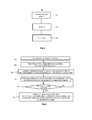
- Figure 1 illustrates a computer system of the present disclosure
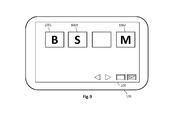
- Figure 2 illustrates a flow chart of a touch control method for setting the BIOS of the present disclosure
- Figures 3 to 9 illustrate the application of touch control method and this is a preferred embodiment of the present disclosure.
- a computer system 10 of the present disclosure includes a basic input output system (BIOS) 101, a memory 103 and a touch panel 105.
- BIOS basic input output system
- the computer system 10 could be a desk computer, a notebook, a laptop computer or a tablet computer, however, the computer system 10 is not limited to the specific computer systems described therein.
- the BIOS 101 includes an initial configuration data
- the memory 103 is a Random Access Memory (RAM).
- the memory 103 electrically connects to the BIOS 101 and the touch panel 105 respectively.
- step 200 describes the process that the computer system 10 executes the boot process and the BIOS 101 of the computer system 10 executes a Power-On Self Test (POST) process.
- POST Power-On Self Test
- Step 201 describes the process that the BIOS 101 of the computer system 10 transmits the initial configuration data to the memory 103 and saves the initial configuration data in the memory 103.
- Step 203 describes the process that the application program reads the initial configuration data of the BIOS 101 from the memory 103. Thereafter the application program evocates an input interface 106 and displays the input interface 106 on the touch panel 105.
- the input interface 106 includes a plurality setting items corresponding to the initial configuration.
- the touch panel 105 displays the input interface 106 evocated by the application program.
- the input interface 106 includes a plurality of setting items such as setting item 1061, setting item 1062 and setting item 1063. Furthermore, various graphic or icon corresponds to each setting item 1061, 1062 and 1063 respectively in order to manifest that different configuration menu being set in the BIOS.
- the setting item 1061 represents the configuration menu related to the boot
- the setting item 1062 represents the configuration data related to the monitor of the computer peripheral
- the setting item 1063 represents the setting of the input interface 106 itself. Only part of the BIOS function is described in the preferred embodiment of the invention and a better comprehension for various modifications and changes of the setting items is known to those skilled in the art, the present invention is not limited to these embodiments, but variations and modifications may be made without departing from the scope of the present invention.
- the application program of the present embodiment could be executed under the operation of the operation system of the computer system 10 or started up before loading the operation system of the computer system 10.
- the application program of the present embodiment is described under the operation of the operation system. It will be understood that the application program started up before loading the operation system will occur to those skilled in the art, the present invention is not limited to these embodiments, but variations and modifications may be made without departing from the scope of the present invention.
- Step 205 describes the process that the application program receives the setting signal from the touch panel 105 and executes the setting of the input interface 106 corresponding to the setting signal.
- the application program receives the setting signal from the touch panel 105 and executes the setting item 1061 of the input interface 106 corresponding to the setting signal.
- the setting item 1061 represents the setting related to the boot process in the present embodiment.
- the input interface 106 shows related boot options for user to regulate, for example, the option of boot process or the option of boot device.
- step 207 describes the process that the application program compares the setting signal triggered by the touch panel 105 with an application program exiting setting. If the application program receives an instruction for exiting the application program, user can either ends the setting process of the BIOS setting or, optionally, continues the setting process of the BIOS setting and back to the step 205.
- Step 207 describes the process that the application program generates a renewal configuration data according to the setting result of the setting item in the setting process, there within the application program transmits the renewal configuration data to the memory 103 and saves it followed by the application program writing the renewal configuration data back to the BIOS 101.
- the BIOS 101 grabs the renewal configuration data as the initial configuration data during next booting of the computer system 10.
- the application program further receives a setting signal triggered from the touch panel 105 in step 205 in the present embodiment wherein the application program drags and arranges the position of the setting item according to the setting signal to meet the operation requirement and habit of different user.
- the application program further receives a setting signal triggered from the touch panel 105 in step 205, and the application program optionally decides the types and the quantity of the setting items displaying on the input interface according to the setting signal.
- the application program will display the setting corresponding to the setting item 1063.
- the setting item 1063 represents the setting related to the input interface 106 itself of the present embodiment. User could regulate the setting of the input interface 106 through the setting item 1063.
- the setting corresponding to the setting item 1063 optionally decide the types and the quantity of the setting items which display on the input interface 106.
- the quantity of the setting items of the input interface 106 in Figure 9 is different from the setting items in Figure 3 .
- User could display the setting item that is regulated frequently. And user also could hide some setting items to prevent the setting items from being regulated erroneously or unnecessarily.
- the touch control method of the present disclosure is applicable to the computer system with a touch panel. While user needs to set the BIOS, user could regulate the configuration data of the BIOS by the touch control method directly.
- the present disclosure enhances the convenience of the BIOS setting process by the graphic input interface collaborating with the touch control method. User also could customize the operation mode or the operation routine personally by the operations including drag, display or hide.
- the application program can be stored in a recording media that is readable or accessible for the computer system.
- the recording media could be a disk but the recording media is not limited to the disk described therein. While user loads or installs the application program in the computer system from the recording media and starts the application program up, user could utilize the touch control method for setting the BIOS.
Landscapes
- Engineering & Computer Science (AREA)
- Software Systems (AREA)
- Theoretical Computer Science (AREA)
- General Engineering & Computer Science (AREA)
- Physics & Mathematics (AREA)
- General Physics & Mathematics (AREA)
- Human Computer Interaction (AREA)
- Stored Programmes (AREA)
- User Interface Of Digital Computer (AREA)
- Input From Keyboards Or The Like (AREA)
- Position Input By Displaying (AREA)
Abstract
Description
- This invention is generally relative to a touch control method and a computer system using the same, in particular, relative to a touch control method for setting the basic input output system.
- Almost all present computer systems are equipped with the Basic Input Output System (BIOS). The BIOS controls and configures the basic parameters of the hardware function of the computer system. The BIOS also provides a medium for the operation system to control various hardware apparatus and hardware device. An user could enable/disable a hardware function or regulate/control the operation efficiency and operation process by amending or setting the BIOS. The BIOS initializes the hardware, detects the hardware function and guides operation system.
- In early stage, an user uses the keyboard as the input device to manipulate the BIOS setting with the aid of traditional window interface in a computer system. But it is not convenient to use the keyboard because there is a restriction to regulate the BIOS by direction keys and specific keys on the keyboard. Furthermore, to access the traditional windows interface is also not a simple task because the BIOS setting shown in the traditional windows interface is a text menu which is difficult for a layperson to understand the meaning of each parameter.
- In order to promote the efficiency of the BIOS setting, an easier way developed to change the BIOS setting is by a mouse. But it is still not convenient enough for an user because the setting method is not intuitional, humanistic and personalized enough. And the BIOS setting interface is still a traditional text menu which is difficult for users to enhance the computer efficiency by setting the BIOS.
- This disclosure provides a touch control method for setting the BIOS and a computer system using the same.
- This disclosure reveals a touch control method for setting the BIOS. The BIOS saves the initial configuration data of the BIOS into the memory. User starts up an application program to read the initial configuration data saved in the memory. The application program evocates an input interface of the BIOS setting and the application program displays the input interface on a touch panel. The input interface includes a plurality of setting items corresponding to the initial configuration data. The application program receives a setting signal from the touch panel. The setting signal is triggered by the touch panel while an object touching the touch panel. The application program executes the setting item corresponding to the setting signal and produces a renew configuration data of the BIOS. The application program transmits and saves the renew configuration data in the memory and the application program writes the renew configuration data back in the BIOS.
- The computer system in this disclosure regulates the configuration data of the BIOS by the touch control method. The computer system includes a BIOS, a memory and a touch panel. There is an initial configuration data which is saved in the BIOS. The memory electrically connects to the BIOS and accommodates the initial configuration data transmitted from the BIOS. The touch panel electrically connects to the memory and displays the input interface for the BIOS setting. The input interface includes a plurality of setting items corresponding to the initial configuration data of the BIOS. When at least one setting item is triggered, the computer system correspondingly produces the renewal configuration data of the BIOS. The computer system transmits the renewal configuration data of the BIOS to the memory and saves the renewal configuration data of the BIOS in the memory. The computer system rewrites the renewal configuration data back to the BIOS.
- This disclosure enables the user to regulate the BIOS by the way of the touch control method with a corresponding graphic input interface; which differs from the conventional approaches. The touch control input interface of this disclosure replaces the keyboard or the mouse. The graphic input interface of this disclosure also replaces the menu table.
- This disclosure simplifies the BIOS setting method by the touch control input interface. And this disclosure replaces the traditional menu table with graphic input interface, the setting icons corresponding to the different BIOS functions or parameters are easy to understand and facilitate user's application. User could regulate the parameter of the BIOS more intuitionally by the touch control method and improve the efficiency of the computer system.
- Further objects and advantages are apparent in the drawings and in the detailed description which follows.
-
-
Figure 1 illustrates the block chart of a computer system of one embodiment of the present disclosure. -
Figure 2 illustrates the flow chart of a touch control method of one embodiment of the present disclosure. -
Figures 3 to 9 illustrate the application chart of a touch control method of one embodiment of the present disclosure. -
Figure 1 illustrates a computer system of the present disclosure,Figure 2 illustrates a flow chart of a touch control method for setting the BIOS of the present disclosure,Figures 3 to 9 illustrate the application of touch control method and this is a preferred embodiment of the present disclosure. - Referring to
Figure 1 , acomputer system 10 of the present disclosure includes a basic input output system (BIOS) 101, amemory 103 and atouch panel 105. Thecomputer system 10 could be a desk computer, a notebook, a laptop computer or a tablet computer, however, thecomputer system 10 is not limited to the specific computer systems described therein. Wherein theBIOS 101 includes an initial configuration data and thememory 103 is a Random Access Memory (RAM). Thememory 103 electrically connects to theBIOS 101 and thetouch panel 105 respectively. - Referring to
Figure 2 together withFigure 1 ,step 200 describes the process that thecomputer system 10 executes the boot process and theBIOS 101 of thecomputer system 10 executes a Power-On Self Test (POST) process. Thus, theBIOS 101 produces an initial configuration data. -
Step 201 describes the process that theBIOS 101 of thecomputer system 10 transmits the initial configuration data to thememory 103 and saves the initial configuration data in thememory 103. - User triggers and starts an application program up by an object. The object could be a finger, touch pen or mouse, but the object is not limited to those described therein.
Step 203 describes the process that the application program reads the initial configuration data of theBIOS 101 from thememory 103. Thereafter the application program evocates aninput interface 106 and displays theinput interface 106 on thetouch panel 105. Referring toFigure 3 , theinput interface 106 includes a plurality setting items corresponding to the initial configuration. - The
touch panel 105 displays theinput interface 106 evocated by the application program. Theinput interface 106 includes a plurality of setting items such as settingitem 1061, settingitem 1062 and settingitem 1063. Furthermore, various graphic or icon corresponds to eachsetting item - In the present embodiment, for example, the
setting item 1061 represents the configuration menu related to the boot, thesetting item 1062 represents the configuration data related to the monitor of the computer peripheral, and thesetting item 1063 represents the setting of theinput interface 106 itself. Only part of the BIOS function is described in the preferred embodiment of the invention and a better comprehension for various modifications and changes of the setting items is known to those skilled in the art, the present invention is not limited to these embodiments, but variations and modifications may be made without departing from the scope of the present invention. - The application program of the present embodiment could be executed under the operation of the operation system of the
computer system 10 or started up before loading the operation system of thecomputer system 10. The application program of the present embodiment is described under the operation of the operation system. It will be understood that the application program started up before loading the operation system will occur to those skilled in the art, the present invention is not limited to these embodiments, but variations and modifications may be made without departing from the scope of the present invention. - While user regulates the BIOS through the
input interface 106 displayed on thetouch panel 105 by the way of touching, user's touch triggers a setting signal. Step 205 describes the process that the application program receives the setting signal from thetouch panel 105 and executes the setting of theinput interface 106 corresponding to the setting signal. - Referring to
Figure 4 , while user touches the setting 1061 on thetouch panel 105, user's touch triggers a setting signal. The application program receives the setting signal from thetouch panel 105 and executes thesetting item 1061 of theinput interface 106 corresponding to the setting signal. Thesetting item 1061 represents the setting related to the boot process in the present embodiment. Referring toFigure 5 , theinput interface 106 shows related boot options for user to regulate, for example, the option of boot process or the option of boot device. - User's touch in the present embodiment could be implemented by the finger, touch pen or other tools or other ways. The present invention is not limited to the present embodiment.
- Referring to
Figure 2 ,step 207 describes the process that the application program compares the setting signal triggered by thetouch panel 105 with an application program exiting setting. If the application program receives an instruction for exiting the application program, user can either ends the setting process of the BIOS setting or, optionally, continues the setting process of the BIOS setting and back to thestep 205. - Referring to
Figure 2 , if the application program receives an instruction of exiting the application program, thecomputer system 10 deems that user ends the setting process of the BIOS. Step 207 describes the process that the application program generates a renewal configuration data according to the setting result of the setting item in the setting process, there within the application program transmits the renewal configuration data to thememory 103 and saves it followed by the application program writing the renewal configuration data back to theBIOS 101. TheBIOS 101 grabs the renewal configuration data as the initial configuration data during next booting of thecomputer system 10. - The application program further receives a setting signal triggered from the
touch panel 105 instep 205 in the present embodiment wherein the application program drags and arranges the position of the setting item according to the setting signal to meet the operation requirement and habit of different user. - Referring to
Figure 6 , user drags thesetting item 1063 which is originally arranged in the rear position by the touch control method to the front position, thereafter the user disposes thesetting item 1063 between the settingitem 1061 and thesetting item 1062. Referring toFigure 7 , it is a new arrangement after user's drag; the arrangement of the setting items of theinput interface 106 is different from the arrangement inFigure 3 . User could customize the setting of theinput interface 106 according to the personal requirement and operation habit of the user. - The application program further receives a setting signal triggered from the
touch panel 105 instep 205, and the application program optionally decides the types and the quantity of the setting items displaying on the input interface according to the setting signal. - Referring to
Figure 7 , while user triggers thesetting item 1063 by the touch control method, the application program will display the setting corresponding to thesetting item 1063. Thesetting item 1063 represents the setting related to theinput interface 106 itself of the present embodiment. User could regulate the setting of theinput interface 106 through thesetting item 1063. Referring toFigure 8 , the setting corresponding to thesetting item 1063 optionally decide the types and the quantity of the setting items which display on theinput interface 106. - Referring to
Figure 9 , the quantity of the setting items of theinput interface 106 inFigure 9 is different from the setting items inFigure 3 . User could display the setting item that is regulated frequently. And user also could hide some setting items to prevent the setting items from being regulated erroneously or unnecessarily. - The touch control method of the present disclosure is applicable to the computer system with a touch panel. While user needs to set the BIOS, user could regulate the configuration data of the BIOS by the touch control method directly. The present disclosure enhances the convenience of the BIOS setting process by the graphic input interface collaborating with the touch control method. User also could customize the operation mode or the operation routine personally by the operations including drag, display or hide.
- Initially, the application program can be stored in a recording media that is readable or accessible for the computer system. The recording media could be a disk but the recording media is not limited to the disk described therein. While user loads or installs the application program in the computer system from the recording media and starts the application program up, user could utilize the touch control method for setting the BIOS.
- While the disclosure has been described in terms of what is presently consider to be the preferred embodiments, it is to be understood that the disclosure needs not be limited to the disclosed embodiment. On the contrary, it is intended cover various modifications and similar arrangements included within the spirit and scope of the appended claims which are to be accorded with the broadest interpretation so as to encompass all such modification and similar structures. It is therefore intended by the appended claims to define the true scope of the invention.
Claims (11)
- A touch control method for setting a basic input output system, the method comprising the following steps:transmitting an initial configuration data to a memory;saving the initial configuration data in the memory by the basic input output system;executing an application program to read the initial configuration data saved in the memory;evocating an input interface and displaying the input interface on a touch panel by the application program, wherein the input interface comprises a plurality of setting items corresponding to the initial configuration data;receiving a setting signal from the touch panel by the application program,wherein the setting signal is triggered on the touch panel;
executing the setting item corresponding to the setting signal by the application program;
producing a renewal configuration data by the application program;
transmitting the renewal configuration data to a memory and saving the renewal configuration data in the memory by the application program; and
rewriting the renewal configuration data to the basic input output system by the application program. - The method of claim 1, further comprising a step of executing a Power-On Self Test function and producing the initial configuration data by the basic input output system.
- The method of claim 1, further comprising a step of receiving an instruction of exiting the application program.
- The method of claim 1, further comprising a step of loading an operation system and the application program executed under the operation system.
- The method of claim 1, further comprising a step of loading an operation system after executing the application program.
- The method of claim 1, wherein the method further comprises the following steps:receiving a setting signal from the touch panel by the application program; anddragging and arranging the setting item corresponding to the setting signal on the touch panel.
- The method of claim 1, wherein the method further comprises the following steps:receiving a setting signal from the touch panel by the application program; andoptionally displaying the setting item corresponding to the setting signal on the touch panel by the application program.
- A computer system, comprising:a basic input output system;a memory electrically connected to the basic input output system and storing the initial configuration data; anda touch panel connected to the memory electrically and displaying an input interface;wherein the input interface comprises a plurality of setting items corresponding to the initial configuration data, the touch panel produces a renewal configuration data correspondingly while at least one setting item is triggered, the touch panel saves the renewal configuration data in the memory, and the touch panel saves the renewal configuration data to the basic input output system.
- The computer system of claim 8, wherein the computer system further comprises an operation system and the operation system is configured to display the input interface by the touch panel.
- The computer system of claim 8, wherein the computer system further comprises an operation system and the touch panel displays the input interface before loading the operation system.
- The computer system of claim 8, wherein the computer system further comprises a recording media, the recording media is readable for a computer system and the input interface is carried out while the recording media is accessed by the computer system.
Applications Claiming Priority (1)
| Application Number | Priority Date | Filing Date | Title |
|---|---|---|---|
| TW100113631A TWI438676B (en) | 2011-04-20 | 2011-04-20 | Touch setting method of basic input/output system, computer system and recording medium thereof |
Publications (1)
| Publication Number | Publication Date |
|---|---|
| EP2515220A1 true EP2515220A1 (en) | 2012-10-24 |
Family
ID=45715322
Family Applications (1)
| Application Number | Title | Priority Date | Filing Date |
|---|---|---|---|
| EP11171489A Ceased EP2515220A1 (en) | 2011-04-20 | 2011-06-27 | Touch control method for setting basic input output system and computer system using the same |
Country Status (4)
| Country | Link |
|---|---|
| US (1) | US8671272B2 (en) |
| EP (1) | EP2515220A1 (en) |
| JP (1) | JP2012226726A (en) |
| TW (1) | TWI438676B (en) |
Cited By (1)
| Publication number | Priority date | Publication date | Assignee | Title |
|---|---|---|---|---|
| CN103246513A (en) * | 2013-05-06 | 2013-08-14 | 苏州三星电子电脑有限公司 | Setting method for BIOS (basic input/output system) menus |
Families Citing this family (6)
| Publication number | Priority date | Publication date | Assignee | Title |
|---|---|---|---|---|
| DE102012100738A1 (en) * | 2012-01-30 | 2013-08-01 | Fujitsu Technology Solutions Intellectual Property Gmbh | Method for configuring a BIOS in a computer system and computer program product |
| US10338933B2 (en) * | 2014-03-25 | 2019-07-02 | Dell Products, Lp | Method for generating custom BIOS setup interface and system therefor |
| US10803437B2 (en) * | 2015-08-28 | 2020-10-13 | Ncr Corporation | Self-service terminal technical state monitoring and alerting |
| US9910679B2 (en) * | 2015-10-15 | 2018-03-06 | Lenovo Enterprise Solutions (Singapore) Pte. Ltd. | Selective loading of components within a node to speed up maintenance actions |
| CN108595090A (en) * | 2018-04-23 | 2018-09-28 | 联想(北京)有限公司 | A kind of information processing method and electronic equipment |
| CN112463227B (en) * | 2020-11-18 | 2024-12-27 | 广州彩熠科技股份有限公司 | BIOS control method, system and touch screen control panel based on touch screen |
Citations (4)
| Publication number | Priority date | Publication date | Assignee | Title |
|---|---|---|---|---|
| US20030236935A1 (en) * | 2002-06-21 | 2003-12-25 | Takeshi Amemiya | System for processing programmable buttons using system control interrupts |
| US20090019390A1 (en) * | 2007-07-11 | 2009-01-15 | Asustek Computer Inc. | Method and device for editing menu interface |
| WO2009094021A1 (en) * | 2008-01-23 | 2009-07-30 | Hewlett-Packard Development Company, L.P. | Bios graphical setup engine |
| US20100205422A1 (en) * | 2009-02-12 | 2010-08-12 | Inventec Corporation | Method for setting basic input/output system |
Family Cites Families (10)
| Publication number | Priority date | Publication date | Assignee | Title |
|---|---|---|---|---|
| JP3626258B2 (en) * | 1995-08-25 | 2005-03-02 | 株式会社東芝 | Computer system |
| US7234054B2 (en) * | 2004-02-09 | 2007-06-19 | Intel Corporation | Method and apparatus for enabling platform configuration |
| US20050283599A1 (en) * | 2004-06-22 | 2005-12-22 | Zimmerman Toby S | Exposing BIOS information to an ACPI aware operating system |
| US7698546B2 (en) * | 2006-04-27 | 2010-04-13 | Microsoft Corporation | BIOS configuration update technique |
| JP4809738B2 (en) * | 2006-09-07 | 2011-11-09 | 株式会社リコー | Image processing apparatus and guidance display method |
| KR101305502B1 (en) * | 2008-07-10 | 2013-09-05 | 삼성전자주식회사 | Computer system and control method thereof |
| JP4331252B1 (en) * | 2008-07-18 | 2009-09-16 | 任天堂株式会社 | Object display order changing program and apparatus |
| TW201030617A (en) * | 2009-02-09 | 2010-08-16 | Inventec Corp | Method for installing operating system in computers |
| JP4852625B2 (en) * | 2009-04-16 | 2012-01-11 | 東芝テック株式会社 | Information processing device |
| KR20110093097A (en) * | 2010-02-11 | 2011-08-18 | 삼성전자주식회사 | Method and apparatus for editing list of mobile terminal |
-
2011
- 2011-04-20 TW TW100113631A patent/TWI438676B/en active
- 2011-06-27 EP EP11171489A patent/EP2515220A1/en not_active Ceased
- 2011-06-29 US US13/171,485 patent/US8671272B2/en active Active
- 2011-07-21 JP JP2011159853A patent/JP2012226726A/en active Pending
Patent Citations (4)
| Publication number | Priority date | Publication date | Assignee | Title |
|---|---|---|---|---|
| US20030236935A1 (en) * | 2002-06-21 | 2003-12-25 | Takeshi Amemiya | System for processing programmable buttons using system control interrupts |
| US20090019390A1 (en) * | 2007-07-11 | 2009-01-15 | Asustek Computer Inc. | Method and device for editing menu interface |
| WO2009094021A1 (en) * | 2008-01-23 | 2009-07-30 | Hewlett-Packard Development Company, L.P. | Bios graphical setup engine |
| US20100205422A1 (en) * | 2009-02-12 | 2010-08-12 | Inventec Corporation | Method for setting basic input/output system |
Non-Patent Citations (2)
| Title |
|---|
| BAIG, EDWARD C; LEVITUS, BOB: "iPhone for Dummies (pages 187-188)", 2009, ISBN: 978-0-470-53698-8, XP007920848 * |
| GIGABYTE: "GIGABYTE Touch BIOS(Patent Pending), An Innovative New Way to Modify BIOS Settings", 26 April 2011 (2011-04-26), XP007920847, Retrieved from the Internet <URL:http://www.youtube.com/watch?v=2ozr7XDJ6IA> [retrieved on 20120720] * |
Cited By (1)
| Publication number | Priority date | Publication date | Assignee | Title |
|---|---|---|---|---|
| CN103246513A (en) * | 2013-05-06 | 2013-08-14 | 苏州三星电子电脑有限公司 | Setting method for BIOS (basic input/output system) menus |
Also Published As
| Publication number | Publication date |
|---|---|
| US20120272049A1 (en) | 2012-10-25 |
| TW201243694A (en) | 2012-11-01 |
| TWI438676B (en) | 2014-05-21 |
| JP2012226726A (en) | 2012-11-15 |
| CN102750160A (en) | 2012-10-24 |
| US8671272B2 (en) | 2014-03-11 |
Similar Documents
| Publication | Publication Date | Title |
|---|---|---|
| US8671272B2 (en) | Method and system for changing bios settings via touch control interface by executing an application under OS without entering system management mode | |
| US10528252B2 (en) | Key combinations toolbar | |
| CN103229141B (en) | Manage Workspaces in the User Interface | |
| US9588661B1 (en) | Graphical user interface widget to select multiple items from a fixed domain | |
| US20100238089A1 (en) | System and method for the auto-detection and presentation of pre-set configurations for multiple monitor layout display | |
| CN103049250B (en) | The method of control inerface and terminal | |
| TW200939105A (en) | Arranging display areas utilizing enhanced window states | |
| CN105493034A (en) | Method and device for managing tab window indicating application group including heterogeneous applications | |
| US20150040062A1 (en) | Multi-monitor full screen mode in a windowing environment | |
| US20140059491A1 (en) | Electronic apparatus to execute application, method thereof, and computer readable recording medium | |
| US10712910B2 (en) | Electronics apparatus, method for executing application, and computer-readable recording medium | |
| US10620772B2 (en) | Universal back navigation for multiple windows | |
| US9747002B2 (en) | Display apparatus and image representation method using the same | |
| US11237699B2 (en) | Proximal menu generation | |
| US9213555B2 (en) | Off-screen window controls | |
| US20180090027A1 (en) | Interactive tutorial support for input options at computing devices | |
| KR100852652B1 (en) | System and method for providing user interface of information processing terminal using information processing terminal and host resource | |
| KR20150111651A (en) | Control method of favorites mode and device including touch screen performing the same | |
| KR102296968B1 (en) | Control method of favorites mode and device including touch screen performing the same | |
| CN106716350B (en) | Apparatus and method for providing user interface screen | |
| CN102750160B (en) | Touch control setting method of basic input and output system and computer system thereof | |
| US11847070B2 (en) | Creating a computer macro | |
| KR102205235B1 (en) | Control method of favorites mode and device including touch screen performing the same | |
| JP2026023012A (en) | Information processing device, UI control method, and program | |
| KR20210029175A (en) | Control method of favorites mode and device including touch screen performing the same |
Legal Events
| Date | Code | Title | Description |
|---|---|---|---|
| PUAI | Public reference made under article 153(3) epc to a published international application that has entered the european phase |
Free format text: ORIGINAL CODE: 0009012 |
|
| AK | Designated contracting states |
Kind code of ref document: A1 Designated state(s): AL AT BE BG CH CY CZ DE DK EE ES FI FR GB GR HR HU IE IS IT LI LT LU LV MC MK MT NL NO PL PT RO RS SE SI SK SM TR |
|
| AX | Request for extension of the european patent |
Extension state: BA ME |
|
| 17P | Request for examination filed |
Effective date: 20130424 |
|
| 17Q | First examination report despatched |
Effective date: 20131010 |
|
| RAP1 | Party data changed (applicant data changed or rights of an application transferred) |
Owner name: GIGA-BYTE TECHNOLOGY CO., LTD. |
|
| STAA | Information on the status of an ep patent application or granted ep patent |
Free format text: STATUS: THE APPLICATION HAS BEEN REFUSED |
|
| 18R | Application refused |
Effective date: 20170206 |