EP2477104A1 - Method for providing a shortcut to the most likely application on the lock screen of a portable electronic device - Google Patents
Method for providing a shortcut to the most likely application on the lock screen of a portable electronic device Download PDFInfo
- Publication number
- EP2477104A1 EP2477104A1 EP11195416A EP11195416A EP2477104A1 EP 2477104 A1 EP2477104 A1 EP 2477104A1 EP 11195416 A EP11195416 A EP 11195416A EP 11195416 A EP11195416 A EP 11195416A EP 2477104 A1 EP2477104 A1 EP 2477104A1
- Authority
- EP
- European Patent Office
- Prior art keywords
- application
- electronic device
- portable electronic
- usage history
- event
- Prior art date
- Legal status (The legal status is an assumption and is not a legal conclusion. Google has not performed a legal analysis and makes no representation as to the accuracy of the status listed.)
- Ceased
Links
Images

Classifications
-
- H—ELECTRICITY
- H04—ELECTRIC COMMUNICATION TECHNIQUE
- H04W—WIRELESS COMMUNICATION NETWORKS
- H04W4/00—Services specially adapted for wireless communication networks; Facilities therefor
- H04W4/02—Services making use of location information
-
- G—PHYSICS
- G06—COMPUTING OR CALCULATING; COUNTING
- G06F—ELECTRIC DIGITAL DATA PROCESSING
- G06F3/00—Input arrangements for transferring data to be processed into a form capable of being handled by the computer; Output arrangements for transferring data from processing unit to output unit, e.g. interface arrangements
- G06F3/01—Input arrangements or combined input and output arrangements for interaction between user and computer
- G06F3/048—Interaction techniques based on graphical user interfaces [GUI]
-
- G—PHYSICS
- G06—COMPUTING OR CALCULATING; COUNTING
- G06F—ELECTRIC DIGITAL DATA PROCESSING
- G06F3/00—Input arrangements for transferring data to be processed into a form capable of being handled by the computer; Output arrangements for transferring data from processing unit to output unit, e.g. interface arrangements
- G06F3/01—Input arrangements or combined input and output arrangements for interaction between user and computer
- G06F3/048—Interaction techniques based on graphical user interfaces [GUI]
- G06F3/0481—Interaction techniques based on graphical user interfaces [GUI] based on specific properties of the displayed interaction object or a metaphor-based environment, e.g. interaction with desktop elements like windows or icons, or assisted by a cursor's changing behaviour or appearance
- G06F3/04817—Interaction techniques based on graphical user interfaces [GUI] based on specific properties of the displayed interaction object or a metaphor-based environment, e.g. interaction with desktop elements like windows or icons, or assisted by a cursor's changing behaviour or appearance using icons
-
- G—PHYSICS
- G06—COMPUTING OR CALCULATING; COUNTING
- G06F—ELECTRIC DIGITAL DATA PROCESSING
- G06F3/00—Input arrangements for transferring data to be processed into a form capable of being handled by the computer; Output arrangements for transferring data from processing unit to output unit, e.g. interface arrangements
- G06F3/01—Input arrangements or combined input and output arrangements for interaction between user and computer
- G06F3/048—Interaction techniques based on graphical user interfaces [GUI]
- G06F3/0484—Interaction techniques based on graphical user interfaces [GUI] for the control of specific functions or operations, e.g. selecting or manipulating an object, an image or a displayed text element, setting a parameter value or selecting a range
- G06F3/04842—Selection of displayed objects or displayed text elements
-
- G—PHYSICS
- G06—COMPUTING OR CALCULATING; COUNTING
- G06F—ELECTRIC DIGITAL DATA PROCESSING
- G06F3/00—Input arrangements for transferring data to be processed into a form capable of being handled by the computer; Output arrangements for transferring data from processing unit to output unit, e.g. interface arrangements
- G06F3/01—Input arrangements or combined input and output arrangements for interaction between user and computer
- G06F3/048—Interaction techniques based on graphical user interfaces [GUI]
- G06F3/0487—Interaction techniques based on graphical user interfaces [GUI] using specific features provided by the input device, e.g. functions controlled by the rotation of a mouse with dual sensing arrangements, or of the nature of the input device, e.g. tap gestures based on pressure sensed by a digitiser
- G06F3/0488—Interaction techniques based on graphical user interfaces [GUI] using specific features provided by the input device, e.g. functions controlled by the rotation of a mouse with dual sensing arrangements, or of the nature of the input device, e.g. tap gestures based on pressure sensed by a digitiser using a touch-screen or digitiser, e.g. input of commands through traced gestures
-
- H—ELECTRICITY
- H04—ELECTRIC COMMUNICATION TECHNIQUE
- H04M—TELEPHONIC COMMUNICATION
- H04M1/00—Substation equipment, e.g. for use by subscribers
- H04M1/66—Substation equipment, e.g. for use by subscribers with means for preventing unauthorised or fraudulent calling
- H04M1/667—Preventing unauthorised calls from a telephone set
- H04M1/67—Preventing unauthorised calls from a telephone set by electronic means
-
- H—ELECTRICITY
- H04—ELECTRIC COMMUNICATION TECHNIQUE
- H04W—WIRELESS COMMUNICATION NETWORKS
- H04W88/00—Devices specially adapted for wireless communication networks, e.g. terminals, base stations or access point devices
- H04W88/02—Terminal devices
-
- H—ELECTRICITY
- H04—ELECTRIC COMMUNICATION TECHNIQUE
- H04M—TELEPHONIC COMMUNICATION
- H04M1/00—Substation equipment, e.g. for use by subscribers
- H04M1/72—Mobile telephones; Cordless telephones, i.e. devices for establishing wireless links to base stations without route selection
- H04M1/724—User interfaces specially adapted for cordless or mobile telephones
- H04M1/72448—User interfaces specially adapted for cordless or mobile telephones with means for adapting the functionality of the device according to specific conditions
- H04M1/72457—User interfaces specially adapted for cordless or mobile telephones with means for adapting the functionality of the device according to specific conditions according to geographic location
-
- H—ELECTRICITY
- H04—ELECTRIC COMMUNICATION TECHNIQUE
- H04M—TELEPHONIC COMMUNICATION
- H04M1/00—Substation equipment, e.g. for use by subscribers
- H04M1/72—Mobile telephones; Cordless telephones, i.e. devices for establishing wireless links to base stations without route selection
- H04M1/724—User interfaces specially adapted for cordless or mobile telephones
- H04M1/72466—User interfaces specially adapted for cordless or mobile telephones with selection means, e.g. keys, having functions defined by the mode or the status of the device
Definitions
- the disclosed embodiments relate in general to an electronic device, a control method and a computer program product, and more particularly to a portable electronic device, a control method and a computer program product of the same.
- the required procedures may include activating the program files, opening the browser folder, locating the browser application, clicking the browser application, and searching for news webpage.
- the disclosure is directed to a portable electronic device, a control method and a computer program product of the same capable of increasing the convenience in the use of the portable electronic device, making the operation of the portable electronic device simpler and more efficient.
- a portable electronic device, a control method and a computer program product of the same are provided for providing a shortcut on a lock screen of the portable electronic device.
- the control method includes the following steps. An application usage history indicative of execution histories of a number of applications installed on the portable electronic device is stored. At least one of a current time and a current location of the portable electronic device is obtained. From the applications, an application that is most possible to be requested for execution is selected according to the application usage history and at least one of the current time and the current location. A shortcut icon used to activate the selected application is displayed on the lock screen of the portable electronic device. The selected application is activated when the portable electronic device is unlocked from the lock screen via the shortcut icon.
- a portable electronic device including a storage unit, a detection unit, and a control unit.
- the storage unit is used for storing an application usage history indicative of execution histories of a number of applications installed on the portable electronic device.
- the detection unit is used for obtaining at least one of a current time and a current location of the portable electronic device.
- the control unit is used for selecting from the applications an application that is most possible to be requested for execution according to the application usage history and at least one of the current time and the current location.
- the control unit is further used for controlling the portable electronic device to display a shortcut icon used to activate the selected application on the lock screen.
- the control unit is further used for activating the selected application when the portable electronic device is unlocked from the lock screen via the shortcut icon.
- a computer program product is provided. After a computing device executes a computer program, the computing device completes the abovementioned control method of the portable electronic device.
- FIG. 1 shows a flowchart of a control method of according to an embodiment
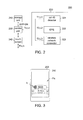
- FIG. 3 shows a schematic diagram of an example of the portable electronic device of FIG. 2 and a lock screen displayed thereby.
- the control method is for providing a shortcut on a lock screen of the portable electronic device.
- the method includes several steps.
- step S110 an application usage history indicative of execution histories of a number of applications installed on the portable electronic device is stored.
- step S120 at least one of a current time and a current location of the portable electronic device is obtained.
- step S130 an application is selected from the applications according to the application usage history and at least one of the current time and the current location. The selected application is most possible to be requested for execution.
- a shortcut icon used to activate the selected application is displayed on the lock screen of the portable electronic device.
- step S150 the selected application is activated when the portable electronic device is unlocked from the lock screen via the shortcut icon.
- the application that is most likely used by a user is identified by using the application usage history.
- the present embodiment is capable of constructing or predicting the user's behavior of operating the portable electronic device.
- a shortcut icon of such application can be provided at suitable time or location, so that the user can conveniently activate the desired application. In this way, convenience for using the portable electronic device is thus increased.
- the disclosure is further elaborated below with embodiments of a portable electronic device using the control method.
- the portable electronic device 200 includes a storage unit 210, a detection unit 220, a control unit 230, and a touch screen 240.
- the operation relationships among the units are disclosed below.
- the time information or the location information can be provided by a detection unit 220, which can be realized by detection elements for detecting the current time Tc, and/or detection elements for detecting the current location Lc, and/or a combination thereof.
- the detection unit 220 includes for example a cell identity (cell-ID) detector 221, a global positioning system (GPS) 222, and a wireless network connector 223.
- the cell-ID detector 221 provides cell-ID information L1 as the current location Lc of the portable electronic device 200.
- the global positioning system 222 provides GPS positioning information L2 as the current location Lc of the portable electronic device 200.
- the wireless network connector 223 provides address information L3 of a wireless access point as the current location Lc of the portable electronic device 200.
- server time T1 (such as local time or time-zone time) provided by telecommunication services can be obtained by the cell-ID detector 221 from telecommunication circuit (not illustrated).
- satellite time T2 related to GPS positioning information L2 can be obtained by the global positioning system 222.
- Internet time T3 can be obtained by the wireless network connector 223.
- system time of the portable electronic device 200 can be obtained by an internal timer (not illustrated) or a clock.
- control unit 230 can construct or predict user's behavior of operating the device by analyzing the application usage history APP-UH stored in the storage unit 210, and predict which application is most likely to be used by the user at a particular time or location.
- the at least one predetermined event is exemplified as an event that an application is activated and another event that the application is terminated.
- the present embodiment is similar to the above embodiment in that when the user requests to activate an application the information related to when and/or where the application is activated is stored to the storage unit 210, but is different from the above embodiment in that when the user requests to terminate the application the information related to when and/or where the application is terminated is also stored to the storage unit 210.
- the predetermined event is exemplified as an event that an application is in use.
- the present embodiment periodically stores time and/or location information of an application to the storage unit 210 when the application is in use or is continuously executed. For example, time and/or location information can be periodically stored to the storage unit 210 every 5 seconds.
- the predetermined event is exemplified as an event that an application is switched from being executed in background to being executed in foreground.
- the portable electronic device 200 applicable to the event has a multi-tasking operating system. That is, the control unit 230 has a processor capable of controlling execution of several applications.
- the application when first activated, will be executed in the foreground. If the application is not finished after its execution in the foreground, the application is moved to background. For example, when the user requests the activation of a music playing program for the first time but has not yet terminated the music playing program, the music playing program will be shifted to background execution. Then, if the user would like to request the activation of the music playing program again and operate the device to switch the music playing program from background to foreground, such event is regarded as an event of switching an application from background execution to foreground execution. In this case, at least one of the time information and the location information is stored to the storage unit 210.
- the application usage history APP-UH stored in the storage unit 210 is recorded during a predetermined period.
- the application usage history APP-UH can be recorded for a period such as last three months.
- the content of the application usage history APP-UH is continuously updated for the portable electronic device 200 to analyze the stored data and predict the user's behavior so that the prediction is closer to the user's recent habit in using the applications.
- the predetermined event is for illustration and explanation, and the disclosure is not limited thereto. Where there is an event from which a user's behavior in using the applications can be properly predicted, such an event can be regarded as a predetermined event of the disclosure.
- the control unit 230 is used for selecting from the applications an application that is most possible to be requested for execution according to the application usage history APP-UH, and at least one of the current time Tc and the current location Lc. In an embodiment, the control unit 230 is used for generating execution probabilities for the applications according to the application usage history APP-UH and at least one of the current time Tc and the current location Lc. Then, the control unit 230 selects from the applications an application that has a highest execution probability and serves the selected application as the applications that is most possible to be requested for execution.
- an implementation of selecting from the applications an application that has a highest execution probability in view of the current time Tc, it can be identified from the application usage history APP-UH that certain application is activated most often at the current time. As such, the identified application is determined as the application that has a highest execution possibility at the current time. For example, suppose a user used to activate a browser application to read news at a particular website daily at 9.00 am. In this case, after the storage unit 210 records the application usage history APP-UH during the predetermined period, the application usage history APP-UH will keep several records of executing the browser at 9.00 am.
- the control unit 230 can identify that the user is very likely to activate the browser at 9.00 am and may even connect to a particular news website. In other words, at the current time of 9.00 am, the control unit 230 regards the browser as the application that has a highest probability of being used, and treats it as the application that is most possible to be requested for execution. For another example, suppose the user goes to certain place such as a school or a tutorial school to pick up children everyday, and activates a telephony application to make a phone call for a particular telephone number.
- the control unit 230 can identify that the user is very likely to activate the telephony application around the location of the school or the tutorial school or even make a phone call for a particular telephone number. In other words, when the user is near to or arrives at the school or the tutorial school, the control unit 230 will regard the telephony application as the application that has a highest probability of being used and treat it as the application that is most possible to be requested for execution.
- control unit 230 can analyze the application usage history APP-UH according to other data analysis methods, such as methods based on linear/non-linear classification algorithms or neural network, to construct the user's behavior and obtain the application that is most likely used by the user at the current time Tc or the current location Lc.
- the control unit 230 is further used for controlling the portable electronic device 200 to display a shortcut icon Ic used to activate the selected application on a lock screen Fls.
- a schematic diagram of an example of the portable electronic device 200 of FIG. 2 and a lock screen displayed thereby is shown.
- the control unit 230 controls for example the touch screen 240 to display a lock screen Fls.
- the lock screen Fls indicates that the portable electronic device 200 has entered a lock state and is thus unavailable for use.
- the portable electronic device 200 when the touch screen 240 receives the above predetermined slide operation or click operation, the portable electronic device 200 is firstly unlocked from the lock screen Fls and then provides a security verification procedure. Thus, in the present embodiment, only when security verification procedure is passed will the control unit 230 open the selected application.
- the information enabling the portable electronic device 200 to pass the security verification procedure include: a code information inputted via a keyboard or a touch screen 240, such as a string composed of English letters, numbers, or symbols; or a pattern information, also referred as the gesture input information, inputted by touching the touch screen 240 along a sliding path, such as the information inputted when the user draws a Z on the touch screen 240.
- the disclosure is not limited to the above exemplifications.
- the above embodiments illustrate how to unlock a portable electronic device and activate an application.
- the lock screen Fls is for avoiding the portable electronic device 200 generating unexpected results when being touched by mistake.
- the lock screen Fls can also be designed to possess security enhancement function.
- the lock screen Fls also referred as "idle screen”
- has palm rejection function but the disclosure is not limited thereto.
- a shortcut icon making the user conveniently activate an application is displayed on the lock screen, so that the convenience of use of the portable electronic device is increased, and the operation of the portable electronic device is made simpler and more efficient.
- the present embodiment constructs the user's behavior and generates corresponding shortcut icon so as to achieve higher user convenience.
- the storage unit 210 can collect the application usage history APP-UH related to the user's behavior when the user gets used to activate a particular application at a certain time or a certain location, such as to activate an Internet application during the commuting time, to activate a telephony application when picking up children daily at fixed time or at a fixed location, or to activate a telephony application when feeling like making a phone call home weekly or daily at a fixed time.
- the portable electronic device 200 can predict what the user would like to do next or which application is most likely used.
- the portable electronic device 200 displays the shortcut icon of the predicted application (such as an Internet application or a telecommunication program) and related instructions or parameters (such as the website or the telephone number) so that the user can conveniently open the desired application.
- a computer program product is further provided in an embodiment. After a computing device executes a computer program, the computing device completes the abovementioned control method of the portable electronic device.
- execution information related to the applications is collected and stored to form an application usage history for constructing the user's behavior so as to identify an application that is most possible to be requested for execution.
- the shortcut icon of application being provided at suitable time or location, the user can conveniently activate the identified application.
- the shortcut icon provided in the present embodiment enables the user to conveniently and promptly activate his/her application.
Landscapes
- Engineering & Computer Science (AREA)
- General Engineering & Computer Science (AREA)
- Theoretical Computer Science (AREA)
- Human Computer Interaction (AREA)
- Physics & Mathematics (AREA)
- General Physics & Mathematics (AREA)
- Computer Security & Cryptography (AREA)
- Signal Processing (AREA)
- Computer Networks & Wireless Communication (AREA)
- User Interface Of Digital Computer (AREA)
- Telephone Function (AREA)
- Stored Programmes (AREA)
Abstract
Description
- This application claims the benefit of Taiwan application Serial No.
100101309, filed January 13, 2011 - The disclosed embodiments relate in general to an electronic device, a control method and a computer program product, and more particularly to a portable electronic device, a control method and a computer program product of the same.
- In recent years, research in the field of portable electronic device, such as touch phone, personal digital assistant (PDA) and mobile phone, has gained remarkable progress. Normally, the portable electronic device provides a variety of applications for users.
- In general, in order for users to use the applications, the applications of the portable electronic device are normally arranged in a hierarchical manner and are illustrated in the form of a menu for users' observation and selection. However, when a user would like to activate an application, he or she is required to go through several hierarchies of menus before the desired application can be located.
- For example, when the user would like to activate a browser to read news, the required procedures may include activating the program files, opening the browser folder, locating the browser application, clicking the browser application, and searching for news webpage. These above procedures are tedious and inconvenient to the user. Therefore, there is a need the industries to increase the convenience for using a portable electronic device.
- The disclosure is directed to a portable electronic device, a control method and a computer program product of the same capable of increasing the convenience in the use of the portable electronic device, making the operation of the portable electronic device simpler and more efficient.
- According to one embodiment, a portable electronic device, a control method and a computer program product of the same are provided for providing a shortcut on a lock screen of the portable electronic device. The control method includes the following steps. An application usage history indicative of execution histories of a number of applications installed on the portable electronic device is stored. At least one of a current time and a current location of the portable electronic device is obtained. From the applications, an application that is most possible to be requested for execution is selected according to the application usage history and at least one of the current time and the current location. A shortcut icon used to activate the selected application is displayed on the lock screen of the portable electronic device. The selected application is activated when the portable electronic device is unlocked from the lock screen via the shortcut icon.
- According to another embodiment, a portable electronic device including a storage unit, a detection unit, and a control unit is provided. The storage unit is used for storing an application usage history indicative of execution histories of a number of applications installed on the portable electronic device. The detection unit is used for obtaining at least one of a current time and a current location of the portable electronic device. The control unit is used for selecting from the applications an application that is most possible to be requested for execution according to the application usage history and at least one of the current time and the current location. The control unit is further used for controlling the portable electronic device to display a shortcut icon used to activate the selected application on the lock screen. The control unit is further used for activating the selected application when the portable electronic device is unlocked from the lock screen via the shortcut icon.
- According to another embodiment, a computer program product is provided. After a computing device executes a computer program, the computing device completes the abovementioned control method of the portable electronic device.
-
FIG. 1 shows a flowchart of a control method of according to an embodiment; -
FIG. 2 shows a block diagram of an example of a portable electronic device according to an embodiment; and -
FIG. 3 shows a schematic diagram of an example of the portable electronic device ofFIG. 2 and a lock screen displayed thereby. - In the following detailed description, for purposes of explanation, numerous specific details are set forth in order to provide a thorough understanding of the disclosed embodiments. It will be apparent, however, that one or more embodiments may be practiced without these specific details. In other instances, well-known structures and devices are schematically shown in order to simplify the drawing.
- Referring
FIG. 1 , a flowchart of a control method of according to an embodiment is shown. The control method is for providing a shortcut on a lock screen of the portable electronic device. The method includes several steps. In step S110, an application usage history indicative of execution histories of a number of applications installed on the portable electronic device is stored. In step S120, at least one of a current time and a current location of the portable electronic device is obtained. In step S130, an application is selected from the applications according to the application usage history and at least one of the current time and the current location. The selected application is most possible to be requested for execution. In step S140, a shortcut icon used to activate the selected application is displayed on the lock screen of the portable electronic device. In step S150, the selected application is activated when the portable electronic device is unlocked from the lock screen via the shortcut icon. - According to the control method of portable electronic device disclosed in the above embodiment, the application that is most likely used by a user is identified by using the application usage history. This implies that the present embodiment is capable of constructing or predicting the user's behavior of operating the portable electronic device. Thus, a shortcut icon of such application can be provided at suitable time or location, so that the user can conveniently activate the desired application. In this way, convenience for using the portable electronic device is thus increased. The disclosure is further elaborated below with embodiments of a portable electronic device using the control method.
- Referring
FIG. 2 , a block diagram of an example of a portable electronic device according to an embodiment is shown. The portableelectronic device 200 includes astorage unit 210, adetection unit 220, acontrol unit 230, and atouch screen 240. The operation relationships among the units are disclosed below. - The
storage unit 210 is used for storing an application usage history APP-UH indicative of execution histories of the applications. The application usage history APP-UH includes for example at least one of time information and location information of at least one predetermined event related to the applications. In other words, when a predetermined event related to a certain application occurs, at least one of the time information or the location information of the predetermined event will be stored to thestorage unit 210 and recorded on the application usage history APP-UH. The predetermined event is for example an event that an application is activated, an event that an application is terminated, or an event that an application is in use. The time information or the location information can be provided by adetection unit 220, which can be realized by detection elements for detecting the current time Tc, and/or detection elements for detecting the current location Lc, and/or a combination thereof. For example, thedetection unit 220 includes for example a cell identity (cell-ID)detector 221, a global positioning system (GPS) 222, and awireless network connector 223. The cell-ID detector 221 provides cell-ID information L1 as the current location Lc of the portableelectronic device 200. Theglobal positioning system 222 provides GPS positioning information L2 as the current location Lc of the portableelectronic device 200. Thewireless network connector 223 provides address information L3 of a wireless access point as the current location Lc of the portableelectronic device 200. The way of obtaining the current time Tc is exemplified below. For example, server time T1 (such as local time or time-zone time) provided by telecommunication services can be obtained by the cell-ID detector 221 from telecommunication circuit (not illustrated). For another example, satellite time T2 related to GPS positioning information L2 can be obtained by theglobal positioning system 222. For another example, Internet time T3 can be obtained by thewireless network connector 223. For another example, system time of the portableelectronic device 200 can be obtained by an internal timer (not illustrated) or a clock. Thus, through suitable design of various predetermined events of applications, thecontrol unit 230 can construct or predict user's behavior of operating the device by analyzing the application usage history APP-UH stored in thestorage unit 210, and predict which application is most likely to be used by the user at a particular time or location. - In an embodiment, the predetermined event is exemplified as an event that an application is activated. For further illustration, when a user requests to activate an application, time and location at which the application is activated can be stored to the
storage unit 210. For example, if the user requests to activate an Internet application to browse webpages on his/her commute path, then the information related to when and/or where the Internet application is activated can be stored to thestorage unit 210 such that the portableelectronic device 200 analyze the stored data and predict the user's behavior. - In another embodiment, the at least one predetermined event is exemplified as an event that an application is activated and another event that the application is terminated. The present embodiment is similar to the above embodiment in that when the user requests to activate an application the information related to when and/or where the application is activated is stored to the
storage unit 210, but is different from the above embodiment in that when the user requests to terminate the application the information related to when and/or where the application is terminated is also stored to thestorage unit 210. - In another embodiment, the predetermined event is exemplified as an event that an application is in use. Different from the above embodiment where the predetermined event is exemplified as an event that an application is activated and/or terminated, the present embodiment periodically stores time and/or location information of an application to the
storage unit 210 when the application is in use or is continuously executed. For example, time and/or location information can be periodically stored to thestorage unit 210 every 5 seconds. Besides, in another embodiment, the predetermined event is exemplified as an event that an application is switched from being executed in background to being executed in foreground. The portableelectronic device 200 applicable to the event has a multi-tasking operating system. That is, thecontrol unit 230 has a processor capable of controlling execution of several applications. Under control of such processor, the application, when first activated, will be executed in the foreground. If the application is not finished after its execution in the foreground, the application is moved to background. For example, when the user requests the activation of a music playing program for the first time but has not yet terminated the music playing program, the music playing program will be shifted to background execution. Then, if the user would like to request the activation of the music playing program again and operate the device to switch the music playing program from background to foreground, such event is regarded as an event of switching an application from background execution to foreground execution. In this case, at least one of the time information and the location information is stored to thestorage unit 210. - The application usage history APP-UH stored in the
storage unit 210 is recorded during a predetermined period. For example, the application usage history APP-UH can be recorded for a period such as last three months. Thus, along with the user's operation, the content of the application usage history APP-UH is continuously updated for the portableelectronic device 200 to analyze the stored data and predict the user's behavior so that the prediction is closer to the user's recent habit in using the applications. However, the predetermined event is for illustration and explanation, and the disclosure is not limited thereto. Where there is an event from which a user's behavior in using the applications can be properly predicted, such an event can be regarded as a predetermined event of the disclosure. - The
control unit 230 is used for selecting from the applications an application that is most possible to be requested for execution according to the application usage history APP-UH, and at least one of the current time Tc and the current location Lc. In an embodiment, thecontrol unit 230 is used for generating execution probabilities for the applications according to the application usage history APP-UH and at least one of the current time Tc and the current location Lc. Then, thecontrol unit 230 selects from the applications an application that has a highest execution probability and serves the selected application as the applications that is most possible to be requested for execution. - For further illustration, there is provided an implementation of selecting from the applications an application that has a highest execution probability. In this case, in view of the current time Tc, it can be identified from the application usage history APP-UH that certain application is activated most often at the current time. As such, the identified application is determined as the application that has a highest execution possibility at the current time. For example, suppose a user used to activate a browser application to read news at a particular website daily at 9.00 am. In this case, after the
storage unit 210 records the application usage history APP-UH during the predetermined period, the application usage history APP-UH will keep several records of executing the browser at 9.00 am. Based on the application usage history APP-UH, thecontrol unit 230 can identify that the user is very likely to activate the browser at 9.00 am and may even connect to a particular news website. In other words, at the current time of 9.00 am, thecontrol unit 230 regards the browser as the application that has a highest probability of being used, and treats it as the application that is most possible to be requested for execution. For another example, suppose the user goes to certain place such as a school or a tutorial school to pick up children everyday, and activates a telephony application to make a phone call for a particular telephone number. In this case, after thestorage unit 210 records the application usage history APP-UH during the predetermined period, the application usage history APP-UH will keep several records of activating the telephony application around the location of the school or the tutorial school. Based on the application usage history APP-UH, thecontrol unit 230 can identify that the user is very likely to activate the telephony application around the location of the school or the tutorial school or even make a phone call for a particular telephone number. In other words, when the user is near to or arrives at the school or the tutorial school, thecontrol unit 230 will regard the telephony application as the application that has a highest probability of being used and treat it as the application that is most possible to be requested for execution. - The above method using execution probabilities of applications and is disclosed for illustrating an embodiment. In other embodiments, the
control unit 230 can analyze the application usage history APP-UH according to other data analysis methods, such as methods based on linear/non-linear classification algorithms or neural network, to construct the user's behavior and obtain the application that is most likely used by the user at the current time Tc or the current location Lc. - The
control unit 230 is further used for controlling the portableelectronic device 200 to display a shortcut icon Ic used to activate the selected application on a lock screen Fls. Referring toFIG. 3 , a schematic diagram of an example of the portableelectronic device 200 ofFIG. 2 and a lock screen displayed thereby is shown. Thecontrol unit 230 controls for example thetouch screen 240 to display a lock screen Fls. The lock screen Fls indicates that the portableelectronic device 200 has entered a lock state and is thus unavailable for use. - The
control unit 230 is further used for activating the selected application that is most possible to be requested for execution when the portableelectronic device 200 is unlocked from the lock screen Fls via the shortcut icon Ic. In an embodiment of activating an application, when thetouch screen 240 receives a predetermined slide operation or a predetermined click operation, the portableelectronic device 200 will be unlocked and activate the corresponding application of the shortcut icon Ic. For example, thecontrol unit 230 can control thetouch screen 240 to display a bar-shaped icon besides the shortcut icon lc. Meanwhile, as to the predetermined slide operation or click operation, the user may click the shortcut icon lc and slide towards the direction indicated by the bar-shaped icon to complete the unlocking procedure and activating the corresponding application. In a practice, the above predetermined slide operation refers to pressing the shortcut icon Ic and moving towards a particular direction. - In another embodiment of activating an application, when the
touch screen 240 receives the above predetermined slide operation or click operation, the portableelectronic device 200 is firstly unlocked from the lock screen Fls and then provides a security verification procedure. Thus, in the present embodiment, only when security verification procedure is passed will thecontrol unit 230 open the selected application. Examples of the information enabling the portableelectronic device 200 to pass the security verification procedure include: a code information inputted via a keyboard or atouch screen 240, such as a string composed of English letters, numbers, or symbols; or a pattern information, also referred as the gesture input information, inputted by touching thetouch screen 240 along a sliding path, such as the information inputted when the user draws a Z on thetouch screen 240. However, the disclosure is not limited to the above exemplifications. - In an alternative embodiment of activating an application, the portable
electronic device 200 directly provides the abovementioned security verification procedure. When the security verification procedure is passed, the portableelectronic device 200 is unlocked and at the same time activates the corresponding application of the shortcut icon Ic. - The above embodiments illustrate how to unlock a portable electronic device and activate an application. The lock screen Fls is for avoiding the portable
electronic device 200 generating unexpected results when being touched by mistake. The lock screen Fls can also be designed to possess security enhancement function. In practice, the lock screen Fls, also referred as "idle screen", has palm rejection function, but the disclosure is not limited thereto. In short, according to the present embodiment, a shortcut icon making the user conveniently activate an application is displayed on the lock screen, so that the convenience of use of the portable electronic device is increased, and the operation of the portable electronic device is made simpler and more efficient. - The present embodiment constructs the user's behavior and generates corresponding shortcut icon so as to achieve higher user convenience. In other words, the
storage unit 210 can collect the application usage history APP-UH related to the user's behavior when the user gets used to activate a particular application at a certain time or a certain location, such as to activate an Internet application during the commuting time, to activate a telephony application when picking up children daily at fixed time or at a fixed location, or to activate a telephony application when feeling like making a phone call home weekly or daily at a fixed time. Thus, the portableelectronic device 200 can predict what the user would like to do next or which application is most likely used. Then, the portableelectronic device 200 displays the shortcut icon of the predicted application (such as an Internet application or a telecommunication program) and related instructions or parameters (such as the website or the telephone number) so that the user can conveniently open the desired application. - Besides, a computer program product is further provided in an embodiment. After a computing device executes a computer program, the computing device completes the abovementioned control method of the portable electronic device.
- According to embodiments of the portable electronic device, the control method and the computer program product, execution information related to the applications is collected and stored to form an application usage history for constructing the user's behavior so as to identify an application that is most possible to be requested for execution. Thus, with the shortcut icon of application being provided at suitable time or location, the user can conveniently activate the identified application. In comparison to the conventional method in which the user has to open hierarchies of menus to locate his/her desired application, the shortcut icon provided in the present embodiment enables the user to conveniently and promptly activate his/her application. Thus, the convenience for using portable electronic device is enhanced, and the operation of the portable electronic device is made simpler and more efficient.
- It will be apparent to those skilled in the art that various modifications and variations can be made to the disclosed embodiments. It is intended that the specification and examples be considered as exemplary only, with a true scope of the disclosure being indicated by the following claims and their equivalents.
Claims (16)
- A control method for providing a shortcut on a lock screen of a portable electronic device, comprising:storing (S110) an application usage history indicative of execution histories of a plurality of applications installed on the portable electronic device;obtaining (S120) at least one of a current time and a current location of the portable electronic device;selecting,(S130) from the applications, an application that is most possible to be requested for execution according to the application usage history and the at least one of the current time and the current location;displaying (S140) a shortcut icon used to activate the selected application on the lock screen of the portable electronic device; andactivating (S150) the selected application when the portable electronic device is unlocked from the lock screen via the shortcut icon.
- The control method according to claim 1, wherein, the step of selecting, from the applications, the application that is most possible to be requested for execution according to the application usage history and the at least one of the current time and the current location comprises:generating execution probabilities for the applications according to the application usage history and the at least one of the current time and the current location; andselecting, from the applications, the application that has a highest execution probability as the application that is most possible to be requested for execution.
- The control method according to claim 1 or 2, wherein the application usage history is recorded during a predetermined period.
- The control method according to one or more of the claims 1 to 3, wherein the application usage history comprises at least one of time information and location information of at least one predetermined event related to the applications.
- The control method according to claim 4, wherein the predetermined events comprise an event that an application is activated.
- The control method according to claim 4 or 5, wherein the at least one predetermined event comprises an event that an application is activated and another event that the application is terminated.
- The control method according to one or more of the claims 4 to 6, wherein the at least one predetermined event comprises an event that an application is in use.
- The control method according to one or more of the claims 4 to 7, wherein the at least one predetermined event comprises an event where an application is switched from being executed in background to being executed in foreground.
- The control method according to one or more of the claims 1 to 8, wherein, the step of activating the selected application when the portable electronic device is unlocked from the lock screen via the shortcut icon comprises:performing, at the portable electronic device, a security verification procedure;activating, when the security verification procedure at the portable electronic device is passed, the selected application.
- A portable electronic device, comprising:a storage unit (210) used for storing an application usage history indicative of execution histories of a plurality of applications installed on the portable electronic device;a detection unit used for obtaining at least one of a current time and a current location of the portable electronic device; anda control unit (230) for selecting from the applications an application that is most possible to be requested for execution according to the application usage history and the at least one of the current time and the current location, wherein the control unit is further used for controlling the portable electronic device to display a shortcut icon used to activate the selected application on a lock screen and further used for activating the selected application when the portable electronic device is unlocked from the lock screen via the shortcut icon.
- The portable electronic device according to claim 10, wherein the control unit generates execution probabilities for the applications according to the application usage history and the at least one of the current time and the current location, and selects from the applications the application that has a highest execution probability as the application that is most possible to be requested for execution.
- The portable electronic device according to claim 10 or 11, wherein the application usage history is recorded during a predetermined period.
- The portable electronic device according to one or more of the claims 10 to 12, wherein the application usage history comprises at least one of time information and location information of at least one predetermined event related to the applications.
- The portable electronic device according to claim 13, wherein the at least one predetermined event of an event of application being activated, an event of application being terminated, an event of application being in use, an event of application being switched from being executed in background to being executed in foreground.
- The portable electronic device according to one or more of the claims 10 to 14, wherein when the portable electronic device is unlocked from the lock screen via shortcut icon, the portable electronic device performs a security verification procedure, and activates the selected application when the security verification of the portable electronic device is passed.
- A computer program product comprising at least one program instruction for performing a control method for providing a shortcut on a lock screen of a portable electronic device according to any one of claims 1 to 9.
Applications Claiming Priority (1)
| Application Number | Priority Date | Filing Date | Title |
|---|---|---|---|
| TW100101309A TWI546700B (en) | 2011-01-13 | 2011-01-13 | Portable electronic device, and control method and computer program product of the same |
Publications (1)
| Publication Number | Publication Date |
|---|---|
| EP2477104A1 true EP2477104A1 (en) | 2012-07-18 |
Family
ID=45478110
Family Applications (1)
| Application Number | Title | Priority Date | Filing Date |
|---|---|---|---|
| EP11195416A Ceased EP2477104A1 (en) | 2011-01-13 | 2011-12-22 | Method for providing a shortcut to the most likely application on the lock screen of a portable electronic device |
Country Status (5)
| Country | Link |
|---|---|
| US (1) | US20120185803A1 (en) |
| EP (1) | EP2477104A1 (en) |
| JP (1) | JP5372182B2 (en) |
| KR (1) | KR101356366B1 (en) |
| TW (1) | TWI546700B (en) |
Cited By (7)
| Publication number | Priority date | Publication date | Assignee | Title |
|---|---|---|---|---|
| CN102855062A (en) * | 2012-08-02 | 2013-01-02 | 中兴通讯股份有限公司 | Screen unlock method, device and terminal |
| CN103034520A (en) * | 2012-12-31 | 2013-04-10 | 广东欧珀移动通信有限公司 | A method and system for starting an application program |
| EP2618247A1 (en) * | 2012-01-20 | 2013-07-24 | Research In Motion Limited | Predictive context-aware dynamic lock screen |
| EP3107101A1 (en) * | 2015-06-05 | 2016-12-21 | Apple Inc. | Smart audio playback when connecting to an audio output system |
| EP3147779A4 (en) * | 2014-05-29 | 2017-05-31 | Agoop Corp. | Program and information processing device |
| EP3203361A4 (en) * | 2014-09-29 | 2018-05-30 | Ntt Docomo, Inc. | Display control device, program, and image display method |
| US11900012B2 (en) | 2020-09-24 | 2024-02-13 | Apple Inc. | Method and system for seamless media synchronization and handoff |
Families Citing this family (118)
| Publication number | Priority date | Publication date | Assignee | Title |
|---|---|---|---|---|
| US9318108B2 (en) | 2010-01-18 | 2016-04-19 | Apple Inc. | Intelligent automated assistant |
| US8977255B2 (en) | 2007-04-03 | 2015-03-10 | Apple Inc. | Method and system for operating a multi-function portable electronic device using voice-activation |
| US8676904B2 (en) | 2008-10-02 | 2014-03-18 | Apple Inc. | Electronic devices with voice command and contextual data processing capabilities |
| US10706373B2 (en) | 2011-06-03 | 2020-07-07 | Apple Inc. | Performing actions associated with task items that represent tasks to perform |
| US10276170B2 (en) | 2010-01-18 | 2019-04-30 | Apple Inc. | Intelligent automated assistant |
| US10078755B2 (en) * | 2011-05-27 | 2018-09-18 | Apple Inc. | Private and public applications |
| US10057736B2 (en) | 2011-06-03 | 2018-08-21 | Apple Inc. | Active transport based notifications |
| US20130187753A1 (en) * | 2012-01-20 | 2013-07-25 | Research In Motion Limited | Predictive Context-Aware Dynamic Lock Screen |
| US9354748B2 (en) | 2012-02-13 | 2016-05-31 | Microsoft Technology Licensing, Llc | Optical stylus interaction |
| US8873227B2 (en) | 2012-03-02 | 2014-10-28 | Microsoft Corporation | Flexible hinge support layer |
| US9075566B2 (en) | 2012-03-02 | 2015-07-07 | Microsoft Technoogy Licensing, LLC | Flexible hinge spine |
| US9134807B2 (en) | 2012-03-02 | 2015-09-15 | Microsoft Technology Licensing, Llc | Pressure sensitive key normalization |
| US9870066B2 (en) | 2012-03-02 | 2018-01-16 | Microsoft Technology Licensing, Llc | Method of manufacturing an input device |
| US20130300590A1 (en) | 2012-05-14 | 2013-11-14 | Paul Henry Dietz | Audio Feedback |
| US10417037B2 (en) | 2012-05-15 | 2019-09-17 | Apple Inc. | Systems and methods for integrating third party services with a digital assistant |
| WO2014030986A1 (en) * | 2012-08-19 | 2014-02-27 | Lee Young Jae | Cell phone system |
| US8964379B2 (en) | 2012-08-20 | 2015-02-24 | Microsoft Corporation | Switchable magnetic lock |
| US20140073305A1 (en) * | 2012-09-11 | 2014-03-13 | Apple Inc. | Preemptive hardware activation |
| KR102019117B1 (en) * | 2012-10-04 | 2019-09-06 | 엘지전자 주식회사 | Mobile terminal and method for controlling the same |
| KR101977084B1 (en) * | 2012-10-05 | 2019-05-10 | 엘지전자 주식회사 | Mobile terminal and control method thereof |
| KR101990038B1 (en) * | 2012-11-13 | 2019-06-18 | 엘지전자 주식회사 | Mobile terminal and control method for the mobile terminal |
| EP4560630A3 (en) | 2013-02-07 | 2025-08-06 | Apple Inc. | Voice trigger for a digital assistant |
| CN103197759A (en) * | 2013-03-01 | 2013-07-10 | 北京小米科技有限责任公司 | Method, device and equipment for controlling external equipment on mobile equipment |
| JP2014175977A (en) * | 2013-03-12 | 2014-09-22 | Sharp Corp | Terminal device |
| US10652394B2 (en) | 2013-03-14 | 2020-05-12 | Apple Inc. | System and method for processing voicemail |
| US10748529B1 (en) | 2013-03-15 | 2020-08-18 | Apple Inc. | Voice activated device for use with a voice-based digital assistant |
| JP2014182659A (en) * | 2013-03-19 | 2014-09-29 | Fujitsu Ltd | Operation lock releasing device, operation lock releasing method and operation lock releasing program |
| JP6052004B2 (en) * | 2013-03-27 | 2016-12-27 | 富士通株式会社 | Terminal device and terminal control program |
| US10176167B2 (en) | 2013-06-09 | 2019-01-08 | Apple Inc. | System and method for inferring user intent from speech inputs |
| EP3008641A1 (en) | 2013-06-09 | 2016-04-20 | Apple Inc. | Device, method, and graphical user interface for enabling conversation persistence across two or more instances of a digital assistant |
| CN103399689A (en) * | 2013-07-31 | 2013-11-20 | 广东欧珀移动通信有限公司 | Unlocking interface shortcut generation and display method and device |
| US10791216B2 (en) | 2013-08-06 | 2020-09-29 | Apple Inc. | Auto-activating smart responses based on activities from remote devices |
| US9681086B2 (en) * | 2014-03-12 | 2017-06-13 | Google Inc. | System and method for continuing playback in widget after app is backgrounded |
| US10120420B2 (en) | 2014-03-21 | 2018-11-06 | Microsoft Technology Licensing, Llc | Lockable display and techniques enabling use of lockable displays |
| CN104380769B (en) | 2014-04-18 | 2019-05-28 | 华为技术有限公司 | Information reminder method, device and electronic terminal |
| CN104199626B (en) * | 2014-05-15 | 2017-10-03 | 小米科技有限责任公司 | Background display methods, device and electronic equipment |
| US9966065B2 (en) | 2014-05-30 | 2018-05-08 | Apple Inc. | Multi-command single utterance input method |
| US9715875B2 (en) | 2014-05-30 | 2017-07-25 | Apple Inc. | Reducing the need for manual start/end-pointing and trigger phrases |
| US10170123B2 (en) | 2014-05-30 | 2019-01-01 | Apple Inc. | Intelligent assistant for home automation |
| US9032321B1 (en) * | 2014-06-16 | 2015-05-12 | Google Inc. | Context-based presentation of a user interface |
| US9338493B2 (en) | 2014-06-30 | 2016-05-10 | Apple Inc. | Intelligent automated assistant for TV user interactions |
| CN104049848B (en) * | 2014-07-04 | 2017-12-05 | 北京奇虎科技有限公司 | Using based reminding method, device, client and electronic equipment |
| US10324733B2 (en) | 2014-07-30 | 2019-06-18 | Microsoft Technology Licensing, Llc | Shutdown notifications |
| KR102186783B1 (en) * | 2014-08-04 | 2020-12-04 | 에스케이플래닛 주식회사 | Navigation apparatus, method thereof and computer readable medium having computer program recorded therefor |
| US20160050130A1 (en) * | 2014-08-18 | 2016-02-18 | Sony Corporation | Device switching for a streaming service |
| JP6314767B2 (en) * | 2014-09-24 | 2018-04-25 | 富士通株式会社 | Electronic apparatus and information processing apparatus |
| CN104348976A (en) * | 2014-10-23 | 2015-02-11 | 深圳市金立通信设备有限公司 | Terminal |
| US10824987B2 (en) | 2014-11-14 | 2020-11-03 | The Joan and Irwin Jacobs Technion-Cornell Institute | Techniques for embedding virtual points of sale in electronic media content |
| US10825069B2 (en) * | 2014-11-14 | 2020-11-03 | The Joan and Irwin Jacobs Technion-Cornell Institute | System and method for intuitive content browsing |
| US9886953B2 (en) | 2015-03-08 | 2018-02-06 | Apple Inc. | Virtual assistant activation |
| CN106033347A (en) * | 2015-03-19 | 2016-10-19 | 中兴通讯股份有限公司 | Application switching method and device |
| US10460227B2 (en) | 2015-05-15 | 2019-10-29 | Apple Inc. | Virtual assistant in a communication session |
| US10097973B2 (en) | 2015-05-27 | 2018-10-09 | Apple Inc. | Systems and methods for proactively identifying and surfacing relevant content on a touch-sensitive device |
| US10200824B2 (en) * | 2015-05-27 | 2019-02-05 | Apple Inc. | Systems and methods for proactively identifying and surfacing relevant content on a touch-sensitive device |
| US10169474B2 (en) | 2015-06-11 | 2019-01-01 | International Business Machines Corporation | Mobile application discovery using an electronic map |
| CN104866755B (en) * | 2015-06-11 | 2018-03-30 | 北京金山安全软件有限公司 | Application program unlocking interface background image setting method, device and electronic equipment |
| US20160378747A1 (en) | 2015-06-29 | 2016-12-29 | Apple Inc. | Virtual assistant for media playback |
| US10671428B2 (en) | 2015-09-08 | 2020-06-02 | Apple Inc. | Distributed personal assistant |
| US10747498B2 (en) | 2015-09-08 | 2020-08-18 | Apple Inc. | Zero latency digital assistant |
| US10331312B2 (en) | 2015-09-08 | 2019-06-25 | Apple Inc. | Intelligent automated assistant in a media environment |
| US10740384B2 (en) | 2015-09-08 | 2020-08-11 | Apple Inc. | Intelligent automated assistant for media search and playback |
| US11587559B2 (en) | 2015-09-30 | 2023-02-21 | Apple Inc. | Intelligent device identification |
| US10691473B2 (en) | 2015-11-06 | 2020-06-23 | Apple Inc. | Intelligent automated assistant in a messaging environment |
| US10956666B2 (en) | 2015-11-09 | 2021-03-23 | Apple Inc. | Unconventional virtual assistant interactions |
| CN105487786A (en) * | 2015-11-30 | 2016-04-13 | 小米科技有限责任公司 | Application icon management method and device |
| US10223066B2 (en) | 2015-12-23 | 2019-03-05 | Apple Inc. | Proactive assistance based on dialog communication between devices |
| GB201523166D0 (en) * | 2015-12-31 | 2016-02-17 | Jones Maria F | Direct integration system |
| US10901573B2 (en) * | 2016-02-05 | 2021-01-26 | Airwatch Llc | Generating predictive action buttons within a graphical user interface |
| US10345986B1 (en) * | 2016-05-17 | 2019-07-09 | Google Llc | Information cycling in graphical notifications |
| TWI632505B (en) * | 2016-05-20 | 2018-08-11 | 精誠資訊股份有限公司 | Mobile device application call system |
| KR101944447B1 (en) * | 2016-06-01 | 2019-01-31 | 에스케이텔레콤 주식회사 | Terminal apparatus having screen lock function by using icon |
| US12223282B2 (en) | 2016-06-09 | 2025-02-11 | Apple Inc. | Intelligent automated assistant in a home environment |
| US10586535B2 (en) | 2016-06-10 | 2020-03-10 | Apple Inc. | Intelligent digital assistant in a multi-tasking environment |
| DK201670540A1 (en) | 2016-06-11 | 2018-01-08 | Apple Inc | Application integration with a digital assistant |
| DK179415B1 (en) | 2016-06-11 | 2018-06-14 | Apple Inc | Intelligent device arbitration and control |
| US10484480B2 (en) | 2017-01-27 | 2019-11-19 | International Business Machines Corporation | Dynamically managing data sharing |
| US11425222B2 (en) * | 2017-01-27 | 2022-08-23 | International Business Machines Corporation | Dynamically managing data sharing |
| KR102725643B1 (en) | 2017-01-31 | 2024-11-05 | 삼성전자주식회사 | Method for swtiching application and electronic device thereof |
| DK180048B1 (en) | 2017-05-11 | 2020-02-04 | Apple Inc. | MAINTAINING THE DATA PROTECTION OF PERSONAL INFORMATION |
| US10726832B2 (en) | 2017-05-11 | 2020-07-28 | Apple Inc. | Maintaining privacy of personal information |
| DK179745B1 (en) | 2017-05-12 | 2019-05-01 | Apple Inc. | SYNCHRONIZATION AND TASK DELEGATION OF A DIGITAL ASSISTANT |
| DK179496B1 (en) | 2017-05-12 | 2019-01-15 | Apple Inc. | USER-SPECIFIC Acoustic Models |
| DK201770428A1 (en) | 2017-05-12 | 2019-02-18 | Apple Inc. | Low-latency intelligent automated assistant |
| DK201770411A1 (en) | 2017-05-15 | 2018-12-20 | Apple Inc. | MULTI-MODAL INTERFACES |
| US10303715B2 (en) | 2017-05-16 | 2019-05-28 | Apple Inc. | Intelligent automated assistant for media exploration |
| DK179549B1 (en) | 2017-05-16 | 2019-02-12 | Apple Inc. | Far-field extension for digital assistant services |
| US20180336892A1 (en) | 2017-05-16 | 2018-11-22 | Apple Inc. | Detecting a trigger of a digital assistant |
| CN107219976B (en) * | 2017-05-31 | 2020-07-28 | Oppo广东移动通信有限公司 | Application display method and related products |
| US11467723B2 (en) | 2017-06-15 | 2022-10-11 | Huawei Technolgoies Co., Ltd. | Method and electronic device for displaying a menu in association with an application icon |
| US10818288B2 (en) | 2018-03-26 | 2020-10-27 | Apple Inc. | Natural assistant interaction |
| US11145294B2 (en) | 2018-05-07 | 2021-10-12 | Apple Inc. | Intelligent automated assistant for delivering content from user experiences |
| US10928918B2 (en) | 2018-05-07 | 2021-02-23 | Apple Inc. | Raise to speak |
| US10871882B2 (en) | 2018-05-16 | 2020-12-22 | Samsung Electronics Co., Ltd. | Efficient access to frequently utilized actions on computing devices |
| DK180639B1 (en) | 2018-06-01 | 2021-11-04 | Apple Inc | DISABILITY OF ATTENTION-ATTENTIVE VIRTUAL ASSISTANT |
| US10892996B2 (en) | 2018-06-01 | 2021-01-12 | Apple Inc. | Variable latency device coordination |
| DK201870355A1 (en) | 2018-06-01 | 2019-12-16 | Apple Inc. | Virtual assistant operation in multi-device environments |
| DK179822B1 (en) | 2018-06-01 | 2019-07-12 | Apple Inc. | Voice interaction at a primary device to access call functionality of a companion device |
| CN112424734A (en) * | 2018-07-18 | 2021-02-26 | 索尼公司 | Information processing apparatus, information processing method, and program |
| CN109324902B (en) * | 2018-09-21 | 2021-03-26 | 深圳市中科明望通信软件有限公司 | Method for adjusting working frequency of mobile terminal, mobile terminal and storage medium |
| US11462215B2 (en) | 2018-09-28 | 2022-10-04 | Apple Inc. | Multi-modal inputs for voice commands |
| CN109375859B (en) * | 2018-10-29 | 2020-11-27 | Oppo(重庆)智能科技有限公司 | Screen control method, device, terminal and storage medium |
| KR102621809B1 (en) | 2018-11-02 | 2024-01-09 | 삼성전자주식회사 | Electronic device and method for displaying screen via display in low power state |
| US11348573B2 (en) | 2019-03-18 | 2022-05-31 | Apple Inc. | Multimodality in digital assistant systems |
| DK201970509A1 (en) | 2019-05-06 | 2021-01-15 | Apple Inc | Spoken notifications |
| US11307752B2 (en) | 2019-05-06 | 2022-04-19 | Apple Inc. | User configurable task triggers |
| US11140099B2 (en) | 2019-05-21 | 2021-10-05 | Apple Inc. | Providing message response suggestions |
| DK180129B1 (en) | 2019-05-31 | 2020-06-02 | Apple Inc. | USER ACTIVITY SHORTCUT SUGGESTIONS |
| DK201970510A1 (en) | 2019-05-31 | 2021-02-11 | Apple Inc | Voice identification in digital assistant systems |
| US11227599B2 (en) | 2019-06-01 | 2022-01-18 | Apple Inc. | Methods and user interfaces for voice-based control of electronic devices |
| CN110995917A (en) * | 2019-10-22 | 2020-04-10 | 华为技术有限公司 | Method and mobile terminal for locking screen and unlocking |
| CN111198830B (en) * | 2019-11-22 | 2021-08-10 | 广州视源电子科技股份有限公司 | Identification method and device of mobile storage equipment, electronic equipment and storage medium |
| US11043220B1 (en) | 2020-05-11 | 2021-06-22 | Apple Inc. | Digital assistant hardware abstraction |
| US11061543B1 (en) | 2020-05-11 | 2021-07-13 | Apple Inc. | Providing relevant data items based on context |
| US11755276B2 (en) | 2020-05-12 | 2023-09-12 | Apple Inc. | Reducing description length based on confidence |
| US11490204B2 (en) | 2020-07-20 | 2022-11-01 | Apple Inc. | Multi-device audio adjustment coordination |
| US11438683B2 (en) | 2020-07-21 | 2022-09-06 | Apple Inc. | User identification using headphones |
| US12394412B2 (en) | 2022-05-10 | 2025-08-19 | Apple Inc. | Voice-activated shortcut registration |
| US12039149B2 (en) * | 2022-05-10 | 2024-07-16 | Apple Inc. | User interface suggestions for electronic devices |
Citations (6)
| Publication number | Priority date | Publication date | Assignee | Title |
|---|---|---|---|---|
| EP1513329A1 (en) * | 2003-09-02 | 2005-03-09 | Siemens Aktiengesellschaft | Mobile terminal with time and/or location dependent menu structure |
| US20070150842A1 (en) * | 2005-12-23 | 2007-06-28 | Imran Chaudhri | Unlocking a device by performing gestures on an unlock image |
| GB2444306A (en) * | 2006-11-28 | 2008-06-04 | Inst Information Industry | Managing Menu Structures in Mobile Electronic Apparatus. |
| US20080146245A1 (en) * | 2006-12-13 | 2008-06-19 | Appaji Anuradha K | Method for Adaptive User Interface in Mobile Devices |
| EP2154602A1 (en) * | 2007-04-06 | 2010-02-17 | NTT DoCoMo, Inc. | Mobile communication terminal, information processing apparatus, and program |
| US20100306718A1 (en) * | 2009-05-26 | 2010-12-02 | Samsung Electronics Co., Ltd. | Apparatus and method for unlocking a locking mode of portable terminal |
Family Cites Families (129)
| Publication number | Priority date | Publication date | Assignee | Title |
|---|---|---|---|---|
| US5973676A (en) * | 1993-06-30 | 1999-10-26 | Kabushiki Kaisha Toshiba | Input apparatus suitable for portable electronic device |
| US5396264A (en) * | 1994-01-03 | 1995-03-07 | Motorola, Inc. | Automatic menu item sequencing method |
| US5550968A (en) * | 1994-04-12 | 1996-08-27 | International Business Machines Corporation | Method and system for providing access security to controls in a graphical user interface |
| US6804726B1 (en) * | 1996-05-22 | 2004-10-12 | Geovector Corporation | Method and apparatus for controlling electrical devices in response to sensed conditions |
| US6014638A (en) * | 1996-05-29 | 2000-01-11 | America Online, Inc. | System for customizing computer displays in accordance with user preferences |
| US6583797B1 (en) * | 1997-01-21 | 2003-06-24 | International Business Machines Corporation | Menu management mechanism that displays menu items based on multiple heuristic factors |
| US6233448B1 (en) * | 1998-07-22 | 2001-05-15 | Ericsson Inc. | System, method and apparatus for automatic feature activation/deactivation based upon positioning |
| US6563430B1 (en) * | 1998-12-11 | 2003-05-13 | Koninklijke Philips Electronics N.V. | Remote control device with location dependent interface |
| US6324546B1 (en) * | 1998-10-12 | 2001-11-27 | Microsoft Corporation | Automatic logging of application program launches |
| US6466232B1 (en) * | 1998-12-18 | 2002-10-15 | Tangis Corporation | Method and system for controlling presentation of information to a user based on the user's condition |
| US7779015B2 (en) * | 1998-12-18 | 2010-08-17 | Microsoft Corporation | Logging and analyzing context attributes |
| US6957075B1 (en) * | 1999-02-01 | 2005-10-18 | Intel Corporation | Method and apparatus for providing a location based appliance personality |
| US6246862B1 (en) * | 1999-02-03 | 2001-06-12 | Motorola, Inc. | Sensor controlled user interface for portable communication device |
| US6594762B1 (en) * | 1999-05-05 | 2003-07-15 | Ericsson Inc. | Methods and devices enabling displays of electronic devices based on separation thereof |
| US6721542B1 (en) * | 1999-05-28 | 2004-04-13 | Nokia Corporation | System for location specific, automatic mobile station behavior control |
| AU2001253161A1 (en) * | 2000-04-04 | 2001-10-15 | Stick Networks, Inc. | Method and apparatus for scheduling presentation of digital content on a personal communication device |
| US6975874B1 (en) * | 2000-06-09 | 2005-12-13 | International Business Machines Corporation | Portable phone that changes function according to its self-detected geographical position |
| US7257777B1 (en) * | 2000-07-19 | 2007-08-14 | International Business Machines Corporation | System and method for automatic control of window viewing |
| US7197431B2 (en) * | 2000-08-22 | 2007-03-27 | International Business Machines Corporation | Method and system for determining the use and non-use of software programs |
| JP3633465B2 (en) * | 2000-09-27 | 2005-03-30 | 日本電気株式会社 | Mobile phone terminal and screen transition control method used therefor |
| US20030046401A1 (en) * | 2000-10-16 | 2003-03-06 | Abbott Kenneth H. | Dynamically determing appropriate computer user interfaces |
| US6874094B2 (en) * | 2000-12-19 | 2005-03-29 | Microsoft Corporation | Method for locking user input elements for a small computer device by ignoring input signals if a locking signal is generated by a calendar-type application program |
| JP2002259010A (en) * | 2001-03-05 | 2002-09-13 | Fujitsu Ltd | Automatic shortcut icon creation / deletion program |
| US6668177B2 (en) * | 2001-04-26 | 2003-12-23 | Nokia Corporation | Method and apparatus for displaying prioritized icons in a mobile terminal |
| US7313621B2 (en) * | 2001-05-15 | 2007-12-25 | Sony Corporation | Personalized interface with adaptive content presentation |
| US7490045B1 (en) * | 2001-06-04 | 2009-02-10 | Palmsource, Inc. | Automatic collection and updating of application usage |
| GB2377858B (en) * | 2001-07-19 | 2005-04-20 | Inventec Appliances Corp | Method for simplifying cellular phone menu selection |
| US7237240B1 (en) * | 2001-10-30 | 2007-06-26 | Microsoft Corporation | Most used programs list |
| US6912386B1 (en) * | 2001-11-13 | 2005-06-28 | Nokia Corporation | Method for controlling operation of a mobile device by detecting usage situations |
| US6981242B2 (en) * | 2002-01-11 | 2005-12-27 | Hewlett-Packard Development Company, L.P. | System and method for developing custom operator-specific software-applications |
| US7299422B2 (en) * | 2002-05-08 | 2007-11-20 | Migo Software, Inc. | System and method for transferring personalization information among computer systems |
| US7574661B2 (en) * | 2003-02-25 | 2009-08-11 | Panasonic Corporation | Application program prediction method and mobile terminal |
| US20050034124A1 (en) * | 2003-03-27 | 2005-02-10 | House Eric Edward | Mechanism for simultaneously operating multiple applications on a personal digital assistant implementing a palm operating system |
| US8990688B2 (en) * | 2003-09-05 | 2015-03-24 | Samsung Electronics Co., Ltd. | Proactive user interface including evolving agent |
| US7620894B1 (en) * | 2003-10-08 | 2009-11-17 | Apple Inc. | Automatic, dynamic user interface configuration |
| US20050090267A1 (en) * | 2003-10-24 | 2005-04-28 | Kotzin Michael D. | Method and apparatus for enabling a device by proximity |
| US7496352B2 (en) * | 2004-03-02 | 2009-02-24 | International Business Machines Corporation | Environmentally driven phone behavior |
| US7275150B2 (en) * | 2004-03-15 | 2007-09-25 | International Business Machines Corporation | Method and system for adding frequently selected applications to a computer startup sequence |
| US7925635B1 (en) * | 2004-04-23 | 2011-04-12 | Bmc Software, Inc. | System and method for collecting statistics related to software usage |
| US20050266857A1 (en) * | 2004-05-27 | 2005-12-01 | Nokia Corporation | Location based execution rights |
| US20060085787A1 (en) * | 2004-09-15 | 2006-04-20 | Nokia Corporation | Method for providing a rapid response to an application launch request |
| US20060075250A1 (en) * | 2004-09-24 | 2006-04-06 | Chung-Wen Liao | Touch panel lock and unlock function and hand-held device |
| US7400891B2 (en) * | 2004-11-10 | 2008-07-15 | At&T Delaware Intellectual Property, Inc. | Methods, systems and computer program products for remotely controlling wireless terminals |
| US7257374B1 (en) * | 2004-12-10 | 2007-08-14 | Cingular Wireless Ii, Llc | Automatic security locking method and system for wireless-enabled devices |
| US7134094B2 (en) * | 2005-01-14 | 2006-11-07 | Microsoft Corporation | Automatic assigning of shortcut keys |
| US7543244B2 (en) * | 2005-03-22 | 2009-06-02 | Microsoft Corporation | Determining and displaying a list of most commonly used items |
| US7802197B2 (en) * | 2005-04-22 | 2010-09-21 | Microsoft Corporation | Adaptive systems and methods for making software easy to use via software usage mining |
| US20070016958A1 (en) * | 2005-07-12 | 2007-01-18 | International Business Machines Corporation | Allowing any computer users access to use only a selection of the available applications |
| US8024711B2 (en) * | 2005-08-10 | 2011-09-20 | Microsoft Corporation | Software analysis tool |
| US8037421B2 (en) * | 2005-10-11 | 2011-10-11 | Research In Motion Limited | System and method for organizing application indicators on an electronic device |
| EP1983732A4 (en) * | 2006-02-08 | 2010-07-21 | Nec Corp | Mobile terminal, control method for mobile terminal, control program for mobile terminal, and recording medium |
| US7620905B2 (en) * | 2006-04-14 | 2009-11-17 | International Business Machines Corporation | System and method of windows management |
| KR101295155B1 (en) * | 2006-06-26 | 2013-08-09 | 삼성전자주식회사 | Mobile communication terminal and method for displaying standby screen on the basis behavior analysis result of user |
| US8112755B2 (en) * | 2006-06-30 | 2012-02-07 | Microsoft Corporation | Reducing latencies in computing systems using probabilistic and/or decision-theoretic reasoning under scarce memory resources |
| US7675414B2 (en) * | 2006-08-10 | 2010-03-09 | Qualcomm Incorporated | Methods and apparatus for an environmental and behavioral adaptive wireless communication device |
| US7996792B2 (en) * | 2006-09-06 | 2011-08-09 | Apple Inc. | Voicemail manager for portable multifunction device |
| US7581188B2 (en) * | 2006-09-27 | 2009-08-25 | Hewlett-Packard Development Company, L.P. | Context-based user interface system |
| US8606497B2 (en) * | 2006-11-03 | 2013-12-10 | Salient Imaging, Inc. | Method, system and computer program for detecting and monitoring human activity utilizing location data |
| US8918543B2 (en) * | 2006-11-06 | 2014-12-23 | International Business Machines Corporation | Changing device functionality using environment conditions |
| US7881990B2 (en) * | 2006-11-30 | 2011-02-01 | Intuit Inc. | Automatic time tracking based on user interface events |
| KR100784969B1 (en) * | 2006-12-20 | 2007-12-11 | 삼성전자주식회사 | How to Display History-Based Menus on Mobile Devices |
| US9049302B2 (en) * | 2007-01-07 | 2015-06-02 | Apple Inc. | Portable multifunction device, method, and graphical user interface for managing communications received while in a locked state |
| US8665225B2 (en) * | 2007-01-07 | 2014-03-04 | Apple Inc. | Portable multifunction device, method, and graphical user interface for interpreting a finger gesture |
| US8761712B1 (en) * | 2007-01-23 | 2014-06-24 | Control4 Corporation | Location based remote controller for controlling different electronic devices located in different locations |
| US7840237B2 (en) * | 2007-02-08 | 2010-11-23 | Microsoft Corporation | Enabling user interface elements based on short range wireless devices |
| US20080263024A1 (en) * | 2007-04-20 | 2008-10-23 | Agere Systems, Inc. | Electronic device with a ranking of applications based on location and method of using the same |
| JP2009017239A (en) * | 2007-07-04 | 2009-01-22 | Nec Corp | Mobile phone terminal and mode changing method by authentication function thereof |
| JP4898581B2 (en) * | 2007-07-12 | 2012-03-14 | 株式会社日立製作所 | User interface method, display device, and user interface system |
| KR101515050B1 (en) * | 2007-08-01 | 2015-04-24 | 삼성전자주식회사 | Mobile terminal comprising touch screen and method for locking/unlocking thereof |
| US20090044023A1 (en) * | 2007-08-07 | 2009-02-12 | Alex Crumlin | Control device with an integrated user interface |
| US8701210B2 (en) * | 2007-10-02 | 2014-04-15 | Computime, Ltd. | Adjustable feature access for a controlled environmental system |
| US8943425B2 (en) * | 2007-10-30 | 2015-01-27 | Google Technology Holdings LLC | Method and apparatus for context-aware delivery of informational content on ambient displays |
| US8510743B2 (en) * | 2007-10-31 | 2013-08-13 | Google Inc. | Terminating computer applications |
| EP2208370B1 (en) * | 2007-11-09 | 2018-06-13 | Google LLC | Activating applications based on accelerometer data |
| KR101421164B1 (en) * | 2007-12-18 | 2014-07-18 | 엘지전자 주식회사 | Mobile terminal and its wireless device display method |
| JP5031588B2 (en) * | 2008-01-07 | 2012-09-19 | 株式会社エヌ・ティ・ティ・ドコモ | Information processing apparatus and program |
| US8214767B2 (en) * | 2008-01-14 | 2012-07-03 | Hewlett-Packard Development Company, L.P. | Method and computer program product for generating shortcuts for launching computer program functionality on a computer |
| US20090288022A1 (en) * | 2008-05-15 | 2009-11-19 | Sony Corporation | Dynamically changing a user interface based on device location and/or date/time |
| US8174503B2 (en) * | 2008-05-17 | 2012-05-08 | David H. Cain | Touch-based authentication of a mobile device through user generated pattern creation |
| US8713535B2 (en) * | 2008-06-30 | 2014-04-29 | Microsoft Corporation | Reliable and accurate usage detection of a software application |
| KR101517967B1 (en) * | 2008-07-07 | 2015-05-06 | 엘지전자 주식회사 | Controlling a Mobile Terminal |
| US8826336B2 (en) * | 2008-08-20 | 2014-09-02 | Verizon Patent And Licensing Inc. | Methods and systems for providing a plurality of last applications |
| CN101661367A (en) * | 2008-08-25 | 2010-03-03 | 扬智科技股份有限公司 | Menu shortcut generation method and user interface device |
| WO2010027477A1 (en) * | 2008-09-02 | 2010-03-11 | Belarc, Inc. | System and method for software usage discovery |
| KR20100030968A (en) * | 2008-09-11 | 2010-03-19 | 엘지전자 주식회사 | Terminal and method for displaying menu thereof |
| US20100079380A1 (en) * | 2008-09-30 | 2010-04-01 | Nokia Corporation | Intelligent input device lock |
| JP5412083B2 (en) * | 2008-10-31 | 2014-02-12 | ソニーモバイルコミュニケーションズ, エービー | Portable terminal device, operation object display method, and operation object display program |
| KR101019335B1 (en) * | 2008-11-11 | 2011-03-07 | 주식회사 팬택 | Application control method and system of mobile terminal using gesture |
| KR101568128B1 (en) * | 2008-11-14 | 2015-11-12 | 삼성전자주식회사 | A method of operating a UI based on a motion sensor and a terminal using the same |
| JP2010122928A (en) * | 2008-11-20 | 2010-06-03 | Toshiba Corp | Portable terminal |
| KR101528262B1 (en) * | 2008-11-26 | 2015-06-11 | 삼성전자 주식회사 | A Method of Unlocking a Locking Mode of Portable Terminal and an Apparatus having the same |
| US9197738B2 (en) * | 2008-12-04 | 2015-11-24 | Microsoft Technology Licensing, Llc | Providing selected data through a locked display |
| US8331992B2 (en) * | 2008-12-19 | 2012-12-11 | Verizon Patent And Licensing Inc. | Interactive locked state mobile communication device |
| US20100162169A1 (en) * | 2008-12-23 | 2010-06-24 | Nokia Corporation | Method, Apparatus and Computer Program Product for Providing a Dynamic Slider Interface |
| KR101565768B1 (en) * | 2008-12-23 | 2015-11-06 | 삼성전자주식회사 | Apparatus and method for unlocking a locking mode of portable terminal |
| CN101770339B (en) * | 2009-01-05 | 2012-12-19 | 深圳富泰宏精密工业有限公司 | System and method for tracking and recording according to user behavior |
| US8961619B2 (en) * | 2009-01-06 | 2015-02-24 | Qualcomm Incorporated | Location-based system permissions and adjustments at an electronic device |
| US8539382B2 (en) * | 2009-04-03 | 2013-09-17 | Palm, Inc. | Preventing unintentional activation and/or input in an electronic device |
| KR101537706B1 (en) * | 2009-04-16 | 2015-07-20 | 엘지전자 주식회사 | Mobile terminal and control method thereof |
| US9065928B2 (en) * | 2009-05-26 | 2015-06-23 | Apple Inc. | Space and time based device customization |
| US8626141B2 (en) * | 2009-07-30 | 2014-01-07 | Qualcomm Incorporated | Method and apparatus for customizing a user interface menu |
| KR101544371B1 (en) * | 2009-08-07 | 2015-08-17 | 삼성전자주식회사 | Portable terminal reflecting user situation and its operation method |
| KR101584058B1 (en) * | 2009-08-07 | 2016-01-12 | 삼성전자주식회사 | Mobile terminal providing environment adapted to present situation and method for operating the same |
| US8434153B2 (en) * | 2009-08-24 | 2013-04-30 | Microsoft Corporation | Application display on a locked device |
| TW201113741A (en) * | 2009-10-01 | 2011-04-16 | Htc Corp | Lock-state switching method, electronic apparatus and computer program product |
| US9338274B2 (en) * | 2009-10-02 | 2016-05-10 | Blackberry Limited | Method of interacting with electronic devices in a locked state and handheld electronic device configured to permit interaction when in a locked state |
| KR101608673B1 (en) * | 2009-10-30 | 2016-04-05 | 삼성전자주식회사 | Operation Method for Portable Device including a touch lock state And Apparatus using the same |
| US8161417B1 (en) * | 2009-11-04 | 2012-04-17 | Sprint Communications Company L.P. | Enhancing usability of a moving touch screen |
| US8490018B2 (en) * | 2009-11-17 | 2013-07-16 | International Business Machines Corporation | Prioritization of choices based on context and user history |
| CN102087575B (en) * | 2009-12-03 | 2015-04-08 | 中山市云创知识产权服务有限公司 | Electronic device and method for dynamically arranging icons |
| US8914732B2 (en) * | 2010-01-22 | 2014-12-16 | Lg Electronics Inc. | Displaying home screen profiles on a mobile terminal |
| US8620344B2 (en) * | 2010-04-07 | 2013-12-31 | Apple Inc. | Location-based application program management |
| US20110252423A1 (en) * | 2010-04-07 | 2011-10-13 | Apple Inc. | Opportunistic Multitasking |
| US9052926B2 (en) * | 2010-04-07 | 2015-06-09 | Apple Inc. | Device, method, and graphical user interface for managing concurrently open software applications |
| US20110283241A1 (en) * | 2010-05-14 | 2011-11-17 | Google Inc. | Touch Gesture Actions From A Device's Lock Screen |
| US8335938B2 (en) * | 2010-06-11 | 2012-12-18 | Kevin Howard Orr | Method and device for activation of components |
| US8811948B2 (en) * | 2010-07-09 | 2014-08-19 | Microsoft Corporation | Above-lock camera access |
| US8528072B2 (en) * | 2010-07-23 | 2013-09-03 | Apple Inc. | Method, apparatus and system for access mode control of a device |
| US8402533B2 (en) * | 2010-08-06 | 2013-03-19 | Google Inc. | Input to locked computing device |
| US8854318B2 (en) * | 2010-09-01 | 2014-10-07 | Nokia Corporation | Mode switching |
| US20120060123A1 (en) * | 2010-09-03 | 2012-03-08 | Hugh Smith | Systems and methods for deterministic control of instant-on mobile devices with touch screens |
| TWI441072B (en) * | 2010-09-21 | 2014-06-11 | Altek Corp | Touch screen unlock method and electric device with camera function thereof |
| US8195194B1 (en) * | 2010-11-02 | 2012-06-05 | Google Inc. | Alarm for mobile communication device |
| KR101808625B1 (en) * | 2010-11-23 | 2018-01-18 | 엘지전자 주식회사 | Content control apparatus and method thereof |
| US8924873B2 (en) * | 2010-11-23 | 2014-12-30 | International Business Machines Corporation | Optimizing a user interface for a computing device |
| US9781540B2 (en) * | 2011-07-07 | 2017-10-03 | Qualcomm Incorporated | Application relevance determination based on social context |
| US9215225B2 (en) * | 2013-03-29 | 2015-12-15 | Citrix Systems, Inc. | Mobile device locking with context |
| US8359389B1 (en) * | 2011-10-11 | 2013-01-22 | Google Inc. | Monitoring application program resource consumption |
| US9009630B2 (en) * | 2012-06-05 | 2015-04-14 | Microsoft Corporation | Above-lock notes |
-
2011
- 2011-01-13 TW TW100101309A patent/TWI546700B/en active
- 2011-11-18 US US13/299,408 patent/US20120185803A1/en not_active Abandoned
- 2011-12-22 EP EP11195416A patent/EP2477104A1/en not_active Ceased
-
2012
- 2012-01-12 JP JP2012003750A patent/JP5372182B2/en active Active
- 2012-01-13 KR KR1020120004239A patent/KR101356366B1/en active Active
Patent Citations (6)
| Publication number | Priority date | Publication date | Assignee | Title |
|---|---|---|---|---|
| EP1513329A1 (en) * | 2003-09-02 | 2005-03-09 | Siemens Aktiengesellschaft | Mobile terminal with time and/or location dependent menu structure |
| US20070150842A1 (en) * | 2005-12-23 | 2007-06-28 | Imran Chaudhri | Unlocking a device by performing gestures on an unlock image |
| GB2444306A (en) * | 2006-11-28 | 2008-06-04 | Inst Information Industry | Managing Menu Structures in Mobile Electronic Apparatus. |
| US20080146245A1 (en) * | 2006-12-13 | 2008-06-19 | Appaji Anuradha K | Method for Adaptive User Interface in Mobile Devices |
| EP2154602A1 (en) * | 2007-04-06 | 2010-02-17 | NTT DoCoMo, Inc. | Mobile communication terminal, information processing apparatus, and program |
| US20100306718A1 (en) * | 2009-05-26 | 2010-12-02 | Samsung Electronics Co., Ltd. | Apparatus and method for unlocking a locking mode of portable terminal |
Cited By (12)
| Publication number | Priority date | Publication date | Assignee | Title |
|---|---|---|---|---|
| EP2618247A1 (en) * | 2012-01-20 | 2013-07-24 | Research In Motion Limited | Predictive context-aware dynamic lock screen |
| CN102855062A (en) * | 2012-08-02 | 2013-01-02 | 中兴通讯股份有限公司 | Screen unlock method, device and terminal |
| EP2869171A4 (en) * | 2012-08-02 | 2015-09-02 | Zte Corp | Screen unlocking method, device and terminal |
| US9380148B2 (en) | 2012-08-02 | 2016-06-28 | Zte Corporation | Screen unlocking method, device and terminal |
| CN103034520A (en) * | 2012-12-31 | 2013-04-10 | 广东欧珀移动通信有限公司 | A method and system for starting an application program |
| EP3147779A4 (en) * | 2014-05-29 | 2017-05-31 | Agoop Corp. | Program and information processing device |
| EP3203361A4 (en) * | 2014-09-29 | 2018-05-30 | Ntt Docomo, Inc. | Display control device, program, and image display method |
| US10430027B2 (en) | 2014-09-29 | 2019-10-01 | Ntt Docomo, Inc. | Display control device, program, and image display method |
| EP3107101A1 (en) * | 2015-06-05 | 2016-12-21 | Apple Inc. | Smart audio playback when connecting to an audio output system |
| US10331399B2 (en) | 2015-06-05 | 2019-06-25 | Apple Inc. | Smart audio playback when connecting to an audio output system |
| US11900012B2 (en) | 2020-09-24 | 2024-02-13 | Apple Inc. | Method and system for seamless media synchronization and handoff |
| US12282705B2 (en) | 2020-09-24 | 2025-04-22 | Apple Inc. | Method and system for seamless media synchronization and handoff |
Also Published As
| Publication number | Publication date |
|---|---|
| JP2012150804A (en) | 2012-08-09 |
| TW201229813A (en) | 2012-07-16 |
| US20120185803A1 (en) | 2012-07-19 |
| KR20120082371A (en) | 2012-07-23 |
| KR101356366B1 (en) | 2014-01-27 |
| TWI546700B (en) | 2016-08-21 |
| JP5372182B2 (en) | 2013-12-18 |
Similar Documents
| Publication | Publication Date | Title |
|---|---|---|
| US20120185803A1 (en) | Portable electronic device, control method of the same, and computer program product of the same | |
| US11347385B1 (en) | Sharing screen content in a mobile environment | |
| CN102722363B (en) | Handheld electronic device and control method thereof | |
| US20130283283A1 (en) | Portable electronic device and control method therefor | |
| US9622016B2 (en) | Invisiblemask: a tangible mechanism to enhance mobile device smartness | |
| US20140365853A1 (en) | Information management and display in web browsers | |
| US20090158190A1 (en) | Computing apparatus including a personal web and application assistant | |
| US20140282178A1 (en) | Personalized community model for surfacing commands within productivity application user interfaces | |
| US20080295018A1 (en) | Apparatus, method and computer program product providing an adaptive forward button for a browser application | |
| US20140365496A1 (en) | Menu configuration method and system of smart device | |
| EP3289486A1 (en) | Entity action suggestion on a mobile device | |
| CN116368468A (en) | Systems and methods for providing tab previews via an operating system user interface | |
| JP2009529184A (en) | Search within the site of search results | |
| US20230161460A1 (en) | Systems and Methods for Proactively Identifying and Providing an Internet Link on an Electronic Device | |
| US10824445B2 (en) | Dynamic presentation of function portals | |
| CN104461258A (en) | Method and system for operating computer | |
| KR20160016526A (en) | Method for Providing Information and Device thereof | |
| CN113485813A (en) | Method and device for application jumping | |
| KR20160016545A (en) | Method for Providing Information and Device thereof | |
| KR100907342B1 (en) | Method, apparatus and computer readable recording medium for performing retrieval using image input | |
| CN115904141B (en) | Application processing method, device, terminal, medium and program product | |
| CN120215774A (en) | Application identification arrangement method, device, equipment, storage medium and program product | |
| CN121326215A (en) | Information prediction methods, devices and electronic equipment |
Legal Events
| Date | Code | Title | Description |
|---|---|---|---|
| PUAI | Public reference made under article 153(3) epc to a published international application that has entered the european phase |
Free format text: ORIGINAL CODE: 0009012 |
|
| 17P | Request for examination filed |
Effective date: 20111222 |
|
| AK | Designated contracting states |
Kind code of ref document: A1 Designated state(s): AL AT BE BG CH CY CZ DE DK EE ES FI FR GB GR HR HU IE IS IT LI LT LU LV MC MK MT NL NO PL PT RO RS SE SI SK SM TR |
|
| AX | Request for extension of the european patent |
Extension state: BA ME |
|
| RAP1 | Party data changed (applicant data changed or rights of an application transferred) |
Owner name: HTC CORPORATION |
|
| 17Q | First examination report despatched |
Effective date: 20150227 |
|
| STAA | Information on the status of an ep patent application or granted ep patent |
Free format text: STATUS: THE APPLICATION HAS BEEN REFUSED |
|
| 18R | Application refused |
Effective date: 20161209 |