EP2424283A1 - Image forming apparatus and method for setting wireless LAN thereof - Google Patents
Image forming apparatus and method for setting wireless LAN thereof Download PDFInfo
- Publication number
- EP2424283A1 EP2424283A1 EP20110177970 EP11177970A EP2424283A1 EP 2424283 A1 EP2424283 A1 EP 2424283A1 EP 20110177970 EP20110177970 EP 20110177970 EP 11177970 A EP11177970 A EP 11177970A EP 2424283 A1 EP2424283 A1 EP 2424283A1
- Authority
- EP
- European Patent Office
- Prior art keywords
- button
- wps
- image forming
- forming apparatus
- access point
- Prior art date
- Legal status (The legal status is an assumption and is not a legal conclusion. Google has not performed a legal analysis and makes no representation as to the accuracy of the status listed.)
- Granted
Links
Images



Classifications
-
- H—ELECTRICITY
- H04—ELECTRIC COMMUNICATION TECHNIQUE
- H04W—WIRELESS COMMUNICATION NETWORKS
- H04W12/00—Security arrangements; Authentication; Protecting privacy or anonymity
- H04W12/06—Authentication
-
- H—ELECTRICITY
- H04—ELECTRIC COMMUNICATION TECHNIQUE
- H04W—WIRELESS COMMUNICATION NETWORKS
- H04W48/00—Access restriction; Network selection; Access point selection
- H04W48/16—Discovering, processing access restriction or access information
-
- H—ELECTRICITY
- H04—ELECTRIC COMMUNICATION TECHNIQUE
- H04L—TRANSMISSION OF DIGITAL INFORMATION, e.g. TELEGRAPHIC COMMUNICATION
- H04L63/00—Network architectures or network communication protocols for network security
- H04L63/08—Network architectures or network communication protocols for network security for authentication of entities
-
- H—ELECTRICITY
- H04—ELECTRIC COMMUNICATION TECHNIQUE
- H04L—TRANSMISSION OF DIGITAL INFORMATION, e.g. TELEGRAPHIC COMMUNICATION
- H04L63/00—Network architectures or network communication protocols for network security
- H04L63/20—Network architectures or network communication protocols for network security for managing network security; network security policies in general
-
- H—ELECTRICITY
- H04—ELECTRIC COMMUNICATION TECHNIQUE
- H04N—PICTORIAL COMMUNICATION, e.g. TELEVISION
- H04N1/00—Scanning, transmission or reproduction of documents or the like, e.g. facsimile transmission; Details thereof
- H04N1/00127—Connection or combination of a still picture apparatus with another apparatus, e.g. for storage, processing or transmission of still picture signals or of information associated with a still picture
- H04N1/00204—Connection or combination of a still picture apparatus with another apparatus, e.g. for storage, processing or transmission of still picture signals or of information associated with a still picture with a digital computer or a digital computer system, e.g. an internet server
-
- H—ELECTRICITY
- H04—ELECTRIC COMMUNICATION TECHNIQUE
- H04W—WIRELESS COMMUNICATION NETWORKS
- H04W84/00—Network topologies
- H04W84/02—Hierarchically pre-organised networks, e.g. paging networks, cellular networks, WLAN [Wireless Local Area Network] or WLL [Wireless Local Loop]
- H04W84/10—Small scale networks; Flat hierarchical networks
- H04W84/12—WLAN [Wireless Local Area Networks]
-
- H—ELECTRICITY
- H04—ELECTRIC COMMUNICATION TECHNIQUE
- H04W—WIRELESS COMMUNICATION NETWORKS
- H04W88/00—Devices specially adapted for wireless communication networks, e.g. terminals, base stations or access point devices
- H04W88/02—Terminal devices
- H04W88/021—Terminal devices adapted for Wireless Local Loop operation
Definitions
- the present invention relates generally to an image forming apparatus and a method for setting a wireless LAN thereof, and more particularly, to an image forming apparatus and a method for setting a wireless LAN thereof, which can use various kinds of buttons provided in the image forming apparatus as WPS (Wi-Fi Protected Setup) buttons.
- WPS Wi-Fi Protected Setup
- An image forming apparatus means an apparatus that prints print data generated in a terminal device such as a computer on a print paper.
- Examples of such an image forming apparatus include a copy machine, a printer, a facsimile, a multifunctional peripheral (MFP) that multiply implements functions of these devices through one device, and the like.
- MFP multifunctional peripheral
- a recent image forming apparatus is wirelessly connectable with a print control terminal device using a wireless LAN.
- a currently used wireless LAN generally follows IEEE 802.11 standard.
- a WPS Wi-Fi Protected Setup
- a WPS protocol provides a means for simply setting wireless setting set in an access point by communicating with a wireless connection device through a user authentication method such as PBC (Push Button Configuration), PIN (Personal Identification Number), or the like.
- PBC Push Button Configuration
- PIN Personal Identification Number
- the WPS protocol is a standard means which enables a user who has difficulty in performing wireless security setting to easily perform the wireless setting.
- the WPS function can be easily provided through a GUI in a device such as a desk top computer or a mobile, it is not easy to provide a user the WPS function in an image forming apparatus that has a limited display means.
- a recent image forming apparatus is provided with a dedicated WPS button to support the WPS function.
- the WPS function has the problem that its utility is lowered in spite of cost increase that occurs as a WPS-dedicated button is added, on the point that the WPS function is used at an initial stage of constructing a wireless environment, but is not used any further, except for reconnection, in a state where the wireless setting is completed and the wireless communication is possible.
- the currently connected wireless connection may be disconnected or become non-connectable.
- an aspect of the present invention provides an image forming apparatus and a method for setting a wireless LAN in the image forming apparatus, which can use various kinds of buttons provided in the image forming apparatus as WPS (Wi-Fi Protected Setup) buttons.
- WPS Wi-Fi Protected Setup
- a method for setting a wireless LAN in an image forming apparatus that is connectable with an access point includes receiving a signal for starting a WPS (Wi-Fi Protected Setup) function; activating a button provided in the image forming apparatus as a WPS button; and if the button activated as the WPS button is selected, constructing a wireless network with the access point.
- WPS Wi-Fi Protected Setup
- the signal is a packet that includes at least one information of a selected register and a device password ID.
- the method for setting a wireless LAN may further include displaying that the button is activated as the WPS button when the button is activated as the WPS button.
- the method for setting a wireless LAN may further include terminating the activation of the button activated as the WPS button if a predetermined time elapses after the button is activated as the WPS button or the image forming apparatus is wirelessly connected to the access point.
- the button is a button for performing a predetermined inherent function, and the activation step replaces the inherent function by the WPS function for a predetermined time after the signal is received.
- the activation step judges whether the image forming apparatus is wirelessly connected to the access point, and activates the button as the WPS button based on the judgment.
- the method for setting a wireless LAN may further include judging whether the image forming apparatus is wirelessly connected to the access point if the button activated as the WPS button is selected; and if the image forming apparatus is wirelessly connected to the access point, confirming whether the selection of the button activated as the WPS button is for a WPS progress.
- the button of the image forming apparatus may be at least one button of a power button, a cancel button, and a print button.
- the image forming apparatus may be provided with a plurality of buttons, and the activation step activates all the plurality of buttons as the WPS buttons.
- WPS Wi-Fi Protected Setup
- the signal is a packet that includes at least one information of a selected register and a device password ID.
- the image forming apparatus may further include a display unit displaying that the button is activated as the WPS button when the button is activated as the WPS button.
- control unit terminates the activation of the button activated as the WPS button if a predetermined time elapses after the button is activated as the WPS button or the image forming apparatus is wirelessly connected to the access point.
- the button is a button for performing a predetermined inherent function
- the control unit replaces the inherent function by the WPS function for a predetermined time after the signal is received.
- control unit judges whether the image forming apparatus is wirelessly connected to the access point, and activates the button as the WPS button based on the judgment.
- control unit judges whether the image forming apparatus is wirelessly connected to the access point if the button activated as the WPS button is selected, and if the image forming apparatus is wirelessly connected to the access point, the control unit confirms whether the selection of the button activated as the WPS button is for a WPS progress.
- the button may be at least one button of a power button, a cancel button, and a print button.
- the input unit is provided with a plurality of buttons, and the control unit activates all the plurality of buttons as the WPS buttons.
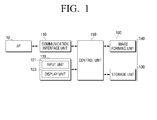
- FIG. 1 is a block diagram illustrating the configuration of an image forming apparatus according to an embodiment of the present invention.
- an image forming apparatus 100 includes a communication interface unit 110, a user interface unit 120, a storage unit 130, an image forming unit 140, and a control unit 150.
- the communication interface unit 110 may be wirelessly connected with an access point 10 using a WPS protocol. Specifically, the communication interface unit 110 may receive a signal for starting a WPS (Wi-Fi Protected Setup) function from the access point 10.
- the signal received from the access point 10 may be a "packet finding a WPS enrollee" which reports that a WPS (Wi-Fi Protected Setup) button of the access point 10 has operated.
- the packet finding a WPS enrollee may include WPS information such as "selected register", "device password ID”, and the like. Information included in the signal transmitted by the access point 10 will be described later with reference to FIGS. 3 and 4 .
- the communication interface unit 110 may transmit a WPS start packet to the access point 10. Specifically, if a WPS button of an input unit 121 to be described later is selected, the communication interface unit 110 may transmit the WPS start packet to the access point 10 that has transmitted a "signal for starting the WPS (Wi-Fi Protected Setup) function". Through this, the access point 10 and the image forming apparatus start a WPS protocol, and the communication interface unit 110 can receive a wireless communication parameter from the access point through a predefined WPS protocol regulation.
- the communication interface unit 10 can receive print data from the access point 10. Specifically, in the case where the access point 10 is a print control terminal device, the communication interface unit 110 can directly receive print data from the access point. On the other hand, in the case where the image forming apparatus is connected to the print control terminal device through the access point 10 (that is, in the case where the access point 10 serves as a router), the communication interface unit 110 can receive the print data from the print control terminal device through the access point 10.
- the user interface unit 120 is provided with a plurality of function keys through which a user can set or select various kinds of functions supported by the image forming apparatus, and displays various kinds of information provided from the image forming apparatus 100.
- the user interface unit 120 may include an input unit 121 and a display unit 123.
- the input unit 121 receives an input of a user's selection.
- the input unit 121 may include buttons provided at an upper end or on the front surface of the image forming apparatus 100, such as a power button, a cancel button, a print button, and the like.
- the power button is a button that can be selected by a user to turn on or off the power of the image forming apparatus 100
- the cancel button is a button that can be selected by the user to cancel the existing selection
- the print button is a button that can be selected by the user to print an image displayed on the print control terminal device (not illustrated) or to resume a print job that is in a standby state.
- the use of the power button, the cancel button, and the print button is exemplified.
- other buttons provided in the image forming apparatus 100 may also be used in addition to the power button, the cancel button, and the print button.
- the display unit 123 displays whether the button is used for the WPS function or a preset inherent function of the button. Specifically, if the button of the input unit 121 is activated as the WPS button, the display unit 123 can display that the corresponding button operates as the WPS button.
- the display unit 123 may be implemented by LED or an LCD window. The detailed shape of the display unit 123 will be described layer with reference to FIGS. 5 and 6 .
- the storage unit 130 stores information related to the wireless connection. Specifically, the storage unit 130 receives WPS information received during the wireless connection procedure with the access point 10.
- the storage unit 130 may be implemented by a storage medium within the image forming apparatus 100 and an external storage medium, for example, a removable disk including a USB memory, a web server through a network, or the like.
- the image forming unit 140 performs a printing task. Specifically, the image forming unit 140 may perform a series of processes of outputting the print data received through the communication interface 110 through a print engine.
- the control unit 150 controls respective configurations in the image forming apparatus 100. Also, the control unit 150 may set a wireless connection with the access point 10. Specifically, if a signal for starting the WPS (Wi-Fi Protected Setup) function is received from the access point 10, the control unit 150 may activate all buttons of the input unit 121 as WPS buttons.
- the term "activation" means the replacement of the predetermined inherent function of the buttons by the WPS functions.
- a user can perform the EPS connection by selecting the button activated as the WPS button. If a user selects the button activated as the WPS button, the control unit 150 controls the communication interface unit 110 so as to make a wireless connection with the access point.
- control unit 150 may terminate the activation of the WPS button. Specifically, if a predetermined time, for example, a time for 120 seconds, elapses after the activation of the WPS button, or the image forming apparatus has already been wirelessly connected with the access point 10, the control unit 150 may terminate the WPS activation of the button. That is, the button that performs the WPS function may be made to perform the preset inherent function.
- control unit 150 may judge whether the image forming apparatus is wirelessly connected with the access point 10. Specifically, if the image forming apparatus and the access point 10 have already been wirelessly connected with each other, the control unit 150 may make the button of the input unit 121 not activated as the WPS button even if the signal that reports the WPS activation is received from the access point 10 so that the reconnection process is not performed even if the WPS button of the access point is pressed. Also, the control unit 150 can confirm whether a button activated as the WPS button is selected in a state where the image forming apparatus and the access point are wirelessly connected with each other and whether the user's selection of the WPS button is for the WPS progress.
- the image forming apparatus 100 uses the buttons basically provided in the image forming apparatus as the WPS buttons, and thus the cost for additionally providing WPS buttons can be saved. Also, since the basic buttons are used as the WPS buttons only at the point where the WPS activation is required, the user's confusion due to an unnecessary selection of the WPS button can be removed, and thus the user convenience is improved.
- FIG. 2 is a diagram illustrating a wireless connection process between an image forming apparatus according to an embodiment of the present invention and an access point.
- the access point 10 may transit a packet for finding a device to be connected with by WPS in unicast or broadcast method (step S220).
- the packet for finding the device to be accessed by WPS may include a broadcast type beacon packet, and the packet for finding the device to be accessed by WPS may be included in a unitcast type probe response packet.
- the transferred packet may include information as illustrated in FIG. 4 .
- the image forming apparatus 100 judges that the access point 10 is ready to access the WPS, and may activate at least one of the buttons provided in the image forming apparatus 100 as the WPS button (step S230). At this time, the image forming apparatus 100 can display that at least one of the buttons provided in the image forming apparatus 100 has been activated as the WPS button.
- the image forming apparatus 100 transmits a WPS start packet to the access point 10 (step S250), and the access point that has received the WPS start packet can perform the WPS wireless connection with the image forming apparatus 100. Specifically, if the WPS start packet is transmitted to the access point, the access point 10 and the image forming apparatus 100 perform the WPS protocol through a predefined WPS protocol regulation, and the image forming apparatus 100 decodes and stores the received final wireless communication parameter. Using the stored wireless communication parameter, the image forming apparatus 100 and the access point 10 0 can be wirelessly connected with each other.
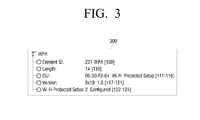
- FIGS. 3 and 4 are diagrams illustrating an example of information that is transferred by an access point 10.
- FIG. 3 shows an example of a packet that is transmitted before the WPS button is operated
- FIG. 4 shows an example of a packet that is transmitted after the WPS button is operated.
- the access point 10 can confirm the transfer of the packet that includes the WPS information, such as the selected register, device password ID, selected reg., and the like, to the image forming apparatus 100.
- the WPS information such as the selected register, device password ID, selected reg., and the like
- the device password ID is set to "Ox0004", and in this case, the value of "Ox0004" means "push button”.
- FIGS. 5 and 6 are diagrams illustrating examples of a display unit according to an embodiment of the present invention.
- a manipulation panel 500 includes a print button 510 and a display unit 520.
- the print button 510 is a button that a user can select in order to print an image that is displayed on the print control terminal device (not illustrated). Also, the print button 510 may be operated as the WPS button in accordance with the activation of the WPS button. In the illustrated example, only a “print button” is illustrated, but other buttons such as a "power button” or “cancel button” may also be operated as the WPS buttons.
- the display unit 520 is configured to display whether the print button 510 is activated as the WPS button. Specifically, the display unit 520 includes a "print screen" region 521 and a "WPS" region 522.
- the "print screen” region 521 is a region which informs a user that the current print button 510 is operated with its original function
- the "WPS" region 522 is a region which informs a user that the print button 510 is operated as the WPS button.
- whether the button is activated as the WPS button is displayed using two regions 521 and 522.
- the activation/inactivation of the WPS button may be displayed using LED that displays various colors in one region.
- the display unit 520 may be implemented in the form as illustrated in FIG. 6 .
- the display unit 600 includes a "print screen” region 610, a "WPS button” region 620, and an "auto" region 630.
- the "print screen” region 610 is a region which informs a user that the button is operated as a print button which is its original function
- the "WPS button” region 620 is a region which informs a user that the button is operated as the WPS button.
- the "auto" region is a region which informs a user that the function of the current button is automatically changed according to the WPS activation.
- the input unit is implemented by mechanical buttons.
- the input unit may be implemented by buttons on a touch pad on which the input unit and the output unit are combined into one configuration.
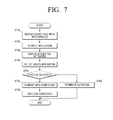
- FIG. 7 is a flowchart illustrating a method for setting a wireless LAN according to an embodiment of the present invention.
- a signal for staring the WPS (Wi-Fi Protected Setup) function is received from the access point 10 (step S710). Specifically, if a packet that includes information such as a selected register, a device password ID, and the like is received from the access point 10, it can be judged that the access point 10 is ready to access the WPS.
- WPS Wi-Fi Protected Setup
- buttons provided in the image forming apparatus 100 is activated as the WPS button (step S720). Specifically, if it is judged that the access point 10 is ready to access the WPS, at least one button among buttons provided in the image forming apparatus can be activated as the WPS button. In implementation, all buttons of the image forming apparatus may be implemented to be activated as the WPS buttons. In this case, the buttons of the image forming apparatus may be a power button, a cancel button (or function button), or a print button.
- step S740 it is displayed that the button provided in the image forming apparatus has been activated as the WPS button (step S740). Specifically, it can be displayed that at least one of the buttons provided in the image forming apparatus has been activated as the WPS button through a display window as shown in FIGS. 5 and 6 .
- step S740 If a user selects the button that has been activated as the WPS button (step S740), it can be judged whether the user's button selection is effective (step S750). Specifically, if the user's button selection is made after a predetermined time elapses, the wireless connection may not be performed in the case where the button is selected in an already wirelessly connected state. In this state, the activation of the activated WPS button may be terminated (step S760).
- wireless connection with the access point 10 is performed. Specifically, a WPS start packet is transmitted to the access point (step S770), and after the transmission of the WPS start packet, the WPS protocol is performed according to the predefined WPS protocol regulation. At this time, the image forming apparatus 100 decodes and stores the received final wireless communication parameter, and the image forming apparatus 100 and the access point 10 can be wirelessly connected using the stored wireless communication parameter (step S780).
- the buttons basically provided in the image forming apparatus are used as the WPS buttons, and thus the cost for additionally providing the WPS buttons can be saved. Also, since the WPS button function is activated and provided only at a point where the WPS button is required, the user's confusion due to an unnecessary selection of the WPS button can be removed, and thus the user convenience is improved.
- the method for setting a wireless LAN as illustrated in FIG. 7 may be executed on the image forming apparatus having the configuration of FIG. 1 or another image forming apparatus having different configuration.
Landscapes
- Engineering & Computer Science (AREA)
- Signal Processing (AREA)
- Computer Networks & Wireless Communication (AREA)
- Computer Security & Cryptography (AREA)
- Computing Systems (AREA)
- General Engineering & Computer Science (AREA)
- Computer Hardware Design (AREA)
- Multimedia (AREA)
- Mobile Radio Communication Systems (AREA)
- Accessory Devices And Overall Control Thereof (AREA)
Abstract
Description
- This application claims priority to Korean Patent Application No.
10-2010-0081550, filed on August 23, 2010 - The present invention relates generally to an image forming apparatus and a method for setting a wireless LAN thereof, and more particularly, to an image forming apparatus and a method for setting a wireless LAN thereof, which can use various kinds of buttons provided in the image forming apparatus as WPS (Wi-Fi Protected Setup) buttons.
- An image forming apparatus means an apparatus that prints print data generated in a terminal device such as a computer on a print paper. Examples of such an image forming apparatus include a copy machine, a printer, a facsimile, a multifunctional peripheral (MFP) that multiply implements functions of these devices through one device, and the like.
- Although an image forming apparatus in the related art performs communication with a print control terminal device in a wired method, a recent image forming apparatus is wirelessly connectable with a print control terminal device using a wireless LAN. A currently used wireless LAN generally follows IEEE 802.11 standard.
- On the other hand, a WPS (Wi-Fi Protected Setup) means a Wi-Fi standard protocol for easy wireless security setting. Such a WPS protocol provides a means for simply setting wireless setting set in an access point by communicating with a wireless connection device through a user authentication method such as PBC (Push Button Configuration), PIN (Personal Identification Number), or the like. The WPS protocol is a standard means which enables a user who has difficulty in performing wireless security setting to easily perform the wireless setting.
- Although the WPS function can be easily provided through a GUI in a device such as a desk top computer or a mobile, it is not easy to provide a user the WPS function in an image forming apparatus that has a limited display means. In order to overcome this point, a recent image forming apparatus is provided with a dedicated WPS button to support the WPS function.
- However, the WPS function has the problem that its utility is lowered in spite of cost increase that occurs as a WPS-dedicated button is added, on the point that the WPS function is used at an initial stage of constructing a wireless environment, but is not used any further, except for reconnection, in a state where the wireless setting is completed and the wireless communication is possible.
- Also, if a WPS button is pressed due to a user's mistake in spite of the situation in which the wireless environment is not being constructed, in the related art, the currently connected wireless connection may be disconnected or become non-connectable.
- The present invention has been made to address at least the above problems and/or disadvantages and to provide at least the advantages described below. Accordingly, an aspect of the present invention provides an image forming apparatus and a method for setting a wireless LAN in the image forming apparatus, which can use various kinds of buttons provided in the image forming apparatus as WPS (Wi-Fi Protected Setup) buttons.
- According to the present invention there is provided an apparatus and method as set forth in the appended claims. Other features of the invention will be apparent from the dependent claims, and the description which follows.
- According to one aspect of the present invention, a method for setting a wireless LAN in an image forming apparatus that is connectable with an access point includes receiving a signal for starting a WPS (Wi-Fi Protected Setup) function; activating a button provided in the image forming apparatus as a WPS button; and if the button activated as the WPS button is selected, constructing a wireless network with the access point.
- It is preferable that the signal is a packet that includes at least one information of a selected register and a device password ID.
- The method for setting a wireless LAN according to an embodiment of the present invention may further include displaying that the button is activated as the WPS button when the button is activated as the WPS button.
- The method for setting a wireless LAN according to an embodiment of the present invention may further include terminating the activation of the button activated as the WPS button if a predetermined time elapses after the button is activated as the WPS button or the image forming apparatus is wirelessly connected to the access point.
- It is preferable that the button is a button for performing a predetermined inherent function, and the activation step replaces the inherent function by the WPS function for a predetermined time after the signal is received.
- It is preferable that the activation step judges whether the image forming apparatus is wirelessly connected to the access point, and activates the button as the WPS button based on the judgment.
- The method for setting a wireless LAN according to an embodiment of the present invention may further include judging whether the image forming apparatus is wirelessly connected to the access point if the button activated as the WPS button is selected; and if the image forming apparatus is wirelessly connected to the access point, confirming whether the selection of the button activated as the WPS button is for a WPS progress.
- The button of the image forming apparatus may be at least one button of a power button, a cancel button, and a print button.
- The image forming apparatus may be provided with a plurality of buttons, and the activation step activates all the plurality of buttons as the WPS buttons.
- According to another aspect of the present invention, an image forming apparatus that is connectable with an access point includes a communication interface unit receiving a signal for starting a WPS (Wi-Fi Protected Setup) function; an input unit including buttons for receiving an input of a user's selection; and a control unit activating a button provided in the image forming apparatus as a WPS button; wherein if the button activated as the WPS button is selected, the control unit constructs a wireless network with the access point.
- It is preferable that the signal is a packet that includes at least one information of a selected register and a device password ID.
- The image forming apparatus according to an embodiment of the present invention may further include a display unit displaying that the button is activated as the WPS button when the button is activated as the WPS button.
- It is preferable that the control unit terminates the activation of the button activated as the WPS button if a predetermined time elapses after the button is activated as the WPS button or the image forming apparatus is wirelessly connected to the access point.
- It is preferable that the button is a button for performing a predetermined inherent function, and the control unit replaces the inherent function by the WPS function for a predetermined time after the signal is received.
- It is preferable that the control unit judges whether the image forming apparatus is wirelessly connected to the access point, and activates the button as the WPS button based on the judgment.
- It is preferable that the control unit judges whether the image forming apparatus is wirelessly connected to the access point if the button activated as the WPS button is selected, and if the image forming apparatus is wirelessly connected to the access point, the control unit confirms whether the selection of the button activated as the WPS button is for a WPS progress.
- It is preferable that the button may be at least one button of a power button, a cancel button, and a print button.
- It is preferable that the input unit is provided with a plurality of buttons, and the control unit activates all the plurality of buttons as the WPS buttons.
- The above and other aspects, features and advantages of the present invention will be more apparent from the following detailed description when taken in conjunction with the accompanying drawings, in which:
-
FIG. 1 is a block diagram illustrating the configuration of an image forming apparatus according to an embodiment of the present invention; -
FIG. 2 is a diagram illustrating a wireless connection process between an image forming apparatus according to an embodiment of the present invention and an access point; -
FIGS. 3 and4 are diagrams illustrating an example of information that is transferred by an access point; -
FIGS. 5 and6 are diagrams illustrating a configuration example of a display unit according to an embodiment of the present invention; and -
FIG. 7 is a flowchart illustrating a method for setting a wireless LAN according to an embodiment of the present invention. - Embodiments of the present invention are described in detail with reference to the accompanying drawings.
- In the following description, the same or similar reference numerals may be used for the same or similar elements when they are illustrated in different drawings. Detailed descriptions of constructions or processes known in the art may be omitted to avoid obscuring the subject matter of the present invention.
-
FIG. 1 is a block diagram illustrating the configuration of an image forming apparatus according to an embodiment of the present invention. - Referring to
FIG. 1 , animage forming apparatus 100 includes acommunication interface unit 110, auser interface unit 120, astorage unit 130, animage forming unit 140, and acontrol unit 150. - The
communication interface unit 110 may be wirelessly connected with anaccess point 10 using a WPS protocol. Specifically, thecommunication interface unit 110 may receive a signal for starting a WPS (Wi-Fi Protected Setup) function from theaccess point 10. In this case, the signal received from theaccess point 10 may be a "packet finding a WPS enrollee" which reports that a WPS (Wi-Fi Protected Setup) button of theaccess point 10 has operated. Specifically, the packet finding a WPS enrollee may include WPS information such as "selected register", "device password ID", and the like. Information included in the signal transmitted by theaccess point 10 will be described later with reference toFIGS. 3 and4 . - Also, the
communication interface unit 110 may transmit a WPS start packet to theaccess point 10. Specifically, if a WPS button of aninput unit 121 to be described later is selected, thecommunication interface unit 110 may transmit the WPS start packet to theaccess point 10 that has transmitted a "signal for starting the WPS (Wi-Fi Protected Setup) function". Through this, theaccess point 10 and the image forming apparatus start a WPS protocol, and thecommunication interface unit 110 can receive a wireless communication parameter from the access point through a predefined WPS protocol regulation. - If the image forming apparatus is wirelessly connected to the
access point 10, thecommunication interface unit 10 can receive print data from theaccess point 10. Specifically, in the case where theaccess point 10 is a print control terminal device, thecommunication interface unit 110 can directly receive print data from the access point. On the other hand, in the case where the image forming apparatus is connected to the print control terminal device through the access point 10 (that is, in the case where theaccess point 10 serves as a router), thecommunication interface unit 110 can receive the print data from the print control terminal device through theaccess point 10. - The
user interface unit 120 is provided with a plurality of function keys through which a user can set or select various kinds of functions supported by the image forming apparatus, and displays various kinds of information provided from theimage forming apparatus 100. Theuser interface unit 120 may include aninput unit 121 and adisplay unit 123. - The
input unit 121 receives an input of a user's selection. Specifically, theinput unit 121 may include buttons provided at an upper end or on the front surface of theimage forming apparatus 100, such as a power button, a cancel button, a print button, and the like. - Here, the power button is a button that can be selected by a user to turn on or off the power of the
image forming apparatus 100, and the cancel button is a button that can be selected by the user to cancel the existing selection. The print button is a button that can be selected by the user to print an image displayed on the print control terminal device (not illustrated) or to resume a print job that is in a standby state. In an embodiment of the present invention, the use of the power button, the cancel button, and the print button is exemplified. However, other buttons provided in theimage forming apparatus 100 may also be used in addition to the power button, the cancel button, and the print button. - The
display unit 123 displays whether the button is used for the WPS function or a preset inherent function of the button. Specifically, if the button of theinput unit 121 is activated as the WPS button, thedisplay unit 123 can display that the corresponding button operates as the WPS button. Thedisplay unit 123 may be implemented by LED or an LCD window. The detailed shape of thedisplay unit 123 will be described layer with reference toFIGS. 5 and6 . - The
storage unit 130 stores information related to the wireless connection. Specifically, thestorage unit 130 receives WPS information received during the wireless connection procedure with theaccess point 10. - On the other hand, the
storage unit 130 may be implemented by a storage medium within theimage forming apparatus 100 and an external storage medium, for example, a removable disk including a USB memory, a web server through a network, or the like. - The
image forming unit 140 performs a printing task. Specifically, theimage forming unit 140 may perform a series of processes of outputting the print data received through thecommunication interface 110 through a print engine. - The
control unit 150 controls respective configurations in theimage forming apparatus 100. Also, thecontrol unit 150 may set a wireless connection with theaccess point 10. Specifically, if a signal for starting the WPS (Wi-Fi Protected Setup) function is received from theaccess point 10, thecontrol unit 150 may activate all buttons of theinput unit 121 as WPS buttons. Here, the term "activation" means the replacement of the predetermined inherent function of the buttons by the WPS functions. - A user can perform the EPS connection by selecting the button activated as the WPS button. If a user selects the button activated as the WPS button, the
control unit 150 controls thecommunication interface unit 110 so as to make a wireless connection with the access point. - Also, the
control unit 150 may terminate the activation of the WPS button. Specifically, if a predetermined time, for example, a time for 120 seconds, elapses after the activation of the WPS button, or the image forming apparatus has already been wirelessly connected with theaccess point 10, thecontrol unit 150 may terminate the WPS activation of the button. That is, the button that performs the WPS function may be made to perform the preset inherent function. - Also, the
control unit 150 may judge whether the image forming apparatus is wirelessly connected with theaccess point 10. Specifically, if the image forming apparatus and theaccess point 10 have already been wirelessly connected with each other, thecontrol unit 150 may make the button of theinput unit 121 not activated as the WPS button even if the signal that reports the WPS activation is received from theaccess point 10 so that the reconnection process is not performed even if the WPS button of the access point is pressed. Also, thecontrol unit 150 can confirm whether a button activated as the WPS button is selected in a state where the image forming apparatus and the access point are wirelessly connected with each other and whether the user's selection of the WPS button is for the WPS progress. - As described above, the
image forming apparatus 100 according to an embodiment of the present invention uses the buttons basically provided in the image forming apparatus as the WPS buttons, and thus the cost for additionally providing WPS buttons can be saved. Also, since the basic buttons are used as the WPS buttons only at the point where the WPS activation is required, the user's confusion due to an unnecessary selection of the WPS button can be removed, and thus the user convenience is improved. -
FIG. 2 is a diagram illustrating a wireless connection process between an image forming apparatus according to an embodiment of the present invention and an access point. - Referring to
FIG. 2 , if a user presses the WPS button positioned on theaccess point 10 0 for the WPS operation (step S210), theaccess point 10 may transit a packet for finding a device to be connected with by WPS in unicast or broadcast method (step S220). Specifically, the packet for finding the device to be accessed by WPS may include a broadcast type beacon packet, and the packet for finding the device to be accessed by WPS may be included in a unitcast type probe response packet. In this case, the transferred packet may include information as illustrated inFIG. 4 . - Also, if the
image forming apparatus 100 receives the packet for finding the device to be accessed by WPS, theimage forming apparatus 100 judges that theaccess point 10 is ready to access the WPS, and may activate at least one of the buttons provided in theimage forming apparatus 100 as the WPS button (step S230). At this time, theimage forming apparatus 100 can display that at least one of the buttons provided in theimage forming apparatus 100 has been activated as the WPS button. - If a user selects the button activated as the WPS button (step S240), the
image forming apparatus 100 transmits a WPS start packet to the access point 10 (step S250), and the access point that has received the WPS start packet can perform the WPS wireless connection with theimage forming apparatus 100. Specifically, if the WPS start packet is transmitted to the access point, theaccess point 10 and theimage forming apparatus 100 perform the WPS protocol through a predefined WPS protocol regulation, and theimage forming apparatus 100 decodes and stores the received final wireless communication parameter. Using the stored wireless communication parameter, theimage forming apparatus 100 and theaccess point 10 0 can be wirelessly connected with each other. -
FIGS. 3 and4 are diagrams illustrating an example of information that is transferred by anaccess point 10. - Specifically,
FIG. 3 shows an example of a packet that is transmitted before the WPS button is operated, andFIG. 4 shows an example of a packet that is transmitted after the WPS button is operated. - Comparing
FIGS. 3 and4 with each other, if the WPS button of theaccess point 10 is pressed, theaccess point 10 can confirm the transfer of the packet that includes the WPS information, such as the selected register, device password ID, selected reg., and the like, to theimage forming apparatus 100. On the other hand, referring toFIG. 4 , it can be confirmed that the device password ID is set to "Ox0004", and in this case, the value of "Ox0004" means "push button". -
FIGS. 5 and6 are diagrams illustrating examples of a display unit according to an embodiment of the present invention. - Referring to
FIG. 5 , amanipulation panel 500 includes aprint button 510 and adisplay unit 520. - The
print button 510 is a button that a user can select in order to print an image that is displayed on the print control terminal device (not illustrated). Also, theprint button 510 may be operated as the WPS button in accordance with the activation of the WPS button. In the illustrated example, only a "print button" is illustrated, but other buttons such as a "power button" or "cancel button" may also be operated as the WPS buttons. - The
display unit 520 is configured to display whether theprint button 510 is activated as the WPS button. Specifically, thedisplay unit 520 includes a "print screen"region 521 and a "WPS"region 522. - The "print screen"
region 521 is a region which informs a user that thecurrent print button 510 is operated with its original function, and the "WPS"region 522 is a region which informs a user that theprint button 510 is operated as the WPS button. In the illustrated example, whether the button is activated as the WPS button is displayed using tworegions - On the other hand, the
display unit 520 may be implemented in the form as illustrated inFIG. 6 . Specifically, referring toFIG. 6 , thedisplay unit 600 includes a "print screen"region 610, a "WPS button"region 620, and an "auto"region 630. - The "print screen"
region 610 is a region which informs a user that the button is operated as a print button which is its original function, and the "WPS button"region 620 is a region which informs a user that the button is operated as the WPS button. - Also, the "auto" region is a region which informs a user that the function of the current button is automatically changed according to the WPS activation.
- In
FIGS. 5 and6 , it is exemplified that the input unit is implemented by mechanical buttons. However, the input unit may be implemented by buttons on a touch pad on which the input unit and the output unit are combined into one configuration. -
FIG. 7 is a flowchart illustrating a method for setting a wireless LAN according to an embodiment of the present invention. - First, a signal for staring the WPS (Wi-Fi Protected Setup) function is received from the access point 10 (step S710). Specifically, if a packet that includes information such as a selected register, a device password ID, and the like is received from the
access point 10, it can be judged that theaccess point 10 is ready to access the WPS. - Thereafter, the buttons provided in the
image forming apparatus 100 is activated as the WPS button (step S720). Specifically, if it is judged that theaccess point 10 is ready to access the WPS, at least one button among buttons provided in the image forming apparatus can be activated as the WPS button. In implementation, all buttons of the image forming apparatus may be implemented to be activated as the WPS buttons. In this case, the buttons of the image forming apparatus may be a power button, a cancel button (or function button), or a print button. - Thereafter, it is displayed that the button provided in the image forming apparatus has been activated as the WPS button (step S740). Specifically, it can be displayed that at least one of the buttons provided in the image forming apparatus has been activated as the WPS button through a display window as shown in
FIGS. 5 and6 . - If a user selects the button that has been activated as the WPS button (step S740), it can be judged whether the user's button selection is effective (step S750). Specifically, if the user's button selection is made after a predetermined time elapses, the wireless connection may not be performed in the case where the button is selected in an already wirelessly connected state. In this state, the activation of the activated WPS button may be terminated (step S760).
- On the other hand, if the user's button selection is effective, wireless connection with the
access point 10 is performed. Specifically, a WPS start packet is transmitted to the access point (step S770), and after the transmission of the WPS start packet, the WPS protocol is performed according to the predefined WPS protocol regulation. At this time, theimage forming apparatus 100 decodes and stores the received final wireless communication parameter, and theimage forming apparatus 100 and theaccess point 10 can be wirelessly connected using the stored wireless communication parameter (step S780). - According to the method for setting a wireless LAN according to an embodiment of the present invention, the buttons basically provided in the image forming apparatus are used as the WPS buttons, and thus the cost for additionally providing the WPS buttons can be saved. Also, since the WPS button function is activated and provided only at a point where the WPS button is required, the user's confusion due to an unnecessary selection of the WPS button can be removed, and thus the user convenience is improved. The method for setting a wireless LAN as illustrated in
FIG. 7 may be executed on the image forming apparatus having the configuration ofFIG. 1 or another image forming apparatus having different configuration. - While the invention has been shown and described with reference to certain embodiments thereof, it will be understood by those skilled in the art that various changes in form and detail may be made therein without departing from the spirit and scope of the invention, as defined by the appended claims.
Claims (15)
- A method for setting a wireless LAN in an image forming apparatus that is connectable with an access point, comprising:receiving a signal for starting a WPS (Wi-Fi Protected Setup) function;activating a button provided in the image forming apparatus as a WPS button; andif the button activated as the WPS button is selected, constructing a wireless network with the access point.
- The method for setting a wireless LAN as claimed in claim 1, wherein the signal is a packet that includes at least one information of a selected register and a device password ID.
- The method for setting a wireless LAN as in claim 1 or 2, further comprising displaying that the button is activated as the WPS button when the button is activated as the WPS button.
- The method for setting a wireless LAN as claimed in any one of claims 1 to 3, further comprising terminating the activation of the button activated as the WPS button if a predetermined time elapses after the button is activated as the WPS button or the image forming apparatus is wirelessly connected to the access point.
- The method for setting a wireless LAN as claimed in any one of claims 1 to 4, wherein the button is a button for performing a predetermined inherent function, and
the activation step replaces the inherent function by the WPS function for a predetermined time after the signal is received. - The method for setting a wireless LAN as claimed in any one of claims 1 to 5, wherein the activation step judges whether the image forming apparatus is wirelessly connected to the access point, and activates the button as the WPS button based on the judgment.
- The method for setting a wireless LAN as claimed in any one of claims 1 to 5, further comprising:judging whether the image forming apparatus is wirelessly connected to the access point if the button activated as the WPS button is selected; andif the image forming apparatus is wirelessly connected to the access point, confirming whether the selection of the button activated as the WPS button is for a WPS progress.
- The method for setting a wireless LAN as claimed in claim 1, wherein the button of the image forming apparatus is at least one button of a power button, a cancel button, and a print button.
- The method for setting a wireless LAN as claimed in claim 1, wherein the image forming apparatus is provided with a plurality of buttons, and
the activation step activates all the plurality of buttons as the WPS buttons. - An image forming apparatus that is connectable with an access point comprising:a communication interface unit receiving a signal for starting a WPS (Wi-Fi Protected Setup) function;an input unit including buttons for receiving an input of a user's selection; anda control unit activating a button provided in the image forming apparatus as a WPS button;wherein if the button activated as the WPS button is selected, the control unit constructs a wireless network with the access point.
- The image forming apparatus as claimed in claim 10, wherein the signal is a packet that includes at least one information of a selected register and a device password ID.
- The image forming apparatus as claimed in claim 10 or 11, further comprising a display unit displaying that the button is activated as the WPS button when the button is activated as the WPS button.
- The image forming apparatus as claimed in any one of claims 10 to 12, wherein the control unit terminates the activation of the button activated as the WPS button if a predetermined time elapses after the button is activated as the WPS button or the image forming apparatus is wirelessly connected to the access point.
- The image forming apparatus as claimed in any one of claims 10 to 13, wherein the button is a button for performing a predetermined inherent function, and
the control unit replaces the inherent function by the WPS function for a predetermined time after the signal is received. - The image forming apparatus as claimed in any one of claims 10 to 14, wherein the control unit judges whether the image forming apparatus is wirelessly connected to the access point, and activates the button as the WPS button based on the judgment.
Applications Claiming Priority (1)
| Application Number | Priority Date | Filing Date | Title |
|---|---|---|---|
| KR1020100081550A KR20120018606A (en) | 2010-08-23 | 2010-08-23 | Image forming apparatus and method for setting wireless lan thereof |
Publications (2)
| Publication Number | Publication Date |
|---|---|
| EP2424283A1 true EP2424283A1 (en) | 2012-02-29 |
| EP2424283B1 EP2424283B1 (en) | 2018-10-03 |
Family
ID=44508946
Family Applications (1)
| Application Number | Title | Priority Date | Filing Date |
|---|---|---|---|
| EP11177970.8A Not-in-force EP2424283B1 (en) | 2010-08-23 | 2011-08-18 | Image forming apparatus and method for setting wireless lan thereof |
Country Status (4)
| Country | Link |
|---|---|
| US (1) | US8743398B2 (en) |
| EP (1) | EP2424283B1 (en) |
| KR (1) | KR20120018606A (en) |
| CN (1) | CN102378404B (en) |
Cited By (1)
| Publication number | Priority date | Publication date | Assignee | Title |
|---|---|---|---|---|
| WO2015200273A1 (en) * | 2014-06-27 | 2015-12-30 | Arris Enterprises, Inc. | Set-to box or similar device with wifi protected setup button and visual indicators for displaying each stage of a protected setup process |
Families Citing this family (9)
| Publication number | Priority date | Publication date | Assignee | Title |
|---|---|---|---|---|
| US8917651B2 (en) * | 2011-10-05 | 2014-12-23 | Cisco Technology, Inc. | Associating wi-fi stations with an access point in a multi-access point infrastructure network |
| KR101915314B1 (en) * | 2011-10-25 | 2018-11-07 | 삼성전자주식회사 | Method and apparatus for wi-fi connecting using wi-fi protected setup in a portable terminal |
| JP5950556B2 (en) * | 2011-12-07 | 2016-07-13 | キヤノン株式会社 | Printing apparatus having wireless communication function, printing apparatus control method, and program |
| CN103297952B (en) * | 2013-05-10 | 2016-05-04 | 深圳市共进电子股份有限公司 | A kind of double frequency WPS triggering method |
| CN103634935B (en) * | 2013-11-22 | 2017-02-15 | 北京奇虎科技有限公司 | WPS (Wi-Fi protected setup) or QSS (quick secure setup)-based network accessing method and device |
| JP6317576B2 (en) * | 2013-11-29 | 2018-04-25 | キヤノン株式会社 | COMMUNICATION DEVICE, COMMUNICATION DEVICE CONTROL METHOD, AND PROGRAM |
| WO2016026144A1 (en) * | 2014-08-22 | 2016-02-25 | 华为技术有限公司 | Method for establishing network connection by means of wps, and mobile wi-fi device |
| NL1041509B1 (en) * | 2015-10-08 | 2017-04-26 | Assumite Gladium Spiritus B V | Activation procedure for low radiation wireless networks. |
| JP2024081197A (en) * | 2022-12-06 | 2024-06-18 | キヤノン株式会社 | Image forming device |
Citations (2)
| Publication number | Priority date | Publication date | Assignee | Title |
|---|---|---|---|---|
| EP2112844A2 (en) * | 2008-04-25 | 2009-10-28 | Samsung Electronics Co., Ltd. | Methods and apparatus for setting up wireless LAN |
| KR20100081550A (en) | 2009-01-06 | 2010-07-15 | 김종재 | Indication lamp on street |
Family Cites Families (2)
| Publication number | Priority date | Publication date | Assignee | Title |
|---|---|---|---|---|
| JP4228261B2 (en) * | 2000-08-29 | 2009-02-25 | カシオ計算機株式会社 | Rear device, portable communication terminal, and information acquisition method |
| US8625552B2 (en) * | 2008-12-31 | 2014-01-07 | Microsoft Corporation | Wireless provisioning a device for a network using a soft access point |
-
2010
- 2010-08-23 KR KR1020100081550A patent/KR20120018606A/en not_active Ceased
-
2011
- 2011-03-14 US US13/047,352 patent/US8743398B2/en active Active
- 2011-08-18 EP EP11177970.8A patent/EP2424283B1/en not_active Not-in-force
- 2011-08-23 CN CN201110251270.6A patent/CN102378404B/en not_active Expired - Fee Related
Patent Citations (2)
| Publication number | Priority date | Publication date | Assignee | Title |
|---|---|---|---|---|
| EP2112844A2 (en) * | 2008-04-25 | 2009-10-28 | Samsung Electronics Co., Ltd. | Methods and apparatus for setting up wireless LAN |
| KR20100081550A (en) | 2009-01-06 | 2010-07-15 | 김종재 | Indication lamp on street |
Cited By (2)
| Publication number | Priority date | Publication date | Assignee | Title |
|---|---|---|---|---|
| WO2015200273A1 (en) * | 2014-06-27 | 2015-12-30 | Arris Enterprises, Inc. | Set-to box or similar device with wifi protected setup button and visual indicators for displaying each stage of a protected setup process |
| US9596704B2 (en) | 2014-06-27 | 2017-03-14 | Arris Enterprises, Inc. | Initiating and monitoring wireless connection between station and access point |
Also Published As
| Publication number | Publication date |
|---|---|
| US8743398B2 (en) | 2014-06-03 |
| US20120044522A1 (en) | 2012-02-23 |
| CN102378404B (en) | 2016-06-29 |
| EP2424283B1 (en) | 2018-10-03 |
| KR20120018606A (en) | 2012-03-05 |
| CN102378404A (en) | 2012-03-14 |
Similar Documents
| Publication | Publication Date | Title |
|---|---|---|
| EP2424283B1 (en) | Image forming apparatus and method for setting wireless lan thereof | |
| US11792867B2 (en) | Communication system, communication apparatus, control method thereof, and storage medium | |
| US10241729B2 (en) | Communication device, and method and computer readable medium for the same | |
| JP5962896B2 (en) | Printer | |
| US9274738B2 (en) | Information processing apparatus, control method and storage medium storing program for short distance wireless communication | |
| US20140044010A1 (en) | Wireless communication device, method for setting communication configuration, and program for setting communication configuration | |
| US20160219433A1 (en) | System, communication apparatus, communication method, and storage medium storing program | |
| JP2012113349A (en) | Printing device and terminal device | |
| EP2945402B1 (en) | Communication apparatus, control method, and program | |
| US9569152B2 (en) | Communication apparatus | |
| CN108694025B (en) | Information processing apparatus, control method, and storage medium | |
| CN110611904B (en) | Control method, information processing device and non-transitory computer-readable storage medium | |
| JP6481462B2 (en) | Image forming apparatus search method, portable terminal, and program | |
| JP6163947B2 (en) | Image recording device | |
| US20230180119A1 (en) | Information processing apparatus capable of preventing automatic direct connection from remote mobile devices | |
| JP6645261B2 (en) | Programs and mobile terminals | |
| JP6626559B2 (en) | Program for causing computer to execute control method of communication device, communication device and control method therefor | |
| KR20170031682A (en) | Image forming apparatus and method for setting wireless lan thereof | |
| JP6744783B2 (en) | Information processing apparatus, control method thereof, and program | |
| US8823974B2 (en) | Method and apparatus for processing scan data | |
| JP6458828B2 (en) | Image recording device | |
| JP2020074137A (en) | Program and mobile device | |
| JP6107152B2 (en) | Wireless printing system, printer |
Legal Events
| Date | Code | Title | Description |
|---|---|---|---|
| AK | Designated contracting states |
Kind code of ref document: A1 Designated state(s): AL AT BE BG CH CY CZ DE DK EE ES FI FR GB GR HR HU IE IS IT LI LT LU LV MC MK MT NL NO PL PT RO RS SE SI SK SM TR |
|
| AX | Request for extension of the european patent |
Extension state: BA ME |
|
| PUAI | Public reference made under article 153(3) epc to a published international application that has entered the european phase |
Free format text: ORIGINAL CODE: 0009012 |
|
| 17P | Request for examination filed |
Effective date: 20120727 |
|
| RAP1 | Party data changed (applicant data changed or rights of an application transferred) |
Owner name: SAMSUNG ELECTRONICS CO., LTD. |
|
| 17Q | First examination report despatched |
Effective date: 20150521 |
|
| RAP1 | Party data changed (applicant data changed or rights of an application transferred) |
Owner name: S-PRINTING SOLUTION CO., LTD. |
|
| GRAP | Despatch of communication of intention to grant a patent |
Free format text: ORIGINAL CODE: EPIDOSNIGR1 |
|
| STAA | Information on the status of an ep patent application or granted ep patent |
Free format text: STATUS: GRANT OF PATENT IS INTENDED |
|
| INTG | Intention to grant announced |
Effective date: 20180425 |
|
| RAP1 | Party data changed (applicant data changed or rights of an application transferred) |
Owner name: HP PRINTING KOREA CO., LTD. |
|
| GRAS | Grant fee paid |
Free format text: ORIGINAL CODE: EPIDOSNIGR3 |
|
| GRAA | (expected) grant |
Free format text: ORIGINAL CODE: 0009210 |
|
| STAA | Information on the status of an ep patent application or granted ep patent |
Free format text: STATUS: THE PATENT HAS BEEN GRANTED |
|
| AK | Designated contracting states |
Kind code of ref document: B1 Designated state(s): AL AT BE BG CH CY CZ DE DK EE ES FI FR GB GR HR HU IE IS IT LI LT LU LV MC MK MT NL NO PL PT RO RS SE SI SK SM TR |
|
| REG | Reference to a national code |
Ref country code: GB Ref legal event code: FG4D |
|
| REG | Reference to a national code |
Ref country code: CH Ref legal event code: EP Ref country code: AT Ref legal event code: REF Ref document number: 1049997 Country of ref document: AT Kind code of ref document: T Effective date: 20181015 |
|
| REG | Reference to a national code |
Ref country code: DE Ref legal event code: R096 Ref document number: 602011052501 Country of ref document: DE |
|
| REG | Reference to a national code |
Ref country code: IE Ref legal event code: FG4D |
|
| REG | Reference to a national code |
Ref country code: NL Ref legal event code: MP Effective date: 20181003 |
|
| REG | Reference to a national code |
Ref country code: LT Ref legal event code: MG4D |
|
| REG | Reference to a national code |
Ref country code: AT Ref legal event code: MK05 Ref document number: 1049997 Country of ref document: AT Kind code of ref document: T Effective date: 20181003 |
|
| PG25 | Lapsed in a contracting state [announced via postgrant information from national office to epo] |
Ref country code: NL Free format text: LAPSE BECAUSE OF FAILURE TO SUBMIT A TRANSLATION OF THE DESCRIPTION OR TO PAY THE FEE WITHIN THE PRESCRIBED TIME-LIMIT Effective date: 20181003 |
|
| PG25 | Lapsed in a contracting state [announced via postgrant information from national office to epo] |
Ref country code: LV Free format text: LAPSE BECAUSE OF FAILURE TO SUBMIT A TRANSLATION OF THE DESCRIPTION OR TO PAY THE FEE WITHIN THE PRESCRIBED TIME-LIMIT Effective date: 20181003 Ref country code: FI Free format text: LAPSE BECAUSE OF FAILURE TO SUBMIT A TRANSLATION OF THE DESCRIPTION OR TO PAY THE FEE WITHIN THE PRESCRIBED TIME-LIMIT Effective date: 20181003 Ref country code: BG Free format text: LAPSE BECAUSE OF FAILURE TO SUBMIT A TRANSLATION OF THE DESCRIPTION OR TO PAY THE FEE WITHIN THE PRESCRIBED TIME-LIMIT Effective date: 20190103 Ref country code: NO Free format text: LAPSE BECAUSE OF FAILURE TO SUBMIT A TRANSLATION OF THE DESCRIPTION OR TO PAY THE FEE WITHIN THE PRESCRIBED TIME-LIMIT Effective date: 20190103 Ref country code: PL Free format text: LAPSE BECAUSE OF FAILURE TO SUBMIT A TRANSLATION OF THE DESCRIPTION OR TO PAY THE FEE WITHIN THE PRESCRIBED TIME-LIMIT Effective date: 20181003 Ref country code: HR Free format text: LAPSE BECAUSE OF FAILURE TO SUBMIT A TRANSLATION OF THE DESCRIPTION OR TO PAY THE FEE WITHIN THE PRESCRIBED TIME-LIMIT Effective date: 20181003 Ref country code: AT Free format text: LAPSE BECAUSE OF FAILURE TO SUBMIT A TRANSLATION OF THE DESCRIPTION OR TO PAY THE FEE WITHIN THE PRESCRIBED TIME-LIMIT Effective date: 20181003 Ref country code: LT Free format text: LAPSE BECAUSE OF FAILURE TO SUBMIT A TRANSLATION OF THE DESCRIPTION OR TO PAY THE FEE WITHIN THE PRESCRIBED TIME-LIMIT Effective date: 20181003 Ref country code: ES Free format text: LAPSE BECAUSE OF FAILURE TO SUBMIT A TRANSLATION OF THE DESCRIPTION OR TO PAY THE FEE WITHIN THE PRESCRIBED TIME-LIMIT Effective date: 20181003 Ref country code: IS Free format text: LAPSE BECAUSE OF FAILURE TO SUBMIT A TRANSLATION OF THE DESCRIPTION OR TO PAY THE FEE WITHIN THE PRESCRIBED TIME-LIMIT Effective date: 20190203 Ref country code: CZ Free format text: LAPSE BECAUSE OF FAILURE TO SUBMIT A TRANSLATION OF THE DESCRIPTION OR TO PAY THE FEE WITHIN THE PRESCRIBED TIME-LIMIT Effective date: 20181003 |
|
| PG25 | Lapsed in a contracting state [announced via postgrant information from national office to epo] |
Ref country code: SE Free format text: LAPSE BECAUSE OF FAILURE TO SUBMIT A TRANSLATION OF THE DESCRIPTION OR TO PAY THE FEE WITHIN THE PRESCRIBED TIME-LIMIT Effective date: 20181003 Ref country code: RS Free format text: LAPSE BECAUSE OF FAILURE TO SUBMIT A TRANSLATION OF THE DESCRIPTION OR TO PAY THE FEE WITHIN THE PRESCRIBED TIME-LIMIT Effective date: 20181003 Ref country code: GR Free format text: LAPSE BECAUSE OF FAILURE TO SUBMIT A TRANSLATION OF THE DESCRIPTION OR TO PAY THE FEE WITHIN THE PRESCRIBED TIME-LIMIT Effective date: 20190104 Ref country code: PT Free format text: LAPSE BECAUSE OF FAILURE TO SUBMIT A TRANSLATION OF THE DESCRIPTION OR TO PAY THE FEE WITHIN THE PRESCRIBED TIME-LIMIT Effective date: 20190203 Ref country code: AL Free format text: LAPSE BECAUSE OF FAILURE TO SUBMIT A TRANSLATION OF THE DESCRIPTION OR TO PAY THE FEE WITHIN THE PRESCRIBED TIME-LIMIT Effective date: 20181003 |
|
| REG | Reference to a national code |
Ref country code: DE Ref legal event code: R097 Ref document number: 602011052501 Country of ref document: DE |
|
| PG25 | Lapsed in a contracting state [announced via postgrant information from national office to epo] |
Ref country code: IT Free format text: LAPSE BECAUSE OF FAILURE TO SUBMIT A TRANSLATION OF THE DESCRIPTION OR TO PAY THE FEE WITHIN THE PRESCRIBED TIME-LIMIT Effective date: 20181003 Ref country code: DK Free format text: LAPSE BECAUSE OF FAILURE TO SUBMIT A TRANSLATION OF THE DESCRIPTION OR TO PAY THE FEE WITHIN THE PRESCRIBED TIME-LIMIT Effective date: 20181003 |
|
| PLBE | No opposition filed within time limit |
Free format text: ORIGINAL CODE: 0009261 |
|
| STAA | Information on the status of an ep patent application or granted ep patent |
Free format text: STATUS: NO OPPOSITION FILED WITHIN TIME LIMIT |
|
| PG25 | Lapsed in a contracting state [announced via postgrant information from national office to epo] |
Ref country code: SK Free format text: LAPSE BECAUSE OF FAILURE TO SUBMIT A TRANSLATION OF THE DESCRIPTION OR TO PAY THE FEE WITHIN THE PRESCRIBED TIME-LIMIT Effective date: 20181003 Ref country code: SM Free format text: LAPSE BECAUSE OF FAILURE TO SUBMIT A TRANSLATION OF THE DESCRIPTION OR TO PAY THE FEE WITHIN THE PRESCRIBED TIME-LIMIT Effective date: 20181003 Ref country code: EE Free format text: LAPSE BECAUSE OF FAILURE TO SUBMIT A TRANSLATION OF THE DESCRIPTION OR TO PAY THE FEE WITHIN THE PRESCRIBED TIME-LIMIT Effective date: 20181003 Ref country code: RO Free format text: LAPSE BECAUSE OF FAILURE TO SUBMIT A TRANSLATION OF THE DESCRIPTION OR TO PAY THE FEE WITHIN THE PRESCRIBED TIME-LIMIT Effective date: 20181003 |
|
| 26N | No opposition filed |
Effective date: 20190704 |
|
| PG25 | Lapsed in a contracting state [announced via postgrant information from national office to epo] |
Ref country code: SI Free format text: LAPSE BECAUSE OF FAILURE TO SUBMIT A TRANSLATION OF THE DESCRIPTION OR TO PAY THE FEE WITHIN THE PRESCRIBED TIME-LIMIT Effective date: 20181003 |
|
| REG | Reference to a national code |
Ref country code: DE Ref legal event code: R082 Ref document number: 602011052501 Country of ref document: DE Representative=s name: SCHOPPE, ZIMMERMANN, STOECKELER, ZINKLER, SCHE, DE Ref country code: DE Ref legal event code: R081 Ref document number: 602011052501 Country of ref document: DE Owner name: HEWLETT-PACKARD DEVELOPMENT COMPANY, L.P., SPR, US Free format text: FORMER OWNER: HP PRINTING KOREA CO., LTD., SUWON-SI, GYEONGGI-DO, KR |
|
| REG | Reference to a national code |
Ref country code: GB Ref legal event code: 732E Free format text: REGISTERED BETWEEN 20191212 AND 20191218 |
|
| PG25 | Lapsed in a contracting state [announced via postgrant information from national office to epo] |
Ref country code: TR Free format text: LAPSE BECAUSE OF FAILURE TO SUBMIT A TRANSLATION OF THE DESCRIPTION OR TO PAY THE FEE WITHIN THE PRESCRIBED TIME-LIMIT Effective date: 20181003 |
|
| PG25 | Lapsed in a contracting state [announced via postgrant information from national office to epo] |
Ref country code: LU Free format text: LAPSE BECAUSE OF NON-PAYMENT OF DUE FEES Effective date: 20190818 Ref country code: CH Free format text: LAPSE BECAUSE OF NON-PAYMENT OF DUE FEES Effective date: 20190831 Ref country code: LI Free format text: LAPSE BECAUSE OF NON-PAYMENT OF DUE FEES Effective date: 20190831 Ref country code: MC Free format text: LAPSE BECAUSE OF FAILURE TO SUBMIT A TRANSLATION OF THE DESCRIPTION OR TO PAY THE FEE WITHIN THE PRESCRIBED TIME-LIMIT Effective date: 20181003 |
|
| REG | Reference to a national code |
Ref country code: BE Ref legal event code: MM Effective date: 20190831 |
|
| PG25 | Lapsed in a contracting state [announced via postgrant information from national office to epo] |
Ref country code: IE Free format text: LAPSE BECAUSE OF NON-PAYMENT OF DUE FEES Effective date: 20190818 |
|
| PG25 | Lapsed in a contracting state [announced via postgrant information from national office to epo] |
Ref country code: BE Free format text: LAPSE BECAUSE OF NON-PAYMENT OF DUE FEES Effective date: 20190831 |
|
| PGFP | Annual fee paid to national office [announced via postgrant information from national office to epo] |
Ref country code: FR Payment date: 20201216 Year of fee payment: 11 |
|
| PG25 | Lapsed in a contracting state [announced via postgrant information from national office to epo] |
Ref country code: CY Free format text: LAPSE BECAUSE OF FAILURE TO SUBMIT A TRANSLATION OF THE DESCRIPTION OR TO PAY THE FEE WITHIN THE PRESCRIBED TIME-LIMIT Effective date: 20181003 |
|
| PG25 | Lapsed in a contracting state [announced via postgrant information from national office to epo] |
Ref country code: HU Free format text: LAPSE BECAUSE OF FAILURE TO SUBMIT A TRANSLATION OF THE DESCRIPTION OR TO PAY THE FEE WITHIN THE PRESCRIBED TIME-LIMIT; INVALID AB INITIO Effective date: 20110818 Ref country code: MT Free format text: LAPSE BECAUSE OF FAILURE TO SUBMIT A TRANSLATION OF THE DESCRIPTION OR TO PAY THE FEE WITHIN THE PRESCRIBED TIME-LIMIT Effective date: 20181003 |
|
| PGFP | Annual fee paid to national office [announced via postgrant information from national office to epo] |
Ref country code: DE Payment date: 20201217 Year of fee payment: 11 Ref country code: GB Payment date: 20210720 Year of fee payment: 11 |
|
| PG25 | Lapsed in a contracting state [announced via postgrant information from national office to epo] |
Ref country code: MK Free format text: LAPSE BECAUSE OF FAILURE TO SUBMIT A TRANSLATION OF THE DESCRIPTION OR TO PAY THE FEE WITHIN THE PRESCRIBED TIME-LIMIT Effective date: 20181003 |
|
| REG | Reference to a national code |
Ref country code: DE Ref legal event code: R119 Ref document number: 602011052501 Country of ref document: DE |
|
| GBPC | Gb: european patent ceased through non-payment of renewal fee |
Effective date: 20220818 |
|
| PG25 | Lapsed in a contracting state [announced via postgrant information from national office to epo] |
Ref country code: FR Free format text: LAPSE BECAUSE OF NON-PAYMENT OF DUE FEES Effective date: 20220831 Ref country code: DE Free format text: LAPSE BECAUSE OF NON-PAYMENT OF DUE FEES Effective date: 20230301 |
|
| PG25 | Lapsed in a contracting state [announced via postgrant information from national office to epo] |
Ref country code: GB Free format text: LAPSE BECAUSE OF NON-PAYMENT OF DUE FEES Effective date: 20220818 |