EP2390775A2 - Self adjusting kiosk display - Google Patents
Self adjusting kiosk display Download PDFInfo
- Publication number
- EP2390775A2 EP2390775A2 EP11165179A EP11165179A EP2390775A2 EP 2390775 A2 EP2390775 A2 EP 2390775A2 EP 11165179 A EP11165179 A EP 11165179A EP 11165179 A EP11165179 A EP 11165179A EP 2390775 A2 EP2390775 A2 EP 2390775A2
- Authority
- EP
- European Patent Office
- Prior art keywords
- display
- kiosk
- user
- centered
- presentations
- Prior art date
- Legal status (The legal status is an assumption and is not a legal conclusion. Google has not performed a legal analysis and makes no representation as to the accuracy of the status listed.)
- Withdrawn
Links
Images
Classifications
-
- G—PHYSICS
- G06—COMPUTING OR CALCULATING; COUNTING
- G06F—ELECTRIC DIGITAL DATA PROCESSING
- G06F3/00—Input arrangements for transferring data to be processed into a form capable of being handled by the computer; Output arrangements for transferring data from processing unit to output unit, e.g. interface arrangements
- G06F3/01—Input arrangements or combined input and output arrangements for interaction between user and computer
- G06F3/048—Interaction techniques based on graphical user interfaces [GUI]
- G06F3/0487—Interaction techniques based on graphical user interfaces [GUI] using specific features provided by the input device, e.g. functions controlled by the rotation of a mouse with dual sensing arrangements, or of the nature of the input device, e.g. tap gestures based on pressure sensed by a digitiser
- G06F3/0488—Interaction techniques based on graphical user interfaces [GUI] using specific features provided by the input device, e.g. functions controlled by the rotation of a mouse with dual sensing arrangements, or of the nature of the input device, e.g. tap gestures based on pressure sensed by a digitiser using a touch-screen or digitiser, e.g. input of commands through traced gestures
-
- G—PHYSICS
- G06—COMPUTING OR CALCULATING; COUNTING
- G06Q—INFORMATION AND COMMUNICATION TECHNOLOGY [ICT] SPECIALLY ADAPTED FOR ADMINISTRATIVE, COMMERCIAL, FINANCIAL, MANAGERIAL OR SUPERVISORY PURPOSES; SYSTEMS OR METHODS SPECIALLY ADAPTED FOR ADMINISTRATIVE, COMMERCIAL, FINANCIAL, MANAGERIAL OR SUPERVISORY PURPOSES, NOT OTHERWISE PROVIDED FOR
- G06Q30/00—Commerce
- G06Q30/02—Marketing; Price estimation or determination; Fundraising
- G06Q30/0281—Customer communication at a business location, e.g. providing product or service information, consulting
Definitions
- the kiosks come in a variety of sizes and are used for a variety of purposes. Some kiosks are provided at drive through locations, such as fast food establishments, pharmacies, banks, and the like. Other kiosks are provided at pedestrian locations, such as gas stations, grocery stores, department stores, and others.
- Kiosks are often equipped using a "one size fits all" approach. That is, the kiosks are not flexible and are not adaptable to accommodate the customers that are using the kiosks. So, shorter customers may encounter problems with a pedestrian kiosk because it is too high for them to access properly. In another situation, customers in large Sport Utility Vehicles (SUV's) that use a drive through kiosk may have to exit their car to access the kiosk properly.
- SUV's Sport Utility Vehicles
- Kiosks are rigid and not customized to the needs of the customers that come to the kiosks in all shapes, sizes, and/or a variety of transportation vehicles.
- a method for self adjusting kiosk display information is provided. An entry presentation is centered within a display of a kiosk. Next, a touch from a user is detected at a specific location on the display. Finally, the entry presentation is repositioned to be centered at the specific location within the display.
- a processor-implemented method comprising: presenting on a display of a kiosk an entry presentation centered within the display; detecting a touch from a user at a specific location on the display; and repositioning the entry presentation to be centered at the specific location within the display.
- a processor-implemented method comprising: receiving a request to re-center information presented on a display of a kiosk; and repositioning the information within the display to be centered at a location identified by the request.
- the step of receiving a request to re-center information presented on a display of a kiosk may further include detecting a user's touch at the location and raising an event as the request.
- the step of receiving a request to re-center information presented on a display of a kiosk may further include receiving an instruction identifying the location with the request from an operator that provides the instruction from a remote and different display screen after making visual contact via a video camera with a car of the user, the display part of a drive through window display.
- the step of receiving a request to re-center information presented on a display of a kiosk may further include receiving an instruction from a video detection service that identifies a height of a driver's side window driving through a drive through with the display and using the height to calculate and provide the location.
- the step of repositioning the information within the display to be centered at a location identified by the request further includes resizing the information to be centered at the location when portions of the information exceed a border of the display.
- a kiosk comprising: a display; and a processor configured to automatically recalibrate a center point for presentations within the display based on a direction of a user interacting with the kiosk.
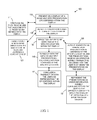
- FIG. 1 is a diagram of a method for self adjusting kiosk display information, according to an example embodiment
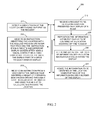
- FIG. 2 is a diagram of another method for self adjusting kiosk display information, according to an example embodiment
- FIG. 3 is a diagram of a kiosk having a self-adjusting display, according to an example embodiment.
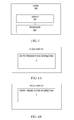
- FIGS. 4A and 4B are sample illustrations of a kiosk display before self adjusting and after self adjusting using the techniques presented herein.
- FIG. 1 is a diagram of a method 100 for self adjusting kiosk display information, according to an example embodiment.
- the method 100 (hereinafter “kiosk display service”) is implemented as instructions residing on a non-transitory computer-readable storage medium and executed by one or more processors.
- the processors are specifically configured to process the kiosk display service.
- the kiosk display service operates over a network.
- the network is wireless, wired, or a combination of wired and wireless.
- the kiosk display service executes on processors embedded within a kiosk.
- the kiosk can be part of a system, such as a drive through window at a fast food establishment, a bank, a pharmacy, and the like; or, the kiosk can be a stand alone machine designed to complete a transaction for any good or service offered by an establishment.
- the kiosk display service presents on a display of a kiosk an entry presentation centered within the display. That is, the initial greeting screen or information presented to a customer in front of the kiosk is centered based on a location that is centered with the four edges of the physical display screen.
- the kiosk display service detects an initial touch from the user that causes the entry presentation to be presented and centered within the display based on the four edges of the display screen.
- the screen may be initially blank or have some type of advertisement on it unrelated to the function of the kiosk and it is awaiting a customer for transacting business.
- the entry presentation is immediately presented and centered within the display based on the four edges of the display screen.
- the kiosk display service detects a touch from a user at a specific location on the display. This can be achieved in a few manners.
- the display screen is touch sensitive such that the specific location is immediately identified by coordinate points identifying all points on the display screen and when touched the user identifies a specific point or location within a grid being maintained by the kiosk display service.
- a hidden camera may be affixed above the screen or on the side of the screen that captures an image of where the user is touching the screen and the converts that image, via image processing, into the specific location. In this latter situation, the screen does not have to be touch-enabled display screen although to the user (customer) the screen appears to function as a touch-sensitive and enabled display screen.
- the kiosk display service presents a popup window on the display asking the user (can be referred to herein as a customer as well) to confirm the specific location as a new center for the entry presentation of the kiosk display. This may be useful when the customer inadvertently touches the screen and is not intending to recalibrate the information presented on the display screen.
- the kiosk display service automatically and dynamically in real time repositions the entry presentation centered at or about the specific location (which was detected at 120) within the display.
- the specific location is different from the center used at 110 (the center based on the four physical edges of the kiosk display).
- the kiosk display is self-adjusting based on user or customer provided direction. This permits the customer based on their situation (car, size, etc.) to decide where information on the display screen of the kiosk is to be provided.
- the kiosk display service transacts with the user, via multiple presentations, each presentation centered at the specific location. So, as information on the display changes the center of the information presented on the display remains the specific location identified by the customer.
- the kiosk display service concludes a transaction with the user and then immediately represents the entry presentation centered within the display at a center identified by the four sides of the display.
- the entry presentation is recalibrated back to its original state as soon as the session or transaction with the customer concludes at the kiosk.
- the kiosk display service alters presentations, such that each presentation is centered at the specific location. This was mentioned above but here an operator audibly transacts an order with the user that is viewing the presentations on the display.
- the kiosk display service represents the presentations as order information that is audibly communicated by the user to the operator and keyed into a terminal by the operator at the drive through window and presented on the display back at the location of the customer.
- the kiosk is a drive through window system where the customer interacts with an operator that is remotely located from the display being presented to the customer.
- the operator may visually inspect the size of the car used by the customer and provide via the terminal the specific location for recalibrating the entry presentation and other information presented to the customer on the display.
- FIG. 2 is a diagram of another method 200 for self adjusting kiosk display information, according to an example embodiment.
- the method 200 (hereinafter “self-adjusting display service”) is implemented as instruction within a computer-readable storage medium that execute on one or more processors, the processors specifically configured to execute the self-adjusting display service.
- the self-adjusting display service is operational over a network; the network is wired, wireless, or a combination of wired and wireless.
- the self-adjusting display service is implemented in a stand alone kiosk or a kiosk associated with a drive through service as discussed above with reference to the method 100 of the FIG. 1 .
- the transaction self-adjusting display service represents another and in some cases enhanced perspective of the kiosk display service, presented above with respect to the discussion of the FIG. 1 .
- self-adjusting display service receives a request to re-center or recalibrate information presented on a display of a kiosk.
- the self-adjusting display service detects a user's touch at the location and then raises an event to produce the request identified at 210.
- the detection can be achieved via a touch-sensitive display screen or can be achieved via a video camera with image processing capabilities. In the latter case, old legacy system displays that are not touch sensitive can be retrofitted to achieve the techniques presented herein with the addition of a camera and image processing.
- the self-adjusting display service receives an instruction identifying the location with the request from an operator that provides the instruction from a remote and different display screen after making visual contact via a video camera with a car of the user.
- the display is part of a kiosk system for a drive through window display. This scenario was discussed above with the embodiments of the FIG. 1 at 150 and 151.
- the self-adjusting display service receives an instruction from a video detection service that identifies a height of a driver's side window driving through with the display.
- the detected height of the window on the driver's side is used to calculate and provide the location.
- sensors can be used to determine a height of the car and an algorithm used to deduce a reduction in height to get to where a drive would be seated at the driver's side window. Calculations are then made to identify the location for recalibrating the display information on the screen of the kiosk.
- the self-adjusting display service repositions the information within the display to be centered at a location identified (or calculated as discussed above) by the request.
- the self-adjusting display service resizes the information to be centered at the location when portions of the information exceed a boarder of the display. So, when recalibration occurs about the new center at the identified location of the display, the information itself may have to have its font-type and font-size adjusted to ensure it all still is presented in a readable manner to the customer within the display.
- the self-adjusting display service auto fills blank areas that are void of information with a custom background color within the display, such as black, red, etc.
- FIG. 3 is a diagram of a kiosk 300 having a self-adjusting display, according to an example embodiment.
- the kiosk 300 includes one or more processors that are specifically configured to perform, inter alia, the processing associated with the methods 100 and 200 of the FIGS. 1 and 2 , respectively.
- the kiosk 300 includes a variety of other hardware components, such as network connections, memory, display screen, input mechanisms, and the like.
- the kiosk 300 includes a display 301 and a processor 302. Each of these and their interactions with one another will now be discussed in turn.
- the display 301 can be touch enabled (touch screen) or can be a conventional large kiosk display equipped with camera's and image processing capabilities executing on the processor 302 (as discussed above with the methods 100 and 200 of the FIGS. 1 and 2 , respectively).
- the processor 302 is configured to automatically recalibrate a center point for the presentations within the display 301 based on a direction of a user that interacts with the kiosk 300.
- the direction provided by the user is a specific location on the display 301 when the display is a touch screen device that is touched by the user at the specific location.
- the direction provided by the user is provided via arrow keys situated on one or more sides of the display 301 and activated by the user and interfaced to be captured and handled by the processor 302.
- the direction provided by the user is achieved audibly via audible commands of the user to move the information on the display 301 to the left, the right, up, and down.
- the processor 302 is enabled with speech recognition software.
- the kiosk 300 is situated inside a business and is accessed by a user that walks up to the kiosk 300.
- the kiosk 300 is situated at a drive through window system of a business.
- FIGS. 4A and 4B are sample illustrations of a kiosk display before self adjusting and after self adjusting using the techniques presented herein.
- FIG. 4A shows a large display of a kiosk having a block of information or an initial entry presentation that is centered within the display based on the original dimensions of the display itself at location "X". This is how the display screen with the entry presentation appears to a customer that initially comes up to the kiosk to interact with the kiosk for purposes of conducting a transaction.
- FIG. 4B shows the entry presentation recalibrated and re-centered about a different Center at location "Y".
- Location Y is defined by the customer that touches the display screen at location Y upon initial interaction with the kiosk. Variations and techniques for achieving this user-driven (or customer-driven) self adjusting display presentation within a kiosk display were presented above with reference to the methods 100 and 200 of the FIGS. 1 and 2 , respectively, and with respect to the kiosk 300 of the FIG. 3 .
Landscapes
- Engineering & Computer Science (AREA)
- Business, Economics & Management (AREA)
- Theoretical Computer Science (AREA)
- Physics & Mathematics (AREA)
- Accounting & Taxation (AREA)
- Development Economics (AREA)
- Finance (AREA)
- General Engineering & Computer Science (AREA)
- Strategic Management (AREA)
- General Physics & Mathematics (AREA)
- Entrepreneurship & Innovation (AREA)
- General Business, Economics & Management (AREA)
- Marketing (AREA)
- Economics (AREA)
- Game Theory and Decision Science (AREA)
- Human Computer Interaction (AREA)
- User Interface Of Digital Computer (AREA)
- Control Of Indicators Other Than Cathode Ray Tubes (AREA)
Abstract
Description
- Consumers are increasingly using kiosks to conduct business with enterprises. The kiosks come in a variety of sizes and are used for a variety of purposes. Some kiosks are provided at drive through locations, such as fast food establishments, pharmacies, banks, and the like. Other kiosks are provided at pedestrian locations, such as gas stations, grocery stores, department stores, and others.
- Kiosks are often equipped using a "one size fits all" approach. That is, the kiosks are not flexible and are not adaptable to accommodate the customers that are using the kiosks. So, shorter customers may encounter problems with a pedestrian kiosk because it is too high for them to access properly. In another situation, customers in large Sport Utility Vehicles (SUV's) that use a drive through kiosk may have to exit their car to access the kiosk properly.
- In short, Kiosks are rigid and not customized to the needs of the customers that come to the kiosks in all shapes, sizes, and/or a variety of transportation vehicles.
- It would be advantageous to provide an improved user interface at a kiosk.
- In various embodiments, techniques for self adjusting kiosk display information are presented. According to an embodiment, a method for self adjusting kiosk display information is provided. An entry presentation is centered within a display of a kiosk. Next, a touch from a user is detected at a specific location on the display. Finally, the entry presentation is repositioned to be centered at the specific location within the display.
- According to a first aspect of the invention there is provided a processor-implemented method comprising: presenting on a display of a kiosk an entry presentation centered within the display; detecting a touch from a user at a specific location on the display; and repositioning the entry presentation to be centered at the specific location within the display.
- According to a second aspect of the invention there is provided a processor-implemented method comprising: receiving a request to re-center information presented on a display of a kiosk; and repositioning the information within the display to be centered at a location identified by the request.
- The step of receiving a request to re-center information presented on a display of a kiosk may further include detecting a user's touch at the location and raising an event as the request.
- The step of receiving a request to re-center information presented on a display of a kiosk may further include receiving an instruction identifying the location with the request from an operator that provides the instruction from a remote and different display screen after making visual contact via a video camera with a car of the user, the display part of a drive through window display.
- The step of receiving a request to re-center information presented on a display of a kiosk may further include receiving an instruction from a video detection service that identifies a height of a driver's side window driving through a drive through with the display and using the height to calculate and provide the location.
- The step of repositioning the information within the display to be centered at a location identified by the request further includes resizing the information to be centered at the location when portions of the information exceed a border of the display.
- According to a third aspect of the invention there is provided a kiosk, comprising: a display; and a processor configured to automatically recalibrate a center point for presentations within the display based on a direction of a user interacting with the kiosk.
- These and other aspects of the invention will become apparent from the following specific description, given by way of example, with reference to the accompanying drawings, in which:
-
FIG. 1 is a diagram of a method for self adjusting kiosk display information, according to an example embodiment; -
FIG. 2 is a diagram of another method for self adjusting kiosk display information, according to an example embodiment; -
FIG. 3 is a diagram of a kiosk having a self-adjusting display, according to an example embodiment; and -
FIGS. 4A and 4B are sample illustrations of a kiosk display before self adjusting and after self adjusting using the techniques presented herein. - Reference will now be made to
FIG. 1 , which is a diagram of amethod 100 for self adjusting kiosk display information, according to an example embodiment. - The method 100 (hereinafter "kiosk display service") is implemented as instructions residing on a non-transitory computer-readable storage medium and executed by one or more processors. The processors are specifically configured to process the kiosk display service. In an embodiment, the kiosk display service operates over a network. The network is wireless, wired, or a combination of wired and wireless.
- In an embodiment, the kiosk display service executes on processors embedded within a kiosk. The kiosk can be part of a system, such as a drive through window at a fast food establishment, a bank, a pharmacy, and the like; or, the kiosk can be a stand alone machine designed to complete a transaction for any good or service offered by an establishment.
- At 110, the kiosk display service presents on a display of a kiosk an entry presentation centered within the display. That is, the initial greeting screen or information presented to a customer in front of the kiosk is centered based on a location that is centered with the four edges of the physical display screen.
- According to an embodiment, at 111, the kiosk display service detects an initial touch from the user that causes the entry presentation to be presented and centered within the display based on the four edges of the display screen. In this case, the screen may be initially blank or have some type of advertisement on it unrelated to the function of the kiosk and it is awaiting a customer for transacting business. When the customer initially touches the screen at any location or touches any of the input keys or even swipes a card, the entry presentation is immediately presented and centered within the display based on the four edges of the display screen.
- At 120, the kiosk display service detects a touch from a user at a specific location on the display. This can be achieved in a few manners. In one case, the display screen is touch sensitive such that the specific location is immediately identified by coordinate points identifying all points on the display screen and when touched the user identifies a specific point or location within a grid being maintained by the kiosk display service. In another case, a hidden camera may be affixed above the screen or on the side of the screen that captures an image of where the user is touching the screen and the converts that image, via image processing, into the specific location. In this latter situation, the screen does not have to be touch-enabled display screen although to the user (customer) the screen appears to function as a touch-sensitive and enabled display screen.
- In an embodiment, at 121, the kiosk display service presents a popup window on the display asking the user (can be referred to herein as a customer as well) to confirm the specific location as a new center for the entry presentation of the kiosk display. This may be useful when the customer inadvertently touches the screen and is not intending to recalibrate the information presented on the display screen.
- At 130, the kiosk display service automatically and dynamically in real time repositions the entry presentation centered at or about the specific location (which was detected at 120) within the display. The specific location is different from the center used at 110 (the center based on the four physical edges of the kiosk display). In this manner, the kiosk display is self-adjusting based on user or customer provided direction. This permits the customer based on their situation (car, size, etc.) to decide where information on the display screen of the kiosk is to be provided.
- In one scenario, at 140, the kiosk display service transacts with the user, via multiple presentations, each presentation centered at the specific location. So, as information on the display changes the center of the information presented on the display remains the specific location identified by the customer.
- Continuing with the embodiment of 140 and at 141, the kiosk display service concludes a transaction with the user and then immediately represents the entry presentation centered within the display at a center identified by the four sides of the display. In other words, the entry presentation is recalibrated back to its original state as soon as the session or transaction with the customer concludes at the kiosk.
- In another scenario, at 150, the kiosk display service alters presentations, such that each presentation is centered at the specific location. This was mentioned above but here an operator audibly transacts an order with the user that is viewing the presentations on the display.
- Continuing with the embodiment of 150 and at 151, the kiosk display service represents the presentations as order information that is audibly communicated by the user to the operator and keyed into a terminal by the operator at the drive through window and presented on the display back at the location of the customer.
- With the embodiments of 150 and 151, the kiosk is a drive through window system where the customer interacts with an operator that is remotely located from the display being presented to the customer. In these cases, the operator may visually inspect the size of the car used by the customer and provide via the terminal the specific location for recalibrating the entry presentation and other information presented to the customer on the display.
-
FIG. 2 is a diagram ofanother method 200 for self adjusting kiosk display information, according to an example embodiment. The method 200 (hereinafter "self-adjusting display service") is implemented as instruction within a computer-readable storage medium that execute on one or more processors, the processors specifically configured to execute the self-adjusting display service. In an embodiment, the self-adjusting display service is operational over a network; the network is wired, wireless, or a combination of wired and wireless. - According to an embodiment, the self-adjusting display service is implemented in a stand alone kiosk or a kiosk associated with a drive through service as discussed above with reference to the
method 100 of theFIG. 1 . - The transaction self-adjusting display service represents another and in some cases enhanced perspective of the kiosk display service, presented above with respect to the discussion of the
FIG. 1 . - At 210, self-adjusting display service receives a request to re-center or recalibrate information presented on a display of a kiosk.
- In an embodiment, at 211, the self-adjusting display service detects a user's touch at the location and then raises an event to produce the request identified at 210. As was mentioned with the discussion of the
method 100 of theFIG. 1 , the detection can be achieved via a touch-sensitive display screen or can be achieved via a video camera with image processing capabilities. In the latter case, old legacy system displays that are not touch sensitive can be retrofitted to achieve the techniques presented herein with the addition of a camera and image processing. - According to an embodiment, at 212, the self-adjusting display service receives an instruction identifying the location with the request from an operator that provides the instruction from a remote and different display screen after making visual contact via a video camera with a car of the user. Here, the display is part of a kiosk system for a drive through window display. This scenario was discussed above with the embodiments of the
FIG. 1 at 150 and 151. - In another situation, at 213, the self-adjusting display service receives an instruction from a video detection service that identifies a height of a driver's side window driving through with the display. Here, the detected height of the window on the driver's side is used to calculate and provide the location. This is another case where sensors can be used to determine a height of the car and an algorithm used to deduce a reduction in height to get to where a drive would be seated at the driver's side window. Calculations are then made to identify the location for recalibrating the display information on the screen of the kiosk.
- At 220, the self-adjusting display service repositions the information within the display to be centered at a location identified (or calculated as discussed above) by the request.
- In an embodiment, at 221, the self-adjusting display service resizes the information to be centered at the location when portions of the information exceed a boarder of the display. So, when recalibration occurs about the new center at the identified location of the display, the information itself may have to have its font-type and font-size adjusted to ensure it all still is presented in a readable manner to the customer within the display.
- According to an embodiment, at 230, the self-adjusting display service auto fills blank areas that are void of information with a custom background color within the display, such as black, red, etc.
-
FIG. 3 is a diagram of akiosk 300 having a self-adjusting display, according to an example embodiment. Thekiosk 300 includes one or more processors that are specifically configured to perform, inter alia, the processing associated with themethods FIGS. 1 and2 , respectively. Thekiosk 300 includes a variety of other hardware components, such as network connections, memory, display screen, input mechanisms, and the like. - The
kiosk 300 includes adisplay 301 and aprocessor 302. Each of these and their interactions with one another will now be discussed in turn. - The
display 301 can be touch enabled (touch screen) or can be a conventional large kiosk display equipped with camera's and image processing capabilities executing on the processor 302 (as discussed above with themethods FIGS. 1 and2 , respectively). - The
processor 302 is configured to automatically recalibrate a center point for the presentations within thedisplay 301 based on a direction of a user that interacts with thekiosk 300. - According to an embodiment, the direction provided by the user is a specific location on the
display 301 when the display is a touch screen device that is touched by the user at the specific location. - In a different scenario, the direction provided by the user is provided via arrow keys situated on one or more sides of the
display 301 and activated by the user and interfaced to be captured and handled by theprocessor 302. - In yet another situation, the direction provided by the user is achieved audibly via audible commands of the user to move the information on the
display 301 to the left, the right, up, and down. Here, theprocessor 302 is enabled with speech recognition software. - In an embodiment, the
kiosk 300 is situated inside a business and is accessed by a user that walks up to thekiosk 300. - In another case, the
kiosk 300 is situated at a drive through window system of a business. -
FIGS. 4A and 4B are sample illustrations of a kiosk display before self adjusting and after self adjusting using the techniques presented herein. - The
FIG. 4A shows a large display of a kiosk having a block of information or an initial entry presentation that is centered within the display based on the original dimensions of the display itself at location "X". This is how the display screen with the entry presentation appears to a customer that initially comes up to the kiosk to interact with the kiosk for purposes of conducting a transaction. - The
FIG. 4B shows the entry presentation recalibrated and re-centered about a different Center at location "Y". Location Y is defined by the customer that touches the display screen at location Y upon initial interaction with the kiosk. Variations and techniques for achieving this user-driven (or customer-driven) self adjusting display presentation within a kiosk display were presented above with reference to themethods FIGS. 1 and2 , respectively, and with respect to thekiosk 300 of theFIG. 3 . - The above description is illustrative, and not restrictive. Many other embodiments will be apparent to those of skill in the art upon reviewing the above description.
- In the foregoing description of the embodiments, various features are grouped together in a single embodiment for the purpose of streamlining the disclosure. This method of disclosure is not to be interpreted as reflecting that the claimed embodiments have more features than are expressly recited in each claim. Rather, as the following claims reflect, inventive subject matter lies in less than all features of a single disclosed embodiment.
Claims (15)
- A processor-implemented method to execute on a processor (302) configured to execute the method, comprising:presenting on a display (301) of a kiosk (300) an entry presentation centered within the display (301);detecting a touch from a user at a specific location on the display (301); andrepositioning the entry presentation to be centered at the specific location within the display (301).
- The method of claim 1 further comprising, transacting with the user via multiple presentations, each presentation centered at the specific location.
- The method of claim 2 further comprising, concluding a transaction with the user and representing the entry presentation centered within the display (301).
- The method of any preceding claim, further comprising: altering presentations where each presentation is centered at the specific location and the presentations made by an operator audibly transacting an order with the user that views the presentations on the display.
- The method of claim 4, wherein altering presentations further includes representing the presentations as order information audibly communicated by the user to the operator and keyed into a terminal by the operator at a drive through window.
- The method of any preceding claim, wherein presenting on a display (301) of a kiosk (300) an entry presentation centered within the display (301) further includes detecting an initial touch from the user that causes the entry presentation to be presented and centered within the display (301).
- The method of any preceding claim, wherein detecting a touch from a user at a specific location on the display (301) further includes presenting a popup window on the display (301) asking the user to confirm the specific location as a center for the entry presentation.
- The method of claim 1 further comprising, filling blank areas that are void of information with a custom background color within the display (301).
- A kiosk (300), comprising:a display (301); anda processor (302) configured to automatically recalibrate a center point for presentations within the display (301) based on a direction of a user interacting with the kiosk (300).
- The kiosk of claim 9, wherein the display (301) is a touch screen.
- The kiosk of claim 10, wherein the direction is a location on the touch screen that is touched by the user.
- The kiosk of any of claims 9 to 11, wherein the direction is provided via arrow keys situated on the side of the display (301) and activated by the user.
- The kiosk of any of claims 9 to 12, wherein the direction is provided via audibly communicated commands from the user recognized and handled by the processor (302).
- The kiosk of any of claims 9 to 13, wherein the kiosk (300 is situated inside a business and is accessed via user walking up to the kiosk (300).
- The kiosk of any of claims 9 to 14, wherein the kiosk (300) is situated at a drive through window of a business.
Applications Claiming Priority (1)
| Application Number | Priority Date | Filing Date | Title |
|---|---|---|---|
| US12/800,868 US9367226B2 (en) | 2010-05-25 | 2010-05-25 | Techniques for self adjusting kiosk display information |
Publications (2)
| Publication Number | Publication Date |
|---|---|
| EP2390775A2 true EP2390775A2 (en) | 2011-11-30 |
| EP2390775A3 EP2390775A3 (en) | 2015-05-06 |
Family
ID=44201894
Family Applications (1)
| Application Number | Title | Priority Date | Filing Date |
|---|---|---|---|
| EP20110165179 Withdrawn EP2390775A3 (en) | 2010-05-25 | 2011-05-06 | Self adjusting kiosk display |
Country Status (2)
| Country | Link |
|---|---|
| US (1) | US9367226B2 (en) |
| EP (1) | EP2390775A3 (en) |
Cited By (3)
| Publication number | Priority date | Publication date | Assignee | Title |
|---|---|---|---|---|
| US20240311937A1 (en) * | 2023-03-15 | 2024-09-19 | Xenial, Inc. | Drive through system including vision system and transaction system integration |
| US20250182079A1 (en) * | 2023-12-05 | 2025-06-05 | Xenial, Inc. | Drive through system with traffic management |
| US12381673B1 (en) | 2023-07-31 | 2025-08-05 | Xenial, Inc. | Drive through audio communication system with multi-lane support |
Families Citing this family (2)
| Publication number | Priority date | Publication date | Assignee | Title |
|---|---|---|---|---|
| US9773258B2 (en) | 2014-02-12 | 2017-09-26 | Nextep Systems, Inc. | Subliminal suggestive upsell systems and methods |
| US10489050B2 (en) * | 2019-03-04 | 2019-11-26 | Salleh M Barakat | User interface with automatic movement to driver window |
Citations (11)
| Publication number | Priority date | Publication date | Assignee | Title |
|---|---|---|---|---|
| AU674764B2 (en) * | 1993-08-18 | 1997-01-09 | Mark Victor Keefe Fiori | Fast food drive through facility |
| US5764034A (en) * | 1996-04-10 | 1998-06-09 | Baxter International Inc. | Battery gauge for a battery operated infusion pump |
| EP1065638A2 (en) * | 1999-06-30 | 2001-01-03 | Citicorp Development Center, Inc. | Method and system for assisting the visually impaired in performing financial transactions |
| US20020070926A1 (en) * | 2000-12-11 | 2002-06-13 | Xerox Corporation | Touchscreen display calibration using results history |
| US20030055727A1 (en) * | 2001-09-18 | 2003-03-20 | Walker Jay S. | Method and apparatus for facilitating the provision of a benefit to a customer of a retailer |
| US20050049922A1 (en) * | 2003-03-24 | 2005-03-03 | Ipdev Co. | Method and apparatus for specifying toppings and their placement on a pizza and confirming same |
| US20060158425A1 (en) * | 2005-01-15 | 2006-07-20 | International Business Machines Corporation | Screen calibration for display devices |
| JP2007109075A (en) * | 2005-10-14 | 2007-04-26 | Oki Electric Ind Co Ltd | Automatic transaction apparatus |
| JP2007300501A (en) * | 2006-05-01 | 2007-11-15 | Softbank Mobile Corp | Customer information registration system, customer information registration program, and terminal device. |
| US20080270230A1 (en) * | 2007-04-27 | 2008-10-30 | Bradley Marshall Hendrickson | System and method for improving customer wait time, customer service, and marketing efficiency in the restaurant, retail, travel, and entertainment industries |
| US20100104262A1 (en) * | 2008-09-18 | 2010-04-29 | Panasonic Corporation | Playback apparatus, playback method, and playback program for playing back stereoscopic video contents |
Family Cites Families (11)
| Publication number | Priority date | Publication date | Assignee | Title |
|---|---|---|---|---|
| KR100190841B1 (en) * | 1996-07-08 | 1999-06-01 | 윤종용 | Monitor screen control device having screen information transmission function and its control method |
| US6803906B1 (en) * | 2000-07-05 | 2004-10-12 | Smart Technologies, Inc. | Passive touch system and method of detecting user input |
| US20020156682A1 (en) * | 2001-04-19 | 2002-10-24 | Ncr Corporation | Scaleable drive-thru solution for quick service vending |
| US6996460B1 (en) | 2002-10-03 | 2006-02-07 | Advanced Interfaces, Inc. | Method and apparatus for providing virtual touch interaction in the drive-thru |
| US20070164554A1 (en) * | 2005-12-16 | 2007-07-19 | Krone Craig E | Order fulfillment system and method for printing products including individualized information |
| US8190483B2 (en) * | 2006-05-02 | 2012-05-29 | Nextep Systems, Inc. | Computer-based ordering system |
| US20080172243A1 (en) * | 2007-01-11 | 2008-07-17 | Kelly Michael J | System and method for providing targeted, interactive, multimedia content for entertaining, advertising, and promotional purposes |
| US20080231604A1 (en) | 2007-03-22 | 2008-09-25 | Cypress Semiconductor Corp. | Method for extending the life of touch screens |
| KR101493748B1 (en) | 2008-06-16 | 2015-03-02 | 삼성전자주식회사 | Article providing apparatus, display apparatus and GUI providing method using the same |
| US20100188342A1 (en) * | 2009-01-26 | 2010-07-29 | Manufacturing Resources International, Inc. | Method and System for Positioning a Graphical User Interface |
| US20110199335A1 (en) * | 2010-02-12 | 2011-08-18 | Bo Li | Determining a Position of an Object Using a Single Camera |
-
2010
- 2010-05-25 US US12/800,868 patent/US9367226B2/en active Active
-
2011
- 2011-05-06 EP EP20110165179 patent/EP2390775A3/en not_active Withdrawn
Patent Citations (11)
| Publication number | Priority date | Publication date | Assignee | Title |
|---|---|---|---|---|
| AU674764B2 (en) * | 1993-08-18 | 1997-01-09 | Mark Victor Keefe Fiori | Fast food drive through facility |
| US5764034A (en) * | 1996-04-10 | 1998-06-09 | Baxter International Inc. | Battery gauge for a battery operated infusion pump |
| EP1065638A2 (en) * | 1999-06-30 | 2001-01-03 | Citicorp Development Center, Inc. | Method and system for assisting the visually impaired in performing financial transactions |
| US20020070926A1 (en) * | 2000-12-11 | 2002-06-13 | Xerox Corporation | Touchscreen display calibration using results history |
| US20030055727A1 (en) * | 2001-09-18 | 2003-03-20 | Walker Jay S. | Method and apparatus for facilitating the provision of a benefit to a customer of a retailer |
| US20050049922A1 (en) * | 2003-03-24 | 2005-03-03 | Ipdev Co. | Method and apparatus for specifying toppings and their placement on a pizza and confirming same |
| US20060158425A1 (en) * | 2005-01-15 | 2006-07-20 | International Business Machines Corporation | Screen calibration for display devices |
| JP2007109075A (en) * | 2005-10-14 | 2007-04-26 | Oki Electric Ind Co Ltd | Automatic transaction apparatus |
| JP2007300501A (en) * | 2006-05-01 | 2007-11-15 | Softbank Mobile Corp | Customer information registration system, customer information registration program, and terminal device. |
| US20080270230A1 (en) * | 2007-04-27 | 2008-10-30 | Bradley Marshall Hendrickson | System and method for improving customer wait time, customer service, and marketing efficiency in the restaurant, retail, travel, and entertainment industries |
| US20100104262A1 (en) * | 2008-09-18 | 2010-04-29 | Panasonic Corporation | Playback apparatus, playback method, and playback program for playing back stereoscopic video contents |
Non-Patent Citations (1)
| Title |
|---|
| ANONYMOUS: "NEXTEP and MRI unveil touchscreen drive-thru kiosk", 15 November 2009 (2009-11-15), XP055344301, Retrieved from the Internet <URL:https://www.qsrweb.com/news/nextep-and-mri-unveil-touchscreen-drive-thru-kiosk/> [retrieved on 20170209] * |
Cited By (7)
| Publication number | Priority date | Publication date | Assignee | Title |
|---|---|---|---|---|
| US20240311937A1 (en) * | 2023-03-15 | 2024-09-19 | Xenial, Inc. | Drive through system including vision system and transaction system integration |
| US12400279B2 (en) * | 2023-03-15 | 2025-08-26 | Xenial, Inc. | Drive through system including vision system and transaction system integration |
| US12381673B1 (en) | 2023-07-31 | 2025-08-05 | Xenial, Inc. | Drive through audio communication system with multi-lane support |
| US20250182079A1 (en) * | 2023-12-05 | 2025-06-05 | Xenial, Inc. | Drive through system with traffic management |
| US20250182080A1 (en) * | 2023-12-05 | 2025-06-05 | Xenial, Inc. | Drive through system with traffic management |
| US12327230B1 (en) * | 2023-12-05 | 2025-06-10 | Xenial, Inc. | Drive through system with traffic management |
| US12579528B2 (en) * | 2023-12-05 | 2026-03-17 | Xenial, Inc. | Drive through system with traffic management |
Also Published As
| Publication number | Publication date |
|---|---|
| EP2390775A3 (en) | 2015-05-06 |
| US9367226B2 (en) | 2016-06-14 |
| US20110296355A1 (en) | 2011-12-01 |
Similar Documents
| Publication | Publication Date | Title |
|---|---|---|
| US10373357B2 (en) | Device and method for displaying screen based on event | |
| US10572772B2 (en) | Object detection device, object detection method, and recording medium, and recording medium | |
| US9007300B2 (en) | Method and system to control a process with bend movements | |
| US20120032896A1 (en) | Self-service terminal and configurable screen therefor | |
| US9367226B2 (en) | Techniques for self adjusting kiosk display information | |
| EP3866389A1 (en) | Transparent fuel dispenser | |
| US9164954B2 (en) | Vending accommodation and accessibility | |
| US20180211283A1 (en) | Passive Patron Identification Systems And Methods | |
| AU2015342838B2 (en) | Transit vending machine with automatic user interface adaption | |
| US10552778B2 (en) | Point-of-sale (POS) terminal assistance | |
| JP5454737B2 (en) | Wrinkle detection device, wrinkle detection method and program | |
| JP2013232181A5 (en) | ||
| EP2581808B1 (en) | Method and system to control a process with bend movements | |
| US20150102047A1 (en) | Vending apparatus and product vending method | |
| CN107369273B (en) | Anti-peeping method, device and system for ATM | |
| CN104517337B (en) | Vehicle entrance and exit card reading method and device | |
| EP2891967A1 (en) | Display control device, thin-client system, display control method, and recording medium | |
| TW201237730A (en) | Method of adjusting windows and electronic device using same | |
| US20140092124A1 (en) | First Image And A Second Image On A Display | |
| JP5192324B2 (en) | Monitoring system and automatic transaction apparatus | |
| US20190138199A1 (en) | System and method of finger swipe gesture detection by display edge button | |
| US20160048265A1 (en) | Touch panel system | |
| JP6866888B2 (en) | Information processing device, screen display method, and program | |
| US12424188B2 (en) | Height adjustable screen interface and display | |
| US20240095971A1 (en) | Image processing system, image processing method, and non-transitory computer-readable medium |
Legal Events
| Date | Code | Title | Description |
|---|---|---|---|
| AK | Designated contracting states |
Kind code of ref document: A2 Designated state(s): AL AT BE BG CH CY CZ DE DK EE ES FI FR GB GR HR HU IE IS IT LI LT LU LV MC MK MT NL NO PL PT RO RS SE SI SK SM TR |
|
| AX | Request for extension of the european patent |
Extension state: BA ME |
|
| PUAI | Public reference made under article 153(3) epc to a published international application that has entered the european phase |
Free format text: ORIGINAL CODE: 0009012 |
|
| PUAL | Search report despatched |
Free format text: ORIGINAL CODE: 0009013 |
|
| RIC1 | Information provided on ipc code assigned before grant |
Ipc: G06F 3/048 20130101AFI20150310BHEP |
|
| AK | Designated contracting states |
Kind code of ref document: A3 Designated state(s): AL AT BE BG CH CY CZ DE DK EE ES FI FR GB GR HR HU IE IS IT LI LT LU LV MC MK MT NL NO PL PT RO RS SE SI SK SM TR |
|
| AX | Request for extension of the european patent |
Extension state: BA ME |
|
| 17P | Request for examination filed |
Effective date: 20151106 |
|
| RBV | Designated contracting states (corrected) |
Designated state(s): AL AT BE BG CH CY CZ DE DK EE ES FI FR GB GR HR HU IE IS IT LI LT LU LV MC MK MT NL NO PL PT RO RS SE SI SK SM TR |
|
| 17Q | First examination report despatched |
Effective date: 20170301 |
|
| RAP1 | Party data changed (applicant data changed or rights of an application transferred) |
Owner name: NCR CORPORATION |
|
| APBK | Appeal reference recorded |
Free format text: ORIGINAL CODE: EPIDOSNREFNE |
|
| APBN | Date of receipt of notice of appeal recorded |
Free format text: ORIGINAL CODE: EPIDOSNNOA2E |
|
| APBR | Date of receipt of statement of grounds of appeal recorded |
Free format text: ORIGINAL CODE: EPIDOSNNOA3E |
|
| APAF | Appeal reference modified |
Free format text: ORIGINAL CODE: EPIDOSCREFNE |
|
| APBT | Appeal procedure closed |
Free format text: ORIGINAL CODE: EPIDOSNNOA9E |
|
| STAA | Information on the status of an ep patent application or granted ep patent |
Free format text: STATUS: THE APPLICATION HAS BEEN WITHDRAWN |
|
| 18R | Application refused |
Effective date: 20180323 |
|
| 18W | Application withdrawn |
Effective date: 20210226 |