EP2357779A2 - User terminal device for managing network device and method thereof - Google Patents
User terminal device for managing network device and method thereof Download PDFInfo
- Publication number
- EP2357779A2 EP2357779A2 EP10195092A EP10195092A EP2357779A2 EP 2357779 A2 EP2357779 A2 EP 2357779A2 EP 10195092 A EP10195092 A EP 10195092A EP 10195092 A EP10195092 A EP 10195092A EP 2357779 A2 EP2357779 A2 EP 2357779A2
- Authority
- EP
- European Patent Office
- Prior art keywords
- information
- map image
- application
- application program
- program
- Prior art date
- Legal status (The legal status is an assumption and is not a legal conclusion. Google has not performed a legal analysis and makes no representation as to the accuracy of the status listed.)
- Granted
Links
Images






Classifications
-
- H—ELECTRICITY
- H04—ELECTRIC COMMUNICATION TECHNIQUE
- H04N—PICTORIAL COMMUNICATION, e.g. TELEVISION
- H04N1/00—Scanning, transmission or reproduction of documents or the like, e.g. facsimile transmission; Details thereof
- H04N1/00127—Connection or combination of a still picture apparatus with another apparatus, e.g. for storage, processing or transmission of still picture signals or of information associated with a still picture
- H04N1/00344—Connection or combination of a still picture apparatus with another apparatus, e.g. for storage, processing or transmission of still picture signals or of information associated with a still picture with a management, maintenance, service or repair apparatus
-
- H—ELECTRICITY
- H04—ELECTRIC COMMUNICATION TECHNIQUE
- H04N—PICTORIAL COMMUNICATION, e.g. TELEVISION
- H04N1/00—Scanning, transmission or reproduction of documents or the like, e.g. facsimile transmission; Details thereof
- H04N1/00127—Connection or combination of a still picture apparatus with another apparatus, e.g. for storage, processing or transmission of still picture signals or of information associated with a still picture
- H04N1/00204—Connection or combination of a still picture apparatus with another apparatus, e.g. for storage, processing or transmission of still picture signals or of information associated with a still picture with a digital computer or a digital computer system, e.g. an internet server
- H04N1/00209—Transmitting or receiving image data, e.g. facsimile data, via a computer, e.g. using e-mail, a computer network, the internet, I-fax
- H04N1/00222—Transmitting or receiving image data, e.g. facsimile data, via a computer, e.g. using e-mail, a computer network, the internet, I-fax details of image data generation or reproduction, e.g. scan-to-email or network printing
-
- H—ELECTRICITY
- H04—ELECTRIC COMMUNICATION TECHNIQUE
- H04N—PICTORIAL COMMUNICATION, e.g. TELEVISION
- H04N1/00—Scanning, transmission or reproduction of documents or the like, e.g. facsimile transmission; Details thereof
- H04N1/00127—Connection or combination of a still picture apparatus with another apparatus, e.g. for storage, processing or transmission of still picture signals or of information associated with a still picture
- H04N1/00204—Connection or combination of a still picture apparatus with another apparatus, e.g. for storage, processing or transmission of still picture signals or of information associated with a still picture with a digital computer or a digital computer system, e.g. an internet server
- H04N1/00209—Transmitting or receiving image data, e.g. facsimile data, via a computer, e.g. using e-mail, a computer network, the internet, I-fax
- H04N1/00222—Transmitting or receiving image data, e.g. facsimile data, via a computer, e.g. using e-mail, a computer network, the internet, I-fax details of image data generation or reproduction, e.g. scan-to-email or network printing
- H04N1/00233—Transmitting or receiving image data, e.g. facsimile data, via a computer, e.g. using e-mail, a computer network, the internet, I-fax details of image data generation or reproduction, e.g. scan-to-email or network printing details of image data reproduction, e.g. network printing or remote image display
-
- H—ELECTRICITY
- H04—ELECTRIC COMMUNICATION TECHNIQUE
- H04N—PICTORIAL COMMUNICATION, e.g. TELEVISION
- H04N2201/00—Indexing scheme relating to scanning, transmission or reproduction of documents or the like, and to details thereof
- H04N2201/0077—Types of the still picture apparatus
- H04N2201/0081—Image reader
-
- H—ELECTRICITY
- H04—ELECTRIC COMMUNICATION TECHNIQUE
- H04N—PICTORIAL COMMUNICATION, e.g. TELEVISION
- H04N2201/00—Indexing scheme relating to scanning, transmission or reproduction of documents or the like, and to details thereof
- H04N2201/0077—Types of the still picture apparatus
- H04N2201/0082—Image hardcopy reproducer
-
- H—ELECTRICITY
- H04—ELECTRIC COMMUNICATION TECHNIQUE
- H04N—PICTORIAL COMMUNICATION, e.g. TELEVISION
- H04N2201/00—Indexing scheme relating to scanning, transmission or reproduction of documents or the like, and to details thereof
- H04N2201/0077—Types of the still picture apparatus
- H04N2201/0091—Digital copier; digital 'photocopier'
-
- H—ELECTRICITY
- H04—ELECTRIC COMMUNICATION TECHNIQUE
- H04N—PICTORIAL COMMUNICATION, e.g. TELEVISION
- H04N2201/00—Indexing scheme relating to scanning, transmission or reproduction of documents or the like, and to details thereof
- H04N2201/0077—Types of the still picture apparatus
- H04N2201/0094—Multifunctional device, i.e. a device capable of all of reading, reproducing, copying, facsimile transception, file transception
Definitions
- the user has inconvenience of having to check the target device and input required information, or go to the target device and install necessary program thereon.
- the map image includes a device image which is indicated at a location where each corresponding device is installed under a network environment, and a menu provided at one side of the device image to indicate information about the corresponding device.
- the controller If the selected application program is already installed in the selected device, the controller generates a UI window to inquire about an intention to proceed installation of an application program, and causes the display to display the generated UI window.
- the order of installing the device selected from the map image is changeable by a user.
- the carrying out of the application installation of the application program may include displaying a first UI screen including a map image representing a device arrangement under an environment where the network is constructed, and an application information field, and if the device is selected from the map image and the application program is selected from the application information field, transmitting and installing the selected application program to the selected device.
- the carrying out the driver installation of the driver program may include displaying a second UI screen including map image, and if a device is selected from the map image included in the second UI, installing the driver program corresponding to the selected device onto the user terminal device.
- the carrying out the application installation may additionally include, if the selected application program is already installed in the selected device, generating and displaying a user interface (UI) window to inquire as to whether the application program is to be installed or not.
- UI user interface
- the main UI screen may further include a map image construct menu to construct the map image.
- User of each terminal device 100-1, 100-2 may check the status of each device 10, 20, 30, 40, 50 connected in the network and manage the devices 10, 20, 30, 40, 50 using his terminal device 100-1 or 100-2.
- the storage unit 120 may include various types of storages such as non-volatile memory, volatile memory, or buffer.
- the storage unit 120 may store various data such as, for example, O/S or other application programs to drive the user terminal device 100, data generated during execution of the application programs, document information written through the user terminal device 100, setting information, or the like.
- FIG. 2 illustrates only one storage unit 120, there may be one or more storage unit 120 depending on occasion.
- the input unit 150 receives a command input by a user, and transfers the input command to the controller 130.
- the input unit 150 may include keyboard, mouse, joystick, touch screen, or the like.
- the application information field may display a list form of various application programs which can be installed onto a device.
- the application information on the application information field is not limited to the information regarding the application programs stored in the user terminal device 100.
- the application information field may also display application information notified from an external server.
- the controller 130 causes the selected application program to be transmitted to and installed onto the selected device. If the selected application program is already stored in the storage unit 120, the controller 130 may directly transmit the application program stored in the storage unit 120 to the selected device via the network interface 110.
- the controller 130 may send a request to the external server via the network interface 110 to transmit the selected application program. Accordingly, the controller 130 receives the requested application program from the external server and transmits the received application program to the selected device.
- the application information field 320 may include an application information indicating field 321 to indicate application information, a menu 322 to display detailed information about the corresponding application program, and a select field 323 to select the corresponding application program.
- FIG. 5 illustrates a UI screen on which a device and an application program are selected by a drag-and-drop manner, according to a first exemplary embodiment.
- the UI screen 300 includes a cursor 350.
- the user may move the cursor 350 using the input unit 150.
- the map image 310 may indicate only the images a, b, c of the devices on the layout. That is, different from the examples of FIGS. 3 and 5 , on the UI screen of FIG. 6 , the menu 313 to indicate information about the devices, and the select field 314 are omitted.
- the user may command to begin installation upon completing his selecting about each device, by selecting an OK button.
- the installation of the application program may begin immediately without displaying the above-mentioned inquiry message, if the device does not have the same application program installed thereon.
- the application information field 320 may inactivate the displaying of the application programs which is incompatible to, or impossible to be installed onto the selected device.
- the select field 323 may be turned to a non-selectable state, and the application information field 321 of the corresponding application may be displayed in a non-transparent form. Alternatively, the application information of the corresponding application may be deleted from the application information field 320 temporarily.
- activating or inactivating the displaying may be carried out on the UI screen as the ones illustrated in FIGS. 3 , 5 , and 6 .
- the device list 410 and the application list 420 of FIG. 8 may be displayed directly through the display 140, so that the displaying of the corresponding device or application is activated or inactivated on the displayed list.
- the user can check even information about the devices, the user can easily select the application program to install onto the device. Furthermore, since it is possible to install a plurality of application programs onto a plurality of devices concurrently, it becomes easier to install and manage programs.
- the user terminal device 100 provides a UI screen indicating a map image thereon. Accordingly, as a user selects one or more devices on the map image, driver program(s) corresponding to the selected device(s) is(are) installed onto the user terminal device 100. As a result, the user can easily find a device he intends to use, and directly install a driver program corresponding to the found device onto his own user terminal device 100.
- FIG. 9 illustrates an example of a UI screen of the user terminal device according to a second exemplary embodiment.
- the structure of the user terminal device will be explained with reference to the block diagram of FIG. 2 .
- the user may select the images of the devices 511a, 511b, 511c, 511d, 511e, 511f on the map image 510 using the input unit 150.
- the list may include information such as a name of the device selected from the map image, a device type, an IP address, a current status, a location, or an order of installation, or the like.
- information such as a name of the device selected from the map image, a device type, an IP address, a current status, a location, or an order of installation, or the like.
- the user checks the current status of the list and determines whether the device has an error or in a power-on state, etc.
- the controller 130 changes the current screen to display a UI screen which includes the map image.
- the UI screen used to install a driver will be referred to as a 'second UI screen' hereinbelow for convenience of explanation.
- the first UI screen including a map image and an application information field therein, is displayed.
- the first UI screen may have the identical forms as those illustrated in FIGS. 3 , 5 , and 6 , but it not limited thereto.
- the user selects a device on the map image of the first UI screen, and selects an application program on the application information field.
- the map image on the second UI screen may use the same images as those on the map image on the first UI screen, but this is not strictly limiting. Accordingly, the map image may have different structures as these may be customized suitably to the installation characteristics of the driver.
- the user or network manager may generate a layout of the map image on the UI screen provided for the construction of the map image, and then arrange device images or texts appropriately, according to the locations on the layout which correspond to the respective devices.
- a map image to be used for the UI screen of the first and second install menus is constructed and stored in advance.
- FIG. 15 is a flowchart provided to explain an example of a method for installing a driver according to an exemplary embodiment.
- One or more embodiments may be realized as a medium/media storing therein a program to execute various embodiments including those explained above.
- the program may be executed by executing computer readable code/instructions in/on a medium/media, e.g., a computer readable recording medium/media.
- the medium/media can correspond to any medium/media permitting the storing and/or transmission of the computer readable code/instructions.
- the medium/media may also include, alone or in combination with the computer readable code/instructions, data files, data structures, and the like. Examples of code/instructions include both machine code, such as produced by a compiler, and files containing higher level code that may be executed by a computing device and the like using an interpreter.
- code/instructions may include functional programs and code segments.
Landscapes
- Engineering & Computer Science (AREA)
- General Engineering & Computer Science (AREA)
- Multimedia (AREA)
- Signal Processing (AREA)
- Computing Systems (AREA)
- Stored Programmes (AREA)
- User Interface Of Digital Computer (AREA)
Abstract
Description
- This application claims priority benefit from Korean Patent Application No.
10-2009-0125450, filed on December 16, 2009 - Embodiments generally relate to a user terminal device for managing a network device and a method thereof, and more particularly, to a user terminal device for displaying a map image indicating therein an arrangement of devices connected in a network environment, and managing a network device accordingly, and a method thereof.
- Electronic appliances today have been increasingly diversified thanks to the development of electronic technologies. It is very common that users own a number of electronic devices in their offices or homes, and connect those devices by networks for more efficient use thereof.
- By way of example, since image forming apparatuses such as printers, copiers, multifunction units, or scanners are used less frequently than personal computers, the devices are connected by a network and shared, instead of being installed for every member of the office. Such way of networking is applied to not only the image forming apparatuses, but also many other devices.
- Accordingly, a user of a terminal device in a network can use a plurality of devices connected in the same network by installing corresponding driver programs on his terminal device or installing a corresponding application onto a target network device he intends to use.
- However, in the abovementioned case, the user has inconvenience of having to check the target device and input required information, or go to the target device and install necessary program thereon.
- The abovementioned inconvenience experienced in the installation of program particularly increases in the large network environment which involves a lot of devices and users.
- Accordingly, a need arises for a method which enables a user to check locations or information of each network device easily, and to manage and manipulate the entire network devices more efficiently and conveniently.
- One or more embodiments provide a user terminal for providing a user a user interface (UI) screen indicating a map image therein so that the user can use devices on the network conveniently and efficiently, and a method of network device management thereof.
- The foregoing and/or other aspects and utilities of one or more embodiments may be achieved by providing a user terminal device connected in a network, which may include a display to display a main user interface (UI) screen including therein a first install menu to install an application program and a second install menu to install a driver program, an input unit through which one of the first install menu and the second install menu is selected on the main UI screen, and a controller to carry out an application installation in which the application program is installed onto a device connected in the network, if the first install menu is selected, or carry out a driver program installation in which the driver program is installed onto the user terminal device, if the second install menu is selected. The controller controls the display to display a map image, indicative of an arrangement of devices in an environment where the network is constructed, and carries out the application program installation or the driver program installation onto the device selected from the map image.
- The controller controls the display to display a first UI screen including therein a map image field having the map image indicated therein, and an application information field, if the first install menu is selected, and if a device is selected from the map image and an application program is selected from the application information field through the input unit, transmits the selected application program to the selected device.
- The map image includes a device image which is indicated at a location where each corresponding device is installed under a network environment, and a menu provided at one side of the device image to indicate information about the corresponding device.
- If one of the devices on the map image and one of the application programs on the application information field are dragged and dropped into a device image or an application program on the other field, the controller determines that the corresponding device and the corresponding application program are selected, and therefore, transmits an application program corresponding to the selected application information to the selected device.
- If the selected application program is already installed in the selected device, the controller generates a UI window to inquire about an intention to proceed installation of an application program, and causes the display to display the generated UI window.
- If a device image is selected from the map image, the controller inactivates displaying status of a non-installable application program among the application programs indicated in the application information field, and if an application program is selected from the application information field, the controller inactivates displaying status of a non-installable device among the devices indicated on the map image, in which the non-installable application program is an application program which is not installable onto the selected device, and the non-installable device is a device onto which the selected application program can not be installed.
- The user terminal device may additionally include a storage unit to store program compatibility information therein, and wherein the controller determines a possibility of installing each application program onto each device, using the program compatibility information stored in the storage unit.
- The user terminal device may additionally include a storage unit, and wherein the controller controls the display to display a second UI screen including the map image therein, if the second install menu is selected, and if a device is selected from the map image on the second UI screen, installs a driver program corresponding to the selected device to the storage unit.
- The second UI screen displays an information collect field to collect information about a device selected through the map image, and if the information collect field is selected, the controller controls a list of the device information collected in the selected information collect field to be displayed, and if information about at least one device is selected from the list, the controller receives from an external server at least one driver program which corresponds to the selected information about at least one device.
- The list may comprise at least one of: a name, a type, an IP address, a current status, a location, and an order of installing, regarding the device selected from the map image.
- The order of installing the device selected from the map image is changeable by a user.
- The information about the device on the map image is collected into the information collect field by a drag-and-drop manner.
- The main UI screen may additionally include a map image construct menu to construct the map image.
- The foregoing and/or other aspects and utilities of one or more embodiments may be achieved by providing a method of a user terminal device connected in a network for managing a network device, which may include displaying a main user interface (UI) screen indicating therein a first install menu to install an application program and a second install menu to install a driver program, carrying out an application installation of the application program if the first install menu is selected, and carrying out a driver installation of the driver program if the second install menu is installed. The carrying out of the application installation of the application program may include displaying a first UI screen including a map image representing a device arrangement under an environment where the network is constructed, and an application information field, and if the device is selected from the map image and the application program is selected from the application information field, transmitting and installing the selected application program to the selected device. The carrying out the driver installation of the driver program may include displaying a second UI screen including map image, and if a device is selected from the map image included in the second UI, installing the driver program corresponding to the selected device onto the user terminal device.
- The map image represents a device image indicated at a location in which the corresponding device is placed under the network environment, and a menu to indicate information about the device is displayed on one side of the device image next to the device image.
- The carrying out the application installation may include, if one of the devices on the map image and one of the application programs on the application information field are moved by drag-and-drop manner to another side, determining the corresponding device and the corresponding application program to be selected.
- The carrying out the application installation may additionally include, if the selected application program is already installed in the selected device, generating and displaying a user interface (UI) window to inquire as to whether the application program is to be installed or not.
- The carrying out the application installation may include if a device image is selected from the map image, inactivating a displaying status of an application program which is non-installable onto the selected device, from among the application programs indicated in the application information field, and if an application program is selected from the application information field, inactivating a displaying status of a device which is incapable of installing the selected application program, from among the devices indicated on the map image.
- The carrying out the application installation may additionally include detecting previously stored program compatibility information, and determining compatibility between each device and application program using the program compatibility information.
- The method may include displaying on the second UI screen an information collect field to collect information about a device selected through the map image. The carrying out the driver installation may include if the information collect field is selected, displaying a list of device information collected in the selected information collect field, and if at least one piece of device information is selected from the list, receiving at least one driver program corresponding to the selected at least one device information from an external server.
- The information about the device on the map image is collected into the information collect field by a drag-and-drop manner.
- The main UI screen may further include a map image construct menu to construct the map image.
- The foregoing and/or other aspects and utilities of one or more embodiments may be achieved by providing a user terminal device connected in a network, which may include a display to display a UIscreen including a map image indicating therein a device arrangement under an environment in which the network is constructed, and an application information field, an input unit to receive a selection of a device from the map image, and a selection of an application program from the application information field, and a controller to control installation of the application program selected from the application information field onto the device selected from the map image.
- The user terminal device may additionally include a storage unit, and a network interface connected in the network. The controller either reads out the selected application program from the storage unit, or receives the selected application program from an external server via the network interface and transmits the received selected application program to the selected device.
- The map image may include a device image which is indicated at a location where each corresponding device is installed under the network environment, a menu provided at one side of the device image to indicate information about the corresponding device, and a menu provided at one side of each application program indicated on the application information field, to indicate detailed information about the corresponding application information.
- If a device image is selected from the map image, the controller inactivates displaying status of a non-installable application program among the application programs indicated in the application information field, and if an application program is selected from the application information field, the controller inactivates displaying status of a non-installable device among the devices indicated on the map image, in which the non-installable application program is an application program which is not installable onto the selected device, and the non-installable device is a device onto which the selected application program can not be installed.
- If the application program is already installed on the selected device, the controller displays a message window through the display to inquire as to whether or not to proceed with installation.
- The foregoing and/or other aspects and utilities of one or more embodiments may be achieved by providing a user terminal device which may include a storage unit, a network interface connected in a network, a display to display a UI screen including a map image indicating therein an arrangement of devices under an environment where the network is constructed, and a user interface (UI) screen including therein an information collect field, an input unit to receive a selection for at least one device on the map image, and a controller to control so that, if at least one device is selected from the map image, the information about the at least one selected device is included in the information collect field, and if a command to install at least one driver is input through the input unit, a at least one driver program corresponding to the information included in the information collect field is installed to the storage unit.
- The controller controls so that, if the information collect field is selected from the UI screen, a list of the device information collected in the information collect field is displayed through the display, and if at least one piece of device information is selected from the list, at least one driver program corresponding to the selected device information is received from an external server.
- The foregoing and/or other aspects and utilities of one or more embodiments may be achieved by providing a recording medium storing therein a program to execute a method for managing a device connected in a network, which may include displaying a main user interface (UI) screen indicating therein a first install menu to install an application program and a second install menu to install a driver program, if the first install menu is selected, displaying a first UI screen indicating therein a map image representing an arrangement of devices under an environment where the network is constructed, and an application information field, if a device is selected from the map image of the first UI screen and an application program is selected from the application information field of the first UI screen, transmitting and installing the selected application program onto the selected device, if the second install menu is selected, displaying a second UI screen including therein map image which indicates therein arrangement of devices under environment where the network is constructed, and if a device is selected from a map image of the second UI screen, installing a driver program corresponding to the selected device onto a user terminal device.
- As a result, a user can install an application program to a device and install a driver program to a user terminal device conveniently and efficiently.
- According to another aspect, there is provided at least one computer readable medium storing computer readable instructions to implement methods of embodiments.
- These and/or other aspects and utilities of embodiments will become apparent and more readily appreciated from the following description of embodiments, taken in conjunction with the accompanying drawings of which:
-
FIG. 1 is a conceptual view of a network system structure according to an exemplary embodiment; -
FIG. 2 is a block diagram of a user terminal device according to an exemplary embodiment; -
FIGS. 3 to 12 are conceptual views illustrating a screen on a user terminal device according to various exemplary embodiments; -
FIG. 13 is a flowchart provided to explain a method of managing a network device according to an exemplary embodiment; -
FIG. 14 is a flowchart provided to explain a method of installing an application according to an exemplary embodiment; and -
FIG. 15 is a flowchart provided to explain a method of installing a driver according to an exemplary embodiment. - Reference will now be made in detail to embodiments, examples of which are illustrated in the accompanying drawings, wherein like reference numerals refer to the like elements throughout. Embodiments are described below in order to explain the disclosure by referring to the figures.
-
FIG. 1 is a view illustrating a structure of a network system according to an exemplary embodiment. - Referring to
FIG. 1 , an exemplary embodiment of a network system includes a plurality of terminal devices 100-1, 100-2, and a plurality ofdevices - Although
FIG. 1 depicts two terminal devices 100-1, 100-2 and fivedevices devices printers MFU 30,copier 40, orscanner 50, but also various other networkable devices including, for example, a display device such as a TV or an electronic frame, an image replay device such as a DVD player or a Blue-ray Disc (BLD) player, or the like. - User of each terminal device 100-1, 100-2 may check the status of each
device devices - Specifically, as the user of the terminal device 100-1 or 100-2 executes a management program installed on his terminal device 100-1 or 100-2, the terminal device 100-1 or 100-2 displays a user interface (U I) screen regarding device management on a display thereof.
- The user may select corresponding menus on the UI screen to check the status of the
devices - Meanwhile, if the screen changes according to the users' selecting of a menu from the UI initial screen or UI screen, the new screen appears, indicating a map image thereon. The 'map image' herein refers to information represented in a map format, indicating a layout of a network environment, such as layout of an office, company, or home network environment having the network system of
FIG. 1 constructed therein. The map image may indicate the way the network devices are arranged in the layout. By way of example, the map image may indicate locations of the devices using corresponding images or texts. - The user may select a target device he intends to install a desired program onto the target device, or install a driver program corresponding to the target device onto his own terminal device, directly onto the map image.
-
FIG. 2 is a block diagram of a terminal device according to an exemplary embodiment. The structure illustrated inFIG. 2 is applicable to a first terminal device 100-1 or a second terminal device 100-2 of the network system ofFIG. 1 . - Referring to
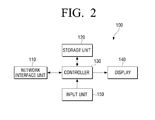
FIG. 2 , theuser terminal device 100 includes anetwork interface 110, astorage unit 120, acontroller 130, adisplay 140, and aninput unit 150. -
Network interface 110 is a unit capable of relaying communication between theuser terminal 100 and the other devices either connected in the network or outside the network. Accordingly, thenetwork interface 110 supports transmission and reception of data or command between thecontroller 130 of theuser terminal 100 and the devices other than theuser terminal 100. - The
storage unit 120 may include various types of storages such as non-volatile memory, volatile memory, or buffer. Thestorage unit 120 may store various data such as, for example, O/S or other application programs to drive theuser terminal device 100, data generated during execution of the application programs, document information written through theuser terminal device 100, setting information, or the like. AlthoughFIG. 2 illustrates only onestorage unit 120, there may be one ormore storage unit 120 depending on occasion. - The
controller 130 controls the functions of the respective components of theuser terminal device 100. - The
display 140 displays various UI screens according to the control of thecontroller 130. Although not illustrated inFIG. 2 , thedisplay 140 may include various other components such as a screen processing unit (not illustrated) to construct a UI screen, a display panel to display the constructed UI screen, or the like. - The
input unit 150 receives a command input by a user, and transfers the input command to thecontroller 130. Theinput unit 150 may include keyboard, mouse, joystick, touch screen, or the like. - The user terminal device illustrated in
FIGS. 1 and2 may operate in various modes according to various examples of embodiments, and these will be explained in greater detail below, with reference toFIGS. 3 to 12 . - According to a first exemplary embodiment, the
display 140 of theuser terminal device 100 displays a UI screen which includes therein a map image and an application information field. The user may select a target device to which he intends to install an application program from the map image, and may also select an application program he intends to install from the application information field. - The application information field may display a list form of various application programs which can be installed onto a device. The application information on the application information field is not limited to the information regarding the application programs stored in the
user terminal device 100. For example, the application information field may also display application information notified from an external server. - The external server may transmit an application program to user terminal devices connected in a network, if the external server has a new application program usable by the users or if the existing application program is updated, providing the users with the application programs and the users can use these as need arises.
- If selecting a device and an application program through the map image and application information field is completed, the
controller 130 causes the selected application program to be transmitted to and installed onto the selected device. If the selected application program is already stored in thestorage unit 120, thecontroller 130 may directly transmit the application program stored in thestorage unit 120 to the selected device via thenetwork interface 110. - If the selected application program is not stored in the
storage unit 120, thecontroller 130 may send a request to the external server via thenetwork interface 110 to transmit the selected application program. Accordingly, thecontroller 130 receives the requested application program from the external server and transmits the received application program to the selected device. - The
controller 130 may control so that an installation command is also transmitted to the selected device along with the application program, so that the device can automatically install the received application program thereon. - Meanwhile, the
controller 130 may cause information about the application program, network address of the selected device, and transmission request for application to be also transmitted to the external server, so that the external server transmits the application program directly to the selected device. -
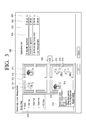
FIG. 3 illustrates an example of a UI screen of the user terminal device according to a first exemplary embodiment. - Referring to
FIG. 3 , thedisplay 140 of theuser terminal device 100 includes, on theUI screen 300, not only themap image field 310 and theapplication information field 320, but also abutton 330 to command installation of the application, or a map imageselect field 340 to select the map image. - If it is impossible to represent the environment of the user on one single map image, the user may select the map image of the specific location that he wants to see, from the map image
select field 340. That is, referring toFIG. 3 , the map imageselect field 340 may include menus corresponding to various parts of a company such as 'HR part', 'R&D part', 'Sales part', 'CS part', or the like, and in response to a user's selecting on one of the menus, display a map image of the part corresponding to the selected menu on themap image field 310. A map image of a part, sector, or floor where theuser terminal device 100 is located, may be displayed in an initial stage by default. - The
map image field 310 of theUI screen 300 displays alayout 311 of the network environment, anddevice images 312 are overlapped at the corresponding locations on thelayout 311. As illustrated inFIG. 3 , the images on theUI screen 300 may correspond to the devices represented by the images, but this is not limiting. Accordingly, the devices may be presented by various ways, such as marks, symbols, or text lain at the locations of the devices. - Additionally, a
menu 313 to check the information about a corresponding device, and aselect field 314 to select the corresponding device, may be displayed on a side of eachimage 312. Accordingly, if themenu 313 is selected, afield 315 indicative of various information about the corresponding device is open on theUI screen 300. By way of example, thefield 315 may indicate model number, product name, IP, or information about pre-stored application programs. - Although the
field 315 indicative of the information about the corresponding device is depicted as being open at a side of the device image inFIG. 3 , one will understand that thisfield 315 may be open at other empty space on theUI screen 300. For example, thefield 315 may be open at an empty space underneath theapplication information field 320, or even generated as a separate U I screen. - The application information installed in the corresponding device may be received from the device and stored, when the device is initially connected to the network and registered. The application information may also be updated referring to the history information of the device, when there is an application installed in the device.
- The
field 315 may also indicate a detail menu to check detailed information about the device, and a close menu to close thefield 315. Accordingly, having checked on the information on thefield 315, the user may select the close menu to cause thefield 315 to disappear. Of course, thefield 315 may be controlled to disappear automatically if a predetermined time elapses since the time when thefield 315 is open. - The user may select the
select field 314 provided at a side of thedevice image 312 to select a device to which he intends to install an application. As the user selects a device, the correspondingselect field 314 may indicate a tick sign. Using theselect field 314, the user may select one or more devices from onesingle UI screen 300. - Meanwhile, the user may select the application program to be installed, from the
application information field 320. Theapplication information field 320 may include an applicationinformation indicating field 321 to indicate application information, amenu 322 to display detailed information about the corresponding application program, and aselect field 323 to select the corresponding application program. - Referring to
FIG. 3 , the application program may include, by way of example, 'billing management', 'device management', 'job accounting management', or 'user management.' Of course, the application program may additionally include different other programs to support new functions, by combining the functions supported by the device. - The user may determine whether or not to install the application program onto the target device, after checking the detailed information about the application program using the
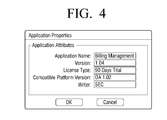
select field 323.FIG. 4 illustrates an example of the UI screen which is presented in response to the selecting on theselect field 323. Referring toFIG. 4 , the detailed information about the application program may include an application name, version, license information, compatible platform version, writer, or the like. - If selecting of a device and an application program is completed, the user may command the installation of an application program by selecting a
button 330. AlthoughFIG. 3 depicts thebutton 330 in the form of an arrow located between themap image field 310 and theapplication information field 320, the location and form of thebutton 330 are changeable. - According to an aspect of one or more exemplary embodiments, the device and application program may be selected by a drag-and-drop manner.
-
FIG. 5 illustrates a UI screen on which a device and an application program are selected by a drag-and-drop manner, according to a first exemplary embodiment. - Referring to
FIG. 5 , theUI screen 300 includes acursor 350. The user may move thecursor 350 using theinput unit 150. - Accordingly, using the
cursor 350, the user may select one or more application programs from theselect field 323 on theapplication information field 320, and then drag and drop the selected application programs to the device image on themap image 310. Alternatively, the user may drag and drop the device image on themap image 310 to theapplication information field 320. - Accordingly, the user is able to select one or more application programs and the device, and make an installation command at the same time. It is also possible to make an installation command to a plurality of devices by one single drag-and-drop, by selecting a plurality of
device images 312 on themap image 310. - Referring to
FIG. 5 , the user clearly knows the application program he is selecting, since the draggedapplication program information 351 is displayed on one side of the draggingcursor 350. - The other repetitious explanation about overlapping components or operation will be omitted for the sake of brevity.
-
FIG. 6 illustrates a UI screen according to another aspect of an exemplary embodiment. - Referring to
FIG. 6 , themap image 310 may indicate only the images a, b, c of the devices on the layout. That is, different from the examples ofFIGS. 3 and5 , on the UI screen ofFIG. 6 , themenu 313 to indicate information about the devices, and theselect field 314 are omitted. - In response to the user's placing of a cursor on the image of the device, information regarding the corresponding device may be displayed on one side of the screen. The user may check the information displayed regarding the corresponding device, and move the device image to the application information fields 371, 381 by drag-and-drop manner using the cursor.
- The number of application information fields 371, 381 corresponds to the number of application programs. Each of the application information fields 371, 381 may include
fields application information field device information field - The user may command to begin installation upon completing his selecting about each device, by selecting an OK button.
- Meanwhile, a device may already have an application program installed thereon, when the user inputs an installation command regarding the particular application program. This example includes a case when the device has an old version of the application program.
- In the above case, the
controller 130 may display a message through thedisplay 140, inquiring the user as to whether he wishes to proceed to overwriting the old existing application program. - The installation of the application program may begin immediately without displaying the above-mentioned inquiry message, if the device does not have the same application program installed thereon.
-
FIG. 7 illustrates an example of an inquiry message regarding installation of an application program. - Referring to
FIG. 7 , in a state that the device and application program are selected and an installation command is input, the attributes of the application program, attributes of the device, and attributes of the application program previously stored in the device, are displayed, along with an inquiry message which asks the user whether he wishes to proceed to installing the selected application program onto the device. The user may select 'Yes' to overwrite the corresponding application, 'Yes for all' to overwrite not only the corresponding application but also the other selected application programs, or 'No' to cancel installation process. - According to an aspect of an exemplary embodiment, if the device is selected in advance of the application program from the UI screen of
FIG. 3 ,FIG. 5 , orFIG. 6 , or vice versa, the remaining select field may activate displaying of only the unselected application program (or device) which is compatible to the selected device (or application program) and inactivate displaying of the incompatible application program (or device). - For example, if a device is selected from the UI screen of
FIG. 3 , theapplication information field 320 may inactivate the displaying of the application programs which is incompatible to, or impossible to be installed onto the selected device. - Specifically, the
select field 323 may be turned to a non-selectable state, and theapplication information field 321 of the corresponding application may be displayed in a non-transparent form. Alternatively, the application information of the corresponding application may be deleted from theapplication information field 320 temporarily. - If the user selects the application program in advance of the device, the
controller 130 may inactivate the displaying of the device which is either incompatible to the selected application program or incapable of installing the selected application program. Specifically, thecontroller 130 may change the image of the corresponding device in a non-transparent form on themap image 310, or turn theselect field 314 to a non-selectable state. Alternatively, the image of the corresponding device may be deleted from themap image 310 temporarily. - If the select state of the device or application program changes, the inactivated displaying may be returned to the activated state.
- The
controller 130 determines compatibility between a device and an application program, using the program compatibility information previously stored in thestorage unit 120. -
FIG. 8 illustrates an example of the program compatibility information stored in thestorage unit 120. - Referring to
FIG. 8 , thestorage unit 120 may store the program compatibility information, and the program compatibility information may include, for example, adevice list 410 containing information about OS version installed in each device, anapplication list 420 containing information about OS version on which the application program is operable, or alist 430 containing information about a compatible platform. - The
controller 130 may determine whether the application program is installable onto the device or not, using the program compatibility information stored in thestorage unit 120. Referring toFIG. 8 , OS version 1.01 is compatible to OS version 1.02, and OS version 1.03 is compatible to OS version 1.04. Also, version 1.01 is incompatible to version 1.03, or 1.04, and version 1.02 is also incompatible to version 1.03 or 1.04. Accordingly, ifdevice 1 is selected from thedevice list 410, sincedevice 1 has OS 1.01 installed thereon, thecontroller 130 determines thatapplications 1 to 4 from theapplication list 420 are installable ontodevice 1, whileapplication 5 is non-installable. Accordingly, thecontroller 130 inactivates the displaying ofapplication 5. - As explained above, activating or inactivating the displaying may be carried out on the UI screen as the ones illustrated in
FIGS. 3 ,5 , and6 . Alternatively, thedevice list 410 and theapplication list 420 ofFIG. 8 may be displayed directly through thedisplay 140, so that the displaying of the corresponding device or application is activated or inactivated on the displayed list. - According to a first exemplary embodiment, the user is enabled to check the locations of the devices and determine a device to install an application program accurately, by using a UI screen which provides both the map image and the application information field.
- Furthermore, since the user can check even information about the devices, the user can easily select the application program to install onto the device. Furthermore, since it is possible to install a plurality of application programs onto a plurality of devices concurrently, it becomes easier to install and manage programs.
- According to a second exemplary embodiment, the
user terminal device 100 provides a UI screen indicating a map image thereon. Accordingly, as a user selects one or more devices on the map image, driver program(s) corresponding to the selected device(s) is(are) installed onto theuser terminal device 100. As a result, the user can easily find a device he intends to use, and directly install a driver program corresponding to the found device onto his ownuser terminal device 100. -
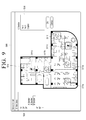
FIG. 9 illustrates an example of a UI screen of the user terminal device according to a second exemplary embodiment. For convenience of explanation, the structure of the user terminal device will be explained with reference to the block diagram ofFIG. 2 . - According to a second exemplary embodiment, the
controller 130 of theuser terminal device 100 generates aUI screen 500 including therein amap image 510, and displays the generatedUI screen 500 on thedisplay 140. TheUI screen 500 may also include a map imageselect field 520 to select a map image of a specific environment from the entire environment to which the user belongs to. - Unlike the examples shown in
FIGS. 3 and5 , the map image inFIG. 9 includes the map imageselect field 520 which is divided into floor units, and each floor is subdivided into sectors.FIG. 9 particularly illustrates an example of a map image regarding the C sector on the third floor. Although themap image 510 and the map imageselect field 520 ofFIG. 9 are illustrated in different forms from those ofFIGS. 3 ,5 , and6 for the purpose of convenient explanation, one will understand that the same map images ofFIGS. 3 ,5 , and6 are also applicable. - Referring to
FIG. 9 , thedevices map image 510. - The user may select the images of the
devices map image 510 using theinput unit 150. - The device information of the selected device image may be displayed on the
information collecting field 530. Accordingly, the user can check the information about the device he selects, through theinformation collecting field 530. Although only the names of the devices appear on theinformation collecting field 530 inFIG. 9 , other types of information such as device type, function, or manufacturer may also be displayed. - If the user completes selecting a device and selects an OK button, the
controller 130 receives a driver program corresponding to the selected device from the eternal server corresponding to the device information included in theinformation collecting field 530. By way of example, thecontroller 130 may send a corresponding server a request including device information, information about user terminal device, or the like, and receive the driver program as a response. - In the above situation, the external server may request a user authentication. In this case, the
controller 130 may display a user authentication window on thedisplay 140, asking a user to input information necessary for user authentication such as a user ID and a password. If the user completes inputting required information through theinput unit 150, the user information is transmitted to the external server for authentication. If authentication is completed successfully, the driver program is downloaded from the external server and stored in thestorage unit 120. -
FIG. 10 illustrates an example of a UI screen according to another example of the second embodiment. - Referring to
FIG. 10 , theUI screen 600 may display themap image 610, along with theinformation collecting field 630 which is provided in a folder form. The user may move the device image to theinformation collecting field 630 on themap image 610 by drag-and-drop, or add the device image to theinformation collecting field 630 by selecting the device and selecting an 'Add'button 620. - When the user completes selecting all things related to the target device, the user selects the
information collecting field 630 and checks the information regarding the device information collected. -
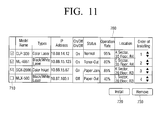
FIG. 11 illustrates an example of a list which is displayed when theinformation collecting field 630 is selected. - Referring to
FIG. 11 , the list may include information such as a name of the device selected from the map image, a device type, an IP address, a current status, a location, or an order of installation, or the like. However, since the list inFIG. 11 is only one of many possible examples, deletion or addition of certain information from or to the list is possible. The user checks the current status of the list and determines whether the device has an error or in a power-on state, etc. - While checking the
list 700, the user may finalize his selection of the driver program, using aselect field 710, aninstallation start menu 720, and aremove menu 730. For example, if the user determines that it is impossible to use a specific device on the list considering problems such as toner-out or malfunction, the user selects the corresponding device information using theselect field 710, and cancels the installation of the driver regarding the corresponding device information by selecting theremove menu 730. If selection of a device to use is finalized, the user selects corresponding device information, and selects theinstallation start menu 720 according to which the driver program corresponding to the all the selected device information is downloaded from the external server and installed onto the device. - Meanwhile, the devices added to the
list 700 are basically assigned with an installation order according to a sequence in which the devices are added. However, the order of installation is changeable. For example, as illustrated inFIG. 11 , an arrow-form button may be provided next to the figures indicating the installation order of each device. The user may change the order of installing the driver programs by manipulating the button. Accordingly, if need arises, for example, if a user needs to use a specific device faster than the other devices preceding in order, the user may rearrange the order of installing the driver program so that the driver program is installed onto the specific device first, and save time. - The 'external server' may be a web server, or a managed printing and service or solution (MPS) server separately provided to manage the respective devices of the network. In the latter's case, the
user terminal device 100 may include a client program so as to access and use the MPS system. - The MPS server may include a database, that is, a collection of shared data, which stores and operates the integrated information of many application systems. Accordingly, it is possible to store in the database the information including, for example, unique information of each device (such as IP address, driver, location information, etc.), status information (such as error occurrence, On/Off status, etc.), or operation log (such as output amount, rate of operation, etc.), and provide the database for reference in response to a request received from the
user terminal device 100. The MPS server may also update the information of the database if a device has changes in its state, or the like. - The map image illustrated in
FIGS. 9 and10 may be stored in thestorage unit 120, or alternatively, provided from the MPS server and displayed. That is, thecontroller 130 of theuser terminal device 100 may receive from the MPS server the information required for creating the U I screen and display the received information on the screen, according to a user selection command input through theinput unit 150. - Meanwhile, the MPS server or the
controller 130 drives installation program such as ActiveX or Java Applets to install a corresponding driver program onto thestorage unit 120 of the user terminal device, if a button to start installation is selected on the UI screen as the one illustrated inFIG. 9 , or if theinstallation start menu 720 is selected on the list as the one illustrated inFIG. 11 . As a result, the corresponding driver program is installed onto theuser terminal device 100 automatically, that is, without requiring further intervention of the user. - A window may be displayed on the screen to indicate the extent of processing of the driver installation, so that the user can easily check how the installation is proceeding during the installation.
-
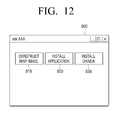
FIG. 12 illustrates an example of a UIscreen displayed on a user terminal device according to a third exemplary embodiment. - Referring to
FIG. 12 , theUI screen 800 may include a mapimage construct menu 810, an application installmenu 820, and a driver installmenu 830. - The map
image construct menu 810 is used to construct a map image of an environment where the user is located. Accordingly, the user selects the mapimage construct menu 810, and inputs an original map image using a scan image of a photo of the user's environment, a graphic image layout, or blueprint. The user then writes device images or text information including model names, or product numbers of the devices on the original map image, according to the exact locations of each device in the user's environment. - The image or text input may be made through the
input unit 150 ofFIG. 2 , and the final form of the map image may be stored in thestorage unit 120 of theuser terminal device 100 or in the external server. The device image may be selected from the previously created icons and arranged on an appropriate location on the map image by drag-and-drop, or alternatively, the user may create a new graphic image to represent the device image and arrange the created image on the map image. Alternatively, the user may write in text information and arrange the text at an appropriate location. The map image, once stored in the manner described above, may be used repeatedly in the later process. - Meanwhile, if a new device is added to the network, if device is moved to a different location, or if existing device is not used anymore, the user may select the map image construct menu 301 to update the old map image.
- The application install
menu 820 is used to install an application program onto a device of a network. - Accordingly, if the application install
menu 820 is selected, thecontroller 130 changes themain UI screen 800 to display a UI screen which includes the map image and application information field as illustrated inFIGS. 3 ,5 and6 . For convenience of explanation, the UI I screen for use in installation of the application is referred to as a 'first UI screen' hereinbelow. Accordingly, the user selects a device on the map image, selects an application program on the application information field, and carries out application installation process. Since the way of installing the application is explained above in the first embodiment, this will not be discussed in detail for the sake of brevity. - The driver install
menu 830 is used to install a printer driver program onto the user terminal device. - If the driver install
menu 830 is selected, referring toFIGS. 9 and10 , thecontroller 130 changes the current screen to display a UI screen which includes the map image. The UI screen used to install a driver will be referred to as a 'second UI screen' hereinbelow for convenience of explanation. - The user may select a device on the map image, and if the device is selected, the corresponding driver program is installed onto the
user terminal device 100 automatically. Since the way of installing a driver has been explained above in the second embodiment, this will not be discussed in detail below for the sake of brevity. - As explained above, application or driver installation may be provided as one total solution to manage the network devices.
-
FIG. 13 is a flowchart provided to explain a method for managing a network device according to a third exemplary embodiment. - Referring to
FIG. 13 , if the user executes a program provided to manage the network device, at S1310, a UI screen appears. This UI screen will be referred to as a 'main UI screen' hereinbelow for the sake of convenient explanation. Referring toFIG. 12 , the main UI screen may include the mapimage construct menu 810, the application installmenu 820, and the driver installmenu 830. Depending on the particular examples applied, the mapimage construct menu 810 may be omitted. - The user may select a specific menu on the main U I screen.
- At S1315, if the user selects the application install menu ('first install menu'), at S1320, the first UI screen including a map image and an application information field therein, is displayed. The first UI screen may have the identical forms as those illustrated in
FIGS. 3 ,5 , and6 , but it not limited thereto. - At S1325, the user selects a device on the map image of the first UI screen, and selects an application program on the application information field.
- If selection is completed, at S1330, the
user terminal device 100 starts installing the selected application program onto the selected device. - At S1335, if the selected menu is not the first install menu, but the driver install menu ('second install menu'), at S1340, the second UI screen including a map image therein, is displayed. The second UI screen may have the same form as the one illustrated in
FIG. 9 or -
FIG. 11 , but is not strictly limited thereto. The map image on the second UI screen may use the same images as those on the map image on the first UI screen, but this is not strictly limiting. Accordingly, the map image may have different structures as these may be customized suitably to the installation characteristics of the driver. - At S1345, the user may select a device from the map image on the second UI screen.
- At S1350, if the device is selected, a driver program corresponding to the selected device is installed onto the user terminal device.
- At S1355, if the selected menu is not the first or second install menu, but the map image construct menu, at S1360, the user or network manager may generate a layout of the map image on the UI screen provided for the construction of the map image, and then arrange device images or texts appropriately, according to the locations on the layout which correspond to the respective devices. As a result, a map image to be used for the UI screen of the first and second install menus is constructed and stored in advance.
-
FIG. 14 is a flowchart provided to explain an example of a method for installing an application. - Referring to
FIG. 14 , at S 1410, a UI screen including therein a map image and an application information field is displayed. The user may select a device from the map image, and select an application program from the application information field. - At S1415, if a device is selected first, at S1420, displaying of an application, which is not installable onto the selected device, on the application information field is inactivated, and at S1425, an application program is selected in such a state.
- At S1430, if a user selects an application program first, at S1435, displaying of a device which can not install the selected application program thereon, is inactivated, and at S1440, the user selects a device in such a state.
- As the selection of the device and the application program is completed through the above-explained processes, at S1445, the
user terminal device 100 determines whether or not the selected device already has the corresponding application program installed thereon. Theuser terminal deice 100 determines the device has the corresponding application program, even when the existing application program is in a different version. - If it is determined that the selected device has the existing application program, at S1450, the
user terminal device 100 inquires the user as to whether the user wishes to proceed overwriting the existing application program or not. At S1455, if the user selects to confirm the intention to overwrite, the corresponding application program is installed. - Meanwhile, if the selected device does not have the application program installed thereon, at S1460, the selected application program is directly installed onto the device.
- By the processes described above, installation of an application program onto the device is completed.
-
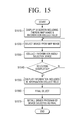
FIG. 15 is a flowchart provided to explain an example of a method for installing a driver according to an exemplary embodiment. - Referring to
FIG. 15 , at S1510, a UI screen including therein a map image and an information collect field is displayed. - At S1520, the user selects a device he intends to use from the map image on the displayed UI screen. At S1530, information regarding the selected device is collected in the information collect field.
- At S1540, if the user completes selecting a device, at S1550, the information of the information collect field is displayed according to a user command input by the user to check the device information collected in the information collect field. The device information may be displayed in a list form.
- At S1560, the user re-selects a device he intends to use by checking the device information. Specifically, the user may finalize his determination as to the selected device by selecting installation start menu or remove menu on the list illustrated in
FIG. 11 . - At S1570, if the user finalizes his determination to select the device, the driver program corresponding to the selected device is installed onto the user terminal device.
- By the above-explained processes, the driver program is installed onto the user terminal device.
- One or more embodiments may be realized as a medium/media storing therein a program to execute various embodiments including those explained above. The program may be executed by executing computer readable code/instructions in/on a medium/media, e.g., a computer readable recording medium/media. The medium/media can correspond to any medium/media permitting the storing and/or transmission of the computer readable code/instructions. The medium/media may also include, alone or in combination with the computer readable code/instructions, data files, data structures, and the like. Examples of code/instructions include both machine code, such as produced by a compiler, and files containing higher level code that may be executed by a computing device and the like using an interpreter. In addition, code/instructions may include functional programs and code segments.
- The computer readable code/instructions can be recorded/transferred in/on a medium/media in a variety of ways, with examples of the medium/media including magnetic storage media (e.g., floppy disks, hard disks, magnetic tapes, etc.), optical media (e.g., CD-ROMs, DVDs, etc.), magneto-optical media (e.g., floptical disks), and hardware storage devices (e.g., read only memory media, random access memory media, flash memories, a hard disc, a memory card, a USB memory, or any other computer-readable recording media etc.). The medium/media may also be computer-readable recording media in a distributed network, so that the computer readable code/instructions are stored and executed in a distributed fashion. The computer readable code/instructions may be executed by one or more processors. The computer readable code/instructions may also be executed and/or embodied in at least one application specific integrated circuit (ASIC) or Field Programmable Gate Array (FPGA).
- Furthermore, in many examples explained above, the 'device' is not strictly limited to the image forming apparatus. Accordingly, the examples of exemplary embodiments may be applied to various other types of devices.
- Furthermore, although the above-described examples focused on installing an application program or a driver program onto a selected device, other examples are also possible. For example, a user may select a device from a map image, so that certain data can be transmitted to or received from the selected device.
- Meanwhile, although various examples of exemplary embodiments are applicable to the user terminal device such as the one illustrated in
FIG. 2 , this is not strictly limiting. Accordingly, certain components may be omitted from the user terminal device inFIG. 2 , or new components may also be added. - Furthermore, various types of devices may be applied as the device of the network system in
FIG. 1 . For example, the device may be an image forming apparatus, and the image forming apparatus may include an interface to receive print data, a main controller to convert the print data into image data, and an engine unit to print the image data converted at the main controller onto a printing paper sheet. - The main controller may transmit various types of information such as a product name, a model number, manufacturer information, or an installed application, to a managing server, as the image forming apparatus is connected to the network. The user terminal device or managing server may construct a map image based on the received information, and create a UI screen so that the user can manage the network devices more efficiently.
- Although a few exemplary embodiments have been shown and described, it will be appreciated by those skilled in the art that changes may be made in these exemplary embodiments without departing from the principles and spirit of the disclosure, the scope of which is defined in the appended claims and their equivalents.
Claims (15)
- A user terminal device (100-1, 100-2) connected in a network, the user terminal device comprising:a display (140) to display a main user interface (UI) screen (300) including therein a first install menu to install an application program and a second install menu to install a driver program;an input unit (150) through which one of the first install menu and the second install menu is selected on the main UI screen; anda controller (130) to carry out an application installation in which the application program is installed onto a device connected in the network, if the first install menu is selected, or carry out a driver program installation in which the driver program is installed onto the user terminal device, if the second install menu is selected, whereinif one of the first install menu and the second install menu is selected, the controller causes the display to display a map image, indicative of an arrangement of devices in an environment where the network is constructed, and carries out the application program installation or the driver program installation onto the device selected from the map image.
- The user terminal device of claim 1, wherein the controller (130) controls the display to display a first UI screen including therein a map image field (310) having the map image indicated therein, and an application information field, if the first install menu is selected, and
if a device is selected from the map image and an application program is selected from the application information field through the input unit, transmits the selected application program to the selected device,
wherein the map image includes a device image (312) which is indicated at a location where each corresponding device is installed under a network environment, and a menu provided at one side of the device image to indicate information about the corresponding device. - The user terminal device of claim 2, wherein, if the selected application program is already installed in the selected device, the controller generates a UI window to inquire about an intention to proceed installation of an application program, and causes the display to display the generated UI window.
- The user terminal device of claim 2, further comprising a storage unit (120) to store program compatibility information therein, and wherein, if a device image is selected from the map image, the controller inactivates displaying status of a non-installable application program among the application programs indicated in the application information field, and
if an application program is selected from the application information field, the controller inactivates displaying status of a non-installable device among the devices indicated on the map image, in which the non-installable application program is an application program which is not installable onto the selected device, and the non-installable device is a device onto which the selected application program can not be installed, and
wherein the controller determines a possibility of installing each application program onto each device, using the program compatibility information stored in the storage unit. - The user terminal device of any preceding claim, further comprising a storage unit (120), and wherein the controller controls the display to display a second UI screen including the map image therein, if the second install menu is selected, and
if a device is selected from the map image on the second UI screen, installs a driver program corresponding to the selected device to the storage unit. - The user terminal device of claim5, wherein the second Ul screen displays an information collect field to collect information about a device selected through the map image, and
if the information collect field is selected, the controller controls a list of the device information collected in the selected information collect field to be displayed, and
if information about at least one device is selected from the list, the controller receives from an external server at least one driver program which corresponds to the selected information about at least one device. - A method of a user terminal device connected in a network for managing a network device, the method comprising:displaying a main user interface (UI) screen (S1310) indicating therein a first install menu to install an application program and a second install menu to install a driver program;carrying out an application installation (S1330) of the application program if the first install menu is selected; andcarrying out a driver installation (S1350) of the driver program if the second install menu is installed, whereinthe carrying out of the application installation of the application program comprises,displaying a first UI screen (S1320) including a map image representing a device arrangement under an environment where the network is constructed, and an application information field, andif a device is selected from the map image and the application program is selected from the application information field, transmitting and installing the selected application program to the selected device, andthe carrying out the driver installation of the driver program comprises,displaying a second UI screen including map image (S1340), andif a device is selected from the map image included in the second UI, installing (S1350) the driver program corresponding to the selected device onto the user terminal device.
- The method of claim 7, wherein the map image represents a device image indicated at a location in which the corresponding device is placed under the network environment, and a menu to indicate information about the device is displayed on one side of the device image next to the device image.
- The method of any of claims 7 to 8, the carrying out the application installation further comprises, if the selected application program is already installed in the selected device, generating and displaying a user interface (UI) window to inquire as to whether the application program is to be installed or not.
- The method of any of claims 7 to 9, wherein the carrying out the application installation comprises,
detecting previously stored program compatibility information;
determining compatibility between each device and application program using the program compatibility information;
if a device image is selected from the map image, inactivating a displaying status of an application program which is non-installable onto the selected device, from among the application programs indicated in the application information field, and
if an application program is selected from the application information field, inactivating a displaying status of a device which is incapable of installing the selected application program, from among the devices indicated on the map image. - The method of any of claims 7 to 10, comprising displaying on the second UI screen an information collect field (S1510) to collect information about a device selected through the map image, wherein
the carrying out the driver installation comprises,
if the information collect field is selected, displaying (S1550) a list of device information collected in the selected information collect field, and if at least one piece of device information is selected from the list, receiving at least one driver program corresponding to the selected at least one device information from an external server, wherein the information about the device on the map image is collected into the information collect field by a drag-and-drop manner. - A user terminal device (100-1, 100-2) connected in a network, the user terminal device comprising:a display (140) to display a UI screen (300) including a map image indicating therein a device arrangement under an environment in which the network is constructed, and an application information field;an input unit (150) to receive a selection of a device from the map image, and a selection of an application program from the application information field; anda controller (130) to control installation of the application program selected from the application information field onto the device selected from the map image.
- The user terminal device of claim 12, wherein the map image comprises:a device image (312) which is indicated at a location where each corresponding device is installed under the network environment;a menu provided at one side of the device image to indicate information about the corresponding device; anda menu provided at one side of each application program indicated on the application information field, to indicate detailed information about the corresponding application information,and wherein if a device image is selected from the map image, the controller inactivates displaying status of a non-installable application program among the application programs indicated in the application information field,if an application program is selected from the application information field, the controller inactivates displaying status of a non-installable device among the devices indicated on the map image, in which the non-installable application program is an application program which is not installable onto the selected device, and the non-installable device is a device onto which the selected application program can not be installed, andif the application program is already installed on the selected device, the controller displays a message window through the display to inquire as to whether or not to proceed with installation.
- A user terminal device (100-1, 100-2), comprising:a storage unit (120);a network interface (110) connected in a network;a display (140) to display a UI screen including a map image indicating therein an arrangement of devices under an environment where the network is constructed, and a user interface (UI) screen including therein an information collect field;an input unit (150) to receive a selection for at least one device on the map image; anda controller (130) to control so that, if at least one device is selected from the map image, the information about the at least one selected device is included in the information collect field, and if a command to install at least one driver is input through the input unit, at least one driver program corresponding to the information included in the information collect field is installed to the storage unit,wherein the controller controls so that, if the information collect field is selected from the UI screen, a list of the device information collected in the information collect field is displayed through the display, and if at least one piece of device information is selected from the list, at least one driver program corresponding to the selected device information is received from an external server.
- A recording medium storing therein a program to execute a method for managing a device connected in a network, wherein the method comprises,
displaying a main user interface (UI) screen indicating therein a first install menu to install an application program and a second install menu to install a driver program;
if the first install menu is selected, displaying a first UI screen indicating therein a map image representing an arrangement of devices under an environment where the network is constructed, and an application information field;
if a device is selected from the map image of the first UI screen and an application program is selected from the application information field of the first UI screen, transmitting and installing the selected application program onto the selected device;
if the second install menu is selected, displaying a second UI screen including therein map image which indicates therein arrangement of devices under environment where the network is constructed; and
if a device is selected from map image of the second UI screen, installing a driver program corresponding to the selected device onto a user terminal device.
Applications Claiming Priority (1)
| Application Number | Priority Date | Filing Date | Title |
|---|---|---|---|
| KR1020090125450A KR101926592B1 (en) | 2009-12-16 | 2009-12-16 | User terminal device for managing network device and method thereof |
Publications (3)
| Publication Number | Publication Date |
|---|---|
| EP2357779A2 true EP2357779A2 (en) | 2011-08-17 |
| EP2357779A3 EP2357779A3 (en) | 2014-05-28 |
| EP2357779B1 EP2357779B1 (en) | 2016-09-21 |
Family
ID=44144375
Family Applications (1)
| Application Number | Title | Priority Date | Filing Date |
|---|---|---|---|
| EP10195092.1A Not-in-force EP2357779B1 (en) | 2009-12-16 | 2010-12-15 | User terminal device for managing network device and method thereof |
Country Status (3)
| Country | Link |
|---|---|
| US (1) | US8762988B2 (en) |
| EP (1) | EP2357779B1 (en) |
| KR (1) | KR101926592B1 (en) |
Families Citing this family (24)
| Publication number | Priority date | Publication date | Assignee | Title |
|---|---|---|---|---|
| US6324685B1 (en) * | 1998-03-18 | 2001-11-27 | Becomm Corporation | Applet server that provides applets in various forms |
| US9171314B2 (en) * | 2011-06-16 | 2015-10-27 | Microsoft Technology Licensing, Llc | Cloud based management of an in-store device experience |
| KR101850817B1 (en) * | 2011-11-17 | 2018-04-23 | 삼성전자주식회사 | The method and apparatus for auto installing applications into different terminal |
| KR101515998B1 (en) | 2011-12-19 | 2015-05-07 | 주식회사 케이티 | Method for providing space market widget, market server and user deivce thereof |
| US8789034B1 (en) * | 2011-12-31 | 2014-07-22 | Parallels IP Holdings GmbH | Method for updating operating system without memory reset |
| EP2943859B1 (en) * | 2013-01-11 | 2020-10-21 | Hand Held Products, Inc. | System, method, and computer-readable medium for managing edge devices |
| US20160048308A1 (en) * | 2013-03-12 | 2016-02-18 | Andrew K. Lukes | Automatic flowchart-based webpage generation for troubleshooting or task completion without manual programming |
| JP5932712B2 (en) * | 2013-05-21 | 2016-06-08 | 京セラドキュメントソリューションズ株式会社 | Installer program and installation method |
| US9894164B2 (en) * | 2013-06-06 | 2018-02-13 | Samsung Electronics Co., Ltd. | Computing system with control mechanism and method of operation thereof |
| CN105474580B (en) | 2013-06-18 | 2019-02-15 | 三星电子株式会社 | User terminal equipment and management method of home network |
| JP6286922B2 (en) | 2013-08-09 | 2018-03-07 | ソニー株式会社 | Electronic device, server, electronic device control method, information processing method, and recording medium |
| US9935846B2 (en) | 2013-10-31 | 2018-04-03 | Google Llc | Synchronized distributed networks with frictionless application installation |
| WO2015072764A1 (en) * | 2013-11-13 | 2015-05-21 | 엘지전자(주) | Method and apparatus for managing connection between plurality of devices over network |
| CN105446703B (en) * | 2014-06-03 | 2021-09-14 | 联想(北京)有限公司 | Information processing method and electronic equipment |
| JP6206436B2 (en) * | 2015-03-26 | 2017-10-04 | コニカミノルタ株式会社 | Image forming system, image forming apparatus, and program |
| KR20170047560A (en) * | 2015-10-23 | 2017-05-08 | 삼성전자주식회사 | Electronic apparatus and control method thereof |
| JP6938887B2 (en) | 2016-10-06 | 2021-09-22 | 富士フイルムビジネスイノベーション株式会社 | Information processing equipment, information processing systems and programs |
| JP6957855B2 (en) * | 2016-10-06 | 2021-11-02 | 富士フイルムビジネスイノベーション株式会社 | Information processing equipment, information processing systems and programs |
| JP6882645B2 (en) * | 2016-10-06 | 2021-06-02 | 富士フイルムビジネスイノベーション株式会社 | Information processing equipment, information processing systems and programs |
| KR20180060200A (en) * | 2016-11-28 | 2018-06-07 | 에이치피프린팅코리아 주식회사 | Image forming apparatus and method for installing printer driver in host device |
| JP6987541B2 (en) * | 2017-06-16 | 2022-01-05 | 株式会社東芝 | Image forming apparatus and control method of image forming apparatus |
| CN109062581B (en) * | 2018-07-18 | 2023-07-25 | 珠海奔图电子有限公司 | Terminal equipment side driver processing method, device and equipment |
| JP2023068758A (en) * | 2021-11-04 | 2023-05-18 | キヤノン株式会社 | IMAGE FORMING APPARATUS, IMAGE FORMING APPARATUS CONTROL METHOD, AND PROGRAM |
| KR102755248B1 (en) * | 2023-06-26 | 2025-01-21 | 주식회사 그림소프트 | Device and system for data visualization |
Family Cites Families (19)
| Publication number | Priority date | Publication date | Assignee | Title |
|---|---|---|---|---|
| JPH0727504B2 (en) * | 1990-12-10 | 1995-03-29 | インターナショナル・ビジネス・マシーンズ・コーポレイション | System for defining network configuration, method for generating configuration parameters for network, and system for configuring network |
| US5684952A (en) * | 1994-07-25 | 1997-11-04 | Apple Computer, Inc. | Supervisory control system for networked multimedia workstations that provides reconfiguration of workstations by remotely updating the operating system |
| JP3590688B2 (en) * | 1995-04-05 | 2004-11-17 | インターナショナル・ビジネス・マシーンズ・コーポレーション | Method and system for constructing an installation plan object for installing an application |
| US6031533A (en) * | 1996-07-03 | 2000-02-29 | Sun Microsystems, Inc. | Graphical user interface for use in a de-centralized network environment |
| US5958012A (en) * | 1996-07-18 | 1999-09-28 | Computer Associates International, Inc. | Network management system using virtual reality techniques to display and simulate navigation to network components |
| KR100431049B1 (en) * | 2001-03-05 | 2004-05-12 | 이엠테크놀러지 (주) | Method and System for Remote Installation of a Software on Client Computers from a Server |
| JP2003241925A (en) * | 2002-02-15 | 2003-08-29 | Minolta Co Ltd | Driver downloading system, driver transmitting program and method, and driver receiving program |
| JP2003241876A (en) | 2002-02-20 | 2003-08-29 | Fuji Xerox Co Ltd | Device and method for displaying remote operation equipment |
| JP2003256301A (en) * | 2002-02-28 | 2003-09-12 | Canon Inc | Network management system, display method, and network management program |
| JP2003288211A (en) * | 2002-03-27 | 2003-10-10 | Minolta Co Ltd | Network management program |
| US20030233483A1 (en) * | 2002-04-23 | 2003-12-18 | Secure Resolutions, Inc. | Executing software in a network environment |
| US7689673B2 (en) * | 2002-04-23 | 2010-03-30 | Canon Kabushiki Kaisha | Remote creation of printer instances on a workstation |
| US7886031B1 (en) * | 2002-06-04 | 2011-02-08 | Symantec Operating Corporation | SAN configuration utility |
| US7853946B2 (en) * | 2003-02-28 | 2010-12-14 | Canon Kabushiki Kaisha | Information processing apparatus, information processing method, and control program |
| KR100703804B1 (en) * | 2006-01-20 | 2007-04-09 | 삼성전자주식회사 | Plug and install system and method |
| US7793285B2 (en) * | 2006-03-31 | 2010-09-07 | Ricoh Company, Ltd. | Web installer driver and management through a remote network |
| JP2009093228A (en) * | 2007-10-03 | 2009-04-30 | Canon Inc | Image forming system and application program installation method |
| JP4774078B2 (en) * | 2008-05-12 | 2011-09-14 | シャープ株式会社 | Information processing device |
| US9112789B2 (en) * | 2008-08-15 | 2015-08-18 | Tellabs Operations, Inc. | Method and apparatus for simplifying planning and tracking of multiple installation configurations |
-
2009
- 2009-12-16 KR KR1020090125450A patent/KR101926592B1/en not_active Expired - Fee Related
-
2010
- 2010-10-01 US US12/923,668 patent/US8762988B2/en active Active
- 2010-12-15 EP EP10195092.1A patent/EP2357779B1/en not_active Not-in-force
Non-Patent Citations (1)
| Title |
|---|
| None |
Also Published As
| Publication number | Publication date |
|---|---|
| EP2357779B1 (en) | 2016-09-21 |
| US20110145812A1 (en) | 2011-06-16 |
| US8762988B2 (en) | 2014-06-24 |
| EP2357779A3 (en) | 2014-05-28 |
| KR101926592B1 (en) | 2019-03-08 |
| KR20110068477A (en) | 2011-06-22 |
Similar Documents
| Publication | Publication Date | Title |
|---|---|---|
| EP2357779B1 (en) | User terminal device for managing network device and method thereof | |
| JP4717453B2 (en) | File management apparatus and control method thereof | |
| US7506142B2 (en) | Method for configuring device driver by customizing same user setting using in different image processing devices | |
| US20100011290A1 (en) | Print management method, recording medium storing a program, and print management apparatus | |
| JP7408931B2 (en) | Electronic equipment, information processing systems, information processing methods and programs | |
| JP2016194785A (en) | Print control program, print control method, and information processor | |
| KR102740787B1 (en) | Application and information processing apparatus | |
| US20090083651A1 (en) | Method to manage driver program of image forming apparatus, and apparatus thereof | |
| KR101361507B1 (en) | Image forming apparatus with embedded web server, client and control method of image forming system | |
| CN101556531A (en) | Information processor, information processing method, and recording medium | |
| JP6225590B2 (en) | Program, information processing apparatus and information processing system | |
| JP7490384B2 (en) | Management device, method and program | |
| JP5361399B2 (en) | Image processing apparatus, control method for image processing apparatus, and control program | |
| US20090293015A1 (en) | Application Platform | |
| KR101898976B1 (en) | User terminal device for managing network device and method thereof | |
| JP2014179038A (en) | Information process system, information process method, and program | |
| JP6497837B2 (en) | Information processing apparatus, program, and control method | |
| JP2006172342A (en) | Form information management system, form information management server, client terminal, image forming apparatus and program | |
| JP2019036792A (en) | Image forming apparatus and control method and program thereof | |
| JP2009151678A (en) | Image forming apparatus and image forming system | |
| JP6776675B2 (en) | Electronics and programs | |
| US20240385726A1 (en) | Apparatus, method, and computer readable storage medium | |
| JP2019192066A (en) | Image formation device, control method and program | |
| JP2022013247A (en) | Information processing device, control method of information processing device, and program | |
| JP2020182133A (en) | Image processing device, its control method, and program |
Legal Events
| Date | Code | Title | Description |
|---|---|---|---|
| PUAI | Public reference made under article 153(3) epc to a published international application that has entered the european phase |
Free format text: ORIGINAL CODE: 0009012 |
|
| AK | Designated contracting states |
Kind code of ref document: A2 Designated state(s): AL AT BE BG CH CY CZ DE DK EE ES FI FR GB GR HR HU IE IS IT LI LT LU LV MC MK MT NL NO PL PT RO RS SE SI SK SM TR |
|
| AX | Request for extension of the european patent |
Extension state: BA ME |
|
| RAP1 | Party data changed (applicant data changed or rights of an application transferred) |
Owner name: SAMSUNG ELECTRONICS CO., LTD. |
|
| PUAL | Search report despatched |
Free format text: ORIGINAL CODE: 0009013 |
|
| AK | Designated contracting states |
Kind code of ref document: A3 Designated state(s): AL AT BE BG CH CY CZ DE DK EE ES FI FR GB GR HR HU IE IS IT LI LT LU LV MC MK MT NL NO PL PT RO RS SE SI SK SM TR |
|
| AX | Request for extension of the european patent |
Extension state: BA ME |
|
| RIC1 | Information provided on ipc code assigned before grant |
Ipc: H04N 1/00 20060101AFI20140424BHEP |
|
| 17P | Request for examination filed |
Effective date: 20141128 |
|
| RBV | Designated contracting states (corrected) |
Designated state(s): AL AT BE BG CH CY CZ DE DK EE ES FI FR GB GR HR HU IE IS IT LI LT LU LV MC MK MT NL NO PL PT RO RS SE SI SK SM TR |
|
| 17Q | First examination report despatched |
Effective date: 20150116 |
|
| GRAP | Despatch of communication of intention to grant a patent |
Free format text: ORIGINAL CODE: EPIDOSNIGR1 |
|
| INTG | Intention to grant announced |
Effective date: 20160527 |
|
| GRAS | Grant fee paid |
Free format text: ORIGINAL CODE: EPIDOSNIGR3 |
|
| GRAA | (expected) grant |
Free format text: ORIGINAL CODE: 0009210 |
|
| AK | Designated contracting states |
Kind code of ref document: B1 Designated state(s): AL AT BE BG CH CY CZ DE DK EE ES FI FR GB GR HR HU IE IS IT LI LT LU LV MC MK MT NL NO PL PT RO RS SE SI SK SM TR |
|
| REG | Reference to a national code |
Ref country code: GB Ref legal event code: FG4D |
|
| REG | Reference to a national code |
Ref country code: CH Ref legal event code: EP |
|
| REG | Reference to a national code |
Ref country code: AT Ref legal event code: REF Ref document number: 831860 Country of ref document: AT Kind code of ref document: T Effective date: 20161015 |
|
| REG | Reference to a national code |
Ref country code: IE Ref legal event code: FG4D |
|
| REG | Reference to a national code |
Ref country code: DE Ref legal event code: R096 Ref document number: 602010036544 Country of ref document: DE |
|
| REG | Reference to a national code |
Ref country code: NL Ref legal event code: FP |
|
| REG | Reference to a national code |
Ref country code: LT Ref legal event code: MG4D |
|
| PG25 | Lapsed in a contracting state [announced via postgrant information from national office to epo] |
Ref country code: LT Free format text: LAPSE BECAUSE OF FAILURE TO SUBMIT A TRANSLATION OF THE DESCRIPTION OR TO PAY THE FEE WITHIN THE PRESCRIBED TIME-LIMIT Effective date: 20160921 Ref country code: NO Free format text: LAPSE BECAUSE OF FAILURE TO SUBMIT A TRANSLATION OF THE DESCRIPTION OR TO PAY THE FEE WITHIN THE PRESCRIBED TIME-LIMIT Effective date: 20161221 Ref country code: FI Free format text: LAPSE BECAUSE OF FAILURE TO SUBMIT A TRANSLATION OF THE DESCRIPTION OR TO PAY THE FEE WITHIN THE PRESCRIBED TIME-LIMIT Effective date: 20160921 Ref country code: RS Free format text: LAPSE BECAUSE OF FAILURE TO SUBMIT A TRANSLATION OF THE DESCRIPTION OR TO PAY THE FEE WITHIN THE PRESCRIBED TIME-LIMIT Effective date: 20160921 |
|
| REG | Reference to a national code |
Ref country code: AT Ref legal event code: MK05 Ref document number: 831860 Country of ref document: AT Kind code of ref document: T Effective date: 20160921 |
|
| PG25 | Lapsed in a contracting state [announced via postgrant information from national office to epo] |
Ref country code: LV Free format text: LAPSE BECAUSE OF FAILURE TO SUBMIT A TRANSLATION OF THE DESCRIPTION OR TO PAY THE FEE WITHIN THE PRESCRIBED TIME-LIMIT Effective date: 20160921 Ref country code: SE Free format text: LAPSE BECAUSE OF FAILURE TO SUBMIT A TRANSLATION OF THE DESCRIPTION OR TO PAY THE FEE WITHIN THE PRESCRIBED TIME-LIMIT Effective date: 20160921 Ref country code: GR Free format text: LAPSE BECAUSE OF FAILURE TO SUBMIT A TRANSLATION OF THE DESCRIPTION OR TO PAY THE FEE WITHIN THE PRESCRIBED TIME-LIMIT Effective date: 20161222 |
|
| REG | Reference to a national code |
Ref country code: NL Ref legal event code: PD Owner name: S-PRINTING SOLUTION CO., LTD.; KO Free format text: DETAILS ASSIGNMENT: CHANGE OF OWNER(S), ASSIGNMENT; FORMER OWNER NAME: SAMSUNG ELECTRONICS CO., LTD. Effective date: 20170221 |
|
| RAP2 | Party data changed (patent owner data changed or rights of a patent transferred) |
Owner name: S-PRINTING SOLUTION CO., LTD. |
|
| REG | Reference to a national code |
Ref country code: DE Ref legal event code: R082 Ref document number: 602010036544 Country of ref document: DE Representative=s name: GULDE & PARTNER PATENT- UND RECHTSANWALTSKANZL, DE Ref country code: DE Ref legal event code: R081 Ref document number: 602010036544 Country of ref document: DE Owner name: HP PRINTING KOREA CO., LTD., SUWON-SI, KR Free format text: FORMER OWNER: SAMSUNG ELECTRONICS CO., LTD., SUWON-SI, GYEONGGI-DO, KR Ref country code: DE Ref legal event code: R081 Ref document number: 602010036544 Country of ref document: DE Owner name: S-PRINTING SOLUTION CO., LTD., SUWON-SI, KR Free format text: FORMER OWNER: SAMSUNG ELECTRONICS CO., LTD., SUWON-SI, GYEONGGI-DO, KR Ref country code: DE Ref legal event code: R081 Ref document number: 602010036544 Country of ref document: DE Owner name: HEWLETT-PACKARD DEVELOPMENT COMPANY, L.P., SPR, US Free format text: FORMER OWNER: SAMSUNG ELECTRONICS CO., LTD., SUWON-SI, GYEONGGI-DO, KR |
|
| PG25 | Lapsed in a contracting state [announced via postgrant information from national office to epo] |
Ref country code: EE Free format text: LAPSE BECAUSE OF FAILURE TO SUBMIT A TRANSLATION OF THE DESCRIPTION OR TO PAY THE FEE WITHIN THE PRESCRIBED TIME-LIMIT Effective date: 20160921 Ref country code: RO Free format text: LAPSE BECAUSE OF FAILURE TO SUBMIT A TRANSLATION OF THE DESCRIPTION OR TO PAY THE FEE WITHIN THE PRESCRIBED TIME-LIMIT Effective date: 20160921 |
|
| REG | Reference to a national code |
Ref country code: GB Ref legal event code: 732E Free format text: REGISTERED BETWEEN 20170406 AND 20170412 |
|
| PG25 | Lapsed in a contracting state [announced via postgrant information from national office to epo] |
Ref country code: BG Free format text: LAPSE BECAUSE OF FAILURE TO SUBMIT A TRANSLATION OF THE DESCRIPTION OR TO PAY THE FEE WITHIN THE PRESCRIBED TIME-LIMIT Effective date: 20161221 Ref country code: IS Free format text: LAPSE BECAUSE OF FAILURE TO SUBMIT A TRANSLATION OF THE DESCRIPTION OR TO PAY THE FEE WITHIN THE PRESCRIBED TIME-LIMIT Effective date: 20170121 Ref country code: ES Free format text: LAPSE BECAUSE OF FAILURE TO SUBMIT A TRANSLATION OF THE DESCRIPTION OR TO PAY THE FEE WITHIN THE PRESCRIBED TIME-LIMIT Effective date: 20160921 Ref country code: BE Free format text: LAPSE BECAUSE OF FAILURE TO SUBMIT A TRANSLATION OF THE DESCRIPTION OR TO PAY THE FEE WITHIN THE PRESCRIBED TIME-LIMIT Effective date: 20160921 Ref country code: SK Free format text: LAPSE BECAUSE OF FAILURE TO SUBMIT A TRANSLATION OF THE DESCRIPTION OR TO PAY THE FEE WITHIN THE PRESCRIBED TIME-LIMIT Effective date: 20160921 Ref country code: PT Free format text: LAPSE BECAUSE OF FAILURE TO SUBMIT A TRANSLATION OF THE DESCRIPTION OR TO PAY THE FEE WITHIN THE PRESCRIBED TIME-LIMIT Effective date: 20170123 Ref country code: AT Free format text: LAPSE BECAUSE OF FAILURE TO SUBMIT A TRANSLATION OF THE DESCRIPTION OR TO PAY THE FEE WITHIN THE PRESCRIBED TIME-LIMIT Effective date: 20160921 Ref country code: SM Free format text: LAPSE BECAUSE OF FAILURE TO SUBMIT A TRANSLATION OF THE DESCRIPTION OR TO PAY THE FEE WITHIN THE PRESCRIBED TIME-LIMIT Effective date: 20160921 Ref country code: PL Free format text: LAPSE BECAUSE OF FAILURE TO SUBMIT A TRANSLATION OF THE DESCRIPTION OR TO PAY THE FEE WITHIN THE PRESCRIBED TIME-LIMIT Effective date: 20160921 Ref country code: CZ Free format text: LAPSE BECAUSE OF FAILURE TO SUBMIT A TRANSLATION OF THE DESCRIPTION OR TO PAY THE FEE WITHIN THE PRESCRIBED TIME-LIMIT Effective date: 20160921 |
|
| REG | Reference to a national code |
Ref country code: DE Ref legal event code: R097 Ref document number: 602010036544 Country of ref document: DE |
|
| PG25 | Lapsed in a contracting state [announced via postgrant information from national office to epo] |
Ref country code: IT Free format text: LAPSE BECAUSE OF FAILURE TO SUBMIT A TRANSLATION OF THE DESCRIPTION OR TO PAY THE FEE WITHIN THE PRESCRIBED TIME-LIMIT Effective date: 20160921 |
|
| PLBE | No opposition filed within time limit |
Free format text: ORIGINAL CODE: 0009261 |
|
| STAA | Information on the status of an ep patent application or granted ep patent |
Free format text: STATUS: NO OPPOSITION FILED WITHIN TIME LIMIT |
|
| PG25 | Lapsed in a contracting state [announced via postgrant information from national office to epo] |
Ref country code: DK Free format text: LAPSE BECAUSE OF FAILURE TO SUBMIT A TRANSLATION OF THE DESCRIPTION OR TO PAY THE FEE WITHIN THE PRESCRIBED TIME-LIMIT Effective date: 20160921 |
|
| REG | Reference to a national code |
Ref country code: CH Ref legal event code: PL |
|
| 26N | No opposition filed |
Effective date: 20170622 |
|
| PG25 | Lapsed in a contracting state [announced via postgrant information from national office to epo] |
Ref country code: MC Free format text: LAPSE BECAUSE OF FAILURE TO SUBMIT A TRANSLATION OF THE DESCRIPTION OR TO PAY THE FEE WITHIN THE PRESCRIBED TIME-LIMIT Effective date: 20160921 |
|
| REG | Reference to a national code |
Ref country code: FR Ref legal event code: ST Effective date: 20170831 |
|
| REG | Reference to a national code |
Ref country code: IE Ref legal event code: MM4A |
|
| PG25 | Lapsed in a contracting state [announced via postgrant information from national office to epo] |
Ref country code: LU Free format text: LAPSE BECAUSE OF NON-PAYMENT OF DUE FEES Effective date: 20161215 Ref country code: FR Free format text: LAPSE BECAUSE OF NON-PAYMENT OF DUE FEES Effective date: 20170102 Ref country code: CH Free format text: LAPSE BECAUSE OF NON-PAYMENT OF DUE FEES Effective date: 20161231 Ref country code: LI Free format text: LAPSE BECAUSE OF NON-PAYMENT OF DUE FEES Effective date: 20161231 |
|
| PG25 | Lapsed in a contracting state [announced via postgrant information from national office to epo] |
Ref country code: IE Free format text: LAPSE BECAUSE OF NON-PAYMENT OF DUE FEES Effective date: 20161215 Ref country code: SI Free format text: LAPSE BECAUSE OF FAILURE TO SUBMIT A TRANSLATION OF THE DESCRIPTION OR TO PAY THE FEE WITHIN THE PRESCRIBED TIME-LIMIT Effective date: 20160921 |
|
| PG25 | Lapsed in a contracting state [announced via postgrant information from national office to epo] |
Ref country code: CY Free format text: LAPSE BECAUSE OF FAILURE TO SUBMIT A TRANSLATION OF THE DESCRIPTION OR TO PAY THE FEE WITHIN THE PRESCRIBED TIME-LIMIT Effective date: 20160921 Ref country code: HU Free format text: LAPSE BECAUSE OF FAILURE TO SUBMIT A TRANSLATION OF THE DESCRIPTION OR TO PAY THE FEE WITHIN THE PRESCRIBED TIME-LIMIT; INVALID AB INITIO Effective date: 20101215 |
|
| PG25 | Lapsed in a contracting state [announced via postgrant information from national office to epo] |
Ref country code: TR Free format text: LAPSE BECAUSE OF FAILURE TO SUBMIT A TRANSLATION OF THE DESCRIPTION OR TO PAY THE FEE WITHIN THE PRESCRIBED TIME-LIMIT Effective date: 20160921 Ref country code: MK Free format text: LAPSE BECAUSE OF FAILURE TO SUBMIT A TRANSLATION OF THE DESCRIPTION OR TO PAY THE FEE WITHIN THE PRESCRIBED TIME-LIMIT Effective date: 20160921 Ref country code: HR Free format text: LAPSE BECAUSE OF FAILURE TO SUBMIT A TRANSLATION OF THE DESCRIPTION OR TO PAY THE FEE WITHIN THE PRESCRIBED TIME-LIMIT Effective date: 20160921 |
|
| REG | Reference to a national code |
Ref country code: NL Ref legal event code: HC Owner name: HP PRINTING KOREA CO., LTD.; KR Free format text: DETAILS ASSIGNMENT: CHANGE OF OWNER(S), CHANGE OF OWNER(S) NAME; FORMER OWNER NAME: S-PRINTING SOLUTION CO., LTD. Effective date: 20180816 |
|
| PG25 | Lapsed in a contracting state [announced via postgrant information from national office to epo] |
Ref country code: MT Free format text: LAPSE BECAUSE OF NON-PAYMENT OF DUE FEES Effective date: 20161215 |
|
| PG25 | Lapsed in a contracting state [announced via postgrant information from national office to epo] |
Ref country code: AL Free format text: LAPSE BECAUSE OF FAILURE TO SUBMIT A TRANSLATION OF THE DESCRIPTION OR TO PAY THE FEE WITHIN THE PRESCRIBED TIME-LIMIT Effective date: 20160921 |
|
| REG | Reference to a national code |
Ref country code: DE Ref legal event code: R082 Ref document number: 602010036544 Country of ref document: DE Ref country code: DE Ref legal event code: R081 Ref document number: 602010036544 Country of ref document: DE Owner name: HP PRINTING KOREA CO., LTD., SUWON-SI, KR Free format text: FORMER OWNER: S-PRINTING SOLUTION CO., LTD., SUWON-SI, GYEONGGI-DO, KR Ref country code: DE Ref legal event code: R081 Ref document number: 602010036544 Country of ref document: DE Owner name: HEWLETT-PACKARD DEVELOPMENT COMPANY, L.P., SPR, US Free format text: FORMER OWNER: S-PRINTING SOLUTION CO., LTD., SUWON-SI, GYEONGGI-DO, KR Ref country code: DE Ref legal event code: R082 Ref document number: 602010036544 Country of ref document: DE Representative=s name: SCHOPPE, ZIMMERMANN, STOECKELER, ZINKLER, SCHE, DE |
|
| REG | Reference to a national code |
Ref country code: NL Ref legal event code: PD Owner name: HEWLETT-PACKARD DEVELOPMENT COMPANY, L.P.; US Free format text: DETAILS ASSIGNMENT: CHANGE OF OWNER(S), CHANGE OF LEGAL ENTITY; FORMER OWNER NAME: SAMSUNG ELECTRONICS CO., LTD. Effective date: 20191030 |
|
| REG | Reference to a national code |
Ref country code: DE Ref legal event code: R081 Ref document number: 602010036544 Country of ref document: DE Owner name: HEWLETT-PACKARD DEVELOPMENT COMPANY, L.P., SPR, US Free format text: FORMER OWNER: HP PRINTING KOREA CO., LTD., SUWON-SI, GYEONGGI-DO, KR |
|
| REG | Reference to a national code |
Ref country code: GB Ref legal event code: 732E Free format text: REGISTERED BETWEEN 20191212 AND 20191218 |
|
| REG | Reference to a national code |
Ref country code: DE Ref legal event code: R082 Ref document number: 602010036544 Country of ref document: DE Representative=s name: SCHOPPE, ZIMMERMANN, STOECKELER, ZINKLER, SCHE, DE |
|
| PGFP | Annual fee paid to national office [announced via postgrant information from national office to epo] |
Ref country code: NL Payment date: 20211118 Year of fee payment: 12 Ref country code: GB Payment date: 20211118 Year of fee payment: 12 |
|
| PGFP | Annual fee paid to national office [announced via postgrant information from national office to epo] |
Ref country code: DE Payment date: 20220616 Year of fee payment: 13 |
|
| REG | Reference to a national code |
Ref country code: NL Ref legal event code: MM Effective date: 20230101 |
|
| GBPC | Gb: european patent ceased through non-payment of renewal fee |
Effective date: 20221215 |
|
| PG25 | Lapsed in a contracting state [announced via postgrant information from national office to epo] |
Ref country code: NL Free format text: LAPSE BECAUSE OF NON-PAYMENT OF DUE FEES Effective date: 20230101 |
|
| PG25 | Lapsed in a contracting state [announced via postgrant information from national office to epo] |
Ref country code: GB Free format text: LAPSE BECAUSE OF NON-PAYMENT OF DUE FEES Effective date: 20221215 |
|
| REG | Reference to a national code |
Ref country code: DE Ref legal event code: R119 Ref document number: 602010036544 Country of ref document: DE |
|
| PG25 | Lapsed in a contracting state [announced via postgrant information from national office to epo] |
Ref country code: DE Free format text: LAPSE BECAUSE OF NON-PAYMENT OF DUE FEES Effective date: 20240702 |
|
| PG25 | Lapsed in a contracting state [announced via postgrant information from national office to epo] |
Ref country code: DE Free format text: LAPSE BECAUSE OF NON-PAYMENT OF DUE FEES Effective date: 20240702 |