EP2293598A2 - Menüsystem - Google Patents
Menüsystem Download PDFInfo
- Publication number
- EP2293598A2 EP2293598A2 EP10445005A EP10445005A EP2293598A2 EP 2293598 A2 EP2293598 A2 EP 2293598A2 EP 10445005 A EP10445005 A EP 10445005A EP 10445005 A EP10445005 A EP 10445005A EP 2293598 A2 EP2293598 A2 EP 2293598A2
- Authority
- EP
- European Patent Office
- Prior art keywords
- headset
- audial
- sound
- sounds
- songs
- Prior art date
- Legal status (The legal status is an assumption and is not a legal conclusion. Google has not performed a legal analysis and makes no representation as to the accuracy of the status listed.)
- Withdrawn
Links
Images






Classifications
-
- H—ELECTRICITY
- H04—ELECTRIC COMMUNICATION TECHNIQUE
- H04R—LOUDSPEAKERS, MICROPHONES, GRAMOPHONE PICK-UPS OR LIKE ACOUSTIC ELECTROMECHANICAL TRANSDUCERS; ELECTRIC HEARING AIDS; PUBLIC ADDRESS SYSTEMS
- H04R5/00—Stereophonic arrangements
- H04R5/033—Headphones for stereophonic communication
-
- G—PHYSICS
- G06—COMPUTING OR CALCULATING; COUNTING
- G06F—ELECTRIC DIGITAL DATA PROCESSING
- G06F3/00—Input arrangements for transferring data to be processed into a form capable of being handled by the computer; Output arrangements for transferring data from processing unit to output unit, e.g. interface arrangements
- G06F3/01—Input arrangements or combined input and output arrangements for interaction between user and computer
- G06F3/011—Arrangements for interaction with the human body, e.g. for user immersion in virtual reality
- G06F3/012—Head tracking input arrangements
-
- G—PHYSICS
- G06—COMPUTING OR CALCULATING; COUNTING
- G06F—ELECTRIC DIGITAL DATA PROCESSING
- G06F3/00—Input arrangements for transferring data to be processed into a form capable of being handled by the computer; Output arrangements for transferring data from processing unit to output unit, e.g. interface arrangements
- G06F3/01—Input arrangements or combined input and output arrangements for interaction between user and computer
- G06F3/048—Interaction techniques based on graphical user interfaces [GUI]
- G06F3/0484—Interaction techniques based on graphical user interfaces [GUI] for the control of specific functions or operations, e.g. selecting or manipulating an object, an image or a displayed text element, setting a parameter value or selecting a range
- G06F3/0485—Scrolling or panning
-
- H—ELECTRICITY
- H04—ELECTRIC COMMUNICATION TECHNIQUE
- H04S—STEREOPHONIC SYSTEMS
- H04S7/00—Indicating arrangements; Control arrangements, e.g. balance control
- H04S7/30—Control circuits for electronic adaptation of the sound field
- H04S7/302—Electronic adaptation of stereophonic sound system to listener position or orientation
- H04S7/303—Tracking of listener position or orientation
- H04S7/304—For headphones
Definitions
- One of the intentions of the invention is to enable a user/listener to give input to a cellphone or the alike without the need of using a hand for this. This is achieved by moving the head (32), accordning to characteristical movements, that is captured by motion sensors (6) that are incorporated in the earphones (4).
- One of the general purposes of the invention is to enable a user of for example a cellphone (5) or the alike to make choices, in for example a menu, without the need of seeing the options (1), (50), (9) as when they are being represented by graphical symbols presented on a screen. For this purpose the choices are instead presented in the earphone (4) as sounds.
- the sounds (50), that represents options are preferably chosen in a way so that they represent the options as good as possible.
- the audial representation could be for example the very ripping of an envelope to symbolize this option.
- the option in a menu to play a certain song could for example represented by a characteristic part of that song.
- sounds when they are represented by sounds, it is necessary that those sounds are being presented in a way so that they are set apart/isolated from each other.
- sounds can be made separate from each other/isolated/distinguished:
- a separation/isolation of the menu options is done accordning to number 1 above, the user can for example make a choice by specifying the sound's number of order in the sequence it is played in. If for example choice B is wanted it is made by specifying the number two.
- a separation/isolation accordning to nr 2 above a choice is made by specifying the spatial reference of that sound/choice. If for example an option, that is represented by a sound that seems to be coming from a source playced to the left is to be elected, the sounds spatial reference is specified: for example by pushing the left arrow at the playing device 5.
- a separation/isolation accordning to nr 3 above a choice can be made by specifying the sounds spatial reference.
- the music player that the invention concerns can be incorporated in a mobile device (5), for example a cellphone, a MP3-player. IPOD, or a PC.
- the music that is played via the player (5) can either be stored in the player itself (for example in a memory card) or be streamed to the player when the player is connected to a network, for example Internet.
- One of the purposes of this invention is to offer a listener the possibility to navigate between the songs that are stored in the player, or that are streamed.
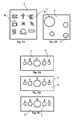
- Fig. 2B This is for example done by playing a number of representative songs at the same time, see for example Fig. 2B .
- the songs (1) are symbolized by rings whose size symbolizes the volume that the songs are played with, and the positions of the rings symbolizes the experienced position in the audial space.
- These songs (1) are positioned/placed in the audial space, accordning to above and in such a way that the user is given the possiblilty to associate those songs with their corresponding spatial position/direction/coordinate.
- playback songs representative parts of the songs can be played, or pieces of sound that in some sense are associated with a particular song, or a particular genre.
- the songs/tracks 32, 64 and 96 are good to start with because the listener reaches the song/track he wants to listen to after approximately six choices, and also because the difference between how the listener experience the songs/tracks (at least with regards to tempo) is large, which at least initially helps him to distinguish between the songs/tracks (menu options) when (if) they are being played simultaneously.
- the precise number of three songs/tracks, and not another number of sounds played simultaneosly in the audial space, is arbitrary. It could as well have been four number of songs/tracks that were played simultainuosly, or for example two; one in eatch earphone, or the two songs/tracks could be played after eatch other in a sequence.
- the listener is then choosing song/track (of the ones that are played simultaineously, and are playced in different locations in the audial space ) for example by choosing up, down, right or left arrow key on the players (5) key set.
- the Up arrow key is for example used to choose the song that is played straight in front of the listeners face
- right and left arrow key is for example used to choose the song/track that is played at the side of the listeners face
- down arrow key is for example used to playback a song/track that is played behind the listeners face/head.
- One other way to choose one song/sound out of many songs/sounds that are being played at the same time is to use at least one sensor (6) that can track/detect movements, and that is contained within, or attached to a headset (4), see Fig. 4 , 9 , 10 or Fig. 13 , 14 . With for example a movement of the head towards the direction from where the song/sound is percieved to come from, that song/sound is being chosen.
- a sensor (6) that can detect movments is attached to or contained within the player (5), a song/sound (1) can be chosen by for example by pointing the player in a certain direction, for example towards the song (1) that is wished to be heard, or by rotating/angling the player (5), or by shaking it or by hittning it in certain ways.
- One way to make it easier to distinguish between the songs/sounds (1) could be to play the song/sound (1) that is being looked at with a stronger volume than the others.
- the expression "looked at” just loosely refer to the sound that is being held under focus, which for example could be the sound that is experienced to be positioned in front of the listerens nose.
- One other possible way to make it easier to distingusish between a set of simultaineously played songs/sounds could be that the invention/system makes smart guesses about what sound/song among many simultaneously played souds/songs that the user probably is going to choose, and highlights it, for example by playing it at a higher volume. In such a way the user is guided in a certain direction through the search-tree.
- a headset 4 that contains movements sensors 6.
- a movement sensor could for example be an accelerometer, or a gyrometer/gyrosensor 6.
- a musicplayer 5 is connected (in the figure a cable is shown but the connection could as well be wireless).
- the songs is stored within the player 5.
- the list 3 is preferable ordered in regard to how the songs 1 is experienced by a user. That means that songs 1 that are experienced in a similar way are positioned in the list close to eatch other, and that songs that are experienced in a different way, and that probably is being listend at in different moods, is positioned far from eatch other in the list 3.
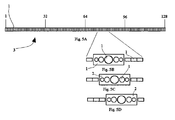
- the list contains 128 songs, as the list in Fig. 1A .
- first song 32, 64 and 96 is being played in his headset, or sounds that represent those songs or the gengre that the songs (32, 64 and 96) represents.
- the songs are played simultaneously.
- Fig. 1B the rectangle depicts the audial space 2 where the options 1 is played.
- the first options 1 that is played is depicted as circles in the topmost rectangle in Fig. 1A .
- the options (sounds that that represents the songs) are here spread in the audial space and can be accociated with a spatial coordinate/direction.
- the user chooses the song that he believes lies closest to the song he wishes ro choose to listen at.
- the user chooses song nr 32, see Fig. 1B .
- This song is the song among the songs 32, 64 and 128 that the user consider to be closest to the song that he searches for.
- This choice takes him to three new songs, nr 16, 32 and 48, see Fig. 1B . From those he chooses nr 16. In this way he search his way closer and closer to the song he wants ro listen at, and in this example he reaches this song after six choises.
- song is nr 21 that is being played to him.
- the first choice that in Fig. 1B happens to be song n 32, is located at the left in the audial space 2.
- the songs (options) 16 and 48 has entered into the audial space 2.
- the song that is being chosen is preferble played at the same loocation in the audial space 2 as it was located at in the earlier situation of choice, see Fig. 1C .
- sounds that represents the songs, or the genre can be played.
- the seach procedure described above, is used ro reach all the way ro the wanted song. An implemetation of the invention could however change the search procedure before reaching all the way to the wanted song, see Fig.
- Fig. 3A-3C is shown how songs/sounds 1 moves through the audial space 2 from the right to the left.
- the songs/sounds 1 constitutes an audiell scrolllist.
- the scrolllist can move thruogh the audial room automatically or it can be pulled by a user, at the left or at the right.
- the pulling of the scrolllist can for example be made by head movements, that is detected by movements sensors 6, or by moving the musicplayer 5 (this assumes it has been incorporated with movements sensors) or the pulling of the scroll list can be made in a graphical user interface incorparated in the musicplayer.
- Fig. 7 shows a graphical display 7 at for example a cellphone 5.
- Fig. 7A to 7C shows scrolling in a list of symbols 8.
- This implementation of the invention concerns a mobile device 5, for example a cellphone with user interface 7, as Fig. 7 suggests.
- the cellphone 5 is connected to headset 4 that contains motion/movemnets sensors 6 (at least one).
- the scrolling is made in the graphical display 7 either in a traditional way by using the set of buttons at the cell phone, or by moving the cell phone (those movements is detected by movements detectors in the cell phone), or by head movements done by the user, see Fig. 7 .
- Scrolling means that the sounds that represents different options moves through the audial space 2.
- the menu system is depicted as a scrolling list) is made possible without using hands or even without using the graphical display.
- a number of sounds 1, corresponding to the symbols 8, see Fig. 7 is played in the audial space 2, see Fig. 8 .
- one of the sounds 1 is marked 9. That a sound is marked means for this implementaion that it is played with a higher volume than the other sounds that is played at the same time.
- uppwards-scrolling is done by tilting the head up, and downwards scrolling is done by tilting the head down.
- dial space means the “imaginary” 3-dimensional space that sound that represents options in a menu is played.
- sounds can be generated at a certain and real spatial position, in oposite to the audial space where all sounds is generated by the loudspeakers but in such a way so they are experienced as if they where generated at a certain spatial position.
- the headset is preferably included in a system together with the device they.
- the mobile device can be a cell phone, a mp3-player, an IPOD or another device that has the property that it can, directly or indirectly, play sounds and that it independently or together with the headset or connected to a network for example internet can contain a menu.
- characteristical movement for example refer to for example that the system understands it as an order ro perform something.
- the order can include a spatial referens to a certain sound/song 1.
- An example of such a head movement can be a nod directed towards a certain sound 1.
- an order doesn't need to include such a spatial referens.
- An example of an order that doesnt contain a spatial referens ro a sound could be when an audial scroll list wants to be scrolled to the right or to the left.
- Example of such a head movements can be to turn the head to the left or turn it to the right.
- a visual scrollist in a display can be moved back and forth with head movemnets as well as with the cellphones button set.
- a gyrometer is preferable used that is used to detect changes in angles.
- an accelerometer is used ro detect translations.
- An accelerometer can also be used ro detect changes in angles. For example by detecting foremostions of the g-vektor.
- a combination of gyroskpoe and acceleratmeter is used.
- a head with a headset 4 is within a moving reference frame, such as a car, bus etc.
- the system/invention can mistakenly interpret a movement/rotation of the reference frame as a characteristical movement.
- a way to avoid this kan be as following:
- the mobile device is supplied with at least one movement sensor whose movements is subtracted from the movements of the headset. This means that movements that comes from pure referece movemnets can be cancelled away.
- the expression menu means a set of options or a structure, see Fig. 1 , 5 , 6 , 7 that allows a user to navigate though it, with the purpose to directly or finally give the system full information of what the user wants the system to do: for example to play a certain song or to reach a certain mode from where a sms can be written.
- a part of the structure, in where choices can be made, are presented in an audial space. One or many choices can be presented simultainously in that space.
- menu referce to a structure in wich choises can be made that either is graphical, see Fig. 7 , or audial, see Fig. 8 .
- scroll list refers to a graphical scroll list, see Fig. 7 or an audial scroll list, see Fig. 8 .
- the audial space 2, 7 where choices is made can be either visual 7 or audial 2.
- the space is visual when the choices is presented as symbols 8 or texts in a graphical display 7.
- a menu is at hand that has the purpose to make it easy ro find a song that the user wants ro keep listen at, and say that the menu is a tree structure, see Fig. 1 , that starts from a list 3 where the songs is being sorted with respect to how they are experienced, or percieved.
- a menu containes a set of options. Also note that except those options a user can perform meta choices.
- a meta option is for example an option that concerns what set of option that is going to be presented.
- meta choices examples include, in this document, the term meta choice.
- the expression sound refer to an arbitrary sound: it could for example be generated by an instrument or by many instruments, or by a voice or generated digitally in a computer. It can be of any length.
- the expression headset 4 refer to one piece of loudspeaker that can be playced close ro an ear, or a pair of loudspeakers that can be played close to two ears.
- the geometrical shape of a headset can be so it covers the ears, see Fig. 4 , or so it can be inserted into an ear, see Fig. 9 .
- headset refer to all different variations of headsets.
- a headset 4 is connected to a device 5, 12, for example a cell phone, a mp3-player or a computer.
- a device 5, 12 for example a cell phone, a mp3-player or a computer.
- one choice (sound) is presented (played) in the right loud speaker, and another choice in the other loud speaker.. They can be played simultaneously or altering after each other.
- pressing the right arrow key at the device 5 the user chooses the option that is represented by the sound that is played in the right headspeaker 4, by pressing left arrow on the device 5 the option that represents by the sound that is played in the left phone 4 is choosed.
- the device 5 can be played in a pocket when the choice is made, and that there is no need to look at a graphical user interface or ro be able to do the choice, and note the convenience of this. To have the sight free is very favorable, for example in the handles.
- two new choices can for example be presented in a mentioned way,. In such a way it is possible ro navigate down a tree sructure untill the user reaches the final end option.
- the choices are for this embodiment of the invention isolated from eatch other by playing the sounds in different phones, which makes it possible for the user to identify the two options.
- the two sounds can be played repeatedly after eatch other: first one of the sound is played in one of the phones in a certain period of times (for example 0.5 sceonds), then the second sound is played in the other phone at a certain period of times (for example 0,6 seconds).
- This binary audial menu system can for example be used to find a certain post in a list. So, a choice is done by pressing buttons on the device, or by moving it, or by moving the head 32 (and the headset) and/or positioned the head at a certain position/orientation and to let at least one movement sensor, orientation sensor, position sensor 6 included in the headset 4 detects the heads movements/orientation/positioned. For example: lets say both options are played in eatch phone 4, and that the right option wishes to be performed by the user, then the user tilts his head 32 at the right and in that way the choice is made. Similar for the other choice.
- the sensor 6 can for example be implemented by an accelerometer that register the head movements, via the headset 4.
- the sensor 6 can for example be a gyrometer that register head rotations. Note that head rotations also can be register by an accelerometer.
- the sensor 6 can be at least one compass 30.
- the sensor can be at least a GPS. Or a combination of those.
- the processor of the device 5 is used ro analyse the siglas from the sensors, and to judge when a characteristical head movements is performed, and how it should be interpret. In this way the system decides when and what choices the user wants to perform.
- the headset itself containes a processor (or simpler electronics) so the analysis can be done in the headset, or by combining the processor in the headset with the processor in the device.
- the headset itself containes electrical components that is specially suitable to perform a part of the analysis, and then let the device finish the analys.
- a movements/rotations/positions-sensor regards neeed to be taken to the movements/rotations/positions of the reference frame, that for example can be a buss, an air plane, a bicycle or a car.
- the reference frame for example can be a buss, an air plane, a bicycle or a car.
- a fast turn of a bus could misstakenly be interpretated by the system, when the user sits in the bus, as an order to the system (a choice is mistakenly made).
- One way to solve this would be to detect the movements/rotations/positions of the head 32 relative to the body.
- a sufficiant method ro detect the users Is body would be ro detect the handhold device 4 (for exaple a cell phone) Very often the device 4 is moving, for example when it is held in a hand or when it is played in a pocket when the user sits for example i a bus.
- the absolute movemnets of the handheld device reflects the bodies absolute movements well in some situations and less well in others: if for example the device is placed in a pocket it is probably pretty well reflected, but if it is placed in a hand it is probably pretty bad reflected since the hand often moves. But, mainly the movements of the device 5 reflects the bodies movemnet fairly well.
- the hand hold device include at least one movements sensor and/or one orientation sensor and/or one position sensor and/or one GPS and/or one compass. With a sensor one of those just mentioned implementation or a combination of these is meant. By subtracting the movements that the sensor/sensors 6 incorporated in the headset 4 detects from the movemnets and/or orientations and/or positioneing that the sensor incorporated in the handheld device, the relative movement between the headset 4 and the body is calculated. So, this difference corresponds to the headsets relative movements to the handheld device, that mainly also is relative to the users body.
- a spatial experience By playing a sound in both ear phones 4 with a phase shift a spatial experience (the sounds is perfcieved as if it had a spatial positioning) of the sound can be percieved by the user.
- a spatial positioning Lets say that many sounds (options) are manipulated so they are percieved as having a spatial position. See Fig.11 where the circles depicts sounds that are played in the headset. With for example key arrows, or by moving or tilting the device 5 the sounds can be controlled by the user so that they moves through the audiel space 2, see Fig 11 A-C that shows such a movement from the left to the right.
- a new sound (option 50) can by directed into the midde of the audial space 21.
- Fig. 11 a sound is moved into the middle of the audial space. This is depicted by an extra circlesurronding the crircle that depicts the sound. That a sound is placed in the middle of the audial space means that it is played straight infront of the listener, that is, there is no phase-shift between right and left earphone, and that no difference in volume exists between the right and left earphone.
- the character of the sound can be modified to further indicate that the sound has been moved into the middle. Such a change of the sound can be made by using reverb.
- this modification of the character can be compared with the highligthing/marking of a graphical object in a display.
- all sounds can have the same volume and that it is not central to the invention to change it when it is moved into the middle.
- the modification of a sound Is character can for example be done when it reaches a certain position.
- the sound (option) that is positioned in the middle of the audial space is highlighted/enhanced. By pressing a button, or for example controling a joystick-like lever, or by moving/turning the handheld device 5 the highlighted sound is chosen.
- head movements can be used to move them around, by using sensors that is described above.
- the translation of the sounds constitutes an example of how the sounds 1, 50 can be moved through the audial space 2.
- An arbitrary movement/transformation of the sounds in the audial space can of course be made.
- zooming can be done of the sounds that the face is directed towards.
- "Out zoomingcan for example mean that a set of sounds in the audial space 2 is percieved by the user as if they moves away from the user untill they finaly moves out of the audial space 2, and is nomore played.
- Fig. 13 shows another example of an audial space 2.
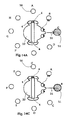
- the sound 50, 51, represents options 50, 51, is spread in a circle 52 (or part of a circle) around the head 32 of the user and the headset 4.
- the sound that is placed infront of the face 51 can for example be highlighted/marked.
- the cricle of sounds can be made rotate This means that the sounds changes its positions in the audial space 2.
- the rotational direction of the sounds is opposite to the rotational direction of the head.
- the sounds 52 rotates anticlockwise relative to the head 32 but is still relative to the earth, and the head rotates clockwise, see Fig. 13A and 13B .
- the user experiences that the sound hangs in the air and that he turns his head among them.
- he turns his head new sounds enters infront of his face 51.
- Fig. 13 A sound C is placed infront of his face, but in Fig. 13B the sound E is instead placed infront of his face.
- the user turns his head untill the wanted option 51 is positioned infront of his face.
- the circle of sounds 52 can turn itself with a higher rotational speed than the user turns his head 32 at. This could for example mean that when the head has turned 45 degrees the circle of sounds has turn 360 degrees.
- the turning of the circle of sounds 52 can also be done by turning the handheld device or by using levers at the device. Note the importance of isolating sounds, or set of sounds from each others, to enable them to be distinctively listen at, and therefore to be possible to choose.
- the sounds can be isolated or separated by playing them separated in time or by spreading them in the audial space 2 or by letting theirs character separate them or by a combination of this.
- the separation is necessary for being able to discriminate.
- the experience by the user that the sounds has spatial positions, or is moving is enhanced.
- certain sounds can, when the head is moving, be placed in the back of other sounds, they are so ro say hidden.
- a hidden sound can for example be represented by not playing it at all or by playing it dull. But when the user moves around in the audial space he will soon be having a different angle to and have reached a position from where he can hear the object again.
- the sounds can also move independently of the users head movements.
- a circle of sounds can turn around the users head. In Fig. 14 the circle of sounds 52 is rotated one step anticlockwise from Fig. 14A to Fig. 14B .
- the sounds could for example be placed at the same position as a real physical object.
- a sound of a motorbike could be placed close ro a real motorbike.
- Choosing option 51, 52 can for example be made by letting the user walking up to one of those options and when he is close enough it becomes highlighted, see above what highligted means.
- the circle of sounds 52 can off course be placed vertical relative the horisontal plane.
- the circle is made to rotate by tilting the users head, that is to move one of the ears closer to ground than the other.
- an accelerometer is preferably used, but not necessarily.
- the accelerometer is preferably positioned to the headset so that two of its axes lies in the same plane that the circle of the sounds 52 and in the same plane that the head is being tilted in.
- the angle that the head is tilted with is then measured by reading the projection the G-vector makes onto one of the accelerometers axes.
- Another example of an audial space 2 is a list of sounds. When the head is moving forward, the list moves backwards through the audial space 2 at the same speed as the head moves forwards.
- the options can be in a list, that is scrolled forward by hitting the headset with a finger. New options is so to say coming into the highlighted area. By knocking a bit harder, for example, or by doing a dubble knock, the highlighted option is choosen.
- the expression movement sensor when used, or only sensor, it refer to a sensor capable of detecting a bodys movements and/or rotation and/or orientation and/or positioning. Examples of such sensor is accelerometers, gyrometers, compasses or GPS Is or a combination of these.
- the connection bewteen the device 5 and the headset can be wire less, such as bluetooth, or can be made of many wires.
- one way to make the sounds separated is to play them in a sequence in time.
- One sound can for example be chosen directly when they are heard or they can be chosen by giving the memoril number of the wanted sound/option.
- At least one camera is connected with the headset 4 and/or the device 5, 12.
- the camera is filming at least one of the users eyes 33.
- the device can then decide at what direction the user looks, via so called eye-tracking.
- the audial eniviroment 2 can consequently be varied depending on where at the display the user looks, and options in the audial enviroments 2 can be highlighted depending on where at the screen the user looks.
- the display 7 shows an icon that looks like a bird, and one icon that looks like a watch. When the user looks at the bird-icon a bird-tweet sound is played, and when he watches at the watch-icon a tick-tack-sound is played.
- the headsets 4 sensors 6 is detecting the head-tilt and a tweet is made.
- the signature melodi of it is played in the headset. In this way the audial enviroment is varied as a result of where the user looks and/or how he moves/positiones his head 32.
- person one or more persons is ment.
- headset one or two loud speakers that can be fastened at a head is meant.
- the headset 4 containes at least one compass 30, and at least one movement sensor 6.
- the headset 4 is connected to a handheld device 5.
- the device and/or the headset containes at least one GPS- unit.
- the invention can decide ro what direcion 31 the user has his head poited, because the headset turns when the head turns.
- the device kan decide at what direction the user points his eyes. This is because the sysrtem has the compass information. Lets say that the user has his face directed towrads a certain direction, face-direction 31, See Fig.
- the user looks to the east, that in the figure coincide with the face-dircetion.
- the face-direction (east) is known becasuse the compass needle 30 gives to what direction north is.
- the user also stands at a certain GPS-koordinate, his gps-position. Lets say that the hand held device 5 has access to one or a number of known gps-positions, that corresponds ro certain known objects such as restaurants, churches 60 or hotells. Those known GPS-positions can have been downloaded to his handheld device 5, or he can have continous access to them via the internet.
- the device can use the face-direction 31 and his GPS-poistion to calulate if he looks at one of the known gps-positions. If he looks at some of the known GPS-positions, lets say known-gps-1, the device for example calculates the distance between his gps-position and the known-gps-1. If those two gps-positions are close enoff to eatch other the device goes on calculating.
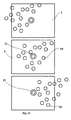
- the user stands at a place and looks towards his face-direction. He is looking at for example a hotell 61, see Fig. 12A .
- the church is one of the known objects and to it there is sound information connected.
- a voice is first played in the users headset: you are now looking at wheela-church, built 1783,,,,, In this case it is information that the city offers.
- an audial menu is played to the user and he can choose between what typ of information he wants ro take part of.
- the options can for example be 1. to listen at a typical piece of music that are used to be played in that specific church or. 2. take part of information concerning the opening times of the church.
- GPS-unit can be located in the hand held device and/or in the headset.
- the software that calculates what object that the person looks at can be placed in the device 5 and/or be included in the headset.
- the expression compass means a device that can decide at what direction north is.
- the movements-sensor can be built with a compass and/or a gyrometer and/or an accelerometer and/or an accelerometer.
- One more implementation of the invention camera+GPS.
- the absolute look-direction can be decided.
- the look-direction is in northeast direction 34, see Fig. 12B , and in a direction at for example a church 60. This means that the invention can be used to detect at where a user is looking.
Landscapes
- Engineering & Computer Science (AREA)
- General Engineering & Computer Science (AREA)
- Theoretical Computer Science (AREA)
- Physics & Mathematics (AREA)
- Human Computer Interaction (AREA)
- General Physics & Mathematics (AREA)
- Acoustics & Sound (AREA)
- Signal Processing (AREA)
- Electrophonic Musical Instruments (AREA)
- Reverberation, Karaoke And Other Acoustics (AREA)
Applications Claiming Priority (1)
| Application Number | Priority Date | Filing Date | Title |
|---|---|---|---|
| SE0901051 | 2009-07-31 |
Publications (2)
| Publication Number | Publication Date |
|---|---|
| EP2293598A2 true EP2293598A2 (de) | 2011-03-09 |
| EP2293598A3 EP2293598A3 (de) | 2013-07-31 |
Family
ID=43302628
Family Applications (1)
| Application Number | Title | Priority Date | Filing Date |
|---|---|---|---|
| EP10445005.1A Withdrawn EP2293598A3 (de) | 2009-07-31 | 2010-07-30 | Menüsystem |
Country Status (1)
| Country | Link |
|---|---|
| EP (1) | EP2293598A3 (de) |
Cited By (7)
| Publication number | Priority date | Publication date | Assignee | Title |
|---|---|---|---|---|
| EP2579127A1 (de) * | 2011-10-04 | 2013-04-10 | Research In Motion Limited | Ausrichtungsbestimmung für eine mobile Vorrichtung |
| CN103226436A (zh) * | 2013-03-06 | 2013-07-31 | 广东欧珀移动通信有限公司 | 一种智能终端的人机交互方法及系统 |
| CN103513770A (zh) * | 2013-10-09 | 2014-01-15 | 中国科学院深圳先进技术研究院 | 基于三轴陀螺仪的人机接口设备及人机交互方法 |
| CN104935721A (zh) * | 2014-03-20 | 2015-09-23 | 宇龙计算机通信科技(深圳)有限公司 | 一种与智能终端互动的方法及装置 |
| JP2016035631A (ja) * | 2014-08-01 | 2016-03-17 | 株式会社Nttドコモ | メニュー選択装置及びメニュー選択方法 |
| US20180059778A1 (en) * | 2016-09-01 | 2018-03-01 | Motorola Mobility Llc | Employing headset motion data to determine audio selection preferences |
| EP3370442A1 (de) * | 2017-03-02 | 2018-09-05 | Starkey Laboratories, Inc. | Hörgerät mit interaktiver akustischer benutzeranzeige |
Family Cites Families (4)
| Publication number | Priority date | Publication date | Assignee | Title |
|---|---|---|---|---|
| JP3285835B2 (ja) * | 1998-12-25 | 2002-05-27 | 三菱電機株式会社 | メニュー選択装置 |
| JP2007310599A (ja) * | 2006-05-17 | 2007-11-29 | Nikon Corp | 映像表示装置 |
| FR2904712A1 (fr) * | 2006-08-04 | 2008-02-08 | France Telecom | Procede de navigation dans une arborescence, dispositif et systeme associes. |
| JP2008226400A (ja) * | 2007-03-15 | 2008-09-25 | Sony Computer Entertainment Inc | オーディオ再生装置およびオーディオ再生方法 |
-
2010
- 2010-07-30 EP EP10445005.1A patent/EP2293598A3/de not_active Withdrawn
Non-Patent Citations (1)
| Title |
|---|
| None |
Cited By (14)
| Publication number | Priority date | Publication date | Assignee | Title |
|---|---|---|---|---|
| EP2579127A1 (de) * | 2011-10-04 | 2013-04-10 | Research In Motion Limited | Ausrichtungsbestimmung für eine mobile Vorrichtung |
| CN103226436A (zh) * | 2013-03-06 | 2013-07-31 | 广东欧珀移动通信有限公司 | 一种智能终端的人机交互方法及系统 |
| WO2014135023A1 (zh) * | 2013-03-06 | 2014-09-12 | 广东欧珀移动通信有限公司 | 一种智能终端的人机交互方法及系统 |
| CN103513770A (zh) * | 2013-10-09 | 2014-01-15 | 中国科学院深圳先进技术研究院 | 基于三轴陀螺仪的人机接口设备及人机交互方法 |
| CN104935721B (zh) * | 2014-03-20 | 2018-02-13 | 宇龙计算机通信科技(深圳)有限公司 | 一种与智能终端互动的方法及装置 |
| CN104935721A (zh) * | 2014-03-20 | 2015-09-23 | 宇龙计算机通信科技(深圳)有限公司 | 一种与智能终端互动的方法及装置 |
| JP2016035631A (ja) * | 2014-08-01 | 2016-03-17 | 株式会社Nttドコモ | メニュー選択装置及びメニュー選択方法 |
| US20180059778A1 (en) * | 2016-09-01 | 2018-03-01 | Motorola Mobility Llc | Employing headset motion data to determine audio selection preferences |
| US10698477B2 (en) * | 2016-09-01 | 2020-06-30 | Motorola Mobility Llc | Employing headset motion data to determine audio selection preferences |
| EP3370442A1 (de) * | 2017-03-02 | 2018-09-05 | Starkey Laboratories, Inc. | Hörgerät mit interaktiver akustischer benutzeranzeige |
| CN108540899A (zh) * | 2017-03-02 | 2018-09-14 | 斯达克实验室公司 | 包含用户交互式听觉显示器的听觉设备 |
| US10620905B2 (en) | 2017-03-02 | 2020-04-14 | Starkey Laboratories, Inc. | Hearing device incorporating user interactive auditory display |
| CN108540899B (zh) * | 2017-03-02 | 2020-09-22 | 斯达克实验室公司 | 包含用户交互式听觉显示器的听觉设备 |
| US10942700B2 (en) | 2017-03-02 | 2021-03-09 | Starkey Laboratories, Inc. | Hearing device incorporating user interactive auditory display |
Also Published As
| Publication number | Publication date |
|---|---|
| EP2293598A3 (de) | 2013-07-31 |
Similar Documents
| Publication | Publication Date | Title |
|---|---|---|
| EP2293598A2 (de) | Menüsystem | |
| US9632683B2 (en) | Methods, apparatuses and computer program products for manipulating characteristics of audio objects by using directional gestures | |
| US8359547B2 (en) | Movable user interface indicator of at least one parameter that is adjustable with different operations for increasing and decreasing the parameter and/or methods of providing the same | |
| JP6065369B2 (ja) | 情報処理装置、情報処理方法、及びプログラム | |
| US20090166098A1 (en) | Non-visual control of multi-touch device | |
| US20090282335A1 (en) | Electronic device with 3d positional audio function and method | |
| JP2008226400A (ja) | オーディオ再生装置およびオーディオ再生方法 | |
| JP4561766B2 (ja) | 音データ検索支援装置、音データ再生装置、プログラム | |
| US10031581B1 (en) | Virtual artifacts using mobile devices | |
| US11036464B2 (en) | Spatialized augmented reality (AR) audio menu | |
| EP2811389A1 (de) | Aktivierung einer Auswahl und Bestätigungsverfahren | |
| Heller et al. | Navigatone: Seamlessly embedding navigation cues in mobile music listening | |
| KR101386852B1 (ko) | 공간적 청각 큐들을 이용한 데이터 검색 | |
| EP2417519A1 (de) | Räumliche benutzeroberfläche für ein audiosystem | |
| JP5949234B2 (ja) | サーバ、クライアント端末、およびプログラム | |
| JP4837512B2 (ja) | 音源選択装置 | |
| US20020054175A1 (en) | Selection of an alternative | |
| JP6651231B2 (ja) | 携帯情報端末、情報処理装置、及びプログラム | |
| JP6294183B2 (ja) | メニュー選択装置及びメニュー選択方法 | |
| EP3451149A1 (de) | Informationsverarbeitungsvorrichtung, informationsverarbeitungsverfahren und programm | |
| JPH0793367A (ja) | 音声情報検索システム及び装置 | |
| EP3089014A1 (de) | Informationsverarbeitungssystem, informationsverarbeitungsverfahren und programm | |
| JP7782452B2 (ja) | 情報処理システム及びコンテンツ再生装置 | |
| US10817153B2 (en) | Augmented audio development | |
| Kajastila et al. | Eyes-free methods for accessing large auditory menus |
Legal Events
| Date | Code | Title | Description |
|---|---|---|---|
| PUAI | Public reference made under article 153(3) epc to a published international application that has entered the european phase |
Free format text: ORIGINAL CODE: 0009012 |
|
| AK | Designated contracting states |
Kind code of ref document: A2 Designated state(s): AL AT BE BG CH CY CZ DE DK EE ES FI FR GB GR HR HU IE IS IT LI LT LU LV MC MK MT NL NO PL PT RO SE SI SK SM TR |
|
| AX | Request for extension of the european patent |
Extension state: BA ME RS |
|
| PUAL | Search report despatched |
Free format text: ORIGINAL CODE: 0009013 |
|
| AK | Designated contracting states |
Kind code of ref document: A3 Designated state(s): AL AT BE BG CH CY CZ DE DK EE ES FI FR GB GR HR HU IE IS IT LI LT LU LV MC MK MT NL NO PL PT RO SE SI SK SM TR |
|
| AX | Request for extension of the european patent |
Extension state: BA ME RS |
|
| RIC1 | Information provided on ipc code assigned before grant |
Ipc: H04S 7/00 20060101ALI20130627BHEP Ipc: G06F 3/01 20060101ALI20130627BHEP Ipc: H04R 5/033 20060101AFI20130627BHEP |
|
| STAA | Information on the status of an ep patent application or granted ep patent |
Free format text: STATUS: THE APPLICATION IS DEEMED TO BE WITHDRAWN |
|
| 18D | Application deemed to be withdrawn |
Effective date: 20140201 |