EP2287809B1 - Bildverarbeitungsvorrichtung, bildverarbeitungsverfahren und computerprogramm - Google Patents
Bildverarbeitungsvorrichtung, bildverarbeitungsverfahren und computerprogramm Download PDFInfo
- Publication number
- EP2287809B1 EP2287809B1 EP10761522.1A EP10761522A EP2287809B1 EP 2287809 B1 EP2287809 B1 EP 2287809B1 EP 10761522 A EP10761522 A EP 10761522A EP 2287809 B1 EP2287809 B1 EP 2287809B1
- Authority
- EP
- European Patent Office
- Prior art keywords
- feature point
- display
- data
- additional information
- moving image
- Prior art date
- Legal status (The legal status is an assumption and is not a legal conclusion. Google has not performed a legal analysis and makes no representation as to the accuracy of the status listed.)
- Active
Links
Images








Classifications
-
- G—PHYSICS
- G06—COMPUTING OR CALCULATING; COUNTING
- G06T—IMAGE DATA PROCESSING OR GENERATION, IN GENERAL
- G06T13/00—Animation
- G06T13/80—Two-dimensional [2D] animation, e.g. using sprites
-
- G—PHYSICS
- G06—COMPUTING OR CALCULATING; COUNTING
- G06T—IMAGE DATA PROCESSING OR GENERATION, IN GENERAL
- G06T11/00—Two-dimensional [2D] image generation
- G06T11/60—Creating or editing images; Combining images with text
Definitions
- the present invention relates to an image processing device, an image processing method, and a computer program, and more particularly, an image processing device, an image processing method, and computer program that display additional information displayed to accompany a feature point in an image.
- a user adds comments or sound effects to the image to create an original image.
- a balloon may be provided in the vicinity of a face of a person in the image to write comments or a stamp may be added to highlight a motion of a person.
- a user when another image is added to moving image content, a user has instructed to change a display position of the additional image according to a temporal change while confirming content of moving image content in order to change the additional image according to the motion of the moving image. Also, the user has created a changed image in synchronization with the temporal change of the image moving image content in order to change the additional image according to the motion of the moving image.
- Patent publication number US6339431 discloses a system where a user can input an hand-written annotation to a dynamic image, and the system transforms the annotation over time according to changes in the image.
- Patent publication number US2008/0317455 discloses an apparatus for capturing an image, detecting a smiling face and adding an icon to the image when a smile is detected.
- Non-Patent Literature 1 Decorate and Upload images (eDeco), [see April 7, 2009], Internet ⁇ URL: http://support.d-imaging.sony.co.jp/www/disoft/jp/pmb/feature/web/edeco.html>
- the present invention is made in view of the above-mentioned issue, and aims to provide an image processing device, an image processing method and a computer program which are novel and improved, and which are capable of adding simply additional information to a moving object in a moving image.
- data is automatically generated by the data generating unit based on the motion information indicating the behavior of the feature point and a display scenario indicating a change pattern to change the additional information added to the feature point according to the behavior of the feature point. Accordingly, it is possible to simply add the additional information to a moving object in a moving image.
- the image processing device of the present invention includes an input unit to which the feature point selection information is input.
- the image processing device may include a display scenario storage unit for storing one or at least two display scenarios indicated by the behavior pattern of the feature point and a display method for additional information added to a feature point matching the behavior pattern.
- Display scenario selection information for selecting the display scenario to change the additional information added to the selected feature point is further input to the input unit.
- the data generating unit generates data to display the additional information using a display method defined in the display scenario when the data generating unit has detected a behavior of the feature point matching the behavior pattern of the feature point of the selected display scenario from the motion information, for the feature point selected by the feature point selection information.
- the image processing device of the present invention may include an additional information storage unit for storing one or at least two pieces of additional information.
- selection information for selecting the additional information accompanied with the feature point is input to the input unit.
- the image processing device may include a hand-drawn data input unit to which additional information added to moving image data is input by hand-drawing.
- the data generating unit may generate data to change a display position of the additional information associated with the feature point based on a position of the feature point in the image of moving image data recognized from the motion information. Also, the data generating unit may generate data to change a size of the additional information associated with the feature point based on a size of the feature point relative to a display size of moving image data recognized from the motion information.
- the data generating unit may generate data to display the additional information associated with the feature point according to a change of a facial expression of the feature point recognized from the motion information. Also, the data generating unit may generate data to change display of the additional information associated with the feature point according to a movement speed of the feature point recognized from the motion information. When selection information to select at least two feature points is input from the input unit, the data generating unit may generate data to generate a display size of the additional information associated with the feature point according to a distance between the feature points.
- a computer program for causing a computer to function as the image processing device is provided.
- the computer program is stored in a storage device included in the computer, and read and executed by a CPU included in the computer, such that the computer function as the image processing device.
- a computer-readable recording medium having a computer program recorded thereon is also provided.
- the recording medium is, for example, a magnetic disk, an optical disk, or the like.
- Fig. 1 is functional block diagram showing a configuration of the image processing device 100 according to the present embodiment.
- Fig. 2 is an illustrative diagram showing a configuration example of a metadata storage unit 152 according to the present embodiment.
- the image processing device 100 is for example, a reproduction device capable of reproducing moving image content imaged by an imaging device such as a digital video camera or a digital still camera, a recording and reproduction device capable of recording and reproducing moving image content, or the like. Also, the image processing device 100 according to the present embodiment may be embodied as an application executed by a personal computer. Such an image processing device 100 includes an input display unit 110, an additional data creation unit 120, a feature point tracking unit 130, a decoding unit 140, and a storage unit 150, as shown in Fig. 1 .
- the input display unit 110 is a functional unit by which input of information from a user is performed or that outputs information to the user, and includes an input detection unit 112 and a display unit 114.
- the input display unit 110 of the present embodiment may be a touch panel including a sensor, such as a touch pad, as the input detection unit 112 on the surface of the display unit 114 configured of, for example, a liquid crystal display element or an organic EL element.
- the input detection unit 112 may detect a contact of, for example, a stylus or a finger with the surface of the input display unit 110.
- a locus of a touch manipulation to contact the surface of the input display unit 110 may be acquired from the detection result of the input detection unit 112 and input as hand-drawn data or, for example, icons displayed on the display unit 114 may be selected.
- the display unit 114 displays moving image content, hand-drawn data, and the like and presents them to the user.
- the additional data creation unit 120 creates additional data, such as hand-drawn data, or additional data metadata, and performs a control to display the moving image content, the additional data and the like.
- the moving image content is real moving image data imaged by an imaging device
- the additional data is data added to decorate the moving image of the moving image content.
- the additional data metadata is information of additional data the display of which is changed over time of the moving image content.
- the additional data creation unit 120 acquires a locus of a touch manipulation contacting the surface of the input display unit 110 from the detection result input by the input detection unit 112 and generates hand-drawn data as additional data.
- the additional data creation unit 120 displays the generated hand-drawn data on the display unit 114 and records the hand-drawn data in the storage unit 150, which will be described below.
- the additional data creation unit 120 specifies one or at least two feature points to which additional data is to be added, from among feature points in the moving image detected by the feature point tracking unit 130, which will be described below, based on the content of the moving image displayed on the display unit 114 and the detection result of the input detection unit 112.
- the additional data creation unit 120 associates the specified feature point with the additional data to be accompanied with the feature point and displayed, based on the input information from the input detection unit 112, and records the association in the storage unit 150.
- the additional data creation unit 120 uses contact position information in the input display unit 110, motion information of the feature point and the additional data to create additional data metadata according to the display scenario.
- the display scenario is information indicating a change pattern to change display of the additional data added to the feature point according to the behavior of the feature point.
- the additional data creation unit 120 generates motion information indicating the behavior of the feature point from the position information of the feature point at each time detected by the feature point tracking unit 130.
- the additional data creation unit 120 creates additional data metadata and records the additional data metadata in the storage unit 150.
- the additional data creation unit 120 performs a display process for creating the additional data metadata. Further, the display process in the additional data creation unit 120 will be described in detail below.
- the feature point tracking unit 130 is a functional unit that extracts a feature point in the moving image and tracks the extracted feature point.
- the feature point tracking unit 130 extracts, for example, a portion with a feature, such as a face of a person, as the feature point, from a given image constituting the moving image content.
- the extraction of the feature point may be performed using a related method.
- the feature point tracking unit 130 may recognize and track a position of the moving feature point through the reproduction of the moving image content.
- the feature point tracking unit 130 may output information of the extracted feature point to the display unit 114 and display a mark, such as a frame, at the feature point displayed on the display unit 114.
- the feature point tracking unit 130 outputs information of the feature point to the additional data creation unit 120, for creation of the additional data metadata.
- the decoding unit 140 decodes moving image content or still image content.
- the decoding unit 140 reads moving image content or still image content stored in the storage unit 150, decodes the content, and outputs the resultant content to the display unit 114. Accordingly, the moving image content or the still image content may be displayed on the display unit 114.
- the storage unit 150 is a storage unit that stores various pieces of information.
- the storage unit 150 includes a metadata storage unit 152, a real data storage unit 154, a drawing data storage unit 156, and a display scenario storage unit 158.
- the metadata storage unit 152 is a storage unit that stores the additional data, such as hand-drawn data, or the additional data metadata.
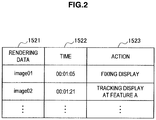
- the metadata storage unit 152 stores, for example, drawing data 1521 as a display processing object, a time 1522 when the display process is performed, and an action 1523 indicating processing content of the drawing data, which are associated with each other, as shown in Fig. 2 .
- the drawing data 1521 is, for example, additional data such as hand-drawn data input from the input display unit 110 or a previously set stamp.
- the time 1522 indicates a time in the moving image content to which the additional data metadata corresponds.
- the processing content such as: drawing data “image01” being “fixedly displayed” at a time “00:01:05” and drawing data “image02 being “displayed while tracking a feature point A" at a time “00:01:21,” is stored in the metadata storage unit 152.
- the real data storage unit 154 stores moving image content or still image content imaged by an imaging device.
- the drawing data storage unit 156 stores additional data, such as the hand-drawn data input from the input display unit 110 or the previously set stamp. Also, information on a drawing tool necessary for creating the hand-drawn data may also be stored in the drawing data storage unit 156.
- the additional data stored in the drawing data storage unit 156 may be stored, for example, in association with unique names such as "image01" and "image02" shown in Fig. 2 .
- the display scenario storage unit 158 stores display scenarios. The display scenario may be previously set or added by a user.
- the configuration of the image processing device 100 according to the present embodiment has been described.
- the image processing device 100 can change the display of the additional data added to the feature point based on the motion information indicating the behavior of the feature point of the moving image content and the display scenario, and automatically generate the additional data metadata.
- an image processing method in the image processing device 100 will be described in detail.
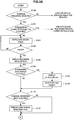
- Figs. 3A and 3B are a flowchart showing the process of adding hand-drawn data to moving image content according to the present embodiment.
- the process of adding hand-drawn data to moving image content may be initiated by decoding the moving image content stored in the real data storage unit 154 of the storage unit 150 using the decoding unit 140 and displaying the resultant moving image content on the display unit 114.
- the display process to add additional data to moving image content includes a process of adding hand-drawn data, which is described herein, a display process based on display scenario, which will be described below, a display process performing by inputting the hand-drawn data while reproducing the moving image content, and the like. First, the user selects a display process to be executed.
- the user selects whether to perform manual drawing using hand-drawing (step S100).
- a display scenario selection process which will be described below, is executed.
- the user selects whether to perform drawing during reproduction of the moving image content (step S102).
- the hand-drawing process during reproduction which will be described below is executed.
- reproduction of the moving image content is initiated (step S104).
- step S106 When the moving image content is reproduced, the user views the moving image content displayed on the display unit 114 and pauses reproduction of the moving image content at a time desired to add additional data.
- the moving image content continues to be reproduced until the reproduction of the moving image content pauses (step S106).
- step S108 a drawing menu screen is displayed on the display unit 114 (step S108).
- the drawing menu screen 200a may have, for example a screen configuration as shown in Fig. 5 .
- the drawing menu screen 200a includes a content display area 210 in which the moving image content is displayed, and a manipulation icon display area 220 in which a manipulation icon such as a play icon 222a, a rewind icon 222b, and a fast forward icon 222c is displayed.
- a hand-drawing icon 230 to initiate a hand-drawn data input process, a fix icon 240 for displaying previously set additional data, and a list display icon 250 for displaying a list of additional data metadata previously registered are displayed at an edge of the content display area 210.
- the user releases display of the drawing data that is the previously registered additional data at a pause time. That is, the user may set to delete the display of the drawing data that begins to be displayed at a time earlier than a current time and continues to be displayed even at the current time.
- the user selects whether to perform the display of the drawing data (step S110) and selects a manipulation to release the display of the drawing data
- the user selects the list display icon 250 by touching the list display icon 250 in the drawing menu screen 200a, for example, using the stylus (step S112).
- the list of previously registered drawing data is displayed on the display unit 114 at the pause time. In this list, for example, drawing data and an action among the additional data metadata shown in Fig. 2 are displayed.
- the user touches the drawing data for which the display is to be released, for example, using the stylus touch, and selects a release object (step S114).
- a release object selected in step S114 is determined, the drawing data is deleted at that time, and the additional data creation unit 120 primarily holds such information as information recorded in the metadata storage unit 152 of the storage unit 150.
- the drawing menu screen 200a shown in Fig. 6 is displayed on the display surface of the display unit 114 again.
- step S116 When the user selects not to perform the drawing data display release in step S110 or when a release object is determined by step S114, the user then selects whether to perform data input by hand-drawing (step S116).
- drawing by a hand-drawing tool may be performed (step S118).
- the data input by hand-drawing may be performed, for example, by selecting the hand-drawing icon 230 shown in Fig. 6 .
- the screen transitions from the drawing menu screen 200a, for example, to a hand-drawing drawing screen 200b shown in Fig. 7 .
- the moving image content at a time when the reproduction pauses in step S106 is displayed on the hand-drawing drawing screen 200b and a tool icon 232 for inputting hand-drawn data is displayed at an edge thereof.
- the tool icon 232 includes, for example, a color selection icon 232a, a line type icon 232b, and a delete icon 232c.
- the user selects a drawing line or color from the tool icon 232, for example, using the stylus 16 and performs drawing by tracing the surface of the input display unit 110.
- the additional data creation unit 120 displays the locus from the detection result of the input detection unit 112 as the hand-drawn data 300 on the display unit 114.
- the user selects, for example, the OK icon 234 of Fig. 7 to determine to display the input hand-drawn data 300 in the moving image content at a time displayed on the display unit 114.
- the additional data creation unit 120 primarily holds such information as information recorded in the metadata storage unit 152 of the storage unit 150.
- step S120 When the user has not selected the hand-drawing input in step S116 or when the hand-drawn data input is terminated in step S118, the user selects whether to input the previously set additional data (hereinafter referred to as "pattern data") as shown in Fig. 3B (step S120).
- pattern data the previously set additional data
- the user may perform drawings by the pattern data (step S122).
- the data input by the pattern data may be performed, for example, by selecting the fix icon 240 shown in Fig. 6 .
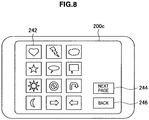
- the fix icon 240 By touching the fix icon 240, for example, using the stylus, the screen transitions from the drawing menu screen 200a, for example, to a pattern drawing screen 200c shown in Fig. 8 .
- a plurality of pattern figures 242 are displayed in the pattern drawing screen 200c, as shown in Fig. 8 .
- a "next page” icon 244 is displayed as shown in Fig. 8
- a list of next pattern figures 242 may be displayed on the display unit 114 by selecting the icon 244.
- a "previous page” icon is displayed on the next screen.
- one pattern figure 242 is selected as the additional data added to the moving image content, the moving image content at a time when the reproduction pauses in step S106 is displayed.
- the selected pattern figure 242 is displayed in the moving image content at that time.
- the color, size and the like of the pattern figure 242 may be properly changed.
- the additional data creation unit 120 primarily holds such information as information recorded in the metadata storage unit 152 of the storage unit 150. Thereafter, the screen returns to the drawing menu screen 200a shown in Fig. 6 . Further, the display of the pattern figure 242 onto the moving image content may be canceled by selecting the "back" icon 246 on the pattern drawing screen 200c of Fig. 8 .
- step S124 When the input of the drawing data displayed in the moving image content is completed through the process in steps S116 to S122, the user selects a motion of the drawing data (step S124).
- the user first selects drawing data to set the motion from the drawing data displayed on the display unit 114.
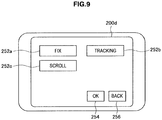
- a motion setting screen 200d as shown in Fig. 9 is displayed.
- Motion icons indicating the type of the motion of the drawing data are displayed on the motion setting screen 200d.
- the motion icons include, for example, a "fix” icon 252a, a "tracking” icon 252b, a "scroll” icon 252c, and the like.
- the user selects the motion of the drawing data from the motion icons of the motion setting screen 200d and selects the OK icon 254 to determine the motion. Further, the user may cancel motion setting for the drawing data by selecting a "back" icon 256 in the motion setting screen 200d.
- a determination as to whether a fix display is selected as the motion of the drawing data is made by the additional data creation unit 120 (step S126). Such a determination may be performed, for example, based on whether the "fix" icon 252a is selected on the motion setting screen 200d shown in Fig. 9 .
- a feature point selection screen 200e on which all feature points in the moving image content as an object associated with the drawing data are displayed is displayed on the display unit 114 (step S128).
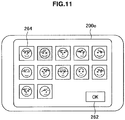
- the feature point selection screen 200e may be structured to show feature points extracted by the feature point tracking unit 130 by displaying frames 260a and 260b at the feature points, for the display of the moving image content at a time when the reproduction pauses, as shown in Fig. 10 .
- all feature points 264 in the moving image content at a time when the reproduction pauses may be displayed as a list.
- the user selects one or at least two feature points associated with the drawing data from the feature points displayed on the feature point selection screen 200e and selects the OK icon 262 to determine an association with the drawing data (step S130). Accordingly, the motion of the drawing data at that time or later is determined.
- step S132 the user selects whether to set a display end time for the drawing data (step S132).
- the end time can be set, and the user sets the end time (step S134).
- step S136 display content of the drawing data at that time is determined (step S136).
- the determination of the display content is performed, for example, by selecting the play icon 222a of the drawing menu screen 200.
- the determined display content is recorded as metadata in the metadata storage unit 152 of the storage unit 150 by the additional data creation unit 120 (step S138).
- the additional data metadata created by the additional data creation unit 120 is superimposed and displayed on the moving image content, such that the moving image can be decorated so that the additional information is changed according to the behavior of the feature point of moving image content.
- a setting is performed so that the additional data 300 follows the feature point 264 according to the motion of the feature point 264 shown in Fig. 12 .
- the feature point 264 and the additional data 300 are displayed in positions indicated by dotted lines at a certain time. Thereafter, when the feature point 264 is moved to a position indicated by a solid line, the additional data 300 also moves to a position indicated by another solid line according to the movement of the feature point 264.
- the user can add the additional data changed according to the behavior of the feature point to the moving image content only by creating the additional data to be added to the moving image content and determining a feature point at which the additional data is to be added and an additional data display method.
- Fig. 4 is a flowchart showing the additional data display process by the display scenario according to the present embodiment.
- the additional data display process by the display scenario shown in Fig. 4 is executed when the user selects not to perform manual drawing in step S100 of Fig. 3A . That is, it is a case in which drawing is automatically performed based on the motion information of the feature point of the moving image content according to the display scenario.
- a display scenario selection screen 200f as shown in Fig. 13 is displayed on the display unit 114 (step S210).
- the display scenario selection screen 200f includes, for example, a classification area 271a in which a display scenario icon 270 for selecting a previously set display scenario is displayed, and a detail area 271b for performing a detailed setting of display content, as shown in Fig. 13 .
- the display scenario includes, for example a change pattern to display given additional data when a facial expression of a feature point in moving image content is a smiling face or to change and display the additional data according to a feature of the behavior of the feature point.
- the user selects the display scenario icon 270 including a "smiling face" icon 272, a "motion” icon 274, an "others” icon 276, and the like associated with a change pattern displayed in the classification area 271a. Accordingly, the additional data can be displayed on the moving image content (step S220).
- Information for performing the detailed setting of the selected display scenario icon 270 is displayed in the detail area 271b.
- the additional data creation unit 120 displays one or at least two additional data display examples in the details area 271b by referring to the display scenario storage unit 158 of the storage unit 150.
- two display examples 272a and 272b are displayed.
- the user may determine the additional data by selecting additional data desired to be added to the feature point from among the display examples 272a and 272b and selecting the OK icon 277.
- the user selects one or at least two feature points to which the additional data is to be added from among the feature points present in the moving image content (step S230).
- the selection of the feature points may be performed, as in the above-described process in steps S128 and S130.
- a drawing process based on the set display scenario is executed (step S240).
- the set display scenario is stored as additional data metadata in the metadata storage unit 152 (step S250).
- the drawing process based on the display scenario continues to be performed, for example, until the user releases the process. Therefore, where the same display scenario is applied to all moving image contents, only if the user sets the display scenario only once, the additional data is automatically added to the feature point based on the set display scenario when the same scene appears. For example, when a display scenario to display given additional data when a smiling face is detected from a feature point is set, the additional data is automatically displayed each time the smiling face of the feature point is detected. Accordingly, the user need not set the same process several times, making it possible to easily add additional data to moving images.
- the display scenario indicates content of a change pattern to change additional data added to the feature point according to the behavior of the feature point, as described above.
- FIG. 14 an example of the display scenario to display additional data when a smiling face of the feature point is detected is shown.
- the additional data creation unit 120 when a facial expression of the feature point 202 is not a smiling face as shown in Fig. 14(a) , the additional data creation unit 120 does not display the additional data, whereas when facial expression of the feature point 202 is a smiling face, the additional data creation unit 120 displays additional data 410 as shown in Fig. 14(b) .
- the smiling face of the feature point may be detected using an existing method and, for example, by the feature point tracking unit 130.
- FIG. 15 an example of the display scenario to display a display position of the additional data according to the position of the feature point is shown.
- the feature point often moves in the moving image content and the position of the feature point in the image is changed from moment to moment.
- Such a display scenario allows the additional data to be displayed in the image by following the feature point even when the position of the feature point is changed.
- the feature point 202 located at a right in the image 200 as shown in Fig. 15(a) is assumed to be moved to the left in the image 200 as shown in Fig. 15(b) .
- Additional data 420 in a balloon is added to the feature point 202.
- the additional data 420 displayed at the left of the feature point 202 located at the right end in the image 200 in the state of Fig. 15(a) is displayed at the right of the feature point 202 when the feature point 202 moves in the state of Fig. 15(b) and is located at the left in the image 200.
- the display position of the additional data 420 is automatically changed so that additional data 420 does not protrude from the image 200.
- FIG. 16 an example of the display scenario in which the size of the additional data is changed according to the size of the feature point is shown.
- the size of the additional data 430 added to the feature point 202 becomes small.
- the size of the feature point 202 relative to the size of the image 200 is greater as shown in Fig. 16(b)
- Magnification of the additional data 430 may be changed, for example, according to the size of the feature point 202 relative to the size of the image 200. In this case, when the additional data 430 becomes large by the display scenario, the additional data 430 is processed not to protrude from the image 200.
- Fig. 17 an example of the display scenario in which additional data is changed according to the movement speed of the feature point is shown.
- the movement speed of the feature point may be calculated from a change amount of a position of the feature point in the image at a given time. For example, when the movement speed of the feature point 202 is substantially equal to 0 as shown in Fig. 17(a) , substantially circular additional data 440 added to the feature point 202 is displayed to surround the feature point 202 once. On the other hand, when the movement speed of the feature point 202 increases, the additional data 440 surrounds the feature point 202 twice and three times, as shown in Fig. 17(b) . Thus, it is possible to represent a feature of the behavior of the feature point 202 by changing the display of the additional data 440 according to a speed change of the feature point 202.
- Fig. 18 an example of a display scenario to show a locus of the movement of the feature point is shown.
- a feature point 202 is assumed to move from an upper right of the image 200 to a lower left.
- the locus of the movement of the feature point is displayed as additional data 450, as shown in Fig. 18(b) . Accordingly, it is possible to increase visual effects of moving image content.
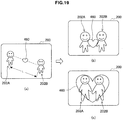
- FIG. 19 an example of a display scenario to change display of the additional data according to a distance between the feature points is shown.
- two feature points 202A and 202B are assumed to be associated with one additional data 460, as shown in Fig. 19(a) .
- a size or a display position of the additional data 460 is changed according to the distance between the feature points L.
- the additional data creation unit 120 displays the small additional data 460 substantially at the middle between the feature points.
- the additional data creation unit 120 displays, for example, the additional data 460 larger than that shown in Fig.
- the additional data creation unit 120 may display the additional data 460 to surround the approaching feature points 202A and 202B, as shown in Fig. 19(c) .
- FIG. 20 an example of a display scenario to cause additional data with motion to follow a feature point is shown.
- a display scenario includes, for example, a change pattern to cause text as additional data to follow the feature point while sequentially displaying the text over time.
- one line of text is displayed at a certain time in a balloon as additional data 480a that follows the feature point 202.
- additional data 480b moves with movement of the feature point 202 and two lines of text are displayed within the additional data 480b, as shown in Fig. 20(b) .
- additional data 480b moves with movement of the feature point 202 and two lines of text are displayed within the additional data 480b, as shown in Fig. 20(b) .
- the additional data creation unit 120 automatically creates additional data metadata based on the display scenario according to the behavior of the feature point in the moving image content. Also, since the additional data metadata is created according to the display scenario, content of the additional data metadata can be easily changed only by changing the display scenario. That is, it is possible to create a display pattern to display a plurality of additional data from one additional data.
- One additional data metadata is created for one moving image content.
- a change pattern of the additional data according to one or at least two display scenarios is stored in the additional data metadata.
- the change pattern of the additional data may be set by the methods shown in Figs. 3A , 3B and 4 , and Fig. 5 , which will be described below.
- FIG. 5 is a flowchart showing a hand-drawing process during reproduction according to the present embodiment.
- additional data is drawn during reproduction of the moving image content, one can draw while confirming a motion of a feature point of the moving image content, and it is easy to create, for example, additional data with motion as shown in Fig. 20 .
- the hand-drawing process during reproduction shown in Fig. 5 is executed when the user selects to perform the hand-drawing process during reproduction in step S102 of Fig. 3A .
- a screen to select a drawing tool for creating additional data by hand-drawing is displayed on the display unit 114.
- the user sets a line type, color and the like to draw (step S310). Further, line type, color or the like of the additional data may be set again after the additional data is drawn.
- step S320 the user draws additional data while reproducing the moving image content.
- Drawing of the additional data may be performed, as in step S118 of Fig. 3A .
- the user finishes drawing of the additional data for example, the user pauses the reproduction of the moving image content and settles such additional data. Accordingly, the additional data with motion is created.
- the created additional data is associated with a time of moving image content on which such additional data is to be displayed, and the association data is recorded as additional data metadata in the metadata storage unit 152.
- the association of the additional data with the feature point may not be particularly performed, but when there is a similar behavior of a feature point in the moving image content, the additional data may be associated with and added to the feature point.
- additional data created using various methods is associated with the feature point, and additional data metadata causing the additional data to be changed according to the behavior of the feature point is automatically generated. Accordingly, it is possible to simply add the additional information to a moving object in a moving image.
- tracing of the surface of the display unit 114 by a manipulation body such as the stylus 116 or a finger may execute a given process associated with such a manipulation.
- a given process may be associated with a given operation to perform a screen manipulation, as the page moves to a next page when a right side of the screen is touched by the manipulation body, and the page moves to a previous page when a left side of the screen is touched.
- Image processing in the image processing device 100 according to the present embodiment may be executed by hardware or may be executed by software.
- a computer as shown in Fig. 21 is included in the image processing device 100.
- Fig. 21 illustrates a hardware configuration showing the image processing device 100 according to the present embodiment.
- the image processing device 100 of the present embodiment includes a central processing unit (CPU) 101, a read only memory (ROM) 102, a random access memory (RAM) 103, and a host bus 104a. Also, the image processing device 100 includes a bridge 104, an external bus 104b, an interface 105, an input device 106, an output device 107, a storage device (HDD) 108, a drive 109, a connection port 111, and a communication device 113.
- CPU central processing unit
- ROM read only memory
- RAM random access memory
- the image processing device 100 includes a bridge 104, an external bus 104b, an interface 105, an input device 106, an output device 107, a storage device (HDD) 108, a drive 109, a connection port 111, and a communication device 113.
- HDMI storage device
- the CPU 101 functions as an operation processing device and a control device, and controls general operation of the image processing device 100 according to various programs. Also, the CPU 101 may be a microprocessor.
- the ROM 102 stores programs, operation parameters, and the like used by the CPU 101.
- the RAM 103 temporarily stores a program used in the execution of the CPU 101, parameters properly changed in the execution, and the like. They are connected to each other by a host bust 104a, which includes a CPU bus.
- the host bust 104a is connected to an external bus 104b such as a peripheral component interconnect/interface (PCI) bus via the bridge 104. Further, the host bus 104a, the bridge 104 and the external bus 104b need not be configured separately, and one bus may have such functions.
- PCI peripheral component interconnect/interface
- the input device 106 includes an input means for enabling the user to input information, such as a mouse, a keyboard, a touch screen, buttons, a microphone, a switch, and a lever, an input control circuit for generating an input signal based on an input by the user and outputting the input signal to the CPU 101, and the like.
- the user of the image processing device 100 may input various data to the image processing device 100 or instruct a processing operation by manipulating the input device 106.
- the input device 106 includes a touch screen, as shown in Fig. 1 .
- the output device 107 includes, for example, a display device such as a cathode ray tube (CRT) display device, a liquid crystal display (LCD) device, an organic light emitting diode (OLED) device, and a lamp. Further, the output device 107 includes a sound output device, such as a speaker and a headphone. In the present embodiment, the display unit 114 of the input display unit 110 is provided as the output device 107, as shown in Fig. 1 .
- a display device such as a cathode ray tube (CRT) display device, a liquid crystal display (LCD) device, an organic light emitting diode (OLED) device, and a lamp.
- the output device 107 includes a sound output device, such as a speaker and a headphone.
- the display unit 114 of the input display unit 110 is provided as the output device 107, as shown in Fig. 1 .
- the storage device 108 is a data storage device as one example of the storage unit of the image processing device 100.
- the storage device 108 may include a recording medium, a recording device for recording data in the recording medium, a reading device for reading the data from the recording medium, a deleting device for deleting the data recorded in the recording medium, and the like.
- the storage device 108 includes, for example, a hard disk drive (HDD). This storage device 108 stores programs executed by the CPU 101 by driving the hard disk, or various data.
- HDD hard disk drive
- the drive 109 is a reader/writer for a recording medium, which is embedded in the image processing device 100 or provided as an external device.
- the drive 109 reads information recorded in a removable recording medium that is mounted, such as a magnetic disk, an optical disk, a magneto optical disk, or a semiconductor memory, and outputs the information to the RAM 103.
- connection port 111 is an interface connected with an external device, which is a connection port with an external device capable of transmitting data, for example, via a universal serial bus (USB).
- the communication device 113 is, for example, a communication interface configured of, for example, a communication device for connecting to a communication network 15.
- the communication device 112 may be a wireless local area network (LAN)-compliant communication device, a wireless USB-compliant communication device, or a wired communication device for performing wired communication.
- LAN local area network
- the moving image content and the additional data metadata are held as separate data, the present invention is not limited to such an example.
- the additional data metadata may be encoded together with the moving image content and stored in a storage unit.
Landscapes
- Physics & Mathematics (AREA)
- General Physics & Mathematics (AREA)
- Engineering & Computer Science (AREA)
- Theoretical Computer Science (AREA)
- Processing Or Creating Images (AREA)
- Television Signal Processing For Recording (AREA)
- User Interface Of Digital Computer (AREA)
- Information Retrieval, Db Structures And Fs Structures Therefor (AREA)
- Image Analysis (AREA)
Claims (9)
- Bildverarbeitungsvorrichtung (100), umfassend:eine Merkmalspunkt-Detektionseinheit (130) zum Detektieren eines Merkmalspunkts (202, 202A, 202B, 264), der ein Abschnitt eines Bewegungsbilds mit einem Merkmal wie ein Gesicht einer Person ist, aus Bewegungsbilddaten;eine Assoziationsverarbeitungseinheit zum Assoziieren des Merkmalspunkts (202, 202A, 202B, 264) mit zusätzlichen Informationen, wobei der Merkmalspunkt (202, 202A, 202B, 264) basierend auf Merkmalspunkt-Auswahlinformationen zum Auswählen von einem oder mindestens zwei Merkmalspunkten (202, 202A, 202B, 264), die die zusätzlichen Informationen anzeigen, die angezeigt werden, den Merkmalspunkt (202, 202A, 202B, 264) zu begleiten, ausgewählt wird;eine Bewegungsanalyseeinheit zum Analysieren eines Veränderungsverhaltens des Merkmalspunkts (202, 202A, 202B, 264) durch Reproduktion von Bewegungsbilddaten; undeine Datenerzeugungseinheit zum Erzeugen von Daten, die Veränderungsinhalt zum Verändern der Anzeige der mit dem Merkmalspunkt (202, 202A, 202B, 264) assoziierten zusätzlichen Informationen angeben, basierend auf Bewegungsinformationen, die das durch die Bewegungsanalyseeinheit analysierte Verhalten des Merkmalspunkts (202, 202A, 202B, 264) angeben, und eines Anzeigeszenariums, das ein Veränderungsmuster angibt, um die dem Merkmalspunkt (202, 202A, 202B, 264) hinzugefügten zusätzlichen Informationen gemäß dem Verhalten des Merkmalspunkts (202, 202A, 202B, 264) zu verändern, ferner umfassend eine Eingabeeinheit (152), in die die Merkmalspunkt-Auswahlinformationen eingegeben werden,dadurch gekennzeichnet, dass sie ferner eine Anzeigeszenarium-Speichereinheit (158) zum Speichern von einem oder mindestens zwei Anzeigeszenarien, angegeben durch das Verhaltensmuster des Merkmalspunkts (202, 202A, 202B, 264), und ein Anzeigeverfahren für dem Merkmalspunkt (202, 202A, 202B, 264) hinzugefügte zusätzliche Informationen, die dem Verhaltensmuster entsprechen, umfasst,wobei Anzeigeszenarium-Auswahlinformationen zum Auswählen des Anzeigeszenariums, um die dem ausgewählten Merkmalspunkt (202, 202A, 202B, 264) hinzugefügten zusätzlichen Informationen zu verändern, ferner in die Eingabeeinheit (152) eingegeben werden undwobei die Datenerzeugungseinheit Daten zum Anzeigen der zusätzlichen Informationen unter Verwendung eines in dem Anzeigeszenarium definierten Anzeigeverfahrens aus den Bewegungsinformationen für den durch die Merkmalspunkt-Auswahlinformationen ausgewählten Merkmalspunkt (202, 202A, 202B, 264) erzeugt, wenn die Datenerzeugungseinheit ein Verhalten des Merkmalspunkts (202, 202A, 202B, 264), das dem Verhaltensmuster des Merkmalspunkts (202, 202A, 202B, 264) des ausgewählten Anzeigeszenariums entspricht, detektiert hat.
- Bildverarbeitungsvorrichtung (100) nach Anspruch 1, umfassend eine Zusatzinformationen-Speichereinheit (152) zum Speichern von einem oder mindestens zwei Teilen zusätzlicher Informationen,
wobei Auswahlinformationen zum Auswählen der zusätzlichen Informationen, die den Merkmalspunkt (202, 202A, 202B, 264) begleiten, in die Eingabeeinheit (152) eingegeben werden. - Bildverarbeitungsvorrichtung (100) nach Anspruch 1, umfassend eine Handskizzen-Dateneingabeeinheit, in die Bewegungsbilddaten hinzugefügte zusätzliche Informationen durch Skizzieren mit der Hand eingegeben werden.
- Bildverarbeitungsvorrichtung (100) nach Anspruch 1, wobei die Datenerzeugungseinheit Daten zum Verändern einer Anzeigeposition der mit dem Merkmalspunkt (202, 202A, 202B, 264) assoziierten zusätzlichen Informationen basierend auf einer Position des Merkmalspunkts (202, 202A, 202B, 264) in dem Bild von Bewegungsbilddaten, erkannt aus den Bewegungsinformationen, erzeugt.
- Bildverarbeitungsvorrichtung (100) nach Anspruch 1, wobei die Datenerzeugungseinheit Daten zum Verändern einer Größe der mit dem Merkmalspunkt (202, 202A, 202B, 264) assoziierten zusätzlichen Informationen basierend auf einer Größe des Merkmalspunkts (202, 202A, 202B, 264) relativ zu einer Anzeigegröße von Bewegungsbilddaten, erkannt aus den Bewegungsinformationen, erzeugt.
- Bildverarbeitungsvorrichtung (100) nach Anspruch 1, wobei die Datenerzeugungseinheit Daten zum Anzeigen der mit dem Merkmalspunkt (202, 202A, 202B, 264) assoziierten zusätzlichen Informationen gemäß einer Veränderung eines Gesichtsausdrucks des Merkmalspunkts (202, 202A, 202B, 264), erkannt aus den Bewegungsinformationen, erzeugt.
- Bildverarbeitungsvorrichtung (100) nach Anspruch 1, wobei die Datenerzeugungseinheit Daten zum Verändern der Anzeige der mit dem Merkmalspunkt (202, 202A, 202B, 264) assoziierten zusätzlichen Informationen gemäß einer Bewegungsgeschwindigkeit des Merkmalspunkts (202, 202A, 202B, 264), erkannt aus den Bewegungsinformationen, erzeugt.
- Bildverarbeitungsverfahren, die folgenden Schritte umfassend:Detektieren eines Merkmalspunkts (202, 202A, 202B, 264), der ein Abschnitt eines Bewegungsbilds mit einem Merkmal wie ein Gesicht einer Person ist, aus Bewegungsbilddaten;Assoziieren des Merkmalspunkts (202, 202A, 202B, 264) mit zusätzlichen Informationen, wobei der Merkmalspunkt (202, 202A, 202B, 264) basierend auf Merkmalspunkt-Auswahlinformationen zum Auswählen von einem oder mindestens zwei Merkmalspunkten (202, 202A, 202B, 264), die die zusätzlichen Informationen anzeigen, die angezeigt werden, den Merkmalspunkt (202, 202A, 202B, 264) zu begleiten, ausgewählt wird;Analysieren eines Veränderungsverhaltens des Merkmalspunkts (202, 202A, 202B, 264) durch Reproduktion von Bewegungsbilddaten; undErzeugen von Daten, die Veränderungsinhalt zum Verändern der Anzeige der mit dem Merkmalspunkt (202, 202A, 202B, 264) assoziierten zusätzlichen Informationen angeben, basierend auf Bewegungsinformationen, die das analysierte Verhalten des Merkmalspunkts (202, 202A, 202B, 264) angeben, und eines Anzeigeszenariums, das ein Veränderungsmuster angibt, um die dem Merkmalspunkt (202, 202A, 202B, 264) hinzugefügten zusätzlichen Informationen gemäß dem Verhalten des Merkmalspunkts (202, 202A, 202B, 264) zu verändern, wobei die Merkmalspunkt-Auswahlinformationen in eine Eingabeeinheit (152) eingegeben werden,gekennzeichnet durch Speichern von einem oder mindestens zwei Anzeigeszenarien, angegeben durch das Verhaltensmuster des Merkmalspunkts (202, 202A, 202B, 264), und ein Anzeigeverfahren für einem Merkmalspunkt (202, 202A, 202B, 264) hinzugefügte zusätzliche Informationen, die dem Verhaltensmuster entsprechen,Eingeben von Anzeigeszenarium-Auswahlinformationen zum Auswählen des Anzeigeszenariums, um die dem ausgewählten Merkmalspunkt (202, 202A, 202B, 264) hinzugefügten zusätzlichen Informationen zu verändern, in die Eingabeeinheit (152) undErzeugen von Daten zum Anzeigen der zusätzlichen Informationen unter Verwendung eines in dem Anzeigeszenarium definierten Anzeigeverfahrens, wenn ein Verhalten des Merkmalspunkts (202, 202A, 202B, 264), das dem Verhaltensmuster des Merkmalspunkts (202, 202A, 202B, 264) des ausgewählten Anzeigeszenariums entspricht, aus den Bewegungsinformationen für den ausgewählten Merkmalspunkt (202, 202A, 202B, 264) detektiert wird.
- Computerprogramm zum Bewirken, dass ein Computer als eine Bildverarbeitungsvorrichtung (100) zu funktioniert, umfassend:ein Merkmalspunkt-Detektionsmittel (130) zum Detektieren eines Merkmalspunkts (202, 202A, 202B, 264), der ein Abschnitt eines Bewegungsbilds mit einem Merkmal wie ein Gesicht einer Person ist, aus Bewegungsbilddaten;ein Assoziationsverarbeitungsmittel zum Assoziieren des Merkmalspunkts (202, 202A, 202B, 264) mit zusätzlichen Informationen, wobei der Merkmalspunkt (202, 202A, 202B, 264) basierend auf Merkmalspunkt-Auswahlinformationen zum Auswählen von einem oder mindestens zwei Merkmalspunkten (202, 202A, 202B, 264), die die zusätzlichen Informationen anzeigen, die angezeigt werden, den Merkmalspunkt (202, 202A, 202B, 264) zu begleiten, ausgewählt wird;ein Bewegungsanalysemittel zum Analysieren eines Veränderungsverhaltens des Merkmalspunkts (202, 202A, 202B, 264) durch Reproduktion von Bewegungsbilddaten; undein Datenerzeugungsmittel zum Erzeugen von Daten, die Veränderungsinhalt zum Verändern der Anzeige der mit dem Merkmalspunkt (202, 202A, 202B, 264) assoziierten zusätzlichen Informationen angeben, basierend auf Bewegungsinformationen, die das Verhalten des Merkmalspunkts (202, 202A, 202B, 264), analysiert durch das Bewegungsanalysemittel, angeben, und eines Anzeigeszenariums, das ein Veränderungsmuster zum Verändern der dem Merkmalspunkt (202, 202A, 202B, 264) hinzugefügten zusätzlichen Informationen gemäß dem Verhalten des Merkmalspunkts (202, 202A, 202B, 264) angibt, ferner umfassend ein Eingabemittel (152), in das die Merkmalspunkt-Auswahlinformationen eingegeben werden,gekennzeichnet ferner durch Umfassen eines Anzeigeszenarium-Speichermittels (158) zum Speichern von einem oder mindestens zwei Anzeigeszenarien, angegeben durch das Verhaltensmuster des Merkmalspunkts (202, 202A, 202B, 264), und eines Anzeigeverfahrens für einem Merkmalspunkt (202, 202A, 202B, 264) hinzugefügte zusätzliche Informationen, die dem Verhaltensmuster entsprechen,wobei die Anzeigeszenarium-Auswahlinformationen zum Auswählen des Anzeigeszenariums, um die dem ausgewählten Merkmalspunkt (202, 202A, 202B, 264) hinzugefügten zusätzlichen Informationen zu verändern, ferner in die Eingabeeinheit (152) eingegeben werden undwobei das Datenerzeugungsmittel Daten zum Anzeigen der zusätzlichen Informationen unter Verwendung eines in dem Anzeigeszenarium definierten Anzeigeverfahrens erzeugt, wenn das Datenerzeugungsmittel ein Verhalten des Merkmalspunkts (202, 202A, 202B, 264), das dem Verhaltensmuster des Merkmalspunkts (202, 202A, 202B, 264) des ausgewählten Anzeigeszenariums entspricht, aus den Bewegungsinformationen für den durch die Merkmalspunkt-Auswahlinformationen ausgewählten Merkmalspunkt (202, 202A, 202B, 264) detektiert hat.
Applications Claiming Priority (2)
| Application Number | Priority Date | Filing Date | Title |
|---|---|---|---|
| JP2009094370A JP5343676B2 (ja) | 2009-04-08 | 2009-04-08 | 画像処理装置、画像処理方法およびコンピュータプログラム |
| PCT/JP2010/053293 WO2010116820A1 (ja) | 2009-04-08 | 2010-03-02 | 画像処理装置、画像処理方法およびコンピュータプログラム |
Publications (3)
| Publication Number | Publication Date |
|---|---|
| EP2287809A1 EP2287809A1 (de) | 2011-02-23 |
| EP2287809A4 EP2287809A4 (de) | 2013-10-30 |
| EP2287809B1 true EP2287809B1 (de) | 2018-12-26 |
Family
ID=42936108
Family Applications (1)
| Application Number | Title | Priority Date | Filing Date |
|---|---|---|---|
| EP10761522.1A Active EP2287809B1 (de) | 2009-04-08 | 2010-03-02 | Bildverarbeitungsvorrichtung, bildverarbeitungsverfahren und computerprogramm |
Country Status (9)
| Country | Link |
|---|---|
| US (1) | US10140746B2 (de) |
| EP (1) | EP2287809B1 (de) |
| JP (1) | JP5343676B2 (de) |
| KR (1) | KR20120006434A (de) |
| CN (1) | CN102057400A (de) |
| BR (1) | BRPI1002811A2 (de) |
| RU (1) | RU2010150143A (de) |
| TW (1) | TW201119368A (de) |
| WO (1) | WO2010116820A1 (de) |
Families Citing this family (25)
| Publication number | Priority date | Publication date | Assignee | Title |
|---|---|---|---|---|
| US8615112B2 (en) * | 2007-03-30 | 2013-12-24 | Casio Computer Co., Ltd. | Image pickup apparatus equipped with face-recognition function |
| KR101951761B1 (ko) * | 2012-01-27 | 2019-02-25 | 라인 가부시키가이샤 | 모바일 환경에서 제공되는 서비스에서 아바타를 제공하는 아바타 서비스 시스템 및 방법 |
| WO2013183811A1 (en) * | 2012-06-08 | 2013-12-12 | Lg Electronics Inc. | Portable device and method for controlling the same |
| JP5659307B2 (ja) * | 2012-07-17 | 2015-01-28 | パナソニックIpマネジメント株式会社 | コメント情報生成装置およびコメント情報生成方法 |
| JP5571269B2 (ja) | 2012-07-20 | 2014-08-13 | パナソニック株式会社 | コメント付き動画像生成装置およびコメント付き動画像生成方法 |
| KR20140031660A (ko) * | 2012-09-05 | 2014-03-13 | 삼성전자주식회사 | 휴대 단말기에서 이미지를 편집하는 장치 및 방법 |
| CN102868919B (zh) * | 2012-09-19 | 2016-03-30 | 上海基美文化传媒股份有限公司 | 交互式播放设备及播放方法 |
| JP5831764B2 (ja) * | 2012-10-26 | 2015-12-09 | カシオ計算機株式会社 | 画像表示装置及びプログラム |
| US10809865B2 (en) * | 2013-01-15 | 2020-10-20 | Microsoft Technology Licensing, Llc | Engaging presentation through freeform sketching |
| JP6318470B2 (ja) * | 2013-05-15 | 2018-05-09 | ソニー株式会社 | 表示制御装置、表示制御方法および記録媒体 |
| JP6179889B2 (ja) * | 2013-05-16 | 2017-08-16 | パナソニックIpマネジメント株式会社 | コメント情報生成装置およびコメント表示装置 |
| US9665259B2 (en) | 2013-07-12 | 2017-05-30 | Microsoft Technology Licensing, Llc | Interactive digital displays |
| JP6201501B2 (ja) * | 2013-08-07 | 2017-09-27 | 辰巳電子工業株式会社 | 動画編集装置、動画編集方法およびプログラム |
| CN104683682A (zh) * | 2013-11-29 | 2015-06-03 | 英业达科技有限公司 | 拍摄装置及其拍摄方法 |
| JP6334927B2 (ja) * | 2014-01-23 | 2018-05-30 | 三菱電機株式会社 | 付加情報表示装置および付加情報表示プログラム |
| WO2016111174A1 (ja) * | 2015-01-06 | 2016-07-14 | ソニー株式会社 | エフェクト生成装置およびエフェクト生成方法、並びにプログラム |
| JP6301990B2 (ja) * | 2015-04-24 | 2018-03-28 | 京セラ株式会社 | 電子機器、画像表示システム及び制御プログラム並びに電子機器の動作方法 |
| US9921796B2 (en) | 2015-04-24 | 2018-03-20 | Kyocera Corporation | Sharing of input information superimposed on images |
| RU2622843C2 (ru) * | 2015-09-24 | 2017-06-20 | Виталий Витальевич Аверьянов | Способ управления устройством обработки изображения |
| JP6197849B2 (ja) * | 2015-10-23 | 2017-09-20 | カシオ計算機株式会社 | 画像表示装置及びプログラム |
| JP6538574B2 (ja) * | 2016-01-14 | 2019-07-03 | 株式会社東芝 | 認識装置、認識システム、認識方法及びプログラム |
| WO2017162506A1 (en) * | 2016-03-22 | 2017-09-28 | Koninklijke Philips N.V. | Using visual context to timely trigger measuring physiological parameters |
| JP6930541B2 (ja) * | 2016-08-19 | 2021-09-01 | ソニーグループ株式会社 | 画像処理装置および画像処理方法 |
| KR102769027B1 (ko) * | 2016-09-09 | 2025-02-18 | 삼성전자주식회사 | 전자 장치 및 그 제어 방법 |
| JP6198983B1 (ja) * | 2017-04-26 | 2017-09-20 | 株式会社 ディー・エヌ・エー | 動画を配信するためのシステム、方法、及びプログラム |
Family Cites Families (22)
| Publication number | Priority date | Publication date | Assignee | Title |
|---|---|---|---|---|
| US6317128B1 (en) * | 1996-04-18 | 2001-11-13 | Silicon Graphics, Inc. | Graphical user interface with anti-interference outlines for enhanced variably-transparent applications |
| JP3773670B2 (ja) * | 1998-09-30 | 2006-05-10 | 株式会社東芝 | 情報呈示方法および情報呈示装置および記録媒体 |
| EP1018840A3 (de) * | 1998-12-08 | 2005-12-21 | Canon Kabushiki Kaisha | Digitales Empfangsgerät und Verfahren |
| AUPQ464099A0 (en) * | 1999-12-14 | 2000-01-13 | Canon Kabushiki Kaisha | Emotive editing system |
| US7783154B2 (en) * | 1999-12-16 | 2010-08-24 | Eastman Kodak Company | Video-editing workflow methods and apparatus thereof |
| JP4291963B2 (ja) * | 2000-04-13 | 2009-07-08 | 富士フイルム株式会社 | 画像処理方法 |
| JP2002262246A (ja) * | 2001-03-05 | 2002-09-13 | Mitsubishi Electric Corp | 出力情報制御装置及び出力情報制御方法 |
| JP2003244425A (ja) * | 2001-12-04 | 2003-08-29 | Fuji Photo Film Co Ltd | 伝送画像の修飾パターンの登録方法および装置ならびに再生方法および装置 |
| JP4065507B2 (ja) * | 2002-07-31 | 2008-03-26 | キヤノン株式会社 | 情報提示装置および情報処理方法 |
| JP4072674B2 (ja) * | 2002-09-06 | 2008-04-09 | ソニー株式会社 | 画像処理装置および方法、記録媒体、並びにプログラム |
| JP3809411B2 (ja) * | 2002-09-27 | 2006-08-16 | キヤノン株式会社 | 画像処理方法及び装置並びに印刷装置 |
| JP2006166208A (ja) * | 2004-12-09 | 2006-06-22 | Fuji Photo Film Co Ltd | コマ分類情報付与装置及びプログラム |
| JP2006227838A (ja) * | 2005-02-16 | 2006-08-31 | Nec Corp | 画像処理装置及び画像処理プログラム |
| JP4577085B2 (ja) * | 2005-05-17 | 2010-11-10 | ソニー株式会社 | 映像処理装置、映像処理方法 |
| WO2007030609A2 (en) * | 2005-09-08 | 2007-03-15 | Charles King | Vacuum assisted heat/perspiration removal system and limb volume management for prosthetic device |
| TWI384413B (zh) * | 2006-04-24 | 2013-02-01 | Sony Corp | An image processing apparatus, an image processing method, an image processing program, and a program storage medium |
| CN100471255C (zh) * | 2006-10-25 | 2009-03-18 | 浙江大学 | 用于制作和播放具有热点区域的交互式视频的方法 |
| JP4356778B2 (ja) * | 2007-06-25 | 2009-11-04 | ソニー株式会社 | 画像撮影装置及び画像撮影方法、並びにコンピュータ・プログラム |
| JP2009077362A (ja) * | 2007-08-24 | 2009-04-09 | Sony Corp | 画像処理装置、動画再生装置、これらにおける処理方法およびプログラム |
| JP2009053914A (ja) * | 2007-08-27 | 2009-03-12 | Seiko Epson Corp | 画像処理装置および画像処理方法 |
| JP4752897B2 (ja) * | 2008-10-31 | 2011-08-17 | ソニー株式会社 | 画像処理装置、画像表示方法および画像表示プログラム |
| JP4811452B2 (ja) * | 2008-11-19 | 2011-11-09 | ソニー株式会社 | 画像処理装置、画像表示方法および画像表示プログラム |
-
2009
- 2009-04-08 JP JP2009094370A patent/JP5343676B2/ja active Active
-
2010
- 2010-03-02 US US12/995,610 patent/US10140746B2/en active Active
- 2010-03-02 EP EP10761522.1A patent/EP2287809B1/de active Active
- 2010-03-02 RU RU2010150143/08A patent/RU2010150143A/ru not_active Application Discontinuation
- 2010-03-02 WO PCT/JP2010/053293 patent/WO2010116820A1/ja not_active Ceased
- 2010-03-02 CN CN2010800017661A patent/CN102057400A/zh active Pending
- 2010-03-02 BR BRPI1002811A patent/BRPI1002811A2/pt not_active IP Right Cessation
- 2010-03-02 KR KR1020107027507A patent/KR20120006434A/ko not_active Withdrawn
- 2010-03-25 TW TW099108913A patent/TW201119368A/zh unknown
Non-Patent Citations (1)
| Title |
|---|
| None * |
Also Published As
| Publication number | Publication date |
|---|---|
| EP2287809A4 (de) | 2013-10-30 |
| CN102057400A (zh) | 2011-05-11 |
| BRPI1002811A2 (pt) | 2016-02-23 |
| RU2010150143A (ru) | 2012-06-20 |
| WO2010116820A1 (ja) | 2010-10-14 |
| JP5343676B2 (ja) | 2013-11-13 |
| KR20120006434A (ko) | 2012-01-18 |
| EP2287809A1 (de) | 2011-02-23 |
| US10140746B2 (en) | 2018-11-27 |
| US20110181774A1 (en) | 2011-07-28 |
| JP2010244437A (ja) | 2010-10-28 |
| TW201119368A (en) | 2011-06-01 |
Similar Documents
| Publication | Publication Date | Title |
|---|---|---|
| EP2287809A1 (de) | Bildverarbeitungsvorrichtung, bildverarbeitungsverfahren und computerprogramm | |
| US8610678B2 (en) | Information processing apparatus and method for moving a displayed object between multiple displays | |
| US7849421B2 (en) | Virtual mouse driving apparatus and method using two-handed gestures | |
| JP6370893B2 (ja) | 検出されたジェスチャーに基づいてデバイス動作を実行するためのシステムおよび方法 | |
| US20180225035A1 (en) | Display control device, display control method, and program | |
| CN104049861B (zh) | 电子装置及操作所述电子装置的方法 | |
| CN104756484B (zh) | 信息处理设备、重放状态控制方法及计算机可读记录介质 | |
| US9179090B2 (en) | Moving image recording device, control method therefor, and non-transitory computer readable storage medium | |
| JP2015508211A (ja) | カメラモジュールを通じてユーザの頭部を追跡することによりスクリーンを制御する方法及び装置、並びにそのコンピュータ可読記録媒体 | |
| JP2010067135A (ja) | 情報処理装置、情報処理方法およびコンピュータプログラム | |
| WO2011142317A1 (ja) | ジェスチャー認識装置、方法、プログラム、および該プログラムを格納したコンピュータ可読媒体 | |
| CN111475059A (zh) | 基于近距离传感器和图像传感器的手势检测 | |
| CN106796810B (zh) | 在用户界面上从视频选择帧 | |
| JPWO2013121807A1 (ja) | 情報処理装置、情報処理方法およびコンピュータプログラム | |
| KR20150134674A (ko) | 사용자 단말 및 이의 제어 방법, 그리고 멀티미디어 시스템 | |
| CN104508599A (zh) | 要素选择装置、要素选择方法、及程序 | |
| KR102007445B1 (ko) | 레이저 다이오드 모드 | |
| CN111936999A (zh) | 为图像库创作图像集合 | |
| JP2014082605A (ja) | 情報処理装置、その制御方法及びプログラム | |
| JP2015141526A (ja) | 情報処理装置、情報処理方法、及びプログラム | |
| JP6484859B2 (ja) | 情報処理装置、情報処理方法、及びプログラム | |
| JP2014160416A (ja) | 閲覧システム及びプログラム | |
| CN117193514A (zh) | 人机交互的方法及电子设备 | |
| JP6399131B2 (ja) | 情報処理装置 | |
| US10976912B2 (en) | Information processing device, information processing method, and recording medium |
Legal Events
| Date | Code | Title | Description |
|---|---|---|---|
| PUAI | Public reference made under article 153(3) epc to a published international application that has entered the european phase |
Free format text: ORIGINAL CODE: 0009012 |
|
| 17P | Request for examination filed |
Effective date: 20101130 |
|
| AK | Designated contracting states |
Kind code of ref document: A1 Designated state(s): AT BE BG CH CY CZ DE DK EE ES FI FR GB GR HR HU IE IS IT LI LT LU LV MC MK MT NL NO PL PT RO SE SI SK SM TR |
|
| AX | Request for extension of the european patent |
Extension state: AL BA ME RS |
|
| DAX | Request for extension of the european patent (deleted) | ||
| A4 | Supplementary search report drawn up and despatched |
Effective date: 20131001 |
|
| RIC1 | Information provided on ipc code assigned before grant |
Ipc: G06T 13/00 20110101AFI20130925BHEP |
|
| 17Q | First examination report despatched |
Effective date: 20160708 |
|
| REG | Reference to a national code |
Ref country code: DE Ref legal event code: R079 Ref document number: 602010056072 Country of ref document: DE Free format text: PREVIOUS MAIN CLASS: G06T0013000000 Ipc: G06T0013800000 |
|
| GRAP | Despatch of communication of intention to grant a patent |
Free format text: ORIGINAL CODE: EPIDOSNIGR1 |
|
| STAA | Information on the status of an ep patent application or granted ep patent |
Free format text: STATUS: GRANT OF PATENT IS INTENDED |
|
| RIC1 | Information provided on ipc code assigned before grant |
Ipc: G06T 11/60 20060101ALI20180606BHEP Ipc: G06T 13/80 20110101AFI20180606BHEP |
|
| INTG | Intention to grant announced |
Effective date: 20180704 |
|
| GRAJ | Information related to disapproval of communication of intention to grant by the applicant or resumption of examination proceedings by the epo deleted |
Free format text: ORIGINAL CODE: EPIDOSDIGR1 |
|
| STAA | Information on the status of an ep patent application or granted ep patent |
Free format text: STATUS: EXAMINATION IS IN PROGRESS |
|
| GRAR | Information related to intention to grant a patent recorded |
Free format text: ORIGINAL CODE: EPIDOSNIGR71 |
|
| GRAS | Grant fee paid |
Free format text: ORIGINAL CODE: EPIDOSNIGR3 |
|
| STAA | Information on the status of an ep patent application or granted ep patent |
Free format text: STATUS: GRANT OF PATENT IS INTENDED |
|
| GRAA | (expected) grant |
Free format text: ORIGINAL CODE: 0009210 |
|
| STAA | Information on the status of an ep patent application or granted ep patent |
Free format text: STATUS: THE PATENT HAS BEEN GRANTED |
|
| INTC | Intention to grant announced (deleted) | ||
| AK | Designated contracting states |
Kind code of ref document: B1 Designated state(s): AT BE BG CH CY CZ DE DK EE ES FI FR GB GR HR HU IE IS IT LI LT LU LV MC MK MT NL NO PL PT RO SE SI SK SM TR |
|
| INTG | Intention to grant announced |
Effective date: 20181116 |
|
| REG | Reference to a national code |
Ref country code: GB Ref legal event code: FG4D |
|
| REG | Reference to a national code |
Ref country code: CH Ref legal event code: EP |
|
| REG | Reference to a national code |
Ref country code: DE Ref legal event code: R096 Ref document number: 602010056072 Country of ref document: DE |
|
| REG | Reference to a national code |
Ref country code: AT Ref legal event code: REF Ref document number: 1082477 Country of ref document: AT Kind code of ref document: T Effective date: 20190115 |
|
| REG | Reference to a national code |
Ref country code: IE Ref legal event code: FG4D |
|
| PG25 | Lapsed in a contracting state [announced via postgrant information from national office to epo] |
Ref country code: BG Free format text: LAPSE BECAUSE OF FAILURE TO SUBMIT A TRANSLATION OF THE DESCRIPTION OR TO PAY THE FEE WITHIN THE PRESCRIBED TIME-LIMIT Effective date: 20190326 Ref country code: HR Free format text: LAPSE BECAUSE OF FAILURE TO SUBMIT A TRANSLATION OF THE DESCRIPTION OR TO PAY THE FEE WITHIN THE PRESCRIBED TIME-LIMIT Effective date: 20181226 Ref country code: LV Free format text: LAPSE BECAUSE OF FAILURE TO SUBMIT A TRANSLATION OF THE DESCRIPTION OR TO PAY THE FEE WITHIN THE PRESCRIBED TIME-LIMIT Effective date: 20181226 Ref country code: LT Free format text: LAPSE BECAUSE OF FAILURE TO SUBMIT A TRANSLATION OF THE DESCRIPTION OR TO PAY THE FEE WITHIN THE PRESCRIBED TIME-LIMIT Effective date: 20181226 Ref country code: NO Free format text: LAPSE BECAUSE OF FAILURE TO SUBMIT A TRANSLATION OF THE DESCRIPTION OR TO PAY THE FEE WITHIN THE PRESCRIBED TIME-LIMIT Effective date: 20190326 Ref country code: FI Free format text: LAPSE BECAUSE OF FAILURE TO SUBMIT A TRANSLATION OF THE DESCRIPTION OR TO PAY THE FEE WITHIN THE PRESCRIBED TIME-LIMIT Effective date: 20181226 |
|
| REG | Reference to a national code |
Ref country code: NL Ref legal event code: MP Effective date: 20181226 |
|
| REG | Reference to a national code |
Ref country code: LT Ref legal event code: MG4D |
|
| PG25 | Lapsed in a contracting state [announced via postgrant information from national office to epo] |
Ref country code: SE Free format text: LAPSE BECAUSE OF FAILURE TO SUBMIT A TRANSLATION OF THE DESCRIPTION OR TO PAY THE FEE WITHIN THE PRESCRIBED TIME-LIMIT Effective date: 20181226 Ref country code: GR Free format text: LAPSE BECAUSE OF FAILURE TO SUBMIT A TRANSLATION OF THE DESCRIPTION OR TO PAY THE FEE WITHIN THE PRESCRIBED TIME-LIMIT Effective date: 20190327 |
|
| REG | Reference to a national code |
Ref country code: AT Ref legal event code: MK05 Ref document number: 1082477 Country of ref document: AT Kind code of ref document: T Effective date: 20181226 |
|
| PG25 | Lapsed in a contracting state [announced via postgrant information from national office to epo] |
Ref country code: NL Free format text: LAPSE BECAUSE OF FAILURE TO SUBMIT A TRANSLATION OF THE DESCRIPTION OR TO PAY THE FEE WITHIN THE PRESCRIBED TIME-LIMIT Effective date: 20181226 |
|
| PG25 | Lapsed in a contracting state [announced via postgrant information from national office to epo] |
Ref country code: CZ Free format text: LAPSE BECAUSE OF FAILURE TO SUBMIT A TRANSLATION OF THE DESCRIPTION OR TO PAY THE FEE WITHIN THE PRESCRIBED TIME-LIMIT Effective date: 20181226 Ref country code: PT Free format text: LAPSE BECAUSE OF FAILURE TO SUBMIT A TRANSLATION OF THE DESCRIPTION OR TO PAY THE FEE WITHIN THE PRESCRIBED TIME-LIMIT Effective date: 20190426 Ref country code: IT Free format text: LAPSE BECAUSE OF FAILURE TO SUBMIT A TRANSLATION OF THE DESCRIPTION OR TO PAY THE FEE WITHIN THE PRESCRIBED TIME-LIMIT Effective date: 20181226 Ref country code: ES Free format text: LAPSE BECAUSE OF FAILURE TO SUBMIT A TRANSLATION OF THE DESCRIPTION OR TO PAY THE FEE WITHIN THE PRESCRIBED TIME-LIMIT Effective date: 20181226 Ref country code: PL Free format text: LAPSE BECAUSE OF FAILURE TO SUBMIT A TRANSLATION OF THE DESCRIPTION OR TO PAY THE FEE WITHIN THE PRESCRIBED TIME-LIMIT Effective date: 20181226 |
|
| PG25 | Lapsed in a contracting state [announced via postgrant information from national office to epo] |
Ref country code: SK Free format text: LAPSE BECAUSE OF FAILURE TO SUBMIT A TRANSLATION OF THE DESCRIPTION OR TO PAY THE FEE WITHIN THE PRESCRIBED TIME-LIMIT Effective date: 20181226 Ref country code: RO Free format text: LAPSE BECAUSE OF FAILURE TO SUBMIT A TRANSLATION OF THE DESCRIPTION OR TO PAY THE FEE WITHIN THE PRESCRIBED TIME-LIMIT Effective date: 20181226 Ref country code: IS Free format text: LAPSE BECAUSE OF FAILURE TO SUBMIT A TRANSLATION OF THE DESCRIPTION OR TO PAY THE FEE WITHIN THE PRESCRIBED TIME-LIMIT Effective date: 20190426 Ref country code: SM Free format text: LAPSE BECAUSE OF FAILURE TO SUBMIT A TRANSLATION OF THE DESCRIPTION OR TO PAY THE FEE WITHIN THE PRESCRIBED TIME-LIMIT Effective date: 20181226 Ref country code: EE Free format text: LAPSE BECAUSE OF FAILURE TO SUBMIT A TRANSLATION OF THE DESCRIPTION OR TO PAY THE FEE WITHIN THE PRESCRIBED TIME-LIMIT Effective date: 20181226 |
|
| REG | Reference to a national code |
Ref country code: DE Ref legal event code: R097 Ref document number: 602010056072 Country of ref document: DE |
|
| PG25 | Lapsed in a contracting state [announced via postgrant information from national office to epo] |
Ref country code: AT Free format text: LAPSE BECAUSE OF FAILURE TO SUBMIT A TRANSLATION OF THE DESCRIPTION OR TO PAY THE FEE WITHIN THE PRESCRIBED TIME-LIMIT Effective date: 20181226 Ref country code: MC Free format text: LAPSE BECAUSE OF FAILURE TO SUBMIT A TRANSLATION OF THE DESCRIPTION OR TO PAY THE FEE WITHIN THE PRESCRIBED TIME-LIMIT Effective date: 20181226 Ref country code: DK Free format text: LAPSE BECAUSE OF FAILURE TO SUBMIT A TRANSLATION OF THE DESCRIPTION OR TO PAY THE FEE WITHIN THE PRESCRIBED TIME-LIMIT Effective date: 20181226 |
|
| REG | Reference to a national code |
Ref country code: CH Ref legal event code: PL |
|
| PLBE | No opposition filed within time limit |
Free format text: ORIGINAL CODE: 0009261 |
|
| STAA | Information on the status of an ep patent application or granted ep patent |
Free format text: STATUS: NO OPPOSITION FILED WITHIN TIME LIMIT |
|
| GBPC | Gb: european patent ceased through non-payment of renewal fee |
Effective date: 20190326 |
|
| PG25 | Lapsed in a contracting state [announced via postgrant information from national office to epo] |
Ref country code: LU Free format text: LAPSE BECAUSE OF NON-PAYMENT OF DUE FEES Effective date: 20190302 |
|
| 26N | No opposition filed |
Effective date: 20190927 |
|
| REG | Reference to a national code |
Ref country code: BE Ref legal event code: MM Effective date: 20190331 |
|
| PG25 | Lapsed in a contracting state [announced via postgrant information from national office to epo] |
Ref country code: IE Free format text: LAPSE BECAUSE OF NON-PAYMENT OF DUE FEES Effective date: 20190302 Ref country code: GB Free format text: LAPSE BECAUSE OF NON-PAYMENT OF DUE FEES Effective date: 20190326 Ref country code: CH Free format text: LAPSE BECAUSE OF NON-PAYMENT OF DUE FEES Effective date: 20190331 Ref country code: LI Free format text: LAPSE BECAUSE OF NON-PAYMENT OF DUE FEES Effective date: 20190331 |
|
| PG25 | Lapsed in a contracting state [announced via postgrant information from national office to epo] |
Ref country code: FR Free format text: LAPSE BECAUSE OF NON-PAYMENT OF DUE FEES Effective date: 20190331 Ref country code: BE Free format text: LAPSE BECAUSE OF NON-PAYMENT OF DUE FEES Effective date: 20190331 Ref country code: SI Free format text: LAPSE BECAUSE OF FAILURE TO SUBMIT A TRANSLATION OF THE DESCRIPTION OR TO PAY THE FEE WITHIN THE PRESCRIBED TIME-LIMIT Effective date: 20181226 |
|
| PG25 | Lapsed in a contracting state [announced via postgrant information from national office to epo] |
Ref country code: TR Free format text: LAPSE BECAUSE OF FAILURE TO SUBMIT A TRANSLATION OF THE DESCRIPTION OR TO PAY THE FEE WITHIN THE PRESCRIBED TIME-LIMIT Effective date: 20181226 |
|
| PG25 | Lapsed in a contracting state [announced via postgrant information from national office to epo] |
Ref country code: MT Free format text: LAPSE BECAUSE OF NON-PAYMENT OF DUE FEES Effective date: 20190302 |
|
| PG25 | Lapsed in a contracting state [announced via postgrant information from national office to epo] |
Ref country code: CY Free format text: LAPSE BECAUSE OF FAILURE TO SUBMIT A TRANSLATION OF THE DESCRIPTION OR TO PAY THE FEE WITHIN THE PRESCRIBED TIME-LIMIT Effective date: 20181226 |
|
| PG25 | Lapsed in a contracting state [announced via postgrant information from national office to epo] |
Ref country code: HU Free format text: LAPSE BECAUSE OF FAILURE TO SUBMIT A TRANSLATION OF THE DESCRIPTION OR TO PAY THE FEE WITHIN THE PRESCRIBED TIME-LIMIT; INVALID AB INITIO Effective date: 20100302 |
|
| PG25 | Lapsed in a contracting state [announced via postgrant information from national office to epo] |
Ref country code: MK Free format text: LAPSE BECAUSE OF FAILURE TO SUBMIT A TRANSLATION OF THE DESCRIPTION OR TO PAY THE FEE WITHIN THE PRESCRIBED TIME-LIMIT Effective date: 20181226 |
|
| P01 | Opt-out of the competence of the unified patent court (upc) registered |
Effective date: 20230527 |
|
| PGFP | Annual fee paid to national office [announced via postgrant information from national office to epo] |
Ref country code: DE Payment date: 20260219 Year of fee payment: 17 |