EP2239740B1 - Interaktion zwischen einem Benutzer und einem Multimedia-Inhalt - Google Patents
Interaktion zwischen einem Benutzer und einem Multimedia-Inhalt Download PDFInfo
- Publication number
- EP2239740B1 EP2239740B1 EP10305251.0A EP10305251A EP2239740B1 EP 2239740 B1 EP2239740 B1 EP 2239740B1 EP 10305251 A EP10305251 A EP 10305251A EP 2239740 B1 EP2239740 B1 EP 2239740B1
- Authority
- EP
- European Patent Office
- Prior art keywords
- multimedia content
- user
- interface
- points
- intensity
- Prior art date
- Legal status (The legal status is an assumption and is not a legal conclusion. Google has not performed a legal analysis and makes no representation as to the accuracy of the status listed.)
- Active
Links
Images



Classifications
-
- G—PHYSICS
- G11—INFORMATION STORAGE
- G11B—INFORMATION STORAGE BASED ON RELATIVE MOVEMENT BETWEEN RECORD CARRIER AND TRANSDUCER
- G11B27/00—Editing; Indexing; Addressing; Timing or synchronising; Monitoring; Measuring tape travel
- G11B27/10—Indexing; Addressing; Timing or synchronising; Measuring tape travel
- G11B27/34—Indicating arrangements
-
- G—PHYSICS
- G06—COMPUTING OR CALCULATING; COUNTING
- G06F—ELECTRIC DIGITAL DATA PROCESSING
- G06F16/00—Information retrieval; Database structures therefor; File system structures therefor
- G06F16/40—Information retrieval; Database structures therefor; File system structures therefor of multimedia data, e.g. slideshows comprising image and additional audio data
- G06F16/44—Browsing; Visualisation therefor
-
- G—PHYSICS
- G06—COMPUTING OR CALCULATING; COUNTING
- G06F—ELECTRIC DIGITAL DATA PROCESSING
- G06F16/00—Information retrieval; Database structures therefor; File system structures therefor
- G06F16/40—Information retrieval; Database structures therefor; File system structures therefor of multimedia data, e.g. slideshows comprising image and additional audio data
- G06F16/48—Retrieval characterised by using metadata, e.g. metadata not derived from the content or metadata generated manually
-
- G—PHYSICS
- G06—COMPUTING OR CALCULATING; COUNTING
- G06F—ELECTRIC DIGITAL DATA PROCESSING
- G06F16/00—Information retrieval; Database structures therefor; File system structures therefor
- G06F16/50—Information retrieval; Database structures therefor; File system structures therefor of still image data
-
- G—PHYSICS
- G06—COMPUTING OR CALCULATING; COUNTING
- G06F—ELECTRIC DIGITAL DATA PROCESSING
- G06F3/00—Input arrangements for transferring data to be processed into a form capable of being handled by the computer; Output arrangements for transferring data from processing unit to output unit, e.g. interface arrangements
- G06F3/01—Input arrangements or combined input and output arrangements for interaction between user and computer
- G06F3/048—Interaction techniques based on graphical user interfaces [GUI]
-
- G—PHYSICS
- G06—COMPUTING OR CALCULATING; COUNTING
- G06F—ELECTRIC DIGITAL DATA PROCESSING
- G06F3/00—Input arrangements for transferring data to be processed into a form capable of being handled by the computer; Output arrangements for transferring data from processing unit to output unit, e.g. interface arrangements
- G06F3/01—Input arrangements or combined input and output arrangements for interaction between user and computer
- G06F3/048—Interaction techniques based on graphical user interfaces [GUI]
- G06F3/0481—Interaction techniques based on graphical user interfaces [GUI] based on specific properties of the displayed interaction object or a metaphor-based environment, e.g. interaction with desktop elements like windows or icons, or assisted by a cursor's changing behaviour or appearance
- G06F3/04817—Interaction techniques based on graphical user interfaces [GUI] based on specific properties of the displayed interaction object or a metaphor-based environment, e.g. interaction with desktop elements like windows or icons, or assisted by a cursor's changing behaviour or appearance using icons
-
- G—PHYSICS
- G06—COMPUTING OR CALCULATING; COUNTING
- G06F—ELECTRIC DIGITAL DATA PROCESSING
- G06F3/00—Input arrangements for transferring data to be processed into a form capable of being handled by the computer; Output arrangements for transferring data from processing unit to output unit, e.g. interface arrangements
- G06F3/01—Input arrangements or combined input and output arrangements for interaction between user and computer
- G06F3/048—Interaction techniques based on graphical user interfaces [GUI]
- G06F3/0487—Interaction techniques based on graphical user interfaces [GUI] using specific features provided by the input device, e.g. functions controlled by the rotation of a mouse with dual sensing arrangements, or of the nature of the input device, e.g. tap gestures based on pressure sensed by a digitiser
- G06F3/0488—Interaction techniques based on graphical user interfaces [GUI] using specific features provided by the input device, e.g. functions controlled by the rotation of a mouse with dual sensing arrangements, or of the nature of the input device, e.g. tap gestures based on pressure sensed by a digitiser using a touch-screen or digitiser, e.g. input of commands through traced gestures
- G06F3/04883—Interaction techniques based on graphical user interfaces [GUI] using specific features provided by the input device, e.g. functions controlled by the rotation of a mouse with dual sensing arrangements, or of the nature of the input device, e.g. tap gestures based on pressure sensed by a digitiser using a touch-screen or digitiser, e.g. input of commands through traced gestures for inputting data by handwriting, e.g. gesture or text
-
- G—PHYSICS
- G11—INFORMATION STORAGE
- G11B—INFORMATION STORAGE BASED ON RELATIVE MOVEMENT BETWEEN RECORD CARRIER AND TRANSDUCER
- G11B27/00—Editing; Indexing; Addressing; Timing or synchronising; Monitoring; Measuring tape travel
- G11B27/10—Indexing; Addressing; Timing or synchronising; Measuring tape travel
- G11B27/19—Indexing; Addressing; Timing or synchronising; Measuring tape travel by using information detectable on the record carrier
- G11B27/28—Indexing; Addressing; Timing or synchronising; Measuring tape travel by using information detectable on the record carrier by using information signals recorded by the same method as the main recording
-
- G—PHYSICS
- G06—COMPUTING OR CALCULATING; COUNTING
- G06F—ELECTRIC DIGITAL DATA PROCESSING
- G06F2203/00—Indexing scheme relating to G06F3/00 - G06F3/048
- G06F2203/048—Indexing scheme relating to G06F3/048
- G06F2203/04808—Several contacts: gestures triggering a specific function, e.g. scrolling, zooming, right-click, when the user establishes several contacts with the surface simultaneously; e.g. using several fingers or a combination of fingers and pen
Definitions
- the present invention relates to the interaction between a user and multimedia content via an interface.
- the invention more particularly relates to accessing or selecting at least part of a multimedia content.
- Multimedia content can be text, sound (or audio), images, video or any combination of these elements.
- the increase in terminal storage capacity and transmission rates in telecommunications networks facilitates user access to multimedia content. At the same time, the volume of accessible multimedia content continues to grow.
- Another way to respond to this challenge is to facilitate user browsing of multimedia content.
- the user has basic features like access to the beginning or the end of the multimedia content, browse or pause.
- these features are named respectively: fast forward, fast rewind, play and pause.
- the same features are available for text or an image.
- the interaction between the user and the multimedia content requires the use of specific tactile gestures.
- a short shot (equivalent to a flick gesture in English) allows access to the next or previous multimedia content
- a scroll gesture (for scroll gesture in English) allows scrolling in a list of data.
- gestures allow the selection of a part of a multimedia content. These gestures can be executed from a point or two points of contact that the user establishes with the touch interface.
- the beginning of the selection is determined by a sustained pressure exerted at the point of contact, followed by a continuous displacement of the point of contact on the part to be selected and then a relaxation of the pressure. to specify the end of the selection.
- the gesture executed for the selection requires precision in the choice of the beginning and the end of the selection, a precision that is not always easy to obtain, especially when the touch interface is small.
- the document EP 1377 047 A2 describes a user interface that allows a user to interact with a plurality of short video sequences or "cliplets” displayed as a mosaic.
- a “cliplet” of the mosaic When selecting a "cliplet” of the mosaic, metadata relating to this "cliplet” are displayed in a neighboring area of the screen.
- the document US 7,362,946 B1 describes a system for automatically editing a video sequence from a series of clips, which assists a user to create a montage from clips he has shot. It defines rules to cut a clip and keep only the most interesting scenes. It also describes analyzing the audio track of a clip or collection of clips to identify areas of interest from the audio peaks of a profile displayed on a terminal screen.
- the document US 2007/0266322 A1 concerns a video consultation system stored on a terminal.
- a video consultation system stored on a terminal.
- Such a system comprises a user interface that displays a static representation of the videos stored on the terminal in the form, for example, of an image chosen as representative or key of each of the videos (cf [0026]) and / or a dynamic representation of this video in the form of a slideshow consisting of several keyframes of the selected video (key frames).
- the static representation a fixed keyframe
- the dynamic representation the keyframe slideshow
- One of the aims of the invention is to overcome the disadvantages of the aforementioned prior art.
- Displaying at least one metadata representation relating to the entire multimedia content allows the user to quickly see where the useful information in the multimedia content is.
- the at least one representation is an intensity curve is a two-dimensional curve, one of these dimensions representing a progression in the multimedia content and the other of these dimensions representing an intensity, which curve of intensity has peaks of intensity.
- the intensity curve allows the user, through the peaks, to know the position of the useful information in the entirety of the multimedia content.
- said at least one representation is a key point and, when the user makes contact with the interface at a key point, an indication and / or a reaction is notified back to him allowing him to access the part of the multimedia content located at this key point.
- a key point allows the user to access the part of the multimedia content corresponding to the position of this key point.
- Key points and intensity curves can be determined from the same predefined criteria or from different criteria thus allowing greater flexibility to identify the useful information present in the multimedia content.
- Key points and intensity curves can be displayed at the same time. They can also be determined from the same predefined criteria or from different criteria thus allowing greater flexibility to identify the useful information present in the multimedia content.
- At least one peak of the at least one intensity curve is determined as a function of the location of these at least two points on the earth. interface and at least a portion of the multimedia content corresponding to this at least one peak is selected.
- the part of the multimedia content between the intersections of the at least one curve of intensity with the axes passing respectively through these points of contact and parallel to the dimension representing the intensity is selected.
- the user can select a continuous portion of the multimedia content without taking into account the intensity peaks of an intensity curve.
- the user when the user establishes a contact at a point of the interface that is not a key point, he accesses the portion of the multimedia content located at the intersection of the at least one intensity curve with an axis passing through this point of contact and parallel to the dimension representing the intensity.
- the user can thus access a continuous portion of the multimedia content by taking into account the intensity peaks of an intensity curve.
- the user can select at least a portion of the multimedia content corresponding to a predefined size by establishing contacts at any number of points positioned on the interface and then varying the number and the positioning of these points. contact until you get some of the multimedia content of the predefined size.
- the user can select a portion of the multimedia content of a predefined size.
- the path is accompanied by a return whose power makes it possible to identify the peaks of the at least one curve.
- the invention also relates to a system for interaction between a user and a multimedia content via an interface comprising a display module on an interface of a representation of metadata relating to the entire multimedia content, corresponding to useful information present. in the multimedia content and determined with respect to predefined criteria and a module for accessing at least part of the multimedia content, which can be implemented on detection of a contact established by the user with the interface in at least a point in the metadata representation, said portion of the multimedia content corresponding to the at least one point of the metadata representation.
- the invention further relates to a computer program product comprising program code instructions recorded on or transmitted by a computer-readable medium, for implementing the steps of the method described above when said program is implemented on a computer.
- the invention also relates to a terminal adapted to receive a system as described above.
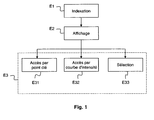
- the figure 1 represents an embodiment of a method of interaction between a user and a multimedia content via an interface.
- Step E1 is a step of indexing a multimedia content.
- Metadata is determined from the multimedia content considered. This metadata is determined based on information useful to the user present in the multimedia content and relative to predefined criteria.
- This metadata can be represented by key points and / or intensity curves.
- a key point corresponds to a part of the multimedia content carrying useful information for the user.
- the key points of a multimedia content are defined relative to predefined criteria.
- An intensity curve is a two-dimensional curve, one of these dimensions representing the progression in the multimedia content and the other dimension representing an intensity (for example, sound, kinematic, emotional, etc.). This curve comprises peaks corresponding to useful information and hollows corresponding to information of lesser utility for the user. An intensity curve is defined relative to predefined criteria.
- the predefined criteria for determining the key points of a media content may be the same or different from those for determining an intensity curve for that media content. Several intensity curves can be determined for multimedia content from different predefined criteria.
- the key points and the intensity curves are two metadata representation modes determined according to the useful information present in the multimedia content considered and based on predefined criteria.
- the key points may be, for example, keywords.
- the intensity curve can illustrate the structure of the document (for example, introduction, chapter, paragraph, appendix, etc.), a variation in the importance of each paragraph according to a predefined subject, etc.
- the key points can be sounds, chords, notes, spoken words, etc.
- the intensity curve can, for example, illustrate a sound volume.
- the key points may be, for example, points of interest in the image.
- the intensity curve can illustrate a color histogram of the pixels of the image, a probability of presence or absence of an object in the image, etc.
- the key points can be spoken words, sounds, etc.
- the intensity curve can, for example, illustrate an emotional intensity corresponding to an action described in the video. Emotional intensity can be described as loudness, heartbeat, tracking moving objects in the video, and so on.
- the determination of key points and intensity curves uses known techniques for the multimedia content considered. For example, when the multimedia content is a video or sound and the key points are spoken words, the determination of these key points is based on a word recognition technique in a sound file, also called word spotting in English.
- This step of indexing the multimedia content can be fully automatic. Alternatively, the user can intervene in the step of indexing the multimedia content to make corrections or identify new useful information relative to the multimedia content considered.
- the metadata obtained during the step E1 are recorded in a database.
- the next step E2 is a step of displaying metadata.
- the metadata determined during the previous step E1 and the corresponding multimedia content or a representation thereof are displayed on the same interface.
- the interface allows a user to view the multimedia content in question or a representation thereof and the metadata represented as key points and / or intensity curves.
- the metadata are displayed in transparency and superimposed on the multimedia content.
- the display of the metadata can be performed by default when the user accesses the multimedia content or can be realized at any time at the request of the user, for example, through a menu, by a specific tactile gesture, etc.
- the interface may be a touch interface on which the user acts via one or more fingers, one or more stylets, etc.
- FIGS. 2a, 2b, 2c and 2d illustrate a display of metadata and corresponding multimedia content, respectively text, audio, image and video.
- Metadata are represented by key points and / or intensity curves.
- the key points, represented by black circles, and / or the intensity curves, represented by black curves, as well as the multimedia content appear on the interface.
- K 11 , K 12 , K 13 and K 14 which may correspond, for example, to four occurrences of a keyword and two intensity curves C 11 and C 12 .
- the intensity curves represented by black curves, represent the evolution of an intensity as a function of the progression of the multimedia content.
- the key points and / or intensity curves displayed represent all the multimedia content whereas in transparency it is only a part of it that appears (for example, a page of a text document, an image a video, etc.).
- the next step E3 is a step of accessing and / or selecting at least part of a multimedia content.
- This step E3 comprises three operations E31, E32 and E33 each illustrating a mode of access to and / or selection of at least a part of the multimedia content in question.
- the operation E31 is an access to a part of a multimedia content via a key point.
- the key points and the multimedia content are displayed on the same interface.
- the user can act on the key points displayed, for example by establishing a contact with the interface at the key point considered. Such an action may, for example, correspond to activation or inhibition of a key point.
- an indication (visual, audible, tactile, etc.) can be issued and / or a reaction can be generated to the user from the key point on which the user has acted.
- the indication issued and / or the reaction produced allow the user to access the part of the multimedia content corresponding to the key point on which he has acted.
- the reaction produced and / or the indication emitted can be respectively a proposal for refocusing the text around the key point and / or displaying a definition of the corresponding keyword, an address web, etc.
- a comment (text, sound or other) corresponding to a detected sound can be displayed.
- the playback of the sound (or video) can also be positioned at the moment corresponding to the appearance of the sound in the multimedia content considered.
- the reaction and the indication can respectively be a zoom on a region of interest identified by the presence of a key point and the display of a comment.
- Operation E32 is an access to part of a multimedia content via an intensity curve.
- the intensity curve and the multimedia content are displayed on the same interface.
- the intensity curve allows the user, from the peaks it comprises, to access the portion of the multimedia content corresponding to these peaks. These peaks correspond to useful information present in the multimedia content. The user can also access portions of lesser interest from hollows or other portions of the intensity curve.
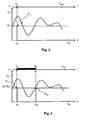
- the figure 3 illustrates an example of accessing part of a multimedia content via an intensity curve.
- a maximum milestone t max is defined for the multimedia content considered defining the size of the latter. This milestone is defined according to the nature of the multimedia content. This milestone t max is positioned on an axis t corresponding to the progression of the multimedia content.
- this maximum milestone may correspond to the duration of that content.
- this maximum milestone can be the size of the text expressed in number of characters, words, etc.
- this maximum milestone may be the height or the width of the image.
- Two axes x and y are defined in the direction respectively of the width and the height of the interface on which are displayed in particular the multimedia content, the key points and the intensity curve.
- the width and height of the interface are respectively defined by x int and y int .
- the user comes into contact with the interface at a point P 11 with coordinates (x 11 , y 11 ) relative to the respective axes x and y in the direction of the width and the height of the interface.
- This contact makes it possible to directly access the portion of the multimedia content at the milestone t 11 thus obtained and to position the unfolding of the multimedia content at this milestone t 11 .
- intensity curves each determined from predefined criteria can be used to access a portion of the multimedia content.
- the user may also be able to traverse the intensity curve via a point of contact with the interface.
- a visual feedback for example, a color change of the curve
- a sound feedback for example, a melody
- a tactile feedback for example, a vibration modulation
- the power of this return can allow the user to identify the peaks of the intensity curve.
- Operation E33 is a selection of at least part of a multimedia content.
- At least a portion of a multimedia content is selected from the intensity curve.
- one or more parts of the multimedia content can be extracted to perform, for example, cutting, summary, etc. of this content.
- the Figures 4 to 8 illustrate examples of selecting at least part of a multimedia content.
- the user makes contact with the two-point interface.
- the two contact points P 21 and P 22 of respective coordinates (x 21 , y 21 ) and (x 22 , y 22 ) are located on an axis parallel to the abscissa x axis. This axis is also parallel to the flow axis t of the multimedia content.
- the portion of the selected multimedia content corresponds to the interval [t 21 , t 22 ] delimited by the corresponding milestones.
- the two contact points P 21 and P 22 of respective coordinates (x 21, y 21) and (x 22, y 22) are located on an axis parallel to the y axis.
- the part of the multimedia content selected corresponds to the intervals [t '21 , t' 22 ], [t '23 , t' 24 ] and [t '25 , t' 26 ] delimited by the corresponding milestones.
- the part of the selected multimedia content corresponds to the interval [t " 21 , t" 22 ] delimited by the corresponding milestones.
- the user comes into contact with the interface at three points of contact P 31 , P 32 and P 33 with respective coordinates (X 31 , y 31 ), (x 32 , y 32 ) and (x 33 , y 33 ) .
- the part of the multimedia continuum selected corresponds to the intervals [t 31 , t 32 ] and [t 33 , t 34 ] delimited by the corresponding milestones.
- the user makes contact with the interface at four points of contact P 41 , P 42 , P 43 and P 44 with respective coordinates (x 41 , y 41 ), (x 42 , y 42 ), (x 43 , y 43 ) and (x 44 , y 44 ).
- the part of the multimedia continuum selected corresponds to the intervals [t 41 , t 42 ], [t 43 , t 44 ] and [t 45 , t 46 ] delimited by the corresponding milestones.
- N points of contact make it possible to select the portion or portions of the multimedia content corresponding to the peaks of the intensity curve situated inside a rectangle defined by four points among the N points. These four points correspond, on the one hand, to the nearest point and to the furthest point of the x-axis, and on the other hand to the nearest point and to the furthest point of the y-axis.
- the user may also choose to select a part or portions of the multimedia content corresponding to a predefined selection size D.
- Size can be expressed in terms of time, number of characters, etc. depending on the nature of the multimedia content considered. For example, for video-type media content, the user may want to select 5 minutes of this video.
- the user makes contact with the interface in any number N and variable points.
- the size of the part of the multimedia content is then displayed on the interface.
- the user then varies the number and positioning of the touch points until the selected size displayed is equal to the predefined size D selection .
- the selection of a part or parts of the multimedia content corresponding to a predefined size D seletion comprises the determination of N points at which the user must contact the interface.
- N contact points of coordinates (x j , y j ) with j varying from 1 to N, which the user must establish with the interface to select a part or parts of the multimedia content corresponding to a size D predefined selection .
- intensity curves each determined from predefined criteria may be used to select at least a portion of a multimedia content.
- the figure 9 represents an embodiment of a system able to implement a method of interaction between a user and a multimedia content via an interface as described above.
- the system comprises a module M1 indexing a multimedia content as described in step E1 above.
- Such a module makes it possible to obtain from the multimedia content in question key points and / or intensity curves.
- the system comprises an M2 module for displaying on an interface key points and / or intensity curves obtained through the module M1.
- the system comprises a module M3 for accessing part of a multimedia content via a key point.
- the system also comprises an M4 module for accessing part of a multimedia content via an intensity curve.
- the system also includes an M5 module for selecting at least part of a multimedia content as described by the operation E33.
- the system further comprises a central control unit, not shown, connected to each of the modules M1 to M5 and adapted to control their operation.
- the modules M1 to M5 may be software modules forming a computer program.
- the invention thus also relates to a computer program for a system for interaction between a user and a multimedia content via an interface comprising program code instructions for executing the method previously described by the system.
- the different software modules can be stored in or transmitted by a data carrier.
- a data carrier can be a storage medium, for example a CD-ROM, a magnetic floppy disk or a disk hard, or a transmissible medium such as an electrical signal, optical or radio.
- the invention also relates to a terminal adapted to receive a system as described above.
- the present invention finds applications in the search for information in multimedia contents, in particular audiovisual contents, in the management of video collection for individual or industrial needs, in the cutting-editing of films facilitated by gestural interaction, etc.
Landscapes
- Engineering & Computer Science (AREA)
- Theoretical Computer Science (AREA)
- General Engineering & Computer Science (AREA)
- Physics & Mathematics (AREA)
- General Physics & Mathematics (AREA)
- Human Computer Interaction (AREA)
- Data Mining & Analysis (AREA)
- Databases & Information Systems (AREA)
- Multimedia (AREA)
- Library & Information Science (AREA)
- User Interface Of Digital Computer (AREA)
Claims (7)
- Verfahren zur Interaktion zwischen einem Benutzer und einem Multimedia-Inhalt über eine Berührungsschnittstelle, dadurch gekennzeichnet, dass es die folgenden Schritte aufweist:- Anzeige (E2) auf der Schnittstelle mindestens einer Darstellung von Metadaten bezüglich der Gesamtheit des Multimedia-Inhalts, wobei die Darstellung mindestens eine zweidimensionale Intensitätskurve enthält, von der die eine ihrer Dimensionen einen Fortschritt im Multimedia-Inhalt und die andere ihrer Dimensionen eine Intensität darstellt, wobei die Kurve bezüglich von vordefinierten Kriterien definiert ist und Höhepunkte, die Nutzinformationen für den Benutzer entsprechen, und Tiefpunkte aufweist, die Informationen von geringerem Nutzen für den Benutzer entsprechen,- wenn der Benutzer an mindestens zwei Punkten einen Kontakt mit der Schnittstelle herstellt, Ermittlung mindestens eines Höhepunkts der mindestens einen Intensitätskurve abhängig von der Lage dieser mindestens zwei Punkte auf der Schnittstelle und Auswahl mindestens eines Teils des Multimedia-Inhalts entsprechend diesem mindestens einen Höhepunkt (E33).
- Verfahren nach Anspruch 1, dadurch gekennzeichnet, dass, wenn der Benutzer einen Kontakt mit der Schnittstelle an zwei Punkten herstellt, die sich auf einer Achse parallel zu der einen Fortschritt im Multimedia-Inhalt darstellenden Dimension befinden, der Teil des Multimedia-Inhalts, der zwischen den Schnittpunkten der mindestens einen Intensitätskurve mit den Achsen, die je durch diese Kontaktpunkte gehen und parallel zu der die Intensität darstellenden Dimension sind, enthalten ist, ausgewählt wird.
- Verfahren nach Anspruch 1, dadurch gekennzeichnet, dass der Benutzer, wenn er einen Kontakt an einem Punkt der Schnittstelle herstellt, der kein Punkt der mindestens einen Intensitätskurve ist, auf den Teil des Multimedia-Inhalts zugreift, der sich im Bereich des Schnittpunkts der mindestens einen Intensitätskurve mit einer Achse befindet, die durch diesen Kontaktpunkt geht und parallel zu der die Intensität darstellenden Dimension ist.
- Verfahren nach Anspruch 1, dadurch gekennzeichnet, dass der Benutzer mindestens einen Teil des Multimedia-Inhalts auswählen kann, der einer vordefinierten Größe entspricht, indem er Kontakte an einer beliebigen Anzahl von Punkten herstellt, die auf der Schnittstelle positioniert sind, und dann die Anzahl und die Positionierung dieser Kontaktpunkte variiert, bis er einen Teil des Multimedia-Inhalts der vordefinierten Größe erhält.
- Verfahren nach Anspruch 1, dadurch gekennzeichnet, dass, wenn der Benutzer die mindestens eine Intensitätskurve durchläuft, die Strecke von einer Rückmeldung begleitet wird, deren Leistung es ermöglicht, die Höhepunkte der mindestens einen Kurve zu bestimmen.
- Interaktionssystem zwischen einem Benutzer und einem Multimedia-Inhalt über eine Schnittstelle, dadurch gekennzeichnet, dass es die folgenden Module aufweist:- Anzeige (M2), auf einer Schnittstelle, einer Darstellung von Metadaten bezüglich der Gesamtheit des Multimedia-Inhalts, wobei die Darstellung mindestens eine zweidimensionale Intensitätskurve enthält, von der eine ihrer Dimensionen einen Fortschritt im Multimedia-Inhalt und die andere ihrer Dimensionen eine Intensität darstellt, wobei die Kurve Höhepunkte aufweist, die Nutzinformationen für den Benutzer entsprechen, die im Multimedia-Inhalt enthalten sind und bezüglich vordefinierten Kriterien bestimmt werden,- Auswahl (M5) mindestens eines Teils des Multimedia-Inhalts entsprechend mindestens einem Höhepunkt der mindestens einen Intensitätskurve, wobei der mindestens eine Höhepunkt abhängig von der Lage dieser mindestens zwei Punkte auf der Schnittstelle bestimmt wird, wobei der Modul angewendet werden kann, wenn der Benutzer an mindestens zwei Punkten einen Kontakt mit der Schnittstelle herstellt.
- Computerprogrammprodukt, das Programmcodeanweisungen enthält, die auf einen computerlesbaren Träger aufgezeichnet oder von ihm übertragen werden, um die Schritte des Verfahrens nach Anspruch 1 durchzuführen, wenn das Programm von einem Computer angewendet wird.
Priority Applications (1)
| Application Number | Priority Date | Filing Date | Title |
|---|---|---|---|
| PL10305251T PL2239740T3 (pl) | 2009-03-13 | 2010-03-12 | Interakcja pomiędzy użytkownikiem a treścią multimedialną |
Applications Claiming Priority (1)
| Application Number | Priority Date | Filing Date | Title |
|---|---|---|---|
| FR0951617 | 2009-03-13 |
Publications (2)
| Publication Number | Publication Date |
|---|---|
| EP2239740A1 EP2239740A1 (de) | 2010-10-13 |
| EP2239740B1 true EP2239740B1 (de) | 2013-05-08 |
Family
ID=41055289
Family Applications (1)
| Application Number | Title | Priority Date | Filing Date |
|---|---|---|---|
| EP10305251.0A Active EP2239740B1 (de) | 2009-03-13 | 2010-03-12 | Interaktion zwischen einem Benutzer und einem Multimedia-Inhalt |
Country Status (3)
| Country | Link |
|---|---|
| EP (1) | EP2239740B1 (de) |
| ES (1) | ES2424117T3 (de) |
| PL (1) | PL2239740T3 (de) |
Family Cites Families (4)
| Publication number | Priority date | Publication date | Assignee | Title |
|---|---|---|---|---|
| GB2323699B (en) * | 1996-11-22 | 2000-12-27 | Sony Corp | Editing apparatus, editing system and editing method |
| US7362946B1 (en) * | 1999-04-12 | 2008-04-22 | Canon Kabushiki Kaisha | Automated visual image editing system |
| US7383508B2 (en) * | 2002-06-19 | 2008-06-03 | Microsoft Corporation | Computer user interface for interacting with video cliplets generated from digital video |
| US20070266322A1 (en) * | 2006-05-12 | 2007-11-15 | Tretter Daniel R | Video browsing user interface |
-
2010
- 2010-03-12 PL PL10305251T patent/PL2239740T3/pl unknown
- 2010-03-12 EP EP10305251.0A patent/EP2239740B1/de active Active
- 2010-03-12 ES ES10305251T patent/ES2424117T3/es active Active
Also Published As
| Publication number | Publication date |
|---|---|
| EP2239740A1 (de) | 2010-10-13 |
| ES2424117T3 (es) | 2013-09-27 |
| PL2239740T3 (pl) | 2013-09-30 |
Similar Documents
| Publication | Publication Date | Title |
|---|---|---|
| Amato et al. | AI in the media and creative industries | |
| US11893794B2 (en) | Hierarchical segmentation of screen captured, screencasted, or streamed video | |
| CN112449231B (zh) | 多媒体文件素材的处理方法、装置、电子设备及存储介质 | |
| US11899917B2 (en) | Zoom and scroll bar for a video timeline | |
| CN101558373B (zh) | 在缩略图预览图标上指示文件类型 | |
| US11880408B2 (en) | Interacting with hierarchical clusters of video segments using a metadata search | |
| US11631434B2 (en) | Selecting and performing operations on hierarchical clusters of video segments | |
| US8316299B2 (en) | Information processing apparatus, method and program | |
| EP3690674A1 (de) | Verfahren zur empfehlung von videoinhalt | |
| US11995894B2 (en) | Interacting with hierarchical clusters of video segments using a metadata panel | |
| US8391355B2 (en) | Method and device for online dynamic semantic video compression and video indexing | |
| JP2013047960A (ja) | デジタルマルチメディアオブジェクトのセットを提示する方法 | |
| US20140164371A1 (en) | Extraction of media portions in association with correlated input | |
| WO2011087757A1 (en) | Rolling audio recognition | |
| WO2025010025A1 (en) | Chat application for video content creation | |
| EP2104937B1 (de) | Verfahren zur erzeugung einer neuen zusammenfassung eines audiovisuellen dokuments, das bereits eine zusammenfassung und meldungen enthält, und empfänger, der das verfahren implementieren kann | |
| EP1582067B1 (de) | Verfahren und system zur herstellung einermultimedia-publikation auf der basis von mündlichem material | |
| US20140163956A1 (en) | Message composition of media portions in association with correlated text | |
| EP2239740A1 (de) | Interaktion zwischen einem Benutzer und einem Multimedia-Inhalt | |
| Park et al. | A personalized summarization of video life-logs from an indoor multi-camera system using a fuzzy rule-based system with domain knowledge | |
| CA3208553A1 (en) | Systems and methods for transforming digital audio content | |
| JP7767656B2 (ja) | ウェブページの一部分の選択に基づくスニペットパケットの生成 | |
| Luo et al. | Musicon: Glyph-Based Design for Music Visualization and Retrieval. | |
| CN100454997C (zh) | 图像记述系统及其方法 | |
| Aaltonen | Facilitating personal content management in smart phones |
Legal Events
| Date | Code | Title | Description |
|---|---|---|---|
| PUAI | Public reference made under article 153(3) epc to a published international application that has entered the european phase |
Free format text: ORIGINAL CODE: 0009012 |
|
| AK | Designated contracting states |
Kind code of ref document: A1 Designated state(s): AT BE BG CH CY CZ DE DK EE ES FI FR GB GR HR HU IE IS IT LI LT LU LV MC MK MT NL NO PL PT RO SE SI SK SM TR |
|
| AX | Request for extension of the european patent |
Extension state: AL BA ME RS |
|
| 17P | Request for examination filed |
Effective date: 20110201 |
|
| 17Q | First examination report despatched |
Effective date: 20110921 |
|
| GRAP | Despatch of communication of intention to grant a patent |
Free format text: ORIGINAL CODE: EPIDOSNIGR1 |
|
| RIC1 | Information provided on ipc code assigned before grant |
Ipc: G11B 27/28 20060101ALI20120927BHEP Ipc: G11B 27/34 20060101AFI20120927BHEP Ipc: G06F 17/30 20060101ALI20120927BHEP Ipc: G06F 3/048 20060101ALI20120927BHEP |
|
| GRAS | Grant fee paid |
Free format text: ORIGINAL CODE: EPIDOSNIGR3 |
|
| GRAA | (expected) grant |
Free format text: ORIGINAL CODE: 0009210 |
|
| AK | Designated contracting states |
Kind code of ref document: B1 Designated state(s): AT BE BG CH CY CZ DE DK EE ES FI FR GB GR HR HU IE IS IT LI LT LU LV MC MK MT NL NO PL PT RO SE SI SK SM TR |
|
| REG | Reference to a national code |
Ref country code: GB Ref legal event code: FG4D Free format text: NOT ENGLISH |
|
| REG | Reference to a national code |
Ref country code: AT Ref legal event code: REF Ref document number: 611422 Country of ref document: AT Kind code of ref document: T Effective date: 20130515 Ref country code: CH Ref legal event code: EP |
|
| REG | Reference to a national code |
Ref country code: IE Ref legal event code: FG4D Free format text: LANGUAGE OF EP DOCUMENT: FRENCH |
|
| REG | Reference to a national code |
Ref country code: DE Ref legal event code: R096 Ref document number: 602010006908 Country of ref document: DE Effective date: 20130704 |
|
| REG | Reference to a national code |
Ref country code: CH Ref legal event code: PUE Owner name: ORANGE, FR Free format text: FORMER OWNER: FRANCE TELECOM, FR |
|
| RAP2 | Party data changed (patent owner data changed or rights of a patent transferred) |
Owner name: ORANGE |
|
| REG | Reference to a national code |
Ref country code: ES Ref legal event code: FG2A Ref document number: 2424117 Country of ref document: ES Kind code of ref document: T3 Effective date: 20130927 |
|
| REG | Reference to a national code |
Ref country code: PL Ref legal event code: T3 |
|
| REG | Reference to a national code |
Ref country code: AT Ref legal event code: MK05 Ref document number: 611422 Country of ref document: AT Kind code of ref document: T Effective date: 20130508 |
|
| REG | Reference to a national code |
Ref country code: LT Ref legal event code: MG4D |
|
| REG | Reference to a national code |
Ref country code: NL Ref legal event code: VDEP Effective date: 20130508 |
|
| PG25 | Lapsed in a contracting state [announced via postgrant information from national office to epo] |
Ref country code: GR Free format text: LAPSE BECAUSE OF FAILURE TO SUBMIT A TRANSLATION OF THE DESCRIPTION OR TO PAY THE FEE WITHIN THE PRESCRIBED TIME-LIMIT Effective date: 20130809 Ref country code: AT Free format text: LAPSE BECAUSE OF FAILURE TO SUBMIT A TRANSLATION OF THE DESCRIPTION OR TO PAY THE FEE WITHIN THE PRESCRIBED TIME-LIMIT Effective date: 20130508 Ref country code: LT Free format text: LAPSE BECAUSE OF FAILURE TO SUBMIT A TRANSLATION OF THE DESCRIPTION OR TO PAY THE FEE WITHIN THE PRESCRIBED TIME-LIMIT Effective date: 20130508 Ref country code: PT Free format text: LAPSE BECAUSE OF FAILURE TO SUBMIT A TRANSLATION OF THE DESCRIPTION OR TO PAY THE FEE WITHIN THE PRESCRIBED TIME-LIMIT Effective date: 20130909 Ref country code: NO Free format text: LAPSE BECAUSE OF FAILURE TO SUBMIT A TRANSLATION OF THE DESCRIPTION OR TO PAY THE FEE WITHIN THE PRESCRIBED TIME-LIMIT Effective date: 20130808 Ref country code: IS Free format text: LAPSE BECAUSE OF FAILURE TO SUBMIT A TRANSLATION OF THE DESCRIPTION OR TO PAY THE FEE WITHIN THE PRESCRIBED TIME-LIMIT Effective date: 20130908 Ref country code: SE Free format text: LAPSE BECAUSE OF FAILURE TO SUBMIT A TRANSLATION OF THE DESCRIPTION OR TO PAY THE FEE WITHIN THE PRESCRIBED TIME-LIMIT Effective date: 20130508 Ref country code: FI Free format text: LAPSE BECAUSE OF FAILURE TO SUBMIT A TRANSLATION OF THE DESCRIPTION OR TO PAY THE FEE WITHIN THE PRESCRIBED TIME-LIMIT Effective date: 20130508 Ref country code: SI Free format text: LAPSE BECAUSE OF FAILURE TO SUBMIT A TRANSLATION OF THE DESCRIPTION OR TO PAY THE FEE WITHIN THE PRESCRIBED TIME-LIMIT Effective date: 20130508 |
|
| PG25 | Lapsed in a contracting state [announced via postgrant information from national office to epo] |
Ref country code: CY Free format text: LAPSE BECAUSE OF FAILURE TO SUBMIT A TRANSLATION OF THE DESCRIPTION OR TO PAY THE FEE WITHIN THE PRESCRIBED TIME-LIMIT Effective date: 20130508 Ref country code: BG Free format text: LAPSE BECAUSE OF FAILURE TO SUBMIT A TRANSLATION OF THE DESCRIPTION OR TO PAY THE FEE WITHIN THE PRESCRIBED TIME-LIMIT Effective date: 20130808 Ref country code: HR Free format text: LAPSE BECAUSE OF FAILURE TO SUBMIT A TRANSLATION OF THE DESCRIPTION OR TO PAY THE FEE WITHIN THE PRESCRIBED TIME-LIMIT Effective date: 20130508 |
|
| PG25 | Lapsed in a contracting state [announced via postgrant information from national office to epo] |
Ref country code: LV Free format text: LAPSE BECAUSE OF FAILURE TO SUBMIT A TRANSLATION OF THE DESCRIPTION OR TO PAY THE FEE WITHIN THE PRESCRIBED TIME-LIMIT Effective date: 20130508 |
|
| PG25 | Lapsed in a contracting state [announced via postgrant information from national office to epo] |
Ref country code: SK Free format text: LAPSE BECAUSE OF FAILURE TO SUBMIT A TRANSLATION OF THE DESCRIPTION OR TO PAY THE FEE WITHIN THE PRESCRIBED TIME-LIMIT Effective date: 20130508 Ref country code: DK Free format text: LAPSE BECAUSE OF FAILURE TO SUBMIT A TRANSLATION OF THE DESCRIPTION OR TO PAY THE FEE WITHIN THE PRESCRIBED TIME-LIMIT Effective date: 20130508 Ref country code: EE Free format text: LAPSE BECAUSE OF FAILURE TO SUBMIT A TRANSLATION OF THE DESCRIPTION OR TO PAY THE FEE WITHIN THE PRESCRIBED TIME-LIMIT Effective date: 20130508 Ref country code: CZ Free format text: LAPSE BECAUSE OF FAILURE TO SUBMIT A TRANSLATION OF THE DESCRIPTION OR TO PAY THE FEE WITHIN THE PRESCRIBED TIME-LIMIT Effective date: 20130508 |
|
| PG25 | Lapsed in a contracting state [announced via postgrant information from national office to epo] |
Ref country code: RO Free format text: LAPSE BECAUSE OF FAILURE TO SUBMIT A TRANSLATION OF THE DESCRIPTION OR TO PAY THE FEE WITHIN THE PRESCRIBED TIME-LIMIT Effective date: 20130508 Ref country code: IT Free format text: LAPSE BECAUSE OF FAILURE TO SUBMIT A TRANSLATION OF THE DESCRIPTION OR TO PAY THE FEE WITHIN THE PRESCRIBED TIME-LIMIT Effective date: 20130508 Ref country code: NL Free format text: LAPSE BECAUSE OF FAILURE TO SUBMIT A TRANSLATION OF THE DESCRIPTION OR TO PAY THE FEE WITHIN THE PRESCRIBED TIME-LIMIT Effective date: 20130508 |
|
| PLBE | No opposition filed within time limit |
Free format text: ORIGINAL CODE: 0009261 |
|
| STAA | Information on the status of an ep patent application or granted ep patent |
Free format text: STATUS: NO OPPOSITION FILED WITHIN TIME LIMIT |
|
| 26N | No opposition filed |
Effective date: 20140211 |
|
| REG | Reference to a national code |
Ref country code: DE Ref legal event code: R097 Ref document number: 602010006908 Country of ref document: DE Effective date: 20140211 |
|
| REG | Reference to a national code |
Ref country code: DE Ref legal event code: R119 Ref document number: 602010006908 Country of ref document: DE |
|
| PG25 | Lapsed in a contracting state [announced via postgrant information from national office to epo] |
Ref country code: LU Free format text: LAPSE BECAUSE OF FAILURE TO SUBMIT A TRANSLATION OF THE DESCRIPTION OR TO PAY THE FEE WITHIN THE PRESCRIBED TIME-LIMIT Effective date: 20140312 |
|
| REG | Reference to a national code |
Ref country code: CH Ref legal event code: PL |
|
| REG | Reference to a national code |
Ref country code: IE Ref legal event code: MM4A |
|
| REG | Reference to a national code |
Ref country code: DE Ref legal event code: R119 Ref document number: 602010006908 Country of ref document: DE Effective date: 20141001 |
|
| PG25 | Lapsed in a contracting state [announced via postgrant information from national office to epo] |
Ref country code: CH Free format text: LAPSE BECAUSE OF NON-PAYMENT OF DUE FEES Effective date: 20140331 Ref country code: DE Free format text: LAPSE BECAUSE OF NON-PAYMENT OF DUE FEES Effective date: 20141001 Ref country code: IE Free format text: LAPSE BECAUSE OF NON-PAYMENT OF DUE FEES Effective date: 20140312 Ref country code: LI Free format text: LAPSE BECAUSE OF NON-PAYMENT OF DUE FEES Effective date: 20140331 |
|
| REG | Reference to a national code |
Ref country code: FR Ref legal event code: PLFP Year of fee payment: 7 |
|
| PG25 | Lapsed in a contracting state [announced via postgrant information from national office to epo] |
Ref country code: MT Free format text: LAPSE BECAUSE OF FAILURE TO SUBMIT A TRANSLATION OF THE DESCRIPTION OR TO PAY THE FEE WITHIN THE PRESCRIBED TIME-LIMIT Effective date: 20130508 |
|
| PG25 | Lapsed in a contracting state [announced via postgrant information from national office to epo] |
Ref country code: SM Free format text: LAPSE BECAUSE OF FAILURE TO SUBMIT A TRANSLATION OF THE DESCRIPTION OR TO PAY THE FEE WITHIN THE PRESCRIBED TIME-LIMIT Effective date: 20130508 |
|
| PG25 | Lapsed in a contracting state [announced via postgrant information from national office to epo] |
Ref country code: MC Free format text: LAPSE BECAUSE OF FAILURE TO SUBMIT A TRANSLATION OF THE DESCRIPTION OR TO PAY THE FEE WITHIN THE PRESCRIBED TIME-LIMIT Effective date: 20130508 |
|
| PG25 | Lapsed in a contracting state [announced via postgrant information from national office to epo] |
Ref country code: TR Free format text: LAPSE BECAUSE OF FAILURE TO SUBMIT A TRANSLATION OF THE DESCRIPTION OR TO PAY THE FEE WITHIN THE PRESCRIBED TIME-LIMIT Effective date: 20130508 Ref country code: HU Free format text: LAPSE BECAUSE OF FAILURE TO SUBMIT A TRANSLATION OF THE DESCRIPTION OR TO PAY THE FEE WITHIN THE PRESCRIBED TIME-LIMIT; INVALID AB INITIO Effective date: 20100312 |
|
| REG | Reference to a national code |
Ref country code: FR Ref legal event code: PLFP Year of fee payment: 8 |
|
| REG | Reference to a national code |
Ref country code: FR Ref legal event code: PLFP Year of fee payment: 9 |
|
| PG25 | Lapsed in a contracting state [announced via postgrant information from national office to epo] |
Ref country code: MK Free format text: LAPSE BECAUSE OF FAILURE TO SUBMIT A TRANSLATION OF THE DESCRIPTION OR TO PAY THE FEE WITHIN THE PRESCRIBED TIME-LIMIT Effective date: 20130508 |
|
| PGFP | Annual fee paid to national office [announced via postgrant information from national office to epo] |
Ref country code: ES Payment date: 20250401 Year of fee payment: 16 |
|
| PGFP | Annual fee paid to national office [announced via postgrant information from national office to epo] |
Ref country code: GB Payment date: 20260220 Year of fee payment: 17 |
|
| PGFP | Annual fee paid to national office [announced via postgrant information from national office to epo] |
Ref country code: BE Payment date: 20260219 Year of fee payment: 17 |
|
| PGFP | Annual fee paid to national office [announced via postgrant information from national office to epo] |
Ref country code: FR Payment date: 20260219 Year of fee payment: 17 |
|
| PGFP | Annual fee paid to national office [announced via postgrant information from national office to epo] |
Ref country code: PL Payment date: 20260220 Year of fee payment: 17 |