EP2237141A2 - User interface for digital photo frame - Google Patents
User interface for digital photo frame Download PDFInfo
- Publication number
- EP2237141A2 EP2237141A2 EP10156870A EP10156870A EP2237141A2 EP 2237141 A2 EP2237141 A2 EP 2237141A2 EP 10156870 A EP10156870 A EP 10156870A EP 10156870 A EP10156870 A EP 10156870A EP 2237141 A2 EP2237141 A2 EP 2237141A2
- Authority
- EP
- European Patent Office
- Prior art keywords
- boundary
- frame
- touch screen
- selector
- right edges
- Prior art date
- Legal status (The legal status is an assumption and is not a legal conclusion. Google has not performed a legal analysis and makes no representation as to the accuracy of the status listed.)
- Ceased
Links
Images

Classifications
-
- G—PHYSICS
- G06—COMPUTING OR CALCULATING; COUNTING
- G06F—ELECTRIC DIGITAL DATA PROCESSING
- G06F3/00—Input arrangements for transferring data to be processed into a form capable of being handled by the computer; Output arrangements for transferring data from processing unit to output unit, e.g. interface arrangements
- G06F3/01—Input arrangements or combined input and output arrangements for interaction between user and computer
- G06F3/048—Interaction techniques based on graphical user interfaces [GUI]
- G06F3/0487—Interaction techniques based on graphical user interfaces [GUI] using specific features provided by the input device, e.g. functions controlled by the rotation of a mouse with dual sensing arrangements, or of the nature of the input device, e.g. tap gestures based on pressure sensed by a digitiser
- G06F3/0488—Interaction techniques based on graphical user interfaces [GUI] using specific features provided by the input device, e.g. functions controlled by the rotation of a mouse with dual sensing arrangements, or of the nature of the input device, e.g. tap gestures based on pressure sensed by a digitiser using a touch-screen or digitiser, e.g. input of commands through traced gestures
-
- H—ELECTRICITY
- H04—ELECTRIC COMMUNICATION TECHNIQUE
- H04N—PICTORIAL COMMUNICATION, e.g. TELEVISION
- H04N1/00—Scanning, transmission or reproduction of documents or the like, e.g. facsimile transmission; Details thereof
- H04N1/00127—Connection or combination of a still picture apparatus with another apparatus, e.g. for storage, processing or transmission of still picture signals or of information associated with a still picture
- H04N1/00347—Connection or combination of a still picture apparatus with another apparatus, e.g. for storage, processing or transmission of still picture signals or of information associated with a still picture with another still picture apparatus, e.g. hybrid still picture apparatus
-
- H—ELECTRICITY
- H04—ELECTRIC COMMUNICATION TECHNIQUE
- H04N—PICTORIAL COMMUNICATION, e.g. TELEVISION
- H04N1/00—Scanning, transmission or reproduction of documents or the like, e.g. facsimile transmission; Details thereof
- H04N1/0035—User-machine interface; Control console
- H04N1/00405—Output means
- H04N1/00408—Display of information to the user, e.g. menus
- H04N1/00411—Display of information to the user, e.g. menus the display also being used for user input, e.g. touch screen
-
- H—ELECTRICITY
- H04—ELECTRIC COMMUNICATION TECHNIQUE
- H04N—PICTORIAL COMMUNICATION, e.g. TELEVISION
- H04N1/00—Scanning, transmission or reproduction of documents or the like, e.g. facsimile transmission; Details thereof
- H04N1/0035—User-machine interface; Control console
- H04N1/00405—Output means
- H04N1/00408—Display of information to the user, e.g. menus
- H04N1/0044—Display of information to the user, e.g. menus for image preview or review, e.g. to help the user position a sheet
-
- G—PHYSICS
- G06—COMPUTING OR CALCULATING; COUNTING
- G06F—ELECTRIC DIGITAL DATA PROCESSING
- G06F3/00—Input arrangements for transferring data to be processed into a form capable of being handled by the computer; Output arrangements for transferring data from processing unit to output unit, e.g. interface arrangements
- G06F3/01—Input arrangements or combined input and output arrangements for interaction between user and computer
- G06F3/048—Interaction techniques based on graphical user interfaces [GUI]
-
- G—PHYSICS
- G06—COMPUTING OR CALCULATING; COUNTING
- G06F—ELECTRIC DIGITAL DATA PROCESSING
- G06F3/00—Input arrangements for transferring data to be processed into a form capable of being handled by the computer; Output arrangements for transferring data from processing unit to output unit, e.g. interface arrangements
- G06F3/01—Input arrangements or combined input and output arrangements for interaction between user and computer
- G06F3/048—Interaction techniques based on graphical user interfaces [GUI]
- G06F3/0481—Interaction techniques based on graphical user interfaces [GUI] based on specific properties of the displayed interaction object or a metaphor-based environment, e.g. interaction with desktop elements like windows or icons, or assisted by a cursor's changing behaviour or appearance
- G06F3/0482—Interaction with lists of selectable items, e.g. menus
-
- G—PHYSICS
- G06—COMPUTING OR CALCULATING; COUNTING
- G06F—ELECTRIC DIGITAL DATA PROCESSING
- G06F3/00—Input arrangements for transferring data to be processed into a form capable of being handled by the computer; Output arrangements for transferring data from processing unit to output unit, e.g. interface arrangements
- G06F3/01—Input arrangements or combined input and output arrangements for interaction between user and computer
- G06F3/048—Interaction techniques based on graphical user interfaces [GUI]
- G06F3/0487—Interaction techniques based on graphical user interfaces [GUI] using specific features provided by the input device, e.g. functions controlled by the rotation of a mouse with dual sensing arrangements, or of the nature of the input device, e.g. tap gestures based on pressure sensed by a digitiser
- G06F3/0488—Interaction techniques based on graphical user interfaces [GUI] using specific features provided by the input device, e.g. functions controlled by the rotation of a mouse with dual sensing arrangements, or of the nature of the input device, e.g. tap gestures based on pressure sensed by a digitiser using a touch-screen or digitiser, e.g. input of commands through traced gestures
- G06F3/04883—Interaction techniques based on graphical user interfaces [GUI] using specific features provided by the input device, e.g. functions controlled by the rotation of a mouse with dual sensing arrangements, or of the nature of the input device, e.g. tap gestures based on pressure sensed by a digitiser using a touch-screen or digitiser, e.g. input of commands through traced gestures for inputting data by handwriting, e.g. gesture or text
-
- G—PHYSICS
- G09—EDUCATION; CRYPTOGRAPHY; DISPLAY; ADVERTISING; SEALS
- G09G—ARRANGEMENTS OR CIRCUITS FOR CONTROL OF INDICATING DEVICES USING STATIC MEANS TO PRESENT VARIABLE INFORMATION
- G09G2380/00—Specific applications
- G09G2380/16—Digital picture frames
-
- H—ELECTRICITY
- H04—ELECTRIC COMMUNICATION TECHNIQUE
- H04N—PICTORIAL COMMUNICATION, e.g. TELEVISION
- H04N2201/00—Indexing scheme relating to scanning, transmission or reproduction of documents or the like, and to details thereof
- H04N2201/0077—Types of the still picture apparatus
- H04N2201/0087—Image storage device
-
- H—ELECTRICITY
- H04—ELECTRIC COMMUNICATION TECHNIQUE
- H04N—PICTORIAL COMMUNICATION, e.g. TELEVISION
- H04N2201/00—Indexing scheme relating to scanning, transmission or reproduction of documents or the like, and to details thereof
- H04N2201/0077—Types of the still picture apparatus
- H04N2201/0089—Image display device
Definitions
- the present invention relates generally to user interfaces for digital photo frames.
- Digital photo frames have been provided which can present, on a computer-controlled display, digital photographs. These frames mimic in size and shape traditional photo frames, but have the advantages of allowing users to rapidly view multiple photos in succession without flipping through a hard copy album, and allowing users to quickly and easily change the image that is presented in the frame without having to remove the back of the frame and swap hard copy photos.
- digital photo frames may employ touch screens on which user interfaces may be presented.
- Existing user interfaces can be obtrusive to viewing the photo and may not be conveniently configured for the user.
- a digital photo frame includes a frame, a touch screen bordered by the frame, and a computer readable storage medium bearing digital images.
- a processor causes a user-selected image from the medium to be presented on the touch screen.
- the processor also receives touch signals from the touch screen.
- the processor causes the touch screen to present a user interface (UI) that may include at least first and second partially arcuate rings.
- UI user interface
- Each ring bears plural discreet selector elements, and each selector element is manipulable by a person to input a respective selection represented by the selector element.
- At least one menu navigation arrow is juxtaposed with at least one of the rings and is manipulable by a person to navigate through a menu of selections selectable using respective selector elements,
- each selector element on the first ring represents a root selection and each selector element on the second ring represents a branch of a selected root from the first ring.
- a ring can be caused to appear to rotate when a user moves a finger along the ring to expose selector elements previously not presented on the touch screen.
- the frame defines left and right edges
- each ring defines a straight boundary and an arcuate selector element segment extending from a first end of the respective boundary to a second end of the respective boundary
- the boundaries of the first and second rings are respectively juxtaposed with and parallel to the left and right edges of the frame.
- the first ring defines a straight boundary and a first arcuate selector element segment extending from a first end of the boundary to a second end of the boundary
- the second ring defines a second arcuate selector element segment positioned against the first selector element segment parallel thereto, and the boundary is juxtaposed with and parallel to one of the left or right edges of the frame.
- each ring defines a straight boundary and an arcuate selector element segment extending from a first end of the respective boundary to a second end of the respective boundary, and the boundaries of the first and second rings are displayed on a centerline of the digital picture frame that is midway between the left and right edges.
- the arcuate segments can be reversed, i.e., midpoints of the selector element segments can be substantially tangential to each other at a centerline of the digital picture frame that is midway between the left and right edges.
- the UI may be used for other types of digital frames including mobile devices, book readers, and any touch screen device with a pictorial or textual display.
- a touch screen is controlled by processor to present a user interface (UI).
- the UI includes at least two groups of selector elements with each group arranged in a respective arc.
- a first group of selector elements can be manipulated to establish an input genre root, while a second group of selector elements can be manipulated to select an input branching from a genre root selected using an element in the first group.
- At least one arc may be rotatable to reveal previously unpresented selector elements when a person moves a hand along the respective arc.
- an apparatus has a frame, a touch screen bordered by the frame, and a computer readable storage medium bearing digital images.
- a processor causes at least one image from the medium to be presented on the touch screen.
- the processor also receives touch signals from the touch screen, with the processor causing the touch screen to present a user interface (UI) that has at least two groups of selector elements. Each group is arranged in a respective arc.
- a first group of selector elements can be manipulated to establish an input genre root.
- a second group of selector elements can be manipulated to select an input branching from a genre root selected using an element in the first group. At least one arc reveals previously unpresented selector elements when a person moves a hand along the respective arc.
- a digital picture frame 10 includes a hollow frame 12 that may be rectilinear as shown, defining left and right edges 14, 16.
- the frame 12 may assume other shapes, e.g., ovular with left and right ends.
- the digital picture frame 10 is sized as a picture frame so that it is substantially flat and can be grasped by a user's left and right hands 18, 20 as shown along the left and right edges 14, 16, with the user's fingers in back and the thumbs in front as shown.
- the digital picture frame 10 can hold a processor 22 that receives time input from a clock 24, as well as still or moving image data input from various sources such as but not limited to a universal serial bus (USB) interface 26 and/or a computer readable storage medium 28 such as but not limited to solid state storage or disk-based storage.
- the medium 28 may be removable, e.g., the medium 28 may be implemented by a memory card.
- photos from a digital camera may be conveyed to the medium 28 directly by engaging the medium 28 with the camera and loading photos onto the medium 28, then disengaging the medium 28 from the camera and sliding it into a receptacle of the digital picture frame 10.
- the photos may be transferred from a camera or other source of photos through the USB interface 26 onto the medium 28 in the digital picture frame 10.
- the processor 22 may receive input from a wireless or wired network interface 30 such as but not limited to a WiFi interface. Images received from the network interface 30 may also be displayed in addition to images from cameras as set forth further below.
- a touch screen 32 is bounded by the frame 12 as shown.
- the touch screen 32 is controlled by the processor 22 to present images from the medium 28 and/or USB interface 26 and/or network interface 30 or other source communicating with the processor 22.
- user input signals are generated by the touch screen 32 when a user tactiley manipulates the below-described user interfaces (UI), and these signals are sent to the processor 22, which may execute logic stored on the medium 28 to undertake the UI activities and respond to UI commands as discussed below.
- UI user interfaces
- the processor 22 can cause the touch screen 32 to present a UI that may include at least first and second partially arcuate rings 34, 36.
- the rings may be circular as shown.
- the rings 34, 36 are visible; in other embodiments, only the arcuately-arranged selector elements may be visible.
- each ring bears plural discreet selector elements 38, 40, and each selector element 38, 40 is manipulable by a person to input a respective selection represented by the selector element.
- a respective menu navigation arrow 42 is juxtaposed with each of the rings and is manipulable by a person to navigate through a menu of selections selectable using respective selector elements. For example, touching the left arrow 42 can cause the below-described tree-like menu to traverse up the tree, while touching the right arrow 42 can cause a downward traversal.
- each selector element 38 on the first ring represents a root selection and each selector element 40 on the second ring represents a branch of a selected root from the first ring.
- the selector elements 40 on the right ring represent elements in that genre that are available for display (and, thus, the selector elements 40 in Figure 2 are labeled "2a”, "2b", and so on for clarity of disclosure).
- arrows 42 have been manipulated to traverse to the root of the tree. This may be regarded as a "list of genres" root. Further manipulation of the arrows 42 may cause selector elements 38 in the left ring to respectively represent "albums", “Wi-Fi”, and "clock”.
- Selector elements 38 in the left ring may then represent each album available with photos for presentation, e.g., "Album 1", "album 2", and so on. If “album 1” is selected then the selector elements 40 of the right ring may indicate respective photos in that album, and a user may manipulate the selector element 40 corresponding to a photo from the selected album desired to be presented on the touch screen 32. In such a case, a preview of the photo may be superimposed on the UI, or the UI may be superimposed on the selected photo. When the UI times out or upon user command, the UI can disappear until such time as, e.g., the user again touches the screen 32 to indicate a desire to invoke the UI.
- selector elements 40 in the right ring can be correlated to respective WiFi channel numbers. Then again, if the user navigates to "clock”, selector elements in the right ring can correspond to "set hour”, “set minute”, “set second for digital picture frames having a digital clock also displayed, and then the arrow elements 42 can be manipulated to appropriately set the time.
- each ring may virtually include more selector elements than are displayed.
- a ring (or equivalently the associated arc of selector elements) can be caused to appear to rotate when a user moves a finger along the ring to expose selector elements previously not presented on the touch screen.
- each ring 34, 36 defines a respective straight boundary 44,46 in addition to the arcuate selector element segment, which extends from end to end on the straight boundary.
- the boundaries 44, 46 are respectively juxtaposed with and parallel to the left and right edges 14, 16 of the frame. Indeed, the boundaries 44, 46 lie along the left and right edges of the touch screen 32 as shown. With this UI a person can conveniently manipulate the selector elements using only respective thumbs of the person.
- a first ring 50 of selector elements 52 defines a straight boundary 54 and a first arcuate selector element segment 56 extending from end to end of the boundary.
- the second ring 58 defines a second arcuate selector element segment 60 that is positioned against the first selector element segment 56, parallel thereto.
- the straight boundary 54 is juxtaposed with and parallel to the left edge of a digital picture frame 62 ( Figure 3 ) or to the right edge of the frame ( Figure 4 ). With this arrangement, a person can conveniently manipulate the selector elements using only a left or right thumb of the person.
- Figures 5 and 6 show that the UI may be distanced from the left and right edges of the frame and be disposed in the middle of the touch screen for single finger manipulation if desired.
- each of two rings 70, 72 that function as described above can define a straight boundary 74 and an arcuate selector element segment extending from a first end of the respective boundary to a second end of the respective boundary, and the boundaries of the first and second rings are displayed on a centerline of the digital picture frame that is midway between the left and right edges 76, 78.
- each semi-circular ring faces the other to establish a complete circle, with selector elements in the right semicircle functioning as the selector elements 40 in Figures 1 and 2 and selector elements in the left semicircle functioning as the selector elements 38.
- the arcuate segments can be reversed, i.e., midpoints 80, 82 of the selector element segments can be substantially tangential to each other at a centerline of the digital picture frame that is midway between the left and right edges of the frame.
- the user may be given "UI configuration" options which allows the user to select which one of the above-described UIs to select.
- present principles provide an unobtrusive UI that can be presented simultaneously with a photo for preview, and in some embodiments is well suited for two thumb-only UI interaction.
- Present principles provide an easy way to browse options in a clean and elegant UI design.
Landscapes
- Engineering & Computer Science (AREA)
- Human Computer Interaction (AREA)
- Multimedia (AREA)
- Signal Processing (AREA)
- General Engineering & Computer Science (AREA)
- Theoretical Computer Science (AREA)
- Physics & Mathematics (AREA)
- General Physics & Mathematics (AREA)
- Position Input By Displaying (AREA)
- User Interface Of Digital Computer (AREA)
- Input From Keyboards Or The Like (AREA)
Abstract
Description
- The present invention relates generally to user interfaces for digital photo frames.
- Digital photo frames have been provided which can present, on a computer-controlled display, digital photographs. These frames mimic in size and shape traditional photo frames, but have the advantages of allowing users to rapidly view multiple photos in succession without flipping through a hard copy album, and allowing users to quickly and easily change the image that is presented in the frame without having to remove the back of the frame and swap hard copy photos.
- To facilitate image browsing and selection, digital photo frames may employ touch screens on which user interfaces may be presented. Existing user interfaces can be obtrusive to viewing the photo and may not be conveniently configured for the user.
- As understood herein, users typically grasp digital photo frames in the same manner as traditional frames, that is, along the left and right edges with the fingers behind the frame and the thumbs in front.
- Accordingly, in one embodiments a digital photo frame includes a frame, a touch screen bordered by the frame, and a computer readable storage medium bearing digital images. A processor causes a user-selected image from the medium to be presented on the touch screen. The processor also receives touch signals from the touch screen. The processor causes the touch screen to present a user interface (UI) that may include at least first and second partially arcuate rings. Each ring bears plural discreet selector elements, and each selector element is manipulable by a person to input a respective selection represented by the selector element. At least one menu navigation arrow is juxtaposed with at least one of the rings and is manipulable by a person to navigate through a menu of selections selectable using respective selector elements,
- In some embodiments, each selector element on the first ring represents a root selection and each selector element on the second ring represents a branch of a selected root from the first ring. A ring can be caused to appear to rotate when a user moves a finger along the ring to expose selector elements previously not presented on the touch screen.
- In one implementation of the UI, the frame defines left and right edges, each ring defines a straight boundary and an arcuate selector element segment extending from a first end of the respective boundary to a second end of the respective boundary, and the boundaries of the first and second rings are respectively juxtaposed with and parallel to the left and right edges of the frame. With this UI a person can conveniently manipulate the selector elements using only respective thumbs of the person.
- In another implementation of the UI the first ring defines a straight boundary and a first arcuate selector element segment extending from a first end of the boundary to a second end of the boundary, the second ring defines a second arcuate selector element segment positioned against the first selector element segment parallel thereto, and the boundary is juxtaposed with and parallel to one of the left or right edges of the frame. A person can conveniently manipulate the selector elements using only a left or right thumb of the person.
- In yet another UI implementation each ring defines a straight boundary and an arcuate selector element segment extending from a first end of the respective boundary to a second end of the respective boundary, and the boundaries of the first and second rings are displayed on a centerline of the digital picture frame that is midway between the left and right edges. Or, the arcuate segments can be reversed, i.e., midpoints of the selector element segments can be substantially tangential to each other at a centerline of the digital picture frame that is midway between the left and right edges.
- While contemplated in some intended environments for use with digital photo frames, the UI may be used for other types of digital frames including mobile devices, book readers, and any touch screen device with a pictorial or textual display.
- In another aspect, a touch screen is controlled by processor to present a user interface (UI). The UI includes at least two groups of selector elements with each group arranged in a respective arc. A first group of selector elements can be manipulated to establish an input genre root, while a second group of selector elements can be manipulated to select an input branching from a genre root selected using an element in the first group. At least one arc may be rotatable to reveal previously unpresented selector elements when a person moves a hand along the respective arc.
- In still another aspect, an apparatus has a frame, a touch screen bordered by the frame, and a computer readable storage medium bearing digital images. A processor causes at least one image from the medium to be presented on the touch screen. The processor also receives touch signals from the touch screen, with the processor causing the touch screen to present a user interface (UI) that has at least two groups of selector elements. Each group is arranged in a respective arc. A first group of selector elements can be manipulated to establish an input genre root. In contrast, a second group of selector elements can be manipulated to select an input branching from a genre root selected using an element in the first group. At least one arc reveals previously unpresented selector elements when a person moves a hand along the respective arc.
- Various respective aspects and features of the invention are defined in appended claims. Combinations of features from the dependent claims may be combined with features of the independent claims as appropriate and not merely as explicitly set out in the claims.
- Embodiments of the invention will now be described with reference to the accompanying drawings, throughout which like parts are referred to by like references, and in which:
-
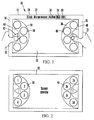
Figure 1 is a front elevational view of an example digital picture frame, showing internal components schematically; -
Figure 2 is a front elevational view of the digital picture frame ofFigure 1 , illustrating the root and branch selection provided by the user interface (UI); -
Figure 3 is a front elevational view of an alternate example digital picture frame; -
Figure 4 is a front elevational view of another alternate example digital picture frame; -
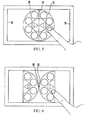
Figure 5 is a front elevational view of yet another alternate example digital picture frame; and -
Figure 6 is a front elevational view of still another alternate example digital picture frame. - Referring initially to
Figure 1 , adigital picture frame 10 includes ahollow frame 12 that may be rectilinear as shown, defining left andright edges frame 12 may assume other shapes, e.g., ovular with left and right ends. Thedigital picture frame 10 is sized as a picture frame so that it is substantially flat and can be grasped by a user's left andright hands 18, 20 as shown along the left andright edges - In the example embodiment shown in
Figure 1 , thedigital picture frame 10 can hold aprocessor 22 that receives time input from aclock 24, as well as still or moving image data input from various sources such as but not limited to a universal serial bus (USB)interface 26 and/or a computerreadable storage medium 28 such as but not limited to solid state storage or disk-based storage. In some embodiments themedium 28 may be removable, e.g., themedium 28 may be implemented by a memory card. In any case, photos from a digital camera, for example, may be conveyed to themedium 28 directly by engaging themedium 28 with the camera and loading photos onto themedium 28, then disengaging themedium 28 from the camera and sliding it into a receptacle of thedigital picture frame 10. Or, the photos may be transferred from a camera or other source of photos through theUSB interface 26 onto themedium 28 in thedigital picture frame 10. - Also, the
processor 22 may receive input from a wireless orwired network interface 30 such as but not limited to a WiFi interface. Images received from thenetwork interface 30 may also be displayed in addition to images from cameras as set forth further below. - A
touch screen 32 is bounded by theframe 12 as shown. Thetouch screen 32 is controlled by theprocessor 22 to present images from themedium 28 and/orUSB interface 26 and/ornetwork interface 30 or other source communicating with theprocessor 22. Also, user input signals are generated by thetouch screen 32 when a user tactiley manipulates the below-described user interfaces (UI), and these signals are sent to theprocessor 22, which may execute logic stored on themedium 28 to undertake the UI activities and respond to UI commands as discussed below. - With more specificity, the
processor 22 can cause thetouch screen 32 to present a UI that may include at least first and second partiallyarcuate rings rings - Thus, each ring bears plural
discreet selector elements selector element Figures 1 and 2 , a respectivemenu navigation arrow 42 is juxtaposed with each of the rings and is manipulable by a person to navigate through a menu of selections selectable using respective selector elements. For example, touching theleft arrow 42 can cause the below-described tree-like menu to traverse up the tree, while touching theright arrow 42 can cause a downward traversal. - In some embodiments, each
selector element 38 on the first ring represents a root selection and eachselector element 40 on the second ring represents a branch of a selected root from the first ring. Thus and now referring toFigure 2 , if genre #2 is selected by manipulating the "2" element on the left ring, then theselector elements 40 on the right ring represent elements in that genre that are available for display (and, thus, theselector elements 40 inFigure 2 are labeled "2a", "2b", and so on for clarity of disclosure). - As an example, assume that the
arrows 42 have been manipulated to traverse to the root of the tree. This may be regarded as a "list of genres" root. Further manipulation of thearrows 42 may causeselector elements 38 in the left ring to respectively represent "albums", "Wi-Fi", and "clock". - Assume "albums" is selected.
Selector elements 38 in the left ring may then represent each album available with photos for presentation, e.g., "Album 1", "album 2", and so on. If "album 1" is selected then theselector elements 40 of the right ring may indicate respective photos in that album, and a user may manipulate theselector element 40 corresponding to a photo from the selected album desired to be presented on thetouch screen 32. In such a case, a preview of the photo may be superimposed on the UI, or the UI may be superimposed on the selected photo. When the UI times out or upon user command, the UI can disappear until such time as, e.g., the user again touches thescreen 32 to indicate a desire to invoke the UI. - If the user navigates to "WiFi",
selector elements 40 in the right ring can be correlated to respective WiFi channel numbers. Then again, if the user navigates to "clock", selector elements in the right ring can correspond to "set hour", "set minute", "set second for digital picture frames having a digital clock also displayed, and then thearrow elements 42 can be manipulated to appropriately set the time. - While four selector elements per ring are shown, each ring may virtually include more selector elements than are displayed. Under these circumstances, to display hidden selector elements, a ring (or equivalently the associated arc of selector elements) can be caused to appear to rotate when a user moves a finger along the ring to expose selector elements previously not presented on the touch screen.
- As shown in
Figures 1 and 2 , eachring straight boundary 44,46 in addition to the arcuate selector element segment, which extends from end to end on the straight boundary. In the embodiment shown inFigures 1 and 2 , theboundaries 44, 46 are respectively juxtaposed with and parallel to the left andright edges boundaries 44, 46 lie along the left and right edges of thetouch screen 32 as shown. With this UI a person can conveniently manipulate the selector elements using only respective thumbs of the person. - In another implementation of the UI and now referring to
Figure 3 and 4 , afirst ring 50 ofselector elements 52 defines astraight boundary 54 and a first arcuateselector element segment 56 extending from end to end of the boundary. In this implementation, thesecond ring 58 defines a second arcuateselector element segment 60 that is positioned against the firstselector element segment 56, parallel thereto. Thestraight boundary 54 is juxtaposed with and parallel to the left edge of a digital picture frame 62 (Figure 3 ) or to the right edge of the frame (Figure 4 ). With this arrangement, a person can conveniently manipulate the selector elements using only a left or right thumb of the person. -
Figures 5 and 6 show that the UI may be distanced from the left and right edges of the frame and be disposed in the middle of the touch screen for single finger manipulation if desired. With more specificity, starting withFigure 5 each of tworings straight boundary 74 and an arcuate selector element segment extending from a first end of the respective boundary to a second end of the respective boundary, and the boundaries of the first and second rings are displayed on a centerline of the digital picture frame that is midway between the left andright edges selector elements 40 inFigures 1 and 2 and selector elements in the left semicircle functioning as theselector elements 38. Or, as shown inFigure 6 the arcuate segments can be reversed, i.e.,midpoints - If desired, in the setup mode the user may be given "UI configuration" options which allows the user to select which one of the above-described UIs to select.
- It may now be appreciated that present principles provide an unobtrusive UI that can be presented simultaneously with a photo for preview, and in some embodiments is well suited for two thumb-only UI interaction. Present principles provide an easy way to browse options in a clean and elegant UI design.
- While the particular USER INTERFACE FOR DIGITAL PHOTO FRAME is herein shown and described in detail, it is to be understood that the subject matter which is encompassed by the present invention is limited only by the claims.
Claims (15)
- Digital photo frame comprising:frame;touch screen bordered by the frame;computer readable storage medium bearing digital images; andprocessor causing at least one image from the medium to be presented on the touch screen, the processor also receiving touch signals from the touch screen, the processor causing the touch screen to present a user interface (UI) comprising:at least first and second partially arcuate rings, each ring bearing plural discreet selector elements, each selector element being manipulable by a person to input a respective selection represented by the selector element; andat least one menu navigation arrow juxtaposed with at least one of the rings and manipulable by a person to navigate through a menu of selections selectable using respective selector elements.
- The digital picture frame of Claim 1, wherein each selector element on the first ring represents a root selection and each selector element on the second ring represents a branch of a selected root from the first ring.
- The digital picture frame of Claim 1, wherein the frame defines left and right edges, each ring defines a straight boundary and an arcuate selector element segment extending from a first end of the respective boundary to a second end of the respective boundary, and the boundaries of the first and second rings are respectively juxtaposed with
and parallel to the left and right edges of the frame, whereby a person can conveniently manipulate the selector elements using only respective thumbs of the person. - The digital picture frame of Claim 1, wherein a ring is caused to appear to rotate when a user moves a finger along the ring to expose selector elements previously not presented on the touch screen.
- The digital picture frame of Claim 1, wherein the frame defines left and right edges, the first ring defines a straight boundary and a first arcuate selector element segment extending from a first end of the boundary to a second end of the boundary, the second ring defining a second arcuate selector element segment positioned against the first selector element segment parallel thereto, and the boundary is juxtaposed with and parallel to one of the left or right edges of the frame, whereby a person can conveniently manipulate the selector elements using only a left or right thumb of the person.
- The digital picture frame of Claim 1, wherein the frame defines left and right edges, each ring defines a straight boundary and an arcuate selector element segment extending from a first end of the respective boundary to a second end of the respective boundary, and the boundaries of the first and second rings are displayed on a centerline of the digital picture frame that is midway between the left and right edges.
- The digital picture frame of Claim 1, wherein the frame defines left and right edges, each ring defines a straight boundary and an arcuate selector element segment extending from a first end of the respective boundary to a second end of the respective boundary, and midpoints of the selector element segments are substantially tangential to each other at a centerline of the digital picture frame that is midway between the left and right edges.
- Touch screen controlled by processor to present a user interface (UI) comprising:at least two groups of selector elements, each group arranged in a respective arc, a first group of selector elements being manipulable to establish an input genre root, a second group of selector elements being manipulable to select an input branching from a genre root selected using an element in the first group, at least one arc being rotatable to reveal previously unpresented selector elements when a person moves a hand along the respective arc.
- The touch screen of Claim 8, wherein the touch screen is bounded by a digital picture frame.
- The touch screen of Claim 8, comprising at least one menu navigation arrow juxtaposed with at least one of the groups and manipulable by a person to navigate through a menu of selections selectable using respective selector elements.
- The touch screen of Claim 9, wherein the frame defines left and right edges, each group is associated with a straight boundary and an arcuate selector element segment extending from a first end of the respective boundary to a second end of the respective boundary, and the boundaries of the first and second groups are respectively juxtaposed with and parallel to the left and right edges of the frame, whereby a person can conveniently manipulate the selector elements using only respective thumbs of the person.
- The touch screen of Claim 9, wherein the frame defines left and right edges, the first group being associated with a straight boundary and a first arcuate selector element segment extending from a first end of the boundary to a second end of the boundary, the second group being associated with a second arcuate selector element segment positioned against the first selector element segment parallel thereto, and the boundary is juxtaposed with and parallel to one of the left or right edges of the frame, whereby a person can conveniently manipulate the selector elements using only a left or right thumb of the person.
- The touch screen of Claim 9, wherein the frame defines left and right edges, each group is associated with a straight boundary and an arcuate selector element segment extending from a first end of the respective boundary to a second end of the respective boundary, and the boundaries of the first and second groups are displayed on a centerline of the digital picture frame that is midway between the left and right edges.
- The touch screen of Claim 9, wherein the frame defines left and right edges, each group is associated with a straight boundary and an arcuate selector element segment extending from a first end of the respective boundary to a second end of the respective boundary, and midpoints of the selector element segments are substantially tangential to each other at a centerline of the digital picture frame that is midway between the left and right edges.
- Apparatus comprising:frame;a touch screen according to any one of claims 8 or 10-14 bordered by the frame;computer readable storage medium bearing digital images; and
processor causing at least one image from the medium to be presented on the touch screen, the processor also receiving touch signals from the touch screen.
Applications Claiming Priority (1)
| Application Number | Priority Date | Filing Date | Title |
|---|---|---|---|
| US12/414,368 US9015627B2 (en) | 2009-03-30 | 2009-03-30 | User interface for digital photo frame |
Publications (2)
| Publication Number | Publication Date |
|---|---|
| EP2237141A2 true EP2237141A2 (en) | 2010-10-06 |
| EP2237141A3 EP2237141A3 (en) | 2013-10-02 |
Family
ID=42269357
Family Applications (1)
| Application Number | Title | Priority Date | Filing Date |
|---|---|---|---|
| EP10156870.7A Ceased EP2237141A3 (en) | 2009-03-30 | 2010-03-18 | User interface for digital photo frame |
Country Status (4)
| Country | Link |
|---|---|
| US (1) | US9015627B2 (en) |
| EP (1) | EP2237141A3 (en) |
| JP (1) | JP2010238240A (en) |
| CN (1) | CN101853123B (en) |
Cited By (3)
| Publication number | Priority date | Publication date | Assignee | Title |
|---|---|---|---|---|
| WO2012119735A1 (en) * | 2011-03-04 | 2012-09-13 | Leica Camera Ag | Graphical user interface having an orbital menu system |
| EP3021204A4 (en) * | 2013-07-12 | 2017-03-08 | Sony Corporation | Information processing device, information processing method, and computer program |
| US10049644B2 (en) | 2014-03-31 | 2018-08-14 | Meural, Inc. | System and method for output display generation based on ambient conditions |
Families Citing this family (83)
| Publication number | Priority date | Publication date | Assignee | Title |
|---|---|---|---|---|
| US9633182B2 (en) | 2001-05-15 | 2017-04-25 | Altair Engineering, Inc. | Token based digital content licensing method |
| US9017188B2 (en) * | 2009-04-08 | 2015-04-28 | Shoot-A-Way, Inc. | System and method for improving a basketball player's shooting including a detection and measurement system |
| US8539369B2 (en) * | 2010-01-06 | 2013-09-17 | La Crosse Technology, Ltd. | Central monitoring and measurement system |
| JP2012003545A (en) * | 2010-06-17 | 2012-01-05 | Nec Corp | Information processing terminal and operation control method therefor |
| JP5818227B2 (en) | 2010-10-25 | 2015-11-18 | 日産自動車株式会社 | Fuel cell system |
| WO2012066591A1 (en) * | 2010-11-15 | 2012-05-24 | 株式会社ソニー・コンピュータエンタテインメント | Electronic apparatus, menu display method, content image display method, function execution method |
| CN102479028A (en) * | 2010-11-24 | 2012-05-30 | 上海三旗通信科技股份有限公司 | Method for intelligent standby function |
| US20120192108A1 (en) * | 2011-01-26 | 2012-07-26 | Google Inc. | Gesture-based menu controls |
| JP4944267B1 (en) * | 2011-06-15 | 2012-05-30 | 和穂 小磯 | Option selection / character input device, option selection / character input method, computer-readable program and recording medium |
| CN102508610A (en) * | 2011-11-17 | 2012-06-20 | 合一网络技术(北京)有限公司 | Media device and method for interaction between media device and user |
| US9851884B2 (en) | 2011-12-01 | 2017-12-26 | Panasonic Intellectual Property Management Co., Ltd. | Information processing device |
| CN102541445A (en) * | 2011-12-08 | 2012-07-04 | 华为技术有限公司 | Interaction method and interaction equipment |
| CN102591577A (en) * | 2011-12-28 | 2012-07-18 | 华为技术有限公司 | Method for displaying arc-shaped menu index and relevant device |
| USD725143S1 (en) * | 2012-03-01 | 2015-03-24 | Google Inc. | Portion of a display panel with an animated computer icon |
| USD738382S1 (en) * | 2012-08-29 | 2015-09-08 | Samsung Electronics Co., Ltd. | Digital camera with a graphical user interface |
| US9239664B2 (en) * | 2012-08-29 | 2016-01-19 | Sap Se | Method and system for using a tablet device to provide contextual input to a computing device |
| USD739414S1 (en) * | 2012-08-29 | 2015-09-22 | Samsung Electronics Co., Ltd. | Digital camera with a graphical user interface |
| US9195368B2 (en) * | 2012-09-13 | 2015-11-24 | Google Inc. | Providing radial menus with touchscreens |
| US9261989B2 (en) | 2012-09-13 | 2016-02-16 | Google Inc. | Interacting with radial menus for touchscreens |
| CN103677530B (en) * | 2012-09-17 | 2018-01-05 | 腾讯科技(深圳)有限公司 | menu display method and device |
| USD757026S1 (en) * | 2012-09-18 | 2016-05-24 | Samsung Electronics Co., Ltd. | Digital camera with a graphical user interface |
| USD738385S1 (en) * | 2012-09-18 | 2015-09-08 | Samsung Electronics Co., Ltd. | Digital camera with a graphical user interface |
| USD732049S1 (en) | 2012-11-08 | 2015-06-16 | Uber Technologies, Inc. | Computing device display screen with electronic summary or receipt graphical user interface |
| KR102052960B1 (en) * | 2012-11-23 | 2019-12-06 | 삼성전자주식회사 | Input apparatus, display apparatus and control method thereof |
| CN103902136B (en) * | 2012-12-24 | 2017-11-28 | 联想(北京)有限公司 | The method and electronic equipment of a kind of control electronics |
| USD738380S1 (en) * | 2012-12-26 | 2015-09-08 | Ab Initio Technology Llc | Portion of a display screen with a graphical user interface |
| USD745015S1 (en) * | 2012-12-27 | 2015-12-08 | Lenova (Beijing) Co., Ltd. | Display screen or portion thereof with animated graphical user interface |
| USD736780S1 (en) * | 2012-12-27 | 2015-08-18 | Lenovo (Beijing) Co., Ltd. | Display screen or portion thereof with animated graphical user interface |
| TWD173239S (en) | 2012-12-27 | 2016-01-21 | 聯想(北京)有限公司 | Portion of graphical user interface for display screen |
| WO2014123756A1 (en) * | 2013-02-05 | 2014-08-14 | Nokia Corporation | Method and apparatus for a slider interface element |
| USD704734S1 (en) * | 2013-02-08 | 2014-05-13 | Universalapps, LLC. | Display screen or portion thereof with icon |
| USD714322S1 (en) * | 2013-04-30 | 2014-09-30 | Microsoft Corporation | Display screen with animated graphical user interface |
| USD714318S1 (en) * | 2013-04-30 | 2014-09-30 | Microsoft Corporation | Display screen with graphical user interface |
| USD714317S1 (en) * | 2013-04-30 | 2014-09-30 | Microsoft Corporation | Display screen with graphical user interface |
| USD714324S1 (en) * | 2013-04-30 | 2014-09-30 | Microsoft Corporation | Display screen with animated graphical user interface |
| USD714314S1 (en) * | 2013-04-30 | 2014-09-30 | Microsoft Corporation | Display screen with animated graphical user interface |
| USD714313S1 (en) * | 2013-04-30 | 2014-09-30 | Microsoft Corporation | Display screen with graphical user interface |
| USD714321S1 (en) * | 2013-04-30 | 2014-09-30 | Microsoft Corporation | Display screen with graphical user interface |
| USD714320S1 (en) * | 2013-04-30 | 2014-09-30 | Microsoft Corporation | Display screen with animated graphical user interface |
| USD714325S1 (en) * | 2013-04-30 | 2014-09-30 | Microsoft Corporation | Display screen with animated graphical user interface |
| USD714323S1 (en) * | 2013-04-30 | 2014-09-30 | Microsoft Corporation | Display screen with graphical user interface |
| USD714319S1 (en) * | 2013-04-30 | 2014-09-30 | Microsoft Corporation | Display screen with graphical user interface |
| USD714316S1 (en) * | 2013-04-30 | 2014-09-30 | Microsoft Corporation | Display screen with graphical user interface |
| USD714315S1 (en) * | 2013-04-30 | 2014-09-30 | Microsoft Corporation | Display screen with graphical user interface |
| USD759072S1 (en) * | 2013-06-17 | 2016-06-14 | Opp Limited | Display screen with a personal assessment interface having a color icon |
| USD738898S1 (en) | 2014-01-09 | 2015-09-15 | Microsoft Corporation | Display screen with graphical user interface |
| USD760758S1 (en) * | 2014-01-15 | 2016-07-05 | Yahoo Japan Corporation | Portable electronic terminal with graphical user interface |
| USD791142S1 (en) | 2014-03-31 | 2017-07-04 | Gambro Lundia Ab | Display screen for a medical device with graphical user interface |
| KR102257817B1 (en) * | 2014-04-11 | 2021-05-28 | 삼성전자 주식회사 | Method and apparatus for controlling number of input in electronic device |
| USD834064S1 (en) * | 2014-04-17 | 2018-11-20 | Deere & Company | Display screen or portion thereof with icon |
| US10679151B2 (en) | 2014-04-28 | 2020-06-09 | Altair Engineering, Inc. | Unit-based licensing for third party access of digital content |
| US20220171530A1 (en) * | 2014-06-11 | 2022-06-02 | Lenovo (Singapore) Pte. Ltd. | Displaying a user input modality |
| US20150363008A1 (en) * | 2014-06-11 | 2015-12-17 | Lenovo (Singapore) Pte. Ltd. | Displaying a user input modality |
| JP6813254B2 (en) * | 2014-07-15 | 2021-01-13 | ソニー株式会社 | Information processing equipment, information processing methods, and programs |
| KR102317645B1 (en) * | 2014-10-21 | 2021-10-26 | 에스케이플래닛 주식회사 | Browsing device for rebrowsing on searching result, browsing system for rebrowsing on searching result and method for rebrowsing on searching result and computer readable medium having computer program recorded therefor |
| USD789393S1 (en) * | 2015-02-20 | 2017-06-13 | Google Inc. | Portion of a display panel with a graphical user interface |
| US10685055B2 (en) | 2015-09-23 | 2020-06-16 | Altair Engineering, Inc. | Hashtag-playlist content sequence management |
| USD820861S1 (en) * | 2015-11-30 | 2018-06-19 | Uber Technologies, Inc. | Display screen with graphical user interface for enabling color selection |
| CN105611374B (en) * | 2015-12-23 | 2019-09-17 | 北京奇虎科技有限公司 | Video playing control method and device |
| CN107577414A (en) * | 2017-09-07 | 2018-01-12 | 广东欧珀移动通信有限公司 | The method and mobile terminal of split screen display available |
| JP2019170853A (en) * | 2018-03-29 | 2019-10-10 | オリンパス株式会社 | Touch panel device, curving control program, recording medium with the curving control program recorded, and curving control method for endoscope |
| USD910646S1 (en) * | 2018-03-30 | 2021-02-16 | Lightspeed Technologies, Inc. | Display screen or portion thereof with a graphical user interface |
| USD861720S1 (en) * | 2018-03-30 | 2019-10-01 | Lightspeed Technologies, Inc. | Display screen or portion thereof with a graphical user interface |
| CN108769374B (en) * | 2018-04-25 | 2020-10-02 | 维沃移动通信有限公司 | Image management method and mobile terminal |
| USD916780S1 (en) * | 2018-05-02 | 2021-04-20 | Claudia E. Lamb | Display screen or portion thereof with graphical user interface |
| USD978177S1 (en) * | 2018-10-30 | 2023-02-14 | Cloud People Llc | Display screen with graphical user interface |
| US11799864B2 (en) | 2019-02-07 | 2023-10-24 | Altair Engineering, Inc. | Computer systems for regulating access to electronic content using usage telemetry data |
| US12172064B2 (en) | 2019-06-07 | 2024-12-24 | Shoot-A-Way, Inc. | Basketball system for tracking and presenting off the dribble shooting statistics |
| US11577146B1 (en) | 2019-06-07 | 2023-02-14 | Shoot-A-Way, Inc. | Basketball launching device with off of the dribble statistic tracking |
| US12134009B1 (en) | 2019-06-07 | 2024-11-05 | Shoot-A-Way, Inc. | Basketball launching device using machine vision |
| US11400355B1 (en) | 2019-06-07 | 2022-08-02 | Shoot-A-Way, Inc. | Basketball launching device with a camera for detecting made shots |
| TWD208935S (en) * | 2019-08-27 | 2020-12-21 | 友達光電股份有限公司 | Display image on screen |
| USD956081S1 (en) * | 2019-08-28 | 2022-06-28 | Asustek Computer Inc. | Display screen with animated graphical user interface |
| US12029960B1 (en) | 2019-12-20 | 2024-07-09 | Shoot-A-Way, Inc. | Basketball passing machine with virtual coaching capabilities |
| US12390713B1 (en) | 2019-12-20 | 2025-08-19 | Shoot-A-Way, Inc. | Basketball passing machine with multi-user features |
| US12076632B1 (en) | 2020-04-24 | 2024-09-03 | Shoot-A-Way, Inc. | Basketball launching device |
| USD1105092S1 (en) * | 2021-09-30 | 2025-12-09 | Igt | Display screen or portion thereof with a graphical user interface |
| USD1062778S1 (en) * | 2022-06-15 | 2025-02-18 | Huawei Technologies Co., Ltd. | Display screen or portion thereof with graphical user interface |
| USD1046903S1 (en) | 2022-07-01 | 2024-10-15 | Igt | Display screen or a portion thereof with a graphical user interface |
| USD1119922S1 (en) * | 2022-07-01 | 2026-03-24 | Igt | Display screen or portion thereof with a graphical user interface |
| US11712610B1 (en) | 2023-01-11 | 2023-08-01 | Shoot-A-Way, Inc. | Ultrasonic shots-made detector for basketball launching device |
| USD1093411S1 (en) | 2024-05-16 | 2025-09-16 | Igt | Display screen or portion thereof with a graphical user interface |
| USD1093412S1 (en) | 2024-05-16 | 2025-09-16 | Igt | Display screen or portion thereof with a graphical user interface |
Family Cites Families (48)
| Publication number | Priority date | Publication date | Assignee | Title |
|---|---|---|---|---|
| US6310648B1 (en) * | 1997-09-12 | 2001-10-30 | Eastman Kodak Company | User interface for electronic image viewing apparatus |
| US6278442B1 (en) * | 1998-06-26 | 2001-08-21 | Research In Motion Limited | Hand-held electronic device with a keyboard optimized for use with the thumbs |
| GB9920327D0 (en) * | 1999-08-28 | 1999-11-03 | Koninkl Philips Electronics Nv | Menu display for a graphical user interface |
| US6710805B1 (en) * | 2000-01-26 | 2004-03-23 | Hewlett-Packard Development Company, L.P. | Simplified user interface for digital camera |
| US7036091B1 (en) * | 2001-09-24 | 2006-04-25 | Digeo, Inc. | Concentric curvilinear menus for a graphical user interface |
| GB0201074D0 (en) * | 2002-01-18 | 2002-03-06 | 3G Lab Ltd | Graphic user interface for data processing device |
| JP2003296015A (en) | 2002-01-30 | 2003-10-17 | Casio Comput Co Ltd | Electronics |
| US20060170669A1 (en) * | 2002-08-12 | 2006-08-03 | Walker Jay S | Digital picture frame and method for editing |
| FR2844390B1 (en) * | 2002-09-11 | 2004-11-26 | Siemens Vdo Automotive | METHOD FOR CONTROLLING A MULTIMEDIA DEVICE FOR A MOTOR VEHICLE AND APPARATUS USING THE SAME |
| US7663605B2 (en) * | 2003-01-08 | 2010-02-16 | Autodesk, Inc. | Biomechanical user interface elements for pen-based computers |
| US20050057578A1 (en) | 2003-09-16 | 2005-03-17 | Shan-Jang Chen | Digital photo frame |
| EP1536315A1 (en) | 2003-11-27 | 2005-06-01 | Sony NetServices GmbH | Information retrieval device |
| TWI240564B (en) | 2004-01-28 | 2005-09-21 | Sunplus Technology Co Ltd | Digital photo frame apparatus |
| JP2006085276A (en) * | 2004-09-14 | 2006-03-30 | Seiko Epson Corp | Image processing apparatus, image processing method, and program thereof |
| US20060095865A1 (en) * | 2004-11-04 | 2006-05-04 | Rostom Mohamed A | Dynamic graphical user interface for a desktop environment |
| US7992102B1 (en) * | 2007-08-03 | 2011-08-02 | Incandescent Inc. | Graphical user interface with circumferentially displayed search results |
| WO2007030503A2 (en) * | 2005-09-06 | 2007-03-15 | Pattern Intelligence, Inc. | Graphical user interfaces |
| US20070136681A1 (en) | 2005-12-08 | 2007-06-14 | Syntax Brillian Corp. | On-screen display for configuring a display apparatus using graphic icons |
| EP1860534A1 (en) * | 2006-05-22 | 2007-11-28 | LG Electronics Inc. | Mobile terminal and menu display method thereof |
| US20080001933A1 (en) | 2006-06-29 | 2008-01-03 | Avid Electronics Corp. | Digital photo frame that auto-adjusts a picture to match a display panel |
| US20080007481A1 (en) | 2006-07-06 | 2008-01-10 | Tain-Rein Chen | Digital photo frame having dual display panels |
| CN101118642B (en) | 2006-08-04 | 2012-01-25 | 鸿富锦精密工业(深圳)有限公司 | Electronic photo frame |
| US20080055283A1 (en) | 2006-08-30 | 2008-03-06 | Juen-Tien Peng | Digital Photo Frame with Storing Functions |
| US7509348B2 (en) * | 2006-08-31 | 2009-03-24 | Microsoft Corporation | Radially expanding and context-dependent navigation dial |
| US20100188268A1 (en) * | 2006-09-01 | 2010-07-29 | Nokia Corporation | Touchpad |
| US20080062469A1 (en) | 2006-09-11 | 2008-03-13 | Silverbrook Research Pty Ltd | Digital photo frame with integral printer |
| US7663784B2 (en) | 2006-09-11 | 2010-02-16 | Silverbrook Research Pty Ltd | Method of storing and displaying photos on a digital photo frame |
| US20080100596A1 (en) | 2006-10-31 | 2008-05-01 | Juen-Tien Peng | Digital Photo Frame with Monthly Calendar |
| US20080100632A1 (en) | 2006-10-31 | 2008-05-01 | Juen-Tien Peng | Digital Photo Frame for Saving Power |
| US20080172695A1 (en) * | 2007-01-05 | 2008-07-17 | Microsoft Corporation | Media selection |
| JP2008204402A (en) * | 2007-02-22 | 2008-09-04 | Eastman Kodak Co | User interface device |
| CN100574389C (en) * | 2007-03-02 | 2009-12-23 | 深圳创维-Rgb电子有限公司 | A kind of implementation method with Digital Television of digital photo frame function |
| US20080236014A1 (en) | 2007-03-29 | 2008-10-02 | Kinpo Electronics, Inc. | Autorotative digital photo frame |
| US20080270949A1 (en) * | 2007-04-25 | 2008-10-30 | Liang Younger L | Methods and Systems for Navigation and Selection of Items within User Interfaces with a Segmented Cursor |
| TWM327686U (en) | 2007-05-04 | 2008-03-01 | Abocom Sys Inc | Digital picture frame apparatus |
| TWI338569B (en) | 2007-06-01 | 2011-03-11 | Asustek Comp Inc | Photo frame |
| CN101321215A (en) | 2007-06-08 | 2008-12-10 | 鹏智科技(深圳)有限公司 | Electronic photo frame with corresponding time picture display function |
| US20090037813A1 (en) * | 2007-07-31 | 2009-02-05 | Palo Alto Research Center Incorporated | Space-constrained marking menus for mobile devices |
| CN101365139B (en) | 2007-08-08 | 2011-08-17 | 群康科技(深圳)有限公司 | Digital photo frame and control method thereof |
| TWM330797U (en) | 2007-08-30 | 2008-04-21 | Aiptek Int Inc | Digital photo frame having photographing function |
| US8314789B2 (en) * | 2007-09-26 | 2012-11-20 | Autodesk, Inc. | Navigation system for a 3D virtual scene |
| WO2009100018A2 (en) * | 2008-02-01 | 2009-08-13 | Spy Rock, Llc | Ergonomic user interface for hand held devices |
| US8259208B2 (en) * | 2008-04-15 | 2012-09-04 | Sony Corporation | Method and apparatus for performing touch-based adjustments within imaging devices |
| US8826181B2 (en) * | 2008-06-28 | 2014-09-02 | Apple Inc. | Moving radial menus |
| US20100214243A1 (en) * | 2008-07-15 | 2010-08-26 | Immersion Corporation | Systems and Methods For Interpreting Physical Interactions With A Graphical User Interface |
| US20100192102A1 (en) * | 2009-01-29 | 2010-07-29 | International Business Machines Corporation | Displaying radial menus near edges of a display area |
| US8631354B2 (en) * | 2009-03-06 | 2014-01-14 | Microsoft Corporation | Focal-control user interface |
| US9658760B2 (en) * | 2009-05-07 | 2017-05-23 | Creative Technology Ltd. | Methods for searching digital files on a user interface |
-
2009
- 2009-03-30 US US12/414,368 patent/US9015627B2/en active Active
-
2010
- 2010-03-18 EP EP10156870.7A patent/EP2237141A3/en not_active Ceased
- 2010-03-30 JP JP2010077797A patent/JP2010238240A/en active Pending
- 2010-03-30 CN CN201010141518.9A patent/CN101853123B/en not_active Expired - Fee Related
Non-Patent Citations (1)
| Title |
|---|
| None |
Cited By (5)
| Publication number | Priority date | Publication date | Assignee | Title |
|---|---|---|---|---|
| WO2012119735A1 (en) * | 2011-03-04 | 2012-09-13 | Leica Camera Ag | Graphical user interface having an orbital menu system |
| EP3021204A4 (en) * | 2013-07-12 | 2017-03-08 | Sony Corporation | Information processing device, information processing method, and computer program |
| US11188192B2 (en) | 2013-07-12 | 2021-11-30 | Sony Corporation | Information processing device, information processing method, and computer program for side menus |
| US10049644B2 (en) | 2014-03-31 | 2018-08-14 | Meural, Inc. | System and method for output display generation based on ambient conditions |
| US11222613B2 (en) | 2014-03-31 | 2022-01-11 | Meural, Inc. | System and method for output display generation based on ambient conditions |
Also Published As
| Publication number | Publication date |
|---|---|
| US20100251181A1 (en) | 2010-09-30 |
| CN101853123A (en) | 2010-10-06 |
| CN101853123B (en) | 2014-12-03 |
| JP2010238240A (en) | 2010-10-21 |
| US9015627B2 (en) | 2015-04-21 |
| EP2237141A3 (en) | 2013-10-02 |
Similar Documents
| Publication | Publication Date | Title |
|---|---|---|
| US9015627B2 (en) | User interface for digital photo frame | |
| US12255864B2 (en) | Method and system for organizing and interacting with messages on devices | |
| EP2659347B1 (en) | Method for moving object between pages and interface apparatus | |
| US7777730B2 (en) | Browsing media items | |
| CN103150084B (en) | Terminal and terminal control method | |
| JP5226051B2 (en) | Content display device, content display method, program, and recording medium | |
| JP2014531645A (en) | Selectable tile grouping | |
| JP2011070651A (en) | Display device and image display method | |
| JP5802171B2 (en) | Image display device, image display method, and program | |
| CN104285225A (en) | User interface, information display method, and computer readable medium | |
| JP7057382B2 (en) | Electronic album device and its operation method and operation program | |
| US20250202859A1 (en) | Immersive message management | |
| WO2014051130A1 (en) | Image processing apparatus, image processing method and program | |
| EP2746922A2 (en) | Touch control method and handheld device utilizing the same | |
| CN107515711A (en) | The method and device of exhibiting pictures | |
| KR100703812B1 (en) | How to Display Photo Folders on Your Mobile Device | |
| JP2013109775A (en) | Content display device, content display method, program, and recording medium | |
| EP2535807A1 (en) | Computer system | |
| Hoffman | Create Great iPhone Photos: Apps, Tips, Tricks, and Effects | |
| JP6163894B2 (en) | Image reproduction apparatus, image display method, program, and image display system | |
| KR100736092B1 (en) | Image display device and method | |
| McManus et al. | iPad for the Older and Wiser: Get Up and Running with Your iPad or iPad mini | |
| Trautschold et al. | Quick Start Guide | |
| JP2017102217A (en) | Display device, display program and display method | |
| JP2014123402A (en) | Content display device, content display method, program, and recording medium |
Legal Events
| Date | Code | Title | Description |
|---|---|---|---|
| PUAI | Public reference made under article 153(3) epc to a published international application that has entered the european phase |
Free format text: ORIGINAL CODE: 0009012 |
|
| AK | Designated contracting states |
Kind code of ref document: A2 Designated state(s): AT BE BG CH CY CZ DE DK EE ES FI FR GB GR HR HU IE IS IT LI LT LU LV MC MK MT NL NO PL PT RO SE SI SK SM TR |
|
| AX | Request for extension of the european patent |
Extension state: AL BA ME RS |
|
| PUAL | Search report despatched |
Free format text: ORIGINAL CODE: 0009013 |
|
| AK | Designated contracting states |
Kind code of ref document: A3 Designated state(s): AT BE BG CH CY CZ DE DK EE ES FI FR GB GR HR HU IE IS IT LI LT LU LV MC MK MT NL NO PL PT RO SE SI SK SM TR |
|
| AX | Request for extension of the european patent |
Extension state: AL BA ME RS |
|
| RIC1 | Information provided on ipc code assigned before grant |
Ipc: G06F 3/048 20130101AFI20130827BHEP |
|
| 17P | Request for examination filed |
Effective date: 20140124 |
|
| RBV | Designated contracting states (corrected) |
Designated state(s): AT BE BG CH CY CZ DE DK EE ES FI FR GB GR HR HU IE IS IT LI LT LU LV MC MK MT NL NO PL PT RO SE SI SK SM TR |
|
| STAA | Information on the status of an ep patent application or granted ep patent |
Free format text: STATUS: EXAMINATION IS IN PROGRESS |
|
| 17Q | First examination report despatched |
Effective date: 20180405 |
|
| STAA | Information on the status of an ep patent application or granted ep patent |
Free format text: STATUS: THE APPLICATION HAS BEEN REFUSED |
|
| 18R | Application refused |
Effective date: 20200903 |