EP2209306A1 - Mobile telephone - Google Patents
Mobile telephone Download PDFInfo
- Publication number
- EP2209306A1 EP2209306A1 EP08838354A EP08838354A EP2209306A1 EP 2209306 A1 EP2209306 A1 EP 2209306A1 EP 08838354 A EP08838354 A EP 08838354A EP 08838354 A EP08838354 A EP 08838354A EP 2209306 A1 EP2209306 A1 EP 2209306A1
- Authority
- EP
- European Patent Office
- Prior art keywords
- image
- display
- enlargement target
- enlarged
- enlargement
- Prior art date
- Legal status (The legal status is an assumption and is not a legal conclusion. Google has not performed a legal analysis and makes no representation as to the accuracy of the status listed.)
- Withdrawn
Links
Images




Classifications
-
- G—PHYSICS
- G06—COMPUTING OR CALCULATING; COUNTING
- G06F—ELECTRIC DIGITAL DATA PROCESSING
- G06F1/00—Details not covered by groups G06F3/00 - G06F13/00 and G06F21/00
- G06F1/16—Constructional details or arrangements
- G06F1/1613—Constructional details or arrangements for portable computers
- G06F1/1615—Constructional details or arrangements for portable computers with several enclosures having relative motions, each enclosure supporting at least one I/O or computing function
- G06F1/1622—Constructional details or arrangements for portable computers with several enclosures having relative motions, each enclosure supporting at least one I/O or computing function with enclosures rotating around an axis perpendicular to the plane they define or with ball-joint coupling, e.g. PDA with display enclosure orientation changeable between portrait and landscape by rotation with respect to a coplanar body enclosure
-
- G—PHYSICS
- G06—COMPUTING OR CALCULATING; COUNTING
- G06F—ELECTRIC DIGITAL DATA PROCESSING
- G06F3/00—Input arrangements for transferring data to be processed into a form capable of being handled by the computer; Output arrangements for transferring data from processing unit to output unit, e.g. interface arrangements
- G06F3/01—Input arrangements or combined input and output arrangements for interaction between user and computer
- G06F3/048—Interaction techniques based on graphical user interfaces [GUI]
- G06F3/0487—Interaction techniques based on graphical user interfaces [GUI] using specific features provided by the input device, e.g. functions controlled by the rotation of a mouse with dual sensing arrangements, or of the nature of the input device, e.g. tap gestures based on pressure sensed by a digitiser
- G06F3/0489—Interaction techniques based on graphical user interfaces [GUI] using specific features provided by the input device, e.g. functions controlled by the rotation of a mouse with dual sensing arrangements, or of the nature of the input device, e.g. tap gestures based on pressure sensed by a digitiser using dedicated keyboard keys or combinations thereof
-
- H—ELECTRICITY
- H04—ELECTRIC COMMUNICATION TECHNIQUE
- H04M—TELEPHONIC COMMUNICATION
- H04M1/00—Substation equipment, e.g. for use by subscribers
- H04M1/02—Constructional features of telephone sets
- H04M1/0202—Portable telephone sets, e.g. cordless phones, mobile phones or bar type handsets
- H04M1/0206—Portable telephones comprising a plurality of mechanically joined movable body parts, e.g. hinged housings
- H04M1/0247—Portable telephones comprising a plurality of mechanically joined movable body parts, e.g. hinged housings comprising more than two body parts
-
- H—ELECTRICITY
- H04—ELECTRIC COMMUNICATION TECHNIQUE
- H04M—TELEPHONIC COMMUNICATION
- H04M1/00—Substation equipment, e.g. for use by subscribers
- H04M1/72—Mobile telephones; Cordless telephones, i.e. devices for establishing wireless links to base stations without route selection
- H04M1/724—User interfaces specially adapted for cordless or mobile telephones
- H04M1/72403—User interfaces specially adapted for cordless or mobile telephones with means for local support of applications that increase the functionality
-
- H—ELECTRICITY
- H04—ELECTRIC COMMUNICATION TECHNIQUE
- H04N—PICTORIAL COMMUNICATION, e.g. TELEVISION
- H04N21/00—Selective content distribution, e.g. interactive television or video on demand [VOD]
- H04N21/40—Client devices specifically adapted for the reception of or interaction with content, e.g. set-top-box [STB]; Operations thereof
- H04N21/41—Structure of client; Structure of client peripherals
- H04N21/414—Specialised client platforms, e.g. receiver in car or embedded in a mobile appliance
- H04N21/41407—Specialised client platforms, e.g. receiver in car or embedded in a mobile appliance embedded in a portable device, e.g. video client on a mobile phone, PDA, laptop
-
- H—ELECTRICITY
- H04—ELECTRIC COMMUNICATION TECHNIQUE
- H04N—PICTORIAL COMMUNICATION, e.g. TELEVISION
- H04N21/00—Selective content distribution, e.g. interactive television or video on demand [VOD]
- H04N21/40—Client devices specifically adapted for the reception of or interaction with content, e.g. set-top-box [STB]; Operations thereof
- H04N21/41—Structure of client; Structure of client peripherals
- H04N21/422—Input-only peripherals, i.e. input devices connected to specially adapted client devices, e.g. global positioning system [GPS]
- H04N21/42204—User interfaces specially adapted for controlling a client device through a remote control device; Remote control devices therefor
-
- H—ELECTRICITY
- H04—ELECTRIC COMMUNICATION TECHNIQUE
- H04N—PICTORIAL COMMUNICATION, e.g. TELEVISION
- H04N21/00—Selective content distribution, e.g. interactive television or video on demand [VOD]
- H04N21/40—Client devices specifically adapted for the reception of or interaction with content, e.g. set-top-box [STB]; Operations thereof
- H04N21/43—Processing of content or additional data, e.g. demultiplexing additional data from a digital video stream; Elementary client operations, e.g. monitoring of home network or synchronising decoder's clock; Client middleware
- H04N21/431—Generation of visual interfaces for content selection or interaction; Content or additional data rendering
- H04N21/4312—Generation of visual interfaces for content selection or interaction; Content or additional data rendering involving specific graphical features, e.g. screen layout, special fonts or colors, blinking icons, highlights or animations
- H04N21/4316—Generation of visual interfaces for content selection or interaction; Content or additional data rendering involving specific graphical features, e.g. screen layout, special fonts or colors, blinking icons, highlights or animations for displaying supplemental content in a region of the screen, e.g. an advertisement in a separate window
-
- H—ELECTRICITY
- H04—ELECTRIC COMMUNICATION TECHNIQUE
- H04N—PICTORIAL COMMUNICATION, e.g. TELEVISION
- H04N21/00—Selective content distribution, e.g. interactive television or video on demand [VOD]
- H04N21/40—Client devices specifically adapted for the reception of or interaction with content, e.g. set-top-box [STB]; Operations thereof
- H04N21/47—End-user applications
-
- H—ELECTRICITY
- H04—ELECTRIC COMMUNICATION TECHNIQUE
- H04N—PICTORIAL COMMUNICATION, e.g. TELEVISION
- H04N21/00—Selective content distribution, e.g. interactive television or video on demand [VOD]
- H04N21/40—Client devices specifically adapted for the reception of or interaction with content, e.g. set-top-box [STB]; Operations thereof
- H04N21/47—End-user applications
- H04N21/472—End-user interface for requesting content, additional data or services; End-user interface for interacting with content, e.g. for content reservation or setting reminders, for requesting event notification, for manipulating displayed content
- H04N21/4728—End-user interface for requesting content, additional data or services; End-user interface for interacting with content, e.g. for content reservation or setting reminders, for requesting event notification, for manipulating displayed content for selecting a Region Of Interest [ROI], e.g. for requesting a higher resolution version of a selected region
-
- H—ELECTRICITY
- H04—ELECTRIC COMMUNICATION TECHNIQUE
- H04N—PICTORIAL COMMUNICATION, e.g. TELEVISION
- H04N5/00—Details of television systems
- H04N5/44—Receiver circuitry for the reception of television signals according to analogue transmission standards
- H04N5/445—Receiver circuitry for the reception of television signals according to analogue transmission standards for displaying additional information
- H04N5/44504—Circuit details of the additional information generator, e.g. details of the character or graphics signal generator, overlay mixing circuits
-
- G—PHYSICS
- G06—COMPUTING OR CALCULATING; COUNTING
- G06F—ELECTRIC DIGITAL DATA PROCESSING
- G06F2200/00—Indexing scheme relating to G06F1/04 - G06F1/32
- G06F2200/16—Indexing scheme relating to G06F1/16 - G06F1/18
- G06F2200/161—Indexing scheme relating to constructional details of the monitor
- G06F2200/1614—Image rotation following screen orientation, e.g. switching from landscape to portrait mode
-
- G—PHYSICS
- G06—COMPUTING OR CALCULATING; COUNTING
- G06F—ELECTRIC DIGITAL DATA PROCESSING
- G06F2203/00—Indexing scheme relating to G06F3/00 - G06F3/048
- G06F2203/048—Indexing scheme relating to G06F3/048
- G06F2203/04806—Zoom, i.e. interaction techniques or interactors for controlling the zooming operation
-
- G—PHYSICS
- G09—EDUCATION; CRYPTOGRAPHY; DISPLAY; ADVERTISING; SEALS
- G09G—ARRANGEMENTS OR CIRCUITS FOR CONTROL OF INDICATING DEVICES USING STATIC MEANS TO PRESENT VARIABLE INFORMATION
- G09G2340/00—Aspects of display data processing
- G09G2340/04—Changes in size, position or resolution of an image
- G09G2340/0492—Change of orientation of the displayed image, e.g. upside-down, mirrored
-
- H—ELECTRICITY
- H04—ELECTRIC COMMUNICATION TECHNIQUE
- H04M—TELEPHONIC COMMUNICATION
- H04M1/00—Substation equipment, e.g. for use by subscribers
- H04M1/02—Constructional features of telephone sets
- H04M1/0202—Portable telephone sets, e.g. cordless phones, mobile phones or bar type handsets
- H04M1/0206—Portable telephones comprising a plurality of mechanically joined movable body parts, e.g. hinged housings
- H04M1/0208—Portable telephones comprising a plurality of mechanically joined movable body parts, e.g. hinged housings characterized by the relative motions of the body parts
- H04M1/021—Portable telephones comprising a plurality of mechanically joined movable body parts, e.g. hinged housings characterized by the relative motions of the body parts using combined folding and rotation motions
-
- H—ELECTRICITY
- H04—ELECTRIC COMMUNICATION TECHNIQUE
- H04M—TELEPHONIC COMMUNICATION
- H04M1/00—Substation equipment, e.g. for use by subscribers
- H04M1/02—Constructional features of telephone sets
- H04M1/0202—Portable telephone sets, e.g. cordless phones, mobile phones or bar type handsets
- H04M1/0206—Portable telephones comprising a plurality of mechanically joined movable body parts, e.g. hinged housings
- H04M1/0208—Portable telephones comprising a plurality of mechanically joined movable body parts, e.g. hinged housings characterized by the relative motions of the body parts
- H04M1/0214—Foldable telephones, i.e. with body parts pivoting to an open position around an axis parallel to the plane they define in closed position
-
- H—ELECTRICITY
- H04—ELECTRIC COMMUNICATION TECHNIQUE
- H04M—TELEPHONIC COMMUNICATION
- H04M1/00—Substation equipment, e.g. for use by subscribers
- H04M1/02—Constructional features of telephone sets
- H04M1/0202—Portable telephone sets, e.g. cordless phones, mobile phones or bar type handsets
- H04M1/0206—Portable telephones comprising a plurality of mechanically joined movable body parts, e.g. hinged housings
- H04M1/0208—Portable telephones comprising a plurality of mechanically joined movable body parts, e.g. hinged housings characterized by the relative motions of the body parts
- H04M1/0225—Rotatable telephones, i.e. the body parts pivoting to an open position around an axis perpendicular to the plane they define in closed position
- H04M1/0233—Including a rotatable display body part
Definitions
- the present invention relates to a cellular phone, and more particularly, is an invention preferable for a cellular phone enabling a TV broadcast to be watched.
- Cellular phones includes one that is adapted to include an antenna for receiving a TV broadcast wave transmitted from a broadcast base station; display a TV image on a display screen on the basis of the TV broadcast wave; and output TV voice corresponding to the TV image to thereby enable a TV broadcast to be watched.
- a display screen is formed in a rectangular shape, and the display screen can be switched between a vertically long display state and a horizontally long display state.
- the cellular phone of which the display screen is formed in a rectangular shape as described is adapted such that, for example, in the above-described vertically long display state, a TV image is displayed with a longer direction of the display screen being vertical, whereas in the above-described horizontally long display state, the TV image is displayed with a shorter direction of the display screen being vertical.
- a TV image based on a TV broadcast wave transmitted from a broadcast base station may include characters and the like.
- scores are typically displayed at the end of a display screen.
- a display screen of a cellular phone is very small as compared with that of a typical home-use TV set, and therefore the score display may be difficult to recognize.
- an entire area of the display screen is equally sectioned corresponding to an arrangement of respective keys in a ten-key pad to form enlargement target areas. Also, the cellular phone is adapted such that if a key operation is performed with a predetermined key, an image within an enlargement target area corresponding to the key is enlarged and displayed.
- the cellular phone having the enlargement display function in Patent document is adapted to, by performing a long pressing operation of the predetermined key for a predetermined time period, enlarge and display the image within the enlargement target area corresponding to the key. Also, the cellular phone is adapted such that when the enlarged image display state is restored to an original image state, the same key is again operated.
- a system is adapted such that operations of dividing an image into a plurality of pieces to form divided images, and enlarging the divided images at a predetermined magnification are performed in a server, and data on the enlarged images created in the server in this manner is transmitted to the cellular phone.
- the present invention is made in consideration of the above situations, and an object thereof is to provide a cellular phone that when a part of an image displayed on a display screen is enlarged, enables content of the enlarged image to be easily visually recognized.
- a cellular phone includes: TV image generating means that, on the basis of a received TV broadcast wave, generates a TV image; an operation part including a plurality of operation keys that are two-dimensionally arranged in a matrix form; image enlarging means that, in a state where a plurality of enlargement target areas are preliminarily set as partial areas of the TV image, generates an enlarged TV image by, on a basis of an operation of any of the operation keys, enlarging an image within an enlargement target area preliminarily related to the operation key; display image generating means that, in a normal browsing mode, generates a display image including the TV image, and in an enlargement browsing mode, generates a display image including the enlarged TV image; and display means that displays the display image, and is configured such that the respective enlargement target areas respectively correspond in an arrangement order to the preliminarily related operation keys, and form overlap areas with their adjacent enlargement target areas.
- the enlargement target area is set to form an overlap area with an adjacent enlargement target area, and therefore a range of the enlargement target area can be made larger by an amount equal to the overlap area, as compared with the case of, as a conventional case, simply enlarging an image within an enlargement target area that is set by equally sectioning an entire area of an image displayed on a display screen.
- the content of the character string becomes recognizable by specifying the enlargement target area including many of characters constituting the character string.
- character string scores in a relay broadcast of a sport such as baseball, football, or volleyball, character string indicating data on a player, a character string displayed in news, or the like is exemplified. Also, besides the character string, a finely patterned image or the like is exemplified.
- the respective enlargement target areas are set to respectively correspond in an arrangement order to the preliminarily related operation keys, so that a correspondence relationship between the enlargement target areas and the operation keys is easy to recognize, and therefore a user can easily specify any of the enlargement target areas.
- a cellular phone is, in addition to the configuration, configured such that the image enlarging means generates the enlarged TV image in an area smaller than an area in which the TV image is displayed, and the display image generating means superimposes the enlarged TV image on the TV image so as to leave a part of the TV image, and generates the display image having the enlarged TV image and the part of the TV image.
- the part of the TV image, which is not enlarged can be displayed around the enlarged TV image with the enlarged TV image being superimposed on the TV image having been displayed in the normal browsing mode, and therefore it can be easily determined in which part of the TV image an enlargement target area is enlarged.
- a cellular phone is, in addition to the configuration, configured such that on the basis of a pressing down operation of the operation key, the display image generating means generates the display image including the enlarged TV image for the enlargement browsing mode, whereas on the basis of a releasing operation of the operation key, the display image generating means generates the display image including the TV image for the normal browsing mode.
- a user performs an operation of pressing down a predetermined operation key, and can thereby switch to the enlargement browsing mode to enlarge and display the part of the TV image, whereas the user releases a finger from the operation key having been pressed down to perform the releasing operation, and can thereby easily restore the enlargement browsing mode to the normal browsing mode.
- a cellular phone is, in addition to the configuration, configured such that the image enlarging means enlarges the enlargement target area to generate the enlarged TV image depending on a time period during which the operation key is subjected to the pressing down operation.
- the enlargement target area is changed so as to be enlarged, and an enlarged TV image different in an enlargement target area from an enlarged TV image having been displayed can be displayed on the display means.
- the enlargement target area having been set is enlarged to set a new enlargement target area having a different area size, and an image within the larger enlargement target area can be enlarged to display the new enlarged TV image.
- a cellular phone is, in addition to the configuration, configured such that the image enlarging means increases an enlargement magnification for the enlargement target area to generate the enlarged TV image depending on a time period during which the operation key is subjected to the pressing down operation.
- the enlargement magnification upon enlargement of the enlargement target area is changed so as to be increased, and the enlarged TV image generated differently in enlargement magnification from an enlargement TV image having been displayed can be displayed by the display means.
- an enlargement magnification for the enlargement target area is set to be increased larger than the enlargement magnification for the enlarged TV image having been displayed, and the new enlarged TV image for which the enlargement magnification is increased can be displayed on the display means.
- a cellular phone is, in addition to the configuration, configured such that a display screen of the display means is rectangular shaped; a longer direction of the display screen is changed within a range of 90 degrees with respect to the operation part to enable switching to a vertically long display state or a horizontally long display state; switch detecting means that detects the switching of the display state of the display screen is provided; and the image enlarging means sets enlargement target area groups respectively corresponding to the display screen in the horizontally long display state and the vertically long display state, and on the basis of a result of the detection by the switch detecting means, selects one of the enlargement target area groups.
- the enlargement target area groups respectively are set for TV images in the horizontally long display state and the vertically long display state, and therefore even if the display state of the display screen is switched, the enlargement target area at the same arrangement position in the TV image can be specified with the same key operation, and therefore an enlargement operation can be easily performed.
- each of the enlargement target areas forms an overlap area with an adjacent enlargement target area, and therefore a range of the enlargement target area can be made larger, as compared with the case where, as a conventional case, an image within an enlargement target area set by simply dividing the entire area of an image displayed on a display screen is enlarged.
- a part such as character string or the like, which is difficult to recognize in content in a current TV image state, is present in the overlap area of the enlargement target area, the content becomes recognizable by specifying the enlargement target area including most of the part.
- the respective enlargement target areas are set to respectively correspond in the arrangement order to the preliminarily related operation keys, so that the correspondence relationship between the enlargement target areas and the operation keys is easy to recognize, and therefore a user can easily specify any of the enlargement target areas, and operability can be improved.
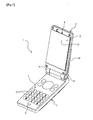
- Fig. 1 is a perspective view illustrating an example of a cellular phone 1 according to a first embodiment of the present invention, and illustrates a state where casings are expanded.
- the cellular phone 1 is a so-called flip phone, in which a display casing 2 and an operation casing 3 respectively formed in rectangular shapes are connected to each other through a hinge part 4. Accordingly, the cellular phone 1 is adapted to be folded with respective main surfaces of the display casing 2 and the operation casing 3 facing to each other.
- a display part 5 and a receiver 6 are arranged on the main surface that faces to the operation casing 3 in the folded state.
- the display part 5 serves as display means that displays a display image.
- the display part 5 includes a liquid crystal display having a rectangular shaped display screen 51, and is arranged such that a longer direction thereof corresponds to that of the display casing 2.
- the receiver 6 is voice output means that is intended to output voice from an opposite side telephone set upon telephone conversation, and arranged at an end part of the display casing 2 on a side opposite to the hinge part 4.
- an operation part 7 and a transmitting microphone 8 are arranged on the main surface that faces to the display casing 2 in the folded state.
- the operation part 7 has a plurality of operation keys 71, and is adapted to be able to perform selection and decision (enter) operations with use of the operation keys 71.
- the transmitting microphone 8 is voice input means that inputs user's voice upon telephone conversation, and arranged at an end part of the operation casing 3 on a side opposite to the hinge part 4.
- the hinge part 4 foldably connects between the display casing 2 and the operation casing 3 such that the respective main surfaces face to each other.
- the hinge part 4 is configured by integrally forming a connecting part 41 rotatably connected to the operation casing 3 and a rectangular plate-like holding part 42 that is arranged with facing to an outer surface of the display casing 2 and rotatably holds the display casing 2 in a horizontal plane.
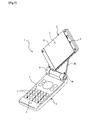
- the display casing 2 is connected to a flat surface part of the holding part 42 rotatably around a rotary shaft (not illustrated) perpendicular to the display screen of the display part 5 with the outer surface thereof facing to the flat surface of the holding part 42 of the hinge part 4. Based on this, the display casing 2 is adapted to be rotatably held in the plane of the holding part 42 parallel to the display screen of the display part 5, and be able to rotate with keeping an inclination angle to the operation casing 3.
- Fig. 2 is a perspective view illustrating a state where the display casing 2 of the cellular phone 1 in Fig. 1 is rotated, and illustrates the state where the display casing 2 is rotated clockwise by approximately 45 ° from the state of Fig. 1 as viewed from the front.
- Fig. 3 is a perspective view illustrating a state where the display casing 2 of the cellular phone 1 in Fig. 1 is rotated, and illustrates the state where the display casing 2 is rotated clockwise by 90 ° from the state of Fig. 1 as viewed from the front.
- a user rotates, with holding the operation casing 3, the display casing 2 in the plane parallel to the display screen 51 of the display part 5 within an angle range of 90 ° with respect to the operation casing 3 to be thereby able to switch the display screen 51 between a vertically long display state illustrated in Fig. 1 and a horizontally long display state illustrated in Fig. 3 .
- a vertically long display state illustrated in Fig. 1 an image is displayed with a longer direction of the display screen 51 being made vertical.
- an image is displayed with a shorter direction of the display screen 51 being made vertical.
- Fig. 4 is a configuration block diagram of the cellular phone 1.
- the cellular phone 1 includes an antenna 11, an amplifier 12, a tuner 13, an A/D converter 14, a decoder 15, a switch detecting part 90, an image enlarging part 91, a display image generating part 92, a display part 5, a speaker 16, and an operation part 7.
- the amplifier 12, the tuner 13, the A/D converter 14, and the decoder 15 constitute a TV image generating part (TV image generating means) 10.
- the cellular phone 1 is adapted to receive a TV broadcast wave with the antenna 11, and by displaying an TV image based on the received TV broadcast wave on the display screen 51 of the display part 5 and also outputting TV voice corresponding to the TV image from the speaker 16, allow a TV broadcast to be watched.
- a signal based on the TV broadcast wave received with the antenna 11 is inputted to the amplifier 12; then a TV broadcast wave corresponding to a specified channel number is extracted in the tuner 13; and an analog signal is converted to a digital signal with the A/D converter 14.
- a channel number can be specified for the tuner 13 by operating the operation keys 71. At this time, by operating the operation keys 71 to input the channel number, the channel number can be directly specified; however, processing of sequentially specifying channel numbers for the tuner 13, i.e., a so-called channel search can also be performed until the TV broadcast wave is normally received.
- the signal based on the TV broadcast wave which is the digital signal into which the analog signal is converted in the A/D converter 14, is inputted to the decoder 15.
- the decoder 15 decodes the signal based on the TV broadcast wave to thereby generate data on the TV image and also data on the TV voice.
- the present embodiment is adapted to, on the basis of the image data generated in the decoder 15, generate a display image including the TV image in the display image generating part 92, and display the display image on the display part 5. Also, the present embodiment is adapted to output the TV voice from the speaker 16 on the basis of the voice data generated in the decoder 15.
- a digital TV broadcast can be received to generate not only a TV image or TV voice but also content data.
- the content data is inputted to the display image generating part 92, and then displayed on the display part 5.
- the cellular phone 1 is adapted such that the content data is displayed on the display part 5, and thereby the user can watch a data broadcast.
- the content data includes a character string generated with use of a BML (Broadcast Markup Language) that is a language for data broadcast, and besides, image data, tag information, and the like.
- BML Broadcast Markup Language
- the character string included in the content data is not limited to one generated with use of the BML, but may be one generated with use of the other language such as an HTML (Hyper Text Markup Language).
- a wireless signal is transmitted/received to/from a base station through an antenna, although not illustrated.
- the cellular phone 1 receives character information such as an electronic mail from the base station through the antenna, it is adapted to display the character information on the display part.
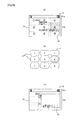
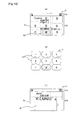
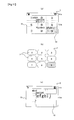
- the present embodiment is adapted such that, when the display casing 2 of the cellular phone 1 is rotated with respect to the operation casing 3, the switch detecting part 90 detects whether the display screen 51 is in the horizontally long display state illustrated in Fig. 5(a) or the vertically long display state illustrated in Fig. 5 (b) .
- the present embodiment is also adapted such that a result of the display state detected by the switch detecting part 90 is inputted to the display image generating part 92.
- the display screen 51 in the horizontally long display state is, as illustrated in Fig. 5(a) , sectioned into a pictogram display area 51a and a TV image display area 51b.
- the display screen 51 in the vertically long display state is, as illustrated in Fig. 5(b) , sectioned into a pictogram display area 51a, TV image display area 51b, and data broadcast display area 51c.
- the image enlarging part 91 serves as image enlarging means that enlarges a part of a TV image, and includes a memory 91a that stores an enlargement target area, and an image enlargement processing part 91b that, on the basis of the enlargement target area stored in the memory 91a, enlarges the part of the TV image to generate an enlarged TV image.
- the enlargement target area 93 serving as a partial area of the TV image is stored, and a plurality of the enlargement target areas 93 set to have the same arrangement order as the operation keys 71 are stored.
- the nine enlargement target areas 93 are set corresponding to an arrangement order of numerical keys (1 to 9 keys) among the operation keys 71 for the TV image display area 51b of the display screen 51. Further, each of the enlargement target areas 93 is set so as to form an overlap area with an adjacent enlargement target area.
- an operation key 71 and the enlargement target area respectively having corresponding arrangement positions are related to each other, and if any of the operation keys 71 in the operation part 7 is specified, an enlargement target region 93 having a corresponding arrangement position will be specified. Then, the specified enlargement target area 93 is inputted to the image enlargement processing part 91b.
- enlargement target area groups respectively corresponding to display images in the horizontally long display state and the vertically long display state are stored.
- the memory 91a is adapted to select, on the basis of a result of detection by the switch detecting part 90, one of the enlargement target area group related to the horizontally long display state or that related to the vertically long display state.
- Each of the enlargement target area groups includes the nine enlargement target areas related to the nine numerical keys.
- the operation keys 71 and the enlargement target areas 93 are related to each other, and also when the relationship is established, the enlargement target area group related to the horizontally long display state and that related to the vertically long display state are set.
- the image enlargement processing part 91b enlarges, on the basis the enlargement target area 93 specified by the operation of the operation key 71, an image within the enlargement target area 93 preliminarily related to the operation key 71 to generate an enlarged TV image.
- Data on the enlarged TV image is inputted to the display image generating part 92.
- an enlargement magnification for the enlarged TV image is set such that when the enlarged TV image is displayed on the display screen 51, it becomes smaller in area than the TV image display area 51b.
- the enlargement magnification may be set such that the enlarged TV image is displayed over the entire area of the TV image display area 51b.
- the display image generating part 92 serves as display image generating means that generates a display image to be displayed on the display screen 51.
- the display image generating part 92 performs processing of generating the display image including a TV image in a normal browsing mode, or in an enlargement browsing mode, generating the display image including an enlarged TV image.
- the normal browsing mode refers to a state where the entire TV image is displayed in the TV image display area 51b of the display screen 51.
- the display image generated in the display image generating part 92 includes not only the TV image but also a pictogram display image and a content data image.
- the present embodiment is adapted such that the user keeps pressing an operation key 71 corresponding to an enlargement target area 93 the user has a desire to enlarge, and thereby the normal browsing mode is changed to the enlargement browsing mode.
- the display image generating part 92 performs the processing of generating a display image so as to include an enlarged TV image generated in the image enlargement processing part 91b.
- the enlargement target area 93 specified by the operation key 71 is inputted from the memory 91a of the image enlarging part 91 to the image enlargement processing part 91b, and the image enlargement processing part 91b enlarges an image within the specified enlargement target area 93 to generate an enlarged TV image.
- the display image generating part 92 receives data on the enlarged TV image from the image enlargement processing part 91b, and generates a display image to be displayed on the display screen 51 such that the enlarged TV image is included in the TV image display area 51b. Then, the display image including the enlarged TV image is displayed on the display screen 51.
- the present embodiment is adapted such that by releasing a finger from the operation key 71 having been kept pressing to set the operation key 71 free in the enlargement browsing mode, the enlargement browsing mode immediately returns to the normal browsing mode in which the entire TV image is displayed. That is, when the finger is released from the operation key 71 having been kept pressing, an enlarged TV image is not generated in the image enlarging part 91, but a display image including the above TV image for the normal browsing mode is generated in the display image generating part 92, and the enlargement browsing mode returns to the normal browsing mode in which the entire TV image is displayed on the display screen 51.
- the display image generating part 92 further performs processing of generating a display image to be displayed on the display screen 51 in the horizontally or vertically long display state, too.
- the display image suited to any of the display states of the display screen 51 is generated on the basis of a result of the detection by the switch detecting part 90.
- each of the enlargement target areas 93 (Nos. [1], [3], [7], and [9]) at the four corners is set to overlap with vertically and horizontally adjacent two enlargement target areas along entire sides thereof, and with an obliquely adjacent enlargement target area at a corner part thereof.
- the No. [1] enlargement target area is set to overlap with the horizontally and vertically adjacent enlargement target areas (Nos. [2] and [4] enlargement target areas) along entire sides thereof, and with the adjacent central enlargement target area (No. [5] enlargement target area) at a corner part thereof.
- an area indicated by hatching is the No. [1] enlargement target area 93.
- each of the Nos. [2], [4], [6], and [8] enlargement target areas is set to overlap with vertically and horizontally adjacent three enlargement target areas respectively along entire sides thereof, and with obliquely adjacent two enlargement target areas at corner parts thereof.
- the No. [5] enlargement target area that is at the center is set to overlap with the obliquely adjacent four enlargement target areas at the four corners thereof, and with the vertically and horizontally adjacent four enlargement target areas along entire sides thereof.
- each of the diagrams illustrates a state where a TV broadcast is received to display a TV image in the TV image display area 51b of the display screen 51.
- a state where the TV image having a plurality of character strings is displayed there is illustrated a state where the TV image having a plurality of character strings is displayed.
- the image enlarging part 91 when the image enlarging part 91 generates the enlarged TV image, it generates the enlarged TV image at an enlargement magnification that produces an area smaller than the area in which the TV image is displayed. Then, the display image generating part 92 superimposes the enlarged TV image on the TV image so as to leave a part of the TV image, and thereby generates a display image having the enlarged TV image and the part of the TV image. Accordingly, in the TV image display area 51b of the display screen 51, the image is displayed with the enlarged TV image being superimposed on the TV image, and the enlarged TV image is enlarged and displayed on the basis of a position of the specified enlargement target area 93 on the display screen 51. As a result, on the basis of a position at which the enlarged TV image in the TV image display area 51b is displayed, it can be easily determined which of the enlargement target areas 93 in the TV image is enlarged.
- enlargement target area 93 is enlarged is displayed in the central part within the TV image display area 51b.
- the character strings "F, G, H, I, and J", and "K, L, M, N, and O" are entirely displayed in the enlarged TV image because of the characters displayed in the overlap areas with the adjacent Nos. [2] and [8] enlargement target areas 93, and therefore content of each of the character strings can be fully recognized.
- [6] enlargement target area 93 is specified with the No. [6] operation key 71, as illustrated in Fig. 9(c) , in a right-hand side vertical central part within the TV image display area 51b, the enlarged TV image in which an image within the No. [6] enlargement target area 93 is enlarged is displayed.
- the character string "efghij" is substantially entirely displayed because of the characters displayed in the overlap area with the adjacent No. [9] enlargement target area 93, and therefore content of the character string can be fully recognized.
- enlargement target area 93 is specified with the No. [9] operation key 71, as illustrated in Fig. 11(c) , in a right-hand side lower part within the TV image display area 51b, the enlarged TV image in which an image within the No. [9] enlargement target area 93 is enlarged is displayed.
- the character string "efghij" is entirely displayed because of the overlap area with the adjacent No. [6] enlargement target area 93, and therefore the content of the character string can be fully recognized.
- the content of the character string "abcd” can be recognized by enlarging the image within the No. [1] enlargement target area.
- the content of the character string "ABCDE” can be recognized by enlarging the image within the No. [2] enlargement target area.
- the content of the character string "FGHIJ” can be recognized by enlarging the image within any of the No. [2] or [5] enlargement target area.
- the content of the character string "KLMNO” can be recognized by enlarging the image within any of the No. [5] or [8] enlargement target area.
- the content of the character string "efghij" can be recognized by enlarging the image within any of the No. [6] or [9] enlargement target area. As described, an overlap area is formed with an adjacent enlargement target area, and therefore in a plurality of enlargement target areas, content of the same character string can be recognized, and only by switching specification of an operation key, an image within an adjacent enlargement target area can be enlarged to display an enlarged TV image, and therefore content of a character string is easy to recognize.
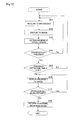
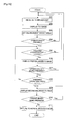
- Fig. 12 is a flowchart illustrating processing of receiving a TV broadcast with the display screen being in the horizontally long display state; changing from the normal browsing mode in which a TV image is displayed on the display screen to the enlargement browsing mode; and enlarging and displaying a part of the image.
- Step S101 When the TV broadcast is received in the horizontally long display state (Step S101), the TV image is displayed on the display screen (Step S102).
- a state of the Step S102 is the normal browsing mode.
- the nine enlargement target areas are set for the TV image display area of the display screen as illustrated in Fig. 5(a) (Step S103).
- Step S104 it is determined whether or not a predetermined operation key has been pressed. If it is determined that the operation key has been pressed (Yes in Step S104), it is further determined whether or not a pressing operation time (t) of the operation key has passed a predetermined time period or more (t1 ⁇ t) (Step S105). If it is determined in Step S104 that the operation key is not pressed (No in Step S104), the flow returns to Step S102 where a display image including the entire TV image is generate to keep the normal browsing mode without enlarging the image.
- t pressing operation time
- Step S105 If the pressing operation time (t) of the operation key has passed the predetermined time period or more (t1 ⁇ t) (Yes in Step S105), the image enlarging part generates an enlarged TV image for an enlargement target area specified by the operation key, and as illustrated in Figs. 6 to 11(c) , a display image including the enlarged TV image, which is generated in the display image generating part, is displayed on the display screen (Step S106). On the other hand, if the pressing operation time does not reach the predetermined time period (No in Step S105), the flow returns to Step S102 where the normal browsing mode in which the entire TV image is displayed on the display screen is kept.
- Step S107 the display image generating part determines whether or not the same operation key is kept pressing. If the operation key is kept pressing without releasing a finger, the flow returns to Step S106 where the enlargement browsing mode in which the enlarged TV image is displayed is kept. On the other hand, if the operation key is not pressed, it is determined that the operation key has been subjected to a releasing operation (No in Step S107), and the flow returns to Step S102 where the enlargement browsing mode returns to the normal browsing mode in which the entire TV image, which is not enlarged, is displayed on the display screen.
- the present embodiment is adapted such that, on the basis of a pressing down operation of an operation key in the operation part performed by a used, an image within an enlargement target area corresponding to the operation key being pressed down is enlarged to display an enlarged TV image.
- the enlargement target area is set to form an overlap area with an enlargement target area adjacent thereto, and therefore larger in area than an enlargement target area formed by simply sectioning with boundary lines.
- the nine enlargement target areas are set for the TV image display area of the display screen, and each of the enlargement target areas is adapted to form overlap areas with adjacent enlargement target areas.
- a TV image display area is equally sectioned by boundary lines 94 to set enlargement target areas.
- a structure of a cellular phone to be used is the same as that in the above-described first embodiment, but a method for setting the enlargement target areas, and a processing method for enlarging the enlargement target areas are different from those in the first embodiment.
- the same components are denoted by the same symbols to omit description thereof.
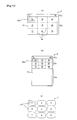
- the present embodiment is adapted such that an image enlarging part 91 sets an enlargement target area group for the display screen in each of the horizontally and vertically display states as illustrated in Figs. 13(a) and (b) , and on the basis of a result of detection by a switch detecting part 90, selects one of the enlargement target area group related to the horizontally long display state or the enlargement target area group related to the vertically long display state.
- Each of the enlargement target groups includes the nine enlargement target areas 93a related to nine numerical keys, and the TV image display area 51b of the display screen 51 is sectioned by the boundary lines 94 to set the respective enlargement target areas 93a.
- the operation keys 71 and the enlargement target areas 93a are related to each other, and when the relationship is established, the enlargement target area group related to the horizontally long display state, and that related to the vertically long display state are set, so that operability upon specification of an enlargement target area 93 with a corresponding operation key 71 can be improved.
- the present embodiment is adapted such that, when any of the operation keys 71 remains pressed, the enlargement browsing mode appears, whereas when a finger is released from the operation key 71, the enlargement browsing mode returns to the normal browsing mode.
- Fig. 14 is a diagram illustrating an example of an aspect in which a TV broadcast is received, and a TV image is displayed on the display screen 51 in the horizontally long display state. Also, in the present embodiment, in the TV image display area 51b of the display screen 51, oval and quadrangular images as illustrated in Fig. 14(a) are displayed. Fig. 14(a) illustrates a state of the TV image displayed on the display screen 51 in the horizontally long display state, and also a state where the TV image display area 51b of the display screen 51 is sectioned into the nine enlargement target areas 93a. In the present embodiment, at an initial stage, any of the enlargement target areas 93a is set so as not to form an overlap area with an adjacent enlargement area.
- Fig. 14(b) illustrates a state where a first enlarged TV image in which an enlargement target area 93a in an upper left part in the state of (a) is specified and enlarged is displayed on the display screen 51.
- Fig. 14(c) illustrates a state where an image within an enlargement target area 93b that is newly set to serve as a larger enlargement target area than the initial enlargement target area 93a illustrated in Fig. 14(a) is enlarged to display a second enlargement TV image.
- the image enlarging part 91 equally sections the entire display area of the TV image display area 51b into the nine enlargement target areas 93a with the boundary lines 93.
- the No. [1] operation key 71 is pressed, and thereby an image within the No. [1] enlargement target area 93a in the left-hand side upper part in Fig. 14(a) is enlarged to display the first enlarged TV image.
- the new second enlargement target area 93b is set, in which the enlargement target area 93a illustrated in Fig. 14(a) is enlarged. Then, as illustrated in Fig. 14(c) , an image within the second enlargement target area 93b is enlarged to display the second enlarged TV image on the display screen 51.
- the second enlargement target area 93b is set to form an overlap area with an adjacent enlargement target area.
- the second enlarged TV image is an enlarged image in which the image within the new second enlargement target area 93b that is the enlarged enlargement target area 93a and formed with the overlap area with the adjacent enlargement target area is enlarged.
- the present embodiment is adapted such that, if the operation key 71 kept pressing is brought into a state of not being pressed, the enlargement browsing mode returns to the normal browsing mode corresponding to the image state illustrated in Fig. 14(a) .
- Fig. 15 is a flowchart illustrating processing of receiving a TV broadcast with the display screen being in the horizontally long display state; changing the normal browsing mode in which a TV image is displayed on the display screen to the enlarged browsing mode; and enlarging and displaying a part of the image.
- Step S201 When the TV broadcast is received in the horizontally long display state (Step S201), the TV image is displayed on the display screen (Step S202).
- a state of Step S202 is the normal browsing mode.
- the nine enlargement target areas are set for the TV image display area of the display screen as illustrated in Fig. 14(a) (Step S203).
- Step S204 it is determined whether or not a predetermined operation key has been pressed. If it is determined that the operation key has been pressed (Yes in Step S204), it is further determined whether or not a pressing operation time (t) of the operation key is within a predetermined time period (t1 ⁇ t ⁇ t2) (Step S205). If it is determined in Step S204 that the operation key is not pressed (No in Step S204), the flow returns to Step S202 where a display image including the entire TV image is generated to keep the normal browsing mode without enlarging the image.
- t pressing operation time
- Step S205 If the pressing operation time (t) of the operation key is within the predetermined time period (t1 ⁇ t ⁇ t2) (Yes in Step S205), the image enlarging part generates an enlarged TV image for an enlargement target area specified by the operation key, and a display image including a first enlarged TV image generated in the display image generating part in the state of Fig. 14(b) is displayed on the display screen (Step S206). On the other hand, if the pressing operation time does not reach the predetermined time period (No in Step S205), the flow returns to Step S202 where the normal browsing mode in which the entire TV image is displayed on the display screen is kept.
- the display image generating part determines whether or not the same operation key is kept pressing without releasing a finger (Step S207). If the operation key is kept pressing without releasing a finger (Yes in Step S207), it is further determined whether or not the pressing operation time of the operation key (t) exceeds the predetermined time period (t2 ⁇ t) (Step S208). On the other hand, if the operation key is not pressed, i.e., if a finger has been released from the operation key to perform a releasing operation (No in Step S207), the flow returns to Step S202 where the normal browsing mode in which the entire TV image is displayed on the display screen is kept.
- Step S208 If it is determined in Step S208 that the pressing operation time (t) of the operation key exceeds the predetermined time period (t2), the image enlarging part generated a second enlarged TV image, and displays on the display screen a display image including the second enlarged TV image generated in the display image generating part in the above-described state in Fig. 14(c) (Step S209). Also, if the pressing operation time is equal to or less than the predetermined time period (t2) (No in Step S208), the flow returns to Step S205.
- Step S210 it is determined whether or not the operation key is pressed. If the pressing operation of the operation key is kept (Yes in Step S210), the flow returns to Step S209 to keep the state where the second enlarged TV image is displayed on the display screen. Also, if it is determined that the operation key is not pressed (Yes in Step S210), the enlargement browsing mode returns to the normal browsing mode (Step S211).
- each of the initially set enlargement target areas 93a is set so as not to form an overlap area with an adjacent enlargement target area, and therefore with the first enlarged TV image that was subjected to the initial enlargement operation and displayed, content of the image may not be fully recognizable.
- a user can keep pressing the operation key to set the enlargement target area 93b that is larger in area than the initial enlargement target area 93, and enlarge an image within the subsequent enlargement target area 93b to display the second enlarged TV image on the display screen.
- the part difficult to recognize can be enlarged stepwise to broaden a display area, and therefore the content of the part becomes recognizable.
- the present second embodiment is adapted such that around an enlarged TV image, a part of a TV image, which is not enlarged, is displayed, and therefore only by watching the enlarged TV image, it can be easily determined at which position an enlargement target area is enlarged.
- an enlargement target area is set such that a half area thereof overlaps with an adjacent enlargement target area.
- a structure of a cellular phone used in the present embodiment is also the same as that in the above-described embodiment 1, but a method for setting enlargement target areas and a processing method for enlarging and displaying an image corresponding to a predetermine enlargement target area are different from those in the first embodiment.
- the same components are denoted by the same symbols to omit description thereof.
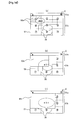
- Fig. 16(a) to (c) illustrates a position and size of each of the enlargement target areas in a TV image display area
- Fig. 16(d) illustrates an arrangement of operation keys in an operation part.
- an image enlarging part 91 sets the nine enlargement target areas 93c for the TV image display area 51b of a display screen 51.
- each of the enlargement target areas 93c is set corresponding to the arrangement of the operation keys 71, and also set such that a half area thereof overlaps with an adjacent enlargement target area 93c.
- enlargement target areas 93c (Nos. [1], [3], [7], [9]) at the four corners are arranged with the TV image display area 51b being sectioned into equal four pieces.
- the remaining enlargement target areas 93c are, as illustrated in Fig. 16(b) , arranged as the same sized areas such that a No. [2] enlargement target area 93c is positioned between the Nos. [1] and [3] enlargement target areas; a No. [8] enlargement target area 93c is positioned between the Nos. [7] and [9] enlargement target areas; a No.
- enlargement target area 93c is positioned between the Nos. [1] and [7] enlargement target areas; and a No. [6] enlargement target area 93c is positioned between the Nos. [3] and [9] enlargement target areas. Also, at the center of them, a No. [5] enlargement target area 93c is arranged.
- Each of the enlargement target areas 93c is set such that a half area thereof overlaps with each of vertically and horizontally adjacent enlargement target areas 93c.
- the No. [1] enlargement target area overlaps with each of the horizontally and vertically adjacent enlargement target areas (Nos. [2] and [4] enlargement target areas) respectively in their half areas, and with the adjacent central enlargement target area (No. [5] enlargement target area) respectively in their 1/4 areas.
- each of the Nos. [2], [4], [6], and [8] enlargement target areas overlaps with each of vertically and horizontally adjacent enlargement target areas respectively in their half areas; and the central No. [5] enlargement target area overlaps with each of the four corner enlargement target areas respectively in their 1/4 areas, and with each of the vertically and horizontally adjacent enlargement target areas respectively in their half areas.
- each of the above-describe enlargement target areas 93c is related to an operation key having the same number as that thereof. Accordingly, by pressing the No. [1] operation key 71, the No. [1] enlargement target area 93c is specified.
- Fig. 17(a) illustrates a state where the nine enlargement target areas 93c are set in the TV image display area 51b of the display screen 51 for the case where the cellular phone 1 is brought into the horizontally long display state.
- Fig. 17(b) illustrates a state of the TV image displayed in the TV image display area 51b of the display screen 51.
- Fig. 17(c) illustrates a state where a first enlarged TV image in which an image within an enlargement target area 93c in an upper left part (No.
- FIG. 17(d) illustrates a state where a second enlarged TV image in which an image within an enlarged target area 93d newly set to serve as a larger enlargement target area than the initial enlargement target area 93c illustrated in (a) is enlarged is displayed.
- the image enlarging part 91 performs processing of enlarging and displaying an image within an enlargement target area corresponding to the operation key 71.
- Fig. 17 Processing of displaying an enlarged TV image in the present third embodiment is specifically described on the basis of Fig. 17 .
- the image enlarging part 91 first sets the nine enlargement target areas 93c for an entire area of the TV image display area 51b of the display screen 51 such that each of the enlargement target areas 93c overlaps with a part of an adjacent enlargement target area as described above.
- the first enlarged TV image is, as illustrated in Fig. 17(c) , displayed in the left-hand side upper part of the TV image display area 51b.
- each of the enlargement target areas 93c is in the state of overlapping with each of vertically and horizontally adjacent enlargement target areas 93c in their half areas, and therefore a size of each of the enlargement target areas 93c is considerably larger than that of each of the enlargement target areas 93 in the above-described first embodiment.
- one of the enlargement target areas is larger in area, so that, as illustrated in Fig. 17(b) , the first enlarged TV image is brought into a state of completely including the entire oval image, and therefore content of the oval image can be surely recognized.
- the cellular phone 1 is adapted such that, by keeping pressing the operation key 71 to obtain the first enlarged TV image illustrated in Fig. 17(c) , and then keeping pressing the operation key 71 for the predetermined time period without releasing a finger, the enlargement target area is enlarged from the first enlarged TV image as illustrated in Fig. 17(d) to be able to display the second enlarged TV image.
- the image enlarging part 91 sets the new second enlargement target area 93d in which the enlargement target area 93c illustrated in Fig. 17(a) is enlarged. Then, as illustrated in Fig. 17(d) , the image within the second enlargement target area 93d is enlarged to generate the second enlarged TV image, and the second enlarged TV image is displayed on the display screen 51 by the display image generating part 92.
- the second enlargement target area 93d is set so as to further increase the overlap areas with the adjacent enlargement target areas. As described, by changing the first enlarged TV image illustrated in Fig. 17(c) to the second enlarged TV image illustrated in Fig. 17(d) , content of the image becomes easier to recognize.
- the present third embodiment is adapted such that around an enlarged TV image, a part of a TV image that is not enlarged is displayed, and therefore only by watching the enlarged TV image, it can be easily determined at which position an enlargement target area is enlarged.
- each of the enlargement target areas is configured to be larger in area so as to overlap with adjacent enlargement target areas, and therefore when a user performs a pressing operation of an operation key in the operation part to enlarge and display an image within an enlargement target area, content of an enlarged and displayed enlarged TV image becomes easy to recognize. Further, by continuously keeping the pressing operation state of the operation key, the enlargement target area can be further enlarged to display an enlarged TV image, and therefore the content of the image becomes easier to recognize.
- a method for setting enlargement target areas is the same as in the above-described third embodiment, and a first enlarged TV image is also displayed in the same manner as in the above-described third embodiment, but a processing method for displaying a subsequent second enlarged TV image is different from that in the above-described third embodiment. That is, in the present fourth embodiment, regarding the second enlarged TV image, content of the first enlarged TV image is enlarged and displayed on a display screen with an enlargement magnification being increased.
- the same components are denoted by the same symbols to omit description thereof.
- a position and a size of each of the enlargement target areas in a TV image display area are the same as those in the third embodiment illustrated in Fig. 16 , and therefore description thereof is omitted.
- each of the above-described enlargement target areas 93 is related to an operation key having the same number as that thereof. Accordingly, by pressing a No. [1] operation key 71, a No. [1] enlargement target area 93c is specified.
- Fig. 18 (a) illustrates a state where the nine enlargement target areas 93c are set in a TV image display area 51b of a display screen 51 for the case where a cellular phone 1 is brought into the horizontally long display state.
- Fig. 18(b) illustrates a state of the TV image displayed in the TV image display area 51b of the display screen 51.
- Fig. 18(c) illustrates a state where a first enlarged TV image in which an image within an enlargement target area 93c in an upper left part (No.
- FIG. 18(d) illustrates a state where an enlargement magnification for the initial enlargement target area 93c illustrated in (a) is increased to display a second enlarged TV image.
- the cellular phone 1 is adapted such that, by keeping pressing the operation key 71 to obtain the first enlarged TV image in Fig. 18(c) , and then keeping pressing the operation key 71 for a predetermine time period without releasing a finger, the first enlarged TV image changes to the second enlarged TV image illustrated in Fig. 18(d) .
- an image enlarging part 91 performs processing of enlarging and displaying an image within an enlargement target area 93 corresponding to the operation key 71.
- Fig. 18(c) by keeping pressing a predetermined operation key 71, the image enlarging part 91enlarges an image within an enlargement target area 93 corresponding to the operation key 71 to generate a first enlarged TV image, and the first enlarged TV image is displayed on the display screen 51 by a display image generating part 92. Then, by further keeping pressing the same operation key 71, the image enlarging part 91 increases an enlargement magnification for the first enlarged TV image to generate a second enlarged TV image, and the second enlarged TV image is displayed on the display screen as illustrated in Fig. 18(d) .
- the present embodiment is adapted such that when the operation key 71 having been kept pressing is restored to a state not being pressed to perform a releasing operation on the operation key, the enlargement browsing mode returns to the state illustrated in Fig. 18(b) , i.e., the normal browsing mode.
- processing of enlarging and displaying a part of an image is performed in the same manner as in the above-described second embodiment.
- the present fourth embodiment is adapted such that around an enlarged TV image, a part of a TV image that is not enlarged is displayed, and therefore only by watching the enlarged TV image, it can be easily determined at which position an enlargement target area is enlarged.
- each of the enlargement target areas is configured to be larger in area so as to overlap with adjacent enlargement target areas, and therefore when a user performs a pressing operation of an operation key in the operation part to enlarge and display an image within an enlargement target area, content of the displayed enlarged TV image becomes easy to recognize. Further, by continuously keeping the pressing operation state of the operation key, an enlargement magnification for the enlarged TV image can be further increased to display an enlarged TV image, and therefore the content of the image becomes easier to recognize.
- the cellular phone according to each of the above embodiments is configured such that when the display casing is rotated in a plane parallel to the display screen of the display part, switching between the vertically long display state and the horizontally long display state is made.
- the structure of the cellular phone may be configured such that direction detecting means such as a geomagnetic sensor for detecting geomagnetism is used to detect an arrangement direction of the display state with respect to a user, and on the basis of a result of the detection, the switching between the vertically long display state and the horizontally long display state is made.
- the cellular phone may be adapted to make the switching on the basis of the rotation or sliding operation of the casing, or by an operation with operation buttons on the casing, and the switching can be arbitrarily set.
- a cellular phone not having the configuration of the cellular phone in any of the above-described embodiments, but configured such that a display casing rotates with respect to an operation casing around a shaft parallel to a display screen of a display part can also be applied. Also, a cellular phone configured such that a display casing slides in a direction parallel to a display screen with respect to an operation casing can also be applied.
- the present invention can also be applied to a cellular phone in which a display casing is adapted to rotate in a plane parallel to a display screen with respect to an operation casing, and when a longer direction of the display casing is positioned vertically to a longer direction of the operation casing, a whole of the casings is brought into an L-shaped state by the display casing and the operation casing. Still further, the present invention can also be applied to a cellular phone in which a display casing slides in a direction parallel to a display screen with respect to an operation casing, and also the display casing rotates in a plane parallel to the display screen with respect to the operation casing. Yet further, the present invention can also be applied to a cellular phone in which a display casing is only folded with respect to an operation casing such that a display part and an operation part face to each other.
- the above-described enlargement target areas of the present invention are set as partial areas of a TV image, but can also be set as partial areas of content data in a data broadcast.
- the data broadcast refers to a system that transmits various pieces of content data such as news and whether forecast, separately from a TV image and TV voice based on a digital TV broadcast wave.
- the image enlargement processing method in each of the above-described embodiments can also be applied to the case where when a TV image is displayed on the display screen 51 in the vertically long display state, a part of the TV image is enlarged and displayed.
Landscapes
- Engineering & Computer Science (AREA)
- Signal Processing (AREA)
- Multimedia (AREA)
- Human Computer Interaction (AREA)
- Theoretical Computer Science (AREA)
- General Engineering & Computer Science (AREA)
- Physics & Mathematics (AREA)
- General Physics & Mathematics (AREA)
- Mathematical Physics (AREA)
- Computer Graphics (AREA)
- Computer Networks & Wireless Communication (AREA)
- Computer Hardware Design (AREA)
- Databases & Information Systems (AREA)
- Business, Economics & Management (AREA)
- Marketing (AREA)
- Controls And Circuits For Display Device (AREA)
- User Interface Of Digital Computer (AREA)
- Telephone Function (AREA)
- Control Of Indicators Other Than Cathode Ray Tubes (AREA)
- Telephone Set Structure (AREA)
Abstract
Description
- The present invention relates to a cellular phone, and more particularly, is an invention preferable for a cellular phone enabling a TV broadcast to be watched.
- Cellular phones includes one that is adapted to include an antenna for receiving a TV broadcast wave transmitted from a broadcast base station; display a TV image on a display screen on the basis of the TV broadcast wave; and output TV voice corresponding to the TV image to thereby enable a TV broadcast to be watched.
- As an example of this sort of cellular phone, there is one adapted such that a display screen is formed in a rectangular shape, and the display screen can be switched between a vertically long display state and a horizontally long display state. The cellular phone of which the display screen is formed in a rectangular shape as described is adapted such that, for example, in the above-described vertically long display state, a TV image is displayed with a longer direction of the display screen being vertical, whereas in the above-described horizontally long display state, the TV image is displayed with a shorter direction of the display screen being vertical.
- Meanwhile, a TV image based on a TV broadcast wave transmitted from a broadcast base station may include characters and the like. For example, in a relay broadcast of a sport such as baseball, football, or volleyball, scores are typically displayed at the end of a display screen. However, a display screen of a cellular phone is very small as compared with that of a typical home-use TV set, and therefore the score display may be difficult to recognize.
- For this reason, there is proposed a technique in which if characters and the like displayed on a display screen of a cellular phone are difficult to visually recognize, a corresponding part is enlarged and displayed (see, for example,
Patent document 1 or 2). - In the cellular phone disclosed in
Patent document - In addition, the cellular phone having the enlargement display function in Patent document is adapted to, by performing a long pressing operation of the predetermined key for a predetermined time period, enlarge and display the image within the enlargement target area corresponding to the key. Also, the cellular phone is adapted such that when the enlarged image display state is restored to an original image state, the same key is again operated.
- Also, in
Patent document 2, a system is adapted such that operations of dividing an image into a plurality of pieces to form divided images, and enlarging the divided images at a predetermined magnification are performed in a server, and data on the enlarged images created in the server in this manner is transmitted to the cellular phone. - Patent document 1: Japanese Unexamined Patent Publication No.
2005-316558 - Patent document 2: Japanese Unexamined Patent Publication No.
2003-273971 - However, what the above-described technique that divides an image to enlarge the divided images does is only to simply equally divide the entire area of the display screen on which the image is displayed to set the enlargement target areas, and then directly magnify an image within any of the enlargement target areas at the predetermined magnification. As a result, there arises a problem that, if successive characters (character string) are displayed on the display screen beyond a boundary line between the respective target regions, a part of the character string is not enlarged, and content of the character string is difficult to recognize, and therefore even if an image within a enlargement target area is enlarged, visibility is not improved.
- The present invention is made in consideration of the above situations, and an object thereof is to provide a cellular phone that when a part of an image displayed on a display screen is enlarged, enables content of the enlarged image to be easily visually recognized.
- A cellular phone according to a first aspect of the present invention includes: TV image generating means that, on the basis of a received TV broadcast wave, generates a TV image; an operation part including a plurality of operation keys that are two-dimensionally arranged in a matrix form; image enlarging means that, in a state where a plurality of enlargement target areas are preliminarily set as partial areas of the TV image, generates an enlarged TV image by, on a basis of an operation of any of the operation keys, enlarging an image within an enlargement target area preliminarily related to the operation key; display image generating means that, in a normal browsing mode, generates a display image including the TV image, and in an enlargement browsing mode, generates a display image including the enlarged TV image; and display means that displays the display image, and is configured such that the respective enlargement target areas respectively correspond in an arrangement order to the preliminarily related operation keys, and form overlap areas with their adjacent enlargement target areas.
- According to such a configuration, in the case where an image within any of the enlargement target areas is enlarged and displayed, the enlargement target area is set to form an overlap area with an adjacent enlargement target area, and therefore a range of the enlargement target area can be made larger by an amount equal to the overlap area, as compared with the case of, as a conventional case, simply enlarging an image within an enlargement target area that is set by equally sectioning an entire area of an image displayed on a display screen. As a result, for example, in the case where a character string that is difficult to recognize in content in a current TV image state is present in the overlap area of the enlargement target area, the content of the character string becomes recognizable by specifying the enlargement target area including many of characters constituting the character string.
- As the character string, scores in a relay broadcast of a sport such as baseball, football, or volleyball, character string indicating data on a player, a character string displayed in news, or the like is exemplified. Also, besides the character string, a finely patterned image or the like is exemplified.
- Further, in the cellular phone of the present invention, the respective enlargement target areas are set to respectively correspond in an arrangement order to the preliminarily related operation keys, so that a correspondence relationship between the enlargement target areas and the operation keys is easy to recognize, and therefore a user can easily specify any of the enlargement target areas.
- A cellular phone according to a second aspect of the present invention is, in addition to the configuration, configured such that the image enlarging means generates the enlarged TV image in an area smaller than an area in which the TV image is displayed, and the display image generating means superimposes the enlarged TV image on the TV image so as to leave a part of the TV image, and generates the display image having the enlarged TV image and the part of the TV image.
- According to such a configuration, in the case where the enlarged TV image generated by enlarging the image within the enlargement target area is displayed by the display means, the part of the TV image, which is not enlarged, can be displayed around the enlarged TV image with the enlarged TV image being superimposed on the TV image having been displayed in the normal browsing mode, and therefore it can be easily determined in which part of the TV image an enlargement target area is enlarged.
- A cellular phone according to a third aspect of the present embodiment is, in addition to the configuration, configured such that on the basis of a pressing down operation of the operation key, the display image generating means generates the display image including the enlarged TV image for the enlargement browsing mode, whereas on the basis of a releasing operation of the operation key, the display image generating means generates the display image including the TV image for the normal browsing mode.
- According to such a configuration, in the cellular phone of the present invention, a user performs an operation of pressing down a predetermined operation key, and can thereby switch to the enlargement browsing mode to enlarge and display the part of the TV image, whereas the user releases a finger from the operation key having been pressed down to perform the releasing operation, and can thereby easily restore the enlargement browsing mode to the normal browsing mode.
- A cellular phone according to a fourth aspect of the present invention is, in addition to the configuration, configured such that the image enlarging means enlarges the enlargement target area to generate the enlarged TV image depending on a time period during which the operation key is subjected to the pressing down operation.
- According to such a configuration, in the cellular phone of the present invention, by keep pressing the operation key, the enlargement target area is changed so as to be enlarged, and an enlarged TV image different in an enlargement target area from an enlarged TV image having been displayed can be displayed on the display means. Specifically, by keep pressing the operation key, the enlargement target area having been set is enlarged to set a new enlargement target area having a different area size, and an image within the larger enlargement target area can be enlarged to display the new enlarged TV image. As a result, even if there occurs a case where, for example, in the enlarged TV image initially displayed on the display means, a character string or the like cannot yet be fully recognized because the character string or the like is in a state where an end part of the character string or the like is still cut off, content of the character string or the like becomes fully recognizable.
- A cellular phone according to a fifth aspect of the present invention is, in addition to the configuration, configured such that the image enlarging means increases an enlargement magnification for the enlargement target area to generate the enlarged TV image depending on a time period during which the operation key is subjected to the pressing down operation.
- According to such a configuration, by keep pressing the operation key, the enlargement magnification upon enlargement of the enlargement target area is changed so as to be increased, and the enlarged TV image generated differently in enlargement magnification from an enlargement TV image having been displayed can be displayed by the display means. Specifically, by keep pressing the operation key, an enlargement magnification for the enlargement target area is set to be increased larger than the enlargement magnification for the enlarged TV image having been displayed, and the new enlarged TV image for which the enlargement magnification is increased can be displayed on the display means. As a result, even in the case where, for example, a character string or the like has a size still difficult to determine in the enlarged TV image initially displayed on the display means, by further increasing an enlargement magnification to display an enlarged TV image, content of the character string or the like becomes fully recognizable.
- A cellular phone according to a sixth aspect of the present invention is, in addition to the configuration, configured such that a display screen of the display means is rectangular shaped; a longer direction of the display screen is changed within a range of 90 degrees with respect to the operation part to enable switching to a vertically long display state or a horizontally long display state; switch detecting means that detects the switching of the display state of the display screen is provided; and the image enlarging means sets enlargement target area groups respectively corresponding to the display screen in the horizontally long display state and the vertically long display state, and on the basis of a result of the detection by the switch detecting means, selects one of the enlargement target area groups.
- According to such a configuration, the enlargement target area groups respectively are set for TV images in the horizontally long display state and the vertically long display state, and therefore even if the display state of the display screen is switched, the enlargement target area at the same arrangement position in the TV image can be specified with the same key operation, and therefore an enlargement operation can be easily performed.
- According to the present invention, each of the enlargement target areas forms an overlap area with an adjacent enlargement target area, and therefore a range of the enlargement target area can be made larger, as compared with the case where, as a conventional case, an image within an enlargement target area set by simply dividing the entire area of an image displayed on a display screen is enlarged. As a result, even in the case where a part such as character string or the like, which is difficult to recognize in content in a current TV image state, is present in the overlap area of the enlargement target area, the content becomes recognizable by specifying the enlargement target area including most of the part.
- Further, in the present invention, the respective enlargement target areas are set to respectively correspond in the arrangement order to the preliminarily related operation keys, so that the correspondence relationship between the enlargement target areas and the operation keys is easy to recognize, and therefore a user can easily specify any of the enlargement target areas, and operability can be improved.
-
Fig. 1 is a perspective view illustrating an example of acellular phone 1 according to a first embodiment of the present invention, and illustrates a state where casings are expanded. Thecellular phone 1 is a so-called flip phone, in which adisplay casing 2 and anoperation casing 3 respectively formed in rectangular shapes are connected to each other through ahinge part 4. Accordingly, thecellular phone 1 is adapted to be folded with respective main surfaces of thedisplay casing 2 and theoperation casing 3 facing to each other. - In the
display casing 2, adisplay part 5 and areceiver 6 are arranged on the main surface that faces to theoperation casing 3 in the folded state. Thedisplay part 5 serves as display means that displays a display image. Also, thedisplay part 5 includes a liquid crystal display having a rectangularshaped display screen 51, and is arranged such that a longer direction thereof corresponds to that of thedisplay casing 2. Thereceiver 6 is voice output means that is intended to output voice from an opposite side telephone set upon telephone conversation, and arranged at an end part of thedisplay casing 2 on a side opposite to thehinge part 4. - In the
operation casing 3, anoperation part 7 and a transmittingmicrophone 8 are arranged on the main surface that faces to thedisplay casing 2 in the folded state. Theoperation part 7 has a plurality ofoperation keys 71, and is adapted to be able to perform selection and decision (enter) operations with use of theoperation keys 71. The transmittingmicrophone 8 is voice input means that inputs user's voice upon telephone conversation, and arranged at an end part of theoperation casing 3 on a side opposite to thehinge part 4. - The
hinge part 4 foldably connects between thedisplay casing 2 and theoperation casing 3 such that the respective main surfaces face to each other. Also, thehinge part 4 is configured by integrally forming a connectingpart 41 rotatably connected to theoperation casing 3 and a rectangular plate-like holding part 42 that is arranged with facing to an outer surface of thedisplay casing 2 and rotatably holds thedisplay casing 2 in a horizontal plane. Thedisplay casing 2 is connected to a flat surface part of theholding part 42 rotatably around a rotary shaft (not illustrated) perpendicular to the display screen of thedisplay part 5 with the outer surface thereof facing to the flat surface of theholding part 42 of thehinge part 4. Based on this, thedisplay casing 2 is adapted to be rotatably held in the plane of theholding part 42 parallel to the display screen of thedisplay part 5, and be able to rotate with keeping an inclination angle to theoperation casing 3. -
Fig. 2 is a perspective view illustrating a state where thedisplay casing 2 of thecellular phone 1 inFig. 1 is rotated, and illustrates the state where thedisplay casing 2 is rotated clockwise by approximately 45 ° from the state ofFig. 1 as viewed from the front.Fig. 3 is a perspective view illustrating a state where thedisplay casing 2 of thecellular phone 1 inFig. 1 is rotated, and illustrates the state where thedisplay casing 2 is rotated clockwise by 90 ° from the state ofFig. 1 as viewed from the front. - A user rotates, with holding the
operation casing 3, thedisplay casing 2 in the plane parallel to thedisplay screen 51 of thedisplay part 5 within an angle range of 90 ° with respect to theoperation casing 3 to be thereby able to switch thedisplay screen 51 between a vertically long display state illustrated inFig. 1 and a horizontally long display state illustrated inFig. 3 . On thedisplay screen 51 in the vertically long display state illustrated inFig. 1 , an image is displayed with a longer direction of thedisplay screen 51 being made vertical. On the other hand, on thedisplay screen 51 in the horizontally long display state illustrated inFig. 3 , an image is displayed with a shorter direction of thedisplay screen 51 being made vertical. -
Fig. 4 is a configuration block diagram of thecellular phone 1. Thecellular phone 1 includes anantenna 11, anamplifier 12, atuner 13, an A/D converter 14, adecoder 15, aswitch detecting part 90, animage enlarging part 91, a displayimage generating part 92, adisplay part 5, aspeaker 16, and anoperation part 7. In the present embodiment, theamplifier 12, thetuner 13, the A/D converter 14, and thedecoder 15 constitute a TV image generating part (TV image generating means) 10. - The
cellular phone 1 is adapted to receive a TV broadcast wave with theantenna 11, and by displaying an TV image based on the received TV broadcast wave on thedisplay screen 51 of thedisplay part 5 and also outputting TV voice corresponding to the TV image from thespeaker 16, allow a TV broadcast to be watched. - A signal based on the TV broadcast wave received with the
antenna 11 is inputted to theamplifier 12; then a TV broadcast wave corresponding to a specified channel number is extracted in thetuner 13; and an analog signal is converted to a digital signal with the A/D converter 14. - A channel number can be specified for the
tuner 13 by operating theoperation keys 71. At this time, by operating theoperation keys 71 to input the channel number, the channel number can be directly specified; however, processing of sequentially specifying channel numbers for thetuner 13, i.e., a so-called channel search can also be performed until the TV broadcast wave is normally received. - The signal based on the TV broadcast wave, which is the digital signal into which the analog signal is converted in the A/
D converter 14, is inputted to thedecoder 15. Thedecoder 15 decodes the signal based on the TV broadcast wave to thereby generate data on the TV image and also data on the TV voice. - The present embodiment is adapted to, on the basis of the image data generated in the
decoder 15, generate a display image including the TV image in the displayimage generating part 92, and display the display image on thedisplay part 5. Also, the present embodiment is adapted to output the TV voice from thespeaker 16 on the basis of the voice data generated in thedecoder 15. - In the
decoder 15 of thecellular phone 1, a digital TV broadcast can be received to generate not only a TV image or TV voice but also content data. The content data is inputted to the displayimage generating part 92, and then displayed on thedisplay part 5. Thecellular phone 1 is adapted such that the content data is displayed on thedisplay part 5, and thereby the user can watch a data broadcast. - The content data includes a character string generated with use of a BML (Broadcast Markup Language) that is a language for data broadcast, and besides, image data, tag information, and the like. Note that the character string included in the content data is not limited to one generated with use of the BML, but may be one generated with use of the other language such as an HTML (Hyper Text Markup Language).
- In addition, when the
cellular phone 1 is use to make a telephone conversation with the opposite side telephone set, a wireless signal is transmitted/received to/from a base station through an antenna, although not illustrated. Also, if thecellular phone 1 receives character information such as an electronic mail from the base station through the antenna, it is adapted to display the character information on the display part. - Further, the present embodiment is adapted such that, when the
display casing 2 of thecellular phone 1 is rotated with respect to theoperation casing 3, theswitch detecting part 90 detects whether thedisplay screen 51 is in the horizontally long display state illustrated inFig. 5(a) or the vertically long display state illustrated inFig. 5 (b) . The present embodiment is also adapted such that a result of the display state detected by theswitch detecting part 90 is inputted to the displayimage generating part 92. - Note that the
display screen 51 in the horizontally long display state is, as illustrated inFig. 5(a) , sectioned into apictogram display area 51a and a TVimage display area 51b. Also, thedisplay screen 51 in the vertically long display state is, as illustrated inFig. 5(b) , sectioned into apictogram display area 51a, TVimage display area 51b, and data broadcastdisplay area 51c. - Also, the
image enlarging part 91 serves as image enlarging means that enlarges a part of a TV image, and includes amemory 91a that stores an enlargement target area, and an imageenlargement processing part 91b that, on the basis of the enlargement target area stored in thememory 91a, enlarges the part of the TV image to generate an enlarged TV image. - In the
memory 91a of theimage enlarging part 91, as illustrated inFig. 5 , theenlargement target area 93 serving as a partial area of the TV image is stored, and a plurality of theenlargement target areas 93 set to have the same arrangement order as theoperation keys 71 are stored. In the present embodiment, the nineenlargement target areas 93 are set corresponding to an arrangement order of numerical keys (1 to 9 keys) among theoperation keys 71 for the TVimage display area 51b of thedisplay screen 51. Further, each of theenlargement target areas 93 is set so as to form an overlap area with an adjacent enlargement target area. - In the
memory 91a, anoperation key 71 and the enlargement target area respectively having corresponding arrangement positions are related to each other, and if any of theoperation keys 71 in theoperation part 7 is specified, anenlargement target region 93 having a corresponding arrangement position will be specified. Then, the specifiedenlargement target area 93 is inputted to the imageenlargement processing part 91b. - Also, in the
memory 91a, as illustrated inFigs. 5(a) and (b) , enlargement target area groups respectively corresponding to display images in the horizontally long display state and the vertically long display state are stored. Thememory 91a is adapted to select, on the basis of a result of detection by theswitch detecting part 90, one of the enlargement target area group related to the horizontally long display state or that related to the vertically long display state. Each of the enlargement target area groups includes the nine enlargement target areas related to the nine numerical keys. As described, in the present embodiment, theoperation keys 71 and theenlargement target areas 93 are related to each other, and also when the relationship is established, the enlargement target area group related to the horizontally long display state and that related to the vertically long display state are set. - The image
enlargement processing part 91b enlarges, on the basis theenlargement target area 93 specified by the operation of theoperation key 71, an image within theenlargement target area 93 preliminarily related to the operation key 71 to generate an enlarged TV image. Data on the enlarged TV image is inputted to the displayimage generating part 92. In the present embodiment, an enlargement magnification for the enlarged TV image is set such that when the enlarged TV image is displayed on thedisplay screen 51, it becomes smaller in area than the TVimage display area 51b. Note that the enlargement magnification may be set such that the enlarged TV image is displayed over the entire area of the TVimage display area 51b. - The display
image generating part 92 serves as display image generating means that generates a display image to be displayed on thedisplay screen 51. The displayimage generating part 92 performs processing of generating the display image including a TV image in a normal browsing mode, or in an enlargement browsing mode, generating the display image including an enlarged TV image. The normal browsing mode refers to a state where the entire TV image is displayed in the TVimage display area 51b of thedisplay screen 51. Note that the display image generated in the displayimage generating part 92 includes not only the TV image but also a pictogram display image and a content data image. - Meanwhile, when a user watches a TV image in the normal browsing mode, he/she may feel a desire to enlarge and display a partial image of the TV image. The present embodiment is adapted such that the user keeps pressing an operation key 71 corresponding to an
enlargement target area 93 the user has a desire to enlarge, and thereby the normal browsing mode is changed to the enlargement browsing mode. When the enlargement browsing mode appears, the displayimage generating part 92 performs the processing of generating a display image so as to include an enlarged TV image generated in the imageenlargement processing part 91b. - Also, in the enlargement browsing mode, by keeping pressing the
operation key 71, the following processing is performed. First, theenlargement target area 93 specified by theoperation key 71 is inputted from thememory 91a of theimage enlarging part 91 to the imageenlargement processing part 91b, and the imageenlargement processing part 91b enlarges an image within the specifiedenlargement target area 93 to generate an enlarged TV image. The displayimage generating part 92 receives data on the enlarged TV image from the imageenlargement processing part 91b, and generates a display image to be displayed on thedisplay screen 51 such that the enlarged TV image is included in the TVimage display area 51b. Then, the display image including the enlarged TV image is displayed on thedisplay screen 51. - Further, the present embodiment is adapted such that by releasing a finger from the operation key 71 having been kept pressing to set the operation key 71 free in the enlargement browsing mode, the enlargement browsing mode immediately returns to the normal browsing mode in which the entire TV image is displayed. That is, when the finger is released from the operation key 71 having been kept pressing, an enlarged TV image is not generated in the
image enlarging part 91, but a display image including the above TV image for the normal browsing mode is generated in the displayimage generating part 92, and the enlargement browsing mode returns to the normal browsing mode in which the entire TV image is displayed on thedisplay screen 51. - In addition, the display
image generating part 92 further performs processing of generating a display image to be displayed on thedisplay screen 51 in the horizontally or vertically long display state, too. The display image suited to any of the display states of thedisplay screen 51 is generated on the basis of a result of the detection by theswitch detecting part 90. - Next, the nine
enlargement target areas 93 set for the TVimage display area 51b of thedisplay screen 51 in each of the horizontally long display state and the vertically long display state in the present embodiment are specifically described on the basis ofFig. 5 . - First, each of the enlargement target areas 93 (Nos. [1], [3], [7], and [9]) at the four corners is set to overlap with vertically and horizontally adjacent two enlargement target areas along entire sides thereof, and with an obliquely adjacent enlargement target area at a corner part thereof. For example, the No. [1] enlargement target area is set to overlap with the horizontally and vertically adjacent enlargement target areas (Nos. [2] and [4] enlargement target areas) along entire sides thereof, and with the adjacent central enlargement target area (No. [5] enlargement target area) at a corner part thereof. Note that, in
Fig. 5(a) , an area indicated by hatching is the No. [1]enlargement target area 93. - Also, each of the Nos. [2], [4], [6], and [8] enlargement target areas is set to overlap with vertically and horizontally adjacent three enlargement target areas respectively along entire sides thereof, and with obliquely adjacent two enlargement target areas at corner parts thereof. The No. [5] enlargement target area that is at the center is set to overlap with the obliquely adjacent four enlargement target areas at the four corners thereof, and with the vertically and horizontally adjacent four enlargement target areas along entire sides thereof.
- Next, specific processing of enlarging an image within a predetermined enlargement target area with respect to a TV image in the horizontally long display state is described on the basis of
Figs. 6 to 11 . By specifying an operation key 71 indicated by hatching in (b) of each of the diagrams, anenlargement target area 93 of thedisplay screen 51, which is indicated by hatching in (a) of each of the diagrams, is specified, and for theenlargement target area 93, an enlarged TV image is generated. A state in which the enlarged TV image is displayed on the display screen is illustrated in (c) of each of the diagrams. Also, (a) of each of the diagrams illustrates a state where a TV broadcast is received to display a TV image in the TVimage display area 51b of thedisplay screen 51. In the present embodiment, there is illustrated a state where the TV image having a plurality of character strings is displayed. - Also, in the present embodiment, when the
image enlarging part 91 generates the enlarged TV image, it generates the enlarged TV image at an enlargement magnification that produces an area smaller than the area in which the TV image is displayed. Then, the displayimage generating part 92 superimposes the enlarged TV image on the TV image so as to leave a part of the TV image, and thereby generates a display image having the enlarged TV image and the part of the TV image. Accordingly, in the TVimage display area 51b of thedisplay screen 51, the image is displayed with the enlarged TV image being superimposed on the TV image, and the enlarged TV image is enlarged and displayed on the basis of a position of the specifiedenlargement target area 93 on thedisplay screen 51. As a result, on the basis of a position at which the enlarged TV image in the TVimage display area 51b is displayed, it can be easily determined which of theenlargement target areas 93 in the TV image is enlarged. - First, there is described a case where, as illustrated in
Fig. 6 , the No. [1]enlargement target area 93 is specified with the No. [1]operation key 71 to display an enlarged TV image on thedisplay screen 51. InFig. 6 (a) , in the No. [1]enlargement target area 93, characters "a", "b", "c", "d", "A", and "F" are displayed. In an overlap area with the adjacent No. [2]enlargement target area 93, the characters "d", "A", and "F" are displayed, and in an overlap area with the adjacent No. [5]enlargement target area 93, the character "F" is displayed. When the No. [1]enlargement target area 93 is specified with the No. [1]operation key 71, as illustrated inFig. 6(c) , the enlarged TV image in which an image within the No. [1]enlargement target area 93 is enlarged is displayed in an upper left part within the TVimage display area 51b. In the enlarged TV image, the character string "abcd" is entirely displayed because of the character "d" displayed in the overlap area with the adjacent No. [2]enlargement target area 93, and therefore content of the character string is fully recognized. - Next, as illustrated in
Fig. 7 , there is described a case where the No. [2]enlargement target area 93 is specified with the No. [2]operation key 71 to display an enlarged TV image on thedisplay screen 51. InFig. 7 (a) , in the No. [2]enlargement target area 93, characters "d", "A", "B", "C", "D", "E", "F", "G", "H", "I", and "J" are displayed. In the overlap area with the adjacent No. [1]enlargement target area 93, the characters "d", "A", and "F" are displayed, and in an overlap area with the adjacent No. [5]enlargement target area 93, the characters "F", "G", "H", "I", and "J" are displayed. When the No.[2]enlargement target area 93 is specified with the No. [2]operation key 71, as illustrated inFig. 7(c) , in a horizontal central upper part within the TVimage display area 51b, the enlarged TV image in which an image within the No. [2]enlargement target area 93 is enlarged is displayed. In the enlarged TV image, the character strings "ABCDE" and "FGHIJ" are entirely displayed because of the characters "A" and "F" displayed in the overlap area with the adjacent No. [1]enlargement target area 93, and therefore content of each of the character strings can be fully recognized. - Next, as illustrated in
Fig. 8 , there is described a case where the No. [5]enlargement target area 93 is specified with the No. [5]operation key 71 to display an enlarged TV image on thedisplay screen 51. InFig. 8 (a) , in the No. [5]enlargement target area 93, characters "F", "G", "H", "I", "J", "K", "L", "M", "N", "O", and "e" are displayed. In the overlap area with the adjacent No. [2]enlargement target area 93, the characters "F", "G", "H", "I", and "J" are displayed, and in an overlap area with the adjacent No. [8]enlargement target area 93, the characters "K", "L", "M", "N", "O", and "e" are displayed. Further, in an overlap area with the adjacent Nos. [1] and [4]enlargement target areas 93, the character "F" is displayed; in an overlap area with the adjacent Nos. [4] and [7]enlargement target areas 93, the character "K" is displayed; and in an overlap area with the adjacent Nos. [6] and [9]enlargement target areas 93, the character "e" is displayed. When the No. [5]enlargement target area 93 is specified with the No. [5]operation key 71, as illustrated inFig. 8(c) , the enlarged TV image in which an image within the No. [5]enlargement target area 93 is enlarged is displayed in the central part within the TVimage display area 51b. The character strings "F, G, H, I, and J", and "K, L, M, N, and O" are entirely displayed in the enlarged TV image because of the characters displayed in the overlap areas with the adjacent Nos. [2] and [8]enlargement target areas 93, and therefore content of each of the character strings can be fully recognized. - Next, as illustrated in
Fig. 9 , there is described a case where the No. [6]enlargement target area 93 is specified with the No. [6]operation key 71 to display an enlarged TV image on thedisplay screen 51. InFig. 9(a) , in the No. [6]enlargement target area 93, characters "e", "f", "g", "h", "i", and "j" are displayed. In an overlap area with the adjacent No. [9]enlargement target area 93, the characters "e", "f", "g", "h", "i" , and "j" are displayed, and in an overlap area with the adjacent Nos. [5] and [8]enlargement target areas 93, the character "e" is displayed. When the No. [6]enlargement target area 93 is specified with the No. [6]operation key 71, as illustrated inFig. 9(c) , in a right-hand side vertical central part within the TVimage display area 51b, the enlarged TV image in which an image within the No. [6]enlargement target area 93 is enlarged is displayed. In the enlarged TV image, the character string "efghij" is substantially entirely displayed because of the characters displayed in the overlap area with the adjacent No. [9]enlargement target area 93, and therefore content of the character string can be fully recognized. - Next, as illustrated in
Fig. 10 , there is described a case where the No. [8]enlargement target area 93 is specified with the No. [8]operation key 71 to display an enlarged TV image on thedisplay screen 51. InFig. 10(a) , in the No. [8]enlargement target area 93, characters "K", "L", "M", "N", "O", and "e" are displayed. In the overlap area with the adjacent No. [5]enlargement target area 93, the characters "K", "L", "M", "N", "O", and "e" are displayed; the character "K" is displayed in the overlap area with the adjacent Nos. [4] and [7]enlargement target areas 93; and the character "e" is displayed in the overlap area with the adjacent Nos. [6] and [9]enlargement target areas 93. When the No. [8]enlargement target area 93 is specified with the No. [8]operation key 71, as illustrated inFig. 10(c) , in a horizontal central lower part within the TVimage display area 51b, the enlarged TV image in which an image within the No. [8]enlargement target area 93 is enlarged is displayed. In the enlarged TV image, the character string "KLMNO" is entirely displayed because of the characters displayed in the overlap area with the adjacent No. [5]enlargement target area 93, and therefore the content of the character string can be fully recognized. - Finally, as illustrated in
Fig. 11 , there is described a case where the No. [9]enlargement target area 93 is specified with the No. [9]operation key 71 to display an enlarged TV image on thedisplay screen 51. InFig. 11(a) , in the No. [9]enlargement target area 93, the characters "e", "f", "g", "j", "i", and "j" are displayed. In the overlap area with the adjacent No. [6]enlargement target area 93, the characters "e", "f', "g", "j", "i", and "j" are displayed, and the character "e" is displayed in the overlap area with the adjacent Nos. [5] and [8]enlargement target areas 93. When the No. [9]enlargement target area 93 is specified with the No. [9]operation key 71, as illustrated inFig. 11(c) , in a right-hand side lower part within the TVimage display area 51b, the enlarged TV image in which an image within the No. [9]enlargement target area 93 is enlarged is displayed. In the enlarged TV image, the character string "efghij" is entirely displayed because of the overlap area with the adjacent No. [6]enlargement target area 93, and therefore the content of the character string can be fully recognized. - In the TV image illustrated in
Figs. 6 to 11 , the content of the character string "abcd" can be recognized by enlarging the image within the No. [1] enlargement target area. The content of the character string "ABCDE" can be recognized by enlarging the image within the No. [2] enlargement target area. The content of the character string "FGHIJ" can be recognized by enlarging the image within any of the No. [2] or [5] enlargement target area. The content of the character string "KLMNO" can be recognized by enlarging the image within any of the No. [5] or [8] enlargement target area. The content of the character string "efghij" can be recognized by enlarging the image within any of the No. [6] or [9] enlargement target area. As described, an overlap area is formed with an adjacent enlargement target area, and therefore in a plurality of enlargement target areas, content of the same character string can be recognized, and only by switching specification of an operation key, an image within an adjacent enlargement target area can be enlarged to display an enlarged TV image, and therefore content of a character string is easy to recognize. -
Fig. 12 is a flowchart illustrating processing of receiving a TV broadcast with the display screen being in the horizontally long display state; changing from the normal browsing mode in which a TV image is displayed on the display screen to the enlargement browsing mode; and enlarging and displaying a part of the image. - When the TV broadcast is received in the horizontally long display state (Step S101), the TV image is displayed on the display screen (Step S102). A state of the Step S102 is the normal browsing mode. When the TV image is displayed on the display screen, the nine enlargement target areas are set for the TV image display area of the display screen as illustrated in
Fig. 5(a) (Step S103). - In the display image generating part, it is determined whether or not a predetermined operation key has been pressed (Step S104). If it is determined that the operation key has been pressed (Yes in Step S104), it is further determined whether or not a pressing operation time (t) of the operation key has passed a predetermined time period or more (t1 ≤ t) (Step S105). If it is determined in Step S104 that the operation key is not pressed (No in Step S104), the flow returns to Step S102 where a display image including the entire TV image is generate to keep the normal browsing mode without enlarging the image.
- If the pressing operation time (t) of the operation key has passed the predetermined time period or more (t1 ≤ t) (Yes in Step S105), the image enlarging part generates an enlarged TV image for an enlargement target area specified by the operation key, and as illustrated in
Figs. 6 to 11(c) , a display image including the enlarged TV image, which is generated in the display image generating part, is displayed on the display screen (Step S106). On the other hand, if the pressing operation time does not reach the predetermined time period (No in Step S105), the flow returns to Step S102 where the normal browsing mode in which the entire TV image is displayed on the display screen is kept. - Then, the display image generating part determines whether or not the same operation key is kept pressing (Step S107). If the operation key is kept pressing without releasing a finger, the flow returns to Step S106 where the enlargement browsing mode in which the enlarged TV image is displayed is kept. On the other hand, if the operation key is not pressed, it is determined that the operation key has been subjected to a releasing operation (No in Step S107), and the flow returns to Step S102 where the enlargement browsing mode returns to the normal browsing mode in which the entire TV image, which is not enlarged, is displayed on the display screen.
- The present embodiment is adapted such that, on the basis of a pressing down operation of an operation key in the operation part performed by a used, an image within an enlargement target area corresponding to the operation key being pressed down is enlarged to display an enlarged TV image. At this time, the enlargement target area is set to form an overlap area with an enlargement target area adjacent thereto, and therefore larger in area than an enlargement target area formed by simply sectioning with boundary lines. As a result, a range displayed within an enlargement target area corresponding to a part the user has a desire to check becomes larger correspondingly, and therefore content of the part becomes easy to recognize.
- In the first embodiment, the nine enlargement target areas are set for the TV image display area of the display screen, and each of the enlargement target areas is adapted to form overlap areas with adjacent enlargement target areas. On the other hand, in a second embodiment, as illustrated in
Figs. 13(a) and (b) , a TV image display area is equally sectioned byboundary lines 94 to set enlargement target areas. In the present embodiment, a structure of a cellular phone to be used is the same as that in the above-described first embodiment, but a method for setting the enlargement target areas, and a processing method for enlarging the enlargement target areas are different from those in the first embodiment. In addition, the same components are denoted by the same symbols to omit description thereof. - The present embodiment is adapted such that an
image enlarging part 91 sets an enlargement target area group for the display screen in each of the horizontally and vertically display states as illustrated inFigs. 13(a) and (b) , and on the basis of a result of detection by aswitch detecting part 90, selects one of the enlargement target area group related to the horizontally long display state or the enlargement target area group related to the vertically long display state. Each of the enlargement target groups includes the nineenlargement target areas 93a related to nine numerical keys, and the TVimage display area 51b of thedisplay screen 51 is sectioned by theboundary lines 94 to set the respectiveenlargement target areas 93a. Even in the present embodiment, theoperation keys 71 and theenlargement target areas 93a are related to each other, and when the relationship is established, the enlargement target area group related to the horizontally long display state, and that related to the vertically long display state are set, so that operability upon specification of anenlargement target area 93 with a corresponding operation key 71 can be improved. - Further, even the present embodiment is adapted such that, when any of the
operation keys 71 remains pressed, the enlargement browsing mode appears, whereas when a finger is released from theoperation key 71, the enlargement browsing mode returns to the normal browsing mode. - Image processing in the enlargement browsing mode in the present embodiment is described on the basis of
Fig. 14. Fig. 14 is a diagram illustrating an example of an aspect in which a TV broadcast is received, and a TV image is displayed on thedisplay screen 51 in the horizontally long display state. Also, in the present embodiment, in the TVimage display area 51b of thedisplay screen 51, oval and quadrangular images as illustrated inFig. 14(a) are displayed.Fig. 14(a) illustrates a state of the TV image displayed on thedisplay screen 51 in the horizontally long display state, and also a state where the TVimage display area 51b of thedisplay screen 51 is sectioned into the nineenlargement target areas 93a. In the present embodiment, at an initial stage, any of theenlargement target areas 93a is set so as not to form an overlap area with an adjacent enlargement area. - Also,
Fig. 14(b) illustrates a state where a first enlarged TV image in which anenlargement target area 93a in an upper left part in the state of (a) is specified and enlarged is displayed on thedisplay screen 51. Further,Fig. 14(c) illustrates a state where an image within anenlargement target area 93b that is newly set to serve as a larger enlargement target area than the initialenlargement target area 93a illustrated inFig. 14(a) is enlarged to display a second enlargement TV image. - In the present embodiment, the
image enlarging part 91 equally sections the entire display area of the TVimage display area 51b into the nineenlargement target areas 93a with the boundary lines 93. In the sectioned state as described above, for example, the No. [1]operation key 71 is pressed, and thereby an image within the No. [1]enlargement target area 93a in the left-hand side upper part inFig. 14(a) is enlarged to display the first enlarged TV image. In the TV image displayed in the normal browsing mode, an image in which a character string "abcd" is displayed inside an oval is displayed; however, in the corresponding first enlarged TV image, the characters "abc" and a part of the oval are only displayed, and therefore a shape of the oval and content of the character string cannot be recognized. - For this reason, in the present embodiment, by keep pressing the No. [1]
operation key 71, the new secondenlargement target area 93b is set, in which theenlargement target area 93a illustrated inFig. 14(a) is enlarged. Then, as illustrated inFig. 14(c) , an image within the secondenlargement target area 93b is enlarged to display the second enlarged TV image on thedisplay screen 51. The secondenlargement target area 93b is set to form an overlap area with an adjacent enlargement target area. - The second enlarged TV image is an enlarged image in which the image within the new second
enlargement target area 93b that is the enlargedenlargement target area 93a and formed with the overlap area with the adjacent enlargement target area is enlarged. As a result, even in the case where the oval image is not entirely displayed in the first enlarged TV image as illustrated inFig. 14(b) , by changing to the second enlarged TV image, the oval image can be brought into a state of being entirely displayed, and therefore not only the oval shape but also the content of the character string inside the oval can be recognized. - In addition, even the present embodiment is adapted such that, if the operation key 71 kept pressing is brought into a state of not being pressed, the enlargement browsing mode returns to the normal browsing mode corresponding to the image state illustrated in
Fig. 14(a) . -
Fig. 15 is a flowchart illustrating processing of receiving a TV broadcast with the display screen being in the horizontally long display state; changing the normal browsing mode in which a TV image is displayed on the display screen to the enlarged browsing mode; and enlarging and displaying a part of the image. - When the TV broadcast is received in the horizontally long display state (Step S201), the TV image is displayed on the display screen (Step S202). A state of Step S202 is the normal browsing mode. When the TV image is displayed on the display screen, the nine enlargement target areas are set for the TV image display area of the display screen as illustrated in
Fig. 14(a) (Step S203). - In a display image generating part, it is determined whether or not a predetermined operation key has been pressed (Step S204). If it is determined that the operation key has been pressed (Yes in Step S204), it is further determined whether or not a pressing operation time (t) of the operation key is within a predetermined time period (t1 ≤ t ≤ t2) (Step S205). If it is determined in Step S204 that the operation key is not pressed (No in Step S204), the flow returns to Step S202 where a display image including the entire TV image is generated to keep the normal browsing mode without enlarging the image.
- If the pressing operation time (t) of the operation key is within the predetermined time period (t1 ≤ t ≤ t2) (Yes in Step S205), the image enlarging part generates an enlarged TV image for an enlargement target area specified by the operation key, and a display image including a first enlarged TV image generated in the display image generating part in the state of
Fig. 14(b) is displayed on the display screen (Step S206). On the other hand, if the pressing operation time does not reach the predetermined time period (No in Step S205), the flow returns to Step S202 where the normal browsing mode in which the entire TV image is displayed on the display screen is kept. - Then, the display image generating part determines whether or not the same operation key is kept pressing without releasing a finger (Step S207). If the operation key is kept pressing without releasing a finger (Yes in Step S207), it is further determined whether or not the pressing operation time of the operation key (t) exceeds the predetermined time period (t2 < t) (Step S208). On the other hand, if the operation key is not pressed, i.e., if a finger has been released from the operation key to perform a releasing operation (No in Step S207), the flow returns to Step S202 where the normal browsing mode in which the entire TV image is displayed on the display screen is kept.
- If it is determined in Step S208 that the pressing operation time (t) of the operation key exceeds the predetermined time period (t2), the image enlarging part generated a second enlarged TV image, and displays on the display screen a display image including the second enlarged TV image generated in the display image generating part in the above-described state in
Fig. 14(c) (Step S209). Also, if the pressing operation time is equal to or less than the predetermined time period (t2) (No in Step S208), the flow returns to Step S205. - In a state where the second enlarged TV image is displayed in Step S209, it is determined whether or not the operation key is pressed (Step S210). If the pressing operation of the operation key is kept (Yes in Step S210), the flow returns to Step S209 to keep the state where the second enlarged TV image is displayed on the display screen. Also, if it is determined that the operation key is not pressed (Yes in Step S210), the enlargement browsing mode returns to the normal browsing mode (Step S211).
- In the present embodiment, each of the initially set
enlargement target areas 93a is set so as not to form an overlap area with an adjacent enlargement target area, and therefore with the first enlarged TV image that was subjected to the initial enlargement operation and displayed, content of the image may not be fully recognizable. In such a case, a user can keep pressing the operation key to set theenlargement target area 93b that is larger in area than the initialenlargement target area 93, and enlarge an image within the subsequentenlargement target area 93b to display the second enlarged TV image on the display screen. As described, if when a TV image is displayed with thecellular phone 1, there is a part of which content is difficult to recognize, the part difficult to recognize can be enlarged stepwise to broaden a display area, and therefore the content of the part becomes recognizable. - In addition, even the present second embodiment is adapted such that around an enlarged TV image, a part of a TV image, which is not enlarged, is displayed, and therefore only by watching the enlarged TV image, it can be easily determined at which position an enlargement target area is enlarged.
- In a third embodiment, as illustrated in
Fig. 16 , an enlargement target area is set such that a half area thereof overlaps with an adjacent enlargement target area. A structure of a cellular phone used in the present embodiment is also the same as that in the above-describedembodiment 1, but a method for setting enlargement target areas and a processing method for enlarging and displaying an image corresponding to a predetermine enlargement target area are different from those in the first embodiment. In addition, the same components are denoted by the same symbols to omit description thereof. -
Fig. 16(a) to (c) illustrates a position and size of each of the enlargement target areas in a TV image display area, andFig. 16(d) illustrates an arrangement of operation keys in an operation part. - Even in the present third embodiment, an
image enlarging part 91 sets the nineenlargement target areas 93c for the TVimage display area 51b of adisplay screen 51. Even in this case, each of theenlargement target areas 93c is set corresponding to the arrangement of theoperation keys 71, and also set such that a half area thereof overlaps with an adjacentenlargement target area 93c. - Specifically, as illustrated in
Fig. 16(a) ,enlargement target areas 93c (Nos. [1], [3], [7], [9]) at the four corners are arranged with the TVimage display area 51b being sectioned into equal four pieces. The remainingenlargement target areas 93c are, as illustrated inFig. 16(b) , arranged as the same sized areas such that a No. [2]enlargement target area 93c is positioned between the Nos. [1] and [3] enlargement target areas; a No. [8]enlargement target area 93c is positioned between the Nos. [7] and [9] enlargement target areas; a No. [4]enlargement target area 93c is positioned between the Nos. [1] and [7] enlargement target areas; and a No. [6]enlargement target area 93c is positioned between the Nos. [3] and [9] enlargement target areas. Also, at the center of them, a No. [5]enlargement target area 93c is arranged. Each of theenlargement target areas 93c is set such that a half area thereof overlaps with each of vertically and horizontally adjacentenlargement target areas 93c. - For example, the No. [1] enlargement target area overlaps with each of the horizontally and vertically adjacent enlargement target areas (Nos. [2] and [4] enlargement target areas) respectively in their half areas, and with the adjacent central enlargement target area (No. [5] enlargement target area) respectively in their 1/4 areas.
- Also, each of the Nos. [2], [4], [6], and [8] enlargement target areas overlaps with each of vertically and horizontally adjacent enlargement target areas respectively in their half areas; and the central No. [5] enlargement target area overlaps with each of the four corner enlargement target areas respectively in their 1/4 areas, and with each of the vertically and horizontally adjacent enlargement target areas respectively in their half areas.
- Even in the present third embodiment, each of the above-describe
enlargement target areas 93c is related to an operation key having the same number as that thereof. Accordingly, by pressing the No. [1]operation key 71, the No. [1]enlargement target area 93c is specified. - Next, specific processing of enlarging an image within a predetermined enlargement target area with respect to a TV image in the horizontally long display state in the present third embodiment is described on the basis of
Fig. 17. Fig. 17(a) illustrates a state where the nineenlargement target areas 93c are set in the TVimage display area 51b of thedisplay screen 51 for the case where thecellular phone 1 is brought into the horizontally long display state.Fig. 17(b) illustrates a state of the TV image displayed in the TVimage display area 51b of thedisplay screen 51.Fig. 17(c) illustrates a state where a first enlarged TV image in which an image within anenlargement target area 93c in an upper left part (No. [1]) in the state of (b) is enlarged is displayed on thedisplay screen 51.Fig. 17(d) illustrates a state where a second enlarged TV image in which an image within anenlarged target area 93d newly set to serve as a larger enlargement target area than the initialenlargement target area 93c illustrated in (a) is enlarged is displayed. - Further, even in the present embodiment, when any of the
operation keys 71 remains pressed, theimage enlarging part 91 performs processing of enlarging and displaying an image within an enlargement target area corresponding to theoperation key 71. - Processing of displaying an enlarged TV image in the present third embodiment is specifically described on the basis of
Fig. 17 . In the case where oval and quadrangular images as illustrated inFig. 17(b) are displayed on thedisplay screen 51 of adisplay part 5, theimage enlarging part 91 first sets the nineenlargement target areas 93c for an entire area of the TVimage display area 51b of thedisplay screen 51 such that each of theenlargement target areas 93c overlaps with a part of an adjacent enlargement target area as described above. - In the case where the
enlargement target area 93c indicated by No. [1] in the left-hand side upper part inFig. 17(b) is enlarged and displayed, a user first performs an operation of pressing the No. [1]operation key 71. If he/she keeps pressing theoperation key 71, as illustrated inFig. 17(c) , an image within the No. [1]enlargement target area 93c corresponding to theoperation key 71 is enlarged to generate a first enlarged TV image with parts of theenlargement target areas 93c (Nos. [2], [4], and [5] enlargement target areas) adjacent to the No. [1]enlargement target area 93c overlapping, and the first enlarged TV image is displayed on the display screen by a displayimage generating part 92. The first enlarged TV image is, as illustrated inFig. 17(c) , displayed in the left-hand side upper part of the TVimage display area 51b. - In the present embodiment, each of the
enlargement target areas 93c is in the state of overlapping with each of vertically and horizontally adjacentenlargement target areas 93c in their half areas, and therefore a size of each of theenlargement target areas 93c is considerably larger than that of each of theenlargement target areas 93 in the above-described first embodiment. As a result, one of the enlargement target areas is larger in area, so that, as illustrated inFig. 17(b) , the first enlarged TV image is brought into a state of completely including the entire oval image, and therefore content of the oval image can be surely recognized. - Also, in the present third embodiment, the
cellular phone 1 is adapted such that, by keeping pressing the operation key 71 to obtain the first enlarged TV image illustrated inFig. 17(c) , and then keeping pressing theoperation key 71 for the predetermined time period without releasing a finger, the enlargement target area is enlarged from the first enlarged TV image as illustrated inFig. 17(d) to be able to display the second enlarged TV image. - That is, by keeping pressing the No. [1]
operation key 71, theimage enlarging part 91 sets the new secondenlargement target area 93d in which theenlargement target area 93c illustrated inFig. 17(a) is enlarged. Then, as illustrated inFig. 17(d) , the image within the secondenlargement target area 93d is enlarged to generate the second enlarged TV image, and the second enlarged TV image is displayed on thedisplay screen 51 by the displayimage generating part 92. The secondenlargement target area 93d is set so as to further increase the overlap areas with the adjacent enlargement target areas. As described, by changing the first enlarged TV image illustrated inFig. 17(c) to the second enlarged TV image illustrated inFig. 17(d) , content of the image becomes easier to recognize. - Further, even the present third embodiment is adapted such that around an enlarged TV image, a part of a TV image that is not enlarged is displayed, and therefore only by watching the enlarged TV image, it can be easily determined at which position an enlargement target area is enlarged.
- Note that the processing of enlarging and displaying a part of an image in the present third embodiment is performed in the same manner as in the above-described second embodiment.
- As described above, in the third embodiment, each of the enlargement target areas is configured to be larger in area so as to overlap with adjacent enlargement target areas, and therefore when a user performs a pressing operation of an operation key in the operation part to enlarge and display an image within an enlargement target area, content of an enlarged and displayed enlarged TV image becomes easy to recognize. Further, by continuously keeping the pressing operation state of the operation key, the enlargement target area can be further enlarged to display an enlarged TV image, and therefore the content of the image becomes easier to recognize.
- In a fourth embodiment, a method for setting enlargement target areas is the same as in the above-described third embodiment, and a first enlarged TV image is also displayed in the same manner as in the above-described third embodiment, but a processing method for displaying a subsequent second enlarged TV image is different from that in the above-described third embodiment. That is, in the present fourth embodiment, regarding the second enlarged TV image, content of the first enlarged TV image is enlarged and displayed on a display screen with an enlargement magnification being increased. In addition, the same components are denoted by the same symbols to omit description thereof. Also, a position and a size of each of the enlargement target areas in a TV image display area are the same as those in the third embodiment illustrated in
Fig. 16 , and therefore description thereof is omitted. - Even in the present fourth embodiment, each of the above-described
enlargement target areas 93 is related to an operation key having the same number as that thereof. Accordingly, by pressing a No. [1]operation key 71, a No. [1]enlargement target area 93c is specified. - Next, specific processing of enlarging an image within a predetermined enlargement target area with respect to a TV image in the horizontally long display state in the present fourth embodiment is described on the basis of
Fig. 18. Fig. 18 (a) illustrates a state where the nineenlargement target areas 93c are set in a TVimage display area 51b of adisplay screen 51 for the case where acellular phone 1 is brought into the horizontally long display state.Fig. 18(b) illustrates a state of the TV image displayed in the TVimage display area 51b of thedisplay screen 51.Fig. 18(c) illustrates a state where a first enlarged TV image in which an image within anenlargement target area 93c in an upper left part (No. [1]) in the state of (b) is enlarged is displayed on thedisplay screen 51.Fig. 18(d) illustrates a state where an enlargement magnification for the initialenlargement target area 93c illustrated in (a) is increased to display a second enlarged TV image. - In the present fourth embodiment, the
cellular phone 1 is adapted such that, by keeping pressing the operation key 71 to obtain the first enlarged TV image inFig. 18(c) , and then keeping pressing theoperation key 71 for a predetermine time period without releasing a finger, the first enlarged TV image changes to the second enlarged TV image illustrated inFig. 18(d) . - Note that, even in the present embodiment, when any of
operation keys 71 remains pressed, animage enlarging part 91 performs processing of enlarging and displaying an image within anenlargement target area 93 corresponding to theoperation key 71. - Processing of displaying an enlarged TV image in the present fourth embodiment is specifically described on the basis of
Fig. 18 . As illustrated inFig. 18(c) , by keeping pressing a predetermined operation key 71, the image enlarging part 91enlarges an image within anenlargement target area 93 corresponding to the operation key 71 to generate a first enlarged TV image, and the first enlarged TV image is displayed on thedisplay screen 51 by a displayimage generating part 92. Then, by further keeping pressing thesame operation key 71, theimage enlarging part 91 increases an enlargement magnification for the first enlarged TV image to generate a second enlarged TV image, and the second enlarged TV image is displayed on the display screen as illustrated inFig. 18(d) . - In addition, even the present embodiment is adapted such that when the operation key 71 having been kept pressing is restored to a state not being pressed to perform a releasing operation on the operation key, the enlargement browsing mode returns to the state illustrated in
Fig. 18(b) , i.e., the normal browsing mode. - Further, even in the present fourth embodiment, processing of enlarging and displaying a part of an image is performed in the same manner as in the above-described second embodiment.
- Still further, even the present fourth embodiment is adapted such that around an enlarged TV image, a part of a TV image that is not enlarged is displayed, and therefore only by watching the enlarged TV image, it can be easily determined at which position an enlargement target area is enlarged.
- Even in the present fourth embodiment, each of the enlargement target areas is configured to be larger in area so as to overlap with adjacent enlargement target areas, and therefore when a user performs a pressing operation of an operation key in the operation part to enlarge and display an image within an enlargement target area, content of the displayed enlarged TV image becomes easy to recognize. Further, by continuously keeping the pressing operation state of the operation key, an enlargement magnification for the enlarged TV image can be further increased to display an enlarged TV image, and therefore the content of the image becomes easier to recognize.
- Also, the cellular phone according to each of the above embodiments is configured such that when the display casing is rotated in a plane parallel to the display screen of the display part, switching between the vertically long display state and the horizontally long display state is made. However, the structure of the cellular phone may be configured such that direction detecting means such as a geomagnetic sensor for detecting geomagnetism is used to detect an arrangement direction of the display state with respect to a user, and on the basis of a result of the detection, the switching between the vertically long display state and the horizontally long display state is made. Further, in order to make the switching of the display screen between the horizontally long display state and the vertically long display state, the cellular phone may be adapted to make the switching on the basis of the rotation or sliding operation of the casing, or by an operation with operation buttons on the casing, and the switching can be arbitrarily set.
- As a cellular phone applicable with the present invention, a cellular phone not having the configuration of the cellular phone in any of the above-described embodiments, but configured such that a display casing rotates with respect to an operation casing around a shaft parallel to a display screen of a display part can also be applied. Also, a cellular phone configured such that a display casing slides in a direction parallel to a display screen with respect to an operation casing can also be applied. Further, the present invention can also be applied to a cellular phone in which a display casing is adapted to rotate in a plane parallel to a display screen with respect to an operation casing, and when a longer direction of the display casing is positioned vertically to a longer direction of the operation casing, a whole of the casings is brought into an L-shaped state by the display casing and the operation casing. Still further, the present invention can also be applied to a cellular phone in which a display casing slides in a direction parallel to a display screen with respect to an operation casing, and also the display casing rotates in a plane parallel to the display screen with respect to the operation casing. Yet further, the present invention can also be applied to a cellular phone in which a display casing is only folded with respect to an operation casing such that a display part and an operation part face to each other.
- Note that the above-described enlargement target areas of the present invention are set as partial areas of a TV image, but can also be set as partial areas of content data in a data broadcast. The data broadcast refers to a system that transmits various pieces of content data such as news and whether forecast, separately from a TV image and TV voice based on a digital TV broadcast wave.
- Further, the image enlargement processing method in each of the above-described embodiments can also be applied to the case where when a TV image is displayed on the
display screen 51 in the vertically long display state, a part of the TV image is enlarged and displayed. - This application claims priority under the Paris Convention based on the following patent application in Japan: patent application filed on October 12, 2007 (Japanese patent application No.
2007-266143 -
- [
Fig. 1] Fig. 1 is a perspective view illustrating an example of a cellular phone according to a first embodiment of the present invention, and illustrates a state where casings are expanded. - [
Fig. 2] Fig. 2 is a perspective view illustrating a state where a display casing of the cellular phone inFig. 1 is rotated, and illustrates the state where the display casing is rotated clockwise by approximately 45 ° from the state ofFig. 1 as viewed from the front. - [
Fig. 3] Fig. 3 is a perspective view illustrating a state where the display casing of the cellular phone inFig. 1 is rotated, and illustrates the state where the display casing is rotated clockwise by 90 ° from the state ofFig. 1 as viewed from the front. - [
Fig. 4] Fig. 4 is a block diagram illustrating a configuration of the cellular phone. - [
Fig. 5] Fig. 5 is a diagram illustrating an arrangement state of enlargement target areas set on a display screen, and a positional relation ship between the enlargement target areas and operation keys in the first embodiment of the present invention. - [
Fig. 6] Fig. 6 is an explanatory diagram of processing of enlarging an image within a No. [1] enlargement target area in the first embodiment of the present invention. - [
Fig. 7] Fig. 7 is an explanatory diagram of processing of enlarging an image within a No. [2] enlargement target area in the first embodiment of the present invention. - [
Fig. 8] Fig. 8 is an explanatory diagram of processing of enlarging an image within a No. [5] enlargement target area in the first embodiment of the present invention. - [
Fig. 9] Fig. 9 is an explanatory diagram of processing of enlarging an image within a No. [6] enlargement target area in the first embodiment of the present invention. - [
Fig. 10] Fig. 10 is an explanatory diagram of processing of enlarging an image within a No. [8] enlargement target area in the first embodiment of the present invention. - [
Fig. 11] Fig. 11 is an explanatory diagram of processing of enlarging an image within a No. [9] enlargement target area in the first embodiment of the present invention. - [
Fig. 12] Fig. 12 is a flowchart illustrating an example of processing for enlarging and displaying a part of a TV image in the first embodiment of the present invention. - [
Fig. 13] Fig. 13 is a diagram illustrating an arrangement state of enlargement target areas set on a display screen, and a positional relation ship between the enlargement target areas and the operation keys in a second embodiment of the present invention. - [
Fig. 14] Fig. 14 is an explanatory diagram of processing of enlarging an image within an enlargement target area in the second embodiment of the present invention. - [
Fig. 15] Fig. 15 is a flowchart illustrating an example of processing for enlarging and displaying a part f a TV image in the second embodiment of the present invention. - [
Fig. 16] Fig. 16 is a diagram illustrating an arrangement state of enlargement target areas set on a display screen, and a positional relationship between enlargement target areas and operation keys in a third embodiment of the present invention. - [
Fig. 17] Fig. 17 is an explanatory diagram of processing of enlarging an image within an enlargement target area in the third embodiment of the present invention. - [
Fig. 18] Fig. 18 is an explanatory diagram of processing of enlarging an image within an enlargement target area in a fourth embodiment of the present invention. -
- 1
- Cellular phone
- 2
- Display casing
- 3
- Operation casing
- 4
- Hinge part
- 41
- Connecting part
- 42
- Holding part
- 5
- Display part
- 51
- Display screen
- 51a
- Pictrogram display
- 51b
- TV image display area
- 51c
- Data broadcast display area
- 6
- Receiver
- 7
- Operation part
- 71
- Operation key
- 8
- Transmitting microphone
- 10
- TV image generating part
- 11
- Antenna
- 12
- Amplifier
- 13
- Tuner
- 14
- A/D converter
- 15
- Decoder
- 16
- Speaker
- 90
- Switch detecting part
- 91
- Image enlarging part
- 91a
- Enlargement target area
- 91b
- Image enlargement processing part
- 92
- Display image generating part
- 93
- Enlargement target area
- 94
- Boundary line
Claims (6)
- A cellular phone comprising:TV image generating means that, on a basis of a received TV broadcast wave, generates a TV image;an operation part including a plurality of operation keys that are two-dimensionally arranged in a matrix form;image enlarging means that, in a state where a plurality of enlargement target areas are preliminarily set as partial areas of said TV image, generates an enlarged TV image by, on a basis of an operation of any of said operation keys, enlarging an image within an enlargement target area preliminarily related to the operation key;display image generating means that, in a normal browsing mode, generates a display image including said TV image, and in an enlargement browsing mode, generates a display image including said enlarged TV image; anddisplay means that displays said display image, whereinsaid respective enlargement target areas respectively correspond in an arrangement order to said preliminarily related operation keys, and form overlap areas with their adjacent enlargement target areas.
- The cellular phone according to claim 1, wherein
said image enlarging means generates the enlarged TV image in an area smaller than an area in which said TV image is displayed, and
said display image generating means superimposes said enlarged TV image on said TV image so as to leave a part of said TV image, and generates the display image having the enlarged TV image and the part of said TV image. - The cellular phone according to claim 1, wherein
on a basis of a pressing down operation of said operation key, said display image generating means generates the display image including said enlarged TV image for the enlargement browsing mode, whereas
on a basis of a releasing operation of said operation key, said display image generating means generates the display image including said TV image for the normal browsing mode. - The cellular phone according to claim 1, wherein
said image enlarging means enlarges said enlargement target area to generate said enlarged TV image depending on a time period during which said operation key is subjected to the pressing down operation. - The cellular phone according to claim 1, wherein
said image enlarging means increases an enlargement magnification for said enlargement target area to generate said enlarged TV image depending on a time period during which said operation key is subjected to the pressing down operation. - The cellular phone according to claim 1, wherein:a display screen of said display means is rectangular shaped;a longer direction of the display screen is changed within a range of 90 degrees with respect to said operation part to enable switching to a vertically long display state or a horizontally long display state;switch detecting means that detects the switching of the display state of said display screen is provided; and
said image enlarging means sets enlargement target area groups respectively corresponding to the display screen in said horizontally long display state and said vertically long display state, and on a basis of a result of the detection by said switch detecting means, selects one of said enlargement target area groups.
Applications Claiming Priority (2)
| Application Number | Priority Date | Filing Date | Title |
|---|---|---|---|
| JP2007266153A JP4351717B2 (en) | 2007-10-12 | 2007-10-12 | Mobile phone |
| PCT/JP2008/065281 WO2009047951A1 (en) | 2007-10-12 | 2008-08-27 | Mobile telephone |
Publications (2)
| Publication Number | Publication Date |
|---|---|
| EP2209306A1 true EP2209306A1 (en) | 2010-07-21 |
| EP2209306A4 EP2209306A4 (en) | 2010-12-01 |
Family
ID=40549099
Family Applications (1)
| Application Number | Title | Priority Date | Filing Date |
|---|---|---|---|
| EP08838354A Withdrawn EP2209306A4 (en) | 2007-10-12 | 2008-08-27 | Mobile telephone |
Country Status (5)
| Country | Link |
|---|---|
| US (1) | US8350965B2 (en) |
| EP (1) | EP2209306A4 (en) |
| JP (1) | JP4351717B2 (en) |
| CN (1) | CN101690178B (en) |
| WO (1) | WO2009047951A1 (en) |
Cited By (7)
| Publication number | Priority date | Publication date | Assignee | Title |
|---|---|---|---|---|
| WO2015009865A1 (en) * | 2013-07-19 | 2015-01-22 | Google Inc. | Visual storytelling on a mobile media-consumption device |
| CN105162954A (en) * | 2015-07-30 | 2015-12-16 | 努比亚技术有限公司 | Embedded picture amplifying method and device, and mobile terminal |
| US9589597B2 (en) | 2013-07-19 | 2017-03-07 | Google Technology Holdings LLC | Small-screen movie-watching using a viewport |
| US9779480B2 (en) | 2013-07-19 | 2017-10-03 | Google Technology Holdings LLC | View-driven consumption of frameless media |
| US9851868B2 (en) | 2014-07-23 | 2017-12-26 | Google Llc | Multi-story visual experience |
| US9933921B2 (en) | 2013-03-13 | 2018-04-03 | Google Technology Holdings LLC | System and method for navigating a field of view within an interactive media-content item |
| US10341731B2 (en) | 2014-08-21 | 2019-07-02 | Google Llc | View-selection feedback for a visual experience |
Families Citing this family (8)
| Publication number | Priority date | Publication date | Assignee | Title |
|---|---|---|---|---|
| CN101616281A (en) * | 2009-06-26 | 2009-12-30 | 中兴通讯股份有限公司南京分公司 | A kind of with local method and the portable terminal that amplifies of mobile TV playing picture |
| JP5407950B2 (en) * | 2010-03-11 | 2014-02-05 | ソニー株式会社 | Information processing apparatus, information processing method, and program |
| JP5723631B2 (en) * | 2011-02-23 | 2015-05-27 | 京セラ株式会社 | Mobile terminal device |
| US20130091473A1 (en) * | 2011-10-11 | 2013-04-11 | Microsoft Corporation | Changing display between grid and form views |
| KR102084582B1 (en) * | 2012-02-24 | 2020-03-04 | 삼성전자 주식회사 | Method and apparatus for adjusting the size of displayed object |
| KR20140144056A (en) * | 2013-06-10 | 2014-12-18 | 삼성전자주식회사 | Method for object control and an electronic device thereof |
| JP6027703B1 (en) * | 2016-09-12 | 2016-11-16 | シャープ株式会社 | Information processing apparatus and control program |
| JP2020161520A (en) * | 2019-03-25 | 2020-10-01 | ソニーセミコンダクタソリューションズ株式会社 | Imaging device |
Family Cites Families (15)
| Publication number | Priority date | Publication date | Assignee | Title |
|---|---|---|---|---|
| JPH04199371A (en) * | 1990-11-29 | 1992-07-20 | Ricoh Co Ltd | image display device |
| JP2643045B2 (en) * | 1991-10-31 | 1997-08-20 | 富士通株式会社 | Display enlargement / reduction method |
| JPH08263251A (en) * | 1995-03-23 | 1996-10-11 | Fuji Photo Film Co Ltd | Method and device for displaying image |
| JPH0950509A (en) * | 1995-08-08 | 1997-02-18 | Toshiba Corp | Map information management system |
| US7148909B2 (en) * | 1998-05-27 | 2006-12-12 | Canon Kabushiki Kaisha | Image display system capable of displaying and scaling images on plurality of image sources and display control method therefor |
| JP2002182638A (en) * | 2000-12-11 | 2002-06-26 | Matsushita Electric Ind Co Ltd | Image display device and image display system |
| US6678009B2 (en) * | 2001-02-27 | 2004-01-13 | Matsushita Electric Industrial Co., Ltd. | Adjustable video display window |
| JP3890241B2 (en) * | 2002-03-13 | 2007-03-07 | キヤノン株式会社 | Information processing system and information processing method |
| JP2004110719A (en) * | 2002-09-20 | 2004-04-08 | Cresys:Kk | Image display system and computer program |
| JP2005156627A (en) * | 2003-11-20 | 2005-06-16 | Sharp Corp | Display device, mobile phone device including the display device, image display method, image display program, and recording medium storing image program |
| US7317449B2 (en) | 2004-03-02 | 2008-01-08 | Microsoft Corporation | Key-based advanced navigation techniques |
| KR100557135B1 (en) * | 2004-04-13 | 2006-03-03 | 삼성전자주식회사 | Multiple channel display and channel change method in portable terminal equipped with television video signal receiving function |
| JP2005316558A (en) | 2004-04-27 | 2005-11-10 | Sanyo Electric Co Ltd | Screen zooming method |
| JP2007060555A (en) * | 2005-08-26 | 2007-03-08 | Canon Inc | Television program display device, display control method, program, storage medium |
| JP5016832B2 (en) | 2006-03-27 | 2012-09-05 | 株式会社東芝 | Nonvolatile semiconductor memory device and manufacturing method thereof |
-
2007
- 2007-10-12 JP JP2007266153A patent/JP4351717B2/en not_active Expired - Fee Related
-
2008
- 2008-08-27 EP EP08838354A patent/EP2209306A4/en not_active Withdrawn
- 2008-08-27 WO PCT/JP2008/065281 patent/WO2009047951A1/en not_active Ceased
- 2008-08-27 CN CN2008800217745A patent/CN101690178B/en not_active Expired - Fee Related
-
2010
- 2010-04-07 US US12/755,850 patent/US8350965B2/en not_active Expired - Fee Related
Cited By (11)
| Publication number | Priority date | Publication date | Assignee | Title |
|---|---|---|---|---|
| US9933921B2 (en) | 2013-03-13 | 2018-04-03 | Google Technology Holdings LLC | System and method for navigating a field of view within an interactive media-content item |
| US10845969B2 (en) | 2013-03-13 | 2020-11-24 | Google Technology Holdings LLC | System and method for navigating a field of view within an interactive media-content item |
| WO2015009865A1 (en) * | 2013-07-19 | 2015-01-22 | Google Inc. | Visual storytelling on a mobile media-consumption device |
| US9589597B2 (en) | 2013-07-19 | 2017-03-07 | Google Technology Holdings LLC | Small-screen movie-watching using a viewport |
| US9766786B2 (en) | 2013-07-19 | 2017-09-19 | Google Technology Holdings LLC | Visual storytelling on a mobile media-consumption device |
| US9779480B2 (en) | 2013-07-19 | 2017-10-03 | Google Technology Holdings LLC | View-driven consumption of frameless media |
| US10056114B2 (en) | 2013-07-19 | 2018-08-21 | Colby Nipper | Small-screen movie-watching using a viewport |
| US9851868B2 (en) | 2014-07-23 | 2017-12-26 | Google Llc | Multi-story visual experience |
| US10341731B2 (en) | 2014-08-21 | 2019-07-02 | Google Llc | View-selection feedback for a visual experience |
| CN105162954A (en) * | 2015-07-30 | 2015-12-16 | 努比亚技术有限公司 | Embedded picture amplifying method and device, and mobile terminal |
| CN105162954B (en) * | 2015-07-30 | 2018-11-20 | 努比亚技术有限公司 | embedded picture amplifying method, device and mobile terminal |
Also Published As
| Publication number | Publication date |
|---|---|
| WO2009047951A1 (en) | 2009-04-16 |
| JP2009094973A (en) | 2009-04-30 |
| CN101690178B (en) | 2011-11-16 |
| JP4351717B2 (en) | 2009-10-28 |
| EP2209306A4 (en) | 2010-12-01 |
| US20100208138A1 (en) | 2010-08-19 |
| US8350965B2 (en) | 2013-01-08 |
| CN101690178A (en) | 2010-03-31 |
Similar Documents
| Publication | Publication Date | Title |
|---|---|---|
| EP2209306A1 (en) | Mobile telephone | |
| KR100723212B1 (en) | Electronic terminal having a split screen display function and a screen display method thereof | |
| US8140059B2 (en) | Portable information terminal device | |
| JP5765224B2 (en) | PORTABLE TERMINAL DEVICE, ITS CONTROL PROGRAM, AND MULTI-DISPLAY SCREEN CONTROL METHOD | |
| US9755999B2 (en) | Method and apparatus for changing font size of message in a mobile communication terminal | |
| US7489363B2 (en) | Method of scaling partial area of main picture | |
| JP2008017373A (en) | Mobile phone | |
| KR100652624B1 (en) | How to display standby screen of mobile communication terminal | |
| JP5231361B2 (en) | Electronic equipment and information processing program | |
| JP4255567B2 (en) | Mobile phone equipment | |
| US20090303257A1 (en) | Mobile terminal device and display control method | |
| EP2001205A9 (en) | Mobile communication terminal | |
| EP3617865A1 (en) | Input device, mobile terminal, input device control method, and input device control program | |
| JP2007142762A (en) | Mobile terminal device | |
| US20100041441A1 (en) | Electronic apparatus | |
| JP2005198259A (en) | Portable information terminal device | |
| KR100889088B1 (en) | How to display multi-task screen of portable terminal | |
| KR101422011B1 (en) | Communication terminal and displaying method therein | |
| JP4640758B2 (en) | Portable information terminal and portable communication terminal | |
| JP2006119229A (en) | Method for enlarging display information in portable terminal, portable terminal and program thereof | |
| US20120038575A1 (en) | Method and device for inputting characters | |
| JP4818206B2 (en) | Electronic device and its menu screen display method | |
| KR20060022114A (en) | A mobile communication terminal having a designated menu enlargement function of a display window and a control method thereof | |
| KR20010106372A (en) | A mobile phone which has function of enlarging characters on the display panel | |
| KR100757743B1 (en) | Character input device and method in portable terminal |
Legal Events
| Date | Code | Title | Description |
|---|---|---|---|
| PUAI | Public reference made under article 153(3) epc to a published international application that has entered the european phase |
Free format text: ORIGINAL CODE: 0009012 |
|
| 17P | Request for examination filed |
Effective date: 20100419 |
|
| AK | Designated contracting states |
Kind code of ref document: A1 Designated state(s): AT BE BG CH CY CZ DE DK EE ES FI FR GB GR HR HU IE IS IT LI LT LU LV MC MT NL NO PL PT RO SE SI SK TR |
|
| AX | Request for extension of the european patent |
Extension state: AL BA MK RS |
|
| A4 | Supplementary search report drawn up and despatched |
Effective date: 20101103 |
|
| DAX | Request for extension of the european patent (deleted) | ||
| 17Q | First examination report despatched |
Effective date: 20140415 |
|
| GRAP | Despatch of communication of intention to grant a patent |
Free format text: ORIGINAL CODE: EPIDOSNIGR1 |
|
| RIC1 | Information provided on ipc code assigned before grant |
Ipc: G06F 1/16 20060101ALI20160411BHEP Ipc: H04N 21/414 20110101ALI20160411BHEP Ipc: H04M 1/02 20060101ALI20160411BHEP Ipc: H04M 1/725 20060101ALI20160411BHEP Ipc: H04N 5/445 20060101ALI20160411BHEP Ipc: H04N 21/422 20110101ALI20160411BHEP Ipc: G06F 3/0489 20130101AFI20160411BHEP Ipc: H04N 21/4728 20110101ALI20160411BHEP |
|
| INTG | Intention to grant announced |
Effective date: 20160506 |
|
| STAA | Information on the status of an ep patent application or granted ep patent |
Free format text: STATUS: THE APPLICATION IS DEEMED TO BE WITHDRAWN |
|
| 18D | Application deemed to be withdrawn |
Effective date: 20160917 |