EP2134069A1 - User interface for previewing notifications - Google Patents
User interface for previewing notifications Download PDFInfo
- Publication number
- EP2134069A1 EP2134069A1 EP08158103A EP08158103A EP2134069A1 EP 2134069 A1 EP2134069 A1 EP 2134069A1 EP 08158103 A EP08158103 A EP 08158103A EP 08158103 A EP08158103 A EP 08158103A EP 2134069 A1 EP2134069 A1 EP 2134069A1
- Authority
- EP
- European Patent Office
- Prior art keywords
- electronic device
- user interface
- notification
- visual
- tactile
- Prior art date
- Legal status (The legal status is an assumption and is not a legal conclusion. Google has not performed a legal analysis and makes no representation as to the accuracy of the status listed.)
- Withdrawn
Links
Images




Classifications
-
- G—PHYSICS
- G06—COMPUTING OR CALCULATING; COUNTING
- G06F—ELECTRIC DIGITAL DATA PROCESSING
- G06F3/00—Input arrangements for transferring data to be processed into a form capable of being handled by the computer; Output arrangements for transferring data from processing unit to output unit, e.g. interface arrangements
- G06F3/01—Input arrangements or combined input and output arrangements for interaction between user and computer
- G06F3/011—Arrangements for interaction with the human body, e.g. for user immersion in virtual reality
-
- G—PHYSICS
- G06—COMPUTING OR CALCULATING; COUNTING
- G06F—ELECTRIC DIGITAL DATA PROCESSING
- G06F3/00—Input arrangements for transferring data to be processed into a form capable of being handled by the computer; Output arrangements for transferring data from processing unit to output unit, e.g. interface arrangements
- G06F3/01—Input arrangements or combined input and output arrangements for interaction between user and computer
- G06F3/016—Input arrangements with force or tactile feedback as computer generated output to the user
-
- G—PHYSICS
- G06—COMPUTING OR CALCULATING; COUNTING
- G06F—ELECTRIC DIGITAL DATA PROCESSING
- G06F3/00—Input arrangements for transferring data to be processed into a form capable of being handled by the computer; Output arrangements for transferring data from processing unit to output unit, e.g. interface arrangements
- G06F3/01—Input arrangements or combined input and output arrangements for interaction between user and computer
- G06F3/048—Interaction techniques based on graphical user interfaces [GUI]
- G06F3/0481—Interaction techniques based on graphical user interfaces [GUI] based on specific properties of the displayed interaction object or a metaphor-based environment, e.g. interaction with desktop elements like windows or icons, or assisted by a cursor's changing behaviour or appearance
-
- G—PHYSICS
- G06—COMPUTING OR CALCULATING; COUNTING
- G06F—ELECTRIC DIGITAL DATA PROCESSING
- G06F3/00—Input arrangements for transferring data to be processed into a form capable of being handled by the computer; Output arrangements for transferring data from processing unit to output unit, e.g. interface arrangements
- G06F3/16—Sound input; Sound output
-
- H—ELECTRICITY
- H04—ELECTRIC COMMUNICATION TECHNIQUE
- H04M—TELEPHONIC COMMUNICATION
- H04M1/00—Substation equipment, e.g. for use by subscribers
- H04M1/72—Mobile telephones; Cordless telephones, i.e. devices for establishing wireless links to base stations without route selection
- H04M1/724—User interfaces specially adapted for cordless or mobile telephones
- H04M1/72448—User interfaces specially adapted for cordless or mobile telephones with means for adapting the functionality of the device according to specific conditions
-
- H—ELECTRICITY
- H04—ELECTRIC COMMUNICATION TECHNIQUE
- H04M—TELEPHONIC COMMUNICATION
- H04M19/00—Current supply arrangements for telephone systems
- H04M19/02—Current supply arrangements for telephone systems providing ringing current or supervisory tones, e.g. dialling tone or busy tone
- H04M19/04—Current supply arrangements for telephone systems providing ringing current or supervisory tones, e.g. dialling tone or busy tone the ringing-current being generated at the substations
-
- H—ELECTRICITY
- H04—ELECTRIC COMMUNICATION TECHNIQUE
- H04M—TELEPHONIC COMMUNICATION
- H04M19/00—Current supply arrangements for telephone systems
- H04M19/02—Current supply arrangements for telephone systems providing ringing current or supervisory tones, e.g. dialling tone or busy tone
- H04M19/04—Current supply arrangements for telephone systems providing ringing current or supervisory tones, e.g. dialling tone or busy tone the ringing-current being generated at the substations
- H04M19/047—Vibrating means for incoming calls
-
- H—ELECTRICITY
- H04—ELECTRIC COMMUNICATION TECHNIQUE
- H04M—TELEPHONIC COMMUNICATION
- H04M19/00—Current supply arrangements for telephone systems
- H04M19/02—Current supply arrangements for telephone systems providing ringing current or supervisory tones, e.g. dialling tone or busy tone
- H04M19/04—Current supply arrangements for telephone systems providing ringing current or supervisory tones, e.g. dialling tone or busy tone the ringing-current being generated at the substations
- H04M19/048—Arrangements providing optical indication of the incoming call, e.g. flasher circuits
Definitions
- the present specification relates generally to electronic devices, and in particular to a method and user interface for previewing notification settings in an electronic device.
- an electronic device such as a wireless communication device (e.g. portable phone, smart phone, PDA, etc). More particularly, various combinations and settings of auditory, visual and tactile notifications may be associated with specific events. For example, various combinations of ring tones, vibration modes, message light flashing, etc. may be selected for notification of specific events such as incoming calls and emails, appointments, tasks, etc. Such combinations and settings may be saved according to various profiles, such as loud, vibrate, quiet, normal, phone only, etc. Thus, an electronic device may be programmed with specific settings of volume, vibration, message light flashing associated with a particular event (e.g. incoming email) and/or state of the device (e.g. in holster), which settings may then be saved in a notification profile (e.g. Email - Default).
- a notification profile e.g. Email - Default
- a method and a user interface are set forth for previewing notification settings in an electronic device, such as a wireless communication device.
- a method of operating an electronic device comprising: configuring parameters of a notification setting comprising at least two of auditory, visual and tactile notifications for association with specific events on said electronic device; generating a window display having a first area thereof with multiple selectable fields depicting said parameters, and a second area having an icon for previewing said notification setting; and previewing said notification setting via at least two of said audio output, visual output and tactile output responsive to selection of said icon.
- a user interface for an electronic device comprising: at least one input device; at least one audio output; at least one visual output; at least one tactile output; and a window display generated responsive to a first input to said at least one input device, said window display having a first area thereof with multiple selectable fields for configuring parameters of a notification setting comprising at least two of auditory, visual and tactile notifications for association with specific events on said electronic device, and a second area having an icon selectable by a second input to said at least one input device for previewing said notification setting via at least two of said audio output, visual output and tactile output.
- Figure 1 is a simplified block diagram of a wireless communication system
- Figure 2 is a block diagram of components of a portable electronic device
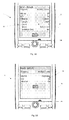
- Figures 3A-3C are screen shot representations of a graphical user interface of the portable electronic device in Figure 2 for previewing notification settings, according to an embodiment
- Figure 4 is a flowchart showing a method of operating an electronic device for previewing notification settings, according to the embodiment of Figures 3A -3C .
- FIG 1 is a simplified block diagram of an exemplary communication system 10 for an electronic device 12, such as a wireless communication device.
- the electronic device 12 is operable to effect communications over a radio communications channel and communicates with a base station (not shown) while located within a coverage area that is defined by the base station.
- the portable electronic device 12 is not limited to a device capable of effecting communications.
- the exemplary method of previewing notification settings set forth in greater detail below may advantageously be implemented within a multitude of devices, some of which are capable of communications and others of which are not (e.g. portable entertainment devices, PDAs, mobile phones, smart telephones, laptop computers, etc.).
- the base station (not shown) is part of a wireless network that is in communication with the Internet 14. Data is delivered to the electronic device 12 via wireless transmission from the base station. Similarly, data is sent from the electronic device 12 via wireless transmission to the base station.
- wireless networks include GSM/GPRS, CDPD, TDMA, iDEN, Mobitex, DataTAC networks, EDGE, EVDO or UMTS and broadband networks such as Bluetooth and variants of 802.11.
- a server 18 handles wireless client requests from the electronic device 12.
- a firewall, or proxy server, 16 is provided between the server 18 and the Internet 14.
- the server 18 further operates as a Mail Server, which communicates with an email client of the electronic device 12 to allow a user to send and receive email messages.
- FIG. 2 is a block diagram showing certain components within an exemplary embodiment of the electronic device 12.
- the electronic device 12 includes a processor 20 connected to a read-only-memory (ROM) 21 that contains a plurality of applications executable by the processor 20 for enabling the electronic device 12 to perform certain functions including, for example, Personal Identification Number (PIN) message functions, Short Message Service (SMS) message functions, address book and calendaring functions, camera functions, and cellular telephone functions. More particularly, processor 20 may execute applications within ROM 21 for notifying the user of events such as incoming calls and/or emails, appointments, tasks, etc., as hereinbefore described.
- the processor 20 is also connected to a random access memory unit (RAM) 22 and a persistent storage device 23 to facilitate various non-volatile storage functions of the electronic device 12.
- RAM random access memory unit
- the processor 20 receives input from one or more input devices, including a keypad 24A and trackball 24B.
- the processor 20 outputs to one or more visual output devices, including a Liquid Crystal Display (LCD) display 25 and a message lamp or LED 31, and one or more audio output devices such as phone speaker 27, as well as to a vibrator 30, for tactile notification of device events, such as incoming calls or emails, etc., by vibrating the device 12, in a well known manner.
- the device 12 includes a microphone 26 connected to the processor 20 for providing cellular telephone functions in association with phone speaker 27.
- the processor 20 is also connected to a modem and radio device 28.
- the modem and radio device 28 is used to connect to wireless networks and transmit and receive voice and data communications through an antenna 29.
- Other devices and features may be provided, such as a camera (not shown) for taking pictures that can be viewed on display 25, sent to other users via wireless email, saved to persistent storage 23 for later viewing, etc.
- “user interface” comprises an input device (such as keypad 24A, trackball 24B, etc.) and at least one graphical window displayed via an output device (such as display 25).
- electronic device 12 may be used to create customizable configurations of auditory, visual and tactile notifications for association with events such as incoming calls or emails, calendar notifications, task reminders, etc.
- a home screen window (not shown) is displayed (60) from which a user may launch various applications by selecting associated icons on display 25.
- a determination is made (62) as to whether the user has selected to configure notification settings. If not, the device 12 launches another application associated with the user selected icon (63). If the user has selected to configure notification settings, a window (33) is displayed (64) as shown in Figure 3A .
- user selection (61) may comprise one input or several inputs to the input device(s) (keypad 24A, trackball 24B, etc.) through a menu tree of multiple selections to arrive at the window (33).
- user interface window (33) includes a first area thereof (35) having multiple selectable fields for configuring a notification setting comprising an auditory notification (ringtone), a visual notification (LED), and a tactile notification (vibration), and a second area having an icon such as an input button (37) for previewing the notification setting shown in the first window area (35).
- a ring tone: Notifier_Crystal has been selected with a volume value of "60”
- the message LED is indicated as being active
- a custom vibration mode has been selected for operation only when the device 12 is in its holster, with a "short” vibration length of "5" prior to playing the ring tone.
- the input button (37) includes text for encouraging selection thereof (e.g. "Try It”).
- the window (33) is updated and displayed (64) to reflect the new parameters.
- the volume of the ring tone has been changed to "Escalating”
- the volume has been set to "50" with LED and vibration mode both being "On”.
- the device 12 previews the selected parameter settings (71) by simultaneously playing any selected ring tone through the phone speaker (27) according to any set parameters (e.g. volume), flashing the message light (31) according to any set parameters (e.g. on/off durations, etc), and/or vibrating the device via the vibrator (30) according to any set parameters (e.g. number and duration of vibration pulses, etc.).
- any set parameters e.g. volume
- flashing the message light (31) e.g. on/off durations, etc
- vibrating the device via the vibrator (30) e.g. number and duration of vibration pulses, etc.
Landscapes
- Engineering & Computer Science (AREA)
- Theoretical Computer Science (AREA)
- General Engineering & Computer Science (AREA)
- Human Computer Interaction (AREA)
- Signal Processing (AREA)
- General Physics & Mathematics (AREA)
- Physics & Mathematics (AREA)
- Computer Networks & Wireless Communication (AREA)
- Health & Medical Sciences (AREA)
- Audiology, Speech & Language Pathology (AREA)
- General Health & Medical Sciences (AREA)
- User Interface Of Digital Computer (AREA)
- Telephone Function (AREA)
- Mobile Radio Communication Systems (AREA)
Abstract
Description
- The present specification relates generally to electronic devices, and in particular to a method and user interface for previewing notification settings in an electronic device.
- It is known in the art to provide customizable notifications for events on an electronic device, such as a wireless communication device (e.g. portable phone, smart phone, PDA, etc). More particularly, various combinations and settings of auditory, visual and tactile notifications may be associated with specific events. For example, various combinations of ring tones, vibration modes, message light flashing, etc. may be selected for notification of specific events such as incoming calls and emails, appointments, tasks, etc. Such combinations and settings may be saved according to various profiles, such as loud, vibrate, quiet, normal, phone only, etc. Thus, an electronic device may be programmed with specific settings of volume, vibration, message light flashing associated with a particular event (e.g. incoming email) and/or state of the device (e.g. in holster), which settings may then be saved in a notification profile (e.g. Email - Default).
- Although it is known in the art to preview audio ring tones prior to selection thereof, it has not hitherto been known to provide any mechanism for previewing a configuration of auditory, visual and tactile settings (e.g. ring tone and/or vibration mode and/or message light flashing) to ensure appropriateness or adequacy of the configuration for a particular use or profile. Thus, it is desirable to provide a simple and user-friendly mechanism for previewing such configurations of notification settings prior to selection thereof.
- In general, a method and a user interface are set forth for previewing notification settings in an electronic device, such as a wireless communication device.
- According to one aspect, there may be provided a method of operating an electronic device, comprising: configuring parameters of a notification setting comprising at least two of auditory, visual and tactile notifications for association with specific events on said electronic device; generating a window display having a first area thereof with multiple selectable fields depicting said parameters, and a second area having an icon for previewing said notification setting; and previewing said notification setting via at least two of said audio output, visual output and tactile output responsive to selection of said icon.
- According to another aspect, there may be provided a user interface for an electronic device, comprising: at least one input device; at least one audio output; at least one visual output; at least one tactile output; and a window display generated responsive to a first input to said at least one input device, said window display having a first area thereof with multiple selectable fields for configuring parameters of a notification setting comprising at least two of auditory, visual and tactile notifications for association with specific events on said electronic device, and a second area having an icon selectable by a second input to said at least one input device for previewing said notification setting via at least two of said audio output, visual output and tactile output.
- The embodiments will be better understood with reference to the following Figures in which like numerals denote like parts and in which:
-
Figure 1 is a simplified block diagram of a wireless communication system; -
Figure 2 is a block diagram of components of a portable electronic device; -
Figures 3A-3C are screen shot representations of a graphical user interface of the portable electronic device inFigure 2 for previewing notification settings, according to an embodiment; and -
Figure 4 is a flowchart showing a method of operating an electronic device for previewing notification settings, according to the embodiment ofFigures 3A -3C . -
Figure 1 is a simplified block diagram of anexemplary communication system 10 for anelectronic device 12, such as a wireless communication device. According to a non-limiting embodiment, theelectronic device 12 is operable to effect communications over a radio communications channel and communicates with a base station (not shown) while located within a coverage area that is defined by the base station. However, the portableelectronic device 12 is not limited to a device capable of effecting communications. Indeed, the exemplary method of previewing notification settings set forth in greater detail below, may advantageously be implemented within a multitude of devices, some of which are capable of communications and others of which are not (e.g. portable entertainment devices, PDAs, mobile phones, smart telephones, laptop computers, etc.). - In the illustrated embodiment, the base station (not shown) is part of a wireless network that is in communication with the Internet 14. Data is delivered to the
electronic device 12 via wireless transmission from the base station. Similarly, data is sent from theelectronic device 12 via wireless transmission to the base station. - It will be appreciated that the
electronic device 12 ofFigure 1 is movable within a coverage area of the base stations and can be moved to coverage areas defined by other base stations. Further, as will be understood by one of ordinary skill in the art, wireless networks include GSM/GPRS, CDPD, TDMA, iDEN, Mobitex, DataTAC networks, EDGE, EVDO or UMTS and broadband networks such as Bluetooth and variants of 802.11. - A
server 18 handles wireless client requests from theelectronic device 12. A firewall, or proxy server, 16, is provided between theserver 18 and the Internet 14. Theserver 18 further operates as a Mail Server, which communicates with an email client of theelectronic device 12 to allow a user to send and receive email messages. -
Figure 2 is a block diagram showing certain components within an exemplary embodiment of theelectronic device 12. Theelectronic device 12 includes aprocessor 20 connected to a read-only-memory (ROM) 21 that contains a plurality of applications executable by theprocessor 20 for enabling theelectronic device 12 to perform certain functions including, for example, Personal Identification Number (PIN) message functions, Short Message Service (SMS) message functions, address book and calendaring functions, camera functions, and cellular telephone functions. More particularly,processor 20 may execute applications withinROM 21 for notifying the user of events such as incoming calls and/or emails, appointments, tasks, etc., as hereinbefore described. Theprocessor 20 is also connected to a random access memory unit (RAM) 22 and apersistent storage device 23 to facilitate various non-volatile storage functions of theelectronic device 12. Theprocessor 20 receives input from one or more input devices, including akeypad 24A andtrackball 24B. Theprocessor 20 outputs to one or more visual output devices, including a Liquid Crystal Display (LCD)display 25 and a message lamp orLED 31, and one or more audio output devices such asphone speaker 27, as well as to avibrator 30, for tactile notification of device events, such as incoming calls or emails, etc., by vibrating thedevice 12, in a well known manner. Thedevice 12 includes amicrophone 26 connected to theprocessor 20 for providing cellular telephone functions in association withphone speaker 27. Theprocessor 20 is also connected to a modem andradio device 28. The modem andradio device 28 is used to connect to wireless networks and transmit and receive voice and data communications through anantenna 29. Other devices and features may be provided, such as a camera (not shown) for taking pictures that can be viewed ondisplay 25, sent to other users via wireless email, saved topersistent storage 23 for later viewing, etc. - In the context of this specification and the exemplary embodiment illustrated in the drawings, "user interface" comprises an input device (such as
keypad 24A,trackball 24B, etc.) and at least one graphical window displayed via an output device (such as display 25). - According to a first aspect of this detailed description, as shown in
Figures 3A -3C and as further depicted inFigure 4 ,electronic device 12 may be used to create customizable configurations of auditory, visual and tactile notifications for association with events such as incoming calls or emails, calendar notifications, task reminders, etc. - With reference to
Figure 4 , in an idle or default state fordevice 12, a home screen window (not shown) is displayed (60) from which a user may launch various applications by selecting associated icons ondisplay 25. Upon making a selection (61), a determination is made (62) as to whether the user has selected to configure notification settings. If not, thedevice 12 launches another application associated with the user selected icon (63). If the user has selected to configure notification settings, a window (33) is displayed (64) as shown inFigure 3A . A person of skill in the art will appreciate that user selection (61) may comprise one input or several inputs to the input device(s) (keypad 24A,trackball 24B, etc.) through a menu tree of multiple selections to arrive at the window (33). - According to a non-limiting embodiment, user interface window (33) includes a first area thereof (35) having multiple selectable fields for configuring a notification setting comprising an auditory notification (ringtone), a visual notification (LED), and a tactile notification (vibration), and a second area having an icon such as an input button (37) for previewing the notification setting shown in the first window area (35). In the illustrated embodiment, a ring tone: Notifier_Crystal has been selected with a volume value of "60", the message LED is indicated as being active and a custom vibration mode has been selected for operation only when the
device 12 is in its holster, with a "short" vibration length of "5" prior to playing the ring tone. - Preferably, the input button (37) includes text for encouraging selection thereof (e.g. "Try It").
- In response to a further user input a determination is made (65) as to whether the user has modified any parameters of the settings in the first window area (35) and, if not, a determination is made (67) whether the user has activated the input button (37) for previewing the notification setting shown in the first window area (35).
- In the event the user has modified any parameters of the settings (i.e. "Yes at 65), then the window (33) is updated and displayed (64) to reflect the new parameters. For example, in
Figure 3B , the volume of the ring tone has been changed to "Escalating", while in the example ofFigure 3C , the volume has been set to "50" with LED and vibration mode both being "On". - In the event the user has activated the input button (i.e. a "Yes" at 67), then determinations are made (68, 69, 70) as to whether any of the auditory, visual or tactile settings have been enabled. If so (i.e. a "Yes" at any of 68, 69 or 70), the
device 12 previews the selected parameter settings (71) by simultaneously playing any selected ring tone through the phone speaker (27) according to any set parameters (e.g. volume), flashing the message light (31) according to any set parameters (e.g. on/off durations, etc), and/or vibrating the device via the vibrator (30) according to any set parameters (e.g. number and duration of vibration pulses, etc.).
Specific embodiments have been shown and described herein. However, modifications and variations may occur to those skilled in the art. For example, as discussed above, although the exemplary embodiment has been described in terms of implementation on a portable handheld electronic device, the principles set forth herein may be applied to other devices such as desktop computers, etc. All such modifications and variations are believed to be within the sphere and scope of this specification.
Claims (15)
- A user interface for an electronic device (12), comprising:at least one input device (24B);at least one audio output (27);at least one visual output (31);at least one tactile output (30);a window display (33) generated responsive to a first input (61) to said at least one input device (24B), said window display having a first area (35) thereof with multiple selectable fields for configuring parameters of a notification setting comprising at least two of auditory, visual and tactile notifications for association with specific events on said electronic device, and a second area having an icon (37) selectable by a second input (67) to said at least one input device (24B) for previewing said notification setting (71) via at least two of said audio output (27), visual output (31) and tactile output (30).
- A user interface as claimed in claim 1, wherein said specific events comprise any one or more of calendar appointments, incoming calls, incoming emails, and task reminders.
- A user interface as claimed in claim 1 or claim 2, wherein said icon is a button on said window display.
- A user interface as claimed in claim 3, wherein said button has text to encourage selection of said icon.
- A user interface as claimed in any one or more of claims 1 to 4, wherein said auditory notification comprises playing of a ring tone via said audio output (27).
- A user interface as claimed in any one or more of claims 1 to 4, wherein said visual notification comprises flashing of said visual output (31).
- A user interface as claimed in any one or more of claims 1 to 4, wherein said tactile notification comprises vibration of said electronic device via said tactile output (30).
- A method of operating an electronic device (12), comprising:configuring parameters of a notification setting (61) comprising at least two of auditory, visual and tactile notifications for association with specific events on said electronic device;generating a window display (33) having a first area (35) thereof with multiple selectable fields depicting said parameters, and a second area having an icon (37) for previewing said notification setting; andpreviewing said notification setting (71) via at least two of said audio output, visual output and tactile output responsive to selection of said icon (37).
- A method as claimed in claim 8, wherein said specific events are any one or more of calendar appointments, incoming calls, incoming emails, and task reminders.
- A method as claimed in claim 10, wherein said button has text to encourage selection of said icon.
- A method as claimed in any one or more of claims 8 to 10, wherein said auditory notification is playing of a ring tone.
- A method as claimed in any one or more of claims 8 to 10, wherein said visual notification is flashing of a message lamp (31).
- A method as claimed in any one or more of claims 8 to 10, wherein said tactile notification is vibration of said electronic device.
- An electronic device (12) having a user interface as claimed in any one of claims 1 to 7.
- A computer readable medium containing computer-executable instructions that, when performed by a processor (20) of an electronic device (12), cause said electronic device (12) to implement the steps of the method of any one of claims 8 to 14.
Priority Applications (4)
| Application Number | Priority Date | Filing Date | Title |
|---|---|---|---|
| EP08158103A EP2134069A1 (en) | 2008-06-12 | 2008-06-12 | User interface for previewing notifications |
| CA002666261A CA2666261A1 (en) | 2008-06-12 | 2009-05-21 | User interface for previewing configurations of notifications |
| CN2009101452927A CN101605172B (en) | 2008-06-12 | 2009-06-01 | User interface for previewing notifications |
| KR1020090050398A KR101010301B1 (en) | 2008-06-12 | 2009-06-08 | User Interface for Previewing Notifications |
Applications Claiming Priority (1)
| Application Number | Priority Date | Filing Date | Title |
|---|---|---|---|
| EP08158103A EP2134069A1 (en) | 2008-06-12 | 2008-06-12 | User interface for previewing notifications |
Publications (1)
| Publication Number | Publication Date |
|---|---|
| EP2134069A1 true EP2134069A1 (en) | 2009-12-16 |
Family
ID=39951699
Family Applications (1)
| Application Number | Title | Priority Date | Filing Date |
|---|---|---|---|
| EP08158103A Withdrawn EP2134069A1 (en) | 2008-06-12 | 2008-06-12 | User interface for previewing notifications |
Country Status (4)
| Country | Link |
|---|---|
| EP (1) | EP2134069A1 (en) |
| KR (1) | KR101010301B1 (en) |
| CN (1) | CN101605172B (en) |
| CA (1) | CA2666261A1 (en) |
Cited By (4)
| Publication number | Priority date | Publication date | Assignee | Title |
|---|---|---|---|---|
| WO2015106230A1 (en) | 2014-01-13 | 2015-07-16 | Kashar Alexis | System and method for alerting a user |
| US9740381B1 (en) | 2016-09-06 | 2017-08-22 | Apple Inc. | Devices, methods, and graphical user interfaces for providing feedback during interaction with an intensity-sensitive button |
| DK201670738A1 (en) * | 2016-09-06 | 2018-02-12 | Apple Inc | Devices, Methods, and Graphical User Interfaces for Providing Feedback During Interaction with an Intensity-Sensitive Button |
| US10600291B2 (en) | 2014-01-13 | 2020-03-24 | Alexis Ander Kashar | System and method for alerting a user |
Families Citing this family (1)
| Publication number | Priority date | Publication date | Assignee | Title |
|---|---|---|---|---|
| US9788298B1 (en) * | 2016-12-01 | 2017-10-10 | Immersion Corporation | Smart surfaces for visuo-haptics notifications |
Citations (1)
| Publication number | Priority date | Publication date | Assignee | Title |
|---|---|---|---|---|
| EP1324578A2 (en) | 2001-12-27 | 2003-07-02 | Sanyo Electric Co., Ltd. | Communication apparatus having a light emitting unit that emits light in a variety of colors |
Family Cites Families (1)
| Publication number | Priority date | Publication date | Assignee | Title |
|---|---|---|---|---|
| US20080162648A1 (en) * | 2006-12-29 | 2008-07-03 | Wang Kai Benson Leung | Device and method of expressing information contained in a communication message sent through a network |
-
2008
- 2008-06-12 EP EP08158103A patent/EP2134069A1/en not_active Withdrawn
-
2009
- 2009-05-21 CA CA002666261A patent/CA2666261A1/en not_active Abandoned
- 2009-06-01 CN CN2009101452927A patent/CN101605172B/en active Active
- 2009-06-08 KR KR1020090050398A patent/KR101010301B1/en active Active
Patent Citations (1)
| Publication number | Priority date | Publication date | Assignee | Title |
|---|---|---|---|---|
| EP1324578A2 (en) | 2001-12-27 | 2003-07-02 | Sanyo Electric Co., Ltd. | Communication apparatus having a light emitting unit that emits light in a variety of colors |
Non-Patent Citations (2)
| Title |
|---|
| ANONYMOUS: "CHANGE YOUR RINGTONE (WINDOWS MOBILE)", INTERNET ARTICLE, 9 August 2007 (2007-08-09), XP002505414, Retrieved from the Internet <URL:http://www.inspectmygadget.com/2007/08/09/img-quickie-change-your-ringtonewindows-mobile/> [retrieved on 20081125] * |
| CHANGE YOUR RINGTONE (WINDOWS MOBILE), 9 August 2007 (2007-08-09), Retrieved from the Internet <URL:http://www.inspectmVqadqet.com> |
Cited By (15)
| Publication number | Priority date | Publication date | Assignee | Title |
|---|---|---|---|---|
| EP3095012A4 (en) * | 2014-01-13 | 2018-05-02 | Kashar, Alexis | System and method for alerting a user |
| US10600291B2 (en) | 2014-01-13 | 2020-03-24 | Alexis Ander Kashar | System and method for alerting a user |
| US10274908B2 (en) | 2014-01-13 | 2019-04-30 | Barbara Ander | System and method for alerting a user |
| WO2015106230A1 (en) | 2014-01-13 | 2015-07-16 | Kashar Alexis | System and method for alerting a user |
| DK179223B1 (en) * | 2016-09-06 | 2018-02-12 | Apple Inc | Devices, Methods, and Graphical User Interfaces for Providing Feedback During Interaction with an Intensity-Sensitive Button |
| US10198073B2 (en) | 2016-09-06 | 2019-02-05 | Apple Inc. | Devices, methods, and graphical user interfaces for providing feedback during interaction with an intensity-sensitive button |
| US10228765B2 (en) | 2016-09-06 | 2019-03-12 | Apple Inc. | Devices, methods, and graphical user interfaces for providing feedback during interaction with an intensity-sensitive button |
| DK201670738A1 (en) * | 2016-09-06 | 2018-02-12 | Apple Inc | Devices, Methods, and Graphical User Interfaces for Providing Feedback During Interaction with an Intensity-Sensitive Button |
| US10303252B2 (en) | 2016-09-06 | 2019-05-28 | Apple Inc. | Devices, methods, and graphical user interfaces for providing feedback during interaction with an intensity-sensitive button |
| US9740381B1 (en) | 2016-09-06 | 2017-08-22 | Apple Inc. | Devices, methods, and graphical user interfaces for providing feedback during interaction with an intensity-sensitive button |
| US10712826B2 (en) | 2016-09-06 | 2020-07-14 | Apple Inc. | Devices, methods, and graphical user interfaces for providing feedback during interaction with an intensity-sensitive button |
| US11009960B2 (en) | 2016-09-06 | 2021-05-18 | Apple Inc. | Devices, methods, and graphical user interfaces for providing feedback during interaction with an intensity-sensitive button |
| US11320910B2 (en) | 2016-09-06 | 2022-05-03 | Apple Inc. | Devices, methods, and graphical user interfaces for providing feedback during interaction with an intensity-sensitive button |
| US11635818B2 (en) | 2016-09-06 | 2023-04-25 | Apple Inc. | Devices, methods, and graphical user interfaces for providing feedback during interaction with an intensity-sensitive button |
| US12086319B2 (en) | 2016-09-06 | 2024-09-10 | Apple Inc. | Devices, methods, and graphical user interfaces for providing feedback during interaction with an intensity-sensitive button |
Also Published As
| Publication number | Publication date |
|---|---|
| CN101605172A (en) | 2009-12-16 |
| CA2666261A1 (en) | 2009-12-12 |
| KR20090129342A (en) | 2009-12-16 |
| CN101605172B (en) | 2012-09-19 |
| KR101010301B1 (en) | 2011-01-25 |
Similar Documents
| Publication | Publication Date | Title |
|---|---|---|
| US20080207263A1 (en) | Temporary notification profile switching on an electronic device | |
| KR101347023B1 (en) | Communication management feature | |
| US20090113340A1 (en) | Method of generating event reminders in an electronic device | |
| CN102224724B (en) | Information prompting method and wireless handheld device | |
| WO2004040461A1 (en) | A communication apparatus and a method of indicating receipt of an electronic message, and a server, a method and a computer progam product for providing a computerized icon ordering service | |
| EP2134069A1 (en) | User interface for previewing notifications | |
| EP2113105B1 (en) | Temporary notification profile switching on an electronic device | |
| JP2002369260A (en) | Method of notifying of the arrival of an event in a mobile terminal, and a mobile terminal for implementing the method | |
| US20090313543A1 (en) | User interface for previewing notifications | |
| EP1617359A1 (en) | Sender-specified notification of incoming data messages | |
| US20090221276A1 (en) | User interface for custom recordable ring tones | |
| EP2056244A1 (en) | Method of generating event reminders in an electronic device | |
| EP2096846B1 (en) | User interface for custom recordable ring tones | |
| JP2006166118A (en) | Portable communication terminal and its information providing method | |
| US20090005124A1 (en) | Methods and devices for message alert management | |
| JP2003333137A (en) | Information processing apparatus and standby screen control program | |
| EP1850287A1 (en) | A server, a method and a computer program product for providing a computerized icon ordering service | |
| KR100776305B1 (en) | How to control the sleep mode of a mobile terminal | |
| CN101023656A (en) | Communication device with image transmission operation and method thereof | |
| JP3580728B2 (en) | Communication terminal device | |
| JP2002057750A (en) | Portable telephone set provided with automatic incoming history transmission function, and automatic incoming history transmission method | |
| KR20060072876A (en) | Receiving message management method of mobile communication terminal having sub message receiving box | |
| JP2008244764A (en) | Mobile terminal device | |
| KR20050052675A (en) | Method for setting alarm of text messages reception by time | |
| HK1176776A (en) | Communication management feature |
Legal Events
| Date | Code | Title | Description |
|---|---|---|---|
| PUAI | Public reference made under article 153(3) epc to a published international application that has entered the european phase |
Free format text: ORIGINAL CODE: 0009012 |
|
| 17P | Request for examination filed |
Effective date: 20080612 |
|
| AK | Designated contracting states |
Kind code of ref document: A1 Designated state(s): AT BE BG CH CY CZ DE DK EE ES FI FR GB GR HR HU IE IS IT LI LT LU LV MC MT NL NO PL PT RO SE SI SK TR |
|
| AX | Request for extension of the european patent |
Extension state: AL BA MK RS |
|
| AKX | Designation fees paid |
Designated state(s): AT BE BG CH CY CZ DE DK EE ES FI FR GB GR HR HU IE IS IT LI LT LU LV MC MT NL NO PL PT RO SE SI SK TR |
|
| AXX | Extension fees paid |
Extension state: RS Payment date: 20080612 Extension state: MK Payment date: 20080612 Extension state: BA Payment date: 20080612 Extension state: AL Payment date: 20080612 |
|
| 17Q | First examination report despatched |
Effective date: 20110803 |
|
| R17C | First examination report despatched (corrected) |
Effective date: 20111209 |
|
| STAA | Information on the status of an ep patent application or granted ep patent |
Free format text: STATUS: THE APPLICATION IS DEEMED TO BE WITHDRAWN |
|
| 18D | Application deemed to be withdrawn |
Effective date: 20120420 |