EP2079224A1 - Dynamic print driver installation for cameras - Google Patents
Dynamic print driver installation for cameras Download PDFInfo
- Publication number
- EP2079224A1 EP2079224A1 EP09150303A EP09150303A EP2079224A1 EP 2079224 A1 EP2079224 A1 EP 2079224A1 EP 09150303 A EP09150303 A EP 09150303A EP 09150303 A EP09150303 A EP 09150303A EP 2079224 A1 EP2079224 A1 EP 2079224A1
- Authority
- EP
- European Patent Office
- Prior art keywords
- print driver
- digital camera
- printer
- printers
- Prior art date
- Legal status (The legal status is an assumption and is not a legal conclusion. Google has not performed a legal analysis and makes no representation as to the accuracy of the status listed.)
- Ceased
Links
- 238000009434 installation Methods 0.000 title description 2
- 238000000034 method Methods 0.000 claims description 28
- 238000004891 communication Methods 0.000 claims description 20
- 230000008569 process Effects 0.000 claims description 17
- 230000004044 response Effects 0.000 claims description 14
- 230000000977 initiatory effect Effects 0.000 claims description 3
- 230000002085 persistent effect Effects 0.000 claims 1
- 238000013459 approach Methods 0.000 description 9
- 230000007246 mechanism Effects 0.000 description 9
- 230000003287 optical effect Effects 0.000 description 5
- 238000010586 diagram Methods 0.000 description 4
- 239000000523 sample Substances 0.000 description 4
- 230000003993 interaction Effects 0.000 description 3
- 238000009877 rendering Methods 0.000 description 3
- 230000002093 peripheral effect Effects 0.000 description 2
- 238000012545 processing Methods 0.000 description 2
- 230000003068 static effect Effects 0.000 description 2
- 238000012546 transfer Methods 0.000 description 2
- 230000001960 triggered effect Effects 0.000 description 2
- 230000008901 benefit Effects 0.000 description 1
- 238000012937 correction Methods 0.000 description 1
- 230000008878 coupling Effects 0.000 description 1
- 238000010168 coupling process Methods 0.000 description 1
- 238000005859 coupling reaction Methods 0.000 description 1
- 230000001419 dependent effect Effects 0.000 description 1
- 239000000796 flavoring agent Substances 0.000 description 1
- 235000019634 flavors Nutrition 0.000 description 1
- 230000006855 networking Effects 0.000 description 1
Images



Classifications
-
- H—ELECTRICITY
- H04—ELECTRIC COMMUNICATION TECHNIQUE
- H04N—PICTORIAL COMMUNICATION, e.g. TELEVISION
- H04N1/00—Scanning, transmission or reproduction of documents or the like, e.g. facsimile transmission; Details thereof
- H04N1/00127—Connection or combination of a still picture apparatus with another apparatus, e.g. for storage, processing or transmission of still picture signals or of information associated with a still picture
- H04N1/00278—Connection or combination of a still picture apparatus with another apparatus, e.g. for storage, processing or transmission of still picture signals or of information associated with a still picture with a printing apparatus, e.g. a laser beam printer
-
- H—ELECTRICITY
- H04—ELECTRIC COMMUNICATION TECHNIQUE
- H04N—PICTORIAL COMMUNICATION, e.g. TELEVISION
- H04N1/00—Scanning, transmission or reproduction of documents or the like, e.g. facsimile transmission; Details thereof
- H04N1/00127—Connection or combination of a still picture apparatus with another apparatus, e.g. for storage, processing or transmission of still picture signals or of information associated with a still picture
- H04N1/00204—Connection or combination of a still picture apparatus with another apparatus, e.g. for storage, processing or transmission of still picture signals or of information associated with a still picture with a digital computer or a digital computer system, e.g. an internet server
- H04N1/00244—Connection or combination of a still picture apparatus with another apparatus, e.g. for storage, processing or transmission of still picture signals or of information associated with a still picture with a digital computer or a digital computer system, e.g. an internet server with a server, e.g. an internet server
-
- H—ELECTRICITY
- H04—ELECTRIC COMMUNICATION TECHNIQUE
- H04N—PICTORIAL COMMUNICATION, e.g. TELEVISION
- H04N1/00—Scanning, transmission or reproduction of documents or the like, e.g. facsimile transmission; Details thereof
- H04N1/00962—Input arrangements for operating instructions or parameters, e.g. updating internal software
- H04N1/00973—Input arrangements for operating instructions or parameters, e.g. updating internal software from a remote device, e.g. receiving via the internet instructions input to a computer terminal
-
- H—ELECTRICITY
- H04—ELECTRIC COMMUNICATION TECHNIQUE
- H04N—PICTORIAL COMMUNICATION, e.g. TELEVISION
- H04N1/00—Scanning, transmission or reproduction of documents or the like, e.g. facsimile transmission; Details thereof
- H04N1/32—Circuits or arrangements for control or supervision between transmitter and receiver or between image input and image output device, e.g. between a still-image camera and its memory or between a still-image camera and a printer device
- H04N1/32502—Circuits or arrangements for control or supervision between transmitter and receiver or between image input and image output device, e.g. between a still-image camera and its memory or between a still-image camera and a printer device in systems having a plurality of input or output devices
-
- H—ELECTRICITY
- H04—ELECTRIC COMMUNICATION TECHNIQUE
- H04N—PICTORIAL COMMUNICATION, e.g. TELEVISION
- H04N1/00—Scanning, transmission or reproduction of documents or the like, e.g. facsimile transmission; Details thereof
- H04N1/32—Circuits or arrangements for control or supervision between transmitter and receiver or between image input and image output device, e.g. between a still-image camera and its memory or between a still-image camera and a printer device
- H04N1/32502—Circuits or arrangements for control or supervision between transmitter and receiver or between image input and image output device, e.g. between a still-image camera and its memory or between a still-image camera and a printer device in systems having a plurality of input or output devices
- H04N1/32523—Circuits or arrangements for control or supervision between transmitter and receiver or between image input and image output device, e.g. between a still-image camera and its memory or between a still-image camera and a printer device in systems having a plurality of input or output devices a plurality of output devices
-
- H—ELECTRICITY
- H04—ELECTRIC COMMUNICATION TECHNIQUE
- H04N—PICTORIAL COMMUNICATION, e.g. TELEVISION
- H04N2101/00—Still video cameras
-
- H—ELECTRICITY
- H04—ELECTRIC COMMUNICATION TECHNIQUE
- H04N—PICTORIAL COMMUNICATION, e.g. TELEVISION
- H04N2201/00—Indexing scheme relating to scanning, transmission or reproduction of documents or the like, and to details thereof
- H04N2201/0008—Connection or combination of a still picture apparatus with another apparatus
- H04N2201/0034—Details of the connection, e.g. connector, interface
- H04N2201/0037—Topological details of the connection
- H04N2201/0039—Connection via a network
-
- H—ELECTRICITY
- H04—ELECTRIC COMMUNICATION TECHNIQUE
- H04N—PICTORIAL COMMUNICATION, e.g. TELEVISION
- H04N2201/00—Indexing scheme relating to scanning, transmission or reproduction of documents or the like, and to details thereof
- H04N2201/0008—Connection or combination of a still picture apparatus with another apparatus
- H04N2201/0034—Details of the connection, e.g. connector, interface
- H04N2201/0048—Type of connection
- H04N2201/0049—By wire, cable or the like
-
- H—ELECTRICITY
- H04—ELECTRIC COMMUNICATION TECHNIQUE
- H04N—PICTORIAL COMMUNICATION, e.g. TELEVISION
- H04N2201/00—Indexing scheme relating to scanning, transmission or reproduction of documents or the like, and to details thereof
- H04N2201/0008—Connection or combination of a still picture apparatus with another apparatus
- H04N2201/0034—Details of the connection, e.g. connector, interface
- H04N2201/0048—Type of connection
- H04N2201/0055—By radio
-
- H—ELECTRICITY
- H04—ELECTRIC COMMUNICATION TECHNIQUE
- H04N—PICTORIAL COMMUNICATION, e.g. TELEVISION
- H04N2201/00—Indexing scheme relating to scanning, transmission or reproduction of documents or the like, and to details thereof
- H04N2201/0077—Types of the still picture apparatus
- H04N2201/0082—Image hardcopy reproducer
-
- H—ELECTRICITY
- H04—ELECTRIC COMMUNICATION TECHNIQUE
- H04N—PICTORIAL COMMUNICATION, e.g. TELEVISION
- H04N2201/00—Indexing scheme relating to scanning, transmission or reproduction of documents or the like, and to details thereof
- H04N2201/0077—Types of the still picture apparatus
- H04N2201/0084—Digital still camera
Definitions
- the invention relates to a system for discovering, installing and using a printer device directly from a digital camera.
- Digital cameras are increasing in complexity, with features that resemble a personal computer (PC). Some digital cameras can run Linux®, and can have a file transfer protocol (FTP) service installed therein. These digital cameras can have an entire network stack present, support network communications for example internet protocol (IP) networking, and also potentially embedded flavors of Unix. However, unlike PCs, digital cameras seldom save software print drivers, as storage space is limited.
- PC personal computer
- FTP file transfer protocol
- digital cameras may be completely independent of computers as an intermediary to printing. Users may wish to print directly from their cameras to a printing device. These users can take their digital camera to a print kiosk such as in a mall, an office building printer, or a home printer, and print an image on a print device that may be completely unfamiliar to that specific digital camera.
- the software print drivers that enable the digital cameras to print to the print device must be readily available to be uploaded to the digital camera. Consequently, a mechanism for printing from a digital camera directly to a printer is desired.
- a camera is configured with a discovery service that discovers available printers on a network.
- the camera is also configured with a print driver update manager that is configured to determine and obtain a particular print driver required for the camera to print digital images to a particular printing device.
- Embodiments of the invention also include a mechanism for deleting print drivers to free up space on the camera and a mechanism for automatically updating print drivers stored on the camera.
- a printer system comprises a discovery service located on the digital camera, for determining which of a plurality of printers are present and available to work with the digital camera; a discovery coordinator located on each of the plurality of printers, for being available to communicate their status with the discovery service; a print driver update manager located on the digital camera, for obtaining and storing print drivers; and a print driver update service located on a printer configured to, in response to the digital camera being connected to the printer system, select a particular print driver that is compatible with the digital camera, and assist in downloading the selected print driver to the digital camera.
- a method comprises a digital camera initiating a discovery process; a printer responding to the discovery process; the digital camera requesting information from the printer about the print driver; the printer responding with the requested information; the digital camera interpreting the information associated with the print driver; the digital camera requesting the print driver from the printer; and the printer sending the print driver to the digital camera.
- a digital camera is configured with a discovery service that discovers available printers on a network.
- the digital camera is also configured with a print driver update manager that is configured to determine and obtain a particular print driver required for the digital camera to print digital images to a particular printing device.
- Embodiments of the invention also include a mechanism for deleting print drivers to free up space on the digital camera, and a mechanism for automatically updating print drivers stored on the digital camera.
- FIG. 1 depicts a system 100 that allows users to print digital images directly from a digital camera to a printer.
- the system 100 includes one or more printers 110 connected to a digital camera 120 through a network 140 or a link 144.
- printers 110 connected to a digital camera 120 through a network 140 or a link 144.
- MFP multi-function peripheral
- Printer 110 is a printing device that is configured with a print driver update service 112 for managing print drivers, and a discovery coordinator 114 for responding to inquiries about status and capabilities of the printer 110.
- the printer 110 is also configured with a print engine 118 that generates printed versions of electronic documents including, for example, image data from the digital camera 120.
- Printer 110 may be configured with various other components and processes, depending upon a particular implementation, and is not limited to the components and processes depicted in FIG. 1 .
- the digital camera 120 is configured with a print driver update manager 122 for coordinating and managing print drivers, and a discovery service 124 for making determinations about available print devices.
- the digital camera 120 communicates with other devices on network 140 via a network interface 130, and displays information and accepts user input through a graphical user interface (GUI) 126.
- GUI graphical user interface
- the digital camera 120 is configured with an application 132 for managing the printing process, as well as an operating system (O/S) 134.
- the print driver update manager 122 can store print drivers in storage 128, that may include volatile and non-volatile storage.
- the network interface 130 may be any type of wired or wireless network interface.
- the digital camera 120 may also communicate directly with printer 110 via a link 144.
- the link 144 can be a wired (e.g. USB, FireWireTM) or wireless (e.g. WiFiTM) connection.
- Digital camera 120 may be configured with various other components and processes, depending upon a particular implementation, and is not limited to the components and processes depicted in FIG. 1 .
- FIG. 1 also shows a repository of print drivers 142, accessible to the various printers 110 and the digital camera 120 through the network 140.
- the repository of print drivers 142 may be a server, a database management system, or any type of network entity.
- the network 140 may be implemented by any medium or mechanism that provides for the exchange of data between printer 110, digital camera 120 and repository of print drivers 142. Examples of network 140 include, without limitation, a network such as a Local Area Network (LAN), Wide Area Network (WAN), Ethernet or the Internet, or one or more terrestrial, satellite or wireless links.
- LAN Local Area Network
- WAN Wide Area Network
- Ethernet or the Internet
- a print driver generally translates application data from a format supported by an application program into a format supported by a printing device. In doing so, the print driver may work in conjunction with the O/S 134 of the digital camera 120. In the present example, a print driver processes digital photo data from a format supported by the application 132 and generates print data that is in a format supported by printer 110.
- a print driver typically contains at least two features, a rendering module and a GUI module.
- the print application 132 invokes the rendering module to transform the digital image data into specific target format of a printer 110 (also known as print data). After rendering, the print data is then sent to the print engine 118.
- the GUI module within a print driver is used to communicate the status and capabilities of a particular printer, as well as the status of a print task, to a user.
- the printer 110 may have sufficient storage to contain print drivers for one or more digital cameras that it supports interaction with, or may instead store a pointer to a location on the network 140 where the print drivers are located. As depicted in FIG. 1 , one possible location is the repository of print drivers 142.
- the discovery service 124 has the ability to query either the network 140 or the link 144 for printers and other devices that the digital camera 120 may wish to interact with.
- the print driver update manager 122 determines whether the digital camera 120 has the necessary print driver to interact with a given printer and also determines whether the digital camera 120 needs to download a print driver or replace a current version of a print driver with a later version of the print driver.
- the print driver update manager 122 works in conjunction with the discovery service 124.
- the digital camera 120 can store print drivers in its storage 128, either persistently or temporarily.
- the discovery service 124 initiates requests for information about available printers using either the network 140 or link 144.
- the discovery service 124 communicates with the various discovery coordinators 114 within the one or more printers 110, which are configured to respond to discovery requests from digital cameras.
- the system 100 allows the digital camera 120 to discover a specific printer 110 either through the network 140 or through the link 144.
- the system 100 has access to print drivers through the network 140 and the repository of print drivers 142, but also can store those print drivers directly on the printer 110.
- Most digital cameras 120 have some type of display and buttons, which assist in accessing the GUI 126 depicted in FIG. 1 .
- the GUI 126 can be used to show a list of discovered printers potentially including a description of the printing mechanisms contained therein (for example, color/black and white, physical location, print-resolution (high/medium/low), type of paper available, other capabilities).
- many digital cameras have at least "OK”, “Cancel” and scroll up/down buttons, as well as potentially many others. Those buttons can be used to make various user selections using the GUI 126.
- the GUI 126 actuates the user's input to the digital camera 120, thereby enabling the exchange of information between a user and the digital camera 120.
- the GUI 126 may include display objects as well as one or more user interface controls. Using the data displayed through the GUI 126, a user can for example select a particular printer 110.
- a typical printer 110 can have a multitude of print drivers loaded therein, although storage space is limited.
- the print driver update service 112 may also assist in finding print drivers by using the network 140, and potentially communicating with the repository of print drivers 142.
- the digital camera 120 uses the discovery service 124 to discover printers within the network 140. Once a printer of interest is discovered, the discovery service 124 determines what (if any) version of a print driver is needed to enable the digital camera 120 to communicate with that printer. If the digital camera 120 does not have any version of a needed print driver, or does not have the correct version, the digital camera 120 can request the print driver from the printer 110. This request can be automatic, or can be triggered by the user through the GUI 126.
- the system 100 can refer the user to a URL that points to print drivers.
- FIG. 2 is a flowchart depicting example communication steps between printer 110 and digital camera 120 according to an embodiment of the invention.
- the discovery service 124 initiates a discovery request to all of the printers on network 140.
- the discovery service 124 may generate and broadcast a request for available printing devices to identify themselves.
- discovery service 124 may use a Web Services discovery mechanism.
- the various discovery coordinators 114 respond to the discovery request to identify the printing devices that are available.
- the discovery service 124 obtains information about the capabilities of the available printing devices. This may include the discovery service 124 making one or more requests for information to the discovered printing devices.
- metadata exchange may optionally be used to obtain information about the capabilities of discovered printing devices.
- the digital camera 120 displays data on the GUI 126 that indicates the printing devices that are available to print the digital data.
- a user selects a printer through the GUI 126.
- the user may use one or more interface controls provided on GUI 126 to select a particular printer from a list of printers.
- the print driver update manager 122 requests data regarding the specific print driver needed.
- the data can be but not necessarily is in the form of metadata. This data can be important because often, print drivers are specific to a particular O/S within a digital camera, and are less dependent on the particular brand of digital camera 120.
- the print driver data can include but is not limited to whether color printing is possible or not, resolution(s) of the printer 110, type of paper available, and potentially other specific details.
- the update service responds with the requested data.
- the digital camera 120 checks its own storage 128 to determine whether a version of the print driver is already present. Supposing no print driver is present, at step 220 the print driver update manager 122 requests the print driver, and at step 224 the print driver update service 112 sends to discovery service 124 either the print driver or a link to a location where the print driver may be obtained. At step 228, the digital camera 120 installs the print driver, potentially working with the O/S 134 installed thereupon.
- a user requests printing of an image.
- the user may use one or more interface controls on GUI 126 to select a particular image for printing.
- the digital camera 120 uses the driver to generate print data and the print data is transmitted to the printer 110.
- the printer 110 prints the image and at step 236 informs the digital camera 120 that the image was printed.
- the print driver update manager 122 may optionally uninstall the print driver, for example, to save storage space on the digital camera 120.
- Step 240 is drawn in dashed lines because it is optional, as some users may not wish to uninstall the print driver. For example, supposing the digital camera 120 is used within a mall printing kiosk, the digital camera 120 would likely discard the print driver as repeated use is not expected in such an environment.
- the GUI 126 can prompt the user to make this choice.
- FIG. 3 is a flowchart showing how a search for printers and print drivers could be part of startup when a digital camera 120 is first connected to the network 140 or link 144. This search could occur automatically, or could be triggered by a user through the GUI 126. When the search is completed, a list of available printers is provided to the user through the display of the digital camera 120.
- the print driver update manager 122 searches for all printers on the network 140.
- a response e.g. step 208, FIG. 2
- the user selects a printer 110 from a list and the print driver update manager 122 requests print driver information for that printer at step 312.
- the print driver update manager 122 waits for a response. After a specified amount of time, if no response arrives, the print driver update manager 122 times out and exits at step 314.
- the print driver update manager 122 inquires whether the print driver is present on the digital camera 120. The response to this inquiry occurs at step 320. If a print driver is already present, at step 324 another inquiry is made as to whether the print driver is the latest available. If a print driver is not present, or if the print driver is not the latest (step 330) available, at step 328 the print driver update manager 122 requests the latest print driver. At step 334 the latest print driver is installed.
- a user request that a print job be printed and the print job is sent to printer 110 for printing.
- a response from a printer is received.
- the option of uninstalling the print driver is available.
- the GUI 126 of the digital camera 120 needs to be sophisticated enough to be aware of different printers present.
- the digital camera 120 only sends a request for a print driver after checking the storage 128. If a print driver exists, but that print driver is not the latest version, then the print driver update manager 122 can request a later version, or prompt the user to make a decision using the GUI 126.
- the system 100 can also prompt the user to "keep or discard driver" using the GUI 126.
- the print driver update service 112 directs a user to how to find the print driver, for example by providing a uniform resource locator (URL) or other resource. If the print driver is not available, the steps complete without going any further.
- URL uniform resource locator
- the print driver update service 112 receives a print request, and at step 438 prints the requested subject matter. At step 442, the print driver update service 112 informs the print driver update manager 122 of the status of the printing process.
- Computer-readable media include, for example, a floppy disk, a flexible disk, hard disk, magnetic tape, or any other magnetic medium, a CD-ROM, any other optical medium, a RAM, a PROM, and EPROM, a FLASH-EPROM, any other memory chip or cartridge, or any other medium from which a computer can read.
Landscapes
- Engineering & Computer Science (AREA)
- Multimedia (AREA)
- Signal Processing (AREA)
- General Engineering & Computer Science (AREA)
- Computing Systems (AREA)
- Accessory Devices And Overall Control Thereof (AREA)
- Information Transfer Between Computers (AREA)
- Computer And Data Communications (AREA)
- Studio Devices (AREA)
Abstract
Description
- The invention relates to a system for discovering, installing and using a printer device directly from a digital camera.
- Digital cameras are increasing in complexity, with features that resemble a personal computer (PC). Some digital cameras can run Linux®, and can have a file transfer protocol (FTP) service installed therein. These digital cameras can have an entire network stack present, support network communications for example internet protocol (IP) networking, and also potentially embedded flavors of Unix. However, unlike PCs, digital cameras seldom save software print drivers, as storage space is limited.
- It is thus possible for digital cameras to be completely independent of computers as an intermediary to printing. Users may wish to print directly from their cameras to a printing device. These users can take their digital camera to a print kiosk such as in a mall, an office building printer, or a home printer, and print an image on a print device that may be completely unfamiliar to that specific digital camera. However, the software print drivers that enable the digital cameras to print to the print device must be readily available to be uploaded to the digital camera. Consequently, a mechanism for printing from a digital camera directly to a printer is desired.
- The approaches described in this section are approaches that could be pursued, but not necessarily approaches that have been previously conceived or pursued. Therefore, unless otherwise indicated, it should not be assumed that any of the approaches described in this section qualify as prior art merely by virtue of their inclusion in this section.
- An approach is provided for allowing users to print digital images directly from a camera to a printer. A camera is configured with a discovery service that discovers available printers on a network. The camera is also configured with a print driver update manager that is configured to determine and obtain a particular print driver required for the camera to print digital images to a particular printing device. Embodiments of the invention also include a mechanism for deleting print drivers to free up space on the camera and a mechanism for automatically updating print drivers stored on the camera.
- According to one aspect of the invention, a printer system comprises a discovery service located on the digital camera, for determining which of a plurality of printers are present and available to work with the digital camera; a discovery coordinator located on each of the plurality of printers, for being available to communicate their status with the discovery service; a print driver update manager located on the digital camera, for obtaining and storing print drivers; and a print driver update service located on a printer configured to, in response to the digital camera being connected to the printer system, select a particular print driver that is compatible with the digital camera, and assist in downloading the selected print driver to the digital camera.
- According to another aspect of the invention, a method comprises a digital camera initiating a discovery process; a printer responding to the discovery process; the digital camera requesting information from the printer about the print driver; the printer responding with the requested information; the digital camera interpreting the information associated with the print driver; the digital camera requesting the print driver from the printer; and the printer sending the print driver to the digital camera.
- The present invention is illustrated by way of example, and not by way of limitation, in the figures of the accompanying drawings and in which like reference numerals refer to similar elements and in which:
-
FIG. 1 is a block diagram that illustrates an example system for processing communications between a digital camera and a printer, according to an embodiment of the invention; -
FIG. 2 is a flowchart illustrating various communication steps, according to an embodiment of the invention; -
FIG. 3 is a flowchart of events that occur within an update manager on a digital camera, according to an embodiment of the invention; -
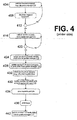
FIG. 4 is a flowchart of events that occur within an update service on a printer, according to an embodiment of the invention; and -
FIG. 5 is a block diagram that illustrates a computer system upon which an embodiment of the invention may be implemented. - In the following description, for the purposes of explanation, numerous specific details are set forth in order to provide a thorough understanding of the present invention. It will be apparent, however, that the present invention may be practiced without these specific details. In other instances, well-known structures and devices are depicted in block diagram form in order to avoid unnecessarily obscuring the present invention.
- In the following description, the various features of the invention are discussed under topic headings that appear in the following order:
- GENERAL OVERVIEW
- COMPONENTS OF SYSTEM
- HOW THE SYSTEM COMMUNICATES
- FROM THE DIGITAL CAMERA'S PERSPECTIVE
- FROM THE PRINTER'S PERSPECTIVE
- OVERVIEW OF HARDWARE AND OTHER FEATURES
- DETAILS OF WEB SERVICES
- EXPLANATION OF METADATA
- An approach is provided for allowing users to print digital images directly from a digital camera to a printer. A digital camera is configured with a discovery service that discovers available printers on a network. The digital camera is also configured with a print driver update manager that is configured to determine and obtain a particular print driver required for the digital camera to print digital images to a particular printing device. Embodiments of the invention also include a mechanism for deleting print drivers to free up space on the digital camera, and a mechanism for automatically updating print drivers stored on the digital camera.
-
FIG. 1 depicts asystem 100 that allows users to print digital images directly from a digital camera to a printer. Thesystem 100 includes one ormore printers 110 connected to adigital camera 120 through anetwork 140 or alink 144. Although the approach is depicted inFIG. 1 in the context of adigital camera 120 printing directly to aprinter 110, the approach is not limited to the printer context and may be used with any device that has printing functionality, including for example, a multi-function peripheral (MFP). Thus, within this specification, references toprinter 110 are for example purposes only. -
Printer 110 is a printing device that is configured with a printdriver update service 112 for managing print drivers, and adiscovery coordinator 114 for responding to inquiries about status and capabilities of theprinter 110. Theprinter 110 is also configured with aprint engine 118 that generates printed versions of electronic documents including, for example, image data from thedigital camera 120.Printer 110 may be configured with various other components and processes, depending upon a particular implementation, and is not limited to the components and processes depicted inFIG. 1 . - The
digital camera 120 is configured with a printdriver update manager 122 for coordinating and managing print drivers, and adiscovery service 124 for making determinations about available print devices. Thedigital camera 120 communicates with other devices onnetwork 140 via anetwork interface 130, and displays information and accepts user input through a graphical user interface (GUI) 126. Thedigital camera 120 is configured with anapplication 132 for managing the printing process, as well as an operating system (O/S) 134. The printdriver update manager 122 can store print drivers instorage 128, that may include volatile and non-volatile storage. - The
network interface 130 may be any type of wired or wireless network interface. Thedigital camera 120 may also communicate directly withprinter 110 via alink 144. Thelink 144 can be a wired (e.g. USB, FireWire™) or wireless (e.g. WiFi™) connection.Digital camera 120 may be configured with various other components and processes, depending upon a particular implementation, and is not limited to the components and processes depicted inFIG. 1 . -
FIG. 1 also shows a repository ofprint drivers 142, accessible to thevarious printers 110 and thedigital camera 120 through thenetwork 140. The repository ofprint drivers 142 may be a server, a database management system, or any type of network entity. Thenetwork 140 may be implemented by any medium or mechanism that provides for the exchange of data betweenprinter 110,digital camera 120 and repository ofprint drivers 142. Examples ofnetwork 140 include, without limitation, a network such as a Local Area Network (LAN), Wide Area Network (WAN), Ethernet or the Internet, or one or more terrestrial, satellite or wireless links. - A print driver generally translates application data from a format supported by an application program into a format supported by a printing device. In doing so, the print driver may work in conjunction with the O/
S 134 of thedigital camera 120. In the present example, a print driver processes digital photo data from a format supported by theapplication 132 and generates print data that is in a format supported byprinter 110. - A print driver typically contains at least two features, a rendering module and a GUI module. The
print application 132 invokes the rendering module to transform the digital image data into specific target format of a printer 110 (also known as print data). After rendering, the print data is then sent to theprint engine 118. The GUI module within a print driver is used to communicate the status and capabilities of a particular printer, as well as the status of a print task, to a user. - The
printer 110 may have sufficient storage to contain print drivers for one or more digital cameras that it supports interaction with, or may instead store a pointer to a location on thenetwork 140 where the print drivers are located. As depicted inFIG. 1 , one possible location is the repository ofprint drivers 142. - The
discovery service 124 has the ability to query either thenetwork 140 or thelink 144 for printers and other devices that thedigital camera 120 may wish to interact with. The printdriver update manager 122 determines whether thedigital camera 120 has the necessary print driver to interact with a given printer and also determines whether thedigital camera 120 needs to download a print driver or replace a current version of a print driver with a later version of the print driver. The printdriver update manager 122 works in conjunction with thediscovery service 124. Thedigital camera 120 can store print drivers in itsstorage 128, either persistently or temporarily. - Within the
digital camera 120, thediscovery service 124 initiates requests for information about available printers using either thenetwork 140 or link 144. Thediscovery service 124 communicates with thevarious discovery coordinators 114 within the one ormore printers 110, which are configured to respond to discovery requests from digital cameras. Using thediscovery coordinator 114, thesystem 100 allows thedigital camera 120 to discover aspecific printer 110 either through thenetwork 140 or through thelink 144. Thesystem 100 has access to print drivers through thenetwork 140 and the repository ofprint drivers 142, but also can store those print drivers directly on theprinter 110. - Most
digital cameras 120 have some type of display and buttons, which assist in accessing theGUI 126 depicted inFIG. 1 . TheGUI 126 can be used to show a list of discovered printers potentially including a description of the printing mechanisms contained therein (for example, color/black and white, physical location, print-resolution (high/medium/low), type of paper available, other capabilities). As stated, many digital cameras have at least "OK", "Cancel" and scroll up/down buttons, as well as potentially many others. Those buttons can be used to make various user selections using theGUI 126. - The
GUI 126 actuates the user's input to thedigital camera 120, thereby enabling the exchange of information between a user and thedigital camera 120. TheGUI 126 may include display objects as well as one or more user interface controls. Using the data displayed through theGUI 126, a user can for example select aparticular printer 110. - A
typical printer 110 can have a multitude of print drivers loaded therein, although storage space is limited. As depicted inFIG. 1 , the printdriver update service 112 may also assist in finding print drivers by using thenetwork 140, and potentially communicating with the repository ofprint drivers 142. - The
digital camera 120 uses thediscovery service 124 to discover printers within thenetwork 140. Once a printer of interest is discovered, thediscovery service 124 determines what (if any) version of a print driver is needed to enable thedigital camera 120 to communicate with that printer. If thedigital camera 120 does not have any version of a needed print driver, or does not have the correct version, thedigital camera 120 can request the print driver from theprinter 110. This request can be automatic, or can be triggered by the user through theGUI 126. - In the case where the
digital camera 120 cannot discover a specific print driver, such as where the needed print driver is not present in the repository ofprint drivers 142, thesystem 100 can refer the user to a URL that points to print drivers. -
FIG. 2 is a flowchart depicting example communication steps betweenprinter 110 anddigital camera 120 according to an embodiment of the invention. - Within
FIG. 2 , atstep 204 thediscovery service 124 initiates a discovery request to all of the printers onnetwork 140. For example, thediscovery service 124 may generate and broadcast a request for available printing devices to identify themselves. As another example, in the context of Web Services,discovery service 124 may use a Web Services discovery mechanism. Atstep 208, thevarious discovery coordinators 114 respond to the discovery request to identify the printing devices that are available. In step 209, thediscovery service 124 obtains information about the capabilities of the available printing devices. This may include thediscovery service 124 making one or more requests for information to the discovered printing devices. As shown instep 210, within the context of Web Services, metadata exchange may optionally be used to obtain information about the capabilities of discovered printing devices. InStep 211, thedigital camera 120 displays data on theGUI 126 that indicates the printing devices that are available to print the digital data. - At
step 211, a user selects a printer through theGUI 126. For example, the user may use one or more interface controls provided onGUI 126 to select a particular printer from a list of printers. Atstep 212, the printdriver update manager 122 requests data regarding the specific print driver needed. As stated, the data can be but not necessarily is in the form of metadata. This data can be important because often, print drivers are specific to a particular O/S within a digital camera, and are less dependent on the particular brand ofdigital camera 120. The print driver data can include but is not limited to whether color printing is possible or not, resolution(s) of theprinter 110, type of paper available, and potentially other specific details. Atstep 216, the update service responds with the requested data. - At
step 218, thedigital camera 120 checks itsown storage 128 to determine whether a version of the print driver is already present. Supposing no print driver is present, atstep 220 the printdriver update manager 122 requests the print driver, and atstep 224 the printdriver update service 112 sends todiscovery service 124 either the print driver or a link to a location where the print driver may be obtained. Atstep 228, thedigital camera 120 installs the print driver, potentially working with the O/S 134 installed thereupon. - At step 232, a user requests printing of an image. For example, the user may use one or more interface controls on
GUI 126 to select a particular image for printing. In response to detecting user input indicating that a user desires to print the particular image, thedigital camera 120 uses the driver to generate print data and the print data is transmitted to theprinter 110. Atstep 234, theprinter 110 prints the image and atstep 236 informs thedigital camera 120 that the image was printed. When printing is completed, atstep 240 the printdriver update manager 122 may optionally uninstall the print driver, for example, to save storage space on thedigital camera 120. Step 240 is drawn in dashed lines because it is optional, as some users may not wish to uninstall the print driver. For example, supposing thedigital camera 120 is used within a mall printing kiosk, thedigital camera 120 would likely discard the print driver as repeated use is not expected in such an environment. TheGUI 126 can prompt the user to make this choice. -
FIG. 3 is a flowchart showing how a search for printers and print drivers could be part of startup when adigital camera 120 is first connected to thenetwork 140 or link 144. This search could occur automatically, or could be triggered by a user through theGUI 126. When the search is completed, a list of available printers is provided to the user through the display of thedigital camera 120. - At
step 304, the printdriver update manager 122 searches for all printers on thenetwork 140. Atstep 306, if a response (e.g. step 208,FIG. 2 ) occurs, at step 308 the user selects aprinter 110 from a list and the printdriver update manager 122 requests print driver information for that printer atstep 312. Atstep 313, the printdriver update manager 122 waits for a response. After a specified amount of time, if no response arrives, the printdriver update manager 122 times out and exits atstep 314. - If the desired response arrives, at
step 316 the printdriver update manager 122 inquires whether the print driver is present on thedigital camera 120. The response to this inquiry occurs atstep 320. If a print driver is already present, atstep 324 another inquiry is made as to whether the print driver is the latest available. If a print driver is not present, or if the print driver is not the latest (step 330) available, atstep 328 the printdriver update manager 122 requests the latest print driver. Atstep 334 the latest print driver is installed. - At
step 340, a user request that a print job be printed and the print job is sent toprinter 110 for printing. Atstep 344, a response from a printer is received. Atstep 348, the option of uninstalling the print driver is available. - The
GUI 126 of thedigital camera 120 needs to be sophisticated enough to be aware of different printers present. Thedigital camera 120 only sends a request for a print driver after checking thestorage 128. If a print driver exists, but that print driver is not the latest version, then the printdriver update manager 122 can request a later version, or prompt the user to make a decision using theGUI 126. Thesystem 100 can also prompt the user to "keep or discard driver" using theGUI 126. -
FIG. 4 is a flowchart showing the steps taken by the printdriver update service 112 located on theprinter 110. Initially, atstep 404, the printdriver update service 112 is idle, waiting for queries. Atstep 408 if a query is received, then atstep 412 the printdriver update service 112 advances to waiting on a request for version information atstep 416. The printdriver update service 112 waits on (step 416) a request for version information. When a request arrives (step 420), then the printdriver update service 112 sends the version information (step 424). At step 428, the printdriver update service 112 receives a request for and then sends (step 432) the print driver, if available on theprinter 110. If the print driver is not available onprinter 110, atstep 430 the printdriver update service 112 directs a user to how to find the print driver, for example by providing a uniform resource locator (URL) or other resource. If the print driver is not available, the steps complete without going any further. - At
step 434, the printdriver update service 112 receives a print request, and atstep 438 prints the requested subject matter. Atstep 442, the printdriver update service 112 informs the printdriver update manager 122 of the status of the printing process. - As depicted in
FIGS. 2 and4 , upon receiving a request from adigital camera 120, theprinter 110 should always respond even if theprinter 110 does not have the driver. As depicted inFIG. 3 atstep 314, thedigital camera 120 will time out after a set amount of time if no response arrives, and will either try again, or give up and potentially post a message to the user using theGUI 126. - Using the above information, the
discovery service 124 can directly talk to thediscovery coordinator 114 and get a description of theprinter 110. - The
system 100 thus simplifies the process of discovering, installing and using a printer device directly from adigital camera 120, and eliminates the use of a computer as an intermediary in printing. - The approach described herein for providing dynamic print driver installation on cameras may be implemented on any type of computing architecture or platform. For purposes of explanation,
FIG. 5 is a block diagram that illustrates acomputer system 500 upon which an embodiment of the invention may be implemented.Computer system 500 includes abus 502 or other communication mechanism for communicating information, and aprocessor 504 coupled withbus 502 for processing information.Computer system 500 also includes amain memory 506, such as a random access memory (RAM) or other dynamic storage device, coupled tobus 502 for storing information and instructions to be executed byprocessor 504.Main memory 506 also may be used for storing temporary variables or other intermediate information during execution of instructions to be executed byprocessor 504.Computer system 500 further includes a read only memory (ROM) 508 or other static storage device coupled tobus 502 for storing static information and instructions forprocessor 504. Astorage device 510, such as a magnetic disk or optical disk, is provided and coupled tobus 502 for storing information and instructions. -
Computer system 500 may be coupled viabus 502 to adisplay 512, such as a cathode ray tube (CRT), for displaying information to a computer user. Aninput device 514, including alphanumeric and other keys, is coupled tobus 502 for communicating information and command selections toprocessor 504. Another type of user input device iscursor control 516, such as a mouse, a trackball, or cursor direction keys for communicating direction information and command selections toprocessor 504 and for controlling cursor movement ondisplay 512. This input device typically has two degrees of freedom in two axes, a first axis (e.g., x) and a second axis (e.g., y), that allows the device to specify positions in a plane. - The invention is related to the use of
computer system 500 for implementing the techniques described herein. According to one embodiment of the invention, those techniques are performed bycomputer system 500 in response toprocessor 504 executing one or more sequences of one or more instructions contained inmain memory 506. Such instructions may be read intomain memory 506 from another machine-readable medium, such asstorage device 510. Execution of the sequences of instructions contained inmain memory 506 causesprocessor 504 to perform the process steps described herein. In alternative embodiments, hard-wired circuitry may be used in place of or in combination with software instructions to implement the invention. Thus, embodiments of the invention are not limited to any specific combination of hardware circuitry and software. - The term "computer-readable medium" as used herein refers to any medium that participates in providing data that causes a machine to operation in a specific fashion. In an embodiment implemented using
computer system 500, various computer-readable media are involved, for example, in providing instructions toprocessor 504 for execution. Such a medium may take many forms, including but not limited to non-volatile media and volatile media. Non-volatile media includes, for example, optical or magnetic disks, such asstorage device 510. Volatile media includes, for example, dynamic memory, such asmain memory 506. - Common forms of computer-readable media include, for example, a floppy disk, a flexible disk, hard disk, magnetic tape, or any other magnetic medium, a CD-ROM, any other optical medium, a RAM, a PROM, and EPROM, a FLASH-EPROM, any other memory chip or cartridge, or any other medium from which a computer can read.
- Various forms of computer-readable media may be involved in carrying one or more sequences of one or more instructions to
processor 504 for execution. For example, the instructions may initially be carried on a magnetic disk of a remote computer. The remote computer can load the instructions into its dynamic memory and send the instructions over a telephone line using a modem. A modem local tocomputer system 500 can receive the data on the telephone line and use an infra-red transmitter to convert the data to an infra-red signal. An infra-red detector can receive the data carried in the infra-red signal and appropriate circuitry can place the data onbus 502.Bus 502 carries the data tomain memory 506, from whichprocessor 504 retrieves and executes the instructions. The instructions received bymain memory 506 may optionally be stored onstorage device 510 either before or after execution byprocessor 504. -
Computer system 500 also includes acommunication interface 518 coupled tobus 502.Communication interface 518 provides a two-way data communication coupling to anetwork link 520 that is connected to a local network 522. For example,communication interface 518 may be an integrated services digital network (ISDN) card or a modem to provide a data communication connection to a corresponding type of telephone line. As another example,communication interface 518 may be a local area network (LAN) card to provide a data communication connection to a compatible LAN. Wireless links may also be implemented. In any such implementation,communication interface 518 sends and receives electrical, electromagnetic or optical signals that carry digital data streams representing various types of information. - Network link 520 typically provides data communication through one or more networks to other data devices. For example,
network link 520 may provide a connection through local network 522 to ahost computer 524 or to data equipment operated by an Internet Service Provider (ISP) 526.ISP 526 in turn provides data communication services through the world wide packet data communication network now commonly referred to as the "Internet" 528. Local network 522 andInternet 528 both use electrical, electromagnetic or optical signals that carry digital data streams. -
Computer system 500 can send messages and receive data, including program code, through the network(s),network link 520 andcommunication interface 518. In the Internet example, aserver 530 might transmit a requested code for an application program throughInternet 528,ISP 526, local network 522 andcommunication interface 518. The received code may be executed byprocessor 504 as it is received, and/or stored instorage device 510, or other non-volatile storage for later execution. - As stated, within the
system 100, various communication protocols can be implemented using WS, although WS is not required and thesystem 100 should not be considered as limited exclusively thereto. The WS protocols are suitable for use with thesystem 100 because they define operations necessary for a print device (e.g. printer 110) to be discovered, installed, and used by a client device, in this case adigital camera 120. The WS protocols require that a WS device implement a discovery service, a metadata exchange service and an eventing service. WS thus includes a device profile, a print profile, and also a scan profile. Such features lend themselves well to use within thesystem 100. However, as stated, thesystem 100 can also be implemented without using WS. - Supposing that WS are enabled, examples of discovery and querying services used by the
digital camera 120 could include WS_Discovery and WS_Metadata. These services could be used to find printers, multi-function peripherals (MFPs), or other devices that can print images or perform other useful interactions with thedigital camera 120. - WS uses a protocol for exchanging XML-based messages over computer networks known as Simple Object Access Protocol (SOAP). Another usage of this acronym is Service Oriented Architecture Protocol. In either case, SOAP forms the foundation layer of the WS stack, providing a basic messaging framework that more abstract layers can build upon.
- There are several different types of messaging patterns in SOAP, but the most common is the Remote Procedure Call (RPC) pattern, in which one network node (e.g. a digital camera) sends a request message to another node (e.g. an printer) and the server immediately sends a response message to the client.
- Another WS category potentially useful with the
system 100 is "Relationship", which describes the services hosted on that device, for example - a print service, a scan service, a fax service, etc. Metadata is exchanged through another WS protocol called WS-Transfer. There are many other information types called dialects that can be exchanged using a metadata exchange service. - Within the
system 100, metadata exchange could conceivably involve the exchange of "This Device", "This Model", and "Relationship" information. The "ThisDevice" information contains the URL of the manufacturer of theprinter 110 which thedigital camera 120 can use to download the print driver if it is presently not available either on theprinter 110 or within thenetwork 140. The "ThisModel" information could contain the firmware version of theprinter 110, which could allow thedigital camera 120 to determine if updating a version of a print driver is necessary. The "Relationship" information will tell thedigital camera 120 what services are hosted within a specific printer. For example, if an printer has a print service, then the "Relationship" information will contain the IP address and port at which that service can be reached. - Returning to
FIG. 2 , regarding thesteps 208 "Discovery Response" and 212 "request Print Driver version", these requests can be for example formatted using a tagging system defined by the SOAP protocol. Regarding thesteps 212 "request Print Driver version" and 216 "Metadata Response", the information exchanged therein is in the form of text strings that have tags embedded into them that provide the structure for how to read the text string. - Another way of utilizing WS protocols is in the area of communicating with all
printers 110 present on thenetwork 140. In such a case, thedigital camera 120 can send a WS-Discovery probe message incorporating a multicast probe packet circulating through thenetwork 140. The WS-Discovery probe message that will basically say that the sender (e.g. the digital camera 120) is looking for devices that support a print service. All printers that implemented WS-Discovery will have joined that multicast group address, and will then see that multicast probe packet. If aprinter 110 supports a print service, thatprinter 110 can respond to thedigital camera 120 with a ProbeResponse message. As stated, the same concept or principle can also be implemented in a non-WS capacity. - Supposing the
system 100 uses WS protocols, thediscovery service 124 can get information known as "DeviceID" which identifies what print driver thedigital camera 120 needs. Continuing the example where WS protocols are used, during the initial discovery process, the menuing logic within theGUI 126 could have a "Setup" menu that has a "Network Setup" sub-menu, which could in turn give rise to a "Printer Discovery" sub-menu. The "printer Discovery" sub-menu could start the process of installing a printer, with pop up windows to allow further interaction with the user. However, these features could also be implemented without using WS protocols. - Various portions of the
system 100 can be implemented using Web Services (WS) protocols, although these are not required. Nonetheless, regardless of whether WS are used or not, various components within thesystem 100 can communicate using metadata. Such metadata can for example contain a description of theprinter 110 including a category ("dialect" if WS protocols are used) called "ThisModel", which describes the type of model name, model number, and manufacturer of the device. Another category included is "ThisDevice", which describes information specific to that device, for example - device name, firmware version, serial number, etc. If using WS, aprinter 110 should have a metadata section with its Dialect equal to http://schemas.xmlsoap.org/ws/2006/02/devprof/ThisDevice. An example follows.
 <wdsp:ThisDevice ...>
 <wdsp:FriendlyName xml:lang="..."?
 >xs:string</wsdp:FriendlyName>+
 <wdsp:FirmwareVersion>xs:string</wsdp:FirmwareVersion>?
  <wdsp:SerialNumber>xs:string</wsdp:SerialNumber>?
  . . .
 </wdsp:ThisDevice>
Claims (13)
- A method, comprising:a digital camera (120) initiating a discovery process;one or more of the printers (110) responding to the discovery process within a network (140) having a plurality of printers (110) connected therein;
the digital camera requesting metadata from the printer regarding a print driver;one or more of the printers responding with the requested metadata;
interpreting metadata associated with the print driver;the digital camera requesting the print driver from the printer; andthe printer sending the print driver to the digital camera. - The method of claim 1, comprising:a discovery service within the digital camera performing the step of initiating a discovery process.
- The method of claim 1, comprising:a discovery manager within one of the plurality of printers performing the step of responding to the discovery process.
- The method of claim 1, comprising:a print driver update service within the digital camera performing the step of requesting the print driver.
- The method of claim 1, comprising:a print driver update manager within one of the plurality of printers performing the step of sending the print driver.
- The method of claim 1, further comprising:a graphical user interface (GUI) within the digital camera prompting a user to make a decision to select a specific printer of the plurality of printers.
- A printer system comprising:a plurality of printers (110) each connected to a network (140) that is accessible by a digital camera (120);wherein the digital camera comprises a discovery service (124) for determining status and availability of the plurality of printers, and a print driver update manager (122) for obtaining and storing print drivers;
wherein each of the plurality of printers comprises a discovery coordinator (114) for responding to communications from the discovery service, a print driver update service (112) for communicating with the print driver update manager; and a print engine (118) located on the printer side which processes print data and causes a printed version of an electronic document contained within the print data to be generated at the printer. - The printer system of claim 7, further comprising:in response to the digital camera being connected to the printer system,the print driver update service selects a particular print driver that is compatible with the digital camera, andassists in downloading the selected print driver to the digital camera.
- The printer system as recited in Claim 7, wherein the print driver update service is further configured to cause at least a portion of the particular print driver to be stored in a persistent storage within the digital camera.
- The printer system as recited in Claim 7, wherein the print driver selection module is further configured to cause the at least a portion of the particular print driver stored in the storage in the digital camera to be deleted from the storage in the digital camera.
- The printer system as recited in Claim 7, further comprising:the print driver update manager notifying a user of the existence of a more recent version of the print driver than is currently installed.
- The printer system as recited in Claim 11, further comprising:the print driver update manager automatically installing a more recent version of the print driver than is currently installed.
- The printer system as recited in Claim 7, wherein the print driver selection module is further configured to cause a graphical user interface to be displayed on the digital camera that allows a user to select a particular print driver from a list of print drivers.
Applications Claiming Priority (1)
| Application Number | Priority Date | Filing Date | Title |
|---|---|---|---|
| US12/013,258 US8723963B2 (en) | 2008-01-11 | 2008-01-11 | Dynamic print driver installation on cameras |
Publications (1)
| Publication Number | Publication Date |
|---|---|
| EP2079224A1 true EP2079224A1 (en) | 2009-07-15 |
Family
ID=40344492
Family Applications (1)
| Application Number | Title | Priority Date | Filing Date |
|---|---|---|---|
| EP09150303A Ceased EP2079224A1 (en) | 2008-01-11 | 2009-01-09 | Dynamic print driver installation for cameras |
Country Status (3)
| Country | Link |
|---|---|
| US (1) | US8723963B2 (en) |
| EP (1) | EP2079224A1 (en) |
| JP (1) | JP2009171579A (en) |
Cited By (1)
| Publication number | Priority date | Publication date | Assignee | Title |
|---|---|---|---|---|
| CN102693101A (en) * | 2011-02-09 | 2012-09-26 | 株式会社理光 | Information processing apparatus |
Families Citing this family (9)
| Publication number | Priority date | Publication date | Assignee | Title |
|---|---|---|---|---|
| JP4125172B2 (en) * | 2003-04-23 | 2008-07-30 | キヤノン株式会社 | Wireless communication system, wireless communication apparatus, control method therefor, and computer program |
| JP4136771B2 (en) * | 2003-04-23 | 2008-08-20 | キヤノン株式会社 | COMMUNICATION SYSTEM, COMMUNICATION DEVICE, ITS CONTROL METHOD, AND COMPUTER PROGRAM |
| JP4125173B2 (en) | 2003-04-23 | 2008-07-30 | キヤノン株式会社 | Information processing apparatus connection control method, information processing apparatus, and computer program |
| JP4886463B2 (en) | 2006-10-20 | 2012-02-29 | キヤノン株式会社 | Communication parameter setting method, communication apparatus, and management apparatus for managing communication parameters |
| US9036200B2 (en) | 2010-09-14 | 2015-05-19 | Hewlett-Packard Development Company, L.P. | Job processing by dividing a job into sub-jobs for rendering and streaming |
| JP5972094B2 (en) * | 2012-08-06 | 2016-08-17 | キヤノン株式会社 | Information processing apparatus, information processing method, and program |
| US9311027B2 (en) * | 2013-03-28 | 2016-04-12 | Hewlett-Packard Development Company, L.P. | Document generation based on target device availability |
| US9430723B1 (en) * | 2015-03-27 | 2016-08-30 | Kyocera Document Solutions Inc. | Printing device software management and common interface |
| JP7551474B2 (en) * | 2020-11-27 | 2024-09-17 | キヤノン株式会社 | Information processing device, control method and program |
Citations (10)
| Publication number | Priority date | Publication date | Assignee | Title |
|---|---|---|---|---|
| US5580177A (en) * | 1994-03-29 | 1996-12-03 | Hewlett-Packard Company | Printer/client network with centrally updated printer drivers and printer status monitoring |
| US20020129353A1 (en) * | 2001-03-07 | 2002-09-12 | Brett Williams | Peripheral driver installation method and system |
| US20030037325A1 (en) * | 2001-08-17 | 2003-02-20 | Hargrove David C. | System and methods for automatically installing a correct software version from media containing multiple software versions |
| US20030227554A1 (en) | 2002-04-26 | 2003-12-11 | Nikon Corporation | Digital camera system |
| US20040162804A1 (en) | 2003-02-18 | 2004-08-19 | Michael Strittmatter | System and method for searching for wireless devices |
| US20050066325A1 (en) * | 2003-09-18 | 2005-03-24 | Brother Kogyo Kabushiki Kaisha | Software install program product, installation method, and software install system |
| US20060092751A1 (en) * | 2004-11-04 | 2006-05-04 | Hewlett-Packard Development Company, L.P. | Peripheral management |
| US20070101345A1 (en) | 2005-11-02 | 2007-05-03 | Canon Kabushiki Kaisha | Information processing apparatus, information processing method, and program thereof |
| US20070123242A1 (en) * | 2005-08-15 | 2007-05-31 | Matthew Shapiro | Device and method for selecting an application for a mobile handset |
| US20070234354A1 (en) * | 2006-03-31 | 2007-10-04 | Tomoki Hattori | System and method for printer driver distribution with searchable map database |
Family Cites Families (12)
| Publication number | Priority date | Publication date | Assignee | Title |
|---|---|---|---|---|
| US7212229B2 (en) * | 1997-04-04 | 2007-05-01 | Eastman Kodak Company | Digital camera providing image processing for an attachable printer |
| AU2002243279A1 (en) * | 2000-11-01 | 2002-06-18 | Flexiworld Technologies, Inc. | Controller and manager for device-to-device pervasive digital output |
| JP2002268855A (en) | 2001-03-13 | 2002-09-20 | Ricoh Co Ltd | Image forming system, image forming method, and computer-readable recording medium storing a program for causing a computer to execute the image forming method |
| JP2003032381A (en) | 2001-07-17 | 2003-01-31 | Casio Comput Co Ltd | Information communication terminal device and program |
| JP4312598B2 (en) * | 2001-07-26 | 2009-08-12 | チバ ホールディング インコーポレーテッド | Photosensitive resin composition |
| JP2003303071A (en) * | 2002-01-16 | 2003-10-24 | Canon Inc | Information processing apparatus, information processing method, information processing system, control program, and storage medium |
| US20030227641A1 (en) * | 2002-06-07 | 2003-12-11 | Xerox Corporation | Mobile USB printer driver |
| US7853946B2 (en) * | 2003-02-28 | 2010-12-14 | Canon Kabushiki Kaisha | Information processing apparatus, information processing method, and control program |
| US20040190042A1 (en) * | 2003-03-27 | 2004-09-30 | Ferlitsch Andrew Rodney | Providing enhanced utilization of printing devices in a cluster printing environment |
| JP2004334785A (en) | 2003-05-12 | 2004-11-25 | Seiko Epson Corp | Printing system, apparatus and equipment used therefor, and printing method |
| GB2409365B (en) * | 2003-12-19 | 2009-07-08 | Nokia Corp | Image handling |
| JP2006155306A (en) | 2004-11-30 | 2006-06-15 | Canon Inc | Managing device drivers |
-
2008
- 2008-01-11 US US12/013,258 patent/US8723963B2/en active Active
-
2009
- 2009-01-09 JP JP2009003449A patent/JP2009171579A/en active Pending
- 2009-01-09 EP EP09150303A patent/EP2079224A1/en not_active Ceased
Patent Citations (10)
| Publication number | Priority date | Publication date | Assignee | Title |
|---|---|---|---|---|
| US5580177A (en) * | 1994-03-29 | 1996-12-03 | Hewlett-Packard Company | Printer/client network with centrally updated printer drivers and printer status monitoring |
| US20020129353A1 (en) * | 2001-03-07 | 2002-09-12 | Brett Williams | Peripheral driver installation method and system |
| US20030037325A1 (en) * | 2001-08-17 | 2003-02-20 | Hargrove David C. | System and methods for automatically installing a correct software version from media containing multiple software versions |
| US20030227554A1 (en) | 2002-04-26 | 2003-12-11 | Nikon Corporation | Digital camera system |
| US20040162804A1 (en) | 2003-02-18 | 2004-08-19 | Michael Strittmatter | System and method for searching for wireless devices |
| US20050066325A1 (en) * | 2003-09-18 | 2005-03-24 | Brother Kogyo Kabushiki Kaisha | Software install program product, installation method, and software install system |
| US20060092751A1 (en) * | 2004-11-04 | 2006-05-04 | Hewlett-Packard Development Company, L.P. | Peripheral management |
| US20070123242A1 (en) * | 2005-08-15 | 2007-05-31 | Matthew Shapiro | Device and method for selecting an application for a mobile handset |
| US20070101345A1 (en) | 2005-11-02 | 2007-05-03 | Canon Kabushiki Kaisha | Information processing apparatus, information processing method, and program thereof |
| US20070234354A1 (en) * | 2006-03-31 | 2007-10-04 | Tomoki Hattori | System and method for printer driver distribution with searchable map database |
Cited By (3)
| Publication number | Priority date | Publication date | Assignee | Title |
|---|---|---|---|---|
| CN102693101A (en) * | 2011-02-09 | 2012-09-26 | 株式会社理光 | Information processing apparatus |
| EP2509297A1 (en) * | 2011-02-09 | 2012-10-10 | Ricoh Company, Ltd. | Information processing apparatus and program |
| US9037760B2 (en) | 2011-02-09 | 2015-05-19 | Ricoh Company, Limited | Information processing apparatus and computer program product |
Also Published As
| Publication number | Publication date |
|---|---|
| JP2009171579A (en) | 2009-07-30 |
| US20090179991A1 (en) | 2009-07-16 |
| US8723963B2 (en) | 2014-05-13 |
Similar Documents
| Publication | Publication Date | Title |
|---|---|---|
| US8723963B2 (en) | Dynamic print driver installation on cameras | |
| US9081526B2 (en) | Peripheral device control system and method | |
| US7987241B2 (en) | Sharing EIP service applications across a fleet of multi-function document reproduction devices in a peer-aware network | |
| US8289551B2 (en) | Approach for processing print data without a client print driver | |
| JP4590457B2 (en) | Documentless driver image processing method | |
| US20040230500A1 (en) | Service providing apparatus, user terminal, service providing method, service utilizing method, computer-readable recording medium recorded with a service providing program, and computer-readable recording medium recorded with a service utilizing program | |
| US20090198811A1 (en) | Image Forming System, Image Forming Apparatus, User Interface Device, Extended User Interface Compatibility Confirming Method, Document Scanning Method and Setting Value Managing Method | |
| JP2003006133A (en) | Information processing method, control program, information processing device, peripheral device, response method, proxy response device, and network system | |
| EP1868077A2 (en) | Automatic printer registration | |
| EP2023579B1 (en) | Extensible web services system | |
| US20100027050A1 (en) | Dynamic bridging of web-enabled components | |
| US8676967B2 (en) | Event proxy notification apparatus and method of controlling the same and program | |
| JP4991820B2 (en) | Client device with expandable image processing device driver and method for implementing the same | |
| US20050015446A1 (en) | Method and apparatus to remotely control electronic apparatuses over a network | |
| JP4467955B2 (en) | Information processing device, peripheral device control system, peripheral device control method applied to information processing device, and program thereof | |
| US7812984B2 (en) | Remote stored print job retrieval | |
| CN1925438B (en) | Information processing device and network device and their control method | |
| US20090190154A1 (en) | Image Forming System and Method, Management Apparatus, and Recording Medium | |
| KR20110131802A (en) | Apparatus and method for forming an image as a DNL digital media renderer | |
| US8271621B2 (en) | Metadata communication system | |
| JP5272400B2 (en) | Method, apparatus and computer program for dynamically adding a new service to an apparatus | |
| Moller et al. | Enhancing Jini's lookup service using XML-based service templates | |
| JP2004272888A (en) | Service providing device, user terminal device, service providing method, service using method, service providing program, service using program, and recording medium |
Legal Events
| Date | Code | Title | Description |
|---|---|---|---|
| PUAI | Public reference made under article 153(3) epc to a published international application that has entered the european phase |
Free format text: ORIGINAL CODE: 0009012 |
|
| 17P | Request for examination filed |
Effective date: 20090109 |
|
| AK | Designated contracting states |
Kind code of ref document: A1 Designated state(s): AT BE BG CH CY CZ DE DK EE ES FI FR GB GR HR HU IE IS IT LI LT LU LV MC MK MT NL NO PL PT RO SE SI SK TR |
|
| AX | Request for extension of the european patent |
Extension state: AL BA RS |
|
| AKX | Designation fees paid |
Designated state(s): DE ES FR GB IT NL |
|
| 17Q | First examination report despatched |
Effective date: 20130514 |
|
| STAA | Information on the status of an ep patent application or granted ep patent |
Free format text: STATUS: THE APPLICATION HAS BEEN REFUSED |
|
| 18R | Application refused |
Effective date: 20150215 |