EP2000932A1 - Image processing device - Google Patents
Image processing device Download PDFInfo
- Publication number
- EP2000932A1 EP2000932A1 EP08251937A EP08251937A EP2000932A1 EP 2000932 A1 EP2000932 A1 EP 2000932A1 EP 08251937 A EP08251937 A EP 08251937A EP 08251937 A EP08251937 A EP 08251937A EP 2000932 A1 EP2000932 A1 EP 2000932A1
- Authority
- EP
- European Patent Office
- Prior art keywords
- file
- metadata
- document
- document information
- user
- Prior art date
- Legal status (The legal status is an assumption and is not a legal conclusion. Google has not performed a legal analysis and makes no representation as to the accuracy of the status listed.)
- Withdrawn
Links
Images











Classifications
-
- G—PHYSICS
- G06—COMPUTING OR CALCULATING; COUNTING
- G06F—ELECTRIC DIGITAL DATA PROCESSING
- G06F16/00—Information retrieval; Database structures therefor; File system structures therefor
- G06F16/30—Information retrieval; Database structures therefor; File system structures therefor of unstructured textual data
- G06F16/33—Querying
- G06F16/338—Presentation of query results
-
- G—PHYSICS
- G06—COMPUTING OR CALCULATING; COUNTING
- G06F—ELECTRIC DIGITAL DATA PROCESSING
- G06F16/00—Information retrieval; Database structures therefor; File system structures therefor
- G06F16/30—Information retrieval; Database structures therefor; File system structures therefor of unstructured textual data
- G06F16/34—Browsing; Visualisation therefor
-
- G—PHYSICS
- G06—COMPUTING OR CALCULATING; COUNTING
- G06F—ELECTRIC DIGITAL DATA PROCESSING
- G06F16/00—Information retrieval; Database structures therefor; File system structures therefor
- G06F16/90—Details of database functions independent of the retrieved data types
- G06F16/93—Document management systems
Definitions
- This invention relates to an image processing device for use in an image forming device, such as a multi-function peripheral.
- MFP multi-function peripherals
- RSS formats are specified using XML (Extensible Markup Language), a generic specification for the creation of data formats.
- RSS formats are used to describe metadata, such as Web site headlines or summaries.
- the initials "RSS” are used to refer to the following formats: Rich Site Summary, Really Simple Syndication, or RDF (Resource Description Framework) Site Summary.
- the RSS distribution by the above-mentioned communication device makes it possible for users to view RSS content using a general-purpose browser in which an RSS reader is incorporated, without needing dedicated viewer software for viewing RSS documents.
- the user on the client can view the bibliographic information and thumbnail image contained in the received RSS, using the general-purpose browser.
- the user makes a judgment as to whether the main document image is to be accessed.
- the user accesses a file of the main document image, if needed, to view the content of the file concerned.
- Accessing the file of the main document image may be performed by selecting the link to the URL (Uniform Resource Locator) of the document image file included in the bibliographic information through mouse operation.
- URL Uniform Resource Locator
- the thumbnail image usually is an image of a typical page, such as a first page of a document.
- the user cannot easily read the images of other pages than the typical page.
- the present disclosure provides an improved image processing device in which the above-described problems are eliminated.
- the present disclosure provides an image processing device which is able to perform efficient viewing operation to view the stored document information.
- an image processing device comprising: a document storing unit configured to store document information containing scanned images and fax transmission/reception images sent from a plurality of users; a metadata outputting unit configured to generate a metadata of the document information stored by the document storing unit and distribute the metadata; a display format file supplying unit configured to supply a display conversion file linked to the metadata; a zooming process file supplying unit configured to supply a zooming process file linked to the metadata; and a document information supplying unit configured to read a document information item, requested at a time of displaying, from the document storing unit and supply the document information item.
- the above-mentioned image processing device may be arranged to further comprise an authentication unit which is configured to authenticate a user who performs a login procedure, and supply user information, wherein the metadata outputting unit is configured to generate a metadata of a document information item with a viewing authority of the user in accordance with the user information and distribute the metadata, and the document information supplying unit is configured to distribute the document information item with the viewing authority of the user in accordance with the user information.
- the above-mentioned image processing device may be arranged so that the zooming process file includes: a mapping script which associates a display element, contained in a displaying file produced from the display conversion file, with a zooming process; and an event processing script which performs a zooming process to the display element in response to operation of a user.
- the zooming process file includes: a mapping script which associates a display element, contained in a displaying file produced from the display conversion file, with a zooming process; and an event processing script which performs a zooming process to the display element in response to operation of a user.
- the above-mentioned image processing device may be arranged so that the document storing unit is configured to manage the document information in hierarchical levels according to components of the document information.
- the above-mentioned image processing device may be arranged so that the metadata outputting unit is configured to distribute the metadata according to hierarchical levels of components of the document information.
- the above-mentioned image processing device may be arranged so that the metadata includes an RSS feed which is an XML based format.
- the above-mentioned image processing device may be arranged so that the display conversion file is an XSL file which converts the RSS feed in an HTML format to generate an HTML file.
- the above-mentioned image processing device may be arranged so that the display conversion file includes a format script file and a CSS file which convert the RSS feed in an HTML format to generate an HTML file.
- the present disclosure provides a viewing control method comprising the steps of: storing document information containing scanned images and fax transmission/reception images sent from a plurality of users; generating a metadata of the document information stored to distribute the metadata; supplying a display conversion file linked to the metadata; supplying a zooming process file linked to the metadata; and reading a document information item, requested at a time of displaying, to supply the document information item.
- the image processing device of the invention it is possible to perform efficient viewing operation to view the stored document information, without discontinuing the operation, because the user is enabled to perform zoom-in/zoom-out operation in the screen by specifying freely a display element displayed in the screen.
- FIG. 1 is a diagram showing the composition of a network system to which an image processing device of a first embodiment of the invention is applied.
- FIG. 2 is a diagram for explaining the flow of information in the network system of FIG. 1 .
- FIG. 3 is a diagram for explaining the relationship between various files.
- FIG. 4A, FIG. 4B, FIG. 4C, FIG. 4D, and FIG. 4E are diagrams showing examples of the hierarchical arrangements of RSS feeds.
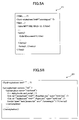
- FIG. 5A and FIG. 5B are diagrams showing examples of an RSS feed and an XSL file.
- FIG. 6A shows examples of descriptions of block elements in a generated HTML file
- FIG. 6B shows an example of a zooming object description in the HTML file.
- FIG. 7 is a sequence diagram for explaining the process performed by the image processing device of the first embodiment.
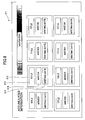
- FIG. 8 is a diagram showing an example of a screen displayed by the browser.
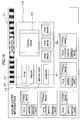
- FIG. 9 is a diagram showing an example of a screen displayed by the browser.
- FIG. 10 is a diagram showing an example of a screen displayed by the browser.
- FIG. 11 is a diagram showing an example of a screen displayed by the browser.
- FIG. 12 is a diagram showing an example of a screen displayed by the browser.
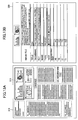
- FIG. 13A and FIG. 13B are diagrams showing examples of screens displayed by the browser.
- FIG. 14 is a diagram showing the composition of a first example of an image processing device of a second embodiment of the invention.
- FIG. 15 is a diagram showing the composition of a second example of the image processing device of the second embodiment.
- FIG. 16 is a diagram showing the composition of a third example of the image processing device of the second embodiment.
- FIG. 17 is a sequence diagram for explaining the process performed by the first example of the image processing device of the second embodiment.
- FIG. 18 is a sequence diagram for explaining the process performed by the second example of the image processing device of the second embodiment.
- FIG. 19 is a sequence diagram for explaining the process performed by the third example of the image processing device of the second embodiment.
- FIG. 20 is a diagram showing an example of an RSS feed output to the browser immediately after authentication.
- FIG. 21 is a diagram showing an example of an initial display content contained in the RSS feed of FIG. 20 .
- FIG. 22 is a diagram showing an example of masking of the display in the process of zooming operation.
- FIG. 1 shows the composition of a network system to which an image processing device of a first embodiment of the invention is applied.
- an MFP 1 which is the image processing device of this embodiment
- a client 3 such as PC
- an RSS server 4 are interconnected via a network 2.
- the RSS server 4 relays distribution of an RSS from the MFP 1.
- the RSS server 4 stores an RSS feed distributed from the MFP 1, and supplies the stored RSS feed to the client 3.
- the RSS server 4 may be omitted from the network system shown in FIG. 1 .
- the MFP 1 in this embodiment includes a document storing unit 11, a region identifying unit 12, an RSS outputting unit 13, an XSL/script storing unit 14, and an authentication processing unit 15.
- the document storing unit 11 stores document images (body images, thumbnail images) and their bibliographic information (date, title, writer, summary, etc.).
- the region identifying unit 12 analyzes the content of a document image, identifies regions (character regions, image regions, etc.), and adds information relating to the regions to the document storing unit 11.
- the RSS outputting unit 13 generates an RSS feed based on the document image, bibliographic information, etc. which are stored in the document storing unit 11, and outputs the RSS feed to the network 2.
- the XSL/script storing unit 14 stores an XSL (Extensible Stylesheet Language) file and a zooming script file which are linked to the RSS feed output from the RSS outputting unit 13, and supplies corresponding files in response to a file receiving request.
- XSL Extensible Stylesheet Language
- the authentication processing unit 15 performs authenticating processing when it is necessary to restrict the viewers who are permitted to view the document information in the MFP 1.
- a general-purpose browser 31 is arranged. This browser 31 receives an RSS feed, an XSL file, and a script file from the MFP 1 or the RSS server 4, generates a HTML (Hyper Text Markup Language) file from the received files, and performs displaying of the HTML file on the monitor screen.
- This browser 31 receives an RSS feed, an XSL file, and a script file from the MFP 1 or the RSS server 4, generates a HTML (Hyper Text Markup Language) file from the received files, and performs displaying of the HTML file on the monitor screen.
- HTML Hyper Text Markup Language
- FIG. 2 is a diagram for explaining the flow of information flow in the network system of FIG. 1 .
- each of the documents contains one or more pages, and each page contains one or more regions in the document storing unit 11.
- the hierarchical arrangements of regions may be omitted.
- the hierarchical arrangements of sub-regions may be provided additionally in the document storing unit 11.
- the XSL/script storing unit 14 of the MFP 1 holds an XSL file F2 for converting an RSS feed in an HTML format to generate an HTML file, and a zooming script file F3 for enabling zooming operation to the display elements (objects) contained in a generated HTML file.
- a style sheet description may be separated from the XSL file F2 as another CSS (Cascading Style Sheet) file.
- the zooming script file F3 includes a mapping script file which associates the display elements contained in the generated HTML file with a zooming process (mapping), and an event processing script file which performs a zooming process in response to an input operation of the mouse by the user U using the mouse or the keyboard.
- the RSS outputting unit 13 generates an RSS feed F1 based on the information stored in the document storing unit 11, and distributes the RSS feed to the client 3 or the RSS server 4.
- the XSL file F2 and the zooming script file F3 are linked to the RSS feed F1.
- the RSS feed F1 is processed by the browser 31, the XSL file F2 and the zooming script file F3 are read out in accordance with the links.
- FIG. 3 is a diagram for explaining the relationship between various files.
- the example of FIG. 3 is applicable to a print log and a fax log.
- a print log HTML file F4a is generated from the common mapping script portions of a print log RSS feed F1a, a print log XSL file F2a, a print log mapping script file F3a, and a common zooming script file F3c.
- a fax log HTML file F4b is generated from the common mapping script portions of a fax log RSS feed F1b, a fax log XSL file F2b, a fax log mapping script file F3b, and the common zooming script file F3c.
- a zooming process is performed by operation of the event processing script portion of the common zooming script file F3c when the user U performs mouse operation to the print log HTML file F4a or the fax log HTML file F4b.
- FIGS. 4A through 4E are diagrams showing examples of the hierarchical arrangements of RSS feeds.
- FIGS. 4A-4C show examples of the print log RSS feed F1a
- FIGS. 4D and 4E show examples of the fax log RSS feed F1b.
- the print log RSS feed F1a has a print log RSS feed F1a-1 at the uppermost position and contains a plurality of document entries Ea-1.
- each of the document entries Ea-1 has a document RSS feed F1a-2 and contains a plurality of page entries Ea-2.
- each of the page entries Ea-2 has a page RSS feed Fla-3 and contains a plurality of region entries Ea-3.
- the fax log RSS feed F1b has a fax log RSS feed F1b-1 at the uppermost position and contains a plurality of fax document entries Eb-1.
- each of the fax document entries Eb-1 has a fax document RSS feed F1b-2 and contains a plurality of page entries Eb-2. Each page entry may be subdivided into a plurality of region entries.
- FIG. 5A and FIG. 5B show examples of an RSS feed and an XSL file.
- FIG. 5A shows an example of an RSS feed F1
- FIG. 5B shows an example of an XSL file F2.
- FIG. 6A shows examples of descriptions of block elements in an HTML file F4, which is generated from an RSS feed F1, an XSL file F2, and a zooming script file F3.
- FIG. 6B shows an example of a zooming object description in the HTML file F4.
- “thumbnail” corresponds to a typical image
- “summary” corresponds to a summary
- FIG. 6B shows an example of a zooming object description 303 in the HTML file F4.
- a zooming object description 303 is generated in correspondence with each of the displaying objects in the HTML file F4.
- parameters including "id”, "initZoomFactor", “relatedTo”, etc. are set up.
- the parameter "id” identifies a displaying object in the HTML file F4.
- the parameter "initZoomFactor” indicates the zooming factor at a time of initial displaying.
- the parameter "relatedTo” indicates the relation of another object to which the zoom operation of the object concerned is transmitted, and the transmission ratio.
- the ID of a corresponding block element ( FIG. 6A ) in the mapping script is set to the parameter "id".
- the value which indicates the degree of zooming is set to "initZoomFactor". For example, if the zooming factor is set up to "0.0", the image is displayed in the original display size. If the zooming factor is set up to a positive value, an expanded image is displayed. If the zooming factor is set up to a negative value, a reduced image is displayed.
- the zoom operation of the object concerned is transmitted to the other included object by the transmission ratio "0.8".
- the zoom operation of the object concerned is transmitted with reversed polarity to the other parallel-relation object by the transmission ratio "0.5".
- the zoom-in operation of the object concerned is performed, the zoom-out operation of the other parallel-relation object is performed by the transmission ratio "0.5".
- an included zooming object action description 304 which defines the displaying action of each of other included displaying objects is included.
- the parameters including "zoomFactor", “id", “size”, etc. are set up.
- the parameter "zoomFactor” indicates the range of a zooming factor by which the object is displayed.
- the parameter "id” identifies the object.
- the parameter "size” indicates the display size corresponding to the zooming factor range.
- the ID of a corresponding block element ( FIG. 6A ) in the mapping script is set to the parameter "id". For example, if the "zoomFactor" is set to "0.0 1.0", the object is displayed when the zooming factor of the parent object is in a range of "0.0" to "1.0". If the "zoomFactor” is set to "0.1 1.0", the object is not displayed when the zooming factor of the parent object is equal to "0.0" but it is displayed when the zooming factor of the parent object is in a range of "0.1” to "1.0".
- the object is an image and the "size" is set to "20% 50%”
- the image size is changed in the range of 20% - 50% in correspondence with the range of the "zoomFactor".
- the object is a text (character string) and the "size” is set to "8pt 12pt" (where pt denotes the point by which a character size is indicated), the character size is changed in the range of 8pt - 12pt in correspondence with the range of the "zoomFactor".
- the "size” is set to "50%” or "8pt"
- the image or character size is held at a fixed size, regardless of the zooming factor.
- FIG. 7 is a sequence diagram for explaining the process performed by the image processing device of the first embodiment.
- step S101 when the user U performs a login procedure relating to the MFP 1 to the browser 31 by specifying a user ID, a password, etc. (step S101), the browser 31 starts performing an authentication process (basic authentication, etc.) between the browser 31 and the MFP 1 (step S102).
- the login and authentication processes may be omitted.
- the subsequent processes may be changed for the case in which the login procedure is performed and the case in which the login procedure is not performed.
- the browser 31 receives an RSS from the MFP 1 (step S104), and continuously receives an XSL, a zooming script, a thumbnail image, etc. from the MFP 1 sequentially one by one based on the descriptions of the links included in the received RSS (steps S105-S107).
- the MFP 1 may be arranged to prevent the user from receiving the RSS, the XSL, the zooming script, the thumbnail image, etc., or to restrict the content being supplied to the user such that only the content of the files having no problem on the security is supplied to the user.
- the browser 31 generates an HTML file based on the RSS, the XSL, the zooming script, the thumbnail image, etc. which are received from the MFP 1, and displays the HTML file (step S108). Specifically, the browser 31 generates an HTML file by applying the XSL and the zooming script to the RSS, and displays the generated HTML file.
- the browser 31 receives the lacking information from the MFP 1, if needed (step S110), and performs the displaying according to the zooming operation (step S111).
- the lacking information at this time is, for example, information relating to the object which was not displayed before zooming operation but displaying of the object is needed by the zooming operation.
- FIGS. 8 through 13B are diagrams showing examples of screens displayed in the browser 31.
- FIG. 8 shows an example of an initial viewing screen 311.
- a plurality of "document” objects 312 in the example, eight objects
- a "title” object 313, a “writer” object 314, and a "writing date” object 315 are displayed in each "document” object 312, a "title” object 313, a “writer” object 314, and a "writing date” object 315 are displayed.
- These objects 313-315 are set up such that the starting value of the parameter "zoomFactor" is the same as the value of the "initZoomFactor” in the zooming object description of the parent object ( FIG. 6B ), and they are displayed at the time of initial displaying.
- the starting value of the "zoomFactor” of the object which is not displayed at this time is set up as being larger than the value of the "initZoomFactor" in the zooming object description of the parent object.
- FIG. 9 shows an example of the viewing screen 311 when a zooming operation is performed without selecting any of the "document" objects 312 in the viewing screen 311 of FIG. 8 (or when an upward scroll operation is performed in the margin part of the viewing screen 311).
- a plurality of "document” objects 312 are expanded equally, and "typical image” objects (thumbnail images) 316 which were not displayed before are displayed.
- the parameter "relatedTo” ( FIG. 6B ) in the zooming object description of the whole screen object which includes the plurality of "document” objects 312 is set up to "children:1.0", and the plurality of "document” objects 312 are expanded equally.
- the starting value of the "zoomFactor” of the "typical image” object 316 is set up as being larger than the value of the "initZoomFactor” in the zooming object description of the parent "document” object 312, and the displaying is performed when the zooming factor exceeds a certain value.
- the "document” objects which are placed beyond the margin are eliminated form the display area of the screen, and the number of the objects displayed is changed from eight to six. This is performed by the normal display function of the browser 31.
- FIG. 10 shows an example of the viewing screen 311 when a zooming operation is performed by selecting a specific "document" object 312 in the viewing screen 311 of FIG. 9 .
- the starting value of the "zoomFactor” is set up as being larger than the value of the "initZoomFactor” in the zooming object description of the parent "document” object 312, and the displaying of the "summary” object 317 and "page image” objects 318 is performed when the zooming factor exceeds a certain value. All the other "document” objects than the selected one are reduced equally.
- FIG. 11 shows an example of the viewing screen 311 when a zooming operation is performed further by selecting the specific "document" object 312 in the viewing the screen 311 of FIG. 10 .
- FIG. 12 shows an example of the viewing screen 311 when a zooming operation is performed further by selecting the specific "document” object 312 in the viewing screen 311 of FIG. 11 , and a zooming operation is performed further by selecting a specific "page image" object 318 in the "document” object 312.
- FIG. 13A and FIG. 13B show examples of screens displayed when a zooming operation to a specific area is performed. Specifically, when a "region" object 319 in a "page image” object 318 shown in FIG. 13A is selected and a zooming operation is performed, a "region detailed information” object 320 is displayed as shown in FIG. 13B .
- a "region detailed information” object 320 an "image file (URL information)", a “title”, a “thumbnail (URL information)”, a “key (URL information)”, a "name”, a “type”, a "text”, a “surrounding text", "X0(position)", “Y0(position)", “X1(position)", “Y1(position)”, etc. are displayed.
- a screen displaying HTML file is generated using an XSL file F2 ( FIG. 2 ).
- An image processing device of a second embodiment of the invention is arranged to generate a screen displaying HTML file by using a format script file and a CSS (Cascading Style Sheets) file, such as files described in JavaScript or the like, without using an XSL file.
- Generation of an HTML file using an XSL file according to the first embodiment needs a relatively long processing time, and the time for completing the screen displaying is relatively long.
- the image processing device of the second embodiment uses a format script file and a CSS file, and an HTML file can be generated at high speed and it is possible to shorten the time for completing the screen displaying.
- FIG. 14 shows the composition of a first example of the image processing device of the second embodiment.
- an MFP 1 which is the image processing device of this embodiment, and a client 3 (such as PC) which is operated by a user U are interconnected via a network.
- a client 3 such as PC
- the MFP 1 in this embodiment includes a document storing unit 11, a region identifying unit 12, an RSS outputting unit 13, a script storing unit 141, a CSS storing unit 142, an authentication processing unit 15, and an HTML providing unit 16.
- the document storing unit 11 stores document images (body images, thumbnail images) and their bibliographic information (date, title, writer, summary, etc.).
- the region identifying unit 12 analyzes the content of a document image, identifies regions (character regions, image regions, etc.), and adds information relating to the regions to the document storing unit 11.
- the HTML providing unit 16 provides an HTML file of an operation screen including a login area in response to a displaying request received from the browser 31 of the client 3.
- the RSS outputting unit 13 generates an RSS feed based on the document image, the bibliographic information, etc., which are stored in the document storing unit 11, and outputs the RSS feed to the requiring device.
- the script storing unit 141 stores various kinds of script files linked to the RSS feed output from the RSS outputting unit 13, and supplies a corresponding script file in response to a script file request.
- the CSS storing unit 142 stores various kinds of CSS files and supplies a corresponding CSS file in response to a CSS file request.
- the authentication processing unit 15 performs an authentication process of a user.
- a mapping script file F31 provided for each of displaying object lists
- a format script file F32 provided for each of the displaying object lists
- a common zooming script file F33 provided in common for the displaying object lists
- the mapping script file F31 is equivalent to the print log mapping script file F3 and the fax log mapping script file F3b shown in FIG. 3 .
- the mapping script file F31 is a file which associates the models of documents, such as fax logs and print logs, with a zooming operation.
- the format script file F32 is a script file described in JavaScript which defines the conversion processing (similar to the conversion processing by means of the XSL file F2 in FIG. 2 ) to convert an RSS feed in an HTML format to generate an HTML file.
- the format script file F32 sets up the layout specified in the CSS file F5 in correspondence with the model of a document.
- the format script file F32 indicates how to trace back to a metadata and detailed images (pages, regions, etc.) according to the model. For example, the relation, such as "/ ⁇ $page no ⁇ ⁇ $region no ⁇ ", can be traced back.
- the information without any access privilege is turned into the lacking information within the model, it is possible to realize masking in that case by replacing it by an alternative image or the like.
- the common zooming script file F33 is equivalent to the common zooming script file F3c in FIG. 3 , and it contains basic zooming scripts.
- the CSS files F5 for the respective displaying object lists which are linked to the format script files F32 in the script storing unit 141 are stored in the CSS storing unit 142.
- FIG. 15 shows the composition of a second example of the image processing device of the second embodiment.
- the authentication processing unit 15 is arranged outside the MFP 1.
- the authentication processing unit 15 is separated from the MFP 1, and the existing authentication systems arranged on the network may be used as the authentication processing unit 15. Because it is not necessary to newly set up user information including authority, the time and cost for construction of the network system in which the image processing device is arranged can be reduced.
- FIG. 16 shows the composition of a third example of the image processing device of the second embodiment.
- the HTML providing unit 16, the script storing unit 141, and the CSS storing unit 142 are separated from the MFP 1 of the second example shown in FIG. 15 , and the units 16, 141, and 142 are arranged into a Web application server 5.
- the MFP 1 requires only the functions of storing documents and outputting a RSS feed, and the range of the models of the MFP 1 to which the image processing device is applicable is expanded and the existing products can be used effectively.
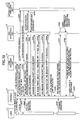
- FIGS. 17 through 19 are sequence diagrams for explaining respective processes performed by the first, second, and third examples of the image processing device of the second embodiment.
- FIG. 17 is a sequence diagram for explaining the process performed by the first example of the image processing device of the second embodiment shown in FIG. 14 .
- the browser 31 acquires an HTML file of an operation screen including the login area from the HTML providing unit 16 and displays the HTML file (step S202).
- step S203 When the user U performs a login procedure to the browser 31 in response by specifying the user ID, the password, etc. (step S203), the browser 31 requests authentication of the authentication processing unit 15 with the user ID, the password, etc. When the authentication is done normally, the browser 31 receives an authentication token from the authentication processing unit 15 (step S204). On the other hand, when the authentication is not performed normally, an error code is returned to the browser 31.
- the browser 31 requests acquisition of RSS feed, together with the authentication token, to the RSS outputting unit 13 (step S206).
- the RSS outputting unit 13 requests checking of the authentication token to the authentication processing unit 15.
- the RSS outputting unit 13 receives the user information from the authentication processing unit 15 (step S207).
- the RSS outputting unit 13 outputs an RSS feed to the browser 31 (step S208).
- FIG. 20 shows an example of an RSS feed which is received at the browser 31 immediately after authentication.
- the RSS feed includes a description 101 which indicates the link to the common zooming script file F33, a description 102 which indicates the link to the format script file F32, a description 103 which indicates the link to the mapping script file F31, and a description 104 which indicates the initial display content.
- FIG. 21 shows an example of the initial display content included in the RSS feed of FIG. 20 .
- the initial display content a plurality of items, each being surrounded by a pair of ⁇ div...> tag and ⁇ /div> tag, are described.
- the RSS outputting unit 13 performs filtering of the items to be included in the RSS feed, based on the user information acquired by the checking of the authentication token performed, beforehand, by the authentication processing unit 15. Specifically, in the document storing unit 11, the permission of displaying according to the user's viewing authority is set up beforehand for each unit of documents, pages, and regions as additional information.
- the RSS outputting unit 13 is arranged to include only the items with respect to documents for which the user has viewing authority, in the RSS feed.
- the description 105 of such items is not included in the RSS feed by the RSS outputting unit 13 through the filtering performed based on the user information.
- the browser 31 receives the common zooming script file F33, the format script file F32 (including the CSS file F5), and the mapping script file F31 from the RSS outputting unit 13 sequentially one by one (steps S209-S211).
- the browser receives necessary files, such as thumbnail images, from the RSS outputting unit 13 according to the contents of the received scripts (step S212).
- the browser 31 generates an HTML file based on the common zooming script file F33, the format script file F32, the mapping script file F31, the thumbnail images, etc. which are received from the RSS outputting unit 13, and displays the HTML file (step S213). Specifically, the browser 31 executes the common zooming script file F33, the format script file F32 (including the CSS file F5), and the mapping script file F31, so that an HTML file is generated from the RSS feed and the HTML file is displayed.
- the zooming object description 303 ( FIG. 6B ) for zooming operation is included in the generated HTML file.
- the browser 31 requests the RSS outputting unit 13 to output the lacking information to the browser 31 if needed (step S215).
- the lacking information is, for example, information concerning a certain object when displaying of an object which has not been displayed before the zooming operation is needed.
- the RSS outputting unit 13 checks the user information and the access privilege (step S216), and returns the fax image, the metadata, etc. which are suited to the user information and the access privilege, to the browser 31 (step S217).
- the browser 31 performs the displaying in accordance with the zooming operation (step S218).
- the example of the display according to the zooming operation is the same as those shown in FIGS. 8-13B .
- FIG. 22 shows an example of masking of the displaying in the process of the zooming operation.
- the viewing screen 311 only the objects for which the current user has viewing authority are displayed, which include "title” object 313, "writing date” object 315, "summary” object 317, and “typical image” object 316.
- Other objects including "writer” object 314 and "page image” object 318 are masked in the viewing screen 311, and they are held in an invisible state.
- the applicable masking method may include the completely blanking method, the mosaic attaching method, the fading state allocating method, etc.
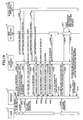
- FIG. 18 is a sequence diagram for explaining the process performed by the second example of the image processing device of the second embodiment shown in FIG. 15 .
- the browser 31 acquires an HTML file of an operation screen, including the login area, from the HTML providing unit 16 and displays the HTML file (step S222).
- step S223 When the user U performs a login procedure to the browser 31 by specifying the user ID, the password, etc. (step S223), the browser 31 requests authentication of the HTML providing unit 16 with the user ID, the password, etc. (step S224).
- the HTML providing unit 16 transmits the authentication request to the authentication processing unit 15.
- the HTML providing unit 16 receives an authentication token from the authentication processing unit 15 (step S225).
- the HTML providing unit 16 transmits the authentication token to the browser 31 (step S226).
- step S227) when the user U inputs a fax record list RSS feed request to the browser 31 (step S227), the browser 31 requests acquisition of an RSS feed, together with the authentication token, to the RSS outputting unit 13 (step S228).
- the RSS outputting unit 13 requests the checking of the authentication token to the authentication processing unit 15.
- the RSS outputting unit 13 receives the user information from the authentication processing unit 15 (step S229).
- the RSS outputting unit 13 outputs an RSS feed to the browser 31 (step S230).
- the browser 31 receives the common zooming script file F33, the format script file F32 (including the CSS file F5), and the mapping script file F31 from the RSS outputting unit 13 sequentially one by one (steps 5231-S233).
- the browser 31 receives necessary files, such as thumbnail images, from the RSS outputting unit 13 according to the contents of the received scripts (step S234).
- the browser 31 generates an HTML file based on the common zooming script file F33, the format script file F32, the mapping script file F31, the thumbnail images, etc. which are received (step S235). Specifically, the browser 31 executes the common zooming script file F33, the format script file F32 (including the CSS file F5), and the mapping script file F31, so that an HTML file is generated from the RSS feed and the HTML file is displayed.
- step S236 when the user U performs a zooming operation to the browser 31 through mouse operation or keyboard operation (step S236), the browser 31 requests receiving of the lacking information to the RSS outputting unit 13, if needed (step S237).
- the RSS outputting unit 13 checks the user information and the access privilege (step S238), and returns the fax image, the metadata, etc., which are suited to the user information and the access privilege, to the browser 31 (step S239).
- the browser 31 performs the displaying in accordance with the zooming operation (step S240).
- FIG. 19 is a sequence diagram for explaining the process performed by the third example of the image processing device of the second embodiment shown in FIG. 16 .
- the browser 31 acquires an HTML file of an operation screen including the login area, from HTML providing unit 16 and displays the HTML file (step S252).
- the browser 31 requests authentication of HTML providing unit 16 with the user ID, the password, etc. (step S254).
- the HTML providing unit 16 transmits the same request to the authentication processing unit 15.
- the HTML providing unit 16 receives an authentication token from the authentication processing unit 15 (step S255), and transmits the authentication token to the browser 31 (step S256).
- step S257 when the user U inputs a fax record list RSS feed request to the browser 31 (step S257), the browser 31 requests receiving of an RSS feed, together with the authentication token, to the HTML providing unit 16 (step S258).
- the HTML providing unit 16 requests the checking of the authentication token to the authentication processing unit 15. When the authentication token is checked normally, the HTML providing unit 16 receives the user information from the authentication processing unit 15 (step S259), and the HTML providing unit 16 outputs an RSS feed to the browser 31 (step S260).
- the browser 31 receives the common zooming script file F33, the format script file F32 (including the CSS file F5), and the mapping script file F31 from the HTML providing unit 16 sequentially one by one (steps S261-S263).
- the browser 31 receives necessary files, such as thumbnail images, from the RSS outputting unit 13 via the HTML providing unit 16 according to the contents of the received scripts (steps S264-S266).
- the browser 31 may acquire the files, such as thumbnail images, directly from the RSS outputting unit 13.
- the browser 31 generates an HTML file based on the common zooming script file F33, the format script file F32, the mapping script file F31, the thumbnail images, etc. which are received, and displays the HTML file (step S267). Specifically, the browser 31 executes the common zooming script file F33, the format script file F32 (including the CSS file F5) and the mapping script file F31, so that an HTML file is generated from the RSS feed and it is displayed.
- step S268 When the user U performs a zooming operation to the browser 31 through mouse operation or keyboard operation (step S268), the browser 31 requests receiving of the lacking information, to the RSS outputting unit 13 via the HTML providing unit 16, if needed (steps S269, S270).
- the RSS outputting unit 13 checks the user information and the access privilege (step S271), and returns the fax image, the metadata, etc. which are suited to the user information and the access privilege, to the browser 31 via the HTML providing unit 16 (steps S272, S273).
- the browser 31 may receive the lacking information directly from the RSS outputting unit 13. Finally, the browser 31 performs the displaying in accordance with the zooming operation (step S274).
- the common zooming script file F33, the format script file F32 (including the CSS file F5), and the mapping script file F31 are executed by the browser 31 to generate an HTML file.
- the HTML providing unit 16 may execute the common zooming script file F33, the format script file F32 (including the CSS file F5), and the mapping script file F31 to generate an HTML file and may supply the generated HTML file to the browser 31.
- the image processing device of the invention is arranged based on the RSS distribution, the user is enabled to view document information using a general-purpose browser implemented in a client, such as a PC, as standard equipment; (2) it is possible to perform efficient viewing operation to view the stored document information without discontinuing the operation, because the user is enabled to perform zoom-in/zoom-out operation in the screen by specifying freely a display element displayed in the screen, until the desired content is found out; (3) the image processing device of the invention generally enables the user to perform efficient viewing operation.
Landscapes
- Engineering & Computer Science (AREA)
- Theoretical Computer Science (AREA)
- Databases & Information Systems (AREA)
- Data Mining & Analysis (AREA)
- Physics & Mathematics (AREA)
- General Engineering & Computer Science (AREA)
- General Physics & Mathematics (AREA)
- Computational Linguistics (AREA)
- Business, Economics & Management (AREA)
- General Business, Economics & Management (AREA)
- Facsimiles In General (AREA)
Abstract
Description
- This invention relates to an image processing device for use in an image forming device, such as a multi-function peripheral.
- Many multi-function peripherals (MFP) are provided with the functions of document image storing, fax image transmission and fax image reception, and some of the multi-function peripherals have the function of viewing any of document images stored or fax images received or transmitted.
- In recent years, there has been proposed a network communication device which is arranged to distribute metadata, such as fax transmission/ reception records, by using RSS formats. For example, see Japanese Laid-Open Patent Application No.
2006-050373 - RSS formats are used to describe metadata, such as Web site headlines or summaries. The initials "RSS" are used to refer to the following formats: Rich Site Summary, Really Simple Syndication, or RDF (Resource Description Framework) Site Summary.
- The RSS distribution by the above-mentioned communication device makes it possible for users to view RSS content using a general-purpose browser in which an RSS reader is incorporated, without needing dedicated viewer software for viewing RSS documents.
- When the distributed RSS is received at a client, such as PC (personal computer), the user on the client can view the bibliographic information and thumbnail image contained in the received RSS, using the general-purpose browser. The user makes a judgment as to whether the main document image is to be accessed. The user accesses a file of the main document image, if needed, to view the content of the file concerned.
- Accessing the file of the main document image may be performed by selecting the link to the URL (Uniform Resource Locator) of the document image file included in the bibliographic information through mouse operation.
- As described above, use of the RSS distribution enables the user to easily view document information using a general-purpose browser. However, there is a case in which the bibliographic information or thumbnail image contained in the RSS is not sufficient for the user to judge that the desired document is discovered.
- Specifically, when the user cannot judge that the desired document is discovered, only with the bibliographic information, the user has to make the judgment by viewing the thumbnail image. However, in many cases, fine characters or fine drawings in the thumbnail image are illegible, and it is difficult to determine whether the desired document is discovered.
- Moreover, the thumbnail image usually is an image of a typical page, such as a first page of a document. In a case of document information covering a plurality of pages or fax transmission/reception images, the user cannot easily read the images of other pages than the typical page.
- For this reason, there are an increasing number of cases in which the user has to access the main document image. However, if the desired document is not found after the main document image is viewed, the user must return to the viewing screen, such as the bibliographic information, and must repeat the same process for other document images. Accordingly, the viewing operation by the user is discontinued and it is difficult to perform efficient viewing operation.
- In one aspect of the invention, the present disclosure provides an improved image processing device in which the above-described problems are eliminated.
- In one aspect of the invention, the present disclosure provides an image processing device which is able to perform efficient viewing operation to view the stored document information.
- In an embodiment of the invention which solves or reduces one or more of the above-mentioned problems, the present disclosure provides an image processing device comprising: a document storing unit configured to store document information containing scanned images and fax transmission/reception images sent from a plurality of users; a metadata outputting unit configured to generate a metadata of the document information stored by the document storing unit and distribute the metadata; a display format file supplying unit configured to supply a display conversion file linked to the metadata; a zooming process file supplying unit configured to supply a zooming process file linked to the metadata; and a document information supplying unit configured to read a document information item, requested at a time of displaying, from the document storing unit and supply the document information item.
- The above-mentioned image processing device may be arranged to further comprise an authentication unit which is configured to authenticate a user who performs a login procedure, and supply user information, wherein the metadata outputting unit is configured to generate a metadata of a document information item with a viewing authority of the user in accordance with the user information and distribute the metadata, and the document information supplying unit is configured to distribute the document information item with the viewing authority of the user in accordance with the user information.
- The above-mentioned image processing device may be arranged so that the zooming process file includes: a mapping script which associates a display element, contained in a displaying file produced from the display conversion file, with a zooming process; and an event processing script which performs a zooming process to the display element in response to operation of a user.
- The above-mentioned image processing device may be arranged so that the document storing unit is configured to manage the document information in hierarchical levels according to components of the document information.
- The above-mentioned image processing device may be arranged so that the metadata outputting unit is configured to distribute the metadata according to hierarchical levels of components of the document information.
- The above-mentioned image processing device may be arranged so that the metadata includes an RSS feed which is an XML based format.
- The above-mentioned image processing device may be arranged so that the display conversion file is an XSL file which converts the RSS feed in an HTML format to generate an HTML file.
- The above-mentioned image processing device may be arranged so that the display conversion file includes a format script file and a CSS file which convert the RSS feed in an HTML format to generate an HTML file.
- In an embodiment of the invention which solves or reduces one or more of the above-mentioned problems, the present disclosure provides a viewing control method comprising the steps of: storing document information containing scanned images and fax transmission/reception images sent from a plurality of users; generating a metadata of the document information stored to distribute the metadata; supplying a display conversion file linked to the metadata; supplying a zooming process file linked to the metadata; and reading a document information item, requested at a time of displaying, to supply the document information item.
- In the image processing device of the invention, it is possible to perform efficient viewing operation to view the stored document information, without discontinuing the operation, because the user is enabled to perform zoom-in/zoom-out operation in the screen by specifying freely a display element displayed in the screen.
- Other objects, features and advantages of the present invention will become more apparent from the following detailed description when read in conjunction with the accompanying drawings.
-
FIG. 1 is a diagram showing the composition of a network system to which an image processing device of a first embodiment of the invention is applied. -
FIG. 2 is a diagram for explaining the flow of information in the network system ofFIG. 1 . -
FIG. 3 is a diagram for explaining the relationship between various files. -
FIG. 4A, FIG. 4B, FIG. 4C, FIG. 4D, and FIG. 4E are diagrams showing examples of the hierarchical arrangements of RSS feeds. -
FIG. 5A and FIG. 5B are diagrams showing examples of an RSS feed and an XSL file. -
FIG. 6A shows examples of descriptions of block elements in a generated HTML file, andFIG. 6B shows an example of a zooming object description in the HTML file. -
FIG. 7 is a sequence diagram for explaining the process performed by the image processing device of the first embodiment. -
FIG. 8 is a diagram showing an example of a screen displayed by the browser. -
FIG. 9 is a diagram showing an example of a screen displayed by the browser. -
FIG. 10 is a diagram showing an example of a screen displayed by the browser. -
FIG. 11 is a diagram showing an example of a screen displayed by the browser. -
FIG. 12 is a diagram showing an example of a screen displayed by the browser. -
FIG. 13A and FIG. 13B are diagrams showing examples of screens displayed by the browser. -
FIG. 14 is a diagram showing the composition of a first example of an image processing device of a second embodiment of the invention. -
FIG. 15 is a diagram showing the composition of a second example of the image processing device of the second embodiment. -
FIG. 16 is a diagram showing the composition of a third example of the image processing device of the second embodiment. -
FIG. 17 is a sequence diagram for explaining the process performed by the first example of the image processing device of the second embodiment. -
FIG. 18 is a sequence diagram for explaining the process performed by the second example of the image processing device of the second embodiment. -
FIG. 19 is a sequence diagram for explaining the process performed by the third example of the image processing device of the second embodiment. -
FIG. 20 is a diagram showing an example of an RSS feed output to the browser immediately after authentication. -
FIG. 21 is a diagram showing an example of an initial display content contained in the RSS feed ofFIG. 20 . -
FIG. 22 is a diagram showing an example of masking of the display in the process of zooming operation. - A description will be given of embodiments of the invention with reference to the accompanying drawings.
-
FIG. 1 shows the composition of a network system to which an image processing device of a first embodiment of the invention is applied. - In the network system shown in
FIG. 1 , anMFP 1 which is the image processing device of this embodiment, a client 3 (such as PC) which is operated by a user U, and anRSS server 4 are interconnected via anetwork 2. TheRSS server 4 relays distribution of an RSS from theMFP 1. Specifically, theRSS server 4 stores an RSS feed distributed from theMFP 1, and supplies the stored RSS feed to theclient 3. - In a case in which an RSS feed is supplied to the
client 3 directly from theMFP 1, theRSS server 4 may be omitted from the network system shown inFIG. 1 . - The
MFP 1 in this embodiment includes adocument storing unit 11, aregion identifying unit 12, anRSS outputting unit 13, an XSL/script storing unit 14, and anauthentication processing unit 15. - The
document storing unit 11 stores document images (body images, thumbnail images) and their bibliographic information (date, title, writer, summary, etc.). - The
region identifying unit 12 analyzes the content of a document image, identifies regions (character regions, image regions, etc.), and adds information relating to the regions to thedocument storing unit 11. - The
RSS outputting unit 13 generates an RSS feed based on the document image, bibliographic information, etc. which are stored in thedocument storing unit 11, and outputs the RSS feed to thenetwork 2. - The XSL/
script storing unit 14 stores an XSL (Extensible Stylesheet Language) file and a zooming script file which are linked to the RSS feed output from theRSS outputting unit 13, and supplies corresponding files in response to a file receiving request. - The
authentication processing unit 15 performs authenticating processing when it is necessary to restrict the viewers who are permitted to view the document information in theMFP 1. - In the
client 3, a general-purpose browser 31 is arranged. Thisbrowser 31 receives an RSS feed, an XSL file, and a script file from theMFP 1 or theRSS server 4, generates a HTML (Hyper Text Markup Language) file from the received files, and performs displaying of the HTML file on the monitor screen. -
FIG. 2 is a diagram for explaining the flow of information flow in the network system ofFIG. 1 . - As shown in
FIG. 2 , in thedocument storing unit 11 of theMFP 1, document images and bibliographic information are managed for each of the hierarchical arrangements of documents, pages, and regions. Specifically, each of the documents contains one or more pages, and each page contains one or more regions in thedocument storing unit 11. - When it is not necessary to subdivide each page into regions, the hierarchical arrangements of regions may be omitted. On the other hand, when it is necessary to subdivide each region into sub-regions, the hierarchical arrangements of sub-regions may be provided additionally in the
document storing unit 11. - The XSL/
script storing unit 14 of theMFP 1 holds an XSL file F2 for converting an RSS feed in an HTML format to generate an HTML file, and a zooming script file F3 for enabling zooming operation to the display elements (objects) contained in a generated HTML file. A style sheet description may be separated from the XSL file F2 as another CSS (Cascading Style Sheet) file. - The zooming script file F3 includes a mapping script file which associates the display elements contained in the generated HTML file with a zooming process (mapping), and an event processing script file which performs a zooming process in response to an input operation of the mouse by the user U using the mouse or the keyboard.
- The
RSS outputting unit 13 generates an RSS feed F1 based on the information stored in thedocument storing unit 11, and distributes the RSS feed to theclient 3 or theRSS server 4. - The XSL file F2 and the zooming script file F3 are linked to the RSS feed F1. When the RSS feed F1 is processed by the
browser 31, the XSL file F2 and the zooming script file F3 are read out in accordance with the links. -
FIG. 3 is a diagram for explaining the relationship between various files. The example ofFIG. 3 is applicable to a print log and a fax log. - As shown in
FIG. 3 , a print log HTML file F4a is generated from the common mapping script portions of a print log RSS feed F1a, a print log XSL file F2a, a print log mapping script file F3a, and a common zooming script file F3c. A fax log HTML file F4b is generated from the common mapping script portions of a fax log RSS feed F1b, a fax log XSL file F2b, a fax log mapping script file F3b, and the common zooming script file F3c. - A zooming process is performed by operation of the event processing script portion of the common zooming script file F3c when the user U performs mouse operation to the print log HTML file F4a or the fax log HTML file F4b.
-
FIGS. 4A through 4E are diagrams showing examples of the hierarchical arrangements of RSS feeds.FIGS. 4A-4C show examples of the print log RSS feed F1a, andFIGS. 4D and 4E show examples of the fax log RSS feed F1b. - As shown in
FIG. 4A , the print log RSS feed F1a has a print log RSS feed F1a-1 at the uppermost position and contains a plurality of document entries Ea-1. As shown inFIG. 4B , each of the document entries Ea-1 has a document RSS feed F1a-2 and contains a plurality of page entries Ea-2. As shown inFIG. 4C , each of the page entries Ea-2 has a page RSS feed Fla-3 and contains a plurality of region entries Ea-3. - As shown in
FIG. 4D , the fax log RSS feed F1b has a fax log RSS feed F1b-1 at the uppermost position and contains a plurality of fax document entries Eb-1. As shown inFIG. 4E , each of the fax document entries Eb-1 has a fax document RSS feed F1b-2 and contains a plurality of page entries Eb-2. Each page entry may be subdivided into a plurality of region entries. -
FIG. 5A and FIG. 5B show examples of an RSS feed and an XSL file.FIG. 5A shows an example of an RSS feed F1, andFIG. 5B shows an example of an XSL file F2. - As shown in
FIG. 5A , the RSS feed F1 includes a description indicating the link to the XSL file F2: "<?xml-stylesheet href="zooming.xsl"?>", a description indicating the URL of an MFP which performs the RSS outputting: "<title>MFP:192.168.21.12 ...</title>", and a description indicating a plurality of entries: " <entry>...</entry>". - As shown in
FIG. 5B , the XSL file F2 includes a description indicating the link to a CSS file: "<link rel= "stylesheet" href="./hogehge.css" type="text/css" />", "<link rel= "stylesheet" href="./hgoe.css" type="text/css" />", and a description indicating the link to the zooming script file: "<script type="text/javascript" src="./zooming.js">//</script>". -
FIG. 6A shows examples of descriptions of block elements in an HTML file F4, which is generated from an RSS feed F1, an XSL file F2, and a zooming script file F3.FIG. 6B shows an example of a zooming object description in the HTML file F4. - The mapping script contained in the zooming script file F3 refers to the class descriptions "class= "thumbnail"" and "class= "summary"" contained in the
descriptions FIG. 6A . For example, assume that "thumbnail" corresponds to a typical image and "summary" corresponds to a summary, the IDs "id= "01"" and "id="02"" are mapped to the IDs of a zooming object description. -
FIG. 6B shows an example of azooming object description 303 in the HTML file F4. A zoomingobject description 303 is generated in correspondence with each of the displaying objects in the HTML file F4. In thiszooming object description 303, parameters including "id", "initZoomFactor", "relatedTo", etc. are set up. The parameter "id" identifies a displaying object in the HTML file F4. The parameter "initZoomFactor" indicates the zooming factor at a time of initial displaying. The parameter "relatedTo" indicates the relation of another object to which the zoom operation of the object concerned is transmitted, and the transmission ratio. - The ID of a corresponding block element (
FIG. 6A ) in the mapping script is set to the parameter "id". The value which indicates the degree of zooming is set to "initZoomFactor". For example, if the zooming factor is set up to "0.0", the image is displayed in the original display size. If the zooming factor is set up to a positive value, an expanded image is displayed. If the zooming factor is set up to a negative value, a reduced image is displayed. - For example, if the "relatedTo" is set up as "children:0.8", the zoom operation of the object concerned is transmitted to the other included object by the transmission ratio "0.8". If the "relatedTo" is set up as "brother:-0.5", the zoom operation of the object concerned is transmitted with reversed polarity to the other parallel-relation object by the transmission ratio "0.5". Specifically, if the zoom-in operation of the object concerned is performed, the zoom-out operation of the other parallel-relation object is performed by the transmission ratio "0.5".
- Moreover, in the
zooming object description 303, an included zoomingobject action description 304 which defines the displaying action of each of other included displaying objects is included. In the included zoomingobject action description 304, the parameters including "zoomFactor", "id", "size", etc. are set up. The parameter "zoomFactor" indicates the range of a zooming factor by which the object is displayed. The parameter "id" identifies the object. The parameter "size" indicates the display size corresponding to the zooming factor range. - The ID of a corresponding block element (
FIG. 6A ) in the mapping script is set to the parameter "id". For example, if the "zoomFactor" is set to "0.0 1.0", the object is displayed when the zooming factor of the parent object is in a range of "0.0" to "1.0". If the "zoomFactor" is set to "0.1 1.0", the object is not displayed when the zooming factor of the parent object is equal to "0.0" but it is displayed when the zooming factor of the parent object is in a range of "0.1" to "1.0". - For example, suppose that the object is an image and the "size" is set to "20% 50%", the image size is changed in the range of 20% - 50% in correspondence with the range of the "zoomFactor". Suppose that the object is a text (character string) and the "size" is set to "8pt 12pt" (where pt denotes the point by which a character size is indicated), the character size is changed in the range of 8pt - 12pt in correspondence with the range of the "zoomFactor". If the "size" is set to "50%" or "8pt", the image or character size is held at a fixed size, regardless of the zooming factor.
-
FIG. 7 is a sequence diagram for explaining the process performed by the image processing device of the first embodiment. - As shown in
FIG. 7 , when the user U performs a login procedure relating to theMFP 1 to thebrowser 31 by specifying a user ID, a password, etc. (step S101), thebrowser 31 starts performing an authentication process (basic authentication, etc.) between thebrowser 31 and the MFP 1 (step S102). - When the authentication is done normally, the notification is returned to the
browser 31. When the authentication is not performed normally, an error code is returned to thebrowser 31. - If the viewing security is not needed, the login and authentication processes may be omitted. Alternatively, the subsequent processes may be changed for the case in which the login procedure is performed and the case in which the login procedure is not performed.
- Subsequently, when the user U inputs a list displaying request to the browser 31 (step S103), the
browser 31 receives an RSS from the MFP 1 (step S104), and continuously receives an XSL, a zooming script, a thumbnail image, etc. from theMFP 1 sequentially one by one based on the descriptions of the links included in the received RSS (steps S105-S107). - At this time, when the user U who has requested the list displaying does not perform a login procedure relating to the
MFP 1, theMFP 1 may be arranged to prevent the user from receiving the RSS, the XSL, the zooming script, the thumbnail image, etc., or to restrict the content being supplied to the user such that only the content of the files having no problem on the security is supplied to the user. - Subsequently, the
browser 31 generates an HTML file based on the RSS, the XSL, the zooming script, the thumbnail image, etc. which are received from theMFP 1, and displays the HTML file (step S108). Specifically, thebrowser 31 generates an HTML file by applying the XSL and the zooming script to the RSS, and displays the generated HTML file. - Subsequently, when the user U performs a zooming operation to the
browser 31 through mouse operation or keyboard operation (step S109), thebrowser 31 receives the lacking information from theMFP 1, if needed (step S110), and performs the displaying according to the zooming operation (step S111). The lacking information at this time is, for example, information relating to the object which was not displayed before zooming operation but displaying of the object is needed by the zooming operation. -
FIGS. 8 through 13B are diagrams showing examples of screens displayed in thebrowser 31. -
FIG. 8 shows an example of aninitial viewing screen 311. In theinitial viewing screen 311 ofFIG. 8 , a plurality of "document" objects 312 (in the example, eight objects) are displayed with equal size. In each "document"object 312, a "title"object 313, a "writer"object 314, and a "writing date"object 315 are displayed. These objects 313-315 are set up such that the starting value of the parameter "zoomFactor" is the same as the value of the "initZoomFactor" in the zooming object description of the parent object (FIG. 6B ), and they are displayed at the time of initial displaying. The starting value of the "zoomFactor" of the object which is not displayed at this time is set up as being larger than the value of the "initZoomFactor" in the zooming object description of the parent object. -
FIG. 9 shows an example of theviewing screen 311 when a zooming operation is performed without selecting any of the "document" objects 312 in theviewing screen 311 ofFIG. 8 (or when an upward scroll operation is performed in the margin part of the viewing screen 311). - In the example of
FIG. 9 , a plurality of "document" objects 312 are expanded equally, and "typical image" objects (thumbnail images) 316 which were not displayed before are displayed. The parameter "relatedTo" (FIG. 6B ) in the zooming object description of the whole screen object which includes the plurality of "document" objects 312 is set up to "children:1.0", and the plurality of "document" objects 312 are expanded equally. The starting value of the "zoomFactor" of the "typical image"object 316 is set up as being larger than the value of the "initZoomFactor" in the zooming object description of the parent "document"object 312, and the displaying is performed when the zooming factor exceeds a certain value. The "document" objects which are placed beyond the margin are eliminated form the display area of the screen, and the number of the objects displayed is changed from eight to six. This is performed by the normal display function of thebrowser 31. -
FIG. 10 shows an example of theviewing screen 311 when a zooming operation is performed by selecting a specific "document"object 312 in theviewing screen 311 ofFIG. 9 . - In the example of
FIG. 10 , only the selected "document"object 312 is expanded and other "document" objects are reduced. The parameter "relatedTo" (FIG. 6B ) in the zooming object description of the "document"object 312 is set up to "brother:-1.0", and the selected "document"object 312 is expanded and other "document" objects 312 are simultaneously reduced by the same ratio. In the selected "document"object 312, the "typical image"object 316 is expanded, and a "summary"object 317 and "page image" objects 318 which were not displayed before are displayed. The starting value of the "zoomFactor" is set up as being larger than the value of the "initZoomFactor" in the zooming object description of the parent "document"object 312, and the displaying of the "summary"object 317 and "page image" objects 318 is performed when the zooming factor exceeds a certain value. All the other "document" objects than the selected one are reduced equally. -
FIG. 11 shows an example of theviewing screen 311 when a zooming operation is performed further by selecting the specific "document"object 312 in the viewing thescreen 311 ofFIG. 10 . - In the example of
FIG. 11 , only the selected "document"object 312 is expanded further and other "document" objects 312 are reduced further. In the selected "document"object 312, the "summary"object 317 is expanded, and the number of "page image" objects 318 displayed is increased. In other "document" objects 312, the "writer" object and the "typical image" object which were displayed before are removed, and the "title" object and the "writing date" object are displayed. The range of the "zoomFactor" (FIG. 6B ) of the "writer" object and the "typical image" object is set up such that the displaying range becomes out of range if the zooming factor exceeds a certain negative value, and the displaying of these objects is not performed when the zooming factor exceeds the negative value. -
FIG. 12 shows an example of theviewing screen 311 when a zooming operation is performed further by selecting the specific "document"object 312 in theviewing screen 311 ofFIG. 11 , and a zooming operation is performed further by selecting a specific "page image"object 318 in the "document"object 312. - In the example of
FIG. 12 , only the selected "document"object 312 is expanded further and other "document" objects 312 are reduced further. In the selected "document"object 312, the number of "page image" objects 318 displayed is increased, and the "page image" object to which the zooming operation is performed is expanded. In other "document" objects 312, the "writing date" object which was displayed before is removed, and only the "title" object is displayed. -
FIG. 13A and FIG. 13B show examples of screens displayed when a zooming operation to a specific area is performed. Specifically, when a "region"object 319 in a "page image"object 318 shown inFIG. 13A is selected and a zooming operation is performed, a "region detailed information"object 320 is displayed as shown inFIG. 13B . In the "region detailed information"object 320, an "image file (URL information)", a "title", a "thumbnail (URL information)", a "key (URL information)", a "name", a "type", a "text", a "surrounding text", "X0(position)", "Y0(position)", "X1(position)", "Y1(position)", etc. are displayed. - In the above described first embodiment of the invention, a screen displaying HTML file is generated using an XSL file F2 (
FIG. 2 ). An image processing device of a second embodiment of the invention is arranged to generate a screen displaying HTML file by using a format script file and a CSS (Cascading Style Sheets) file, such as files described in JavaScript or the like, without using an XSL file. Generation of an HTML file using an XSL file according to the first embodiment needs a relatively long processing time, and the time for completing the screen displaying is relatively long. However, the image processing device of the second embodiment uses a format script file and a CSS file, and an HTML file can be generated at high speed and it is possible to shorten the time for completing the screen displaying. -
FIG. 14 shows the composition of a first example of the image processing device of the second embodiment. - As shown in
FIG. 14 , anMFP 1 which is the image processing device of this embodiment, and a client 3 (such as PC) which is operated by a user U are interconnected via a network. - The
MFP 1 in this embodiment includes adocument storing unit 11, aregion identifying unit 12, anRSS outputting unit 13, ascript storing unit 141, aCSS storing unit 142, anauthentication processing unit 15, and anHTML providing unit 16. - The
document storing unit 11 stores document images (body images, thumbnail images) and their bibliographic information (date, title, writer, summary, etc.). - The
region identifying unit 12 analyzes the content of a document image, identifies regions (character regions, image regions, etc.), and adds information relating to the regions to thedocument storing unit 11. - The
HTML providing unit 16 provides an HTML file of an operation screen including a login area in response to a displaying request received from thebrowser 31 of theclient 3. - The
RSS outputting unit 13 generates an RSS feed based on the document image, the bibliographic information, etc., which are stored in thedocument storing unit 11, and outputs the RSS feed to the requiring device. - The
script storing unit 141 stores various kinds of script files linked to the RSS feed output from theRSS outputting unit 13, and supplies a corresponding script file in response to a script file request. - The
CSS storing unit 142 stores various kinds of CSS files and supplies a corresponding CSS file in response to a CSS file request. - The
authentication processing unit 15 performs an authentication process of a user. - In the
script storing unit 141, a mapping script file F31 provided for each of displaying object lists, a format script file F32 provided for each of the displaying object lists, and a common zooming script file F33 provided in common for the displaying object lists are stored. - The mapping script file F31 is equivalent to the print log mapping script file F3 and the fax log mapping script file F3b shown in
FIG. 3 . The mapping script file F31 is a file which associates the models of documents, such as fax logs and print logs, with a zooming operation. - The format script file F32 is a script file described in JavaScript which defines the conversion processing (similar to the conversion processing by means of the XSL file F2 in
FIG. 2 ) to convert an RSS feed in an HTML format to generate an HTML file. Specifically, the format script file F32 sets up the layout specified in the CSS file F5 in correspondence with the model of a document. Moreover, the format script file F32 indicates how to trace back to a metadata and detailed images (pages, regions, etc.) according to the model. For example, the relation, such as "/{$page no} {$region no}", can be traced back. Although the information without any access privilege is turned into the lacking information within the model, it is possible to realize masking in that case by replacing it by an alternative image or the like. - The common zooming script file F33 is equivalent to the common zooming script file F3c in
FIG. 3 , and it contains basic zooming scripts. - The CSS files F5 for the respective displaying object lists which are linked to the format script files F32 in the
script storing unit 141 are stored in theCSS storing unit 142. -
FIG. 15 shows the composition of a second example of the image processing device of the second embodiment. In the image processing device ofFIG. 15 , theauthentication processing unit 15 is arranged outside theMFP 1. Theauthentication processing unit 15 is separated from theMFP 1, and the existing authentication systems arranged on the network may be used as theauthentication processing unit 15. Because it is not necessary to newly set up user information including authority, the time and cost for construction of the network system in which the image processing device is arranged can be reduced. -
FIG. 16 shows the composition of a third example of the image processing device of the second embodiment. In the image processing device ofFIG. 16 , theHTML providing unit 16, thescript storing unit 141, and theCSS storing unit 142 are separated from theMFP 1 of the second example shown inFIG. 15 , and theunits Web application server 5. - Consequently, the
MFP 1 requires only the functions of storing documents and outputting a RSS feed, and the range of the models of theMFP 1 to which the image processing device is applicable is expanded and the existing products can be used effectively. -
FIGS. 17 through 19 are sequence diagrams for explaining respective processes performed by the first, second, and third examples of the image processing device of the second embodiment. -
FIG. 17 is a sequence diagram for explaining the process performed by the first example of the image processing device of the second embodiment shown inFIG. 14 . - As shown in
FIG. 17 , when the user U inputs a displaying request to the browser 31 (step S201), thebrowser 31 acquires an HTML file of an operation screen including the login area from theHTML providing unit 16 and displays the HTML file (step S202). - When the user U performs a login procedure to the
browser 31 in response by specifying the user ID, the password, etc. (step S203), thebrowser 31 requests authentication of theauthentication processing unit 15 with the user ID, the password, etc. When the authentication is done normally, thebrowser 31 receives an authentication token from the authentication processing unit 15 (step S204). On the other hand, when the authentication is not performed normally, an error code is returned to thebrowser 31. - Subsequently, when the user U inputs a fax record list RSS feed request to the browser 31 (step S205), the
browser 31 requests acquisition of RSS feed, together with the authentication token, to the RSS outputting unit 13 (step S206). TheRSS outputting unit 13 requests checking of the authentication token to theauthentication processing unit 15. When the authentication token is checked normally by theauthentication processing unit 15, theRSS outputting unit 13 receives the user information from the authentication processing unit 15 (step S207). TheRSS outputting unit 13 outputs an RSS feed to the browser 31 (step S208). - On the other hand, when the checking is not performed normally, an error code is returned to the
browser 31 via theRSS outputting unit 13. -
FIG. 20 shows an example of an RSS feed which is received at thebrowser 31 immediately after authentication. As shown inFIG. 20 , the RSS feed includes adescription 101 which indicates the link to the common zooming script file F33, adescription 102 which indicates the link to the format script file F32, adescription 103 which indicates the link to the mapping script file F31, and adescription 104 which indicates the initial display content. -
FIG. 21 shows an example of the initial display content included in the RSS feed ofFIG. 20 . As shown inFIG. 21 , in the initial display content, a plurality of items, each being surrounded by a pair of <div...> tag and </div> tag, are described. - The
RSS outputting unit 13 performs filtering of the items to be included in the RSS feed, based on the user information acquired by the checking of the authentication token performed, beforehand, by theauthentication processing unit 15. Specifically, in thedocument storing unit 11, the permission of displaying according to the user's viewing authority is set up beforehand for each unit of documents, pages, and regions as additional information. TheRSS outputting unit 13 is arranged to include only the items with respect to documents for which the user has viewing authority, in the RSS feed. - For example, suppose that, in the example of
FIG. 21 , the user has no viewing authority for adescription 105 of certain items. In such a case, thedescription 105 of such items is not included in the RSS feed by theRSS outputting unit 13 through the filtering performed based on the user information. - Referring back to
FIG. 17 , based on the descriptions of the links included in the received RSS feed, thebrowser 31 receives the common zooming script file F33, the format script file F32 (including the CSS file F5), and the mapping script file F31 from theRSS outputting unit 13 sequentially one by one (steps S209-S211). - Moreover, the browser receives necessary files, such as thumbnail images, from the
RSS outputting unit 13 according to the contents of the received scripts (step S212). - Subsequently, the
browser 31 generates an HTML file based on the common zooming script file F33, the format script file F32, the mapping script file F31, the thumbnail images, etc. which are received from theRSS outputting unit 13, and displays the HTML file (step S213). Specifically, thebrowser 31 executes the common zooming script file F33, the format script file F32 (including the CSS file F5), and the mapping script file F31, so that an HTML file is generated from the RSS feed and the HTML file is displayed. The zooming object description 303 (FIG. 6B ) for zooming operation is included in the generated HTML file. - Subsequently, when the user U performs a zooming operation to the
browser 31 through mouse operation or keyboard operation (step S214), thebrowser 31 requests theRSS outputting unit 13 to output the lacking information to thebrowser 31 if needed (step S215). The lacking information is, for example, information concerning a certain object when displaying of an object which has not been displayed before the zooming operation is needed. - The
RSS outputting unit 13 checks the user information and the access privilege (step S216), and returns the fax image, the metadata, etc. which are suited to the user information and the access privilege, to the browser 31 (step S217). - Subsequently, the
browser 31 performs the displaying in accordance with the zooming operation (step S218). The example of the display according to the zooming operation is the same as those shown inFIGS. 8-13B . -
FIG. 22 shows an example of masking of the displaying in the process of the zooming operation. As shown inFIG. 22 , in theviewing screen 311, only the objects for which the current user has viewing authority are displayed, which include "title"object 313, "writing date"object 315, "summary"object 317, and "typical image"object 316. Other objects including "writer"object 314 and "page image"object 318 are masked in theviewing screen 311, and they are held in an invisible state. - Any of various masking methods is applicable. The applicable masking method may include the completely blanking method, the mosaic attaching method, the fading state allocating method, etc.
-
FIG. 18 is a sequence diagram for explaining the process performed by the second example of the image processing device of the second embodiment shown inFIG. 15 . - As shown in
FIG. 18 , when the user U inputs a displaying request to the browser 31 (step S221), thebrowser 31 acquires an HTML file of an operation screen, including the login area, from theHTML providing unit 16 and displays the HTML file (step S222). - When the user U performs a login procedure to the
browser 31 by specifying the user ID, the password, etc. (step S223), thebrowser 31 requests authentication of theHTML providing unit 16 with the user ID, the password, etc. (step S224). - The
HTML providing unit 16 transmits the authentication request to theauthentication processing unit 15. When the authentication is done normally, theHTML providing unit 16 receives an authentication token from the authentication processing unit 15 (step S225). TheHTML providing unit 16 transmits the authentication token to the browser 31 (step S226). - On the other hand, when the authentication is not performed normally, an error code is returned to the
browser 31 via theHTML providing unit 16. - Subsequently, when the user U inputs a fax record list RSS feed request to the browser 31 (step S227), the
browser 31 requests acquisition of an RSS feed, together with the authentication token, to the RSS outputting unit 13 (step S228). - The
RSS outputting unit 13 requests the checking of the authentication token to theauthentication processing unit 15. When the authentication token is checked normally by theauthentication processing unit 15, theRSS outputting unit 13 receives the user information from the authentication processing unit 15 (step S229). TheRSS outputting unit 13 outputs an RSS feed to the browser 31 (step S230). - On the other hand, when the checking is not performed normally, an error code is returned to the
browser 31 via theRSS outputting unit 13. - Subsequently, based on the descriptions of the links included in the received RSS feed, the
browser 31 receives the common zooming script file F33, the format script file F32 (including the CSS file F5), and the mapping script file F31 from theRSS outputting unit 13 sequentially one by one (steps 5231-S233). - Moreover, the
browser 31 receives necessary files, such as thumbnail images, from theRSS outputting unit 13 according to the contents of the received scripts (step S234). - Subsequently, the
browser 31 generates an HTML file based on the common zooming script file F33, the format script file F32, the mapping script file F31, the thumbnail images, etc. which are received (step S235). Specifically, thebrowser 31 executes the common zooming script file F33, the format script file F32 (including the CSS file F5), and the mapping script file F31, so that an HTML file is generated from the RSS feed and the HTML file is displayed. - Subsequently, when the user U performs a zooming operation to the
browser 31 through mouse operation or keyboard operation (step S236), thebrowser 31 requests receiving of the lacking information to theRSS outputting unit 13, if needed (step S237). - The
RSS outputting unit 13 checks the user information and the access privilege (step S238), and returns the fax image, the metadata, etc., which are suited to the user information and the access privilege, to the browser 31 (step S239). - The
browser 31 performs the displaying in accordance with the zooming operation (step S240). - Next,
FIG. 19 is a sequence diagram for explaining the process performed by the third example of the image processing device of the second embodiment shown inFIG. 16 . - As shown in
FIG. 19 , when the user U inputs a displaying request to the browser 31 (step S251), thebrowser 31 acquires an HTML file of an operation screen including the login area, fromHTML providing unit 16 and displays the HTML file (step S252). - When the user U performs a login procedure to the
browser 31 in response by specifying the user ID, the password, etc. (step S253), thebrowser 31 requests authentication ofHTML providing unit 16 with the user ID, the password, etc. (step S254). TheHTML providing unit 16 transmits the same request to theauthentication processing unit 15. When the authentication is done normally, theHTML providing unit 16 receives an authentication token from the authentication processing unit 15 (step S255), and transmits the authentication token to the browser 31 (step S256). - On the other hand, when the authentication is not performed normally, an error code is returned to the
browser 31 via theHTML providing unit 16. - Subsequently, when the user U inputs a fax record list RSS feed request to the browser 31 (step S257), the
browser 31 requests receiving of an RSS feed, together with the authentication token, to the HTML providing unit 16 (step S258). - The
HTML providing unit 16 requests the checking of the authentication token to theauthentication processing unit 15. When the authentication token is checked normally, theHTML providing unit 16 receives the user information from the authentication processing unit 15 (step S259), and theHTML providing unit 16 outputs an RSS feed to the browser 31 (step S260). - On the other hand, when the checking is not performed normally, an error code is returned to the
browser 31 via theHTML providing unit 16. - Subsequently, based on the descriptions of the links included in the received RSS feed, the
browser 31 receives the common zooming script file F33, the format script file F32 (including the CSS file F5), and the mapping script file F31 from theHTML providing unit 16 sequentially one by one (steps S261-S263). - Moreover, the
browser 31 receives necessary files, such as thumbnail images, from theRSS outputting unit 13 via theHTML providing unit 16 according to the contents of the received scripts (steps S264-S266). Thebrowser 31 may acquire the files, such as thumbnail images, directly from theRSS outputting unit 13. - Subsequently, the
browser 31 generates an HTML file based on the common zooming script file F33, the format script file F32, the mapping script file F31, the thumbnail images, etc. which are received, and displays the HTML file (step S267). Specifically, thebrowser 31 executes the common zooming script file F33, the format script file F32 (including the CSS file F5) and the mapping script file F31, so that an HTML file is generated from the RSS feed and it is displayed. - When the user U performs a zooming operation to the
browser 31 through mouse operation or keyboard operation (step S268), thebrowser 31 requests receiving of the lacking information, to theRSS outputting unit 13 via theHTML providing unit 16, if needed (steps S269, S270). - The
RSS outputting unit 13 checks the user information and the access privilege (step S271), and returns the fax image, the metadata, etc. which are suited to the user information and the access privilege, to thebrowser 31 via the HTML providing unit 16 (steps S272, S273). Thebrowser 31 may receive the lacking information directly from theRSS outputting unit 13. Finally, thebrowser 31 performs the displaying in accordance with the zooming operation (step S274). - In the above-mentioned processes of
FIGS. 17-19 , the common zooming script file F33, the format script file F32 (including the CSS file F5), and the mapping script file F31 are executed by thebrowser 31 to generate an HTML file. Alternatively, instead of thebrowser 31, theHTML providing unit 16 may execute the common zooming script file F33, the format script file F32 (including the CSS file F5), and the mapping script file F31 to generate an HTML file and may supply the generated HTML file to thebrowser 31. - The above-described embodiments of the invention may provide the following advantages: (1) because the image processing device of the invention is arranged based on the RSS distribution, the user is enabled to view document information using a general-purpose browser implemented in a client, such as a PC, as standard equipment; (2) it is possible to perform efficient viewing operation to view the stored document information without discontinuing the operation, because the user is enabled to perform zoom-in/zoom-out operation in the screen by specifying freely a display element displayed in the screen, until the desired content is found out; (3) the image processing device of the invention generally enables the user to perform efficient viewing operation.
Claims (16)
- An image processing device comprising:a document storing unit configured to store document information containing scanned images and fax transmission/reception images sent from a plurality of users;a metadata outputting unit configured to generate a metadata of the document information stored by the document storing unit and distribute the metadata;a display format file supplying unit configured to supply a display conversion file linked to the metadata;a zooming process file supplying unit configured to supply a zooming process file linked to the metadata; anda document information supplying unit configured to read a document information item, requested at a time of displaying, from the document storing unit and supply the document information item.
- The image processing device according to claim 1, further comprising an authentication unit configured to authenticate a user who performs a login procedure, and supply user information,
wherein the metadata outputting unit is configured to generate a metadata of a document information item with a viewing authority of the user in accordance with the user information and distribute the metadata, and the document information supplying unit is configured to distribute the document information item with the viewing authority of the user in accordance with the user information. - The image processing device according to claim 1 or 2, wherein the zooming process file includes:a mapping script which associates a display element, contained in a displaying file produced from the display conversion file, with a zooming process; andan event processing script which performs a zooming process to the display element in response to operation of a user.
- The image processing device according to any of claims 1 to 3, wherein the document storing unit is configured to manage the document information in hierarchical levels according to components of the document information.
- The image processing device according to claim 4, wherein the metadata outputting unit is configured to distribute the metadata according to hierarchical levels of components of the document information.
- The image processing device according to any of claims 1 to 5, wherein the metadata includes an RSS feed which is an XML based format.
- The image processing device according to claim 6, wherein the display conversion file is an XSL file which converts the RSS feed in an HTML format to generate an HTML file.
- The image processing device according to claim 6, wherein the display conversion file includes a format script file and a CSS file which convert the RSS feed in an HTML format to generate an HTML file.
- A viewing control method comprising the steps of:storing document information containing scanned images and fax transmission/reception images sent from a plurality of users;generating a metadata of the document information stored to distribute the metadata;supplying a display conversion file linked to the metadata;supplying a zooming process file linked to the metadata; andreading a document information item, requested at a time of displaying, to supply the document information item.
- The viewing control method according to claim 9, further comprising the step of
authenticating a user who performs a login procedure, to supply user information,
wherein the generating step is configured to generate a metadata of a document information item with a viewing authority of the user in accordance with the user information and distribute the metadata, and the reading step is configured to distribute the document information item with the viewing authority of the user in accordance with the user information. - The viewing control method according to claim 9 or 10, wherein the zooming process file includes:a mapping script which associates a display element, contained in a displaying file produced from the display conversion file, with a zooming process; andan event processing script which performs a zooming process to the display element in response to operation of a user.
- The viewing control method according to any of claims 9 to 11, wherein the storing step is configured to manage the document information in hierarchical levels according to components of the document information.
- The viewing control method according to claim 12, wherein the reading step is configured to distribute the metadata according to hierarchical levels of components of the document information.
- The viewing control method according to any of claims 9 to 13, wherein the metadata includes an RSS feed which is an XML based format.
- The viewing control method according to claim 14, wherein the display conversion file is an XSL file which converts the RSS feed in an HTML format to generate an HTML file.
- The viewing control method according to claim 14, wherein the display conversion file includes a format script file and a CSS file which convert the RSS feed in an HTML format to generate an HTML file.
Applications Claiming Priority (2)
| Application Number | Priority Date | Filing Date | Title |
|---|---|---|---|
| JP2007152026 | 2007-06-07 | ||
| JP2008109513A JP4922986B2 (en) | 2007-06-07 | 2008-04-18 | Image processing apparatus and browsing control method |
Publications (1)
| Publication Number | Publication Date |
|---|---|
| EP2000932A1 true EP2000932A1 (en) | 2008-12-10 |
Family
ID=39638880
Family Applications (1)
| Application Number | Title | Priority Date | Filing Date |
|---|---|---|---|
| EP08251937A Withdrawn EP2000932A1 (en) | 2007-06-07 | 2008-06-04 | Image processing device |
Country Status (2)
| Country | Link |
|---|---|
| US (1) | US8427672B2 (en) |
| EP (1) | EP2000932A1 (en) |
Families Citing this family (27)
| Publication number | Priority date | Publication date | Assignee | Title |
|---|---|---|---|---|
| JP4656246B2 (en) * | 2009-03-31 | 2011-03-23 | ブラザー工業株式会社 | COMMUNICATION DEVICE AND PROGRAM FOR FUNCTIONING COMMUNICATION DEVICE |
| US9489354B1 (en) * | 2012-06-27 | 2016-11-08 | Amazon Technologies, Inc. | Masking content while preserving layout of a webpage |
| CN102819416B (en) | 2012-08-13 | 2016-12-21 | 华为终端有限公司 | A method and device for displaying component content |
| US9547316B2 (en) | 2012-09-07 | 2017-01-17 | Opower, Inc. | Thermostat classification method and system |
| US10067516B2 (en) | 2013-01-22 | 2018-09-04 | Opower, Inc. | Method and system to control thermostat using biofeedback |
| US10719797B2 (en) | 2013-05-10 | 2020-07-21 | Opower, Inc. | Method of tracking and reporting energy performance for businesses |
| US10001792B1 (en) | 2013-06-12 | 2018-06-19 | Opower, Inc. | System and method for determining occupancy schedule for controlling a thermostat |
| USD767581S1 (en) * | 2013-06-14 | 2016-09-27 | Worldmate, Ltd. | Display screen with graphical user interface |
| US10037014B2 (en) | 2014-02-07 | 2018-07-31 | Opower, Inc. | Behavioral demand response dispatch |
| US9727063B1 (en) | 2014-04-01 | 2017-08-08 | Opower, Inc. | Thermostat set point identification |
| US10019739B1 (en) | 2014-04-25 | 2018-07-10 | Opower, Inc. | Energy usage alerts for a climate control device |
| US10171603B2 (en) | 2014-05-12 | 2019-01-01 | Opower, Inc. | User segmentation to provide motivation to perform a resource saving tip |
| USD753168S1 (en) * | 2014-06-27 | 2016-04-05 | Opower, Inc. | Display screen of a communications terminal with graphical user interface |
| US10024564B2 (en) | 2014-07-15 | 2018-07-17 | Opower, Inc. | Thermostat eco-mode |
| US10467249B2 (en) | 2014-08-07 | 2019-11-05 | Opower, Inc. | Users campaign for peaking energy usage |
| US10410130B1 (en) | 2014-08-07 | 2019-09-10 | Opower, Inc. | Inferring residential home characteristics based on energy data |
| US10572889B2 (en) | 2014-08-07 | 2020-02-25 | Opower, Inc. | Advanced notification to enable usage reduction |
| US9576245B2 (en) | 2014-08-22 | 2017-02-21 | O Power, Inc. | Identifying electric vehicle owners |
| US10033184B2 (en) | 2014-11-13 | 2018-07-24 | Opower, Inc. | Demand response device configured to provide comparative consumption information relating to proximate users or consumers |
| US11093950B2 (en) | 2015-02-02 | 2021-08-17 | Opower, Inc. | Customer activity score |
| US10198483B2 (en) | 2015-02-02 | 2019-02-05 | Opower, Inc. | Classification engine for identifying business hours |
| US10074097B2 (en) | 2015-02-03 | 2018-09-11 | Opower, Inc. | Classification engine for classifying businesses based on power consumption |
| US10371861B2 (en) | 2015-02-13 | 2019-08-06 | Opower, Inc. | Notification techniques for reducing energy usage |
| US10817789B2 (en) | 2015-06-09 | 2020-10-27 | Opower, Inc. | Determination of optimal energy storage methods at electric customer service points |
| US9958360B2 (en) | 2015-08-05 | 2018-05-01 | Opower, Inc. | Energy audit device |
| US10559044B2 (en) | 2015-11-20 | 2020-02-11 | Opower, Inc. | Identification of peak days |
| AU2017348370A1 (en) * | 2016-10-28 | 2019-06-13 | Axon Enterprise, Inc. | Systems and methods for supplementing captured data |
Citations (2)
| Publication number | Priority date | Publication date | Assignee | Title |
|---|---|---|---|---|
| US20060028691A1 (en) * | 2004-08-06 | 2006-02-09 | Kiyohiko Shinomiya | Network communication apparatus |
| JP2006050373A (en) | 2004-08-06 | 2006-02-16 | Ricoh Co Ltd | Network communication equipment |
Family Cites Families (1)
| Publication number | Priority date | Publication date | Assignee | Title |
|---|---|---|---|---|
| JP2007025786A (en) | 2005-07-12 | 2007-02-01 | Ricoh Co Ltd | Content search device, content search program, and content search method |
-
2008
- 2008-05-22 US US12/125,387 patent/US8427672B2/en not_active Expired - Fee Related
- 2008-06-04 EP EP08251937A patent/EP2000932A1/en not_active Withdrawn
Patent Citations (2)
| Publication number | Priority date | Publication date | Assignee | Title |
|---|---|---|---|---|
| US20060028691A1 (en) * | 2004-08-06 | 2006-02-09 | Kiyohiko Shinomiya | Network communication apparatus |
| JP2006050373A (en) | 2004-08-06 | 2006-02-16 | Ricoh Co Ltd | Network communication equipment |
Non-Patent Citations (2)
| Title |
|---|
| HOLMQUIST L E: "Flip Zooming: An Alternative to Distortion-Based Focus+Context Views", MASTER'S THESIS, 1996, Göteborg University, XP009104025, Retrieved from the Internet <URL:http://www.viktoria.se/~leh/exjobb/zoom-thesis.pdf> [retrieved on 20080728] * |
| SCHNEIDERMAN B ED - SCHNEIDERMAN B: "Designing the user interface: Strategies for effective human-computer interaction", DESIGNING THE USER INTERFACE. STRATEGIES FOR EFFECTIVE HUMAN COMPUTER INTERACTION, READING, ADDISON WESLEY, US, 1 January 1992 (1992-01-01), pages 519 - 521,526, XP002210867 * |
Also Published As
| Publication number | Publication date |
|---|---|
| US8427672B2 (en) | 2013-04-23 |
| US20080304112A1 (en) | 2008-12-11 |
Similar Documents
| Publication | Publication Date | Title |
|---|---|---|
| US8427672B2 (en) | Image processing device | |
| US6332150B1 (en) | Integrated document development method | |
| EP1933242A1 (en) | A method for ensuring internet content compliance | |
| CN101583938A (en) | Systems and methods of transforming data for web communities and web applications | |
| US20050240869A1 (en) | Method and system for editable web browsing | |
| US20020059265A1 (en) | Method and apparatus for rendering electronic documents | |
| NZ534184A (en) | Document display system and method | |
| US20150212980A1 (en) | Converting spreadsheet applications to web-based applications | |
| WO2001008044A2 (en) | Publishing system for intranet | |
| JP2008276419A (en) | Data visual cabinet system and data display method using it | |
| US8566711B1 (en) | Document views | |
| US20020156813A1 (en) | Developing documents | |
| US7716352B2 (en) | Method and system for retrieving information using an authentication web page | |
| US8248667B2 (en) | Document management device, document management method, and computer program product | |
| US20070283277A1 (en) | Information processing apparatus, thumbnail management apparatus, content processing method, storage medium, and program | |
| JP4922986B2 (en) | Image processing apparatus and browsing control method | |
| US8131815B1 (en) | Client-side modification of electronic documents in a client-server environment | |
| KR100261265B1 (en) | Apparatus for making a web document and method of operating it | |
| US20240176946A1 (en) | Method of publishing a computer file including interactive data and a method of managing said data | |
| JP2004326626A (en) | Structured document file management apparatus and structured document file management method | |
| US8112813B1 (en) | Interactive image-based document for secured data access | |
| US20070180353A1 (en) | Systems and methods for generating documents using multimedia data gathering tools | |
| JP2007233698A (en) | Web display terminal and annotation processing module | |
| JP4879612B2 (en) | Annotation management device, web display terminal, annotation management method, and web display method | |
| JP2005018220A (en) | Disclosure program |
Legal Events
| Date | Code | Title | Description |
|---|---|---|---|
| PUAI | Public reference made under article 153(3) epc to a published international application that has entered the european phase |
Free format text: ORIGINAL CODE: 0009012 |
|
| 17P | Request for examination filed |
Effective date: 20080626 |
|
| AK | Designated contracting states |
Kind code of ref document: A1 Designated state(s): AT BE BG CH CY CZ DE DK EE ES FI FR GB GR HR HU IE IS IT LI LT LU LV MC MT NL NO PL PT RO SE SI SK TR |
|
| AX | Request for extension of the european patent |
Extension state: AL BA MK RS |
|
| AKX | Designation fees paid |
Designated state(s): DE FR GB |
|
| 17Q | First examination report despatched |
Effective date: 20090727 |
|
| STAA | Information on the status of an ep patent application or granted ep patent |
Free format text: STATUS: THE APPLICATION IS DEEMED TO BE WITHDRAWN |
|
| 18D | Application deemed to be withdrawn |
Effective date: 20101209 |