EP1962211A1 - Methods and systems of interrogating data attributes in a process environment - Google Patents
Methods and systems of interrogating data attributes in a process environment Download PDFInfo
- Publication number
- EP1962211A1 EP1962211A1 EP07124030A EP07124030A EP1962211A1 EP 1962211 A1 EP1962211 A1 EP 1962211A1 EP 07124030 A EP07124030 A EP 07124030A EP 07124030 A EP07124030 A EP 07124030A EP 1962211 A1 EP1962211 A1 EP 1962211A1
- Authority
- EP
- European Patent Office
- Prior art keywords
- data
- filter
- attribute
- interrogate
- item
- Prior art date
- Legal status (The legal status is an assumption and is not a legal conclusion. Google has not performed a legal analysis and makes no representation as to the accuracy of the status listed.)
- Withdrawn
Links
Images



Classifications
-
- G—PHYSICS
- G06—COMPUTING OR CALCULATING; COUNTING
- G06F—ELECTRIC DIGITAL DATA PROCESSING
- G06F16/00—Information retrieval; Database structures therefor; File system structures therefor
- G06F16/20—Information retrieval; Database structures therefor; File system structures therefor of structured data, e.g. relational data
- G06F16/24—Querying
- G06F16/242—Query formulation
- G06F16/2428—Query predicate definition using graphical user interfaces, including menus and forms
-
- G—PHYSICS
- G06—COMPUTING OR CALCULATING; COUNTING
- G06F—ELECTRIC DIGITAL DATA PROCESSING
- G06F30/00—Computer-aided design [CAD]
Definitions
- the present disclosure relates to computer program products and methods for interrogating data attributes in a product development process environment.
- CAD computer aided design
- a CAD program for industrial design for example, can be used to create a design of a structure such as a beam, mechanical system, mobile airborne platform part, automobile part, etc.
- CAD systems can be used to create designs for any part or item.
- each part may include a plurality of sub-parts.
- Each sub-part may include associated data attributes that define the part's dimensions, materials, etc. Accessing the data attributes in complex designs can be time consuming.
- conventional CAD systems provide an expandable product tree structure for listing the parts, sub-parts, and associated attributes. Navigating this type of tree structure, where the tree requires expansion until a specific part is found, and then further expansion of this part to access the nodes that house the data attributes, is time consuming. Further, the expandable tree structure provides little or no means for filtering common data attributes.
- manufacturing design systems rely on the data associated with the parts, sub-parts, and data attributes to generate work instructions, process plans, etc. Accessing the plethora of data attributes via the manufacturing design systems can be just as time consuming.
- a computer program product for interrogating data attributes in a product development environment.
- the computer program product includes a product development application that includes an interrogate data selection device.
- a product development datastore stores attribute data associated with at least one of a part item and an annotation item created by the product development application.
- a data interrogator module is initiated by the interrogate data selection device and retrieves the attribute data associated with the at least one of the part item and the annotation item from the product development datastore.
- a graphical user interface manager module displays the attribute data in a user customizable presentation.
- a method of interrogating data attributes in a product development environment includes initiating an interrogation process graphical user interface based on an interrogate command received from at least one of a computer assisted design application and a manufacturing application; retrieving attribute data associated with at least one of a part item and an annotation item from a product development datastore; and displaying the attribute data in a user customizable presentation via the interrogation process graphical user interface.
- a product development system in another embodiment, includes a computer aided design (CAD) application used for designing at least one part item and assigning attribute data to the at least one part item.
- the CAD application includes an interrogate attribute selection device.
- a datastore stores the at lest one part item and the attribute data.
- An interrogate data attribute module is initiated by the interrogate attribute selection device and interfaces with the CAD application to retrieve and display attribute data of the at least one part item from the datastore.
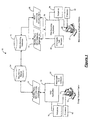
- the product development system 10 is shown to include a first computer 12 that can be used as a design engineering station.
- the first computer 12 may be any computer system including, but not limited to, a laptop, a desktop, and a workstation.
- the first computer 12 can be associated with one or more input devices 14 used by a user to communicate with the first computer 12.
- input devices 14 may include, but are not limited to, a mouse, a keyboard, and a touchpad.
- the first computer 12 includes a processor 16 and one or more data storage devices 18.
- the one or more data storage devices 18 can be at least one of random access memory (RAM), read only memory (ROM), a cache, a stack, or the like which may temporarily or permanently store electronic data of the first computer 12.
- the processor 16 of the first computer 12 is operable to execute one or more set of instructions contained in software.
- a product development application such as a computer aided design (CAD) software application 20 can be installed to the computer's data storage device 18 or run from a portable storage device such as a CD-ROM (not shown).
- the CAD application 20 can be downloaded via the internet (not shown) or run from a remote location such as a from a remote server (not shown).
- the CAD application 20 accepts input from a user to generate design data 22 including, but not limited to, models, plans, bill of materials, drawings, etc.
- the CAD application generates design data 22 pertaining to mobile airborne platforms.
- the design data 22 is stored in an engineering design datastore 24.
- the engineering design datastore 24 can reside on the first computer 12 or reside on a remote station such as a server (not shown).
- the CAD application 20 includes interrogate data software 26 in accordance with the present disclosure.
- the interrogate data software 26 allows a user to interrogate design data attributes stored in the engineering design datastore 24 based on parts and annotations from the CAD application 20.
- the interrogate data software 26 can be a plug-in to existing CAD software applications 20 or a stand alone program.
- the product development system 10 can include a second computer 28 that can be used as a manufacturing engineering station.
- the second computer 28 may be any computer system including, but not limited to, a laptop, a desktop, and a workstation.
- the second computer 28 can be associated with one or more input devices 30 used by a user to communicate with the second computer 28.
- input devices 30 may include, but are not limited to, a mouse, a keyboard, and a touchpad.
- the second computer 28 includes a processor 32 and one or more data storage devices 34.
- the one or more data storage devices 34 can be at least one of random access memory (RAM), read only memory (ROM), a cache, a stack, or the like which may temporarily or permanently store electronic data of the second computer 28.
- the processor 32 of the second computer 28 is operable to execute one or more set of instructions contained in software.
- a product development application such as a manufacturing software application 36 can be installed to the computer's data storage device 34 or run from a portable storage device such as a CD-ROM (not shown).
- the manufacturing application 36 can be downloaded via the internet (not shown) or run from a remote location such as a from a remote server (not shown).
- the manufacturing application 36 accepts input from a user to generate manufacturing data 38 including, but not limited to, work instructions, process plans, etc.
- the manufacturing application 36 generates manufacturing data 38 pertaining to mobile airborne platforms.
- the manufacturing data 38 is stored in a manufacturing datastore 40.
- the manufacturing datastore 40 can reside on the second computer 28 or reside on a remote station such as a server (not shown).
- the manufacturing application 36 includes the interrogate data software 26 as discussed above.
- the interrogate data software 26 allows a user to interrogate the design data 22 and or the manufacturing data 38 stored in the manufacturing datastore 40 or the engineering design datastore 24 based on parts and annotations used by the manufacturing application 36.
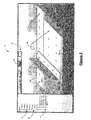
- a exemplary graphical user interface 42 illustrating a CAD application 20 ( Figure 1 ) of the product development system 10 ( Figure 1 ) is shown.
- the interrogate data attributes systems and methods of the present disclosure can similarly apply to the manufacturing application 36 of Figure 1 .
- the CAD application graphical user interface 42 can display design data including part items 44, annotation items 46, and attributes 47 in various formats including a graphical two-dimensional format, a graphical three-dimensional format, and an expandable tree-structure format.
- the CAD application graphical user interface 42 includes a toolbar 48.
- An interrogate attribute selection button 50 can be accessed via the toolbar 48.
- the interrogate attribute selection button 50 when selected, initiates an instance of an interrogate process graphical user interface 52 as will be discussed in the context of Figure 3A .
- the interrogate process graphical user interface 52 ( Figure 3A ) can be initiated via other selection devices including, but not limited to, a drop-down menu, a dialog box, and a selection icon.
- the interrogate process graphical user interface 52 includes a part item text box 54, a filter text box 56, a part selection button 58, a create filters button 60, an attribute display screen 62, and an execute button 64.
- the part selection button 58 when selected, populates the part item text box 54 with the part item 44 or the annotation item 46.
- the part item 44 or the annotation item 46 can be selected from the CAD application graphical user interface 42, for example, by highlighting the selected part item 44. Alternatively, the part item 44 or the annotation item 46 can be manually entered into the part item text box 54.
- the filter text box 56 includes a drop-down list of pre-defined filters. One or no filter can be selected from the list.
- the create filters button 60 is provided. When selected, the create filters button 60 initiates an instance of a filter graphical user interface 70 as will be discussed in the context of Figure 4A .
- the execute button 64 can be selected. The execute button 64, when selected, causes the interrogate data software 26 to retrieve attributes associated with the part item 44 or annotation item 46 based on the filter (if provided). The attributes 47 are displayed in the attribute display screen 62.
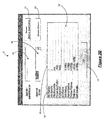
- Figure 3B illustrates the exemplary interrogate process graphical user interface of Figure 3A that is populated with exemplary data.
- the attributes 47 were retrieved for the "Flag Note 1" annotation corresponding to Figure 2 with "No Filter” applied.
- the attribute display screen 62 displays the attributes 47 in a tabular format including an attribute label 66 and the associated attribute data 68.
- an export button (not shown) can be provided that, when selected, exports the attributes 47 from the interrogate process graphical user interface 52 to an attribute file 72 (shown in Figure 6 ) according to a pre-defined format including, but not limited to, Extensible Markup Language (XML), Excel, tab separated variables (tsv), and comma separated variables (csv).
- XML Extensible Markup Language
- tsv tab separated variables
- csv comma separated variables
- the filter graphical user interface 70 includes a filter text box 74, an attribute text box 76, a filter attributes display screen 78, a create filter button 80, a delete filter button 82, an add attribute button 84, a remove attribute button 86, a save filter button 88, and a cancel button 90.
- the filter text box 74 includes a drop-down list indicating the pre-defined filters. A pre-defined filter can be selected from the drop-down list for customization such as modification or deletion.
- a new filter can be created by selecting the create filter button 80 and manually entering a new filter name into a text box.
- a separate dialog box (not shown) can appear that includes the text box for entering the new filter name.
- the attribute text box 76 includes an attribute list of available attributes 47 that can be associated with a part item 44 or annotation item 46.
- the attribute 47 can be added via the add attribute button 84 to the filter list and displayed in the filter attributes display screen 78.
- An attribute 47 can be removed from the filter list by selecting the attribute 47 from the filter attributes display screen 78 and selecting the remove attribute button 86.
- the filter can be saved via the save filter button 88 or deleted via the delete filter button 82.
- the cancel button terminates the filter graphical user interface 70 without saving the filter data.
- Figure 4B illustrates a portion of the exemplary filter graphical user interface 70 of Figure 4A populated with exemplary data.
- a filter can be created to include the following attributes: Hole Quantity, Stackup Thickness, and Hole Diameter.
- Figure 5 illustrates the exemplary interrogate process graphical user interface 52 of Figure 3A populated with exemplary data based on a "DRILL" filter including the above mentioned attributes.
- the interrogate data software 26 can be used to interrogate data attributes by interfacing with the CAD application 20 or the manufacturing applications 36.
- the interrogate data software 26 includes one or more software modules.
- the software modules shown in Figure 6 may be combined and/or further partitioned to similarly interrogate data attributes 47.
- the interrogate data software 26 includes a graphical user interface manager module 92, a filter module 94, and a data interrogator module 96.
- the graphical user interface manager module 92 displays and accepts input from the two graphical user interfaces 52 and 70.
- the graphical user interface manager module 92 Upon receiving an initiate command 97 generated by the interrogate data button 50 ( Figure 2 ), the graphical user interface manager module 92 displays the interrogate process graphical user interface 52.
- the graphical user interface manager module 92 Upon receiving user input 98 indicating a selection of the create filters button 60 ( Figure 3A ), the graphical user interface manager module 92 displays the filter graphical user interface 70.
- a user interacts with the interrogate process graphical user interface 52 and the filter graphical user interface 70 to generate user input 98.
- the graphical user interface manager module 92 receives the user input 98 and directs the user input 98 in the form of a part/annotation item 44,46 or filter data 102 to the data interrogator module 96 and the filter module 94 respectively.
- the data interrogator module 96 receives the part/annotation item 44,46 and retrieves attributes 47 associated with at least one of the part item 44 or the annotation item 46 from the datastore 24 or 40.
- the graphical user interface manager module 92 displays the attributes 47 in the interrogate process graphical user interface 52. Additionally or alternatively, the graphical user interface manager module 92 can export the attributes 47 to an attribute file 72 according to a predefined format as discussed above.
- the filter module 94 receives the filter data 102 and generates a filter 104.
- the graphical user interface manager module 92 displays the filter information 106 in the filter graphical user interface 70.
- the filter 104 is then applied by the data interrogator module 96 when retrieving attributes 47 from the datastore 24 or 40.
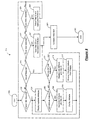
- FIG. 7 a process flow diagram illustrating an exemplary interrogate data method as performed by the interrogate data software 26 is shown.
- operation of the interrogate data method can be executed in varying order and therefore is not limited strictly to the sequential execution as illustrated in Figure 7 .
- the method may begin at 200.
- the interrogate process graphical user interface 52 is initiated at operation 210.
- the user input 98 is evaluated at operations 204, 208, and 216. If the part item 44 or annotation item 46 is selected at operation 204, the part item 44 or annotation item 46 is displayed by the interrogate process graphical user interface 52 at operation 206.
- create filter is selected at operation 208, the filter graphical user interface 70 is initiated at operation 210, the filter is created at operation 212, and the filter name is displayed in the interrogate process graphical user interface 52 at operation 214. Details of the create filter method as performed by the create filter operation 212 will be discussed further below.
- the datastore 24 or 40 is interrogated for attributes 47 based on the part item 44 or annotation item 46 and the filter 104.
- the attributes 47 for that part item 44 or annotation item 46 are displayed in the interrogate process graphical user interface 52 at operation 226.
- the datastore 24 or 40 is interrogated for attributes 47 based on the part item 44 or annotation item 46 and no filter is applied at operation 224.
- the attributes 47 for that part item 44 or annotation item 46 is displayed in the interrogate process graphical user interface 52 at operation 226. The method may end at 228.
- FIG. 8 a process flow diagram illustrating an exemplary filter method as performed by the filter module 94 of the interrogate data software 26 is shown.
- operation of the filter method can be executed in varying order and therefore is not limited strictly to the sequential execution as illustrated in Figure 8 .
- the method may begin at 300.
- the user input 98 is evaluated at operations 302, 306, 312, 318, 322, and 326. If create filter is selected at operation 302, the list of available attributes is displayed at operation 304. If add attribute is selected at operation 306, the selected attribute 47 from the available attributes 47 is associated with the filter name at operation 308 and the attribute 47 is listed in the filter graphical user interface 70 at operation 310.
- remove attribute is selected at operation 312
- the selected attribute 47 is disassociated with the filter name at operation 314 and the attribute 47 is removed from the listing in the filter graphical user interface 70 at operation 316. Thereafter, the method loops back to evaluate the user input 98 at operation 302.
- the filter graphical user interface 70 is terminated at operation 320 and the method may end at 330. If save filter is selected at operation 322, the filter name and associated attributes 47 are saved at operation 324, the filter graphical user interface 70 is terminated at operation 320, and the method may end at 330. If delete filter is selected at operation 326, the selected filter name and the associated attributes 47 are deleted at operation 328 and the method loops back to evaluate the user input 98 at 302.
Landscapes
- Engineering & Computer Science (AREA)
- Theoretical Computer Science (AREA)
- Physics & Mathematics (AREA)
- General Engineering & Computer Science (AREA)
- General Physics & Mathematics (AREA)
- Evolutionary Computation (AREA)
- Geometry (AREA)
- Computer Hardware Design (AREA)
- Human Computer Interaction (AREA)
- Mathematical Physics (AREA)
- Computational Linguistics (AREA)
- Data Mining & Analysis (AREA)
- Databases & Information Systems (AREA)
- User Interface Of Digital Computer (AREA)
Abstract
Description
- The present disclosure relates to computer program products and methods for interrogating data attributes in a product development process environment.
- Automated design systems are used by designers and engineers to create circuits, devices, structures, or other items. One type of design system is a computer aided design (CAD) program. A CAD program for industrial design, for example, can be used to create a design of a structure such as a beam, mechanical system, mobile airborne platform part, automobile part, etc. As can be appreciated, different types of CAD systems can be used to create designs for any part or item.
- As designs become more complex, the size of design data associated with each part or item can be large. For instance, each part may include a plurality of sub-parts. Each sub-part may include associated data attributes that define the part's dimensions, materials, etc. Accessing the data attributes in complex designs can be time consuming. For example, conventional CAD systems provide an expandable product tree structure for listing the parts, sub-parts, and associated attributes. Navigating this type of tree structure, where the tree requires expansion until a specific part is found, and then further expansion of this part to access the nodes that house the data attributes, is time consuming. Further, the expandable tree structure provides little or no means for filtering common data attributes.
- Similarly, manufacturing design systems rely on the data associated with the parts, sub-parts, and data attributes to generate work instructions, process plans, etc. Accessing the plethora of data attributes via the manufacturing design systems can be just as time consuming.
- A need exists for a more efficient system that interrogates data attributes in a product development environment.
- In one embodiment, a computer program product for interrogating data attributes in a product development environment is provided. The computer program product includes a product development application that includes an interrogate data selection device. A product development datastore stores attribute data associated with at least one of a part item and an annotation item created by the product development application. A data interrogator module is initiated by the interrogate data selection device and retrieves the attribute data associated with the at least one of the part item and the annotation item from the product development datastore. A graphical user interface manager module displays the attribute data in a user customizable presentation.
- In one implementation, a method of interrogating data attributes in a product development environment is provided. The method includes initiating an interrogation process graphical user interface based on an interrogate command received from at least one of a computer assisted design application and a manufacturing application; retrieving attribute data associated with at least one of a part item and an annotation item from a product development datastore; and displaying the attribute data in a user customizable presentation via the interrogation process graphical user interface.
- In another embodiment, a product development system is provided. The system includes a computer aided design (CAD) application used for designing at least one part item and assigning attribute data to the at least one part item. The CAD application includes an interrogate attribute selection device. A datastore stores the at lest one part item and the attribute data. An interrogate data attribute module is initiated by the interrogate attribute selection device and interfaces with the CAD application to retrieve and display attribute data of the at least one part item from the datastore.
- Further areas of applicability will become apparent from the description provided herein. It should be understood that the description and specific examples are intended for purposes of illustration only and are not intended to limit the scope of the present disclosure.
- The drawings described herein are for illustration purposes only and are not intended to limit the scope of the present disclosure in any way.
-
Figure 1 illustrates a product development system including interrogate data software. -
Figure 2 is a graphical user interface illustrating an exemplary computer aided design application of the product development process that includes an option to initiate the interrogate data software. -
Figure 3A illustrates an exemplary interrogate process graphical user interface generated by the interrogate data software. -
Figure 3B illustrates an exemplary interrogate process graphical user interface including exemplary data. -
Figure 4A illustrates an exemplary filter graphical user interface generated by the interrogate data software. -
Figure 4B illustrates a portion of an exemplary filter graphical user interface including exemplary available attribute data. -
Figure 5 illustrates an exemplary interrogate process graphical user interface including exemplary filtered data. -
Figure 6 is a dataflow diagram illustrating the interrogate data software in more detail. -
Figure 7 is a process flow diagram illustrating an exemplary interrogate data method as performed by the interrogate data software. -
Figure 8 is a process flow diagram illustrating an exemplary filter method as performed by a filter sub-module of the interrogate data software. - The following description is merely exemplary in nature and is not intended to limit the present disclosure, application, or uses. It should be understood that throughout the drawings, corresponding reference numerals indicate like or corresponding parts and features.
- Referring now to
Figure 1 , an exemplary product develop system is shown generally at 10. Theproduct development system 10 is shown to include afirst computer 12 that can be used as a design engineering station. Thefirst computer 12 may be any computer system including, but not limited to, a laptop, a desktop, and a workstation. Thefirst computer 12 can be associated with one ormore input devices 14 used by a user to communicate with thefirst computer 12. As can be appreciated,such devices 14 may include, but are not limited to, a mouse, a keyboard, and a touchpad. Thefirst computer 12 includes aprocessor 16 and one or moredata storage devices 18. The one or moredata storage devices 18 can be at least one of random access memory (RAM), read only memory (ROM), a cache, a stack, or the like which may temporarily or permanently store electronic data of thefirst computer 12. - The
processor 16 of thefirst computer 12 is operable to execute one or more set of instructions contained in software. A product development application such as a computer aided design (CAD)software application 20 can be installed to the computer'sdata storage device 18 or run from a portable storage device such as a CD-ROM (not shown). In various other embodiments, theCAD application 20 can be downloaded via the internet (not shown) or run from a remote location such as a from a remote server (not shown). TheCAD application 20 accepts input from a user to generatedesign data 22 including, but not limited to, models, plans, bill of materials, drawings, etc. In various embodiments, the CAD application generatesdesign data 22 pertaining to mobile airborne platforms. Thedesign data 22 is stored in anengineering design datastore 24. Theengineering design datastore 24 can reside on thefirst computer 12 or reside on a remote station such as a server (not shown). - The
CAD application 20 includesinterrogate data software 26 in accordance with the present disclosure. Theinterrogate data software 26 allows a user to interrogate design data attributes stored in theengineering design datastore 24 based on parts and annotations from theCAD application 20. As can be appreciated, the interrogatedata software 26 can be a plug-in to existingCAD software applications 20 or a stand alone program. - Similarly, the
product development system 10 can include asecond computer 28 that can be used as a manufacturing engineering station. Thesecond computer 28 may be any computer system including, but not limited to, a laptop, a desktop, and a workstation. Thesecond computer 28 can be associated with one ormore input devices 30 used by a user to communicate with thesecond computer 28. As can be appreciated,such devices 30 may include, but are not limited to, a mouse, a keyboard, and a touchpad. Thesecond computer 28 includes aprocessor 32 and one or moredata storage devices 34. The one or moredata storage devices 34 can be at least one of random access memory (RAM), read only memory (ROM), a cache, a stack, or the like which may temporarily or permanently store electronic data of thesecond computer 28. - The
processor 32 of thesecond computer 28 is operable to execute one or more set of instructions contained in software. A product development application such as amanufacturing software application 36 can be installed to the computer'sdata storage device 34 or run from a portable storage device such as a CD-ROM (not shown). In various other embodiments, themanufacturing application 36 can be downloaded via the internet (not shown) or run from a remote location such as a from a remote server (not shown). Themanufacturing application 36 accepts input from a user to generatemanufacturing data 38 including, but not limited to, work instructions, process plans, etc. In various embodiments, themanufacturing application 36 generatesmanufacturing data 38 pertaining to mobile airborne platforms. Themanufacturing data 38 is stored in amanufacturing datastore 40. The manufacturing datastore 40 can reside on thesecond computer 28 or reside on a remote station such as a server (not shown). - The
manufacturing application 36 includes the interrogatedata software 26 as discussed above. The interrogatedata software 26 allows a user to interrogate thedesign data 22 and or themanufacturing data 38 stored in the manufacturing datastore 40 or theengineering design datastore 24 based on parts and annotations used by themanufacturing application 36. - Referring now to
Figure 2 , a exemplarygraphical user interface 42 illustrating a CAD application 20 (Figure 1 ) of the product development system 10 (Figure 1 ) is shown. As can be appreciated, the interrogate data attributes systems and methods of the present disclosure can similarly apply to themanufacturing application 36 ofFigure 1 . As shown inFigure 2 , the CAD applicationgraphical user interface 42 can display design data includingpart items 44,annotation items 46, and attributes 47 in various formats including a graphical two-dimensional format, a graphical three-dimensional format, and an expandable tree-structure format. In various embodiments, the CAD applicationgraphical user interface 42 includes atoolbar 48. An interrogateattribute selection button 50 can be accessed via thetoolbar 48. The interrogateattribute selection button 50, when selected, initiates an instance of an interrogate processgraphical user interface 52 as will be discussed in the context ofFigure 3A . As can be appreciated, the interrogate process graphical user interface 52 (Figure 3A ) can be initiated via other selection devices including, but not limited to, a drop-down menu, a dialog box, and a selection icon. - Referring now to
Figure 3A , an exemplary interrogate processgraphical user interface 52 is shown. The interrogate processgraphical user interface 52 includes a partitem text box 54, afilter text box 56, apart selection button 58, a create filtersbutton 60, anattribute display screen 62, and an executebutton 64. Thepart selection button 58, when selected, populates the partitem text box 54 with thepart item 44 or theannotation item 46. Thepart item 44 or theannotation item 46 can be selected from the CAD applicationgraphical user interface 42, for example, by highlighting the selectedpart item 44. Alternatively, thepart item 44 or theannotation item 46 can be manually entered into the partitem text box 54. - The
filter text box 56 includes a drop-down list of pre-defined filters. One or no filter can be selected from the list. To define a new filter, the create filtersbutton 60 is provided. When selected, the create filtersbutton 60 initiates an instance of a filtergraphical user interface 70 as will be discussed in the context ofFigure 4A . Once thepart item 44 orannotation item 46 is selected and the filter or no filter is selected, the executebutton 64 can be selected. The executebutton 64, when selected, causes the interrogatedata software 26 to retrieve attributes associated with thepart item 44 orannotation item 46 based on the filter (if provided). Theattributes 47 are displayed in theattribute display screen 62. -
Figure 3B illustrates the exemplary interrogate process graphical user interface ofFigure 3A that is populated with exemplary data. As shown, theattributes 47 were retrieved for the "Flag Note 1" annotation corresponding toFigure 2 with "No Filter" applied. Theattribute display screen 62 displays theattributes 47 in a tabular format including anattribute label 66 and the associatedattribute data 68. As can be appreciated, an export button (not shown) can be provided that, when selected, exports theattributes 47 from the interrogate processgraphical user interface 52 to an attribute file 72 (shown inFigure 6 ) according to a pre-defined format including, but not limited to, Extensible Markup Language (XML), Excel, tab separated variables (tsv), and comma separated variables (csv). - Referring now to
Figure 4A , an exemplary filtergraphical user interface 70 is shown. The filtergraphical user interface 70 includes afilter text box 74, anattribute text box 76, a filter attributesdisplay screen 78, a createfilter button 80, adelete filter button 82, anadd attribute button 84, aremove attribute button 86, asave filter button 88, and a cancel button 90. Thefilter text box 74 includes a drop-down list indicating the pre-defined filters. A pre-defined filter can be selected from the drop-down list for customization such as modification or deletion. In addition, a new filter can be created by selecting the createfilter button 80 and manually entering a new filter name into a text box. As can be appreciated, a separate dialog box (not shown) can appear that includes the text box for entering the new filter name. Theattribute text box 76 includes an attribute list ofavailable attributes 47 that can be associated with apart item 44 orannotation item 46. When selecting anattribute 47 from the attribute list, theattribute 47 can be added via theadd attribute button 84 to the filter list and displayed in the filter attributesdisplay screen 78. Anattribute 47 can be removed from the filter list by selecting theattribute 47 from the filter attributesdisplay screen 78 and selecting theremove attribute button 86. After creation, the filter can be saved via thesave filter button 88 or deleted via thedelete filter button 82. The cancel button terminates the filtergraphical user interface 70 without saving the filter data. -
Figure 4B illustrates a portion of the exemplary filtergraphical user interface 70 ofFigure 4A populated with exemplary data. As shown, a filter can be created to include the following attributes: Hole Quantity, Stackup Thickness, and Hole Diameter.Figure 5 illustrates the exemplary interrogate processgraphical user interface 52 ofFigure 3A populated with exemplary data based on a "DRILL" filter including the above mentioned attributes. - Referring now to
Figure 6 , an exemplary embodiment of the interrogatedata software 26 is shown. As can be appreciated, the interrogatedata software 26 can be used to interrogate data attributes by interfacing with theCAD application 20 or themanufacturing applications 36. In various embodiments, the interrogatedata software 26 includes one or more software modules. As can be appreciated, the software modules shown inFigure 6 may be combined and/or further partitioned to similarly interrogate data attributes 47. In the embodiment ofFigure 6 , the interrogatedata software 26 includes a graphical userinterface manager module 92, afilter module 94, and adata interrogator module 96. - The graphical user
interface manager module 92 displays and accepts input from the twographical user interfaces command 97 generated by the interrogate data button 50 (Figure 2 ), the graphical userinterface manager module 92 displays the interrogate processgraphical user interface 52. Upon receivinguser input 98 indicating a selection of the create filters button 60 (Figure 3A ), the graphical userinterface manager module 92 displays the filtergraphical user interface 70. A user interacts with the interrogate processgraphical user interface 52 and the filtergraphical user interface 70 to generateuser input 98. The graphical userinterface manager module 92 receives theuser input 98 and directs theuser input 98 in the form of a part/annotation item filter data 102 to thedata interrogator module 96 and thefilter module 94 respectively. - The
data interrogator module 96 receives the part/annotation item part item 44 or theannotation item 46 from thedatastore interface manager module 92 then displays theattributes 47 in the interrogate processgraphical user interface 52. Additionally or alternatively, the graphical userinterface manager module 92 can export theattributes 47 to anattribute file 72 according to a predefined format as discussed above. Thefilter module 94 receives thefilter data 102 and generates afilter 104. The graphical userinterface manager module 92 displays thefilter information 106 in the filtergraphical user interface 70. Thefilter 104 is then applied by thedata interrogator module 96 when retrieving attributes 47 from thedatastore - Referring now to
Figure 7 and with continued reference toFigure 6 , a process flow diagram illustrating an exemplary interrogate data method as performed by the interrogatedata software 26 is shown. As can be appreciated, operation of the interrogate data method can be executed in varying order and therefore is not limited strictly to the sequential execution as illustrated inFigure 7 . The method may begin at 200. The interrogate processgraphical user interface 52 is initiated atoperation 210. Theuser input 98 is evaluated atoperations part item 44 orannotation item 46 is selected atoperation 204, thepart item 44 orannotation item 46 is displayed by the interrogate processgraphical user interface 52 atoperation 206. If create filter is selected atoperation 208, the filtergraphical user interface 70 is initiated atoperation 210, the filter is created atoperation 212, and the filter name is displayed in the interrogate processgraphical user interface 52 atoperation 214. Details of the create filter method as performed by thecreate filter operation 212 will be discussed further below. - If initiate interrogation is selected at
operation 216, thepart item 44 orannotation item 46 has been selected atoperation 218, and thefilter 104 has been selected atoperation 220, thedatastore attributes 47 based on thepart item 44 orannotation item 46 and thefilter 104. Theattributes 47 for thatpart item 44 orannotation item 46 are displayed in the interrogate processgraphical user interface 52 atoperation 226. Otherwise, if initiate interrogation is selected atoperation 216, thepart item 44 orannotation item 46 has been selected atoperation 218, and no filter has been selected at operation 270, thedatastore attributes 47 based on thepart item 44 orannotation item 46 and no filter is applied atoperation 224. Theattributes 47 for thatpart item 44 orannotation item 46 is displayed in the interrogate processgraphical user interface 52 atoperation 226. The method may end at 228. - Referring now to
Figure 8 and with continued reference toFigure 6 , a process flow diagram illustrating an exemplary filter method as performed by thefilter module 94 of the interrogatedata software 26 is shown. As can be appreciated, operation of the filter method can be executed in varying order and therefore is not limited strictly to the sequential execution as illustrated inFigure 8 . The method may begin at 300. Theuser input 98 is evaluated atoperations operation 302, the list of available attributes is displayed atoperation 304. If add attribute is selected atoperation 306, the selectedattribute 47 from the available attributes 47 is associated with the filter name atoperation 308 and theattribute 47 is listed in the filtergraphical user interface 70 atoperation 310. Otherwise, if remove attribute is selected atoperation 312, the selectedattribute 47 is disassociated with the filter name atoperation 314 and theattribute 47 is removed from the listing in the filtergraphical user interface 70 atoperation 316. Thereafter, the method loops back to evaluate theuser input 98 atoperation 302. - If cancel is selected at
operation 318, the filtergraphical user interface 70 is terminated atoperation 320 and the method may end at 330. If save filter is selected atoperation 322, the filter name and associatedattributes 47 are saved atoperation 324, the filtergraphical user interface 70 is terminated atoperation 320, and the method may end at 330. If delete filter is selected atoperation 326, the selected filter name and the associated attributes 47 are deleted atoperation 328 and the method loops back to evaluate theuser input 98 at 302. - While various embodiments have been described, those skilled in the art will recognize modifications or variations which might be made without departing from the present disclosure. The examples illustrate the various embodiments and are not intended to limit the present disclosure. Therefore, the description and claims should be interpreted liberally with only such limitation as is necessary in view of the pertinent prior art.
- The claims categorize aspects and embodiments of the invention as a computer program product, a method and a system. Other aspects and embodiments of the invention are contemplated in which the subject matter claimed in one category in the appended claims is claimed in another category. That is, method and system claims reciting equivalent features to the computer program product claims are contemplated, as are method and computer program product claims reciting equivalent features to the system claims. Likewise, system and computer program product claims are contemplated that recite equivalent features to the method claims.
Claims (21)
- A computer program product for interrogating data attributes in a product development environment, comprising:a product development application that includes an interrogate data selection device;a product development datastore that stores attribute data associated with at least one of a part item and an annotation item created by the product development application;a data interrogator module that is initiated by the interrogate data selection device and that retrieves the attribute data associated with the at least one of the part item and the annotation item from the product development datastore; anda graphical user interface manager module that displays the attribute data in a user customizable presentation.
- The computer program product of claim 1 further comprising:a filter module that generates a user customizable data filter; andwherein the data interrogator module retrieves the attribute data associated with the at least one of the part item and the annotation item based on the user customizable data filter.
- The computer program product of claim 2 wherein the graphical user interface manager module initiates a filter graphical user interface based on a create filter command and wherein the filter module generates the user customizable data filter based on filter data commands received from the filter graphical user interface.
- The computer program product of claim 1 wherein graphical user interface manager module initiates an interrogate process graphical user interface based on a command generated by the interrogate selection device and wherein the graphical user interface manager module displays the attribute data in the interrogate process graphical user interface.
- The computer program product of claim 1 wherein the graphical user interface manager module receives at least one of a part item and an annotation item name from the product development application.
- The computer program product of claim 1 wherein the graphical user interface manager module exports the attribute data to an attribute file based on a predefined format.
- The computer program product of claim 1 wherein the product development application is at least one of a computer aided design software application and a manufacturing software application.
- A method of interrogating data attributes in a product development environment, comprising:initiating an interrogation process graphical user interface based on an interrogate command received from at least one of a computer assisted design application and a manufacturing application;retrieving attribute data associated with at least one of a part item and an annotation item from a product development datastore; anddisplaying the attribute data in a user customizable presentation via the interrogation process graphical user interface.
- The method of claim 8 further comprising:generating a user customizable data filter; andwherein the retrieving the attribute data comprises retrieving the attribute data associated with the at least one of the part item and the annotation item based on the user customizable data filter.
- The method of claim 9 further comprising:initiating a filter graphical user interface based on a create filter command; andwherein the generating the user customizable data filter is based on filter data commands received from the filter graphical user interface.
- The method of claim 8 further comprising receiving the at least one of the part item and the annotation item from the at least one of the CAD application and the manufacturing application.
- The method of claim 8 further comprising exporting the attribute data to an attribute file based on a predefined format.
- A product development system, comprising:a computer aided design (CAD) application used for designing at least one part item and assigning attribute data to the at least one part item wherein the CAD application includes an interrogate attribute selection device;a datastore that stores the at lest one part item and the attribute data; andan interrogate data attribute module that is initiated by the interrogate attribute selection device and that interfaces with the CAD application to retrieve and display attribute data of the at least one part item from the datastore.
- The product development system of claim 13 wherein the CAD application is used for designing at least one annotation item of the part item, wherein the datastore stores attribute data of the at least one annotation item, and wherein the interrogate data attribute module interfaces with the CAD application to retrieve the attribute data of the at least one annotation item from the datastore.
- The product development system of claim 13 further comprising:a manufacturing application that includes an interrogate attribute selection device; andwherein the interrogate data attribute module is initiated by the interrogate attribute selection device of the manufacturing application and interfaces with the manufacturing application to retrieve the attribute data from the datastore.
- The product development system of claim 13 wherein the interrogate data attribute module generates a user customizable data filter and retrieves the attribute data associated with the at least one part item based on the user customizable data filter.
- The product development system of claim 16 wherein the interrogate data attribute module initiates a filter graphical user interface based on a create filter command and wherein interrogate data attribute module generates the user customizable data filter based on filter data commands received from the filter graphical user interface.
- The product development system of claim 13 wherein the interrogate data attribute module exports the attribute data to an attribute file based on a predefined format.
- The product development system of claim 13 wherein the CAD application is used for designing the at least one part item of a mobile airborne platform.
- A method of interrogating data attributes in a product development environment, comprising:selecting an interrogate attributes icon from at least one of a computer assisted design application and a manufacturing application;selecting at least one of a part item and an annotation item from the at least one of the computer assisted design application and the manufacturing application;retrieving attribute data associated with the at least one of the part item and an annotation item from a product development datastore; anddisplaying the attribute data in a user customizable presentation.
- The method of claim 20 further comprising:creating a customizable data filter; andwherein the retrieving the attribute data comprises retrieving the attribute data associated with the at least one of the part item and the annotation item based on the customizable data filter.
Applications Claiming Priority (1)
| Application Number | Priority Date | Filing Date | Title |
|---|---|---|---|
| US11/614,741 US7814110B2 (en) | 2006-12-21 | 2006-12-21 | Methods and systems for interrogating data attributes in a process environment |
Publications (1)
| Publication Number | Publication Date |
|---|---|
| EP1962211A1 true EP1962211A1 (en) | 2008-08-27 |
Family
ID=39232766
Family Applications (1)
| Application Number | Title | Priority Date | Filing Date |
|---|---|---|---|
| EP07124030A Withdrawn EP1962211A1 (en) | 2006-12-21 | 2007-12-21 | Methods and systems of interrogating data attributes in a process environment |
Country Status (2)
| Country | Link |
|---|---|
| US (1) | US7814110B2 (en) |
| EP (1) | EP1962211A1 (en) |
Families Citing this family (5)
| Publication number | Priority date | Publication date | Assignee | Title |
|---|---|---|---|---|
| US9448705B2 (en) * | 2007-11-05 | 2016-09-20 | Trimble Navigation Limited | Configuring graphical displays |
| US8108058B2 (en) * | 2009-02-09 | 2012-01-31 | The Boeing Company | Method of analyzing composite structures |
| US10885235B2 (en) | 2012-08-13 | 2021-01-05 | The Boeing Company | Multi-user virtual product development environment |
| US9430548B1 (en) | 2012-09-25 | 2016-08-30 | Emc Corporation | Generating context tree data based on a tailored data model |
| US10279928B2 (en) | 2015-08-26 | 2019-05-07 | The Boeing Company | Delta offset based surface modeling |
Citations (2)
| Publication number | Priority date | Publication date | Assignee | Title |
|---|---|---|---|---|
| US20020183982A1 (en) * | 2001-03-26 | 2002-12-05 | Rauscher Thomas C. | Design and estimating tools for the design of communication infrastructure in a structure |
| US20030078676A1 (en) * | 1996-01-26 | 2003-04-24 | Takeshi Kuribayashi | Component electronic catalog |
Family Cites Families (7)
| Publication number | Priority date | Publication date | Assignee | Title |
|---|---|---|---|---|
| US5070483A (en) * | 1990-01-12 | 1991-12-03 | Shell Oil Company | Remote seismic sensing |
| US5828579A (en) * | 1996-08-28 | 1998-10-27 | Synopsys, Inc. | Scan segment processing within hierarchical scan architecture for design for test applications |
| JP3057019B2 (en) * | 1997-01-24 | 2000-06-26 | キヤノン株式会社 | Component selection device and component selection system with CAD function |
| US6519603B1 (en) * | 1999-10-28 | 2003-02-11 | International Business Machine Corporation | Method and system for organizing an annotation structure and for querying data and annotations |
| US6901442B1 (en) * | 2000-01-07 | 2005-05-31 | Netiq Corporation | Methods, system and computer program products for dynamic filtering of network performance test results |
| US7392255B1 (en) * | 2002-07-31 | 2008-06-24 | Cadence Design Systems, Inc. | Federated system and methods and mechanisms of implementing and using such a system |
| GB2418760B (en) * | 2004-10-01 | 2010-07-14 | Hewlett Packard Development Co | Securing electronic annotations |
-
2006
- 2006-12-21 US US11/614,741 patent/US7814110B2/en not_active Expired - Fee Related
-
2007
- 2007-12-21 EP EP07124030A patent/EP1962211A1/en not_active Withdrawn
Patent Citations (2)
| Publication number | Priority date | Publication date | Assignee | Title |
|---|---|---|---|---|
| US20030078676A1 (en) * | 1996-01-26 | 2003-04-24 | Takeshi Kuribayashi | Component electronic catalog |
| US20020183982A1 (en) * | 2001-03-26 | 2002-12-05 | Rauscher Thomas C. | Design and estimating tools for the design of communication infrastructure in a structure |
Non-Patent Citations (3)
| Title |
|---|
| BILL FANE: "Clean up your mess with the Filter command | Cadalyst", 1 August 2000 (2000-08-01), pages 1 - 3, XP055489475, Retrieved from the Internet <URL:http://www.cadalyst.com/cad/autocad/clean-your-mess-with-filter-command-4778> [retrieved on 20180702] * |
| DAVID S COHN ED - COHN DAVID S: "AutoCAD 2000: The Complete Reference", 1 January 2000, AUTOCAD 2000: THE COMPLETE REFERENCE, OSBORNE/MCGRAW-HILL, BERKELEY; CALIFORNIA, PAGE(S) 224 - 231,401, ISBN: 978-0-07-212241-1, XP002484071 * |
| DAVID WATSON: "AutoCAD Tutorial | Advanced Selection | CADTutor", 1 February 2001 (2001-02-01), XP055489480, Retrieved from the Internet <URL:http://www.cadtutor.net/tutorials/autocad/advanced-selection.php> [retrieved on 20180702] * |
Also Published As
| Publication number | Publication date |
|---|---|
| US20080155432A1 (en) | 2008-06-26 |
| US7814110B2 (en) | 2010-10-12 |
Similar Documents
| Publication | Publication Date | Title |
|---|---|---|
| US10936802B2 (en) | Methods and systems for creating configurable forms, configuring forms and for form flow and form correlation | |
| US7050872B2 (en) | Innovation information management model | |
| US9519701B2 (en) | Generating information models in an in-memory database system | |
| JP6033235B2 (en) | Formatting data by example | |
| US20190018659A1 (en) | Method and system for visual data mapping and code generation to support data integration | |
| US8719224B2 (en) | Common modeling of data access and provisioning for search, query, reporting and/or analytics | |
| US8566714B1 (en) | Catalog accessories meta-configurator, and its use thereof | |
| JP4934291B2 (en) | How to navigate graphically in a database of modeled objects | |
| US20130152038A1 (en) | Project management workflows | |
| EP2096590A1 (en) | Enhanced process query framework | |
| US20170185612A1 (en) | Dynamically designing web pages | |
| CN1818901B (en) | Method and computer system for interacting with a database | |
| US20080250062A1 (en) | Apparatus and method for linking objects created in a rapid application development environment | |
| JPH0673137B2 (en) | How to give an interface of parts list between a conceptual design tool and CAD / CAM environment | |
| US20140172826A1 (en) | Social network analyzer | |
| US7814110B2 (en) | Methods and systems for interrogating data attributes in a process environment | |
| US20140149093A1 (en) | Modeling content data for generating information models | |
| US20070101321A1 (en) | Computer method and apparatus for connection creation in a software modeling system | |
| US10832197B1 (en) | Creating and utilizing bill of work information to provide a dynamic routing plan for manufacturing a product | |
| CN107220044B (en) | Method and device for driving business object based on meta-model | |
| US6275787B1 (en) | Method for merging repository updates with incomplete work in progress | |
| US20140012869A1 (en) | Business object browser | |
| JP2001022764A (en) | Database creation device and method, product configuration device and method, and program recording medium | |
| US8244588B1 (en) | Method and apparatus for entering purchase information | |
| JP2007265249A (en) | Data search and display device, data search and display system, search and display processing program, and data search and display method |
Legal Events
| Date | Code | Title | Description |
|---|---|---|---|
| PUAI | Public reference made under article 153(3) epc to a published international application that has entered the european phase |
Free format text: ORIGINAL CODE: 0009012 |
|
| 17P | Request for examination filed |
Effective date: 20071228 |
|
| AK | Designated contracting states |
Kind code of ref document: A1 Designated state(s): AT BE BG CH CY CZ DE DK EE ES FI FR GB GR HU IE IS IT LI LT LU LV MC MT NL PL PT RO SE SI SK TR |
|
| AX | Request for extension of the european patent |
Extension state: AL BA HR MK RS |
|
| 17Q | First examination report despatched |
Effective date: 20090318 |
|
| AKX | Designation fees paid |
Designated state(s): AT BE BG CH CY CZ DE DK EE ES FI FR GB GR HU IE IS IT LI LT LU LV MC MT NL PL PT RO SE SI SK TR |
|
| STAA | Information on the status of an ep patent application or granted ep patent |
Free format text: STATUS: THE APPLICATION HAS BEEN WITHDRAWN |
|
| 18W | Application withdrawn |
Effective date: 20181010 |