EP1895744A1 - Method and apparatus for simplified user access to multiple browser transports in a mobile communication device - Google Patents
Method and apparatus for simplified user access to multiple browser transports in a mobile communication device Download PDFInfo
- Publication number
- EP1895744A1 EP1895744A1 EP06119844A EP06119844A EP1895744A1 EP 1895744 A1 EP1895744 A1 EP 1895744A1 EP 06119844 A EP06119844 A EP 06119844A EP 06119844 A EP06119844 A EP 06119844A EP 1895744 A1 EP1895744 A1 EP 1895744A1
- Authority
- EP
- European Patent Office
- Prior art keywords
- browser
- transport
- mobile communication
- associating
- transports
- Prior art date
- Legal status (The legal status is an assumption and is not a legal conclusion. Google has not performed a legal analysis and makes no representation as to the accuracy of the status listed.)
- Granted
Links
Images


Classifications
-
- H—ELECTRICITY
- H04—ELECTRIC COMMUNICATION TECHNIQUE
- H04L—TRANSMISSION OF DIGITAL INFORMATION, e.g. TELEGRAPHIC COMMUNICATION
- H04L67/00—Network arrangements or protocols for supporting network services or applications
- H04L67/01—Protocols
- H04L67/02—Protocols based on web technology, e.g. hypertext transfer protocol [HTTP]
- H04L67/025—Protocols based on web technology, e.g. hypertext transfer protocol [HTTP] for remote control or remote monitoring of applications
-
- G—PHYSICS
- G06—COMPUTING OR CALCULATING; COUNTING
- G06F—ELECTRIC DIGITAL DATA PROCESSING
- G06F16/00—Information retrieval; Database structures therefor; File system structures therefor
- G06F16/90—Details of database functions independent of the retrieved data types
- G06F16/95—Retrieval from the web
- G06F16/955—Retrieval from the web using information identifiers, e.g. uniform resource locators [URL]
- G06F16/9562—Bookmark management
-
- H—ELECTRICITY
- H04—ELECTRIC COMMUNICATION TECHNIQUE
- H04L—TRANSMISSION OF DIGITAL INFORMATION, e.g. TELEGRAPHIC COMMUNICATION
- H04L67/00—Network arrangements or protocols for supporting network services or applications
- H04L67/01—Protocols
- H04L67/04—Protocols specially adapted for terminals or networks with limited capabilities; specially adapted for terminal portability
-
- H—ELECTRICITY
- H04—ELECTRIC COMMUNICATION TECHNIQUE
- H04M—TELEPHONIC COMMUNICATION
- H04M1/00—Substation equipment, e.g. for use by subscribers
- H04M1/72—Mobile telephones; Cordless telephones, i.e. devices for establishing wireless links to base stations without route selection
- H04M1/724—User interfaces specially adapted for cordless or mobile telephones
- H04M1/72403—User interfaces specially adapted for cordless or mobile telephones with means for local support of applications that increase the functionality
- H04M1/72445—User interfaces specially adapted for cordless or mobile telephones with means for local support of applications that increase the functionality for supporting Internet browser applications
Definitions
- the present application relates generally to mobile communication devices and more particularly to a method and system for providing a single browser icon for automatically selecting an appropriate browser transport from among a plurality of available browser transports on a mobile communication device.
- Mobile communication devices such as wireless personal digital assistants (PDAs) and smart telephones are well known for providing users with services such as email, Web browsing, text messaging, etc.
- PDAs personal digital assistants
- Such devices communicate over a wide variety of networks including data-only networks such as Mobitex and DataTAC as well as complex voice and data networks such as the Global System for Mobile Communications/General Packet Radio Service (GSM/GPRS), Code Division Multiple Access (CDMA), Enhanced Data Rates for Global Evolution (EDGE), Universal Mobile Telecommunications System (UMTS) and CDMA2000 networks.
- GSM/GPRS Global System for Mobile Communications/General Packet Radio Service
- CDMA Code Division Multiple Access
- EDGE Enhanced Data Rates for Global Evolution
- UMTS Universal Mobile Telecommunications System
- the corporate enterprise browser is the only browser that can access content inside the user's corporate firewall.
- the Internet browser is the only browser that can access and browse Internet sites via a hosted service, without requiring access to a corporate enterprise server.
- WAP is an open international standard for applications that use wireless communication.
- a WAP browser is designed to provide all of the basic services of a computer based Web browser but is simplified to operate within the restrictions of a mobile communication device.
- the WAP browser is the only browser with access to a service provider's portal and carrier-specific subscription services.
- a user may find that the page is not accessible because, for example, the user's corporate enterprise server is down or offline or the user is attempting to access a corporate Intranet site using the Internet browser icon rather than the corporate enterprise browser icon.
- a single browser icon entry point may be set forth for providing user access to the Web while maintaining the capabilities of the existing browsers to access separate domains (corporate enterprise browser, Internet browser, WAP browser).
- the mobile communication device automatically may associate the appropriate browser transport with the single browser icon based on information being requested by the user (e.g. Internet Web site, Intranet site, carrier's subscription service, etc.)
- information being requested by the user e.g. Internet Web site, Intranet site, carrier's subscription service, etc.
- One of a plurality of browser transports may be associated with a single browser icon for display on the mobile communication device, and a predetermined one of the plurality of browser transports is selected for displaying information based on characteristics of the information being requested by the user.
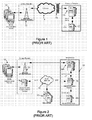
- Figure 1 is a block diagram of a corporate enterprise communication architecture, according to the prior art
- FIG. 2 is a block diagram of a hosted Internet service architecture, according to the prior art
- FIG. 3 is a block diagram of a WAP architecture, according to the prior art
- Figure 4A shows a prior art mobile communication device graphical user interface for accessing multiple browser platforms via respective browser icons
- Figure 4B shows a mobile communication device graphical user interface for accessing multiple browser platforms via a single browser icon, according to an exemplary embodiment
- Figure 5 is a flowchart showing a method of implementing access to multiple browser platforms via a single browser icon and automatically associating an appropriate browser transport with the single browser icon, according to the exemplary embodiment.
- wireless network 13 may be a GSM/GPRS, Cellular Digital Packet Data (CDPD), Time Division Multiple Access (TDMA), iDEN Mobitex, DataTAC network, EDGE or UMTS, or a broadband network such as Bluetooth or variants of 802.11.
- CDPD Cellular Digital Packet Data
- TDMA Time Division Multiple Access
- iDEN Mobitex DataTAC network
- EDGE EDGE or UMTS
- broadband network such as Bluetooth or variants of 802.11
- the corporate enterprise includes a proxy server 16 for providing company controlled, secure, wireless Web access, email access and Personal Information Manager (PIM) synchronization.
- the proxy server 16 also provides a Mobile Data Service (MDS) for accessing Web content from a Web server 17.
- MDS Mobile Data Service
- the proxy server 16 may also provide email functionality, although such functionality is not germane to this specification.
- Web server 17 While only one Web server 17 is shown, for illustration purposes, a person of skill in the art will understand that the corporate enterprise could have many such servers for hosting Web sites or graphic download sites, providing access to picture files such as Joint Photographic Experts Group (JPEG), Tagged Image File Format (TIFF), bitmap (BMP), Portable Network Graphics (PNG), Moving Picture Experts Group (MPEG-4), Moving JPEG (MOV), Graphics Interchange Format (GIF), Scalable Vector Graphics (SVG), etc.
- JPEG Joint Photographic Experts Group
- TIFF bitmap
- BMP Portable Network Graphics
- MPEG-4 Moving Picture Experts Group
- MOV Moving JPEG
- GIF Graphics Interchange Format
- SVG Scalable Vector Graphics
- each mobile communication device 12 communicates with proxy server 16 using Hypertext Transfer Protocol (HTTP) over an Internet Protocol (IP) optimized for mobile environments.
- HTTP Hypertext Transfer Protocol
- IP Internet Protocol
- the device 12 communicates with the proxy server 16 using either HTTP over Transmission Control Protocol over Internet Protocol (TCP/IP) or a variant of TCP/IP optimized for mobile use (e.g. Wireless Profiled TCP) or over other, proprietary protocols.
- TCP/IP Transmission Control Protocol over Internet Protocol
- Wireless Profiled TCP Wireless Profiled TCP
- HTTP is run over Internet Point-to-Point Protocol (IPPP) and an encrypted Global Messaging Exchange (GME) channel over which datagrams are exchanged to transport data between the mobile communication device 12 and proxy server 16, wherein over proprietary protocols such as (IPPP/GME/MDP), and a Message Delivery Protocol (MDP) is used to separate the GME datagrams into one or more MDP packets which are transported over User Datagram Protocol over Internet Protocol (UDP/IP).
- IPPP/GME/MDP Message Delivery Protocol
- MDP Message Delivery Protocol
- UDP User Datagram Protocol over Internet Protocol
- the proxy server 16 enables Internet access, preprocesses and compresses Hypertext Markup Language (HTML) and Extensible Markup Language (XML) content from the Web server 17 before sending it to the device 12, transcodes content type, stores HTTP cookies on behalf of the device 12, and supports certificate authority authentications, etc.
- HTML Hypertext Markup Language
- XML Extensible Markup Language
- the proxy server 16 retrieves content from Web server 17 and creates a custom document containing both images to be displayed on the device and data in the form of compressed versions of requested portions of the document.
- the document is preferably of "multi-part" format to improve transmission to and processing efficiency within the device 12.
- WML Wireless Markup Language
- HTML HyperText Markup Language
- auxiliary files such as style sheets, JavaScript files, or image files
- a multi-part generation feature of the proxy server 16 all necessary parts of a composite Web page are preferably posted in a single bundle, thereby enabling the device browser to download all of the required content with a single request.
- the header in the proxy server response identifies the content as a multi-part bundle (e.g. Multi-Purpose Mail Extensions (MIME)/multipart , as defined by RFC 2112, E. Levinson, March 1997).
- MIME Multi-Purpose Mail Extensions
- Infrastructure 21 includes an authentication server 16B, Internet connection service 18 and provisioning system 20.
- the Internet service of Figure 2 is deployed through the provisioning system 20, which manages services within the Infrastructure 21, including user accounts, features and profiles, as well as storing subscription information.
- the user's service provider controls and manages Internet connection service 18 on a per-device/group basis through the provisioning system 20, and may also may host content and services via service provider-hosted content and services 19 (e.g. WAP, HTML, Java archive (JAR), etc.), as well as provide public Internet content 17 access via Internet 14.
- Service blocking is based on PIN and subscription information stored within provisioning system 20 for each mobile communication device 12. Connectivity and authentication are handled by authentication server 16B using Server Relay Protocol (SRP).
- SRP Server Relay Protocol
- service books are "pushed" (i.e. downloaded) from the provisioning system 20 to the devices 12 (e.g. an IPPP service book to enable communication between a mobile communication device 12 and the Infrastructure 21 using IPPP, a browser configuration service book that contains configuration parameters for the device browser to access the Internet 14, etc.)
- IPPP service book to enable communication between a mobile communication device 12 and the Infrastructure 21 using IPPP
- browser configuration service book that contains configuration parameters for the device browser to access the Internet 14, etc.
- HTML content is simplified and enhanced (i.e. "transcoded") to a format similar to a WAP binary representation of XML (WBXML), which is designed to reduce transmission size of XML data and enable efficient transmission over narrowband wireless communication channels.
- WBXML WAP binary representation of XML
- HTML content is parsed and stripped of extraneous tags and content that the device browser cannot render. Images are scaled down and automatically downsized and converted to a .png format for maximum bandwidth efficiency. Then, the entire Web page is divided into a series of bits (referred to as "tokens”) and compressed for display on the mobile communication device 12.
- the solution of Figure 2 uses the existing network connection to the Infrastructure 21.
- the Internet browser is a component of the Infrastructure 21 in the hosted solution of Figure 2. This enables prosumer users of mobile communication devices 12 to access public HTML content 17 on the Internet 14 though service provider-hosted content and services 19 via the Infrastructure 21.
- the service offered by the system of Figure 2 does not support Java applications, TCP sockets, and TripleDES data encryption, nor is there access to Intranets that are protected by firewalls.
- secure HTTP HTTPS
- SSL Secure Sockets Layer
- mobile communication devices 12 access documents stored in Mobile internet sites, or WAP sites on a server 17B, via a WAP gateway 22.
- the WAP sites are Websites written in, or dynamically converted to WML and accessed via the WAP browser icon on a mobile communication device 12.
- FIG. 4A a prior art mobile communication device 12 is shown with an LCD display 30 depicting numerous icons for launching applications within the device, including an Internet Browser icon 40, a corporate enterprise browser 42, and a WAP browser 44.
- an Internet Browser icon 40 a corporate enterprise browser 42
- a WAP browser 44 a WAP browser 44
- a mobile device browser 12 is provided with a single browser icon 46 as an entry point for providing user access to the Web while maintaining the capabilities of the existing browsers to access separate domains (corporate enterprise browser, Internet browser, WAP browser).
- the mobile communication devices 12 each comprise a processor which controls overall operation of the device including the modified functionality of the invention through execution of suitable software/program code stored on a computer readable medium such as a memory of the device.
- the proxy server 16 pushes browser configuration service records to the mobile communication devices 12, for use in associating the single browser 46 to an appropriate transport.
- the association is made in accordance with a specified priority.
- the order of priority is 1) corporate enterprise transport, 2) Internet browser transport, and lastly 3) WAP browser transport.
- the corporate enterprise transport is given first priority if present (i.e. downloaded from the provisioning server 20), followed by the Internet browser transport, followed by the WAP browser transport.
- this priority scheme preferably does not involve any 'stepping-down' retry mechanism wherein the next priority transport is selected only if the initial transport fails, as this would require excessive time to implement and would likely be aborted by the user before being completed. Instead, the mobile device 12 preferably tries the highest available transport and simply reports any errors to the user.
- the configuration service records downloaded to the mobile communication devices 12 also specify a default home page and a list of domains associated with each transport. The latter association permits URLs to be automatically accessed using the appropriate transport, without any user interaction.
- a service provider can specify domains within their content and services system 19 so that any requests to those domains are handled by the WAP transport.
- the Internet Browser configuration record preferably specifies an Infrastructure domain for all traffic to go through in order to ensure that the users' subscription services will function.
- partial domains e.g. http://livelink, http://intranet, etc.
- not explicitly listed in a browser configuration preferably default to the corporate enterprise transport, as discussed below.
- the configuration settings established by the provisioning sever 20 may, nonetheless, be changed by the user (e.g. by providing a choice field in the device configuration screen to specify which transport is being changed).
- the device browser In response to the user clicking the browser icon 46 (step 51), the device browser starts in single-browser mode, selects a default browser transport according to the priority scheme set forth above(step 52), and displays one of either the default home page associated with that transport or a bookmarks screen (not shown), depending on the browser setting.
- the device 12 responds in one of four ways.
- the device 12 uses the specified transport (step 58) for the remainder of the session for all URLs entered until the user exits the browser.
- the domain matches a specified domain associated with any of the browser configuration service books then the associated transport is used (step 62).
- the URL contains a partial domain then the corporate enterprise transport is used (step 66). Otherwise, the default transport is selected (step 58). Thereafter, the selected browser transport is used until the user enters another URL (e.g. via the "go to" dialog) or selects a bookmark from the bookmark list.
- All bookmarks also preferably have a transport associated with them to allow the proper transport to be used on subsequent visits to the bookmark.
- the mobile communication device 12 adds the bookmark and associates it with the transport that was originally used to fetch the page (step 72).
- the user nonetheless has the option to change the transport (e.g. by using an "edit bookmark" dialog in the user interface).
- the transport associated with the bookmark is used to request the bookmark and is then used on any links followed from the original bookmark page or subsequent pages.
- the browser reverts back to the transport selection methodology of steps 56 - 66 if the user enters a further URL (step 54), or alternatively another associated transport is used if the user selects another bookmark from their bookmark list.
- Bookmarks that are restored from a previous code version will have a transport associated with them the first time they are used.
- the chosen transport is based on the folder that they are in. For example, in the case of WAP bookmarks the default WAP transport is associated whereas corporate enterprise browser bookmarks use the default corporate enterprise browser transport.
Landscapes
- Engineering & Computer Science (AREA)
- Databases & Information Systems (AREA)
- Theoretical Computer Science (AREA)
- Computer Networks & Wireless Communication (AREA)
- Signal Processing (AREA)
- Data Mining & Analysis (AREA)
- Physics & Mathematics (AREA)
- General Engineering & Computer Science (AREA)
- General Physics & Mathematics (AREA)
- Information Transfer Between Computers (AREA)
- Mobile Radio Communication Systems (AREA)
- Computer And Data Communications (AREA)
Abstract
Description
- The present application relates generally to mobile communication devices and more particularly to a method and system for providing a single browser icon for automatically selecting an appropriate browser transport from among a plurality of available browser transports on a mobile communication device.
- Mobile communication devices such as wireless personal digital assistants (PDAs) and smart telephones are well known for providing users with services such as email, Web browsing, text messaging, etc. Such devices communicate over a wide variety of networks including data-only networks such as Mobitex and DataTAC as well as complex voice and data networks such as the Global System for Mobile Communications/General Packet Radio Service (GSM/GPRS), Code Division Multiple Access (CDMA), Enhanced Data Rates for Global Evolution (EDGE), Universal Mobile Telecommunications System (UMTS) and CDMA2000 networks.
- It is common to provide a separate browser icon entry point for each browser configuration present on the device. Thus, for a corporate user up to three different browser icons may be provided on the device - a corporate enterprise browser, an Internet browser, and a Wireless Application Protocol (WAP) browser.
- Although the browsers are quite similar, each has a specific use that the other browsers are unable to duplicate. The corporate enterprise browser is the only browser that can access content inside the user's corporate firewall. The Internet browser is the only browser that can access and browse Internet sites via a hosted service, without requiring access to a corporate enterprise server. WAP is an open international standard for applications that use wireless communication. Thus, a WAP browser is designed to provide all of the basic services of a computer based Web browser but is simplified to operate within the restrictions of a mobile communication device. The WAP browser is the only browser with access to a service provider's portal and carrier-specific subscription services.
- Since each of the foregoing specific capabilities is required for a corporate user, it is not possible to simply remove any of the browser configurations from the device. However, a typical user may be expected to find the presence of multiple browser icons confusing and unintuitive. Many users are not aware of the capabilities of the different browsers and simply want to use a browser to browse the Web.
- Also, when attempting to access a Web page a user may find that the page is not accessible because, for example, the user's corporate enterprise server is down or offline or the user is attempting to access a corporate Intranet site using the Internet browser icon rather than the corporate enterprise browser icon.
- According to an aspect of this specification, a single browser icon entry point may be set forth for providing user access to the Web while maintaining the capabilities of the existing browsers to access separate domains (corporate enterprise browser, Internet browser, WAP browser).
- According to another aspect, the mobile communication device automatically may associate the appropriate browser transport with the single browser icon based on information being requested by the user (e.g. Internet Web site, Intranet site, carrier's subscription service, etc.)
- Accordingly, there may be provided a method and system for providing Web access to a user on a mobile communication device. One of a plurality of browser transports may be associated with a single browser icon for display on the mobile communication device, and a predetermined one of the plurality of browser transports is selected for displaying information based on characteristics of the information being requested by the user.
- By providing a single browser icon entry point, simplified user access may be provided to different domains while maintaining the capabilities of the existing browsers. Also, providing automatic association of an appropriate browser transport with the single browser icon may address the problem of user confusion regarding appropriate browser selection.
- Figure 1 is a block diagram of a corporate enterprise communication architecture, according to the prior art;
- Figure 2 is a block diagram of a hosted Internet service architecture, according to the prior art;
- Figure 3 is a block diagram of a WAP architecture, according to the prior art;
- Figure 4A shows a prior art mobile communication device graphical user interface for accessing multiple browser platforms via respective browser icons;
- Figure 4B shows a mobile communication device graphical user interface for accessing multiple browser platforms via a single browser icon, according to an exemplary embodiment; and
- Figure 5 is a flowchart showing a method of implementing access to multiple browser platforms via a single browser icon and automatically associating an appropriate browser transport with the single browser icon, according to the exemplary embodiment.
- Reference is first made to the corporate enterprise communication architecture shown in Figure 1. A plurality of
mobile communication devices 12 are shown communicating over awireless network 13 and the Internet 14 to a corporate enterprise through afirewall 15. Themobile communication devices 12 are based on the computing environment and functionality of a wireless personal digital assistant. It is, however, to be understood thatdevices 12 can include the construction and functionality of other electronic devices, such as cell phones, smart telephones, and the like. As would be understood by one of ordinary skill in the art,wireless network 13 may be a GSM/GPRS, Cellular Digital Packet Data (CDPD), Time Division Multiple Access (TDMA), iDEN Mobitex, DataTAC network, EDGE or UMTS, or a broadband network such as Bluetooth or variants of 802.11. - The corporate enterprise includes a
proxy server 16 for providing company controlled, secure, wireless Web access, email access and Personal Information Manager (PIM) synchronization. Theproxy server 16 also provides a Mobile Data Service (MDS) for accessing Web content from aWeb server 17. Theproxy server 16 may also provide email functionality, although such functionality is not germane to this specification. While only oneWeb server 17 is shown, for illustration purposes, a person of skill in the art will understand that the corporate enterprise could have many such servers for hosting Web sites or graphic download sites, providing access to picture files such as Joint Photographic Experts Group (JPEG), Tagged Image File Format (TIFF), bitmap (BMP), Portable Network Graphics (PNG), Moving Picture Experts Group (MPEG-4), Moving JPEG (MOV), Graphics Interchange Format (GIF), Scalable Vector Graphics (SVG), etc. - In terms of Web browsing functionality, each
mobile communication device 12 communicates withproxy server 16 using Hypertext Transfer Protocol (HTTP) over an Internet Protocol (IP) optimized for mobile environments. In some embodiments, thedevice 12 communicates with theproxy server 16 using either HTTP over Transmission Control Protocol over Internet Protocol (TCP/IP) or a variant of TCP/IP optimized for mobile use (e.g. Wireless Profiled TCP) or over other, proprietary protocols. For example, in some systems HTTP is run over Internet Point-to-Point Protocol (IPPP) and an encrypted Global Messaging Exchange (GME) channel over which datagrams are exchanged to transport data between themobile communication device 12 andproxy server 16, wherein over proprietary protocols such as (IPPP/GME/MDP), and a Message Delivery Protocol (MDP) is used to separate the GME datagrams into one or more MDP packets which are transported over User Datagram Protocol over Internet Protocol (UDP/IP). Theproxy server 16 enables Internet access, preprocesses and compresses Hypertext Markup Language (HTML) and Extensible Markup Language (XML) content from theWeb server 17 before sending it to thedevice 12, transcodes content type, stores HTTP cookies on behalf of thedevice 12, and supports certificate authority authentications, etc. - In response to a request from the device browser, the
proxy server 16 retrieves content fromWeb server 17 and creates a custom document containing both images to be displayed on the device and data in the form of compressed versions of requested portions of the document. The document is preferably of "multi-part" format to improve transmission to and processing efficiency within thedevice 12. Specifically, in order to display composite Web pages (i.e. pages composed of a main Wireless Markup Language (WML) or HTML page and one or more related auxiliary files, such as style sheets, JavaScript files, or image files) the device browser is normally required to send multiple HTTP requests to theproxy server 16. However, according to a multi-part generation feature of theproxy server 16, all necessary parts of a composite Web page are preferably posted in a single bundle, thereby enabling the device browser to download all of the required content with a single request. The header in the proxy server response identifies the content as a multi-part bundle (e.g. Multi-Purpose Mail Extensions (MIME)/multipart , as defined by RFC 2112, E. Levinson, March 1997). - Whereas users of the
mobile communication devices 12 enjoy benefits of Web browsing, wireless Java and other application downloads viaproxy server 16, these particular features have at least as much value to a non-corporate "prosumer". A prosumer is a type of electronic product that straddles the professional and consumer electronic product markets, or one who uses such a product. Consequently, it is known in the art to provide a hosted Internet service architecture, as illustrated in Figure 2.Infrastructure 21 includes anauthentication server 16B,Internet connection service 18 andprovisioning system 20. The Internet service of Figure 2 is deployed through theprovisioning system 20, which manages services within the Infrastructure 21, including user accounts, features and profiles, as well as storing subscription information. The user's service provider controls and managesInternet connection service 18 on a per-device/group basis through theprovisioning system 20, and may also may host content and services via service provider-hosted content and services 19 (e.g. WAP, HTML, Java archive (JAR), etc.), as well as providepublic Internet content 17 access via Internet 14. Service blocking is based on PIN and subscription information stored withinprovisioning system 20 for eachmobile communication device 12. Connectivity and authentication are handled byauthentication server 16B using Server Relay Protocol (SRP). - To enable Web access on
mobile communication devices 12, appropriate service books are "pushed" (i.e. downloaded) from theprovisioning system 20 to the devices 12 (e.g. an IPPP service book to enable communication between amobile communication device 12 and theInfrastructure 21 using IPPP, a browser configuration service book that contains configuration parameters for the device browser to access the Internet 14, etc.) Upon full registration, all necessary service books for each enabled service are pushed directly to eachmobile communication device 12 which, in response, automatically accepts the service books. - In the implementation of Figure 2, HTML content is simplified and enhanced (i.e. "transcoded") to a format similar to a WAP binary representation of XML (WBXML), which is designed to reduce transmission size of XML data and enable efficient transmission over narrowband wireless communication channels. HTML content is parsed and stripped of extraneous tags and content that the device browser cannot render. Images are scaled down and automatically downsized and converted to a .png format for maximum bandwidth efficiency. Then, the entire Web page is divided into a series of bits (referred to as "tokens") and compressed for display on the
mobile communication device 12. - Unlike WAP browser sessions, which must establish a new connection each time the network is accessed, the solution of Figure 2 uses the existing network connection to the
Infrastructure 21. Also, unlike the system of Figure 1, the Internet browser is a component of theInfrastructure 21 in the hosted solution of Figure 2. This enables prosumer users ofmobile communication devices 12 to access public HTMLcontent 17 on the Internet 14 though service provider-hosted content andservices 19 via the Infrastructure 21. It should be noted that, typically, the service offered by the system of Figure 2 does not support Java applications, TCP sockets, and TripleDES data encryption, nor is there access to Intranets that are protected by firewalls. However, secure HTTP (HTTPS) and Secure Sockets Layer (SSL) may be supported if appropriate libraries have been uploaded to themobile communication device 12. - With reference to Figure 3,
mobile communication devices 12 access documents stored in Mobile internet sites, or WAP sites on aserver 17B, via aWAP gateway 22. The WAP sites are Websites written in, or dynamically converted to WML and accessed via the WAP browser icon on amobile communication device 12. - Turning to Figure 4A, a prior art
mobile communication device 12 is shown with an LCD display 30 depicting numerous icons for launching applications within the device, including anInternet Browser icon 40, acorporate enterprise browser 42, and aWAP browser 44. As discussed above, the presence ofmultiple browser icons - Therefore, as shown in Figure 4B, a
mobile device browser 12 is provided with asingle browser icon 46 as an entry point for providing user access to the Web while maintaining the capabilities of the existing browsers to access separate domains (corporate enterprise browser, Internet browser, WAP browser). Themobile communication devices 12 each comprise a processor which controls overall operation of the device including the modified functionality of the invention through execution of suitable software/program code stored on a computer readable medium such as a memory of the device. - With reference to Figure 5, a flowchart is set forth showing steps in a method for providing the single-browser icon functionality of Figure 4B. Initially, at
step 50, theproxy server 16 pushes browser configuration service records to themobile communication devices 12, for use in associating thesingle browser 46 to an appropriate transport. The association is made in accordance with a specified priority. Typically, the order of priority is 1) corporate enterprise transport, 2) Internet browser transport, and lastly 3) WAP browser transport. Thus, the corporate enterprise transport is given first priority if present (i.e. downloaded from the provisioning server 20), followed by the Internet browser transport, followed by the WAP browser transport. It should be noted that this priority scheme preferably does not involve any 'stepping-down' retry mechanism wherein the next priority transport is selected only if the initial transport fails, as this would require excessive time to implement and would likely be aborted by the user before being completed. Instead, themobile device 12 preferably tries the highest available transport and simply reports any errors to the user. - The configuration service records downloaded to the
mobile communication devices 12 also specify a default home page and a list of domains associated with each transport. The latter association permits URLs to be automatically accessed using the appropriate transport, without any user interaction. Thus, for example, a service provider can specify domains within their content andservices system 19 so that any requests to those domains are handled by the WAP transport. Likewise, the Internet Browser configuration record preferably specifies an Infrastructure domain for all traffic to go through in order to ensure that the users' subscription services will function. In addition, partial domains (e.g. http://livelink, http://intranet, etc.) not explicitly listed in a browser configuration preferably default to the corporate enterprise transport, as discussed below. - The configuration settings established by the provisioning sever 20 may, nonetheless, be changed by the user (e.g. by providing a choice field in the device configuration screen to specify which transport is being changed).
- In response to the user clicking the browser icon 46 (step 51), the device browser starts in single-browser mode, selects a default browser transport according to the priority scheme set forth above(step 52), and displays one of either the default home page associated with that transport or a bookmarks screen (not shown), depending on the browser setting.
- Then, at
step 54, in response to the user entering a URL in a "go to" dialog of the device user interface (not shown), or selecting a URL link in an email, etc., thedevice 12 responds in one of four ways. Atstep 56, if the user has explicitly set the default transport, then thedevice 12 uses the specified transport (step 58) for the remainder of the session for all URLs entered until the user exits the browser. Atstep 60, if the domain matches a specified domain associated with any of the browser configuration service books then the associated transport is used (step 62). Atstep 64, if the URL contains a partial domain then the corporate enterprise transport is used (step 66). Otherwise, the default transport is selected (step 58). Thereafter, the selected browser transport is used until the user enters another URL (e.g. via the "go to" dialog) or selects a bookmark from the bookmark list. - All bookmarks also preferably have a transport associated with them to allow the proper transport to be used on subsequent visits to the bookmark. Thus, when the user has visited a Web page and decides to add a bookmark for that page (step 70), the
mobile communication device 12 adds the bookmark and associates it with the transport that was originally used to fetch the page (step 72). The user nonetheless has the option to change the transport (e.g. by using an "edit bookmark" dialog in the user interface). The transport associated with the bookmark is used to request the bookmark and is then used on any links followed from the original bookmark page or subsequent pages. The browser reverts back to the transport selection methodology of steps 56 - 66 if the user enters a further URL (step 54), or alternatively another associated transport is used if the user selects another bookmark from their bookmark list. - Bookmarks that are restored from a previous code version will have a transport associated with them the first time they are used. The chosen transport is based on the folder that they are in. For example, in the case of WAP bookmarks the default WAP transport is associated whereas corporate enterprise browser bookmarks use the default corporate enterprise browser transport.
- While the embodiment described herein is directed to a particular implementation for associating transports with URLs and Web page bookmarks, it will be understood that the steps described hereinabove are not limited to the order in which they are described. The steps described can be performed in any suitable order as may occur to those skilled in the art.
- Many other modifications and variations may occur to those skilled in the art. All such modifications and variations are believed to be within the sphere and scope of the present application.
Claims (17)
- A method for providing Web access to a user on a mobile communication device, comprising:associating one of a plurality of browser transports with a single browser icon for display on said mobile communication device; andselecting a predetermined one of said plurality of browser transports for displaying information based on characteristics of said information being requested by the user.
- The method of claim 1, wherein associating said one of said plurality of browser transports with said single browser icon is in accordance with a predetermined priority sequence.
- The method of claim 2, wherein said priority sequence comprises: associating a corporate enterprise browser transport, followed by associating an Internet browser transport, followed by associating a Wireless Application Protocol 'WAP' browser transport.
- The method of claim 1, wherein said associating one of a plurality of browser transports with a single browser icon is effected by downloading browser configuration service records to said mobile communication device.
- The method of claim 4, further comprising specifying a default home page for each of said browser transports.
- The method of claim 4, further comprising associating a list of domains with each transport to permit URLs associated with said domains to be accessed using an associated browser transport without requiring user interaction.
- The method of claim 6, wherein selecting said predetermined one of said plurality of browser transports further comprises one of selecting a browser transport specified by said user, or selecting the browser transport associated with a specified domain in said list of domains, or selecting a corporate enterprise transport if the requested information contains a partial domain.
- The method of claim 1, further comprising associating one of said plurality of browser transports with a bookmark added by said user for a Web page displayed on said mobile communication device.
- A system for providing Web access to a user on a mobile communication device, comprising:a plurality of configuration service records for associating a plurality of browser transports with a single browser icon for display on said mobile communication device; anda browser application on said mobile communication device for selecting a predetermined one of said plurality of browser transports for displaying information based on characteristics of said information being requested by the user.
- The system of claim 9, wherein said plurality of browser transports comprises a corporate enterprise browser transport, an Internet browser transport, and a Wireless Application Protocol 'WAP' browser transport associated by said configuration service records with said single browser icon in accordance with a predetermined priority sequence.
- The system of claim 10, wherein said priority sequence comprises associating said corporate enterprise browser transport, followed by associating said Internet browser transport, followed by associating said WAP browser transport.
- The system of claim 11, wherein said configuration service records further comprise a default home page for each of said browser transports.
- The system of claim 11, wherein said configuration service records further comprise a list of domains associated with each transport to permit URLs associated with said domains to be accessed using an associated browser transport without requiring user interaction.
- The system of claim 13, wherein said browser application further comprises means for selecting one of either a browser transport specified by said user, the browser transport associated with a specified domain in said list of domains, or a corporate enterprise transport if the requested information contains a partial domain.
- The system of claim 9, wherein said browser application further comprises means for associating one of said plurality of browser transports with a bookmark added by said user for a Web page displayed on said mobile communication device.
- A mobile communication device having the system of any one of claims 9 to 15.
- A computer readable medium storing program code executable by a processor of a computing device to cause said computing device to perform the method of any one of claims 1 to 8.
Priority Applications (5)
| Application Number | Priority Date | Filing Date | Title |
|---|---|---|---|
| AT06119844T ATE483315T1 (en) | 2006-08-30 | 2006-08-30 | METHOD AND DEVICE FOR SIMPLIFYING USER ACCESS TO MULTIPLE BROWSERS IN A MOBILE COMMUNICATIONS DEVICE |
| EP06119844A EP1895744B1 (en) | 2006-08-30 | 2006-08-30 | Method and apparatus for simplified user access to multiple browser transports in a mobile communication device |
| DE602006017212T DE602006017212D1 (en) | 2006-08-30 | 2006-08-30 | Method and apparatus for simplified user access to multiple browsers in a mobile communication device |
| CA2788562A CA2788562C (en) | 2006-08-30 | 2007-08-30 | Method and apparatus for simplified user access to multiple browser transports in a mobile communication device |
| CA2599774A CA2599774C (en) | 2006-08-30 | 2007-08-30 | Method and apparatus for simplified user access to multiple browser transports in a mobile communication device |
Applications Claiming Priority (1)
| Application Number | Priority Date | Filing Date | Title |
|---|---|---|---|
| EP06119844A EP1895744B1 (en) | 2006-08-30 | 2006-08-30 | Method and apparatus for simplified user access to multiple browser transports in a mobile communication device |
Publications (2)
| Publication Number | Publication Date |
|---|---|
| EP1895744A1 true EP1895744A1 (en) | 2008-03-05 |
| EP1895744B1 EP1895744B1 (en) | 2010-09-29 |
Family
ID=37722719
Family Applications (1)
| Application Number | Title | Priority Date | Filing Date |
|---|---|---|---|
| EP06119844A Active EP1895744B1 (en) | 2006-08-30 | 2006-08-30 | Method and apparatus for simplified user access to multiple browser transports in a mobile communication device |
Country Status (4)
| Country | Link |
|---|---|
| EP (1) | EP1895744B1 (en) |
| AT (1) | ATE483315T1 (en) |
| CA (2) | CA2599774C (en) |
| DE (1) | DE602006017212D1 (en) |
Cited By (1)
| Publication number | Priority date | Publication date | Assignee | Title |
|---|---|---|---|---|
| US10430595B2 (en) | 2016-09-22 | 2019-10-01 | International Business Machines Corporation | Systems and methods for rule based dynamic selection of rendering browsers |
Citations (3)
| Publication number | Priority date | Publication date | Assignee | Title |
|---|---|---|---|---|
| US20010056444A1 (en) | 2000-04-07 | 2001-12-27 | Motoki Ide | Communication terminal device |
| EP1231548A2 (en) | 2001-02-10 | 2002-08-14 | Samsung Electronics Co., Ltd. | Bookmark frame and method of launching browsers using the bookmark in an Internet terminal |
| WO2004038563A2 (en) * | 2002-10-25 | 2004-05-06 | Bettina Experton | System and method for automatically launching and accessing network addresses and applications |
-
2006
- 2006-08-30 EP EP06119844A patent/EP1895744B1/en active Active
- 2006-08-30 DE DE602006017212T patent/DE602006017212D1/en active Active
- 2006-08-30 AT AT06119844T patent/ATE483315T1/en not_active IP Right Cessation
-
2007
- 2007-08-30 CA CA2599774A patent/CA2599774C/en active Active
- 2007-08-30 CA CA2788562A patent/CA2788562C/en active Active
Patent Citations (3)
| Publication number | Priority date | Publication date | Assignee | Title |
|---|---|---|---|---|
| US20010056444A1 (en) | 2000-04-07 | 2001-12-27 | Motoki Ide | Communication terminal device |
| EP1231548A2 (en) | 2001-02-10 | 2002-08-14 | Samsung Electronics Co., Ltd. | Bookmark frame and method of launching browsers using the bookmark in an Internet terminal |
| WO2004038563A2 (en) * | 2002-10-25 | 2004-05-06 | Bettina Experton | System and method for automatically launching and accessing network addresses and applications |
Cited By (2)
| Publication number | Priority date | Publication date | Assignee | Title |
|---|---|---|---|---|
| US10430595B2 (en) | 2016-09-22 | 2019-10-01 | International Business Machines Corporation | Systems and methods for rule based dynamic selection of rendering browsers |
| US10963580B2 (en) | 2016-09-22 | 2021-03-30 | International Business Machines Corporation | Systems and methods for rule based dynamic selection of rendering browsers |
Also Published As
| Publication number | Publication date |
|---|---|
| DE602006017212D1 (en) | 2010-11-11 |
| CA2599774C (en) | 2012-11-13 |
| CA2788562C (en) | 2014-05-06 |
| ATE483315T1 (en) | 2010-10-15 |
| CA2788562A1 (en) | 2008-02-29 |
| EP1895744B1 (en) | 2010-09-29 |
| CA2599774A1 (en) | 2008-02-29 |
Similar Documents
| Publication | Publication Date | Title |
|---|---|---|
| US7702317B2 (en) | System and method to query wireless network offerings | |
| US8392832B2 (en) | Display placeholders for rich media content | |
| JP4690615B2 (en) | Method and system for retrieving content from a server in a cellular communication system | |
| FI104873B (en) | Data service in a mobile telephone network | |
| US7716281B2 (en) | Method and system for transferring content from the web to mobile devices | |
| US8856270B2 (en) | Method and apparatus for simplified user access to multiple browser transports in a mobile communication device | |
| CN1309272C (en) | Internet Session Initiation and Customization Protocols on Personal Cellular Telecommunications Devices | |
| KR101424261B1 (en) | A terminal providing a mobile web service and an operation method of the terminal | |
| US20090083646A1 (en) | Method and system for transferring content from the web to mobile devices | |
| US20060184609A1 (en) | Simplified scheme of rich content messaging from PC to mobile devices | |
| US20060009215A1 (en) | Storing data content in a remote computer | |
| JP2011175460A (en) | Document browsing system and document conversion server | |
| CA2599774C (en) | Method and apparatus for simplified user access to multiple browser transports in a mobile communication device | |
| US20090024664A1 (en) | Method and system for generating a content-based file, and content-based data structure | |
| US20060069790A1 (en) | Content presentation adaptation | |
| JP4489390B2 (en) | COMMUNICATION SYSTEM AND COMMUNICATION METHOD, SERVER DEVICE, AND MOBILE PHONE TERMINAL | |
| WO2009037227A1 (en) | Mobile phone code editing method and apparatus | |
| CA2730986C (en) | Display placeholders for rich media content | |
| CA2647976C (en) | Method and system for automated and configurable remote cache refreshes | |
| KR101397890B1 (en) | Method for downloading a web-page contents, and terminal thereof | |
| US20070258570A1 (en) | Using services provided via a communication system | |
| Luk et al. | WAP | |
| WO2005117405A1 (en) | Using services provided via a communication system | |
| JP2005117417A (en) | Communication relay device, communication system, control program, and recording medium | |
| Andreadis et al. | Wireless Application Protocol (WAP) |
Legal Events
| Date | Code | Title | Description |
|---|---|---|---|
| PUAI | Public reference made under article 153(3) epc to a published international application that has entered the european phase |
Free format text: ORIGINAL CODE: 0009012 |
|
| 17P | Request for examination filed |
Effective date: 20060830 |
|
| AK | Designated contracting states |
Kind code of ref document: A1 Designated state(s): AT BE BG CH CY CZ DE DK EE ES FI FR GB GR HU IE IS IT LI LT LU LV MC NL PL PT RO SE SI SK TR |
|
| AX | Request for extension of the european patent |
Extension state: AL BA HR MK YU |
|
| 17Q | First examination report despatched |
Effective date: 20080401 |
|
| AKX | Designation fees paid |
Designated state(s): AT BE BG CH CY CZ DE DK EE ES FI FR GB GR HU IE IS IT LI LT LU LV MC NL PL PT RO SE SI SK TR |
|
| AXX | Extension fees paid |
Extension state: MK Payment date: 20060830 Extension state: AL Payment date: 20060830 Extension state: BA Payment date: 20060830 Extension state: HR Payment date: 20060830 Extension state: RS Payment date: 20060830 |
|
| GRAP | Despatch of communication of intention to grant a patent |
Free format text: ORIGINAL CODE: EPIDOSNIGR1 |
|
| GRAS | Grant fee paid |
Free format text: ORIGINAL CODE: EPIDOSNIGR3 |
|
| GRAA | (expected) grant |
Free format text: ORIGINAL CODE: 0009210 |
|
| AK | Designated contracting states |
Kind code of ref document: B1 Designated state(s): AT BE BG CH CY CZ DE DK EE ES FI FR GB GR HU IE IS IT LI LT LU LV MC NL PL PT RO SE SI SK TR |
|
| AX | Request for extension of the european patent |
Extension state: AL BA HR MK RS |
|
| REG | Reference to a national code |
Ref country code: GB Ref legal event code: FG4D |
|
| REG | Reference to a national code |
Ref country code: CH Ref legal event code: EP |
|
| REG | Reference to a national code |
Ref country code: IE Ref legal event code: FG4D |
|
| REF | Corresponds to: |
Ref document number: 602006017212 Country of ref document: DE Date of ref document: 20101111 Kind code of ref document: P |
|
| PG25 | Lapsed in a contracting state [announced via postgrant information from national office to epo] |
Ref country code: LT Free format text: LAPSE BECAUSE OF FAILURE TO SUBMIT A TRANSLATION OF THE DESCRIPTION OR TO PAY THE FEE WITHIN THE PRESCRIBED TIME-LIMIT Effective date: 20100929 Ref country code: FI Free format text: LAPSE BECAUSE OF FAILURE TO SUBMIT A TRANSLATION OF THE DESCRIPTION OR TO PAY THE FEE WITHIN THE PRESCRIBED TIME-LIMIT Effective date: 20100929 Ref country code: AT Free format text: LAPSE BECAUSE OF FAILURE TO SUBMIT A TRANSLATION OF THE DESCRIPTION OR TO PAY THE FEE WITHIN THE PRESCRIBED TIME-LIMIT Effective date: 20100929 |
|
| REG | Reference to a national code |
Ref country code: NL Ref legal event code: VDEP Effective date: 20100929 |
|
| RIN2 | Information on inventor provided after grant (corrected) |
Inventor name: EDWARDS, ROBERT Inventor name: BOCKING, ANDREW DOUGLAS Inventor name: WILHELM, KATHRYN ANN Inventor name: SOHM, MARK Inventor name: BREDIN, ROBERT |
|
| LTIE | Lt: invalidation of european patent or patent extension |
Effective date: 20100929 |
|
| PG25 | Lapsed in a contracting state [announced via postgrant information from national office to epo] |
Ref country code: SI Free format text: LAPSE BECAUSE OF FAILURE TO SUBMIT A TRANSLATION OF THE DESCRIPTION OR TO PAY THE FEE WITHIN THE PRESCRIBED TIME-LIMIT Effective date: 20100929 |
|
| PG25 | Lapsed in a contracting state [announced via postgrant information from national office to epo] |
Ref country code: SE Free format text: LAPSE BECAUSE OF FAILURE TO SUBMIT A TRANSLATION OF THE DESCRIPTION OR TO PAY THE FEE WITHIN THE PRESCRIBED TIME-LIMIT Effective date: 20100929 Ref country code: LV Free format text: LAPSE BECAUSE OF FAILURE TO SUBMIT A TRANSLATION OF THE DESCRIPTION OR TO PAY THE FEE WITHIN THE PRESCRIBED TIME-LIMIT Effective date: 20100929 Ref country code: GR Free format text: LAPSE BECAUSE OF FAILURE TO SUBMIT A TRANSLATION OF THE DESCRIPTION OR TO PAY THE FEE WITHIN THE PRESCRIBED TIME-LIMIT Effective date: 20101230 |
|
| PG25 | Lapsed in a contracting state [announced via postgrant information from national office to epo] |
Ref country code: EE Free format text: LAPSE BECAUSE OF FAILURE TO SUBMIT A TRANSLATION OF THE DESCRIPTION OR TO PAY THE FEE WITHIN THE PRESCRIBED TIME-LIMIT Effective date: 20100929 Ref country code: NL Free format text: LAPSE BECAUSE OF FAILURE TO SUBMIT A TRANSLATION OF THE DESCRIPTION OR TO PAY THE FEE WITHIN THE PRESCRIBED TIME-LIMIT Effective date: 20100929 Ref country code: IT Free format text: LAPSE BECAUSE OF FAILURE TO SUBMIT A TRANSLATION OF THE DESCRIPTION OR TO PAY THE FEE WITHIN THE PRESCRIBED TIME-LIMIT Effective date: 20100929 Ref country code: RO Free format text: LAPSE BECAUSE OF FAILURE TO SUBMIT A TRANSLATION OF THE DESCRIPTION OR TO PAY THE FEE WITHIN THE PRESCRIBED TIME-LIMIT Effective date: 20100929 Ref country code: CZ Free format text: LAPSE BECAUSE OF FAILURE TO SUBMIT A TRANSLATION OF THE DESCRIPTION OR TO PAY THE FEE WITHIN THE PRESCRIBED TIME-LIMIT Effective date: 20100929 Ref country code: PT Free format text: LAPSE BECAUSE OF FAILURE TO SUBMIT A TRANSLATION OF THE DESCRIPTION OR TO PAY THE FEE WITHIN THE PRESCRIBED TIME-LIMIT Effective date: 20110131 Ref country code: IS Free format text: LAPSE BECAUSE OF FAILURE TO SUBMIT A TRANSLATION OF THE DESCRIPTION OR TO PAY THE FEE WITHIN THE PRESCRIBED TIME-LIMIT Effective date: 20110129 Ref country code: SK Free format text: LAPSE BECAUSE OF FAILURE TO SUBMIT A TRANSLATION OF THE DESCRIPTION OR TO PAY THE FEE WITHIN THE PRESCRIBED TIME-LIMIT Effective date: 20100929 |
|
| PG25 | Lapsed in a contracting state [announced via postgrant information from national office to epo] |
Ref country code: BE Free format text: LAPSE BECAUSE OF FAILURE TO SUBMIT A TRANSLATION OF THE DESCRIPTION OR TO PAY THE FEE WITHIN THE PRESCRIBED TIME-LIMIT Effective date: 20100929 |
|
| PG25 | Lapsed in a contracting state [announced via postgrant information from national office to epo] |
Ref country code: ES Free format text: LAPSE BECAUSE OF FAILURE TO SUBMIT A TRANSLATION OF THE DESCRIPTION OR TO PAY THE FEE WITHIN THE PRESCRIBED TIME-LIMIT Effective date: 20110109 |
|
| PLBE | No opposition filed within time limit |
Free format text: ORIGINAL CODE: 0009261 |
|
| STAA | Information on the status of an ep patent application or granted ep patent |
Free format text: STATUS: NO OPPOSITION FILED WITHIN TIME LIMIT |
|
| PG25 | Lapsed in a contracting state [announced via postgrant information from national office to epo] |
Ref country code: PL Free format text: LAPSE BECAUSE OF FAILURE TO SUBMIT A TRANSLATION OF THE DESCRIPTION OR TO PAY THE FEE WITHIN THE PRESCRIBED TIME-LIMIT Effective date: 20100929 Ref country code: DK Free format text: LAPSE BECAUSE OF FAILURE TO SUBMIT A TRANSLATION OF THE DESCRIPTION OR TO PAY THE FEE WITHIN THE PRESCRIBED TIME-LIMIT Effective date: 20100929 |
|
| REG | Reference to a national code |
Ref country code: DE Ref legal event code: R097 Ref document number: 602006017212 Country of ref document: DE Effective date: 20110630 |
|
| PG25 | Lapsed in a contracting state [announced via postgrant information from national office to epo] |
Ref country code: MC Free format text: LAPSE BECAUSE OF NON-PAYMENT OF DUE FEES Effective date: 20110831 |
|
| REG | Reference to a national code |
Ref country code: CH Ref legal event code: PL |
|
| PG25 | Lapsed in a contracting state [announced via postgrant information from national office to epo] |
Ref country code: LI Free format text: LAPSE BECAUSE OF NON-PAYMENT OF DUE FEES Effective date: 20110831 Ref country code: CH Free format text: LAPSE BECAUSE OF NON-PAYMENT OF DUE FEES Effective date: 20110831 |
|
| REG | Reference to a national code |
Ref country code: IE Ref legal event code: MM4A |
|
| PG25 | Lapsed in a contracting state [announced via postgrant information from national office to epo] |
Ref country code: IE Free format text: LAPSE BECAUSE OF NON-PAYMENT OF DUE FEES Effective date: 20110830 |
|
| PG25 | Lapsed in a contracting state [announced via postgrant information from national office to epo] |
Ref country code: CY Free format text: LAPSE BECAUSE OF EXPIRATION OF PROTECTION Effective date: 20100929 Ref country code: LU Free format text: LAPSE BECAUSE OF NON-PAYMENT OF DUE FEES Effective date: 20110830 |
|
| PG25 | Lapsed in a contracting state [announced via postgrant information from national office to epo] |
Ref country code: BG Free format text: LAPSE BECAUSE OF FAILURE TO SUBMIT A TRANSLATION OF THE DESCRIPTION OR TO PAY THE FEE WITHIN THE PRESCRIBED TIME-LIMIT Effective date: 20101229 Ref country code: TR Free format text: LAPSE BECAUSE OF FAILURE TO SUBMIT A TRANSLATION OF THE DESCRIPTION OR TO PAY THE FEE WITHIN THE PRESCRIBED TIME-LIMIT Effective date: 20100929 |
|
| PG25 | Lapsed in a contracting state [announced via postgrant information from national office to epo] |
Ref country code: HU Free format text: LAPSE BECAUSE OF FAILURE TO SUBMIT A TRANSLATION OF THE DESCRIPTION OR TO PAY THE FEE WITHIN THE PRESCRIBED TIME-LIMIT Effective date: 20100929 |
|
| REG | Reference to a national code |
Ref country code: DE Ref legal event code: R082 Ref document number: 602006017212 Country of ref document: DE Representative=s name: MERH-IP MATIAS ERNY REICHL HOFFMANN, DE |
|
| REG | Reference to a national code |
Ref country code: DE Ref legal event code: R082 Ref document number: 602006017212 Country of ref document: DE Representative=s name: MERH-IP MATIAS ERNY REICHL HOFFMANN, DE Effective date: 20140925 Ref country code: DE Ref legal event code: R081 Ref document number: 602006017212 Country of ref document: DE Owner name: BLACKBERRY LIMITED, WATERLOO, CA Free format text: FORMER OWNER: RESEARCH IN MOTION LTD., WATERLOO, ONTARIO, CA Effective date: 20140925 Ref country code: DE Ref legal event code: R082 Ref document number: 602006017212 Country of ref document: DE Representative=s name: MERH-IP MATIAS ERNY REICHL HOFFMANN PATENTANWA, DE Effective date: 20140925 |
|
| REG | Reference to a national code |
Ref country code: FR Ref legal event code: PLFP Year of fee payment: 11 |
|
| REG | Reference to a national code |
Ref country code: FR Ref legal event code: PLFP Year of fee payment: 12 |
|
| REG | Reference to a national code |
Ref country code: FR Ref legal event code: PLFP Year of fee payment: 13 |
|
| REG | Reference to a national code |
Ref country code: DE Ref legal event code: R079 Ref document number: 602006017212 Country of ref document: DE Free format text: PREVIOUS MAIN CLASS: H04L0029080000 Ipc: H04L0065000000 |
|
| REG | Reference to a national code |
Ref country code: DE Ref legal event code: R082 Ref document number: 602006017212 Country of ref document: DE Ref country code: DE Ref legal event code: R081 Ref document number: 602006017212 Country of ref document: DE Owner name: MALIKIE INNOVATIONS LTD., IE Free format text: FORMER OWNER: BLACKBERRY LIMITED, WATERLOO, ONTARIO, CA |
|
| PGFP | Annual fee paid to national office [announced via postgrant information from national office to epo] |
Ref country code: DE Payment date: 20250827 Year of fee payment: 20 |
|
| PGFP | Annual fee paid to national office [announced via postgrant information from national office to epo] |
Ref country code: GB Payment date: 20250826 Year of fee payment: 20 |
|
| PGFP | Annual fee paid to national office [announced via postgrant information from national office to epo] |
Ref country code: FR Payment date: 20250825 Year of fee payment: 20 |