EP1813191A1 - Medical image diagnosis apparatus, security managing system, and security managing method - Google Patents
Medical image diagnosis apparatus, security managing system, and security managing method Download PDFInfo
- Publication number
- EP1813191A1 EP1813191A1 EP05807090A EP05807090A EP1813191A1 EP 1813191 A1 EP1813191 A1 EP 1813191A1 EP 05807090 A EP05807090 A EP 05807090A EP 05807090 A EP05807090 A EP 05807090A EP 1813191 A1 EP1813191 A1 EP 1813191A1
- Authority
- EP
- European Patent Office
- Prior art keywords
- screen saver
- screen
- display
- information
- application
- Prior art date
- Legal status (The legal status is an assumption and is not a legal conclusion. Google has not performed a legal analysis and makes no representation as to the accuracy of the status listed.)
- Granted
Links
Images


Classifications
-
- A—HUMAN NECESSITIES
- A61—MEDICAL OR VETERINARY SCIENCE; HYGIENE
- A61B—DIAGNOSIS; SURGERY; IDENTIFICATION
- A61B6/00—Apparatus or devices for radiation diagnosis; Apparatus or devices for radiation diagnosis combined with radiation therapy equipment
- A61B6/02—Arrangements for diagnosis sequentially in different planes; Stereoscopic radiation diagnosis
- A61B6/03—Computed tomography [CT]
- A61B6/032—Transmission computed tomography [CT]
-
- A—HUMAN NECESSITIES
- A61—MEDICAL OR VETERINARY SCIENCE; HYGIENE
- A61B—DIAGNOSIS; SURGERY; IDENTIFICATION
- A61B6/00—Apparatus or devices for radiation diagnosis; Apparatus or devices for radiation diagnosis combined with radiation therapy equipment
- A61B6/46—Arrangements for interfacing with the operator or the patient
- A61B6/461—Displaying means of special interest
- A61B6/465—Displaying means of special interest adapted to display user selection data, e.g. graphical user interface, icons or menus
Definitions
- the present invention relates to a technique for securing security of information by causing an operation terminal to display a display shielding screen to conceal information that is unsuitable for people other than a specific user to inspect and, inparticular, to a medical image diagnostic apparatus, a security managing system, and a security managing method that are capable of causing an operation terminal to display desired information, which plural users desire to inspect, in a desired display method according to conditions such as a status of the apparatus and authorities of the respective users even while display shielding is active.
- a screen saver is activated to prevent the third party from easily inspecting information displayed on a monitor.
- Security management for information is performed by such a screen saver function.
- the screen saver function is provided not only in a general-purpose computer but also in operation terminals included in various kinds of medical image diagnostic apparatuses and various apparatuses such as an analytical instrument.
- a technique for providing a screen saver control function in an analytical instrument including a function of creating and rendering a graph from measurement data and, when, for example, no operation is performed for a certain fixed time duringmeasurement, activating a screen saver according to the screen saver control function is devised (see, for example, Patent Document 1).
- a technique for providing, in this analytical instrument a data processing device for analytical instruments that displays a latest graph result calculated by a chromatogramprocessingunit on a screen saver screen displayed on a monitor is devised.
- a method of creating a screen saver screen using a graph and a method of pasting the graph on the screen saver screen are devised.
- the medical image diagnostic apparatus includes plural functions such as a registration function for photographed patient information, a medical image photographing function, a medical image observation function, and a filing function. Various images corresponding to the respective functions are displayed on the operation terminal of the medical image diagnostic apparatus.
- usable functions vary depending on an attribute of a user of the medical image diagnostic apparatus, for example, whether the user is a doctor or a radio engineer.
- arrangement of display items of the GUI is determined on the basis of fixed rules. For example, a patient name is arranged on the upper left of a screen and an application execution button is arranged in a lower part of the screen.
- the display items such as execution buttons are arranged according to a fixed rule for each application type. This takes into account a characteristic that a color, a shape, and an arrangement position of an object affect object cognition of the human.
- the invention has been devised in order to cope with such conventional circumstances and it is an object of the invention to provide a medical image diagnostic apparatus, a security managing system, and a security managing method that are capable of securing security of information by causing an operation terminal to display a display shielding screen to conceal information that is unsuitable for people other than a specific user to inspect and, on the other hand, causing an operation terminal to display desired information, which plural users desire to inspect, in a desired display method according to conditions such as a status of the apparatus and authorities of the respective users even while display shielding is active.
- the invention provides a medical image diagnostic apparatus that includes an operation terminal having an input device and a display device.
- the medical image diagnostic apparatus includes: a display shielding area information storing unit that stores information on an area in which display shielding is activated; a display shielding activation event detecting unit that detects an event serving as a condition for activating the display shielding; and a display shielding screen creating unit that reads, when the event is detected by the display shielding activation event detecting unit, the area information from the display shielding area information storing unit and creates display shielding screen information for causing the display device to display the display shielding on the basis of the area information read.
- the invention provides a medical image diagnostic apparatus that includes an operation terminal having an input device and a display device.
- the medical image diagnostic apparatus includes: a screen saver shape storing unit that stores shapes of a screen saver for respective execution states of an application; a screen saver activation event detecting unit that detects an event serving as an activation condition for the screen saver; an application execution state detecting unit that detects an execution state of the application as application execution state information; a screen saver screen creating unit that reads a shape of the screen saver corresponding to the execution state of the application from the screen saver shape storing unit and creates screen saver image information for causing the display device to display the screen saver on the basis of the shape of the screen saver read; and a screen saver managing unit that receives notification indicating that the event serving as the activation condition for the screen saver is detected from the screen saver activation event detecting unit and requests the application execution state detecting unit to detect the execution state of the application and, on the other hand, receives the application execution state
- the invention provides a security managing system that includes an operation terminal having an input device and a display device.
- the security managing system includes: a display shielding area information storing unit that stores information on an area in which display shielding is activated; a display shielding activation event detecting unit that detects an event serving as a condition for activating the display shielding; and a display shielding screen creating unit that reads, when the event is detected by the display shielding activation event detecting unit, the area information from the display shielding area information storing unit and creates display shielding screen information for causing the display device to display the display shielding on the basis of the area information read.
- the invention provides a security managing system that includes an operation terminal having an input device and a display device.
- the security managing system includes: a screen saver shape storing unit that stores shapes of a screen saver for respective execution states of an application; a screen saver activation event detecting unit that detects an event serving as an activation condition for the screen saver; an application execution state detecting unit that detects an execution state of the application as application execution state information; a screen saver screen creating unit that reads a shape of the screen saver corresponding to the execution state of the application from the screen saver shape storing unit and creates screen saver image information for causing the display device to display the screen saver on the basis of the shape of the screen saver read; and a screen saver managing unit that receives notification indicating that the event serving as the activation condition for the screen saver is detected from the screen saver activation event detecting unit and requests the application execution state detecting unit to detect the execution state of the application and, on the other hand, receives the application execution state information detected
- the invention provides a security managing method that includes an operation terminal having an input device and a display device.
- the security managing method includes : a step of storing information on an area in which display shielding is activated; a step of detecting an event serving as a condition for activating the display shielding; and a step of reading, when the event is detected, the area information and creating display shielding screen information for causing the display device to display the display shielding on the basis of the area information read.
- the invention provides a security managing method that includes an operation terminal having an input device and the display device.
- the security managing method includes: a step of storing shapes of a screen saver for respective execution states of an application; a step of detecting an event serving as an activation condition for the screen saver; a step of detecting an execution state of the application when the event serving as an activation condition for the screen saver is detected; and a step of creating screen saver image information for causing the display device to display the screen saver using a shape of the screen saver corresponding to the execution state of the application detected among the shapes of the screen saver stored.
- the invention provides a security managing method for a medical image diagnostic apparatus that includes an operation terminal having an inputting device and a display device.
- the securitymanaging method includes: a step of storing information on an area in which display shielding is activated; a step of detecting an event serving as a condition for activating the display shielding; and a step of reading, when the event is detected, the area information and creating display shielding screen information for causing the display device to display the display shielding on the basis of the area information read.
- the invention provides a security managing method for a medical image diagnostic apparatus that includes an operation terminal having an inputting device and a display device.
- the security managing method includes: a step of storing shapes of a screen saver for respective execution states of an application; a step of detecting an event serving as an activation condition for the screen saver; a step of detecting an execution state of the application when the event serving as an activation condition for the screen saver is detected; and a step of creating screen saver image information for causing the display device to display the screen saver using a shape of the screen saver corresponding to the execution state of the application detected among the shapes of the screen saver stored.
- a medical image diagnostic apparatus a security managing system, and a security managing method according to the invention, it is possible to secure security of information by causing the operation terminal to display a display shielding screen to conceal information that is unsuitable for people other than a specific user to inspect and, on the other hand, cause the operation terminal to display desired information, which plural users desire to inspect, in a desired displaymethod according to conditions such as a status of the apparatus and authorities of the respective users even while display shielding is active.
- Embodiments of a medical image diagnostic apparatus, a security managing system, and a security managing method according to the invention will be hereinafter explained.
- the security managing system according to the invention is mounted on a general-purpose computer.
- the security managing system is mounted on an operation terminal that is a computer constituting a part of a medical image diagnostic apparatus that is an example of a medical apparatus.
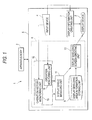
- Fig. 1 is a diagram showing a first embodiment of the medical image diagnostic apparatus and the securitymanaging system according to the invention.
- An X-ray CT apparatus 1 as an example of the medical image diagnostic apparatus includes an apparatus body 2 and an operation terminal 5 having a display device 3 and an input device 4.
- a security managing system 6 is mounted on the operation terminal 5.
- the security managing system 6 may be mounted on the apparatus body 2 or may be an independent external system.
- the medical image diagnostic apparatus may be an arbitrary medical image diagnostic apparatus such as an MRI (Magnetic resonance imaging) apparatus, an X-ray CT (Computed tomography) apparatus, an ultrasonic diagnostic apparatus, a PET (Positron emission computer tomography) apparatus, or an X-ray diagnostic apparatus.
- the X-ray CT apparatus 1 will be explained as an example.
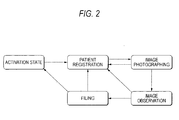
- the X-ray CT apparatus 1 is operated according to information received from the input device 4 of the operation terminal 5 and can take statuses such as an activation state, patient registration, image photographing, image observation, and filing to be capable of transitioning from one status to another.
- Fig. 2 is a transition chart of the statues in the X-ray CT apparatus 1 shown in Fig. 1.
- Fig. 2 it is possible to set the X-ray CT apparatus 1 in the activation state according to operation of the operation terminal 5. It is possible to transition the status from the activation state to the patient registration state, from the patient registration state to the image photographing state, from the image photographing state to the patient registration state or the image observation state, from the image observation state to the patient registration state or the filing state, and from the filing state to the patient registration state or the activation state, respectively.
- an operation screen is displayed on the display device 3 of the operation terminal 5.
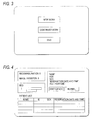
- Fig. 3 is a diagram showing an example of anoperation screen that is displayed on the display device 3 of the operation terminal 5 when the status of the X-ray CT apparatus 1 shown in Fig. 1 is the activation state shown in Fig. 2.
- a user can instruct start of patient registration processing according to operation of the input device 4 via the operation screen. Consequently, the status of the X-ray CT apparatus 1 transitions from the activation state to the patient registration state.
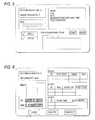
- Fig. 4 is a diagram showing an example of an operation screen that is displayed on the display device 3 of the operation terminal 5 when the status of the X-ray CT apparatus 1 shown in Fig. 1 is the patient registration state shown in Fig. 2.
- a patient registration screen is displayed as an operation screen on the display device 3. It is possible to perform, by operating the input device 4 with reference to the patient registration screen, registration of attribute information of a patient to be photographed and selection of a patient from a list of patients planned to be photographed.
- information such as personal information of a patient like a name and an age of the patient, activation buttons for other applications, and status information of the apparatus is displayed on the screen.
- the user can perform input of patient information or, after selecting patient information from a patient list, perform instruction for start of image photographing by operating the input device 4 via the operation screen. Consequently, the status of the X-ray CT apparatus 1 transitions from the patient registration state to the image photographing state.
- Fig. 5 is a diagram showing an example of an operation screen that is displayed on the display device 3 of the operation terminal 5 when the status of the X-ray CT apparatus 1 shown in Fig. 1 is the image photographing state shown in Fig. 2.
- an image photographing screen is displayed as an operation screen on the display device 3. It is possible to actually perform photographing of medical images by operating the input device 4 with reference to the image photographing screen.
- information such as attribute information of a patient to be photographed, a photographing progress state, an apparatus status, and activation buttons for other applications is displayed on the screen.
- the user can give an instruction for performing image observation to the X-ray CT apparatus 1 according to operation of the input device 4 via the operation screen. Consequently, the status of the X-ray CT apparatus 1 transitions from the image photographing state to the image observation state.
- Fig. 6 is a diagram showing an example of an operation screen that is displayed on the display device 3 of the operation terminal 5 when the status of the X-ray CT apparatus 1 shown in Fig. 1 is the image observation state shown in Fig. 2.
- an image observation screen is displayed on the display device 3. It is possible to observe, with the image observation screen, a photographed image of a patient for whom photographing ends.
- attribute information of the image such as an ID (Identification) and a scan time, a progress state of image reconfiguration, activation buttons for other applications, and the like are displayed.
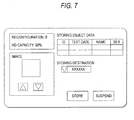
- Fig. 7 is a diagram showing an example of an operation screen that is displayed on the display device 3 of the operation terminal 5 when the status of the X-ray CT apparatus 1 shown in Fig. 1 is the filing state shown in Fig. 2.
- an image filing screen is displayed on the display device 3. It is possible to store a photographed image in a not-shown file server by operating the input device 4 with reference to the image filing screen.
- information such as a section and an image for designating a storing destination and attribute information of storing object data is displayed.
- a display information creating unit 7 for causing the display device 3 to display information corresponding to the respective statuses is provided in the operation terminal 5 of the X-ray CT apparatus 1.
- the display information creating unit 7 has a function of receiving information from the input device 4, creating image information for causing the display device 3 to display information corresponding to the respective statuses of the X-ray CT apparatus 1, and giving the image information to the display device 3.
- the security managing system 6 includes a display shielding area information storing unit 9, a display shielding activation event detectingunit 10, a display shieldingmanaging unit 11, and a display shielding screen creating unit 13.
- the display shielding area information storing unit 9 the display shielding activation event detecting unit 10, the display shielding managing unit 11, and the display shielding screen creating unit 13, which are components of the security managing system 6, by causing a computer to read a security managing program.
- a part or all of the components of the securitymanaging system 6 may be constituted by circuits. The same holds true for the display information creating unit 7.
- the area information for display shielding may be formed of screen data indicating information such as a start point, a shape (square, circle, ellipse, rhombus, parallelogram, etc.), and a size of a display shielding screen that should be displayed on the display device 3.
- the area information for display shielding may be indirect information for causing the display device 3 to display a display shielding screen such as a program for creating display shielding screen information.
- the display shielding activation event detecting unit 10 includes an operation history monitoring unit 15 and an operation monitoring unit 16 in order to detect an event serving as an activation condition for display shielding.
- the operation history monitoring unit 15 has a function of monitoring an operation history of the operation terminal 5 and detecting non-operation of the operation terminal 5 for a fixed time as an event serving as an activation condition for display shielding and a function of notifying the display shielding managing unit 11 of an indication that the event serving as an activation condition for display shielding is detected as an activation request for display shielding.
- the operation history monitoring unit 15 can measure an elapsed time from a final detection time of a key input event or a mouse operation event from the input device 4 such as a key or a mouse and, when the elapsed time exceeds a fixed time set in advance, detect that the operation terminal 5 is not operated.
- the operation monitoring unit 16 has a function of monitoring operation of the operation terminal 5 and detecting performance of a series of key input operation set in advance by the input device 4 as an event serving as an activation condition or a cancellation condition for display shielding and a function of notifying the display shielding managing unit 11 of key input operation information indicting that the events are detected as an activation request for display shielding or a cancellation request for display shielding.
- the operation monitoring unit 16 can acquire a key input event or a mouse operation event by the input device 4 and perform judgment on whether the key input event or the mouse operation event coincides with key operation or mouse operation defined in advance.
- input of one specific key may be set as an object of monitoring or simultaneous input of plural keys or sequential input of plural keys may be set as an object of monitoring.
- the key input operation information can be information that makes it possible to distinguish whether the information is an activation request for display shielding or a cancellation request for display shielding.
- the display shielding managing unit 11 may judge whether the key input operation information is an activation request for display shielding or a cancellation request for display shielding.
- the display shielding managing unit 11 has a function of requesting, when an activation request for display shielding is received from the operation history monitoring unit 15 or the operation monitoring unit 16, the display shielding screen creating unit 13 to create and display a display shielding screen.
- the display shielding managing unit 11 has a function of judging, when a series of key input operation information is received from the operation monitoring unit 16 as a cancellation request for display shielding, whether the key input operation information coincides with a cancellation condition for display shielding and a function of giving, when it is judged that the key input operation information coincides with the cancellation condition for display shielding, giving a non-display request for a display shielding screen to the display shielding screen creating unit 13. It is possible to provide, as required, in the display shielding managing unit 11, a function of causing the display device 3 to display an authentication screen by giving authentication screen information to the display device 3 and a function of performing authentication using the authentication information of the user received from the input device 4. It is possible to constitute the display shielding managing unit 11 to give a non-display request for a display shielding screen to the display shielding screen creating unit 13 only when the authentication is successful.
- the display shielding screen creating unit 13 has a function of acquiring area information for display shielding, which should be displayed on the display device 3 as a display shielding screen, from the display shielding area information storing unit 9 on the basis of a request for creation of a display shielding screen received from the display shielding managing unit 11 and a function of creating display shielding screen information on the basis of the display shielding area information acquired and giving the display shielding screen information to the display device 3 to thereby cause the display device 3 to display a display shielding screen.
- Fig. 8 is a diagram showing a specific example of the first embodiment of the medical image diagnostic apparatus and the security managing system.
- AnX-rayCT apparatus 1A as an example of the medical image diagnostic apparatus includes the apparatus body 2 and the operation terminal 5 having the display device 3 and the input device 4.
- a security managing system 6A is mounted on the operation terminal 5.
- An application executing unit 18 is provided in the operation terminal 5 of the X-ray CT apparatus 1A.
- the application executing unit 18 has a function of executing various applications in the respective statuses in accordance with instructions received from the input device 4.
- the operation terminal 5 includes a screen saver shape storing unit 9a as an example of the display shielding area information storing unit 9, a screen saver activation event detecting unit 10a as an example of the display shielding activation event detecting unit 10, a screen saver managing unit 11a as an example of the display shielding managing unit 11, and a screen saver screen creating unit 13a as an example of the display shielding screen creating unit 13.
- the operation terminal 5 includes an application execution state detecting unit 19.
- the security managing system 6A is a system that performs security management for the X-ray CT apparatus 1A with the security managing method according to the invention.
- components identical with those in the X-ray CT apparatus 1 shown in Fig. 1 are denoted by the identical reference numerals and signs. Explanations of the components are omitted.
- An operation history monitoring unit 15a of the screen saver activation event detecting unit 10a has a function of monitoring an operation history of the operation terminal 5 and detecting non-operation of the operation terminal 5 for a fixed time as an event serving as an activation condition for display shielding and a function of notifying the display shielding managing unit 11a of an indication that the event serving as an activation condition for display shielding is detected as an activation request for display shielding.
- the operation history monitoring unit 15a can measure an elapsed time from a final detection time of a key input event or a mouse operation event from the input device 4 such as a key or a mouse and, when the elapsed time exceeds a fixed time set in advance, detect that the operation terminal 5 is not operated.
- An operation monitoring unit 16a has a function of monitoring operation of the operation terminal 5 and detecting performance of a series of key input operation set in advance by the input device 4 as an event serving as an activation condition or a cancellation condition for the screen saver and a function of notifying the screen saver managing unit 11a of key input operation information indicting that the events are detected as an activation request for the screen saver or a cancellation request for the screen saver.
- the operation monitoring unit 16a can acquire a key input event or a mouse operation event by the input device 4 and perform judgment on whether the key input event or the mouse operation event coincides with key operation or mouse operation defined in advance.
- input of one specific key may be set as an object of monitoring or simultaneous input of plural keys or sequential input of plural keys may be set as an object of monitoring.
- the key input operation information can be information that makes it possible to distinguish whether the information is an activation request for the screen saver or a cancellation request for the screen saver.
- the screen saver managing unit 11a may judge whether the key input operation information is an activation request for the screen saver or a cancellation request for the screen saver.
- the screen saver managing unit 11a has a function of requesting, when an activation request for the screen saver is received from the operation history monitoring unit 15a or the operation monitoring unit 16a, the application execution state detecting unit 19 to notify an execution state of an application and a function of receiving notification of the execution state of the application from the application execution state detecting unit 19 and requesting the screen saver screen creating unit 13a to create and display a screen saver screen.
- execution state information of the application which is the notification of the execution state of the application, is included in the request for creation and display of the screen saver screen.
- the screen saver managing unit 11a has a function of judging, when a series of key input operation information is received from the operation monitoring unit 16a as a cancellation request for the screen saver, whether the key input operation information coincides with a cancellation condition for the screen saver and a function of giving, when it is judged that the key input operation information coincides with the cancellation condition for the screen saver, a non-display request for a screen saver screen to the screen saver screen creating unit 13a. It is possible to provide, as required, in the screen saver managing unit 11a, a function of causing the display device 3 to display an authentication screen by giving authentication screen information to the display device 3 and a function of performing authentication using the authentication information of the user received from the input device 4. It is possible to constitute the screen saver managing unit 11a to give a non-display request for a screen saver screen to the screen saver screen creating unit 13a only when the authentication is successful.
- the application execution state detecting unit 19 has a function of detecting, when a notification request for an execution state of an application is received from the screen saver managing unit 11a, an execution state of an application of the X-ray CT apparatus 1A at a point when the request is received from the screen saver managing unit 11a as application execution state information on the basis of application information under execution acquired from the application executing unit 18 and a function of notifying the screen saver managing unit 11a of the execution state of the application detected.
- At least an execution status of the application is included in the execution state information of the application acquired by the application execution state detecting unit 19.
- arbitrary information such as user information indicating an attribute of the user using the application and a type of the application.
- the user information may be an identifier for uniquely identifying the user or may be role identifying information indicating a role of the user.
- the statuses of the X-ray CT apparatus 1A are not limited to the examples described above and can be defined in advance for each X-ray CT apparatus such that a type of a screen can be distinguished.
- the screen saver screen creating unit 13a has a function of acquiring screen shape information (screen saver screen shape information) of a screen saver, which should be displayed on the display device 3 as a screen saver screen, from the screen saver shape storing unit 9a on the basis of application execution state information included the request for creation and display of a screen saver screen received from the screen saver managing unit 11a and a function of creating screen saver screen information on the basis of the screen saver screen shape information acquired and giving the screen saver screen information to the display device 3 to thereby cause the display device 3 to display the screen saver screen.
- screen shape information screen saver screen shape information
- Screen saver screen shape information created for respective application execution states in advance is stored in the screen saver shape storing unit 9a.
- the screen saver screen shape information may be formed of screen data indicating information such as a start point, a shape (square, circle, ellipse, rhombus, parallelogram, etc.), and a size of a screen saver screen that should be displayed on the display device 3.
- the screen saver screen shape information may be indirect information for causing the display device 3 to display a screen saver screen such as a program for creating screen saver screen information.
- Fig. 9 is a diagram showing an example of an image photographing screen that is used as a base in creating screen saver screen shape information stored in the screen saver shape storing unit 9a of the X-ray CT apparatus 1A shown in Fig. 8.
- a shape of a screen saver screen applied to the image photographing screen shown in Fig. 9 is set.
- the image photographing screen shown in Fig. 9 is divided into a patient attribute information display area, an application operation area, and an apparatus status area.
- a polygon obtained combining the patient attribute information display area and the application operation area is a screen shape of the screen saver.
- screen data of the polygon obtained by combining the patient attribute information display area and the application operation area of the image photographing screen is stored in the screen saver shape storing unit 9a as screen saver screen shape information in association with the application execution states.
- Examples of an execution state of an application (an execution status of an application) via the image photographing screen include execution states such as a patient registration state and an image photographing state.
- Fig. 10 is a diagram showing a first example of the screen saver screen shape information stored in the screen saver shape storing unit 9a of the X-ray CT apparatus 1A shown in Fig. 8.
- the screen saver screen shape information is formed by, for example, as shown in Fig. 10, associating an execution state of an application and screen data of a file format with each other.
- screen data of AAA.BMP is a screen shape of a screen saver.
- Fig. 11 is a diagram showing a second example of the screen saver screen shape information stored in the screen saver shape storing unit 9a of the X-ray CT apparatus 1A shown in Fig. 8.
- screen saver screen shape information by, for example, as shown in Fig. 11, adding not only execution content but also user information indicating an authority and an attribute of a user to the execution state of the application.
- the execution state of the application is a state in which an engineer performs patient registration
- screen data of AA2.BMP is a screen shape of a screen saver.
- Fig. 12 is a diagram showing a third example of the screen saver screen shape information stored in the screen saver shape storing unit 9a of the X-ray CT apparatus 1A shown in Fig. 8.
- the screen saver screen shape information by, for example, as shown in Fig. 12, associating the execution state of the application and screen vertex data indicating vertexes of a polygon with each other.
- the execution state of the application is a state in which a doctor performs patient registration
- an area of a polygon defined by screen vertex data ⁇ (100,900) (100, 0) (0, 400) (400, 500) (700, 500) (700, 900) ⁇ is a screen shape of a screen saver.
- Fig. 13 is a diagram showing a forth example of the screen saver screen shape information stored in the screen saver shape storing unit 9a of the X-ray CT apparatus 1A shown in Fig. 8.
- the screen saver screen shape information by, for example, as shown in Fig. 13, associating display presence/absence information indicating whether area names specifying divided areas of a screen and respective areas are displayed (whether the areas are shielded by a screen saver) with the execution state of the application.
- the execution state of the application is a state in which a doctor performs patient registration
- the apparatus status area is displayed on the display device 3 and, on the other hand, the patient attribute information display area and the application operation area are not displayed.
- the respective areas are not limited to the areas such as the patient attribute information display area, the application operation area, and the apparatus status area shown in Fig. 9 and can be divided into arbitrary areas and defined.
- screen saver screen shape information in various format and store the screen saver screen shape information in the screen saver shape storing unit 9a.
- screen saver screen information is generated on the basis of the screen saver screen shape information.
- Fig. 14 is a sequence chart showing a flow in causing the display device 3 to display a screen server screen and performing security management for information in the operation terminal 5 of the X-ray CT apparatus 1A shown in Fig. 8.
- signs with numbers affixed to S denote respective steps of the sequence chart.
- the X-ray CT apparatus 1A is activated to be in an arbitrary status in advance.
- Operation screens corresponding to the respective statuses shown in the examples in Figs. 3 to 7 are displayed on the display device 3 provided in the operation terminal 5.
- An operation history of the operation terminal 5 is monitored by the operation history monitoring unit 15a and, in parallel, a key input event and a mouse operation event by the input device 4 is acquired by the operation monitoring unit 16a.
- step S1 for example, when key input or mouse operation by the input device 4 such as a key or a mouse is not performed for a fixed period, the operation history monitoring unit 15a detects that the operation terminal 5 is not operated.
- the operation history monitoring unit 15a measures an elapsed time (a non-operation time) from time when last operation of the input device 4 such as key input or mouse operation is performed and, at a point when the elapsed time exceeds time set in advance, detects that the operation terminal 5 is not operated for the fixed period.
- the operation history monitoring unit 15a gives a message for notifying occurrence of an event in that the operation terminal 5 is not operated for the fixed period to the screen saver managing unit 11a as an activation request for a screen saver.
- step S2 when fixed key input or fixed mouse operation for screen saver activation defined in advance is performed, it is detected by the operation monitoring unit 16a, which monitors specific key input, that a series of key input operation is performed.
- the operation monitoring unit 16a notifies the screen saver managing unit 11a of a message indicating that the series of key input operation is performed by the operation terminal 5 as an activation request for the screen saver.
- the operation history monitoring unit 15a and the operation monitoring unit 16a notifies the screen saver managing unit 11a of an activation request for the screen saver.
- a type of an inputted key is included in the notification of the activation request for the screen saver to the screen saver managing unit 11a as required.
- step S3 the screen saver managing unit 11a receives the screen saver activation request, the screen saver managing unit 11a judges whether activation conditions for the screen saver are satisfied.
- the screen saver managing unit 11a requests the application execution state detecting unit 19 to notify an execution state of an application in the X-ray CT apparatus 1A. Therefore, the application execution state detecting unit 19 detects an execution state of an application of the X-ray CT apparatus 1A at a point when the request from the screen saver managing unit 11a is received on the basis of information on an application under execution acquired from the application executing unit 18.
- the application execution state detecting unit 19 can also inquire of the application executing unit 18 about an application under execution.
- step S4 the screen saver managing unit 11a requests the screen saver screen creating unit 13a to create and display a screen saver screen.
- Information on an execution state of an application including a status of the X-ray CT apparatus 1A and user information given to the screen saver managing unit 11a from the application execution state detecting unit 19 is included in the request for creation and display of a screen saver screen.
- step S5 the screen saver screen creating unit 13a acquires screen saver screen shape information, which should be displayed on the display device 3 as a screen saver screen, from the screen saver shape storing unit 9a on the basis of the application execution state information included in the request for creation and display of a screen saver screen received from the screen saver managing unit 11a.
- the screen saver screen creating unit 13a creates screen saver screen information on the basis of the screen saver screen shape information acquired from the screen saver shape storing unit 9a and gives the screen saver screen information to the display device 3. Consequently, a screen saver screen created by the screen saver screen creating unit 13a is displayed on the display device 3 and the activation of a screen saver is completed.
- the screen saver screen displayed on the display device 3 assumes a shape corresponding to an attribute and an authority of a user for each of execution states of applications in the respective statuses.
- the user operates the input device 4 of the operation terminal 5.
- step S6 key input monitoring for the input device 4 is performed by the operation monitoring unit 16a.
- the operation monitoring unit 16a detects that some operation such as input of an arbitrary key or key input or mouse operation decided in advance of the input device 4 is performed.
- the operation monitoring unit 16a notifies the screen saver managing unit 11a of a series of key input operation information indicating that a series of key input operation is performed.
- the screen saver managing unit 11a interprets the key input operation information received from the operation monitoring unit 16a as a cancellation request for the screen saver and judges whether the key input operation information coincides with cancellation conditions for the screen saver. When it is judged that the key input operation information coincides with the cancellation conditions for the screen saver, the screen saver managing unit 11a gives authentication screen information for canceling activation of the screen saver to the display device 3.
- an authentication screen for canceling activation of the screen saver is displayed on the display device 3.
- the user can instruct cancellation of the screen saver by inputting an ID and a password from the input device 4 via the authentication screen.
- the user who can instruct cancellation of the screen saver is not limited to this.
- a cancellation authority for the screen saver may be given to users belonging to the same authority group as the user or may be given to only an administrator other than the user.
- the screen saver managing unit 11a receives authentication information of the user inputted to the input device 4 and performs authentication. When the authentication is successful, the screen saver managing unit 11a gives a non-display request for a screen saver screen to the screen saver screen creating unit 13a.
- step S7 the screen saver screen creating unit 13a cancels the screen saver displayed on the display device 3 in accordance with the non-display request for the screen saver screen received from the screen saver managing unit 11a.
- the user can use a desired application according to operation of the input device 4 with reference to the display device 3 of the operation terminal 5.
- the application executing unit 18 may execute applications of the respective statutes and display pieces of information of the respective statuses on the display device 3 while superimposing the pieces of information one on top of another.
- the screen saver managing unit 11a requests the application execution state detecting unit 19 to notify an execution state of an application executed lately. Therefore, the application execution state detecting unit 19 detects a latest execution state of an application on the basis of the information on the application under execution acquired from the application executing unit 18.
- Fig. 15 is a diagram showing an example of a screen saver screen at the time when respective pieces of information on respective statuses are displayed on the display device 3 while being superimposed one on top of another.
- Fig. 15 shows a screen saver screen at the time when applications of respective statuses, for example, the patient registration state, the image photographing state, and the image observation state shown in Fig. 2 are executed, respectively, and pieces of the respective statuses are displayed on the display device 3 while being superimposed one on top of another.
- the screen saver screen creating unit 13a acquires screen saver screen shape information, which should be displayed on the display device 3 as a screen saver screen, from the screen saver shape storing unit 9a on the basis of information on the patient registration state included in the request for creation and display of the screen saver screen received from the screen saver managing unit 11a.
- the screen saver screen creating unit 13a creates screen saver screen information on the basis of the screen saver screen shape information acquired from the screen saver shape storing unit 9a and gives the screen saver screen information to the display device 3.
- the X-ray CT apparatus 1 and the security managing system 6 described above it is possible to display a display shielding screen according to desired area information. Therefore, it is possible to display the display shielding screen in the same color and arrangement as a screen used by the user in his/her daily work.
- the X-ray CT apparatus 1A and the security managing system 6A it is possible to display a screen saver screen of a desired shape according to a status or an execution state of an application. Moreover, it is possible to display a screen saver screen in a desired shape according to not only the status but also a user who uses the application. Therefore, it is possible to display the display shielding screen in the same color and arrangement as a screen used by the user in his/her daily work.
- Fig. 16 is a diagram showing a second embodiment of the medical image diagnostic apparatus and the security managing system according to the invention.
- An X-ray CT apparatus 1B as an example of the medical image diagnostic apparatus shown in Fig. 16 is different from the X-ray CT apparatus 1A shown in Fig. 8 in that a screen saver shape setting unit 20a is provided in the security managing system.
- the other constitutions and actions are not substantially different from those of the X-ray CT apparatus 1A shown in Fig. 8.
- components same as those of the X-ray CT apparatus 1A are denoted by the same reference numerals and signs. Explanations of the components are omitted.
- the screen saver shape setting unit 20a as an example of the display shielding information setting unit 20 that sets area information of display shielding is provided.
- the screen saver shape setting unit 20a has a function of receiving input from the input device 4 and creating screen saver screen shape information by associating an application execution state and a screen shape of a screen saver and a function of storing the screen saver screen shape information created in the screen saver shape storing unit 9a by writing the screen saver screen shape information therein.
- the screen saver shape setting unit 20a is constituted to be capable of causing the display device 3 to display an operation screen necessary for creating screen saver screen shape information.
- Fig. 17 is a diagram showing an example of a screen for creating screen saver screen shape information that is displayed as an operation screen on the display device 3 of the X-ray CT apparatus 1B shown in Fig. 16.
- Screen information for creating screen saver screen shape information is given to the display device 3 from the screen saver shape setting unit 20a. For example, a screen for creating screen saver screen shape information shown in Fig. 17 is displayed on the display device 3.
- a screen type section 21 for selecting a type of a screen to be displayed on a screen saver screen for example, a screen type section 21 for selecting a type of a screen to be displayed on a screen saver screen, a user type section 22 for selecting a type of a user, an area designation pallet 23 for using a tool for defining an area, an area type section 24 for designating an area type for designating whether an area defined at the time of activation of a screen saver is displayed or not displayed, and a sample image display area 25 for displaying a sample image of a screen saver screen.
- a sample image of a screen corresponding to an attribute of the user is displayed in the sample image display area 25.
- the user can define an area on the sample image using rendering tools such as figures and lines provided in the area designation pallet 23.
- the user designates a display attribute of an area indicating whether the area defined is an area that should be displayed or an area that should not be displayed. In other words, the user sets an area, which the user desires to display at the time of activation of the screen saver, as a display area.
- screen saver screen shape information including the shape determined and cause the screen saver shape storing unit 9a to store the screen saver screen shape information.
- screen saver screen shape information is created via the screen for creating screen saver screen shape information shown in Fig. 17, screen saver screen shape information is stored in the screen saver shape storing unit 9a in the formats shown in Figs. 10 to 12.
- Fig. 18 is a diagram showing another example of the screen for creating screen saver screen shape information that is displayed as an operation screen on the display device 3 of the X-ray CT apparatus 1B shown in Fig. 16.
- an area type section 24 for designating whether plural areas divided in advance are displayed or not displayed is provided other than the screen type section 21 for selecting a type of a screen to be displayed on a screen saver screen and the user type section 22 for selecting a type of a user.
- the area type section 24 for designating whether plural areas divided in advance are displayed or not displayed is displayed, for example, in an ideographic format on a screen corresponding to an attribute of the user.
- area names are a patient attribute information display area, an application operation area, and an apparatus status area. Then, the user can perform setting for displaying or not displaying the respective areas in the area type section 24 displayed in the ideographic format.
- screen saver screen shape information including the shape determined and cause the screen saver shape storing unit 9a to store the screen saver screen shape information.
- the screen saver screen shape information is created via the screen for creating screen saver screen shape information shown in Fig. 18, the screen saver screen shape information is stored in the screen saver shape storing unit 9a in the format shown in Fig. 13.
- the X-ray CT apparatus 1B and the security managing system 6B described above allow a user to create screen saver screen shape information with desired contents. Therefore, according to the X-ray CT apparatus 1B and the security managing system 6B, in addition to the same effects as the X-ray CT apparatus 1A shown in Fig. 8, respective users can set a shape of a screen saver in desired shapes according to roles and authorities of the users. Thus, it is possible to improve convenience for the users. In particular, as shown in Fig. 18, if a user performs setting only for whether an area set for each screen in advance is displayed or not displayed, it is possible to more easily create screen saver screen shape information.
- Fig. 19 is a diagram showing a third embodiment of the medical image diagnostic apparatus and the security managing system according to the invention.
- An X-ray CT apparatus 1C as an example of the medical image diagnostic apparatus shown in Fig. 19 is different from the X-ray CT apparatus 1B shown in Fig. 16 in that a screen saver activation conditions setting unit 30a is provided in the security managing system.
- the other constitutions and actions are not substantially different from those of the X-ray CT apparatus 1B shown in Fig. 16.
- components identical with those in the X-ray CT apparatus 1B are denoted by the same reference numerals and signs. Explanations of the components are omitted.
- the screen saver activation conditions setting unit 30a as an example of a display shielding activation conditions setting unit 30 that sets activation conditions for display shielding is provided in the security managing system 6C of the X-ray CT apparatus 1C.
- the screen saver activation conditions setting unit 30a has a function of receiving input from the input device 4, setting activation conditions and cancellation conditions for a screen saver, and giving the activation conditions and the cancellation conditions to one or both of the operation history monitoring unit 15a and the operation monitoring unit 16a.
- the activation conditions for the screen saver it is possible to set a condition concerning whether an elapsed time from the last operation by the input device 4 exceeds a fixed time or whether a specific series of key input is performed.
- the cancellation conditions for the screen saver other than key operation for canceling the screen saver by the input device 4, it is possible to designate authentication conditions on an authentication screen displayed by key operation for canceling the screen saver.
- the authentication conditions in canceling the screen saver it is preferable if it is possible to designate authentication conditions that, for example, a user is identical with a user who has logged in and is a user or an administrator having an identical authority.
- the screen saver activation conditionssetting unit 30a is constituted to be capable of causing the display device 3 to display a setting screen necessary for setting activation conditions and cancellation conditions for a screen saver by giving image information to the display device 3.
- Fig. 20 is a diagram showing an example of a setting screen for setting activation conditions and cancellation conditions for a screen saver that is displayed on the display device 3 of the X-ray CT apparatus 1C shown in Fig. 19.
- an activation conditions setting section 31 for setting activation conditions for a screen saver and a cancellation conditions setting section 32 for setting cancellation conditions for a screen saver are provided in the setting screen.
- the activation conditions setting section 31 for setting activation conditions for a screen saver it is possible to perform designation of a no-operation time until screen saver activation and designation of key operation and mouse operation in activating the screen saver with key input.
- the cancellation conditions setting section 32 for setting cancellation conditions for a screen saver it is possible to designate key operation or mouse operation in canceling the screen saver and designate an attribute of a user at the time of authentication.
- the X-ray CT apparatus 1C and the security managing system 6C described above allow a user to arbitrarily set activation conditions and cancellation conditions for a screen saver. Therefore, according to the X-ray CT apparatus 1C and the security managing system 6C, in addition to the same effects as the X-ray CT apparatus 1B shown in Fig. 16, respective users can set activation conditions and cancellation conditions for a screen saver to be desired conditions. Thus, it is possible to improve convenience for the users. In particular, it is possible to set activation conditions and cancellation conditions for a screen saver in association with an attribute of a user and a screen. In this way, it is possible to further improve convenience for the user and perform careful security management.
- a part of the functions and processing do not have to be provided. It is also possible to include, other than a role and an authority of a user, arbitrary information such as a patient attribute of image data forming a screen, an attribute of a user who has photographed image data, an attribute of a test, and an attribute of an X-ray CT apparatus in the screen saver screen shape information. In this case, if the user can associate pieces of information by selecting the information from an item list, it is possible to improve convenience.
Landscapes
- Health & Medical Sciences (AREA)
- Life Sciences & Earth Sciences (AREA)
- Engineering & Computer Science (AREA)
- Medical Informatics (AREA)
- Biomedical Technology (AREA)
- Surgery (AREA)
- High Energy & Nuclear Physics (AREA)
- Physics & Mathematics (AREA)
- Nuclear Medicine, Radiotherapy & Molecular Imaging (AREA)
- Optics & Photonics (AREA)
- Pathology (AREA)
- Radiology & Medical Imaging (AREA)
- Veterinary Medicine (AREA)
- Heart & Thoracic Surgery (AREA)
- Molecular Biology (AREA)
- Biophysics (AREA)
- Animal Behavior & Ethology (AREA)
- General Health & Medical Sciences (AREA)
- Public Health (AREA)
- Human Computer Interaction (AREA)
- Pulmonology (AREA)
- Theoretical Computer Science (AREA)
- Controls And Circuits For Display Device (AREA)
- Measuring And Recording Apparatus For Diagnosis (AREA)
- Digital Computer Display Output (AREA)
- Control Of Indicators Other Than Cathode Ray Tubes (AREA)
Abstract
Description
- The present invention relates to a technique for securing security of information by causing an operation terminal to display a display shielding screen to conceal information that is unsuitable for people other than a specific user to inspect and, inparticular, to a medical image diagnostic apparatus, a security managing system, and a security managing method that are capable of causing an operation terminal to display desired information, which plural users desire to inspect, in a desired display method according to conditions such as a status of the apparatus and authorities of the respective users even while display shielding is active.
- Conventionally, in an operation terminal of a computer, when no operation is performed for a fixed time, a screen saver is activated to prevent the third party from easily inspecting information displayed on a monitor. Security management for information is performed by such a screen saver function.
- The screen saver function is provided not only in a general-purpose computer but also in operation terminals included in various kinds of medical image diagnostic apparatuses and various apparatuses such as an analytical instrument. For example, a technique for providing a screen saver control function in an analytical instrument including a function of creating and rendering a graph from measurement data and, when, for example, no operation is performed for a certain fixed time duringmeasurement, activating a screen saver according to the screen saver control function is devised (see, for example, Patent Document 1).
- Moreover, a technique for providing, in this analytical instrument, a data processing device for analytical instruments that displays a latest graph result calculated by a chromatogramprocessingunit on a screen saver screen displayed on a monitor is devised. In this technique, a method of creating a screen saver screen using a graph and a method of pasting the graph on the screen saver screen are devised.
- In a screen saver control technique in the conventional analytical instruments, only display of specific information such as a graph result is examined. In an apparatus that displays only a single image corresponding to a purpose such as the analytical instrument, it is possible to improve convenience of the apparatus by displaying specific information decided in advance on the screen saver.
- However, when the screen saver function is provided in the operation terminal of the medical image diagnostic apparatus, things are different. The medical image diagnostic apparatus includes plural functions such as a registration function for photographed patient information, a medical image photographing function, a medical image observation function, and a filing function. Various images corresponding to the respective functions are displayed on the operation terminal of the medical image diagnostic apparatus. In general, usable functions vary depending on an attribute of a user of the medical image diagnostic apparatus, for example, whether the user is a doctor or a radio engineer.
- Therefore, when the screen saver function is provided in the operation terminal of the medical image diagnostic apparatus, it is inappropriate to dynamically create a screen saver screen using specific information decided in advance as in the technique used for the conventional analytical instrument. It is necessary to cause the operation terminal to arbitrarily define image information to be displayed while the screen saver is active according to a status of the medical image diagnostic apparatus and authorities of users. In this regard, such necessity is not taken into account at all in the screen saver control technique used in the conventional analytical instrument.
- Incidentally, in a GUI (Graphical user interface) forming a basis of the screen saver control technique, in general, arrangement of display items of the GUI is determined on the basis of fixed rules. For example, a patient name is arranged on the upper left of a screen and an application execution button is arranged in a lower part of the screen. In this way, the display items such as execution buttons are arranged according to a fixed rule for each application type. This takes into account a characteristic that a color, a shape, and an arrangement position of an object affect object cognition of the human.
- When such characteristic of a cognition ability of the human is considered, it is inappropriate as a control technique for a screen saver, which should be displayed on a screen of the operation terminal in the medical image diagnostic apparatus, to create a screen saver image simply using calculation in progress of a chromatograph as in the screen saver control technique used in the conventional analytical instrument. This is because, when the screen saver is used in the medical image diagnostic apparatus, it is necessary to display information, which has plural different meanings such as a processing progress state of an application and an examination request state, on the operation terminal while concealing privacy information of a patient such as a patient name from which the patient can be identified. Thus, depending on display positions of the respective kinds of information, it is likely that misunderstanding of a user is induced.
- Therefore, when information is presented on the screen saver screen of the operation terminal in the medical image diagnostic apparatus, it is desirable that information is displayed on the screen saver screen in the same color and the same arrangement as a screen used by a user in his/her daily work. However, in the screen saver control technique used in the conventional analytical instrument, such display of information is not taken into account at all.
- Patent Document 1:
JP-A-2002-229538 - The invention has been devised in order to cope with such conventional circumstances and it is an object of the invention to provide a medical image diagnostic apparatus, a security managing system, and a security managing method that are capable of securing security of information by causing an operation terminal to display a display shielding screen to conceal information that is unsuitable for people other than a specific user to inspect and, on the other hand, causing an operation terminal to display desired information, which plural users desire to inspect, in a desired display method according to conditions such as a status of the apparatus and authorities of the respective users even while display shielding is active.
- In order to attain the object described above, the invention provides a medical image diagnostic apparatus that includes an operation terminal having an input device and a display device. The medical image diagnostic apparatus includes: a display shielding area information storing unit that stores information on an area in which display shielding is activated; a display shielding activation event detecting unit that detects an event serving as a condition for activating the display shielding; and a display shielding screen creating unit that reads, when the event is detected by the display shielding activation event detecting unit, the area information from the display shielding area information storing unit and creates display shielding screen information for causing the display device to display the display shielding on the basis of the area information read.
- In order to attain the object, the invention provides a medical image diagnostic apparatus that includes an operation terminal having an input device and a display device. The medical image diagnostic apparatus includes: a screen saver shape storing unit that stores shapes of a screen saver for respective execution states of an application; a screen saver activation event detecting unit that detects an event serving as an activation condition for the screen saver; an application execution state detecting unit that detects an execution state of the application as application execution state information; a screen saver screen creating unit that reads a shape of the screen saver corresponding to the execution state of the application from the screen saver shape storing unit and creates screen saver image information for causing the display device to display the screen saver on the basis of the shape of the screen saver read; and a screen saver managing unit that receives notification indicating that the event serving as the activation condition for the screen saver is detected from the screen saver activation event detecting unit and requests the application execution state detecting unit to detect the execution state of the application and, on the other hand, receives the application execution state information detected in the application execution state detecting unit and gives the application execution state information received to the screen saver screen creating unit to request the screen saver screen creating unit to create the screen saver image information.
- In order to attain the object, the invention provides a security managing system that includes an operation terminal having an input device and a display device. The security managing system includes: a display shielding area information storing unit that stores information on an area in which display shielding is activated; a display shielding activation event detecting unit that detects an event serving as a condition for activating the display shielding; and a display shielding screen creating unit that reads, when the event is detected by the display shielding activation event detecting unit, the area information from the display shielding area information storing unit and creates display shielding screen information for causing the display device to display the display shielding on the basis of the area information read.
- In order to attain the object, the invention provides a security managing system that includes an operation terminal having an input device and a display device. The security managing system includes: a screen saver shape storing unit that stores shapes of a screen saver for respective execution states of an application; a screen saver activation event detecting unit that detects an event serving as an activation condition for the screen saver; an application execution state detecting unit that detects an execution state of the application as application execution state information; a screen saver screen creating unit that reads a shape of the screen saver corresponding to the execution state of the application from the screen saver shape storing unit and creates screen saver image information for causing the display device to display the screen saver on the basis of the shape of the screen saver read; and a screen saver managing unit that receives notification indicating that the event serving as the activation condition for the screen saver is detected from the screen saver activation event detecting unit and requests the application execution state detecting unit to detect the execution state of the application and, on the other hand, receives the application execution state information detected in the application execution state detecting unit and gives the application execution state information received to the screen saver screen creating unit to request the screen saver screen creating unit to create the screen saver image information.
- In order to attain the object, the invention provides a security managing method that includes an operation terminal having an input device and a display device. The security managing method includes : a step of storing information on an area in which display shielding is activated; a step of detecting an event serving as a condition for activating the display shielding; and a step of reading, when the event is detected, the area information and creating display shielding screen information for causing the display device to display the display shielding on the basis of the area information read.
- In order to attain the object, the invention provides a security managing method that includes an operation terminal having an input device and the display device. The security managing method includes: a step of storing shapes of a screen saver for respective execution states of an application; a step of detecting an event serving as an activation condition for the screen saver; a step of detecting an execution state of the application when the event serving as an activation condition for the screen saver is detected; and a step of creating screen saver image information for causing the display device to display the screen saver using a shape of the screen saver corresponding to the execution state of the application detected among the shapes of the screen saver stored.
- In order to attain the object, the invention provides a security managing method for a medical image diagnostic apparatus that includes an operation terminal having an inputting device and a display device. The securitymanaging method includes: a step of storing information on an area in which display shielding is activated; a step of detecting an event serving as a condition for activating the display shielding; and a step of reading, when the event is detected, the area information and creating display shielding screen information for causing the display device to display the display shielding on the basis of the area information read.
- In order to attain the object, the invention provides a security managing method for a medical image diagnostic apparatus that includes an operation terminal having an inputting device and a display device. The security managing method includes: a step of storing shapes of a screen saver for respective execution states of an application; a step of detecting an event serving as an activation condition for the screen saver; a step of detecting an execution state of the application when the event serving as an activation condition for the screen saver is detected; and a step of creating screen saver image information for causing the display device to display the screen saver using a shape of the screen saver corresponding to the execution state of the application detected among the shapes of the screen saver stored.
- According to a medical image diagnostic apparatus, a security managing system, and a security managing method according to the invention, it is possible to secure security of information by causing the operation terminal to display a display shielding screen to conceal information that is unsuitable for people other than a specific user to inspect and, on the other hand, cause the operation terminal to display desired information, which plural users desire to inspect, in a desired displaymethod according to conditions such as a status of the apparatus and authorities of the respective users even while display shielding is active.
-
- Fig. 1 is a diagram showing a first embodiment of a medical image diagnostic apparatus and a security managing system according to the invention.
- Fig. 2 is a transition chart of a status in an X-ray CT apparatus shown in Fig. 1.
- Fig. 3 is a diagram showing an example of an operation screen that is displayed on a display device of an operation terminal when the status of the X-ray CT apparatus shown in Fig. 1 is an activation state shown in Fig. 2.
- Fig. 4 is a diagram showing an example of an operation screen that is displayed on the display device of the operation terminal when the status of the X-ray CT apparatus shown in Fig. 1 is a patient registration state shown in Fig. 2.
- Fig. 5 is a diagram showing an example of an operation screen that is displayed on the display device of the operation terminal when the status of the X-ray CT apparatus shown in Fig. 1 is an image photographing state shown in Fig. 2.
- Fig. 6 is a diagram showing an example of an operation screen that is displayed on the display device of the operation terminal when the status of the X-ray CT apparatus shown in Fig. 1 is an image observation state shown in Fig. 2.
- Fig. 7 is a diagram showing an example of an operation screen that is displayed on the display device of the operation terminal when the status of the X-ray CT apparatus shown in Fig. 1 is a filing state shown in Fig. 2.
- Fig. 8 is a diagram showing a specific example of the first embodiment of the medical image diagnostic apparatus and the security managing system.
- Fig. 9 is a diagram showing an example of an image photographing screen that is used as a base in creating screen saver screen shape information stored in a screen saver shape storing unit of an X-ray CT apparatus shown in Fig. 8.
- Fig. 10 is a diagram showing a first example of the screen saver screen shape information stored in the screen saver shape storing unit of the X-ray CT apparatus shown in Fig. 8.
- Fig. 11 is a diagram showing a second example of the screen saver screen shape information stored in the screen saver shape storing unit of the X-ray CT apparatus shown in Fig. 8.
- Fig. 12 is a diagram showing a third example of the screen saver screen shape information stored in the screen saver shape storing unit of the X-ray CT apparatus shown in Fig. 8.
- Fig. 13 is a diagram showing a fourth example of the screen saver screen shape information stored in the screen saver shape storing unit of the X-ray CT apparatus shown in Fig. 8.
- Fig. 14 is a sequence chart showing a flow in causing a display device to display a screen saver screen to perform security management for information in an operation terminal of the X-ray CT apparatus shown in Fig. 8.
- Fig. 15 is a diagram showing an example of a screen saver screen at the time when respective pieces of information on statuses are displayed on the display device while being superimposed one on top of another.
- Fig. 16 is a diagram showing a second embodiment of the medical image diagnostic apparatus and the security managing system according to the invention.
- Fig. 17 is a diagram showing an example of a screen for creation of screen saver screen shape information displayed as an operation screen on a display device of an X-ray CT apparatus shown in Fig. 16.
- Fig. 18 is a diagram showing another example of the screen for creation of screen saver screen shape information displayed as the operation screen on the display device of the X-ray CT apparatus shown in Fig. 16.
- Fig. 19 is a diagram showing a third embodiment of the medical image diagnostic apparatus and the security managing system according to the invention.
- Fig. 20 is a diagram showing an example of a setting screen for setting activation conditions and cancellation conditions for a screen saver displayed on a display device of an X-ray CT apparatus shown in Fig. 19.
- Embodiments of a medical image diagnostic apparatus, a security managing system, and a security managing method according to the invention will be hereinafter explained.
- The security managing system according to the invention is mounted on a general-purpose computer. In the following explanation, as an example, the security managing system is mounted on an operation terminal that is a computer constituting a part of a medical image diagnostic apparatus that is an example of a medical apparatus.
- Fig. 1 is a diagram showing a first embodiment of the medical image diagnostic apparatus and the securitymanaging system according to the invention.
- An
X-ray CT apparatus 1 as an example of the medical image diagnostic apparatus includes anapparatus body 2 and anoperation terminal 5 having adisplay device 3 and aninput device 4. Asecurity managing system 6 is mounted on theoperation terminal 5. However, thesecurity managing system 6 may be mounted on theapparatus body 2 or may be an independent external system. The medical image diagnostic apparatus may be an arbitrary medical image diagnostic apparatus such as an MRI (Magnetic resonance imaging) apparatus, an X-ray CT (Computed tomography) apparatus, an ultrasonic diagnostic apparatus, a PET (Positron emission computer tomography) apparatus, or an X-ray diagnostic apparatus. In this embodiment, theX-ray CT apparatus 1 will be explained as an example. - The
X-ray CT apparatus 1 is operated according to information received from theinput device 4 of theoperation terminal 5 and can take statuses such as an activation state, patient registration, image photographing, image observation, and filing to be capable of transitioning from one status to another. - Fig. 2 is a transition chart of the statues in the
X-ray CT apparatus 1 shown in Fig. 1. - As shown in Fig. 2, it is possible to set the
X-ray CT apparatus 1 in the activation state according to operation of theoperation terminal 5. It is possible to transition the status from the activation state to the patient registration state, from the patient registration state to the image photographing state, from the image photographing state to the patient registration state or the image observation state, from the image observation state to the patient registration state or the filing state, and from the filing state to the patient registration state or the activation state, respectively. In the respective statuses, an operation screen is displayed on thedisplay device 3 of theoperation terminal 5. - Fig. 3 is a diagram showing an example of anoperation screen that is displayed on the
display device 3 of theoperation terminal 5 when the status of theX-ray CT apparatus 1 shown in Fig. 1 is the activation state shown in Fig. 2. - As shown in Fig. 3, when the status of the
X-ray CT apparatus 1 is the activation state, it is possible to input instructions such as new work, continued work, and end to theoperation terminal 5 according to operation of theinput device 4 with reference to the operation screen displayed on the display device3. Inotherwords, in the activation state, it is possible to select a type of processing by theX-ray CT apparatus 1. - In order to perform registration of patient information, a user can instruct start of patient registration processing according to operation of the
input device 4 via the operation screen. Consequently, the status of theX-ray CT apparatus 1 transitions from the activation state to the patient registration state. - Fig. 4 is a diagram showing an example of an operation screen that is displayed on the
display device 3 of theoperation terminal 5 when the status of theX-ray CT apparatus 1 shown in Fig. 1 is the patient registration state shown in Fig. 2. - As shown in Fig. 4, when the status of the
X-ray CT apparatus 1 is the patient registration state, a patient registration screen is displayed as an operation screen on thedisplay device 3. It is possible to perform, by operating theinput device 4 with reference to the patient registration screen, registration of attribute information of a patient to be photographed and selection of a patient from a list of patients planned to be photographed. In this example of the patient registration screen, information such as personal information of a patient like a name and an age of the patient, activation buttons for other applications, and status information of the apparatus is displayed on the screen. - In this patient registration state, the user can perform input of patient information or, after selecting patient information from a patient list, perform instruction for start of image photographing by operating the
input device 4 via the operation screen. Consequently, the status of theX-ray CT apparatus 1 transitions from the patient registration state to the image photographing state. - Fig. 5 is a diagram showing an example of an operation screen that is displayed on the
display device 3 of theoperation terminal 5 when the status of theX-ray CT apparatus 1 shown in Fig. 1 is the image photographing state shown in Fig. 2. - As shown in Fig. 5, when the status of the
X-ray CT apparatus 1 is the image photographing state, an image photographing screen is displayed as an operation screen on thedisplay device 3. It is possible to actually perform photographing of medical images by operating theinput device 4 with reference to the image photographing screen. In this example of the image photographing screen, information such as attribute information of a patient to be photographed, a photographing progress state, an apparatus status, and activation buttons for other applications is displayed on the screen. - In this image photographing state, when the image photographing ends, the user can give an instruction for performing image observation to the
X-ray CT apparatus 1 according to operation of theinput device 4 via the operation screen. Consequently, the status of theX-ray CT apparatus 1 transitions from the image photographing state to the image observation state. - Fig. 6 is a diagram showing an example of an operation screen that is displayed on the
display device 3 of theoperation terminal 5 when the status of theX-ray CT apparatus 1 shown in Fig. 1 is the image observation state shown in Fig. 2. - As shown in Fig. 6, when the status of the
X-ray CT apparatus 1 is the image observation state, an image observation screen is displayed on thedisplay device 3. It is possible to observe, with the image observation screen, a photographed image of a patient for whom photographing ends. In this example of the image observation screen, other than the image, attribute information of the image such as an ID (Identification) and a scan time, a progress state of image reconfiguration, activation buttons for other applications, and the like are displayed. - In this image observation state, at a point when the image observation by the user ends, it is possible to give an instruction for filing the image to the
X-ray CT apparatus 1 according to operation of theinput device 4. Consequently, the status of theX-ray CT apparatus 1 transitions from the image observation state to the filing state. - Fig. 7 is a diagram showing an example of an operation screen that is displayed on the
display device 3 of theoperation terminal 5 when the status of theX-ray CT apparatus 1 shown in Fig. 1 is the filing state shown in Fig. 2. - As shown in Fig. 7, when the status of the
X-ray CT apparatus 1 is the filing state, an image filing screen is displayed on thedisplay device 3. It is possible to store a photographed image in a not-shown file server by operating theinput device 4 with reference to the image filing screen. In this example of the image filing screen, information such as a section and an image for designating a storing destination and attribute information of storing object data is displayed. - In this way, not only in the
X-ray CT apparatus 1 but also in various kinds of medical image diagnostic apparatuses, plural statuses are present and peculiar images corresponding to the statuses are displayed, respectively. - Therefore, a display
information creating unit 7 for causing thedisplay device 3 to display information corresponding to the respective statuses is provided in theoperation terminal 5 of theX-ray CT apparatus 1. In other words, the displayinformation creating unit 7 has a function of receiving information from theinput device 4, creating image information for causing thedisplay device 3 to display information corresponding to the respective statuses of theX-ray CT apparatus 1, and giving the image information to thedisplay device 3. - The
security managing system 6 includes a display shielding areainformation storing unit 9, a display shieldingactivation event detectingunit 10, adisplay shieldingmanaging unit 11, and a display shieldingscreen creating unit 13. - It is possible to establish the display shielding area
information storing unit 9, the display shielding activationevent detecting unit 10, the displayshielding managing unit 11, and the display shieldingscreen creating unit 13, which are components of thesecurity managing system 6, by causing a computer to read a security managing program. However, a part or all of the components of thesecuritymanaging system 6 may be constituted by circuits. The same holds true for the displayinformation creating unit 7. - Information on an area in which display shielding is activated is stored in the display shielding area
information storing unit 9 in advance. The area information for display shielding may be formed of screen data indicating information such as a start point, a shape (square, circle, ellipse, rhombus, parallelogram, etc.), and a size of a display shielding screen that should be displayed on thedisplay device 3. Alternatively, the area information for display shielding may be indirect information for causing thedisplay device 3 to display a display shielding screen such as a program for creating display shielding screen information. - The display shielding activation
event detecting unit 10 includes an operationhistory monitoring unit 15 and anoperation monitoring unit 16 in order to detect an event serving as an activation condition for display shielding. - The operation
history monitoring unit 15 has a function of monitoring an operation history of theoperation terminal 5 and detecting non-operation of theoperation terminal 5 for a fixed time as an event serving as an activation condition for display shielding and a function of notifying the displayshielding managing unit 11 of an indication that the event serving as an activation condition for display shielding is detected as an activation request for display shielding. In otherwords, the operationhistory monitoring unit 15 can measure an elapsed time from a final detection time of a key input event or a mouse operation event from theinput device 4 such as a key or a mouse and, when the elapsed time exceeds a fixed time set in advance, detect that theoperation terminal 5 is not operated. - The
operation monitoring unit 16 has a function of monitoring operation of theoperation terminal 5 and detecting performance of a series of key input operation set in advance by theinput device 4 as an event serving as an activation condition or a cancellation condition for display shielding and a function of notifying the displayshielding managing unit 11 of key input operation information indicting that the events are detected as an activation request for display shielding or a cancellation request for display shielding. - In other words, the
operation monitoring unit 16 can acquire a key input event or a mouse operation event by theinput device 4 and perform judgment on whether the key input event or the mouse operation event coincides with key operation or mouse operation defined in advance. Concerning the key input, input of one specific key may be set as an object of monitoring or simultaneous input of plural keys or sequential input of plural keys may be set as an object of monitoring. The key input operation information can be information that makes it possible to distinguish whether the information is an activation request for display shielding or a cancellation request for display shielding. However, rather than making the key input operation information distinguishable, the displayshielding managing unit 11 may judge whether the key input operation information is an activation request for display shielding or a cancellation request for display shielding. - The display
shielding managing unit 11 has a function of requesting, when an activation request for display shielding is received from the operationhistory monitoring unit 15 or theoperation monitoring unit 16, the display shieldingscreen creating unit 13 to create and display a display shielding screen. - The display
shielding managing unit 11 has a function of judging, when a series of key input operation information is received from theoperation monitoring unit 16 as a cancellation request for display shielding, whether the key input operation information coincides with a cancellation condition for display shielding and a function of giving, when it is judged that the key input operation information coincides with the cancellation condition for display shielding, giving a non-display request for a display shielding screen to the display shieldingscreen creating unit 13. It is possible to provide, as required, in the displayshielding managing unit 11, a function of causing thedisplay device 3 to display an authentication screen by giving authentication screen information to thedisplay device 3 and a function of performing authentication using the authentication information of the user received from theinput device 4. It is possible to constitute the displayshielding managing unit 11 to give a non-display request for a display shielding screen to the display shieldingscreen creating unit 13 only when the authentication is successful. - The display shielding
screen creating unit 13 has a function of acquiring area information for display shielding, which should be displayed on thedisplay device 3 as a display shielding screen, from the display shielding areainformation storing unit 9 on the basis of a request for creation of a display shielding screen received from the displayshielding managing unit 11 and a function of creating display shielding screen information on the basis of the display shielding area information acquired and giving the display shielding screen information to thedisplay device 3 to thereby cause thedisplay device 3 to display a display shielding screen. - Fig. 8 is a diagram showing a specific example of the first embodiment of the medical image diagnostic apparatus and the security managing system.
- AnX-
rayCT apparatus 1A as an example of the medical image diagnostic apparatus includes theapparatus body 2 and theoperation terminal 5 having thedisplay device 3 and theinput device 4. Asecurity managing system 6A is mounted on theoperation terminal 5. Anapplication executing unit 18 is provided in theoperation terminal 5 of theX-ray CT apparatus 1A. Theapplication executing unit 18 has a function of executing various applications in the respective statuses in accordance with instructions received from theinput device 4. - The
operation terminal 5 includes a screen savershape storing unit 9a as an example of the display shielding areainformation storing unit 9, a screen saver activationevent detecting unit 10a as an example of the display shielding activationevent detecting unit 10, a screensaver managing unit 11a as an example of the displayshielding managing unit 11, and a screen saverscreen creating unit 13a as an example of the display shieldingscreen creating unit 13. Moreover, theoperation terminal 5 includes an application executionstate detecting unit 19. Thesecurity managing system 6A is a system that performs security management for theX-ray CT apparatus 1A with the security managing method according to the invention. In theX-ray CT apparatus 1A shown in Fig. 8, components identical with those in theX-ray CT apparatus 1 shown in Fig. 1 are denoted by the identical reference numerals and signs. Explanations of the components are omitted. - It is possible to establish the screen saver
shape storing unit 9a, the screen saver activationevent detecting unit 10a, the screensaver managing unit 11a, the screen saverscreen creating unit 13a, and the application executionstate detecting unit 19, which are components of thesecurity managing system 6A, by causing a computer to read a security managing program. However, a part or all of the components of thesecurity managing system 6A may be constituted by circuits. The same holds true for the displayinformation creating unit 7 and theapplication executing unit 18. - An operation
history monitoring unit 15a of the screen saver activationevent detecting unit 10a has a function of monitoring an operation history of theoperation terminal 5 and detecting non-operation of theoperation terminal 5 for a fixed time as an event serving as an activation condition for display shielding and a function of notifying the displayshielding managing unit 11a of an indication that the event serving as an activation condition for display shielding is detected as an activation request for display shielding. In other words, the operationhistory monitoring unit 15a can measure an elapsed time from a final detection time of a key input event or a mouse operation event from theinput device 4 such as a key or a mouse and, when the elapsed time exceeds a fixed time set in advance, detect that theoperation terminal 5 is not operated. - An
operation monitoring unit 16a has a function of monitoring operation of theoperation terminal 5 and detecting performance of a series of key input operation set in advance by theinput device 4 as an event serving as an activation condition or a cancellation condition for the screen saver and a function of notifying the screensaver managing unit 11a of key input operation information indicting that the events are detected as an activation request for the screen saver or a cancellation request for the screen saver. - In other words, the
operation monitoring unit 16a can acquire a key input event or a mouse operation event by theinput device 4 and perform judgment on whether the key input event or the mouse operation event coincides with key operation or mouse operation defined in advance. Concerning the key input, input of one specific key may be set as an object of monitoring or simultaneous input of plural keys or sequential input of plural keys may be set as an object of monitoring. The key input operation information can be information that makes it possible to distinguish whether the information is an activation request for the screen saver or a cancellation request for the screen saver. However, rather than making the key input operation information distinguishable, the screensaver managing unit 11a may judge whether the key input operation information is an activation request for the screen saver or a cancellation request for the screen saver. - The screen
saver managing unit 11a has a function of requesting, when an activation request for the screen saver is received from the operationhistory monitoring unit 15a or theoperation monitoring unit 16a, the application executionstate detecting unit 19 to notify an execution state of an application and a function of receiving notification of the execution state of the application from the application executionstate detecting unit 19 and requesting the screen saverscreen creating unit 13a to create and display a screen saver screen. In this case, execution state information of the application, which is the notification of the execution state of the application, is included in the request for creation and display of the screen saver screen. - The screen
saver managing unit 11a has a function of judging, when a series of key input operation information is received from theoperation monitoring unit 16a as a cancellation request for the screen saver, whether the key input operation information coincides with a cancellation condition for the screen saver and a function of giving, when it is judged that the key input operation information coincides with the cancellation condition for the screen saver, a non-display request for a screen saver screen to the screen saverscreen creating unit 13a. It is possible to provide, as required, in the screensaver managing unit 11a, a function of causing thedisplay device 3 to display an authentication screen by giving authentication screen information to thedisplay device 3 and a function of performing authentication using the authentication information of the user received from theinput device 4. It is possible to constitute the screensaver managing unit 11a to give a non-display request for a screen saver screen to the screen saverscreen creating unit 13a only when the authentication is successful. - The application execution
state detecting unit 19 has a function of detecting, when a notification request for an execution state of an application is received from the screensaver managing unit 11a, an execution state of an application of theX-ray CT apparatus 1A at a point when the request is received from the screensaver managing unit 11a as application execution state information on the basis of application information under execution acquired from theapplication executing unit 18 and a function of notifying the screensaver managing unit 11a of the execution state of the application detected. - In this case, at least an execution status of the application is included in the execution state information of the application acquired by the application execution
state detecting unit 19. Besides, it is possible to include arbitrary information such as user information indicating an attribute of the user using the application and a type of the application. The user information may be an identifier for uniquely identifying the user or may be role identifying information indicating a role of the user. The statuses of theX-ray CT apparatus 1A are not limited to the examples described above and can be defined in advance for each X-ray CT apparatus such that a type of a screen can be distinguished. - The screen saver
screen creating unit 13a has a function of acquiring screen shape information (screen saver screen shape information) of a screen saver, which should be displayed on thedisplay device 3 as a screen saver screen, from the screen savershape storing unit 9a on the basis of application execution state information included the request for creation and display of a screen saver screen received from the screensaver managing unit 11a and a function of creating screen saver screen information on the basis of the screen saver screen shape information acquired and giving the screen saver screen information to thedisplay device 3 to thereby cause thedisplay device 3 to display the screen saver screen. - Screen saver screen shape information created for respective application execution states in advance is stored in the screen saver
shape storing unit 9a. The screen saver screen shape information may be formed of screen data indicating information such as a start point, a shape (square, circle, ellipse, rhombus, parallelogram, etc.), and a size of a screen saver screen that should be displayed on thedisplay device 3. Alternatively, the screen saver screen shape information may be indirect information for causing thedisplay device 3 to display a screen saver screen such as a program for creating screen saver screen information. - Fig. 9 is a diagram showing an example of an image photographing screen that is used as a base in creating screen saver screen shape information stored in the screen saver
shape storing unit 9a of theX-ray CT apparatus 1A shown in Fig. 8. - For example, in the following explanation, a shape of a screen saver screen applied to the image photographing screen shown in Fig. 9 is set. The image photographing screen shown in Fig. 9 is divided into a patient attribute information display area, an application operation area, and an apparatus status area. In this image photographing screen, when the patient attribute information display area and the application operation area are protected by a screen saver, a polygon obtained combining the patient attribute information display area and the application operation area is a screen shape of the screen saver.
- Therefore, screen data of the polygon obtained by combining the patient attribute information display area and the application operation area of the image photographing screen is stored in the screen saver
shape storing unit 9a as screen saver screen shape information in association with the application execution states. Examples of an execution state of an application (an execution status of an application) via the image photographing screen include execution states such as a patient registration state and an image photographing state. - Fig. 10 is a diagram showing a first example of the screen saver screen shape information stored in the screen saver
shape storing unit 9a of theX-ray CT apparatus 1A shown in Fig. 8. - The screen saver screen shape information is formed by, for example, as shown in Fig. 10, associating an execution state of an application and screen data of a file format with each other. For example, when the execution state of the application is a state in which patient registration is performed, screen data of AAA.BMP is a screen shape of a screen saver.
- Fig. 11 is a diagram showing a second example of the screen saver screen shape information stored in the screen saver
shape storing unit 9a of theX-ray CT apparatus 1A shown in Fig. 8. - It is also possible to form the screen saver screen shape information by, for example, as shown in Fig. 11, adding not only execution content but also user information indicating an authority and an attribute of a user to the execution state of the application. For example, when the execution state of the application is a state in which an engineer performs patient registration, screen data of AA2.BMP is a screen shape of a screen saver.
- Fig. 12 is a diagram showing a third example of the screen saver screen shape information stored in the screen saver
shape storing unit 9a of theX-ray CT apparatus 1A shown in Fig. 8. - Moreover, it is also possible to form the screen saver screen shape information by, for example, as shown in Fig. 12, associating the execution state of the application and screen vertex data indicating vertexes of a polygon with each other. For example, when the execution state of the application is a state in which a doctor performs patient registration, an area of a polygon defined by screen vertex data {(100,900) (100, 0) (0, 400) (400, 500) (700, 500) (700, 900) } is a screen shape of a screen saver.
- Fig. 13 is a diagram showing a forth example of the screen saver screen shape information stored in the screen saver
shape storing unit 9a of theX-ray CT apparatus 1A shown in Fig. 8. - It is also possible to form the screen saver screen shape information by, for example, as shown in Fig. 13, associating display presence/absence information indicating whether area names specifying divided areas of a screen and respective areas are displayed (whether the areas are shielded by a screen saver) with the execution state of the application. In the example in Fig. 13, when the execution state of the application is a state in which a doctor performs patient registration, as a screen shape of a screen saver, the apparatus status area is displayed on the
display device 3 and, on the other hand, the patient attribute information display area and the application operation area are not displayed. In this case, the respective areas are not limited to the areas such as the patient attribute information display area, the application operation area, and the apparatus status area shown in Fig. 9 and can be divided into arbitrary areas and defined. - In this way, it is possible to create the screen saver screen shape information in various format and store the screen saver screen shape information in the screen saver
shape storing unit 9a. As shown in the examples in Figs. 12 and 13, when the screen data itself defining a shape of a screen saver screen is not stored in the screen savershape storing unit 9a, in the screen saverscreen creating unit 13a, screen saver screen information is generated on the basis of the screen saver screen shape information. - Operations and processing of the
X-ray CT apparatus 1A will be explained. - Fig. 14 is a sequence chart showing a flow in causing the
display device 3 to display a screen server screen and performing security management for information in theoperation terminal 5 of theX-ray CT apparatus 1A shown in Fig. 8. In the figure, signs with numbers affixed to S denote respective steps of the sequence chart. - First, the
X-ray CT apparatus 1A is activated to be in an arbitrary status in advance. Operation screens corresponding to the respective statuses shown in the examples in Figs. 3 to 7 are displayed on thedisplay device 3 provided in theoperation terminal 5. An operation history of theoperation terminal 5 is monitored by the operationhistory monitoring unit 15a and, in parallel, a key input event and a mouse operation event by theinput device 4 is acquired by theoperation monitoring unit 16a. - In this state, in step S1, for example, when key input or mouse operation by the
input device 4 such as a key or a mouse is not performed for a fixed period, the operationhistory monitoring unit 15a detects that theoperation terminal 5 is not operated. In other words, the operationhistory monitoring unit 15a measures an elapsed time (a non-operation time) from time when last operation of theinput device 4 such as key input or mouse operation is performed and, at a point when the elapsed time exceeds time set in advance, detects that theoperation terminal 5 is not operated for the fixed period. - The operation
history monitoring unit 15a gives a message for notifying occurrence of an event in that theoperation terminal 5 is not operated for the fixed period to the screensaver managing unit 11a as an activation request for a screen saver. - On the other hand, in step S2, when fixed key input or fixed mouse operation for screen saver activation defined in advance is performed, it is detected by the
operation monitoring unit 16a, which monitors specific key input, that a series of key input operation is performed. Theoperation monitoring unit 16a notifies the screensaver managing unit 11a of a message indicating that the series of key input operation is performed by theoperation terminal 5 as an activation request for the screen saver. - In other words, at a point when an event set in advance in monitoring objects occurs, the operation
history monitoring unit 15a and theoperation monitoring unit 16a notifies the screensaver managing unit 11a of an activation request for the screen saver. At this point, when the fixed key input or the fixed mouse operation for screen saver activation is performed, a type of an inputted key is included in the notification of the activation request for the screen saver to the screensaver managing unit 11a as required. - In step S3, the screen
saver managing unit 11a receives the screen saver activation request, the screensaver managing unit 11a judges whether activation conditions for the screen saver are satisfied. When the activation conditions are satisfied, in order to start activation of the screen saver, the screensaver managing unit 11a requests the application executionstate detecting unit 19 to notify an execution state of an application in theX-ray CT apparatus 1A. Therefore, the application executionstate detecting unit 19 detects an execution state of an application of theX-ray CT apparatus 1A at a point when the request from the screensaver managing unit 11a is received on the basis of information on an application under execution acquired from theapplication executing unit 18. - As the detection of an execution state of an application, every time the
application executing unit 18 executes each application, information on the application under execution is notified from theapplication executing unit 18 to the application executionstate detecting unit 19 in advance such that the application executionstate detecting unit 19 can store latest information on an application under execution while updating the information. However, at a point when the application executionstate detecting unit 19 receives a notification request for an execution state of an application from the screensaver managing unit 11a, the application executionstate detecting unit 19 can also inquire of theapplication executing unit 18 about an application under execution. - In step S4, the screen
saver managing unit 11a requests the screen saverscreen creating unit 13a to create and display a screen saver screen. Information on an execution state of an application including a status of theX-ray CT apparatus 1A and user information given to the screensaver managing unit 11a from the application executionstate detecting unit 19 is included in the request for creation and display of a screen saver screen. - In step S5, the screen saver
screen creating unit 13a acquires screen saver screen shape information, which should be displayed on thedisplay device 3 as a screen saver screen, from the screen savershape storing unit 9a on the basis of the application execution state information included in the request for creation and display of a screen saver screen received from the screensaver managing unit 11a. The screen saverscreen creating unit 13a creates screen saver screen information on the basis of the screen saver screen shape information acquired from the screen savershape storing unit 9a and gives the screen saver screen information to thedisplay device 3. Consequently, a screen saver screen created by the screen saverscreen creating unit 13a is displayed on thedisplay device 3 and the activation of a screen saver is completed. - The screen saver screen displayed on the
display device 3 assumes a shape corresponding to an attribute and an authority of a user for each of execution states of applications in the respective statuses. Thus, it is possible to secure security of information by selectively concealing only information, which is unsuitable for people other than a specific user to inspect, according to a user and an execution state of an application. Moreover, it is possible to cause thedisplay device 3 of theoperation terminal 5 to display desired information, which plural users desire to inspect, in a desired display method according to conditions such as an execution state of an application and authorities of the respective users even while display shielding is active. - In order to cancel activation of the screen saver, the user operates the
input device 4 of theoperation terminal 5. - Therefore, in step S6, key input monitoring for the
input device 4 is performed by theoperation monitoring unit 16a. Theoperation monitoring unit 16a detects that some operation such as input of an arbitrary key or key input or mouse operation decided in advance of theinput device 4 is performed. Theoperation monitoring unit 16a notifies the screensaver managing unit 11a of a series of key input operation information indicating that a series of key input operation is performed. - InstepS7, since the screen saver is in the activated state, the screen
saver managing unit 11a interprets the key input operation information received from theoperation monitoring unit 16a as a cancellation request for the screen saver and judges whether the key input operation information coincides with cancellation conditions for the screen saver. When it is judged that the key input operation information coincides with the cancellation conditions for the screen saver, the screensaver managing unit 11a gives authentication screen information for canceling activation of the screen saver to thedisplay device 3. - Therefore, an authentication screen for canceling activation of the screen saver is displayed on the
display device 3. The user can instruct cancellation of the screen saver by inputting an ID and a password from theinput device 4 via the authentication screen. In this case, it is desirable to limit a user who can instruct cancellation of the screen saver to only a user who is logging in theX-ray CT apparatus 1A. However, the user who can instruct cancellation of the screen saver is not limited to this. For example, a cancellation authority for the screen saver may be given to users belonging to the same authority group as the user or may be given to only an administrator other than the user. - The screen
saver managing unit 11a receives authentication information of the user inputted to theinput device 4 and performs authentication. When the authentication is successful, the screensaver managing unit 11a gives a non-display request for a screen saver screen to the screen saverscreen creating unit 13a. - In step S7, the screen saver
screen creating unit 13a cancels the screen saver displayed on thedisplay device 3 in accordance with the non-display request for the screen saver screen received from the screensaver managing unit 11a. The user can use a desired application according to operation of theinput device 4 with reference to thedisplay device 3 of theoperation terminal 5. - The
application executing unit 18 may execute applications of the respective statutes and display pieces of information of the respective statuses on thedisplay device 3 while superimposing the pieces of information one on top of another. In that case, in step S3, in order to start activation of a screen saver, the screensaver managing unit 11a requests the application executionstate detecting unit 19 to notify an execution state of an application executed lately. Therefore, the application executionstate detecting unit 19 detects a latest execution state of an application on the basis of the information on the application under execution acquired from theapplication executing unit 18. - Fig. 15 is a diagram showing an example of a screen saver screen at the time when respective pieces of information on respective statuses are displayed on the
display device 3 while being superimposed one on top of another. - Fig. 15 shows a screen saver screen at the time when applications of respective statuses, for example, the patient registration state, the image photographing state, and the image observation state shown in Fig. 2 are executed, respectively, and pieces of the respective statuses are displayed on the
display device 3 while being superimposed one on top of another. When the application of the patient registration state is performed lately, in step S5, the screen saverscreen creating unit 13a acquires screen saver screen shape information, which should be displayed on thedisplay device 3 as a screen saver screen, from the screen savershape storing unit 9a on the basis of information on the patient registration state included in the request for creation and display of the screen saver screen received from the screensaver managing unit 11a. The screen saverscreen creating unit 13a creates screen saver screen information on the basis of the screen saver screen shape information acquired from the screen savershape storing unit 9a and gives the screen saver screen information to thedisplay device 3. - Thus, it is possible to secure security of information by selectively concealing only information, which is unsuitable for people other than a specific user to inspect, among information on the patient registration state displayed in the front of the
display device 3 according to a user and an execution state of an application. In Fig. 15, it is assumed that only the patient attribute information display area among the information on the patient registration state is concealed. Even in information on the image photographing state and information on the image observation state that are displayed in the rear of the information on the patient registration state, areas thereof not covered by the information on the patient registration information displayed in the front may be concealed. - According to the
X-ray CT apparatus 1 and thesecurity managing system 6 described above, it is possible to display a display shielding screen according to desired area information. Therefore, it is possible to display the display shielding screen in the same color and arrangement as a screen used by the user in his/her daily work. - According to the
X-ray CT apparatus 1A and thesecurity managing system 6A, it is possible to display a screen saver screen of a desired shape according to a status or an execution state of an application. Moreover, it is possible to display a screen saver screen in a desired shape according to not only the status but also a user who uses the application. Therefore, it is possible to display the display shielding screen in the same color and arrangement as a screen used by the user in his/her daily work. - As a result, it is possible to secure security of information by selectively and changeably concealing information displayed on the
display device 3 according to conditions of use and, on the other hand, display desired information that the user desires to inspect. - Fig. 16 is a diagram showing a second embodiment of the medical image diagnostic apparatus and the security managing system according to the invention.
- An
X-ray CT apparatus 1B as an example of the medical image diagnostic apparatus shown in Fig. 16 is different from theX-ray CT apparatus 1A shown in Fig. 8 in that a screen savershape setting unit 20a is provided in the security managing system. The other constitutions and actions are not substantially different from those of theX-ray CT apparatus 1A shown in Fig. 8. Thus, components same as those of theX-ray CT apparatus 1A are denoted by the same reference numerals and signs. Explanations of the components are omitted. - In a
security managing system 6B of theX-ray CT apparatus 1B, the screen savershape setting unit 20a as an example of the display shieldinginformation setting unit 20 that sets area information of display shielding is provided. The screen savershape setting unit 20a has a function of receiving input from theinput device 4 and creating screen saver screen shape information by associating an application execution state and a screen shape of a screen saver and a function of storing the screen saver screen shape information created in the screen savershape storing unit 9a by writing the screen saver screen shape information therein. - In this case, the screen saver
shape setting unit 20a is constituted to be capable of causing thedisplay device 3 to display an operation screen necessary for creating screen saver screen shape information. - Fig. 17 is a diagram showing an example of a screen for creating screen saver screen shape information that is displayed as an operation screen on the
display device 3 of theX-ray CT apparatus 1B shown in Fig. 16. - Screen information for creating screen saver screen shape information is given to the
display device 3 from the screen savershape setting unit 20a. For example, a screen for creating screen saver screen shape information shown in Fig. 17 is displayed on thedisplay device 3. - In the screen for creating screen saver screen shape information, for example, a
screen type section 21 for selecting a type of a screen to be displayed on a screen saver screen, auser type section 22 for selecting a type of a user, anarea designation pallet 23 for using a tool for defining an area, anarea type section 24 for designating an area type for designating whether an area defined at the time of activation of a screen saver is displayed or not displayed, and a sampleimage display area 25 for displaying a sample image of a screen saver screen. - When the user selects a screen type such as an image photographing screen and a user type such as a doctor according to operation of the
input device 4, a sample image of a screen corresponding to an attribute of the user is displayed in the sampleimage display area 25. Then, the user can define an area on the sample image using rendering tools such as figures and lines provided in thearea designation pallet 23. Subsequently, in thearea type section 24, the user designates a display attribute of an area indicating whether the area defined is an area that should be displayed or an area that should not be displayed. In other words, the user sets an area, which the user desires to display at the time of activation of the screen saver, as a display area. - When a shape of a screen saver is determined in this way, it is possible to create screen saver screen shape information including the shape determined and cause the screen saver
shape storing unit 9a to store the screen saver screen shape information. When screen saver screen shape information is created via the screen for creating screen saver screen shape information shown in Fig. 17, screen saver screen shape information is stored in the screen savershape storing unit 9a in the formats shown in Figs. 10 to 12. - Fig. 18 is a diagram showing another example of the screen for creating screen saver screen shape information that is displayed as an operation screen on the
display device 3 of theX-ray CT apparatus 1B shown in Fig. 16. - It is also possible to display, for example, the screen for creating screen saver screen shape information shown in Fig. 18 on the
display device 3. - In the screen for creating screen saver screen shape information, for example, an
area type section 24 for designating whether plural areas divided in advance are displayed or not displayed is provided other than thescreen type section 21 for selecting a type of a screen to be displayed on a screen saver screen and theuser type section 22 for selecting a type of a user. - When the user selects a screen type such as an image photographing screen and a user type such as a doctor according to operation of the
input device 4, thearea type section 24 for designating whether plural areas divided in advance are displayed or not displayed is displayed, for example, in an ideographic format on a screen corresponding to an attribute of the user. For example, when the screen type is image photographing and the user type is a doctor, area names are a patient attribute information display area, an application operation area, and an apparatus status area. Then, the user can perform setting for displaying or not displaying the respective areas in thearea type section 24 displayed in the ideographic format. - When a shape of a screen saver is determined in this way, it is possible to create screen saver screen shape information including the shape determined and cause the screen saver
shape storing unit 9a to store the screen saver screen shape information. When the screen saver screen shape information is created via the screen for creating screen saver screen shape information shown in Fig. 18, the screen saver screen shape information is stored in the screen savershape storing unit 9a in the format shown in Fig. 13. - In other words, the
X-ray CT apparatus 1B and thesecurity managing system 6B described above allow a user to create screen saver screen shape information with desired contents. Therefore, according to theX-ray CT apparatus 1B and thesecurity managing system 6B, in addition to the same effects as theX-ray CT apparatus 1A shown in Fig. 8, respective users can set a shape of a screen saver in desired shapes according to roles and authorities of the users. Thus, it is possible to improve convenience for the users. In particular, as shown in Fig. 18, if a user performs setting only for whether an area set for each screen in advance is displayed or not displayed, it is possible to more easily create screen saver screen shape information. - Fig. 19 is a diagram showing a third embodiment of the medical image diagnostic apparatus and the security managing system according to the invention.
- An
X-ray CT apparatus 1C as an example of the medical image diagnostic apparatus shown in Fig. 19 is different from theX-ray CT apparatus 1B shown in Fig. 16 in that a screen saver activationconditions setting unit 30a is provided in the security managing system. The other constitutions and actions are not substantially different from those of theX-ray CT apparatus 1B shown in Fig. 16. Thus, components identical with those in theX-ray CT apparatus 1B are denoted by the same reference numerals and signs. Explanations of the components are omitted. - In other words, the screen saver activation
conditions setting unit 30a as an example of a display shielding activationconditions setting unit 30 that sets activation conditions for display shielding is provided in the security managing system 6C of theX-ray CT apparatus 1C. The screen saver activationconditions setting unit 30a has a function of receiving input from theinput device 4, setting activation conditions and cancellation conditions for a screen saver, and giving the activation conditions and the cancellation conditions to one or both of the operationhistory monitoring unit 15a and theoperation monitoring unit 16a. - As the activation conditions for the screen saver, it is possible to set a condition concerning whether an elapsed time from the last operation by the
input device 4 exceeds a fixed time or whether a specific series of key input is performed. As the cancellation conditions for the screen saver, other than key operation for canceling the screen saver by theinput device 4, it is possible to designate authentication conditions on an authentication screen displayed by key operation for canceling the screen saver. As the authentication conditions in canceling the screen saver, it is preferable if it is possible to designate authentication conditions that, for example, a user is identical with a user who has logged in and is a user or an administrator having an identical authority. - The screen saver
activation conditionssetting unit 30a is constituted to be capable of causing thedisplay device 3 to display a setting screen necessary for setting activation conditions and cancellation conditions for a screen saver by giving image information to thedisplay device 3. - Fig. 20 is a diagram showing an example of a setting screen for setting activation conditions and cancellation conditions for a screen saver that is displayed on the
display device 3 of theX-ray CT apparatus 1C shown in Fig. 19. - As shown in Fig. 20, an activation
conditions setting section 31 for setting activation conditions for a screen saver and a cancellationconditions setting section 32 for setting cancellation conditions for a screen saver are provided in the setting screen. In the activationconditions setting section 31 for setting activation conditions for a screen saver, it is possible to perform designation of a no-operation time until screen saver activation and designation of key operation and mouse operation in activating the screen saver with key input. In the cancellationconditions setting section 32 for setting cancellation conditions for a screen saver, it is possible to designate key operation or mouse operation in canceling the screen saver and designate an attribute of a user at the time of authentication. - In other words, the
X-ray CT apparatus 1C and the security managing system 6C described above allow a user to arbitrarily set activation conditions and cancellation conditions for a screen saver. Therefore, according to theX-ray CT apparatus 1C and the security managing system 6C, in addition to the same effects as theX-ray CT apparatus 1B shown in Fig. 16, respective users can set activation conditions and cancellation conditions for a screen saver to be desired conditions. Thus, it is possible to improve convenience for the users. In particular, it is possible to set activation conditions and cancellation conditions for a screen saver in association with an attribute of a user and a screen. In this way, it is possible to further improve convenience for the user and perform careful security management. - In the
X-ray CT apparatuses security managing systems
Claims (12)
- A medical image diagnostic apparatus that includes an operation terminal having an input device and a display device, the medical image diagnostic apparatus characterized by comprising:a display shielding area information storing unit that stores information on an area in which display shielding is activated;a display shielding activation event detecting unit that detects an event serving as a condition for activating the display shielding; anda display shielding screen creating unit that reads, when the event is detected by the display shielding activation event detecting unit, the area information from the display shielding area information storing unit and creates display shielding screen information for causing the display device to display the display shielding on the basis of the area information read.
- A medical image diagnostic apparatus that includes an operation terminal having an input device and a display device, the medical image diagnostic apparatus characterized by comprising:a screen saver shape storing unit that stores shapes of a screen saver for respective execution states of an application;a screen saver activation event detecting unit that detects an event serving as an activation condition for the screen saver;an application execution state detecting unit that detects an execution state of the application as application execution state information;a screen saver screen creating unit that reads a shape of the screen saver corresponding to the execution state of the application from the screen saver shape storing unit and creates screen saver image information for causing the display device to display the screen saver on the basis of the shape of the screen saver read; anda screen saver managing unit that receives notification indicating that the event serving as the activation condition for the screen saver is detected from the screen saver activation event detecting unit and requests the application execution state detecting unit to detect the execution state of the application and, on the other hand, receives the application execution state information detected in the application execution state detecting unit and gives the application execution state information received to the screen saver screen creating unit to request the screen saver screen creating unit to create the screen saver image information.
- A medical image diagnostic apparatus according to claim 2, characterized by comprising a screen saver shape setting unit that gives image information to a display device to cause the display device to display an operation screen and, on the other hand, sets a shape of the screen saver for respective execution states of the application on the basis of information received from an input device and writes the shape of the screen saver set in the screen saver storing unit to cause the screen saver storing unit to store the shape of the screen saver.
- A medical image diagnostic apparatus according to claim 2, characterized by comprising a screen saver activation conditions setting unit that gives image information to a display device to cause the display device to display an operation screen and, on the other hand, sets activation conditions for the screen saver on the basis of information received from an input device to give the activation conditions to a screen saver activation event detecting unit, and in that the screen saver activation conditions setting unit detects an event serving as an activation condition for the screen saver on the basis of the activation conditions for the screen saver received from the screen saver activation conditions setting unit.
- A medical image diagnostic apparatus according to claim 2, characterized in that the application execution state detecting unit detects a type of an application activated and an execution status of the application by including the type of the application and the execution state of the application in the application execution state information.
- A medical image diagnostic apparatus according to claim 2, characterized in that the application execution state detecting unit detects an attribute of a user of the application and an execution status of the application by including the attribute of the user of the application and the execution status of the application in the application execution state information.
- A security managing system that includes an operation terminal having an input device and a display device, the security managing system characterized by comprising:a display shielding area information storing unit that stores information on an area in which display shielding is activated;a display shielding activation event detecting unit that detects an event serving as a condition for activating the display shielding; anda display shielding screen creating unit that reads, when the event is detected by the display shielding activation event detecting unit, the area information from the display shielding area information storing unit and creates display shielding screen information for causing the display device to display the display shielding on the basis of the area information read.
- A security managing system that includes an operation terminal having an input device and a display device, the security managing system characterized by comprising:a screen saver shape storing unit that stores shapes of a screen saver for respective execution states of an application;a screen saver activation event detecting unit that detects an event serving as an activation condition for the screen saver;an application execution state detecting unit that detects an execution state of the application as application execution state information;a screen saver screen creating unit that reads a shape of the screen saver corresponding to the execution state of the application from the screen saver shape storing unit and creates screen saver image information for causing the display device to display the screen saver on the basis of the shape of the screen saver read; anda screen saver managing unit that receives notification indicating that the event serving as the activation condition for the screen saver is detected from the screen saver activation event detecting unit and requests the application execution state detecting unit to detect the execution state of the application and, on the other hand, receives the application execution state information detected in the application execution state detecting unit and gives the application execution state information received to the screen saver screen creating unit to request the screen saver screen creating unit to create the screen saver image information.
- A security managing system that includes an operation terminal having an input device and a display device, the security managing method characterized by comprising:a step of storing information on an area in which display shielding is activated;a step of detecting an event serving as a condition for activating the display shielding; anda step of reading, when the event is detected, the area information and creating display shielding screen information for causing the display device to display the display shielding on the basis of the area information read.
- A security managing method that includes an operation terminal having an input device and the display device, the security managing method characterized by comprising:a step of storing shapes of a screen saver for respective execution states of an application;a step of detecting an event serving as an activation condition for the screen saver;a step of detecting an execution state of the application when the event serving as an activation condition for the screen saver is detected; anda step of creating screen saver image information for causing the display device to display the screen saver using a shape of the screen saver corresponding to the execution state of the application detected among the shapes of the screen saver stored.
- A security managing method for a medical image diagnostic apparatus that includes an operation terminal having an inputting device and a display device, the security managing method characterized by comprising:a step of storing information on an area in which display shielding is activated;a step of detecting an event serving as a condition for activating the display shielding; anda step of reading, when the event is detected, the area information and creating display shielding screen information for causing the display device to display the display shielding on the basis of the area information read.
- A security managing method for a medical image diagnostic apparatus that includes an operation terminal having an inputting device and a display device, the security managing method characterized by comprising:a step of storing shapes of a screen saver for respective execution states of an application;a step of detecting an event serving as an activation condition for the screen saver;a step of detecting an execution state of the application when the event serving as an activation condition for the screen saver is detected; anda step of creating screen saver image information for causing the display device to display the screen saver using a shape of the screen saver corresponding to the execution state of the application detected among the shapes of the screen saver stored.
Applications Claiming Priority (2)
| Application Number | Priority Date | Filing Date | Title |
|---|---|---|---|
| JP2004336349A JP4761758B2 (en) | 2004-11-19 | 2004-11-19 | Medical image diagnostic apparatus, security management system, and security management method |
| PCT/JP2005/021248 WO2006054699A1 (en) | 2004-11-19 | 2005-11-18 | Medical image diagnosis apparatus, security managing system, and security managing method |
Publications (3)
| Publication Number | Publication Date |
|---|---|
| EP1813191A1 true EP1813191A1 (en) | 2007-08-01 |
| EP1813191A4 EP1813191A4 (en) | 2009-09-09 |
| EP1813191B1 EP1813191B1 (en) | 2017-04-12 |
Family
ID=36407235
Family Applications (1)
| Application Number | Title | Priority Date | Filing Date |
|---|---|---|---|
| EP05807090.5A Ceased EP1813191B1 (en) | 2004-11-19 | 2005-11-18 | Medical image diagnosis apparatus and security managing method |
Country Status (4)
| Country | Link |
|---|---|
| US (1) | US8621346B2 (en) |
| EP (1) | EP1813191B1 (en) |
| JP (1) | JP4761758B2 (en) |
| WO (1) | WO2006054699A1 (en) |
Cited By (1)
| Publication number | Priority date | Publication date | Assignee | Title |
|---|---|---|---|---|
| NL2008510A (en) * | 2011-03-23 | 2012-09-25 | Canon Kk | X-ray imaging apparatus, method for x-ray imaging apparatus, program and storage medium. |
Families Citing this family (13)
| Publication number | Priority date | Publication date | Assignee | Title |
|---|---|---|---|---|
| JP2006189282A (en) * | 2005-01-05 | 2006-07-20 | Hitachi High-Technologies Corp | Automatic analyzer |
| JP2007164372A (en) * | 2005-12-12 | 2007-06-28 | Toshiba Corp | Medical device and screen lock control program |
| JP4761553B2 (en) * | 2006-08-03 | 2011-08-31 | キヤノン株式会社 | Presentation device and control method |
| JP4222399B2 (en) * | 2006-09-22 | 2009-02-12 | ブラザー工業株式会社 | Information processing device |
| JP5022664B2 (en) * | 2006-10-18 | 2012-09-12 | 株式会社ケアコム | Nurse call master display control apparatus and method |
| US8204832B2 (en) * | 2006-10-27 | 2012-06-19 | Hitachi Medical Corporation | Medical image diagnostic apparatus and remote maintenance system |
| US8756535B2 (en) * | 2008-11-17 | 2014-06-17 | Novell, Inc. | Simultaneous screen saver operations |
| JP5500861B2 (en) * | 2009-04-20 | 2014-05-21 | 株式会社日立ハイテクノロジーズ | Automatic analyzer |
| US20120310837A1 (en) * | 2011-06-03 | 2012-12-06 | Holden Kevin Rigby | Method and System For Providing Authenticated Access to Secure Information |
| JP5885468B2 (en) * | 2011-11-02 | 2016-03-15 | キヤノン株式会社 | Radiation imaging system, control device, information hiding method, program |
| JP6504907B2 (en) * | 2015-05-08 | 2019-04-24 | キヤノン株式会社 | Communication device, control method of communication device, and program |
| EP4099080A4 (en) * | 2020-01-27 | 2023-07-12 | FUJIFILM Corporation | MEDICAL IMAGE PROCESSING DEVICE, MEDICAL IMAGE PROCESSING METHOD AND PROGRAM |
| WO2024134894A1 (en) * | 2022-12-23 | 2024-06-27 | ファナック株式会社 | Control device and industrial machine |
Family Cites Families (24)
| Publication number | Priority date | Publication date | Assignee | Title |
|---|---|---|---|---|
| US5107443A (en) * | 1988-09-07 | 1992-04-21 | Xerox Corporation | Private regions within a shared workspace |
| US5319355A (en) * | 1991-03-06 | 1994-06-07 | Russek Linda G | Alarm for patient monitor and life support equipment system |
| JPH07175458A (en) * | 1993-10-12 | 1995-07-14 | Internatl Business Mach Corp <Ibm> | Method and system for reduction of looking-on of data on screen |
| JPH07121336A (en) * | 1993-10-27 | 1995-05-12 | Canon Inc | Display device and method thereof |
| KR19990009846A (en) * | 1997-07-12 | 1999-02-05 | 윤종용 | Locking device and method of computer system using U S B hub |
| US7428701B1 (en) * | 1998-12-18 | 2008-09-23 | Appligent Inc. | Method, system and computer program for redaction of material from documents |
| US6424332B1 (en) | 1999-01-29 | 2002-07-23 | Hunter Innovations, Inc. | Image comparison apparatus and method |
| US7634455B1 (en) * | 1999-09-23 | 2009-12-15 | Agile Software Corporation | Method and apparatus for providing controlled access to software objects and associated documents |
| GB9930852D0 (en) * | 1999-12-24 | 2000-02-16 | Koninkl Philips Electronics Nv | Display for a graphical user interface |
| DE10046845C2 (en) * | 2000-09-20 | 2003-08-21 | Fresenius Medical Care De Gmbh | Method and device for functional testing of a display device of a medical-technical device |
| JP4087074B2 (en) * | 2001-02-05 | 2008-05-14 | 株式会社島津製作所 | Data processing equipment for analytical instruments |
| US20030069759A1 (en) * | 2001-10-03 | 2003-04-10 | Mdoffices.Com, Inc. | Health care management method and system |
| US20030107584A1 (en) * | 2001-12-12 | 2003-06-12 | Intel Corporation | Security system and method for visual display |
| US20030142133A1 (en) * | 2002-01-28 | 2003-07-31 | International Business Machines Corporation | Adjusting transparency of windows to reflect recent use |
| JP2003211799A (en) * | 2002-01-28 | 2003-07-29 | Konica Corp | Imaging apparatus, and program |
| JP2003290196A (en) * | 2002-03-29 | 2003-10-14 | Konica Corp | Imaging control apparatus for medical image, screen saver control method and program |
| JP2004089312A (en) * | 2002-08-30 | 2004-03-25 | Fuji Photo Film Co Ltd | Medical image processor and security protection method therefor |
| JP2004154560A (en) * | 2002-10-17 | 2004-06-03 | Toshiba Corp | Medical diagnostic imaging system, information providing server, and information providing method |
| US20040086164A1 (en) * | 2002-10-31 | 2004-05-06 | Konica Minolta Holdings, Inc. | Medical image radiographing system, method for displaying radiographing order information, portable terminal, display control method and program |
| DE10350174A1 (en) * | 2002-11-29 | 2004-06-24 | Siemens Ag | Logging users onto data processing devices involves getting authentication data, deriving identity/access rights, granting access independently of starting operating system/data processing application |
| US7580033B2 (en) * | 2003-07-16 | 2009-08-25 | Honeywood Technologies, Llc | Spatial-based power savings |
| JP4177212B2 (en) * | 2003-09-08 | 2008-11-05 | インターナショナル・ビジネス・マシーンズ・コーポレーション | Program, recording medium, information processing apparatus, and selection method |
| US20050086515A1 (en) * | 2003-10-15 | 2005-04-21 | Paris Clifford D. | Motion detecting computer control device |
| JP2005293273A (en) * | 2004-03-31 | 2005-10-20 | Fujitsu Ltd | Personal information disclosure system, medical record information disclosure system, personal information disclosure method, and computer program |
-
2004
- 2004-11-19 JP JP2004336349A patent/JP4761758B2/en not_active Expired - Fee Related
-
2005
- 2005-11-18 WO PCT/JP2005/021248 patent/WO2006054699A1/en not_active Ceased
- 2005-11-18 US US11/575,541 patent/US8621346B2/en not_active Expired - Fee Related
- 2005-11-18 EP EP05807090.5A patent/EP1813191B1/en not_active Ceased
Cited By (3)
| Publication number | Priority date | Publication date | Assignee | Title |
|---|---|---|---|---|
| NL2008510A (en) * | 2011-03-23 | 2012-09-25 | Canon Kk | X-ray imaging apparatus, method for x-ray imaging apparatus, program and storage medium. |
| GB2489559A (en) * | 2011-03-23 | 2012-10-03 | Canon Kk | X-ray apparatus screen saver |
| US9031194B2 (en) | 2011-03-23 | 2015-05-12 | Canon Kabushiki Kaisha | X-ray imaging apparatus, method for X-ray imaging apparatus and non-transitory computer-readable recording medium |
Also Published As
| Publication number | Publication date |
|---|---|
| WO2006054699A1 (en) | 2006-05-26 |
| JP2006145882A (en) | 2006-06-08 |
| US20080004506A1 (en) | 2008-01-03 |
| US8621346B2 (en) | 2013-12-31 |
| EP1813191A4 (en) | 2009-09-09 |
| EP1813191B1 (en) | 2017-04-12 |
| JP4761758B2 (en) | 2011-08-31 |
Similar Documents
| Publication | Publication Date | Title |
|---|---|---|
| US8621346B2 (en) | Medical image diagnosis apparatus, security managing system, and security managing method | |
| US9459945B2 (en) | Software bug and performance deficiency reporting system | |
| CN103654696B (en) | Diagnostic support device and diagnostic support method | |
| EP3132264B1 (en) | Method and apparatus for collecting test data from use of a disposable test kit | |
| CN101869483A (en) | Photographic information treatment facility and photographic information processing method | |
| JP2014206834A (en) | Consultation information display control device, consultation information display control method and consultation information display control program | |
| JP4992896B2 (en) | Medical imaging system | |
| JP7740426B2 (en) | Medical information management device, program, medical information management method, and medical information management system | |
| JP4795720B2 (en) | Medical image processing apparatus and information protection system | |
| US9597049B2 (en) | Image display control device, operating method for same, and image display control program | |
| US20150023579A1 (en) | Diagnosis support apparatus, method for the same, and non-transitory computer-readable storage medium | |
| JP4748991B2 (en) | Medical image diagnosis support device | |
| JP5161646B2 (en) | Medical diagnostic imaging apparatus and control program thereof | |
| JP4227444B2 (en) | MEDICAL INFORMATION DISPLAY DEVICE, MEDICAL INFORMATION DISPLAY METHOD, AND COMPUTER PROGRAM | |
| JP5258246B2 (en) | Medical information status display device and medical examination system using the same | |
| JP4538790B2 (en) | Medical image confirmation apparatus and medical image confirmation method | |
| JP5361113B2 (en) | MRI image stitching method and apparatus, and MRI apparatus | |
| JP2010026943A (en) | Patient information display device, patient information display method, and computer program | |
| JP2014033935A (en) | Electrocardiograph and setting method therefor | |
| JP6675744B1 (en) | Medical general-purpose display program, medical general-purpose display system, and medical general-purpose display method | |
| JP2019215591A (en) | Display controller and medical image display system | |
| JP2007213555A (en) | Electronic medical chart preparation program and electronic medical chart preparation system | |
| JP2014160368A (en) | Medical information display system, medical information display program and image diagnostic device | |
| JP2006031517A (en) | Intra-hospital action analysis system | |
| JP2006268458A (en) | Electronic medical chart display device, management device, system, method, program and recording medium |
Legal Events
| Date | Code | Title | Description |
|---|---|---|---|
| PUAI | Public reference made under article 153(3) epc to a published international application that has entered the european phase |
Free format text: ORIGINAL CODE: 0009012 |
|
| 17P | Request for examination filed |
Effective date: 20070328 |
|
| AK | Designated contracting states |
Kind code of ref document: A1 Designated state(s): DE NL |
|
| DAX | Request for extension of the european patent (deleted) | ||
| RBV | Designated contracting states (corrected) |
Designated state(s): DE NL |
|
| RBV | Designated contracting states (corrected) |
Designated state(s): DE NL |
|
| A4 | Supplementary search report drawn up and despatched |
Effective date: 20090811 |
|
| 17Q | First examination report despatched |
Effective date: 20091117 |
|
| RAP1 | Party data changed (applicant data changed or rights of an application transferred) |
Owner name: TOSHIBA MEDICAL SYSTEMS CORPORATION |
|
| GRAP | Despatch of communication of intention to grant a patent |
Free format text: ORIGINAL CODE: EPIDOSNIGR1 |
|
| INTG | Intention to grant announced |
Effective date: 20170103 |
|
| GRAS | Grant fee paid |
Free format text: ORIGINAL CODE: EPIDOSNIGR3 |
|
| GRAA | (expected) grant |
Free format text: ORIGINAL CODE: 0009210 |
|
| AK | Designated contracting states |
Kind code of ref document: B1 Designated state(s): DE NL |
|
| REG | Reference to a national code |
Ref country code: DE Ref legal event code: R096 Ref document number: 602005051740 Country of ref document: DE |
|
| REG | Reference to a national code |
Ref country code: NL Ref legal event code: FP |
|
| REG | Reference to a national code |
Ref country code: DE Ref legal event code: R097 Ref document number: 602005051740 Country of ref document: DE |
|
| PGFP | Annual fee paid to national office [announced via postgrant information from national office to epo] |
Ref country code: DE Payment date: 20171114 Year of fee payment: 13 Ref country code: NL Payment date: 20171115 Year of fee payment: 13 |
|
| PLBE | No opposition filed within time limit |
Free format text: ORIGINAL CODE: 0009261 |
|
| STAA | Information on the status of an ep patent application or granted ep patent |
Free format text: STATUS: NO OPPOSITION FILED WITHIN TIME LIMIT |
|
| 26N | No opposition filed |
Effective date: 20180115 |
|
| REG | Reference to a national code |
Ref country code: DE Ref legal event code: R119 Ref document number: 602005051740 Country of ref document: DE |
|
| REG | Reference to a national code |
Ref country code: NL Ref legal event code: MM Effective date: 20181201 |
|
| PG25 | Lapsed in a contracting state [announced via postgrant information from national office to epo] |
Ref country code: NL Free format text: LAPSE BECAUSE OF NON-PAYMENT OF DUE FEES Effective date: 20181201 |
|
| PG25 | Lapsed in a contracting state [announced via postgrant information from national office to epo] |
Ref country code: DE Free format text: LAPSE BECAUSE OF NON-PAYMENT OF DUE FEES Effective date: 20190601 |