EP1804495A1 - A method and apparatus for synchronising subtitles with video images - Google Patents
A method and apparatus for synchronising subtitles with video images Download PDFInfo
- Publication number
- EP1804495A1 EP1804495A1 EP06251105A EP06251105A EP1804495A1 EP 1804495 A1 EP1804495 A1 EP 1804495A1 EP 06251105 A EP06251105 A EP 06251105A EP 06251105 A EP06251105 A EP 06251105A EP 1804495 A1 EP1804495 A1 EP 1804495A1
- Authority
- EP
- European Patent Office
- Prior art keywords
- video
- subtitle
- subtitles
- display
- synchronisation
- Prior art date
- Legal status (The legal status is an assumption and is not a legal conclusion. Google has not performed a legal analysis and makes no representation as to the accuracy of the status listed.)
- Granted
Links
Images


Classifications
-
- H—ELECTRICITY
- H04—ELECTRIC COMMUNICATION TECHNIQUE
- H04N—PICTORIAL COMMUNICATION, e.g. TELEVISION
- H04N5/00—Details of television systems
- H04N5/44—Receiver circuitry for the reception of television signals according to analogue transmission standards
- H04N5/445—Receiver circuitry for the reception of television signals according to analogue transmission standards for displaying additional information
-
- H—ELECTRICITY
- H04—ELECTRIC COMMUNICATION TECHNIQUE
- H04N—PICTORIAL COMMUNICATION, e.g. TELEVISION
- H04N21/00—Selective content distribution, e.g. interactive television or video on demand [VOD]
- H04N21/40—Client devices specifically adapted for the reception of or interaction with content, e.g. set-top-box [STB]; Operations thereof
- H04N21/43—Processing of content or additional data, e.g. demultiplexing additional data from a digital video stream; Elementary client operations, e.g. monitoring of home network or synchronising decoder's clock; Client middleware
- H04N21/4302—Content synchronisation processes, e.g. decoder synchronisation
- H04N21/4307—Synchronising the rendering of multiple content streams or additional data on devices, e.g. synchronisation of audio on a mobile phone with the video output on the TV screen
- H04N21/43074—Synchronising the rendering of multiple content streams or additional data on devices, e.g. synchronisation of audio on a mobile phone with the video output on the TV screen of additional data with content streams on the same device, e.g. of EPG data or interactive icon with a TV programme
-
- H—ELECTRICITY
- H04—ELECTRIC COMMUNICATION TECHNIQUE
- H04N—PICTORIAL COMMUNICATION, e.g. TELEVISION
- H04N21/00—Selective content distribution, e.g. interactive television or video on demand [VOD]
- H04N21/40—Client devices specifically adapted for the reception of or interaction with content, e.g. set-top-box [STB]; Operations thereof
- H04N21/43—Processing of content or additional data, e.g. demultiplexing additional data from a digital video stream; Elementary client operations, e.g. monitoring of home network or synchronising decoder's clock; Client middleware
- H04N21/434—Disassembling of a multiplex stream, e.g. demultiplexing audio and video streams, extraction of additional data from a video stream; Remultiplexing of multiplex streams; Extraction or processing of SI; Disassembling of packetised elementary stream
- H04N21/4348—Demultiplexing of additional data and video streams
-
- H—ELECTRICITY
- H04—ELECTRIC COMMUNICATION TECHNIQUE
- H04N—PICTORIAL COMMUNICATION, e.g. TELEVISION
- H04N21/00—Selective content distribution, e.g. interactive television or video on demand [VOD]
- H04N21/40—Client devices specifically adapted for the reception of or interaction with content, e.g. set-top-box [STB]; Operations thereof
- H04N21/47—End-user applications
- H04N21/485—End-user interface for client configuration
-
- H—ELECTRICITY
- H04—ELECTRIC COMMUNICATION TECHNIQUE
- H04N—PICTORIAL COMMUNICATION, e.g. TELEVISION
- H04N21/00—Selective content distribution, e.g. interactive television or video on demand [VOD]
- H04N21/40—Client devices specifically adapted for the reception of or interaction with content, e.g. set-top-box [STB]; Operations thereof
- H04N21/47—End-user applications
- H04N21/488—Data services, e.g. news ticker
- H04N21/4884—Data services, e.g. news ticker for displaying subtitles
-
- H—ELECTRICITY
- H04—ELECTRIC COMMUNICATION TECHNIQUE
- H04N—PICTORIAL COMMUNICATION, e.g. TELEVISION
- H04N21/00—Selective content distribution, e.g. interactive television or video on demand [VOD]
- H04N21/80—Generation or processing of content or additional data by content creator independently of the distribution process; Content per se
- H04N21/81—Monomedia components thereof
- H04N21/8166—Monomedia components thereof involving executable data, e.g. software
- H04N21/8173—End-user applications, e.g. Web browser, game
-
- H—ELECTRICITY
- H04—ELECTRIC COMMUNICATION TECHNIQUE
- H04N—PICTORIAL COMMUNICATION, e.g. TELEVISION
- H04N5/00—Details of television systems
- H04N5/04—Synchronising
-
- H—ELECTRICITY
- H04—ELECTRIC COMMUNICATION TECHNIQUE
- H04N—PICTORIAL COMMUNICATION, e.g. TELEVISION
- H04N5/00—Details of television systems
- H04N5/04—Synchronising
- H04N5/06—Generation of synchronising signals
- H04N5/067—Arrangements or circuits at the transmitter end
- H04N5/073—Arrangements or circuits at the transmitter end for mutually locking plural sources of synchronising signals, e.g. studios or relay stations
-
- H—ELECTRICITY
- H04—ELECTRIC COMMUNICATION TECHNIQUE
- H04N—PICTORIAL COMMUNICATION, e.g. TELEVISION
- H04N5/00—Details of television systems
- H04N5/76—Television signal recording
- H04N5/91—Television signal processing therefor
- H04N5/93—Regeneration of the television signal or of selected parts thereof
- H04N5/9305—Regeneration of the television signal or of selected parts thereof involving the mixing of the reproduced video signal with a non-recorded signal, e.g. a text signal
Definitions
- the present invention relates to a method and apparatus for synchronising a video and subtitles.
- the invention also relates to a consumer electronic device capable of playback of a video. Examples of such consumer electronic devices include but are not limited to DVD and VCD display devices and players.
- the invention also relates to consumer electronic devices that support MPEG4, DivX and other video files that can be played with external subtitle files.
- the method and apparatus of embodiments of the invention can be used in DVD, DivX, MPEG4 players, portable media players, digital media players and any device that supports DivX/MPEG4 playback.
- video file is the data file comprising the video data for playing back a video on a video display device.
- a “subtitle file” is the data file containing the data that is to be decoded and played back on a video display device as the subtitle images overlaying the video images on the display.
- a “video display device” is any device capable of playback of a video. It includes all the examples given above.
- video files and subtitle files can be created independently.
- a DivX user to download a video file from an external source such as the internet, and create their own subtitle file, for example including subtitles in a particular desired language. It is therefore possible that any particular subtitle file will not necessarily comply with other video files that have been downloaded by the user.
- the frame rate of the video file may not correspond to the frame rate for which the subtitle file was initially created.
- Frame rate is the number of frames in a given period of time, e.g. one second. Frame rate is sometimes referred to in terms of its commonly used unit, "frames per second" (FPS). Different video standards use different frame rates. For example, NTSC film has a frame rate of 23.976 FPS. NTSC has a frame rate of 29.97 FPS, PAL film has a frame rate of 25 FPS.
- MPEG4 video data is comprised of standard data packages.
- the subtitle files typically used with MPEG4 video files comprise subtitle data relating to the subtitles to be displayed, and auxiliary data including timing data used to ensure that the subtitles are displayed at the right time.
- auxiliary data including timing data used to ensure that the subtitles are displayed at the right time.
- MPEG4 and DivX video data can be played with an auxiliary external subtitle file that has been loaded from an external source, such as an external file.
- an external source such as an external file.
- the relative timing between the video (image) data and the subtitle data is fixed. If there is any problem with the relative timing, e.g. if there is a synchronisation error, the only way that this problem can be overcome is by editing the subtitle file in a suitable device, e.g. a computer, with some specific software, and then burning the video file and subtitle file again to a new disk. Clearly, this is difficult particularly as it requires a significant degree of technical ability and understanding. In addition, it is time consuming and expensive as whenever synchronisation error problems are encountered, a new disk must be burnt.
- Subtitle converter programs exist which can be used to modify the frame rate of the subtitle file. To do this, first the frame rate of the video file must be known. Secondly, the frame rate for which the subtitle file was originally prepared must be known. Then, the subtitle file may be processed in such as way so that it matches the frame rate of the video file. This method is complex and time consuming, which is clearly undesirable.
- Windows®-based programs for editing sub-title files to address synchronisation error already exist. Examples include sub-title Workshop, Time Adjuster and VobSub.
- subtitle formats include, but are not limited to, Micro DVD, SubViewer 1.0, Substation Alpha, SAMICaptioning and PowerDivx.
- converter programs are not a simple and convenient way to address the synchronisation error problem. This is because users will not necessarily have immediate access to a computer or the tools necessary for the conversion process every time the problem is encountered. Typically, the problem will only be discovered when a user has started watching a video or movie on a display device.
- the known methods for correcting synchronisation error are time consuming and quite impractical as typically creating a new subtitle file takes at least five minutes.
- a method of synchronising a subtitle with a video comprising, upon receipt of a user input indicative of a synchronisation error between the video and the subtitles displayed on a display, automatically modifying the relative timing of the subtitle and video displays in accordance with the user input during playback of the video on a video display.
- the invention provides an apparatus and a method by which synchronisation between subtitles and video can be achieved during playback of the video.
- the invention provides a simple and robust method by which subtitles may be synchronised on-the-fly with a movie.
- apparatus for synchronising one or more subtitles with a video during display of the video on a display
- the apparatus comprising a modifier for modifying the relative synchronisation of the subtitle and the video in real time in response to receipt of a user input indicative of a synchronisation error between the video and the or each of the subtitles displayed on the display.
- a receiver is provided for receiving the or each user input.
- the present invention enables a user, whilst watching a video with subtitles, to modify the relative timing of the subtitles so that the video and the subtitles are synchronised. In many situations, a single adjustment to the timing of the subtitles is all that is required to ensure synchronisation of the subtitles with the video throughout the video or whatever is being watched.
- the receiver and the modifier may be any suitable components or collection of components for performing the desired function.
- the modifier may be an ASIC or a processor capable of performing the necessary modification.
- the processor may be a dedicated processor or it may be a processor having other functionality too arranged to perform the timing adjustment required to the subtitles and/or video.
- the invention provides a convenient, user-friendly method by which subtitles can be synchronised with a video during playback of the video.
- a graphical user interface for display on a display screen during display of a video on the display screen, the graphical user interface including relative timing adjustment means, responsive to a user input to represent a desired relative timing-shift between subtitles displayed on the display and the video.
- apparatus for synchronising subtitles with a video comprising;
- Each of the subtitle formats identified above uses a particular parameter or set of parameters for encoding and determining the timing of the display of subtitles. Some use time information (seconds), some use frames and others use both seconds and frames. If the subtitle file uses only time information as auxiliary data, then it is possible that there will be no synchronisation error problem, whatever the frame rates of the subtitle file and video file recording on a recording medium. This is because the timing of the display of the images of the videos and the display of the subtitles is determined only by the actual seconds that have elapsed. Accordingly, whatever the frame rate for which the files were encoded, if a subtitle is encoded to be displayed at a particular time then this is the time it will be displayed irrespective of the frame rate of the subtitle file.
- a video may have a number of seconds of advertisement video before the substantive content, e.g. a feature film actually begins. If a user when encoding the video, cuts 20 seconds from the beginning, i.e. to remove some/all of the advertisement and to save memory, then the 21st second of the original video will be the first second of the displayed video. If the subtitle is created based on the original video, including all of advertisement, then there will be a 20 second delay between the subtitle and the film. In other words, images of the film will appear 20 seconds before the corresponding subtitle on the display. An example is shown in Figures 1 and 2.
- the subtitle "yes, you are right” in this example, should be displayed at the 5th second of the original substantive content but the corresponding subtitle is in fact shown at the 25th second of the substantive content given that the subtitle itself has the original advertisement timing calculated into the original timings. This is shown clearly in Figure 2.
- each frame is displayed for 1/30 second, i.e. approximately 0.033 seconds.
- the start of the 15th second of the video will correspond to the 450th frame (30 x 15). If, however, the same video is encoded at 25 frames per second, the start of the 15th second of the video will correspond to the 375th frame (25 x 15).
- the subtitle is created for 30 frames per second video, then the subtitle will be displayed at the correct time, i.e. in synchronisation with the corresponding images from the video if the 30 FPS video file is used. However, when the same subtitle file is used for a video file encoded at 25 FPS, the subtitle will be shown at the 18th second (450/25).
- GUI graphical user interface
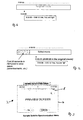
- the GUI comprises a window 4 having a preview screen 6 arranged therein.
- a time-adjustment slide 8 is provided for representing the relative time movement of the subtitles with respect to the corresponding video images.
- the player i.e. the DVD/VCD player
- the player includes a "subtitle synchronisation" function.
- the subtitle synchronisation function is selected.
- the user is then able to time shift the display time of the subtitles without processing the subtitle file or without creating a new file from an external subtitle file. For example, if the subtitle lags the video by 1.5 seconds, the user will navigate to the subtitle synchronisation menu and shift the display time of the subtitle to a new time of 1.5 seconds before the original display time.
- a GUI is shown for implementing the desired functionality. It is also possible that the subtitle synchronisation can be achieved by the provision of one or more dedicated buttons on a remote control unit associated with the player. In other words, the on-screen GUI is preferable only.
- Some remote control units are provided with in-built displays e.g. LCD displays. In one embodiment, the GUI is arranged to appear on the remote control display.
- a preview screen is shown. This provides a preview display within the video display.
- the preview shows the effect of the subtitle time shifting operation so that the user does not have to return to a normal playback mode to check if the shifting process has been successful and then return again to the subtitle synchronisation menu to make any further necessary adjustments.
- Figure 4 shows a schematic representation of a recording medium, such as a DVD having a video file and subtitle file stored thereon.
- the video file has been generated at, say, 25 FPS
- the subtitle file has been generated for use with a video file recorded at, say, 27 FPS.
- the frame rates of the video file and the subtitle file are different.
- the video file and subtitle file will be played back as shown in Figure 5. It can be seen that although the video file and the subtitle file have been recorded at different frame rates, the method and apparatus of embodiments of the present invention ensure that when played back, there is desired synchronisation between the subtitles and the video.
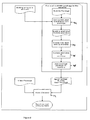
- a flow chart is shown that demonstrates an example of the method of the present invention.
- a subtitle is read from a recording medium.
- the subtitle as stored on the recording medium indicates that the display time should start at 13 seconds and finish at 16 seconds. Presuming a delay of 3 seconds has been indicated by the user, the method proceeds in step 12 by removing the time data and any other subtitle format data.
- the synchronisation error is added and a new display time is calculated for the particular subtitle.
- Step 16 shows the modified metadata associated with the particular subtitle, in this case showing that the subtitle timing will be shifted by 3 seconds so that it will initially be displayed at the 16th second and will remain on screen until the 19th second.
- auxiliary data associated with the subtitle can be achieved between subtitle file and the video file (and therefore between the subtitles and corresponding images of the video), without requiring any editing of the stored subtitle file and without requiring re-recording of the medium.
- the synchronisation error i.e. the time difference between the subtitles displayed and the corresponding images in the video
- the synchronisation error increases with time. Accordingly, even though at some point relatively near the start of the video, a user may act as described above to synchronise the subtitles and the video, as the video is played back, synchronisation error will appear and be detected again later at some point in the video and develop further as the video progresses.
- Table 1 shows an example of the increase in synchronisation error in terms of video frames that would be expected due to different frame rates of a subtitle file and a video file.
- the table shows how the delay increases from the 5th second to the 200th second of a video.
- Table 1 shows how the delay increases from the 5th second to the 200th second of a video.
- This example of the method can also be used where more than two user inputs are provided.
- the method can function based on only two user inputs at corresponding first and second times, it is possible that the determination of the time-shift required for the sub-titles is not made until more than two user inputs have been received, e.g. 3, 4 or more user inputs.
- a value for k at each of the corresponding times may be determined and then compared to enable time-shifting of all subtitles for the video, thus ensuring synchronisation of the subtitles with the images throughout the video.
- Embodiments of the invention provide a number of significant advantages over the known methods of addressing the synchronisation error problem between subtitle files and video files or subtitles and videos.
- synchronisation as described herein is practical and easy. It can typically be achieved in between 10 to 25 seconds without requiring modification of the original subtitle files.
- synchronisation can be achieved at run-time.
- a user can adjust the timing of the subtitles, whilst actually watching a video by means of pre-defined buttons or the preview screen or GUI described above.
- embodiments of the present invention enable subtitle timing to be adjusted as many times as necessary during the playback of a video. It is particularly important that adjustment of the subtitle timing can be made at run-time, because synchronisation error can increase as a video progresses.
- a user may not recognise the synchronisation error at the beginning of a video, but may want to synchronise the subtitle with the video later during viewing.
- a new subtitle file would be required meaning that the video cannot be watched for a period of time whilst the operation is performed.
- the apparatus can be implemented by a processor and beneficially can have low memory requirements as the subtitles may be processed in sequence. Thus it is not necessary to store all the modified subtitle metadata at any one time. Indeed, it is only necessary to store the next subtitle for processing.
- FIG. 7 shows a schematic diagram of the subtitle synchronising apparatus according to an example of an embodiment of the present invention.
- a video data file 18 and a subtitle file 20 are provided in communication with a video decoder unit 22.
- the video data file 18 and the subtitle file 20 will typically be read by a reader from a recording medium, such as a DVD, on which they are stored.
- the video data file 18 is provided directly to the video decoder unit 22, whereas the subtitle file is provided to a processing unit 24.
- a user input 26 is received by the processing unit 24 indicative of a user's desired delay for introduction to the subtitle.
- the user input may be derived from an on-screen menu or by the use of an associated remote control unit. A combination of these arrangements can be used for providing the input to the processing unit 24.
- the processing unit 24 decodes the stored subtitles from the subtitle file and modifies the associated meta-data to ensure a change in display time is effected corresponding to the user input.
- the time-shifted subtitles are then provided to the video decoder unit 22.
- the video decoder unit 22 then provides an output signal including the video images and the subtitles for display.
- step 28 a user input is provided and the required time-shift for the subtitles relative to the video is determined.
- a subtitle when a subtitle is time-shifted, it is moved with respect to the frame order of the video file.
- the number of frames of video file by which it is necessary to move the subtitle in question is determined.
- the actual time shift and frame number shift is determined. This takes into account metadata stored in the video frames. In other words, even though the video may be captured at 25 frames per second, where the metadata is stripped from any particular consecutive set of 25 frames, the remaining display time may well be less than one second. Thus, at step 32, this is taken into account.
- the step 32 is optional, although it is preferably included as it enables an almost 100% synchronisation between the sub-titles and the images by taking into account the video file metadata.
- step 34 a loop shown as step 34 may optionally be included. A determination is made as to whether or not the required time-shift is less than the total video time. If it is not, then clearly an error has occurred and the time-shift amount must be reduced. If the condition is satisfied, at step 36, the adjusted subtitle display times are calculated as described above with reference to Figure 6.
- step 38 the time-shifted subtitle files are provided to the video decoder 22 together with the video files 18.
- the video decoder unit combines the subtitle files and the video files to produce an output signal 40 for providing to a suitable display device.
- Figure 9 shows in more detail the step 36 from Figure 8.
- the original start and end time of the subtitle is determined.
- a new start and end time is determined.
- this new start and end time is written to the subtitle in question.
- the modified subtitle file may be provided to a system memory and from there to the video decoder unit 22.
- the apparatus may be implemented in an integrated circuit for incorporation into a display device such as a television receiver or indeed any consumer device that is capable of video disk playback such as DVD or VCD and/or memory cards such as LMC, MS, SD, XD, etc.
- the invention may also be implemented in any consumer electronic device that supports MPEG4 or DivX playback with external subtitles.
- any such consumer electronics device capable of executing the method of the present invention are within the scope of preferred embodiments of the present invention.
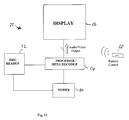
- Figure 10 shows an example of such a consumer electronic device. The example is shown schematically.
- the device 50 includes a disk reader 52 for reading a disk containing a video file and a subtitle file as explained above.
- the disk reader is arranged in communication with a processor 54 which itself is connected to a display 56.
- the processor includes an MPEG decoder or at least MPEG decoding functionality.
- a remote control unit 58 is provided for enabling a user to provide the required inputs to the processor 54 to effect the desired time-shifting of the subtitles relative to the images of a video.
- a power source 60 is provided for providing power to each of the disk reader 52 and the processor 54.
- the device shown in Figure 10 is shown schematically and may be any suitable consumer electronic device that is capable of disk playback and supports MPEG4, DivX playback with external subtitles. It will be appreciated that a number of components have not been shown in Figure 10. It is only intended that Figure 10 shows the relevant components for implementing one particular embodiment of the present invention.
Landscapes
- Engineering & Computer Science (AREA)
- Multimedia (AREA)
- Signal Processing (AREA)
- Human Computer Interaction (AREA)
- General Engineering & Computer Science (AREA)
- Software Systems (AREA)
- Television Signal Processing For Recording (AREA)
- Signal Processing For Digital Recording And Reproducing (AREA)
- Studio Circuits (AREA)
Abstract
Description
- The present invention relates to a method and apparatus for synchronising a video and subtitles. The invention also relates to a consumer electronic device capable of playback of a video. Examples of such consumer electronic devices include but are not limited to DVD and VCD display devices and players. In embodiments, the invention also relates to consumer electronic devices that support MPEG4, DivX and other video files that can be played with external subtitle files.
- The method and apparatus of embodiments of the invention can be used in DVD, DivX, MPEG4 players, portable media players, digital media players and any device that supports DivX/MPEG4 playback.
- In the present specification, the term "video file" is the data file comprising the video data for playing back a video on a video display device. A "subtitle file" is the data file containing the data that is to be decoded and played back on a video display device as the subtitle images overlaying the video images on the display. A "video display device" is any device capable of playback of a video. It includes all the examples given above.
- In the present specification, where the term "a video" is used, this refers to any playback or recording of moving images (or still images). No qualitative standard is implied.
- Videos that use the DivX format, which is based on MPEG-4 compression standard are widely used. New users of DivX are entering the market at a high rate particularly since the release of consumer electronics devices capable of DivX playback. Such consumer electronic devices include DivX players, DVD players with DivX support etc.
- In MPEG4 based videos, video files and subtitle files can be created independently. Thus, it is possible for a DivX user to download a video file from an external source such as the internet, and create their own subtitle file, for example including subtitles in a particular desired language. It is therefore possible that any particular subtitle file will not necessarily comply with other video files that have been downloaded by the user. For example, the frame rate of the video file may not correspond to the frame rate for which the subtitle file was initially created. When playing a video using a video file and a subtitle file obtained, for example, from different external sources, problems with synchronisation between the images displayed as part of the video itself and the subtitles can occur, as will be explained below.
- Videos or movies are essentially a series of pictures, each displayed for only a fraction of a second, fast enough so that the human eye is not able to see each individual image but rather perceives a moving image. This same technique is also used in 3-D animations/games, which are rendered on a frame-by-frame basis.
- "Frame rate" is the number of frames in a given period of time, e.g. one second. Frame rate is sometimes referred to in terms of its commonly used unit, "frames per second" (FPS). Different video standards use different frame rates. For example, NTSC film has a frame rate of 23.976 FPS. NTSC has a frame rate of 29.97 FPS, PAL film has a frame rate of 25 FPS.
- MPEG4 video data is comprised of standard data packages. The subtitle files typically used with MPEG4 video files comprise subtitle data relating to the subtitles to be displayed, and auxiliary data including timing data used to ensure that the subtitles are displayed at the right time. During playback, whilst the MPEG4 video data is decoded from the video file and displayed, the subtitles are also processed and displayed.
- As explained above, MPEG4 and DivX video data can be played with an auxiliary external subtitle file that has been loaded from an external source, such as an external file. There are several subtitle formats supported for use with MPEG4 and DivX. Users can download a DivX movie or video from the internet and search for a subtitle file having subtitles that accompany the video in a desired language. Once found, the video file and external subtitle file are burnt onto a single disk or recorded onto other such recording medium for playback in a DivX-capable consumer electronic device. They may be burnt or recorded onto separate disks or recording media but for convenience usually a common disk or medium is used.
- At this point, the relative timing between the video (image) data and the subtitle data is fixed. If there is any problem with the relative timing, e.g. if there is a synchronisation error, the only way that this problem can be overcome is by editing the subtitle file in a suitable device, e.g. a computer, with some specific software, and then burning the video file and subtitle file again to a new disk. Clearly, this is difficult particularly as it requires a significant degree of technical ability and understanding. In addition, it is time consuming and expensive as whenever synchronisation error problems are encountered, a new disk must be burnt.
- Some attempts to address this problem have been made in the art. Subtitle converter programs exist which can be used to modify the frame rate of the subtitle file. To do this, first the frame rate of the video file must be known. Secondly, the frame rate for which the subtitle file was originally prepared must be known. Then, the subtitle file may be processed in such as way so that it matches the frame rate of the video file. This method is complex and time consuming, which is clearly undesirable. Windows®-based programs for editing sub-title files to address synchronisation error already exist. Examples include sub-title Workshop, Time Adjuster and VobSub.
- As mentioned above, a number of different subtitle formats exist. These include, but are not limited to, Micro DVD, SubViewer 1.0, Substation Alpha, SAMICaptioning and PowerDivx.
- Using any of the commonly available subtitle formats, converter programs are not a simple and convenient way to address the synchronisation error problem. This is because users will not necessarily have immediate access to a computer or the tools necessary for the conversion process every time the problem is encountered. Typically, the problem will only be discovered when a user has started watching a video or movie on a display device. The known methods for correcting synchronisation error are time consuming and quite impractical as typically creating a new subtitle file takes at least five minutes.
- According to a first aspect of the present invention, there is provided a method of synchronising a subtitle with a video, the method comprising, upon receipt of a user input indicative of a synchronisation error between the video and the subtitles displayed on a display, automatically modifying the relative timing of the subtitle and video displays in accordance with the user input during playback of the video on a video display.
- The invention provides an apparatus and a method by which synchronisation between subtitles and video can be achieved during playback of the video. Thus, the problem of having to burn a new media to synchronise the video and subtitles whenever a synchronisation error problem is encountered, is not needed. The invention provides a simple and robust method by which subtitles may be synchronised on-the-fly with a movie.
- If the relative synchronisation between subtitles and a video to which they relate varies during the video then it can become necessary to perform a synchronisation process more than once during playback of the video.
- In accordance with one aspect of the present invention, there is provided apparatus for synchronising one or more subtitles with a video during display of the video on a display, the apparatus comprising a modifier for modifying the relative synchronisation of the subtitle and the video in real time in response to receipt of a user input indicative of a synchronisation error between the video and the or each of the subtitles displayed on the display. Preferably a receiver is provided for receiving the or each user input.
- In contrast to known techniques for addressing the problem of synchronisation errors between movies and subtitles, in embodiments, the present invention enables a user, whilst watching a video with subtitles, to modify the relative timing of the subtitles so that the video and the subtitles are synchronised. In many situations, a single adjustment to the timing of the subtitles is all that is required to ensure synchronisation of the subtitles with the video throughout the video or whatever is being watched.
- The receiver and the modifier may be any suitable components or collection of components for performing the desired function. In one particular example the modifier may be an ASIC or a processor capable of performing the necessary modification. The processor may be a dedicated processor or it may be a processor having other functionality too arranged to perform the timing adjustment required to the subtitles and/or video.
- It is common that a user does not recognise that there is a problem with the synchronisation of subtitles with a video at the beginning of the video, but only realises at some later time whilst watching the video that there is a synchronisation error. Using known techniques, it would at that stage be necessary to adjust the relative timing of the subtitle and the video by one of the known methods described above. Clearly, this is not desirable. In contrast, using methods and apparatus of embodiments of the present invention, the relative timing of the subtitles can be adjusted throughout the playback of the video. It makes no difference at what stage during the playback the synchronisation error is recognised and addressed. Thus, the invention provides a convenient, user-friendly method by which subtitles can be synchronised with a video during playback of the video.
- According to a second aspect of the present invention, there is provided a graphical user interface for display on a display screen during display of a video on the display screen, the graphical user interface including relative timing adjustment means, responsive to a user input to represent a desired relative timing-shift between subtitles displayed on the display and the video.
- According to a further aspect of the present invention, there is provided apparatus for synchronising subtitles with a video, the apparatus comprising;
- means for receiving a user input indicative of the relative synchronisation between a video and the subtitles;
- means for modifying the relative synchronisation of the subtitle and the video during playback of the video on a video display.
- Examples of embodiments of the present invention will now be described in detail with reference to the accompanying drawings, in which:
- Figure 1 is an example showing schematically relative timing of the displays of a video and a subtitle;
- Figure 2 is another example showing schematically a synchronisation error problem between a video and a subtitle;
- Figure 3 is a schematic representation of a graphical user interface for use with an example of a method of an embodiment of the present invention;
- Figure 4 is a schematic representation of a video file and a subtitle file stored on a recording medium;
- Figure 5 is a schematic block diagram showing how the video and subtitle files of Figure 4 will be played back using a method of an embodiment of the present invention;
- Figure 6 is a flow diagram showing processing steps used in one example of the present invention;
- Figure 7 is a schematic representation of a flow chart showing the steps of an example of a method of an embodiment of the present invention;
- Figure 8 is a flow chart showing steps from one example of an embodiment of the method of the present invention;
- Figure 9 is a schematic flow chart showing steps from a method according to an example of an embodiment of the present invention; and,
- Figure 10 is a schematic representation of a display device incorporating the present invention.
- Each of the subtitle formats identified above, uses a particular parameter or set of parameters for encoding and determining the timing of the display of subtitles. Some use time information (seconds), some use frames and others use both seconds and frames. If the subtitle file uses only time information as auxiliary data, then it is possible that there will be no synchronisation error problem, whatever the frame rates of the subtitle file and video file recording on a recording medium. This is because the timing of the display of the images of the videos and the display of the subtitles is determined only by the actual seconds that have elapsed. Accordingly, whatever the frame rate for which the files were encoded, if a subtitle is encoded to be displayed at a particular time then this is the time it will be displayed irrespective of the frame rate of the subtitle file.
- However, there are a number of situations, even when the frame rate of the video and subtitle files are the same that synchronisation error problems may occur. Referring to Figure 1, it is possible that a user who encodes a film may shorten the video data so that less memory is required to store the file. This is particularly possible when the video is encoded in MPEG4 or DivX format. If the video file is shortened, and is then used with a subtitle file (encoded for use with the same frame rate) that has not been correspondingly shortened, there will be a synchronisation error problem in that, when displayed, the subtitles will be displayed out of synchronisation with the corresponding images from the video.
- Referring to Figures 1 and 2, a video may have a number of seconds of advertisement video before the substantive content, e.g. a feature film actually begins. If a user when encoding the video, cuts 20 seconds from the beginning, i.e. to remove some/all of the advertisement and to save memory, then the 21st second of the original video will be the first second of the displayed video. If the subtitle is created based on the original video, including all of advertisement, then there will be a 20 second delay between the subtitle and the film. In other words, images of the film will appear 20 seconds before the corresponding subtitle on the display. An example is shown in Figures 1 and 2. The subtitle "yes, you are right" in this example, should be displayed at the 5th second of the original substantive content but the corresponding subtitle is in fact shown at the 25th second of the substantive content given that the subtitle itself has the original advertisement timing calculated into the original timings. This is shown clearly in Figure 2.
- A particular problem arises when the respective frame rate of the video file and an external subtitle file are not the same. There are a number of different frame rates at which videos can be encoded, as explained above. Thus, the number of frames in one second can differ from video to video. When a frame based subtitle is used, a synchronisation error problem will arise during playback when there is a difference between frame rates of the subtitle file and the video file.
- For example, if a video is encoded as a 30 frame per second video file, each frame is displayed for 1/30 second, i.e. approximately 0.033 seconds. The start of the 15th second of the video will correspond to the 450th frame (30 x 15). If, however, the same video is encoded at 25 frames per second, the start of the 15th second of the video will correspond to the 375th frame (25 x 15). If the subtitle is created for 30 frames per second video, then the subtitle will be displayed at the correct time, i.e. in synchronisation with the corresponding images from the video if the 30 FPS video file is used. However, when the same subtitle file is used for a video file encoded at 25 FPS, the subtitle will be shown at the 18th second (450/25). Thus, there is a synchronisation error of 3 seconds. The subtitle will be displayed 3 seconds after the corresponding images from the video. In addition, the delay between the subtitles and the corresponding images will increase as the video is played back. The timings are somewhat approximate given that metadata associated with images in the video file may affect the precise timings, as explained in greater detail below with reference to Figure 8.
- As an example, consider the case when a user wants to show a 25 FPS movie with a subtitle file created for a 23 FPS movie. The start of the 5th second of the movie (23 FPS movie) will correspond to the 115th frame (5 x 23). However, the 115th frame of the second movie (25 FPS movie) corresponds to the 4.6th second (115/25) of the second movie. The time difference between the video and the subtitle will be 5 - 4.6 = 0.4 second, and this delay between the images of the video and the display of the corresponding subtitles will therefore be experienced by users.
- The 50th second of the first movie (23 FPS movie) will be at the 1150th (50 x 23) frame whereas the 1150th frame will be shown in the second movie (25 PFS movie) at the 1150/25 = 46th second. The time difference between the video and the subtitle will thus be 50 - 46 = 4 seconds.
- The 100th second of the first movie (23 FPS movie) will be at 100 x 23 = 2300th frame whereas the 115th frame will be shown in the second movie (25 FPS movie) at the 2300/25 = 92th second. The time difference between the video and the subtitle will be 100 - 92 = 8 second. Thus, it can be seen that the time difference or synchronisation error between the video images and the corresponding subtitles increases as the video progresses.
- To address the general problem of the synchronisation error between subtitles and images of a video, it is preferred that a graphical user interface (GUI) 2 is provided, as shown in Figure 3. The GUI comprises a
window 4 having a preview screen 6 arranged therein. In addition, a time-adjustment slide 8 is provided for representing the relative time movement of the subtitles with respect to the corresponding video images. - In use, the player i.e. the DVD/VCD player, includes a "subtitle synchronisation" function. When a user encounters or recognises a synchronisation error problem between the video and the subtitles, on a remote control, or directly on the player, the subtitle synchronisation function is selected. Thus, the user is then able to time shift the display time of the subtitles without processing the subtitle file or without creating a new file from an external subtitle file. For example, if the subtitle lags the video by 1.5 seconds, the user will navigate to the subtitle synchronisation menu and shift the display time of the subtitle to a new time of 1.5 seconds before the original display time.
- As mentioned above, in Figure 3, a GUI is shown for implementing the desired functionality. It is also possible that the subtitle synchronisation can be achieved by the provision of one or more dedicated buttons on a remote control unit associated with the player. In other words, the on-screen GUI is preferable only. Some remote control units are provided with in-built displays e.g. LCD displays. In one embodiment, the GUI is arranged to appear on the remote control display.
- In the example shown in Figure 3, a preview screen is shown. This provides a preview display within the video display. The preview shows the effect of the subtitle time shifting operation so that the user does not have to return to a normal playback mode to check if the shifting process has been successful and then return again to the subtitle synchronisation menu to make any further necessary adjustments.
- It is of particular importance that no editing of the external subtitle file is necessary. The method by which the synchronisation is achieved will be described in greater detail below. The subtitle format and content remain the same. The process is executed in run time which means that the stored subtitle file remains unaltered and the synchronisation process can be executed as many times as necessary during playback of any particular video.
- Figure 4 shows a schematic representation of a recording medium, such as a DVD having a video file and subtitle file stored thereon. In the example shown, the video file has been generated at, say, 25 FPS, whereas the subtitle file has been generated for use with a video file recorded at, say, 27 FPS. In other words, the frame rates of the video file and the subtitle file are different. Thus, as explained above, this will lead to synchronisation error problems.
- Using the method and apparatus of embodiments of the present invention, the video file and subtitle file will be played back as shown in Figure 5. It can be seen that although the video file and the subtitle file have been recorded at different frame rates, the method and apparatus of embodiments of the present invention ensure that when played back, there is desired synchronisation between the subtitles and the video.
- Referring now to Figure 6, a flow chart is shown that demonstrates an example of the method of the present invention. At
step 10, a subtitle is read from a recording medium. In this case, the subtitle as stored on the recording medium indicates that the display time should start at 13 seconds and finish at 16 seconds. Presuming a delay of 3 seconds has been indicated by the user, the method proceeds instep 12 by removing the time data and any other subtitle format data. Atstep 14, the synchronisation error is added and a new display time is calculated for the particular subtitle.Step 16 shows the modified metadata associated with the particular subtitle, in this case showing that the subtitle timing will be shifted by 3 seconds so that it will initially be displayed at the 16th second and will remain on screen until the 19th second. Thus, by a simple modification to the auxiliary data associated with the subtitle, synchronisation can be achieved between subtitle file and the video file (and therefore between the subtitles and corresponding images of the video), without requiring any editing of the stored subtitle file and without requiring re-recording of the medium. - In some situations, the synchronisation error, i.e. the time difference between the subtitles displayed and the corresponding images in the video, increases with time. Accordingly, even though at some point relatively near the start of the video, a user may act as described above to synchronise the subtitles and the video, as the video is played back, synchronisation error will appear and be detected again later at some point in the video and develop further as the video progresses.
- Table 1 below, shows an example of the increase in synchronisation error in terms of video frames that would be expected due to different frame rates of a subtitle file and a video file. The table shows how the delay increases from the 5th second to the 200th second of a video. As can be seen, where a 23 FPS subtitle file is used with a 25 FPS video file, after 5 seconds, there is a 10 frame discrepancy, whereas after 200 seconds there is a 400 frame discrepancy. Thus, if after 50 seconds, the user modified the synchronisation so as to account for the 100 frame discrepancy, after a further 150 seconds, there would be a new 300 frame discrepancy.
5th Second 50th Second 100th Second 200th Second 23 FPS (Subtitle 115th frame 1150th frame 2300th frame 4600th frame 25 FPS (Movie) 125th frame 1250th frame 2500th frame 5000th frame Difference (Δ) 10 frames 100 frames 200 frames 400 frame - To address this particular problem, in a particularly preferred embodiment, the method relies on the calculation of two ratios K1 and K2, for the first and second manual adjustments of the user, where:

- The ratio K is calculated twice, once when a user first provides an input to synchronise the subtitles with the video, and again when the user repeats the process. This provides two values K1 and K2. After calculating the ratio for the second time, the two ratios, K1 and K2 are compared. If it is determined that

the time delay required for every subtitle is calculated based on the ratio K1 thereby enabling each subtitle to be shifted by a different amount ensuring that at all times after the second determination, i.e. the determination of K2, the subtitles and the video will be synchronised. Thus, by receiving two user inputs, synchronisation between the entire video file and subtitle file is enabled. Again, this is achieved without requiring any modification or editing of the subtitle file as stored on the recording medium. - This example of the method can also be used where more than two user inputs are provided. Although the method can function based on only two user inputs at corresponding first and second times, it is possible that the determination of the time-shift required for the sub-titles is not made until more than two user inputs have been received, e.g. 3, 4 or more user inputs. In this case a value for k at each of the corresponding times may be determined and then compared to enable time-shifting of all subtitles for the video, thus ensuring synchronisation of the subtitles with the images throughout the video.
- Embodiments of the invention provide a number of significant advantages over the known methods of addressing the synchronisation error problem between subtitle files and video files or subtitles and videos. In particular, synchronisation as described herein is practical and easy. It can typically be achieved in between 10 to 25 seconds without requiring modification of the original subtitle files. Furthermore, synchronisation can be achieved at run-time. A user can adjust the timing of the subtitles, whilst actually watching a video by means of pre-defined buttons or the preview screen or GUI described above. Thus, in contrast to known methods for addressing the synchronisation error problem, embodiments of the present invention enable subtitle timing to be adjusted as many times as necessary during the playback of a video. It is particularly important that adjustment of the subtitle timing can be made at run-time, because synchronisation error can increase as a video progresses.
- In known systems, a user may not recognise the synchronisation error at the beginning of a video, but may want to synchronise the subtitle with the video later during viewing. To do this using conventional techniques, a new subtitle file would be required meaning that the video cannot be watched for a period of time whilst the operation is performed.
- The apparatus can be implemented by a processor and beneficially can have low memory requirements as the subtitles may be processed in sequence. Thus it is not necessary to store all the modified subtitle metadata at any one time. Indeed, it is only necessary to store the next subtitle for processing.
- Figure 7 shows a schematic diagram of the subtitle synchronising apparatus according to an example of an embodiment of the present invention. Initially, a
video data file 18 and asubtitle file 20 are provided in communication with avideo decoder unit 22. Thevideo data file 18 and thesubtitle file 20 will typically be read by a reader from a recording medium, such as a DVD, on which they are stored. - The video data file 18 is provided directly to the
video decoder unit 22, whereas the subtitle file is provided to a processing unit 24. Auser input 26 is received by the processing unit 24 indicative of a user's desired delay for introduction to the subtitle. As explained above, the user input may be derived from an on-screen menu or by the use of an associated remote control unit. A combination of these arrangements can be used for providing the input to the processing unit 24. In response to the user input, the processing unit 24 decodes the stored subtitles from the subtitle file and modifies the associated meta-data to ensure a change in display time is effected corresponding to the user input. The time-shifted subtitles are then provided to thevideo decoder unit 22. Thevideo decoder unit 22 then provides an output signal including the video images and the subtitles for display. - Referring now to Figure 8, the method of processing the subtitles on-the-fly is shown in more detail. Initially, at step 28 a user input is provided and the required time-shift for the subtitles relative to the video is determined.
- It will be appreciated that in effect, when a subtitle is time-shifted, it is moved with respect to the frame order of the video file. At
step 30, the number of frames of video file by which it is necessary to move the subtitle in question, is determined. Atstep 32, the actual time shift and frame number shift is determined. This takes into account metadata stored in the video frames. In other words, even though the video may be captured at 25 frames per second, where the metadata is stripped from any particular consecutive set of 25 frames, the remaining display time may well be less than one second. Thus, atstep 32, this is taken into account. Thestep 32 is optional, although it is preferably included as it enables an almost 100% synchronisation between the sub-titles and the images by taking into account the video file metadata. - Next, a loop shown as
step 34 may optionally be included. A determination is made as to whether or not the required time-shift is less than the total video time. If it is not, then clearly an error has occurred and the time-shift amount must be reduced. If the condition is satisfied, atstep 36, the adjusted subtitle display times are calculated as described above with reference to Figure 6. - Next, at step 38 the time-shifted subtitle files are provided to the
video decoder 22 together with the video files 18. The video decoder unit combines the subtitle files and the video files to produce anoutput signal 40 for providing to a suitable display device. - Figure 9 shows in more detail the
step 36 from Figure 8. As can be seen, initially, once a time-shift amount in seconds has been received from the processor, at step 42, the original start and end time of the subtitle is determined. Next, at step 44, a new start and end time is determined. At step 46, this new start and end time is written to the subtitle in question. At step 48, the modified subtitle file may be provided to a system memory and from there to thevideo decoder unit 22. - Thus, a simple and robust method is provided by which in real-time subtitle files can be modified in such a way as to ensure synchronicity with video files ensuring that the displayed subtitles are synchronised with the corresponding images from the video. As the process is performed effectively on-the-fly the memory requirements of this system are relatively low as at any time, only a relatively small number of subtitles will be being edited.
- It is expected that the apparatus may be implemented in an integrated circuit for incorporation into a display device such as a television receiver or indeed any consumer device that is capable of video disk playback such as DVD or VCD and/or memory cards such as LMC, MS, SD, XD, etc. The invention may also be implemented in any consumer electronic device that supports MPEG4 or DivX playback with external subtitles. Thus, any such consumer electronics device capable of executing the method of the present invention are within the scope of preferred embodiments of the present invention.
- Figure 10 shows an example of such a consumer electronic device. The example is shown schematically.
- The device 50 includes a
disk reader 52 for reading a disk containing a video file and a subtitle file as explained above. The disk reader is arranged in communication with a processor 54 which itself is connected to adisplay 56. In the example shown, the processor includes an MPEG decoder or at least MPEG decoding functionality. In the example shown in Figure 10, a remote control unit 58 is provided for enabling a user to provide the required inputs to the processor 54 to effect the desired time-shifting of the subtitles relative to the images of a video. Apower source 60 is provided for providing power to each of thedisk reader 52 and the processor 54. - The device shown in Figure 10 is shown schematically and may be any suitable consumer electronic device that is capable of disk playback and supports MPEG4, DivX playback with external subtitles. It will be appreciated that a number of components have not been shown in Figure 10. It is only intended that Figure 10 shows the relevant components for implementing one particular embodiment of the present invention.
- Embodiments of the present invention have been described with particular reference to the examples illustrated. However, it will be appreciated that variations and modifications may be made to the examples described within the scope of the present invention.
Claims (14)
- A method of synchronising subtitles with a video displayed on a display, the method comprising:upon receipt of a user input indicative of a synchronisation error between the video and the subtitles displayed on the display, modifying the relative timing of the subtitle and video in accordance with the user input during playback of the video on a video display.
- A method according to claim 1, comprising on receipt of a user input, displaying a graphical user interface on the display to enable a user to intuitively vary the relative timing of the subtitles and the video.
- A method according to claim 2, comprising receiving at least first and second user inputs at corresponding at least first and second times;
when each of the at least first and second user inputs are received, determining the relative synchronisation between the subtitle and the video at the at least first and second times; and
in dependence on the relative synchronisations at the at least first and second times, determining a required modification to the timing of each subtitle in the subtitle file. - A method according to any of claims 1 to 3, comprising when a user input is received, forming a preview display within the video display and within the preview display, displaying the video and subtitles in real time with a relative synchronisation as determined by the user in real time.
- A method according to any of claims 1 to 4, comprising determining an initial timing of subtitles within a subtitle file, and modifying the initial timing in accordance with the user input.
- Apparatus for synchronising subtitles with a video, the apparatus comprising:a receiver for receiving a user input indicative of the relative synchronisation between a video and the subtitles; and,a modifier for modifying the relative synchronisation of the subtitle and the video during playback of the video on a video display.
- Apparatus according to claim 6, the apparatus including a determiner for determining an initial timing of subtitles within a subtitle file and a modifier for modifying the initial timing in accordance with a received user input.
- Apparatus according to claim 7, comprising a receiver for receiving at least first and second user inputs at corresponding at least first and second times;
a determiner for determining the relative synchronisation between the subtitle and the video at each of the at least first and second times; and
a determiner for determining a required timing of each subtitle in the subtitle file in dependence on the relative synchronisations between the subtitles and the video at the at least first and second times. - Apparatus according to any of claims 6 to 8, comprising a generator for generating a preview display within an associated video display for displaying in real time the video and the subtitle wherein the subtitle is time-shifted in dependence on the received user input or inputs.
- Apparatus according to any of claims 6 to 9, comprising a reader for reading from a recording medium a video file and a subtitle file.
- A video player, the player comprising:apparatus according to any of claims 6 to 10; and,an output signal generator for providing an output signal to a display device to enable display on a said display device of a video with synchronised subtitles.
- A video player according to claim 11, wherein the video player is one or more of a DVD player, a DivX player, an MPEG4 player, a portable media player, a digital media players or any device that supports DivX and/or MPEG4 playback.
- A graphical user interface for display on a display screen during playback of a video on the display screen, the graphical user interface including relative timing adjustment means, responsive to a user input to represent a desired relative timing-shift between subtitles displayed on the display and the video.
- Apparatus for synchronising subtitles with a video during display of the video on a display, the apparatus comprising a modifier for modifying the relative synchronisation of the subtitle and the video in real time in response to receipt of a user input indicative of a synchronisation error between the video and the subtitles displayed on the display.
Applications Claiming Priority (1)
| Application Number | Priority Date | Filing Date | Title |
|---|---|---|---|
| US11/311,981 US8761568B2 (en) | 2005-12-20 | 2005-12-20 | Method and apparatus for synchronizing subtitles with a video |
Publications (3)
| Publication Number | Publication Date |
|---|---|
| EP1804495A1 true EP1804495A1 (en) | 2007-07-04 |
| EP1804495B1 EP1804495B1 (en) | 2008-06-18 |
| EP1804495B2 EP1804495B2 (en) | 2012-04-11 |
Family
ID=36190502
Family Applications (1)
| Application Number | Title | Priority Date | Filing Date |
|---|---|---|---|
| EP06251105A Expired - Lifetime EP1804495B2 (en) | 2005-12-20 | 2006-03-01 | A method and apparatus for synchronising subtitles with video images |
Country Status (4)
| Country | Link |
|---|---|
| US (1) | US8761568B2 (en) |
| EP (1) | EP1804495B2 (en) |
| AT (1) | ATE398889T1 (en) |
| DE (1) | DE602006001508D1 (en) |
Cited By (3)
| Publication number | Priority date | Publication date | Assignee | Title |
|---|---|---|---|---|
| EP2323380A1 (en) * | 2009-10-20 | 2011-05-18 | Samsung Electronics Co., Ltd. | Display device and control method thereof |
| RU2462771C2 (en) * | 2008-02-05 | 2012-09-27 | Самсунг Электроникс Ко., Лтд. | Device and method to generate and display media files |
| EP3002952A1 (en) * | 2014-10-02 | 2016-04-06 | Samsung Electronics Co., Ltd. | Video playing device and method of controlling a video playing device |
Families Citing this family (18)
| Publication number | Priority date | Publication date | Assignee | Title |
|---|---|---|---|---|
| JP5022025B2 (en) * | 2006-12-27 | 2012-09-12 | インターナショナル・ビジネス・マシーンズ・コーポレーション | A method and apparatus for synchronizing content data streams and metadata. |
| TW200904185A (en) * | 2007-07-05 | 2009-01-16 | Intervideo Digital Thchnology Corp | Video editing method |
| US8190986B2 (en) * | 2008-05-19 | 2012-05-29 | Microsoft Corporation | Non-destructive media presentation derivatives |
| WO2009157893A1 (en) * | 2008-06-24 | 2009-12-30 | Thomson Licensing | Method and system for redisplaying text |
| CN101458953A (en) * | 2008-12-25 | 2009-06-17 | 康佳集团股份有限公司 | Lyrics synchronously displaying method when playing multimedia songs |
| US20110227911A1 (en) * | 2010-03-22 | 2011-09-22 | Lg Electronics Inc. | Image display device and method for operating the same |
| US9609395B2 (en) | 2012-03-26 | 2017-03-28 | Max Abecassis | Second screen subtitles function |
| US9021536B2 (en) * | 2012-09-06 | 2015-04-28 | Stream Translations, Ltd. | Process for subtitling streaming video content |
| US9471334B2 (en) * | 2013-03-08 | 2016-10-18 | Intel Corporation | Content presentation with enhanced closed caption and/or skip back |
| US20150358507A1 (en) * | 2014-06-04 | 2015-12-10 | Sony Corporation | Timing recovery for embedded metadata |
| CN104093037B (en) * | 2014-06-10 | 2016-05-04 | 腾讯科技(深圳)有限公司 | Captions bearing calibration and device |
| DE102015001622A1 (en) * | 2015-02-09 | 2016-08-11 | Unify Gmbh & Co. Kg | Method for transmitting data in a multimedia system, and software product and device for controlling the transmission of data in a multimedia system |
| US9609397B1 (en) | 2015-12-28 | 2017-03-28 | International Business Machines Corporation | Automatic synchronization of subtitles based on audio fingerprinting |
| EP3614681B1 (en) * | 2017-04-21 | 2025-02-19 | Panasonic Intellectual Property Management Co., Ltd. | Reproduction device, reproduction method, display device, and display method |
| US11070891B1 (en) * | 2019-12-10 | 2021-07-20 | Amazon Technologies, Inc. | Optimization of subtitles for video content |
| JP7516757B2 (en) | 2019-12-25 | 2024-07-17 | 富士フイルムビジネスイノベーション株式会社 | Information processing device and program |
| TWI739377B (en) * | 2020-04-08 | 2021-09-11 | 瑞昱半導體股份有限公司 | Subtitled image generation apparatus and method |
| WO2022121436A1 (en) * | 2020-12-11 | 2022-06-16 | 海信视像科技股份有限公司 | Subtitle adjustment method and display device |
Citations (3)
| Publication number | Priority date | Publication date | Assignee | Title |
|---|---|---|---|---|
| JP2001061123A (en) * | 1999-08-23 | 2001-03-06 | Fooin Creative Products:Kk | English translation display |
| EP1158799A1 (en) * | 2000-05-18 | 2001-11-28 | Deutsche Thomson-Brandt Gmbh | Method and receiver for providing subtitle data in several languages on demand |
| EP1536426A1 (en) * | 2003-11-28 | 2005-06-01 | Lg Electronics Inc. | Method and apparatus for repetitive playback of a video section based on subtitles |
Family Cites Families (10)
| Publication number | Priority date | Publication date | Assignee | Title |
|---|---|---|---|---|
| DE69414275T2 (en) | 1993-09-16 | 1999-05-06 | Toshiba Kawasaki Kk | Device for synchronizing compressed video and audio signals |
| KR100437873B1 (en) * | 2001-05-08 | 2004-06-26 | 연성정밀화학(주) | Process for preparing prostaglandin derivatives and stereospecific starting material thereof |
| WO2003054686A2 (en) * | 2001-12-17 | 2003-07-03 | Becomm Corporation | Method and system for synchronization of content rendering |
| JP4110807B2 (en) * | 2002-03-15 | 2008-07-02 | ヤマハ株式会社 | Program for realizing synchronization adjustment apparatus and synchronization adjustment method |
| US20040044532A1 (en) * | 2002-09-03 | 2004-03-04 | International Business Machines Corporation | System and method for remote audio caption visualizations |
| FR2850820B1 (en) | 2003-01-31 | 2005-06-03 | Thomson Licensing Sa | DEVICE AND METHOD FOR SYNCHRONIZING VIDEO AND ADDITIONAL DATA READING AND RELATED PRODUCTS |
| KR100604831B1 (en) * | 2004-02-17 | 2006-07-28 | 삼성전자주식회사 | Audio / video playback device and method for synchronizing additional video and text with audio |
| KR100716973B1 (en) * | 2004-02-21 | 2007-05-10 | 삼성전자주식회사 | Information storage medium, reproducing method and apparatus for recording text subtitle data synchronized with AF data |
| KR100678938B1 (en) * | 2004-08-28 | 2007-02-07 | 삼성전자주식회사 | Apparatus and method for controlling video and subtitle synchronization |
| US20070016611A1 (en) * | 2005-07-13 | 2007-01-18 | Ulead Systems, Inc. | Preview method for seeking media content |
-
2005
- 2005-12-20 US US11/311,981 patent/US8761568B2/en not_active Expired - Fee Related
-
2006
- 2006-03-01 AT AT06251105T patent/ATE398889T1/en not_active IP Right Cessation
- 2006-03-01 DE DE602006001508T patent/DE602006001508D1/en not_active Expired - Lifetime
- 2006-03-01 EP EP06251105A patent/EP1804495B2/en not_active Expired - Lifetime
Patent Citations (3)
| Publication number | Priority date | Publication date | Assignee | Title |
|---|---|---|---|---|
| JP2001061123A (en) * | 1999-08-23 | 2001-03-06 | Fooin Creative Products:Kk | English translation display |
| EP1158799A1 (en) * | 2000-05-18 | 2001-11-28 | Deutsche Thomson-Brandt Gmbh | Method and receiver for providing subtitle data in several languages on demand |
| EP1536426A1 (en) * | 2003-11-28 | 2005-06-01 | Lg Electronics Inc. | Method and apparatus for repetitive playback of a video section based on subtitles |
Cited By (5)
| Publication number | Priority date | Publication date | Assignee | Title |
|---|---|---|---|---|
| RU2462771C2 (en) * | 2008-02-05 | 2012-09-27 | Самсунг Электроникс Ко., Лтд. | Device and method to generate and display media files |
| EP2323380A1 (en) * | 2009-10-20 | 2011-05-18 | Samsung Electronics Co., Ltd. | Display device and control method thereof |
| EP3002952A1 (en) * | 2014-10-02 | 2016-04-06 | Samsung Electronics Co., Ltd. | Video playing device and method of controlling a video playing device |
| CN105491306A (en) * | 2014-10-02 | 2016-04-13 | 三星电子株式会社 | Video playing device,method of controlling a video playing device, and video playing system |
| US9615123B2 (en) | 2014-10-02 | 2017-04-04 | Samsung Electronics Co., Ltd. | Video playing device, method of controlling the video playing device, and video playing system |
Also Published As
| Publication number | Publication date |
|---|---|
| US8761568B2 (en) | 2014-06-24 |
| EP1804495B2 (en) | 2012-04-11 |
| ATE398889T1 (en) | 2008-07-15 |
| US20070140656A1 (en) | 2007-06-21 |
| EP1804495B1 (en) | 2008-06-18 |
| DE602006001508D1 (en) | 2008-07-31 |
Similar Documents
| Publication | Publication Date | Title |
|---|---|---|
| EP1804495B1 (en) | A method and apparatus for synchronising subtitles with video images | |
| US8364017B2 (en) | Image processing apparatus, image processing method, image playback apparatus, image playback method, and program | |
| EP2160892A1 (en) | Method and system for facilitating creation of content | |
| WO2010041576A1 (en) | Content distribution system | |
| JPH11273258A (en) | Information playback device | |
| JP2001016550A (en) | Method of controlling presentation of presentation data units, digital video system, and method of providing a sequence of digitally encoded video data units | |
| EP1728388B1 (en) | Changing a playback speed for video presentation recorded in a modified film format | |
| JP3731658B2 (en) | Optical disk playback device | |
| WO2009157152A1 (en) | Synthesis device and synthesis method | |
| JP2004213832A (en) | Optical disk reproducing device | |
| US20090092383A1 (en) | Time code processing apparatus, time code processing method, program, and video signal playback apparatus | |
| US20080151060A1 (en) | Camera apparatus and chapter data generating method in camera apparatus | |
| JP2006157697A (en) | Recording and reproducing apparatus | |
| JP3566216B2 (en) | Digital audio / video information recording device | |
| JP2001128096A (en) | Image playback device | |
| JP2006121183A (en) | Video recording/reproducing apparatus | |
| JP2011205439A (en) | Reproducing apparatus and method | |
| US20150255119A1 (en) | Display apparatus and method for editing and displaying recorded video content | |
| KR100693690B1 (en) | How to synchronize data in video playback system | |
| KR20060084062A (en) | Composite video device that can copy a part of original and part copy method of original | |
| JP2007243842A (en) | Information reproducing apparatus and information reproducing method | |
| JP4941567B2 (en) | Video reproducing apparatus and recording medium | |
| JP2004120739A (en) | Optical disk reproducing apparatus | |
| JP2007312054A (en) | Video recording apparatus and video recording method | |
| JP2004193767A (en) | Phase regulated reproduction method of digital recording tape |
Legal Events
| Date | Code | Title | Description |
|---|---|---|---|
| GRAJ | Information related to disapproval of communication of intention to grant by the applicant or resumption of examination proceedings by the epo deleted |
Free format text: ORIGINAL CODE: EPIDOSDIGR1 |
|
| GRAP | Despatch of communication of intention to grant a patent |
Free format text: ORIGINAL CODE: EPIDOSNIGR1 |
|
| PUAI | Public reference made under article 153(3) epc to a published international application that has entered the european phase |
Free format text: ORIGINAL CODE: 0009012 |
|
| 17P | Request for examination filed |
Effective date: 20061218 |
|
| AK | Designated contracting states |
Kind code of ref document: A1 Designated state(s): AT BE BG CH CY CZ DE DK EE ES FI FR GB GR HU IE IS IT LI LT LU LV MC NL PL PT RO SE SI SK TR |
|
| AX | Request for extension of the european patent |
Extension state: AL BA HR MK YU |
|
| GRAP | Despatch of communication of intention to grant a patent |
Free format text: ORIGINAL CODE: EPIDOSNIGR1 |
|
| AKX | Designation fees paid |
Designated state(s): AT BE BG CH CY CZ DE DK EE ES FI FR GB GR HU IE IS IT LI LT LU LV MC NL PL PT RO SE SI SK TR |
|
| GRAS | Grant fee paid |
Free format text: ORIGINAL CODE: EPIDOSNIGR3 |
|
| GRAA | (expected) grant |
Free format text: ORIGINAL CODE: 0009210 |
|
| AK | Designated contracting states |
Kind code of ref document: B1 Designated state(s): AT BE BG CH CY CZ DE DK EE ES FI FR GB GR HU IE IS IT LI LT LU LV MC NL PL PT RO SE SI SK TR |
|
| REG | Reference to a national code |
Ref country code: GB Ref legal event code: FG4D |
|
| REF | Corresponds to: |
Ref document number: 602006001508 Country of ref document: DE Date of ref document: 20080731 Kind code of ref document: P |
|
| REG | Reference to a national code |
Ref country code: CH Ref legal event code: EP |
|
| REG | Reference to a national code |
Ref country code: IE Ref legal event code: FG4D |
|
| PG25 | Lapsed in a contracting state [announced via postgrant information from national office to epo] |
Ref country code: FI Free format text: LAPSE BECAUSE OF FAILURE TO SUBMIT A TRANSLATION OF THE DESCRIPTION OR TO PAY THE FEE WITHIN THE PRESCRIBED TIME-LIMIT Effective date: 20080618 Ref country code: SI Free format text: LAPSE BECAUSE OF FAILURE TO SUBMIT A TRANSLATION OF THE DESCRIPTION OR TO PAY THE FEE WITHIN THE PRESCRIBED TIME-LIMIT Effective date: 20080618 |
|
| PG25 | Lapsed in a contracting state [announced via postgrant information from national office to epo] |
Ref country code: AT Free format text: LAPSE BECAUSE OF FAILURE TO SUBMIT A TRANSLATION OF THE DESCRIPTION OR TO PAY THE FEE WITHIN THE PRESCRIBED TIME-LIMIT Effective date: 20080618 Ref country code: PL Free format text: LAPSE BECAUSE OF FAILURE TO SUBMIT A TRANSLATION OF THE DESCRIPTION OR TO PAY THE FEE WITHIN THE PRESCRIBED TIME-LIMIT Effective date: 20080618 Ref country code: NL Free format text: LAPSE BECAUSE OF FAILURE TO SUBMIT A TRANSLATION OF THE DESCRIPTION OR TO PAY THE FEE WITHIN THE PRESCRIBED TIME-LIMIT Effective date: 20080618 Ref country code: LV Free format text: LAPSE BECAUSE OF FAILURE TO SUBMIT A TRANSLATION OF THE DESCRIPTION OR TO PAY THE FEE WITHIN THE PRESCRIBED TIME-LIMIT Effective date: 20080618 |
|
| NLV1 | Nl: lapsed or annulled due to failure to fulfill the requirements of art. 29p and 29m of the patents act | ||
| PG25 | Lapsed in a contracting state [announced via postgrant information from national office to epo] |
Ref country code: LT Free format text: LAPSE BECAUSE OF FAILURE TO SUBMIT A TRANSLATION OF THE DESCRIPTION OR TO PAY THE FEE WITHIN THE PRESCRIBED TIME-LIMIT Effective date: 20080618 Ref country code: SE Free format text: LAPSE BECAUSE OF FAILURE TO SUBMIT A TRANSLATION OF THE DESCRIPTION OR TO PAY THE FEE WITHIN THE PRESCRIBED TIME-LIMIT Effective date: 20080918 Ref country code: IS Free format text: LAPSE BECAUSE OF FAILURE TO SUBMIT A TRANSLATION OF THE DESCRIPTION OR TO PAY THE FEE WITHIN THE PRESCRIBED TIME-LIMIT Effective date: 20081018 Ref country code: CZ Free format text: LAPSE BECAUSE OF FAILURE TO SUBMIT A TRANSLATION OF THE DESCRIPTION OR TO PAY THE FEE WITHIN THE PRESCRIBED TIME-LIMIT Effective date: 20080618 |
|
| PG25 | Lapsed in a contracting state [announced via postgrant information from national office to epo] |
Ref country code: ES Free format text: LAPSE BECAUSE OF FAILURE TO SUBMIT A TRANSLATION OF THE DESCRIPTION OR TO PAY THE FEE WITHIN THE PRESCRIBED TIME-LIMIT Effective date: 20080929 Ref country code: SK Free format text: LAPSE BECAUSE OF FAILURE TO SUBMIT A TRANSLATION OF THE DESCRIPTION OR TO PAY THE FEE WITHIN THE PRESCRIBED TIME-LIMIT Effective date: 20080618 Ref country code: PT Free format text: LAPSE BECAUSE OF FAILURE TO SUBMIT A TRANSLATION OF THE DESCRIPTION OR TO PAY THE FEE WITHIN THE PRESCRIBED TIME-LIMIT Effective date: 20081118 Ref country code: RO Free format text: LAPSE BECAUSE OF FAILURE TO SUBMIT A TRANSLATION OF THE DESCRIPTION OR TO PAY THE FEE WITHIN THE PRESCRIBED TIME-LIMIT Effective date: 20080618 Ref country code: BE Free format text: LAPSE BECAUSE OF FAILURE TO SUBMIT A TRANSLATION OF THE DESCRIPTION OR TO PAY THE FEE WITHIN THE PRESCRIBED TIME-LIMIT Effective date: 20080618 |
|
| PLBI | Opposition filed |
Free format text: ORIGINAL CODE: 0009260 |
|
| PLAX | Notice of opposition and request to file observation + time limit sent |
Free format text: ORIGINAL CODE: EPIDOSNOBS2 |
|
| 26 | Opposition filed |
Opponent name: INTERESSENGEMEINSCHAFT FUER RUNDFUNKSCHUTZ- RECHTE Effective date: 20090317 |
|
| PG25 | Lapsed in a contracting state [announced via postgrant information from national office to epo] |
Ref country code: DK Free format text: LAPSE BECAUSE OF FAILURE TO SUBMIT A TRANSLATION OF THE DESCRIPTION OR TO PAY THE FEE WITHIN THE PRESCRIBED TIME-LIMIT Effective date: 20080618 Ref country code: BG Free format text: LAPSE BECAUSE OF FAILURE TO SUBMIT A TRANSLATION OF THE DESCRIPTION OR TO PAY THE FEE WITHIN THE PRESCRIBED TIME-LIMIT Effective date: 20080918 Ref country code: EE Free format text: LAPSE BECAUSE OF FAILURE TO SUBMIT A TRANSLATION OF THE DESCRIPTION OR TO PAY THE FEE WITHIN THE PRESCRIBED TIME-LIMIT Effective date: 20080618 |
|
| PLAF | Information modified related to communication of a notice of opposition and request to file observations + time limit |
Free format text: ORIGINAL CODE: EPIDOSCOBS2 |
|
| PG25 | Lapsed in a contracting state [announced via postgrant information from national office to epo] |
Ref country code: IT Free format text: LAPSE BECAUSE OF FAILURE TO SUBMIT A TRANSLATION OF THE DESCRIPTION OR TO PAY THE FEE WITHIN THE PRESCRIBED TIME-LIMIT Effective date: 20080618 |
|
| PG25 | Lapsed in a contracting state [announced via postgrant information from national office to epo] |
Ref country code: MC Free format text: LAPSE BECAUSE OF NON-PAYMENT OF DUE FEES Effective date: 20090331 |
|
| PLBB | Reply of patent proprietor to notice(s) of opposition received |
Free format text: ORIGINAL CODE: EPIDOSNOBS3 |
|
| PG25 | Lapsed in a contracting state [announced via postgrant information from national office to epo] |
Ref country code: IE Free format text: LAPSE BECAUSE OF NON-PAYMENT OF DUE FEES Effective date: 20090301 |
|
| PG25 | Lapsed in a contracting state [announced via postgrant information from national office to epo] |
Ref country code: GR Free format text: LAPSE BECAUSE OF FAILURE TO SUBMIT A TRANSLATION OF THE DESCRIPTION OR TO PAY THE FEE WITHIN THE PRESCRIBED TIME-LIMIT Effective date: 20080919 |
|
| REG | Reference to a national code |
Ref country code: CH Ref legal event code: PL |
|
| GBPC | Gb: european patent ceased through non-payment of renewal fee |
Effective date: 20100301 |
|
| PG25 | Lapsed in a contracting state [announced via postgrant information from national office to epo] |
Ref country code: LI Free format text: LAPSE BECAUSE OF NON-PAYMENT OF DUE FEES Effective date: 20100331 Ref country code: CH Free format text: LAPSE BECAUSE OF NON-PAYMENT OF DUE FEES Effective date: 20100331 |
|
| PG25 | Lapsed in a contracting state [announced via postgrant information from national office to epo] |
Ref country code: GB Free format text: LAPSE BECAUSE OF NON-PAYMENT OF DUE FEES Effective date: 20100301 |
|
| PG25 | Lapsed in a contracting state [announced via postgrant information from national office to epo] |
Ref country code: LU Free format text: LAPSE BECAUSE OF NON-PAYMENT OF DUE FEES Effective date: 20090301 |
|
| PG25 | Lapsed in a contracting state [announced via postgrant information from national office to epo] |
Ref country code: HU Free format text: LAPSE BECAUSE OF FAILURE TO SUBMIT A TRANSLATION OF THE DESCRIPTION OR TO PAY THE FEE WITHIN THE PRESCRIBED TIME-LIMIT Effective date: 20081219 |
|
| PG25 | Lapsed in a contracting state [announced via postgrant information from national office to epo] |
Ref country code: TR Free format text: LAPSE BECAUSE OF FAILURE TO SUBMIT A TRANSLATION OF THE DESCRIPTION OR TO PAY THE FEE WITHIN THE PRESCRIBED TIME-LIMIT Effective date: 20080618 |
|
| PG25 | Lapsed in a contracting state [announced via postgrant information from national office to epo] |
Ref country code: CY Free format text: LAPSE BECAUSE OF FAILURE TO SUBMIT A TRANSLATION OF THE DESCRIPTION OR TO PAY THE FEE WITHIN THE PRESCRIBED TIME-LIMIT Effective date: 20080618 |
|
| PUAH | Patent maintained in amended form |
Free format text: ORIGINAL CODE: 0009272 |
|
| STAA | Information on the status of an ep patent application or granted ep patent |
Free format text: STATUS: PATENT MAINTAINED AS AMENDED |
|
| 27A | Patent maintained in amended form |
Effective date: 20120411 |
|
| AK | Designated contracting states |
Kind code of ref document: B2 Designated state(s): AT BE BG CH CY CZ DE DK EE ES FI FR GB GR HU IE IS IT LI LT LU LV MC NL PL PT RO SE SI SK TR |
|
| REG | Reference to a national code |
Ref country code: DE Ref legal event code: R102 Ref document number: 602006001508 Country of ref document: DE Effective date: 20120411 |
|
| PG25 | Lapsed in a contracting state [announced via postgrant information from national office to epo] |
Ref country code: LV Free format text: LAPSE BECAUSE OF FAILURE TO SUBMIT A TRANSLATION OF THE DESCRIPTION OR TO PAY THE FEE WITHIN THE PRESCRIBED TIME-LIMIT Effective date: 20120411 |
|
| REG | Reference to a national code |
Ref country code: FR Ref legal event code: PLFP Year of fee payment: 11 |
|
| REG | Reference to a national code |
Ref country code: FR Ref legal event code: PLFP Year of fee payment: 12 |
|
| REG | Reference to a national code |
Ref country code: FR Ref legal event code: PLFP Year of fee payment: 13 |
|
| PGFP | Annual fee paid to national office [announced via postgrant information from national office to epo] |
Ref country code: DE Payment date: 20250319 Year of fee payment: 20 |
|
| PGFP | Annual fee paid to national office [announced via postgrant information from national office to epo] |
Ref country code: FR Payment date: 20250325 Year of fee payment: 20 |
|
| REG | Reference to a national code |
Ref country code: DE Ref legal event code: R071 Ref document number: 602006001508 Country of ref document: DE |