EP1729498A2 - Auxiliary message displaying device and method thereof - Google Patents
Auxiliary message displaying device and method thereof Download PDFInfo
- Publication number
- EP1729498A2 EP1729498A2 EP06008821A EP06008821A EP1729498A2 EP 1729498 A2 EP1729498 A2 EP 1729498A2 EP 06008821 A EP06008821 A EP 06008821A EP 06008821 A EP06008821 A EP 06008821A EP 1729498 A2 EP1729498 A2 EP 1729498A2
- Authority
- EP
- European Patent Office
- Prior art keywords
- message
- operating system
- data
- auxiliary
- displaying
- Prior art date
- Legal status (The legal status is an assumption and is not a legal conclusion. Google has not performed a legal analysis and makes no representation as to the accuracy of the status listed.)
- Withdrawn
Links
Images


Classifications
-
- G—PHYSICS
- G06—COMPUTING OR CALCULATING; COUNTING
- G06F—ELECTRIC DIGITAL DATA PROCESSING
- G06F1/00—Details not covered by groups G06F3/00 - G06F13/00 and G06F21/00
- G06F1/16—Constructional details or arrangements
- G06F1/1613—Constructional details or arrangements for portable computers
- G06F1/1633—Constructional details or arrangements of portable computers not specific to the type of enclosures covered by groups G06F1/1615 - G06F1/1626
- G06F1/1637—Details related to the display arrangement, including those related to the mounting of the display in the housing
- G06F1/1647—Details related to the display arrangement, including those related to the mounting of the display in the housing including at least an additional display
- G06F1/165—Details related to the display arrangement, including those related to the mounting of the display in the housing including at least an additional display the additional display being small, e.g. for presenting status information
-
- G—PHYSICS
- G06—COMPUTING OR CALCULATING; COUNTING
- G06F—ELECTRIC DIGITAL DATA PROCESSING
- G06F1/00—Details not covered by groups G06F3/00 - G06F13/00 and G06F21/00
- G06F1/16—Constructional details or arrangements
- G06F1/1613—Constructional details or arrangements for portable computers
-
- G—PHYSICS
- G06—COMPUTING OR CALCULATING; COUNTING
- G06F—ELECTRIC DIGITAL DATA PROCESSING
- G06F3/00—Input arrangements for transferring data to be processed into a form capable of being handled by the computer; Output arrangements for transferring data from processing unit to output unit, e.g. interface arrangements
- G06F3/14—Digital output to display device ; Cooperation and interconnection of the display device with other functional units
-
- G—PHYSICS
- G09—EDUCATION; CRYPTOGRAPHY; DISPLAY; ADVERTISING; SEALS
- G09G—ARRANGEMENTS OR CIRCUITS FOR CONTROL OF INDICATING DEVICES USING STATIC MEANS TO PRESENT VARIABLE INFORMATION
- G09G5/00—Control arrangements or circuits for visual indicators common to cathode-ray tube indicators and other visual indicators
- G09G5/22—Control arrangements or circuits for visual indicators common to cathode-ray tube indicators and other visual indicators characterised by the display of characters or indicia using display control signals derived from coded signals representing the characters or indicia, e.g. with a character-code memory
- G09G5/222—Control of the character-code memory
Definitions
- the texts and fonts required for display purpose are stored in the memory 110.
- the VFD module 100 is capable of displaying the message. If the function of displaying multiple languages is to be added to the electronic product, extra fonts of languages in use must be added to the memory 110. Consequently, the capacity of the memory 110 must be augmented, thus increasing manufacturing costs. Moreover, extra royalty fees need to be paid if extra fonts of other languages are used.
- the Windows operating system supports more than 60 languages, so the current VFD module can not be integrated with the Windows operating system to display the languages supported by the Windows operating system.
- the displayed message is not limited to specific messages, and the message frame is more versatile.
- the driver retrieves a message from the operating system and obtains the font corresponding to the message from the font database, and then the message is processed to generate the first data.
- the auxiliary message displaying module still can operate and display the message using the standby power of the host.
- the font database can be a font database of multiple languages capable of displaying the fonts of multiple languages.
- the computer system 200 comprises an operating system 210, an auxiliary message displaying module 220, a host 230 and a main monitor 240.
- the host 230 displays a frame via the main monitor 240.
- the operating system 210 comprises a font database of multiple languages 212 and a driver 211.
- the font database of multiple languages 212 is for recording the fonts of various languages.
- the driver 211 retrieves a message S0 from an application program of the operating system 210 and retrieves a font F1 from the font database 212, so that the message S0 is processed to generate a first data S1.
- the auxiliary message displaying module 220 is an independent module and can be embedded in the host 230 or connected to the host 230 via a signal line.
- the auxiliary message displaying module 220 comprises a processing unit 221, a memory unit 222, a display unit 224 and a display driving unit 223.
- the processing unit 221 is for receiving and processing the first data S1 and then outputting the second data S2.
- the memory unit 222 is for memorizing programming codes, basic English alphabets and Arabic numbers such as data M1 for instance required by the processing unit 221.
- the display driving unit 223 is for receiving a second data S2 which controls the display unit 224 to display a message.
- the auxiliary message displaying module 220 still can operate and display the message using the standby power of the host 230. Meanwhile, the host 230 is unable to display a frame via the main monitor 240.
- the operating system 210 can be the Microsoft Window operating system, the Linux operating system, an embedded system, the Microsoft long horn operating system having an always-ready mode.
- the main monitor 240 is disabled, but the auxiliary message displaying module 220 still can display the message.
- the driver 211 After retrieving the message S0 from the operating system 210 and the font corresponding to the message S0 from the font database 212, the driver 211 opens a device content (DC) in the operating system 210 outputs the font corresponding to the message S0 to the device content, and then the device content is processed to generate and output a first data S1 to the processing unit 221.
- the first data S1 is an image file whose format can be bitmap images such as Bitmap, JPEG or GIF, or vector graphics.
- the driver 211 retrieves message S0 from the operating system 210 by means of an application programming interface (API) or a software development kit (SDK).
- API application programming interface
- SDK software development kit
- the driver 211 transmits the first message S1 to the message displaying module 221 via an interface such as a universal serial bus (USB)1.1, USB 2.0, RS232, a parallel port or an inter-integrated circuit (12C).
- USB universal serial bus
- USB 2.0 USB 2.0
- RS232 RS232
- parallel port or an inter-integrated circuit (12C).
- the memory unit 222 can be an electrically erasable programmable read only memory (EEPROM).
- the display unit 224 can be a vacuum fluorescent display (VFD), an organic light-emitting diodes (OLED) or a liquid crystal display panel (LCD panel).
- a flowchart of a message displaying method according to the invention is shown. Firstly, a message is retrieved from an operating system as shown in step 31. Next, the font corresponding to the message is retrieved and processed according to the font of the message to generate a first data as shown in step 32. Afterwards, the first data is processed by the auxiliary message displaying module to generate a second data as shown in step 33. Lastly, the message is displayed according to the second data as shown in step 34.
- the message retrieved by the driver can be text only or a message containing text and image. Under such circumstances, the fonts retrieved from the font database of multiple languages are converted into an appropriate image file, and then the required special effects are added.
- the driver can be set to retrieve a message from a predetermined application program and then display the message on the message displaying module.
- the message here refers to the lyrics of a song being played, the phone number of an incoming Internet call, the name of the radio station the user is listening to or the name of the program the user is watching when a computer system is in use.
- step 32 in the message displaying method a flowchart of step 32 in the message displaying method is shown.
- a device content DC
- the font of the word string corresponding to the message is retrieved as shown in step 42.
- the font corresponding to the message is outputted to the device content as shown in step 43.
- the device content is processed to generate and output the first data to the processing unit of the message displaying module as shown in step 44.
- the processing refers to the special effect of the device content such as moving, rotating, flashing or scale-adjusting.
- a message displaying module 220 further comprises a memory unit 225.
- the memory unit 225 is for storing a third data D3, which comprises a document or an image file, and an image that can be used when displaying a message.
- the document and the image file is the message edited in the operating system 210 by the user.
- the memory unit 225 can be a dynamic random access memory (DRAM) or a static random access memory (SRAM) for instance.
- the message displaying module 220 disclosed above can function regardless that the operating system 210 is in use or at the standby mode. When the operating system 210 is not in use, the main monitor 240 is unable to display a frame.
- the processing unit 221 would display the third data, which are stored in the memory unit 225 in advance, on the display unit 224.
- the document of the third data D3 such as a scheduling message is stored in the memory unit 225 after the user has edited the scheduling message in the operating system 210.
- the processing unit 221 displays corresponding message on the display unit 224 according to the corresponding time of the scheduling message.
- the document can be a message to remind the user. For example, when the operating system 210 is at the standby mode, the processing unit 221 would monitor the scheduling message of the third data and display the scheduling message at corresponding time.
- the image file contained in the third message D3 is the message that the user edits in the operating system 210.
- the image file can be a motion picture or a personalized picture.
- the processing unit 221 displays a motion picture on the display unit 224 according to the corresponding settings of the image file. For example, the message is displayed according to the setting when the operating system 210 is at the standby mode.
- the application of the auxiliary message displaying module 220 covers a wide range and would play a crucial role in the concept of digitalized lifestyle. For example, when the user listens to the radio using the computer system 200, the frequency and the name of the radio station can be displayed on the auxiliary message displaying module 220. When the user watches TV using the computer system 200, the number of the channel, the name of the TV station or even the name of the program can be displayed on the auxiliary message displaying module 220.
- the auxiliary message displaying module is capable of supporting multiple languages without disposing an extra font database.
- the displayed message is more versatile by means of the processing of operating system.
Landscapes
- Engineering & Computer Science (AREA)
- Theoretical Computer Science (AREA)
- Physics & Mathematics (AREA)
- Computer Hardware Design (AREA)
- General Physics & Mathematics (AREA)
- Human Computer Interaction (AREA)
- General Engineering & Computer Science (AREA)
- Controls And Circuits For Display Device (AREA)
- Digital Computer Display Output (AREA)
- Control Of Indicators Other Than Cathode Ray Tubes (AREA)
Abstract
Description
- The invention relates in general to an auxiliary message displaying device and method thereof, and more particularly to an auxiliary message displaying device of a computer system and method thereof.
- Ordinary consumer electronic products use vacuum fluorescent display (VFD) to display a message. Referring to FIG. 1, a diagram of a conventional VFD module is shown.
VFD display module 100 comprises amemory 110, aprocessor 120, adisplay driving unit 130 and adisplay unit 140. Thememory 110 is for storing a programming code of theprocessor 120 and a font data. Theprocessor 120 controls thedisplay driving unit 130, obtains and processes a corresponding font from thememory 110, and then uses a signal C1 to control thedisplay driving unit 130. Thedisplay driving unit 130, according to the signal C1, uses a signal C2 to drive thedisplay unit 140 to display the message. - The texts and fonts required for display purpose are stored in the
memory 110. For an ordinary consumer electronic product such as a DVD player, theVFD module 100 is capable of displaying the message. If the function of displaying multiple languages is to be added to the electronic product, extra fonts of languages in use must be added to thememory 110. Consequently, the capacity of thememory 110 must be augmented, thus increasing manufacturing costs. Moreover, extra royalty fees need to be paid if extra fonts of other languages are used. Besides, the Windows operating system supports more than 60 languages, so the current VFD module can not be integrated with the Windows operating system to display the languages supported by the Windows operating system. - It is therefore an object of the invention to provide an auxiliary message displaying device and method thereof capable of outputting the fonts of the languages in use without disposing an extra memory for the fonts of the languages in use in the auxiliary message display device, and displaying all of the languages supported in Windows operating system. Furthermore, the displayed message is not limited to specific messages, and the message frame is more versatile.
- The embodiment of the invention provides an auxiliary message displaying module applied in the computer system. The computer system comprises a host and an operating system. The operating system comprises a driver and a font database. The auxiliary message display module, which is an independent unit embedded in the host or connected to the host via a signal line, comprises a processing unit, a first memory unit, a display unit and a display driving unit. The processing unit receives and processes a first data, and then outputs a second data. The first memory unit is for memorizing a programming code of the processing unit. The display unit is for displaying a message. The display driving unit control display unit to display a message according to the second data. The driver retrieves a message from the operating system and obtains the font corresponding to the message from the font database, and then the message is processed to generate the first data. When the host is at a standby mode, the auxiliary message displaying module still can operate and display the message using the standby power of the host. The font database can be a font database of multiple languages capable of displaying the fonts of multiple languages.
- The embodiment of the invention provides another auxiliary message displaying method applicable to an auxiliary message displaying module of a computer system. The computer system comprises a host and an operating system. Firstly, a message retrieved from the operating system. Next, the font corresponding to the message is retrieved and processed according to the font of the message to generate a first data. Afterwards, the first data is processed by the auxiliary message displaying module to generate a second data. Lastly, the message is displayed by the auxiliary message displaying module according to the second data. When the host is at a standby mode, the auxiliary message displaying module still can operate and display the message using the standby power of the host.
- Other objects, features, and advantages of the invention will become apparent from the following detailed description of the preferred but non-limiting embodiments. The following description is made with reference to the accompanying drawings.
- FIG. 1 (Prior Art) is a diagram of a conventional VFD module;
- FIG. 2 is a diagram of a computer system according to a preferred embodiment of the invention;
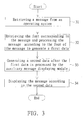
- FIG. 3 is a flowchart of a message displaying method according to the invention; and
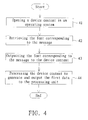
- FIG. 4 is a flowchart of
step 32 in the message displaying method. - Referring to FIG. 2, a diagram of a computer system according to a preferred embodiment of the invention is shown. The
computer system 200 comprises anoperating system 210, an auxiliarymessage displaying module 220, ahost 230 and amain monitor 240. Thehost 230 displays a frame via themain monitor 240. Theoperating system 210 comprises a font database ofmultiple languages 212 and adriver 211. The font database ofmultiple languages 212 is for recording the fonts of various languages. Thedriver 211 retrieves a message S0 from an application program of theoperating system 210 and retrieves a font F1 from thefont database 212, so that the message S0 is processed to generate a first data S1. - The auxiliary
message displaying module 220 is an independent module and can be embedded in thehost 230 or connected to thehost 230 via a signal line. The auxiliarymessage displaying module 220 comprises aprocessing unit 221, amemory unit 222, adisplay unit 224 and adisplay driving unit 223. Theprocessing unit 221 is for receiving and processing the first data S1 and then outputting the second data S2. Thememory unit 222 is for memorizing programming codes, basic English alphabets and Arabic numbers such as data M1 for instance required by theprocessing unit 221. Thedisplay driving unit 223 is for receiving a second data S2 which controls thedisplay unit 224 to display a message. When thehost 230 is at the standby mode, the auxiliarymessage displaying module 220 still can operate and display the message using the standby power of thehost 230.
Meanwhile, thehost 230 is unable to display a frame via themain monitor 240. - The
operating system 210 can be the Microsoft Window operating system, the Linux operating system, an embedded system, the Microsoft long horn operating system having an always-ready mode. When theoperating system 210 enters the always-ready mode, themain monitor 240 is disabled, but the auxiliarymessage displaying module 220 still can display the message. - After retrieving the message S0 from the
operating system 210 and the font corresponding to the message S0 from thefont database 212, thedriver 211 opens a device content (DC) in theoperating system 210 outputs the font corresponding to the message S0 to the device content, and then the device content is processed to generate and output a first data S1 to theprocessing unit 221. The first data S1 is an image file whose format can be bitmap images such as Bitmap, JPEG or GIF, or vector graphics. - The
driver 211 retrieves message S0 from theoperating system 210 by means of an application programming interface (API) or a software development kit (SDK). Thedriver 211 transmits the first message S1 to themessage displaying module 221 via an interface such as a universal serial bus (USB)1.1, USB 2.0, RS232, a parallel port or an inter-integrated circuit (12C). - The
memory unit 222 can be an electrically erasable programmable read only memory (EEPROM). Thedisplay unit 224 can be a vacuum fluorescent display (VFD), an organic light-emitting diodes (OLED) or a liquid crystal display panel (LCD panel). - Referring to FIG. 3, a flowchart of a message displaying method according to the invention is shown. Firstly, a message is retrieved from an operating system as shown in
step 31. Next, the font corresponding to the message is retrieved and processed according to the font of the message to generate a first data as shown instep 32. Afterwards, the first data is processed by the auxiliary message displaying module to generate a second data as shown instep 33. Lastly, the message is displayed according to the second data as shown instep 34. - In
step 31, the message retrieved by the driver can be text only or a message containing text and image. Under such circumstances, the fonts retrieved from the font database of multiple languages are converted into an appropriate image file, and then the required special effects are added. In order to inform the user of the state of the application program of the operating system or extra messages, the driver can be set to retrieve a message from a predetermined application program and then display the message on the message displaying module. The message here refers to the lyrics of a song being played, the phone number of an incoming Internet call, the name of the radio station the user is listening to or the name of the program the user is watching when a computer system is in use. - Referring to FIG. 4, a flowchart of
step 32 in the message displaying method is shown. Firstly, a device content (DC) is opened in an operating system as shown instep 41. Next, the font of the word string corresponding to the message is retrieved as shown instep 42. Afterwards, the font corresponding to the message is outputted to the device content as shown instep 43. Lastly, the device content is processed to generate and output the first data to the processing unit of the message displaying module as shown instep 44. The processing refers to the special effect of the device content such as moving, rotating, flashing or scale-adjusting. - In
step 33, the message processing module receives the first data, and adjusts the display effect of the display unit to generate the second data according to the controls of the driver such as display range and position, display frequency, visual effect or motion picture. - Referring to FIG. 2, a
message displaying module 220 further comprises amemory unit 225. Thememory unit 225 is for storing a third data D3, which comprises a document or an image file, and an image that can be used when displaying a message. The document and the image file is the message edited in theoperating system 210 by the user. Thememory unit 225 can be a dynamic random access memory (DRAM) or a static random access memory (SRAM) for instance. - The
message displaying module 220 disclosed above can function regardless that theoperating system 210 is in use or at the standby mode. When theoperating system 210 is not in use, themain monitor 240 is unable to display a frame. Theprocessing unit 221 would display the third data, which are stored in thememory unit 225 in advance, on thedisplay unit 224. - The document of the third data D3 such as a scheduling message is stored in the
memory unit 225 after the user has edited the scheduling message in theoperating system 210. Theprocessing unit 221 displays corresponding message on thedisplay unit 224 according to the corresponding time of the scheduling message. The document can be a message to remind the user. For example, when theoperating system 210 is at the standby mode, theprocessing unit 221 would monitor the scheduling message of the third data and display the scheduling message at corresponding time. - The image file contained in the third message D3 is the message that the user edits in the
operating system 210. The image file can be a motion picture or a personalized picture. Theprocessing unit 221 displays a motion picture on thedisplay unit 224 according to the corresponding settings of the image file. For example, the message is displayed according to the setting when theoperating system 210 is at the standby mode. - The application of the auxiliary
message displaying module 220 covers a wide range and would play a crucial role in the concept of digitalized lifestyle. For example, when the user listens to the radio using thecomputer system 200, the frequency and the name of the radio station can be displayed on the auxiliarymessage displaying module 220. When the user watches TV using thecomputer system 200, the number of the channel, the name of the TV station or even the name of the program can be displayed on the auxiliarymessage displaying module 220. - The computer system and the message displaying module and method thereof disclosed in above embodiments of the invention have the following advantages:
- 1. The auxiliary message displaying module is capable of supporting multiple languages without disposing an extra font database.
- 2. The loyalty required for the font database is reduced, and the situation of lacking a supportive font database is avoided.
- 3. No extra memory cost for adding the font database would incur to the auxiliary message displaying module.
- 4. The displayed message is more versatile by means of the processing of operating system.
- 5. The message can be displayed even when the computer system is at the standby mode or the main monitor is disabled, transcending the conventional restriction that the computer system must be at an operating mode.
- 6. In response to the trend of digitalization of home appliances, the ranges and aspects of application of the invention are broad and wide, including relevant messages of TV, radio stations and Network telephones.
- 7. Low-cost hardware design is capable of providing long horn auxiliary display function when incorporated with auxiliary display platform SDK of Microsoft Long Horn operating system.
- While the invention has been described by way of example and in terms of a preferred embodiment, it is to be understood that the invention is not limited thereto. On the contrary, it is intended to cover various modifications and similar arrangements and procedures, and the scope of the appended claims therefore should be accorded the broadest interpretation so as to encompass all such modifications and similar arrangements and procedures.
Claims (15)
- An auxiliary message displaying module applied in a computer system, wherein the computer system comprises a host and an operating system, the operating system comprises a font database and a driver, and the auxiliary message displaying module is disposed in the host and comprises:a processing unit for receiving and processing a first data and then outputting a second data;a first memory unit for memorizing a programming code of the processing unit;a display unit for displaying a message; anda display driving unit for controlling the display unit to display message according to the second data;wherein the driver of the operating system retrieves a message from the operating system and obtains a font corresponding to the message from the font database, then the message is processed to generate the first data; when the host is at a standby mode, the auxiliary message displaying module operates and displays message using standby power of the host.
- The auxiliary message displaying module according to claim 1, wherein the operating system is Microsoft Window operating system.
- The auxiliary message displaying module according to claim 2, wherein the operating system is Microsoft Long Horn operating system, the operating system has an always-ready mode, in which the main monitor is disabled and the auxiliary message displaying module displays message.
- The auxiliary message displaying module according to claim 1, wherein the driver retrieves the message from the operating system and the font corresponding to the message from the font database, a device content (DC) is opened in the operating system, the font corresponding to the message is outputted to the device content, and then the device content is processed to generate and output the first data to the processing unit.
- The auxiliary message displaying module according to claim 4, wherein the first data is an image file, and the driver performs image processing on the device content to generate the first data.
- The auxiliary message displaying module according to claim 1, further comprising a second memory unit for storing a third data, wherein the third data comprises a document or an image file to be displayed on the display unit.
- The auxiliary message displaying module according to claim 6, wherein the document or the image file is the message to be edited in the operating system by the user.
- The auxiliary message displaying module according to claim 6, wherein the font database is a font database of multiple languages for displaying fonts of multiple languages.
- A message displaying method for an auxiliary message displaying module of a computer system, wherein the computer system comprises a host, a main monitor and an operating system, and the message displaying method comprises:retrieving a message from the operating system;retrieving a font corresponding to the message, and processing the message according to the font of the message to generate a first data;generating a second data after the first data is processed by the auxiliary message display module; anddisplaying message by the auxiliary message displaying module according to the second data;wherein when the host is at a standby mode, the auxiliary message displaying module operates and displays message using standby power of the host.
- The message displaying method according to claim 9, wherein the operating system is Microsoft Window operating system.
- The message displaying method according to claim 10, wherein the operating system is Microsoft Long Horn operating system, the operating system has an always-ready mode, in which the main monitor is disabled and the auxiliary message displaying module displays message.
- The message displaying method according to claim 9, wherein the step of retrieving the font corresponding to the message comprises:opening a device content in the operating system;retrieving the font corresponding to the message;outputting the font corresponding to the message to the device content; andprocessing the device content to generate and output the first data to the auxiliary message display module.
- The message displaying method according to claim 12, wherein the first data is an image file, and the step of processing the device content is performing image processing on the device content to generate the first data.
- The message displaying method according to claim 9, further comprising displaying message by the auxiliary message displaying module according to a third data, which is stored in the auxiliary message displaying module and comprises a document or an image file.
- The message displaying method according to claim 14, wherein the document or the image file is the message to be edited in the operating system by the user.
Applications Claiming Priority (1)
| Application Number | Priority Date | Filing Date | Title |
|---|---|---|---|
| CNA200510075464XA CN1873609A (en) | 2005-05-31 | 2005-05-31 | Computer system and its auxiliary information display device and method |
Publications (2)
| Publication Number | Publication Date |
|---|---|
| EP1729498A2 true EP1729498A2 (en) | 2006-12-06 |
| EP1729498A3 EP1729498A3 (en) | 2008-11-19 |
Family
ID=36719417
Family Applications (1)
| Application Number | Title | Priority Date | Filing Date |
|---|---|---|---|
| EP06008821A Withdrawn EP1729498A3 (en) | 2005-05-31 | 2006-04-27 | Auxiliary message displaying device and method thereof |
Country Status (2)
| Country | Link |
|---|---|
| EP (1) | EP1729498A3 (en) |
| CN (1) | CN1873609A (en) |
Families Citing this family (1)
| Publication number | Priority date | Publication date | Assignee | Title |
|---|---|---|---|---|
| CN102855110A (en) * | 2012-07-25 | 2013-01-02 | 苏州佳世达电通有限公司 | Information prompt device and display device |
Citations (1)
| Publication number | Priority date | Publication date | Assignee | Title |
|---|---|---|---|---|
| US20020067338A1 (en) | 2000-04-24 | 2002-06-06 | Microsoft Corporation | Method for activating an application in context on a remote input/output device |
Family Cites Families (6)
| Publication number | Priority date | Publication date | Assignee | Title |
|---|---|---|---|---|
| IT1259329B (en) * | 1992-03-12 | 1996-03-12 | Olivetti & Co Spa | PORTABLE CALCULATOR WITH COVER |
| KR100248048B1 (en) * | 1997-06-30 | 2000-03-15 | 윤종용 | Computer having auxiliary display apparatus |
| JP2001337812A (en) * | 2000-03-23 | 2001-12-07 | Fujitsu Ltd | Status display control device, electronic device, and storage medium |
| US7240228B2 (en) * | 2003-05-05 | 2007-07-03 | Microsoft Corporation | Method and system for standby auxiliary processing of information for a computing device |
| US20050030253A1 (en) * | 2003-08-04 | 2005-02-10 | First International Computer Inc | Dual-screen notebook computer |
| US20050066209A1 (en) * | 2003-09-18 | 2005-03-24 | Kee Martin J. | Portable electronic device having high and low power processors operable in a low power mode |
-
2005
- 2005-05-31 CN CNA200510075464XA patent/CN1873609A/en active Pending
-
2006
- 2006-04-27 EP EP06008821A patent/EP1729498A3/en not_active Withdrawn
Patent Citations (1)
| Publication number | Priority date | Publication date | Assignee | Title |
|---|---|---|---|---|
| US20020067338A1 (en) | 2000-04-24 | 2002-06-06 | Microsoft Corporation | Method for activating an application in context on a remote input/output device |
Also Published As
| Publication number | Publication date |
|---|---|
| CN1873609A (en) | 2006-12-06 |
| EP1729498A3 (en) | 2008-11-19 |
Similar Documents
| Publication | Publication Date | Title |
|---|---|---|
| US9262548B2 (en) | Multiple screen size render-engine | |
| US9319677B2 (en) | Video decoding method and system thereof | |
| US6791529B2 (en) | UI with graphics-assisted voice control system | |
| US10949160B2 (en) | Display apparatus and control method thereof | |
| US9892668B2 (en) | Screen resize for reducing power consumption | |
| US9824137B2 (en) | Block zoom on a mobile electronic device | |
| US9053652B2 (en) | Display control device, display control method, and program | |
| US20020073247A1 (en) | Docking station for a laptop computer | |
| CN110450714B (en) | Information display method, device, equipment and storage medium | |
| EP3817394B1 (en) | Electronic device and display method thereof | |
| US20240231852A9 (en) | Window display method, apparatus, terminal and storage medium | |
| US20060267859A1 (en) | Computer system and auxiliary message displaying device and method thereof | |
| KR20100066957A (en) | Display apparatus and control method thereof | |
| CN107820630B (en) | Display device and display method | |
| US20090241141A1 (en) | Display apparatus and control method thereof | |
| US20040223001A1 (en) | Display apparatus having customized on-screen-display and method thereof | |
| US20110199388A1 (en) | Method and apparatus for configuring graphical effect in a mobile terminal | |
| EP3079039A1 (en) | Display apparatus and display method | |
| US20030188305A1 (en) | Installer, external storage medium, computer system and method and program products for installing application program | |
| EP2087482B1 (en) | Method for controlling output of display unit and system enabling of the method | |
| TWI599997B (en) | Driver integrated circuit applying image processing driving method and touch display system | |
| WO2007061157A1 (en) | Mobile external display device in use wireless communication | |
| CN113596531A (en) | Electronic device and control method thereof | |
| CN111273987A (en) | Method and equipment for displaying information by client, terminal and storage medium | |
| TW490633B (en) | Apparatus for displaying characters of at least two distinct types received in the form of a data stream coming from a central unit |
Legal Events
| Date | Code | Title | Description |
|---|---|---|---|
| PUAI | Public reference made under article 153(3) epc to a published international application that has entered the european phase |
Free format text: ORIGINAL CODE: 0009012 |
|
| AK | Designated contracting states |
Kind code of ref document: A2 Designated state(s): AT BE BG CH CY CZ DE DK EE ES FI FR GB GR HU IE IS IT LI LT LU LV MC NL PL PT RO SE SI SK TR |
|
| AX | Request for extension of the european patent |
Extension state: AL BA HR MK YU |
|
| PUAL | Search report despatched |
Free format text: ORIGINAL CODE: 0009013 |
|
| AK | Designated contracting states |
Kind code of ref document: A3 Designated state(s): AT BE BG CH CY CZ DE DK EE ES FI FR GB GR HU IE IS IT LI LT LU LV MC NL PL PT RO SE SI SK TR |
|
| AX | Request for extension of the european patent |
Extension state: AL BA HR MK YU |
|
| RIC1 | Information provided on ipc code assigned before grant |
Ipc: G06F 1/16 20060101AFI20081010BHEP |
|
| 17P | Request for examination filed |
Effective date: 20090423 |
|
| AKX | Designation fees paid |
Designated state(s): DE FR IT |
|
| 17Q | First examination report despatched |
Effective date: 20101029 |
|
| STAA | Information on the status of an ep patent application or granted ep patent |
Free format text: STATUS: THE APPLICATION HAS BEEN WITHDRAWN |
|
| 18W | Application withdrawn |
Effective date: 20160425 |