EP1672574A1 - Compressible display of e-mail message string to facilitate readability - Google Patents
Compressible display of e-mail message string to facilitate readability Download PDFInfo
- Publication number
- EP1672574A1 EP1672574A1 EP04257821A EP04257821A EP1672574A1 EP 1672574 A1 EP1672574 A1 EP 1672574A1 EP 04257821 A EP04257821 A EP 04257821A EP 04257821 A EP04257821 A EP 04257821A EP 1672574 A1 EP1672574 A1 EP 1672574A1
- Authority
- EP
- European Patent Office
- Prior art keywords
- message
- display
- successive
- message string
- Prior art date
- Legal status (The legal status is an assumption and is not a legal conclusion. Google has not performed a legal analysis and makes no representation as to the accuracy of the status listed.)
- Granted
Links
Images


Classifications
-
- G—PHYSICS
- G06—COMPUTING OR CALCULATING; COUNTING
- G06Q—INFORMATION AND COMMUNICATION TECHNOLOGY [ICT] SPECIALLY ADAPTED FOR ADMINISTRATIVE, COMMERCIAL, FINANCIAL, MANAGERIAL OR SUPERVISORY PURPOSES; SYSTEMS OR METHODS SPECIALLY ADAPTED FOR ADMINISTRATIVE, COMMERCIAL, FINANCIAL, MANAGERIAL OR SUPERVISORY PURPOSES, NOT OTHERWISE PROVIDED FOR
- G06Q10/00—Administration; Management
- G06Q10/10—Office automation; Time management
- G06Q10/107—Computer-aided management of electronic mailing [e-mailing]
-
- H—ELECTRICITY
- H04—ELECTRIC COMMUNICATION TECHNIQUE
- H04L—TRANSMISSION OF DIGITAL INFORMATION, e.g. TELEGRAPHIC COMMUNICATION
- H04L51/00—User-to-user messaging in packet-switching networks, transmitted according to store-and-forward or real-time protocols, e.g. e-mail
- H04L51/06—Message adaptation to terminal or network requirements
- H04L51/066—Format adaptation, e.g. format conversion or compression
Definitions
- This invention deals generally with method and apparatus for improving the readability of email message strings.
- each successive reply and/or forward includes both a message header text and message body text
- This also effectively "compresses" the complete email string such that meaningful message body parts can be successively accessed for viewing by successive actuations of a "hot" key on the keyboard or the like.
- a context sensitive menu item might also be employed to permit a selective user command of some pre-defined type to be detected and acted upon in this manner.
- the message header can fill up much of the screen. Even worse, message headers that contain many recipients can fill up multiple screens.
- This invention may be embodied in hardware, software or a combination of hardware and software.
- the invention also provides a method for providing a compressible display of email message strings to facilitate readability - especially in a small handheld wireless communication device.
- the exemplary embodiment is realized, at least in part, by executable computer program code (i.e., logic) which may be embodied in physical program memory media.
- FIG. 1 is an overview of an exemplary communication system in which a wireless communication device 100 may be used in accordance with this invention.
- a wireless communication device 100 may be used in accordance with this invention.
- One skilled in the art will appreciate that there may be hundreds of different system topologies. There may also be many message senders and recipients.
- the simple exemplary system shown in FIG. 1 is for illustrative purposes only, and shows perhaps the currently most prevalent Internet email environment.
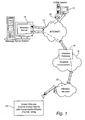
- FIG. 1 shows an email sender 10, the Internet 12, a message server system 14, a wireless gateway 16, wireless infrastructure 18, a wireless network 20 and a mobile communication device 100.
- An email sender 10 may, for example, be connected to an ISP (Internet Service Provider) on which a user of the system has an account, located within a company, possibly connected to a local area network (LAN), and connected to the Internet 12, or connected to the Internet 12 through a large ASP (application service provider) such as America OnlineTM (AOL).
- ISP Internet Service Provider
- ASP application service provider
- FIG. 1 may instead be connected to a wide area network (WAN) other than the Internet, although email transfers are commonly accomplished through Internet-connected arrangements as shown in FIG. 1.
- the message server 14 may be implemented, for example, on a network computer within the firewall of a corporation, a computer within an ISP or ASP system or the like, and acts as the main interface for email exchange over the Internet 12. Although other messaging systems might not require a message server system 14, a mobile device 100 configured for receiving and possibly sending email will normally be associated with an account on a message server. Perhaps the two most common message servers are Microsoft ExchangeTM and Lotus DominoTM. These products are often used in conjunction with Internet mail routers that route and deliver mail. These intermediate components are not shown in FIG. 1, as they do not directly play a role in the invention described below. Message servers such as server 14 typically extend beyond just email sending and receiving; they also include dynamic database storage engines that have predefined database formats for data like calendars, to-do lists, task lists, email and documentation.
- the wireless gateway 16 and infrastructure 18 provide a link between the Internet 12 and wireless network 20.
- the wireless infrastructure 18 determines the most likely network for locating a given user and tracks the users as they roam between countries or networks.
- a message is then delivered to the mobile device 100 via wireless transmission, typically at a radio frequency (RF), from a base station in the wireless network 20 to the mobile device 100.
- RF radio frequency
- the particular network 20 may be virtually any wireless network over which messages may be exchanged with a mobile communication device.
- a composed email message 22 is sent by the mail sender 10, located somewhere on the Internet 12.
- This message 22 typically uses traditional Simple Mail Transfer Protocol (SMTP), RFC 822 headers and Multipurpose Internet Mail extension (MIME) body parts to define the format of the mail message. These techniques are all well known to those skilled in the art.
- the message 22 arrives at the message server 14 and is normally stored in a message store.
- Most known messaging systems support a so-called "pull" message access scheme, wherein the mobile device 100 must request that stored messages be forwarded by the message server to the mobile device 100.
- Some systems provide for automatic routing of such messages which are addressed using a specific email address associated with the mobile device 100.
- messages addressed to a message server account associated with a host system such as a home computer or office computer which belongs to the user of a mobile device 100 are redirected from the message server 14 to the mobile device 100 as they are received.
- the message 22, or possibly a translated or reformatted version thereof is sent to wireless gateway 16.
- the wireless infrastructure 18 includes a series of connections to wireless network 20. These connections could be Integrated Services digital Network (ISDN), Frame Relay or T1 connections using the TCP/IP protocol used throughout the Internet.
- ISDN Integrated Services digital Network
- Frame Relay or T1 connections using the TCP/IP protocol used throughout the Internet.
- the term "wireless network” is intended to include three different types of networks, those being (1) data-centric wireless networks, (2) voice-centric wireless networks and (3) dual-mode networks that can support both voice and data communications over the same physical base stations.
- Combined dual-mode networks include, but are not limited to, (1) Code Division Multiple Access (CDMA) networks, (2) the Group Special Mobile or the Global System for Mobile Communications (GSM) and the General Packet Radio Service (GPRS) networks, and (3) future third-generation (3G) networks like Enhanced Data-rates for Global Evolution (EDGE) and Universal Mobile Telecommunications Systems (UMTS).
- CDMA Code Division Multiple Access
- GSM Global System for Mobile Communications
- GPRS General Packet Radio Service
- 3G networks like Enhanced Data-rates for Global Evolution (EDGE) and Universal Mobile Telecommunications Systems
- Some older examples of data-centric network include the MobitexTM Radio Network and the DataTACTM Radio Network.
- Examples of older voice-centric data networks include Personal Communication Systems (PCS) networks like GSM, and TDMA systems.
- PCS Personal Communication Systems
- mobile communication device 100 includes a suitable RF antenna 102 for wireless communication to/from wireless network 20.
- Conventional RF, demodulation/modulation and decoding/coding circuits 104 are provided.
- DSPs digital signal processors
- microprocessors filters
- analog and digital circuits and the like.
- the mobile communication device 100 will also typically include a main control CPU 106 which operates under control of a stored program in program memory 108 (and which has access to data memory 100).
- CPU 106 also communicates with a conventional keyboard 112, display 114 (e.g., an LCD) and audio transducer or speaker 116.
- a portion of program memory 108a available for storing one or more program sub-routines (i.e., program executable code or logic) for controllably compressing the display of an email message string.
- a display screen buffer 110a will typically store a file (e.g., an email message string) which is at least partially displayed at 114.
- a file of text including a complete email message string will reside in data memory and some or all of it will appear in a display screen buffer (including at least the portion of the entire file that is currently being displayed on the screen).
- This text file is "open" and available for text editing.
- the exemplary embodiment of this invention provides automated text editing of a particular type. However, those in the art will recognize that other kinds of automated text editing may also be used for effectively "compressing" the email message string so as to improve its readability (i.e., by either skipping around automatically in the email chain, thread or string and/or by automatically deleting all or portions of less important pieces of the string (e.g., headers)).
- a mode set/unset subroutine can be entered at 300 as shown in FIG. 3.. If any text compression mode is already set as tested at 302, then all modes are reset at 304 and an inquiry is made at 306 to detect a possible desire to set another mode. At 308, 310 the user is given an option to set a single header delete mode. At 312, 314 the user is given an option to set an all header delete mode. At 316, 318 the user is given an option to set a skip cursor mode. If no options are taken, a no set mode selected message is displayed at 320 before the subroutine is exited at 322.
- a hot key "down” is actuated (e.g., "D” or "S” or the like as determined by appropriate hot key definition software)
- a logic of FIG. 4 is entered at 400.
- a test is made at 402 to find out if any text compression mode is set. If not, then an immediate exit is taken at 404. If a text compression mode is set, then a test is made at 406 to find out if there is any email message located below the current cursor position. If not, then a suitable dialog box indicating "no more message parts" may be displayed at 408 and the routine exited at 410 as indicated in FIG. 4.
- FIG. 5 the logic of FIG. 5 is entered at 500 (e.g., when a different "hot” key “up” is activated such as, for example, the "W” or "U” key).
- the flowchart elements in FIGS. 4 and 5 having the same lower order digits are analogous except for direction of actions. For example, now moving in the upward direction rather than the downward direction, a test is made at 506 to see if there is any message displayed above the current cursor location. If not, then at 508 a suitable dialog box message is displayed indicating that there are no more message parts to be processed thereabove.
- next upper message header may be automatically deleted at 514 or, depending upon the user selected mode of operation, the cursor may simply be skipped at 520 ahead to the next higher message body in the string.
- the hot key definition may require two or more physical keys to be simultaneously actuated or sequentially actuated and/or may require the user to enter a particular menu selected mode of operation before becoming active.
- a sequential actuation of the hot "down" key may cause a sequence of operations as illustrated in FIGS. 6A-6F.
- a complete email message string includes a lowermost original message with header as well as message body and a second reply original message located there just above also having a header as well as message body and a third reply message body at the very top.
- the tests being made at 406 and 506 are looking only for any immediately adjacent portion of a message (i.e., either header or body), then the user would have to move the cursor into successive positions as shown in FIGS. 6A-6F in order to obtain the same end result.
- the test at 406 and 506 is actually looking for any message headers (below or above the cursor, respectively) and therefore the cursor could be left fixed at some particular starting point as may be desired by the user.
- the desired display also may be automatically performed in its entirety in a selected mode of operation so as to initially display the final fully compressed display (e.g., FIG. 6F).
Landscapes
- Engineering & Computer Science (AREA)
- Business, Economics & Management (AREA)
- Human Resources & Organizations (AREA)
- Entrepreneurship & Innovation (AREA)
- Strategic Management (AREA)
- Quality & Reliability (AREA)
- Physics & Mathematics (AREA)
- Economics (AREA)
- Marketing (AREA)
- Operations Research (AREA)
- Computer Hardware Design (AREA)
- Tourism & Hospitality (AREA)
- Data Mining & Analysis (AREA)
- General Business, Economics & Management (AREA)
- General Physics & Mathematics (AREA)
- Theoretical Computer Science (AREA)
- Computer Networks & Wireless Communication (AREA)
- Signal Processing (AREA)
- Information Transfer Between Computers (AREA)
- User Interface Of Digital Computer (AREA)
- Display Devices Of Pinball Game Machines (AREA)
Abstract
Description
- This invention deals generally with method and apparatus for improving the readability of email message strings.
- Many times the originator of a message will initiate an email "conversation" which causes many subsequent replies and re-replies and/or, forwardings (perhaps to and from multiple recipients/senders). The result can be a long string of individual email messages. Unfortunately, the message headers associated with each individual reply or forwarding or the like are also included in a typical display of a raw string of related email messages.
- This can make later (or even current) comprehension of the entire email exchange difficult. This is especially so when the email message string is displayed on a relatively small screen (e.g., on a handheld wireless communication device or the like which may only be able to display a relatively limited number of text lines simultaneously on the screen). Of course, as most will appreciate, this same sort of problem can occur even on larger screens such as are available on typical personal computers and the like.
- While such email message strings may of course be edited by highlighting and deleting portions and thus eliminating redundant material or the like, such traditional editing efforts are time consuming and may become complex (depending upon the size of the string and/or the nature of the editing software). In addition, such traditional editing of the string may accidentally result in loss of the desired message body portion of some message (i.e., of material that is actually not redundant).
- We have recognized that it would be very useful to provide a convenient way for a reader to automatically but controllably skip less meaningful portions of the email message string.
- For example, if each successive reply and/or forward includes both a message header text and message body text, it may be convenient to permit deletion of some or all of the message header text so as to effectively compress the display of email exchanges into a simultaneous (or more nearly simultaneous) display of all meaningful text on the available display area. Of course, even if less important text is not actually deleted, even moving automatically from one message body to the next in response to a single key actuation or the like would also provide a benefit and improve readability. This also effectively "compresses" the complete email string such that meaningful message body parts can be successively accessed for viewing by successive actuations of a "hot" key on the keyboard or the like. A context sensitive menu item might also be employed to permit a selective user command of some pre-defined type to be detected and acted upon in this manner.
- In short, trying to read a message that is made up of multiple forwards and/or replies can be very difficult on a device with a small screen. This is because in between each message "part" there is a message header which can be multiple screen fulls in size (especially on smaller screens). It would be nice to have a method to skip from one message string "part" to the next.
- This can be accomplished through either a hot key or a context sensitive menu item or some other convenient way for a user to provide a predetermined "skip" command to an associated display unit processor. For example, a message with multiple forwards/replies in it might look like:
- Lets meet at Timmy's
----Original Message---- - From: Bob
- Sent: October 8, 2004 1:00 PM
- To: Bill
- Subject: RE: Where to meet for lunch
- Ok, where should we meet?
----Original Message---- - From: Bill
- Sent: October 8, 2004 12:30 PM
- To: Box
- Subject: Where to meet for lunch
- Want to go for lunch?
- On some smaller handheld displays, the message header can fill up much of the screen. Even worse, message headers that contain many recipients can fill up multiple screens.
- Upon invoking, e.g., a hot key/menu item, one may skip down to the first line after the "Subject" line. If no such line exists, the display may stay where it is and a dialog box may pop up to tell the user that there are no more message parts.
- So in the above example, if the cursor was on the "Let's meet at Timmy's line, then a skip could take the cursor and display to the "Ok, where should we meet?" line.
- This is especially beneficial when one is reading something included in the middle of an email thread because one could then quickly read through the previous parts of the thread and catch up with what is going on. Of course there also could be a hot key to go back upwards through the message parts, rather than just scanning in one direction.
- This invention may be embodied in hardware, software or a combination of hardware and software. The invention also provides a method for providing a compressible display of email message strings to facilitate readability - especially in a small handheld wireless communication device. The exemplary embodiment is realized, at least in part, by executable computer program code (i.e., logic) which may be embodied in physical program memory media.
- These and other objects and advantages of this invention will be better understood and appreciated in conjunction with the following detailed description of exemplary embodiments taken together with the accompanying drawings, of which:
- FIG. 1 is an overall system wide schematic view of an exemplary wireless email communication system incorporating a mobile wireless communication device with a selectively compressible display of email string feature;
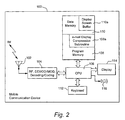
- FIG. 2 is an abbreviated schematic diagram of hardware included within an exemplary mobile wireless communication device of FIG. 1;
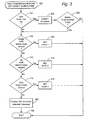
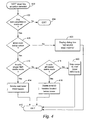
- FIGS. 3-5 are exemplary abbreviated schematic flow charts of computer software (i.e., program logic) that may be utilized in the device of FIG. 2 so as to provide a feature permitting compressible display of email message strings to facilitate readability; and
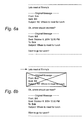
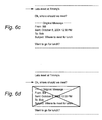
- FIGS. 6A-6F illustrate successive modification of an email message string having message headers and message bodies as it is successively processed to evermore simpler formats for compressed display.
- FIG. 1 is an overview of an exemplary communication system in which a
wireless communication device 100 may be used in accordance with this invention. One skilled in the art will appreciate that there may be hundreds of different system topologies. There may also be many message senders and recipients. The simple exemplary system shown in FIG. 1 is for illustrative purposes only, and shows perhaps the currently most prevalent Internet email environment. - FIG. 1 shows an
email sender 10, the Internet 12, amessage server system 14, awireless gateway 16,wireless infrastructure 18, awireless network 20 and amobile communication device 100. - An
email sender 10 may, for example, be connected to an ISP (Internet Service Provider) on which a user of the system has an account, located within a company, possibly connected to a local area network (LAN), and connected to the Internet 12, or connected to the Internet 12 through a large ASP (application service provider) such as America Online™ (AOL). Those skilled in the art will appreciate that the systems shown in FIG. 1 may instead be connected to a wide area network (WAN) other than the Internet, although email transfers are commonly accomplished through Internet-connected arrangements as shown in FIG. 1. - The
message server 14 may be implemented, for example, on a network computer within the firewall of a corporation, a computer within an ISP or ASP system or the like, and acts as the main interface for email exchange over the Internet 12. Although other messaging systems might not require amessage server system 14, amobile device 100 configured for receiving and possibly sending email will normally be associated with an account on a message server. Perhaps the two most common message servers are Microsoft Exchange™ and Lotus Domino™. These products are often used in conjunction with Internet mail routers that route and deliver mail. These intermediate components are not shown in FIG. 1, as they do not directly play a role in the invention described below. Message servers such asserver 14 typically extend beyond just email sending and receiving; they also include dynamic database storage engines that have predefined database formats for data like calendars, to-do lists, task lists, email and documentation. - The
wireless gateway 16 andinfrastructure 18 provide a link between theInternet 12 andwireless network 20. Thewireless infrastructure 18 determines the most likely network for locating a given user and tracks the users as they roam between countries or networks. A message is then delivered to themobile device 100 via wireless transmission, typically at a radio frequency (RF), from a base station in thewireless network 20 to themobile device 100. Theparticular network 20 may be virtually any wireless network over which messages may be exchanged with a mobile communication device. - As shown in FIG. 1, a composed
email message 22 is sent by themail sender 10, located somewhere on theInternet 12. Thismessage 22 typically uses traditional Simple Mail Transfer Protocol (SMTP), RFC 822 headers and Multipurpose Internet Mail extension (MIME) body parts to define the format of the mail message. These techniques are all well known to those skilled in the art. Themessage 22 arrives at themessage server 14 and is normally stored in a message store. Most known messaging systems support a so-called "pull" message access scheme, wherein themobile device 100 must request that stored messages be forwarded by the message server to themobile device 100. Some systems provide for automatic routing of such messages which are addressed using a specific email address associated with themobile device 100. In a preferred embodiment, messages addressed to a message server account associated with a host system such as a home computer or office computer which belongs to the user of amobile device 100 are redirected from themessage server 14 to themobile device 100 as they are received. - Regardless of the specific mechanism controlling forwarding of messages to
mobile device 100, themessage 22, or possibly a translated or reformatted version thereof, is sent towireless gateway 16. Thewireless infrastructure 18 includes a series of connections towireless network 20. These connections could be Integrated Services digital Network (ISDN), Frame Relay or T1 connections using the TCP/IP protocol used throughout the Internet. As used herein, the term "wireless network" is intended to include three different types of networks, those being (1) data-centric wireless networks, (2) voice-centric wireless networks and (3) dual-mode networks that can support both voice and data communications over the same physical base stations. Combined dual-mode networks include, but are not limited to, (1) Code Division Multiple Access (CDMA) networks, (2) the Group Special Mobile or the Global System for Mobile Communications (GSM) and the General Packet Radio Service (GPRS) networks, and (3) future third-generation (3G) networks like Enhanced Data-rates for Global Evolution (EDGE) and Universal Mobile Telecommunications Systems (UMTS). Some older examples of data-centric network include the Mobitex™ Radio Network and the DataTAC™ Radio Network. Examples of older voice-centric data networks include Personal Communication Systems (PCS) networks like GSM, and TDMA systems. - As depicted in FIG. 2,
mobile communication device 100 includes asuitable RF antenna 102 for wireless communication to/fromwireless network 20. Conventional RF, demodulation/modulation and decoding/coding circuits 104 are provided. As those in the art will appreciate, such circuits can involve possibly many digital signal processors (DSPs), microprocessors, filters, analog and digital circuits and the like. However, since such circuitry is well known in the art, it is not further described. - The
mobile communication device 100 will also typically include amain control CPU 106 which operates under control of a stored program in program memory 108 (and which has access to data memory 100).CPU 106 also communicates with aconventional keyboard 112, display 114 (e.g., an LCD) and audio transducer orspeaker 116. A portion ofprogram memory 108a available for storing one or more program sub-routines (i.e., program executable code or logic) for controllably compressing the display of an email message string. As will also be appreciated, adisplay screen buffer 110a will typically store a file (e.g., an email message string) which is at least partially displayed at 114. - In most email display apparatus (e.g., like mobile communication device 100), a file of text including a complete email message string will reside in data memory and some or all of it will appear in a display screen buffer (including at least the portion of the entire file that is currently being displayed on the screen). This text file is "open" and available for text editing. The exemplary embodiment of this invention provides automated text editing of a particular type. However, those in the art will recognize that other kinds of automated text editing may also be used for effectively "compressing" the email message string so as to improve its readability (i.e., by either skipping around automatically in the email chain, thread or string and/or by automatically deleting all or portions of less important pieces of the string (e.g., headers)).
- As is well known, many if not most computer driven devices with keyboards have "hot" keys (or key combinations) which, when actuated by the user, cause an immediate predetermined response associated with the hot key functionality that has been defined in logic for that particular key in given modes of operation. That is, conventional keyboard monitoring software/hardware routinely watches for the next key stroke (and/or simultaneous actuation of predetermined combinations of keys) and takes appropriate action depending upon which key (keys) has (have) been actuated. When an email display apparatus is put into the automatic "compression" editing mode in accordance with the exemplary embodiment, then there is at least one user action (e.g., the activation of a particular "hot" key) which will thereafter invoke certain automatic text editing and/or display skipping logic such as that depicted in FIGS. 3-5.
- If a text compression mode of operation is desired, then a mode set/unset subroutine can be entered at 300 as shown in FIG. 3.. If any text compression mode is already set as tested at 302, then all modes are reset at 304 and an inquiry is made at 306 to detect a possible desire to set another mode. At 308, 310 the user is given an option to set a single header delete mode. At 312, 314 the user is given an option to set an all header delete mode. At 316, 318 the user is given an option to set a skip cursor mode. If no options are taken, a no set mode selected message is displayed at 320 before the subroutine is exited at 322.
- As depicted in FIG. 4, if a hot key "down" is actuated (e.g., "D" or "S" or the like as determined by appropriate hot key definition software), a logic of FIG. 4 is entered at 400. A test is made at 402 to find out if any text compression mode is set. If not, then an immediate exit is taken at 404. If a text compression mode is set, then a test is made at 406 to find out if there is any email message located below the current cursor position. If not, then a suitable dialog box indicating "no more message parts" may be displayed at 408 and the routine exited at 410 as indicated in FIG. 4. On the other hand, if there is still a message located below the current location of the cursor, then at 412 at test is made for single header mode and, if set, then the next lower message header may be deleted at 414 from the display automatically. Similarly, if the all header delete mode is detected at 416, then all lower message headers are deleted at 418. If the skip cursor mode is set, then the cursor is automatically skipped downward at 420 to the next lower message body.
- Similarly, the logic of FIG. 5 is entered at 500 (e.g., when a different "hot" key "up" is activated such as, for example, the "W" or "U" key). The flowchart elements in FIGS. 4 and 5 having the same lower order digits are analogous except for direction of actions. For example, now moving in the upward direction rather than the downward direction, a test is made at 506 to see if there is any message displayed above the current cursor location. If not, then at 508 a suitable dialog box message is displayed indicating that there are no more message parts to be processed thereabove. On the other hand, if there is still at least a message above the cursor, then at 512 the next upper message header may be automatically deleted at 514 or, depending upon the user selected mode of operation, the cursor may simply be skipped at 520 ahead to the next higher message body in the string.
- As those in the art will appreciate, the hot key definition may require two or more physical keys to be simultaneously actuated or sequentially actuated and/or may require the user to enter a particular menu selected mode of operation before becoming active.
- Assuming that the user has selected the mode for successive automatic deletion of single message header portions, a sequential actuation of the hot "down" key may cause a sequence of operations as illustrated in FIGS. 6A-6F. For example, shown in FIG. 6A, a complete email message string includes a lowermost original message with header as well as message body and a second reply original message located there just above also having a header as well as message body and a third reply message body at the very top.
- If the user positions the cursor as depicted by the arrow at the top of the string in FIG. 6B and actuates the hot "down" key, then the message header portion just there below (indicated with a crossed box) is automatically deleted so as to result in a compressed email string as depicted at FIG. 6C. Using the exemplary embodiment of FIG. 4, even without moving the cursor, another actuation of the "hot" down key would cause deletion of the next successive message header portion in the downward direction as depicted in FIG. 6D so as to result in the further compressed email string depicted at FIG. 6E.
- Once again, in the exemplary embodiment of FIG. 4, even if the cursor is not moved by the user, another depression of the "hot" down key would result in finding no more message headers therebelow so the dialog box displaying "no more message parts" would be displayed instead as shown in FIG. 6F.
- Of course, if the tests being made at 406 and 506 are looking only for any immediately adjacent portion of a message (i.e., either header or body), then the user would have to move the cursor into successive positions as shown in FIGS. 6A-6F in order to obtain the same end result. However, in the exemplary embodiments of FIGS. 3-5, the test at 406 and 506 is actually looking for any message headers (below or above the cursor, respectively) and therefore the cursor could be left fixed at some particular starting point as may be desired by the user.
- As will be appreciated, the desired display also may be automatically performed in its entirety in a selected mode of operation so as to initially display the final fully compressed display (e.g., FIG. 6F).
- Those skilled in the art will recognize that many variations and modifications may be made to the exemplary embodiments described above while yet retaining novel features and advantages of those exemplary embodiments. Accordingly, all such variations and modifications are intended to be included within the scope of the appended claims.
Claims (30)
- A method for improving readability of an email message string including successive message headers with their respective associated message bodies, said method comprising:automatically determining parts of such message string having possibly greater interest to a reader; anddisplaying at least one such located part of the email message string so as to enhance its readability.
- A method as in claim 1 comprising:displaying at least a portion of a complete email message string including successive message headers with their respective associated message bodies;upon a pre-defined user command being detected, automatically deleting from such display at least one message header.
- A method as in claim 2 wherein said pre-defined user command is effected by actuation of at least one hot key on a keyboard associated with a device on which said display appears.
- A method as in claim 2 wherein:upon each repetition of said pre-defined user command being detected, automatically deleting from such display at least one further message header if such is still present.
- A method as in claim 4 wherein said successive deletions begin at a user-marked location in the display.
- A method as in claim 4 wherein said successive deletions occur in a downward direction through the message string.
- A method as in claim 4 wherein said successive deletions occur in an upward direction through the message string.
- A method as in claim 2 wherein said complete email message string exceeds an available capacity for simultaneous display of successive text lines.
- A method as in claim 8 wherein successive repetition of said pre-defined user command causes increasing lines of remaining message body text to be simultaneously displayed to the user.
- A method as in claim 9 wherein the email message string is being displayed on a handheld sized mobile wireless communication device having a correspondingly limited display area.
- A method as in claim 1 comprising:displaying at least a portion of a complete email message string including successive message headers with their respective associated message bodies;upon a pre-defined user command being detected, automatically altering the display so as to enhance readability of a said located part of the message.
- A method as in claim 11 wherein said automatic alteration of the display comprises moving a cursor to a next message body.
- An email display apparatus capable of compressing display of an email message string to improve readability of the email message string, said apparatus comprising:a visual display displaying at least a portion of a complete email message string including successive message headers with their respectively associated message bodies;an email display processor including a user command detector and processor which, upon detecting such command, automatically deletes from such display at least one message header.
- An email display apparatus as in claim 13 wherein said user command detector includes at least one hot key on a keyboard associated with the email display apparatus.
- An email display apparatus as in claim 13 wherein:said processor is adapted, upon detecting a repetition of said user command, to automatically delete at least one further message header from said display if such is still present.
- An email display apparatus as in claim 15 wherein said processor is adapted to cause successive deletions to begin at a user-marked location in the display.
- An email display as in claim 15 wherein said processor is adapted to cause successive deletions to occur in a downward direction through the message string.
- An email display apparatus as in claim 15 wherein said processor is adapted to cause successive deletions to occur in an upward direction through the message string.
- An email display apparatus as in claim 13 wherein said complete email message string exceeds an available capacity for simultaneous display of successive text lines.
- An email display apparatus as in claim 19 wherein said processor is adapted to cause successive repetition of said user command to cause increasing lines of remaining message body text to be simultaneously displayed to the user.
- An email display apparatus as in claim 20 comprising a handheld sized mobile wireless communication device having a correspondingly limited display area.
- A machine readable computer program storage medium on which is stored at least one computer program which, when executed in a suitable computer, effects a method for improving readability of an email message string, said method comprising:displaying at least a portion of a complete email message string including successive message headers with their respectively associated message bodies;upon a pre-defined user command being detected, automatically deleting from such display at least one message header.
- A machine readable computer program storage medium as in claim 22 wherein said pre-defined user command is effected by actuation of at least one key on a keyboard associated with a device on which said display appears.
- A machine readable computer program storage medium as in claim 22 wherein:upon each repetition of said pre-defined user command being detected, automatically deleting from such display at least one further message header if such is still present.
- A machine readable computer program storage medium as in claim 24 wherein said successive deletions begin at a user-marked location in the display.
- A machine readable computer program storage medium as in claim 24 wherein said successive deletions occur in a downward direction through the message string.
- A machine readable computer program storage medium as in claim 24 wherein said successive deletions occur in an upward direction through the message string.
- A machine readable computer program storage medium as in claim 22 wherein said complete email message string exceeds an available capacity for simultaneous display of successive text lines.
- A machine readable computer program storage medium as in claim 28 wherein successive repetition of said pre-defined user command causes increasing lines of remaining message body text to be simultaneously displayed to the user.
- A machine readable computer program storage medium as in claim 29 wherein the email message string is being displayed on a handheld sized mobile wireless communication device having a correspondingly limited display area.
Priority Applications (5)
| Application Number | Priority Date | Filing Date | Title |
|---|---|---|---|
| AT04257821T ATE385003T1 (en) | 2004-12-15 | 2004-12-15 | COMPRESSABLE DISPLAY OF THE MESSAGE STRING OF AN EMAIL FOR EASIER READABILITY |
| EP04257821A EP1672574B1 (en) | 2004-12-15 | 2004-12-15 | Compressible display of e-mail message string to facilitate readability |
| DE602004011547T DE602004011547T2 (en) | 2004-12-15 | 2004-12-15 | Compressible display of the message string of an e-mail to facilitate readability |
| CA2527479A CA2527479C (en) | 2004-12-15 | 2005-11-18 | Compressible display of e-mail message string to facilitate readability |
| HK06113369.0A HK1091574B (en) | 2006-12-05 | Compressible display of e-mail message string to facilitate readability |
Applications Claiming Priority (1)
| Application Number | Priority Date | Filing Date | Title |
|---|---|---|---|
| EP04257821A EP1672574B1 (en) | 2004-12-15 | 2004-12-15 | Compressible display of e-mail message string to facilitate readability |
Publications (2)
| Publication Number | Publication Date |
|---|---|
| EP1672574A1 true EP1672574A1 (en) | 2006-06-21 |
| EP1672574B1 EP1672574B1 (en) | 2008-01-23 |
Family
ID=34930922
Family Applications (1)
| Application Number | Title | Priority Date | Filing Date |
|---|---|---|---|
| EP04257821A Expired - Lifetime EP1672574B1 (en) | 2004-12-15 | 2004-12-15 | Compressible display of e-mail message string to facilitate readability |
Country Status (4)
| Country | Link |
|---|---|
| EP (1) | EP1672574B1 (en) |
| AT (1) | ATE385003T1 (en) |
| CA (1) | CA2527479C (en) |
| DE (1) | DE602004011547T2 (en) |
Citations (5)
| Publication number | Priority date | Publication date | Assignee | Title |
|---|---|---|---|---|
| JPH09190328A (en) * | 1996-01-11 | 1997-07-22 | Matsushita Electric Ind Co Ltd | Portable information terminals |
| US20020073157A1 (en) * | 2000-12-08 | 2002-06-13 | Newman Paula S. | Method and apparatus for presenting e-mail threads as semi-connected text by removing redundant material |
| EP1220520A2 (en) * | 2000-12-29 | 2002-07-03 | Lg Electronics Inc. | Message display method in mobile terminal |
| US20040044735A1 (en) * | 2002-08-30 | 2004-03-04 | International Business Machines Corporation | Method and system for organizing an email thread |
| US20040225901A1 (en) * | 2003-05-05 | 2004-11-11 | Bear Eric Gould | Method and system for auxiliary processing of information for a computing device |
-
2004
- 2004-12-15 AT AT04257821T patent/ATE385003T1/en not_active IP Right Cessation
- 2004-12-15 DE DE602004011547T patent/DE602004011547T2/en not_active Expired - Lifetime
- 2004-12-15 EP EP04257821A patent/EP1672574B1/en not_active Expired - Lifetime
-
2005
- 2005-11-18 CA CA2527479A patent/CA2527479C/en not_active Expired - Lifetime
Patent Citations (5)
| Publication number | Priority date | Publication date | Assignee | Title |
|---|---|---|---|---|
| JPH09190328A (en) * | 1996-01-11 | 1997-07-22 | Matsushita Electric Ind Co Ltd | Portable information terminals |
| US20020073157A1 (en) * | 2000-12-08 | 2002-06-13 | Newman Paula S. | Method and apparatus for presenting e-mail threads as semi-connected text by removing redundant material |
| EP1220520A2 (en) * | 2000-12-29 | 2002-07-03 | Lg Electronics Inc. | Message display method in mobile terminal |
| US20040044735A1 (en) * | 2002-08-30 | 2004-03-04 | International Business Machines Corporation | Method and system for organizing an email thread |
| US20040225901A1 (en) * | 2003-05-05 | 2004-11-11 | Bear Eric Gould | Method and system for auxiliary processing of information for a computing device |
Non-Patent Citations (2)
| Title |
|---|
| "NEXT BUTTON FOR JUMPING / TABBING BETWEEN INTERNET HYPERTEXT TRANSFER PROTOCOL HYPERLINKS", IBM TECHNICAL DISCLOSURE BULLETIN, IBM CORP. NEW YORK, US, vol. 41, no. 1, 1998, pages 435, XP000772162, ISSN: 0018-8689 * |
| PATENT ABSTRACTS OF JAPAN vol. 1997, no. 11 28 November 1997 (1997-11-28) * |
Also Published As
| Publication number | Publication date |
|---|---|
| DE602004011547T2 (en) | 2009-02-05 |
| EP1672574B1 (en) | 2008-01-23 |
| DE602004011547D1 (en) | 2008-03-13 |
| ATE385003T1 (en) | 2008-02-15 |
| CA2527479C (en) | 2012-11-13 |
| CA2527479A1 (en) | 2006-06-15 |
| HK1091574A1 (en) | 2007-01-19 |
Similar Documents
| Publication | Publication Date | Title |
|---|---|---|
| US7756939B2 (en) | Compressible display of e-mail message string to facilitate readability | |
| US7587482B2 (en) | Multimodal interface for mobile messaging | |
| US7644126B2 (en) | Message thread handling | |
| US6252588B1 (en) | Method and apparatus for providing an audio visual e-mail system | |
| US8904292B2 (en) | Method and system for processing electronic mail | |
| JP5061917B2 (en) | Mail transmission / reception program, mail transmission / reception device, and mail transmission / reception method | |
| JP2011527467A (en) | Enhanced messaging platform | |
| CN103731334B (en) | Message status display method and device | |
| US7925983B2 (en) | System and method for address storage and message addressing | |
| JP2006331003A (en) | Information processing apparatus and e-mail control method | |
| US20080195953A1 (en) | Messaging Systems And Methods | |
| JP3924101B2 (en) | E-mail system | |
| EP1672574B1 (en) | Compressible display of e-mail message string to facilitate readability | |
| KR20030055817A (en) | Mail control method of receiving and deleting mails selectively using mail header information and mail client terminal | |
| EP1941709B1 (en) | Improved mobile communication method and terminal | |
| HK1091574B (en) | Compressible display of e-mail message string to facilitate readability | |
| CN100479552C (en) | Text messaging conversation user interface functionality | |
| JP2002149573A (en) | Email sending and receiving device and program | |
| JP3921340B2 (en) | Portable information equipment | |
| KR100539785B1 (en) | How to Receive E-Mail from a Mobile Terminal | |
| JP2014529151A (en) | Bulk classification | |
| KR100620328B1 (en) | MMM creator and method, subscriber terminal having same and network MMS transmission processing verification system and method comprising the same | |
| KR20220107402A (en) | Server for categorizing emails by email address and control method thereof | |
| JPH11161569A (en) | Batch management system and method for electronic mail and recording medium | |
| JP2003099379A (en) | Device providing e-mail service |
Legal Events
| Date | Code | Title | Description |
|---|---|---|---|
| PUAI | Public reference made under article 153(3) epc to a published international application that has entered the european phase |
Free format text: ORIGINAL CODE: 0009012 |
|
| 17P | Request for examination filed |
Effective date: 20050112 |
|
| AK | Designated contracting states |
Kind code of ref document: A1 Designated state(s): AT BE BG CH CY CZ DE DK EE ES FI FR GB GR HU IE IS IT LI LT LU MC NL PL PT RO SE SI SK TR |
|
| AX | Request for extension of the european patent |
Extension state: AL BA HR LV MK YU |
|
| REG | Reference to a national code |
Ref country code: HK Ref legal event code: DE Ref document number: 1091574 Country of ref document: HK |
|
| AKX | Designation fees paid |
Designated state(s): AT BE BG CH CY CZ DE DK EE ES FI FR GB GR HU IE IS IT LI LT LU MC NL PL PT RO SE SI SK TR |
|
| AXX | Extension fees paid |
Extension state: YU Payment date: 20061221 Extension state: AL Payment date: 20061221 Extension state: BA Payment date: 20061221 Extension state: MK Payment date: 20061221 Extension state: LV Payment date: 20061221 Extension state: HR Payment date: 20061221 |
|
| GRAP | Despatch of communication of intention to grant a patent |
Free format text: ORIGINAL CODE: EPIDOSNIGR1 |
|
| GRAS | Grant fee paid |
Free format text: ORIGINAL CODE: EPIDOSNIGR3 |
|
| GRAA | (expected) grant |
Free format text: ORIGINAL CODE: 0009210 |
|
| AK | Designated contracting states |
Kind code of ref document: B1 Designated state(s): AT BE BG CH CY CZ DE DK EE ES FI FR GB GR HU IE IS IT LI LT LU MC NL PL PT RO SE SI SK TR |
|
| AX | Request for extension of the european patent |
Extension state: AL BA HR LV MK YU |
|
| REG | Reference to a national code |
Ref country code: GB Ref legal event code: FG4D |
|
| REG | Reference to a national code |
Ref country code: CH Ref legal event code: EP |
|
| REG | Reference to a national code |
Ref country code: IE Ref legal event code: FG4D |
|
| REF | Corresponds to: |
Ref document number: 602004011547 Country of ref document: DE Date of ref document: 20080313 Kind code of ref document: P |
|
| REG | Reference to a national code |
Ref country code: HK Ref legal event code: GR Ref document number: 1091574 Country of ref document: HK |
|
| NLV1 | Nl: lapsed or annulled due to failure to fulfill the requirements of art. 29p and 29m of the patents act | ||
| PG25 | Lapsed in a contracting state [announced via postgrant information from national office to epo] |
Ref country code: LI Free format text: LAPSE BECAUSE OF FAILURE TO SUBMIT A TRANSLATION OF THE DESCRIPTION OR TO PAY THE FEE WITHIN THE PRESCRIBED TIME-LIMIT Effective date: 20080123 Ref country code: FI Free format text: LAPSE BECAUSE OF FAILURE TO SUBMIT A TRANSLATION OF THE DESCRIPTION OR TO PAY THE FEE WITHIN THE PRESCRIBED TIME-LIMIT Effective date: 20080123 Ref country code: ES Free format text: LAPSE BECAUSE OF FAILURE TO SUBMIT A TRANSLATION OF THE DESCRIPTION OR TO PAY THE FEE WITHIN THE PRESCRIBED TIME-LIMIT Effective date: 20080504 Ref country code: CH Free format text: LAPSE BECAUSE OF FAILURE TO SUBMIT A TRANSLATION OF THE DESCRIPTION OR TO PAY THE FEE WITHIN THE PRESCRIBED TIME-LIMIT Effective date: 20080123 Ref country code: IS Free format text: LAPSE BECAUSE OF FAILURE TO SUBMIT A TRANSLATION OF THE DESCRIPTION OR TO PAY THE FEE WITHIN THE PRESCRIBED TIME-LIMIT Effective date: 20080523 |
|
| REG | Reference to a national code |
Ref country code: CH Ref legal event code: PL |
|
| PG25 | Lapsed in a contracting state [announced via postgrant information from national office to epo] |
Ref country code: BG Free format text: LAPSE BECAUSE OF FAILURE TO SUBMIT A TRANSLATION OF THE DESCRIPTION OR TO PAY THE FEE WITHIN THE PRESCRIBED TIME-LIMIT Effective date: 20080423 Ref country code: AT Free format text: LAPSE BECAUSE OF FAILURE TO SUBMIT A TRANSLATION OF THE DESCRIPTION OR TO PAY THE FEE WITHIN THE PRESCRIBED TIME-LIMIT Effective date: 20080123 |
|
| PG25 | Lapsed in a contracting state [announced via postgrant information from national office to epo] |
Ref country code: PL Free format text: LAPSE BECAUSE OF FAILURE TO SUBMIT A TRANSLATION OF THE DESCRIPTION OR TO PAY THE FEE WITHIN THE PRESCRIBED TIME-LIMIT Effective date: 20080123 Ref country code: PT Free format text: LAPSE BECAUSE OF FAILURE TO SUBMIT A TRANSLATION OF THE DESCRIPTION OR TO PAY THE FEE WITHIN THE PRESCRIBED TIME-LIMIT Effective date: 20080623 Ref country code: SI Free format text: LAPSE BECAUSE OF FAILURE TO SUBMIT A TRANSLATION OF THE DESCRIPTION OR TO PAY THE FEE WITHIN THE PRESCRIBED TIME-LIMIT Effective date: 20080123 Ref country code: BE Free format text: LAPSE BECAUSE OF FAILURE TO SUBMIT A TRANSLATION OF THE DESCRIPTION OR TO PAY THE FEE WITHIN THE PRESCRIBED TIME-LIMIT Effective date: 20080123 |
|
| ET | Fr: translation filed | ||
| PG25 | Lapsed in a contracting state [announced via postgrant information from national office to epo] |
Ref country code: NL Free format text: LAPSE BECAUSE OF FAILURE TO SUBMIT A TRANSLATION OF THE DESCRIPTION OR TO PAY THE FEE WITHIN THE PRESCRIBED TIME-LIMIT Effective date: 20080123 Ref country code: DK Free format text: LAPSE BECAUSE OF FAILURE TO SUBMIT A TRANSLATION OF THE DESCRIPTION OR TO PAY THE FEE WITHIN THE PRESCRIBED TIME-LIMIT Effective date: 20080123 Ref country code: SK Free format text: LAPSE BECAUSE OF FAILURE TO SUBMIT A TRANSLATION OF THE DESCRIPTION OR TO PAY THE FEE WITHIN THE PRESCRIBED TIME-LIMIT Effective date: 20080123 Ref country code: CZ Free format text: LAPSE BECAUSE OF FAILURE TO SUBMIT A TRANSLATION OF THE DESCRIPTION OR TO PAY THE FEE WITHIN THE PRESCRIBED TIME-LIMIT Effective date: 20080123 Ref country code: SE Free format text: LAPSE BECAUSE OF FAILURE TO SUBMIT A TRANSLATION OF THE DESCRIPTION OR TO PAY THE FEE WITHIN THE PRESCRIBED TIME-LIMIT Effective date: 20080423 |
|
| PG25 | Lapsed in a contracting state [announced via postgrant information from national office to epo] |
Ref country code: RO Free format text: LAPSE BECAUSE OF FAILURE TO SUBMIT A TRANSLATION OF THE DESCRIPTION OR TO PAY THE FEE WITHIN THE PRESCRIBED TIME-LIMIT Effective date: 20080123 |
|
| PLBE | No opposition filed within time limit |
Free format text: ORIGINAL CODE: 0009261 |
|
| STAA | Information on the status of an ep patent application or granted ep patent |
Free format text: STATUS: NO OPPOSITION FILED WITHIN TIME LIMIT |
|
| 26N | No opposition filed |
Effective date: 20081024 |
|
| PG25 | Lapsed in a contracting state [announced via postgrant information from national office to epo] |
Ref country code: LT Free format text: LAPSE BECAUSE OF FAILURE TO SUBMIT A TRANSLATION OF THE DESCRIPTION OR TO PAY THE FEE WITHIN THE PRESCRIBED TIME-LIMIT Effective date: 20080123 |
|
| PG25 | Lapsed in a contracting state [announced via postgrant information from national office to epo] |
Ref country code: EE Free format text: LAPSE BECAUSE OF FAILURE TO SUBMIT A TRANSLATION OF THE DESCRIPTION OR TO PAY THE FEE WITHIN THE PRESCRIBED TIME-LIMIT Effective date: 20080123 |
|
| PG25 | Lapsed in a contracting state [announced via postgrant information from national office to epo] |
Ref country code: MC Free format text: LAPSE BECAUSE OF NON-PAYMENT OF DUE FEES Effective date: 20081231 Ref country code: CY Free format text: LAPSE BECAUSE OF FAILURE TO SUBMIT A TRANSLATION OF THE DESCRIPTION OR TO PAY THE FEE WITHIN THE PRESCRIBED TIME-LIMIT Effective date: 20080123 |
|
| PG25 | Lapsed in a contracting state [announced via postgrant information from national office to epo] |
Ref country code: IT Free format text: LAPSE BECAUSE OF FAILURE TO SUBMIT A TRANSLATION OF THE DESCRIPTION OR TO PAY THE FEE WITHIN THE PRESCRIBED TIME-LIMIT Effective date: 20080123 |
|
| PG25 | Lapsed in a contracting state [announced via postgrant information from national office to epo] |
Ref country code: IE Free format text: LAPSE BECAUSE OF NON-PAYMENT OF DUE FEES Effective date: 20081215 |
|
| PG25 | Lapsed in a contracting state [announced via postgrant information from national office to epo] |
Ref country code: LU Free format text: LAPSE BECAUSE OF NON-PAYMENT OF DUE FEES Effective date: 20081215 Ref country code: HU Free format text: LAPSE BECAUSE OF FAILURE TO SUBMIT A TRANSLATION OF THE DESCRIPTION OR TO PAY THE FEE WITHIN THE PRESCRIBED TIME-LIMIT Effective date: 20080724 |
|
| PG25 | Lapsed in a contracting state [announced via postgrant information from national office to epo] |
Ref country code: TR Free format text: LAPSE BECAUSE OF FAILURE TO SUBMIT A TRANSLATION OF THE DESCRIPTION OR TO PAY THE FEE WITHIN THE PRESCRIBED TIME-LIMIT Effective date: 20080123 |
|
| PG25 | Lapsed in a contracting state [announced via postgrant information from national office to epo] |
Ref country code: GR Free format text: LAPSE BECAUSE OF FAILURE TO SUBMIT A TRANSLATION OF THE DESCRIPTION OR TO PAY THE FEE WITHIN THE PRESCRIBED TIME-LIMIT Effective date: 20080424 |
|
| REG | Reference to a national code |
Ref country code: DE Ref legal event code: R082 Ref document number: 602004011547 Country of ref document: DE Representative=s name: MERH-IP MATIAS ERNY REICHL HOFFMANN, DE |
|
| REG | Reference to a national code |
Ref country code: DE Ref legal event code: R081 Ref document number: 602004011547 Country of ref document: DE Owner name: BLACKBERRY LIMITED, WATERLOO, CA Free format text: FORMER OWNER: RESEARCH IN MOTION LTD., WATERLOO, ONTARIO, CA Effective date: 20140925 Ref country code: DE Ref legal event code: R082 Ref document number: 602004011547 Country of ref document: DE Representative=s name: MERH-IP MATIAS ERNY REICHL HOFFMANN, DE Effective date: 20140925 Ref country code: DE Ref legal event code: R082 Ref document number: 602004011547 Country of ref document: DE Representative=s name: MERH-IP MATIAS ERNY REICHL HOFFMANN PATENTANWA, DE Effective date: 20140925 |
|
| REG | Reference to a national code |
Ref country code: FR Ref legal event code: PLFP Year of fee payment: 12 |
|
| REG | Reference to a national code |
Ref country code: FR Ref legal event code: PLFP Year of fee payment: 13 |
|
| REG | Reference to a national code |
Ref country code: FR Ref legal event code: PLFP Year of fee payment: 14 |
|
| PGFP | Annual fee paid to national office [announced via postgrant information from national office to epo] |
Ref country code: GB Payment date: 20231227 Year of fee payment: 20 |
|
| PGFP | Annual fee paid to national office [announced via postgrant information from national office to epo] |
Ref country code: FR Payment date: 20231227 Year of fee payment: 20 |
|
| PGFP | Annual fee paid to national office [announced via postgrant information from national office to epo] |
Ref country code: DE Payment date: 20231229 Year of fee payment: 20 |
|
| REG | Reference to a national code |
Ref country code: DE Ref legal event code: R082 Ref document number: 602004011547 Country of ref document: DE Ref country code: DE Ref legal event code: R081 Ref document number: 602004011547 Country of ref document: DE Owner name: MALIKIE INNOVATIONS LTD., IE Free format text: FORMER OWNER: BLACKBERRY LIMITED, WATERLOO, ONTARIO, CA |
|
| REG | Reference to a national code |
Ref country code: DE Ref legal event code: R071 Ref document number: 602004011547 Country of ref document: DE |
|
| REG | Reference to a national code |
Ref country code: GB Ref legal event code: PE20 Expiry date: 20241214 |
|
| PG25 | Lapsed in a contracting state [announced via postgrant information from national office to epo] |
Ref country code: GB Free format text: LAPSE BECAUSE OF EXPIRATION OF PROTECTION Effective date: 20241214 |
|
| PG25 | Lapsed in a contracting state [announced via postgrant information from national office to epo] |
Ref country code: GB Free format text: LAPSE BECAUSE OF EXPIRATION OF PROTECTION Effective date: 20241214 |