EP1639414B1 - Methods and apparatus for media selection in cluster printing systems - Google Patents
Methods and apparatus for media selection in cluster printing systems Download PDFInfo
- Publication number
- EP1639414B1 EP1639414B1 EP04754786.4A EP04754786A EP1639414B1 EP 1639414 B1 EP1639414 B1 EP 1639414B1 EP 04754786 A EP04754786 A EP 04754786A EP 1639414 B1 EP1639414 B1 EP 1639414B1
- Authority
- EP
- European Patent Office
- Prior art keywords
- media
- paper catalog
- printers
- catalog
- paper
- Prior art date
- Legal status (The legal status is an assumption and is not a legal conclusion. Google has not performed a legal analysis and makes no representation as to the accuracy of the status listed.)
- Expired - Lifetime
Links
Images






Classifications
-
- G—PHYSICS
- G06—COMPUTING OR CALCULATING; COUNTING
- G06F—ELECTRIC DIGITAL DATA PROCESSING
- G06F3/00—Input arrangements for transferring data to be processed into a form capable of being handled by the computer; Output arrangements for transferring data from processing unit to output unit, e.g. interface arrangements
- G06F3/12—Digital output to print unit, e.g. line printer, chain printer
- G06F3/1201—Dedicated interfaces to print systems
- G06F3/1278—Dedicated interfaces to print systems specifically adapted to adopt a particular infrastructure
- G06F3/1285—Remote printer device, e.g. being remote from client or server
- G06F3/1288—Remote printer device, e.g. being remote from client or server in client-server-printer device configuration
-
- B—PERFORMING OPERATIONS; TRANSPORTING
- B41—PRINTING; LINING MACHINES; TYPEWRITERS; STAMPS
- B41J—TYPEWRITERS; SELECTIVE PRINTING MECHANISMS, i.e. MECHANISMS PRINTING OTHERWISE THAN FROM A FORME; CORRECTION OF TYPOGRAPHICAL ERRORS
- B41J11/00—Devices or arrangements of selective printing mechanisms, e.g. ink-jet printers or thermal printers, for supporting or handling copy material in sheet or web form
- B41J11/48—Apparatus for condensed record, tally strip, or like work using two or more papers, or sets of papers, e.g. devices for switching over from handling of copy material in sheet form to handling of copy material in continuous form and vice versa or point-of-sale printers comprising means for printing on continuous copy material, e.g. journal for tills, and on single sheets, e.g. cheques or receipts
- B41J11/485—Means for selecting a type of copy material amongst different types of copy material in the printing apparatus
-
- G—PHYSICS
- G03—PHOTOGRAPHY; CINEMATOGRAPHY; ANALOGOUS TECHNIQUES USING WAVES OTHER THAN OPTICAL WAVES; ELECTROGRAPHY; HOLOGRAPHY
- G03G—ELECTROGRAPHY; ELECTROPHOTOGRAPHY; MAGNETOGRAPHY
- G03G15/00—Apparatus for electrographic processes using a charge pattern
- G03G15/50—Machine control of apparatus for electrographic processes using a charge pattern, e.g. regulating differents parts of the machine, multimode copiers, microprocessor control
- G03G15/5016—User-machine interface; Display panels; Control console
-
- G—PHYSICS
- G03—PHOTOGRAPHY; CINEMATOGRAPHY; ANALOGOUS TECHNIQUES USING WAVES OTHER THAN OPTICAL WAVES; ELECTROGRAPHY; HOLOGRAPHY
- G03G—ELECTROGRAPHY; ELECTROPHOTOGRAPHY; MAGNETOGRAPHY
- G03G15/00—Apparatus for electrographic processes using a charge pattern
- G03G15/50—Machine control of apparatus for electrographic processes using a charge pattern, e.g. regulating differents parts of the machine, multimode copiers, microprocessor control
- G03G15/5075—Remote control machines, e.g. by a host
- G03G15/5087—Remote control machines, e.g. by a host for receiving image data
-
- G—PHYSICS
- G06—COMPUTING OR CALCULATING; COUNTING
- G06F—ELECTRIC DIGITAL DATA PROCESSING
- G06F3/00—Input arrangements for transferring data to be processed into a form capable of being handled by the computer; Output arrangements for transferring data from processing unit to output unit, e.g. interface arrangements
- G06F3/12—Digital output to print unit, e.g. line printer, chain printer
- G06F3/1201—Dedicated interfaces to print systems
- G06F3/1202—Dedicated interfaces to print systems specifically adapted to achieve a particular effect
- G06F3/1203—Improving or facilitating administration, e.g. print management
- G06F3/1205—Improving or facilitating administration, e.g. print management resulting in increased flexibility in print job configuration, e.g. job settings, print requirements, job tickets
-
- G—PHYSICS
- G06—COMPUTING OR CALCULATING; COUNTING
- G06F—ELECTRIC DIGITAL DATA PROCESSING
- G06F3/00—Input arrangements for transferring data to be processed into a form capable of being handled by the computer; Output arrangements for transferring data from processing unit to output unit, e.g. interface arrangements
- G06F3/12—Digital output to print unit, e.g. line printer, chain printer
- G06F3/1201—Dedicated interfaces to print systems
- G06F3/1223—Dedicated interfaces to print systems specifically adapted to use a particular technique
- G06F3/1237—Print job management
- G06F3/125—Page layout or assigning input pages onto output media, e.g. imposition
-
- G—PHYSICS
- G06—COMPUTING OR CALCULATING; COUNTING
- G06F—ELECTRIC DIGITAL DATA PROCESSING
- G06F3/00—Input arrangements for transferring data to be processed into a form capable of being handled by the computer; Output arrangements for transferring data from processing unit to output unit, e.g. interface arrangements
- G06F3/12—Digital output to print unit, e.g. line printer, chain printer
- G06F3/1201—Dedicated interfaces to print systems
- G06F3/1223—Dedicated interfaces to print systems specifically adapted to use a particular technique
- G06F3/1237—Print job management
- G06F3/1253—Configuration of print job parameters, e.g. using UI at the client
-
- G—PHYSICS
- G03—PHOTOGRAPHY; CINEMATOGRAPHY; ANALOGOUS TECHNIQUES USING WAVES OTHER THAN OPTICAL WAVES; ELECTROGRAPHY; HOLOGRAPHY
- G03G—ELECTROGRAPHY; ELECTROPHOTOGRAPHY; MAGNETOGRAPHY
- G03G2215/00—Apparatus for electrophotographic processes
- G03G2215/00025—Machine control, e.g. regulating different parts of the machine
- G03G2215/00109—Remote control of apparatus, e.g. by a host
-
- G—PHYSICS
- G03—PHOTOGRAPHY; CINEMATOGRAPHY; ANALOGOUS TECHNIQUES USING WAVES OTHER THAN OPTICAL WAVES; ELECTROGRAPHY; HOLOGRAPHY
- G03G—ELECTROGRAPHY; ELECTROPHOTOGRAPHY; MAGNETOGRAPHY
- G03G2215/00—Apparatus for electrophotographic processes
- G03G2215/00025—Machine control, e.g. regulating different parts of the machine
- G03G2215/00109—Remote control of apparatus, e.g. by a host
- G03G2215/00113—Plurality of apparatus configured in groups each with its own host
Definitions
- This invention relates to digital printing, and more particularly to cluster printing systems.
- print output devices such as copiers, printers, facsimile machines and other similar print output devices (collectively referred to as "printers")
- printers typically include one or more media trays that accept many different media types, sizes, colors and weights.
- the application When a user submits a print job to such a printer, such as by selecting a "Print" function from within a word processing, spreadsheet, page layout, or other software application, the application typically calls a print driver that permits the user to specify numerous print output specifications, such as a desired media for the print job.
- a user interface on conventional print drivers typically includes pull-down menus that allow the user to select a specific media tray or specific media attributes for printing the print job.
- a print driver may allow a user to specify media attributes, such as type, size, color or other attribute rather than specifying a particular media tray. For example, if any of a printer's media trays includes Letterhead paper, a user may specify Letterhead from a media type pulldown menu, and the print job will be printed on media extracted from a tray that includes Letterhead.
- the number of different media trays and attributes is usually small, and the media specification process is usually quite straightforward. Indeed, most office or home printers include only a few media trays, and typically use only a handful of different media attributes. For commercial print shop printers, however, the number of different media sources and attributes may be quite large. Indeed, a commercial print shop printer may have many different media trays that may be loaded with media having a large number of different attributes. For example, a printer used in a print shop may have six media trays that each may be loaded with media having any of twenty different colors, ten different sizes, five different weights, and three different hole-punching styles.
- Paper catalog 10 is a two-dimensional array that associates one or more media names 12 with a corresponding set of media attributes 14.
- media names 12 are associated with attributes "Size,” “Color,” “Weight” (in grams per square meter, "g/m 2 "), "Type,” and “Mode.”
- a system administrator typically creates the various entries in the paper catalog for commonly used media. Once the paper catalog is created, a user may specify desired media for a print job by selecting any one of the entries in the catalog via a print driver or other job submission means, such as a proprietary downloader or Web submission means.
- a paper catalog may include a first entry named "Letter” to designate media that are 8.5x11", white, 75 g/m 2 , plain, single sided or double sided, and capable of being hole-punched, and a second entry named “Letter Pink” to designate media that are 8.5x11", pink, 75 g/m 2 , plain, single sided or double sided, and capable of being hole-punched.
- the media selection process is simple. Rather than navigating through numerous media attribute pulldown menus and submenus, a user instead only needs to select a desired media name from a single paper catalog pulldown menu. When the print job is submitted to the printer, the media attributes associated with the selected media name will be communicated to the printer, and the printer will extract media from the appropriate tray that includes media having those attributes. Paper catalogs therefore have greatly simplified the media selection process.
- print systems have also advanced in other ways in recent years. Indeed, print technology has advanced to provide "cluster printing," in which multiple printers may be coupled together in a network.
- cluster printing systems may be used to couple multiple printers together to form “virtual printer groups.”
- One exemplary cluster printing system is VelocityTM workflow software, including the Velocity Balance ServerTM, licensed by Electronics for Imaging, Inc., Foster City, CA. Velocity software may be used to couple many printers together, regardless of brand and model, to appear as a single virtual printer group on a network.
- Velocity software can load balance a single "long" print job among multiple printers, split color from black-and-white pages in the same document, route a print job to the best available printer based on the number of pages and other characteristics, send a print job to an alternate printer if a currently selected printer is out of paper or toner or if there is a paper jam, and automatically send certain types of jobs to specific printers, based on specified criteria such as media characteristics, finishing options and device capabilities.
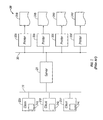
- Cluster printing system 20 includes one or more client devices 22a-22c coupled to server 28, which is also coupled to one or more printers 32a-32d.
- Client devices 22a-22c may be personal computers, laptop computers, handheld computers, computer workstations, personal digital assistants, cell-phones, fax machines, or any similar device that may be used to provide print jobs 24a-24c, respectively, for printing.
- Client devices 22a-22c may be coupled directly to server 28, or may be coupled to server 28 via a communications network 26.
- Serve 23 may be a personal computer, laptop computer, handheld computer, computer workstation or any similar device that includes software and/or hardware that provides cluster printing capabilities.
- Printers 32a-32d may be printers, copiers, fax machines, laser printers, plotters, inkjet printers, wide format printers, or other similar printers that may be used to provide print output 34a-34d, respectively.
- Printers 32a-32d may be the same make and model, or may include more than one make and model of printer.
- printer 32a may be a 12 page per minute ("ppm") black and white printer
- printer 32b may be a 50 ppm black and white printer
- printer 32c may be a 32 ppm color printer
- printer 32d may be a 75 ppm color printer.
- Printers 32a-32d may be coupled directly to server 28, or may be coupled via network 30.
- Networks 26 and 30 each may be a local area network, wide area network, wireless network, the Internet, or any similar network.
- Networks 26 and 30 each may be a single network or may include multiple networks, and the two networks may be the same network.
- a user of any of client computers 22a-22c may create virtual printer clusters that include various combinations of printers 32a-32d.
- a user of client computer 22a may form a first virtual printer group including printers 32a and 32b, a second virtual printer group including printers 32c and 32d, a third virtual printer group including printers 32b, 32c and 32d, and so on.
- a corresponding print driver for each virtual printer group may then be installed on client computer 22a, and print job 24a may then be submitted to any of the virtual printer groups by specifying the desired virtual printer group from a printer selection menu.
- cluster printing systems may be configured with printers that include more than one make and model of printer, the constituent printers in each virtual printer group may not use a single media selection process. For example, some printers in a cluster printing system may provide media selection via a paper catalog, other printers may provide media selection via media tray pulldown menus, and still other printers may provide media selection via media attribute pulldown menus. Further, even if several printers provide media selection via paper catalogs, the printers may not use the same paper catalog.
- printer 32a may provide media selection via a first paper catalog
- printer 32b may provide media selection via a second paper catalog that differs from the first paper catalog
- printer 32c may provide media selection via media tray pulldown menus
- printer 32d may provide media selection via media attribute pulldown menus.
- Previously known cluster printing systems typically address this issue by providing print drivers that include a superset of media selection options for all printers in the corresponding virtual printer group.
- a print driver for a virtual printer group that includes all four printers 32a-32d may permit media selection using the first paper catalog, the second paper catalog, the media tray pulldown menu and optionally other media attribute pulldown menus, such as a media type pulldown menu.
- a problem may occur, however, if these different media selection techniques do not use a consistent convention for designating media.
- printer 32a and printer 32b each may have three paper trays, with the first, second and third trays of each printer loaded with white paper having weights of 80 g/m 2 , 75 g/m 2 and 70 g/m 2 , respectively.
- the first paper catalog may classify these media weights as “Heavy”, “Medium”, and “Light”, respectively, whereas the second paper catalog may classify the exact same media weights as "80 g/m 2 " "75 g/m 2 ", and "70 g/m 2 ", respectively. If a user submits a print job 24a to the virtual printer group and selects an entry from the first paper catalog that specifies Medium weight paper, the entire print job will be sent only to printer 32a, because only printer 32a recognizes a media weight designation as Medium. This is true even though printer 32b is a faster printer that has the exact same media as printer 32a, and could print some or all of the print job.
- US 2002/0097424 discloses a cluster printing system, providing multiple printers in a network, allowing a single print job to be split among several printers.
- US 2003/0044194 discloses media selection using a paper catalog for a printing system that includes a single print output device.
- Cluster printing system 20' includes client devices 22a-22c coupled server 28', which is also coupled to printers 32a-32d. Although three client devices 22a-22c and four printers 32a-32d are shown in FIG. 3 , a greater or lesser number of devices may be included in cluster printing system 20'.
- client devices 22a-22c may be coupled directly to server 28', or may be coupled via network 26.
- printers 32a-32d may be coupled directly to server 28', or may be coupled via network 30.
- server 28' includes universal media selection tool 40, described in more detail below.
- Each of printers 32a-32d uses a corresponding device-specific media selection technique 42a-42d, respectively, to select media for that printer.
- media selection technique 42a may be a first paper catalog (e.g. "Paper Catalog 1")
- media selection technique 42b may be a second paper catalog (e.g., Paper Catalog 2)
- media selection technique 42c may be a media tray pulldown menu
- media selection technique 42d may be a media attribute pulldown menu, such as a media type pulldown menu.
- Paper Catalog 1 and Paper Catalog 2 may be the same paper catalog, or may be different paper catalogs.
- universal media selection tool 40 permits a user of any of client devices 22a-22c to specify media for printing print jobs 24a-24c on any virtual printer group including printers 32a-32d using a universal paper catalog.
- Universal media selection tool 40 includes universal paper catalog 44, entry editor 46, paper catalog translator 48 and tray associator 50.
- FIG. 5 illustrates an exemplary universal paper catalog 44 in accordance with this invention.
- Universal paper catalog 44 is a two-dimensional array that includes one or more entries that each associate a media label 52 with corresponding media attributes 54.
- media labels 52 are associated with attributes "Size,” “Type,” “Weight,” “Color,” “Hole Punch,” and “Tab Positions.”
- Exemplary attributes 54 are media attributes typically encountered in cluster printing systems. Persons of ordinary skill in the art will understand that the attributes 54 other than those shown in FIG. 5 may be used, the order of the attributes may be interchanged, and more than or less than the number of attributes shown may be used.
- entry editor 46 may be used to create, import, export and edit paper catalog entries in universal paper catalog 44.
- FIG. 6 illustrates an exemplary embodiment of entry editor 46 in accordance with this invention.
- Entry editor 46 may be any conventional windowed user interface that displays entries from universal paper catalog 44 and includes function buttons 56a-56g for modifying the entries.
- Exemplary function buttons 56a-56g include "ADD,” “DELETE,” “COPY,” “IMPORT,” “EXPORT,” “SAVE,” and “CANCEL” functions. Persons of ordinary skill in the art will understand that function buttons in addition to or other than those shown in FIG. 6 may be used.
- ADD function button 56a may be used to add a new entry to universal paper catalog 44.
- an Add Paper Entry pop-up window 58 may be displayed, as shown in FIG. 7 .
- Add Paper Entry window 58 includes editable fields 60a-60f for entering the information for each entry regarding Label, Size, Type, Weight, Color, and Hole Punch, respectively. Each of these fields will be discussed in turn.
- Label field 60a may be used to enter an alphanumeric label used to identify the media associated with the entry.
- Size field 60b may include a pulldown arrow for selecting the media size from a list of predetermined media sizes.
- predetermined media sizes may include Letter, Legal, Tabloid, A4, A3, 9x11", 11x17", Envelope #10, and other commonly used sizes.
- a "custom" size may be included that permits a user to specify a custom media size in English units, metric units, or points.
- Type field 60c may include a pulldown arrow for selecting the media type from a list of predefined media types.
- predetermined media types may include Plain, Letterhead, Label, Recycled, Transparent, Translucent, Tab, or other commonly used media types.
- a "custom" type may be included in the pulldown list that permits a user to specify a custom media type. If the type is specified as "Tab,” another pop-up window (not shown) may appear that enables the user to specify tab parameters, such as the number of tab positions (or number of cuts), tab offset dimensions, and other similar tab parameters.
- Weight field 60d may be used to specify the media weight.
- the media weight may be specified in g/m 2 as any value from 1-999 g/m 2 .
- Persons of ordinary skill in the art will understand that any other unit of weight alternatively may be used.
- Color field 60e may include a pulldown arrow for selecting the media color from a list of predefined media colors.
- predefined media colors may include white, red, yellow, green, blue, clear, pink, buff, goldenrod, gray, orange, ivory, purple, or other commonly used media colors.
- a "custom" color may be included in the pulldown list that permits a user to specify a custom media color.
- Hole Punch field 60f may include a pulldown arrow for selecting from a list of predefined values the number of holes punched.
- predefined values may include "Any,” “Not Punched,” “2,” “3,” or “4,” or other commonly used values.
- DELETE function button 56b may be used to delete selected entries in universal paper catalog 44. For example, a cursor may be positioned over a particular entry, and the DELETE button may be selected to delete that entry.
- COPY function button 56c may be used to copy an existing entry to a new entry that has a different label, but otherwise has identical attributes to the existing entry.
- IMPORT and EXPORT function buttons 56d and 56e respectively, described in more detail below, may be used to import and export paper catalog entries to and from device-specific paper catalogs used by any printer coupled to server 28'.
- SAVE function button 56f may be used to save any changes made to universal paper catalog 44, and CANCEL function button 56g may be used to cancel any changes to the catalog.
- printer 32a includes first paper catalog 42a
- printer 32b includes second paper catalog 42b
- IMPORT function button 56d may be used to import entries in universal paper catalog 44 from entries in device-specific paper catalogs, or from files that use machine readable or human readable file formats, such as job description format ("JDF") or comma separated enumerations.
- JDF job description format
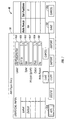
- FIG. 8 when IMPORT function button 56d is selected from entry editor 46, an "Import Paper Catalog" pop-up window 62a may be displayed that includes pulldown menu 64a for selecting the desired device-specific paper catalog or file to import.
- printers 32 are added to cluster printing system 20' ( FIG.
- pulldown menu 64a includes entries for Paper Catalog 1 and Paper Catalog 2 of media selection procedures 42a and 42b, respectively.
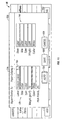
- Import Entries window 68a may include a title bar 70a that indicates the name of the selected device-specific paper catalog whose entries will be imported to universal paper catalog 44.
- Import Entries window 68a may be used to import entries from Paper Catalog 1 to entries in universal paper catalog 44.
- Import Entries window 68a may include a first section 72a listing the name and associated attributes for an entry in the selected device-specific paper catalog, and a second section 74a listing the label and associated attribute values for the corresponding entry in universal paper catalog 44. If the device-specific paper catalog includes more than one entry, pulldown arrow 76a may be used to select each entry from the catalog. As each entry is displayed, the associated attributes in first section 72a change accordingly.
- the values in second section 74a may be modified manually in a manner similar to that described above in connection with Add Paper Entry window 58. That is, a user may manually edit the information for each entry regarding Label, Size, Type, Weight, Color, and Hole Punch.
- An optional "AUTO" function button 78a may be provided to automatically convert entries from the specified device-specific paper catalog to entries in universal paper catalog 44. In this regard, the AUTO function may use any conventional logic to predict the correct entry values in second section 74a. Following automatic conversion, the entry values in second section 74a may be manually modified if a user wants to alter the predicted values. Imported values may be saved using a SAVE function button 80a, or may be cancelled using a CANCEL function button 82a.
- EXPORT function button 56e may be used to export entries from universal paper catalog 44 to entries in device-specific paper catalogs, or to a file that uses machine readable or human readable file formats, like JDF or comma separated enumerations.
- an "Export Paper Catalog" pop-up window 62b may be displayed that includes pulldown menu 64b that allows a user to select a desired device-specific paper catalog or a file that will receive the exported data.
- pulldown menu 64b includes entries for Paper Catalog 1 and Paper Catalog 2 of media selection procedures 42a and 42b, respectively, and also includes an entry for exporting entries in universal paper catalog 44 to a file.
- Export Entries window 68b may include a title bar 70b that indicates the name of the selected device-specific paper catalog or file that will receive entries from universal paper catalog 44.
- Export Entries window 68b may be used to export entries from universal paper catalog 44 to entries in Paper Catalog 2.
- Export Entries window 68 may include a first section 72b listing the label and associated attributes for an entry in universal paper catalog 44, and a second section 74b listing the style and associated attribute values for the corresponding entry in the selected device-specific paper catalog. If universal paper catalog 44 includes more than one entry, pulldown arrow 76b may be used to select each entry from the catalog. As each entry is displayed, the associated attributes in first section 72b change accordingly.
- the values in second section 74b may be modified manually in a manner similar to that described above in connection with Add Paper Entry window 58. That is, a user may manually edit the information for each entry regarding Style, Size, Type, Weight and Color.
- An optional "AUTO" function button 78b may be provided to automatically convert entries from universal paper catalog 44 to entries in the specified device-specific paper catalog.
- the AUTO function may use any conventional logic to predict the correct entry values in second section 74b.
- the entry values in second section 74b may be manually modified if a user wants to alter the predicted values. Exported values may be saved using a SAVE function button 80b, or may be cancelled using a CANCEL function button 82b.
- the paper catalog may be used to specify media for use in cluster printing system 20'. That is, a user of any of client devices 22a-22c may select media for printing print jobs 24a-24c to any virtual printer group in cluster printing system 20' by selecting an entry from universal paper catalog 44.
- universal media selector 40 converts the specified media attributes to formats recognized by the printers in the virtual printer group.
- paper catalog translator 48 translates paper catalog entries between universal paper catalog 44 and device-specific paper catalogs of printers coupled to server 28', and tray associator associates paper catalog entries in universal paper catalog 44 with specific trays and attributes of printers coupled to server 28'.
- FIG. 12 illustrates an exemplary paper catalog translator 48.
- Paper catalog translator 48 may be a two-dimensional array that may be used to translate attribute labels and associated values in universal paper catalog 44 to corresponding attribute names and associated values in device-specific paper catalogs.
- paper catalog translator 48 includes entries for translating attribute labels and associated values in universal paper catalog 44 to and from corresponding attribute names and associated values in Paper Catalog 1 and Paper Catalog 2.
- universal paper catalog 44 may include an entry labeled "Generic Labels” that translates to and from entries named “Labels” in Paper Catalog 1 and styled “Label” in paper Catalog 2.
- paper catalog translator 48 will translate the media selection to "Labels” for any portion of the print job directed to printer 32a, and to "Label” for any portion of the print job directed to printer 32b.
- tray associator 50 may be used to associate paper catalog entries in universal paper catalog 44 to device-specific media trays and/or media attributes of printers coupled to server 28'.
- tray associator 50 associates previously defined entries in universal paper catalog 44 with media tray and media attribute designations, such as media type.
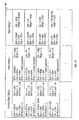
- FIG. 13 an exemplary tray associator in accordance with this invention is described.
- Tray associator 50 includes a two dimensional array including lists of printers 82 and paper catalog labels 84. Expand/Contract buttons 88 may be used to obtain detailed media tray information 90 about each printer in list 82.
- Printer 32c has three media trays (Tray 1, Tray 2 and Tray 3), whereas Printer 32d has just two media trays (Tray 1 and Tray 2).
- Paper catalog label list 84 may be used to associate media trays 90 with predefined labels from universal paper catalog 44.
- pulldown menu 92 may be used to select a label from universal paper catalog 44 that will be associated with the specified media tray.
- Tray 1 of Printer 32c has been associated with label "Default,” and Tray 2 of Printer 32d has been associated with label "John's Tabs.”
- a media type (or other device-specific media attribute) must be specified in addition to specifying a media tray for proper printer operation (e.g., to avoid media jams).
- optional media type list 86 may be used to further associate media trays 90 with device-specific media attributes, as listed in the native device printer's driver.
- scrolling window 96 may be positioned adjacent a specific media tray 90, and pulldown tab 98 may be used to select a media type (or other device-specific media attribute) that will be associated with the specified media tray.
- Tray 2 of Printer 32c has been associated with type "Bond”
- Tray 1 of Printer 32d has been associated with type "Label.”
- tray associator 50 will associate the media selection to Tray 2 for any portion of the print job directed to printer 32c.
- tray associator 50 will associate the media selection to Tray 2 and media type to "Tab" for any portion of the print job directed to printer 32d.
- a user of any of client computers 22a-22c submits a print job to a virtual printer group.
- a user of client computer 22a may submit print job 24a to a virtual printer group that includes printer 32a-32d.
- the user selects media for print job 24a from universal paper catalog 44.
- the user may select "John's Tabs" from universal paper catalog 44.
- server 28' selects printers from within the virtual printer group for printing the print job.
- server 28' may load balance the print job among multiple printers, split color from black-and-white pages in the same document, route a print job to the best available printer based on the number of pages and other characteristics, send a print job to an alternate printer if a currently selected printer is out of paper or toner or if there is a paper jam, and automatically send certain types of jobs to specific printers, based on specified criteria such as media characteristics, finishing options and device capabilities.
- the media selected from universal paper catalog 44 is communicated to the various printers in a format that each printer understands.
- the media selected from universal paper catalog 44 is translated to attribute names and associated values in device-specific paper catalogs in the virtual printer group.
- John's Tabs is translated to the name "Tab 1" in Paper Catalog 1 and the style "Tab” in Paper Catalog 2.
- step 110 if portions of print job 24a are sent to printers that use media tray or media attribute pulldown menus (e.g., printers 32c and 32d), the media selected from universal paper catalog 44 is associated to device-specific trays and attributes of corresponding printers in the virtual printer group.
- John's Tabs is associated to Tray 2 of printer 32d (and optionally to type "Tab").
- Exemplary apparatus for implementing at least some aspects of this invention include a general purpose computing device, such as a personal computer, and a server computer, such as a server used in cluster printing systems.
- Such computing devices may include a computer memory such as read only memory, hard disk, magnetic disk, optical disk, or other suitable memory that may be used to store software modules and other data, such as universal paper catalog data, paper catalog translator data, tray associator data, exported paper catalog data, or other similar files used to implement methods of the present invention.
Landscapes
- Engineering & Computer Science (AREA)
- Theoretical Computer Science (AREA)
- Physics & Mathematics (AREA)
- General Physics & Mathematics (AREA)
- Human Computer Interaction (AREA)
- General Engineering & Computer Science (AREA)
- Microelectronics & Electronic Packaging (AREA)
- Accessory Devices And Overall Control Thereof (AREA)
Description
- This invention relates to digital printing, and more particularly to cluster printing systems.
- Most print output devices, such as copiers, printers, facsimile machines and other similar print output devices (collectively referred to as "printers"), may be used with a wide variety of output media. Indeed, conventional printers typically include one or more media trays that accept many different media types, sizes, colors and weights. When a user submits a print job to such a printer, such as by selecting a "Print" function from within a word processing, spreadsheet, page layout, or other software application, the application typically calls a print driver that permits the user to specify numerous print output specifications, such as a desired media for the print job. A user interface on conventional print drivers typically includes pull-down menus that allow the user to select a specific media tray or specific media attributes for printing the print job. For example, if a user knows that desired media are loaded in Tray 2 of the printer, the user may select
Tray 2 from a media tray pulldown menu, and the print job will be printed on media extracted from Tray 2. Alternatively, a print driver may allow a user to specify media attributes, such as type, size, color or other attribute rather than specifying a particular media tray. For example, if any of a printer's media trays includes Letterhead paper, a user may specify Letterhead from a media type pulldown menu, and the print job will be printed on media extracted from a tray that includes Letterhead. - For conventional office or home printers, the number of different media trays and attributes is usually small, and the media specification process is usually quite straightforward. Indeed, most office or home printers include only a few media trays, and typically use only a handful of different media attributes. For commercial print shop printers, however, the number of different media sources and attributes may be quite large. Indeed, a commercial print shop printer may have many different media trays that may be loaded with media having a large number of different attributes. For example, a printer used in a print shop may have six media trays that each may be loaded with media having any of twenty different colors, ten different sizes, five different weights, and three different hole-punching styles.
- If a printer supports many different media attributes, the printer may provide pulldown menus for selecting media attributes, such as media size, type, weight, color, and other attributes. Thus, a user may find it quite time consuming to specify each media attribute for every print job. To simplify this selection process, some previously known print systems include a paper catalog for media selection. An exemplary previously known paper catalog is illustrated in
FIG. 1 .Paper catalog 10 is a two-dimensional array that associates one ormore media names 12 with a corresponding set ofmedia attributes 14. In the illustrated example,media names 12 are associated with attributes "Size," "Color," "Weight" (in grams per square meter, "g/m2"), "Type," and "Mode." A system administrator typically creates the various entries in the paper catalog for commonly used media. Once the paper catalog is created, a user may specify desired media for a print job by selecting any one of the entries in the catalog via a print driver or other job submission means, such as a proprietary downloader or Web submission means. - For example, a paper catalog may include a first entry named "Letter" to designate media that are 8.5x11", white, 75 g/m2, plain, single sided or double sided, and capable of being hole-punched, and a second entry named "Letter Pink" to designate media that are 8.5x11", pink, 75 g/m2, plain, single sided or double sided, and capable of being hole-punched. For print systems that use a paper catalog, the media selection process is simple. Rather than navigating through numerous media attribute pulldown menus and submenus, a user instead only needs to select a desired media name from a single paper catalog pulldown menu. When the print job is submitted to the printer, the media attributes associated with the selected media name will be communicated to the printer, and the printer will extract media from the appropriate tray that includes media having those attributes. Paper catalogs therefore have greatly simplified the media selection process.
- In addition to improvements in the media selection process, print systems have also advanced in other ways in recent years. Indeed, print technology has advanced to provide "cluster printing," in which multiple printers may be coupled together in a network. In particular, cluster printing systems may be used to couple multiple printers together to form "virtual printer groups." One exemplary cluster printing system is Velocity™ workflow software, including the Velocity Balance Server™, licensed by Electronics for Imaging, Inc., Foster City, CA. Velocity software may be used to couple many printers together, regardless of brand and model, to appear as a single virtual printer group on a network. Velocity software can load balance a single "long" print job among multiple printers, split color from black-and-white pages in the same document, route a print job to the best available printer based on the number of pages and other characteristics, send a print job to an alternate printer if a currently selected printer is out of paper or toner or if there is a paper jam, and automatically send certain types of jobs to specific printers, based on specified criteria such as media characteristics, finishing options and device capabilities.
- Referring to
FIG. 2 , an exemplary previously known cluster printing system is described.Cluster printing system 20 includes one ormore client devices 22a-22c coupled toserver 28, which is also coupled to one ormore printers 32a-32d.Client devices 22a-22c may be personal computers, laptop computers, handheld computers, computer workstations, personal digital assistants, cell-phones, fax machines, or any similar device that may be used to provideprint jobs 24a-24c, respectively, for printing.Client devices 22a-22c may be coupled directly toserver 28, or may be coupled toserver 28 via acommunications network 26. Serve 23 may be a personal computer, laptop computer, handheld computer, computer workstation or any similar device that includes software and/or hardware that provides cluster printing capabilities. -
Printers 32a-32d may be printers, copiers, fax machines, laser printers, plotters, inkjet printers, wide format printers, or other similar printers that may be used to provideprint output 34a-34d, respectively.Printers 32a-32d may be the same make and model, or may include more than one make and model of printer. For example,printer 32a may be a 12 page per minute ("ppm") black and white printer,printer 32b may be a 50 ppm black and white printer, printer 32c may be a 32 ppm color printer, andprinter 32d may be a 75 ppm color printer.Printers 32a-32d may be coupled directly toserver 28, or may be coupled vianetwork 30.Networks Networks - A user of any of
client computers 22a-22c, such asclient computer 22a, may create virtual printer clusters that include various combinations ofprinters 32a-32d. For example, a user ofclient computer 22a may form a first virtual printergroup including printers group including printers 32c and 32d, a third virtual printergroup including printers client computer 22a, andprint job 24a may then be submitted to any of the virtual printer groups by specifying the desired virtual printer group from a printer selection menu. - One problem associated with previously known cluster printing systems, however, pertains to media selection. Because cluster printing systems may be configured with printers that include more than one make and model of printer, the constituent printers in each virtual printer group may not use a single media selection process. For example, some printers in a cluster printing system may provide media selection via a paper catalog, other printers may provide media selection via media tray pulldown menus, and still other printers may provide media selection via media attribute pulldown menus. Further, even if several printers provide media selection via paper catalogs, the printers may not use the same paper catalog. Thus,
printer 32a may provide media selection via a first paper catalog,printer 32b may provide media selection via a second paper catalog that differs from the first paper catalog, printer 32c may provide media selection via media tray pulldown menus, andprinter 32d may provide media selection via media attribute pulldown menus. - Previously known cluster printing systems typically address this issue by providing print drivers that include a superset of media selection options for all printers in the corresponding virtual printer group. Thus, a print driver for a virtual printer group that includes all four
printers 32a-32d may permit media selection using the first paper catalog, the second paper catalog, the media tray pulldown menu and optionally other media attribute pulldown menus, such as a media type pulldown menu. A problem may occur, however, if these different media selection techniques do not use a consistent convention for designating media. For example,printer 32a andprinter 32b each may have three paper trays, with the first, second and third trays of each printer loaded with white paper having weights of 80 g/m2, 75 g/m2 and 70 g/m2, respectively. The first paper catalog may classify these media weights as "Heavy", "Medium", and "Light", respectively, whereas the second paper catalog may classify the exact same media weights as "80 g/m2" "75 g/m2", and "70 g/m2", respectively. If a user submits aprint job 24a to the virtual printer group and selects an entry from the first paper catalog that specifies Medium weight paper, the entire print job will be sent only toprinter 32a, because onlyprinter 32a recognizes a media weight designation as Medium. This is true even thoughprinter 32b is a faster printer that has the exact same media asprinter 32a, and could print some or all of the print job. -
US 2002/0097424 discloses a cluster printing system, providing multiple printers in a network, allowing a single print job to be split among several printers. -
US 2003/0044194 discloses media selection using a paper catalog for a printing system that includes a single print output device. - In view of the foregoing, it would be desirable to provide methods and apparatus for simplifying and unifying the media selection process for cluster printing systems.
- It further would be desirable to provide methods and apparatus for providing a universal paper catalog for cluster printing systems.
- In view of the foregoing, it is an object of this invention to provide methods and apparatus for simplifying and unifying the media selection process for cluster printing systems.
- It further is an object of this invention to provide methods and apparatus for providing a universal paper catalog for cluster printing systems as in
apparatus claim 1 and method claim 8. - The above-mentioned objects and features of the present invention can be more clearly understood from the following detailed description considered in conjunction with the following drawings, in which the same reference numerals denote the same elements throughout, and in which:
-
FIG. 1 is an illustration of a previously known paper catalog; -
FIG. 2 is a block diagram of a previously known cluster printing system; -
FIG. 3 is a block diagram of an exemplary cluster printing system in accordance with this invention; -
FIG. 4 is a block diagram of an exemplary embodiment of a universal media selector in accordance with this invention; -
FIG. 5 is an illustration of an exemplary universal paper catalog in accordance with this invention; -
FIG. 6 is an exemplary embodiment of a universal paper catalog entry editor in accordance with this invention; -
FIG. 7 is an exemplary embodiment of a user interface window in accordance with this invention; -
FIG. 8 is an exemplary embodiment of another user interface window in accordance with this invention; -
FIG. 9 is an exemplary embodiment of another user interface window in accordance with this invention; -
FIG. 10 is an exemplary embodiment of another user interface window in accordance with this invention; -
FIG. 11 is an exemplary embodiment of another user interface window in accordance with this invention; -
FIG. 12 is an exemplary embodiment of a paper catalog translator in accordance with this invention; -
FIG. 13 is an exemplary embodiment of a tray associator in accordance with this invention; and -
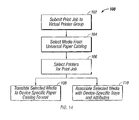
FIG. 14 is an exemplary method for selecting media in a cluster printing system in accordance with this invention. - Referring to
FIG. 3 , an exemplary cluster printing system 20' in accordance with this invention is described. Cluster printing system 20' includesclient devices 22a-22c coupled server 28', which is also coupled toprinters 32a-32d. Although threeclient devices 22a-22c and fourprinters 32a-32d are shown inFIG. 3 , a greater or lesser number of devices may be included in cluster printing system 20'. One or more ofclient devices 22a-22c may be coupled directly to server 28', or may be coupled vianetwork 26. Similarly, one or more ofprinters 32a-32d may be coupled directly to server 28', or may be coupled vianetwork 30. - In accordance with this invention, server 28' includes universal
media selection tool 40, described in more detail below. Each ofprinters 32a-32d uses a corresponding device-specificmedia selection technique 42a-42d, respectively, to select media for that printer. For example,media selection technique 42a may be a first paper catalog (e.g. "Paper Catalog 1"),media selection technique 42b may be a second paper catalog (e.g., Paper Catalog 2), media selection technique 42c may be a media tray pulldown menu, andmedia selection technique 42d may be a media attribute pulldown menu, such as a media type pulldown menu.Paper Catalog 1 andPaper Catalog 2 may be the same paper catalog, or may be different paper catalogs. As described in more detail below, universalmedia selection tool 40 permits a user of any ofclient devices 22a-22c to specify media forprinting print jobs 24a-24c on any virtual printergroup including printers 32a-32d using a universal paper catalog. - Referring now to
FIG. 4 , an exemplary universalmedia selection tool 40 in accordance with this invention is described. Universalmedia selection tool 40 includesuniversal paper catalog 44,entry editor 46,paper catalog translator 48 andtray associator 50.FIG. 5 illustrates an exemplaryuniversal paper catalog 44 in accordance with this invention.Universal paper catalog 44 is a two-dimensional array that includes one or more entries that each associate amedia label 52 with corresponding media attributes 54. In the illustrated example, media labels 52 are associated with attributes "Size," "Type," "Weight," "Color," "Hole Punch," and "Tab Positions."Exemplary attributes 54 are media attributes typically encountered in cluster printing systems. Persons of ordinary skill in the art will understand that theattributes 54 other than those shown inFIG. 5 may be used, the order of the attributes may be interchanged, and more than or less than the number of attributes shown may be used. - Referring again to
FIG. 4 ,entry editor 46 may be used to create, import, export and edit paper catalog entries inuniversal paper catalog 44.FIG. 6 illustrates an exemplary embodiment ofentry editor 46 in accordance with this invention.Entry editor 46 may be any conventional windowed user interface that displays entries fromuniversal paper catalog 44 and includesfunction buttons 56a-56g for modifying the entries.Exemplary function buttons 56a-56g include "ADD," "DELETE," "COPY," "IMPORT," "EXPORT," "SAVE," and "CANCEL" functions. Persons of ordinary skill in the art will understand that function buttons in addition to or other than those shown inFIG. 6 may be used. -
ADD function button 56a may be used to add a new entry touniversal paper catalog 44. WhenADD function button 56a is selected, an Add Paper Entry pop-upwindow 58 may be displayed, as shown inFIG. 7 . AddPaper Entry window 58 includeseditable fields 60a-60f for entering the information for each entry regarding Label, Size, Type, Weight, Color, and Hole Punch, respectively. Each of these fields will be discussed in turn. -
Label field 60a may be used to enter an alphanumeric label used to identify the media associated with the entry. For example, "MyPinkLetterTab" may be used as an identifying label.Size field 60b may include a pulldown arrow for selecting the media size from a list of predetermined media sizes. For example, predetermined media sizes may include Letter, Legal, Tabloid, A4, A3, 9x11", 11x17",Envelope # 10, and other commonly used sizes. Optionally, a "custom" size may be included that permits a user to specify a custom media size in English units, metric units, or points. -
Type field 60c may include a pulldown arrow for selecting the media type from a list of predefined media types. For example, predetermined media types may include Plain, Letterhead, Label, Recycled, Transparent, Translucent, Tab, or other commonly used media types. Optionally, a "custom" type may be included in the pulldown list that permits a user to specify a custom media type. If the type is specified as "Tab," another pop-up window (not shown) may appear that enables the user to specify tab parameters, such as the number of tab positions (or number of cuts), tab offset dimensions, and other similar tab parameters. -
Weight field 60d may be used to specify the media weight. For example, the media weight may be specified in g/m2 as any value from 1-999 g/m2. Persons of ordinary skill in the art will understand that any other unit of weight alternatively may be used.Color field 60e may include a pulldown arrow for selecting the media color from a list of predefined media colors. For example, predefined media colors may include white, red, yellow, green, blue, clear, pink, buff, goldenrod, gray, orange, ivory, purple, or other commonly used media colors. Optionally, a "custom" color may be included in the pulldown list that permits a user to specify a custom media color.Hole Punch field 60f may include a pulldown arrow for selecting from a list of predefined values the number of holes punched. For example, predefined values may include "Any," "Not Punched," "2," "3," or "4," or other commonly used values. - Referring again to
FIG. 6 , DELETEfunction button 56b may be used to delete selected entries inuniversal paper catalog 44. For example, a cursor may be positioned over a particular entry, and the DELETE button may be selected to delete that entry.COPY function button 56c may be used to copy an existing entry to a new entry that has a different label, but otherwise has identical attributes to the existing entry. IMPORT andEXPORT function buttons SAVE function button 56f may be used to save any changes made touniversal paper catalog 44, and CANCELfunction button 56g may be used to cancel any changes to the catalog. - As described above with regard to
FIG. 3 ,printer 32a includesfirst paper catalog 42a, andprinter 32b includessecond paper catalog 42b.IMPORT function button 56d (FIG. 6 ) may be used to import entries inuniversal paper catalog 44 from entries in device-specific paper catalogs, or from files that use machine readable or human readable file formats, such as job description format ("JDF") or comma separated enumerations. Referring now toFIG. 8 , whenIMPORT function button 56d is selected fromentry editor 46, an "Import Paper Catalog" pop-upwindow 62a may be displayed that includespulldown menu 64a for selecting the desired device-specific paper catalog or file to import. As printers 32 are added to cluster printing system 20' (FIG. 3 ), the data used to populatepulldown menu 64a may be updated to include any paper catalog included in the added printer. Thus, as shown inFIG. 8 ,pulldown menu 64a includes entries forPaper Catalog 1 andPaper Catalog 2 ofmedia selection procedures - Upon selecting
OK button 66a in ImportPaper Catalog window 62a, an "Import Entries" pop-upwindow 68a may be displayed, as illustrated inFIG. 9 .Import Entries window 68a may include atitle bar 70a that indicates the name of the selected device-specific paper catalog whose entries will be imported touniversal paper catalog 44. In the exemplary embodiment shown inFIG. 9 ,Import Entries window 68a may be used to import entries fromPaper Catalog 1 to entries inuniversal paper catalog 44.Import Entries window 68a may include afirst section 72a listing the name and associated attributes for an entry in the selected device-specific paper catalog, and asecond section 74a listing the label and associated attribute values for the corresponding entry inuniversal paper catalog 44. If the device-specific paper catalog includes more than one entry,pulldown arrow 76a may be used to select each entry from the catalog. As each entry is displayed, the associated attributes infirst section 72a change accordingly. - For each displayed entry, the values in
second section 74a may be modified manually in a manner similar to that described above in connection with AddPaper Entry window 58. That is, a user may manually edit the information for each entry regarding Label, Size, Type, Weight, Color, and Hole Punch. An optional "AUTO"function button 78a may be provided to automatically convert entries from the specified device-specific paper catalog to entries inuniversal paper catalog 44. In this regard, the AUTO function may use any conventional logic to predict the correct entry values insecond section 74a. Following automatic conversion, the entry values insecond section 74a may be manually modified if a user wants to alter the predicted values. Imported values may be saved using aSAVE function button 80a, or may be cancelled using a CANCELfunction button 82a. - Referring again to
FIG. 6 ,EXPORT function button 56e may be used to export entries fromuniversal paper catalog 44 to entries in device-specific paper catalogs, or to a file that uses machine readable or human readable file formats, like JDF or comma separated enumerations. Referring now toFIG. 10 , whenEXPORT function button 56e is selected fromentry editor 46, an "Export Paper Catalog" pop-upwindow 62b may be displayed that includespulldown menu 64b that allows a user to select a desired device-specific paper catalog or a file that will receive the exported data. As printers 32 are added to cluster printing system 20' (FIG. 3 ), the data used to populatepulldown menu 64b may be updated to include any paper catalog included in the added printer. Thus, as shown inFIG. 10 ,pulldown menu 64b includes entries forPaper Catalog 1 andPaper Catalog 2 ofmedia selection procedures universal paper catalog 44 to a file. - Upon selecting
OK button 66b in ExportPaper Catalog window 62b, an "Export Entries" pop-upwindow 68b may be displayed, as illustrated inFIG. 11 .Export Entries window 68b may include atitle bar 70b that indicates the name of the selected device-specific paper catalog or file that will receive entries fromuniversal paper catalog 44. In the exemplary embodiment shown inFIG. 11 ,Export Entries window 68b may be used to export entries fromuniversal paper catalog 44 to entries inPaper Catalog 2. Export Entries window 68 may include afirst section 72b listing the label and associated attributes for an entry inuniversal paper catalog 44, and asecond section 74b listing the style and associated attribute values for the corresponding entry in the selected device-specific paper catalog. Ifuniversal paper catalog 44 includes more than one entry,pulldown arrow 76b may be used to select each entry from the catalog. As each entry is displayed, the associated attributes infirst section 72b change accordingly. - For each displayed entry, the values in
second section 74b may be modified manually in a manner similar to that described above in connection with AddPaper Entry window 58. That is, a user may manually edit the information for each entry regarding Style, Size, Type, Weight and Color. An optional "AUTO"function button 78b may be provided to automatically convert entries fromuniversal paper catalog 44 to entries in the specified device-specific paper catalog. In this regard, the AUTO function may use any conventional logic to predict the correct entry values insecond section 74b. Following automatic conversion, the entry values insecond section 74b may be manually modified if a user wants to alter the predicted values. Exported values may be saved using aSAVE function button 80b, or may be cancelled using a CANCELfunction button 82b. - Referring again to
FIGS. 3 and4 , once the entries inuniversal paper catalog 44 have been completed, the paper catalog may be used to specify media for use in cluster printing system 20'. That is, a user of any ofclient devices 22a-22c may select media forprinting print jobs 24a-24c to any virtual printer group in cluster printing system 20' by selecting an entry fromuniversal paper catalog 44. To process the print request,universal media selector 40 converts the specified media attributes to formats recognized by the printers in the virtual printer group. In particular,paper catalog translator 48 translates paper catalog entries betweenuniversal paper catalog 44 and device-specific paper catalogs of printers coupled to server 28', and tray associator associates paper catalog entries inuniversal paper catalog 44 with specific trays and attributes of printers coupled to server 28'. -
FIG. 12 illustrates an exemplarypaper catalog translator 48.Paper catalog translator 48 may be a two-dimensional array that may be used to translate attribute labels and associated values inuniversal paper catalog 44 to corresponding attribute names and associated values in device-specific paper catalogs. For example,paper catalog translator 48 includes entries for translating attribute labels and associated values inuniversal paper catalog 44 to and from corresponding attribute names and associated values inPaper Catalog 1 andPaper Catalog 2. - For example,
universal paper catalog 44 may include an entry labeled "Generic Labels" that translates to and from entries named "Labels" inPaper Catalog 1 and styled "Label" inpaper Catalog 2. Thus, if a user of any ofclient computers 22a-22c submits a print job to a virtual printer group that includesprinters universal paper catalog 44,paper catalog translator 48 will translate the media selection to "Labels" for any portion of the print job directed toprinter 32a, and to "Label" for any portion of the print job directed toprinter 32b. - Referring again to
FIG. 4 ,tray associator 50 may be used to associate paper catalog entries inuniversal paper catalog 44 to device-specific media trays and/or media attributes of printers coupled to server 28'. In particular,tray associator 50 associates previously defined entries inuniversal paper catalog 44 with media tray and media attribute designations, such as media type. Referring toFIG. 13 , an exemplary tray associator in accordance with this invention is described.Tray associator 50 includes a two dimensional array including lists ofprinters 82 and paper catalog labels 84. Expand/Contract buttons 88 may be used to obtain detailedmedia tray information 90 about each printer inlist 82. Thus, Printer 32c has three media trays (Tray 1,Tray 2 and Tray 3), whereasPrinter 32d has just two media trays (Tray 1 and Tray 2). Papercatalog label list 84 may be used toassociate media trays 90 with predefined labels fromuniversal paper catalog 44. In particular,pulldown menu 92 may be used to select a label fromuniversal paper catalog 44 that will be associated with the specified media tray. - In the example shown in
FIG. 13 ,Tray 1 of Printer 32c has been associated with label "Default," andTray 2 ofPrinter 32d has been associated with label "John's Tabs." On some printers, a media type (or other device-specific media attribute) must be specified in addition to specifying a media tray for proper printer operation (e.g., to avoid media jams). For such printers, optionalmedia type list 86 may be used to furtherassociate media trays 90 with device-specific media attributes, as listed in the native device printer's driver. In particular, scrollingwindow 96 may be positioned adjacent aspecific media tray 90, andpulldown tab 98 may be used to select a media type (or other device-specific media attribute) that will be associated with the specified media tray. Thus,Tray 2 of Printer 32c has been associated with type "Bond," andTray 1 ofPrinter 32d has been associated with type "Label." Thus, if a user of any ofclient computers 22a-22c submits a print job to a virtual printer group that includes printers 32c, and selects "XYZ Co." inuniversal paper catalog 44,tray associator 50 will associate the media selection toTray 2 for any portion of the print job directed to printer 32c. Similarly, if a user of any ofclient computers 22a-22c submits a print job to a virtual printer group that includesprinters 32d, and selects "John's Tabs" inuniversal paper catalog 44,tray associator 50 will associate the media selection toTray 2 and media type to "Tab" for any portion of the print job directed toprinter 32d. - Referring now to
FIGS. 3 ,12 ,13 and14 , an exemplary method for submitting a print job and specifying media in a cluster printing system in accordance with this invention is described. Beginning atstep 102, a user of any ofclient computers 22a-22c submits a print job to a virtual printer group. For example, a user ofclient computer 22a may submitprint job 24a to a virtual printer group that includesprinter 32a-32d. Atstep 104, the user selects media forprint job 24a fromuniversal paper catalog 44. For example, the user may select "John's Tabs" fromuniversal paper catalog 44. Atstep 106, server 28' selects printers from within the virtual printer group for printing the print job. As described above, server 28' may load balance the print job among multiple printers, split color from black-and-white pages in the same document, route a print job to the best available printer based on the number of pages and other characteristics, send a print job to an alternate printer if a currently selected printer is out of paper or toner or if there is a paper jam, and automatically send certain types of jobs to specific printers, based on specified criteria such as media characteristics, finishing options and device capabilities. - Once the job is divided between printers in the virtual printer group, the media selected from
universal paper catalog 44 is communicated to the various printers in a format that each printer understands. Thus, atstep 108, if portions ofprint job 24a are sent to printers that use a paper catalog (e.g.,printers universal paper catalog 44 is translated to attribute names and associated values in device-specific paper catalogs in the virtual printer group. In the example describe above, John's Tabs is translated to the name "Tab 1" inPaper Catalog 1 and the style "Tab" inPaper Catalog 2. Similarly, atstep 110, if portions ofprint job 24a are sent to printers that use media tray or media attribute pulldown menus (e.g.,printers 32c and 32d), the media selected fromuniversal paper catalog 44 is associated to device-specific trays and attributes of corresponding printers in the virtual printer group. In the example described above, John's Tabs is associated toTray 2 ofprinter 32d (and optionally to type "Tab"). - Exemplary apparatus for implementing at least some aspects of this invention include a general purpose computing device, such as a personal computer, and a server computer, such as a server used in cluster printing systems. Such computing devices may include a computer memory such as read only memory, hard disk, magnetic disk, optical disk, or other suitable memory that may be used to store software modules and other data, such as universal paper catalog data, paper catalog translator data, tray associator data, exported paper catalog data, or other similar files used to implement methods of the present invention.
- The foregoing merely illustrates the principles of this invention, and various modifications can be made by persons of ordinary skill in the art without departing from the scope of this invention as defined in the appended claims.
Claims (15)
- A cluster printing system (20') comprising a server computer (28') that comprises cluster printing software and that is coupled to a plurality of printers (32);
characterized in that each of the printers (32) comprises a corresponding device-specific media selection technique (42); and the server computer (28) further comprises:a media selector tool (40) comprising a universal paper catalog (44), the paper catalog (44) comprising a plurality of entries configured to associate a media name (52) with a media attribute (54), the media selector tool (40) adapted to translate the name (52) to formats compatible with a plurality of device-specific media selection techniques (42). - The cluster printing system (20) of claim 1, wherein one of the corresponding device-specific media selection techniques (42) comprises a paper catalog (42a, 42b).
- The cluster printing system (20') of claim 1, wherein one of the corresponding device-specific media selection techniques (42) comprises a media tray pulldown menu (42c).
- The cluster printing system (20') of claim 1, wherein one of the corresponding device-specific media selection techniques (42) comprises a media attribute pulldown menu (42d).
- The cluster printing system (20') of claim 1, wherein a first corresponding device-specific media selection technique comprises a first paper catalog (42a), and a second corresponding device-specific media selection techniques comprises a second paper catalog (42b).
- The cluster printing system (20') of claim 5, wherein the first paper catalog (42a) and the second paper catalog (42b) are the same paper catalog.
- The cluster printing system (20') of claim 5, wherein the first paper catalog (42a) and the second paper catalog (42b) are not the same paper catalog.
- A method for selecting media in a cluster printing system (20') that comprises a virtual printer cluster comprising a plurality of printers (32);
characterized in that each of the printers (32) comprises a corresponding device-specific media selection technique (42); and the method further comprises:providing a media selector tool (40) comprising a universal paper catalog (44) that comprises a plurality of entries, each entry associating a media name (52) with a media attribute (54);receiving a selection of one of the names (52);translating the selected name (52) to formats compatible with the plurality of device-specific media selection techniques (42). - The method of claim 8, wherein one of the corresponding devices-specific media selection techniques (42) comprises a paper catalog (42a, 42b).
- The method of claim 8, wherein one of the corresponding device-specific media selection techniques (42) comprises a media tray pulldown menu (42c).
- The method of claim 8, wherein one of the corresponding device-specific media selection techniques (42) comprises a media attribute pulldown menu (42d).
- The method of claim 8, wherein a first corresponding device-specific media selection technique comprises a first paper catalog (42a), and a second corresponding device-specific media selection techniques comprises a second paper catalog (42b).
- The method of claim 12, wherein the first paper catalog (42a) and the second paper catalog are the same paper catalog (42b).
- The method of claim 12, wherein the first paper catalog (42a) and the second paper catalog (42b) are not the same paper catalog.
- The method of claim 8, wherein one of the printers (32) comprises a device-specific media selection technique that has a media tray pulldown menu (42c) including a media tray, the method further comprising associating the selected name (52) to the media tray.
Applications Claiming Priority (2)
| Application Number | Priority Date | Filing Date | Title |
|---|---|---|---|
| US10/610,128 US6962449B2 (en) | 2003-06-30 | 2003-06-30 | Methods and apparatus for media selection in cluster printing systems |
| PCT/US2004/018287 WO2005008342A1 (en) | 2003-06-30 | 2004-06-09 | Methods and apparatus for media selection in cluster printing systems |
Publications (2)
| Publication Number | Publication Date |
|---|---|
| EP1639414A1 EP1639414A1 (en) | 2006-03-29 |
| EP1639414B1 true EP1639414B1 (en) | 2015-09-30 |
Family
ID=33541050
Family Applications (1)
| Application Number | Title | Priority Date | Filing Date |
|---|---|---|---|
| EP04754786.4A Expired - Lifetime EP1639414B1 (en) | 2003-06-30 | 2004-06-09 | Methods and apparatus for media selection in cluster printing systems |
Country Status (4)
| Country | Link |
|---|---|
| US (4) | US6962449B2 (en) |
| EP (1) | EP1639414B1 (en) |
| AU (1) | AU2004258469B2 (en) |
| WO (1) | WO2005008342A1 (en) |
Families Citing this family (52)
| Publication number | Priority date | Publication date | Assignee | Title |
|---|---|---|---|---|
| US20030206312A1 (en) * | 2002-05-01 | 2003-11-06 | Compaq Information Technologies Group, L.P. | Method and apparatus for integrating remote print-on-demand services into a local printer driver |
| US9081620B1 (en) * | 2003-09-11 | 2015-07-14 | Oracle America, Inc. | Multi-grid mechanism using peer-to-peer protocols |
| JP2005258858A (en) * | 2004-03-12 | 2005-09-22 | Brother Ind Ltd | Printing system, printing data editing apparatus and printing apparatus |
| US8661332B2 (en) | 2004-04-30 | 2014-02-25 | Microsoft Corporation | Method and apparatus for document processing |
| US8243317B2 (en) | 2004-05-03 | 2012-08-14 | Microsoft Corporation | Hierarchical arrangement for spooling job data |
| US7580948B2 (en) | 2004-05-03 | 2009-08-25 | Microsoft Corporation | Spooling strategies using structured job information |
| US8363232B2 (en) * | 2004-05-03 | 2013-01-29 | Microsoft Corporation | Strategies for simultaneous peripheral operations on-line using hierarchically structured job information |
| JP4449585B2 (en) * | 2004-06-02 | 2010-04-14 | コニカミノルタビジネステクノロジーズ株式会社 | Image forming apparatus and display control method |
| JP2006039908A (en) * | 2004-07-27 | 2006-02-09 | Oki Data Corp | Printing system |
| US20060050294A1 (en) * | 2004-09-08 | 2006-03-09 | Xerox Corporation | Method and system for managing the distribution of print job files among shared printers on a computer network |
| US7751072B2 (en) * | 2004-09-29 | 2010-07-06 | Xerox Corporation | Automated modification of a marking engine in a printing system |
| KR100727945B1 (en) * | 2005-06-29 | 2007-06-14 | 삼성전자주식회사 | Apparatus and method for printing using tool button |
| US8367580B2 (en) | 2006-03-07 | 2013-02-05 | Ncr Corporation | Dual-sided thermal security features |
| US8067335B2 (en) | 2006-03-07 | 2011-11-29 | Ncr Corporation | Multisided thermal media combinations |
| US8670009B2 (en) | 2006-03-07 | 2014-03-11 | Ncr Corporation | Two-sided thermal print sensing |
| US7777770B2 (en) | 2005-12-08 | 2010-08-17 | Ncr Corporation | Dual-sided two-ply direct thermal image element |
| US8222184B2 (en) | 2006-03-07 | 2012-07-17 | Ncr Corporation | UV and thermal guard |
| US8721202B2 (en) | 2005-12-08 | 2014-05-13 | Ncr Corporation | Two-sided thermal print switch |
| US8043993B2 (en) | 2006-03-07 | 2011-10-25 | Ncr Corporation | Two-sided thermal wrap around label |
| AU2006201479B2 (en) * | 2005-12-14 | 2006-07-06 | Epip Pty Ltd | Improved delivery of electronic documents into a postal network using 'ignore page' |
| KR100793971B1 (en) * | 2005-12-20 | 2008-01-16 | 삼성전자주식회사 | Printing method and print control device using mouse pop-up menu |
| US9024986B2 (en) | 2006-03-07 | 2015-05-05 | Ncr Corporation | Dual-sided thermal pharmacy script printing |
| US8593653B2 (en) * | 2006-03-31 | 2013-11-26 | Konica Minolta Laboratory U.S.A., Inc. | Print management method and apparatus with multiple views |
| US9007603B2 (en) * | 2006-03-31 | 2015-04-14 | Konica Minolta Laboratory U.S.A., Inc. | Print management method and apparatus with destination panel |
| US8384927B2 (en) * | 2006-03-31 | 2013-02-26 | Konica Minolta Laboratory U.S.A., Inc. | Print job management method and apparatus with grouping function to group print jobs and submit groups of print jobs to printing devices |
| US8520232B2 (en) * | 2006-03-31 | 2013-08-27 | Konica Minolta Laboratory U.S.A., Inc. | Print job analyzing method and apparatus with print device recommendation functions |
| JP2008070777A (en) * | 2006-09-15 | 2008-03-27 | Konica Minolta Business Technologies Inc | Image forming apparatus and image forming system |
| EP2097266B1 (en) * | 2006-12-22 | 2013-03-13 | NCR Corporation | Two-sided thermal print sensing |
| US7855799B2 (en) * | 2007-01-16 | 2010-12-21 | Shah Pradip K | Print workflow automation |
| KR101340562B1 (en) * | 2007-04-10 | 2013-12-11 | 삼성전자주식회사 | Apparatus of copying and user interface method thereof |
| US20080292329A1 (en) * | 2007-05-25 | 2008-11-27 | Kabushiki Kaisha Toshiba | Driver apparatus, sheet arrangement management method, sheet arrangement management program |
| US9056488B2 (en) | 2007-07-12 | 2015-06-16 | Ncr Corporation | Two-side thermal printer |
| US8848010B2 (en) * | 2007-07-12 | 2014-09-30 | Ncr Corporation | Selective direct thermal and thermal transfer printing |
| US8182161B2 (en) | 2007-08-31 | 2012-05-22 | Ncr Corporation | Controlled fold document delivery |
| US20090147295A1 (en) * | 2007-12-08 | 2009-06-11 | Konica Minolta Systems Laboratory, Inc. | Paper name database in a print shop management system |
| US9449055B1 (en) * | 2008-06-02 | 2016-09-20 | Veritas Technologies Llc | Technique for estimating report generation time at launch in client-server applications |
| JP5448632B2 (en) * | 2009-08-07 | 2014-03-19 | キヤノン株式会社 | Information processing apparatus, information processing apparatus control method, and program |
| JP5768336B2 (en) * | 2009-09-15 | 2015-08-26 | 株式会社リコー | Printing apparatus and printing system |
| US20120287464A1 (en) * | 2011-05-13 | 2012-11-15 | Oce-Technologies B.V. | Method for managing print media |
| JP6183778B2 (en) * | 2013-04-10 | 2017-08-23 | ブラザー工業株式会社 | Label creation processing program and label creation processing method |
| US8874120B1 (en) | 2013-05-02 | 2014-10-28 | Alcatel Lucent | Avoiding formation of a call loop resulting from handling of a mobile terminated call in parallel with a location update in a wireless communication network |
| JP6202902B2 (en) * | 2013-06-21 | 2017-09-27 | キヤノン株式会社 | System, information processing apparatus, control method thereof, and program |
| JP6300503B2 (en) * | 2013-12-10 | 2018-03-28 | キヤノン株式会社 | Information processing apparatus, control method, and program |
| JP6291861B2 (en) * | 2014-01-22 | 2018-03-14 | セイコーエプソン株式会社 | Printing device |
| JP2015191452A (en) * | 2014-03-28 | 2015-11-02 | セイコーエプソン株式会社 | Recording device, recording system, recording medium, program, and program recording medium |
| US10033894B2 (en) | 2015-08-28 | 2018-07-24 | Xerox Corporation | Automatic paper selection for custom media sizes |
| US10180679B2 (en) * | 2015-10-14 | 2019-01-15 | Océ-Technologies B.V. | Sheet processing device measuring and processing equipment for a property of media sheets for a printer |
| JP6776718B2 (en) * | 2016-08-16 | 2020-10-28 | コニカミノルタ株式会社 | Image forming apparatus and control method of image forming apparatus |
| JP6759987B2 (en) * | 2016-11-04 | 2020-09-23 | セイコーエプソン株式会社 | Print management device, printing device, print management program and image processing program |
| US11954390B2 (en) * | 2022-01-10 | 2024-04-09 | Kyocera Document Solutions Inc. | Printing system for peer-to-peer output management |
| JP2024005360A (en) * | 2022-06-30 | 2024-01-17 | キヤノン株式会社 | Information processing device, program, and control method for information processing device |
| US20250156665A1 (en) * | 2023-11-14 | 2025-05-15 | Kyocera Document Solutions Inc. | Printing methods for enhanced paper selection |
Family Cites Families (12)
| Publication number | Priority date | Publication date | Assignee | Title |
|---|---|---|---|---|
| US5267727A (en) * | 1990-12-17 | 1993-12-07 | Eastman Kodak Company | Printer system with paper mismatch controls |
| US5467434A (en) * | 1992-08-28 | 1995-11-14 | Xerox Corporation | Apparatus and method for determining printer option availability and representing conflict resolution in a combination of print job selections |
| US6552813B2 (en) * | 1996-06-11 | 2003-04-22 | Sun Microsystems, Inc. | Directing print jobs in a network printing system |
| US6348971B2 (en) * | 1997-06-20 | 2002-02-19 | Seiko Epson Corporation | Printing system and printing method for selecting an optimum printing for printing |
| US6447184B2 (en) * | 1997-07-30 | 2002-09-10 | Canon Kabushiki Kaisha | Method and apparatus for controlling a printing operation |
| US6700678B1 (en) * | 2000-04-14 | 2004-03-02 | Hewlett-Packard Development Company, L.P. | Methods and systems for increasing the likelihood of print job completions |
| US7548331B2 (en) * | 2001-01-11 | 2009-06-16 | Sharp Laboratories Of America, Inc. | Methods and systems for print system component-based remote printing |
| AU2002250097A1 (en) | 2001-01-19 | 2002-09-04 | Heidelberg Digital L.L.C. | An apparatus and method for a programmable detack charging system |
| EP1291814A3 (en) * | 2001-09-05 | 2004-05-06 | Heidelberger Druckmaschinen Aktiengesellschaft | Method for choosing media for a print order |
| US6799005B2 (en) * | 2001-09-05 | 2004-09-28 | Nexpress Digital Llc | Method and system of pre-selecting ordered media in a printing system |
| US6752082B2 (en) * | 2002-02-21 | 2004-06-22 | Océ Display Graphics Systems | Systems and method for selecting a media for a print job |
| US20040218201A1 (en) * | 2003-04-30 | 2004-11-04 | Pierre Lermant | Methods and apparatus for dynamically configuring cluster printing systems |
-
2003
- 2003-06-30 US US10/610,128 patent/US6962449B2/en not_active Expired - Lifetime
-
2004
- 2004-06-09 AU AU2004258469A patent/AU2004258469B2/en not_active Ceased
- 2004-06-09 WO PCT/US2004/018287 patent/WO2005008342A1/en not_active Ceased
- 2004-06-09 EP EP04754786.4A patent/EP1639414B1/en not_active Expired - Lifetime
- 2004-11-03 US US10/980,530 patent/US6974269B2/en not_active Expired - Lifetime
-
2005
- 2005-12-12 US US11/299,435 patent/US7229225B2/en not_active Expired - Lifetime
-
2007
- 2007-04-17 US US11/736,466 patent/US7648293B2/en not_active Expired - Lifetime
Also Published As
| Publication number | Publication date |
|---|---|
| US7229225B2 (en) | 2007-06-12 |
| US20060088354A1 (en) | 2006-04-27 |
| US6974269B2 (en) | 2005-12-13 |
| US6962449B2 (en) | 2005-11-08 |
| US7648293B2 (en) | 2010-01-19 |
| WO2005008342A1 (en) | 2005-01-27 |
| AU2004258469A1 (en) | 2005-01-27 |
| EP1639414A1 (en) | 2006-03-29 |
| AU2004258469B2 (en) | 2008-10-30 |
| US20040265026A1 (en) | 2004-12-30 |
| US20050063750A1 (en) | 2005-03-24 |
| US20070189827A1 (en) | 2007-08-16 |
Similar Documents
| Publication | Publication Date | Title |
|---|---|---|
| AU2004258469B2 (en) | Methods and apparatus for media selection in cluster printing systems | |
| US7054021B2 (en) | System and method for printing multiple print jobs in a single action | |
| JP4164269B2 (en) | System and method for visually representing tabs in a production printing workflow | |
| US8223377B2 (en) | Print workflow automation | |
| US20040218201A1 (en) | Methods and apparatus for dynamically configuring cluster printing systems | |
| US20010044868A1 (en) | System and method for visual representation and manipulation of tabs on a production printer | |
| US9870182B2 (en) | Information processing apparatus, printing system, and information processing method, configured to present acquired setting values as candidate setting values in print setting interface | |
| US20070253020A1 (en) | System and method for visual representation and manipulation of page features on a production printer | |
| US20010043365A1 (en) | Late binding of tab image contents to ordered tab stock | |
| US20050157330A1 (en) | Image-forming system with a graphical user interface having an interconnection architecture hyperlink | |
| US7149826B2 (en) | Peripheral device output job routing | |
| CN102830945A (en) | Document processing apparatus and document processing method | |
| JPH1153142A (en) | Network printing device | |
| US7710590B2 (en) | Automatic maintenance of page attribute information in a workflow system | |
| US20070153322A1 (en) | Peripheral device output job routing | |
| US20080278745A1 (en) | Multiple output devices with rules-based sub-job device selection | |
| US7333228B2 (en) | Print control system and computer program stored in a computer readable medium | |
| US20180285030A1 (en) | Printing history function that authenticates mapped values | |
| JP2017054496A (en) | Information processing apparatus, printing system, information processing method, printing method, and program | |
| US8248653B2 (en) | Information processing apparatus, print control method, and computer program | |
| US20040190066A1 (en) | Table driven approach for handling pre-collated media on a printer | |
| EP1195266A2 (en) | System and method for visual representation and manipulation of tabs on a product printer | |
| US20200081663A1 (en) | Information processing apparatus and non-transitory computer readable medium | |
| JP2003005933A (en) | Printing controller and its program | |
| JP2008234106A (en) | Print control apparatus, program, and recording medium |
Legal Events
| Date | Code | Title | Description |
|---|---|---|---|
| PUAI | Public reference made under article 153(3) epc to a published international application that has entered the european phase |
Free format text: ORIGINAL CODE: 0009012 |
|
| 17P | Request for examination filed |
Effective date: 20051221 |
|
| AK | Designated contracting states |
Kind code of ref document: A1 Designated state(s): DE FR GB NL |
|
| DAX | Request for extension of the european patent (deleted) | ||
| RBV | Designated contracting states (corrected) |
Designated state(s): DE FR GB NL |
|
| 17Q | First examination report despatched |
Effective date: 20060613 |
|
| GRAP | Despatch of communication of intention to grant a patent |
Free format text: ORIGINAL CODE: EPIDOSNIGR1 |
|
| INTG | Intention to grant announced |
Effective date: 20150410 |
|
| GRAS | Grant fee paid |
Free format text: ORIGINAL CODE: EPIDOSNIGR3 |
|
| GRAA | (expected) grant |
Free format text: ORIGINAL CODE: 0009210 |
|
| AK | Designated contracting states |
Kind code of ref document: B1 Designated state(s): DE FR GB NL |
|
| REG | Reference to a national code |
Ref country code: GB Ref legal event code: FG4D |
|
| REG | Reference to a national code |
Ref country code: DE Ref legal event code: R096 Ref document number: 602004047986 Country of ref document: DE |
|
| REG | Reference to a national code |
Ref country code: NL Ref legal event code: MP Effective date: 20150930 |
|
| PG25 | Lapsed in a contracting state [announced via postgrant information from national office to epo] |
Ref country code: NL Free format text: LAPSE BECAUSE OF FAILURE TO SUBMIT A TRANSLATION OF THE DESCRIPTION OR TO PAY THE FEE WITHIN THE PRESCRIBED TIME-LIMIT Effective date: 20150930 |
|
| REG | Reference to a national code |
Ref country code: FR Ref legal event code: PLFP Year of fee payment: 13 |
|
| REG | Reference to a national code |
Ref country code: DE Ref legal event code: R097 Ref document number: 602004047986 Country of ref document: DE |
|
| PLBE | No opposition filed within time limit |
Free format text: ORIGINAL CODE: 0009261 |
|
| STAA | Information on the status of an ep patent application or granted ep patent |
Free format text: STATUS: NO OPPOSITION FILED WITHIN TIME LIMIT |
|
| PGFP | Annual fee paid to national office [announced via postgrant information from national office to epo] |
Ref country code: NL Payment date: 20160610 Year of fee payment: 13 |
|
| 26N | No opposition filed |
Effective date: 20160701 |
|
| REG | Reference to a national code |
Ref country code: FR Ref legal event code: PLFP Year of fee payment: 14 |
|
| REG | Reference to a national code |
Ref country code: FR Ref legal event code: PLFP Year of fee payment: 15 |
|
| REG | Reference to a national code |
Ref country code: DE Ref legal event code: R081 Ref document number: 602004047986 Country of ref document: DE Owner name: FIERY, LLC (A DELAWARE LIMITED LIABILITY COMPA, US Free format text: FORMER OWNER: ELECTRONICS FOR IMAGING, INC., FOSTER CITY, CALIF., US Ref country code: DE Ref legal event code: R081 Ref document number: 602004047986 Country of ref document: DE Owner name: ELECTRONICS FOR IMAGING, INC., FREMONT, US Free format text: FORMER OWNER: ELECTRONICS FOR IMAGING, INC., FOSTER CITY, CALIF., US |
|
| REG | Reference to a national code |
Ref country code: FR Ref legal event code: PLFP Year of fee payment: 20 |
|
| REG | Reference to a national code |
Ref country code: DE Ref legal event code: R081 Ref document number: 602004047986 Country of ref document: DE Owner name: FIERY, LLC (A DELAWARE LIMITED LIABILITY COMPA, US Free format text: FORMER OWNER: ELECTRONICS FOR IMAGING, INC., FREMONT, CA, US |
|
| P01 | Opt-out of the competence of the unified patent court (upc) registered |
Effective date: 20230526 |
|
| PGFP | Annual fee paid to national office [announced via postgrant information from national office to epo] |
Ref country code: FR Payment date: 20230411 Year of fee payment: 20 Ref country code: DE Payment date: 20230412 Year of fee payment: 20 |
|
| REG | Reference to a national code |
Ref country code: GB Ref legal event code: 732E Free format text: REGISTERED BETWEEN 20230921 AND 20230927 |
|
| PGFP | Annual fee paid to national office [announced via postgrant information from national office to epo] |
Ref country code: GB Payment date: 20230420 Year of fee payment: 20 |
|
| REG | Reference to a national code |
Ref country code: DE Ref legal event code: R071 Ref document number: 602004047986 Country of ref document: DE |
|
| PG25 | Lapsed in a contracting state [announced via postgrant information from national office to epo] |
Ref country code: GB Free format text: LAPSE BECAUSE OF EXPIRATION OF PROTECTION Effective date: 20240608 |
|
| PG25 | Lapsed in a contracting state [announced via postgrant information from national office to epo] |
Ref country code: GB Free format text: LAPSE BECAUSE OF EXPIRATION OF PROTECTION Effective date: 20240608 |