EP1605337A1 - Display control device and program - Google Patents
Display control device and program Download PDFInfo
- Publication number
- EP1605337A1 EP1605337A1 EP04721718A EP04721718A EP1605337A1 EP 1605337 A1 EP1605337 A1 EP 1605337A1 EP 04721718 A EP04721718 A EP 04721718A EP 04721718 A EP04721718 A EP 04721718A EP 1605337 A1 EP1605337 A1 EP 1605337A1
- Authority
- EP
- European Patent Office
- Prior art keywords
- display
- area
- display area
- control means
- configuration
- Prior art date
- Legal status (The legal status is an assumption and is not a legal conclusion. Google has not performed a legal analysis and makes no representation as to the accuracy of the status listed.)
- Ceased
Links
Images





Classifications
-
- G—PHYSICS
- G06—COMPUTING OR CALCULATING; COUNTING
- G06F—ELECTRIC DIGITAL DATA PROCESSING
- G06F3/00—Input arrangements for transferring data to be processed into a form capable of being handled by the computer; Output arrangements for transferring data from processing unit to output unit, e.g. interface arrangements
- G06F3/01—Input arrangements or combined input and output arrangements for interaction between user and computer
- G06F3/048—Interaction techniques based on graphical user interfaces [GUI]
- G06F3/0481—Interaction techniques based on graphical user interfaces [GUI] based on specific properties of the displayed interaction object or a metaphor-based environment, e.g. interaction with desktop elements like windows or icons, or assisted by a cursor's changing behaviour or appearance
Definitions
- the present invention relates to a display control device and a program for displaying a plurality of display areas on a screen.
- the system of the Publication is capable of displaying a window while partitioning it into a plurality of areas called "panes", displaying a plurality of independent windows, etc. for use of a piece of application software.
- a display control device for displaying a first display area and a second display area on a screen, comprising: first control means for controlling at least one of a configuration, display content, character input direction and arrangement position of the first display area; and second control means for controlling at least one of a configuration, display content and arrangement position of the second display area based on result of control by the first control means.
- At least one of the configuration, display content and arrangement position of the second display area is adjusted automatically based on the status of the first display area, by which the viewability and operability of application software can be improved.
- a program for displaying a first display area and a second display area on a screen instructing a computer to function as: first control means for controlling at least one of a configuration, display content, character input direction and arrangement position of the first display area; and second control means for controlling at least one of a configuration, display content and arrangement position of the second display area based on result of control by the first control means.
- At least one of the configuration, display content and arrangement position of the second display area is adjusted automatically based on the status of the first display area, by which the viewability and operability of application software can be improved.
- a display control device for controlling display on a screen, comprising first control means for controlling status of an editing area for editing work and second control means for controlling status of an auxiliary area for displaying information for assisting the editing work in the editing area depending on a change of the status of the editing area made by the first control means.
- the status of the auxiliary area is adjusted automatically based on the status of the editing area, by which the viewability and operability of application software can be improved.
- a display control device for controlling display on a screen, comprising first control means for controlling status of a print area with respect to an editing area for editing work and second control means for executing control so as to change status of an auxiliary area for displaying information for assisting the editing work in the editing area depending on a change of status of the editing area with respect to the print area made by the first control means.
- the status of the auxiliary area is adjusted automatically based on the status of the print area with respect to the editing area, by which the viewability and operability of application software can be improved.
- a method for controlling display on a screen comprising the steps of: detecting status of an editing area for editing work, judging whether a change of status of an auxiliary area for displaying information for assisting the editing work in the editing area is necessary or not based on the detection of the status of the editing area, and changing the status of the auxiliary area when the change is judged to be necessary.
- the status of the auxiliary area can be adjusted automatically based on the status of the editing area, by which the viewability and operability of application software can be improved.
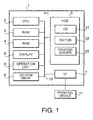
- Fig. 1 is a block diagram showing the composition of a PC (Personal Computer) 1 which functions as the display control device.
- the PC 1 includes a CPU (Central Processing Unit) 2, a ROM (Read Only Memory) 3, a RAM (Random Access Memory) 4, an HDD (Hard Disk Drive) 5, a CD-ROM drive 6, an interface 7, a display 8 and an operation unit 9 which are connected together by a system bus 10.
- the PC 1 is connected to a printing device 11 via the interface 7.
- the CPU 2 is a central processing unit for controlling the PC 1.
- the CPU 2 communicates instructions, data, etc. with all devices in the PC 1 via the system bus 10.
- the CPU 2 reads out an OS (Operating System) and application software from the HDD 5 and executes them.
- OS Operating System
- the ROM 3 is a read-only storage device forming a part of a main memory space used by the CPU 2.
- the ROM 3 stores a program for starting up the OS of the PC 1, etc.
- the RAM 4 is a readable/writable volatile storage device, which also forms a part of the main memory space of the CPU 2 similarly to the ROM 3.
- the HDD 5 is a readable/writable storage device and its reading device.
- the HDD 5 stores software like an OS 21, an editor 22, a printer driver 23, etc.
- the OS 21 is the aforementioned operating system for operating the PC 1.
- the PC 1 employs Microsoft Windows (registered trademark) as the operating system.
- the editor 22 is application software run on the OS 21, having functions for creation and editing of content to be printed by the printing device 11 and for the printing of the content.
- the editor 22 also has a display status control function for controlling display status of windows displayed on the display 2.
- the printer driver 23 provides the application programs (editor 22, etc.) with a function of carrying out printing by use of the printing device 11.
- the CD-ROM drive 6 is a device for reading out information from a CD-ROM as a record medium.
- the CD-ROM drive 6 is used, for example, for installing the OS 21, the editor 22, the printer driver 23, etc. (stored in a CD-ROM) in the HDD 5.
- the interface 7 is an interface (e.g. USB (Universal Serial Bus) interface) for connecting the PC 1 with external devices like the printing device 11.
- the display 8 is a display device such as a liquid crystal display.
- the operation unit 9 is a device (keyboard, mouse, etc.) used for operating the PC 1. The user gives instructions to the PC 1 by operating the keyboard, mouse, etc.
- the printing device 11 is a device for printing on a tape-like print medium (rectangular print medium whose length in a particular direction is variable).
- the printing device 11 may either be an ordinary printing device using ordinary print sheets as the print media or a label printing device using ID labels for stamps as the print media.
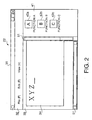
- Fig. 2 shows an example of the operation screen of the editor 22 in a state in which the display status control function (explained later) has been turned off.
- a window 31 shown in Fig. 2 includes a menu bar 32, an editing area 33 and an auxiliary area 41.
- the menu bar 32 is an area in which a menu for operating the editor 22 is displayed.
- any one of the functions of the editor 22 can be carried out. For example, the user hoping to change the direction of display content in the editing area 33 clicks a button "View (V)" in the menu bar 32 with the mouse, by which a menu, to which functions of the editor 22 regarding display (View) have been assigned, is displayed. Then, the user further clicks a part of the displayed menu regarding the change of the direction of the display content in the editing area 33.
- Other functions of the editor 22 can also be called and carried out similarly.
- the editing area 33 is an area used for creating or editing print content to be printed by the printing device 11.
- the editing area 33 includes a print area 34 (as the display content of the editing area 33) and scroll bars 51.
- the print area 34 is an area which is partitioned imitating the configuration of a print sheet as the print medium. Each editing operation in the print area 34 is directly incorporated in the printing on the print sheet, that is, the editor 22 realizes the so-called WYSIWYG (What You See Is What You Get).
- the scroll bars 51 are bars to be used for scrolling the content being displayed in the editing area 33.
- the auxiliary area 41 is an area for assisting the creation/editing of the print content in the editing area 33.
- function icons 42a - 42c are arranged.
- the function icons 42a - 42c are icons representing functions frequently used in the editing area 33, such as a character decoration function, an image input function and an image deformation function, for example.
- a function icon 42a - 42c By clicking a function icon 42a - 42c with the mouse or dragging the function icon to the editing area 33, a function which has been assigned to the function icon is executed.
- the contents of the function icons 42a - 42c and the number of icons can be changed freely by settings made by the user.
- the auxiliary area 41 is capable of displaying not only the function icons 42a - 42c but also various data for assisting the creation/editing of the print content in the editing area 33. For example, model sentences (samples) to be inputted to the editing area 33 can be displayed in the editing area 33 (see Fig. 6).
- the auxiliary area 41 is displayed according to two display methods: pane display (displaying the auxiliary area 41 as a pane built in the window 31) and floating display (displaying the auxiliary area 41 as a window independent of the window 31).
- the display statuses of the editing area 33, the print area 34 and the auxiliary area 41 can be adjusted freely by operations performed by the user.
- the editing area 33 and the auxiliary area 41 are built in the window 31 to partition the window 31 horizontally (with the editing area 33, print area 34 and auxiliary area 41 being relatively long in the vertical direction).
- the auxiliary area 41 restricts the width of the editing area 33 in the horizontal direction (narrowing the viewable range of the editing area 33 in the horizontal direction), by which viewability and operability of the print area 34 being wide in the horizontal direction are deteriorated.
- the configuration, display content and arrangement position of the auxiliary area 41 are adjusted and optimized so as to avoid the deterioration of the viewability and operability of the editing area 32 when the user has made a setting for enabling the display status control function.
- the CPU 2 executes commands according to the program of the editor 22 stored in the HDD 5, by which the PC 1 functions as the editor 22.
- the CPU 2 (operating according to the program of the editor 22) functions as a first control means for controlling the configuration, display content, character input direction and arrangement position of the editing area 33 according to mouse/keyboard operations performed by the user.
- the CPU 2 also functions as a second control means for controlling the configuration, display content and arrangement position of the auxiliary area 41 based on the result of control by the first control means.
- the PC 1 implements the display status control function by the function of the second control means.
- the display status control function is a function for changing at least one of the configuration, display content and arrangement position of the auxiliary area 41 based on the status of the editing area 33 which has been changed by instructions from the user.
- the display status control function includes: (1) automatic adjustment of pane configuration, (2) automatic adjustment of sample display, (3) automatic switching between floating display and pane display, and (4) automatic adjustment of floating position. The above functions will be explained below one by one.
- Fig. 3 shows an example of the operation screen when the arrangement direction of the print area 34 has been changed to let the print area 34 be wide in the horizontal direction.
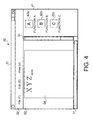
- Fig. 4 shows an example of the operation screen when the arrangement direction of the print area 34 has been changed to let the print area 34 be long in the vertical direction.
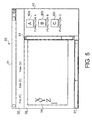
- Fig. 5 shows an example of the operation screen when the direction of character input into the editing area 33 has been changed to the vertical direction.
- Fig. 3 shows an example of the operation screen when the character input direction in the editing area 33 has been changed to the horizontal direction.
- the "automatic adjustment of pane configuration” means changing of the configuration of the auxiliary area 41 (built in as a pane of the window 31) based on the result of the change of the status of the editing area 33 made by the user.
- the change of the status of the editing area 33 includes: (a) change of arrangement direction of the print area 34, and (b) change of character input direction in the editing area 33.
- the "change of arrangement direction of the print area 34" means changing of the direction of the print area 34 being arranged in the editing area 33.
- the configuration of the auxiliary area 41 is changed by the display status control function into pane display vertically partitioning the window 31 as shown in Fig. 3.
- the function icons 42a - 42c are also arranged in the horizontal direction.
- the configuration of the auxiliary area 41 is changed by the display status control function into pane display horizontally partitioning the window 31 as shown in Fig. 4.
- the function icons 42a - 42c are also arranged in the vertical direction.
- the "change of character input direction in the editing area 33” means changing of the character input direction in the editing area 33 to the vertical direction or the horizontal direction.
- the configuration of the auxiliary area 41 is changed by the display status control function into the pane display vertically partitioning the window 31 as shown in Fig. 3.
- the function icons 42a - 42c are arranged in the horizontal direction.
- the configuration of the auxiliary area 41 is changed by the display status control function into the pane display horizontally partitioning the window 31 as shown in Fig. 5.
- the function icons 42a - 42c are arranged in the vertical direction.
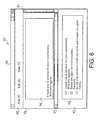
- Fig. 6 shows an example of the operation screen when the character input direction in the editing area 33 is changed to the horizontal direction when sample display 43 has been placed in the auxiliary area 41.
- Fig. 7 shows an example of the operation screen when the character input direction in the editing area 33 is changed to the vertical direction when sample display 43 has been placed in the auxiliary area 41.
- the "automatic adjustment of sample display” means changing of the direction of display content of the sample display 43 placed in the auxiliary area 41 to the vertical direction or the horizontal direction based on the result of the change of the character input direction in the editing area 33 made by the user.
- sample display 43 means a display area for displaying samples of content to be inputted to the editing area 33.
- the sample display 43 can be activated in the auxiliary area 41 by calling a sample display function from the menu bar 32.
- the user can select a desired sample from the samples displayed in the sample display 43 and input the selected sample to the editing area 33. For example, when the user calls a sample display function regarding greeting messages from the menu bar 32, samples of greeting messages are displayed in the sample display area 43.
- the direction of the display content of the sample display 43 in the auxiliary area 41 is changed by the display status control function to the horizontal direction as shown in Fig. 6.
- the display content of the sample display 43 can be maintained in the same direction as the character input direction of the editing area 33.
- the direction of the display content of the sample display 43 in the auxiliary area 41 is changed by the display status control function to the vertical direction as shown in Fig. 7.
- the display content of the sample display 43 can be maintained in the same direction as the character input direction of the editing area 33.
- the user can make reference to the content of the sample display 43 more easily during the character input into the editing area 33.
- Fig. 8 shows an example of the operation screen when the display range of the editing area 33 is enlarged when the auxiliary area 41 has been displayed in the pane display.
- the "automatic switching between floating display and pane display” means switching of the configuration of the auxiliary area 41 into the floating display (displaying the auxiliary area 41 as a window independent of the window 31) or the pane display (displaying the auxiliary area 41 as a pane built in the window 31) based on the result of a change of the display range of the editing area 33 made by the user.
- the configuration of the auxiliary area 41 is switched by the display status control function to the floating display as shown in Fig. 8.
- the display range of the auxiliary area 41 is automatically changed depending on the number of function icons 42a - 42c being displayed in the auxiliary area 41. Consequently, the display range of the editing area 33 gets still larger when the number of function icons 42a - 42c displayed in the auxiliary area 41 is small.
- the user can further enlarge the display range of the editing area 33 by moving the auxiliary area 41 being displayed in the floating display or further reducing the display range of the auxiliary area 41, by which the viewability and operability of the editing area 33 can be improved further.
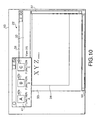
- Figs. 9 and 10 show examples of the operation screen on a screen 53 when the arrangement position of the editing area 34 is changed when the auxiliary area 41 has been displayed in the floating display.
- the "automatic adjustment of floating position” means changing of the arrangement position of the auxiliary area 41 in the floating display so as to maximize the viewable range of the editing area 33 based on the result of the change of the arrangement position of the editing area 33 made by the user.
- the arrangement position of the auxiliary area 41 is changed by the display status control function to the lower right of the screen 53 (to the opposite side of the window 31) as shown in Fig. 9.
- the arrangement position of the auxiliary area 41 is changed by the display status control function to the upper left of the screen 53 (to the opposite side of the window 31) as shown in Fig. 10.
- the arrangement position of the auxiliary area 41 is automatically adjusted by the display status control function so as to constantly maximize the viewable range of the editing area 33.
- the overlapping area between the auxiliary area 41 and the editing area 33 is reduced and the display range of the editing area 33 is enlarged, by which the viewability and operability of the editing area 33 can be maintained even when the editing area 33 is moved.
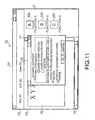
- Fig. 11 shows an example of the operation screen when a setting window 52 for setting the contents of the display status control function has been activated.
- a setting window 52 for the display status control function like the one shown in Fig. 11 is displayed when a function for setting the display status control function is called from the menu arranged in the menu bar 32.
- check boxes “AUTOMATIC ADJUSTMENT OF PANE CONFIGURATION”, “AUTOMATIC ADJUSTMENT OF SAMPLE DISPLAY”, "AUTOMATIC SWITCHING BETWEEN FLOATING AND PANE” and “AUTOMATIC ADJUSTMENT OF FLOATING POSITION” are arranged.
- radio buttons “BASED ON SHEET DIRECTION” and “BASED ON CHARACTER INPUT DIRECTION” are displayed in the frame.
- the display status control function is set to execute the aforementioned "(1)(a) automatic adjustment of pane configuration based on the change of arrangement direction of the print area 34". Meanwhile, by checking the check box "AUTOMATIC ADJUSTMENT OF PANE CONFIGURATION” and selecting the radio button “BASED ON CHARACTER INPUT DIRECTION", the display status control function is set to execute the aforementioned "(1)(b) automatic adjustment of pane configuration based on the change of character input direction in the editing area 33".
- the display status control function is set to execute the aforementioned "(2) automatic adjustment of sample display”.
- the display status control function is set to execute the aforementioned "(3) automatic switching between floating display and pane display”.
- the display status control function is set to execute the aforementioned "(4) automatic adjustment of floating position”.
- the user can change the contents of the display status control function freely by changing the settings in the setting window 52, by which the adjustment of the configuration, display content and arrangement position of the auxiliary area 41 can be set according to the intention of the user.
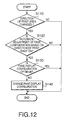
- Fig. 12 is a flow chart showing a process for the automatic adjustment of the pane configuration based on the change of the arrangement direction of the print area 34.
- Fig. 13 is a flow chart showing a process for the automatic adjustment of the pane configuration based on the change of the character input direction in the editing area 33.
- Fig. 14 is a flow chart showing a process for the automatic adjustment of the sample display.
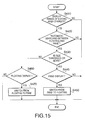
- Fig. 15 is a flow chart showing a process for the automatic switching between the floating display and pane display.
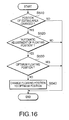
- Fig. 16 is a flow chart showing a process for the automatic adjustment of the floating position. The processes shown in Figs. 12 - 16 are called at prescribed intervals while the editor 22 is operating and executed under the control by the CPU 2.
- step S110 hereinafter abbreviated as "S 110", ditto for the following steps
- S 110 the direction of the print area 34 has been changed by the user in the state in which the auxiliary area 41 is being displayed in the pane display or not is judged. If the direction of the print area 34 has not been changed (S110: NO), the process of Fig. 12 is ended.
- the process advances to S130 and whether the auxiliary area 41 in the pane display is being displayed in an optimum configuration or not is judged. Specifically, in cases where the arrangement direction of the print area 34 has been changed by the user to let the print area 34 be wide in the horizontal direction, the auxiliary area 41 in the pane display is judged to be being displayed in the optimum configuration if the auxiliary area 41 is in the pane display vertically partitioning the window 31.
- the auxiliary area 41 in the pane display is judged to be being displayed in the optimum configuration if the auxiliary area 41 is in the pane display horizontally partitioning the window 31.
- auxiliary area 41 in the pane display is being displayed in the optimum configuration (S130: YES)
- the process of Fig. 12 is ended. If the auxiliary area 41 in the pane display is not being displayed in the optimum configuration (S 130: NO), the process advances to S140 and the pane display of the auxiliary area 41 is changed to the aforementioned optimum configuration. Thereafter, the process of Fig. 12 is ended.
- the process advances to S230 and whether the auxiliary area 41 in the pane display is being displayed in an optimum configuration or not is judged. Specifically, in cases where the character input direction in the print area 34 has been changed by the user to the horizontal direction, the auxiliary area 41 in the pane display is judged to be being displayed in the optimum configuration if the auxiliary area 41 is in the pane display vertically partitioning the window 31.
- the auxiliary area 41 in the pane display is judged to be being displayed in the optimum configuration if the auxiliary area 41 is in the pane display horizontally partitioning the window 31.
- auxiliary area 41 in the pane display is being displayed in the optimum configuration (S230: YES)
- the process of Fig. 13 is ended. If the auxiliary area 41 in the pane display is not being displayed in the optimum configuration (S230: NO), the process advances to S240 and the pane display of the auxiliary area 41 is changed to the aforementioned optimum configuration. Thereafter, the process of Fig. 13 is ended.
- the process advances to S330 and whether the direction of the display content of the sample display 43 is identical with the character input direction in the print area 34 which has been changed by the user or not is judged. Specifically, whether the direction of the display content of the sample display 43 is the horizontal/vertical direction or not is judged when the character input direction in the print area 34 changed by the user is the horizontal/vertical direction. If the direction of the display content of the sample display 43 is identical with the character input direction in the print area 34 (S330: YES), the process of Fig. 14 is ended. If the two directions are not identical with each other (S330: NO), the process advances to S340 and the direction of the display content of the sample display 34 is changed to be identical with the character input direction in the print area 34. Thereafter, the process of Fig. 14 is ended.
- Fig. 15 in the first S410, whether the display range of the editing area 33 has been changed by the user or not is judged. If the display range of the editing area 33 has not been changed (S410: NO), the process of Fig. 15 is ended. If the display range of the editing area 33 has been changed (S410: YES), the process advances to S420, in which whether the setting for executing the "automatic switching between floating display and pane display" has been made by the user operation through the setting window 52 or not is judged. If the setting has not been made (S420: NO), the process of Fig. 15 is ended.
- the process advances to S430 and whether or not the display range of the editing area 33 changed by the user is a prescribed threshold value or more is judged. While the threshold value can be changed freely by the user, the threshold value may also be fixed as an invariable value. If the display range of the editing area 33 changed by the user is the prescribed threshold value or more (S430: YES), the process advances to S440 and whether the auxiliary area 41 is in the pane display or not is judged.
- auxiliary area 41 is not in the pane display (S440: NO)
- the process of Fig. 15 is ended. If the auxiliary area 41 is in the pane display (S440: YES), the process advances to S450 and the configuration of the auxiliary area 41 is changed to the floating display. Thereafter, the process of Fig. 15 is ended.
- the process advances to S460 and whether the auxiliary area 41 is in the floating display or not is judged. If the auxiliary area 41 is not in the floating display (S460: NO), the process of Fig. 15 is ended. If the auxiliary area 41 is in the floating display (S460: YES), the process advances to S470 and the configuration of the auxiliary area 41 is changed to the pane display. Thereafter, the process of Fig. 15 is ended.
- the process advances to S530 and whether the arrangement position of the auxiliary area 41 in the floating display is a position maximizing the viewable range of the editing area 33 or not is judged. If the arrangement position of the auxiliary area 41 is a position maximizing the viewable range of the editing area 33 (S530: YES), the process of Fig. 16 is ended. If the arrangement position is not a position maximizing the viewable range of the editing area 33 (S530: NO), the process advances to S540, in which the arrangement position of the auxiliary area 41 is changed to a position maximizing the viewable range of the editing area 33. Thereafter, the process of Fig. 16 is ended.
- At least one of the configuration, display content and arrangement position of the auxiliary area 41 is changed based on the status of the editing area 33, by which the viewability and operability of the editor 22 are improved.
- the display control device in the above embodiment is implemented by functions of application software which is activated on an OS
- the display control device may also be implemented by a control program or purpose-built hardware of the device.
- the display control device may also be configured to control only one or two of the configuration, display content and arrangement position of the auxiliary area 41 based on the result of control of the editing area 33. It is also possible to simultaneously control two or more of the configuration, display content and arrangement position of the auxiliary area 41 based on the control result of the editing area 33.
- the contents of the display status control function can be set freely in the above embodiment, a configuration allowing the setting of part of the contents of the display status control function can also be implemented. Further, a configuration fixing the contents of the display status control function and allowing no user setting is also possible.
- the second control means may control the configuration of the second display area to be wide in the horizontal direction when the configuration or the display content of the first display area is controlled by first control means to be wide in the horizontal direction, while controlling the configuration of the second display area to be long in the vertical direction when the configuration or the display content of the first display area is controlled by the first control means to be long in the vertical direction.
- the configuration of the second display area is set based on the configuration of the first display area, by which the operability and viewability of the first display area can be improved.
- the second control means may control the configuration of the second display area to be wide in the horizontal direction when the configuration or the display content of the first display area is controlled by first control means to be wide in the horizontal direction, while controlling the configuration of the second display area to be long in the vertical direction when the configuration or the display content of the first display area is controlled by the first control means to be long in the vertical direction.
- the configuration of the second display area is set based on the configuration of the first display area, by which the operability and viewability of the first display area can be improved.
- the second control means may control the configuration of the second display area to be wide in the horizontal direction when the character input direction in the first display area is set by the first control means to the horizontal direction, while controlling the configuration of the second display area to be long in the vertical direction when the character input direction in the first display area is set by the first control means to the vertical direction.
- the configuration of the second display area is set based on the character input direction in the first display area, by which the character input into the first display area is made easier.
- the second control means may control the configuration of the second display area to be wide in the horizontal direction when the character input direction in the first display area is set by the first control means to the horizontal direction, while controlling the configuration of the second display area to be long in the vertical direction when the character input direction in the first display area is set by the first control means to the vertical direction.
- the configuration of the second display area is set based on the character input direction in the first display area, by which the character input into the first display area is made easier.
- the second control means may control the display content of the second display area to be in a horizontal direction when the character input direction in the first display area is set by the first control means to the horizontal direction, while controlling the display content of the second display area to be in a vertical direction when the character input direction in the first display area is set by the first control means to the vertical direction.
- display direction of the content of the second display area is set based on the character input direction in the first display area, by which the user can refer to the display content of the second display area easily during the character input into the first display area.
- the second control means may control the display content of the second display area to be in a horizontal direction when the character input direction in the first display area is set by the first control means to the horizontal direction, while controlling the display content of the second display area to be in a vertical direction when the character input direction in the first display area is set by the first control means to the vertical direction.
- display direction of the content of the second display area is set based on the character input direction in the first display area, by which the user can refer to the display content of the second display area easily during the character input into the first display area.
- the second control means may control the configuration of the second display area to let the second display area be a display area independent of the first display area when the first display area is enlarged by the first control means.
- the second display area is separated from the first display area depending on the size of the first display area, by which the viewability and operability of the first display area can be improved further.
- the second control means may control the configuration of the second display area to let the second display area be a display area independent of the first display area when the first display area is enlarged by the first control means.
- the second display area is separated from the first display area depending on the size of the first display area, by which the viewability and operability of the first display area can be improved further.
- the second control means may change the arrangement position of the second display area to an area without the first display area when the first display area is moved by the first control means.
- the arrangement position of the second display area is set based on the position of the first display area after the movement in the case where the second display area is independent of the first display area, by which the viewability and operability of the first display area can be maintained.
- the second control means may change the arrangement position of the second display area to an area without the first display area when the first display area is moved by the first control means.
- the arrangement position of the second display area is set based on the position of the first display area after the movement in the case where the second display area is independent of the first display area, by which the viewability and operability of the first display area can be maintained.
- a display control device in accordance with an embodiment of the present invention may further comprise setting means for setting contents of the control by the second control means.
- the contents of the change of at least one of the configuration, display content and arrangement position of the second display area which is made based on the status of the first display area can be set, by which control according to the intention of the user can be realized.
- a program in accordance with an embodiment of the present invention may further instruct the computer to function as setting means for setting contents of the control by the second control means.
- the contents of the change of at least one of the configuration, display content and arrangement position of the second display area which is made based on the status of the first display area can be set, by which control according to the intention of the user can be realized.
- a display control device in accordance with an embodiment of the present invention may display an editing area (for displaying print content to be printed by a printing device) in the first display area, while displaying one or more icons (for calling functions for creating the print content in the editing area) in the second display area.
- the print content to be printed by the printing device can be created with efficiency.
- a program in accordance with an embodiment of the present invention may display an editing area (for displaying print content to be printed by a printing device) in the first display area, while displaying one or more icons (for calling functions for creating the print content in the editing area) in the second display area.
- the print content to be printed by the printing device can be created with efficiency.
- the printing device can be a device for printing on a rectangular print medium whose length in a particular direction is variable.
- the print content to be printed on a long and narrow print medium can be displayed across the full width of the screen, by which the operability during the creation/editing of the print content is improved.
- the printing device can be a device for printing on a rectangular print medium whose length in a particular direction is variable.
- the print content to be printed on a long and narrow print medium can be displayed across the full width of the screen, by which the operability during the creation/editing of the print content is improved.
- the programs in accordance with the embodiments of the present invention which have been described above can be distributed to computers by storing them in a removable record medium such as a CD-ROM or a fixed record medium such as a hard disk, or via a communication network like the Internet by use of a wired or wireless telecommunication means.
- a removable record medium such as a CD-ROM or a fixed record medium such as a hard disk
- a communication network like the Internet by use of a wired or wireless telecommunication means.
Landscapes
- Engineering & Computer Science (AREA)
- General Engineering & Computer Science (AREA)
- Theoretical Computer Science (AREA)
- Human Computer Interaction (AREA)
- Physics & Mathematics (AREA)
- General Physics & Mathematics (AREA)
- Controls And Circuits For Display Device (AREA)
- User Interface Of Digital Computer (AREA)
- Digital Computer Display Output (AREA)
Abstract
Description
Claims (21)
- A display control device for displaying a first display area and a second display area on a screen, comprising:first control means for controlling at least one of a configuration, display content, character input direction and arrangement position of the first display area; andsecond control means for controlling at least one of a configuration, display content and arrangement position of the second display area based on result of control by the first control means.
- The display control device according to claim 1, wherein:the second control means controls the configuration of the second display area to be wide in a horizontal direction when the configuration or the display content of the first display area is controlled by the first control means to be wide in the horizontal direction, andthe second control means controls the configuration of the second display area to be long in a vertical direction when the configuration or the display content of the first display area is controlled by the first control means to be long in the vertical direction.
- The display control device according to claim 1, wherein:the second control means controls the configuration of the second display area to be wide in a horizontal direction when the character input direction in the first display area is set by the first control means to the horizontal direction, andthe second control means controls the configuration of the second display area to be long in a vertical direction when the character input direction in the first display area is set by the first control means to the vertical direction.
- The display control device according to claim 1, wherein:the second control means controls the display content of the second display area to be in a horizontal direction when the character input direction in the first display area is set by the first control means to the horizontal direction, andthe second control means controls the display content of the second display area to be in a vertical direction when the character input direction in the first display area is set by the first control means to the vertical direction.
- The display control device according to claim 1, wherein in cases where the second display area has been built in the first display area, the second control means controls the configuration of the second display area to let the second display area be a display area independent of the first display area when the first display area is enlarged by the first control means.
- The display control device according to claim 1, wherein in cases where the second display area is a display area independent of the first display area, the second control means changes the arrangement position of the second display area to an area without the first display area when the first display area is moved by the first control means.
- The display control device according to claim 1, further comprising setting means for setting contents of the control by the second control means.
- The display control device according to claim 1, wherein:an editing area for displaying print content to be printed by a printing device is displayed in the first display area, andone or more icons for calling functions for creating the print content in the editing area are displayed in the second display area.
- The display control device according to claim 8, wherein the printing device is a device for printing on a rectangular print medium whose length in a particular direction is variable.
- A program for displaying a first display area and a second display area on a screen, the program instructing a computer to function as:first control means for controlling at least one of a configuration, display content, character input direction and arrangement position of the first display area; andsecond control means for controlling at least one of a configuration, display content and arrangement position of the second display area based on result of control by the first control means.
- The program according to claim 10, wherein:the second control means controls the configuration of the second display area to be wide in a horizontal direction when the configuration or the display content of the first display area is controlled by the first control means to be wide in the horizontal direction, andthe second control means controls the configuration of the second display area to be long in a vertical direction when the configuration or the display content of the first display area is controlled by the first control means to be long in the vertical direction.
- The program according to claim 10, wherein:the second control means controls the configuration of the second display area to be wide in a horizontal direction when the character input direction in the first display area is set by the first control means to the horizontal direction, andthe second control means controls the configuration of the second display area to be long in a vertical direction when the character input direction in the first display area is set by the first control means to the vertical direction.
- The program according to claim 10, wherein:the second control means controls the display content of the second display area to be in a horizontal direction when the character input direction in the first display area is set by the first control means to the horizontal direction, andthe second control means controls the display content of the second display area to be in a vertical direction when the character input direction in the first display area is set by the first control means to the vertical direction.
- The program according to claim 10, wherein in cases where the second display area has been built in the first display area, the second control means controls the configuration of the second display area to let the second display area be a display area independent of the first display area when the first display area is enlarged by the first control means.
- The program according to claim 10, wherein in cases where the second display area is a display area independent of the first display area, the second control means changes the arrangement position of the second display area to an area without the first display area when the first display area is moved by the first control means.
- The program according to claim 10, further instructing the computer to function as setting means for setting contents of the control by the second control means.
- The program according to claim 10, wherein:a creation area for creating print content to be printed by a printing device is displayed in the first display area, andone or more icons for calling functions for creating the print content in the creation area are displayed in the second display area.
- The program according to claim 17, wherein the printing device is a device for printing on a rectangular print medium whose length in a particular direction is variable.
- A display control device for controlling display on a screen, comprising:first control means for controlling status of an editing area for editing work; andsecond control means for controlling status of an auxiliary area for displaying information for assisting the editing work in the editing area depending on a change of the status of the editing area made by the first control means.
- A display control device for controlling display on a screen, comprising:first control means for controlling status of a print area with respect to an editing area for editing work; andsecond control means for executing control so as to change status of an auxiliary area for displaying information for assisting the editing work in the editing area depending on a change of status of the editing area with respect to the print area made by the first control means.
- A method for controlling display on a screen, comprising the steps of:detecting status of an editing area for editing work;judging whether a change of status of an auxiliary area for displaying information for assisting the editing work in the editing area is necessary or not based on the detection of the status of the editing area; andchanging the status of the auxiliary area when the change is judged to be necessary.
Applications Claiming Priority (3)
| Application Number | Priority Date | Filing Date | Title |
|---|---|---|---|
| JP2003073416A JP2004280655A (en) | 2003-03-18 | 2003-03-18 | Display control device and program |
| JP2003073416 | 2003-03-18 | ||
| PCT/JP2004/003702 WO2004084057A1 (en) | 2003-03-18 | 2004-03-18 | Display control device and program |
Publications (2)
| Publication Number | Publication Date |
|---|---|
| EP1605337A1 true EP1605337A1 (en) | 2005-12-14 |
| EP1605337A4 EP1605337A4 (en) | 2006-04-05 |
Family
ID=33027794
Family Applications (1)
| Application Number | Title | Priority Date | Filing Date |
|---|---|---|---|
| EP04721718A Ceased EP1605337A4 (en) | 2003-03-18 | 2004-03-18 | DISPLAY CONTROL DEVICE AND PROGRAM |
Country Status (5)
| Country | Link |
|---|---|
| US (1) | US7779365B2 (en) |
| EP (1) | EP1605337A4 (en) |
| JP (1) | JP2004280655A (en) |
| CN (1) | CN100403233C (en) |
| WO (1) | WO2004084057A1 (en) |
Families Citing this family (17)
| Publication number | Priority date | Publication date | Assignee | Title |
|---|---|---|---|---|
| US7908568B1 (en) * | 2005-04-01 | 2011-03-15 | Adobe Systems Incorporated | Method of displaying graphical objects |
| JP4361945B2 (en) * | 2007-07-24 | 2009-11-11 | 株式会社エヌ・ティ・ティ・ドコモ | Information processing apparatus and program |
| US20090132939A1 (en) * | 2007-11-19 | 2009-05-21 | International Business Machines Corporation | Method and apparatus for a floating island for user navigation in an interactive environment |
| US9280254B2 (en) * | 2008-01-22 | 2016-03-08 | Bluebeam Software, Inc. | Method of synchronizing multiple views of multiple displayed documents |
| KR101609162B1 (en) * | 2008-11-13 | 2016-04-05 | 엘지전자 주식회사 | Mobile Terminal With Touch Screen And Method Of Processing Data Using Same |
| KR101636570B1 (en) * | 2009-10-28 | 2016-07-20 | 엘지전자 주식회사 | Apparatus and Method for controlling an output display area |
| JP5056875B2 (en) * | 2010-03-17 | 2012-10-24 | ブラザー工業株式会社 | Print control apparatus, program, and print setting screen display method |
| CN101872283A (en) * | 2010-06-17 | 2010-10-27 | 宇龙计算机通信科技(深圳)有限公司 | Display method, system and mobile terminal for display screen |
| US9408958B2 (en) | 2010-12-17 | 2016-08-09 | Fresenius Medical Care Holdings, Inc. | User interfaces for dialysis devices |
| JP5781394B2 (en) * | 2011-08-12 | 2015-09-24 | 株式会社ソニー・コンピュータエンタテインメント | Electronics |
| EP2631760A1 (en) | 2012-02-24 | 2013-08-28 | Research In Motion Limited | Method and apparatus for providing a user interface on a device enabling selection of operations to be performed in relation to content |
| US9223483B2 (en) | 2012-02-24 | 2015-12-29 | Blackberry Limited | Method and apparatus for providing a user interface on a device that indicates content operators |
| EP2631738B1 (en) * | 2012-02-24 | 2016-04-13 | BlackBerry Limited | Method and apparatus for adjusting a user interface to reduce obscuration |
| US20140250375A1 (en) * | 2013-03-04 | 2014-09-04 | Xerox Corporation | Method and system for summarizing documents |
| US11442612B2 (en) * | 2016-12-23 | 2022-09-13 | [24]7.ai, Inc. | Method and apparatus for facilitating user chat interactions |
| CN108009141A (en) * | 2017-11-30 | 2018-05-08 | 努比亚技术有限公司 | A kind of display content control method, mobile terminal and computer-readable recording medium |
| CN111314441B (en) * | 2020-01-21 | 2022-10-11 | 维达力实业(深圳)有限公司 | Terminal control method, device and terminal based on multi-area control |
Family Cites Families (20)
| Publication number | Priority date | Publication date | Assignee | Title |
|---|---|---|---|---|
| JPS6271614A (en) * | 1985-09-26 | 1987-04-02 | 三菱樹脂株式会社 | Manufacture of lining hume pipe |
| JPS63177250A (en) | 1987-01-19 | 1988-07-21 | Fuji Xerox Co Ltd | Kana/kanji converting device |
| DE69123465T2 (en) * | 1990-01-25 | 1997-06-26 | Radius Inc | Process for changing the dimensions of computer display windows and their movement |
| JP2752496B2 (en) * | 1990-02-28 | 1998-05-18 | キヤノン株式会社 | Sentence processing equipment |
| JP2706010B2 (en) * | 1991-08-26 | 1998-01-28 | シャープ株式会社 | Information processing device |
| JPH05324649A (en) | 1992-05-19 | 1993-12-07 | Just Syst Corp | Data processing method and apparatus thereof |
| JPH06274303A (en) * | 1993-03-19 | 1994-09-30 | Ricoh Co Ltd | Multi-window display method |
| US5487143A (en) | 1994-04-06 | 1996-01-23 | Altera Corporation | Computer user interface having tiled and overlapped window areas |
| JPH0887265A (en) * | 1994-09-16 | 1996-04-02 | Toshiba Corp | Image information processing device |
| US5838318A (en) * | 1995-11-10 | 1998-11-17 | Intel Corporation | Method and apparatus for automatically and intelligently arranging windows on a display device |
| US5847706A (en) | 1995-11-30 | 1998-12-08 | Hewlett Packard Company | Sizeable window for tabular and graphical representation of data |
| US6008809A (en) * | 1997-09-22 | 1999-12-28 | International Business Machines Corporation | Apparatus and method for viewing multiple windows within a dynamic window |
| JP2000112613A (en) | 1998-09-30 | 2000-04-21 | Brother Ind Ltd | Computer equipment |
| WO2000063768A1 (en) * | 1999-04-16 | 2000-10-26 | Avid Technology, Inc. | System and method for managing the use of desktop space in graphical user interfaces |
| JP2001022489A (en) | 1999-07-07 | 2001-01-26 | Just Syst Corp | INFORMATION PROCESSING DEVICE, INFORMATION PROCESSING METHOD, AND COMPUTER-READABLE RECORDING MEDIUM RECORDING PROGRAM FOR CAUSING COMPUTER TO EXECUTE THE METHOD |
| US6587128B2 (en) * | 1999-07-15 | 2003-07-01 | International Business Machines Corporation | Method for displaying hidden objects by varying the transparency of overlapping objects |
| JP2002055750A (en) * | 2000-08-10 | 2002-02-20 | Canon Inc | Information processing apparatus, function list display method, and storage medium |
| WO2002089108A1 (en) * | 2001-04-30 | 2002-11-07 | Broadband Graphics, Llc | Cell based eui methods and apparatuses |
| US7036089B2 (en) * | 2002-04-23 | 2006-04-25 | Hewlett-Packard Development Company, L.P. | Distribution of application windows in a computing device display |
| US7370284B2 (en) * | 2003-11-18 | 2008-05-06 | Laszlo Systems, Inc. | User interface for displaying multiple applications |
-
2003
- 2003-03-18 JP JP2003073416A patent/JP2004280655A/en active Pending
-
2004
- 2004-03-18 EP EP04721718A patent/EP1605337A4/en not_active Ceased
- 2004-03-18 CN CNB2004800067699A patent/CN100403233C/en not_active Expired - Fee Related
- 2004-03-18 WO PCT/JP2004/003702 patent/WO2004084057A1/en not_active Ceased
- 2004-03-18 US US10/548,094 patent/US7779365B2/en not_active Expired - Lifetime
Also Published As
| Publication number | Publication date |
|---|---|
| JP2004280655A (en) | 2004-10-07 |
| EP1605337A4 (en) | 2006-04-05 |
| CN100403233C (en) | 2008-07-16 |
| CN1759371A (en) | 2006-04-12 |
| US20060150117A1 (en) | 2006-07-06 |
| US7779365B2 (en) | 2010-08-17 |
| WO2004084057A1 (en) | 2004-09-30 |
Similar Documents
| Publication | Publication Date | Title |
|---|---|---|
| US7779365B2 (en) | Display control device and program | |
| EP1949211B1 (en) | Maximizing window display area using window flowing | |
| US8089423B1 (en) | Automatic configuration of multiple monitor systems | |
| US7444599B1 (en) | Method and apparatus for controlling a display of a data processing system | |
| US20090222761A1 (en) | Computer-readable recording medium having display screen setting program recorded thereon, information processing apparatus, and display screen setting method | |
| US8185846B2 (en) | Teaching box for use in robot, customization method, and robot system using the same | |
| US20070016873A1 (en) | Visual expression of a state of an application window | |
| US20100192091A1 (en) | Image processing method, program thereof, and image processing apparatus | |
| US20060075355A1 (en) | Interface and interface program executed by a computer | |
| JP4303311B2 (en) | Operation support computer program, operation support computer system | |
| EP2367104B1 (en) | Print control apparatus, program and method of displaying print setting screen | |
| JP4821529B2 (en) | Image display apparatus and program | |
| US20090024958A1 (en) | Program product including display control program and computer-readable media, display device, display control method, and image forming apparatus | |
| US6424359B1 (en) | Screen scroll control method and recording medium | |
| JP5025230B2 (en) | Multi-monitor monitoring control apparatus and process monitoring control system using the same | |
| JP3264199B2 (en) | Operation device for FA equipment | |
| US20080163058A1 (en) | Computer-readable recording medium storing display control program, and display control device | |
| US8171409B2 (en) | Interface for print control | |
| KR20050122022A (en) | Print control device having a printer driver and method for controlling print-option using the same | |
| US20050262474A1 (en) | Multi-monitor support for MDI applications | |
| JP2008217256A (en) | Graphic element editing apparatus, scroll method for graphic element editing apparatus, graphic element editing program, and storage medium therefor | |
| US20100165397A1 (en) | Information Processing Device and Recording Medium Containing Program Therefor | |
| JP2001344051A (en) | Information processing apparatus and computer readable medium | |
| JP2009003745A (en) | Information display terminal | |
| JP2025060900A (en) | CONTENT DISPLAY CONTROL DEVICE, CONTENT DISPLAY CONTROL METHOD, AND PROGRAM |
Legal Events
| Date | Code | Title | Description |
|---|---|---|---|
| PUAI | Public reference made under article 153(3) epc to a published international application that has entered the european phase |
Free format text: ORIGINAL CODE: 0009012 |
|
| 17P | Request for examination filed |
Effective date: 20050919 |
|
| AK | Designated contracting states |
Kind code of ref document: A1 Designated state(s): AT BE BG CH CY CZ DE DK EE ES FI FR GB GR HU IE IT LI LU MC NL PL PT RO SE SI SK TR |
|
| AX | Request for extension of the european patent |
Extension state: AL LT LV MK |
|
| A4 | Supplementary search report drawn up and despatched |
Effective date: 20060217 |
|
| DAX | Request for extension of the european patent (deleted) | ||
| REG | Reference to a national code |
Ref country code: DE Ref legal event code: R003 |
|
| STAA | Information on the status of an ep patent application or granted ep patent |
Free format text: STATUS: THE APPLICATION HAS BEEN REFUSED |
|
| 18R | Application refused |
Effective date: 20111124 |