EP1548609A1 - Text edition device and program - Google Patents
Text edition device and program Download PDFInfo
- Publication number
- EP1548609A1 EP1548609A1 EP03807976A EP03807976A EP1548609A1 EP 1548609 A1 EP1548609 A1 EP 1548609A1 EP 03807976 A EP03807976 A EP 03807976A EP 03807976 A EP03807976 A EP 03807976A EP 1548609 A1 EP1548609 A1 EP 1548609A1
- Authority
- EP
- European Patent Office
- Prior art keywords
- frame
- character
- operation mode
- size
- storage means
- Prior art date
- Legal status (The legal status is an assumption and is not a legal conclusion. Google has not performed a legal analysis and makes no representation as to the accuracy of the status listed.)
- Withdrawn
Links
Images










Classifications
-
- G—PHYSICS
- G06—COMPUTING OR CALCULATING; COUNTING
- G06F—ELECTRIC DIGITAL DATA PROCESSING
- G06F40/00—Handling natural language data
- G06F40/10—Text processing
- G06F40/103—Formatting, i.e. changing of presentation of documents
- G06F40/109—Font handling; Temporal or kinetic typography
-
- G—PHYSICS
- G06—COMPUTING OR CALCULATING; COUNTING
- G06F—ELECTRIC DIGITAL DATA PROCESSING
- G06F40/00—Handling natural language data
- G06F40/10—Text processing
- G06F40/166—Editing, e.g. inserting or deleting
Definitions
- the present invention relates to a text editing device for editing a character string, and a program for letting a text editing device edit a character string.
- a label creating device as one of such text editing devices has been disclosed in Japanese Patent Provisional Publication No. HEI 07-114547.
- the label creating device when the stored character string, being displayed on the screen with a designated character size, can not be accommodated in the frame which has been specified, the specified frame is enlarged within a range avoiding overlap with adjacent frames.
- a text editing device described in Japanese Patent Provisional Publication No.SHO62-267858 has a function of starting one of prescribed processes such as a rectangle (frame) generation process, an intra-rectangle character string generation process, a rectangle editing process and an intra-rectangle character string editing process, in response to a command input corresponding to each process.
- a rectangle editing command is inputted
- the rectangle editing process is started.
- the size and the number of lines of the rectangle is corrected while automatically executing the line feed for the intra-rectangle character string.
- the intra-rectangle character string editing process is started in response to an input of an intra-rectangle character string editing command.
- character size data regarding the generated intra-rectangle character string is corrected while automatically executing the line feed for the character string.
- the frame is automatically enlarged when the stored character string can not be accommodated in the specified frame with the designated character size and thus a user not hoping to change the frame size because of editing restrictions has to reset the character size by himself/herself.
- the automatic enlargement of the frame once specified is undesirable to the user since the user in many cases intends to contain all the inputted character string in the frame of the specified configuration. Such a situation is inconvenient to the user and an improvement in workability is hoped for.
- the present invention has been made in consideration of the above problems. It is therefore the primary object of the present invention to provide a text editing device and a program offering convenience and high workability.
- a text editing device comprising character information storage means for storing a character string as text data, character size storage means for storing size of each character included in the character string stored in the character information storage means, frame configuration storage means for storing a configuration of a frame in which the character string stored in the character information storage means is displayed or printed, and operation mode setting means for setting an operation mode (specifying status of displaying or printing of the character string stored in the character information storage means in the frame when editing operation is executed) to operation modes including at least a frame configuration fixed state and a frame configuration alterable state.
- the text editing device further comprises character size alteration means for altering memory contents of the character size storage means so that the character string stored in the character information storage means will fit in the frame in cases where the operation mode setting means has set the operation mode to the frame configuration fixed state, and frame configuration alteration means for altering memory contents of the frame configuration storage means so that the character string stored in the character information storage means will fit in the frame in cases where the operation mode setting means has set the operation mode to the frame configuration alterable state.
- the composition when the operation mode setting means has set the operation mode to the frame configuration alterable state, the configuration of the frame is successively enlarged as characters are inputted one by one by the user and character strings are stored. Meanwhile, when the operation mode setting means has set the operation mode to the frame configuration fixed state, the character size is automatically changed so as to fit the character string in the frame.
- the user hopes to display or print out the character string with a fixed frame configuration, the user does not have to reset the frame configuration corresponding to the character string nor to reset the character size to suit the frame configuration after inputting the character string. Therefore, a text editing device offering convenience and high workability is provided. The user is allowed to do text editing work while easily switching the operation mode (depending on whether the user hopes to fix the frame configuration or not) only by making the setting through the operation mode setting means.
- a computer program that causes a computer to function as character information storage means for storing a character string as text data, character size storage means for storing size of each character included in the character string stored in the character information storage means, frame configuration storage means for storing a configuration of a frame in which the character string stored in the character information storage means is displayed or printed, and operation mode setting means for setting an operation mode (specifying status of displaying or printing of the character string stored in the character information storage means in the frame when editing operation is executed) to operation modes including at least a frame configuration fixed state and a frame configuration alterable state.
- the computer program further causes the computer to function as character size alteration means for altering memory contents of the character size storage means so that the character string stored in the character information storage means will fit in the frame in cases where the operation mode setting means has set the operation mode to the frame configuration fixed state, and frame configuration alteration means for altering memory contents of the frame configuration storage means so that the character string stored in the character information storage means will fit in the frame in cases where the operation mode setting means has set the operation mode to the frame configuration alterable state.
- the composition when the operation mode setting means has set the operation mode to the frame configuration alterable state, the configuration of the frame is successively enlarged as characters are inputted one by one by the user and character strings are stored. Meanwhile, when the operation mode setting means has set the operation mode to the frame configuration fixed state, the character size is automatically changed so as to fit the character string in the frame.
- the user hopes to display or print out the character string with a fixed frame configuration, the user does not have to reset the frame configuration corresponding to the character string nor to reset the character size to suit the frame configuration after inputting the character string. Therefore, a text editing device offering convenience and high workability is provided. The user is allowed to do text editing work while easily switching the operation mode (depending on whether the user hopes to fix the frame configuration or not) only by making the setting through the operation mode setting means.
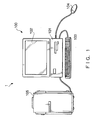
- Fig. 1 shows the overall composition of a text editing device 1 to which the present invention is applied.
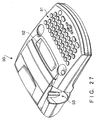
- the text editing device 1 is composed as a label writer which includes a personal computer 100 and a printing device 105 for printing on a label tape.
- the text editing device 1 includes a computer main body 101, a display device 102, a keyboard 103 as an input means, a mouse (pointing device) 104 as an input means, and the printing device 105.
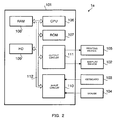
- Fig. 2 is a block diagram showing the hardware configuration of a text editing device 1a in accordance with a first embodiment of the present invention.
- a CPU Central Processing Unit
- ROM Read Only Memory
- RAM Random Access Memory
- HD Hard Disk
- an input circuit 110 and an output circuit 111 are connected together by a bus 112.
- the printing device 105 and the display device 102 are connected via the output circuit 111, while the keyboard 103 and the mouse 104 are connected via the input circuit 110.
- the ROM 107 is a read-only storage device storing various programs to be used for controlling the operation of the text editing device 1a.
- the hard disk (HD) 109 is a readable and writable storage device storing a variety of software including a program for letting the computer function as the text editing device 1a (The program can be installed in an arbitrary computer by, for example, prestoring the program in a removable record medium like a CD-ROM, FD, MO, etc.).
- the HD 109 also stores scalable font data which is used for storing the image of each character not as a bitmap but as vector information. When a character is displayed (or printed), the scalable font data for the character is expanded depending on the resolution of an output device (102, 105).
- the CPU 106 executes various calculations and processes based on input signals inputted via the input circuit 110 and various programs/data stored in the ROM 107, HD 109 and RAM 108.
- the CPU 106 outputs signals to the display device 102 and the printing device 103 via the output circuit 111.
- the RAM 108 is a readable and writable volatile storage element, in which various calculation results by the CPU 106, etc. are stored.
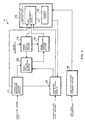
- Fig. 3 is a block diagram showing functions which are constructed by the hardware and software of the text editing device 1a.
- the text editing device 1a includes a character information storage module (character information storage means) 11, a character size storage module (character size storage means) 12, a frame configuration alteration module (frame configuration alteration means) 13, a frame state setting module (frame state setting means) 14, a frame configuration storage module (frame configuration storage means) 15, a character size alteration module (character size alteration means) 16, and a line feed position storage module (line feed position storage means) 19.
- the character information storage module 11, the character size storage module 12, the frame configuration storage module 15 and the line feed position storage module 19 are implemented by the RAM 108.
- the frame state setting module 14, the frame configuration alteration module 13 and the character size alteration module 16 correspond to functions implemented by the CPU 106.
- the character information storage module 11 stores a character string inputted via the input circuit 110 as text data in response to a character input by the user operating the keyboard 103.
- the character size storage module 12 stores the size of each character included in the character string stored in the character information storage module 11.
- the stored data are expanded as image data in a prescribed area of the RAM 108.
- the character string stored in the character information storage module 11 is displayed on the display device 102 via the output circuit 111 according to the character size settings stored in the character size storage module 12.
- the frame state setting module 14 sets the state of a frame (in which the character string stored in the character information storage module 11 is displayed or printed) to a configuration fixed state or a configuration alterable state.
- the frame is a rectangular indication on the screen, indicating an area accommodating the character string when the character string stored in the character information storage module 11 is displayed on the display device 102 or printed by the printing device 105.
- the configuration (shape) of the frame is not limited to a rectangle.
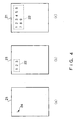
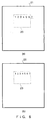
- Figs. 4 and 5 show frames 22 and 23 (dotted lines) displayed in a text display area 21 of the display device 102, as examples of the frame.
- Figs. 4(a) - 4(c) show an example of a series of screen images in the display area 21 of the display device 102 when the user inputs characters without executing frame specification.
- the frame specification means specification for fixing the size of the frame. The frame specification will be explained in detail later referring to Fig. 5(a) or Fig. 7.
- the frame state setting module 14 has set the state of the frame 22 in the "configuration alterable state” and a frame state flag has been set to a value representing the "configuration alterable state”.
- the frame state flag previously assigned a storage area in the RAM 108, is stored being associated with the frame 22 whose configuration is stored in the frame configuration storage module 15.
- a cursor 24 appears in the text display area 21 and the text editing device 1a gets ready to receive character input.
- the user can input a character string from the position of the cursor 24 (Fig. 4(a)).
- the frame configuration alteration module 13 enlarges the frame configuration as shown in Figs. 4(b) and 4(c) depending on the size of the inputted character string.
- Figs. 5(a) - 5(c) show an example of a series of screen images when the user inputs characters after executing the frame specification.
- the specification of the frame 23 is carried out by dragging the mouse 104 on a graphical user interface screen, for example.
- the user moves the mouse cursor to an upper left arrow in the text display area 21, clicks the left mouse button, moves (drags) the mouse cursor to the lower right, and releases the left mouse button (drops) with the mouse cursor placed at a lower right arrow.
- the specification of the area of the frame 23 i.e. the frame specification
- the frame state setting module 14 sets the state of the frame 23 to the "configuration fixed state” and the frame state flag for the frame 23 is set to a value representing the "configuration fixed state", by which the configuration of the frame 23 will not be altered from that time on.
- the frame configuration storage module 15 stores information on the configuration of the frame which has been set in the "configuration fixed state” or the "configuration alterable state”. Specifically, the frame configuration storage module 15 stores the size of the frame, that is, a frame height (length in the vertical direction of Fig. 5 or Fig. 4) and a frame width (length in the horizontal direction of Fig. 4 or Fig. 5). Together with the frame size information (height, width), frame position information (e.g. coordinates of the upper left corner of the frame in the text display area 21) is also stored in the frame configuration storage module 15. Incidentally, it is also possible to use coordinates of the upper left corner and lower right corner of the frame as the information on the frame configuration, instead of the frame width and frame height.
- the frame configuration alteration module 13 alters memory contents of the frame configuration storage module 15 so that the character string stored in the character information storage module 11 can be accommodated in the frame.
- the frame configuration alteration module 13 alters the data stored in the frame configuration storage module 15 so that the configuration of the frame 22 will be enlarged corresponding to the size of the whole character string as shown in the screen images of Figs. 4(b) and 4(c) each time when a character string is stored in the character information storage module 11.
- the term "character string” used in this specification can also mean only one character.
- a character string "123" has been stored in the character information storage module 11.
- the configuration of the frame 22 shown in Fig. 4(b) has been changed so that the character string "123" (being displayed in the character size stored in the character size storage module 12) can be fitted in the frame 22.
- the frame configuration alteration module 13 does not change the frame configuration even when a new character string is inputted and stored in the character information storage module 11.
- the initial character size when a character is initially inputted without the frame specification may be set based on initial setting data existing in the HD 109 at the point of the startup of the text editing device 1a or a character size setting made by the user at the position of the cursor 24.
- the character size alteration module 16 changes the character size (changes the data stored in the character size storage module 12) so that the character string stored in the character information storage module 11 can be fitted in the frame.
- the character size alteration module 16 reduces the character size so that the whole character string can be accommodated in the frame 23 (having the configuration stored in the frame configuration storage module 15) as shown in the screen images of Figs. 5(b) and 5(c) each time when a character string is stored in the character information storage module 11.
- the character size stored in the character size storage module 12 for a character string "1234" stored in the character information storage module 11 has been changed so that the character string "1234" can be fitted in the frame 23.
- the character size has been altered so that a character string "123456" can be fitted in the frame 23.
- the character size alteration module 16 includes a size comparison module 17 and a judgment module 18 (see Fig. 3).
- the size comparison module 17 compares the size of the whole character string with the size of the frame (determined by the frame configuration) each time when a character string is stored in the character information storage module 11.
- Figs. 6(a) and 6(b) show screen images of the text display area 21 when a new character string is inputted starting from the state shown in Fig. 5(c).
- a character string "7" (indicated with an underlined oblique font) is inputted after the character string "123456" as shown in Fig.
- the size comparison module 17 figures out the size of the whole character string assuming that the character string "7" is additionally displayed inside the frame 23 in the text display area 21 in the character size stored in the character size storage module 12. For example, the size comparison module 17 figures out the length of the whole character string in a column-increasing direction (width direction of the frame 23) (and/or the length of the whole character string in a line-increasing direction (height direction of the frame 23)). Thereafter, the size comparison module 17 compares the character string "123456" in Fig. 6(a) with the frame width of the frame 23 stored in the frame configuration storage module 11.
- the judgment module 18 judges whether the whole character string can be accommodated in the frame 23 or not based on the comparison by the size comparison module 17. In the case of Fig. 6(a), the judgment module 18 judges that the size (i.e. the length in the column-increasing direction) of the whole character string "1234567" will not fit in the frame 23 if the newly inputted character string "7" is additionally displayed.
- the character size alteration module 16 changes the character size (alters the data stored in the character size storage module 12) so that the whole character string including the newly inputted character string "7" can be accommodated in the frame 23, that is, the character string "1234567” including the newly inputted character string "7” is scaled down to fit in the frame 23 as shown in Fig. 6(b).
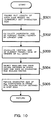
- Fig. 7 is a flow chart showing a frame setting process executed by the frame state setting module 14 (under the control by the CPU 106) for setting the frame.
- a rectangle having a diagonal line specified by the left button pressing coordinates and the left button releasing coordinates is generated as the frame (text frame) as shown in Fig. 5(a) (S110).
- the configuration of the frame is stored in the frame configuration storage module 15.
- the CPU 106 sets the state (operation mode) of the generated frame to the "configuration fixed state (fixed-frame-size variable-character-size mode)" (S111).
- Fig. 8 is a flow chart showing an editing process.
- step S201 whether the state of the frame is the "configuration fixed state” or not (whether the frame state flag represents the “configuration fixed state” or not) is judged in step S201. If the frame state is not the “configuration fixed state” (S201: NO), that is, if the frame state is the "configuration alterable state", the frame configuration alteration module 13 changes the configuration of the frame corresponding to the character string inputted by the user as shown in the example of Fig. 4 (S202). Thereafter, the editing process of Fig. 8 is ended (the control returns to Fig. 7).
- step S201 If the frame state is the "configuration fixed state" in the step S201 (S201: YES), whether a character string has been stored in the character information storage module 11 or not (whether there has been a character input through the keyboard 103 or not) is judged (S203). If there has been no input of character string (S203: NO), the process of Fig. 8 is ended. If there has been a character string input (S203: YES), whether or not the character string input was the initial input (whether or not the character string was the one first inputted to the frame in the "configuration fixed state”) is judged (S204).
- the character string input is judged to be the initial input (S204: YES)
- the number of characters of the inputted character string is counted (S205) and the character size of the initially inputted character string is set depending on the counted number of characters and the size of the frame so that the character string can be fitted in the frame (S206).
- the character size set is stored in the character size storage module 12.
- the character size of the character string made of four characters is set to a size allowing the character string to fit in the width of the frame 23.
- the frame 23 is low (short in the height direction) and extremely wide, the character size is set so that the character string can fit in the height of the frame 23.
- the process of Fig. 8 is ended. According to this process (S205, S206), whatever frame configuration is specified by the user, a character size suitable for the specified frame configuration is set automatically. Therefore, after the frame specification, the user can start text editing work with an easy-to-see display screen without the need of making the initial character size settings.
- the size of the whole character string assuming the additional display of the newly inputted character string is figured out by the size comparison module 17 of the character size alteration module 16 as mentioned above (S207). Subsequently, the size of the character string is compared with the frame size by the size comparison module 17 (S208) and whether the size of the whole character string fits in the frame or not is judged by the judgment module 18 (S209).
- the process of Fig. 8 is ended without the alteration of the character size of the character string including the newly inputted character string by the character size alteration module 16.
- the character size alteration module 16 reduces the size of characters of the character string including the newly inputted character string (S211). After the altered character size is stored in the character size storage module 12, the process of Fig. 8 is ended.
- the text editing device 1a further includes the line feed position storage module 19 as shown in Fig. 3.
- the line feed position storage module 19 stores line feed position information which is used for displaying or printing out the character string stored in the character information storage module 11 while starting new lines at intended positions. Also when the frame state is the "configuration fixed state" and the line feed position information has been stored in the line feed position storage module 19, the character size alteration module 16 changes the memory contents of the character size storage module 12 so that the whole character string stored in the character information storage module 11 can be accommodated in the frame.
- Fig. 9 shows an example of a screen image when the line feed position information has been stored in the line feed position storage module 19 and a character string including one or more line feeds and extending for two or more lines is displayed in the frame 23 in the text display area 21.
- Fig. 10 is a flow chart showing a case where a character string including one or more line feeds and extending for two or more lines is processed in the step S211 of the process of Fig. 8.
- a character string extending for n lines has been stored in the character information storage module 11.
- the width and height of the frame 23 are x and y, respectively.
- Fig. 9 shows a case where a character string "ABC" (indicated with an underlined oblique font) is inputted subsequent to a character string "12345678" in the first line.
- the step S209 of Fig. 8 has judged that the whole character string can not be fitted in the frame 23 if the newly inputted character string "ABC" is additionally displayed in the character size stored in the character size storage module 12.
- the process of Fig. 10 first figures out the length of each line based on the character size currently set (S301).
- the lengths of the lines (line 1 - line n) of the character string including the newly inputted character string will hereinafter be expressed as L 1 ⁇ L n .
- the frame width x of the current frame 23 is divided by the length of the longest line (S302).
- the step S302 calculates x/L 1 since the length of the longest line is L 1 .
- the frame height (vertical size) y of the current frame 23 is divided by the sum of heights of all the lines (S303).
- the step S303 calculates y/(H 1 + H 2 + ⁇ H n ), where H 1 , H 2 ⁇ H n denote the heights of the lines of the character string. From the values obtained in the steps S302 and S303, the smaller one is selected as a scaling factor for the character size (S304).
- x/L 1 obtained in the step S302 is smaller than y/(H 1 + H 2 + ⁇ H n ) obtained in the step S303, therefore, x/L 1 is employed as the scaling factor.
- the character size alteration module 16 changes (reduces) the character size of all the characters included in the frame 23 with the scaling factor obtained in the step S304 (S305).
- the character size of all the characters in the whole character string (line 1 - line n) including the character string "ABC" newly inputted to the first line is reduced so as to fit the whole character string in the frame 23.
- the process of Fig. 10 is ended (the control returns to the process of Fig. 8).
- the character string “cde” in the line n is displayed in a smaller character size compared to other character strings ("ab", "f").
- the character size alteration module 16 changes the character sizes (data stored in the character size storage module 12) so that the character string stored in the character information storage module will fit in the frame while maintaining the ratios among the different character sizes stored in the character size storage module 12. Since all the character strings contained in the frame 23 are scaled down with the scaling factor obtained in the step S304, the size ratios between the character string "cde” and other character strings ("ab", "f”, etc.) are maintained in the reduction of character sizes.
- the character size alteration is carried out so that the whole character string will fit in the frame while maintaining the size ratios. Therefore, the user can continue text editing work with an easy-to-see display screen without the need of altering the character sizes by himself/herself.
- the character size alteration module 16 alters the memory contents of the character size storage module 12 so that the character string stored in the character information storage module 11 will fit in the frame. For example, in cases where the user inputting characters without executing the frame specification as shown in Fig.
- the sizes of all characters contained in the frame are changed by the character size alteration module 16 so that the whole character string will fit in the frame set in the "configuration fixed state" (specifically, the character sizes are enlarged/reduced when the frame configuration has been enlarged/reduced by the user).
- the user can start editing the character string with the frame in the "configuration fixed state" from some point, by the setting through the frame state setting means.
- the text editing device 1a in the above embodiment is configured specifically as a label writer
- the present invention is not restricted to label writers but is applicable to a variety of systems (e.g. a printing system using a printer) requiring text editing work.
- the label writer described in the above embodiment employs a personal computer as means for inputting, editing and displaying characters
- the present invention is also applicable to label writers having an input device, display device, printing device, etc. in one body (the so-called stand-alone label writers).
- the pointing device for letting the user execute the frame specification work is not limited to a mouse. Any device can be used as long as the coordinates of the frame can be specified with the device.
- the configuration (shape) of the frame stored in the frame configuration storage module is not limited to a rectangle but can be various shapes.
- Yet another embodiment including a means for informing the user that the character size can not be reduced further (when the character size has been reduced to the minimum size) by issuing an error message, is also possible.
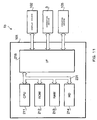
- Fig. 11 is a block diagram showing an example of hardware configuration installed in a text editing device 1b in accordance with the second embodiment of the present invention.
- the text editing device 1b includes a CPU (Central Processing Unit) 211, a ROM (Read Only Memory) 212, a RAM (Random Access Memory) 213, a hard disk (HD) 214 and an interface (I/F) 215 which are connected together by a bus 231.
- CPU Central Processing Unit
- ROM Read Only Memory
- RAM Random Access Memory
- HD hard disk
- I/F interface
- a display device 102, operating devices (keyboard 103, mouse 104) and a printing device 105 are connected to the CPU 211 via the interface (I/F) 215.
- the printing device 105 various types of printing devices, such as a tape printer for printing character strings on tape-like print media, a printer for printing on plain paper (A4 size, B4 size, postcard size, etc.) as print media, a stamp producing device for producing a stamp or seal, etc. can be used.
- the ROM 212 stores various programs to be used for controlling the operation of the text editing device 1b.
- the HD 214 stores a variety of software including a program for letting the personal computer function as the text editing device 1b (The program can be installed in an arbitrary computer by prestoring the program in a removable record medium like a CD-ROM, FD, MO, etc.).
- the HD 214 also stores various data created by the user.
- the CPU 106 executes various calculations and processes based on data inputted via the operating means 3 and various programs/data stored in the ROM 212, HD 214 and RAM 213.
- the CPU 211 sends data to the display device 102 and the printing device 105 via the interface 215.
- the RAM 213 stores various calculation results by the CPU 211, etc.
- Fig. 12 is a functional block diagram showing the functional configuration of the text editing device 1b.
- the text editing device 1b includes a text storage module 221, a character size storage module 222, a frame configuration storage module 223, an operation mode storage module 224, a character size alteration module 225, a frame configuration alteration module 226, an operation mode setting module 227 and an operation mode display control module 228.
- the text storage module 221, the character size storage module 222, the frame configuration storage module 223 and the operation mode storage module 224 are formed in the RAM 213 or the HD 214.
- the character size alteration module 225, the frame configuration alteration module 226, the operation mode setting module 227 and the operation mode display control module 228 correspond to functions implemented by the CPU 211.
- the text storage module 221 stores text data in response to a character string input by the user operating the operating device 3.
- the character size storage module 222 stores the size of each character included in the character string stored in the text storage module 221.
- the stored data are expanded as image data in a prescribed area of the RAM 213 and displayed by the display device 102.
- the frame configuration storage module 223 stores the configuration of a frame in which the character string stored in the text storage module 221 is displayed or printed.
- the frame configuration storage module 223 stores, for example, the size of the frame (frame height, frame width) as the frame configuration. Together with the frame size information (height, width), frame position information (e.g. coordinates of the upper left corner of the frame) is also stored in the frame configuration storage module 223.
- frame position information e.g. coordinates of the upper left corner of the frame
- As the information on the frame configuration it is also possible to store only the coordinates of the upper left corner and lower right corner of the frame instead of the frame width and frame height.
- the operation mode storage module 224 stores information on an operation mode which can be set by the operation mode setting module 227 which will be explained later.
- the display/print formats of the character string which has been stored in the text storage module 221 by text input operation or line feed operation is specified by an operation mode which has been set and settled (confirmed) by the operation mode setting module 227 (hereinafter referred to as a "set operation mode").
- the character size alteration module 225 changes the sizes of characters stored in the character size storage module 222 when the "set operation mode" stored in the operation mode storage module 224 is an operation mode that can change the character sizes ("character size variable operation state"). In the "character size variable state", the character size alteration module 225 changes the character sizes stored in the character size storage module 222 (memory contents of the character size storage module 222) so that the character string stored in the text storage module 221 will fit in the frame stored in the frame configuration storage module 223.
- the frame configuration alteration module 226 changes the configuration of the frame stored in the frame configuration storage module 223 when the "set operation mode" stored in the operation mode storage module 224 is an operation mode that can change the frame configuration ("frame configuration variable operation state"). In this case, the frame configuration alteration module 226 changes the frame configuration stored in the frame configuration storage module 223 (memory contents of the frame configuration storage module 223) so that the character string stored in the text storage module 221 will fit in the frame having the changed frame configuration.
- the operation mode setting module 227 can set the operation mode to the following four operation modes:
- Fig. 13 shows an example of a graphical user interface screen 30 (hereinafter referred to as a "screen 30") displayed on the display device 102 by the operation mode display control module 228.
- the screen 30 shown in Fig. 13 pops up on the display device 102 when an unshown menu screen, etc. displayed on the display device 102 is operated by the user, for example.
- the four operation modes that can be set by the operation mode setting module 227 are shown. Specifically, names of the operation modes: “fixed frame size (frame configuration fixed operation mode)”, “long passage (frame height variable operation mode)”, “automatic length (frame width variable operation mode)” and “free size (two-direction variable operation mode)” are displayed.
- the screen 30 is also provided with radio buttons " ⁇ " corresponding to the operation mode names.
- a desired operation mode can be selected by moving the mouse cursor to the position of the operation mode and clicking.
- the radio button " ⁇ " of the selected operation mode turns into a filled circle " ⁇ ".
- the operation mode setting module 227 sets the operation mode to the selected operation mode. In the case of Fig. 13 where the "fixed frame size" has been selected, the operation mode setting module 227 sets the operation mode to the "frame configuration fixed operation mode".
- the operation mode display control module 228 further displays a screen image 31 indicating the change in text display status at the point when text input operation or line feed operation is executed (text display statuses before and after the operation) depending on the "set operation mode".
- a screen image 31 (surrounded by dotted lines) indicating the change in the text display status in the "frame configuration fixed operation mode" is shown.
- buttons 32 (32a, 32b) that can be clicked by the mouse are also displayed on the screen 30 under the control by the operation mode display control module 228.
- the "set operation mode” is settled in the currently set operation mode (i.e. the operation mode currently set on the screen is confirmed) when the user clicks the button 32a ("OK" button).
- the “set operation mode” settled by the operation on the screen 30 is different from the operation mode stored in the operation mode storage module 224, the operation mode is overwritten with the newly decided "set operation mode".
- the settled "set operation mode” is identical with the operation mode stored in the operation mode storage module 224, the memory contents of the operation mode storage module 224 are not overwritten.
- the process on the screen 30 is ended and the window for the screen 30 is closed.
- the "set operation mode” which has been set on the screen 30 is not confirmed (that is, the memory contents of the operation mode storage module 224 are not overwritten), by which the memory contents of the operation mode storage module 224 are maintained to indicate the "set operation mode” before displaying the screen 30.
- the operation mode setting module 227 may also be configured to be able to set operation modes other than the four operation modes.
- the character sizes are changed so as to fit the inputted character string in the frame.
- the data in the character size storage module 222 are changed so that the character string stored in the text storage module 221 will fit in the frame stored in the frame configuration storage module 223 when text input operation or line feed operation is executed.
- Fig. 14 shows examples of screen images indicating the statuses of the character string and the frame displayed on the display device 102 during text editing work in the "frame configuration fixed operation mode".
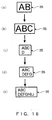
- Fig. 14(a) shows a status in which a character string "AB” inputted by the user has been displayed in a frame 33 which has been set by the initial setting or by the user.
- the character size alteration module 225 judges whether or not the alteration of character sizes is necessary for accommodating the character string "ABC” in the frame 33 stored in the frame configuration storage module 223 (i.e. compares the size of the character string "ABC” with that of the frame 33).
- the character size alteration module 225 does not change the character size of the character string "ABC” (i.e. the character string "ABC” is displayed in the frame 33 in the same character size as that in Fig. 14(a)) since the frame 33 is larger than the character string "ABC” (see Fig. 14(b)).
- the character size alteration module 225 judges that the character string "ABCD” gets larger than the frame 33 if displayed in the same character size. In this case, the character size alteration module 225 reduces the character size so as to fit the character string "ABCD” in the frame 33, by which the character string "ABCD” is displayed in the character size fitting in the frame 33 as shown in Fig. 14(c).
- a similar process is executed when a character string "E” is further inputted (see Fig. 14(d)).
- the character size alteration module 225 reduces the character size of the character string "ABCDEFGH” so that the character string "ABCDEFGH” of two lines will fit in the frame 33, by which the character string is displayed in the frame 33 as shown in Fig. 14(e).
- Figs. 15(a) through 15(d) show examples of screen images during text editing work in the "frame height variable operation mode".
- Fig. 15(a) shows a status in which a character string "AB” inputted by the user has been displayed in a frame 34 which has been set by the initial setting or by the user.
- the frame configuration alteration module 226 judges whether or not the character string "ABC” can be displayed in the frame 34 in the state where only the size in the frame height direction can be changed while fixing the size in the frame width direction.
- the frame configuration alteration module 226 does not change the size in the frame height direction since the frame 34 is larger than the character string "ABC" (see Fig. 15(b)).
- the character size alteration module 225 which has recognized the "frame height variable operation mode" by referring to the memory contents of the operation mode storage module 224, does not change the memory contents of the character size storage module 222.
- the frame configuration alteration module 226 judges that the character string "ABCD” gets larger than the frame 34 if the character string is displayed in the same character size to stretch in its lengthwise direction. In this case, the frame configuration alteration module 226 changes the memory contents of the frame configuration storage module 223 so that the character string "ABCD” displayed in two lines will fit in the frame 34 (that is, the configuration of the frame 34 is extended in the frame height direction), by which the character string "ABCD” is displayed in the frame 34 as shown in Fig. 15(c).
- a character string "E” is further inputted, a process similar to that in Fig. 15(b) is executed (see Fig. 15(d)).
- Figs. 16(a) through 16(e) show examples of screen images displayed on the display device 102 during text editing work in the "frame width variable operation mode".
- Fig. 16(a) shows a status in which a character string "AB” inputted by the user has been displayed in a frame 35 which has been set by the initial setting or by the user.
- the frame configuration alteration module 226 determines a frame width that is necessary for displaying the character string "ABC” in the frame 35 in the same character size in the state where only the size of the frame 35 in the frame width direction can be changed while fixing the size in the frame height direction.
- the frame configuration alteration module 226 After determining the frame width necessary for displaying the character string "ABC” in the frame 35, the frame configuration alteration module 226 changes the width of the frame 35 to the determined frame width (alters the memory contents of the frame configuration storage module 223), by which the character string "ABC” is displayed in the frame 35 as shown in Fig. 16(b).
- the character size alteration module 225 having recognized the "frame width variable operation mode" by referring to the memory contents of the operation mode storage module 224, does not change the memory contents of the character size storage module 222.
- the character size alteration module 225 reduces the character size of the character string "ABCD” so that the character string "ABCD” of two lines will fit in the frame 35.
- the frame configuration alteration module 226 changes the frame width (data in the frame configuration storage module 223) so that the frame width (size in the frame width direction) will be a width corresponding to the character string after the reduction of character size in the state fixing the size in the frame height direction.
- the size of the character string is altered (reduced) to the one corresponding to the fixed frame height, while the width of the frame 35 is changed to the one corresponding to the length of the altered character string in the horizontal direction, by which the character string "ABCD" is displayed to fit in the in the frame 35 as shown in Fig. 16(c).
- Fig. 16(d) shows a status in which a character string "EFG” has been inputted further following the status of Fig. 16(c)
- Fig. 16(e) shows a status in which a character string "HIJ” has been inputted further following the status of Fig. 16(d).
- the character string is displayed to fit in the frame 35 by increasing the frame width as shown in Figs. 16(d) and 16(e).
- Figs. 17(a) through 17(c) show examples of screen images displayed on the display device 102 during text editing work in the "two-direction variable operation mode".
- Fig. 17(a) shows a status in which a character string "AB” inputted by the user has been displayed in a frame 36 which has been set by the initial setting or by the user.
- the frame configuration alteration module 226 determines a frame height that is necessary for displaying the character string "ABC” in the same character size while starting a new line before the character string "C” and thereby enlarges the frame 36 in the frame height direction (alters the data in the frame configuration storage module 223).
- the character size alteration module 225 having recognized the "two-direction variable operation mode" by referring to the memory contents of the operation mode storage module 224, does not change the memory contents of the character size storage module 222.
- the character string "ABC” is displayed in the frame 36 as shown in Fig. 17(b).
- the frame configuration alteration module 226 determines a frame width that is necessary for accommodating the character string "ABCDEF” in the frame 36 when the character string "DEF” is displayed in the same character size to follow the character string "C” in the lengthwise direction of the character string, and thereby enlarges the configuration of the frame 36 in the frame width direction (alters the data in the frame configuration storage module 223).
- the character size alteration module 225 does not change the memory contents of the character size storage module 222 similarly to the case of Fig. 17(b). By this, the character string "ABCDEF” is displayed in the frame 36 as shown in Fig. 17(c).
- Fig. 18 shows an example of the screen image 31 (surrounded by dotted lines) indicating the change in text display status at the point when text input operation or line feed operation is executed (text display statuses before and after the operation) with the "set operation mode" set to the "frame configuration fixed operation mode".
- the screen image 31 of Fig. 18 corresponds to the change in display status from Fig. 14(a) to Fig. 14(e).
- Fig. 19 shows an example of a screen image 37 (surrounded by dotted lines) indicating the change in text display status at the point when text input operation or line feed operation is executed with the "set operation mode" set to the "frame height variable operation mode".
- the screen image 37 of Fig. 19 corresponds to the change in display status from Fig. 15(a) to Fig. 15(d).
- the screen image 37 is displayed at a prescribed position in the screen 30 (the part where the screen image 31 is displayed).
- Fig. 20 shows an example of a screen image 38 (surrounded by dotted lines) indicating the change in text display status at the point when text input operation or line feed operation is executed with the "set operation mode" set to the "frame width variable operation mode".
- the screen image 38 of Fig. 20 corresponds to the change in display status from Fig. 16(a) to Fig. 16(e).
- the screen image 38 is displayed at the prescribed position in the screen 30 (the part for the screen image 31).
- Fig. 21 shows an example of a screen image 39 (surrounded by dotted lines) indicating the change in text display status at the point when text input operation or line feed operation is executed with the "set operation mode" set to the "two-direction variable operation mode".
- the screen image 39 of Fig. 21 corresponds to the change in display status from Fig. 17(a) to Fig. 17(c).
- the screen image 38 is displayed at the prescribed position in the screen 30 (the part for the screen image 31).
- the operation mode setting module 227 may initially set the "set operation mode" when the text editing device 1b is started up, depending on the type and conditions of the print media printed on by the printing device 105, by which the user is allowed to start text editing work immediately after the startup of the text editing device 1b in a proper operation mode appropriate for the type and conditions of the print media, without the need of setting the operation mode.
- the operation mode setting module 227 initially sets the "set operation mode” to the "frame configuration fixed operation mode", and the "frame configuration fixed operation mode” is stored in the frame configuration storage module 223, by which the user starting up the text editing device 1b can immediately start text editing work while recognizing the fixed frame configuration as the preset print area of the tape-like print medium, without the need of setting the operation mode.
- the operation mode setting module 227 initially sets the “set operation mode” to the "frame width variable operation mode", and the "frame width variable operation mode” is stored in the frame configuration storage module 223, by which the user starting up the text editing device 1b can immediately start text editing work while recognizing the frame configuration alterable only in the frame width direction as the print area alterable in the tape lengthwise direction, without the need of setting the operation mode.
- the operation mode setting module 227 initially sets the "set operation mode” to the "frame height variable operation mode", and the "frame height variable operation mode” is stored in the frame configuration storage module 223, by which the user starting up the text editing device 1b can immediately start text editing work while recognizing the frame configuration alterable only in the frame height direction as the print area of the plain paper, etc., without the need of setting the operation mode.
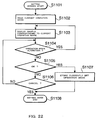
- Fig. 22 is a flow chart showing an operation mode setting process executed by the text editing device 1b.
- the process of Fig. 22 is started with the graphical user interface screen 30 (setting screen) of Fig. 13 called as a pop-up screen.
- the current operation mode is read out (S1102).
- the "set operation mode" stored in the operation mode storage module 224 is read out by the operation mode display control module 228.
- the operation mode display control module 228 displays the screen image of operation display examples corresponding to the "set operation mode" (sample) on the screen 30 (S1103).
- a corresponding screen image 31 is displayed on the screen 30 since the "set operation mode" has been set to the "frame configuration fixed operation mode".
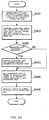
- Fig. 23 is a flow chart showing the editing process when the "set operation mode" has been set to the "frame configuration fixed operation mode". The process of Fig. 23 is carried out each time when text input operation or line feed operation is executed.
- the minimum rectangle size obtained in S1201 is compared with the current frame size and thereby scaling factors in the vertical direction (frame height direction) and the horizontal direction (frame width direction) are calculated (S1202).
- the ratio of the frame size to the character string size is calculated in regard to the vertical direction and the horizontal direction.
- the ratio corresponds to the scaling factor to be used for handling the size of the character string.
- Each scaling factor takes on a value larger/smaller than 100 % when the character string size is smaller/larger than the frame size.
- the scaling factor is less than 100 % in the vertical direction or the horizontal direction, that is, when it is impossible to accommodate and display the whole character string in the frame since the frame size is smaller than the character string size in the vertical direction or in the horizontal direction, the character size alteration is judged to be necessary (S1203: YES).
- the scaling factors in the vertical direction and the horizontal direction are compared to determine which is larger (S1204).
- the vertical scaling factor is judged to be larger than the horizontal scaling factor (S1204: YES)
- the character size stored in the character size storage module 222 is reduced according to the horizontal scaling factor (S1205).
- the vertical scaling factor is judged to be no larger than the horizontal scaling factor (S1204: NO)
- the character size stored in the character size storage module 222 is reduced according to the vertical scaling factor (S1206).
- the character string stored in the text storage module 221 is displayed in the reduced character size(s) in the frame stored in the frame configuration storage module 223 (S1207), by which the editing process of Fig. 23 is ended.
- Fig. 24 is a flow chart showing the editing process when the "set operation mode" has been set to the "frame height variable operation mode". The editing process of Fig. 24 is carried out each time when text input operation or line feed operation is executed.
- the first line of the character string is designated first as the target of process (process target line) by setting a parameter "n" to "1" (S1301).
- the process for the n-th line (S1303 - S1305) is finished, the number "n" is replaced with "n+1" and the loop (S1303 - S1305) is repeated until there remains no process target line.
- the n-th line is judged to exist in the step S1302 (S1302: YES)
- the length of the n-th line of the character string (or a character string in the n-th line) is calculated (S1303) and whether the character string in the n-th line can fit in the frame stored in the frame configuration storage module 223 or not is judged (S1304). If the n-th line is judged to fit in the frame (S1304: YES), the process for the n-th line is finished and the number "n" is replaced with "n+1" so as to shift the process to the loop for the next line (S1306).
- step S1306 for replacing "n” with "n+1” the process advances to the next line. Thereafter, whether the n-th line exists or not is judged regarding the new "n" (S1302). If the n-th line exists (S1302: YES), the process from S1303 is executed similarly, otherwise (S1302: NO) the process goes out of the loop and advances to the next step.
- a step for calculating the sum of heights of all the lines as the length of the object (the frame and the character string added together) in the vertical direction is executed (S1307).
- the frame height is altered so that the character string extending for all the lines will fit in the frame (the memory contents of the frame configuration storage module 223 are altered) and the character string fitting in the frame is displayed, by which the editing process of Fig. 24 is ended.
- Fig. 25 is a flow chart showing the editing process when the "set operation mode" has been set to the "frame width variable operation mode". The editing process of Fig. 25 is carried out each time when text input operation or line feed operation is executed.
- the size of the smallest rectangle surrounding the whole character string (all the character string including the input by the operation) displayed in the current character size (the character size stored in the character size storage module 222) is figured out (S401).
- the CPU 211 compares the minimum rectangle size obtained in S401 with the current frame size and thereby calculates the scaling factor in the vertical direction (frame height direction) (S402). In other words, the ratio of the frame size to the character string size in the vertical direction is calculated.
- the scaling factor in the vertical direction takes on a value larger than 100 % since the character string fits well in the frame.
- the vertical scaling factor falls below 100 % since the character string size in the vertical direction exceeds the frame size.
- step S403 After the calculation of the vertical scaling factor is finished, whether the alteration of the character size stored in the character size storage module 222 is necessary or not is judged (S403).
- the vertical scaling factor is larger than 100 % (when it is judged that no line feed operation has been executed), the character size alteration is judged to be unnecessary (S403: NO) since the vertical size of the frame is larger than that of the character string and the character string can be fitted in the frame height. In this case, step S405 (described later) is executed.
- the character size alteration is judged to be necessary (S403: YES) since the vertical size of the frame is smaller than that of the character string and the character string can not be fitted in the frame height.
- the character size stored in the character size storage module 222 is reduced according to the vertical scaling factor (S404).
- the frame size is altered so that the horizontal size of the frame will be equal to the length of the character string in the set character size (character size stored in the character size storage module 222 at that point) so that the frame can accommodate the character string (S405).
- the frame size is altered so that the horizontal size of the frame will be equal to the length of a line (character string) longest among the lines (so that the frame can accommodate the whole character string) (S405).
- the character string stored in the text storage module 221 is displayed with the frame size stored in the frame configuration storage module 223 and the character size stored in the character size storage module 222 (S406).
- the whole character string is displayed to fit in the frame in the state where the frame configuration is alterable only in the frame width direction (S406) when text input operation or line feed operation is executed.
- the editing process of Fig. 25 is ended.
- Fig. 26 is a flow chart showing the editing process when the "set operation mode" has been set to the "two-direction variable operation mode". The editing process of Fig. 26 is carried out each time when text input operation or line feed operation is executed.
- the text editing device 1b operation modes that can be set by the user are displayed on the graphical user interface screen, while the screen image of display examples indicating the change in text display status at the point when text input operation or line feed operation is executed (text display statuses before and after the operation) is also provided. Therefore, the user setting the operation mode can judge and grasp the change in the frame and character string caused by text input operation, etc. correctly and quickly by checking the screen image of display examples, by which waste of time and effort (like a case where the user actually started editing after setting the operation mode notices that an unexpected operation mode has been set and the operation mode has to be reset by the user) can be prevented. Therefore, efficiency of text editing work can be improved.
Landscapes
- Engineering & Computer Science (AREA)
- Theoretical Computer Science (AREA)
- Audiology, Speech & Language Pathology (AREA)
- Health & Medical Sciences (AREA)
- Computational Linguistics (AREA)
- General Health & Medical Sciences (AREA)
- Physics & Mathematics (AREA)
- General Engineering & Computer Science (AREA)
- General Physics & Mathematics (AREA)
- Artificial Intelligence (AREA)
- Document Processing Apparatus (AREA)
- Controls And Circuits For Display Device (AREA)
- Record Information Processing For Printing (AREA)
Abstract
A character string is stored in a character information storage module 11 as text data
while the size of each character is stored in a character size storage module 12. The state of
a frame in which the character string is displayed or printed is set to a "configuration fixed
state" or a "configuration alterable state" by a frame state setting module 14 and the
configuration of the frame is stored in a frame configuration storage module 13. When the
frame configuration alteration module 14 has set the frame in the "configuration fixed state", a
character size alteration module 16 alters the memory contents of the character size storage
module 12 so that the character string will fit in the frame. When the frame configuration
alteration module 14 has set the frame in the "configuration alterable state", a frame
configuration alteration module 13 alters the memory contents of the frame configuration
storage module 15 so that the character string will fit in the frame.
Description
The present invention relates to a text editing device for editing a character string,
and a program for letting a text editing device edit a character string.
As a conventional text editing device, a device letting a user edit a character string
while specifying a frame (in which a character string which has been stored as text data is
displayed or printed) has been known.
A label creating device as one of such text editing devices has been disclosed in
Japanese Patent Provisional Publication No. HEI 07-114547. In the label creating device,
when the stored character string, being displayed on the screen with a designated character
size, can not be accommodated in the frame which has been specified, the specified frame is
enlarged within a range avoiding overlap with adjacent frames.
A text editing device described in Japanese Patent Provisional Publication
No.SHO62-267858 has a function of starting one of prescribed processes such as a rectangle
(frame) generation process, an intra-rectangle character string generation process, a rectangle
editing process and an intra-rectangle character string editing process, in response to a
command input corresponding to each process. For example, when a rectangle editing
command is inputted, the rectangle editing process is started. In the rectangle editing
process, the size and the number of lines of the rectangle is corrected while automatically
executing the line feed for the intra-rectangle character string. The intra-rectangle character
string editing process is started in response to an input of an intra-rectangle character string
editing command. In the intra-rectangle character string editing process, character size data
regarding the generated intra-rectangle character string is corrected while automatically
executing the line feed for the character string.
However, according to the text editing function of the label creating device of
Japanese Patent Provisional Publication No.HEI07-114547, the frame is automatically
enlarged when the stored character string can not be accommodated in the specified frame
with the designated character size and thus a user not hoping to change the frame size because
of editing restrictions has to reset the character size by himself/herself. Especially in cases
where the user previously specifies the configuration of the frame and then inputs a character
string to be displayed in the frame, the automatic enlargement of the frame once specified is
undesirable to the user since the user in many cases intends to contain all the inputted
character string in the frame of the specified configuration. Such a situation is inconvenient
to the user and an improvement in workability is hoped for.
When the user hopes to fix the frame, it is possible, instead of enlarging the frame
size, to do without displaying part of the character string protruding from the frame; however,
that deteriorates the efficiency of text editing. Further, in this case, the user after inputting
the character string has to change the frame configuration settings corresponding to the
inputted character string and alter the character size settings corresponding to the frame
configuration, which is inconvenient and undesirable from the viewpoint of workability.
In the case of the text editing device of Japanese Patent Provisional Publication
No.SHO62-267858, it is difficult for a user not accustomed to the device to previously and
concretely imagine (at the point of selecting and inputting a command for starting one of the
four processes) how the character string after the editing will be displayed or printed in the
frame after a text input operation or a line feed operation is conducted in each process. In
other words, the user before the editing work can not easily grasp changes in the character
string and the frame which will be caused by each process.
The present invention has been made in consideration of the above problems. It is
therefore the primary object of the present invention to provide a text editing device and a
program offering convenience and high workability.
In accordance with an aspect of the present invention, there is provided a text editing
device comprising character information storage means for storing a character string as text
data, character size storage means for storing size of each character included in the character
string stored in the character information storage means, frame configuration storage means
for storing a configuration of a frame in which the character string stored in the character
information storage means is displayed or printed, and operation mode setting means for
setting an operation mode (specifying status of displaying or printing of the character string
stored in the character information storage means in the frame when editing operation is
executed) to operation modes including at least a frame configuration fixed state and a frame
configuration alterable state. The text editing device further comprises character size
alteration means for altering memory contents of the character size storage means so that the
character string stored in the character information storage means will fit in the frame in cases
where the operation mode setting means has set the operation mode to the frame configuration
fixed state, and frame configuration alteration means for altering memory contents of the
frame configuration storage means so that the character string stored in the character
information storage means will fit in the frame in cases where the operation mode setting
means has set the operation mode to the frame configuration alterable state.
By the composition, when the operation mode setting means has set the operation
mode to the frame configuration alterable state, the configuration of the frame is successively
enlarged as characters are inputted one by one by the user and character strings are stored.
Meanwhile, when the operation mode setting means has set the operation mode to the frame
configuration fixed state, the character size is automatically changed so as to fit the character
string in the frame. Thus, when the user hopes to display or print out the character string
with a fixed frame configuration, the user does not have to reset the frame configuration
corresponding to the character string nor to reset the character size to suit the frame
configuration after inputting the character string. Therefore, a text editing device offering
convenience and high workability is provided. The user is allowed to do text editing work
while easily switching the operation mode (depending on whether the user hopes to fix the
frame configuration or not) only by making the setting through the operation mode setting
means.
In accordance with another aspect of the present invention, there is provided a
computer program that causes a computer to function as character information storage means
for storing a character string as text data, character size storage means for storing size of each
character included in the character string stored in the character information storage means,
frame configuration storage means for storing a configuration of a frame in which the
character string stored in the character information storage means is displayed or printed, and
operation mode setting means for setting an operation mode (specifying status of displaying
or printing of the character string stored in the character information storage means in the
frame when editing operation is executed) to operation modes including at least a frame
configuration fixed state and a frame configuration alterable state. The computer program
further causes the computer to function as character size alteration means for altering memory
contents of the character size storage means so that the character string stored in the character
information storage means will fit in the frame in cases where the operation mode setting
means has set the operation mode to the frame configuration fixed state, and frame
configuration alteration means for altering memory contents of the frame configuration
storage means so that the character string stored in the character information storage means
will fit in the frame in cases where the operation mode setting means has set the operation
mode to the frame configuration alterable state.
By the composition, when the operation mode setting means has set the operation
mode to the frame configuration alterable state, the configuration of the frame is successively
enlarged as characters are inputted one by one by the user and character strings are stored.
Meanwhile, when the operation mode setting means has set the operation mode to the frame
configuration fixed state, the character size is automatically changed so as to fit the character
string in the frame. Thus, when the user hopes to display or print out the character string
with a fixed frame configuration, the user does not have to reset the frame configuration
corresponding to the character string nor to reset the character size to suit the frame
configuration after inputting the character string. Therefore, a text editing device offering
convenience and high workability is provided. The user is allowed to do text editing work
while easily switching the operation mode (depending on whether the user hopes to fix the
frame configuration or not) only by making the setting through the operation mode setting
means.
Referring now to the drawings, a description will be given in detail of preferred
embodiments in accordance with the present invention.
Fig. 1 shows the overall composition of a text editing device 1 to which the present
invention is applied.
As shown in Fig. 1, the text editing device 1 is composed as a label writer which
includes a personal computer 100 and a printing device 105 for printing on a label tape. The
text editing device 1 includes a computer main body 101, a display device 102, a keyboard
103 as an input means, a mouse (pointing device) 104 as an input means, and the printing
device 105.
In the following, two embodiments which are implemented in composition like that
of the text editing device 1 of Fig. 1 will be described.
Fig. 2 is a block diagram showing the hardware configuration of a text editing device
1a in accordance with a first embodiment of the present invention.
As shown in Fig. 2, inside the main body 101 of the personal computer 100 of the
first embodiment, a CPU (Central Processing Unit) 106, a ROM (Read Only Memory) 107, a
RAM (Random Access Memory) 108, an HD (Hard Disk) 109, an input circuit 110 and an
output circuit 111 are connected together by a bus 112. To the main body 101, the printing
device 105 and the display device 102 are connected via the output circuit 111, while the
keyboard 103 and the mouse 104 are connected via the input circuit 110.
The ROM 107 is a read-only storage device storing various programs to be used for
controlling the operation of the text editing device 1a. The hard disk (HD) 109 is a readable
and writable storage device storing a variety of software including a program for letting the
computer function as the text editing device 1a (The program can be installed in an arbitrary
computer by, for example, prestoring the program in a removable record medium like a
CD-ROM, FD, MO, etc.). The HD 109 also stores scalable font data which is used for
storing the image of each character not as a bitmap but as vector information. When a
character is displayed (or printed), the scalable font data for the character is expanded
depending on the resolution of an output device (102, 105).
The CPU 106 executes various calculations and processes based on input signals
inputted via the input circuit 110 and various programs/data stored in the ROM 107, HD 109
and RAM 108. The CPU 106 outputs signals to the display device 102 and the printing
device 103 via the output circuit 111. The RAM 108 is a readable and writable volatile
storage element, in which various calculation results by the CPU 106, etc. are stored.
Fig. 3 is a block diagram showing functions which are constructed by the hardware
and software of the text editing device 1a.
As shown in Fig. 3, the text editing device 1a includes a character information
storage module (character information storage means) 11, a character size storage module
(character size storage means) 12, a frame configuration alteration module (frame
configuration alteration means) 13, a frame state setting module (frame state setting means)
14, a frame configuration storage module (frame configuration storage means) 15, a character
size alteration module (character size alteration means) 16, and a line feed position storage
module (line feed position storage means) 19. In this embodiment, the character information
storage module 11, the character size storage module 12, the frame configuration storage
module 15 and the line feed position storage module 19 are implemented by the RAM 108.
The frame state setting module 14, the frame configuration alteration module 13 and the
character size alteration module 16 correspond to functions implemented by the CPU 106.
The character information storage module 11 stores a character string inputted via the
input circuit 110 as text data in response to a character input by the user operating the
keyboard 103. The character size storage module 12 stores the size of each character
included in the character string stored in the character information storage module 11. When
data are stored in the character information storage module 11 and the character size storage
module 12, the stored data are expanded as image data in a prescribed area of the RAM 108.
Thus, the character string stored in the character information storage module 11 is displayed
on the display device 102 via the output circuit 111 according to the character size settings
stored in the character size storage module 12.
The frame state setting module 14 sets the state of a frame (in which the character
string stored in the character information storage module 11 is displayed or printed) to a
configuration fixed state or a configuration alterable state. The frame is a rectangular
indication on the screen, indicating an area accommodating the character string when the
character string stored in the character information storage module 11 is displayed on the
display device 102 or printed by the printing device 105. Incidentally, the configuration
(shape) of the frame is not limited to a rectangle.
Figs. 4 and 5 show frames 22 and 23 (dotted lines) displayed in a text display area 21
of the display device 102, as examples of the frame.
Figs. 4(a) - 4(c) show an example of a series of screen images in the display area 21
of the display device 102 when the user inputs characters without executing frame
specification. The frame specification means specification for fixing the size of the frame.
The frame specification will be explained in detail later referring to Fig. 5(a) or Fig. 7. In
the case of Figs. 4(a) - 4(c), the frame state setting module 14 has set the state of the frame 22
in the "configuration alterable state" and a frame state flag has been set to a value representing
the "configuration alterable state". The frame state flag, previously assigned a storage area
in the RAM 108, is stored being associated with the frame 22 whose configuration is stored in
the frame configuration storage module 15.
When the text editing device 1a is started up, a cursor 24 appears in the text display
area 21 and the text editing device 1a gets ready to receive character input. The user can
input a character string from the position of the cursor 24 (Fig. 4(a)). When the user inputs
the character string from the state of Fig. 4(a), the frame configuration alteration module 13
enlarges the frame configuration as shown in Figs. 4(b) and 4(c) depending on the size of the
inputted character string.
Meanwhile, Figs. 5(a) - 5(c) show an example of a series of screen images when the
user inputs characters after executing the frame specification. The specification of the frame
23 is carried out by dragging the mouse 104 on a graphical user interface screen, for example.
As shown in Fig. 5(a), the user moves the mouse cursor to an upper left arrow in the text
display area 21, clicks the left mouse button, moves (drags) the mouse cursor to the lower
right, and releases the left mouse button (drops) with the mouse cursor placed at a lower right
arrow. By the operation, the specification of the area of the frame 23 (i.e. the frame
specification) is completed. In response to the specification of the frame 23, the frame state
setting module 14 sets the state of the frame 23 to the "configuration fixed state" and the
frame state flag for the frame 23 is set to a value representing the "configuration fixed state",
by which the configuration of the frame 23 will not be altered from that time on.
The frame configuration storage module 15 stores information on the configuration
of the frame which has been set in the "configuration fixed state" or the "configuration
alterable state". Specifically, the frame configuration storage module 15 stores the size of
the frame, that is, a frame height (length in the vertical direction of Fig. 5 or Fig. 4) and a
frame width (length in the horizontal direction of Fig. 4 or Fig. 5). Together with the frame
size information (height, width), frame position information (e.g. coordinates of the upper left
corner of the frame in the text display area 21) is also stored in the frame configuration
storage module 15. Incidentally, it is also possible to use coordinates of the upper left corner
and lower right corner of the frame as the information on the frame configuration, instead of
the frame width and frame height.
When the frame state has been set to the "configuration alterable state" by the frame
state setting module 14, the frame configuration alteration module 13 alters memory contents
of the frame configuration storage module 15 so that the character string stored in the
character information storage module 11 can be accommodated in the frame. In other words,
when the frame state flag has the value representing the "configuration alterable state", the
frame configuration alteration module 13 alters the data stored in the frame configuration
storage module 15 so that the configuration of the frame 22 will be enlarged corresponding to
the size of the whole character string as shown in the screen images of Figs. 4(b) and 4(c)
each time when a character string is stored in the character information storage module 11.
Incidentally, the term "character string" used in this specification can also mean only one
character.
In the case of Fig. 4(b), a character string "123" has been stored in the character
information storage module 11. The configuration of the frame 22 shown in Fig. 4(b) has
been changed so that the character string "123" (being displayed in the character size stored in
the character size storage module 12) can be fitted in the frame 22.
In Fig. 4(c), the configuration of the frame 22 has been altered corresponding to a
character string "123456789".
On the other hand, when the frame state flag has the value representing the
"configuration fixed state", the frame configuration alteration module 13 does not change the
frame configuration even when a new character string is inputted and stored in the character
information storage module 11. The initial character size when a character is initially
inputted without the frame specification may be set based on initial setting data existing in the
HD 109 at the point of the startup of the text editing device 1a or a character size setting made
by the user at the position of the cursor 24.
When the frame state has been set to the "configuration fixed state" by the frame
state setting module 14, the character size alteration module 16 changes the character size
(changes the data stored in the character size storage module 12) so that the character string
stored in the character information storage module 11 can be fitted in the frame. In other
words, when the frame state flag has the value representing the "configuration fixed state", the
character size alteration module 16 reduces the character size so that the whole character
string can be accommodated in the frame 23 (having the configuration stored in the frame
configuration storage module 15) as shown in the screen images of Figs. 5(b) and 5(c) each
time when a character string is stored in the character information storage module 11. In the
screen image of Fig. 5(b), the character size stored in the character size storage module 12 for
a character string "1234" stored in the character information storage module 11 has been
changed so that the character string "1234" can be fitted in the frame 23. Similarly, in Fig.
5(c), the character size has been altered so that a character string "123456" can be fitted in the
frame 23.
Specifically, the character size alteration module 16 includes a size comparison
module 17 and a judgment module 18 (see Fig. 3). When the frame state flag has the value
representing the "configuration fixed state", the size comparison module 17 compares the size
of the whole character string with the size of the frame (determined by the frame
configuration) each time when a character string is stored in the character information storage
module 11. Figs. 6(a) and 6(b) show screen images of the text display area 21 when a new
character string is inputted starting from the state shown in Fig. 5(c). When a character
string "7" (indicated with an underlined oblique font) is inputted after the character string
"123456" as shown in Fig. 6(a), the size comparison module 17 figures out the size of the
whole character string assuming that the character string "7" is additionally displayed inside
the frame 23 in the text display area 21 in the character size stored in the character size
storage module 12. For example, the size comparison module 17 figures out the length of
the whole character string in a column-increasing direction (width direction of the frame 23)
(and/or the length of the whole character string in a line-increasing direction (height direction
of the frame 23)). Thereafter, the size comparison module 17 compares the character string
"123456" in Fig. 6(a) with the frame width of the frame 23 stored in the frame configuration
storage module 11.
The judgment module 18 judges whether the whole character string can be
accommodated in the frame 23 or not based on the comparison by the size comparison
module 17. In the case of Fig. 6(a), the judgment module 18 judges that the size (i.e. the
length in the column-increasing direction) of the whole character string "1234567" will not fit
in the frame 23 if the newly inputted character string "7" is additionally displayed.
In the case where the judgment module 18 judged that the whole character string will
not fit in the frame 23, the character size alteration module 16 changes the character size
(alters the data stored in the character size storage module 12) so that the whole character
string including the newly inputted character string "7" can be accommodated in the frame 23,
that is, the character string "1234567" including the newly inputted character string "7" is
scaled down to fit in the frame 23 as shown in Fig. 6(b).
In the following, a process executed by the text editing device 1a of this embodiment
will be described referring to flow charts of Figs. 7 and 8. Fig. 7 is a flow chart showing a
frame setting process executed by the frame state setting module 14 (under the control by the
CPU 106) for setting the frame. First, when the text editing device 1a is operated by the user
(step (hereinafter represented by a symbol S) 101), whether the left button of the mouse 104
has been pressed (clicked) or not is judged (S102). If the operation by the user is the
pressing (clicking) of the left mouse button (S102: YES), whether a text frame (either in the
"configuration fixed state" or in the "configuration alterable state") already exists at the
pressing position (mouse click position on the screen) or not is judged (S106). If there exists
no frame at the pressing position (S106: NO), the CPU 106 stores current coordinates
(coordinates of the pressing position) in the frame configuration storage module 15 and
thereafter repeats the process from the step S101. If there exists a frame at the pressing
position (S106: YES), the CPU 106 displays a caret (indicating the next character input
position) at the pressing position and thereafter repeats the process from the step S101.
If the operation by the user is not the pressing of the left mouse button in the step
S102 (S102: NO), whether the left mouse button is up (released) and the storing of the
pressing (clicking) coordinates in the step S107 has been executed or not (whether the
drag-and-drop operation has been done or not) is judged (S104). A state where the left
mouse button is not judged to be up (S104: NO) corresponds to a state where no mouse
operation has been done or a state where the left mouse button is still depressed. In this case
(S104: NO), a process other than the frame state setting process is executed (S109).
Thereafter, the process returns to the step S101.
On the other hand, if the operation by the user is the releasing of the left mouse
button and the pressing coordinates in the step S107 has been stored (S104: YES), whether the
left mouse button releasing coordinates are different from the pressing coordinates or not
(whether the mouse has moved from the pressing position or not) is judged (S105).
If the mouse has moved from the pressing coordinates (S105: YES), that is, if the left
mouse button has been released after the mouse was moved with the left button pressed, a
rectangle having a diagonal line specified by the left button pressing coordinates and the left
button releasing coordinates is generated as the frame (text frame) as shown in Fig. 5(a)
(S110). In other words, the configuration of the frame is stored in the frame configuration
storage module 15. Subsequently, the CPU 106 sets the state (operation mode) of the
generated frame to the "configuration fixed state (fixed-frame-size variable-character-size
mode)" (S111).
On the other hand, if the mouse has not moved from the pressing coordinates (S105:
NO), that is, if the left mouse button has been released at the left mouse button pressing
position, a text frame having no frame width and no frame height is generated at the current
mouse position (i.e. at the pressing position) (S112). In other words, a frame configuration
with a frame width of 0 and a frame height of 0 is stored in the frame configuration storage
means. Subsequently, the CPU 106 sets the state (operation mode) of the generated frame to
the "configuration alterable state (variable-frame-size fixed-character-size mode)" (S113).
After the step S111 or S113, the pressing coordinates which have been stored are deleted
(S114).
Fig. 8 is a flow chart showing an editing process. The process shown in Fig. 8,
executed under the control by the CPU 106, corresponds to the "other process" executed in
the step S109 of the flow shown in Fig. 7. First, whether the state of the frame is the
"configuration fixed state" or not (whether the frame state flag represents the "configuration
fixed state" or not) is judged in step S201. If the frame state is not the "configuration fixed
state" (S201: NO), that is, if the frame state is the "configuration alterable state", the frame
configuration alteration module 13 changes the configuration of the frame corresponding to
the character string inputted by the user as shown in the example of Fig. 4 (S202).
Thereafter, the editing process of Fig. 8 is ended (the control returns to Fig. 7).
If the frame state is the "configuration fixed state" in the step S201 (S201: YES),
whether a character string has been stored in the character information storage module 11 or
not (whether there has been a character input through the keyboard 103 or not) is judged
(S203). If there has been no input of character string (S203: NO), the process of Fig. 8 is
ended. If there has been a character string input (S203: YES), whether or not the character
string input was the initial input (whether or not the character string was the one first inputted
to the frame in the "configuration fixed state") is judged (S204).
If the character string input is judged to be the initial input (S204: YES), the number
of characters of the inputted character string is counted (S205) and the character size of the
initially inputted character string is set depending on the counted number of characters and the
size of the frame so that the character string can be fitted in the frame (S206). The character
size set is stored in the character size storage module 12.
For example, when the initially inputted character string is "1234" as shown in Fig.
5(b), the character size of the character string made of four characters is set to a size allowing
the character string to fit in the width of the frame 23. In this step, if the frame 23 is low
(short in the height direction) and extremely wide, the character size is set so that the
character string can fit in the height of the frame 23. After the character size of the initially
inputted character string is set and stored in the character size storage module 12 (S206), the
process of Fig. 8 is ended. According to this process (S205, S206), whatever frame
configuration is specified by the user, a character size suitable for the specified frame
configuration is set automatically. Therefore, after the frame specification, the user can start
text editing work with an easy-to-see display screen without the need of making the initial
character size settings.
If the character string input is not judged to be the initial input (that is, if the new
character string was inputted following a character string already stored in the character
information storage module 11) (S204: NO), the size of the whole character string assuming
the additional display of the newly inputted character string is figured out by the size
comparison module 17 of the character size alteration module 16 as mentioned above (S207).
Subsequently, the size of the character string is compared with the frame size by the size
comparison module 17 (S208) and whether the size of the whole character string fits in the
frame or not is judged by the judgment module 18 (S209).
If the character string is judged to fit in the frame (S209: YES), the process of Fig. 8
is ended without the alteration of the character size of the character string including the newly
inputted character string by the character size alteration module 16. On the other hand, if the
character string is not judged to fit in the frame (S209: NO), the character size alteration
module 16 reduces the size of characters of the character string including the newly inputted
character string (S211). After the altered character size is stored in the character size storage
module 12, the process of Fig. 8 is ended.
By the frame setting process and the editing process (Fig. 7, Fig. 8) explained above,
when the frame state setting module 14 has set the frame in the "configuration alterable state",
the configuration of the frame is successively enlarged as characters are inputted one by one
by the user and character strings are stored. Meanwhile, when the frame state setting
module 14 has set the frame in the "configuration fixed state", the character size is
automatically changed so as to fit the character string in the frame. Thus, when the user
hopes to display or print out the character string with a fixed frame configuration, the user
does not have to reset the frame configuration corresponding to the character string nor to
reset the character size to suit the frame configuration after inputting the character string.
Therefore, according to this embodiment, a text editing device offering convenience and high
workability is provided. The user is allowed to do text editing work while easily switching
the frame between the "configuration alterable state" and the "configuration fixed state"
through the frame state setting module 14.
The text editing device 1a further includes the line feed position storage module 19
as shown in Fig. 3. The line feed position storage module 19 stores line feed position
information which is used for displaying or printing out the character string stored in the
character information storage module 11 while starting new lines at intended positions. Also
when the frame state is the "configuration fixed state" and the line feed position information
has been stored in the line feed position storage module 19, the character size alteration
module 16 changes the memory contents of the character size storage module 12 so that the
whole character string stored in the character information storage module 11 can be
accommodated in the frame.
Fig. 9 shows an example of a screen image when the line feed position information
has been stored in the line feed position storage module 19 and a character string including
one or more line feeds and extending for two or more lines is displayed in the frame 23 in the
text display area 21. Fig. 10 is a flow chart showing a case where a character string
including one or more line feeds and extending for two or more lines is processed in the step
S211 of the process of Fig. 8. In the state shown in Fig. 9, a character string extending for n
lines has been stored in the character information storage module 11. The width and height
of the frame 23 are x and y, respectively. Fig. 9 shows a case where a character string
"ABC" (indicated with an underlined oblique font) is inputted subsequent to a character string
"12345678" in the first line.
In the example of Fig. 9, the step S209 of Fig. 8 has judged that the whole character
string can not be fitted in the frame 23 if the newly inputted character string "ABC" is
additionally displayed in the character size stored in the character size storage module 12. In
this case, the process of Fig. 10 first figures out the length of each line based on the character
size currently set (S301). The lengths of the lines (line 1 - line n) of the character string
including the newly inputted character string will hereinafter be expressed as L1 ···· Ln.
Subsequently, the frame width x of the current frame 23 is divided by the length of the longest
line (S302). In the case of Fig. 9, the step S302 calculates x/L1 since the length of the
longest line is L1.
Subsequently, the frame height (vertical size) y of the current frame 23 is divided by
the sum of heights of all the lines (S303). In the example of Fig. 9, the step S303 calculates
y/(H1 + H2 + ··· Hn), where H1, H2 ··· Hn denote the heights of the lines of the character
string. From the values obtained in the steps S302 and S303, the smaller one is selected as a
scaling factor for the character size (S304). In the case of Fig. 9, x/L1 obtained in the step
S302 is smaller than y/(H1 + H2 + ··· Hn) obtained in the step S303, therefore, x/L1 is
employed as the scaling factor. The character size alteration module 16 changes (reduces)
the character size of all the characters included in the frame 23 with the scaling factor
obtained in the step S304 (S305). By the above process, the character size of all the
characters in the whole character string (line 1 - line n) including the character string "ABC"
newly inputted to the first line is reduced so as to fit the whole character string in the frame 23.
When the reduction of character size is completed, the process of Fig. 10 is ended (the control
returns to the process of Fig. 8).
Incidentally, in the example of Fig. 9, the character string "cde" in the line n is
displayed in a smaller character size compared to other character strings ("ab", "f"). In such
a case where the frame is in the "configuration fixed state" and different character sizes have
been stored in the character size storage module 12, the character size alteration module 16
changes the character sizes (data stored in the character size storage module 12) so that the
character string stored in the character information storage module will fit in the frame while
maintaining the ratios among the different character sizes stored in the character size storage
module 12. Since all the character strings contained in the frame 23 are scaled down with
the scaling factor obtained in the step S304, the size ratios between the character string "cde"
and other character strings ("ab", "f", etc.) are maintained in the reduction of character sizes.
As above, in the text editing device 1a, even when characters of different sizes are
included in the character string inputted by the user, the character size alteration is carried out
so that the whole character string will fit in the frame while maintaining the size ratios.
Therefore, the user can continue text editing work with an easy-to-see display screen without
the need of altering the character sizes by himself/herself.
Further, in the text editing device 1a, even in cases where the frame state is changed
from the "configuration alterable state" to the "configuration fixed state" by the frame state
setting module 14 and at the same time the frame configuration stored in the frame
configuration storage module 13 is changed, the character size alteration module 16 alters the
memory contents of the character size storage module 12 so that the character string stored in
the character information storage module 11 will fit in the frame. For example, in cases
where the user inputting characters without executing the frame specification as shown in Fig.
4 changes the configuration of the frame 22 by dragging the mouse in the text display area
(that is, selecting the frame 22 by pressing the left mouse button with the mouse cursor placed
at a lower left corner of the frame 22, moving the mouse keeping on pressing the left button,
and releasing the left button) from the state of Fig. 4(c), the step S104 of the process of Fig. 7
judges that the left mouse button is up (S104: YES) and the step S105 judges that the mouse
has moved from the pressing position (S105: YES). The frame configuration altered and
specified by the user is stored in the frame configuration storage module 15 (S110) and the
frame state is set to the "configuration fixed state" by the frame state setting module 14. The
sizes of all characters contained in the frame are changed by the character size alteration
module 16 so that the whole character string will fit in the frame set in the "configuration
fixed state" (specifically, the character sizes are enlarged/reduced when the frame
configuration has been enlarged/reduced by the user).
As above, with the text editing device 1a, even in text editing work without fixing
the frame, the user can start editing the character string with the frame in the "configuration
fixed state" from some point, by the setting through the frame state setting means.
Incidentally, it is possible to make various modifications to the first embodiment of
the present invention which has been described above. For example, while the text editing
device 1a in the above embodiment is configured specifically as a label writer, the present
invention is not restricted to label writers but is applicable to a variety of systems (e.g. a
printing system using a printer) requiring text editing work. While the label writer described
in the above embodiment employs a personal computer as means for inputting, editing and
displaying characters, the present invention is also applicable to label writers having an input
device, display device, printing device, etc. in one body (the so-called stand-alone label
writers).
The pointing device for letting the user execute the frame specification work is not
limited to a mouse. Any device can be used as long as the coordinates of the frame can be
specified with the device.
In the case where characters of different character sizes have been stored in the
character size storage module, it is also possible in another embodiment to alter the memory
contents of the character size storage means without maintaining the ratios among the
different character sizes. Another embodiment without the line feed position storage module
is also possible. The configuration (shape) of the frame stored in the frame configuration
storage module is not limited to a rectangle but can be various shapes.
Yet another embodiment, including a means for informing the user that the character
size can not be reduced further (when the character size has been reduced to the minimum
size) by issuing an error message, is also possible.
In the following, a second embodiment in accordance with the present invention will
be described referring to figures.
Fig. 11 is a block diagram showing an example of hardware configuration installed in
a text editing device 1b in accordance with the second embodiment of the present invention.
The text editing device 1b includes a CPU (Central Processing Unit) 211, a ROM (Read Only
Memory) 212, a RAM (Random Access Memory) 213, a hard disk (HD) 214 and an interface
(I/F) 215 which are connected together by a bus 231.
A display device 102, operating devices (keyboard 103, mouse 104) and a printing
device 105 are connected to the CPU 211 via the interface (I/F) 215. As the printing device
105, various types of printing devices, such as a tape printer for printing character strings on
tape-like print media, a printer for printing on plain paper (A4 size, B4 size, postcard size,
etc.) as print media, a stamp producing device for producing a stamp or seal, etc. can be used.
The ROM 212 stores various programs to be used for controlling the operation of the
text editing device 1b. The HD 214 stores a variety of software including a program for
letting the personal computer function as the text editing device 1b (The program can be
installed in an arbitrary computer by prestoring the program in a removable record medium
like a CD-ROM, FD, MO, etc.). The HD 214 also stores various data created by the user.
The CPU 106 executes various calculations and processes based on data inputted via
the operating means 3 and various programs/data stored in the ROM 212, HD 214 and RAM
213. The CPU 211 sends data to the display device 102 and the printing device 105 via the
interface 215. The RAM 213 stores various calculation results by the CPU 211, etc.
Fig. 12 is a functional block diagram showing the functional configuration of the text
editing device 1b. As shown in Fig. 12, the text editing device 1b includes a text storage
module 221, a character size storage module 222, a frame configuration storage module 223,
an operation mode storage module 224, a character size alteration module 225, a frame
configuration alteration module 226, an operation mode setting module 227 and an operation
mode display control module 228. In this embodiment, the text storage module 221, the
character size storage module 222, the frame configuration storage module 223 and the
operation mode storage module 224 are formed in the RAM 213 or the HD 214. The
character size alteration module 225, the frame configuration alteration module 226, the
operation mode setting module 227 and the operation mode display control module 228
correspond to functions implemented by the CPU 211.
The text storage module 221 stores text data in response to a character string input by
the user operating the operating device 3. The character size storage module 222 stores the
size of each character included in the character string stored in the text storage module 221.
When data are stored in the text storage module 221 and the character size storage module
222, the stored data are expanded as image data in a prescribed area of the RAM 213 and
displayed by the display device 102.
The frame configuration storage module 223 stores the configuration of a frame in
which the character string stored in the text storage module 221 is displayed or printed. The
frame configuration storage module 223 stores, for example, the size of the frame (frame
height, frame width) as the frame configuration. Together with the frame size information
(height, width), frame position information (e.g. coordinates of the upper left corner of the
frame) is also stored in the frame configuration storage module 223. As the information on
the frame configuration, it is also possible to store only the coordinates of the upper left
corner and lower right corner of the frame instead of the frame width and frame height.
The operation mode storage module 224 stores information on an operation mode
which can be set by the operation mode setting module 227 which will be explained later.
The display/print formats of the character string which has been stored in the text storage
module 221 by text input operation or line feed operation is specified by an operation mode
which has been set and settled (confirmed) by the operation mode setting module 227
(hereinafter referred to as a "set operation mode").
The character size alteration module 225 changes the sizes of characters stored in the
character size storage module 222 when the "set operation mode" stored in the operation
mode storage module 224 is an operation mode that can change the character sizes ("character
size variable operation state"). In the "character size variable state", the character size
alteration module 225 changes the character sizes stored in the character size storage module
222 (memory contents of the character size storage module 222) so that the character string
stored in the text storage module 221 will fit in the frame stored in the frame configuration
storage module 223.
The frame configuration alteration module 226 changes the configuration of the
frame stored in the frame configuration storage module 223 when the "set operation mode"
stored in the operation mode storage module 224 is an operation mode that can change the
frame configuration ("frame configuration variable operation state"). In this case, the frame
configuration alteration module 226 changes the frame configuration stored in the frame
configuration storage module 223 (memory contents of the frame configuration storage
module 223) so that the character string stored in the text storage module 221 will fit in the
frame having the changed frame configuration.
The operation mode setting module 227 can set the operation mode to the following
four operation modes:
- "frame configuration fixed operation mode"
- "frame height variable operation mode"
- "frame width variable operation mode"
- "two-direction variable operation mode"
Fig. 13 shows an example of a graphical user interface screen 30 (hereinafter referred
to as a "screen 30") displayed on the display device 102 by the operation mode display control
module 228. The screen 30 shown in Fig. 13 pops up on the display device 102 when an
unshown menu screen, etc. displayed on the display device 102 is operated by the user, for
example.
On the screen 30, the four operation modes that can be set by the operation mode
setting module 227 are shown. Specifically, names of the operation modes: "fixed frame
size (frame configuration fixed operation mode)", "long passage (frame height variable
operation mode)", "automatic length (frame width variable operation mode)" and "free size
(two-direction variable operation mode)" are displayed.
The screen 30 is also provided with radio buttons "○" corresponding to the operation
mode names. A desired operation mode can be selected by moving the mouse cursor to the
position of the operation mode and clicking. In the case of the screen 30, the radio button
"○" of the selected operation mode turns into a filled circle "".
In response to the user's operation on the screen 30 for selecting an operation mode,
the operation mode setting module 227 sets the operation mode to the selected operation
mode. In the case of Fig. 13 where the "fixed frame size" has been selected, the operation
mode setting module 227 sets the operation mode to the "frame configuration fixed operation
mode".
As shown in Fig. 13, the operation mode display control module 228 further displays
a screen image 31 indicating the change in text display status at the point when text input
operation or line feed operation is executed (text display statuses before and after the
operation) depending on the "set operation mode". In the example of Fig. 13, a screen image
31 (surrounded by dotted lines) indicating the change in the text display status in the "frame
configuration fixed operation mode" is shown.
Further, buttons 32 (32a, 32b) that can be clicked by the mouse are also displayed on
the screen 30 under the control by the operation mode display control module 228. The "set
operation mode" is settled in the currently set operation mode (i.e. the operation mode
currently set on the screen is confirmed) when the user clicks the button 32a ("OK" button).
When the "set operation mode" settled by the operation on the screen 30 is different from the
operation mode stored in the operation mode storage module 224, the operation mode is
overwritten with the newly decided "set operation mode". On the other hand, when the
settled "set operation mode" is identical with the operation mode stored in the operation mode
storage module 224, the memory contents of the operation mode storage module 224 are not
overwritten.
When the user clicks the button 32b ("CANCEL" button), the process on the screen
30 is ended and the window for the screen 30 is closed. In this case, the "set operation
mode" which has been set on the screen 30 is not confirmed (that is, the memory contents of
the operation mode storage module 224 are not overwritten), by which the memory contents
of the operation mode storage module 224 are maintained to indicate the "set operation mode"
before displaying the screen 30.
Next, the operation modes that can be set by the operation mode setting module 227
("frame configuration fixed operation mode", "frame height variable operation mode", "frame
width variable operation mode" and "two-direction variable operation mode") will be
explained. Incidentally, the operation mode setting module 227 may also be configured to
be able to set operation modes other than the four operation modes.
When the operation mode is set to the "frame configuration fixed operation mode",
the character sizes are changed so as to fit the inputted character string in the frame. In other
words, the data in the character size storage module 222 are changed so that the character
string stored in the text storage module 221 will fit in the frame stored in the frame
configuration storage module 223 when text input operation or line feed operation is
executed.
Fig. 14 shows examples of screen images indicating the statuses of the character
string and the frame displayed on the display device 102 during text editing work in the
"frame configuration fixed operation mode".
Fig. 14(a) shows a status in which a character string "AB" inputted by the user has
been displayed in a frame 33 which has been set by the initial setting or by the user. When a
character string "C" is inputted following the status of Fig. 14(a), the character size alteration
module 225 judges whether or not the alteration of character sizes is necessary for
accommodating the character string "ABC" in the frame 33 stored in the frame configuration
storage module 223 (i.e. compares the size of the character string "ABC" with that of the
frame 33). In the example of Fig. 14, the character size alteration module 225 does not
change the character size of the character string "ABC" (i.e. the character string "ABC" is
displayed in the frame 33 in the same character size as that in Fig. 14(a)) since the frame 33 is
larger than the character string "ABC" (see Fig. 14(b)).
When a character string "D" is further inputted following the status of Fig. 14(b), the
character size alteration module 225 judges that the character string "ABCD" gets larger than
the frame 33 if displayed in the same character size. In this case, the character size alteration
module 225 reduces the character size so as to fit the character string "ABCD" in the frame 33,
by which the character string "ABCD" is displayed in the character size fitting in the frame 33
as shown in Fig. 14(c). A similar process is executed when a character string "E" is further
inputted (see Fig. 14(d)).
When a character string "FGH" is further inputted after line feed operation following
the status of Fig. 14(d), the character size alteration module 225 reduces the character size of
the character string "ABCDEFGH" so that the character string "ABCDEFGH" of two lines
will fit in the frame 33, by which the character string is displayed in the frame 33 as shown in
Fig. 14(e).
Next, the "frame height variable operation mode" will be explained. In the state
where the operation mode has been set to the "frame height variable operation mode", when
text input operation or line feed operation is executed, the frame configuration stored in the
frame configuration storage module can be altered only in the frame height direction (i.e. the
line-increasing direction of the character string). Figs. 15(a) through 15(d) show examples
of screen images during text editing work in the "frame height variable operation mode".
Fig. 15(a) shows a status in which a character string "AB" inputted by the user has
been displayed in a frame 34 which has been set by the initial setting or by the user. When a
character string "C" is inputted following the status of Fig. 15(a), the frame configuration
alteration module 226 judges whether or not the character string "ABC" can be displayed in
the frame 34 in the state where only the size in the frame height direction can be changed
while fixing the size in the frame width direction. In the example of Fig. 15, the frame
configuration alteration module 226 does not change the size in the frame height direction
since the frame 34 is larger than the character string "ABC" (see Fig. 15(b)). In this case, the
character size alteration module 225, which has recognized the "frame height variable
operation mode" by referring to the memory contents of the operation mode storage module
224, does not change the memory contents of the character size storage module 222.
When a character string "D" is further inputted following the status of Fig. 15(b), the
frame configuration alteration module 226 judges that the character string "ABCD" gets larger
than the frame 34 if the character string is displayed in the same character size to stretch in its
lengthwise direction. In this case, the frame configuration alteration module 226 changes
the memory contents of the frame configuration storage module 223 so that the character
string "ABCD" displayed in two lines will fit in the frame 34 (that is, the configuration of the
frame 34 is extended in the frame height direction), by which the character string "ABCD" is
displayed in the frame 34 as shown in Fig. 15(c). When a character string "E" is further
inputted, a process similar to that in Fig. 15(b) is executed (see Fig. 15(d)).
Next, the "frame width variable operation mode" will be explained. In the state
where the operation mode has been set to the "frame width variable operation mode", when
text input operation or line feed operation is executed, the frame configuration stored in the
frame configuration storage module can be altered only in the frame width direction (i.e. a
length-increasing direction of the character string). Figs. 16(a) through 16(e) show examples
of screen images displayed on the display device 102 during text editing work in the "frame
width variable operation mode".
Fig. 16(a) shows a status in which a character string "AB" inputted by the user has
been displayed in a frame 35 which has been set by the initial setting or by the user. When a
character string "C" is inputted following the status of Fig. 16(a), the frame configuration
alteration module 226 determines a frame width that is necessary for displaying the character
string "ABC" in the frame 35 in the same character size in the state where only the size of the
frame 35 in the frame width direction can be changed while fixing the size in the frame height
direction. After determining the frame width necessary for displaying the character string
"ABC" in the frame 35, the frame configuration alteration module 226 changes the width of
the frame 35 to the determined frame width (alters the memory contents of the frame
configuration storage module 223), by which the character string "ABC" is displayed in the
frame 35 as shown in Fig. 16(b). In this case, the character size alteration module 225,
having recognized the "frame width variable operation mode" by referring to the memory
contents of the operation mode storage module 224, does not change the memory contents of
the character size storage module 222.
When a character string "D" is further inputted after line feed operation following the
status of Fig. 16(b), the character size alteration module 225 reduces the character size of the
character string "ABCD" so that the character string "ABCD" of two lines will fit in the frame
35. At the same time, the frame configuration alteration module 226 changes the frame
width (data in the frame configuration storage module 223) so that the frame width (size in
the frame width direction) will be a width corresponding to the character string after the
reduction of character size in the state fixing the size in the frame height direction.
Therefore, with the line feed operation, the size of the character string is altered (reduced) to
the one corresponding to the fixed frame height, while the width of the frame 35 is changed to
the one corresponding to the length of the altered character string in the horizontal direction,
by which the character string "ABCD" is displayed to fit in the in the frame 35 as shown in
Fig. 16(c).
Fig. 16(d) shows a status in which a character string "EFG" has been inputted further
following the status of Fig. 16(c), and Fig. 16(e) shows a status in which a character string
"HIJ" has been inputted further following the status of Fig. 16(d). In such cases where text
input operation is executed without line feed operation, the character string is displayed to fit
in the frame 35 by increasing the frame width as shown in Figs. 16(d) and 16(e).
Finally, the "two-direction variable operation mode" will be explained. In the state
where the operation mode has been set to the "two-direction variable operation mode", when
text input operation or line feed operation is executed, the frame configuration is altered so
that the character string will fit in the frame in a state where the frame configuration stored in
the frame configuration storage module 223 can be altered both in the frame height direction
and in the frame width direction.
Figs. 17(a) through 17(c) show examples of screen images displayed on the display
device 102 during text editing work in the "two-direction variable operation mode".
Fig. 17(a) shows a status in which a character string "AB" inputted by the user has
been displayed in a frame 36 which has been set by the initial setting or by the user. When a
character string "C" is inputted after line feed operation following the status of Fig. 17(a), the
frame configuration alteration module 226 determines a frame height that is necessary for
displaying the character string "ABC" in the same character size while starting a new line
before the character string "C" and thereby enlarges the frame 36 in the frame height direction
(alters the data in the frame configuration storage module 223). In this case, the character
size alteration module 225, having recognized the "two-direction variable operation mode" by
referring to the memory contents of the operation mode storage module 224, does not change
the memory contents of the character size storage module 222. By this, the character string
"ABC" is displayed in the frame 36 as shown in Fig. 17(b).
When a character string "DEF" is further inputted following the status of Fig. 17(b),
the frame configuration alteration module 226 determines a frame width that is necessary for
accommodating the character string "ABCDEF" in the frame 36 when the character string
"DEF" is displayed in the same character size to follow the character string "C" in the
lengthwise direction of the character string, and thereby enlarges the configuration of the
frame 36 in the frame width direction (alters the data in the frame configuration storage
module 223). In this case, the character size alteration module 225 does not change the
memory contents of the character size storage module 222 similarly to the case of Fig. 17(b).
By this, the character string "ABCDEF" is displayed in the frame 36 as shown in Fig. 17(c).
Next, the screen image 31, which is displayed inside the screen 30 displayed on the
display device 102 by the operation mode display control module 228 depending on the "set
operation mode", will be explained in regard to each operation mode.
Fig. 18 shows an example of the screen image 31 (surrounded by dotted lines)
indicating the change in text display status at the point when text input operation or line feed
operation is executed (text display statuses before and after the operation) with the "set
operation mode" set to the "frame configuration fixed operation mode". The screen image
31 of Fig. 18 corresponds to the change in display status from Fig. 14(a) to Fig. 14(e).
Fig. 19 shows an example of a screen image 37 (surrounded by dotted lines)
indicating the change in text display status at the point when text input operation or line feed
operation is executed with the "set operation mode" set to the "frame height variable operation
mode". The screen image 37 of Fig. 19 corresponds to the change in display status from Fig.
15(a) to Fig. 15(d). The screen image 37 is displayed at a prescribed position in the screen
30 (the part where the screen image 31 is displayed).
Fig. 20 shows an example of a screen image 38 (surrounded by dotted lines)
indicating the change in text display status at the point when text input operation or line feed
operation is executed with the "set operation mode" set to the "frame width variable operation
mode". The screen image 38 of Fig. 20 corresponds to the change in display status from Fig.
16(a) to Fig. 16(e). The screen image 38 is displayed at the prescribed position in the screen
30 (the part for the screen image 31).
Fig. 21 shows an example of a screen image 39 (surrounded by dotted lines)
indicating the change in text display status at the point when text input operation or line feed
operation is executed with the "set operation mode" set to the "two-direction variable
operation mode". The screen image 39 of Fig. 21 corresponds to the change in display status
from Fig. 17(a) to Fig. 17(c). The screen image 38 is displayed at the prescribed position in
the screen 30 (the part for the screen image 31).
As will be described in the following initial setting examples 1 - 3, the operation
mode setting module 227 may initially set the "set operation mode" when the text editing
device 1b is started up, depending on the type and conditions of the print media printed on by
the printing device 105, by which the user is allowed to start text editing work immediately
after the startup of the text editing device 1b in a proper operation mode appropriate for the
type and conditions of the print media, without the need of setting the operation mode.
When the print medium on which the character string stored in the text storage
module 221 will be printed is a tape-like print medium and the size of a print area of the
medium in its longitudinal direction is preset, the operation mode setting module 227 initially
sets the "set operation mode" to the "frame configuration fixed operation mode", and the
"frame configuration fixed operation mode" is stored in the frame configuration storage
module 223, by which the user starting up the text editing device 1b can immediately start
text editing work while recognizing the fixed frame configuration as the preset print area of
the tape-like print medium, without the need of setting the operation mode.
When the print medium to be printed on by the printing device 105 is a tape-like
print medium and the size of the print area of the medium in its longitudinal direction is not
preset (to be arbitrarily set by the user), the operation mode setting module 227 initially sets
the "set operation mode" to the "frame width variable operation mode", and the "frame width
variable operation mode" is stored in the frame configuration storage module 223, by which
the user starting up the text editing device 1b can immediately start text editing work while
recognizing the frame configuration alterable only in the frame width direction as the print
area alterable in the tape lengthwise direction, without the need of setting the operation mode.
When the print medium to be printed on by the printing device 105 is a medium
having size in the height direction (line-increasing direction) larger than that in the width
direction (lengthwise direction of the character string) (e.g. plain paper of A4 size, B4 size,
postcard size, etc.), the operation mode setting module 227 initially sets the "set operation
mode" to the "frame height variable operation mode", and the "frame height variable
operation mode" is stored in the frame configuration storage module 223, by which the user
starting up the text editing device 1b can immediately start text editing work while
recognizing the frame configuration alterable only in the frame height direction as the print
area of the plain paper, etc., without the need of setting the operation mode.
Next, processes executed by the text editing device 1b will be explained referring to
flow charts of Figs. 22 through 26. The processes shown in Figs. 22 through 26 are executed
under the control by the CPU 211.
Fig. 22 is a flow chart showing an operation mode setting process executed by the
text editing device 1b. The process of Fig. 22 is started with the graphical user interface
screen 30 (setting screen) of Fig. 13 called as a pop-up screen.
First, when the screen 30 is displayed on the display device 102 as a pop-up screen in
response to operation by the user (S1101), the current operation mode is read out (S1102).
Specifically, the "set operation mode" stored in the operation mode storage module 224 is
read out by the operation mode display control module 228. While displaying the screen 30,
the operation mode display control module 228 displays the screen image of operation display
examples corresponding to the "set operation mode" (sample) on the screen 30 (S1103). In
the example of Fig. 13, a corresponding screen image 31 is displayed on the screen 30 since
the "set operation mode" has been set to the "frame configuration fixed operation mode".
Subsequently, whether there has been an alteration of operation mode or not is
checked (S1104), that is, whether the operation mode setting has been changed by the user's
operation on the screen 30 or not is judged. If the operation mode alteration is judged to
have occurred (S1104: YES), the CPU 211 displays a screen image of operation display
example after the alteration on the screen 30 (S1103).
On the other hand, if the operation mode alteration is not judged to have occurred
(S1104: NO), whether the button 32a ("OK" button) has been operated (clicked) by the user or
not is judged (S1105). If the "OK" button 32a is judged to have been operated (S1105: YES),
the "set operation mode" (currently set operation mode) is stored in the operation mode
storage module 224 (S1107). By this, the memory contents of the operation mode storage
module 224 are overwritten with the new operation mode when the operation for altering the
operation mode setting is executed.
On the other hand, if the "OK" button 32a is not judged to have been operated
(S1105: NO), whether the button 32b ("CANCEL" button) has been operated or not is judged
(S1106). If the "CANCEL" button 32b is judged to have been operated (S1106: YES), the
window displaying the screen 30 is closed and the operation mode setting process is ended
(S1108). If the "CANCEL" button 32b is not judged to have been operated (S1106: NO), the
process from the step S1104 is repeated.
Next, the flow of the editing process in each operation mode will be explained
referring to flow charts of Figs. 23 through 26.
Fig. 23 is a flow chart showing the editing process when the "set operation mode"
has been set to the "frame configuration fixed operation mode". The process of Fig. 23 is
carried out each time when text input operation or line feed operation is executed.
First, when text input operation or line feed operation is executed, the size of the
smallest rectangle surrounding the whole character string (all the character string including
the input by the operation) displayed in the current character size (the character size of the
character string which had been displayed before the operation was executed) is figured out
(S1201).
Subsequently, the minimum rectangle size obtained in S1201 is compared with the
current frame size and thereby scaling factors in the vertical direction (frame height direction)
and the horizontal direction (frame width direction) are calculated (S1202). In other words,
the ratio of the frame size to the character string size is calculated in regard to the vertical
direction and the horizontal direction. The ratio corresponds to the scaling factor to be used
for handling the size of the character string. Each scaling factor takes on a value
larger/smaller than 100 % when the character string size is smaller/larger than the frame size.
After the calculation of the scaling factors is finished, whether the alteration of the
character size(s) stored in the character size storage module 222 is necessary or not is judged
(S1203). When the scaling factors are 100 % or more both in the vertical direction and the
horizontal direction, that is, when the whole character string can be accommodated and
displayed in the frame since the frame size is larger than the character string size, the
character size alteration is judged to be unnecessary (S1203: NO) and the editing process of
Fig. 23 is ended.
Meanwhile, when the scaling factor is less than 100 % in the vertical direction or the
horizontal direction, that is, when it is impossible to accommodate and display the whole
character string in the frame since the frame size is smaller than the character string size in the
vertical direction or in the horizontal direction, the character size alteration is judged to be
necessary (S1203: YES).
When the character size alteration is judged to be necessary in the step S1203
(S1203: YES), the scaling factors in the vertical direction and the horizontal direction are
compared to determine which is larger (S1204). When the vertical scaling factor is judged
to be larger than the horizontal scaling factor (S1204: YES), the character size stored in the
character size storage module 222 is reduced according to the horizontal scaling factor
(S1205). On the other hand, when the vertical scaling factor is judged to be no larger than
the horizontal scaling factor (S1204: NO), the character size stored in the character size
storage module 222 is reduced according to the vertical scaling factor (S1206).
In either case using the vertical scaling factor or the horizontal scaling factor (S1205,
S1206), after the character size reduction process, the character string stored in the text
storage module 221 is displayed in the reduced character size(s) in the frame stored in the
frame configuration storage module 223 (S1207), by which the editing process of Fig. 23 is
ended.
Fig. 24 is a flow chart showing the editing process when the "set operation mode"
has been set to the "frame height variable operation mode". The editing process of Fig. 24 is
carried out each time when text input operation or line feed operation is executed.
Since the process of Fig. 24 handles the character string in units of lines, when text
input operation or line feed operation is executed, the first line of the character string is
designated first as the target of process (process target line) by setting a parameter "n" to "1"
(S1301). In step S1302, whether the n-th line exists or not is judged. For example, when n
= 1, it is judged that there exists a process target line if the first line exists. If the first line
does not exist (when no character string has been stored in the text storage module 221 yet), it
is judged that there exists no process target line. When the process for the n-th line (S1303 -
S1305) is finished, the number "n" is replaced with "n+1" and the loop (S1303 - S1305) is
repeated until there remains no process target line.
If the n-th line is judged to exist in the step S1302 (S1302: YES), the length of the
n-th line of the character string (or a character string in the n-th line) is calculated (S1303) and
whether the character string in the n-th line can fit in the frame stored in the frame
configuration storage module 223 or not is judged (S1304). If the n-th line is judged to fit in
the frame (S1304: YES), the process for the n-th line is finished and the number "n" is
replaced with "n+1" so as to shift the process to the loop for the next line (S1306).
On the other hand, if the character string in the n-th line is not judged to fit in the
frame (S1304: NO), a step for starting a new line just before a character of the n-th line
straddling the edge of the frame is executed (S1305). In the example of Fig. 15(b), if a
character string "D" is further inputted (n = 1), the last character "D" in the character string
"ABCD" protrudes from the right edge of the frame 34, therefore, a step for starting a new
line just before the character "D" and letting "D" be the first character of the second line is
carried out. After the step S1305 is finished, the number "n" is replaced with "n+1" as
mentioned above.
By the step S1306 for replacing "n" with "n+1", the process advances to the next line.
Thereafter, whether the n-th line exists or not is judged regarding the new "n" (S1302). If
the n-th line exists (S1302: YES), the process from S1303 is executed similarly, otherwise
(S1302: NO) the process goes out of the loop and advances to the next step.
If there exists no n-th line in the judgment of S1302 (S1302: NO), that is, if the steps
S1303 - S1305 have been finished for all the lines, a step for calculating the sum of heights of
all the lines as the length of the object (the frame and the character string added together) in
the vertical direction is executed (S1307). Thus, the frame height is altered so that the
character string extending for all the lines will fit in the frame (the memory contents of the
frame configuration storage module 223 are altered) and the character string fitting in the
frame is displayed, by which the editing process of Fig. 24 is ended.
Fig. 25 is a flow chart showing the editing process when the "set operation mode"
has been set to the "frame width variable operation mode". The editing process of Fig. 25 is
carried out each time when text input operation or line feed operation is executed.
First, when text input operation or line feed operation is executed, the size of the
smallest rectangle surrounding the whole character string (all the character string including
the input by the operation) displayed in the current character size (the character size stored in
the character size storage module 222) is figured out (S401).
Subsequently, the CPU 211 compares the minimum rectangle size obtained in S401
with the current frame size and thereby calculates the scaling factor in the vertical direction
(frame height direction) (S402). In other words, the ratio of the frame size to the character
string size in the vertical direction is calculated. Before line feed operation is executed, the
scaling factor in the vertical direction takes on a value larger than 100 % since the character
string fits well in the frame. After line feed operation, the vertical scaling factor falls below
100 % since the character string size in the vertical direction exceeds the frame size.
After the calculation of the vertical scaling factor is finished, whether the alteration
of the character size stored in the character size storage module 222 is necessary or not is
judged (S403). When the vertical scaling factor is larger than 100 % (when it is judged that
no line feed operation has been executed), the character size alteration is judged to be
unnecessary (S403: NO) since the vertical size of the frame is larger than that of the character
string and the character string can be fitted in the frame height. In this case, step S405
(described later) is executed.
When the vertical scaling factor is smaller than 100 % (when it is judged that line
feed operation has been executed), the character size alteration is judged to be necessary
(S403: YES) since the vertical size of the frame is smaller than that of the character string and
the character string can not be fitted in the frame height. In the case where the character size
alteration is judged to be necessary (S403: YES), the character size stored in the character size
storage module 222 is reduced according to the vertical scaling factor (S404).
In either of the case where the character size alteration has been judged to be
unnecessary (S403: NO) and the case where character size alteration has been judged to be
necessary (S403: YES) and the character size has been reduced (S404), the frame size is
altered so that the horizontal size of the frame will be equal to the length of the character
string in the set character size (character size stored in the character size storage module 222
at that point) so that the frame can accommodate the character string (S405). In this step,
when the character string extends for two or more lines, the frame size is altered so that the
horizontal size of the frame will be equal to the length of a line (character string) longest
among the lines (so that the frame can accommodate the whole character string) (S405).
After the step S405 is finished, the character string stored in the text storage module
221 is displayed with the frame size stored in the frame configuration storage module 223 and
the character size stored in the character size storage module 222 (S406). By this, the whole
character string is displayed to fit in the frame in the state where the frame configuration is
alterable only in the frame width direction (S406) when text input operation or line feed
operation is executed. Thereafter, the editing process of Fig. 25 is ended.
Fig. 26 is a flow chart showing the editing process when the "set operation mode"
has been set to the "two-direction variable operation mode". The editing process of Fig. 26
is carried out each time when text input operation or line feed operation is executed.
When operation such as text input is executed, the lengths of all the lines of the
character string after the operation are figured out (S501) and the frame size (data in the frame
configuration storage module 223) is altered so that the horizontal size of the frame will be
equal to the maximum length of the lines (S501). After the step S501 is finished, the heights
(sizes in the frame height direction) of all the lines included in the character string are added
up, and the frame size is altered so that the vertical size of the frame will be equal to the sum
(S502). By this, the whole character string is displayed to fit in the frame when text input
operation or line feed operation is executed. Thereafter, the editing process of Fig. 26 is
ended.
As described above, by the text editing device 1b, operation modes that can be set by
the user are displayed on the graphical user interface screen, while the screen image of display
examples indicating the change in text display status at the point when text input operation or
line feed operation is executed (text display statuses before and after the operation) is also
provided. Therefore, the user setting the operation mode can judge and grasp the change in
the frame and character string caused by text input operation, etc. correctly and quickly by
checking the screen image of display examples, by which waste of time and effort (like a case
where the user actually started editing after setting the operation mode notices that an
unexpected operation mode has been set and the operation mode has to be reset by the user)
can be prevented. Therefore, efficiency of text editing work can be improved.
Incidentally, it is possible to make various modifications to the second embodiment
which has been described above. For example, the following modifications (1) - (5) can be
realized.
Incidentally, it is to be appreciated that the present invention is not to be restricted by
the contents of the particular illustrative embodiments described above and to be understood
based on the contents of the appended claims.
Claims (36)
- A text editing device comprising:character information storage means for storing a character string as text data;character size storage means for storing size of each character included in the character string stored in the character information storage means;frame configuration storage means for storing a configuration of a frame in which the character string stored in the character information storage means is displayed or printed;operation mode setting means for setting an operation mode, specifying status of displaying or printing of the character string stored in the character information storage means in the frame when editing operation is executed, to operation modes including at least a frame configuration fixed state and a frame configuration alterable state;character size alteration means for altering memory contents of the character size storage means so that the character string stored in the character information storage means will fit in the frame in cases where the operation mode setting means has set the operation mode to the frame configuration fixed state; andframe configuration alteration means for altering memory contents of the frame configuration storage means so that the character string stored in the character information storage means will fit in the frame in cases where the operation mode setting means has set the operation mode to the frame configuration alterable state.
- The text editing device according to claim 1, wherein the character size alteration means includes:wherein when the judgment means judges that the size of the whole character string does not fit in the frame, the character size alteration means alters the memory contents of the character size storage means so that the size of each character of the character string including the newly inputted character string will be reduced to a size within a range allowing the character string stored in the character information storage means to fit in the frame.size comparison means which compares size of the whole character string when a newly inputted character string is additionally displayed or printed in the character size stored in the character size storage means with size of the frame determined by the frame configuration stored in the frame configuration storage means each time when a character string is stored in the character information storage means in the case where the operation mode has been set to the frame configuration fixed state by the operation mode setting means; andjudgment means which judges whether the size of the whole character string when the newly inputted character string is additionally displayed or printed in the character size stored in the character size storage means fits in the frame or not based on the comparison by the size comparison means,
- The text editing device according to claim 2, wherein:the frame configuration storage means stores width of the frame as the size of the frame, andthe size comparison means compares length of the whole character string when the newly inputted character string is additionally displayed or printed in the character size stored in the character size storage means in a column-increasing direction with the width of the frame stored in the frame configuration storage means each time when a character string is stored in the character information storage means.
- The text editing device according to claim 2, wherein:the frame configuration storage means stores height of the frame as the size of the frame, andthe size comparison means compares length of the whole character string when the newly inputted character string is additionally displayed or printed in the character size stored in the character size storage means in a line-increasing direction with the height of the frame stored in the frame configuration storage means each time when a character string is stored in the character information storage means.
- The text editing device according to claim 1, wherein the character size alteration means alters the memory contents of the character size storage means so that the character string stored in the character information storage means will fit in the frame also in cases where the frame configuration stored in the frame configuration storage means is altered and at the same time the operation mode is changed from the frame configuration alterable state to the frame configuration fixed state by the operation mode setting means.
- The text editing device according to claim 1, wherein when the operation mode has been set to the frame configuration fixed state and character sizes of characters of different sizes have been stored in the character size storage means, the character size alteration means alters the memory contents of the character size storage means so that the character string stored in the character information storage means will fit in the frame while maintaining size ratios among the different character sizes stored in the character size storage means.
- The text editing device according to claim 1, further comprising line feed position storage means for storing line feed position information to be used for displaying or printing the character string stored in the character information storage means while starting new lines at intended positions,
wherein the character size alteration means alters the memory contents of the character size storage means so that the whole character string stored in the character information storage means will fit in the frame also in cases where the operation mode has been set to the frame configuration fixed state and the line feed position information has been stored in the line feed position storage means. - The text editing device according to claim 1, wherein the text editing device is configured as a label writer.
- The text editing device according to claim 1, wherein the editing operation includes text input operation and line feed operation.
- The text editing device according to claim 1, further comprising operation mode display control means for displaying a screen image, indicating a change in text display status at the point when the editing operation is executed, depending on the operation mode set by the operation mode setting means.
- The text editing device according to claim 10, wherein the operation mode display control means indicates text display statuses before and after the editing operation by displaying images corresponding to the frame depending on the operation mode set by the operation mode setting means.
- The text editing device according to claim 1, wherein the operation mode setting means can set the operation mode to a frame height variable operation mode for displaying or printing the character string stored in the character information storage means to fit in the frame in a state where the frame configuration stored in the frame configuration storage means is alterable only in a frame height direction which is a line-increasing/decreasing direction when the editing operation is executed, as an operation mode included in the frame configuration alterable state.
- The text editing device according to claim 1, wherein the operation mode setting means can set the operation mode to a frame width variable operation mode for displaying or printing the character string stored in the character information storage means to fit in the frame in a state where the frame configuration stored in the frame configuration storage means is alterable only in a frame width direction which is a column-increasing/decreasing direction when the editing operation is executed, as an operation mode included in the frame configuration alterable state.
- The text editing device according to claim 1, wherein the operation mode setting means can set the operation mode to a two-direction variable operation mode for displaying or printing the character string stored in the character information storage means to fit in the frame in a state where the frame configuration stored in the frame configuration storage means is alterable both in a line-increasing/decreasing direction and in a column-increasing/decreasing direction when the editing operation is executed, as an operation mode included in the frame configuration alterable state.
- The text editing device according to claim 1, wherein the operation mode setting means makes an initial setting of the operation mode depending on a print medium on which the character string stored in the character information storage means will be printed.
- The text editing device according to claim 15, wherein the operation mode setting means initially sets the operation mode to the frame configuration fixed state when the print medium on which the character string stored in the character information storage means will be printed is a tape-like print medium and size of a print area of the tape-like print medium in its longitudinal direction is preset.
- The text editing device according to claim 13, wherein the operation mode setting means initially sets the operation mode to the frame width variable operation mode when the print medium on which the character string stored in the character information storage means will be printed is a tape-like print medium and size of a print area of the tape-like print medium in its longitudinal direction is not preset.
- The text editing device according to claim 12, wherein the operation mode setting means initially sets the operation mode to the frame height variable operation mode when the print medium on which the character string stored in the character information storage means will be printed is a print medium having size in the line-increasing/decreasing direction larger than size in a column-increasing/decreasing direction.
- The text editing device according to claim 1, wherein the operation mode setting means sets the operation mode to the frame configuration fixed state when the frame is newly inputted.
- A program that causes a computer to function as:character information storage means for storing a character string as text data;character size storage means for storing size of each character included in the character string stored in the character information storage means;frame configuration storage means for storing a configuration of a frame in which the character string stored in the character information storage means is displayed or printed;operation mode setting means for setting an operation mode, specifying status of displaying or printing of the character string stored in the character information storage means in the frame when editing operation is executed, to operation modes including at least a frame configuration fixed state and a frame configuration alterable state;character size alteration means for altering memory contents of the character size storage means so that the character string stored in the character information storage means will fit in the frame in cases where the operation mode setting means has set the operation mode to the frame configuration fixed state; andframe configuration alteration means for altering memory contents of the frame configuration storage means so that the character string stored in the character information storage means will fit in the frame in cases where the operation mode setting means has set the operation mode to the frame configuration alterable state.
- The program according to claim 20, wherein the character size alteration means includes:wherein when the judgment means judges that the size of the whole character string does not fit in the frame, the character size alteration means alters the memory contents of the character size storage means so that the size of each character of the character string including the newly inputted character string will be reduced to a size within a range allowing the character string stored in the character information storage means to fit in the frame.size comparison means which compares size of the whole character string when a newly inputted character string is additionally displayed or printed in the character size stored in the character size storage means with size of the frame determined by the frame configuration stored in the frame configuration storage means each time when a character string is stored in the character information storage means in the case where the operation mode has been set to the frame configuration fixed state by the operation mode setting means; andjudgment means which judges whether the size of the whole character string when the newly inputted character string is additionally displayed or printed in the character size stored in the character size storage means fits in the frame or not based on the comparison by the size comparison means,
- The program according to claim 21, wherein:the frame configuration storage means stores height of the frame as the size of the frame, andthe size comparison means compares length of the whole character string when the newly inputted character string is additionally displayed or printed in the character size stored in the character size storage means in a line-increasing direction with the height of the frame stored in the frame configuration storage means each time when a character string is stored in the character information storage means.
- The program according to claim 21, wherein:the frame configuration storage means stores width of the frame as the size of the frame, andthe size comparison means compares length of the whole character string when the newly inputted character string is additionally displayed or printed in the character size stored in the character size storage means in a column-increasing direction with the width of the frame stored in the frame configuration storage means each time when a character string is stored in the character information storage means.
- The program according to claim 20, wherein the character size alteration means alters the memory contents of the character size storage means so that the character string stored in the character information storage means will fit in the frame also in cases where the frame configuration stored in the frame configuration storage means is altered and at the same time the operation mode is changed from the frame configuration alterable state to the frame configuration fixed state by the operation mode setting means.
- The program according to claim 20, wherein when the operation mode has been set to the frame configuration fixed state and character sizes of characters of different sizes have been stored in the character size storage means, the character size alteration means alters the memory contents of the character size storage means so that the character string stored in the character information storage means will fit in the frame while maintaining size ratios among the different character sizes stored in the character size storage means.
- The program according to claim 20, the program further causes the computer to function as line feed position storage means for storing line feed position information to be used for displaying or printing the character string stored in the character information storage means while starting new lines at intended positions,
wherein the character size alteration means alters the memory contents of the character size storage means so that the whole character string stored in the character information storage means will fit in the frame also in cases where the operation mode has been set to the frame configuration fixed state and the line feed position information has been stored in the line feed position storage means. - The program according to claim 20, the program further causes the computer to function as operation mode display control means for displaying a screen image, indicating a change in text display status at the point when the editing operation is executed, depending on the operation mode set by the operation mode setting means.
- The program according to claim 27, wherein the operation mode display control means indicates text display statuses before and after the editing operation by displaying images corresponding to the frame depending on the operation mode set by the operation mode setting means.
- The program according to claim 20, wherein the operation mode setting means can set the operation mode to a frame height variable operation mode for displaying or printing the character string stored in the character information storage means to fit in the frame in a state where the frame configuration stored in the frame configuration storage means is alterable only in a frame height direction which is a line-increasing/decreasing direction when the editing operation is executed, as an operation mode included in the frame configuration alterable state.
- The program according to claim 20, wherein the operation mode setting means can set the operation mode to a frame width variable operation mode for displaying or printing the character string stored in the character information storage means to fit in the frame in a state where the frame configuration stored in the frame configuration storage means is alterable only in a frame width direction which is a column-increasing/decreasing direction when the editing operation is executed, as an operation mode included in the frame configuration alterable state.
- The program according to claim 20, wherein the operation mode setting means can set the operation mode to a two-direction variable operation mode for displaying or printing the character string stored in the character information storage means to fit in the frame in a state where the frame configuration stored in the frame configuration storage means is alterable both in a line-increasing/decreasing direction and in a column-increasing/decreasing direction when the editing operation is executed, as an operation mode included in the frame configuration alterable state.
- The program according to claim 20, wherein the operation mode setting means makes an initial setting of the operation mode depending on a print medium on which the character string stored in the character information storage means will be printed.
- The program according to claim 20, wherein the operation mode setting means initially sets the operation mode to the frame configuration fixed state when the print medium on which the character string stored in the character information storage means will be printed is a tape-like print medium and size of a print area of the tape-like print medium in its longitudinal direction is preset.
- The program according to claim 30, wherein the operation mode setting means initially sets the operation mode to the frame width variable operation mode when the print medium on which the character string stored in the character information storage means will be printed is a tape-like print medium and size of a print area of the tape-like print medium in its longitudinal direction is not preset.
- The program according to claim 29, wherein the operation mode setting means initially sets the operation mode to the frame height variable operation mode when the print medium on which the character string stored in the character information storage means will be printed is a print medium having size in the line-increasing/decreasing direction larger than size in a column-increasing/decreasing direction.
- The program according to claim 20, wherein the operation mode setting means sets the operation mode to the frame configuration fixed state when the frame is newly inputted.
Applications Claiming Priority (5)
| Application Number | Priority Date | Filing Date | Title |
|---|---|---|---|
| JP2002282728 | 2002-09-27 | ||
| JP2002282728 | 2002-09-27 | ||
| JP2003087546 | 2003-03-27 | ||
| JP2003087546 | 2003-03-27 | ||
| PCT/JP2003/012370 WO2004034278A1 (en) | 2002-09-27 | 2003-09-26 | Text edition device and program |
Publications (2)
| Publication Number | Publication Date |
|---|---|
| EP1548609A1 true EP1548609A1 (en) | 2005-06-29 |
| EP1548609A4 EP1548609A4 (en) | 2011-01-05 |
Family
ID=32095396
Family Applications (1)
| Application Number | Title | Priority Date | Filing Date |
|---|---|---|---|
| EP03807976A Withdrawn EP1548609A4 (en) | 2002-09-27 | 2003-09-26 | TEXT EDITING DEVICE AND PROGRAM |
Country Status (5)
| Country | Link |
|---|---|
| US (1) | US20060112333A1 (en) |
| EP (1) | EP1548609A4 (en) |
| JP (1) | JPWO2004034278A1 (en) |
| AU (1) | AU2003266658A1 (en) |
| WO (1) | WO2004034278A1 (en) |
Cited By (4)
| Publication number | Priority date | Publication date | Assignee | Title |
|---|---|---|---|---|
| WO2007106865A2 (en) | 2006-03-15 | 2007-09-20 | Business Objects, S.A. | Apparatus and method for automatically sizing fields within reports |
| WO2012011152A1 (en) * | 2010-07-22 | 2012-01-26 | Kabushiki Kaisha Sato | Area based text formatting for printers |
| WO2014014431A1 (en) * | 2012-07-20 | 2014-01-23 | Google, Inc. | Serving expandable content items |
| CN106878151A (en) * | 2017-02-15 | 2017-06-20 | 上海掌门科技有限公司 | A kind of method for transmitting information, equipment and system |
Families Citing this family (26)
| Publication number | Priority date | Publication date | Assignee | Title |
|---|---|---|---|---|
| JP4508745B2 (en) * | 2004-06-29 | 2010-07-21 | キヤノン株式会社 | Information processing apparatus, image editing apparatus, control method therefor, computer program, and computer-readable storage medium |
| US7676743B2 (en) * | 2004-11-30 | 2010-03-09 | Adobe Systems, Incorporated | Applying type fitting across grouped text frames in a page layout application |
| JP4776995B2 (en) * | 2005-07-14 | 2011-09-21 | キヤノン株式会社 | Computer apparatus and control method and program thereof |
| US7584424B2 (en) * | 2005-08-19 | 2009-09-01 | Vista Print Technologies Limited | Automated product layout |
| US7676744B2 (en) * | 2005-08-19 | 2010-03-09 | Vistaprint Technologies Limited | Automated markup language layout |
| JP2008070831A (en) * | 2006-09-15 | 2008-03-27 | Ricoh Co Ltd | Document display device and document display program |
| CN101192107A (en) * | 2006-11-28 | 2008-06-04 | 国际商业机器公司 | Method and apparatus for inputting |
| WO2008099505A1 (en) * | 2007-02-16 | 2008-08-21 | Pioneer Corporation | Text display controller and computer program |
| JP4497189B2 (en) * | 2007-10-04 | 2010-07-07 | ブラザー工業株式会社 | Label data creation device, program, and recording medium |
| JP5098697B2 (en) * | 2008-02-29 | 2012-12-12 | ブラザー工業株式会社 | Label data creation device, program, and recording medium |
| JP5152031B2 (en) * | 2008-03-24 | 2013-02-27 | ブラザー工業株式会社 | Image processing apparatus and computer program |
| US8225198B2 (en) * | 2008-03-31 | 2012-07-17 | Vistaprint Technologies Limited | Flexible web page template building system and method |
| JP5262279B2 (en) * | 2008-05-13 | 2013-08-14 | 日本電気株式会社 | Mobile communication terminal, display method and program thereof |
| US8086969B2 (en) * | 2009-01-29 | 2011-12-27 | Siemens Aktiengesellschaft | System and method for graphical user interface |
| JP5432625B2 (en) * | 2009-07-29 | 2014-03-05 | 株式会社トプコン | Ophthalmic observation device |
| JP2011053742A (en) * | 2009-08-31 | 2011-03-17 | Sanyo Electric Co Ltd | Medical examination support device |
| GB201005148D0 (en) | 2010-03-26 | 2010-05-12 | Dymo Nv | Label printer |
| TW201214152A (en) * | 2010-09-29 | 2012-04-01 | Hon Hai Prec Ind Co Ltd | System and method for multi-line text view with auto wrap and cutting |
| KR20130080515A (en) * | 2012-01-05 | 2013-07-15 | 삼성전자주식회사 | Display apparatus and editing method of letters displayed in the display apparatus |
| KR101344457B1 (en) * | 2012-06-21 | 2013-12-26 | (주)한양정보통신 | Font generation device and method for generating font by using glyph |
| US9087030B2 (en) * | 2012-07-16 | 2015-07-21 | International Business Machines Corporation | Handling excessive input characters in a field |
| JP6155821B2 (en) * | 2013-05-08 | 2017-07-05 | ソニー株式会社 | Information processing apparatus, information processing method, and program |
| JP6880506B2 (en) * | 2017-09-15 | 2021-06-02 | ブラザー工業株式会社 | Print processing program |
| US11137891B2 (en) * | 2017-10-09 | 2021-10-05 | Huawei Technologies Co., Ltd. | Display processing method and electronic device |
| US11455762B2 (en) * | 2017-12-14 | 2022-09-27 | Adobe Inc. | Text border tool and enhanced corner options for background shading |
| JP7600781B2 (en) * | 2021-03-10 | 2024-12-17 | 株式会社リコー | Display device, display method, and program |
Family Cites Families (14)
| Publication number | Priority date | Publication date | Assignee | Title |
|---|---|---|---|---|
| US5425138A (en) * | 1991-12-26 | 1995-06-13 | Casio Computer Co., Ltd. | Apparatus and method for automatically editing documents including text data and table data with ruled lines |
| JP3277588B2 (en) * | 1993-02-17 | 2002-04-22 | ミノルタ株式会社 | Image editing method |
| JP3352180B2 (en) * | 1993-10-18 | 2002-12-03 | キヤノン株式会社 | Document editing method and document editing device |
| JPH07114547A (en) * | 1993-10-19 | 1995-05-02 | Brother Ind Ltd | Label making device |
| US6055550A (en) * | 1996-03-21 | 2000-04-25 | Oracle Corporation | Auto sizing of fields for displaying computer forms |
| US5956737A (en) * | 1996-09-09 | 1999-09-21 | Design Intelligence, Inc. | Design engine for fitting content to a medium |
| JP3660127B2 (en) * | 1998-03-30 | 2005-06-15 | セイコーエプソン株式会社 | Printed image creation method and apparatus, and printing apparatus including the apparatus |
| AU2002233991A1 (en) * | 2000-12-06 | 2002-06-18 | American Express Travel Related Services Company, Inc. | Layout generator system and method |
| US7120868B2 (en) * | 2002-05-30 | 2006-10-10 | Microsoft Corp. | System and method for adaptive document layout via manifold content |
| JP3835194B2 (en) * | 2001-03-30 | 2006-10-18 | セイコーエプソン株式会社 | Digital content creation system and digital content creation program |
| US20030023627A1 (en) * | 2001-07-26 | 2003-01-30 | Kerr John M. | System and method for indicating a measure of content copy fitting |
| US6910843B2 (en) * | 2001-11-26 | 2005-06-28 | Hewlett-Packard Development Company, L.P. | Cover authoring systems and methods and bookbinding systems incorporating the same |
| JP3935382B2 (en) * | 2002-03-19 | 2007-06-20 | キヤノン株式会社 | Image processing method, image processing apparatus, recording medium, and program |
| US7010746B2 (en) * | 2002-07-23 | 2006-03-07 | Xerox Corporation | System and method for constraint-based document generation |
-
2003
- 2003-09-26 AU AU2003266658A patent/AU2003266658A1/en not_active Abandoned
- 2003-09-26 US US10/529,299 patent/US20060112333A1/en not_active Abandoned
- 2003-09-26 EP EP03807976A patent/EP1548609A4/en not_active Withdrawn
- 2003-09-26 JP JP2004542815A patent/JPWO2004034278A1/en active Pending
- 2003-09-26 WO PCT/JP2003/012370 patent/WO2004034278A1/en not_active Ceased
Cited By (9)
| Publication number | Priority date | Publication date | Assignee | Title |
|---|---|---|---|---|
| WO2007106865A2 (en) | 2006-03-15 | 2007-09-20 | Business Objects, S.A. | Apparatus and method for automatically sizing fields within reports |
| EP2002332A4 (en) * | 2006-03-15 | 2011-06-29 | Business Objects Sa | Apparatus and method for automatically sizing fields within reports |
| WO2012011152A1 (en) * | 2010-07-22 | 2012-01-26 | Kabushiki Kaisha Sato | Area based text formatting for printers |
| WO2014014431A1 (en) * | 2012-07-20 | 2014-01-23 | Google, Inc. | Serving expandable content items |
| US9552436B2 (en) | 2012-07-20 | 2017-01-24 | Google Inc. | Serving expandable content items |
| CN106878151A (en) * | 2017-02-15 | 2017-06-20 | 上海掌门科技有限公司 | A kind of method for transmitting information, equipment and system |
| WO2018149210A1 (en) * | 2017-02-15 | 2018-08-23 | 上海掌门科技有限公司 | Method, device, and system for transmitting information |
| CN106878151B (en) * | 2017-02-15 | 2020-04-28 | 上海掌门科技有限公司 | A method, device and system for transmitting information |
| US11295064B2 (en) | 2017-02-15 | 2022-04-05 | Shanghai Zhangmen Science And Technology Co., Ltd. | Method for transmitting information at user device side and network device side |
Also Published As
| Publication number | Publication date |
|---|---|
| EP1548609A4 (en) | 2011-01-05 |
| US20060112333A1 (en) | 2006-05-25 |
| AU2003266658A1 (en) | 2004-05-04 |
| JPWO2004034278A1 (en) | 2006-02-09 |
| WO2004034278A1 (en) | 2004-04-22 |
Similar Documents
| Publication | Publication Date | Title |
|---|---|---|
| US20060112333A1 (en) | Text edition device and program | |
| KR101432312B1 (en) | Method and computer-readable storage medium for custom spreadsheet table styles | |
| US8312386B2 (en) | Display device capable of scrolling navigation string of current display | |
| EP1096362A2 (en) | Method and control for summarizing distribution of page-specific features within a multi-page print job | |
| US20060232836A1 (en) | Information Processing Apparatus, Image Forming Apparatus and Method, and Storage Medium Readable by Computer Therefor | |
| US6693720B1 (en) | Method and apparatus for integrating print job status information and user options with implicit job interruption | |
| JP4821529B2 (en) | Image display apparatus and program | |
| US7586630B2 (en) | Print preview apparatus and method | |
| CN1591456B (en) | With printing system, with printing method | |
| EP1605337A1 (en) | Display control device and program | |
| JP5495597B2 (en) | PRINT CONTROL METHOD, PRINT CONTROL DEVICE, AND PROGRAM | |
| US7852529B2 (en) | Image processing apparatus, image printer, and method of image processing performed by the image processing apparatus | |
| JP4525405B2 (en) | Print image display device, print image display method, and print image display program | |
| EP1122641B1 (en) | Operation screen creating system for a remote control terminal | |
| WO2005031538A2 (en) | Graphic user interface and method for selectively printing objects displayed on a display device | |
| JP4123168B2 (en) | Image processing system, image processing method, template generation system, and template data structure | |
| JP3175221B2 (en) | Document creation device | |
| JP2007086823A (en) | Information processing apparatus, control method, and program | |
| JP3136626B2 (en) | Document creation device | |
| JPH0470958A (en) | Document processor | |
| JP3607913B2 (en) | Image display device | |
| JP2808553B2 (en) | Image processing device | |
| JPH05143589A (en) | Word processor and its controlling method | |
| JPH0581399A (en) | Document creation device | |
| JPH0744557A (en) | Image editing equipment |
Legal Events
| Date | Code | Title | Description |
|---|---|---|---|
| PUAI | Public reference made under article 153(3) epc to a published international application that has entered the european phase |
Free format text: ORIGINAL CODE: 0009012 |
|
| 17P | Request for examination filed |
Effective date: 20050331 |
|
| AK | Designated contracting states |
Kind code of ref document: A1 Designated state(s): AT BE BG CH CY CZ DE DK EE ES FI FR GB GR HU IE IT LI LU MC NL PT RO SE SI SK TR |
|
| AX | Request for extension of the european patent |
Extension state: AL LT LV MK |
|
| DAX | Request for extension of the european patent (deleted) | ||
| A4 | Supplementary search report drawn up and despatched |
Effective date: 20101208 |
|
| STAA | Information on the status of an ep patent application or granted ep patent |
Free format text: STATUS: THE APPLICATION IS DEEMED TO BE WITHDRAWN |
|
| 18D | Application deemed to be withdrawn |
Effective date: 20110308 |