EP1536318A1 - Printing controller, printing control method, printing control program, medium on which printing control program is recorded, image processor, and image processing computer - Google Patents
Printing controller, printing control method, printing control program, medium on which printing control program is recorded, image processor, and image processing computer Download PDFInfo
- Publication number
- EP1536318A1 EP1536318A1 EP03791352A EP03791352A EP1536318A1 EP 1536318 A1 EP1536318 A1 EP 1536318A1 EP 03791352 A EP03791352 A EP 03791352A EP 03791352 A EP03791352 A EP 03791352A EP 1536318 A1 EP1536318 A1 EP 1536318A1
- Authority
- EP
- European Patent Office
- Prior art keywords
- printer
- formatted
- condition
- data
- Prior art date
- Legal status (The legal status is an assumption and is not a legal conclusion. Google has not performed a legal analysis and makes no representation as to the accuracy of the status listed.)
- Withdrawn
Links
Images



Classifications
-
- G—PHYSICS
- G06—COMPUTING OR CALCULATING; COUNTING
- G06F—ELECTRIC DIGITAL DATA PROCESSING
- G06F3/00—Input arrangements for transferring data to be processed into a form capable of being handled by the computer; Output arrangements for transferring data from processing unit to output unit, e.g. interface arrangements
- G06F3/12—Digital output to print unit, e.g. line printer, chain printer
- G06F3/1201—Dedicated interfaces to print systems
- G06F3/1223—Dedicated interfaces to print systems specifically adapted to use a particular technique
- G06F3/1237—Print job management
- G06F3/1253—Configuration of print job parameters, e.g. using UI at the client
- G06F3/1257—Configuration of print job parameters, e.g. using UI at the client by using pre-stored settings, e.g. job templates, presets, print styles
-
- G—PHYSICS
- G06—COMPUTING OR CALCULATING; COUNTING
- G06F—ELECTRIC DIGITAL DATA PROCESSING
- G06F3/00—Input arrangements for transferring data to be processed into a form capable of being handled by the computer; Output arrangements for transferring data from processing unit to output unit, e.g. interface arrangements
- G06F3/12—Digital output to print unit, e.g. line printer, chain printer
- G06F3/1201—Dedicated interfaces to print systems
- G06F3/1202—Dedicated interfaces to print systems specifically adapted to achieve a particular effect
- G06F3/1203—Improving or facilitating administration, e.g. print management
- G06F3/1204—Improving or facilitating administration, e.g. print management resulting in reduced user or operator actions, e.g. presetting, automatic actions, using hardware token storing data
-
- G—PHYSICS
- G06—COMPUTING OR CALCULATING; COUNTING
- G06F—ELECTRIC DIGITAL DATA PROCESSING
- G06F3/00—Input arrangements for transferring data to be processed into a form capable of being handled by the computer; Output arrangements for transferring data from processing unit to output unit, e.g. interface arrangements
- G06F3/12—Digital output to print unit, e.g. line printer, chain printer
- G06F3/1201—Dedicated interfaces to print systems
- G06F3/1278—Dedicated interfaces to print systems specifically adapted to adopt a particular infrastructure
- G06F3/1285—Remote printer device, e.g. being remote from client or server
Definitions
- the present invention relates to a print control apparatus, a print control method, a print control program, a medium for recording the print control program, an image processing apparatus, and an image processing computer.
- printers tend to have many functions to satisfy users' diverse needs. For example, there are developed printers capable of printing in various modes such as printing with no print margins and converting colors so as to more vividly develop colors than the original.
- providing a printer with many functions tends to increase the number of items for setting print conditions needed for printing.
- the printer may be configured to be capable of implementing the formatted print specified by a sensuous expression such as "beautiful mode" to broadly express the print condition.
- printer functions have progressed remarkably.
- printers equipped with new functions It has been impossible to provide formatted prints corresponding to various printers. It is very complicated to modify factory-default formatted print items in accordance with the printer function enhancement.
- old and new models coexist and one printer is configured to a print condition according to the formatted print, the other printer is incapable of printing.
- the printer functions cannot be used fully.
- the present invention has been made in consideration of the foregoing. It is therefore an object of the present invention to provide a print control apparatus, a print control method, a print control program, and a medium recording the print control program capable of formattedprint exactly corresponding to printer functions.
- the present invention dynamically configures print conditions depending on printer capabilities in response to a specified formatted print. Therefore, the present invention can precisely comply with the printer function enhancement.
- the present invention can not only comply with the function enhancement for one model, but also set proper print conditions for a plurality of models according to function differences. It just needs to dynamically configure print conditions according to printer capabilities and acquire information about capabilities of a printer to perform printing. Further, it may be preferable to acquire information about capabilities of a connected printer. Alternatively, it may be preferable to acquire information about capabilities of a printer where a printer driver is installed to control printers.
- the present invention can adopt various printer capabilities corresponding to print conditions.
- each printer supports the following capabilities to be adopted such as ink types (color, monochrome, and the like), paper sizes, media (whether or not paper types or CD labels are printable), print margins, print qualities, color management types (whether or not automatic adjustment is available, colors exceeding the display's color gamut can be used, and the like), whether or not the automatic paper cut can be used, whether or not the bidirectional print is available, and whether or not the print direction can be changed (vertical or horizontal printing).
- printer capability data is stored for each model of a printer to indicate print conditions that can be set for the printer.
- Conditions for a formatted print are configured within a range of print conditions that can be set for a model of printers to perform printing . It is possible to perform the formatted print precisely corresponding to the printer model.
- Print conditions are configured within a range of print conditions specifiable for a model of printer to perform printing. Consequently, it is possible to dynamically configure print conditions according to the printer's capabilities.
- the present invention can not only comply with the function enhancement for one model, but also set proper print conditions for a plurality of models according to function differences. It is possible to adopt various conditions such as the above-mentioned ink types, paper sizes, and the like as print conditions. To be capable of the formatted print, it just needs to determine conditions specifiable for printer models with respect to print condition items. Specifiable conditions may be stored. Flags may be used to identify specifiable and unspecifiable conditions. Various constructions can be adopted.
- print condition items are available as print condition items. Let us assume that the print is possible for the A3 size but is possible for A4 and postcard sizes. In such case, information of "A4, postcard" may be stored as the specifiable print condition. Alternatively, it may be preferable to store information of flags "011" corresponding to A3, A4, and postcard sizes in order.
- specifiable print conditions vary with models. Print conditions are stored correspondingly to models to enable settings for the respective models. Of course, a user may need to only one model of printers. A printer driver for only one model may be installedon the computer. In these cases, it is sufficient to store the printer capability data for one model.
- Formatted print data storage means just needs to be able to store the formatted print data to provide formatted print candidates as formatted print options.
- a user just needs to be able to select formatted prints provided by formatted print specification acceptance means.
- various modes of candidates including specification of several print condition items such as paper sizes, inks, and sensuous expressions representing printout results.
- the sensuous expressions may include "highest image quality, " "very beautiful, “ and the like. When printers are ready for printing, there are evident needs for obtaining results represented by sensuous expressions such as “beautiful” and “fast” as well as print paper types, sizes, and the like.
- the present invention is convenient enough to be able to perform printing precisely corresponding to models even though the formatted print is represented with sensuous expressions.
- Formatted print specification acceptance means just needs to extract and present formatted print candidates selectable for models of printers to perform printing.
- the formatted print specification acceptance means just needs to accept the specification.
- Various constructions can be adopted to extract formatted print candidates. For example, one construction is to exclude and not to present formatted print candidates unselectable for models of printers to perform printing. Another construction is to provide but dim such formatted print candidates to make them unselectable.
- the above-mentioned printer capability data may be referenced to determine whether or not formatted prints can be selected for a printer to perform printing. When an unselectable formatted print is selected, an error indication may be generated to actually prevent the unselectable formatted print from being selected.
- a specified display apparatus such as a CRT may be used to display formatted print candidates.
- Input devices such as a keyboard and a mouse may be used to accept selection of formatted print candidates.
- Print condition setup means configures a combination of print conditions to perform a specified formatted print so as to be able to configure conditions within a range of print conditions specifiable for models of printers capable of printing. As a result, it is possible to configure print conditions precisely corresponding to functions of various models.
- the range of specifiable print conditions depends on each print item of each model. Whether or not the print condition is specifiable depends on whether or not the corresponding model can perform printing under that condition. For example, when a printer is capable of using paper sizes smaller than or equal to A4, the printer cannot use the A3 size.
- A3-size printing on this printer is outside the range of specifiable print conditions.
- the print condition may not be uniquely determined for a given associated item.
- the print condition can be determined for that item by choosing from any of specifiable print conditions.
- a print condition item is outside the range of specifiable print conditions, all condition items need not be assumed to be incapable of printing for strictness. It may be preferable to approximate to a specified formatted print result by appropriately specifying the condition within the range of print conditions specifiable for each model.
- the formatted print data may include print conditions to implement printing of formatted print candidates. In this manner, some print conditions can be determined at a time point when each formatted print candidate is specified. Since the above-mentioned print condition setup means configures print conditions, the formatted print data may include part of all print condition items. In addition, the formatted print data includes data indicating names for specifiably displaying formatted print candidates when provided as formatted print options.
- the formatted print specification acceptance means can present the corresponding name and accept the formatted print specification. Since the formatted print data includes the print condition and data indicative of that name, it is possible to provide formatted print names comprising specific print conditions.
- the formatted print becomes available under the name of "reverse side of postcard for ink-jet printer, " for example.
- the print condition included in the name may be assumed to be mandatory. In such case, when there is no such printer as being able to satisfy the condition, it is possible to determine that the formatted print is infeasible before accepting the formatted print specification.
- a specific print condition item may require a specific print condition.
- a required print condition is stored correspondingly to each formatted print candidate.
- the print condition setup means may not need to configure conditions. Print conditions may be predetermined for specific items. When “no edge” is specified for the formatted print, for example, the print margin must be "0" or less. When "postcard address” is specified, for example, a specific value need not be required for the print margin.
- print conditions may be selected for respective setup items in the order of priorities to provide the print condition for the formatted print.
- This construction can configure more preferable conditions when a plurality of conditions can be specified for each print condition setup item. As a result, it is possible to obtain the most preferable result as a result of the formatted print itself implemented by a combination of a plurality of print conditions.
- the printer driver is a module that is installed in the computer' s OS and the like to control the printer.
- an inquiry can be issued to the printer driver to acquire printer functions and selectable print conditions.
- the inquiry may be often implementable via a software interface.
- Issuing an inquiry to the printer driver makes it possible to very easily acquire a print conditions selectable for the printer.
- Storing the print condition makes it possible to allow a computer functioning as the print control apparatus to reliably acquire the print condition specifiable for each model of printer. It is possible to configure the print condition to perform the formatted print that reliably makes the most of each printer's functions.
- a condition specifiable for a given setup item depends on a condition for another setup condition.
- the paper size "A4" disables the print condition of no white edges.
- the paper size "A5" enables the print condition of no white edges.
- print conditions for the present invention can include not only conditions dependent only on printer models, but also conditions dependent on each other.
- the above-mentioned technique dynamically configures print conditions for a specified formatted print but is not limited to a solid apparatus.
- the technique is also effective as the invention of the method.
- the above-mentioned print control apparatus may be available standalone or may be built in a given device.
- the concept of the invention includes various modes.
- the present invention can be variously embodied as software or hardware.
- the present invention When the concept of the invention is embodied as the software for the print control apparatus, the present invention obviously exists and is used on a recording medium that records the software.
- the present invention can be embodied as a print control program and as a medium that records the print control program.
- the recording medium may be a magnetic recording medium, a magnetic optical recording medium, on any medium to be developed in the future.
- a communication line may be used as a distribution method.
- the present invention is applied to the communication line as a transmission medium.
- FIG. 1 schematically shows the hardware configuration of a system constructing a print control apparatus according to the present invention.
- FIG. 2 schematically shows the configuration of a main control system implemented by a computer of the print control apparatus.
- the print control apparatus is constructed by the computer that controls a printer.
- the print control apparatus is constructed by a section that is responsible for processing queries about the formatted print and print jobs inside the printer.
- a computer 10 has a CPU 11 as a core of computation.
- the CPU 11 is capable of accessing ROM 13 storing BIOS and RAM 14 via a system bus 12.
- the system bus 12 is connected to external storages such as a hard disk drive (hereafter referred to as an HDD) 15, flexible disk drive 16, and a CD-ROM drive 17.
- the HDD 15 stores an OS, an application program (hereafter referred to as an APL), a print control module, and the like which are to be transferred to the RAM 14.
- the CPU 11 appropriately accesses the ROM 13 and the RAM 14 to execute the software.
- the CPU 11 uses the RAM 14 as a temporary work area to execute various programs.
- the computer 10 connects with input operation devices such as a keyboard 31 and a mouse 32 via a serial communication I/O 19a.
- the computer 10 also connects with a display 18 for displaying data via a video board (not shown).
- the computer 10 is connectable to a printer 40 via a USB I/O 19b.
- the computer 10 is described with the simplified configuration and can use the general configuration as a personal computer. Of course, the present invention is not limited to personal computers.
- the embodiment is applied to a so-called desktop computer and may be also applied to notebook or mobile computers.
- the present invention is not limited to the connection interface between the computer 10 and the printer 40 and may use not only various connection modes such as SCSI and parallel interfaces, but also any connection mode that may be developed in the future.
- the HDD 15 stores programs and the like.
- the recording medium is not limited to the HDD 15 and may be a flexible disk 16a or a CD-ROM 17a.
- the computer 10 reads a program recorded on the recording medium via the flexible disk 16a or the CD-ROM 17a and installs the program on the HDD 15.
- the program is read from the HDD 15 to the RAM 14 to control the computer.
- the present invention is not limited to the above-mentioned recording media and may use magnetic optical disks. Available semiconductor devices include nonvolatile memory such as flash cards.
- the printer 40 performs printing under control of a printer driver installed in the computer 10.
- the computer 10 is installed with printer drivers (PRTDRV) 21a through 21c, an input device driver (DRV) 22, and a display driver (DRV) 23 in an OS 20.
- a plurality of PRTDRVs 21a through 21c are installed.
- the present invention is very effective when applied to a situation where one computer 10 can be connected to a plurality of printers.
- the plurality of PRTDRVs 21a through 21c need not necessarilybe installed.
- the number of printer drivers to be installed is not limited to three.
- the display driver DRV 23 controls display of image data and the like on the display 18.
- the input device DRV 22 receives code signals from the keyboard 31 and the mouse 32 via the serial communication I/O 19a to accept specified input operations.
- An APL 25 is an application program capable of retouching a color image and the like. Using the APL 25, a user can use the above-mentioned input operation devices to print the color image on the printer 40. According to a user's instruction, the APL 25 reads image data 15a recorded on the HDD 15 into the RAM 14. The APL 25 allows the display DRV 23 to display an image generated from the image data 15a on the display 18. When the user operates the input device, the APL 25 acquires operation contents via the input device DRV 22 to interpret the operation contents. According to the operation contents, the APL 25 performs various processes such as print instructions and retouching.
- a print control module 50 and a software I/F 60 are activated to accept the formatted instruction to print an image associated with the print instruction.
- the print control module 50 and the software I/F 60 set a print condition and pass this condition and the image data 15a to a proper PRTDRV.
- the print control module 50 has a formattedprint list creationmodule 51 andaprint condition setup module 52 .
- the I/F 60 has an available printer acquisition module 61 and a printer capability data acquisition module 62.
- the HDD 15 stores formattedprint data 15b and printer capability data 15c.
- the formatted print list creation module 51 performs a process to provide formatted print candidates when the APL 25 issues a print instruction. That is, the formatted print list creation module 51 obtains a type of the printer 40 used for printing from the available printer acquisition module 61 for the software I/F 60 to be described. The formatted print list creation module 51 references the formatted print data 15b indicating formatted print candidates. The formatted print list creation module 51 also creates a list of formatted print candidates selectable for the type of the printer 40.
- the embodiment excludes a formatted print unexecutable on the printer 40 being used.
- the formatted print data 15b has a data structure to be described and comprises required data and optional data.
- the formatted print list creation module 51 references required data for each formatted print in the formatted print data 15b.
- the printer 40 being used may not have a function to perform printing according to the print condition specified by the required data. In such case, the associated formatted print is excluded from the candidates.
- the APL 25 When issuing the print instruction, the APL 25 first provides a list of formatted print candidates. The user of the APL 25 can visually check the list on the display 18 and specify the formatted print using the mouse 32, for example.
- the specification of the formatted print is passed to the print condition setup module 52.
- the print condition setup module 52 configures a print condition for executing the specified formatted print.
- the print condition setup module 52 references formatted print data for the specified formatted print and configures the optional data.
- the print condition setup module 52 references the prestored printer capability data 15c. That is, the printer capability data 15c stores print conditions specifiable for printers according to each printer model. Reference to the printer capability data 15c can ensure conditions specifiable for the printer 40 with respect to each print condition setup item. Accordingly, any condition described in the printer capability data 15c enables printing on the printer 40.
- the print condition setup module 52 adopts conditions of each item according to predetermined priorities to configure the print condition. According to the embodiment, the priority is assigned to each setup item.
- the print condition setup module 52 adopts conditions specifiable for the printer 40 in the descending order of priorities.
- priorities may be changed for each setup item according to printer models. Different priorities may be assigned to different formatted prints. Various modes can be adopted.
- the print condition When the print condition is determined, its contents are passed to the PRTDRV that controls the printer to execute printing.
- the APL 25 is used to print an image, its image data is passed to the PRTDRV at the same time.
- the PRTDRV configures the print conditions appropriate for printing.
- the PRTDRV applies color conversion or halftoning to the image data so as to satisfy the print condition and outputs print data to the printer 40. Consequently, the printer 40 produces a printout result exactly corresponding to the specified formatted print.
- the software I/F 60 has a module that accesses PRTDRVs 21a through 21c to extract necessary information.
- the available printer acquisitionmodule 61 obtains a printer that is connected to the computer 10 and is ready to perform printing in accordance with a print instruction from the APL 25. As shown in FIG. 2, a plurality of PRTDRVs 21a through 21c are installed. In such situation, the available printer acquisition module 61 determines which of the PRTDRVs 21a through 21c is used for printing on the printer 40. The available printer acquisition module 61 passes an available printer to the formatted print list creation module 51.
- the available printer acquisition module 61 detects one of the PRTDRVs 21a through 21c to be assigned to a printer as a "default printer.”
- the available printer acquisition module 61 assumes the printer under control of the PRTDRV to be an active printer.
- the other various modes can be adopted to determine available printers.
- the APL 25 may inquire about a printer to be used together with issuance of the print instruction and accept a response.
- the printer capability data acquisition module 62 generates printer capability data to be saved on the HDD 15.
- the printer capability data acquisition module 62 accesses the PRTDRVs 21a through 21c installed in the OS 20 to obtain specifiable print conditions, i.e., functions provided for printers under control of the PRTDRVs 21a through 21c.
- the printer capability data acquisition module 62 classifies the conditions into the PRTDRVs 21a through 21c and saves them as printer capability data in the HDD 15.
- the PRTDRVs 21a through 21c are programs to control specific printers. Since the print conditions are saved according to the classification into the PRTDRVs 21a through 21c, the print conditions can be stored correspondingly to printer models.
- the PRTDRVs 21a through 21c have the software I/F as shown in FIG. 2.
- the available printer acquisition module 61 and the printer capability data acquisition module 62 provided for the software I/F 60 interchange data with each other via the software I/F.
- the scheme facilitates interchange of data and generation of printer capability data, and the like.
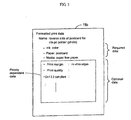
- FIG. 3 shows an example of formatted print data.
- FIG. 3 schematically shows the formatted print data structure.
- required data is shown in an upper part of FIG. 3 and comprises three pieces of data (ink, paper (size), and media (type).
- Optional data is enclosed in a broken line below.
- the optional data depends on priorities as mentioned above.
- the formatted print data has a specified name. The name is displayed when the formatted print list creation module 51 provides a list of formatted print candidates.
- the required data closely corresponds to the name.
- the required data items correspond to those needed to perform the formatted print indicated by the name.
- Print conditions are predetermined as default values so as to perform the formatted print.
- the example of FIG. 3 is used to print a photo on the reverse side of a postcard for ink-jet printers.
- the conditions include color ink for the ink, a postcard for the paper, and super-fine paper, i. e., a specific type of paper for the media. Accordingly, these settings enable printing based on the formatted print configured as "reverse side of postcard for ink-jet printer (photo)."
- formatted prints with various names such as "postcard address”, “A4 super image quality”, and "A4 glossy paper with no white edges.”
- the formatted print name may not be strictly associated with the required data.
- formattedprint names may include somewhat ambiguous and sensuous expression such as "A4 super image quality.” In this case, the expression “super image quality” does not uniquely define the print condition.
- the formatted print named "A4 super image quality” becomes implementable by setting conditions to improve the image quality according to the above-mentioned priorities.
- FIG. 4 shows an example of printer capability data.
- FIG. 4 schematically shows the printer capability data structure. As shown in FIG. 4, specifiable print conditions are registered for each PRTDRV installed in the OS 20.
- the HDD 15 may not store the printer capability data for the PRTDRV to be used for print execution. In such case, the printer capability data acquisition module 62 becomes active to obtain the printer capability data.
- FIG. 4 shows registration of the printer capability data including "A4, A5, postcard" as the paper types for the PRTDRV 21a. That is, the printer under control of the PRTDRV 21a can print on any of paper types such as "A4, A5, and postcard.”
- the print condition items can depend on each other.
- FIG. 4 exemplifies this. That is, as print condition items, the paper and the print margin depend on each other. The print margin is specified with a flag and is defined for each of "A4, A5, and postcard.”
- available print margins are "standard, bottom enlargement, no white edges sideways, and no white edges.”
- the print margins in FIG. 4 are indicated by flags.
- the flag set to “1” enables the setting.
- the flag set to "0” disables the setting.
- the paper size "A4" permits the settings of "standard and bottom enlargement.”
- the paper sizes "A5 and postcard” permit all settings of "standard, bottom enlargement, no white edges sideways, and no white edges.
- the same model of printers under control of the PRTDRV 21a can set different print margins depending on paper sizes. In thin meaning, the print condition items depend on each other.
- the bottom enlargement setting decreases the margin at the bottom of the paper to enlarge a print area toward the bottom of the paper.
- the printer capability data describes print conditions specifiable for each PRTDRV.
- the print condition setup module 52 determines the formatted print data based on information of the printer capability data and the priority.
- the optional data shown at the bottom of FIG. 3 is not limited to a specific setting during execution of the formatted print named "reverse side of postcard for ink-jet printer (photo)." Accordingly, the optional data is determined by the priority.
- the print margins are defined as "no white edges, no white edges sideways, bottom enlargement, and standard” in the ascending order of priorities.
- the printer capability data permits all the settings of "standard, bottom enlargement, no white edges sideways, and no white edges” for the postcard paper. Accordingly, “no white edges” is selected as the highest priority and is used for the print margin.
- the A4 paper is permitted to use only the settings "standard and bottom enlargement. " In this case, the more highly prioritized "bottom enlargement” is assumed.
- the print condition setup module 52 can determine the optional data by referencing the printer capability data 15c as mentioned above.
- the other various items can be defined as conditions for the printer capability data.
- a print quality item can be assigned a plurality of different conditions such as the resolution and the print speed.
- Another condition can be the number of colors (six, seven, and the like) to be used for the printer.
- Still another condition can be provided to determine whether or not to perform image processing for reproducing the object's color tone according to situations of photographing based on header information compliant with the Exif 2.2 standard (Exif is a registered trademark of The Japan Electronics and Information Technology Industries Association).
- FIG. 5 diagrams actual print operations to be performed according to the present invention.
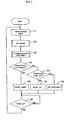
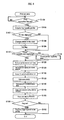
- FIG. 6 is a flowchart showing a print process.
- FIG. 5 shows screens displayed on the display 18 during execution of the APL 25.
- a screen 18a shows a screen example during execution of the APL 25.
- the APL 25 can retouch an image and the like and issue an instruction to print the image.
- a user can instruct printing by selecting a print menu on the screen 18a.
- the embodiment does not display a property screen for the PRTDRV associated with the default printer. Instead, the print control module 50 and the software I/F 60 are activated in accordance with the process in FIG. 6.
- the print control module 50 and the software I/F 60 are activated.
- the available printer acquisition module 61 detects the PRTDRV for the default printer out of the PRTDRVs 21a through 21c via the PRTDRV I/F to acquire the model of the active printer 40. The acquired model of the printer 40 is notified to the formatted print list creation module 51.
- the available printer acquisition module 61 determines whether or not the HDD 15 already stores the printer capability data 15c for the model of the printer 40. When that data is not stored, a printer capability data creation process is performed at Step S115.
- the formatted print list creation module 51 references the formatted print data 15b on the HDD 15 and excludes formatted prints unavailable to the acquired printer 40 from the list.
- the formatted print list creation module 51 notifies the APL 25 of formatted print candidates. As a result, the process activates a GUI to display the formatted print candidates. The screen of the display 18 changes to a screen 18b as shown in FIG. 5.
- the screen lists names stored in the formatted print data 15b.
- the user can operate the mouse 32 and the like, select any of the formatted print names using the pointer, and click the mouse button to specify the formatted print.
- the print condition setup module 52 accepts the specified formatted print. Conditions other than the required data are not settled in the formatted print data for the accepted formatted print.
- the process references predetermined priorities.
- the process assigns highly prioritized conditions to the print condition items in the optional data to generate print condition setup data comprising a combination of print condition settings.
- the generated print condition setup data is passed to the PRTDRV that controls the above-mentioned active printer 40.
- the APL 25 passes image data corresponding to the print instruction to the PRTDRV.
- the PRTDRV generates print data to perform printing according to the print condition and outputs the print data to the printer 40.
- the formatted print precisely corresponds to the function of the active printer 40.
- the printer 40 generates a printout result in accordance with the formatted print as specified by the user.
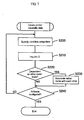
- FIG. 7 is a flowchart of the printer capability data creation process performed by the printer capability data acquisition module 62 at Step S115 as mentioned above.
- the available printer acquisition module 61 performs the printer capability data creation process when the HDD 15 does not store the printer capability data 15c about types of the printer 40 to perform printing.
- the printer capability data creation process may be performed when the PRTDRV is installed, for example.
- the process sets a print condition item to be acquired from the PRTDRV.
- the process calls a function to acquire a condition for the corresponding item.
- the function returns an ID indicating specifiable print conditions via the PRTDRV's software I/F. This makes it possible to identify the specifiable print conditions.
- the process determines whether or not items of the print condition depend on those of the other print conditions. When it is determined that items of the print condition depend on those of the other print conditions, the process associates the setup items with each other based on the dependence at Step S230 to store the setup items as printer capability data. That is, the process associates a plurality of print condition items with each other as shown in FIG. 4.
- Step S240 the process determines whether or not print conditions are configured for all print condition items that can be acquired from the PRTDRV. The process is repeated from Step S200 and later until print conditions are determined to be configured for all the print condition items at Step S240. In this manner, the process sequentially records the printer capability data 15c about types of the printer 40 to perform printing. As a result, the database as shown in FIG. 4 is created with respect to the printer capability data about the PRTDRVs.
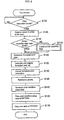
- the present invention can be interpreted as an image processing apparatus according to the following process. That is, at Step S100, the process can display the print menu and accept a print instruction in response to the selection operation. At Steps S105 through S125, the process displays candidates for available formatted prints on a specified printer based on the accepted print instruction. At Step S130, the process accepts the specification of any formatted print corresponding to a selection operation associated with the display. At Steps S135 and S140 , the process generates a print condition for the printer corresponding to the specified formatted print. At Steps S145 and S150, the process generates print data to perform printing based on the print condition.
- the available printer acquisition module 61 acquires default printer models and creates a list of formatted prints and the like on the assumption that the acquired printer 40 is used for printing. As shown in a flowchart of FIG. 8, the available printer acquisition module 61 at Step S106 may detect any one of the registered PRTDRVs 21a through 21c so that the detected PRTDRV can correspond to a printer capable of printing with the highest quality. Various viewpoints are available concerning criteria about the print quality. As an example, the print density is most highly prioritized and then the number of ink colors is taken into consideration. This technique can be used to determine the order of qualities. The available printer acquisition module 61 can acquire these pieces of information by issuing an inquiry to the PRTDRVs 21a through 21c.
- Step S110 When detecting the PRTDRV, the process proceeds at Step S110 and later sequentially such as displaying the list of formatted prints based on the printer 40 corresponding to the detected PRTDRV.
- the process may determine whether or not the currently active printer 40 differs form the printer capable of printing with the best quality. When they differ from each other, the process may temporarily assume the printer capable of printing with the best quality to be the currently active printer.
- the process may set a flag. After printing, the process may reference the flag at Step S151. When the flag is set, at Step S152, the process may reconfigure the printer 40 to be the active printer.
- the present invention stores the formatted print data and the printer capability data.
- the present invention provides formatted print candidates based on the formatted print data.
- the present invention references the printer capability data.
- the present invention configures a combination of print conditions for performing the formatted print and performs the print.
- the printer capability data is stored for each printer model. Therefore, it is possible to specify a proper print condition for each printer model to perform a given formatted print. As a result, it becomes possible to perform the formatted print precisely corresponding to the printer function.
- the present invention dynamically configures print conditions depending on printer capabilities in response to a specified formatted print.
- the present invention can precisely comply with the printer function enhancement.
Landscapes
- Engineering & Computer Science (AREA)
- Theoretical Computer Science (AREA)
- Human Computer Interaction (AREA)
- Physics & Mathematics (AREA)
- General Engineering & Computer Science (AREA)
- General Physics & Mathematics (AREA)
- Accessory Devices And Overall Control Thereof (AREA)
Abstract
Conventionally, it has been impossible to perform a
formatted print precisely corresponding to functions of various
printers. To solve this problem, formatted print data and
printer capability data are stored. When a print instruction
is issued, formatted print candidates are presented based on
the formatted print data. When a formatted print is selected
from these candidates, the printer capability data is referenced
to set a combination of print conditions for performing the
formatted print and actually perform printing. The printer
capability data is stored for each printer model. Therefore,
a proper print condition can be set for each printer model to
perform a given formatted print. As a result, it becomes possible
to perform a formatted print precisely corresponding to printer
functions.
Description
The present invention relates to a print control
apparatus, a print control method, a print control program, a
medium for recording the print control program, an image
processing apparatus, and an image processing computer.
In recent years, printers tend to have many functions
to satisfy users' diverse needs. For example, there are
developed printers capable of printing in various modes such
as printing with no print margins and converting colors so as
to more vividly develop colors than the original. However,
providing a printer with many functions tends to increase the
number of items for setting print conditions needed for printing.
To free users from inconvenience of setting many print conditions,
the printer may be configured to be capable of implementing the
formatted print specified by a sensuous expression such as
"beautiful mode" to broadly express the print condition.
The above-mentioned conventional print control
apparatus has been subject to the following problems.
That is, printer functions have progressed remarkably.
There have been developed many printers equipped with new
functions. It has been impossible to provide formatted prints
corresponding to various printers. It is very complicated to
modify factory-default formatted print items in accordance with
the printer function enhancement. When old and new models
coexist and one printer is configured to a print condition
according to the formatted print, the other printer is incapable
of printing. The printer functions cannot be used fully.
The present invention has been made in consideration
of the foregoing. It is therefore an object of the present
invention to provide a print control apparatus, a print control
method, a print control program, and a medium recording the print
control program capable of formattedprint exactly corresponding
to printer functions.
To achieve the above-mentioned object, the present
invention dynamically configures print conditions depending on
printer capabilities in response to a specified formatted print.
Therefore, the present invention can precisely comply with the
printer function enhancement. Of course, the present invention
can not only comply with the function enhancement for one model,
but also set proper print conditions for a plurality of models
according to function differences. It just needs to dynamically
configure print conditions according to printer capabilities
and acquire information about capabilities of a printer to
perform printing. Further, it may be preferable to acquire
information about capabilities of a connected printer.
Alternatively, it may be preferable to acquire information about
capabilities of a printer where a printer driver is installed
to control printers.
The present invention can adopt various printer
capabilities corresponding to print conditions. For example,
each printer supports the following capabilities to be adopted
such as ink types (color, monochrome, and the like), paper sizes,
media (whether or not paper types or CD labels are printable),
print margins, print qualities, color management types (whether
or not automatic adjustment is available, colors exceeding the
display's color gamut can be used, and the like), whether or
not the automatic paper cut can be used, whether or not the
bidirectional print is available, and whether or not the print
direction can be changed (vertical or horizontal printing).
According to another mode of the present invention,
printer capability data is stored for each model of a printer
to indicate print conditions that can be set for the printer.
Conditions for a formatted print are configured within a range
of print conditions that can be set for a model of printers to
perform printing . It is possible to perform the formatted print
precisely corresponding to the printer model. Print conditions
are configured within a range of print conditions specifiable
for a model of printer to perform printing. Consequently, it
is possible to dynamically configure print conditions according
to the printer's capabilities.
Of course, the present invention can not only comply
with the function enhancement for one model, but also set proper
print conditions for a plurality of models according to function
differences. It is possible to adopt various conditions such
as the above-mentioned ink types, paper sizes, and the like as
print conditions. To be capable of the formatted print, it just
needs to determine conditions specifiable for printer models
with respect to print condition items. Specifiable conditions
may be stored. Flags may be used to identify specifiable and
unspecifiable conditions. Various constructions can be
adopted.
For example, paper sizes are available as print
condition items. Let us assume that the print is possible for
the A3 size but is possible for A4 and postcard sizes. In such
case, information of "A4, postcard" may be stored as the
specifiable print condition. Alternatively, it may be
preferable to store information of flags "011" corresponding
to A3, A4, and postcard sizes in order. Generally, specifiable
print conditions vary with models. Print conditions are stored
correspondingly to models to enable settings for the respective
models. Of course, a user may need to only one model of printers.
A printer driver for only one model may be installedon the computer.
In these cases, it is sufficient to store the printer capability
data for one model.
Formatted print data storage means just needs to be
able to store the formatted print data to provide formatted print
candidates as formatted print options. A user just needs to
be able to select formatted prints provided by formatted print
specification acceptance means. Accordingly, there may be
available various modes of candidates including specification
of several print condition items such as paper sizes, inks, and
sensuous expressions representing printout results. The
sensuous expressions may include "highest image quality, " "very
beautiful, " and the like. When printers are ready for printing,
there are evident needs for obtaining results represented by
sensuous expressions such as "beautiful" and "fast" as well as
print paper types, sizes, and the like. The present invention
is convenient enough to be able to perform printing precisely
corresponding to models even though the formatted print is
represented with sensuous expressions.
Formatted print specification acceptance means just
needs to extract and present formatted print candidates
selectable for models of printers to perform printing. The
formatted print specification acceptance means just needs to
accept the specification. Various constructions can be adopted
to extract formatted print candidates. For example, one
construction is to exclude and not to present formatted print
candidates unselectable for models of printers to perform
printing. Another construction is to provide but dim such
formatted print candidates to make them unselectable. The
above-mentioned printer capability data may be referenced to
determine whether or not formatted prints can be selected for
a printer to perform printing. When an unselectable formatted
print is selected, an error indication may be generated to
actually prevent the unselectable formatted print from being
selected. A specified display apparatus such as a CRT may be
used to display formatted print candidates. Input devices such
as a keyboard and a mouse may be used to accept selection of
formatted print candidates.
Print condition setup means configures a combination
of print conditions to perform a specified formatted print so
as to be able to configure conditions within a range of print
conditions specifiable for models of printers capable of printing.
As a result, it is possible to configure print conditions
precisely corresponding to functions of various models. The
range of specifiable print conditions depends on each print item
of each model. Whether or not the print condition is specifiable
depends on whether or not the corresponding model can perform
printing under that condition. For example, when a printer is
capable of using paper sizes smaller than or equal to A4, the
printer cannot use the A3 size.
Therefore, A3-size printing on this printer is outside
the range of specifiable print conditions. When the formatted
print is to be performed, the print condition may not be uniquely
determined for a given associated item. The print condition
can be determined for that item by choosing from any of specifiable
print conditions. When a print condition item is outside the
range of specifiable print conditions, all condition items need
not be assumed to be incapable of printing for strictness. It
may be preferable to approximate to a specified formatted print
result by appropriately specifying the condition within the range
of print conditions specifiable for each model.
Further, the formatted print data may include print
conditions to implement printing of formatted print candidates.
In this manner, some print conditions can be determined at a
time point when each formatted print candidate is specified.
Since the above-mentioned print condition setup means configures
print conditions, the formatted print data may include part of
all print condition items. In addition, the formatted print
data includes data indicating names for specifiably displaying
formatted print candidates when provided as formatted print
options.
That is, the formatted print specification acceptance
means can present the corresponding name and accept the formatted
print specification. Since the formatted print data includes
the print condition and data indicative of that name, it is
possible to provide formatted print names comprising specific
print conditions. The formatted print becomes available under
the name of "reverse side of postcard for ink-jet printer, " for
example. When the formatted print name corresponds to the print
condition itself for the formatted print, the print condition
included in the name may be assumed to be mandatory. In such
case, when there is no such printer as being able to satisfy
the condition, it is possible to determine that the formatted
print is infeasible before accepting the formatted print
specification.
When a specific formatted print is to be performed,
a specific print condition item may require a specific print
condition. In consideration for this, a required print
condition is stored correspondingly to each formatted print
candidate. When the required cannot be specified for a printer
to perform printing, it becomes possible to determine that the
formatted print is infeasible before accepting the formatted
print specification. The print condition setup means may not
need to configure conditions. Print conditions may be
predetermined for specific items. When "no edge" is specified
for the formatted print, for example, the print margin must be
"0" or less. When "postcard address" is specified, for example,
a specific value need not be required for the print margin.
Moreover, print conditions may be selected for
respective setup items in the order of priorities to provide
the print condition for the formatted print. This construction
can configure more preferable conditions when a plurality of
conditions can be specified for each print condition setup item.
As a result, it is possible to obtain the most preferable result
as a result of the formatted print itself implemented by a
combination of a plurality of print conditions.
Furthermore, the printer driver is a module that is
installed in the computer' s OS and the like to control the printer.
In many cases, an inquiry can be issued to the printer driver
to acquire printer functions and selectable print conditions.
The inquiry may be often implementable via a software interface.
Issuing an inquiry to the printer driver makes it
possible to very easily acquire a print conditions selectable
for the printer. Storing the print condition makes it possible
to allow a computer functioning as the print control apparatus
to reliably acquire the print condition specifiable for each
model of printer. It is possible to configure the print condition
to perform the formatted print that reliably makes the most of
each printer's functions.
On the other hand, a condition specifiable for a given
setup item depends on a condition for another setup condition.
For example, the paper size "A4" disables the print condition
of no white edges. The paper size "A5" enables the print
condition of no white edges. The present invention is also
applicable in such case. As a result, print conditions for the
present invention can include not only conditions dependent only
on printer models, but also conditions dependent on each other.
The above-mentioned technique dynamically configures
print conditions for a specified formatted print but is not
limited to a solid apparatus. The technique is also effective
as the invention of the method. The above-mentioned print
control apparatus may be available standalone or may be built
in a given device. The concept of the invention includes various
modes. The present invention can be variously embodied as
software or hardware.
When the concept of the invention is embodied as the
software for the print control apparatus, the present invention
obviously exists and is used on a recording medium that records
the software. For example, the present invention can be embodied
as a print control program and as a medium that records the print
control program. Of course, the recording medium may be a
magnetic recording medium, a magnetic optical recording medium,
on any medium to be developed in the future.
The same completely applies to duplication stages such
as a primary duplicate copy, a secondary duplicate copy, and
the like. Unlike the above-mentioned medium, a communication
line may be used as a distribution method. In this case, the
present invention is applied to the communication line as a
transmission medium.
The embodiment of the present invention will be
described in the following order.
FIG. 1 schematically shows the hardware configuration
of a system constructing a print control apparatus according
to the present invention. FIG. 2 schematically shows the
configuration of a main control system implemented by a computer
of the print control apparatus. According to the embodiment,
the print control apparatus is constructed by the computer that
controls a printer. When the printer is constructed tobe capable
of printing standalone, the print control apparatus is
constructed by a section that is responsible for processing
queries about the formatted print and print jobs inside the
printer.
A computer 10 has a CPU 11 as a core of computation.
The CPU 11 is capable of accessing ROM 13 storing BIOS and RAM
14 via a system bus 12. The system bus 12 is connected to external
storages such as a hard disk drive (hereafter referred to as
an HDD) 15, flexible disk drive 16, and a CD-ROM drive 17. The
HDD 15 stores an OS, an application program (hereafter referred
to as an APL), a print control module, and the like which are
to be transferred to the RAM 14. The CPU 11 appropriately
accesses the ROM 13 and the RAM 14 to execute the software. The
CPU 11 uses the RAM 14 as a temporary work area to execute various
programs.
The computer 10 connects with input operation devices
such as a keyboard 31 and a mouse 32 via a serial communication
I/O 19a. The computer 10 also connects with a display 18 for
displaying data via a video board (not shown). The computer
10 is connectable to a printer 40 via a USB I/O 19b. The computer
10 is described with the simplified configuration and can use
the general configuration as a personal computer. Of course,
the present invention is not limited to personal computers. The
embodiment is applied to a so-called desktop computer and may
be also applied to notebook or mobile computers. The present
invention is not limited to the connection interface between
the computer 10 and the printer 40 and may use not only various
connection modes such as SCSI and parallel interfaces, but also
any connection mode that may be developed in the future.
In this example, the HDD 15 stores programs and the
like. The recording medium is not limited to the HDD 15 and
may be a flexible disk 16a or a CD-ROM 17a. The computer 10
reads a program recorded on the recording medium via the flexible
disk 16a or the CD-ROM 17a and installs the program on the HDD
15. The program is read from the HDD 15 to the RAM 14 to control
the computer. The present invention is not limited to the
above-mentioned recording media and may use magnetic optical
disks. Available semiconductor devices include nonvolatile
memory such as flash cards. When the program is downloaded by
accessing an external file server via a modem or a communication
line, the present invention is applied by using the communication
as a transmission medium.
The printer 40 performs printing under control of a
printer driver installed in the computer 10. As shown in FIG.
2, the computer 10 according to the embodiment is installed with
printer drivers (PRTDRV) 21a through 21c, an input device driver
(DRV) 22, and a display driver (DRV) 23 in an OS 20. According
to the embodiment, a plurality of PRTDRVs 21a through 21c are
installed. The present invention is very effective when applied
to a situation where one computer 10 can be connected to a plurality
of printers. However, the plurality of PRTDRVs 21a through 21c
need not necessarilybe installed. The number of printer drivers
to be installed is not limited to three. The display driver
DRV 23 controls display of image data and the like on the display
18. The input device DRV 22 receives code signals from the
keyboard 31 and the mouse 32 via the serial communication I/O
19a to accept specified input operations.
An APL 25 is an application program capable of
retouching a color image and the like. Using the APL 25, a user
can use the above-mentioned input operation devices to print
the color image on the printer 40. According to a user's
instruction, the APL 25 reads image data 15a recorded on the
HDD 15 into the RAM 14. The APL 25 allows the display DRV 23
to display an image generated from the image data 15a on the
display 18. When the user operates the input device, the APL
25 acquires operation contents via the input device DRV 22 to
interpret the operation contents. According to the operation
contents, the APL 25 performs various processes such as print
instructions and retouching.
When the APL 25 issues a print instruction, a print
control module 50 and a software I/F 60 are activated to accept
the formatted instruction to print an image associated with the
print instruction. To perform the formattedprint as specified,
the print control module 50 and the software I/F 60 set a print
condition and pass this condition and the image data 15a to a
proper PRTDRV. For this purpose, the print control module 50
has a formattedprint list creationmodule 51 andaprint condition
setup module 52 . The I/F 60 has an available printer acquisition
module 61 and a printer capability data acquisition module 62.
The HDD 15 stores formattedprint data 15b and printer capability
data 15c.
The formatted print list creation module 51 performs
a process to provide formatted print candidates when the APL
25 issues a print instruction. That is, the formatted print
list creation module 51 obtains a type of the printer 40 used
for printing from the available printer acquisition module 61
for the software I/F 60 to be described. The formatted print
list creation module 51 references the formatted print data 15b
indicating formatted print candidates. The formatted print
list creation module 51 also creates a list of formatted print
candidates selectable for the type of the printer 40.
When creating the list, the embodiment excludes a
formatted print unexecutable on the printer 40 being used. For
this reason, the formatted print data 15b has a data structure
to be described and comprises required data and optional data.
The formatted print list creation module 51 references required
data for each formatted print in the formatted print data 15b.
The printer 40 being used may not have a function to perform
printing according to the print condition specified by the
required data. In such case, the associated formatted print
is excluded from the candidates.
When issuing the print instruction, the APL 25 first
provides a list of formatted print candidates. The user of the
APL 25 can visually check the list on the display 18 and specify
the formatted print using the mouse 32, for example. The
specification of the formatted print is passed to the print
condition setup module 52. The print condition setup module
52 configures a print condition for executing the specified
formatted print. The print condition setup module 52 references
formatted print data for the specified formatted print and
configures the optional data.
When configuring the optional data, the print
condition setup module 52 references the prestored printer
capability data 15c. That is, the printer capability data 15c
stores print conditions specifiable for printers according to
each printer model. Reference to the printer capability data
15c can ensure conditions specifiable for the printer 40 with
respect to each print condition setup item. Accordingly, any
condition described in the printer capability data 15c enables
printing on the printer 40.
The print condition setup module 52 adopts conditions
of each item according to predetermined priorities to configure
the print condition. According to the embodiment, the priority
is assigned to each setup item. The print condition setup module
52 adopts conditions specifiable for the printer 40 in the
descending order of priorities. Of course, the other techniques
may be used to predetermine priorities. For example, priorities
may be changed for each setup item according to printer models.
Different priorities may be assigned to different formatted
prints. Various modes can be adopted.
When the print condition is determined, its contents
are passed to the PRTDRV that controls the printer to execute
printing. When the APL 25 is used to print an image, its image
data is passed to the PRTDRV at the same time. The PRTDRV
configures the print conditions appropriate for printing. The
PRTDRV applies color conversion or halftoning to the image data
so as to satisfy the print condition and outputs print data to
the printer 40. Consequently, the printer 40 produces a printout
result exactly corresponding to the specified formatted print.
The software I/F 60 has a module that accesses PRTDRVs
21a through 21c to extract necessary information. The available
printer acquisitionmodule 61 obtains a printer that is connected
to the computer 10 and is ready to perform printing in accordance
with a print instruction from the APL 25. As shown in FIG. 2,
a plurality of PRTDRVs 21a through 21c are installed. In such
situation, the available printer acquisition module 61
determines which of the PRTDRVs 21a through 21c is used for
printing on the printer 40. The available printer acquisition
module 61 passes an available printer to the formatted print
list creation module 51.
According to the embodiment, the available printer
acquisition module 61 detects one of the PRTDRVs 21a through
21c to be assigned to a printer as a "default printer." The
available printer acquisition module 61 assumes the printer under
control of the PRTDRV to be an active printer. Of course, the
other various modes can be adopted to determine available
printers. For example, the APL 25 may inquire about a printer
to be used together with issuance of the print instruction and
accept a response.
The printer capability data acquisition module 62
generates printer capability data to be saved on the HDD 15.
The printer capability data acquisition module 62 accesses the
PRTDRVs 21a through 21c installed in the OS 20 to obtain
specifiable print conditions, i.e., functions provided for
printers under control of the PRTDRVs 21a through 21c. When
obtaining specifiable print conditions, the printer capability
data acquisition module 62 classifies the conditions into the
PRTDRVs 21a through 21c and saves them as printer capability
data in the HDD 15. The PRTDRVs 21a through 21c are programs
to control specific printers. Since the print conditions are
saved according to the classification into the PRTDRVs 21a
through 21c, the print conditions can be stored correspondingly
to printer models.
According to the embodiment, the PRTDRVs 21a through
21c have the software I/F as shown in FIG. 2. The available
printer acquisition module 61 and the printer capability data
acquisition module 62 provided for the software I/F 60
interchange data with each other via the software I/F. There
is a scheme of using function calls so that the software I/F
for the PRTDRVs 21a through 21c can return data such as IDs.
The scheme facilitates interchange of data and generation of
printer capability data, and the like.
Using a specific example, the following details
structures of the formattedprint data and the printer capability
data used in the above-mentioned construction. FIG. 3 shows
an example of formatted print data. FIG. 3 schematically shows
the formatted print data structure. In this example, required
data is shown in an upper part of FIG. 3 and comprises three
pieces of data (ink, paper (size), and media (type). Optional
data is enclosed in a broken line below. The optional data
depends on priorities as mentioned above. The formatted print
data has a specified name. The name is displayed when the
formatted print list creation module 51 provides a list of
formatted print candidates.
According to the embodiment, the required data closely
corresponds to the name. The required data items correspond
to those needed to perform the formatted print indicated by the
name. Print conditions are predetermined as default values so
as to perform the formatted print. The example of FIG. 3 is
used to print a photo on the reverse side of a postcard for ink-jet
printers. For this purpose, the conditions include color ink
for the ink, a postcard for the paper, and super-fine paper,
i. e., a specific type of paper for the media. Accordingly, these
settings enable printing based on the formatted print configured
as "reverse side of postcard for ink-jet printer (photo)."
Of course, the name and the required data are provided
as an example. The other various modes may be adopted. For
example, it is possible to define formatted prints with various
names such as "postcard address", "A4 super image quality", and
"A4 glossy paper with no white edges." According to the present
invention, the formatted print name may not be strictly
associated with the required data. For example, formattedprint
names may include somewhat ambiguous and sensuous expression
such as "A4 super image quality." In this case, the expression
"super image quality" does not uniquely define the print
condition. However, the formatted print named "A4 super image
quality" becomes implementable by setting conditions to improve
the image quality according to the above-mentioned priorities.
For the PRTDRV to actually perform printing, it is
necessary to configure print condition items other than the
required data. The printer capability data 15c is referenced
to configure each item in the optional data. FIG. 4 shows an
example of printer capability data. FIG. 4 schematically shows
the printer capability data structure. As shown in FIG. 4,
specifiable print conditions are registered for each PRTDRV
installed in the OS 20. When the APL 24 issues print instruction
according to the embodiment, the HDD 15 may not store the printer
capability data for the PRTDRV to be used for print execution.
In such case, the printer capability data acquisition module
62 becomes active to obtain the printer capability data.
The example in FIG. 4 shows registration of the printer
capability data including "A4, A5, postcard" as the paper types
for the PRTDRV 21a. That is, the printer under control of the
PRTDRV 21a can print on any of paper types such as "A4, A5, and
postcard." According to the present invention, the print
condition items can depend on each other. FIG. 4 exemplifies
this. That is, as print condition items, the paper and the print
margin depend on each other. The print margin is specified with
a flag and is defined for each of "A4, A5, and postcard."
In this example, available print margins are "standard,
bottom enlargement, no white edges sideways, and no white edges."
The print margins in FIG. 4 are indicated by flags. The flag
set to "1" enables the setting. The flag set to "0" disables
the setting. As shown in FIG. 4, the paper size "A4" permits
the settings of "standard and bottom enlargement." The paper
sizes "A5 and postcard" permit all settings of "standard, bottom
enlargement, no white edges sideways, and no white edges. " The
same model of printers under control of the PRTDRV 21a can set
different print margins depending on paper sizes. In thin
meaning, the print condition items depend on each other. The
bottom enlargement setting decreases the margin at the bottom
of the paper to enlarge a print area toward the bottom of the
paper.
As mentioned above, the printer capability data
describes print conditions specifiable for each PRTDRV. The
print condition setup module 52 determines the formatted print
data based on information of the printer capability data and
the priority. The optional data shown at the bottom of FIG.
3 is not limited to a specific setting during execution of the
formatted print named "reverse side of postcard for ink-jet
printer (photo)." Accordingly, the optional data is determined
by the priority.
According to the embodiment, for example, let us assume
that the print margins are defined as "no white edges, no white
edges sideways, bottom enlargement, and standard" in the
ascending order of priorities. The printer capability data
permits all the settings of "standard, bottom enlargement, no
white edges sideways, and no white edges" for the postcard paper.
Accordingly, "no white edges" is selected as the highest priority
and is used for the print margin. The A4 paper is permitted
to use only the settings "standard and bottom enlargement. " In
this case, the more highly prioritized "bottom enlargement" is
assumed.
The print condition setup module 52 can determine the
optional data by referencing the printer capability data 15c
as mentioned above. In addition, the other various items can
be defined as conditions for the printer capability data. For
example, a print quality item can be assigned a plurality of
different conditions such as the resolution and the print speed.
In an item of color management type, it is possible to determine
whether or not to automatically adjust colors by means of image
processing, whether or not to use colors exceeding the display' s
color gamut, and the like. It is possible to determine whether
or not to use the automatic paper cut, enable the bidirectional
printing, and change the print direction (vertical or horizontal
printing). Another condition can be the number of colors (six,
seven, and the like) to be used for the printer. Still another
condition can be provided to determine whether or not to perform
image processing for reproducing the object's color tone
according to situations of photographing based on header
information compliant with the Exif 2.2 standard (Exif is a
registered trademark of The Japan Electronics and Information
Technology Industries Association).
The following describes the process and operations
of the embodiment according to the above-mentioned construction.
FIG. 5 diagrams actual print operations to be performed according
to the present invention. FIG. 6 is a flowchart showing a print
process. FIG. 5 shows screens displayed on the display 18 during
execution of the APL 25. A screen 18a shows a screen example
during execution of the APL 25. As mentioned above, the APL
25 can retouch an image and the like and issue an instruction
to print the image. A user can instruct printing by selecting
a print menu on the screen 18a.
In response to the print instruction, the embodiment
does not display a property screen for the PRTDRV associated
with the default printer. Instead, the print control module
50 and the software I/F 60 are activated in accordance with the
process in FIG. 6. When the print instruction is issued at Step
S100, the print control module 50 and the software I/F 60 are
activated. At Step S105, the available printer acquisition
module 61 detects the PRTDRV for the default printer out of the
PRTDRVs 21a through 21c via the PRTDRV I/F to acquire the model
of the active printer 40. The acquired model of the printer
40 is notified to the formatted print list creation module 51.
At Step S110 , the available printer acquisition module
61 determines whether or not the HDD 15 already stores the printer
capability data 15c for the model of the printer 40. When that
data is not stored, a printer capability data creation process
is performed at Step S115. At Step S120, the formatted print
list creation module 51 references the formatted print data 15b
on the HDD 15 and excludes formatted prints unavailable to the
acquired printer 40 from the list. At Step S125, the formatted
print list creation module 51 notifies the APL 25 of formatted
print candidates. As a result, the process activates a GUI to
display the formatted print candidates. The screen of the
display 18 changes to a screen 18b as shown in FIG. 5.
That is, the screen lists names stored in the formatted
print data 15b. Visually checking the screen 18b, the user can
operate the mouse 32 and the like, select any of the formatted
print names using the pointer, and click the mouse button to
specify the formatted print. At Step S130, the print condition
setup module 52 accepts the specified formatted print.
Conditions other than the required data are not settled in the
formatted print data for the accepted formatted print. At Step
S135, the process references predetermined priorities. At Step
S140, the process assigns highly prioritized conditions to the
print condition items in the optional data to generate print
condition setup data comprising a combination of print condition
settings.
At Step S145, the generated print condition setup data
is passed to the PRTDRV that controls the above-mentioned active
printer 40. At Step S150, the APL 25 passes image data
corresponding to the print instruction to the PRTDRV. The PRTDRV
generates print data to perform printing according to the print
condition and outputs the print data to the printer 40. As a
result, the formatted print precisely corresponds to the function
of the active printer 40. The printer 40 generates a printout
result in accordance with the formatted print as specified by
the user.
FIG. 7 is a flowchart of the printer capability data
creation process performed by the printer capability data
acquisition module 62 at Step S115 as mentioned above. According
to the embodiment, the available printer acquisition module 61
performs the printer capability data creation process when the
HDD 15 does not store the printer capability data 15c about types
of the printer 40 to perform printing. Of course, the printer
capability data creation process may be performed when the PRTDRV
is installed, for example.
At Step S200, the process sets a print condition item
to be acquired from the PRTDRV. At Step S210, the process calls
a function to acquire a condition for the corresponding item.
As a result, the function returns an ID indicating specifiable
print conditions via the PRTDRV's software I/F. This makes it
possible to identify the specifiable print conditions. At Step
S220, the process determines whether or not items of the print
condition depend on those of the other print conditions. When
it is determined that items of the print condition depend on
those of the other print conditions, the process associates the
setup items with each other based on the dependence at Step S230
to store the setup items as printer capability data. That is,
the process associates a plurality of print condition items with
each other as shown in FIG. 4.
At Step S240, the process determines whether or not
print conditions are configured for all print condition items
that can be acquired from the PRTDRV. The process is repeated
from Step S200 and later until print conditions are determined
to be configured for all the print condition items at Step S240.
In this manner, the process sequentially records the printer
capability data 15c about types of the printer 40 to perform
printing. As a result, the database as shown in FIG. 4 is created
with respect to the printer capability data about the PRTDRVs.
The present invention can be interpreted as an image
processing apparatus according to the following process. That
is, at Step S100, the process can display the print menu and
accept a print instruction in response to the selection operation.
At Steps S105 through S125, the process displays candidates for
available formatted prints on a specified printer based on the
accepted print instruction. At Step S130, the process accepts
the specification of any formatted print corresponding to a
selection operation associated with the display. At Steps S135
and S140 , the process generates a print condition for the printer
corresponding to the specified formatted print. At Steps S145
and S150, the process generates print data to perform printing
based on the print condition.
At Step S105, the available printer acquisition module
61 acquires default printer models and creates a list of formatted
prints and the like on the assumption that the acquired printer
40 is used for printing. As shown in a flowchart of FIG. 8,
the available printer acquisition module 61 at Step S106 may
detect any one of the registered PRTDRVs 21a through 21c so that
the detected PRTDRV can correspond to a printer capable of
printing with the highest quality. Various viewpoints are
available concerning criteria about the print quality. As an
example, the print density is most highly prioritized and then
the number of ink colors is taken into consideration. This
technique can be used to determine the order of qualities. The
available printer acquisition module 61 can acquire these pieces
of information by issuing an inquiry to the PRTDRVs 21a through
21c.
When detecting the PRTDRV, the process proceeds at
Step S110 and later sequentially such as displaying the list
of formatted prints based on the printer 40 corresponding to
the detected PRTDRV.
Further, at Step S107, the process may determine
whether or not the currently active printer 40 differs form the
printer capable of printing with the best quality. When they
differ from each other, the process may temporarily assume the
printer capable of printing with the best quality to be the
currently active printer. At Step S109, the process may set
a flag. After printing, the process may reference the flag at
Step S151. When the flag is set, at Step S152, the process may
reconfigure the printer 40 to be the active printer.
As mentioned above, the present invention stores the
formatted print data and the printer capability data. When a
print instruction is issued, the present invention provides
formatted print candidates based on the formatted print data.
When a formatted print is selected from these candidates, the
present invention references the printer capability data. The
present invention configures a combination of print conditions
for performing the formatted print and performs the print. The
printer capability data is stored for each printer model.
Therefore, it is possible to specify a proper print condition
for each printer model to perform a given formatted print. As
a result, it becomes possible to perform the formatted print
precisely corresponding to the printer function.
As mentioned above, the present invention dynamically
configures print conditions depending on printer capabilities
in response to a specified formatted print. The present
invention can precisely comply with the printer function
enhancement.
Claims (21)
- A print control apparatus which allows a printer to perform printing in accordance with a print execution instruction issued from an application program,
wherein said apparatus accepts a user-specified formatted print when accepting saidprint execution instruction, dynamically configures a print condition needed for printing based on said specified formatted print according to capability of said printer, and performs printing. - A print control apparatus comprising:printer capability data storage means for storing printer capability data based on each printer model, wherein printer capability data indicates capability of said printer in terms of a print condition configurable on said printer;formatted print data storage means for storing formatted print data indicative of a formatted print candidate provided as a formatted print option;formatted print specification acceptance means for referencing said printer capability data, extracting and providing a formatted print candidate selectable for a model of printer to perform printing out of said stored formatted print data, and accepting specified formatted print;print condition setup means for referencing said printer capability data and configuring a combination of print conditions needed for said specified formatted print within a range of print conditions specifiable for said model of printer to perform printing; andprint execution control means for allowing said printer to perform printing under said configured print condition.
- The print control apparatus according to claim 2, wherein said formatted print data includes not only a print condition to enable formatted print for each formatted print candidate, but also data indicative of a name for specifiably displaying each formatted print candidate when provided as an option for said formatted print.
- The print control apparatus according to claim 2 or 3, wherein said formatted print data stores a print condition required to perform said formatted print out of print conditions specifiable for a printer correspondingly to each formatted print candidate.
- The print control apparatus according to any of claims 2 through 4, wherein said printer capability data contains a prioritized condition specifiable for each setup item; and wherein said print condition setup means configures a highly prioritized condition for each setup item so as to perform printing according to said formatted print.
- The print control apparatus according to any of claims 2 through 5, wherein said printer capability data storage means acquires said printer capability data by issuing an inquiry to a printer driver installed in a computer to control a printer.
- The print control apparatus according to any of claims 2 through 6, wherein said printer capability data defines a print condition so that a condition for a given setup item depends on a condition for another setup item.
- A print control method of allowing a printer to perform printing in accordance with a print execution instruction issued from an application program,
wherein said method accepts a user-specified formatted print when accepting said print execution instruction, dynamically configures a print condition needed for printing based on said specified formatted print according to capability of said printer, and performs printing. - A print control method of allowing a printer to perform printing in accordance with a print execution instruction issued from an application program, said method comprising:extracting and providing a formatted print candidate selectable for a model of printer to perform printing out of formatted print data and accepting specified formatted print, wherein formatted print data is stored in a specified storage medium and indicates a formatted print candidate provided as a formatted print option;referencing printer capability data and configuring a combination of print conditions needed for said specified formatted print within a range of print conditions specifiable for said model of printer to perform printing, wherein printer capability data is stored in a specified storage for each printer model and indicates a print condition specifiable for a printer; andallowing said printer to perform printing under said configured print condition.
- The print control method according to claim 9, wherein said formattedprint data includes not only a print condition to enable formatted print for each formatted print candidate, but also data indicative of a name for specifiably displaying each formatted print candidate when provided as an option for said formatted print.
- The print control method according to claim 9 or 11, wherein said formatted print data stores a print condition required to perform said formatted print out of print conditions specifiable for a printer correspondingly to each formatted print candidate.
- The print control method according to any of claims 9 through 11, wherein said printer capability data contains a prioritized condition specifiable for each setup item; and wherein said print condition setup means configures a highly prioritized condition for each setup item so as to perform printing according to said formatted print.
- The print control method according to any of claims 9 through 12, wherein said printer capability data storage means acquires said printer capability data by issuing an inquiry to a printer driver installed in a computer to control a printer.
- The print control method according to any of claims 9 through 13, wherein said printer capability data defines a print condition so that a condition for a given setup item depends on a condition for another setup item.
- A print control program for allowing a printer to perform printing in accordance with a print execution instruction issued from an application program,
wherein said print control program allows a computer to implement functions of accepting said print execution instruction entered through an input operation device, providing a formatted print candidate for a user to visually check on a specified display apparatus, accepting a user-specified formatted print entered through said input operation device, dynamically configuring a print condition needed for printing based on said specified formatted print according to capability of said printer, and performing printing. - A medium recording the print control program according to claim 15.
- An image processing apparatus having a display apparatus to display contents and an input operation device capable of selection operations corresponding to displayed contents, said image processing apparatus characterized by:being able to display a print menu and accept a print instruction corresponding to a selection operation;accepting said print instruction and displaying a formattedprint candidate capable of being printed on a specified printer;accepting any specified formatted print corresponding to a selection operation associated with said displayed candidate;generating a print condition for said printer corresponding to said specified formatted print; andgenerating print data for performing printing under a print condition.
- An image processing apparatus having a display apparatus to display contents and an input operation device capable of selection operations corresponding to displayed contents, said image processing apparatus characterized by:determining whether or not there are available a plurality of printers capable of printing and, when they are available, determining a printer to be used based on print quality;being able to display a print menu and accept a print instruction corresponding to a selection operation;accepting said print instruction and displaying a formatted print candidate capable of being printed on said determined printer;accepting any specified formatted print corresponding to a selection operation associated with said displayed candidate;generating a print condition for said printer corresponding to said determined formatted print; andgenerating print data for performing printing under a print condition.
- The image processing apparatus according to claim 17 or 18 characterized by storing printer capability data indicating capability of a printer capable of printing and displaying said formattedprint candidate capable of being printed on a specified printer based on the same printer capability data.
- The image processing apparatus according to claim 19 characterized by removing formatted print candidates incapable of printing on a specified printer from a plurality of candidates based on said printer capability data and displaying said formatted print candidates as those capable of printing after the removal.
- An image processing computer which has an input operation device and a display for displaying data and can perform a print instruction in accordance with opera lions of said input operation device under control of an application program, said computer comprising:wherein said formatted print list creation module acquires a model of printer used for printing from said available printer acquisition module, references formatted print data indicating formatted print candidates provided as formatted print options, and creates a list of formatted print candidates selectable on said model of printer;a formatted print list creation module to provide formatted print candidates when a print instruction is issued; a print condition setup module to set a print condition for performing a specified formatted print; an available printer acquisition module to acquire a printer for performing printing; and a printer driver to output conditions of performing printing and print data,
wherein, when allowing said display to display a created list and accepting an operation to specify said list from said input operation device, said print condition setup module references formatted print data for said specified formatted print and sets a print condition for performing said specified formatted print; and
wherein said printer driver configures a condition for a printer so as to perform printing according to a proper print condition based on said print condition and image data for an image corresponding to print execution specified by said application program and outputs print data.
Applications Claiming Priority (3)
| Application Number | Priority Date | Filing Date | Title |
|---|---|---|---|
| JP2002252769 | 2002-08-30 | ||
| JP2002252769 | 2002-08-30 | ||
| PCT/JP2003/010883 WO2004021164A1 (en) | 2002-08-30 | 2003-08-27 | Printing controller, printing control method, printing control program, medium on which printing control program is recorded, image processor, and image processing computer |
Publications (2)
| Publication Number | Publication Date |
|---|---|
| EP1536318A1 true EP1536318A1 (en) | 2005-06-01 |
| EP1536318A4 EP1536318A4 (en) | 2008-10-15 |
Family
ID=31972759
Family Applications (1)
| Application Number | Title | Priority Date | Filing Date |
|---|---|---|---|
| EP03791352A Withdrawn EP1536318A4 (en) | 2002-08-30 | 2003-08-27 | PRINTING CONTROLLER, PRINTING CONTROL METHOD, PRINTING CONTROL PROGRAM, MEDIUM ON WHICH PRINTING CONTROL PROGRAM IS RECORDED, IMAGE PROCESSOR, AND IMAGE PROCESSING COMPUTER |
Country Status (4)
| Country | Link |
|---|---|
| US (1) | US7518744B2 (en) |
| EP (1) | EP1536318A4 (en) |
| JP (1) | JP4200384B2 (en) |
| WO (1) | WO2004021164A1 (en) |
Cited By (1)
| Publication number | Priority date | Publication date | Assignee | Title |
|---|---|---|---|---|
| EP2053500A1 (en) * | 2007-10-26 | 2009-04-29 | Ricoh Company, Ltd. | Print options for productivity |
Families Citing this family (10)
| Publication number | Priority date | Publication date | Assignee | Title |
|---|---|---|---|---|
| JP4379577B2 (en) | 2003-09-01 | 2009-12-09 | セイコーエプソン株式会社 | Peripheral device control apparatus, peripheral device control method, and peripheral device control program |
| JP2006007702A (en) * | 2004-06-29 | 2006-01-12 | Ricoh Co Ltd | Printer |
| JP4742537B2 (en) | 2004-08-23 | 2011-08-10 | セイコーエプソン株式会社 | Image printing apparatus, direct print system, and print setting method |
| JP2006268752A (en) * | 2005-03-25 | 2006-10-05 | Seiko Epson Corp | Launching modules for multiple versions |
| JP4807168B2 (en) * | 2006-07-07 | 2011-11-02 | ブラザー工業株式会社 | Transmission data creation device and transmission data creation program |
| JP2008181262A (en) * | 2007-01-24 | 2008-08-07 | Konica Minolta Business Technologies Inc | Printing system, printing method, and printer driver |
| JP2009042737A (en) * | 2007-07-13 | 2009-02-26 | Canon Inc | Oscillator device and optical deflector using the same |
| JP5170199B2 (en) * | 2010-09-30 | 2013-03-27 | ブラザー工業株式会社 | Information processing program, information processing apparatus, and information processing method |
| JP6320088B2 (en) * | 2014-03-06 | 2018-05-09 | キヤノン株式会社 | Information processing apparatus, information processing method, and program |
| CN119576244B (en) * | 2024-12-17 | 2025-09-23 | 珠海恒茂电子科技有限公司 | Method and system for storing printing data of thermal printer |
Family Cites Families (8)
| Publication number | Priority date | Publication date | Assignee | Title |
|---|---|---|---|---|
| JP2661416B2 (en) * | 1991-06-29 | 1997-10-08 | ブラザー工業株式会社 | Printing system |
| US5467434A (en) * | 1992-08-28 | 1995-11-14 | Xerox Corporation | Apparatus and method for determining printer option availability and representing conflict resolution in a combination of print job selections |
| JPH07104949A (en) * | 1993-10-07 | 1995-04-21 | Canon Inc | Printing system |
| JP2000172469A (en) * | 1998-12-09 | 2000-06-23 | Sharp Corp | Automatic display of print setting information |
| US6940614B2 (en) * | 2000-01-05 | 2005-09-06 | Hewlett-Packard Development Company, L.P. | Method for defining printer driver settings |
| JP3854786B2 (en) * | 2000-06-13 | 2006-12-06 | キヤノン株式会社 | Printing control apparatus and method |
| JP2002019197A (en) * | 2000-07-07 | 2002-01-23 | Canon Inc | Output condition setting method for output device, output system, and recording device |
| JP2002091747A (en) | 2000-09-11 | 2002-03-29 | Ricoh Co Ltd | Image forming device |
-
2003
- 2003-08-27 EP EP03791352A patent/EP1536318A4/en not_active Withdrawn
- 2003-08-27 JP JP2004532739A patent/JP4200384B2/en not_active Expired - Fee Related
- 2003-08-27 WO PCT/JP2003/010883 patent/WO2004021164A1/en not_active Ceased
- 2003-08-27 US US10/525,855 patent/US7518744B2/en not_active Expired - Lifetime
Cited By (2)
| Publication number | Priority date | Publication date | Assignee | Title |
|---|---|---|---|---|
| EP2053500A1 (en) * | 2007-10-26 | 2009-04-29 | Ricoh Company, Ltd. | Print options for productivity |
| US8422053B2 (en) | 2007-10-26 | 2013-04-16 | Ricoh Company, Ltd. | Print options for productivity |
Also Published As
| Publication number | Publication date |
|---|---|
| WO2004021164A1 (en) | 2004-03-11 |
| JPWO2004021164A1 (en) | 2005-12-22 |
| US20060152540A1 (en) | 2006-07-13 |
| JP4200384B2 (en) | 2008-12-24 |
| US7518744B2 (en) | 2009-04-14 |
| EP1536318A4 (en) | 2008-10-15 |
Similar Documents
| Publication | Publication Date | Title |
|---|---|---|
| US7551311B2 (en) | Image processing method, image processing apparatus, program, and recording medium for displaying data of a recording medium | |
| JP4645246B2 (en) | Icon control program, computer, method | |
| JP3793181B2 (en) | Data processing apparatus, print control method, computer-readable storage medium storing program, and program | |
| US20080049249A1 (en) | Information processor, print instruction method, and recording medium in which print instruction program is recorded | |
| US12260138B2 (en) | Control method of information processing apparatus using first printing control software and second printing control software for setting margin amounts based on a paper type | |
| US11726732B2 (en) | Information processing apparatus, control method, and storage medium | |
| CN100561435C (en) | Information processing device and information processing method | |
| US6614550B1 (en) | Information processing apparatus, information processing method, and program storage medium | |
| JP4828339B2 (en) | User interface device, image processing device, and program | |
| US7518744B2 (en) | Printing based on user specified formatted print and according to capability of the printer | |
| US8947695B2 (en) | Information processing device, information processing method and computer-readable record medium | |
| US20060017955A1 (en) | Selective graphic instance rendering | |
| JP2005063099A (en) | Image processor | |
| EP2180430B1 (en) | Image forming apparatus and method | |
| US8189907B2 (en) | Information processing method, information processing apparatus, and information processing program | |
| US20070041040A1 (en) | Image forming apparatus enabling performing direct print and recording medium storing program | |
| EP2085870A2 (en) | Print management apparatus, print management system, medium for storing print management program and print management method | |
| US8270014B2 (en) | Printing method, recordable medium recorded with a program to execute the method and host apparatus | |
| JP3768654B2 (en) | Information processing apparatus, printing apparatus, and control method thereof | |
| US20090187821A1 (en) | Image forming apparatus and method of displaying file list therein | |
| US20050254079A1 (en) | Printing apparatus and method enabled to save print option and print document file | |
| US8848207B2 (en) | Computer capable of setting new environment for using new electronic device | |
| JP2022148853A (en) | Test printing method and program | |
| US20240427532A1 (en) | Information processing apparatus and storage medium | |
| JP2006209389A (en) | Information processing device |
Legal Events
| Date | Code | Title | Description |
|---|---|---|---|
| PUAI | Public reference made under article 153(3) epc to a published international application that has entered the european phase |
Free format text: ORIGINAL CODE: 0009012 |
|
| 17P | Request for examination filed |
Effective date: 20050225 |
|
| AK | Designated contracting states |
Kind code of ref document: A1 Designated state(s): AT BE BG CH CY CZ DE DK EE ES FI FR GB GR HU IE IT LI LU MC NL PT RO SE SI SK TR |
|
| A4 | Supplementary search report drawn up and despatched |
Effective date: 20080917 |
|
| 17Q | First examination report despatched |
Effective date: 20090220 |
|
| STAA | Information on the status of an ep patent application or granted ep patent |
Free format text: STATUS: THE APPLICATION IS DEEMED TO BE WITHDRAWN |
|
| 18D | Application deemed to be withdrawn |
Effective date: 20090703 |