EP1475726A1 - Système d'interface graphique - Google Patents
Système d'interface graphique Download PDFInfo
- Publication number
- EP1475726A1 EP1475726A1 EP04290843A EP04290843A EP1475726A1 EP 1475726 A1 EP1475726 A1 EP 1475726A1 EP 04290843 A EP04290843 A EP 04290843A EP 04290843 A EP04290843 A EP 04290843A EP 1475726 A1 EP1475726 A1 EP 1475726A1
- Authority
- EP
- European Patent Office
- Prior art keywords
- freedom
- degree
- window
- degrees
- displayed
- Prior art date
- Legal status (The legal status is an assumption and is not a legal conclusion. Google has not performed a legal analysis and makes no representation as to the accuracy of the status listed.)
- Granted
Links
Images

Classifications
-
- G—PHYSICS
- G06—COMPUTING OR CALCULATING; COUNTING
- G06T—IMAGE DATA PROCESSING OR GENERATION, IN GENERAL
- G06T13/00—Animation
- G06T13/20—Three-dimensional [3D] animation
- G06T13/40—Three-dimensional [3D] animation of characters, e.g. humans, animals or virtual beings
-
- G—PHYSICS
- G06—COMPUTING OR CALCULATING; COUNTING
- G06F—ELECTRIC DIGITAL DATA PROCESSING
- G06F30/00—Computer-aided design [CAD]
-
- G—PHYSICS
- G06—COMPUTING OR CALCULATING; COUNTING
- G06T—IMAGE DATA PROCESSING OR GENERATION, IN GENERAL
- G06T19/00—Manipulating three-dimensional [3D] models or images for computer graphics
-
- G—PHYSICS
- G06—COMPUTING OR CALCULATING; COUNTING
- G06T—IMAGE DATA PROCESSING OR GENERATION, IN GENERAL
- G06T2200/00—Indexing scheme for image data processing or generation, in general
- G06T2200/24—Indexing scheme for image data processing or generation, in general involving graphical user interfaces [GUIs]
-
- G—PHYSICS
- G06—COMPUTING OR CALCULATING; COUNTING
- G06T—IMAGE DATA PROCESSING OR GENERATION, IN GENERAL
- G06T2219/00—Indexing scheme for manipulating 3D models or images for computer graphics
- G06T2219/004—Annotating, labelling
-
- G—PHYSICS
- G06—COMPUTING OR CALCULATING; COUNTING
- G06T—IMAGE DATA PROCESSING OR GENERATION, IN GENERAL
- G06T2219/00—Indexing scheme for manipulating 3D models or images for computer graphics
- G06T2219/028—Multiple view windows (top-side-front-sagittal-orthogonal)
Definitions
- the present invention relates to the field of simulation manual operations using a virtual mannequin.
- the invention relates more particularly to the configuration and handling of members of a virtual mannequin during such a simulation.
- modeling and simulation are not limited only to the objects to be designed. It can also be used for simulate human actions in a defined environment in order to visualize the movements and postures that a technician will have to perform to perform the actions. This is useful to validate and optimize the accessibility of certain parts of a device such as those of an engine aircraft for example which require inspections and maintenance regular. Thus, the ease of access of the various elements of a device can be controlled virtually from the modeling of the latter thanks to a simulation using a virtual mannequin.
- the present invention aims to remedy the aforementioned drawbacks and to create a system that makes the operator's task easier when configuration and manipulation of the dummy in kinematics.
- a graphical interface system for managing the degrees of freedom of a virtual dummy in a kinematic environment, said dummy comprising members articulated according to degrees of freedom, characterized in that the system includes a display means, a selection means for designate a point on the display means and act on it, and processing means for controlling, on the display means, the display in a first window of the manikin, said means of processing responsive to the selection means for further controlling, in a second window, the display of a member selected from the mannequin displayed in the first window, said member comprising symbols indicating the degrees of freedom of said selected member.
- the selection operation of a member and its degrees of freedom is done directly on the screen at from a graphic representation of the mannequin.
- the operator no longer has need to memorize or consult edition numbers to access a particular degree of freedom for the model.
- the processing means react by means of selection, in the second window, to block or unlock a degree of freedom, by selecting the symbol of the degree of corresponding freedom.
- the degrees of freedom are configured directly on the screen with the selection means which further simplifies operator's work.
- the symbols of the degrees of freedom blocked are displayed in a predetermined color and the symbols of the degrees of freedom that are unlocked are displayed in a different color predetermined.
- the member (s) whose at least one degree of freedom is blocked are displayed in a predetermined color in the first window to distinguish members with degrees of freedom disabled.
- each symbol of a degree of freedom includes first and second arrows, each arrow representing a direction of rotation of the degree of freedom.
- the means of treatment react by means of selection to block a sense of rotation of the degree of freedom by selection of the corresponding arrow, said arrow then being displayed in a predetermined color.
- the processing means react by means of selection, in the second window, to manipulate a degree of freedom of the dummy, the selected arrow corresponding to the direction of manipulation the degree of freedom considered.
- the arrow corresponding to the sense of manipulation of the degree of freedom is displayed in a color predetermined depending on whether the degree of freedom is manipulated or not.
- the member or members of which at least one degree of freedom is manipulated are displayed in a predetermined color in the first window to distinguish members with degrees of freedom handled.
- the means of processing react by means of selection, in the first window, to activate or deactivate a member and display active members in a predetermined color and the disabled members in another predetermined color.
- This first window also allows you to select the member which will be displayed in detail with its degrees of freedom in a second window.
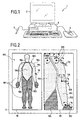
- FIG. 1 represents the system according to the present invention which includes a processing device, such as a computer 1.
- Computer 1 can be used to run a simulation program or similar to visualize the positions and movements of a mannequin in virtual reality.
- the simulation program itself will not be described in more detail, this program not being the subject of the invention.
- the invention relates to the means of display, selection, configuration and manipulation of members of the virtual mannequin that can be used in a virtual reality simulation program.
- the invention provides a graphical interface which allows a user to manipulate or configure the members of a virtual mannequin.
- Computer 1 includes the material means found usually with this type of device. More specifically, the computer includes a screen 2, means for aiming at a point on the screen and acting on him, such as a mouse 3, an optical pencil 5 or similar, and a unit of processing 4 which controls the display on the screen 2 in particular by response to actions performed with mouse 3 or some other means equivalent as described below.
- a screen 2 means for aiming at a point on the screen and acting on him, such as a mouse 3, an optical pencil 5 or similar
- a unit of processing 4 which controls the display on the screen 2 in particular by response to actions performed with mouse 3 or some other means equivalent as described below.
- FIG. 2 illustrates a first example of implementation of the system according to the invention.
- This figure shows the representation on the screen 2 which is made of the dummy according to the invention to allow a user to manipulate and configure the limbs of the manikin.
- the processing unit 4 first of all displays a first window 10 in which a mannequin 100 is shown in whole.
- Each member in the example considered here: head, bust, arms, hands and legs
- a predetermined color such as black for example.
- the representation of the mannequin in the first window 10 corresponds to the global view of the dummy which gives an overview members who can be selected.
- the arrow 30 represents the mouse pointer that the operator will move on the mannequin to designate a member he wish to select. Once the arrow 30 in position on the member choose, here the left arm 102, the operator selects the member in clicking on a mouse button for example. To indicate to the operator which member is selected, the color of the outline 101 of this can be changed to a predetermined color 102 (in lines discontinuous in the figures) to distinguish it from other members who do not are not selected.
- the operator has the choice between two main operations: activation / deactivation of the member as a whole or selection of the member to configure and / or manipulate certain degrees of freedom thereof.
- the first one operation which consists in activating / deactivating the member, is carried out directly on the manikin shown in window 10, by a corresponding command which can be programmed on a key of the computer keyboard or contained in a menu displayed on the screen (not shown) at the same time as the dummy.
- Activated members are represented in a predetermined color 104 (in light shading on the figures), like green for example, while disabled members are represented in another color 105 (in dark shading on the figures) like red for example.
- window 10 as shown in FIG. 2 the legs and the hands of the manikin which are deactivated are in red (dark shading in the figures) while the arms and head which are activated are in green (light shading in the figures).
- a member When a member is selected, it is displayed in detail in a second window 20 to allow the operator to perform the second operation mentioned above in two modes: the setting mode or the manipulation mode of certain limb joints selected.
- Each mode can be activated after selecting the member to from a keyboard key or from a menu displayed on the screen, for example.
- the operation in parameter setting mode is described. degrees of freedom of a selected member.
- the selected member 103 namely the left arm
- the limb degrees of freedom are represented as an axis 110 in the plane or perpendicular to the plane, and a double arrow 120 representing the rotation around this axis in both directions of rotation.
- the operator positions himself on the double arrow of the degree of freedom he wishes to configure and click on the latter to block (respectively unblock) the degree of freedom considered. If the operator clicks on the double-arrow again, this cancels the degree of freedom blocking operation. So, by a simple press the mouse button, the operator can block / unblock any degree of freedom of the selected member and this directly on the graphic representation of the member on the screen.
- a color code is used to distinguish on the representation on the screen the degrees of freedom which are blocked from the degrees of freedom that are not. More specifically, when the operator blocks a degree of freedom, the corresponding double arrow 120 becomes red (in solid lines in the figure).
- the double-arrow corresponding 120 is in green (in broken lines in the figure).
- the three double arrows 120 continuous shoulder lines we can see that all the degrees of freedom of the shoulder have been blocked and are in red (i.e. the three double arrows 120 continuous shoulder lines).
- window 10 the operator always has an overview of the mannequin (window 10) which indicates the blocked / unlocked members as well as the selected member while having a detailed view (window 20) of the member selected with all the degrees of freedom he can set.
- window 10 When at least one degree of freedom is disabled on a member, this is displayed in window 10 with a predefined color allowing to distinguish the members comprising degrees of freedom disabled.
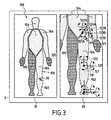
- FIG. 3 illustrates another example of implementation of the graphical interface of the invention for configuring the degrees of freedom of the left leg 106 of the dummy 100.
- the operator therefore selected leg 106 so that an enlarged view of the latter is displayed in the second window 20.
- the blocking or a degree of freedom is unlocked by clicking on the double arrow 120 considered which, depending on its condition (i.e. blocked or unlocked), was shown in a predetermined color.
- the processing means are programmed to recognize on each double-arrow 120 two parts 121 and 122 corresponding respectively to a direction of rotation of the degree of freedom considered.
- the operator clicks on part 121A of the arrow 120A. This has the effect of blocking the degree of freedom in the direction indicated by the part 121A which is then represented in red (in solid lines on the figure).
- Part 122A which is not blocked remains in green (in line discontinuous in the figure).
- the degree of freedom represented by the double arrow 120B was also partially blocked, part 121B being shown in red (in solid lines on the figure) while part 122B is in green (in broken lines on the figure).
- each double arrow 120 comprises two parts 121, 122 corresponding each has a direction of rotation of the degree of freedom. So for the manipulation of a degree of freedom, the operator acts in the same way as in the example considered in figure 3. The operator positions the arrow of the mouse 30 on the part of the double arrow which corresponds to the direction of rotation in which he wishes to manipulate the part of the member concerned. By clicking on the part of the double arrow-chosen, it gives the instruction displacement to the dummy for this degree of freedom.
- the double arrows are in red by defect (solid lines in the figure), i.e. the degrees of freedom are all not handled at the start.
- FIG. 4 illustrates the second window 20 of the graphical interface
- FIGS. 5A, 5B and 5C which are visualizations of a virtual mannequin 200 on which are applied the movement instructions generated from the interface graph of figure 4.
- the visualization of the movements on the virtual mannequin in its simulation environment is performed by a specific simulation program which includes links with the program of the graphical interface of the invention. So the data generated from the GUI are transmitted and used by the simulation program for the animation of the virtual mannequin.
- FIGS. 5A to 5C illustrate a kinematic sequence of a virtual mannequin 200 according to the movement instructions applied from the graphical interface of figure 4.
- the mannequin's right arm 107 is displayed in window 20 and the movement instructions are applied by the operator in successively selecting parts 122A, 122B and 122C of the double arrows 120A, 120B and 120C respectively.
- the selection of parts 122A, 122B and 122C correspond respectively to the folding action of the arm, rotation of the forearm and rotation of the shoulder in the direction corresponding and at a determined speed.
- the movement instruction given by the operator is also indicated in window 20 by the color change of the part of the double arrow selected.
- the parts 122A, 122B and 122C of double arrows 120A, 120B and 120C on which the operator has clicked turn green (in broken lines in the figure).
- FIG. 5B illustrates an intermediate position of the arm 207 of the virtual mannequin 200 between the starting position (FIG. 5A) and the position final of the kinematic sequence (Figure 5C) when the setpoint displacement is given at the level of the articulation of the arm and the shoulder by clicking on parts 122A and 122C of the double arrows 120A and 120C.
- the invention therefore provides a graphical interface system which allows the operator to select and act on the degrees of freedom of the mannequin directly on the screen and by simple operations like a mouse click for example.
- the operator's working comfort is also improved by the double windowing displayed which allows it to permanently have both the global representation of the mannequin and a view details of the member he is working on.
Landscapes
- Engineering & Computer Science (AREA)
- Physics & Mathematics (AREA)
- Theoretical Computer Science (AREA)
- General Physics & Mathematics (AREA)
- General Engineering & Computer Science (AREA)
- Computer Hardware Design (AREA)
- Software Systems (AREA)
- Computer Graphics (AREA)
- Evolutionary Computation (AREA)
- Geometry (AREA)
- Processing Or Creating Images (AREA)
- User Interface Of Digital Computer (AREA)
- Digital Computer Display Output (AREA)
- Image Processing (AREA)
Abstract
Description
- la figure 1 est une vue en perspective des moyens matériels mis en oeuvre dans le système d'interface de l'invention,
- la figure 2 montre un premier exemple d'utilisation du système d'interface de l'invention,
- la figure 3 montre un second exemple d'utilisation du système d'interface de l'invention,
- la figure 4 montre un troisième exemple d'utilisation du système d'interface de l'invention, et
- les figures 5A, 5B et 5C montrent la visualisation, sur un mannequin virtuel, du résultat des actions réalisées dans le troisième exemple d'utilisation du système d'interface illustré en figure 4.
Claims (11)
- Système d'interface graphique pour la gestion des degrés de liberté d'un mannequin virtuel (100) dans un environnement cinématique, ledit mannequin comportant des membres articulés selon des degrés de liberté, caractérisé en ce que le système comprend
un moyen de visualisation (2),
un moyen de sélection (30) pour désigner un point sur le moyen de visualisation et agir sur lui, et
des moyens de traitement (4) pour commander, sur le moyen de visualisation (2), l'affichage dans une première fenêtre (10) du mannequin (100), lesdits moyens de traitement réagissant au moyen de sélection pour commander en outre l'affichage, dans une seconde fenêtre (20), d'un membre sélectionné à partir du mannequin affiché dans la première fenêtre (10), ledit membre comportant des symboles (120) indiquant les degrés de liberté dudit membre sélectionné. - Système selon la revendication 1, caractérisé en ce que les moyens de traitement réagissent au moyen de sélection, dans la seconde fenêtre (20), pour bloquer ou débloquer un degré de liberté, par sélection du symbole (120) du degré de liberté correspondant.
- Système selon la revendication 2, caractérisé en ce que le ou les membres dont au moins un degré de liberté est bloqué sont affichés dans une couleur prédéterminée dans la première fenêtre.
- Système selon la revendication 2 ou 3, caractérisé en ce que les symboles des degrés de liberté bloqués sont affichés dans une couleur prédéterminée et les symboles des degrés de liberté qui sont débloqués sont affichés dans une autre couleur prédéterminée.
- Système selon l'une quelconque des revendications 1 à 4, caractérisé en ce que chaque symbole (120) d'un degré de liberté comprend des première et seconde flèches (121, 122), chaque flèche représentant un sens de rotation du degré de liberté.
- Système selon la revendication 5, caractérisé en ce que les moyens de traitement réagissent au moyen de sélection pour bloquer un sens de rotation du degré de liberté par sélection de la flèche correspondante, ladite flèche étant alors affichée dans une couleur prédéterminée.
- Système selon la revendication 5, caractérisé en ce que les moyens de traitement réagissent au moyen de sélection, dans la seconde fenêtre (20), pour manipuler un degré de liberté du mannequin, la flèche sélectionnée correspondant au sens de manipulation du degré de liberté considéré.
- Système selon la revendication 7, caractérisé en ce que le ou les membres dont au moins un degré de liberté est manipulé sont affichés dans une couleur prédéterminée dans la première fenêtre.
- Système selon la revendication 7 ou 8, caractérisé en ce que, dans la seconde fenêtre (20), la flèche correspondant au sens de manipulation du degré de liberté est affichée dans une couleur prédéterminée.
- Système selon l'une quelconque des revendications 1 à 9, caractérisé en ce que les moyens de traitement réagissent au moyen de sélection, dans la première fenêtre (10), pour activer ou désactiver un membre et afficher les membres actifs dans une couleur prédéterminée (104) et les membres désactivés dans une autre couleur prédéterminée (105).
- Système selon l'une quelconque des revendications 1 à 10, caractérisé en ce que les moyens de traitement affichent le contour du membre sélectionné dans une couleur prédéterminée (102).
Applications Claiming Priority (2)
| Application Number | Priority Date | Filing Date | Title |
|---|---|---|---|
| FR0304377 | 2003-04-09 | ||
| FR0304377A FR2853743B1 (fr) | 2003-04-09 | 2003-04-09 | Systeme d'interface graphique |
Publications (2)
| Publication Number | Publication Date |
|---|---|
| EP1475726A1 true EP1475726A1 (fr) | 2004-11-10 |
| EP1475726B1 EP1475726B1 (fr) | 2017-12-27 |
Family
ID=32982300
Family Applications (1)
| Application Number | Title | Priority Date | Filing Date |
|---|---|---|---|
| EP04290843.4A Expired - Lifetime EP1475726B1 (fr) | 2003-04-09 | 2004-03-31 | Système d'interface graphique |
Country Status (6)
| Country | Link |
|---|---|
| EP (1) | EP1475726B1 (fr) |
| JP (1) | JP4245504B2 (fr) |
| CA (1) | CA2462978C (fr) |
| FR (1) | FR2853743B1 (fr) |
| RU (1) | RU2355026C2 (fr) |
| UA (1) | UA82054C2 (fr) |
Cited By (1)
| Publication number | Priority date | Publication date | Assignee | Title |
|---|---|---|---|---|
| RU2461061C2 (ru) * | 2006-10-27 | 2012-09-10 | Эрбюс Операсьон (Сас) | Способ и устройства помощи в относительном позиционировании объектов во время фазы проектирования |
Families Citing this family (1)
| Publication number | Priority date | Publication date | Assignee | Title |
|---|---|---|---|---|
| WO2020067257A1 (fr) * | 2018-09-28 | 2020-04-02 | 日本電産株式会社 | Dispositif de commande |
Citations (1)
| Publication number | Priority date | Publication date | Assignee | Title |
|---|---|---|---|---|
| US20030007000A1 (en) * | 2001-06-13 | 2003-01-09 | Worldcom, Inc. | Method, system and program product for viewing and manipulating graphical objects representing hierarchically arranged elements of a modeled environment |
Family Cites Families (4)
| Publication number | Priority date | Publication date | Assignee | Title |
|---|---|---|---|---|
| JPH0652472B2 (ja) * | 1984-07-23 | 1994-07-06 | インターナショナル・ビジネス・マシーンズ・コーポレーション | イメージ処理方法 |
| RU2107328C1 (ru) * | 1996-08-14 | 1998-03-20 | Нурахмед Нурисламович Латыпов | Способ отслеживания и отображения положения и ориентации пользователя в пространстве и система для осуществления способа |
| RU2106695C1 (ru) * | 1996-08-14 | 1998-03-10 | Нурахмед Нурисламович Латыпов | Способ представления виртуального пространства пользователю и система для осуществления способа |
| US6191798B1 (en) * | 1997-03-31 | 2001-02-20 | Katrix, Inc. | Limb coordination system for interactive computer animation of articulated characters |
-
2003
- 2003-04-09 FR FR0304377A patent/FR2853743B1/fr not_active Expired - Lifetime
-
2004
- 2004-03-29 RU RU2004110059/09A patent/RU2355026C2/ru active
- 2004-03-31 EP EP04290843.4A patent/EP1475726B1/fr not_active Expired - Lifetime
- 2004-04-05 UA UA2004042541A patent/UA82054C2/uk unknown
- 2004-04-06 JP JP2004111905A patent/JP4245504B2/ja not_active Expired - Lifetime
- 2004-04-07 CA CA2462978A patent/CA2462978C/fr not_active Expired - Lifetime
Patent Citations (1)
| Publication number | Priority date | Publication date | Assignee | Title |
|---|---|---|---|---|
| US20030007000A1 (en) * | 2001-06-13 | 2003-01-09 | Worldcom, Inc. | Method, system and program product for viewing and manipulating graphical objects representing hierarchically arranged elements of a modeled environment |
Non-Patent Citations (2)
| Title |
|---|
| MAILLE B ET AL: "Multi-agent approach and emergence of a virtual human behaviour in a vr environment", IEEE 2002 INTERNATIONAL CONFERENCE ON SYSTEMS, MAN AND CYBERNETICS. (SMC'02). YASMINE HAMMAMET, TUNESIA, OCT. 6 - 9, 2002, IEEE INTERNATIONAL CONFERENCE ON SYSTEMS, MAN, AND CYBERNETICS, NEW YORK, NY: IEEE, US, vol. 7 OF 7, 6 October 2002 (2002-10-06), pages 119 - 124, XP010625598, ISBN: 0-7803-7437-1 * |
| RIFFARD V ET AL: "Optimal posture of a human operator and CAD in robotics", ROBOTICS AND AUTOMATION, 1996. PROCEEDINGS., 1996 IEEE INTERNATIONAL CONFERENCE ON MINNEAPOLIS, MN, USA 22-28 APRIL 1996, NEW YORK, NY, USA,IEEE, US, 22 April 1996 (1996-04-22), pages 1199 - 1204, XP010162908, ISBN: 0-7803-2988-0 * |
Cited By (1)
| Publication number | Priority date | Publication date | Assignee | Title |
|---|---|---|---|---|
| RU2461061C2 (ru) * | 2006-10-27 | 2012-09-10 | Эрбюс Операсьон (Сас) | Способ и устройства помощи в относительном позиционировании объектов во время фазы проектирования |
Also Published As
| Publication number | Publication date |
|---|---|
| RU2355026C2 (ru) | 2009-05-10 |
| FR2853743A1 (fr) | 2004-10-15 |
| EP1475726B1 (fr) | 2017-12-27 |
| FR2853743B1 (fr) | 2005-05-27 |
| JP4245504B2 (ja) | 2009-03-25 |
| RU2004110059A (ru) | 2005-09-20 |
| CA2462978C (fr) | 2012-06-12 |
| UA82054C2 (uk) | 2008-03-11 |
| CA2462978A1 (fr) | 2004-10-09 |
| JP2004348712A (ja) | 2004-12-09 |
Similar Documents
| Publication | Publication Date | Title |
|---|---|---|
| US12307580B2 (en) | Methods for manipulating objects in an environment | |
| JP6193554B2 (ja) | 3次元表示部を備えたロボット教示装置 | |
| JP6659644B2 (ja) | 応用素子の代替的グラフィック表示の事前の生成による入力に対する低レイテンシの視覚的応答およびグラフィック処理ユニットの入力処理 | |
| JP7654809B2 (ja) | 三次元環境におけるアバターの提示のためのインタフェース | |
| US10796798B1 (en) | System and method of a virtual sand tray | |
| FR2607284A1 (fr) | Systeme d'affichage dynamique interactif pour base de connaissances | |
| EP2084632B1 (fr) | Procede et dispositifs d'aide au positionnement relatif d'objets durant une phase de conception | |
| EP2082374A1 (fr) | Procede et dispositifs d'aide a la modelisation d'objets 3d | |
| EP0610594A1 (fr) | Système de conception et de fabrication assistée par ordinateur | |
| Guevarra | Modeling and animation using blender: blender 2.80: the rise of Eevee | |
| FR3008531A1 (fr) | Simulateur d'un engin de travail | |
| EP4167898B1 (fr) | Procédé de fabrication d'un appareil orthodontique | |
| WO2006123040A2 (fr) | Procede et dispositif de generation d’un modele parametrique lie a une geometrie 3 d | |
| EP1475726B1 (fr) | Système d'interface graphique | |
| Kimer et al. | A model of software development process for virtual environments: definition and a case study | |
| Jo et al. | Design evaluation system with visualization and interaction of mobile devices based on virtual reality prototypes | |
| CA2107491A1 (fr) | Dispositif d'execution de commandes virtuelles autoadaptatif | |
| Greer | Sculpting the Blender Way: Explore Blender's 3D sculpting workflows and latest features, including Face Sets, Mesh Filters, and the Cloth brush | |
| Guevarra | Modeling and Animation Using Blender | |
| FR3048541B1 (fr) | Modification virtuelle de la denture d'une personne | |
| Casiez et al. | Towards VE that are more closely related to the real world | |
| CN104731470B (zh) | 用于使用指向元件来配置工具的方法、装置和介质 | |
| EP4591146A1 (fr) | Interfaces utilisateur pour enrôlement par suivi du regard | |
| FR3150021A1 (fr) | Système dentaire informatisé avec ensemble logiciel pour analyse de pathologie, sélection de traitements, conception de prothèse et de taillage et machine de fabrication de prothèse et robot de taillage de dent. | |
| WO2025072524A1 (fr) | Capture de propriétés visuelles |
Legal Events
| Date | Code | Title | Description |
|---|---|---|---|
| PUAI | Public reference made under article 153(3) epc to a published international application that has entered the european phase |
Free format text: ORIGINAL CODE: 0009012 |
|
| 17P | Request for examination filed |
Effective date: 20040331 |
|
| AK | Designated contracting states |
Kind code of ref document: A1 Designated state(s): AT BE BG CH CY CZ DE DK EE ES FI FR GB GR HU IE IT LI LU MC NL PL PT RO SE SI SK TR |
|
| AX | Request for extension of the european patent |
Extension state: AL LT LV MK |
|
| AKX | Designation fees paid |
Designated state(s): DE ES FR GB IT SE |
|
| RAP1 | Party data changed (applicant data changed or rights of an application transferred) |
Owner name: SNECMA |
|
| 17Q | First examination report despatched |
Effective date: 20140521 |
|
| REG | Reference to a national code |
Ref country code: DE Ref legal event code: R079 Ref document number: 602004052217 Country of ref document: DE Free format text: PREVIOUS MAIN CLASS: G06F0017500000 Ipc: G06T0013400000 |
|
| RIC1 | Information provided on ipc code assigned before grant |
Ipc: G06T 19/00 20110101ALI20170616BHEP Ipc: G06T 13/40 20110101AFI20170616BHEP Ipc: G06F 17/50 20060101ALI20170616BHEP |
|
| GRAP | Despatch of communication of intention to grant a patent |
Free format text: ORIGINAL CODE: EPIDOSNIGR1 |
|
| INTG | Intention to grant announced |
Effective date: 20170731 |
|
| GRAS | Grant fee paid |
Free format text: ORIGINAL CODE: EPIDOSNIGR3 |
|
| GRAA | (expected) grant |
Free format text: ORIGINAL CODE: 0009210 |
|
| AK | Designated contracting states |
Kind code of ref document: B1 Designated state(s): DE ES FR GB IT SE |
|
| REG | Reference to a national code |
Ref country code: GB Ref legal event code: FG4D Free format text: NOT ENGLISH |
|
| REG | Reference to a national code |
Ref country code: DE Ref legal event code: R096 Ref document number: 602004052217 Country of ref document: DE |
|
| REG | Reference to a national code |
Ref country code: SE Ref legal event code: TRGR |
|
| REG | Reference to a national code |
Ref country code: FR Ref legal event code: PLFP Year of fee payment: 15 |
|
| RAP2 | Party data changed (patent owner data changed or rights of a patent transferred) |
Owner name: SAFRAN AIRCRAFT ENGINES |
|
| PG25 | Lapsed in a contracting state [announced via postgrant information from national office to epo] |
Ref country code: ES Free format text: LAPSE BECAUSE OF FAILURE TO SUBMIT A TRANSLATION OF THE DESCRIPTION OR TO PAY THE FEE WITHIN THE PRESCRIBED TIME-LIMIT Effective date: 20171227 |
|
| REG | Reference to a national code |
Ref country code: DE Ref legal event code: R097 Ref document number: 602004052217 Country of ref document: DE |
|
| PLBE | No opposition filed within time limit |
Free format text: ORIGINAL CODE: 0009261 |
|
| STAA | Information on the status of an ep patent application or granted ep patent |
Free format text: STATUS: NO OPPOSITION FILED WITHIN TIME LIMIT |
|
| 26N | No opposition filed |
Effective date: 20180928 |
|
| PGFP | Annual fee paid to national office [announced via postgrant information from national office to epo] |
Ref country code: FR Payment date: 20230222 Year of fee payment: 20 |
|
| PGFP | Annual fee paid to national office [announced via postgrant information from national office to epo] |
Ref country code: SE Payment date: 20230222 Year of fee payment: 20 Ref country code: IT Payment date: 20230221 Year of fee payment: 20 Ref country code: GB Payment date: 20230222 Year of fee payment: 20 Ref country code: DE Payment date: 20230221 Year of fee payment: 20 |
|
| REG | Reference to a national code |
Ref country code: DE Ref legal event code: R071 Ref document number: 602004052217 Country of ref document: DE |
|
| REG | Reference to a national code |
Ref country code: GB Ref legal event code: PE20 Expiry date: 20240330 |
|
| PG25 | Lapsed in a contracting state [announced via postgrant information from national office to epo] |
Ref country code: GB Free format text: LAPSE BECAUSE OF EXPIRATION OF PROTECTION Effective date: 20240330 |
|
| REG | Reference to a national code |
Ref country code: SE Ref legal event code: EUG |