EP1473610A1 - Terminal d'exploitation, notamment pour automatismes - Google Patents
Terminal d'exploitation, notamment pour automatismes Download PDFInfo
- Publication number
- EP1473610A1 EP1473610A1 EP04300213A EP04300213A EP1473610A1 EP 1473610 A1 EP1473610 A1 EP 1473610A1 EP 04300213 A EP04300213 A EP 04300213A EP 04300213 A EP04300213 A EP 04300213A EP 1473610 A1 EP1473610 A1 EP 1473610A1
- Authority
- EP
- European Patent Office
- Prior art keywords
- line
- action
- symbols
- boolean
- terminal according
- Prior art date
- Legal status (The legal status is an assumption and is not a legal conclusion. Google has not performed a legal analysis and makes no representation as to the accuracy of the status listed.)
- Granted
Links
Images


Classifications
-
- G—PHYSICS
- G05—CONTROLLING; REGULATING
- G05B—CONTROL OR REGULATING SYSTEMS IN GENERAL; FUNCTIONAL ELEMENTS OF SUCH SYSTEMS; MONITORING OR TESTING ARRANGEMENTS FOR SUCH SYSTEMS OR ELEMENTS
- G05B19/00—Program-control systems
- G05B19/02—Program-control systems electric
- G05B19/18—Numerical control [NC], i.e. automatically operating machines, in particular machine tools, e.g. in a manufacturing environment, so as to execute positioning, movement or co-ordinated operations by means of program data in numerical form
- G05B19/409—Numerical control [NC], i.e. automatically operating machines, in particular machine tools, e.g. in a manufacturing environment, so as to execute positioning, movement or co-ordinated operations by means of program data in numerical form characterised by using manual data input [MDI] or by using control panel, e.g. controlling functions with the panel; characterised by control panel details or by setting parameters
-
- G—PHYSICS
- G05—CONTROLLING; REGULATING
- G05B—CONTROL OR REGULATING SYSTEMS IN GENERAL; FUNCTIONAL ELEMENTS OF SUCH SYSTEMS; MONITORING OR TESTING ARRANGEMENTS FOR SUCH SYSTEMS OR ELEMENTS
- G05B2219/00—Program-control systems
- G05B2219/20—Pc systems
- G05B2219/23—Pc programming
- G05B2219/23018—Enter parameters by combinations of keys and duration of actuation of keys
-
- G—PHYSICS
- G05—CONTROLLING; REGULATING
- G05B—CONTROL OR REGULATING SYSTEMS IN GENERAL; FUNCTIONAL ELEMENTS OF SUCH SYSTEMS; MONITORING OR TESTING ARRANGEMENTS FOR SUCH SYSTEMS OR ELEMENTS
- G05B2219/00—Program-control systems
- G05B2219/20—Pc systems
- G05B2219/23—Pc programming
- G05B2219/23045—Function key changes function as function of program, associated pictogram
-
- G—PHYSICS
- G05—CONTROLLING; REGULATING
- G05B—CONTROL OR REGULATING SYSTEMS IN GENERAL; FUNCTIONAL ELEMENTS OF SUCH SYSTEMS; MONITORING OR TESTING ARRANGEMENTS FOR SUCH SYSTEMS OR ELEMENTS
- G05B2219/00—Program-control systems
- G05B2219/20—Pc systems
- G05B2219/23—Pc programming
- G05B2219/23046—Selection out of menu by function keys
-
- G—PHYSICS
- G05—CONTROLLING; REGULATING
- G05B—CONTROL OR REGULATING SYSTEMS IN GENERAL; FUNCTIONAL ELEMENTS OF SUCH SYSTEMS; MONITORING OR TESTING ARRANGEMENTS FOR SUCH SYSTEMS OR ELEMENTS
- G05B2219/00—Program-control systems
- G05B2219/30—Nc systems
- G05B2219/36—Nc in input of data, input key till input tape
- G05B2219/36129—Menu keys, function of keys soft defined
Definitions
- the present invention relates to an operating terminal for a system of apparatus or a machine, in particular for an automated system, of the type with a display and navigation and function keys.
- Such a terminal is in particular to have an operator interact with the system. automated, for example for diagnostic or ordering purposes.
- the display specific to the terminal simple and inexpensive because it can be non-graphic, is suitable for display of pages which are organized according to at least one menu and which are consist of lines of text with alphanumeric characters intended for the dialogue of the operator with the automated system.
- Such terminals are known as designation XBT Magelis series, Telemechanics.
- Dialog terminals between an operator and an automated system or communication whether these terminals are industrial, telephone, banking, etc. often have a very small footprint. On the one hand this applies to the display and on the other hand for the keys.
- the display does not allow viewing that a small number of lines and we get around this difficulty by systematizing the scrolling of the lines using scroll buttons, and allowing navigation among the pages to be consulted by means of navigation.
- the invention particularly aims to allow an operator to have, in a terminal of the aforementioned type, of a large number of control functions, with a reduced number of keys, and to be able to communicate intuitively and well appropriate to the Boolean nature of highly automated system commands various.
- the invention relates to a terminal of the type comprising a screen display used in non-graphic mode, suitable for viewing pages organized in menu and composed of lines intended for an operator's dialogue with the system, especially for monitoring, diagnostic and control purposes.
- the terminal has at least one scrolling device and function keys, the text pages comprising symbols placed in the lines and designating function keys, the unwinding member being operable by the operator to select a line; and the terminal includes a dialog application created by the operator and comprising dialogue data which can be displayed on the lines in the form of text to alphanumeric characters and internal software that is able to process data from dialogue and manage the viewing process.
- At least one line displayed on the display defines two actions of Boolean command targeting at least one automation organ, the line presenting two respective symbols, representative of the respective Boolean actions of command, and two function keys, located laterally to the left and right of the display, may be unambiguously designated by the symbols Boolean command actions, and are operable by the operator to execute either of the two line-specific control actions.
- the command action, and the associated symbols can also be of the transfer type, or of the increment / decrement type, thus being well suited to the intervention on the automation system.
- the selection of the line can lead to the selection of two left and right command action symbols, each command action attached to a symbol being triggered by pressing the function key respective left or right. It is advantageous that at least one of the lines of the text consists of a left part and a right part, defining two variables of respective boolean commands targeting the same system component and that the two respective command action symbols are representative of dual functions (on-off, or set-reset, ...) of the component in cause.
- each action symbol includes an arrow pointing to the left or to the right, and the function keys are arranged laterally on the screen and are arrowed in the same direction as the adjacent arrow. It is interesting that the selecting a line determines the display of specific visual attributes of the symbols command action.
- command action symbol is advantageously representative of the current state of the boolean variable subject to the command action.
- Command action boolean triggered by pressing the function key can be of the type maintained or of the impulse type, by analogy with a push button actuation snap or impulse.
- the internal software assigns to the function keys a navigation function when the respective line has been selected by the unwinding.
- the function keys Preferably, when displaying a page, no line with symbols command action is selected, the activation of a command action being subject to the selection of the respective line by means of the unwinding.
- the automation equipment illustrated in FIG. 1 comprises an operating terminal 10 according to the invention, which can operate in an operating mode and in a mode application creation.
- the terminal In operation mode, the terminal is connected via a link B, notably under a communication protocol commonly used in such a equipment, to a body controlling the equipment, for example a controller programmable 11 itself connected to devices A ,.
- Terminal 10 is connected in mode creation of an application on a personal computer (PC) 12 or similar station by a RS serial link.
- PC personal computer
- the terminal 10 comprises a hardware part 10a and a software part 10b; the part hardware 10a presents a central unit, a memory necessary for its operation, a non-volatile memory for storing data and program, as well as a display 13 with a non-graphic screen, that is to say suitable for viewing several lines 14 of alphanumeric characters (see FIG. 2), and a set of keys 16 arranged on an area 15 of the terminal which is adjacent to the display.
- non-graphic screen we mean a purely non-graphic screen as well as a graphic screen used in non-graphic mode.
- the capacity of each line displayed is any, for example 20 characters, 40 characters, or any number of desired characters compatible with desired performance and small footprint from the terminal.
- the software part 10b of the terminal includes a manufacturer software sub-assembly 17 presenting a BIOS operating module 17a capable of managing the whole of the hardware part 10a, loading software 17b, as well as a software sub-assembly application 18 presenting a runtime software 18a and a set of data 18b corresponding to the application written by the operator.
- the indicated references designate both the software in question and the areas of the memories of the terminal containing this software.
- the lines 14 displayed on the display 13 consist of a text T and at least one command action symbol S.
- each line 14 can define, by duality of text and symbols, dual control actions to be executed by a same automation device (for example “on” and “off” of a conveyor) or Boolean actions to be executed by two automation organs linked to the same automation function (for example "cabinet 1" and "cabinet 2" for a function "lighting” or "ventilation”).
- the command action symbol S includes a arrow symbol F and may include, along lines 14 considered, a symbol Boolean command action symbol 20, a transfer action symbol 21, a symbol increment / decrement action 22 or a navigation action symbol.
- the arrow symbol F is preferably placed to the left or right of the text T and it is directed to the left or respectively to the right, to designate in a non- ambiguous a respective function key, as will be described later.
- the symbol is a symbol Boolean control action 20, which aims to change the Boolean state of an organ A of the system.
- the symbol 20 then comprises for example the value "0" or "1", representative of the current state of organ A.
- the symbol is an action symbol of transfer control 21, and it includes an appropriate designation, for example "V".
- the role of such a control action is to load a numerical value constant memorized beforehand or modifiable and transfer it to a variable of the automation system.
- the symbol is an increment or decrement indicator and it includes an appropriate designation, for example a / sign to increment or a ⁇ sign to decrement.
- the role of such an action is to increment or decrement the value of a variable in the automation system.
- the control action can at certain stages be a navigation action, and the symbol advantageously merges with the aforementioned arrow symbol F.
- Such a navigation action aims to trigger the viewing of a page other than the page current, depending on the organization of the menu pages.
- FIG. 2 shows in more detail the terminal 10 with its keys 16 arranged near the display 13 and this on the area 15 surrounding the display.
- the keys 16 include a function key 16a (left), function key 16b (right), keys 16c sequence, and service keys 16d.
- the two function keys 16a, 16b are preferably located on the left and right, each near a small side of the display, but they can also be located a little below the display left and right.
- the two unwinding keys 16c are located under the large side of the display and are used to select, by scrolling (scrolling) amount or descending, a line of a screen being viewed.
- the 16c keys can be replaced by a single unwinding unit.
- the keys or the body 16 ensure, if the page to be displayed has a greater number of lines than that viewable on the screen, the progress towards the desired lines of the page.
- the keys 16a, 16b have a dynamic assignment, so that they can take according to the programming of the different lines a boolean function, transfer function or increment function / decrementing.
- the keys 16a, 16b also have a role of navigation in the menu.
- the four service keys 16d are located under the long side of the display, in line with navigation keys. These service keys can be dedicated from well known way to the validation commands, choice of mode, erasure of character, etc.
- FIG. 2 An example of a three-line screen page is shown in Figure 2.
- a selection of the appropriate line is caused by an unwinding of the page lines at the by means of either button 16c, which is reflected on the display by a modification of the visual appearance of the line, preferably by an applied visual attribute with the symbol S.
- a navigation in the menu is obtained by a page change; a such a change results from the actuation of one of the function keys, here of the left function key 16a which is designated by an action symbol of arrow navigation Fa located on the left.
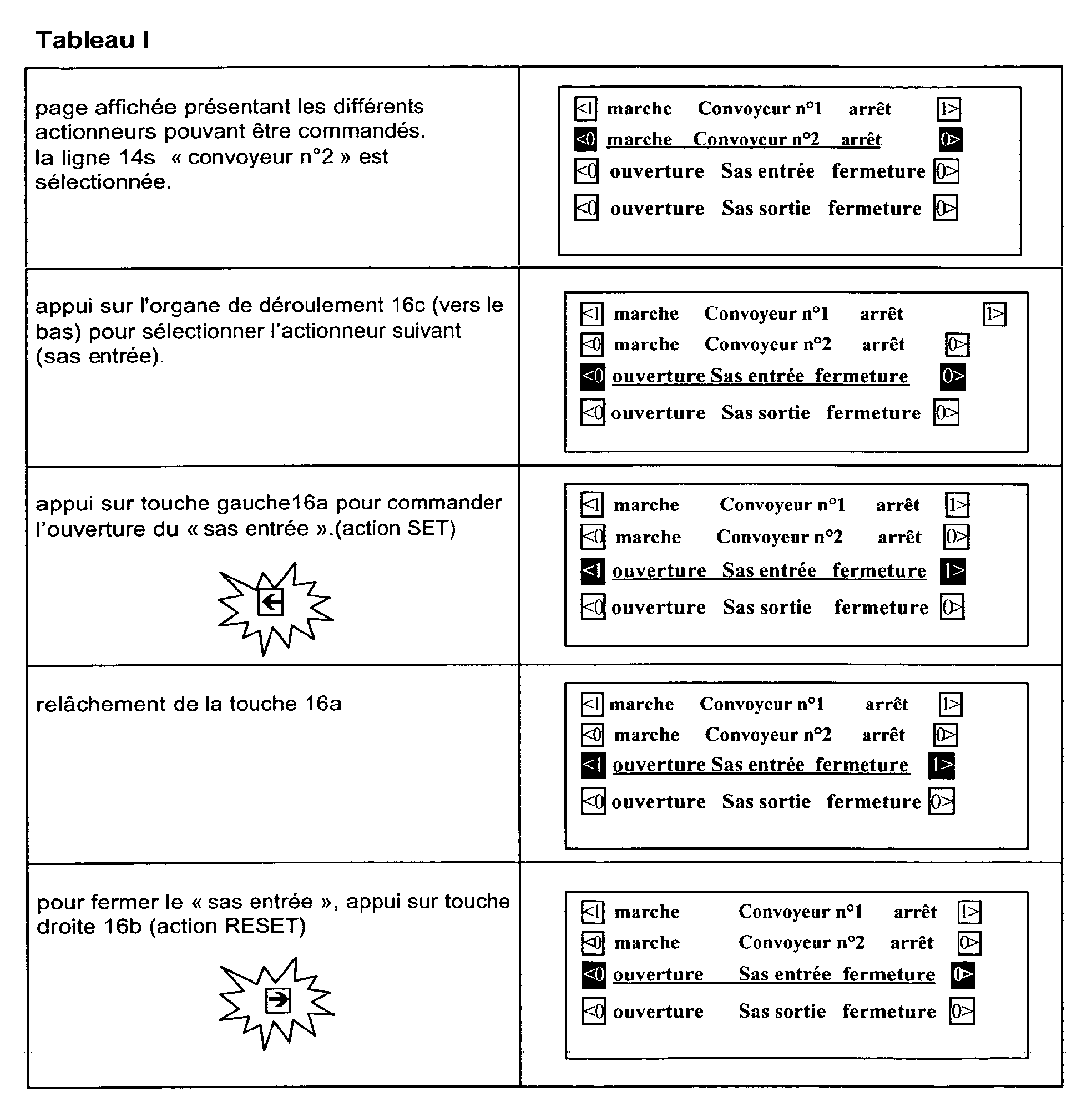
- the control of a motor can be produced, after completion to select the respective line 14s, by activating the "on" function or “stop” of the engine obtained by actuation of the key 16a or 16b designated by the arrow Fa or Fb of a left symbol Sa or right Sb.
- the left and right action symbols 20a and 20b of line 14 have a visual attribute and preferably go for example reverse video with flashing when line 14s has been selected.
- Boolean symbols 20a, 20b illustrated in FIG. 2 they may be symbols of transfer 21 a, 21 b, of increment / decrement symbols 22a, 22b or of navigation symbols then constituted by the arrows Fa, Fb.
- the text T and the control action symbols S can thus be represented exclusively under ASCII character form (see Figures 3 and 4 and Tables I to V), arrow symbols then being constituted by the character ASCII ⁇ or>.
- the screen illustrated in FIG. 3 shows the different lines 14 displayed on the display 13. Assuming that a midline 14s has been selected, and that the text T of this line contains a left part of text Ta and a right part of text Tb, the corresponding symbols S include on the left an arrow Fa, directed towards the adjacent key 16a, and a command action symbol 20a (or transfer 21a, or increment / decrement 22a) and to the right an arrow Fb, directed towards the adjacent key 16b, and a command action symbol 20b (or transfer 21b or increment / decrement 22b).
- FIG. 4 illustrates the mode of creation of an application by the operator: the terminal 10 is connected by a RS serial link to a personal computer 12.
- This uses a configuration software 12a, specific to the terminal family to which it belongs terminal 10, so that the operator can select in respective tables the type of terminal and the desired communication protocol, and write the content of different screens of the menu he designed, specifying the nature of the actions (navigation, boolean command, transfer command, increment command / decrement) associated with the various lines.
- the application developed is transferred to the application memory area 18 of the terminal.
- FIG. 5 illustrates the operating mode of the terminal.
- the operator selects on a screen the desired line of text 14s using the keys 16c, and the action symbols S of this line are then given a specific visual attribute, for example by switching to reverse video display with blinking.
- the line or part of the line in question is of a "navigation action” nature
- pressing the key left function 16a or right 16b generates the display of a page covered by the arrow, according to the menu organizing the pages.
- pressing the button causes switching of the target device (boolean command), or loading a variable value automation (direct write command), or the modification of a value of automation variable (increment / decrement command).
- boost action boost command
- a variable value automation direct write command
- modification of a value of automation variable incrementment / decrement command
- the automation equipment includes actuators capable of being controlled using a boolean variable, but requiring two buttons, for example in the case of a motor starter or a dangerous actuator. (table I below)
- the automation equipment includes bistable actuators requiring two boolean variables, for example in the case of a cylinder with bistable solenoid valve.
- the Boolean command action is impulse, so that the time for pressing the function key associated with the symbol results in a command of the same duration and by a display of the same duration for the state of the symbol.
- the two symbols each act on a separate variable.
- the automation equipment comprises monostable actuators with a single button, for example in the case of spring return cylinders, of lighting controls.
- the function keys act as snap buttons (push-push). Each Boolean command action symbol acts on a separate variable.
- the transfer action symbols 21 have an incrementation function (on the left) and a decrementation function (on the right). For each setting, the two symbols act on the same variable.
- the function keys play, as in Example II, the role of buttons with impulse control.
- the text of line 14s includes the set value.
Landscapes
- Engineering & Computer Science (AREA)
- Human Computer Interaction (AREA)
- Manufacturing & Machinery (AREA)
- Physics & Mathematics (AREA)
- General Physics & Mathematics (AREA)
- Automation & Control Theory (AREA)
- Input From Keyboards Or The Like (AREA)
- Programmable Controllers (AREA)
- Selective Calling Equipment (AREA)
- Fittings On The Vehicle Exterior For Carrying Loads, And Devices For Holding Or Mounting Articles (AREA)
- Telephone Function (AREA)
- Push-Button Switches (AREA)
- Electrical Discharge Machining, Electrochemical Machining, And Combined Machining (AREA)
Abstract
Description


Claims (14)
- Terminal d'exploitation pour système d'appareils ou machine, notamment pour système d'automatisme, comprenant :caractérisé par le fait que :un afficheur (13) à écran utilisé en mode non graphique, apte à la visualisation de pages organisées en menu et composées de lignes (14) destinées au dialogue d'un opérateur avec le système, notamment à fin de surveillance, de diagnostic et de commande,au moins un organe de déroulement (16c) et des touches de fonction (16) , les pages de texte comprenant des symboles (S) placés dans les lignes (14) et désignant des touches de fonction,l'organe de déroulement (16c) est actionnable par l'opérateur pour sélectionner une ligne (14),une application de dialogue créée par l'opérateur et comprenant des données de dialogue affichables sur les lignes (14) sous forme de texte (T) à caractères alphanumériques et un logiciel interne (18) qui est apte à traiter les données de dialogue et gérer le processus de visualisation,au moins une ligne (14) visualisée sur l'afficheur (13) définit deux actions de commande booléennes visant au moins un organe d'automatisme, la ligne présentant deux symboles respectifs (Sa,Sb), représentatifs des actions booléennes de commande,deux touches de fonction (16a,16b) situées latéralement à gauche et à droite de l'afficheur sont susceptibles d'être désignées de façon non ambiguë par les symboles d'actions booléennes de commande (Sa,Sb), et sont actionnables par l'opérateur, après sélection de la ligne respective (14s), pour ordonner l'une ou l'autre des deux actions booléennes de commande propres à la ligne.
- Terminal selon la revendication 1, caractérisé par le fait que la sélection de la ligne (14s) entraíne la sélection des deux symboles d'action de commande (Sa,Sb), chaque action de commande attachée à un symbole étant déclenchée par actionnement de la touche de fonction respective (16a,16b).
- Terminal selon la revendication 1, caractérisé par le fait que l'une au moins des lignes (14) du texte se compose d'une partie gauche et d'une partie droite, définissant deux actions duales de commande respectives, et les deux symboles d'action de commande respectifs (Sa,Sb) sont représentatifs de fonctions duales d'un même composant (A) du système d'automatisme.
- Terminal selon la revendication 1, caractérisé par le fait que la sélection d'une ligne (14s) détermine l'affichage d'un attribut visuel spécifique du ou des symboles d'action de commande (Sa,Sb).
- Terminal selon la revendication 1, caractérisé par le fait que le symbole d'action de commande (20a,20b) est représentatif de l'état courant de la variable booléenne assujettie à l'action de commande.
- Terminal selon la revendication 1, caractérisé par le fait que l'action de commande booléenne déclenchée par l'actionnement de la touche de fonction (16a,16b) est du type maintenu ou du type impulsionnel.
- Terminal selon la revendication 1, caractérisé par le fait que l'action de commande booléenne déclenchée par l'actionnement de la touche de fonction (16a,16b) est du type set ou reset.
- Terminal selon la revendication 1, caractérisé par le fait qu'il est prévu, outre une action de commande booléenne, une action de transfert, ou une action d'incrémentation ou décrémentation, et le symbole (S) d'action de commande est alors respectivement un symbole (21) d'action de transfert ou un symbole (22) d'action de commande d'incrémentation ou décrémentation.
- Terminal selon la revendication 8, caractérisé par le fait que, lorsque l'action de commande est du type incrémentation ou décrémentation, les touches de fonction gauche et droite (16a,16b) sont associées l'une à l'incrémentation et l'autre à la décrémentation.
- Terminal selon la revendication 8, caractérisé par le fait que, lorsque l'action de commande est du type transfert ou incrémentation / décrémentation, une représentation spécifique est adjointe au symbole respectif pendant que l'action s'effectue.
- Terminal selon la revendication 1, caractérisé par le fait qu'à l'affichage d'une page, aucune ligne dotée de symboles d'action de commande n'est sélectionnée, l'activation d'une action de commande étant subordonnée à la sélection de la ligne respective (14s) au moyen de l'organe de déroulement (16c).
- Terminal selon la revendication 1, caractérisé par le fait que les symboles d'action (S) et les textes des lignes (14) se composent exclusivement de caractères ASCII.
- Terminal selon la revendication 1, caractérisé par le fait que chaque symbole (S) d'action comprend une flèche (Fa,Fb) dirigée vers la gauche ou la droite, les touches de fonction (16a,16b) étant disposées latéralement à l'écran et fléchées dans le même sens que la flèche adjacente (Fa,Fb).
- Terminal d'exploitation pour système d'appareils ou machine, notamment pour système d'automatisme, comprenant :caractérisé par le fait que :un afficheur (13) à écran utilisé en mode non graphique, apte à la visualisation de pages organisées en menu et composées de lignes (14) destinées au dialogue d'un opérateur avec le système, notamment à fin de surveillance, de diagnostic et de commande,au moins un organe de déroulement (16c) et des touches de fonction (16) , les pages de texte comprenant des symboles (S) placés dans les lignes (14) et désignant des touches de fonction,l'organe de déroulement (16c) est actionnable par l'opérateur pour sélectionner une ligne (14),une application de dialogue créée par l'opérateur et comprenant des données de dialogue affichables sur les lignes (14) sous forme de texte (T) à caractères alphanumériques et un logiciel interne (18) qui est apte à traiter les données de dialogue et gérer le processus de visualisation,au moins une ligne (14) visualisée sur l'afficheur (13) et sélectionnée par l'opérateur définit deux actions de commande visant un organe d'automatisme, ces actions étant selon la ligne considérée des actions de commande booléennes, ou de commande d'incrémentation et décrémentation, la ligne présentant deux symboles respectifs (Sa,Sb), situés à gauche et à droite et représentatifs des actions de commande,deux touches de fonction (16a,16b) situées latéralement à gauche et à droite de l'afficheur sont susceptibles d'être désignées de façon non ambiguë par les symboles d'actions de commande (Sa,Sb), et sont actionnables par l'opérateur pour ordonner l'une ou l'autre des deux actions de commande propres à la ligne.
Applications Claiming Priority (2)
| Application Number | Priority Date | Filing Date | Title |
|---|---|---|---|
| FR0304909 | 2003-04-22 | ||
| FR0304909A FR2854254B1 (fr) | 2003-04-22 | 2003-04-22 | Terminal d'exploitation, notamment pour automatismes |
Publications (2)
| Publication Number | Publication Date |
|---|---|
| EP1473610A1 true EP1473610A1 (fr) | 2004-11-03 |
| EP1473610B1 EP1473610B1 (fr) | 2008-01-09 |
Family
ID=32982306
Family Applications (1)
| Application Number | Title | Priority Date | Filing Date |
|---|---|---|---|
| EP04300213A Expired - Lifetime EP1473610B1 (fr) | 2003-04-22 | 2004-04-19 | Terminal d'exploitation, notamment pour automatismes |
Country Status (7)
| Country | Link |
|---|---|
| US (1) | US20040215357A1 (fr) |
| EP (1) | EP1473610B1 (fr) |
| JP (1) | JP2004348716A (fr) |
| CN (1) | CN1570792A (fr) |
| AT (1) | ATE383602T1 (fr) |
| DE (1) | DE602004011140T2 (fr) |
| FR (1) | FR2854254B1 (fr) |
Cited By (1)
| Publication number | Priority date | Publication date | Assignee | Title |
|---|---|---|---|---|
| EP3182237A1 (fr) * | 2015-12-15 | 2017-06-21 | Enno electronics Co., Ltd. | Panneau de commande et son procédé de commande |
Families Citing this family (3)
| Publication number | Priority date | Publication date | Assignee | Title |
|---|---|---|---|---|
| USD511150S1 (en) * | 2003-03-14 | 2005-11-01 | Abb Oy | Casing for an electronic unit |
| US20070060377A1 (en) * | 2005-09-10 | 2007-03-15 | Bally Gaming, Inc. | Open-ended bonus gaming machine and method |
| US10852920B2 (en) * | 2016-06-30 | 2020-12-01 | Wipro Limited | Method and system for automating execution of processes |
Citations (3)
| Publication number | Priority date | Publication date | Assignee | Title |
|---|---|---|---|---|
| US4943906A (en) * | 1987-07-14 | 1990-07-24 | Tokai Kogyo Mishin Kabushiki Kaisha | Data setting device for an embroidering machine |
| FR2726382A1 (fr) * | 1994-10-27 | 1996-05-03 | Magneti Marelli France | Systeme informatif de bord pour vehicule automobile |
| WO2001067191A2 (fr) * | 2000-03-06 | 2001-09-13 | Siemens Aktiengesellschaft | Procede et dispositif pour faire actionner, observer et/ou surveiller un systeme de fabrication |
Family Cites Families (21)
| Publication number | Priority date | Publication date | Assignee | Title |
|---|---|---|---|---|
| US4751504A (en) * | 1987-03-24 | 1988-06-14 | Tektronix, Inc. | Cursor interface for waveform displays |
| CA2087503A1 (fr) * | 1992-04-13 | 1993-10-14 | Lester Wayne Dunaway | Telecommande multimode avec clavier dont les designations sont modifiables electriquement |
| US5526416A (en) * | 1992-11-16 | 1996-06-11 | Dezonno; Anthony J. | Automatic call distribution system with an ISDN compatible call connection system and method |
| US5381461A (en) * | 1993-04-13 | 1995-01-10 | At&T Corp. | Interactive display for use in a telephone terminal |
| US5573502A (en) * | 1993-05-26 | 1996-11-12 | Quest Medical, Inc. | Display panel and controls for blood mixture delivery system |
| US5886894A (en) * | 1995-03-28 | 1999-03-23 | Chubb Security Canada, Inc. | Control system for automated security and control systems |
| US5772635A (en) * | 1995-05-15 | 1998-06-30 | Alaris Medical Systems, Inc. | Automated infusion system with dose rate calculator |
| FR2735593B1 (fr) * | 1995-06-13 | 1997-08-29 | Aerospatiale | Procede d'aide a la specification d'un interface entre un terminal de controle et au moins un calculateur |
| US6203498B1 (en) * | 1996-06-28 | 2001-03-20 | Sonosite, Inc. | Ultrasonic imaging device with integral display |
| JPH10116058A (ja) * | 1996-10-14 | 1998-05-06 | Sony Corp | 電子機器の集中制御システム |
| US6691150B1 (en) * | 1996-12-26 | 2004-02-10 | Hitachi, Ltd. | Information device, information device system control method, and information device system |
| US6130726A (en) * | 1997-03-24 | 2000-10-10 | Evolve Products, Inc. | Program guide on a remote control display |
| US6061602A (en) * | 1998-06-23 | 2000-05-09 | Creative Lifestyles, Inc. | Method and apparatus for developing application software for home automation system |
| US6434447B1 (en) * | 1998-10-02 | 2002-08-13 | Koninklijke Philips Electronics N.V. | Control property is mapped modally compatible GUI element |
| US6225976B1 (en) * | 1998-10-30 | 2001-05-01 | Interlink Electronics, Inc. | Remote computer input peripheral |
| US6499062B1 (en) * | 1998-12-17 | 2002-12-24 | Koninklijke Philips Electronics N.V. | Synchronizing property changes to enable multiple control options |
| US6396523B1 (en) * | 1999-07-29 | 2002-05-28 | Interlink Electronics, Inc. | Home entertainment device remote control |
| US6965868B1 (en) * | 1999-08-03 | 2005-11-15 | Michael David Bednarek | System and method for promoting commerce, including sales agent assisted commerce, in a networked economy |
| US20030114942A1 (en) * | 2001-12-17 | 2003-06-19 | Varone John J. | Remote display module |
| US6744259B2 (en) * | 2002-06-25 | 2004-06-01 | Associated Research, Inc. | System and method for verifying failure detect circuitry in safety compliance test instruments |
| US8150922B2 (en) * | 2002-07-17 | 2012-04-03 | Research In Motion Limited | Voice and text group chat display management techniques for wireless mobile terminals |
-
2003
- 2003-04-22 FR FR0304909A patent/FR2854254B1/fr not_active Expired - Fee Related
-
2004
- 2004-04-19 DE DE602004011140T patent/DE602004011140T2/de not_active Expired - Lifetime
- 2004-04-19 EP EP04300213A patent/EP1473610B1/fr not_active Expired - Lifetime
- 2004-04-19 AT AT04300213T patent/ATE383602T1/de not_active IP Right Cessation
- 2004-04-22 JP JP2004126943A patent/JP2004348716A/ja active Pending
- 2004-04-22 CN CNA2004100552130A patent/CN1570792A/zh active Pending
- 2004-04-22 US US10/829,457 patent/US20040215357A1/en not_active Abandoned
Patent Citations (3)
| Publication number | Priority date | Publication date | Assignee | Title |
|---|---|---|---|---|
| US4943906A (en) * | 1987-07-14 | 1990-07-24 | Tokai Kogyo Mishin Kabushiki Kaisha | Data setting device for an embroidering machine |
| FR2726382A1 (fr) * | 1994-10-27 | 1996-05-03 | Magneti Marelli France | Systeme informatif de bord pour vehicule automobile |
| WO2001067191A2 (fr) * | 2000-03-06 | 2001-09-13 | Siemens Aktiengesellschaft | Procede et dispositif pour faire actionner, observer et/ou surveiller un systeme de fabrication |
Cited By (2)
| Publication number | Priority date | Publication date | Assignee | Title |
|---|---|---|---|---|
| EP3182237A1 (fr) * | 2015-12-15 | 2017-06-21 | Enno electronics Co., Ltd. | Panneau de commande et son procédé de commande |
| US9990054B2 (en) | 2015-12-15 | 2018-06-05 | Enno Electronics Co., Ltd | Control panel and controlling method thereof |
Also Published As
| Publication number | Publication date |
|---|---|
| EP1473610B1 (fr) | 2008-01-09 |
| ATE383602T1 (de) | 2008-01-15 |
| DE602004011140T2 (de) | 2009-01-02 |
| FR2854254A1 (fr) | 2004-10-29 |
| FR2854254B1 (fr) | 2005-06-17 |
| DE602004011140D1 (de) | 2008-02-21 |
| US20040215357A1 (en) | 2004-10-28 |
| CN1570792A (zh) | 2005-01-26 |
| JP2004348716A (ja) | 2004-12-09 |
Similar Documents
| Publication | Publication Date | Title |
|---|---|---|
| US7725839B2 (en) | Three-dimensional active file explorer | |
| US9043731B2 (en) | 3D mobile user interface with configurable workspace management | |
| EP0816980B1 (fr) | Défilement commandé par mouvement des yeux | |
| US7155676B2 (en) | System and method for multimedia authoring and playback | |
| EP2325737B1 (fr) | Procédé et système de gestion d'une interface graphique pour l'affichage de composants graphiques applicatifs | |
| US6559871B1 (en) | Asynchronous tree navigator graphical user interface and associated methods | |
| US7669140B2 (en) | System and method for providing rich minimized applications | |
| CN114730270A (zh) | 用于运行车辆中的操作系统的方法和用于车辆的操作系统 | |
| US20100306669A1 (en) | Instant messaging service with minimized user interface | |
| EP3842908A1 (fr) | Procédé d'interaction pour une barre de menu latérale, appareil et support de d'enregistrement lisible sur ordinateur | |
| US7081904B2 (en) | Methods and apparatuses for identifying remote and local services | |
| WO2013061156A2 (fr) | Systèmes et procédé pour la mise en œuvre de plusieurs personae sur des plateformes de technologie mobile | |
| AU2001274755A1 (en) | Graphical user interface for communications | |
| JPH04229320A (ja) | コンピュータ・システムの動作方法 | |
| EP2778885A1 (fr) | Procédé de traitement d'un geste composé, dispositif et terminal d'utilisateur associés | |
| CN107408004A (zh) | 一种在锁屏界面呈现信息的方法、信息处理装置、便携式电子设备以及便携式电子设备上的图形用户界面 | |
| US10261666B2 (en) | Context-independent navigation of electronic content | |
| EP1473610B1 (fr) | Terminal d'exploitation, notamment pour automatismes | |
| EP2339516A1 (fr) | Procédé et système d'interaction avec une application partagée entre plusieurs utilisateurs | |
| EP0816972A1 (fr) | Lanceur d'applications sécurisé à interface graphique | |
| WO2020227273A1 (fr) | Interface utilisateur de navigation multimédia avec éléments multimédias de représentation sélectionnés de manière intelligente | |
| WO2018132265A1 (fr) | Déplacement de commandes d'interface | |
| CA2371013A1 (fr) | Sequence de visite de commandes d'interface client utilisateur definie par l'operateur | |
| EP1668488A1 (fr) | Systeme et procede pour la fourniture d'applications minimisees riches | |
| FR3078797A1 (fr) | Interface tactile de commande d’applications pour vehicule. |
Legal Events
| Date | Code | Title | Description |
|---|---|---|---|
| PUAI | Public reference made under article 153(3) epc to a published international application that has entered the european phase |
Free format text: ORIGINAL CODE: 0009012 |
|
| AK | Designated contracting states |
Kind code of ref document: A1 Designated state(s): AT BE BG CH CY CZ DE DK EE ES FI FR GB GR HU IE IT LI LU MC NL PL PT RO SE SI SK TR |
|
| AX | Request for extension of the european patent |
Extension state: AL HR LT LV MK |
|
| 17P | Request for examination filed |
Effective date: 20041117 |
|
| AKX | Designation fees paid |
Designated state(s): AT BE BG CH CY CZ DE DK EE ES FI FR GB GR HU IE IT LI LU MC NL PL PT RO SE SI SK TR |
|
| 17Q | First examination report despatched |
Effective date: 20070219 |
|
| GRAP | Despatch of communication of intention to grant a patent |
Free format text: ORIGINAL CODE: EPIDOSNIGR1 |
|
| GRAS | Grant fee paid |
Free format text: ORIGINAL CODE: EPIDOSNIGR3 |
|
| GRAA | (expected) grant |
Free format text: ORIGINAL CODE: 0009210 |
|
| AK | Designated contracting states |
Kind code of ref document: B1 Designated state(s): AT BE BG CH CY CZ DE DK EE ES FI FR GB GR HU IE IT LI LU MC NL PL PT RO SE SI SK TR |
|
| REG | Reference to a national code |
Ref country code: GB Ref legal event code: FG4D Free format text: NOT ENGLISH |
|
| REG | Reference to a national code |
Ref country code: CH Ref legal event code: EP |
|
| REG | Reference to a national code |
Ref country code: IE Ref legal event code: FG4D Free format text: LANGUAGE OF EP DOCUMENT: FRENCH |
|
| REF | Corresponds to: |
Ref document number: 602004011140 Country of ref document: DE Date of ref document: 20080221 Kind code of ref document: P |
|
| GBT | Gb: translation of ep patent filed (gb section 77(6)(a)/1977) |
Effective date: 20080410 |
|
| PG25 | Lapsed in a contracting state [announced via postgrant information from national office to epo] |
Ref country code: SI Free format text: LAPSE BECAUSE OF FAILURE TO SUBMIT A TRANSLATION OF THE DESCRIPTION OR TO PAY THE FEE WITHIN THE PRESCRIBED TIME-LIMIT Effective date: 20080109 Ref country code: NL Free format text: LAPSE BECAUSE OF FAILURE TO SUBMIT A TRANSLATION OF THE DESCRIPTION OR TO PAY THE FEE WITHIN THE PRESCRIBED TIME-LIMIT Effective date: 20080109 |
|
| NLV1 | Nl: lapsed or annulled due to failure to fulfill the requirements of art. 29p and 29m of the patents act | ||
| PG25 | Lapsed in a contracting state [announced via postgrant information from national office to epo] |
Ref country code: FI Free format text: LAPSE BECAUSE OF FAILURE TO SUBMIT A TRANSLATION OF THE DESCRIPTION OR TO PAY THE FEE WITHIN THE PRESCRIBED TIME-LIMIT Effective date: 20080109 Ref country code: ES Free format text: LAPSE BECAUSE OF FAILURE TO SUBMIT A TRANSLATION OF THE DESCRIPTION OR TO PAY THE FEE WITHIN THE PRESCRIBED TIME-LIMIT Effective date: 20080420 |
|
| PG25 | Lapsed in a contracting state [announced via postgrant information from national office to epo] |
Ref country code: BG Free format text: LAPSE BECAUSE OF FAILURE TO SUBMIT A TRANSLATION OF THE DESCRIPTION OR TO PAY THE FEE WITHIN THE PRESCRIBED TIME-LIMIT Effective date: 20080409 Ref country code: AT Free format text: LAPSE BECAUSE OF FAILURE TO SUBMIT A TRANSLATION OF THE DESCRIPTION OR TO PAY THE FEE WITHIN THE PRESCRIBED TIME-LIMIT Effective date: 20080109 |
|
| PG25 | Lapsed in a contracting state [announced via postgrant information from national office to epo] |
Ref country code: PL Free format text: LAPSE BECAUSE OF FAILURE TO SUBMIT A TRANSLATION OF THE DESCRIPTION OR TO PAY THE FEE WITHIN THE PRESCRIBED TIME-LIMIT Effective date: 20080109 Ref country code: PT Free format text: LAPSE BECAUSE OF FAILURE TO SUBMIT A TRANSLATION OF THE DESCRIPTION OR TO PAY THE FEE WITHIN THE PRESCRIBED TIME-LIMIT Effective date: 20080609 |
|
| REG | Reference to a national code |
Ref country code: IE Ref legal event code: FD4D |
|
| BERE | Be: lapsed |
Owner name: SCHNEIDER ELECTRIC INDUSTRIES SAS Effective date: 20080430 |
|
| PG25 | Lapsed in a contracting state [announced via postgrant information from national office to epo] |
Ref country code: CZ Free format text: LAPSE BECAUSE OF FAILURE TO SUBMIT A TRANSLATION OF THE DESCRIPTION OR TO PAY THE FEE WITHIN THE PRESCRIBED TIME-LIMIT Effective date: 20080109 Ref country code: DK Free format text: LAPSE BECAUSE OF FAILURE TO SUBMIT A TRANSLATION OF THE DESCRIPTION OR TO PAY THE FEE WITHIN THE PRESCRIBED TIME-LIMIT Effective date: 20080109 Ref country code: SK Free format text: LAPSE BECAUSE OF FAILURE TO SUBMIT A TRANSLATION OF THE DESCRIPTION OR TO PAY THE FEE WITHIN THE PRESCRIBED TIME-LIMIT Effective date: 20080109 Ref country code: SE Free format text: LAPSE BECAUSE OF FAILURE TO SUBMIT A TRANSLATION OF THE DESCRIPTION OR TO PAY THE FEE WITHIN THE PRESCRIBED TIME-LIMIT Effective date: 20080409 Ref country code: IE Free format text: LAPSE BECAUSE OF FAILURE TO SUBMIT A TRANSLATION OF THE DESCRIPTION OR TO PAY THE FEE WITHIN THE PRESCRIBED TIME-LIMIT Effective date: 20080109 |
|
| PLBE | No opposition filed within time limit |
Free format text: ORIGINAL CODE: 0009261 |
|
| STAA | Information on the status of an ep patent application or granted ep patent |
Free format text: STATUS: NO OPPOSITION FILED WITHIN TIME LIMIT |
|
| PG25 | Lapsed in a contracting state [announced via postgrant information from national office to epo] |
Ref country code: RO Free format text: LAPSE BECAUSE OF FAILURE TO SUBMIT A TRANSLATION OF THE DESCRIPTION OR TO PAY THE FEE WITHIN THE PRESCRIBED TIME-LIMIT Effective date: 20080109 Ref country code: MC Free format text: LAPSE BECAUSE OF NON-PAYMENT OF DUE FEES Effective date: 20080430 |
|
| REG | Reference to a national code |
Ref country code: CH Ref legal event code: PL |
|
| 26N | No opposition filed |
Effective date: 20081010 |
|
| PG25 | Lapsed in a contracting state [announced via postgrant information from national office to epo] |
Ref country code: LI Free format text: LAPSE BECAUSE OF NON-PAYMENT OF DUE FEES Effective date: 20080430 Ref country code: CH Free format text: LAPSE BECAUSE OF NON-PAYMENT OF DUE FEES Effective date: 20080430 Ref country code: EE Free format text: LAPSE BECAUSE OF FAILURE TO SUBMIT A TRANSLATION OF THE DESCRIPTION OR TO PAY THE FEE WITHIN THE PRESCRIBED TIME-LIMIT Effective date: 20080109 |
|
| REG | Reference to a national code |
Ref country code: FR Ref legal event code: ST Effective date: 20081231 |
|
| PG25 | Lapsed in a contracting state [announced via postgrant information from national office to epo] |
Ref country code: BE Free format text: LAPSE BECAUSE OF NON-PAYMENT OF DUE FEES Effective date: 20080430 |
|
| PG25 | Lapsed in a contracting state [announced via postgrant information from national office to epo] |
Ref country code: FR Free format text: LAPSE BECAUSE OF NON-PAYMENT OF DUE FEES Effective date: 20080430 |
|
| PG25 | Lapsed in a contracting state [announced via postgrant information from national office to epo] |
Ref country code: CY Free format text: LAPSE BECAUSE OF FAILURE TO SUBMIT A TRANSLATION OF THE DESCRIPTION OR TO PAY THE FEE WITHIN THE PRESCRIBED TIME-LIMIT Effective date: 20080109 |
|
| PG25 | Lapsed in a contracting state [announced via postgrant information from national office to epo] |
Ref country code: IT Free format text: LAPSE BECAUSE OF FAILURE TO SUBMIT A TRANSLATION OF THE DESCRIPTION OR TO PAY THE FEE WITHIN THE PRESCRIBED TIME-LIMIT Effective date: 20080109 |
|
| PGFP | Annual fee paid to national office [announced via postgrant information from national office to epo] |
Ref country code: FR Payment date: 20090312 Year of fee payment: 6 |
|
| PG25 | Lapsed in a contracting state [announced via postgrant information from national office to epo] |
Ref country code: HU Free format text: LAPSE BECAUSE OF FAILURE TO SUBMIT A TRANSLATION OF THE DESCRIPTION OR TO PAY THE FEE WITHIN THE PRESCRIBED TIME-LIMIT Effective date: 20080710 Ref country code: LU Free format text: LAPSE BECAUSE OF NON-PAYMENT OF DUE FEES Effective date: 20080419 |
|
| PG25 | Lapsed in a contracting state [announced via postgrant information from national office to epo] |
Ref country code: TR Free format text: LAPSE BECAUSE OF FAILURE TO SUBMIT A TRANSLATION OF THE DESCRIPTION OR TO PAY THE FEE WITHIN THE PRESCRIBED TIME-LIMIT Effective date: 20080109 |
|
| PG25 | Lapsed in a contracting state [announced via postgrant information from national office to epo] |
Ref country code: GR Free format text: LAPSE BECAUSE OF FAILURE TO SUBMIT A TRANSLATION OF THE DESCRIPTION OR TO PAY THE FEE WITHIN THE PRESCRIBED TIME-LIMIT Effective date: 20080410 |
|
| PGFP | Annual fee paid to national office [announced via postgrant information from national office to epo] |
Ref country code: GB Payment date: 20110323 Year of fee payment: 8 |
|
| GBPC | Gb: european patent ceased through non-payment of renewal fee |
Effective date: 20120419 |
|
| PG25 | Lapsed in a contracting state [announced via postgrant information from national office to epo] |
Ref country code: GB Free format text: LAPSE BECAUSE OF NON-PAYMENT OF DUE FEES Effective date: 20120419 |
|
| PGFP | Annual fee paid to national office [announced via postgrant information from national office to epo] |
Ref country code: DE Payment date: 20230427 Year of fee payment: 20 |
|
| REG | Reference to a national code |
Ref country code: DE Ref legal event code: R071 Ref document number: 602004011140 Country of ref document: DE |