EP1367477A2 - Information processing apparatus - Google Patents
Information processing apparatus Download PDFInfo
- Publication number
- EP1367477A2 EP1367477A2 EP03005422A EP03005422A EP1367477A2 EP 1367477 A2 EP1367477 A2 EP 1367477A2 EP 03005422 A EP03005422 A EP 03005422A EP 03005422 A EP03005422 A EP 03005422A EP 1367477 A2 EP1367477 A2 EP 1367477A2
- Authority
- EP
- European Patent Office
- Prior art keywords
- information
- display
- displayed
- edited
- sub
- Prior art date
- Legal status (The legal status is an assumption and is not a legal conclusion. Google has not performed a legal analysis and makes no representation as to the accuracy of the status listed.)
- Withdrawn
Links
Images




Classifications
-
- G—PHYSICS
- G06—COMPUTING OR CALCULATING; COUNTING
- G06F—ELECTRIC DIGITAL DATA PROCESSING
- G06F3/00—Input arrangements for transferring data to be processed into a form capable of being handled by the computer; Output arrangements for transferring data from processing unit to output unit, e.g. interface arrangements
- G06F3/01—Input arrangements or combined input and output arrangements for interaction between user and computer
- G06F3/048—Interaction techniques based on graphical user interfaces [GUI]
- G06F3/0487—Interaction techniques based on graphical user interfaces [GUI] using specific features provided by the input device, e.g. functions controlled by the rotation of a mouse with dual sensing arrangements, or of the nature of the input device, e.g. tap gestures based on pressure sensed by a digitiser
- G06F3/0488—Interaction techniques based on graphical user interfaces [GUI] using specific features provided by the input device, e.g. functions controlled by the rotation of a mouse with dual sensing arrangements, or of the nature of the input device, e.g. tap gestures based on pressure sensed by a digitiser using a touch-screen or digitiser, e.g. input of commands through traced gestures
- G06F3/04886—Interaction techniques based on graphical user interfaces [GUI] using specific features provided by the input device, e.g. functions controlled by the rotation of a mouse with dual sensing arrangements, or of the nature of the input device, e.g. tap gestures based on pressure sensed by a digitiser using a touch-screen or digitiser, e.g. input of commands through traced gestures by partitioning the display area of the touch-screen or the surface of the digitising tablet into independently controllable areas, e.g. virtual keyboards or menus
-
- G—PHYSICS
- G06—COMPUTING OR CALCULATING; COUNTING
- G06F—ELECTRIC DIGITAL DATA PROCESSING
- G06F1/00—Details not covered by groups G06F3/00 - G06F13/00 and G06F21/00
- G06F1/16—Constructional details or arrangements
- G06F1/1613—Constructional details or arrangements for portable computers
- G06F1/1615—Constructional details or arrangements for portable computers with several enclosures having relative motions, each enclosure supporting at least one I/O or computing function
- G06F1/1616—Constructional details or arrangements for portable computers with several enclosures having relative motions, each enclosure supporting at least one I/O or computing function with folding flat displays, e.g. laptop computers or notebooks having a clamshell configuration, with body parts pivoting to an open position around an axis parallel to the plane they define in closed position
-
- G—PHYSICS
- G06—COMPUTING OR CALCULATING; COUNTING
- G06F—ELECTRIC DIGITAL DATA PROCESSING
- G06F1/00—Details not covered by groups G06F3/00 - G06F13/00 and G06F21/00
- G06F1/16—Constructional details or arrangements
- G06F1/1613—Constructional details or arrangements for portable computers
- G06F1/1633—Constructional details or arrangements of portable computers not specific to the type of enclosures covered by groups G06F1/1615 - G06F1/1626
- G06F1/1684—Constructional details or arrangements related to integrated I/O peripherals not covered by groups G06F1/1635 - G06F1/1675
- G06F1/169—Constructional details or arrangements related to integrated I/O peripherals not covered by groups G06F1/1635 - G06F1/1675 the I/O peripheral being an integrated pointing device, e.g. trackball in the palm rest area, mini-joystick integrated between keyboard keys, touch pads or touch stripes
-
- G—PHYSICS
- G06—COMPUTING OR CALCULATING; COUNTING
- G06F—ELECTRIC DIGITAL DATA PROCESSING
- G06F1/00—Details not covered by groups G06F3/00 - G06F13/00 and G06F21/00
- G06F1/16—Constructional details or arrangements
- G06F1/1613—Constructional details or arrangements for portable computers
- G06F1/1633—Constructional details or arrangements of portable computers not specific to the type of enclosures covered by groups G06F1/1615 - G06F1/1626
- G06F1/1684—Constructional details or arrangements related to integrated I/O peripherals not covered by groups G06F1/1635 - G06F1/1675
- G06F1/169—Constructional details or arrangements related to integrated I/O peripherals not covered by groups G06F1/1635 - G06F1/1675 the I/O peripheral being an integrated pointing device, e.g. trackball in the palm rest area, mini-joystick integrated between keyboard keys, touch pads or touch stripes
- G06F1/1692—Constructional details or arrangements related to integrated I/O peripherals not covered by groups G06F1/1635 - G06F1/1675 the I/O peripheral being an integrated pointing device, e.g. trackball in the palm rest area, mini-joystick integrated between keyboard keys, touch pads or touch stripes the I/O peripheral being a secondary touch screen used as control interface, e.g. virtual buttons or sliders
-
- G—PHYSICS
- G06—COMPUTING OR CALCULATING; COUNTING
- G06F—ELECTRIC DIGITAL DATA PROCESSING
- G06F3/00—Input arrangements for transferring data to be processed into a form capable of being handled by the computer; Output arrangements for transferring data from processing unit to output unit, e.g. interface arrangements
- G06F3/01—Input arrangements or combined input and output arrangements for interaction between user and computer
- G06F3/048—Interaction techniques based on graphical user interfaces [GUI]
- G06F3/0481—Interaction techniques based on graphical user interfaces [GUI] based on specific properties of the displayed interaction object or a metaphor-based environment, e.g. interaction with desktop elements like windows or icons, or assisted by a cursor's changing behaviour or appearance
Definitions
- the present invention relates to an information processing apparatus which comprises a tablet device having a sub-display in addition to a main display.
- Recent OSs allow different programs to run on a plurality of windows.
- a program such as a wordprocessor, spreadsheet software, or the like
- the user normally directly processes data such as characters, numerals, images, and the like on the corresponding window.
- this operation is done in the following case. That is, when the user wants to paste an image onto a given page on the wordprocessor window, he or she opens another window used to run a program suitable for inputting images and edits image data on that window. Then, the user pastes the edited information onto a page on the previous window.
- the user When the user wants to input a plurality of items of identical information, he or she temporarily stores that information in a memory, and successively inputs it by a "paste" operation.
- the user opens a window used to edit information, pastes information from the memory on that edit window, and edits the information on the edit window.
- the user stores the edited information in the memory again, switches the edit window to a main window, moves a pointer to a position where information is to be pasted, and pastes the information (operation for editing information stored in a memory).
- This information processing apparatus implements an input function of image information, text information, numerical value information, and the like, a time display function, and the like on the sub-display.
- the operation for editing information stored in a memory similarly requires a pointing operation, and window display and switching operations, resulting in complicated user operations.
- the present invention has been made in consideration of the above situation, and provides an information processing apparatus, which can reduce the load on user operations.
- an information processing apparatus comprising a first display means, a touch interface means having a second display means separate from the first display means, a selection means for selecting information displayed on the first display means such that the selected information is displayed on the second display means, and an edit means for editing the information displayed on the second display means such that the edited information is displayed on the first display means.
- an information processing apparatus comprising a main display, a tablet device having a sub-display separate from the main display, a selection device for selecting an information item displayed on the main display such that the selected information item is displayed on the sub-display, and a processor programmed for managing in the form of a list a predetermined number of selected information items selected by the selection device.
- the present invention is characterized in that a display-integrated pointing device which integrates a display panel (sub-display) such as an LCD or the like and a tablet or touch interface is provided in addition to a display device (main display) that displays a mouse pointer and the like, and setups and operations of various setup windows and operation windows are allowed on this device.
- a display-integrated pointing device "cPadTM” is commercially available from “Synaptics” Incorporated (refer to http://www.synaptics.com/products/cpad.cfm.)
- An embodiment of the present invention will exemplify an arrangement using cPad (to be referred to as a cPad device hereinafter) as the display-integrated pointing device.
- FIG. 1 is a perspective view showing the outer appearance of an information processing apparatus according to an embodiment of the present invention.
- FIG. 1 exemplifies a notebook type personal computer.
- a computer according to the embodiment of the present invention shown in FIG. 1 comprises a computer main body 11 and display unit 12.
- a display screen (main display) 121 which comprises an LCD is built in the display unit 12.
- the display unit 12 is attached to the computer main body 11 to be pivotal between the opened and closed positions.
- the computer main body 11 has a low-profile, box-shaped housing.
- a keyboard 111 is arranged on the upper surface of the housing, and the upper surface of the housing portion in front of the keyboard 111 forms an armrest.
- a cPad device 112 which is used as the display-integrated pointing device, as described above, is arranged together with left, right, and middle user-selectable operators 113a, 113b, and 113c included in that cPad device.
- a user-selectable operator such as, but not limited to, power button 114, is used to turn on/off the power supply of the computer main body 11 is arranged on the upper surface of the computer main body 11.
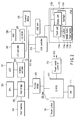
- FIG. 2 is a block diagram showing the system arrangement of the computer shown in FIG. 1.
- This . computer comprises a CPU 201, host bridge 202, main memory 203, graphics controller 204, PCI-ISA bridge 206, I/O controller 207, hard disk drive (HDD) 208, CD-ROM drive 209, USB controller 210, embedded controller/keyboard controller IC (EC/KBC) 211, power supply controller 213, and the like, as shown in FIG. 2.
- the aforementioned cPad device 112 is connected to the USB controller 210.
- This cPad device 112 is formed by integrating a touch pad 112a, display unit 112b, and backlight 112c, and has the left, right, and middle user-selectable operators 113a, 113b, and 113c.
- the CPU 201 is provided to control the operation of this computer.
- the CPU 201 executes an operation system, and application program/utility program, which are loaded from the hard disk drive (HDD) 208 onto the main memory 203.
- the CPU 201 executes processes shown in FIGS. 5, 13, and 14. These processes to be executed shown in FIGS. 5, 13, and 14 will be explained later.
- the host bridge 202 is a bridge device that connects the local bus of the CPU 201, and a PCI bus 1, for bi-directional communication.
- the graphics controller 204 controls the main display 121 used as a display monitor of this computer.
- the graphics controller 204 also controls an external display 106 when such display is connected to an external display connection port.
- the I/O controller 207 controls the hard disk drive (HDD) 208, CD-ROM drive 209, and the like.
- the PCI-ISA bridge 206 is a bridge device that connects the PCI bus 1 and an ISA bus 2 for bi-directional communication. Also, the PCI-ISA bridge 206 incorporates various system devices such as a system timer, DMA controller, interrupt controller, and the like.
- the embedded controller/keyboard controller IC (EC/KBC) 211 is a 1-chip microcomputer which integrates an embedded controller (EC) for power management and a keyboard controller (KBC) that controls the keyboard 111.
- the embedded controller/keyboard controller IC (EC/KBC) 211 has a function of turning on/off the power supply of this computer in response to user' s operation on the power button 114 in collaboration with the power supply controller 213.
- FIG. 3 shows information stored in the main memory 203.
- the main memory 203 comprises a text information manager 21, image information manager 22, text & image information manager 23, and history information manager 24.
- the text information manager 21 stores text information (including numerical value information) (21-1a, 21-2a, 21-3a, ...) of information selected on the main display.
- the manager 21 also stores change permission flags (21-1b 21-2b, 21-3b, ...) corresponding to the text information (21-1a, 21-2a, 21-3a, 7)
- Each of these change permission flags (21-1b, 21-2b, 21-3b, 7) indicates whether or not corresponding text information can be changed, and can be freely set by the user.
- the change permission flag will initially be set to X when the data includes file attribution and the file is a READ-ONLY file (note that if the file was stored in file form, then the data will include file attribution).
- the file attribution will be reflected to the change permission flags shown in FIG. 4. That is, if the file is READ-ONLY, then the change permission flag is X. Otherwise, it will not be X.
- the change permission flag is set to X as the default. In either case, when the change permission flag is set to X, a user is prevented from mistakenly inputting information.
- the image information manager 22 stores image information (22-1a, 22-2a, 22-3a, ...) of information displayed on the main display. Also, the manager 22 stores change permission flags (22-1b 22-2b, 22-3b, ...) corresponding to the image information (22-1a, 22-2a, 22-3a,7) Each of these change permission flags (22-1b, 22-2b, 22-3b,... ) indicates whether or not corresponding image information can be changed, and can be freely set by the user.
- the text & image information manager 23 stores information (text information and image information (23-1a, 23-2a, 23-3a,%) selected on the main display. Also, the manager 23 stores change permission flags (23-1b, 23-2b, 23-3b, ...) corresponding to the text information and image information (23-1a, 23-2a, 23-3a, 7) Each of these change permission flags (23-1b, 23-2b, 23-3b,... ) indicates whether or not corresponding text information and image information can be changed, and can be freely set by the user.
- the text information is stored in the text information manager 21
- the image information is stored in the image information manager 22
- both the text information and image information are stored in the text & image information manager 23.
- the history information manager 24 manages information managed by the text information manager 21, image information manager 22, and text & image information manager 23 in the form of a list, as shown in FIG. 4.
- This list basically stores selected information items in the order in which they are selected from the main display, and the user can edit this list using a GUI to be described later.
- reference numeral 31 denotes a pointer which indicates information to be displayed on the sub-display. In FIG. 4, the pointer 31 indicates that "text & image information 1" is information to be displayed on the sub-display.
- This pointer 31 is also movable using a GUI to be described later. The pointer 31 moves by toggling.
- the user selects information (image information, numerical value information, text information, or the like) to be edited -displayed on the main display (S1).
- image information A, numerical value information B, and/or text information C are displayed on spreadsheet software on the main display 121, as shown in FIG. 6, the user selects one of the data to be edited by a pointing function of the cPad device 112.
- the selected information is stored in the main memory 203 (S2). For example, if image information A in FIG. 6 is selected, that selected information is stored in the image information manager 22, and is managed by the history information manager 24.
- the type (image, numerical value, text information) of selected information is determined (S3).
- a GUI suitable for editing the selected information is displayed on the sub-display of the cPad device 112 on the basis of the type of information determined in step S3 (S4).
- FIGS. 8 to 10 show GUIs displayed in correspondence with the types of information.
- FIG. 8 shows a GUI displayed when the selected information is numerical value information, and this GUI implements a calculator function. For example, the user makes numerical value calculations on the calculator displayed on the sub-display, and can paste the result onto the main display.
- an "edit” user-selectable operator such as, but not limited to, edit button 31 in FIG. 8, is used to edit a list stored in the main memory, and this function will be explained later.
- An "end” user-selectable operator such as, but not limited to, end button 36, is used to close this edit GUI.
- FIG. 9 shows a GUI displayed when the selected information is image information, and image information can be edited on this GUI.
- the image information may be edited directly from the sub-display using the tablet function of the cPad device 112, or may be edited using another input device such as a mouse, keyboard and the like. That is, the edit method in this case is not particularly limited.
- a user-selectable operator 32 in FIG. 9 indicates whether or not an edit process of information to be edited is permitted.
- FIG. 9 shows a case wherein the edit process is inhibited.
- permission/inhibition of the edit process can be switched using the tablet function of the cPad device 112, and that result is reflected in a change permission flag managed in the main memory.
- a user-selectable operator 33 indicates information to be edited.
- FIG. 9 shows a case wherein image information is to be edited. By touching or otherwise selecting this user-selectable operator 33, information to be edited can be switched between image information-and text information using the tablet function of the cPad device 112.
- User-selectable operators 34a and 34b are used to select information, which is managed by the information manager and is to be displayed on the sub-display. Every time the user presses the user-selectable operator 34a, the pointer of the list managed by the history information manager moves up in the list by one information item; every time the user presses the user-selectable operator 34b, the pointer of the list managed by the history information manager moves down in the list by one information item. As a result, an information item indicated by the pointer is displayed on the sub-display, and the user can select information by checking information displayed on the sub-display.
- a display field 35 displays a list number of information displayed on the sub-display. When the user has switched information to be displayed on the sub-display, a GUI corresponding to the type of selected information is displayed.
- FIG. 10 shows a GUI when the information to be edited is text information.
- the user-selectable operator 32 indicates that text information can be edited
- the user-selectable operator 33 indicates that the information to be edited is text information
- the list number of text information to be edited is "88".
- the selected information is displayed on the sub-display (S5).
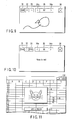
- a window shown in FIG. 7 is displayed on the sub-display. Note that FIG. 7 indicates that the GUI corresponding to text information is displayed, this information can be edited, and the information to be edited is text information.
- the user may directly input/edit text on the sub-display using the tablet function of the cPad device 112 or may input/edit text from the keyboard or other input device.
- the position of an edit cursor which indicates the position of text information to be edited may be designated from either the cPad device 112 or another input device such as a mouse, keyboard and the like.
- FIG. 7 shows a case wherein text information selected on the main display can fall within the window.
- a scroll bar may be displayed on the window of the sub-display to allow for scrolling of the display.
- the selected information may be displayed in a reduced or enlarged scale.
- Such display method can be arbitrarily selected by the user.
- the user edits the text information (S6).
- This edit method is not particularly limited.
- the information may be edited using the GUI on the sub-display or another input device such as a mouse, keyboard and the like.
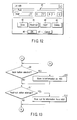
- step S6 it is checked if the edit button has been selected (S7). If it is determined that the edit button has not been selected, the edited information is pasted at the original position on the main display (S8), i.e., the user can replace the original text with the edited text.
- FIG. 11 shows a case wherein the user edits text "I am a cat” to text "I am a mouse", and pastes the edited text at the original position on the main display.
- step S7 If it is determined in step S7 that the edit button has been selected, a window used to edit list information managed in the main memory is displayed on the sub-display, as shown in FIG. 12.
- FIG. 12 shows a setup window used to edit text information, and a field 41 is used to designate a font, character size, and the like.
- a “save” user-selectable operator such as, but not limited to, save button 42, is used to store text information in the HDD of the information processing apparatus.
- a "read out” user-selectable operator such as, but not limited to, read out button 43, is used to read out list information stored on the HDD.
- An “insert” user-selectable operator such as, but not limited to, insert button 44, is used to insert a new information item before or after an information item indicated by the pointer 31 of those which are managed in the form of a list and are stored in the main memory.
- a “delete” user-selectable operator such as, but not limited to, delete button 45, is used to delete an information item indicated by the pointer 31.
- An "OK” user-selectable operator such as, but not limited to, OK button 46, is used to accept the setups on the setup window, and a “cancel” user-selectable operator such as, but not limited to, cancel button 47, is used to cancel the setups on the setup window.
- step S7 If it is determined in step S7 that the edit button has been selected, it is checked if the save button 42 has been selected (S9). If it is determined in step S9 that the save button has been selected, the list information managed in the main memory is stored on the HDD (S10).
- step S9 if it is determined in step S9 that the save button has not been selected, or after the process in step S10 is complete, it is checked if the read-out button 43 has been selected (S11).
- step S11 If it is determined in step S11 that the read-out button 43 has been selected, the list information is read out from the HDD (S12).
- step S11 if it is determined in step S11 that the read-out button 43 has not been selected, or after the process in step S12 is complete, it is checked if the insert button 44 has been selected (S13).
- step S13 If it is determined in step S13 that the insert button 44 has been selected, new information is inserted before or after information indicated by the pointer 31 of those which are managed in the form of a list and are stored in the main memory (S14).
- step S13 if it is determined in step S13 that the insert button 44 has not been selected, or after the process in step S14 is complete, it is checked if the delete button 45 has been selected (S15).
- step S15 If it is determined in step S15 that the delete button 45 has been selected, the current information item on the list that is indicated by the pointer is deleted (S16).
- step S15 if it is determined in step S15 that the delete button 45 has not been selected, or after the process in step S16 is complete, it is then checked if the OK button 46 has been selected (S17).
- step S17 If it is determined in step S17 that the OK button 46 has been selected, the edit contents are reflected in the memory (S18), and the flow returns to step S8. On the other hand, if it is determined in step S17 that the OK button 46 has not been selected, it is checked if the cancel button 47 has been selected (S19).
- step S19 If it is determined in step S19 that the cancel button 47 has been selected, the flow returns to step S8; otherwise, the flow returns to step S9.
- information which is selected on the main display, can be edited on the cPad device, and the edited information can be displayed on the main display.
- the need for the operation for opening a window, window switching operation, pointing operation, and the like can be obviated, thus reducing the load of user operations.
- the user can edit the list which manages selected information on the CPad device, he or she need not open a window for displaying the selected information again, thus reducing the load of user operations.
- all or some information items stored in the memory can be stored in the HDD of the information processing apparatus. Hence, even when the power supply is turned off, the stored information can be read out from the HDD, thus improving the work efficiency of the user.
- the present invention is not limited to the aforementioned embodiments, and various modifications may be made without departing from the scope of the invention when it is practiced.
- the respective embodiments may be combined as needed as much as possible, and combined effects can be obtained in such case.
- the embodiments include inventions of various stages, and various inventions can be extracted by appropriately combining a plurality of required constituent elements disclosed in this application. For example, when the invention is extracted by omitting some required constituent elements from all the required constituent elements in the embodiments, the extracted elements are compensated for by the state-of-the-art technique upon practicing the extracted invention.
Landscapes
- Engineering & Computer Science (AREA)
- Theoretical Computer Science (AREA)
- General Engineering & Computer Science (AREA)
- Computer Hardware Design (AREA)
- Physics & Mathematics (AREA)
- Human Computer Interaction (AREA)
- General Physics & Mathematics (AREA)
- Mathematical Physics (AREA)
- User Interface Of Digital Computer (AREA)
- Digital Computer Display Output (AREA)
- Circuit For Audible Band Transducer (AREA)
- Position Input By Displaying (AREA)
Abstract
Description
Claims (15)
- An information processing apparatus characterized by comprising:a first means (121) for displaying information;a second means (122) for displaying information, the second means being separate from the first means;a selection means (S1) for selecting information displayed on the first means such that the selected information is displayed on the second means; andan edit means (S6) for editing the information displayed on the second means.
- The apparatus according to claim 1, characterized in that the information displayed on the second means is edited such that the edited information is displayed on the first means.
- The apparatus according to claim 2, characterized in that displaying the edited information on the first means comprises replacing the selected information displayed on the first means with the edited information.
- The apparatus according to claim 1, characterized in that the second means includes a touch interface means adapted for inputting instructions, the touch interface means being integral with the second means.
- The apparatus according to claim 1, characterized by further comprising determination means for determining a type of the selected information;
wherein the second means displays a GUI (Graphical User Interface) corresponding to the type of the selected information determined by the determination means. - The apparatus according to claim 1, characterized in that the apparatus further comprises an input means for inputting information, wherein the edit means edits the information displayed on the second means based on an instruction received from the input means.
- The apparatus according to claim 4, characterized in that the edit means edits the information displayed on the second means based on an instruction received from the touch interface means.
- The apparatus according to claim 5, characterized in that the edit means edits the information displayed on the second means using the GUI (Graphical User Interface).
- The apparatus according to claim 1, characterized in that the information displayed on the second means comprises at least one of image information and text information,
wherein the apparatus further comprises a first management means which manages the image information, a second management means which manages the text information, and a third management means which manages the image information and text information, and
wherein the edited information displayed on the first means is managed by at least one of the first management means, the second management means and the third management means. - The apparatus according to claim 1, characterized by further comprising storage means for storing the edited information.
- The apparatus according to claim 1, characterized by further comprising storage means for storing the selected information.
- In an information processing apparatus comprising a main display and a tablet device having a sub-display, an information editing method characterized by comprising:selecting (S1) information displayed on the main display such that the selected information is displayed on the sub-display; andediting (S6) the information displayed on the sub-display.
- The method according to claim 12, characterized by further comprising displaying the edited information on the main display.
- The method according to claim 13, characterized in that displaying the edited information on the main display comprises replacing the selected information on the main display with the edited information.
- The method according to claim 12, characterized in that displaying the selected information on the sub-display comprises:determining a type of the selected information; anddisplaying on the sub-display a GUI (Graphical User Interface) corresponding to the determined type of the selected information.
Applications Claiming Priority (2)
| Application Number | Priority Date | Filing Date | Title |
|---|---|---|---|
| JP2002159987A JP2004005211A (en) | 2002-05-31 | 2002-05-31 | Information processing equipment |
| JP2002159987 | 2002-05-31 |
Publications (2)
| Publication Number | Publication Date |
|---|---|
| EP1367477A2 true EP1367477A2 (en) | 2003-12-03 |
| EP1367477A3 EP1367477A3 (en) | 2006-06-07 |
Family
ID=29417266
Family Applications (1)
| Application Number | Title | Priority Date | Filing Date |
|---|---|---|---|
| EP03005422A Withdrawn EP1367477A3 (en) | 2002-05-31 | 2003-03-13 | Information processing apparatus |
Country Status (3)
| Country | Link |
|---|---|
| US (1) | US20030223183A1 (en) |
| EP (1) | EP1367477A3 (en) |
| JP (1) | JP2004005211A (en) |
Cited By (3)
| Publication number | Priority date | Publication date | Assignee | Title |
|---|---|---|---|---|
| WO2006060232A3 (en) * | 2004-11-30 | 2006-12-14 | Intel Corp | Integrated input and display device for a mobile computer |
| EP2141582A3 (en) * | 2008-07-01 | 2013-07-31 | LG Electronics Inc. | Character input method of mobile terminal |
| TWI424332B (en) * | 2010-07-30 | 2014-01-21 | Giga Byte Tech Co Ltd | The mouse or keyboard built-in display shows the status of the message |
Families Citing this family (5)
| Publication number | Priority date | Publication date | Assignee | Title |
|---|---|---|---|---|
| CN100378722C (en) * | 2004-03-04 | 2008-04-02 | 明基电通股份有限公司 | Screen display device and message display method |
| JP2006288954A (en) * | 2005-04-14 | 2006-10-26 | Olympus Medical Systems Corp | Surgery system |
| JP5194374B2 (en) * | 2006-03-29 | 2013-05-08 | ヤマハ株式会社 | Parameter editing apparatus and signal processing apparatus |
| US10133317B2 (en) * | 2007-04-27 | 2018-11-20 | Hewlett-Packard Development Company, L.P. | Computing device with multiple displays |
| CN101901024B (en) * | 2009-05-26 | 2015-03-25 | 纬创资通股份有限公司 | Portable electronic device |
Family Cites Families (19)
| Publication number | Priority date | Publication date | Assignee | Title |
|---|---|---|---|---|
| GB2056228B (en) * | 1979-07-04 | 1983-04-20 | New Nippon Electric Co | Cathode-ray tube display device |
| US4434419A (en) * | 1980-08-12 | 1984-02-28 | Pitney Bowes Inc. | Cursor control circuit for plural displays for use in a word processing system |
| US4922448A (en) * | 1985-07-10 | 1990-05-01 | Brother Kogyo Kabushiki Kaisha | Word processing system having small-sized and large-sized displays for simultaneous display and automatic power shut-off circuit |
| US5187776A (en) * | 1989-06-16 | 1993-02-16 | International Business Machines Corp. | Image editor zoom function |
| US5274363A (en) * | 1991-02-01 | 1993-12-28 | Ibm | Interactive display system |
| US5250929A (en) * | 1991-07-29 | 1993-10-05 | Conference Communications, Inc. | Interactive overlay-driven computer display system |
| US5801687A (en) * | 1994-09-30 | 1998-09-01 | Apple Computer, Inc. | Authoring tool comprising nested state machines for use in a computer system |
| US5729250A (en) * | 1995-05-08 | 1998-03-17 | International Business Machines Corporation | Front cover assembly for a touch sensitive device |
| US5917480A (en) * | 1996-06-04 | 1999-06-29 | Microsoft Corporation | Method and system for interacting with the content of a slide presentation |
| US6088023A (en) * | 1996-12-10 | 2000-07-11 | Willow Design, Inc. | Integrated pointing and drawing graphics system for computers |
| US6331840B1 (en) * | 1998-03-27 | 2001-12-18 | Kevin W. Nielson | Object-drag continuity between discontinuous touch screens of a single virtual desktop |
| US6295038B1 (en) * | 1998-04-16 | 2001-09-25 | Carlton S. Rebeske | Laptop computer |
| JP2000339097A (en) * | 1998-12-16 | 2000-12-08 | Sony Corp | Information processing apparatus, control method therefor, and recording medium |
| US6560612B1 (en) * | 1998-12-16 | 2003-05-06 | Sony Corporation | Information processing apparatus, controlling method and program medium |
| GB2352425A (en) * | 1999-07-23 | 2001-01-31 | Jonathan Mark Kelly | Integral keyboard and display zoom screen arrangement for touch-typing tuition |
| KR100648231B1 (en) * | 1999-10-19 | 2006-11-24 | 삼성전자주식회사 | A portable computer comprising the pointing device using an auxiliary liquid crystal display panel having a touch screen and a method thereof |
| JP2001142563A (en) * | 1999-11-09 | 2001-05-25 | Internatl Business Mach Corp <Ibm> | Portable information device of function supplementing type |
| US6718059B1 (en) * | 1999-12-10 | 2004-04-06 | Canon Kabushiki Kaisha | Block selection-based image processing |
| US6704467B2 (en) * | 2000-12-21 | 2004-03-09 | Canon Kabushiki Kaisha | Image editing with block selection |
-
2002
- 2002-05-31 JP JP2002159987A patent/JP2004005211A/en active Pending
-
2003
- 2003-03-13 EP EP03005422A patent/EP1367477A3/en not_active Withdrawn
- 2003-05-09 US US10/435,407 patent/US20030223183A1/en not_active Abandoned
Cited By (5)
| Publication number | Priority date | Publication date | Assignee | Title |
|---|---|---|---|---|
| WO2006060232A3 (en) * | 2004-11-30 | 2006-12-14 | Intel Corp | Integrated input and display device for a mobile computer |
| US7486279B2 (en) | 2004-11-30 | 2009-02-03 | Intel Corporation | Integrated input and display device for a mobile computer |
| CN101036101B (en) * | 2004-11-30 | 2013-01-09 | 英特尔公司 | Integrated Input and Display Devices for Mobile Computers |
| EP2141582A3 (en) * | 2008-07-01 | 2013-07-31 | LG Electronics Inc. | Character input method of mobile terminal |
| TWI424332B (en) * | 2010-07-30 | 2014-01-21 | Giga Byte Tech Co Ltd | The mouse or keyboard built-in display shows the status of the message |
Also Published As
| Publication number | Publication date |
|---|---|
| EP1367477A3 (en) | 2006-06-07 |
| US20030223183A1 (en) | 2003-12-04 |
| JP2004005211A (en) | 2004-01-08 |
Similar Documents
| Publication | Publication Date | Title |
|---|---|---|
| US8381127B2 (en) | Methods, systems, and computer program products for displaying windows on a graphical user interface based on relative priorities associated with the windows | |
| JP4541676B2 (en) | System and method for managing software applications in a graphical user interface | |
| US6934778B2 (en) | Information processing apparatus and input assisting method for use in the same | |
| CN105487793B (en) | Portable ultraphonic user interface and resource management system and method | |
| US7154453B2 (en) | Information processing apparatus with pointer indicator function | |
| US5644739A (en) | Method and system for adding buttons to a toolbar | |
| US5825360A (en) | Method for arranging windows in a computer workspace | |
| US20030197739A1 (en) | Distribution of application windows in a computing device display | |
| US6388685B1 (en) | Method for displaying a window | |
| US6963349B1 (en) | Information processing apparatus, control method therefor, and computer-readable memory | |
| JPH09297675A (en) | Customizable device pointer to be used for graphical user interface | |
| TW200847002A (en) | Methods and arrangements to manage transparent windows | |
| JP2003330591A (en) | Information processing apparatus and computer operation method | |
| US20050138575A1 (en) | Information processing apparatus with display | |
| JP2749018B2 (en) | Memory card | |
| JP5487287B2 (en) | Electronic device and display method | |
| US20030223183A1 (en) | Information processing apparatus | |
| JP4653561B2 (en) | Information processing apparatus and display control method | |
| JPH0728791A (en) | Information processing apparatus and display control method | |
| JP2011129164A (en) | Information processing device and display method | |
| EP1043650A2 (en) | Help display method | |
| JP2007323346A (en) | Information processing apparatus and display method | |
| JP3508446B2 (en) | Function instruction method | |
| US20050262273A1 (en) | Information processing apparatus having data input devices and method of processing input data information | |
| JP3256023B2 (en) | Information processing device |
Legal Events
| Date | Code | Title | Description |
|---|---|---|---|
| PUAI | Public reference made under article 153(3) epc to a published international application that has entered the european phase |
Free format text: ORIGINAL CODE: 0009012 |
|
| 17P | Request for examination filed |
Effective date: 20030313 |
|
| AK | Designated contracting states |
Kind code of ref document: A2 Designated state(s): AT BE BG CH CY CZ DE DK EE ES FI FR GB GR HU IE IT LI LU MC NL PT RO SE SI SK TR |
|
| AX | Request for extension of the european patent |
Extension state: AL LT LV MK |
|
| PUAL | Search report despatched |
Free format text: ORIGINAL CODE: 0009013 |
|
| AK | Designated contracting states |
Kind code of ref document: A3 Designated state(s): AT BE BG CH CY CZ DE DK EE ES FI FR GB GR HU IE IT LI LU MC NL PT RO SE SI SK TR |
|
| AX | Request for extension of the european patent |
Extension state: AL LT LV MK |
|
| STAA | Information on the status of an ep patent application or granted ep patent |
Free format text: STATUS: THE APPLICATION HAS BEEN WITHDRAWN |
|
| 18W | Application withdrawn |
Effective date: 20061108 |