EP1349046A2 - Automatic information input program - Google Patents
Automatic information input program Download PDFInfo
- Publication number
- EP1349046A2 EP1349046A2 EP03251143A EP03251143A EP1349046A2 EP 1349046 A2 EP1349046 A2 EP 1349046A2 EP 03251143 A EP03251143 A EP 03251143A EP 03251143 A EP03251143 A EP 03251143A EP 1349046 A2 EP1349046 A2 EP 1349046A2
- Authority
- EP
- European Patent Office
- Prior art keywords
- input
- information
- button
- entering
- window
- Prior art date
- Legal status (The legal status is an assumption and is not a legal conclusion. Google has not performed a legal analysis and makes no representation as to the accuracy of the status listed.)
- Withdrawn
Links
Images







Classifications
-
- G—PHYSICS
- G06—COMPUTING OR CALCULATING; COUNTING
- G06F—ELECTRIC DIGITAL DATA PROCESSING
- G06F21/00—Security arrangements for protecting computers, components thereof, programs or data against unauthorised activity
- G06F21/30—Authentication, i.e. establishing the identity or authorisation of security principals
- G06F21/31—User authentication
- G06F21/36—User authentication by graphic or iconic representation
-
- G—PHYSICS
- G06—COMPUTING OR CALCULATING; COUNTING
- G06F—ELECTRIC DIGITAL DATA PROCESSING
- G06F21/00—Security arrangements for protecting computers, components thereof, programs or data against unauthorised activity
- G06F21/30—Authentication, i.e. establishing the identity or authorisation of security principals
- G06F21/31—User authentication
-
- G—PHYSICS
- G06—COMPUTING OR CALCULATING; COUNTING
- G06F—ELECTRIC DIGITAL DATA PROCESSING
- G06F21/00—Security arrangements for protecting computers, components thereof, programs or data against unauthorised activity
- G06F21/30—Authentication, i.e. establishing the identity or authorisation of security principals
- G06F21/31—User authentication
- G06F21/32—User authentication using biometric data, e.g. fingerprints, iris scans or voiceprints
-
- G—PHYSICS
- G06—COMPUTING OR CALCULATING; COUNTING
- G06F—ELECTRIC DIGITAL DATA PROCESSING
- G06F40/00—Handling natural language data
- G06F40/10—Text processing
- G06F40/166—Editing, e.g. inserting or deleting
- G06F40/174—Form filling; Merging
-
- G—PHYSICS
- G06—COMPUTING OR CALCULATING; COUNTING
- G06F—ELECTRIC DIGITAL DATA PROCESSING
- G06F2221/00—Indexing scheme relating to security arrangements for protecting computers, components thereof, programs or data against unauthorised activity
- G06F2221/21—Indexing scheme relating to G06F21/00 and subgroups addressing additional information or applications relating to security arrangements for protecting computers, components thereof, programs or data against unauthorised activity
- G06F2221/2115—Third party
Definitions
- the present invention relates to an automatic information input program for automatically specifying (locating) the position of an input field or a button and for performing an automatic input of user authentication information. More particularly, the program allows automatically inputting an ID (username) and a password on a user authentication screen of an application, and then automatically pressing (e.g. clicking or selecting) an OK button for confirmation of the input contents.
- an application for electronic mail, groupware, etc.
- the applications require user authentication, and prompt a user to perform an inputting operation with an ID, a password, etc.
- the user has the task, for various applications, of managing an ID and a password (hereinafter referred to simply as a password). Accordingly, to simplify the management of the password by the user, it has been suggested that the user authentication in all applications should be performed by only one common authenticating process.
- biometric information such as a fingerprint etc., or a password
- the user authentication screen is displayed, and when user authentication is obtained by the prompt, for performing an automatic input of passwords on the user authentication screens of other applications displayed on the computer screen, and for automatically pressing the OK buttons for confirmation of the input contents.
- control ID is assigned to the control (an input field, button, etc.) forming a user authentication screen, and the control ID is assumed to uniquely correspond to the control on the screen of an application.
- the above mentioned control ID is obtained, the obtained control ID and a password are entered in the storage device on the user side in advance, an input field into which a password is to be input, and an OK button to be pressed are specified from the entered control ID when the display of the user authentication screen is detected on the computer screen, and the password is automatically input and the OK button is automatically pressed in the positions of the specified input field and the OK button.
- a password can be automatically input and an OK button can be automatically pressed when a control ID can be uniquely obtained for an input field and an OK button.
- an input field and an OK button are embedded in the window area on the monitor screen as a user authentication screen (embedded authentication screen) in a Web application
- a file generated in a markup language such as HTML or XML is assumed to be used to display the user authentication screen.
- a markup language is described in text, and the description is formed by tags (a start tag and an end tag are referred to simply as tags) with text character strings enclosed between a start tag and an end tag.
- the start tag contains various display specification information, and the types of tags cover a broad spectrum.
- the descriptions of the above mentioned input field and OK button are enclosed by specific start and end tags.
- the tag information (the information such as the tags and the text character string between the start tag and the end tag, etc.) is entered in advance, and the positions of the input field (to enter a password) and the OK button (to be pressed) are specified according to the entered tag information, thereby allowing automatic inputting of a password and pressing of an OK button.
- the method of detecting the positions of an input field and an OK button on the screen according to the control ID of the above mentioned known technology 2 is applied to a browser etc. in which an input field and an OK button uniquely correspond to a control ID, and cannot be applied to other browsers.
- browser normally denotes software for sequentially viewing the contents of a data file, and here refers to a Web browser for viewing a file and data described in a markup language through the Internet.
- Typical examples of a Web browser are Internet Explorer (IE) and Netscape Navigator (NN).
- the stored password is stored in a file predetermined in the browser or mail software etc., which is a general purpose application because it is common among many and unspecified users rather than a unique application. Therefore, a number of users are familiar with the system, and these users can easily learn the stored passwords although the stored passwords are other users' passwords.
- a user has to store a password using a unique application so that the password can be automatically input.
- the control ID is not individually associated with an input field and an OK button in the IE specifications, but is associated with an authentication dialog box indicating an input field and an OK button. Therefore, although the position of the authentication dialog box on the window can be obtained by the control ID, the positions of the input field and the OK button cannot be obtained.
- the positions of the input field and the OK button can be obtained on the window using a control ID.
- a control ID is newly assigned to the display page.
- control ID is obtained at the first occasion of authentication entry, and the control ID is entered in advance, the control ID changes each time the authentication screen is displayed as described above. Therefore, the input field and the OK button cannot be specified from the control ID entered on the user side.
- the method of specifying the positions of the input field and the OK button according to the tag information about the input field and the OK button of the markup language in the above mentioned known technology 2 can be used without any trouble if the markup language is described in a basic format.
- special descriptions have been added in many cases by, for example, applying images such as JPEGs, etc. instead of the text character strings of 'OK' to the tags of OK buttons. In these cases, it is often hard to obtain the positions of an input field and an OK button according to tag information.
- the program can contain further program code which, when executed by the computer, can further perform: at entry time, a button position entering process of entering the positional information of a button displayed corresponding to the input field on the monitor screen; and at input time, a button position specifying process of specifying the position of the button according to the positional information entered in the button position entering process, and a pressing process of automatically pressing the button in the position specified in the button position specifying process.
- the program can contain further program code which, when executed by the computer, can perform: at entry time an identification information obtaining process of obtaining identification information for specification of the application displaying the input field from the application, and an identification information entering process of entering the identification information obtained in the identification information obtaining process; and at input time, a display detecting process of monitoring the screen displayed on the monitor screen and detecting that a screen is displayed by the application holding the identification information entered in the identification information entering process.
- the program can also contain further program code which, when executed by the computer, can perform: an entering process of entering as the position of the input field the position specified by a pointing device as an input position in the input position entering process, and an entering process of entering as the position of the button the position pressed by the pointing device in the button position entering process.
- the program can contain further program code which, when executed by the computer, can perform: at entry time, a size entering process of entering size information about the window (screen area or screen) displayed on the monitor screen; and at input time, a window size changing process of automatically changing the size of the window being displayed into the size at size entry time according to the size information about the window entered in the size entering process when the size of the window being displayed on the monitor screen is different from the size at size entry time of the window.
- the program is configured, for example, such that the computer can further perform a window size restoring process of restoring the size of the screen whose size has been changed in the window size changing process to the originally displayed window size after automatically inputting the predetermined information or automatically pressing the button.
- the program can contain further program code which, when executed by the computer, can perform: at entry time, a font information entering process of entering size information and type information about a character font used on the window of the monitor screen; and at input time, a font changing process of changing the size or type of the font used on the window being displayed into the size or type of the entered font when the size or type of the font used on the window being displayed on the monitor screen is different from the size or type of the font at entry time.
- the program is configured such that, for example, the computer can further perform a font restoring process of restoring the size or type of a font on the window changed in the font changing process to the size or type of the font on the originally displayed screen after an automatic input of the predetermined information or an automatic press of the button.
- the program can contain further program code which, when executed by the computer, can perform: at entry time, an application information obtaining process of obtaining information about the type or version of the application displaying on the window the input field or the button, and an application information entering process of entering the information about the type or version of the application obtained in the application information obtaining process with the information associated with the positional information about the input field or the button; and at input time, a position computing process of computing the position of the input field or the button displayed on the monitor screen by an application of a different type or version according to difference information entered in advance for the difference in the screen display between the types or versions of the applications when the type or version of the application displaying the input field or button on the monitor screen is different from the type or version of the application at entry time.
- the program can contain further program code which, when executed by the computer, can perform: at entry time, another display presence/absence entering process of entering the presence/absence of another display as to whether or not there is a display of a button indicating the function specific to an application or a display of a small window belonging to an application for the position of the input field or button displayed on the monitor screen, and another display difference information entering process of entering the difference information corresponding to the presence/absence of another display for the position on the input field or button on the monitor screen; and at input time, a position computing process of computing the display position of the input field or the button being displayed in the application according to the difference information entered in the other display difference information entering process when the presence/absence of the other display in the application displaying the input field or button on the monitor screen is different from the presence/absence of the other display entered at entry time.
- the program can contain further program code which, when executed by the computer, can perform: at input time, an input success/failure detecting process of detecting whether or not an automatic input of the predetermined information into the input field or an automatic press of the button has been successfully performed; a search area setting process of setting a predetermined search area on the monitor screen when a failure has been detected in the input success/failure detecting process; a trial process of automatically inputting the predetermined information or automatically pressing the button by varying a position in the search area set in the search area setting process; and a trial frequency control process of performing control such that the variation of the position in the search area and the automatic inputting of the predetermined information or the automatic pressing of the button are tried until a predetermined result is obtained if the automatic inputting of the predetermined information or the automatic pressing of the button has failed previously.
- the program can contain further program code which, when executed by the computer, can further perform: a rule entering process of entering a predetermined rule specifying a different search area; and a repeating process of repeating the trial process under the control of the trial frequency control process, while moving the position from a reference position specified according to the rule entered in the rule entering process if the automatic input of the predetermined information into the input field or the automatic press of the button has failed in the trial process under the trial frequency control process in the search area set in the search area setting process.
- an automatic information input program for directing a computer to perform a process of automatically inputting information about an information input field displayed on the monitor screen by an application, contains program code which, when executed by the computer, can perform: an initial position determining process of determining an initial position into which the information is to be automatically input in a predetermined search area on a window displayed on the monitor screen; a next position determining process of sequentially moving a next automatic input position to a different position according to a predetermined rule based on the initial position determined in the initial position determining process; an input process of automatically inputting the information in the position determined in the initial position determining process or the next position determining process; an input success/failure detecting process of detecting whether or not information has been successfully input into the information input field by an automatic information input in the input process; and a control process of controlling each of the above mentioned processes such that when a failure is detected in the input success/failure detecting process on the automatic information input performed by the input process on the position determined
- an automatic information input program for directing a computer to perform a process of automatically pressing a push button displayed on the monitor screen of an application contains program code which, when executed by the computer, can perform: an initial position determining process of determining an initial position in which the push button is to be automatically pressed in a predetermined search area on a window displayed on the monitor screen; a next position determining process of sequentially moving a next automatic press position to a different position according to a predetermined rule based on the initial position determined in the initial position determining process; a pressing process of automatically pressing a push button in the position determined in the initial position determining process or the next position determining process; a press success/failure detecting process of detecting whether or not the push button has been successfully pressed by an automatic press in the pressing process; and a control process of controlling each of the above mentioned processes such that when a failure is detected in the success/failure press detecting process on the automatic press attempted by the pressing process on the position determined in the initial position
- the programs according to the second and third aspects can contain further program code which, when executed by the computer, can further perform: an identification information entering process of obtaining in advance identification information specifying the application for displaying the input field into which the predetermined information is entered in advance from the application, and entering in advance the obtained identification information; and a display detecting process of monitoring a window displayed on the monitor screen, and detecting a display on the window by the application having the identification information entered in the identification information entering process.
- the programs according to the second and third aspects can contain further program code which, when executed by the computer, can further perform: an initial position determination rule entering process of entering a first rule for determination of the initial input position in the initial input position determining process or a second rule for determination of the initial press position in the initial press position determining process, with the initial input position determining process performed such that the initial input position can be determined according to the first rule entered in the initial position determination rule entering process, or with the initial press position determining process performed such that the initial press position can be determined according to the second rule entered in the initial position determination rule entering process.
- the programs according to the second and third aspects can contain further program code which, when executed by the computer, can further perform: a next position determination rule entering process of entering a third rule for determination of the next input position in a next input position determining process or a fourth rule for determination of the next press position in a next press position determining process, with the next input position determining process performed such that the next input position can be determined according to the third rule entered in the next position determination rule entering process, and the next press position determining process performed such that the next press position can be determined according to the fourth rule entered in the next position determination rule entering process.
- the programs according to the first to third aspects can contain further program code which, when executed by the computer, can perform: a file information entering process of entering in advance file information about the markup language used for generation of the window as the identification information for designation of a window on the monitor screen for display of the input field and button; a file information obtaining process of obtaining file information about the window displayed on the monitor screen at input time; a comparing process of comparing the file information obtained in the file information obtaining process with the file information entered in the file information entering process; and an execution control process of controlling the predetermined information to be automatically input or the button to be automatically pressed on the window when the two sets of file information match in the comparing process.
- the programs of the first to third aspects can contain further program code which, when executed by the computer, can perform: an additional information adding process of adding predetermined additional information in a predetermined description position in a file described in the markup language on the window displaying the input field or the button on the monitor screen; a discriminating process of discriminating whether or not predetermined additional information is additionally described in a predetermined description position in a markup language on the window displayed on the monitor screen at input time; and an execution control process of controlling the predetermined information to be automatically input or the button to be automatically pressed on the window when predetermined additional information is discriminated in the discriminating process.
- the programs according to the first and second aspects of the invention can contain further program code which, when executed by the computer, can perform: a process of automatically inputting into the input field an ID or a password, or both of them as the predetermined information.
- the programs according to the first and second aspects of the invention can contain further program code which, when executed by the computer, can perform: an initial position determining process of setting a top end of a predetermined display area on the monitor screen as an initial position into which the predetermined information is automatically input; a next position determining process of moving a next input position sequentially downwards using the initial position determined in the initial position determining process as a reference; an input process of sequentially and automatically inputting an ID or a password into the position determined in the initial position determining process or the next position determining process; an input success/failure detecting process of detecting whether or not the ID or password has been successfully input into the input field by automatic information input in the input process; and a control process of controlling each of the above mentioned processes such that when a failure is detected in the input success/failure detecting process on the automatic input performed by the input process on the position determined in the initial position determining process, the next position determining process determines a next position, the input process automatically inputs the information in the next position, the
- the programs according to the first and second aspects of the invention can be configured such that, for example, the window on the monitor screen can be a window of a Web page relating to an electronic transaction, and the predetermined information can be necessary information for purchase of merchandise in the electronic transaction.
- the programs according to the first, second and third aspects of the present invention can be configured such that, for example, the input field can be an information input field of a Web page, an information input field of mail software, or a dialog box activated as another screen by a browser, or any similar information input field.
- the input field can be an information input field of a Web page, an information input field of mail software, or a dialog box activated as another screen by a browser, or any similar information input field.
- programs according to the first and second aspects of the invention can be configured such that, for example, the application with the input field cannot be changed.
- an automatic information input method for automatically inputting predetermined information into an input field and automatically pressing a button on a window for display of the input field and the button corresponding to the input field on the monitor screen of an application includes: at entry time, an information entering step of entering predetermined information; an input position entering step of entering positional information about the input field on the window displayed on the monitor screen; a button position entering step of entering positional information about the button on the window displayed on the monitor screen; an identification information obtaining step of obtaining, from the application, identification information specifying the application for displaying the input field and the button; and an identification information entering step of entering the identification information obtained in the identification information obtaining step; and at input time, a display detecting step of monitoring the screen displayed on the monitor screen and detecting that screen display is performed by the application having the identification information entered in the identification information entering step; an input position detecting step of detecting the position of the input field on the monitor screen according to the positional information entered in the input position entering step; an information input step of
- an automatic information input method for automatically inputting predetermined information into an input field and automatically pressing a button on a window for display of the input field and the button corresponding to the input field on the monitor screen of an application is configured to include: an input position entering step of entering in advance the predetermined information; an identification information entering step of obtaining in advance, from the application, identification information specifying the application for displaying the input field and the button, and entering in advance the obtained identification information; a display detecting step of monitoring the screen displayed on the monitor screen, and detecting that screen display is performed by the application having the identification information entered in the identification information entering step; an initial position determining step of setting predetermined positions on the input window displayed on the monitor screen; a next input/press position determining step of sequentially moving next input positions using the initial positions determined in the initial position determining step as reference according to a predetermined rule; an inputting/pressing step of sequentially and automatically inputting the predetermined information and automatically pressing the button in the positions determined in the initial position determining step or
- an automatic information input apparatus for automatically inputting predetermined information into an input field and automatically pressing a button on a window for display of the input field and the button corresponding to the input field on the monitor screen of an application is configured to include: an information entry unit for entering the predetermined information; an input position entry unit for entering positional information about the input field on the window displayed on the monitor screen; a button position entry unit for entering positional information about the button on the window displayed on the monitor screen; an identification information obtaining unit for obtaining, from the application, identification information specifying the application for displaying the input field and the button; and an identification information entry unit for entering the identification information obtained by the identification information obtaining unit; and, a display detection unit for monitoring the window displayed on the monitor screen and detecting that window display is performed by the application having the identification information entered in the identification information entry unit; an input position detection unit for detecting the position of the input field on the monitor screen according to the positional information entered in the input position entry unit; an information input unit for automatically inputting the pre
- an automatic information input apparatus for automatically inputting predetermined information into an input field and automatically pressing a button on a window for display of the input field and the button corresponding to the input field on the monitor screen of an application is configured to include: an input position entry unit for entering in advance the predetermined information; an identification information entry unit for obtaining in advance, from the application, identification information specifying the application for displaying the input field and the button, and entering in advance the obtained identification information; a display detection unit for monitoring the screen displayed on the monitor screen, and detecting that screen display is performed by the application having the identification information entered in the identification information entry unit; an initial position determination unit for setting predetermined positions on the input window displayed on the monitor screen; a next input/press position determination unit for sequentially determining (moving to) next input positions using the initial positions determined by the initial position determination unit as reference according to a predetermined rule; an input/press unit for sequentially and automatically inputting the predetermined information and automatically pressing the button in the positions determined by the initial position determination unit or the
- predetermined information can be automatically input in an input field requiring the predetermined information
- an OK button can be automatically selected with the position of the OK button specified independent of the method of storing input information specific to a general-purpose application, a control ID, tag information, etc.
- an information input dialog box is representatively referred to as a user authentication screen.
- FIG. 1 is a block diagram of the hardware configuration of a computer for performing the process of an automatic information input program according to an example configuration.
- a computer 1 according to the present configuration shown in FIG. 1 comprises a CPU (central processing unit) 2, memory 3, an output device 4, an external storage device 5, a network connection device 6, and an input device 7. These components are interconnected through a bus 8.
- CPU central processing unit
- the CPU 2 contains, for example, ROM (read only memory), RAM (random access memory), etc. and stores a program and data to be used in a process.
- the computer 1 performs a necessary process by executing the program using the memory 3.
- a Web browser loaded into the external storage device 5 is read into the memory 3, retrieves and obtains a file and data for the service device connected to a network through the network connection device 6, and displays the obtained file contents and data contents on the display device (output device 4).
- the process of automatically inputting necessary information into an input field of, for example, a user authentication screen etc., displayed on a window of the display device of the client device and automatically pressing an OK button corresponding to the input field by the above mentioned Web browser and another application (hereinafter referred to simply as an application) using the above configuration is performed by the automatic information input program stored in the memory 3.
- the output device 4 has a monitor screen for a display, etc., and a user performs an input information entering operation, etc. using the input device 7 such as a mouse, a keyboard etc., while viewing the window displayed on the monitor screen by a desired application.
- the input device 7 such as a mouse, a keyboard etc.
- the external storage device 5 can be, for example, a magnetic disk device, an optical disk device, a magneto-optical disk device etc.
- the computer 1 stores the above mentioned various applications, the automatic information input program, data, etc. in the above hardware configuration, and can use them by loading them into the memory 3.
- the network connection device 6 relays the communications with an external server device through a LAN (local area network) and an optional network (circuit) such as the Internet, etc.
- LAN local area network
- circuit optional network
- the personal authentication is not limited to a fingerprint, but can be performed using other biometric or non-biometric information, for example, an operation specific to a particular living object or a property unique to each person such as a voice print, an iris, a retina, a face, a signature, a stroke, etc.
- the first embodiment relates to a process of automatically inputting predetermined input information on various information input windows displayed on the monitor screen of the output device 4 of the computer 1 after obtaining permission to operate the computer 1 according to the above mentioned personal authentication, and automatically pressing an OK button for confirmation of the automatic input.
- FIG. 2 is a block diagram of a process function module according to the first embodiment of the process performed by the automatic information input program read by the external storage device 5 of the computer 1 to the memory 3, and executed by the CPU 2.
- the process function module comprises an input unit 10, a predetermined information entry unit 11, a positional information entry unit 12, an application information entry unit 13, an identification information entry unit 14, an authentication screen detection unit 15, an input information comparison unit 16, an application information obtaining unit 17, an application comparison unit 18, an application change unit 19, a positional information computation unit 21, an input/press unit 22, and a storage unit 23.
- the storage unit 23 is linked to the external storage device 5 shown in FIG. 1.
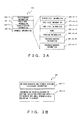
- FIG. 3A shows the configuration of the database generated corresponding to the input from the user at entry time and stored in the external storage device 5 through the storage unit 23.
- FIG. 3B shows the configuration of the database stored in advance corresponding to the input at entry time.
- the application displayed on the monitor screen of the output device 4 is represented as a Web browser (hereinafter referred to simply as a browser) for simple explanation.
- a database 25 generated corresponding to the input from the user is configured by predetermined information 25-1, positional information 25-2, identification information 25-3, and browser information 25-4.
- the predetermined information 25-1 is user personal information key-input by a user from the keyboard of the input device 7, and can be, for example, an ID, a password, an address, a telephone number, a name, etc. although not shown in the attached drawings.
- the positional information 25-2 indicates the position of the input field for the predetermined information operated with a mouse-click by a user and the position of the OK button for input confirmation corresponding to the input field on the dialog screen (hereinafter representatively referred to as a user authentication screen) for personal information as an embedding display or an overlapping display by a predetermined application on the window of a browser.
- the identification information 25-3 specifies a user authentication screen, for example, a window title, etc., displayed on the window of the browser, and is automatically stored by the automatic information input program when the positional information is obtained as described later in detail.
- the browser information 25-4 comprises screen size information 25-4-1, font size information 25-4-2, font type information 25-4-3, a name 25-4-4, version information 25-4-5, presence/absence information 25-4-6 about buttons indicating the functions specific to a browser, and presence/absence information 25-4-7 displayed in a small window belonging to a browser.
- a database 26 generated in advance and stored in the external storage device 5 comprises difference information 26-1 between browsers and between versions, and difference information 26-2 depending on the presence/absence of buttons indicating the functions specific to a browser and a small window display belonging to the browser.
- the information can be obtained in advance by displaying a desired screen with different browsers or displaying desired screens between different versions.
- the input unit 10 outputs the predetermined information 25-1 input by the user to the predetermined information entry unit 11, and the predetermined information entry unit 11 stores (that is, enters) the predetermined information 25-1 received from the input unit 10 in the external storage device 5 through the storage unit 23.
- the input unit 10 outputs the positional information of the input field into which the predetermined information 25-1 obtained by a mouse-clicking operation using a pointing device (hereinafter referred to as a mouse representing all pointing devices such as a mouse, a joy stick, a trackball, a trackpad etc.)is to be input, and the positional information 25-2 about the OK button corresponding to the input field to the positional information entry unit 12, and the positional information entry unit 12 stores the positional information 25-2 received from the input unit 10 in the external storage device 5 through the storage unit 23.
- a pointing device hereinafter referred to as a mouse representing all pointing devices such as a mouse, a joy stick, a trackball, a trackpad etc.
- the input unit 10 outputs to the positional information entry unit 12 the browser information 25-4 including the name of a browser obtained by a mouse-click on the left of the title bar in the case of, for example, a Web page, using the mouse.
- the positional information entry unit 12 outputs the browser information 25-4 received from the input unit 10 to the application information entry unit 13.
- the application information entry unit 13 stores in the external storage device 5 through the storage unit 23 the browser information 25-4 input from the positional information entry unit 12 as the information about the information specifying the browser performing a screen display on the display device, that is, the name and version of the browser, and the screen size, the size and type of the font used for the display, and the presence/absence of other displays.
- the input unit 10 obtains the identification information 25-3, such as a window title etc. on the user authentication screen displayed as embedded on the screen being displayed on the monitor screen, and outputs the identification information 25-3 to the identification information entry unit 14.
- the identification information entry unit 14 stores the identification information 25-3 received from the input unit 10 in the external storage device 5 through the storage unit 23 as the information for identification of the user authentication screen
- the input unit 10 outputs the fingerprint data obtained by the fingerprint detection device provided in the input device 7 to the input information comparison unit 16.
- the input information comparison unit 16 stores the fingerprint data received from the input unit 10 in the external storage device 5 through the storage unit 23.
- the authentication screen detection unit 15 reads the identification information 25-3 stored in the external storage device 5 through the storage unit 23, monitors the displayed screen of the display device, and notifies the input information comparison unit 16 that a user authentication screen to be automatically input is being displayed on the monitor screen when the user authentication screen having the same identification information as the identification information 25-3 stored in the external storage device 5 is displayed on the screen being monitored as an embedding display or an overlapping display.
- the input unit 10 outputs. the fingerprint data obtained by the fingerprint detection device to the input information comparison unit 16.
- the input information comparison unit 16 compares the fingerprint data received from the input unit 10 with the fingerprint data read from the external storage device 5 through the storage unit 23, determines whether or not the fingerprint data received from the input unit 10 matches the fingerprint data read from the external storage device 5, and, if the determination is YES, notifies the application information obtaining unit 17 that the personal authentication is valid.
- the application information obtaining unit 17 Upon receipt of the notification from the input information comparison unit 16 that the personal authentication is valid, the application information obtaining unit 17 obtains the browser information about a browser displaying the Web page screen which displays a user authentication screen, and outputs the obtained browser information to the application comparison unit 18.
- the application comparison unit 18 reads from the external storage device 5 through the storage unit 23 the browser information 25-4 entered as associated with the input information, compares the read browser information 25-4 with the browser information received from the application information obtaining unit 17, and notifies the application change unit 19 of matching or non-matching result information.
- the application change unit 19 maintains the browser currently displaying the user authentication screen when the information received from the application comparison unit 18 is a matching result. If the received information is a non-matching result, and if the non-matching result is detected with the screen size information 25-4-1 to font information 25-4-3 in the browser information 25-4, that is, if the screen size, the type of font, or the size of the font displayed by the browser which currently displays the user authentication screen is different from the screen size, the type of font, or the size of the font displayed by the browser for information entered when input information is entered on the user authentication screen, then the screen size, the type of font, or the size of the font of the screen being displayed is changed into the screen size, the type of font, or the size of the font displayed by the entered browser information.
- the positional information computation unit 21 receives from the application change unit 19 a notification that the browser is maintained or that the change of the browser has been completed if the browser is changed, reads the positional information 25-2 about the input field and OK button entered in the external storage device 5 through the storage unit 23, computes the correct current positions of the input field and the OK button based on the difference in the information 25-4-4 to 25-4-7 in the browser information 25-4 informed by the application comparison unit 18, and notifies the input/press unit 22 of the computed positional information about the input field and the OK button.
- the positional information computation unit 21 notifies the input/press unit 22 of the positional information 25-2 as is about the input field and OK button entered and read from the external storage device 5 if no change is made to the browser information.
- the input/press unit 22 outputs the pointing information and the left-click information of the mouse into the position of the input field received from the positional information computation unit 21, sets the input field active, reads through the storage unit 23 the predetermined information 25-1 to be input which is entered in the external storage device 5, and outputs the read predetermined information 25-1 as input information.
- the predetermined information 25-1 is obtained on the browser side as the information to be input into the active input field.
- the input/press unit 22 outputs the left-click information of the mouse into the position of the OK button received from the positional information computation unit 21.
- the left-click information is obtained on the browser side as the press information about the OK button.
- the Web page relating to the financial and commodity trading, etc. requires user authentication. If there is a larger amount of financial and commodity trading etc. performed on the Web page, the user authentication is required more frequently.
- the automatic input of personal information for user authentication and the automatic press of an OK button can be performed by detecting the positions of the input field and OK button independent of a control ID or tag information.
- the intervention of a user is not required for the frequently required user authentication which can be performed by the above mentioned automatic input and automatic press.
- FIG. 4 shows the relationship between process function modules in the basic process of the process function modules according to the first embodiment.
- FIG. 5A shows a type of authentication screen at entry time displayed on the screen of the display device in the basic process
- FIG. 5B shows a type of authentication screen at input time.
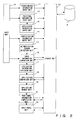
- FIG. 6 is a flowchart of the process at entry time according to the first embodiment.
- S1, S2, ... indicate the procedures of processes (It also holds true with S11, S12, ... in the flowcharts shown in FIG. 7 and in FIGS. 15 and 16).
- a user authentication screen 27 (shown in FIGS. 4 and 5A) into which the predetermined information 25-1 is to be input is first displayed on a window displayed on the monitor screen by a predetermined browser by a user inputting operation in S1 shown in FIG. 6.
- the input unit 10 shown in FIG. 4 enters predetermined input information key-input from the keyboard of the input device 7 in the predetermined information entry unit 11 and the external storage device 5 through the storage unit 23 as described by referring to FIG. 2.
- the input unit 10 shown in FIG. 4 first outputs a coordinate command to a browser, and obtains the coordinates of the display position of the user authentication screen notified by the browser as a return value to the command.
- the coordinates are reference coordinates (0, 0) of the user authentication screen 27 as shown in FIG. 5A.
- the input unit 10 displays, on the screen, an instruction to the user to click on the positions of an input field 28 and an OK button 29 on the user authentication screen 27 by a mouse clicking operation.
- the mouse clicking operation is performed by the user on the positions of the input field 28 and the OK button 29, and the positional information 25-2 is obtained by the input unit 10.
- the obtained positional information 25-2 is entered in the positional information entry unit 12 and the external storage device 5 through the storage unit 23.
- the browser information 25-4 is obtained from the input unit 10 shown in FIG. 4, and the browser information 25-4 is entered in the application information entry unit 13 shown in FIG. 2 and the external storage device 5 through the storage unit 23 shown in FIG. 2 (as in FIG. 4).
- the identification information 25-3 on the user authentication screen 27 is obtained by the input unit 10 shown in FIG. 4, and the identification information 25-3 is entered in the identification information entry unit 14 and the external storage device 5 through the storage unit 23.
- the predetermined information 25-1 for entry in the preparation for automatic input an input field for input of the predetermined information 25-1, the positional information 25-2 about an OK button for confirmation of the input, the identification information 25-3 for designation of the user authentication screen 27 for input of the information, and the browser information 25-4 about the browser displaying the user authentication screen 27 are entered in advance in the external storage device 5.
- the authentication screen detection unit 15 shown in FIG. 4 monitors the screen displayed on the monitor of the output device 4, and detects that the user authentication screen 27 to which information is to be automatically input has been displayed on the screen being displayed according to the identification information 25-3 read from the external storage device 5 through the storage unit 23. The detected information is received by the input/press unit 22.
- the input/press unit 22 automatically inputs as shown in FIG. 5B the predetermined information 25-1 read from the external storage device 5 to be input in the input field 28 obtained according to the positional information 25-2 read from the external storage device 5 through the storage unit 23, and automatically presses the position of the OK button 29, thereby completing the automatic input of the predetermined information 25-1 to the input field 28 on the predetermined user authentication screen 27 and the automatic press of the OK button 29 for confirmation of the input.
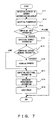
- FIG. 7 is a flowchart of a process at input time somewhat different from the processes shown in FIGS. 4 and 5B.
- the browser information obtained in S4 now includes not only the difference in type of browser as shown in FIG. 3A, but also the difference in version of a same browser, the screen size of the Web page as a parent screen on which a user authentication screen is displayed as an embedding display or an overlapping display, and also font information being used.
- the browser information is entered in the application information entry unit 13 and the external storage device 5 through the storage unit 23.
- the display size of the Web page displayed on the browser can be easily changed using a mouse depending on the user-desired screen operation.
- the size of the user authentication screen changes or does not change depending on each case.
- an embedding window changes in size, and an overlapping window does not change in size.
- the presence/absence of a button (usually displayed on the tool bar) indicating a function specific to a browser or a small window belonging to the browser changes the arrangement of the display area of the entire screen.
- the following process of the automatic information input program according to the first embodiment can be effective in automatic input into an input field and in automatic press of an OK button.
- the authentication screen detection unit 15 monitors the screen being displayed on the monitor screen, and detects that the user authentication screen to be automatically input has been displayed on the screen being displayed.
- a user inputs fingerprint data through a fingerprint data input device for user authentication.
- the above mentioned comparison of fingerprint data is performed by the input information comparison unit 16 shown in FIG. 2, and it is determined whether the user is successfully authenticated (input fingerprint data matches entered fingerprint data) or the user fails in authentication (input fingerprint data is different from entered fingerprint data). If the determination indicates a failure, the process terminates immediately. That is, an automatic input process is not performed.
- the obtained browser information is compared with the entered browser information 25-4 read from the external storage device 5. That is, a comparison is made as to whether or not there is a difference between the browser displaying a screen and the entered browser, or a difference in version between the same browsers, or whether the screen size of the Web page as a parent screen displaying the user authentication screen has been changed, or whether there is a display of a tool bar displaying various unique tool buttons, or the font size or the type has been changed, etc. The resultant difference is checked. If there is any difference, control is passed to S16. If there is no difference, then control is passed to S17.
- S16 if the size or the type of font is different from the size or the type of font at entry time, then the size or the type of font is changed into the size or the type at entry time. If the screen size on the Web page is different, it is changed into the size at entry time. If the presence/absence of the display of a tool bar is different, or the browser or the version is different from any of them at entry time, a notification is provided in S17.
- the positional information 25-2 about the entered input field and OK button is read from the external storage device 5, and, if the presence/absence of the display of a tool bar on the screen being displayed is different from that at entry time, the positions of the input field and OK button changed by the presence/absence of the display of the tool bar are amended. If the browser or the version are different from those at entry time, the positions of the input field and OK button whose display areas have been changed are amended to the correct display positions.
- the predetermined information 25-1 entered in the external storage device 5 is read, and the predetermined information 25-1 is automatically input into the input field whose position has been confirmed by the amendment, and the OK button is automatically pressed.
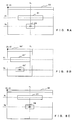
- FIGS. 8A, 8B, and 8C are explanatory views of examples of automatic input and an automatic press when the size of the user authentication screen at input time is different from that at entry time.
- the central positions of an input field 31 and an OK button 32 on a user authentication screen 30 are respectively (x1, y1) and (x1, y2) at entry time.
- the screen size information 25-4-1 of the browser information 25-4 is changed into the screen size at entry time as shown in FIG. 8C.
- the central positions of the input field 31' and the OK button 32' shifted leftwards as shown in FIG. 8B are changed into the input field 31 and the OK button 32 in the positions (x1, y1) and (x1, y2) at entry time as shown in FIG. 8C, thereby successfully performing automatic input of the predetermined information 25-1 and an automatic press of the OK button 32 according to the positional information 25-2 at entry time.
- the screen size of the user authentication screen 30' being displayed is temporarily stored, the automatic input and the automatic press are completed on the user authentication screen 30 shown in FIG. 8C, and then the screen size is restored as shown in FIG. 8B based on the temporarily stored screen.
- the above mentioned process seems quite normal to the user, and the program can be a user-friendly program.
- the font size and the font type on the user authentication screen 30' being displayed can be temporarily stored, the automatic input and the automatic press on the user authentication screen 30 can be completed, and then control can be returned to the screen display using the temporarily stored font size and font type.
- FIGS. 9A, 9B, and 9C show examples of automatic input and an automatic press when the display browser of the user authentication screen at input time is different from the display browser at entry time.
- a user authentication screen 33 is displayed by a browser A at entry time, and the central position of an input field 34 is (x1, y1), and the central position of an OK button 32 is (x1, y2).
- the user authentication screen displayed on the monitor screen at input time is displayed by a browser B, and displayed as a user authentication screen 33' as shown in FIG. 9B.
- the browsers A and B are different in the specifications of display systems.
- the input field 34 and the OK button 35 shown in FIG. 9A are shifted upward as an input field 34' and an OK button 35' as shown in FIG. 9B about the y1 and y2 of the vertical coordinates.
- the y coordinates of the central positions of the input field 34' and the OK button 35' on the user authentication screen 33' on the display currently being displayed shown in FIG. 9B are computed, and the position (x1, y1') is amended for the input field 34', and the position (x1, y2') is amended for the OK button 35' as shown in FIG. 9C.
- the predetermined information 25-1 is automatically input in the correctly displayed input field 34', and the position of the OK button 35' is automatically pressed.
- the amendment of the coordinates indicating the position is made only in the internal process by the automatic information input program, and no visible amendment is made on the display of the monitor screen. Therefore, no restoring process, etc. is required.
- the types of browser are different, but different versions of the same browsers can change the positions of the box images displayed on the Web page. Therefore, automatic input and a corresponding automatic press are performed by amending the coordinates of the input field and OK button as in the above mentioned example according to the difference information between the versions in the difference information 26-1 between the browsers and between the versions shown in FIG. 3B.
- FIGS. 10A, 10B, and 10C shows example of automatic input and an automatic press when the display (display of a tool bar for display of various specific buttons) of buttons specific to a browser displaying a user authentication screen is different (displayed/not displayed) between entry time and input time.
- a tool bar 39 is displayed at the top of the window of the browser displaying a screen 36 on which user authentication is performed, and the central position of an input field 37 is given by the coordinates (x1, y1), and the central position of an OK button 38 is given by the coordinates (x1, y2).
- the correct y coordinates of the input field 37' and the OK button 38' of the screen 36' currently being displayed as shown in FIG. 10B are computed, and the input field 37' is corrected into the coordinates (x1, y1 - a), and the OK button 38' is corrected into the coordinates (x1, y2 - a).
- the predetermined information 25-1 is automatically input into the corrected position of the input field 37'.
- the correction of the coordinates indicating the position is performed only in an internal process by the automatic information input program, but a visible change on the display of the monitor screen is not made, thereby requiring no restoring process, etc.
- This method can also be applied to a second embodiment described later. Therefore, the drawings of data structures, etc. are omitted here for simple explanation.
- This method is used when predetermined information is automatically input and an OK button is automatically pressed, and when it is determined whether or not the automatic input or the automatic press has been successfully performed by referring to a return value from the browser for the input or the press, and the determination indicates a failure. Described below are the automatic input and automatic press to be performed again.
- FIGS. 11A and 11B show a method for sequential and automatic data inputting and button pressing until the automatic input and automatic press succeed, by varying the positions systematically after failures.
- an appropriate rule of determining different positions from those in which automatic input and an automatic press have failed is emperically prepared, and the rule is stored in the external storage device 5 in advance.
- positions different from the faulty positions are determined as positions in which the next automatic input and automatic press are to be performed according to the rule.
- the above mentioned rule is, as shown in FIG. 11A, applied from the first faulty position on a window 41 of the browser, that is, in the vicinity of the position coordinates (the cross shown in FIG. 11A) obtained by the positional information 25-2 entered in the external storage device 5.
- the automatic input and automatic press are repeated while changing (determining) the position outward and clockwise or counterclockwise from the center of the cross in a spiral.
- automatic re-input is repeated from the center of the cross with the position changed outward in a spiral, and with the surroundings 44 of an input field 42 set as the first automatic re-input area.
- the automatic re-input is repeated until a return value of input completion can be obtained with the automatic re-input area extended to the vicinity of the surroundings 44.
- the automatic re-input is repeated while changing the position outward in a spiral from the center of the cross with the surroundings 45 of an OK button 43 set as the first automatic re-input area. Then, if no return value of press completion can be obtained from the browser, then the automatic re-press area is extended to the vicinity of the surroundings 45, and the automatic re-press is repeated until a return value of press completion can be obtained.
- the entire range 49 above and below the center is specified. If the automatic input and automatic press further fail, then the range is sequentially extended left and right (in the plus and minus direction from the center of the x coordinates) as shown by arrows 50a and 50b, and the automatic re-input and automatic re-press are repeated until a return value of success can be obtained. For any case, the automatic input and automatic press can be successfully completed.
- Described below is the method of automatically inputting predetermined information and automatically pressing an OK button as the second embodiment without positional information relating to the input field and the OK button.
- positional information is automatically input in a position on the user authentication screen, and it is determined whether or not the automatic input has been successfully performed. If it has failed, then the position is shifted, and automatic re-input is performed. Until the automatic input can be successfully performed, the automatic input is repeated with the position shifted. A similar process is performed on the automatic press.
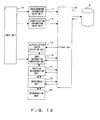
- FIG. 12 is a block diagram of a process function module according to the second embodiment of the process by the automatic information input program read from the external storage device 5 of the computer 1 shown in FIG. 1 to the memory 3, and executed by the CPU 2.
- the process function module comprises the input unit 10, the predetermined information entry unit 11, the identification information entry unit 14, the authentication screen detection unit 15, the input information comparison unit 16, a position determination unit 51, the input/press unit 22, a determination unit 52, and the storage unit 23.
- the storage unit 23 is linked to the external storage device 5 shown in FIG. 1.
- FIG. 13A shows the configuration of the database stored in the external storage device 5 through the storage unit 23 according to the second embodiment, and generated corresponding to the input at entry time from a user.
- a database 55 generated corresponding to the input from the user contains predetermined information 55-1 and identification information 55-2.
- the predetermined information 55-1 is the information key-input by the user from the keyboard of the input device 7.
- the predetermined information of the user can be, for example, an ID, a password, an address, a telephone number, a name, etc. It is obvious that the information is not limited to personal information, but can be any information to be input when the same information input window is displayed later.
- the identification information 55-2 is automatically fetched on the screen by the automatic information input program, and the identification information specifies the information input window.
- a database 56 generated in advance and stored in the external storage device 5 comprises a rule 56-1 for determination of an initial position, and a rule 56-2 for change of a position.
- the rule for determination of an initial value sets the initial position as the coordinate origin (normally the upper left corner) on the window, and the rule for change of a position sequentially moves the position to be changed in the primary scanning direction of pixel information from the coordinate origin, and sequentially repeats the movement in the secondary scanning direction down to the bottom.
- This method takes a long time, but is a reliable method.
- the initial position is set along the horizontal center of the window, and the position change is made by sequentially extending the vertical region left and right from the central position.
- an input field and an OK button are often arranged on the left of the screen.
- the initial position is set on the left of the input window, and the position is sequentially changed rightward from left. Based on the above mentioned rules, the computer can efficiently perform the automatic input and the automatic press in correct positions.
- Each of the identification information 55-2 shown in FIG. 13A, the rule 56-1 for determination of the initial position shown in FIG. 13B, and the rule 56-2 for change of a position is associated with the predetermined information 55-1 and stored (entered) in the external storage device 5.
- the input unit 10 inputs predetermined information key-input by a user.
- the predetermined information entry unit 11 passes the predetermined information input by the input unit 10 to the storage unit 23.
- the storage unit 23 associates the predetermined information for each predetermined information input window, and stores (enters) it as the predetermined information 55-1 in the external storage device 5.
- the input unit 10 also inputs identification information on the information input window on which the predetermined information is input.
- the identification information is automatically obtained by a predetermined command from the screen being displayed.
- the identification information entry unit 14 passes the identification information input by the input unit 10 to the storage unit 23.
- the storage unit 23 associates the identification information for each of the predetermined information input windows, and stores it as the identification information 55-2 in the external storage device 5.
- the authentication screen detection unit 15 monitors the monitor screen of the output device 4, and detects that a predetermined information input window corresponding to the predetermined entered information obtained through the storage unit 23 is present, the notification of the detection is provided for the input information comparison unit 16.
- the input unit 10 outputs the fingerprint data obtained by the fingerprint detection device provided in the input device 7 to the input information comparison unit 16.
- the input information comparison unit 16 compares the fingerprint data received from the input unit 10 with the fingerprint data read from the external storage device 5 through the storage unit 23 and determines whether or not the fingerprint data received from the input unit 10 matches the fingerprint data read from the external storage device 5. If they match, it notifies the position determination unit 51 that the personal authentication is valid.
- the position determination unit 51 determines the initial value according to the rule 56-1 for determination of the initial position read from the external storage device 5 through the storage unit 23 and shown in FIG. 13B, and the notification of the determined initial position is provided for the input/press unit 22.
- the input/press unit 22 obtains the predetermined information 55-1 through the storage unit 23, and automatically inputs the predetermined information 55-1 into the position obtained from the position determination unit 51 on the predetermined information input window, or automatically presses an OK button.
- the determination unit 52 obtains a return value from the application being displayed on the predetermined information input window, and determines from the return value whether or not the result of the automatic input or the automatic press indicates a success. If the result indicates a failure, it instructs the input/press unit 22 to input the information again into a different position.
- the input/press unit 22 requests the position determination unit 51 to determine the next position, and the position determination unit 51 determines the next position based on the rule 56-2 for change of a position shown in FIG. 13B and read from the external storage device 5 through the storage unit 23, and notifies the input/press unit 22 of the determined position.
- the input/press unit 22 repeats receiving a failure notification from the determination unit 52, requesting the position determination unit 51 for the next position, and obtaining the next position until the automatic input and automatic press are successfully performed.
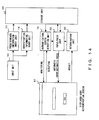
- FIG. 14 shows the relationship between process function modules in the basic process of the process function modules according to the second embodiment.
- FIG. 15 is a flowchart of the process at entry time according to the second embodiment.
- the information input window on which predetermined information is to be input in the user inputting operation is displayed on the monitor screen first in S100.
- the predetermined information is input by the user into the input field on the screen displayed by the program of the second embodiment.
- the predetermined information is input by the input unit 10 shown in FIG. 14 (also refer to FIG. 12), and stored as the predetermined information 55-1 shown in FIG. 13A in the predetermined information entry unit 11 and the external storage device 5 shown in FIG. 12 through the storage unit 23.
- the input unit 10 shown in FIG. 14 fetches the identification information on the information input window.
- the identification information specifies the information input window of a window title, etc. as in the case of the above mentioned user authentication screen.
- the fetched identification information is stored as the identification information 55-2 shown in FIG. 13A in the identification information entry unit 14 and the external storage device 5 shown in FIG. 12 through the storage unit 23. According to the second embodiment, the entire entering process terminates in the above mentioned operations.
- the authentication screen detection unit 15 monitors the monitor screen being displayed, and detects that the information input window on which information is to be automatically input has been displayed on a monitor screen according to the identification information 55-2 shown in FIG. 13A and read from the external storage device 5 through the storage unit 23.
- the input/press unit 22 is notified of the detected information.
- the input/press unit 22 automatically inputs the predetermined information 55-1 in the position indicated according to the predetermined information 55-1 obtained on the predetermined information input window through the storage unit 23. Otherwise, the OK button is automatically pressed.
- the determination unit 52 determines whether or not the result of the automatic input or automatic press has been a success, and notifies the input/press unit 22 of the determination result.
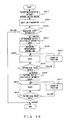
- FIG. 16 is a flowchart for further detailed explanation of the automatic input and automatic press.
- the determination result of the determination unit 52 is a 'failure'
- the process is performed by the position determination unit 51 shown in FIG. 12, the rule 56-1 for determination of an initial position or the rule 56-2 for change of a position shown in FIG. 13B, the input/press unit 22 shown in FIG. 12, etc.
- the screen displayed on the monitor screen of the computer 1 is monitored to detect that the user authentication screen on which the entered predetermined information 55-1 is to be input is displayed.
- the user is prompted to input his or her fingerprint information.
- the prompt is displayed as an overlapping display on the window.
- the user inputs his or her own fingerprint information into the fingerprint detection device.
- the input fingerprint information is compared with the fingerprint information stored in the external storage device 5, and it is determined whether or not they match each other. Control is passed to the process in S204 only if they match (success in S203). If they do not match (failure in S203), then the process immediately terminates, and another process is performed.
- an initial position in which predetermined information is to be automatically input is determined according to the rule 56-1 for determination of the initial position shown in FIG. 13B.
- Rule 56-1 for determination of the initial position as already described, that is, the first rule for shifting the position in the secondary scanning direction then the primary scanning direction from the coordinates origin on the window as the initial position, the second rule for shifting the position sequentially left and right from the central vertical direction from the center on the window as the initial position, and the third rule for shifting the position sequentially right from the initial position on the left of the window.
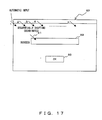
- FIG. 17 shows a type of the state of changing the input position on the window according to the first rule.
- the initial position of input on the window 57 is the coordinates of the upper left corner indicated by an arrow 1.
- the position is determined by the arrow 1.
- the predetermined information 55-1 shown in FIG. 13A is obtained from the external storage device 5 through the storage unit 23.
- S208 it is determined whether or not the input result is a success. If it is a failure (failure in S208), then the position is changed in S207, and control is returned to step S206. If a failure is repeated the position is sequentially shifted from left to right following the arrows 2, 3, ..., n from the arrow 1 at the upper left corner as the initial position as shown in FIG. 17. When the right end is reached, the shift is made downward (in the secondary scanning direction), and then from left to right again. The process is repeated as described above.
- the rule 1 is stored in the external storage device 5 in advance.
- the changed position reaches the left end of the input field 59 as shown in FIG. 17, the input field 59 becomes active, and the predetermined information 55-1 is input as indicated by an arrow 61. Therefore, the determination in S208 indicates a 'success', thereby passing control to S209.
- the initial position in which an OK button 60 shown in FIG. 17 is automatically pressed is determined. It is desired that the initial position can start after the position in which the predetermined information 55-1 has been successfully input into the input field 59 because the position of the OK button is normally below the position of the input field on a window 57 as shown by the OK button 60 shown in FIG. 17.
- S212 it is determined whether or not the result of the press is a success. If it is a failure (failure in S212), a position change is made in S211, thereby returning control to S210. If the failure is repeated, the processes similar to those in S208, S207, S206, and S208 are repeated in S212, S211, and S210. Then, the changed position reaches the position of the OK button 60 shown in FIG. 17, the press is successfully performed (success in S212), thereby successfully terminating the process of automatic input and automatic press.
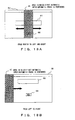
- FIG. 18A shows a method of changing the input position on the window according to the second rule
- FIG. 18B shows a method of changing the input position on the window according to the third rule.
- the position is shifted in the vertical direction from an initial position 63 set at the center of a window 62. If input (or a press) is a failure, then the position is determined by sequentially shifting left and right, as indicated by an arrow, from the vertical direction at the center. As shown in FIG. 18A, the button 72 and the window 61 are located at the center on the window 62, so automatic input and an automatic press can be quickly completed.
- an initial position 67 is shifted in the vertical direction with an initial position 67 set at the left side of a window 64. If input (or a press) is a failure, then the position is sequentially shifted right from the left end as indicated by the arrow, thereby determining the position. If an input field 65 and an OK button 66 shown in FIG. 18B are displayed to the left of the position shown in FIG. 18B on the window 64, then the processes of the automatic input and automatic press are quickly completed.
- the above mentioned examples show processes of inputting predetermined information and an automatic press of an OK button. However, they can also be applied to automatic input of an ID and a password as the predetermined information into two individual input fields respectively.
- predetermined information as an ID and a password
- they can also be applied to input of predetermined information as an ID and a password by inputting one or both of ID and password into one input field.
- the additional information can be character string information uniquely specifying the user authentication screen. That is, in the case of a file described in the HTML, a comment tag ( ⁇ ! ⁇ ⁇ , ⁇ ⁇ ! >) not displayed on the window of the browser can be used, and character string information (for example, the system of an embodiment + application name, etc.) can be described.
- the necessary size of the file is smaller than in the case of entering all file information and only a part of the file information is compared, thereby shortening the comparison time.
- predetermined information can be automatically input and an OK button can be automatically pressed with the position of an input field for predetermined information specified independent of an input information storing method unique to a general purpose application, a control ID, tag information, etc. and without changing the application displaying the input field of the predetermined information (when the window is changed or a position is detected in the above embodiments, a change is made to the screen in a display type being displayed by the application, but not to the application itself).
- the user authentication screen displayed by a browser is described, but the various embodiments are not limited to this screen, but rather the screen displayed by a browser can also be used in applying automatic input of the predetermined information into an input field of a dialog box activated as another screen from the browser for an application such as mail software, etc.
- the above embodiments can input predetermined information into an input field embedded in the display area on the browser, and are not limited to the user authentication screen.
- Inputting predetermined information into the input field of the authentication screens can he widely applied to various uses such as, in addition to the above mentioned mail software, log-in to Windows (registered trademark), release of a lock of a screen saver, password input when connecting to a network, authentication when dialing a telephone, locking an MS OFFICE (registered trademark) file with a password, access to a home page exclusive to members, etc.
- log-in to Windows registered trademark
- release of a lock of a screen saver password input when connecting to a network
- authentication when dialing a telephone authentication when dialing a telephone
- locking an MS OFFICE (registered trademark) file with a password access to a home page exclusive to members, etc.
- an input field and an OK button are used for example, but it is obvious that a plurality of input fields and OK buttons can be used.
- the positions of a plurality of input fields and OK buttons are obtained in advance for entry together with predetermined information. Then, at input time, the process of automatically inputting the predetermined information can be repeated for each piece of predetermined information. The same process can be performed on the OK buttons.
Landscapes
- Engineering & Computer Science (AREA)
- Theoretical Computer Science (AREA)
- Computer Security & Cryptography (AREA)
- Physics & Mathematics (AREA)
- General Engineering & Computer Science (AREA)
- General Physics & Mathematics (AREA)
- Computer Hardware Design (AREA)
- Software Systems (AREA)
- Computational Linguistics (AREA)
- General Health & Medical Sciences (AREA)
- Health & Medical Sciences (AREA)
- Audiology, Speech & Language Pathology (AREA)
- Artificial Intelligence (AREA)
- User Interface Of Digital Computer (AREA)
Abstract
Description
Claims (32)
- A computer-executable automatic information input program for directing a computer to perform a process of automatically inputting predetermined information into an input field on an input window for input of predetermined information displayed on a monitor screen in an application, including program code which, when executed by the computer, performs:at entry timean information entering process of entering the predetermined information; andan input position entering process of entering positional information about the input field on the input window displayed on the monitor screen; andat input timean input position detecting process of detecting the position of the input field on the input window displayed on the monitor screen according to the positional information entered in the input position entering process; andan information input process of automatically inputting the predetermined information entered in the information entering process into the input field detected in the input position detecting process.
- The program according to claim 1, including further program code which, when executed by the computer, can further perform:at entry timea button position entering process of entering the positional information of a button displayed corresponding to the input field on the monitor screen; andat input timea button position specifying process of specifying the position of the button according to the positional information entered in the button position entering process; anda pressing process of automatically pressing the button in the position specified in the button position specifying process.
- The program according to claim 1 or 2, including further program code which, when executed by the computer, can further perform:at entry timean identification information obtaining process of obtaining identification information for specification of the application displaying the input field from the application; andan identification information entering process of entering the identification information obtained in the identification information obtaining process; andat input timea display detecting process of monitoring the window displayed on the monitor screen and detecting that a window is displayed by the application holding the identification information entered in the identification information entering process.
- The program according to claim 2, including further program code which, when executed by the computer, can further perform:an entering process of entering as the position of the input field the position specified by a pointing device as an input position in the input position entering process; andan entering process of entering as the position of the button the position pressed by the pointing device in the button position entering process.
- The program according to any preceding claim, including further program code which, when executed by the computer, can further perform:at entry timea size entering process of entering size information about the window displayed on the monitor screen; andat input timea window size changing process of automatically changing the size of the window being displayed into the size at entry time according to the size information about the window entered in the size entering process when the size of the window being displayed on the monitor screen is different from the size at entry time of the window.
- The program according to claim 5, including further program code which, when executed by the computer, can further perform a window size restoring process of restoring the size of the window whose size has been changed in the window size changing process into the originally displayed window size after automatically inputting the predetermined information or automatically pressing the button.
- The program according to any preceding claim, including further program code which, when executed by the computer, can further perform:at entry timea font information entering process of entering size information and type information about a character font used on the window of the monitor screen; andat input timea font changing process of changing the size or type of the font used on the window being displayed into the size or type of the entered font when the size or type of the font used on the window being displayed on the monitor screen is different from the size or type of the font at entry time.
- The program according to claim 7, including further program code which, when executed by said computer, can further perform a font restoring process of restoring the size or type of a font on the window changed in the font changing process into the size or type of the font on the originally displayed window after an automatic input of the predetermined information or an automatic press of the button.
- The program according to any preceding claim, including further program code which, when executed by the computer, can further perform:at entry timean application information obtaining process of obtaining information about the type or version of the application displaying on the screen the input field or the button; andan application information entering process of entering the information about the type or version of the application obtained in the application information obtaining process with the information associated with the positional information about the input field or the button; andat input timea position computing process of computing the position of the input field or the button displayed on the monitor screen by an application of a different type or version according to difference information entered in advance for the difference in the screen display between the types or versions of the applications when the type or version of the application displaying the input field or button on the monitor screen is different from the type or version of the application at entry time.
- The program according to any preceding claim, including further program code which, when executed by the computer, can further perform:at entry timeanother display presence/absence entering process of entering the presence/absence of another display as to whether or not there is a display of a button indicating the function specific to an application or a display of a small window belonging to an application for the position of the input field or button displayed on the monitor screen; andanother display difference information entering process of entering the difference information corresponding to the presence/absence of another display for the position on the input field or button on the monitor screen; andat input timea position computing process of computing the display position of the input field or the button being displayed in the application according to the difference information entered in the other display difference information entering process when the presence/absence of the other display in the application displaying the input field or button on the monitor screen is different from the presence/absence of the other display entered at entry time.
- The program according to claims 2 or 4, including further program code which, when executed by the computer, can further perform at input time:an input success/failure detecting process of detecting whether or not an automatic input of the predetermined information into the input field or an automatic press of the button has been successfully performed;a search area setting process of setting a predetermined search area on the monitor screen when a failure has been detected in the input success/failure detecting process;a trial process of automatically inputting the predetermined information or automatically pressing the button by varying a position in the search area set in the search area setting process; anda trial frequency control process of performing control such that the variation of the position in the search area and the automatic inputting of the predetermined information or the automatic pressing of the button are tried until a predetermined result is obtained if the automatic inputting of the predetermined information or the automatic pressing of the button has failed previously.
- The program according to claim 11, including further program code which, when executed by the computer, can further perform:a rule entering process of entering a predetermined rule specifying a different search area; anda repeating process of repeating the trial process under the control of the trial frequency control process while moving the position from a reference position specified according to the rule entered in the rule entering process if the automatic input of the predetermined information into the input field or the automatic press of the button has failed in the trial process under the trial frequency control process in the search area set in the search area setting process.
- A computer executable automatic information input program for directing a computer to perform a process of automatically inputting information about an information input field displayed on a monitor screen by an application, including program code which, when executed by the computer, performs:an initial input position determining process of determining an initial position into which the information is to be automatically input in a predetermined search area on a window displayed on the monitor screen;a next position determining process of sequentially moving a next automatic input position to a different position according to a predetermined rule based on the initial position determined in the initial input position determining process;an input process of automatically inputting the information in the position determined in the initial input position determining process or the next position determining process;an input success/failure detecting process of detecting whether or not information has been successfully input into the information input field by the input process; anda control process of controlling each of the processes such that when a failure is detected in the input success/failure detecting process of the automatic information input performed by the input process at the position determined in the initial input position determining process, the next position determining process determines a next position, the input process automatically inputs the information at the next position, the input success/failure detecting process detects the success/failure of the input process, the next position determining process determines another next position when a failure is detected in the detecting process, the input process automatically inputs the information at the another next position, and the input success/failure detecting process detects the success/failure of the input process until a predetermined input result is obtained.
- A computer executable automatic information input program for directing a computer to perform a process of automatically pressing a push button displayed on a monitor screen of an application, including program code which, when executed by a computer, can perform:an initial press position determining process of determining an initial position in which the push button is to be automatically pressed in a predetermined search area on a window displayed on the monitor screen;a next position determining process of sequentially moving a next automatic press position to a different position according to a predetermined rule based on the initial press position determined in the initial position determining process;a pressing process of automatically pressing the push button in the position determined in the initial press position determining process or the next position determining process;a press success/failure detecting process of detecting whether or not the push button has been successfully pressed by an automatic press in the pressing process; anda control process of controlling each of the processes such that when a failure is detected in the success/failure press detecting process of the automatic press performed by the pressing process at the position determined in the initial press position determining process, the next position determining process determines a next position, the pressing process automatically presses the push button at the next position, the input success/failure detecting process detects the success/failure of the pressing process, the next position determining process determines another next position when a failure is detected in the detecting process, the pressing process automatically presses the push button at the another next position, and the input success/failure detecting process detects the success/failure of the pressing process until a predetermined press result is obtained.
- The program according to claim 13, wherein the program contains further program code which, when executed by the computer, performs;
an input information entering process of entering the information in advance; and
an information input process of inputting the information entered in advance at an automatic input time of the information. - The program according to claim 13, including further program code which, when executed by the computer, can further perform:an identification information entering process of obtaining in advance identification information specifying the application for displaying the input field into which the predetermined information is entered in advance from the application, and entering in advance the obtained identification information; anda display detecting process of monitoring a window displayed on the monitor screen, and detecting a display on the window by the application having the identification information entered in the identification information entering process.
- The program according to claim 14, including further program code which, when executed by the computer, can further perform:an identification information entering process of obtaining in advance identification information specifying the application for displaying the push button to be pressed in advance from the application, and entering in advance the obtained identification information; anda display detecting process of monitoring the window displayed on the monitor screen, and detecting a display on the window by the application having the identification information entered in the identification information entering process.
- The program according to claim 13 or 16, including further program code which, when executed by the computer, can further perform an initial position determination rule entering process of entering a first rule for determination of the initial input position in the initial input position determining process; wherein the initial input position determining process is performed such that the initial input position can be determined according to the first rule entered in the initial position determination rule entering process.
- The program according to claim 14, 17 or 18, including further program code which, when executed by the computer, can further perform an initial position determination rule entering process of entering a second rule for determination of the initial press position in the initial press position determining process; wherein the initial press position determining process is performed such that the initial press position can be determined according to the second rule entered in the initial position determination rule entering process.
- The program according to claim 13, 16 or 18, including further program code which, when executed by the computer, can further perform a next position determination rule entering process of entering a third rule for determination of the next input position in a next input position determining process; wherein the next input position determining process is performed such that the next input position can be determined according to the third rule entered in the next position determination rule entering process.
- The program according to claim 14, 17, 19 or 20, including further program code which, when executed by the computer, can further perform a next position determination rule entering process of entering a fourth rule for determination of the next press position in a next press position determining process; wherein the next press position determining process is performed such that the next press position can be determined according to the fourth rule entered in the next position determination rule entering process.
- The program according to any preceding claim, including further program code which, when executed by the computer, can further perform:at entry timea file information entering process of entering in advance file information about the markup language for generation of the window as the identification information for designation of a window on the monitor screen for display of the input field or button; andat input timea file information obtaining process of obtaining file information about the window displayed on the monitor screen;a comparing process of comparing the file information obtained in the file information obtaining process with the file information entered in the file information entering process; andan execution control process of controlling the predetermined information to be automatically input or the button to be automatically pressed on the window when the two sets of file information match in the comparing process.
- The program according to any preceding claim, including further program code which, when executed by the computer, can further perform:at entry timean additional information adding process of adding predetermined additional information in a predetermined description position in a file described in the markup language on the window displaying the input field or the button on the monitor screen; andat input timea discriminating process of discriminating whether or not predetermined additional information is additionally described in a predetermined description position in a markup language on the window displayed on the monitor screen; andan execution control process of controlling the predetermined information to be automatically input or the button to be automatically pressed on the window when predetermined additional information is discriminated in the discriminating process.
- The program according to any of claims 1 to 13, including further program code which, when executed by the computer, can further perform: a process of automatically inputting into the input field an ID or a password, or both of them as the predetermined information.
- The program according to any of claims 1 to 13, including further program code which, when executed by the computer, can further perform:an initial position determining process of setting a top end of a predetermined display area on the monitor screen as an initial position into which the predetermined information is automatically input;a next position determining process of moving a next input position sequentially using the initial position determined in the initial position determining process as a reference;an input process of sequentially and automatically inputting an ID or a password into the input field determined in the initial position determining process or the next position determining process;an input success/failure detecting process of detecting whether or not the ID or password has been successfully input into the input field by automatic information input in the input process; anda control process of controlling each of the processes such that when a failure is detected in the input success/failure detecting process of the automatic input performed by the input process at the position determined in the initial position determining process, the next position determining process determines a next position, the input process automatically inputs the information in the next position, the input success/failure detecting process detects the success/failure of the input process, the next position determining process determines another next position when a failure is detected in the detecting process, the input process automatically inputs the information at the another next position, and the input success/failure detecting process detects the success/failure of the input process until a predetermined input result is obtained.
- The program according to any preceding claim, wherein the window on the monitor screen is a window of a Web page relating to an electronic transaction, and the predetermined information is necessary information for purchase of merchandise in the electronic transaction.
- The program according to any of claims 1 to 13, wherein
said input field is an information input field of a Web page, an information input field of mail software, or a dialog box activated as another screen by a browser, or any similar information input field. - The program according to any of claims 1 to 13, wherein the application with said input field cannot be changed.
- An automatic information input method for automatically inputting predetermined information into an input field and automatically pressing a button on a window for display of the input field and the button corresponding to the input field on a monitor screen of an application, comprising steps of:at entry time,an information entering step of entering predetermined information;an input position entering step of entering positional information about the input field on the window displayed on the monitor screen;a button position entering step of entering positional information about the button on the window displayed on the monitor screen;an identification information obtaining step of obtaining, from the application, identification information specifying the application for displaying the input field and the button; andan identification information entering step of entering the identification information obtained in the identification information obtaining step; andat input timea display detecting step of monitoring the window displayed on the monitor screen and detecting that window display is performed by the application having the identification information entered in the identification information entering step;an input position detecting step of detecting the position of the input field on the monitor screen according to the positional information entered in the input position entering step;an information input step of automatically inputting the predetermined information entered in the information entering step in the input field detected in the input position detecting step;a button position specifying step of specifying the position of the button on the monitor screen according to the positional information entered in the button position entering step; anda pressing step of automatically pressing the button in the position specified in the button position specifying step.
- An automatic information input method for automatically inputting predetermined information into an input field and automatically pressing a button on a window for display of the input field and the button corresponding to the input field on a monitor screen of an application, comprising steps of:an input position entering step of entering in advance predetermined information;an identification information entering step of obtaining in advance, from the application, identification information specifying the application for displaying the input field and the button, and entering in advance the obtained identification information;a display detecting step of monitoring the window displayed on the monitor screen, and detecting that window display is performed by the application having the identification information entered in the identification information entering step;an initial position determining step of setting a predetermined position on the input window displayed on the monitor screen;a next input/press position determining step of sequentially determining next input positions using the initial position determined in the initial position determining step as reference according to a predetermined rule;an inputting/pressing step of sequentially and automatically inputting the predetermined information and automatically pressing the button in the positions determined in the initial position determining step or the next position determining step;a success/failure input/press detecting step of detecting whether or not the automatic input or the automatic press in the inputting/pressing step has been successful; anda step of repeating, when the success/failure input/press detecting step detects a failure in the automatic input or automatic press performed in the inputting/pressing step on a position determined in the initial position determining step, the next position determining step determining next positions, the inputting/pressing step performing the automatic input or automatic press at the next positions, and the success/failure input/press detecting step detecting the success/failure of the inputting/pressing step; and, when a failure is detected in the detecting step, the next position determining step determining new next positions, the inputting/pressing step performing the automatic input or press at the new positions, and the success/failure input/press detecting step detecting the success/failure of the inputting/pressing step.
- An automatic information input apparatus for automatically inputting predetermined information into an input field (28, 31, 34, 37, 44, 47) and automatically pressing a button (29, 32, 35, 45, 48) on a window for display of the input field (28, 31, 34, 37, 44, 47) and the button (29, 32, 35, 45, 48) corresponding to the input field (28, 31, 34, 37, 44, 47) on a monitor screen of an application, comprising:an information entry unit (11) for entering predetermined information;an input position entry unit (12) for entering positional information about the input field (28, 31, 34, 37, 44, 47) on the window displayed on the monitor screen;a button position entry unit (22) for entering positional information about the button (29, 32, 35, 45, 48) on the window displayed on the monitor screen;an identification information obtaining unit (17) for obtaining, from the application, identification information specifying the application for displaying the input field (28, 31, 34, 37, 44, 47) and the button (29, 32, 35, 45, 48); andan identification information entry unit (14) for entering the identification information obtained by the identification information obtaining unit (17); anda display detection unit (15) for monitoring the window displayed on the monitor screen and detecting that window display is performed by the application having the identification information entered in the identification information entry unit (14);an input position detection unit (15) for detecting the position of the input field (28, 31, 34, 37, 44, 47) on the monitor screen according to the positional information entered in the input position entry unit (12);an information input unit (11) for automatically inputting the predetermined information entered in the information entry unit (11) in the input field (28, 31, 34, 37, 44, 47) detected by the input position detection unit (15);a button position specification unit (15) for specifying the position of the button (29, 32, 35, 45, 48) on the monitor screen according to the positional information entered in the button (29, 32, 35, 45, 48) position entry unit (22); anda pressing unit (27) for automatically pressing the button (29, 32, 35, 45, 48) in the position specified in the button position specification unit (15).
- An automatic information input apparatus for automatically inputting predetermined information into an input field (59, 61, 65) and automatically pressing a button (60, 62, 66) on a window for display of the input field (59, 61, 65) and the button (60, 62, 66) corresponding to the input field (59, 61, 65) on a monitor screen of an application, comprising:an input position entry unit (11) for entering in advance predetermined information;an identification information entry unit (14) for obtaining in advance, from the application, identification information specifying the application for displaying the input field (59, 61, 65) and the button (60, 62, 66), and entering in advance the obtained identification information;a display detection unit (15) for monitoring the window displayed on the monitor screen, and detecting that window display is performed by the application having the identification information entered in the identification information entry unit (14);an initial position determination unit (15) for setting a predetermined position on the input window displayed on the monitor screen;a next input/press position determination unit (52) for sequentially determining next input positions using the initial position determined by the initial position determination unit (15) as reference according to a predetermined rule;an input/press unit (22) for sequentially and automatically inputting the predetermined information and automatically pressing the button (60, 62, 66) in the positions determined by the initial position determination unit (15) or the next position determination unit (52);a success/failure input/press detection unit (52) for detecting whether or not the automatic input or the automatic press by the input/press unit (22) has been successful; anda unit (23) for repeating, when the success/failure input/press detection unit (52) detects a failure in the automatic input or automatic press performed by the input/press unit (22) at a position determined by the initial position determination unit (15), the operations of the next position determination unit (52) determining next positions, the input/press unit (22) performing the automatic input or automatic press at the next positions, and the success/failure input/press detection unit (52) detecting the success/failure of input/press on the automatic input or the automatic press; and, when a failure is detected by the detection unit (23), the next position determination unit (52) determining new next positions, the input/press unit (22) performing the automatic input or press on the new positions, the success/failure input/press detection unit (52) detecting the success/failure of the input/press on the automatic input or press.
Applications Claiming Priority (2)
| Application Number | Priority Date | Filing Date | Title |
|---|---|---|---|
| JP2002096845A JP2003295969A (en) | 2002-03-29 | 2002-03-29 | Automatic information input program |
| JP2002096845 | 2002-03-29 |
Publications (2)
| Publication Number | Publication Date |
|---|---|
| EP1349046A2 true EP1349046A2 (en) | 2003-10-01 |
| EP1349046A3 EP1349046A3 (en) | 2006-05-03 |
Family
ID=27800567
Family Applications (1)
| Application Number | Title | Priority Date | Filing Date |
|---|---|---|---|
| EP03251143A Withdrawn EP1349046A3 (en) | 2002-03-29 | 2003-02-26 | Automatic information input program |
Country Status (3)
| Country | Link |
|---|---|
| US (1) | US7441181B2 (en) |
| EP (1) | EP1349046A3 (en) |
| JP (1) | JP2003295969A (en) |
Families Citing this family (28)
| Publication number | Priority date | Publication date | Assignee | Title |
|---|---|---|---|---|
| US20050008148A1 (en) * | 2003-04-02 | 2005-01-13 | Dov Jacobson | Mouse performance identification |
| US20050235364A1 (en) * | 2004-04-15 | 2005-10-20 | Wilson Christopher S | Authentication mechanism permitting access to data stored in a data processing device |
| US20060059247A1 (en) * | 2004-09-16 | 2006-03-16 | International Business Machines Corporation | Automatic simultaneous entry of values in multiple web page fields |
| JP4304145B2 (en) * | 2004-11-19 | 2009-07-29 | 日立情報通信エンジニアリング株式会社 | Information processing apparatus and program |
| JP2007121374A (en) * | 2005-10-25 | 2007-05-17 | Seiko Epson Corp | Information display device |
| US20080068385A1 (en) * | 2006-09-15 | 2008-03-20 | Samsung Electronics Co. Ltd. | Apparatus and method for changing a screen in a portable terminal |
| US20080086700A1 (en) * | 2006-10-06 | 2008-04-10 | Rodriguez Robert A | Systems and Methods for Isolating On-Screen Textual Data |
| US20080109714A1 (en) * | 2006-11-03 | 2008-05-08 | Sap Ag | Capturing screen information |
| KR100883103B1 (en) * | 2007-01-05 | 2009-02-11 | 삼성전자주식회사 | Method and apparatus for changing the font of mobile communication terminal |
| US9137377B2 (en) | 2007-08-22 | 2015-09-15 | Citrix Systems, Inc. | Systems and methods for at least partially releasing an appliance from a private branch exchange |
| US8750490B2 (en) * | 2007-08-22 | 2014-06-10 | Citrix Systems, Inc. | Systems and methods for establishing a communication session among end-points |
| US8315362B2 (en) * | 2007-08-22 | 2012-11-20 | Citrix Systems, Inc. | Systems and methods for voicemail avoidance |
| US20090183110A1 (en) * | 2007-12-21 | 2009-07-16 | Richard Leo Murtagh | Systems and Methods for Efficient Processing of Data Displayed by a Window |
| US8612614B2 (en) * | 2008-07-17 | 2013-12-17 | Citrix Systems, Inc. | Method and system for establishing a dedicated session for a member of a common frame buffer group |
| US8234502B2 (en) * | 2008-08-29 | 2012-07-31 | International Business Machines Corporation | Automated password authentication |
| JP2010186352A (en) * | 2009-02-12 | 2010-08-26 | Brother Ind Ltd | Apparatus and program for processing information |
| KR101132368B1 (en) * | 2010-04-26 | 2012-07-13 | (주)에이케이씨에스 | System for safely inputting password using shift value of password input and method thereof |
| US9015798B1 (en) * | 2012-02-16 | 2015-04-21 | Google Inc. | User authentication using pointing device |
| US9632689B2 (en) | 2013-04-02 | 2017-04-25 | Facebook, Inc. | Interactive elements in a user interface |
| JP6361441B2 (en) * | 2014-10-10 | 2018-07-25 | 富士通株式会社 | Authentication information management method, authentication information management program, and information processing apparatus |
| JP6257546B2 (en) * | 2015-03-16 | 2018-01-10 | 三菱電機株式会社 | Application test equipment |
| US11068892B2 (en) | 2017-01-25 | 2021-07-20 | Samsung Electronics Co., Ltd. | System and method for secure personal information retrieval |
| US10416854B2 (en) * | 2017-03-07 | 2019-09-17 | Google Llc | Autofill for a user device |
| US20190034901A1 (en) * | 2017-07-28 | 2019-01-31 | Convipay Inc. | Self service terminal enabling auto-pressing of keys and method thereof |
| JP7322407B2 (en) * | 2019-01-11 | 2023-08-08 | 京セラドキュメントソリューションズ株式会社 | Information processing equipment |
| US12093353B2 (en) * | 2020-09-04 | 2024-09-17 | Shopify Inc. | Systems and methods for user authentication |
| CN112860311A (en) * | 2021-02-04 | 2021-05-28 | 京东数字科技控股股份有限公司 | Application program issuing method and device and electronic equipment |
| CN113317970B (en) * | 2021-04-19 | 2023-04-11 | 未来穿戴技术有限公司 | Massage control method, massage instrument and computer readable storage medium |
Family Cites Families (9)
| Publication number | Priority date | Publication date | Assignee | Title |
|---|---|---|---|---|
| JPH0721754B2 (en) | 1991-11-08 | 1995-03-08 | インターナショナル・ビジネス・マシーンズ・コーポレイション | Graphical user interface |
| US5495565A (en) * | 1994-06-21 | 1996-02-27 | Wang Laboratories, Inc. | Integrated form document editor with form descriptor table, background bitmap, graphics editor and text editor, composite image generator and intelligent autofill |
| US5734883A (en) * | 1995-04-27 | 1998-03-31 | Michael Umen & Co., Inc. | Drug document production system |
| JP3507681B2 (en) | 1998-01-08 | 2004-03-15 | インターナショナル・ビジネス・マシーンズ・コーポレーション | Information processing method, information processing apparatus, information processing system, and storage medium storing program for controlling information processing apparatus |
| US6192380B1 (en) * | 1998-03-31 | 2001-02-20 | Intel Corporation | Automatic web based form fill-in |
| US20020023108A1 (en) * | 1999-09-09 | 2002-02-21 | Neil Daswani | Automatic web form interaction proxy |
| SE519356C2 (en) | 2000-04-05 | 2003-02-18 | Anoto Ab | Procedure and apparatus for information management |
| US20020062342A1 (en) * | 2000-11-22 | 2002-05-23 | Sidles Charles S. | Method and system for completing forms on wide area networks such as the internet |
| US20020103827A1 (en) * | 2001-01-26 | 2002-08-01 | Robert Sesek | System and method for filling out forms |
-
2002
- 2002-03-29 JP JP2002096845A patent/JP2003295969A/en active Pending
-
2003
- 2003-02-05 US US10/358,253 patent/US7441181B2/en not_active Expired - Fee Related
- 2003-02-26 EP EP03251143A patent/EP1349046A3/en not_active Withdrawn
Also Published As
| Publication number | Publication date |
|---|---|
| JP2003295969A (en) | 2003-10-17 |
| US20030184589A1 (en) | 2003-10-02 |
| EP1349046A3 (en) | 2006-05-03 |
| US7441181B2 (en) | 2008-10-21 |
Similar Documents
| Publication | Publication Date | Title |
|---|---|---|
| EP1349046A2 (en) | Automatic information input program | |
| US20020095406A1 (en) | Method and system for validating data submitted to a database application | |
| CN112416327A (en) | Project construction method and device, computer equipment and storage medium | |
| US20050177731A1 (en) | Secure management of authentication information | |
| EP1582984A2 (en) | Remote software support system | |
| US20150271167A1 (en) | Method of Altering Authentication Information to Multiple Systems | |
| US20130060596A1 (en) | Easy Process Modeling Platform | |
| US20050229240A1 (en) | Information processing apparatus, authentication processing program, and authentication storage apparatus | |
| CN111752740A (en) | Microservice anomaly compensation method, apparatus, device, and computer-readable storage medium | |
| KR100404786B1 (en) | An apparatus, method and computer program product for client/server computing with client selectable location of transaction objects | |
| EP2728472B1 (en) | User terminal, reliability management server, and method and program for preventing unauthorized remote operation | |
| KR20170137827A (en) | Data transfer method and device | |
| AU2022204469B2 (en) | Large pose facial recognition based on 3D facial model | |
| CN114780782B (en) | Enterprise information changing method, system, computer equipment and storage medium | |
| JP2000250860A (en) | Access limit system for terminal equipment | |
| US8307365B2 (en) | Apparatus and method for managing execution of activeX control | |
| US20100057733A1 (en) | Method, computer program product, and apparatus for enabling access to enterprise information | |
| JP2002049523A (en) | Web page display control method, recording medium recording program thereof, browser and transaction processing method using the same | |
| JP4531802B2 (en) | Automatic information input program | |
| WO2023146655A1 (en) | Protocol exception handling external to deterministic code | |
| CN117294502A (en) | Authentication method for recertification of multiple application systems with first authentication process | |
| EP1696375A1 (en) | A workflow retrieval system | |
| CN111597522A (en) | Website affiliate authentication method, system, equipment and readable storage medium | |
| US12572450B1 (en) | Supervised data access for test failure remediation | |
| CN114189527B (en) | Information synchronization method and device, electronic equipment and storage medium |
Legal Events
| Date | Code | Title | Description |
|---|---|---|---|
| PUAI | Public reference made under article 153(3) epc to a published international application that has entered the european phase |
Free format text: ORIGINAL CODE: 0009012 |
|
| AK | Designated contracting states |
Kind code of ref document: A2 Designated state(s): AT BE BG CH CY CZ DE DK EE ES FI FR GB GR HU IE IT LI LU MC NL PT SE SI SK TR |
|
| AX | Request for extension of the european patent |
Extension state: AL LT LV MK RO |
|
| PUAL | Search report despatched |
Free format text: ORIGINAL CODE: 0009013 |
|
| AK | Designated contracting states |
Kind code of ref document: A3 Designated state(s): AT BE BG CH CY CZ DE DK EE ES FI FR GB GR HU IE IT LI LU MC NL PT SE SI SK TR |
|
| AX | Request for extension of the european patent |
Extension state: AL LT LV MK RO |
|
| 17P | Request for examination filed |
Effective date: 20061030 |
|
| AKX | Designation fees paid |
Designated state(s): DE FR GB |
|
| 17Q | First examination report despatched |
Effective date: 20061213 |
|
| STAA | Information on the status of an ep patent application or granted ep patent |
Free format text: STATUS: THE APPLICATION HAS BEEN WITHDRAWN |
|
| 18W | Application withdrawn |
Effective date: 20080915 |