EP1267261A2 - Upgrade method for navigation data and apparatus for saving user data - Google Patents
Upgrade method for navigation data and apparatus for saving user data Download PDFInfo
- Publication number
- EP1267261A2 EP1267261A2 EP02253120A EP02253120A EP1267261A2 EP 1267261 A2 EP1267261 A2 EP 1267261A2 EP 02253120 A EP02253120 A EP 02253120A EP 02253120 A EP02253120 A EP 02253120A EP 1267261 A2 EP1267261 A2 EP 1267261A2
- Authority
- EP
- European Patent Office
- Prior art keywords
- data
- memory device
- navigation
- user data
- hard disk
- Prior art date
- Legal status (The legal status is an assumption and is not a legal conclusion. Google has not performed a legal analysis and makes no representation as to the accuracy of the status listed.)
- Withdrawn
Links
Images



Classifications
-
- G—PHYSICS
- G06—COMPUTING OR CALCULATING; COUNTING
- G06F—ELECTRIC DIGITAL DATA PROCESSING
- G06F8/00—Arrangements for software engineering
- G06F8/60—Software deployment
- G06F8/65—Updates
-
- Y—GENERAL TAGGING OF NEW TECHNOLOGICAL DEVELOPMENTS; GENERAL TAGGING OF CROSS-SECTIONAL TECHNOLOGIES SPANNING OVER SEVERAL SECTIONS OF THE IPC; TECHNICAL SUBJECTS COVERED BY FORMER USPC CROSS-REFERENCE ART COLLECTIONS [XRACs] AND DIGESTS
- Y10—TECHNICAL SUBJECTS COVERED BY FORMER USPC
- Y10S—TECHNICAL SUBJECTS COVERED BY FORMER USPC CROSS-REFERENCE ART COLLECTIONS [XRACs] AND DIGESTS
- Y10S707/00—Data processing: database and file management or data structures
- Y10S707/99931—Database or file accessing
- Y10S707/99938—Concurrency, e.g. lock management in shared database
Definitions
- navigation data such as map data that are recorded on an optical disk
- the data must correspond to changes in road conditions, and after the data have been used for a certain period of time, it is preferable that the data be properly updated.
- an optical disk containing the upgrade navigation data is provided to the customer, and by mounting the disk in the navigation apparatus, it is possible to perform navigation in a manner appropriately reflecting the changes in upgraded road conditions.
- the above object of the present invention can be achieved by a upgrade method of the present invention for navigation data that writes over and upgrades navigation data in a memory device, which is installed in a navigation apparatus such that it can be freely installed and removed and which stores rewritable navigation data and user data.
- upgrading when upgrading navigation data in the memory device of the navigation apparatus, after the status of the memory of the memory has been checked, upgrading is performed by storing the data that have been determined to be user data in a backup memory such that they can be identified as saved data, then writing over the data that are determined to be navigation data with the upgrade navigation data, and finally reading the saved data from the backup memory and writing them to the memory.
- the navigation data are map data or other related data that are necessary for the navigation function of the navigation apparatus
- the user data are various kinds of data such as music data that are collected or created by the user. Therefore, it is possible to upgrade the navigation data on the hard disk as well as maintain the user's own user data without it being deleted, and thus there is the merit that the burden of the customer is not increased.
- a unique user password is set in the memory that is to be upgraded, so upgrading is performed by first clearing this user password and then accessing the memory. Therefore, access is prohibited until the user password for the memory has been cleared, and thus it is possible to protect the user data, as well as access the memory in each of the aforementioned processes.
- an upgrade password is set such that in the rewriting process, it allows the upgraded memory device to be accessed one time only.
- the user password for the memory is cleared as described above, and an upgrade password is set in the memory for the writing process. Therefore, when the memory is installed in the customer's navigation apparatus after upgrading, the memory is accessed one time only and after that by setting the user password again, it is possible to protect the data recorded in the memory without the customer having to perform any complicated operation.
- a directory for user data is created in the memory device for recording the user data such that in the checking process it is determined whether there are user data to be saved according to whether or not the directory for user data exists in the memory device.
- a serial number and manufacturer's code that are unique to the memory device are obtained as control data and stored in the backup memory device to connect the control data with the saved data; and wherein in the rewriting process, said control data are referenced to determine the user data that are to be rewritten from the backup memory device.
- the hard disk to be upgraded that corresponds to the saved data from the serial number and manufacturer code that are recorded as control data in the backup memory, and thus it is possible to rewrite the saved user data on the original hard disk.
- a hard disk is used as the memory device.
- the above object of the present invention can be achieved by a upgrade method of the present invention for navigation data that writes over and upgrades navigation data in a memory device, which is installed in a navigation apparatus such that it can be freely installed and removed and which stores rewritable navigation data and user data.
- the method is provided with a writing over process for writing over the navigation data in the memory device, which has been removed from the navigation apparatus; a saving process for temporarily saving the user data when writing over the navigation data; and a rewriting process for rewriting saved user data in the memory device after the navigation data have been written over.
- the business uses the necessary customer data in the customer database to manage execution of the upgrade of that customer's memory and manage the work that accompanies it, and finally upgrades the navigation data. Therefore, in addition to the merits to the customer mentioned above when upgrading the navigation data, it is possible to better manage all the work for shipping the memory between the customer and business and to improve the work efficiency of the work.
- the business that performs the upgrade of navigation data manages the collection and returning of the memory and the collection of fees, so it is possible to smoothly perform shipment of the memory and thus keep down the intermediate costs of the upgrade.
- a collection request from the customer, the work of collecting the memory device and the work of returning the memory device after the upgrading is performed by a business that is entrusted with removing and installing the memory device.
- the customer that applied for an upgrade does not remove or install the memory by himself, but requests the work to be performed by a specific business, and then the business performs all the aforementioned work. Therefore, in the case that the customer is not accustomed to handling the memory, it is possible to lighten that burden and smoothly perform all of the upgrade work.
- the memory device is a hard disk.
- a hard disk is used as the memory of the navigation apparatus, so it is possible to freely save a large amount of navigation data as well as the customer's own user data on a widely used typical hard disk, and it is possible to relieve the work of both the customer and business for rewriting the hard disk.
- the above object of the present invention can be achieved by an apparatus of the present invention for saving user data that temporarily saves user data when writing over and upgrading navigation data in a memory device, which is installed in a navigation apparatus such that it can be freely installed and removed and which stores rewritable navigation data and user data.
- the apparatus is provided with: a backup memory device for temporarily saving the user data that are stored in the memory device; a user data save control device for checking the memory status of the memory device that was removed from the navigation apparatus to determine whether there are the navigation data to be upgraded and the user data to be saved, and for saving the user data that are stored in the memory device in the backup memory device as saved data, depending on the result of the determination; and a user data rewrite control device for reading the saved data, which correspond to the memory device in which the navigation data have been written over, from the backup memory device and for rewriting the saved data in the memory device as the user data.
- a hard disk is used as the memory of the navigation apparatus, and at the same time, a hard disk is also used as the back memory, so it is possible to freely save the customer's unique user data using a typical hard disk, as well as to back up that data, therefore it is possible to keep a large amount of user data.
- FIG. 3 and FIG. 2 will be used to explain the overall flow the necessary upgrade work of the upgrade method of this invention.
- FIG. 1 is a block diagram that explains the relationship between the customer, who is actually using the upgrade, the business, which performs the upgrade work, and other related businesses.
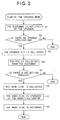
- FIG. 2 is a flowchart that explains the flow of the upgrade work.
- the hard disk 11 is freely installed in or removed from the navigation apparatus 10 by way of a connector, and it has a storage capacity of about 10 GBytes. Of this storage capacity, about 80% is allotted as the area for saving navigation data, and it is possible to write user data in the remaining area.
- the navigation data include map data and all kinds of other data that are related to the navigation function, and the user data are data such as music data that are collected by the user and that can be stored on the hard disk 11. Also, at the beginning, there is one hard disk 11 installed in the navigation apparatus 10, however, it is possible to add a second hard disk 11 in order to increase the area for user data.
- navigation data are already recorded on the hard disk 11.
- the navigation data become old and it becomes necessary to upgrade the data in order to correspond to the most recent road conditions.
- the recording medium is an optical disk, for example, it is only necessary to replace the disk with an upgraded disk, however, in the case of a hard disk 11, the work of upgrading the navigation data becomes more complicated.
- the business 2 provides the upgrading work that will be described later.
- the sections at the business 2 related to upgrade work includes a reception center 2a, inquiry center 2b, service center 2c, collection center 2d, and rewriting center 2e.
- the role of each of these sections will be described later.
- FIG. 2 shows the case of having each section inside the business 2, however, it is possible for part of the work to be entrusted to another outside business.
- businesses that are contracted by the business 2 to perform related work include, a transport business 4 and dealer 5, and their role will be described later.
- FIG. 2 shows a flowchart of the chronological order of the flow corresponding to the basic form of upgrade work.
- FIG. 2 it is assumed that the customer 1 has already purchased the navigation apparatus 10 with hard disk 11.
- the business 2 references the customer database 3 and determines the customer 1 that owns the navigation apparatus 10, and notifies that customer 1 about the upgrade of the navigation data (step S1).
- the notification sent to the customer 1 about the upgrade can be sent, for example, by direct mail or by e-mail over the Internet.
- the notification of step S1 gives a description of the upgrade of the navigation data, the application method, information about the distribution of the required upgrade kit for performing the upgrade, and information about the upgrade fee.
- the reception center 2a checks whether or not an application for an upgrade has been received from customer 1 (step S2).
- the application for an upgrade from the customer 1 can be received, for example, by telephone, fax, or e-mail over the Internet.
- step S2 When an application for an upgrade is not received from the customer 1 (step S2: NO), the upgrade work is not performed and the process ends.
- step S2: YES When an application for an upgrade is received from the customer 1 (step S2: YES), the upgrade kit mentioned above is sent to the customer 1 (step S3). Actual shipping in step S3 is entrusted to the transport company 4 shown in FIG. 1, and it manages the entire shipping of the upgrade kit, such as performing centralized management of the number of the shipping slip with linking the customer information from the customer database to the number.
- step S4 the fee for the upgrade to be paid by the customer 1 is also collected (step S4).
- the customer 1 can select whether to pay the transport company 4 COD at the time of delivery, or to pay via credit card.
- the business 2 handles the shipping slip according to the method of payment, and can perform the centralized management of all sales for the upgrade work. It is also possible for the customer 1 to pay electronically via the Internet.
- the collection center 2d checks whether or not a request for collecting the hard disk 11 for upgrade has been received from the customer 1 (step S5).
- the collection request from the customer 1 can be received, for example, by telephone, fax or by e-mail over the Internet. In this case, in step S3, for example, it is necessary to notify the customer 1 of the method for making the collection request and where to send the request.
- the collection center 2d references the customer database 3 when a collection request is received from the customer 1 to obtain the required customer information, and manages the day-by-day work of collecting hard disks 11.
- step S5 When no collection request is received from the customer 1 (step S5: NO), the process shown in FIG. 2 ends without performing the upgrade work, however, it is possible that upgrading could be performed according to a different process (see FIG. 3 or FIG. 4) to be described later.
- the collection center 2d sends instructions to the transport company 4 and performs the work for collecting the hard disk 11 (step S6). It is preferred that the customer 1 be asked for a desired collection date before collecting the hard disk 11. On the desired collection date, the transport company 4 visits the address matching the customer data and collects the hard disk 11 to be upgraded.
- step S7 the hard disk 11 that is collected from the customer 1 is received by the rewriting center 2e, and the hard disk 11 is upgraded (step S7).
- many hard disks 11 are handled, so in order to improve work efficiency, a series of upgrade processes are executed on a line, and details of those process will be described later.
- the rewriting center 2e manages several upgraded hard disks 11 every day, and performs management work in order to properly meet the delivery deadline and maintain product quality.
- the collection center 2d takes over the upgraded hard disk 11, and sends instructions to the transport company 4 to return the hard disk 11 to the customer (step S8). It is preferable that the customer be notified by telephone or the like before returning the hard disk 11 in order to make sure the customer 1 is at home.
- the transport company 4 goes to the address that corresponds to the customer information and returns the upgraded hard disk 11, and the upgrade process shown in FIG. 2 is completed. In the basic process shown in FIG. 2, it is assumed that the customer 1 will install the hard disk 11 in the navigation apparatus 10.
- the customer 1 is unclear about any of the processes in the series of upgrade processes shown in FIG. 2, he/she can contact the inquiry center 2b. For example, it is possible to ask for instructions on how to remove or install the hard disk 11 in the navigation apparatus 10, or how long it will take for the upgrade.
- the inquiry center 2b gives proper advice in regard to inquiries from the customer 1, however in the case that it is difficult for them to handle the inquiry completely, they may introduce the service center 2c to the customer 1.
- FIG. 3 and FIG. 4 will be used to explain variations of the upgrade work.
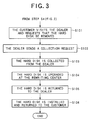
- FIG. 3 is a flowchart that shows the flow of the upgrade work when there is a dealer 5 in between the customer 1 and business 2.
- steps S1 to S4 are performed the same as in the basic process shown in FIG. 2.
- step S4 when the customer 1 receives the aforementioned upgrade kit and is not comfortable handling the hard disk 11, it can be assumed that there will be cases when the customer 1 will want to entrust a third party to remove the hard disk 11 from the navigation apparatus 10.
- the customer 1 calls on the dealer 5 and requests removal of the hard disk 11 for the purpose of having it upgraded (step S101).
- the dealer 5 After the dealer 5 has removed the hard disk 11 from the navigation apparatus 10 that has been installed, for example, in the customer's car, the dealer 5 sends a collection request to the collection center 2d of the business 2 to have the hard disk 11 collected (step S102).
- the fee for removing the hard disk 11 in this case is paid by the customer 1 directly to the dealer 5, and this fee is separate from the upgrade fee itself.
- the collection center 2d When the collection center 2d receives the collection request in step S102, they send an instruction to the transport company 4 to collect the hard disk 11 that belongs to the customer 1 from the dealer 5 (step S103). Then, in the same way as in step S7 (see FIG. 2), the rewriting center 2e upgrades the hard disk 11 (step S104).
- the collection center 2d then sends an instruction to the transport company 4 to return the upgraded hard disk 11 to the dealer 5 (step S105).
- the customer 1 receives notice from the dealer 5, he visits the dealer 5 again and the upgraded hard disk 11 is installed and finally returned to the customer 1 (step S106).
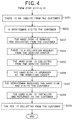
- FIG. 4 is a flowchart that shows the flow of the upgrade work in the case when there is a serviceman from the service center 2c in between the customer 1 and the business 2.
- the customer 1 who received an upgrade notice in step S1 consults with or makes an inquiry to the inquiry center 2b directly about the upgrade (step S201).
- the customer 1 has the inquiry center 2b introduce a serviceman for removing and installing the hard disk 11, and the work proceeds from there.
- An authorized serviceman that is visits the customer 1 according to the request to a request from the inquiry center 2b to the service center 2c (step S202).
- This serviceman removes the hard disk 11 from the navigation apparatus 10 that has been installed, for example, in the customer's car, then collects the hard disk 11 (step S203) and stores it at the service center 2c.
- the service center 2c sends a collection request to the collection center 2d of the business 2 to collect the hard disk 11 (step S204).
- the collection center 2d receives the collection request, they send an instruction to the transport company 4 to collect the hard disk 11 that belongs to the customer 1 from the service center 2c (step S205).
- the rewriting center 2e upgrades the hard disk 11 (step S206).
- the collection center 2d then instructs the transport company 4 to deliver the upgraded hard disk 11 to the service center 2c, and the serviceman, who was in charge of getting the hard disk 11, visits the customer 1 again (step S207).
- the serviceman then installs the hard disk 11 and finally returns the hard disk 11 to the customer (step S208).
- the upgrade fee is collected from the customer 1 in the same was as in step S4 in FIG. 2 (step S209).
- the upgrade work shown in FIG. 3 and FIG. 4 differs from the work shown in FIG. 2 in that the customer 1 does not need to remove the hard disk 11 from the navigation apparatus 10 or install it. Therefore, when the customer removes and installs the hard disk 11 himself, the process shown in FIG. 2 can be selected, and when that work is difficult for the customer 1, it is possible to select the process shown in FIG. 3 or FIG 4. Therefore, it is possible to reduce the burden on the customer 1 when upgrading the navigation data.
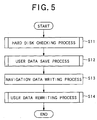
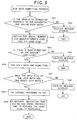
- FIG. 5 is a flowchart that gives a summary of the overall upgrade processes that are performed by the rewriting center 2e.
- Features of the upgrade processes in this embodiment are rewriting of navigation data on the hard disk 11 and retaining user data that were recorded by the user.
- step S11 each hard disk 11 that is delivered for upgrade is checked.
- the hard disk 11 that is to be upgraded is checked as to whether or not there are navigation data to be upgraded, and the state of the hard disk 11 memory is checked to determine whether or not there are user data that need to be saved.
- FIG. 6 is a flowchart that explains the process of checking the hard disk 11 in step S11.
- the hard disk 11 to be upgraded is placed on the line at the rewriting center 2e, the hard disk 11 and the backup hard disk are check as to whether or not they are connected properly to the apparatus for saving user data (step S21).
- the apparatus for saving user data is a device special for this line, and it comprises a backup hard disk for saving the user data that are recorded on the hard disk 11.
- FIG. 7 The exterior of the apparatus for saving user data is shown in FIG. 7. As shown in FIG. 7, there are two connectors 22, 23 on the main body of the apparatus for saving user data 21, and the backup hard disk 24 is connected to one of the connectors 22. Also, the hard disk 11 to be upgraded is connected to the other connector 23, and the checking process of step S21 is performed in this state. Also, the apparatus for saving user data 21 is connected to a power supply 25 for supplying power, and to a display 26 for performing various display. This display 26 is used for displaying cautions to the worker when abnormalities are detected during the process.
- step S21 when the hard disk 11 and backup hard disk 24 are not properly connected to the apparatus for saving user data (step S21: NO), a caution message is displayed on the display 26 (step S22), and further processing ends. It is possible to save user data from a plurality of hard disks 11 on the backup hard disk 24 depending on the memory capacity, and after being connected to the connector 22, that state is maintained as long as there is memory capacity.
- step S21 when it is confirmed that the connection is proper (step S21: YES), then a check is performed to check whether or not there is empty space in the backup hard disk 24 (step S23).
- the storage capacity can be divided such that the user data from eight hard disks 11 can be saved. When doing this, there is one directory for the user data from each hard disk 11, so it is possible to perform the check in step S23 based on the number of directories 24 of the backup hard disk 24.
- step S23 when there is no empty space in the backup hard disk 24 (step S23: NO), a caution message is displayed on the display 26 to replace the backup hard disk 24 (step S24), and further processing ends.
- step S23: YES when there is empty space in the backup hard disk 24 (step S23: YES), the user password that is set for the hard disk 11 is cleared using a master password (step S25).
- a master password is set in the hard disk 11 of this embodiment that allows access to the navigation apparatus 10 of a specific customer 1. Therefore, step S25 is necessary in order to enable reading of the hard disk 11 by clearing the user password.
- step S26 the hard disk 11 is accessed and the memory status is checked.
- the hard disk 11 is checked to determine whether or not there are navigation data saved, and to determine whether or not there is a user data director for saving user data. In this way it is possible to determine beforehand whether or not to rewrite the navigation data or to save the user data in the following processing.
- step S27 The processing in steps S27 to S29 is executed depending on the results of the check in step S26.
- step S27: NO When it is determined in step S27 that there are no navigation data saved on the hard disk 11 (step S27: NO), a caution message indicating that is displayed on the display 26 (step S28), and further processing ends.
- step S27: YES On the other hand, when it is determined that there are navigation data saved on the hard disk 11 (step S27: YES), processing advances to step S29.
- step S29 when it is determined that there is a directory for user data on the hard disk 11 (step S29: YES), processing moves to a process in step S12 (see FIG. 5) of saving the user data. On the other hand, when it is determined that there is no directory for user data on the hard disk 11 (step S29: NO), there is no need to save user data, so processing moves to the process in step S13 (see FIG. 5) of rewriting the navigation data. In the place of the judgment in step S29, it is possible to move to the process for saving user data, even when there is no directory for user data, and just not actually save any user data.
- step S12 the user data that are recorded on the hard disk 11 are saved in step S12.
- the entire directory of user data are temporarily saved in the backup hard disk 24 so that the user data recorded by the customer 1 is not deleted during upgrading of the hard disk 11.
- FIG. 8 is a flowchart that explains the process of saving user data in step S12.
- the serial number and manufacturer's code that are given to the hard disk 11 to be upgraded are obtained (step S31).
- the serial number and manufacturer's code are contained on the backup hard disk 24 as control data to form a correlation with the user data on the hard disk 11 to be upgraded.
- the backup hard disk 24 is accessed and check to determine whether or not there is a save directory that is related to the serial number and manufacturer's code of the hard disk 11 to be upgraded (step S32).
- a save directory that is related to the serial number and manufacturer's code of the hard disk 11 to be upgraded.
- step S35 the hard disk 11 to be upgraded is accessed and the user data from the directory for user data are read and then written as save data in the corresponding save directory on the backup hard disk 24 (step S35). After doing this, save data that are the same as the user data to be saved are stored on the backup hard disk 24.
- a message indicating that copying is in progress be displayed on the display 26. Also, in the case that copying is interrupted due to some malfunction during the processing of step S35, it is preferred that a caution message indicating the malfunction be displayed on the display 26, and further processing ends.
- step S36 the data size of the original user data on the hard disk 11 and the saved data in the save directory on the backup hard disk 24 are compared to determine whether or not they match.
- step S36 YES
- a message indicating that copying was completed properly and to replace the hard disk 11 is displayed on the display 26 (step S37), and then processing moves to the process in step S13 (see FIG. 5) to rewrite the navigation data.
- step S36 NO
- a caution message indicating that is displayed on the display 26 step S38
- step S13 the process for rewriting the navigation data saved on the hard disk 11 is executed.
- the upgraded navigation data are newly written.
- the recording apparatus performs general initialization and writes then new navigation data.
- the upgraded navigation data have been recorded on the hard disk 11, and all of the original user data have been deleted.
- step S14 the process of writing the save data from the backup hard disk 24 is executed. As mentioned above, it is necessary to restore the user data that were deleted in step S13 to the way they were originally, so the processing of step S12 is performed in reverse.
- FIG. 9 is a flowchart that explains the process of writing the user data in step S14.
- it is necessary to once again connect the hard disk 11 after upgrading to the apparatus for saving user data, so a check is performed to determine whether or not the hard disk 11 and backup hard disk 24 are properly connected (step S41).
- step S41 determines whether or not the hard disk 11 and backup hard disk 24 are properly connected.
- step S42 a caution message indicating that is displayed on the display 26 (step S42), and further processing ends.
- step S41 when it is confirmed that connection is proper (step S41: YES), the same process as step S31 in FIG. 8 is performed and the serial number and manufacturer's code that is given to the hard disk 11 is obtained (step S43).
- step S44 the backup hard disk 24 is accessed and checked to determine whether or not there is a save directory that is related to the serial number and manufacturer's code of the hard disk 11 (step S44). In other words, in saved data that correspond to the user data are saved in the save directory that was created in step S34 shown in FIG. 8, so whether that directory exists is checked.
- step S44 when there is no save directory on the backup hard disk 24 (step S44: NO), user data cannot be written, so a caution message indicating that and to replace the hard disk 11 is displayed on the display 26 (step S45), and further processing ends.
- step S44: YES when there is a save directory on the backup hard disk 24 (step S44: YES), and writing of the user data is executed (step S46).
- the backup hard disk 24 is accessed, and then the saved data are read from the saved directory and written to the user data directory that is created on the hard disk 11. In this way, the user data are written again on the hard disk 11 together with the upgraded navigation data.
- a message indicating that copying is in progress be displayed on the display 26.
- a caution message indicating the malfunction be displayed on the display 26, and in that case further processing ends.
- step S47 the data size of the user data that were rewritten on the hard disk 11 is compared with that of the saved data in the save directory on the backup hard disk 24 to determine whether or not they match.
- This process is the same as the process in step S36 of FIG. 8.
- step S47 when it is determined that the data size of the user data and saved data do not match (step S47: NO), a caution message indicating that is displayed on the display 26 (step S48), and further processing ends.
- step S49 an upgrade password is set for the hard disk 11 (step S49).
- This upgrade password is a password for allowing one-time access of the upgraded hard disk 11 after it has been installed in the navigation apparatus 10.
- the user password that was set originally is cleared, however, in this state it is not possible to access the hard disk 11 when installed in the navigation apparatus 10. Therefore, the upgrade password allows one-time access of the hard disk 11 when installed in the navigation apparatus 10, and is effective when automatically setting the original user password in the navigation apparatus 10 after that.
- step S50 a message is displayed on the display 26 indicating that the process for writing user data is finished and to replace the hard disk 11 (step S50), and then the process for upgrading the hard disk 11 ends. After that, by repeating the process shown in FIG. 5 to FIG. 9 for another hard disk 11, it is possible to upgrade a plurality of hard disks 11.
- the process of managing the upgrade of navigation data can also be performed efficiently when handling a plurality of hard disks, making it possible to keep down the cost burden.
Landscapes
- Engineering & Computer Science (AREA)
- Software Systems (AREA)
- General Engineering & Computer Science (AREA)
- Theoretical Computer Science (AREA)
- Computer Security & Cryptography (AREA)
- Physics & Mathematics (AREA)
- General Physics & Mathematics (AREA)
- Navigation (AREA)
- Information Retrieval, Db Structures And Fs Structures Therefor (AREA)
- Traffic Control Systems (AREA)
Abstract
Description
Claims (15)
- A upgrade method for navigation data that writes over and upgrades navigation data in a memory device (11), which is installed in a navigation apparatus (10) such that it can be freely installed and removed and which stores rewritable navigation data and user data, characterized in that the method comprises:a checking process of checking the memory status of the memory device (11) that is removed from the navigation apparatus (10) and determining whether there are the navigation data to be upgraded and the user data to be saved;a user data saving process that depending on the results of the checking process saves the user data, which are stored in the memory device (11), in a backup memory device (24) such that they can be identified as saved data;a navigation data writing process that depending on the results of the checking process writes over the navigation data, which are stored in the memory device (11), with upgraded navigation data; anda user data rewriting process of reading the saved data, which correspond to the memory device (11), from the backup memory device (24) and rewriting the saved data in the memory device (11) as the user data.
- The upgrade method for navigation data according to claim 1, wherein
a unique user password is set for allowing access to said memory device (11) such that in the checking process, the user password is cleared and the memory device (11) is accessed. - The upgrade method for navigation data according to claim 2, wherein
an upgrade password is set such that in the rewriting process, it allows the upgraded memory device (11) to be accessed one time only. - The upgrade method for navigation data according to claim 1, wherein
a directory for user data is created in the memory device (11) for recording the user data such that in the checking process it is determined whether there are user data to be saved according to whether or not the directory for user data exists in the memory device (11). - The upgrade method for navigation data according to claim 1 wherein
in the checking process a serial number and manufacturer's code that are unique to the memory device (11) are obtained as control data and stored in the backup memory device (24) to connect the control data with the saved data; and wherein
in the rewriting process, said control data are referenced to determine the user data that are to be rewritten from the backup memory device (24). - The upgrade method for navigation data according to any one of claims 1 to 5, wherein a hard disk (11) is used as the memory device.
- A upgrade method for navigation data that writes over and upgrades navigation data in a memory device (11), which is installed in a navigation apparatus (10) such that it can be freely installed and removed and which stores rewritable navigation data and user data, characterized in that the method comprises:a writing over process for writing over the navigation data in the memory device (11), which has been removed from the navigation apparatus (10);a saving process for temporarily saving the user data when writing over the navigation data; anda rewriting process for rewriting saved user data in the memory device (11) after the navigation data have been written over.
- The upgrade method for navigation data according to claim 7, wherein
upgrading is performed upon receiving an application for an upgrade from a customer that owns the navigation apparatus (10), and is performed for the memory device (11) for which a collection request is received, and wherein
execution of the upgrading is managed based on a customer database (3) that contains customer data and where the entire series of work related to the upgrading is managed. - The upgrade method for navigation according to claim 8, wherein series of work related to the upgrading comprises: work of collecting the memory device (11) to be upgraded; work of returning the memory device (11) after having been upgraded; and work of collecting the fee for the upgrading.
- The upgrade method for navigation data according to claim 9 wherein after receiving the application from the customer for the upgrading, work of delivering necessary upgrading materials for the upgrading of the memory device (11) to be performed by the customer himself is managed according to the customer database (3), and wherein the upgrading is performed on the memory device (11) for which a collection request is received from the customer to which the upgrading materials were delivered.
- The upgrade method for navigation data according to claim 9 or 10, wherein a collection request from the customer, the work of collecting the memory device (11) and the work of returning the memory device (11) after the upgrading is performed by a business that is entrusted with removing and installing the memory device (11).
- The upgrade method for navigation data according to any one of claims 7 to 11, wherein the memory device is a hard disk (11).
- An apparatus (21) for saving user data that temporarily saves user data when writing over and upgrading navigation data in a memory device (11), which is installed in a navigation apparatus (10) such that it can be freely installed and removed and which stores rewritable navigation data and user data, characterized in that the apparatus comprises:a backup memory device (24) for temporarily saving the user data that are stored in the memory device (11);a user data save control device for checking the memory status of the memory device (11) that was removed from the navigation apparatus (10) to determine whether there are the navigation data to be upgraded and the user data to be saved, and for saving the user data that are stored in the memory device (10) in the backup memory device (24) as saved data, depending on the result of the determination; anda user data rewrite control device for reading the saved data, which correspond to the memory device (11) in which the navigation data have been written over, from the backup memory device (24) and for rewriting the saved data in the memory device (11) as the user data.
- The apparatus (21) for saving user data according to claim 13, wherein the backup memory device (24) comprises the memory device.
- The apparatus (21) for saving user data according to claim 13 or 14, wherein a hard disk is used as the backup memory device (24) and the memory device.
Applications Claiming Priority (4)
| Application Number | Priority Date | Filing Date | Title |
|---|---|---|---|
| JP2001137852A JP4413449B2 (en) | 2001-05-08 | 2001-05-08 | User data saving apparatus and user data saving control method |
| JP2001137852 | 2001-05-08 | ||
| JP2001137853 | 2001-05-08 | ||
| JP2001137853A JP2002333324A (en) | 2001-05-08 | 2001-05-08 | Method for version-up of navigation data |
Publications (2)
| Publication Number | Publication Date |
|---|---|
| EP1267261A2 true EP1267261A2 (en) | 2002-12-18 |
| EP1267261A3 EP1267261A3 (en) | 2006-09-06 |
Family
ID=26614769
Family Applications (1)
| Application Number | Title | Priority Date | Filing Date |
|---|---|---|---|
| EP02253120A Withdrawn EP1267261A3 (en) | 2001-05-08 | 2002-05-02 | Upgrade method for navigation data and apparatus for saving user data |
Country Status (2)
| Country | Link |
|---|---|
| US (1) | US7089546B2 (en) |
| EP (1) | EP1267261A3 (en) |
Cited By (3)
| Publication number | Priority date | Publication date | Assignee | Title |
|---|---|---|---|---|
| EP1713198A4 (en) * | 2004-02-04 | 2007-04-11 | Huawei Tech Co Ltd | METHOD FOR UPDATING THE COMMUNICATION DEVICE |
| GB2467213A (en) * | 2009-01-26 | 2010-07-28 | Denso Corp | Erasing user information recorded in a navigation apparatus |
| US8775569B2 (en) | 2008-11-27 | 2014-07-08 | GM Global Technology Operations LLC | Method for updating the data of a navigation system |
Families Citing this family (15)
| Publication number | Priority date | Publication date | Assignee | Title |
|---|---|---|---|---|
| JP2003114806A (en) * | 2001-10-04 | 2003-04-18 | Hitachi Ltd | OS update method, security control method, and device for implementing the method |
| US7371609B2 (en) * | 2001-10-26 | 2008-05-13 | Staktek Group L.P. | Stacked module systems and methods |
| JP2005209074A (en) * | 2004-01-26 | 2005-08-04 | Denso Corp | Update detection apparatus and update detection program |
| JP4476789B2 (en) * | 2004-11-18 | 2010-06-09 | クラリオン株式会社 | Map update system, navigation device, distribution device |
| JP2007183132A (en) * | 2006-01-05 | 2007-07-19 | Mitsubishi Electric Corp | Car navigation device, information updating PC card, and car navigation device information updating method |
| JP4663620B2 (en) * | 2006-12-07 | 2011-04-06 | 日立オートモティブシステムズ株式会社 | In-vehicle information terminal, map server, and in-vehicle system |
| WO2009067306A1 (en) * | 2007-11-24 | 2009-05-28 | Ronald Finne | Portable data recovery apparatus and method |
| US8094832B2 (en) * | 2008-11-21 | 2012-01-10 | Toyota Motor Engineering & Manufacturing North America, Inc. | Modular automotive multimedia and telematic extension box and head unit |
| US8832676B2 (en) * | 2009-09-30 | 2014-09-09 | Zynga Inc. | Apparatuses, methods and systems for a social networking application updater |
| US9439051B2 (en) | 2011-09-01 | 2016-09-06 | Toyota Motor Engineering & Manufacturing North America, Inc. | System for providing Internet access to an automotive vehicle having a multimedia device |
| WO2013134959A1 (en) * | 2012-03-16 | 2013-09-19 | Qoros Automotive Co., Ltd. | Partial map updates |
| US9003386B2 (en) | 2013-02-28 | 2015-04-07 | Sap Se | Fallback system for software upgrade |
| US10152318B2 (en) * | 2017-01-31 | 2018-12-11 | Oracle Financial Services Software Limited | Computer system and method for executing applications with new data structures |
| CN114528125B (en) * | 2022-02-18 | 2025-03-21 | 青岛海信移动通信技术有限公司 | Method and terminal device for retaining application data |
| CN115509581A (en) * | 2022-10-13 | 2022-12-23 | 锐迪科微电子科技(天津)有限公司 | Upgrading method and device, electronic equipment and storage medium |
Family Cites Families (13)
| Publication number | Priority date | Publication date | Assignee | Title |
|---|---|---|---|---|
| JPH023900A (en) * | 1988-06-16 | 1990-01-09 | Nissan Motor Co Ltd | Present place displaying device for moving body |
| US5146228A (en) * | 1990-01-24 | 1992-09-08 | The Johns Hopkins University | Coherent correlation addition for increasing match information in scene matching navigation systems |
| US5345388A (en) * | 1991-08-06 | 1994-09-06 | Pioneer Electronic Corporation | Navigation system utilizing locus data compression |
| JP3304210B2 (en) * | 1994-09-22 | 2002-07-22 | 株式会社エクシング | Electronic map system and car navigation device |
| US5911773A (en) * | 1995-07-24 | 1999-06-15 | Aisin Aw Co., Ltd. | Navigation system for vehicles |
| US5951620A (en) * | 1996-01-26 | 1999-09-14 | Navigation Technologies Corporation | System and method for distributing information for storage media |
| JPH1165436A (en) * | 1997-08-21 | 1999-03-05 | Toyota Motor Corp | Map data selection support device, map data processing system and processing device including the support device |
| US6199203B1 (en) * | 1998-07-21 | 2001-03-06 | Hewlett-Packard Company | Memory management techniques for on-line replaceable software |
| US6222485B1 (en) * | 1999-05-20 | 2001-04-24 | Garmin Corporation | Use of desired orientation in automotive navigation equipment |
| EP1081461A3 (en) * | 1999-08-30 | 2002-11-20 | Aisin Aw Co., Ltd. | Navigation apparatus with navigation data processor device and man-machine interface device |
| US6408233B1 (en) * | 2000-09-18 | 2002-06-18 | Axiom Navigation, Inc. | GPS data logger with automatic wireless download |
| JP4119088B2 (en) * | 2000-12-28 | 2008-07-16 | パイオニア株式会社 | Navigation information update system and navigation information distribution apparatus |
| US6937936B2 (en) * | 2002-04-25 | 2005-08-30 | Aisin Aw Co., Ltd. | Navigation system |
-
2002
- 2002-05-02 EP EP02253120A patent/EP1267261A3/en not_active Withdrawn
- 2002-05-03 US US10/137,408 patent/US7089546B2/en not_active Expired - Fee Related
Cited By (8)
| Publication number | Priority date | Publication date | Assignee | Title |
|---|---|---|---|---|
| EP1713198A4 (en) * | 2004-02-04 | 2007-04-11 | Huawei Tech Co Ltd | METHOD FOR UPDATING THE COMMUNICATION DEVICE |
| EP1713198B2 (en) † | 2004-02-04 | 2012-07-25 | Huawei Technologies Co., Ltd. | A method for upgrading software of communication equipment |
| US8495616B2 (en) | 2004-02-04 | 2013-07-23 | Huawei Technologies Co., Ltd. | Method for upgrading communication equipment |
| US10007502B2 (en) | 2004-02-04 | 2018-06-26 | Huawei Technologies Co., Ltd. | Method for upgrading communication device |
| US8775569B2 (en) | 2008-11-27 | 2014-07-08 | GM Global Technology Operations LLC | Method for updating the data of a navigation system |
| GB2467213A (en) * | 2009-01-26 | 2010-07-28 | Denso Corp | Erasing user information recorded in a navigation apparatus |
| US8175804B2 (en) | 2009-01-26 | 2012-05-08 | Denso Corporation | Navigation apparatus |
| GB2467213B (en) * | 2009-01-26 | 2016-08-10 | Denso Corp | Navigation apparatus |
Also Published As
| Publication number | Publication date |
|---|---|
| US7089546B2 (en) | 2006-08-08 |
| US20040015945A1 (en) | 2004-01-22 |
| EP1267261A3 (en) | 2006-09-06 |
Similar Documents
| Publication | Publication Date | Title |
|---|---|---|
| US7089546B2 (en) | Upgrade for navigation data based on usage data or initialization of navigation data | |
| JP3976365B2 (en) | Apparatus and method for distributing storage medium information | |
| US7295994B2 (en) | Information distribution system, terminal apparatus, information center, recording medium, and information distribution method | |
| JP3507594B2 (en) | Computer | |
| US6092105A (en) | System and method for vending retail software and other sets of information to end users | |
| US7739160B1 (en) | Dynamic, rule-based, tax-decision system | |
| US20010027357A1 (en) | Data vending system | |
| WO2002003199A1 (en) | Mobile information terminal device, storage server, and method for providing storage region | |
| CN1273669A (en) | System for automatically selling data and method therefor | |
| JPH05298337A (en) | Catalogue shopping system | |
| JP3385844B2 (en) | vending machine | |
| JP4413449B2 (en) | User data saving apparatus and user data saving control method | |
| JP7792073B2 (en) | Information processing apparatus and device management method | |
| JP2001125961A (en) | Information download memory device | |
| JP4919580B2 (en) | Storage medium management system and store terminal used in the system | |
| JP3916031B2 (en) | Information management method and system | |
| US20050241002A1 (en) | Software program storage medium, software program rights management system and management method for software program rights | |
| EP1176491A2 (en) | Software program providing system and software program providing method | |
| JP2002333324A (en) | Method for version-up of navigation data | |
| JP2004145537A (en) | File recording system and file transfer method | |
| JP4300759B2 (en) | Recording medium, information processing apparatus, and method of using recording medium | |
| JP2005107753A (en) | Loan condition change system and loan condition change method | |
| JP2006277087A (en) | Image processor and its license management method | |
| JP3284929B2 (en) | vending machine | |
| JP2002373301A (en) | Rental management system and rental management method |
Legal Events
| Date | Code | Title | Description |
|---|---|---|---|
| PUAI | Public reference made under article 153(3) epc to a published international application that has entered the european phase |
Free format text: ORIGINAL CODE: 0009012 |
|
| AK | Designated contracting states |
Kind code of ref document: A2 Designated state(s): AT BE CH CY DE DK ES FI FR GB GR IE IT LI LU MC NL PT SE TR |
|
| AX | Request for extension of the european patent |
Free format text: AL;LT;LV;MK;RO;SI |
|
| PUAL | Search report despatched |
Free format text: ORIGINAL CODE: 0009013 |
|
| AK | Designated contracting states |
Kind code of ref document: A3 Designated state(s): AT BE CH CY DE DK ES FI FR GB GR IE IT LI LU MC NL PT SE TR |
|
| AX | Request for extension of the european patent |
Extension state: AL LT LV MK RO SI |
|
| 17P | Request for examination filed |
Effective date: 20070306 |
|
| AKX | Designation fees paid |
Designated state(s): AT BE CH CY DE DK ES FI FR GB GR IE IT LI LU MC NL PT SE TR |
|
| 17Q | First examination report despatched |
Effective date: 20090112 |
|
| STAA | Information on the status of an ep patent application or granted ep patent |
Free format text: STATUS: THE APPLICATION IS DEEMED TO BE WITHDRAWN |
|
| 18D | Application deemed to be withdrawn |
Effective date: 20090523 |