EP1236089B1 - Verfahren und system zur konfiguration von komponenten, ausgebbar in einem netzwerk - Google Patents
Verfahren und system zur konfiguration von komponenten, ausgebbar in einem netzwerk Download PDFInfo
- Publication number
- EP1236089B1 EP1236089B1 EP00984121A EP00984121A EP1236089B1 EP 1236089 B1 EP1236089 B1 EP 1236089B1 EP 00984121 A EP00984121 A EP 00984121A EP 00984121 A EP00984121 A EP 00984121A EP 1236089 B1 EP1236089 B1 EP 1236089B1
- Authority
- EP
- European Patent Office
- Prior art keywords
- pluggable
- recited
- pluggable components
- preference values
- components
- Prior art date
- Legal status (The legal status is an assumption and is not a legal conclusion. Google has not performed a legal analysis and makes no representation as to the accuracy of the status listed.)
- Expired - Lifetime
Links
Images

Classifications
-
- G—PHYSICS
- G06—COMPUTING OR CALCULATING; COUNTING
- G06F—ELECTRIC DIGITAL DATA PROCESSING
- G06F9/00—Arrangements for program control, e.g. control units
- G06F9/06—Arrangements for program control, e.g. control units using stored programs, i.e. using an internal store of processing equipment to receive or retain programs
- G06F9/44—Arrangements for executing specific programs
- G06F9/445—Program loading or initiating
- G06F9/44505—Configuring for program initiating, e.g. using registry, configuration files
-
- G—PHYSICS
- G06—COMPUTING OR CALCULATING; COUNTING
- G06F—ELECTRIC DIGITAL DATA PROCESSING
- G06F8/00—Arrangements for software engineering
- G06F8/60—Software deployment
- G06F8/61—Installation
Definitions
- This invention relates to configuring and distributing software in network environments including Web-centric and Internet-centric environments, and in particular to configuring pluggable components prior to distribution to embedded servers in a network environment.
- Embedded applications run on microcomputers that are embedded within electronic devices such as appliances, vending machines, gasoline pumps, cellular phones, or pagers. Embedded systems are also being used to develop a new line of sophisticated devices such as personal data assistants (PDAs), smart pagers, and Web phones. The latest Web phones now support a variety of useful services, such as an address book, an auto-dialer, an Internet browser, and a calendar.
- PDAs personal data assistants
- Web phones Web phones.
- the latest Web phones now support a variety of useful services, such as an address book, an auto-dialer, an Internet browser, and a calendar.
- These embedded computers are constrained in terms of space, power, memory, and network connectivity. But in accordance with Moore's law, these constraints have relaxed, and embedded systems have become much more powerful.
- Embedded server technology has been developed to provide a framework for supporting embedded services.
- Sun Microsystems' Java Embedded ServerTM (JES) is an example of an embedded server framework.
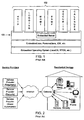
- Figure 1 illustrates an example Embedded Server 100 with several network-deliverable services 102 installed including an HTTP protocol service, a logging service, a management service, an SNMP protocol service, and a calendar service.
- Embodiments of an embedded server framework may include several components.
- An embedded server may provide a runtime framework that manages the loading, installation, activation, execution, and removal of one or more services and/or pluggable components.
- a service may be a specific set of functionality that implements an interface provided by the embedded server.
- a service could be an application, a specific implementation of a protocol like HTTP or Remote Method Invocation (RMI), or some other set of code intended for a specific purpose, like a logging service.
- a service may be defined by what it does.
- a service description may be defined as the name under which a service is registered with the embedded server. Service descriptions allow the embedded server framework to host multiple instances and/or implementations of the same interface.
- a wizard may be code used by the embedded server framework to correctly manage the life cycle of a service. Life-cycle management may include installing, configuring, activating, updating, deactivating, and uninstalling a service.
- a pluggable component which may also be referred to as a bundle , may be a container (e.g. Java ARchive (JAR) file) that may include the full set of classes and methods (e.g. Java classes and methods) and/or other resources (e.g. files, data, configuration information including preferences, etc.) needed to implement a service or services (and the set of wizards needed to manage the service) on an embedded server.
- JAR Java ARchive
- a pluggable component may include one or more services and sets of wizards.
- a pluggable component may be narrowly defined and only contain a limited number of files and functionality, or it may be broadly defined to contain much more., The code contained in a pluggable component, when executed, may be thought of as a program or application.
- the program executes in a component context or bundle context.
- Each pluggable component in the embedded server may have its own unique component context. This makes it possible for several instances of the same pluggable component to run concurrently within the embedded server, each with its own component context and set of wizards.
- a manifest may be defined as a file within a pluggable component in which information regarding the pluggable component, for example, configuration information and dependencies on other pluggable components or resources, may be stated.
- Services may be installed into an embedded server as part of a pluggable component. However, there is not necessarily a one-to-one correlation between a pluggable component and a service.
- the code that makes up two or more services can be packaged into one pluggable component and installed into the embedded server.
- An embedded server may reside on a device, such as an embedded system, on which installed services are executed, or may reside on a gateway device that serves one or more devices.
- Figure 2 illustrates a residential system with a number of devices connected to a gateway device that hosts an embedded server.
- the embedded server on the gateway device may receive pluggable components from the network and provide the pluggable components and/or services provided by the pluggable components to one or more of the attached devices.
- the gateway device may store the pluggable components or may delete the pluggable components when no longer needed.
- a gateway device may be a standalone device.
- a device such as a VCR or home computer may serve as a gateway device.
- the same model as shown in the residential system example of Figure 2 may be applied to other systems, such as enterprise systems comprising computing devices, printers, PDAs, routers, modems, etc.
- pluggable components are typically manually configured after deployment, or configured individually (one at a time).
- some pluggable components may not be configurable after deployment. Therefore, it is desirable to provide a method for configuring network deliverable pluggable components prior to the components being deployed.
- a BCU Bundle Configuration Utility
- a BCU is a utility that enables the configuration of a set of properties associated with one or more pluggable components prior to distribution.
- the properties may serve as default values used by the pluggable component when installed into an embedded server.
- the default values of the properties, accessed from the pluggable component at runtime, may be referred to as preferences of the pluggable component. It is these preferences that the BCU allows a user to configure.
- Embodiments of a BCU may provide several functions including, but not limited to: providing a list of properties and their values; allowing the value associated with a property name to be changed; updating the configuration information in the source pluggable component; creating a new pluggable component with a new set of configuration information; and resetting the configuration information in the pluggable component to default values.
- a BCU may operate on preferences located within the pluggable component to be configured.
- the preferences may be located in a preferences file, which in turn may be located in the pluggable component.
- Individual preferences may have a (current) value, a class or type and a default value.
- the preferences may be initialized and/or modified prior to deployment to embedded servers.
- configuration may be done in a batch mode where several pluggable components are configured during execution of a batch job or batch file.
- a BCU may allow for configuring multiple pluggable components substantially simultaneously prior to deployment.
- the pluggable component(s) may have built-in logic that may be configured to read the preference values and establish properties of the component context and/or services provided by the pluggable component in accordance with the preferences.
- the necessity of manual configuration of a pluggable component after deployment may be eliminated.
- a user or users of a configuration system may first create and/or compile one or more pluggable components.
- the pluggable components may have been received from another system or storage device.
- pluggable components may be created with preference values initialized to default values.
- the user may then use the BCU to set and/or modify preference values for one or more of the pluggable components.
- a user may invoke the BCU to display preferences from one or more pluggable components, modify one or more values of the displayed preferences, and save the modified pluggable components with the modified preferences.
- pluggable components may be bundles such as JAR files, which may include preferences files for storing preference values of the pluggable components.
- each pluggable component may include a manifest (e.g. manifest file in the JAR file) that may be used by the BCU to locate one or more preference files in the pluggable component.
- a user may access pluggable components through a graphical user interface (GUI) provided by the BCU.
- GUI graphical user interface
- the BCU may provide a command line interface to allow the user to enter commands for accessing and modifying pluggable components.
- the configuration system may include an operating system (e.g. Unix, DOS, etc) that provides a command line interface, and the BCU commands may be entered and executed on the configuration system through the provided command line interface.
- a user may create a batch file including one or more commands for accessing and modifying one or more pluggable components, and the batch file may be invoked in the command line interface and executed by the BCU to configure the pluggable components specified by the commands in the batch file.
- multiple pluggable components may be modified by the BCU in batch mode by executing a pre-created batch file.
- the pluggable components may be distributed to one or more systems with embedded servers.
- the pluggable components may then be accessed on the embedded servers to provide one or more services on the embedded server systems.
- Item numbers for objects in the Figures may be repeated in more than one Figure to signify objects that are substantially similar in the Figures.
- a BCU Bundle Configuration Utility for configuring network deliverable pluggable components for deployment in embedded servers.
- a BCU is a utility to allow the change (configuration) of a set of properties associated with a pluggable component.
- the properties may serve as default values used by the pluggable component when installed in an embedded server.
- Properties associated with the pluggable component are called preferences in this document to distinguish them from the properties of the component context and/or services that exist at run-time.
- a BCU may operate on configuration information (e.g. preferences) located within the pluggable component to be configured.
- the configuration information may be located in a configuration file (also referred to as a preferences file).
- the configuration information may be comprised in a standard java.lang.Properties file. Individual preferences may have a value, a class and a default value.
- the configuration information may be initialized and/or modified before deployment.
- configuration may be done in a batch mode where several such pluggable components are configured during execution of the batch file.
- a BCU may allow for configuring multiple pluggable components substantially simultaneously.
- the pluggable component After being deployed, the pluggable component may have built-in logic that may be configured to read the configuration information and establish properties of the component context and/or services provided by the pluggable component in accordance with the configuration information.
- the necessity of manual configuration of a pluggable component after deployment may be eliminated.
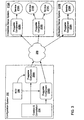
- Figure 3 illustrates an exemplary pluggable component configuration and distribution system according to one embodiment.
- the system may comprise at least one configuration system 202 and one or more embedded server systems 212.
- two embedded server systems, 212A and 212B are connectable to configuration system 202 via a network 200.
- Configuration system 202 is preferably a computer system and may include various standard components, including one or more processors or CPUs, a memory medium, one or more buses, one or more network ports for connecting to and communicating over networks such as network 200. etc.
- Embedded server systems 212A and 212B may be any of various types of devices, including a computer system.
- Each of embedded server systems 212A and 212B may comprise standard computer components, such as a processor or CPU, memory medium, and/or display, one or more network ports for connecting to and communicating over networks such as network 200, etc.
- the network 200 may be any of various types or combinations of local area network and/or wide area network, including the Internet.
- the term "computer system” as used herein may generally describe the hardware and software components that in combination allow the execution of computer programs.
- the computer programs may be implemented in software, hardware, or a combination of software and hardware.
- a computer system's hardware generally includes a processor, memory medium, and input/output (I/O) devices.
- a computer system may take various forms, including a personal computer system, mainframe computer system, workstation, network appliance, Internet appliance, information appliance, personal digital assistant (PDA), television system, home appliance with embedded system or other device.
- PDA personal digital assistant
- the term "computer system” may be broadly defined to encompass any device having a processor that executes instructions from a memory medium.
- processor generally describes the logic circuitry that responds to and processes the basic instruction that operate a computer system.
- memory medium includes various types of memory including an initiator medium, e.g., a CD-ROM, or floppy disks; a volatile computer system memory such as DRAM, SRAM, EDO RAM, Rambus RAM, DDR SDRAM, etc.; or a non-volatile memory such as optical storage or a magnetic medium, e.g., a hard drive.
- the term “memory” is used synonymously with “memory medium” herein.
- the memory medium may comprise other types of memory or combinations thereof.
- the memory medium may be located in a first computer in which the programs are executed, or may be located in a second computer that connects to the first computer over a network. In the latter instance, the second computer provides the program instructions to the first computer for execution.
- the memory medium comprised in the configuration system 202 preferably stores a software program or programs for enabling configuration system 202 to set and/or modify the preferences of pluggable components 208 and to distribute the pluggable components 208 to embedded server systems 212A and 212B.
- configuration system 202 may also store a software program or programs for creating and/or compiling pluggable components 208 prior to setting and/or modifying the preferences of the pluggable components 208.
- the memory medium comprised in the embedded server systems 212A and 212B may include software for enabling the systems 212A and 212B to execute pluggable components 208 and thus to provide services 210 on systems 212A and 212B.
- the embedded server systems 212A and 212B may include embedded servers for executing pluggable components 208.
- the embedded servers may be Java Embedded Servers (JES).
- the software program(s) may be implemented in any of various ways, including procedure-based techniques, component-based techniques, and/or object-oriented techniques, among others.
- the software program may be implemented using ActiveX controls, C++ objects, Java, JavaBeans, Microsoft Foundation Classes (MFC), or other technologies or methodologies, as desired.
- a CPU executing code and data from a memory medium includes a means for creating and executing the software program or programs according to the methods, flowcharts, and/or block diagrams described below.
- a user of configuration system 202 may first create and/or compile one or more pluggable components 208.
- the pluggable components may have been received on configuration system 202 from another system or storage device.
- the pluggable components may have been created and/or compiled on one or more other systems and delivered (e.g. via the network 200) to configuration system 202.
- pluggable components may be created with preference values initialized to default values.
- Configuration system 202 may include a bundle configuration utility (BCU) 206 which may be used to set and/or modify preference values in pluggable components 208A and 208B.
- BCU bundle configuration utility
- a user of configuration system 202 may execute BCU 206 to display preferences from one or more pluggable components 208, modify one or more values of the displayed preferences, and save the modified pluggable components.
- pluggable components 208 may be bundles such as JAR files, and may include preferences files for storing preference values for the pluggable components 208.
- each pluggable component may include a manifest (e.g. manifest file in the JAR file) that may be used by BCU 206 to locate one or more preference files in the pluggable component 208.
- a user may access pluggable components 208 through a graphical user interface (GUI) provided by BCU 206.
- GUI graphical user interface
- BCU 206 may provide a command line interface to allow the user to enter commands for accessing and modifying pluggable components 208.
- configuration system 202 may include an operating system (e.g. Unix, DOS, etc) that provides a command line interface, and the BCU commands may be entered and executed on the configuration system 202 through the provided command line interface.
- a user may create a batch file including one or more commands for accessing and modifying one or more pluggable components 208, and the batch file may be invoked in the command line interface and executed by the BCU 206 to modify the pluggable components 208 specified by the commands in the batch file.
- multiple pluggable components may be modified by the BCU 206 in batch mode by executing a pre-created batch file.
- Batch files may be stored (e.g. on the configuration system 202) and later accessed and modified and/or executed to access and modify the same set or another set of pluggable components.
- the pluggable components 208 may be distributed to one or more systems with embedded server systems 212.
- commands entered on a command line interface may be used to distribute one or more pluggable components 208 to one or more embedded server systems 212.
- a batch file may be created with one or more commands for distributing pluggable components 208.
- a command to distribute one or more pluggable components 208 to one or more embedded server systems 212 may include identification information (e.g. name, directory path, etc) for the pluggable component(s) 208 to be distributed and location information (e.g. network address, URL, etc) of the one or more embedded server systems 212.
- a graphical user interface may be provided for distributing pluggable components 208.
- other methods of distributing pluggable components 208 may be utilized.
- a pluggable component 208 may be copied to a portable magnetic medium (e.g. floppy disk, Zip disk, CD-ROM or other distributable medium) and physically distributed to the embedded server system(s) 212.
- a portable magnetic medium e.g. floppy disk, Zip disk, CD-ROM or other distributable medium
- pluggable component 208A has been delivered to embedded server systems 212A and 212B, while pluggable component 208B has been delivered to embedded server system 212A.
- the pluggable components may be accessed to provide one or more services 210 on the embedded server systems 212.
- portions of pluggable component 208A may be executed to provide service 210A on embedded server systems 212A and 212B.
- a first portion of pluggable component 208B may be executed on embedded server system 212A to provide service 210B, and a second portion of pluggable component 208B may be executed on embedded server system 212A to provide service 210C.
- Embodiments of a BCU 206 may provide several functions including, but not limited to:
- a BCU operates on a preferences file (e.g. standard java.lang.Properties file) located with in the pluggable component 208 to be configured.
- a preferences file may be created at development time, and may include entries for each configurable preference.
- information that directs the BCU 206 where to find the preferences file in the pluggable component 208 may be included in the pluggable component. In one embodiment, this information may be included in a manifest file of the pluggable component.
- the BCU 206 may not be able to locate and alter the pluggable component, and may report an error or otherwise indicate the problem.
- an entry in the manifest file may be similar to the following exemplary entry: BundlePreferences: some/directory/foo.properties
- the entry may include a path referring to a file within the pluggable component 208, relative to a root of the pluggable component, rather than being a general URL to some resource.
- BCU 206 may allow a user to alter the values for any of the included preferences, but not allow the creation or deletion of preferences in the preferences file.
- preferences may only be created or deleted at development time.
- Individual preferences may have a value, a class, and a default value.
- BCU 206 may allow the user to alter only the value of a preference.
- entered preference values are validated, e.g. by type checking, by the BCU 206.
- all preferences in a preferences file may be initialized to default values before installation (e.g. during compilation), and modified to other values through use of the BCU 206 before installation, if desired.
- otherwise identical pluggable components may be configured for use in different execution environments by modification of the preference values.
- properties that should not be accessible to customizers of the pluggable component 208 after installation are not included in the preferences file.
- a pluggable component 208 may be installed in an embedded server system 212 without being configured with a BCU 206.
- a pluggable component 208 may be installed with default values as assigned during compilation on an embedded server system 212 that does not require customization of preference values.
- an interested party when a pluggable component 208 is installed in an embedded server system 212, an interested party (e.g. activator wizard, configuration bean or service) may locate the preferences file in the pluggable component 208 (e.g. through the manifest) and extract any values of interest.
- an interested party may not be allowed to modify the preference values in a pluggable component 208 after the pluggable component 208 is installed in an embedded server system 212.
- an interested party may be allowed to modify at least some of the preference values in a pluggable component 208 after the pluggable component 208 is installed in an embedded server system 212.
- a pluggable component 208 may be customizable in regards to modification access for the preference values in the component after installation in an embedded server system 212, thus allowing varying degrees of modification access (e.g. no preferences may be modified, some preferences may be modified, all preferences may be modified, etc.) depending on the requirements of the installation.
- a BCU 206's actions may be constrained so that it does not allow a user to perform actions on a preferences file and/or pluggable component 208 that may make a pluggable component 208 "invalid", such as removing necessary files.
- the preferences file may be in the format delivered by the java class java.lang.Properties.
- properties of the preference are:
- Rules for preferences in preferences files may include, but are not limited to, the following:
- the default value may be used.
- a default class e.g. java.lang.String
- Class names should be fully qualified. Preference names should not contain a ".” character. Preference names may not end in ".class” or “.default” to insure forward compatibility. BCU may not preserve comments or order of the properties in the file.
- the GUI may verify all values and defaults are acceptable (valid) when it opens the pluggable component. The GUI may validate only the preferences it is told to read or modify.
- BCU may report an error.
- classes that may be allowed in a Java implementation:
- Embodiments of a BCU 206 may include a command line interface, a Graphical User Interface (GUI), or both forms of interfaces in the same executable.
- GUI Graphical User Interface
- One embodiment of a BCU 206 may allow for configuring multiple pluggable components 28 substantially simultaneously.
- One embodiment of a BCU 206 may provide standard edit features such as Copy/Paste and Undo/Redo.
- multiple pluggable components may be configured using scripts (batch files) that can call BCU commands in the command line. After configuring a pluggable component 208 using BCU 206, it may be ready for deployment as a pluggable unit on the network, for example, on an embedded server, where the services provided by the pluggable component 208 can read and initialize from the new preferences file.
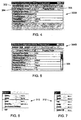
- Figure 4 illustrates a GUI window 300A for a BCU 206 according to one embodiment.
- Window 300 in Figure 4 displays an exemplary list of preferences for a pluggable component.
- the list of preferences includes a name 304 for each property of the pluggable component 208 in the preferences and a corresponding preference value 306 for each property 304.
- the GUI window 300A may also include one or more menus 302 for accessing various functions of the BCU 206.
- BCU 206 may support multiple GUI windows 300 open at one time, with each displaying a set of preferences for a different pluggable component 208.
- BCU 206 may be terminated by closing all currently open GUI windows 300.
- the name fields 304 may not be selected or edited in the BCU 206.
- keyboard vertical arrow keys, return and shift return may move the focus to the next or previous cell, vertically.
- a cursor control device such as a mouse may be used to select a cell.
- the tab key may transfer keyboard focus to a next component.
- all fields i.e. cells have at least two visible states.
- a first visible state is when there is no keyboard focus in a cell, the second when focus is in the cell.
- text and number fields may allow a user to select a range of text.
- horizontal arrow keys may be used to affect the placement of the insertion point and selection in the text fields.
- a Boolean field (such as a checkbox) may be toggled with keyboard action.
- the space bar may be used to toggle the state of a Boolean field. In one embodiment, typing an invalid character in a field that performs input validation may not affect any currently selected text.
- Figure 5 illustrates a GUI window 300B for a BCU 206 according to one embodiment.
- the list of preferences includes more properties, and all are not displayable within the physical limits of window 300B.
- Window 300B includes a scrollbar 308 for accessing properties and their associated values that are not currently visible in window 300B.
- Figure 6 illustrates a "Bundle" menu 310 accessible in BCU 206 according to one embodiment.
- Menu 310 may include one or more menu commands such as commands for opening, closing, and saving preferences of pluggable components 308.
- An "Open" command may be used to open a first pluggable component and display its preferences in a GUI window 300 such as those illustrated in Figures 4 and 5.
- selecting the "Open" menu command may result in an "Open" dialog being displayed, in which zero or more pluggable components 208 may be listed. The user may then select one or more of the pluggable components 208 to be opened.
- the "Open" command may be used to open one or more additional pluggable components 208 and display its preferences in additional GUI windows 300, with the preferences for one pluggable component 208 displayed in one GUI window 300.
- pluggable components 208 currently opened in the BCU 206 may be excluded from an Open dialog displayed in response to the "Open" menu command.
- choosing an already opened bundle in the Open dialog may bring its GUI window 300 to the front.
- the "Close” command of menu 310 may be used to close a currently open GUI window 300.
- the BCU 206 may prompt the user to save the changes, cancel the changes. and/or cancel the close operation.
- the "Save" command of menu 310 may be used to save any preferences for a pluggable component 208 displayed in the GUI window 300 that have been modified since the last time the pluggable component 208 was opened or saved.
- the "Save As” command of menu 310 may be used to save the currently open pluggable component 208 displayed in the GUI window 300 into a new pluggable component 208, and may allow the user to enter a new name for the new pluggable component 208.
- the "Save As" menu command may result in a "Save As” dialog being displayed, in which the user may enter a new name and/or a new location for the pluggable component 208. Any modifications to the preferences that have been made in the GUI window 300 may be saved to the new pluggable component.
- the "Use Factory Settings" command of menu 310 may be used to reset all preference values in the currently open pluggable component 208 to their default values.
- a pluggable component 208 may maintain two values for each property: a current value and a default (factory) value.
- the user can choose the "Exit" command of menu 310 to close all currently open GUI windows 300 and to exit the BCU 206. In one embodiment, if there are any unsaved changes, the user may be prompted to save the changes before exiting the BCU 206, or to cancel the Close operation.
- the "Open”, “Close”, “Save” and “Save As” commands may be constrained to working with files of a particular type or types.
- pluggable components are Java ARchive (JAR) files, and the commands may be constrained to working with JAR files.
- JAR files may be identified by a ".jar” file extension.
- Figure 7 illustrates an Edit menu 312 that may be accessed from the BCU 206 according to one embodiment.
- the Edit menu 312 may include several menu commands for use in editing preference values currently displayed in a GUI window 300, such as "Undo” and “Redo” commands for undoing a previous edit action and redoing a previously undone edit action respectively.
- Edit menu 312 may also include "Cut”, “Copy”, and “Paste” commands for using the clipboard for cutting, copying and pasting portions of displayed preference values.
- Edit menu 312 may also include a "Select All” command for selecting all of a currently active preference value, or alternatively for selecting all preference values in the currently open pluggable component 206.
- the Undo command undoes the last change to the preference values in the window 300.
- the undo is performed at a "field level" granularity, that is, it does not undo individual key presses, but instead undoes changes to the most recently changed field.
- the undo if the user has started to change a value, the undo returns the pre-altered version of the value.
- the user switches focus to another field and chooses Undo the contents of the previously visited field are undone.
- Undo operations (and the corresponding Redos) may also move the insertion point (i.e. focus) to the position they were before the last action was made.
- Undo may be performed past the last save back to the start of the current session.
- One embodiment of a BCU 206 may also include "Help" and "About” menu options.
- a BCU 206 may also include a command line interface that may be used to enter and execute commands to perform various actions of the BCU 206.
- a configuration system on which the BCU 206 resides may provide a command line window (e.g. Unix, DOS, etc.), in which the BCU commands may be entered and executed.
- the BCU 206 command-line interface may be used to perform various actions including, but not limited to:
- command line interface commands The following are examples of formats and content for command line interface commands according to one embodiment.
- the formatting of these commands is for exemplary purposes and is not intended to be limiting.
- Other command formats, command names, etc. may be used in other embodiments.
- the options of a BCU 206 command line may include, but are not limited to, the following: --dryrun
- VM Java Virtual Machine
- Subcommands may include, but are not limited to:
- the about command returns information about the BCU 206, such as its version number. For example: > bcu about Name: Bundle Configuration Utility Version: 1.2.0
- the help command may display help information describing how to use a BCU command line command. If no command is specified, a command-line synopsis and a full description of all command options and subcommands may be displayed. If a subcommand is specified, prints information for that subcommand only. For example:
- the -- properties option is a collection option and follows the standard rules for collection options.
- the update command may follow the rules for key:value pairs.
- the bundle may not be altered in any way and a non-zero status code may be returned.
- the --output option is not specified the original bundle will be updated. However, if it is specified, then the argument may be treated as a pathname and an updated copy of the source bundle may be written there.
- useFactorySettings may reset the properties in all the specified bundles to their default settings. For example: > bcu useFactorySettings myBundle.jar
- the command line's syntax is correct, then it will return a status code of 0 (that is, errors that occur in the GUI will not be reflected in command line shell).
- the following table lists error codes that the BCU 206 may report in either the command line interface or the GUI. Note that some codes may be used for multiple error conditions. The codes are used for exemplary purposes only, and are not intended to be limiting.
- the error codes may include, but are not limited to: Category Code Details Success 0 BCU completed with no errors or warnings Errors 1 general error 2 an invalid option was found 3 invalid subcommand found 4 an argument was missing 6 invalid data type passed as an argument 7 no operands provided 8 no parameters were listed 9 no subcommands were found 10 a semantically invalid argument was passed to an option.
- Figures 8-10 are flowcharts illustrating several embodiments of methods for configuring pluggable components 208 using a BCU 206.
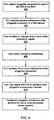
- Figure 8 illustrates a method for configuring pluggable components using a graphical user interface (GUI) to the BCU 206 according to one embodiment.
- Figure 9 illustrates a method for configuring pluggable components using a command line interface to the BCU according to one embodiment.
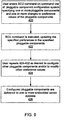
- Figure 10 illustrates a method for configuring pluggable components using a batch file containing BCU commands and executed from a command line.
- Various embodiments of a BCU 206 may provide one or more of these methods.
- a user may select a pluggable component 208 to be configured from the GUI of the BCU 206, as indicated at 400.
- the GUI may have been invoked from the command line using a BCU command (e.g. "usegui" as described above).
- the user may specify the pluggable component 208 to be configured in the GUI in the command line that invokes the BCU 206.
- the user may select an "Open" menu command to bring up a file open dialog from the GUI window, and select the pluggable component 208 to be configured from the file open dialog
- the BCU 206 may display the editable preferences of the pluggable component 208 selected in 400 in a GUI window 300, as indicated at 402.
- the preferences may be displayed substantially similarly to the example GUI windows 300A and 300B as illustrated in Figures 4 and 5, respectively.
- the user may then modify or change one or more of the preference values displayed in the GUI window, as indicated at 404.
- the user may use methods of editing the preference values similar to those described above for Figure 4.
- the user may then save the modified preferences to the pluggable component 208.
- the user may select one of one or more menu functions for saving the modified preferences to the currently open pluggable component 208 or for saving the modified preferences to a new pluggable component 208.
- the user may use a menu command to make a copy of the original pluggable component, with the newly configured preference values saved to the new pluggable component 208.
- the user may close the currently opened GUI window 300 (e.g. using a menu command or close box on the window) and be prompted to save the modified preference values to the pluggable component 208.
- the BCU updates the one or more modified preference values in the pluggable component 208 in response to the save initiated by the user in 406.
- the user may repeat 400-408 for one or more pluggable components 208 as indicated at 410.
- the user may use the GUI to configure a plurality of pluggable components 208 prior to distributing the components to embedded server systems 212.
- the configured pluggable component(s) 208 may be delivered to one or more embedded server systems 212.
- the pluggable components 208 may be delivered to embedded server systems 212 from the configuration system 202 via a network (e.g. the Internet).
- a user may enter a BCU command as described above to a BCU command line interface on a pluggable component configuration system specifying one or more pluggable components 208 and one or more changes to preference values of the pluggable components 208, as indicated at 420.
- the entered BCU command is executed, updating the specified preferences in the specified pluggable components 208, as indicated at 422.
- the user may repeat 420-422 for one or more pluggable components 208, as indicated at 424.
- the user may use the command line interface to configure a plurality of pluggable components 208 prior to distributing the components to embedded server systems 212.
- the configured pluggable component(s) 208 may be delivered to one or more embedded server systems 212.
- the pluggable components 208 may be delivered to embedded server systems 212 from the configuration system 202 via a network (e.g. the Internet).
- a user may create and/or open a previously existing batch file, as indicated at 430.
- the user may enter one or more BCU commands as described above in the batch file, with each command specifying one or more pluggable components and one or more changes to the preference values of the specified pluggable components 432.
- the batch file may then be executed from the command line interface of the pluggable component configuration system, as indicated at 434.
- the execution of the one or more commands in the batch file by the BCU may update the specified preferences in the specified pluggable components as indicated at 436.
- the user may repeat 430-434 for one or more batch files, as indicated at 438.
- the user may use batch files to configure a plurality of pluggable components 208 prior to distributing the components to embedded server systems 212.
- the configured pluggable component(s) 208 may be delivered to one or more embedded server systems 212.
- the pluggable components 208 may be delivered to embedded server systems 212 from the configuration system 202 via a network (e.g. the Internet).
- a carrier medium may include storage media or memory media such as magnetic or optical media, e.g., disk or CD-ROM, volatile or non-volatile media such as RAM (e.g. SDRAM, DDR SDRAM, RDRAM, SRAM, etc.), ROM, etc. as well as transmission media or signals such as electrical, electromagnetic, or digital signals, conveyed via a communication medium such as network and/or a wireless link.
- storage media or memory media such as magnetic or optical media, e.g., disk or CD-ROM, volatile or non-volatile media such as RAM (e.g. SDRAM, DDR SDRAM, RDRAM, SRAM, etc.), ROM, etc.
- RAM e.g. SDRAM, DDR SDRAM, RDRAM, SRAM, etc.
- ROM etc.
- transmission media or signals such as electrical, electromagnetic, or digital signals
Landscapes
- Engineering & Computer Science (AREA)
- Software Systems (AREA)
- Theoretical Computer Science (AREA)
- General Engineering & Computer Science (AREA)
- Physics & Mathematics (AREA)
- General Physics & Mathematics (AREA)
- Stored Programmes (AREA)
- Input Circuits Of Receivers And Coupling Of Receivers And Audio Equipment (AREA)
- Stabilization Of Oscillater, Synchronisation, Frequency Synthesizers (AREA)
- Materials For Medical Uses (AREA)
- Computer And Data Communications (AREA)
Claims (54)
- Verfahren zum Konfigurieren von steckfähigen bzw. einsteckbaren Bauelementen, wobei das Verfahren aufweist:wobei die eine oder die mehreren steckfähigen Komponenten innerhalb des einen oder der mehreren anderen Einrichtungen entsprechend den konfigurierten Vorzugswerten ausführbar sind, um für Benutzer der einen oder mehreren anderen Einrichtungen Dienstleistungsfunktionen bereitzustellen.Konfigurieren von Vorzugswerten für eine oder mehrere ausführbare steckfähige Komponenten an einem ersten Gerät entsprechend einer Benutzereingabe, undVerteilen der einen oder mehreren steckfähigen Komponenten auf ein oder mehrere Geräte über ein Netzwerk im Anschluß an das Konfigurieren und entsprechend einer Benuzerangabe,
- Verfahren nach Anspruch 1, wobei das Konfigurieren der Vorzugswerte für die eine oder mehreren steckfähigen Komponenten an einer ersten Einrichtung aufweist:Empfangen einer Benutzereingabe an einer graphischen Benutzerschnittstelle der ersten Einrichtung, undModifizieren der Vorzugswerte einer ersten der einen oder mehreren steckfähigen Komponenten entsprechend der empfangenen Benutzereingabe.
- Verfahren nach Anspruch 2, welches weiterhin das Anzeigen eines aktuellen Wertes auf der graphischen Benutzerschnittstelle für jeden der Vorzugswerte der ersten steckfähigen Komponente aufweist, wobei die empfangene Benutzereingabe einen oder mehrere der angezeigten aktuellen Werte verändert.
- Verfahren nach Anspruch 2, welches weiterhin die Validierung der empfangenen Benutzereingabe vor der Modifizierung der Vorzugswerte aufweist.
- Verfahren nach Anspruch 1, wobei das Konfigurieren der Vorzugswerte für eine oder mehrere steckfähige Komponenten an einer Einrichtung aufweist:Empfangen einer Benutzereingabe in eine Befehlsleitungsschnittstelle der ersten Einrichtung, undModifizieren der Vorzugswerte einer ersten der einen oder mehreren steckfähigen Komponenten entsprechend der empfangenen Benutzereingabe.
- Verfahren nach Anspruch 5, wobei die empfangene Benutzereingabe einen oder mehrere der Vorzugswerte der ersten steckfähigen Komponente und einen neuen Wert für jeden der spezifizierten Vorzugswerte spezifiziert.
- Verfahren nach Anspruch 5, welches weiterhin die Validierung der empfangenen Benutzereingabe vor der Modifizierung der Vorzugswerte aufweist.
- Verfahren nach Anspruch 1, wobei die Konfigurierung von Vorzugswerte einer oder mehrerer steckfähiger Komponenten an einer ersten Einrichtung das Modifizieren von einem oder mehreren der Vorzugswerte zumindest einer oder mehrerer der steckbaren Komponenten aufweist.
- Verfahren nach Anspruch 1, welches weiterhin die Initialisierung jedes der Vorzugswerte von jeder der einen oder mehreren steckfähigen Komponenten auf einen Standardwert für den Vorzugswert vor dem Konfigurieren aufweist.
- Verfahren nach Anspruch 1, wobei die eine oder die mehreren steckfähigen Komponenten eine Mehrzahl von steckfähigen Komponenten darstellen, wobei jede aus der Mehrzahl von steckfähigen Komponenten Kopien einer ersten steckfähigen Komponente sind.
- Verfahren nach Anspruch 10, wobei die eine oder die mehreren anderen Einrichtungen eine Mehrzahl von Einrichtungen sind, wobei die Konfigurierung von Vorzugswerten das Modifizieren der Vorzugswerte für jede aus der Mehrzahl von steckfähigen Komponenten für die Ausführung innerhalb einer entsprechenden aus der Mehrzahl von Einrichtungen aufweist.
- Verfahren nach Anspruch 11, wobei die Verteilung das Aussenden jeder der Mehrzahl von steckfähigen Komponenten an eine entsprechende aus der Mehrzahl von Einrichtungen über das Netzwerk aufweist.
- Verfahren nach Anspruch 1, wobei die Konfigurierung von Vorzugswerten für eine oder mehrere steckfähige Komponenten an einer ersten Einrichtung aufweist:wobei das Ausführen der Ausgangsdatei das Ausführen von jedem der einen oder mehreren Konfigurationseinträge in der Ausgangsdatei aufweist, wobei jeder der einen oder mehreren Konfigurationseinträge den spezifizierten Vorzugswert für die spezifizierte steckfähige Komponente auf den neuen Wert des Konfigurationseintrages einstellt, wenn sie ausgeführt wird.Erzeugen einer Ausgangsdatei, welche eine oder mehrere Konfigurationseinträge für die eine oder die mehreren steckfähigen Komponenten aufweist, wobei jeder Konfigurationseintrag umfaßt:Information, die die eine oder die mehreren steckfähigen Komponenten spezifiziert,Information, welche die Vorzugswerte für die spezifizierte steckfähige Komponente spezifiziert, und einen neuen Wert für den spezifizierten Vorzugswert, undAusführen der Ausgangsdatei der ersten Einrichtung,
- Verfahren nach Anspruch 13, wobei die Ausgangsdatei weiterhin eine oder mehrere Verteilungseinträge aufweist, wobei jeder Verteilungseintrag umfaßt:wobei das Ausführen der Ausgangsdatei das Ausführen jedes der einen oder mehreren Verteilungseinträge in der Ausgangsdatei aufweist, undInformation, welche eine der einen oder mehreren steckfähigen Komponenten spezifiziert, undInformation, welche eine der einen oder mehreren anderen Einrichtungen als eine Zieleinrichtung für die spezifizierte steckfähige Komponente angibt,
wobei das Ausführen jedes der einen oder mehreren Verteilungseinträge das Senden der spezifizierten steckfähigen Komponente an die spezifizierte Zieleinrichtung über das Netzwerk aufweist. - Verfahren nach Anspruch 1, wobei jede der einen oder mehreren steckfähigen Komponenten eine Vorzugsdatei aufweist, welche die Vorzugswerte enthält, welche der steckfähigen Komponente zugeordnet sind.
- Verfahren nach Anspruch 15, wobei die Vorzugsdateien Dateien mit Eigenschaften der Java-Programmiersprache sind.
- Verfahren nach Anspruch 1, wobei jede der einen oder mehreren anderen Einrichtungen einen eingebetteten Server aufweist, wobei die eine oder die mehreren steckfähigen Komponenten innerhalb des eingebetteten Servers jeder der einen oder mehreren anderen Einrichtungen ausführbar sind.
- Verfahren nach Anspruch 17, wobei die eingebetteten Server nach Java-eingebetteten Server aufweisen.
- Verfahren nach Anspruch 1, wobei die steckfähigen Komponenten Java-Archivdateien (JAR-Dateien) sind.
- Verfahren nach Anspruch 1, wobei das Netzwerk das Internet ist.
- System mit:wobei die erste Einrichtung so ausgestaltet ist, daß sie:einer ersten Einrichtung, undeiner Mehrzahl von Einrichtungen, die so betreibbar sind, daß sie die erste Einrichtung über ein Netzwerk anschließen,wobei die Mehrzahl von steckfähigen Komponenten innerhalb der Mehrzahl von Einrichtungen entsprechend den konfigurierten Vorzugswerten ausführbar sind, um Dienstleistungen für Benutzer der Mehrzahl von Einrichtungen bereitzustellen.Vorzugswerte für eine Mehrzahl von ausführbaren, steckfähigen Komponenten gemäß einer Benutzereingabe konfiguriert, unddie Mehrzahl von steckfähigen Komponenten auf die Mehrzahl von Einrichtungen über das Netzwerk im Anschluß an die Konfigurierung und entsprechend einer Benutzereingabe verteilt, und
- System nach Anspruch 21, wobei die erste Einrichtung eine Anzeigekomponente (Display) aufweist, wobei beim Konfigurieren von Vorzugswerten für eine Mehrzahl von steckfähigen Komponenten die erste Einrichtung weiterhin so konfiguriert wird, daß sie
in einer graphischen Benutzerschnittstelle der Anzeigekomponente einen aktuellen Wert jedes der Vorzugswerte einer ersten aus der Mehrzahl von steckfähigen Komponenten anzeigt,
Benutzereingaben an die graphische Benutzerschnittstelle empfängt unter Veränderung von einem oder mehreren der angezeigten aktuellen Werte, und die Vorzugswerte der ersten steckfähigen Komponente entsprechend der empfangenen Benutzereingabe modifiziert. - System nach Anspruch 21, wobei die erste Einrichtung weiterhin eine Anzeigekomponente (Display) aufweist, wobei beim Konfigurieren von Vorzugswerten für eine Mehrzahl von steckfähigen Komponenten die erste Einrichtung so konfiguriert ist, daß sie
Benutzereingaben in eine Befehlsleitungsschnittstelle auf der Anzeigekomponente der Einrichtung empfängt, wobei die Benutzereingabe einen oder mehrere der Vorzugswerte der ersten steckfähigen Komponente sowie einen neuen Wert für jeden der spezifizierten Vorzugswerte spezifiziert, und
die Vorzugswerte einer ersten aus der Mehrzahl von steckfähigen Komponenten entsprechend der empfangenen Benutzereingabe modifiziert. - System nach Anspruch 21, wobei der Prozessor weiterhin so betreibbar ist, daß er jeden der Vorzugswerte jeder der Mehrzahl von steckfähigen Komponenten vor der Konfigurierung auf einen Standardwert für den Vorzugswert setzt bzw. initialisiert, und wobei beim Konfigurieren der Vorzugswerte der Mehrzahl von steckfähigen Komponenten die erste Einrichtung weiter-hin so ausgestaltet ist, daß sie einen oder mehrere der standardmäßigen Vorzugswerte zumindest einer der Mehrzahl von steckfähigen Komponenten modifiziert.
- System nach Anspruch 21, wobei alle aus der Mehrzahl von steckfähigen Komponenten Kopien einer ersten steckfähigen Komponente sind, wobei beim Konfigurieren von Vorzugswerten die erste Einrichtung weiterhin so konfiguriert ist, daß sie die Vorzugswerte für jede der Mehrzahl von steckfähigen Komponenten für die Ausführung innerhalb einer entsprechenden aus der Mehrzahl von Einrichtungen wunschgemäß anpaßt.
- System nach Anspruch 25, wobei beim Verteilen die erste Einrichtung weiterhin so konfiguriert ist, daß sie jede aus der Mehrzahl von steckfähigen Komponenten über das Netzwerk an die entsprechende aus der Mehrzahl von Einrichtungen sendet.
- System nach Anspruch 21, wobei beim Konfigurieren von Vorzugswerten für eine Mehrzahl von steckfähigen Komponenten die erste Einrichtung weiterhin so konfiguriert ist, daß sie
eine Ausgangsdatei erzeugt, welche eine oder mehrere Konfigurationseinträge für die Mehrzahl von steckfähigen Komponenten in Reaktion auf eine Benutzereingabe aufweisen, wobei jeder Konfigurationseintrag umfaßt:wobei beim Ausführen der Ausgangsdatei die erste Einrichtung weiterhin so konfiguriert ist, daß sie jeden der einen oder mehreren Konfigurationseinträge in der Ausgangsdatei ausführt, wobei jeder der einen oder mehreren Konfigurationseinträge den spezifizierten Vorzugswert für die spezifizierte steckfähige Komponente auf den neuen Wert des Konfigurationseintrags einstellt, wenn er ausgeführt wird.Informationen, welche eine aus der Mehrzahl von steckfähigen Komponenten spezifiziert,Information, welche einen der Vorzugswerte für die spezifizierte steckfähige Komponenten spezifiziert, und einen neuen Wert für den spezifizierten Vorzugswert, undAusführen der Ausgangsdatei, - System nach Anspruch 27, wobei die Ausgangsdatei weiterhin einen oder mehrere Verteilungseinträge aufweist, wobei jeder Verteilungseintrag umfaßt:wobei beim Ausführen der Ausgangsdatei die erste Einrichtung weiterhin so konfiguriert wird, daß sie jeden der einen oder mehreren Verteilungseinträge in der Ausgangsdatei ausführt, undInformation, die eine aus der Mehrzahl von steckfähigen Komponenten spezifiziert, undInformation, welche eine aus der Mehrzahl von Einrichtungen als eine Zieleinrichtung für die spezifizierte steckfähige Komponente spezifiziert,
wobei beim Ausführen jedes der einen oder mehreren Verteilungseinträge die erste Einrichtung weiterhin so ausgestaltet ist, daß sie die spezifizierte steckfähige Komponente über das Netzwerk an die spezifizierte Zieleinrichtung sendet. - System nach Anspruch 21, wobei jede aus der Mehrzahl von steckfähigen Komponenten eine Vorzugsdatei aufweist, welche die der steckfähigen Komponente zugeordneten Vorzugswerte enthält.
- System nach Anspruch 21, wobei die Vorzugsdateien Dateien mit Eigenschaften der Java-Programmiersprache sind.
- System nach Anspruch 21, wobei jede aus der Mehrzahl von Einrichtungen einen eingebetteten Server aufweist, wobei die Mehrzahl von steckfähigen Komponenten innerhalb der eingebetteten Server der Mehrzahl von Einrichtungen ausführbar sind.
- System nach Anspruch 31, wobei die eingebetteten Server nach Java eingebettete Server aufweisen.
- System nach Anspruch 21, wobei die steckfähigen Komponenten Java-Archivdateien (JAR-Dateien) sind.
- System nach Anspruch 21, wobei das Netzwerk das Internet ist.
- Einrichtung, welche aufweist:wobei die eine oder die mehreren steckfähigen Komponenten innerhalb der einen oder mehreren anderen Einrichtungen entsprechend dem konfigurierten Vorzugswert ausführbar sind, um für Benutzer der einen oder mehreren anderen Einrichtungen Dienstleistungen bereitzustellen.einen Speicher, der so konfiguriert ist, daß er Programmanweisungen speichert,eine Eingabeeinrichtung, die so konfiguriert ist, daß sie eine Benutzereingabe aufnimmt, undeinen Prozessor, der so ausgestaltet ist, daß er die Programmanweisungen aus diesem Speicher liest und die Programmanweisungen ausführt, wobei in Reaktion auf die Ausführung von Programmanweisungen der Prozessor derart betreibbar ist, daß er:Vorzugswerte für eine oder mehrere ausführbare, steckfähige Komponenten auf der Einrichtung entsprechend der empfangenen Benutzereingabe konfiguriert, unddie eine oder die mehreren steckfähigen Komponenten im Anschluß an das Konfigurieren und entsprechend einer Benutzereingabe auf eine oder mehrere andere Einrichtungen über ein Netzwerk verteilt,
- Einrichtung nach Anspruch 35, welche weiterhin aufweist:wobei beim Konfigurieren von Vorzugswerten für die eine oder mehreren steckfähigen Komponenten der Prozessor weiterhin so betreibbar ist, daß ereine Anzeigekomponente (Display),
in einer graphischen Benutzerschnittstelle auf der Anzeigekomponente einen aktuellen Wert jedes der Vorzugswerte einer ersten von einer oder mehreren steckfähigen Komponenten anzeigt,
eine Benutzereingabe in die graphische Benutzerschnittstelle empfängt, welche eine oder mehrere der angezeigten aktuellen Werte verändert, und
die Vorzugswerte der ersten steckfähigen Komponente entsprechend der empfangenen Benutzereingabe modifiziert. - Einrichtung nach Anspruch 35, welche weiterhin aufweist:wobei beim Konfigurieren von Vorzugswerte für eine oder mehrere steckfähige Komponenten der Prozessor weiterhin so betreibbar ist, daß ereine Anzeigekomponente,
eine Benutzereingabe an eine Befehlsleitungsschnittstelle auf der Display-Komponente der Einrichtung empfängt, wobei die empfangene Benutzereingabe einen oder mehrere der bevorzugten Werte der ersten steckfähigen Komponente spezifiziert, und auch einen neuen Wert für jeden der spezifizierten Vorzugswerte, und
die Vorzugswerte einer ersten der einen oder mehreren steckfähigen Komponenten entsprechend der empfangenen Benutzereingabe modifiziert. - Einrichtung nach Anspruch 35, wobei der Prozessor weiterhin so betreibbar ist, daß er jeden der Vorzugswerte jeder der einen oder mehreren steckfähigen Komponenten vor der Konfigurierung auf einen Standardwert für den Vorzugswert einstellt.
- Einrichtung nach Anspruch 35, wobei die einen oder mehreren steckfähigen Komponenten eine Mehrzahl steckfähiger Komponenten sind, wobei jede aus der Mehrzahl von steckfähigen Komponenten eine Kopie einer ersten steckfähigen Komponente ist, wobei die einen oder mehreren anderen Einrichtungen eine Mehrzahl von Einrichtungen sind, wobei beim Konfigurieren von Vorzugswerten der Prozessor weiterhin so betreibbar ist, daß er die Vorzugswerte für jede der Mehrzahl von steckfähigen Komponenten für die Ausführung innerhalb einer entsprechenden aus der Mehrzahl von Einrichtungen modifiziert.
- Einrichtung nach Anspruch 39, wobei beim Verteilen der Prozessor weiterhin so betreibbar ist, daß er jede aus der Mehrzahl von steckfähigen Komponenten an die entsprechenden der Mehrzahl von Einrichtungen über das Netzwerk sendet.
- Einrichtung nach Anspruch 35, wobei beim Konfigurieren von Vorzugswerten für eine oder mehrere steckfähigen Komponenten an einer ersten Einrichtung der Prozessor weiterhin so betreibbar ist, daß er:wobei jeder Konfigurationseintrag umfaßt:eine Ausgangsdatei erzeugt, die in Reaktion auf eine Benutzereingabe einen oder mehrere Konfigurationseinträge für die eine oder die mehreren steckfähigen Komponenten aufweist,wobei, beim Ausführen der Ausgangsdatei der Prozessor weiterhin so betreibbar ist, daß er jeden der einen der mehreren Konfigurationseinträge in der Ausgangsdatei ausführt, wobei jeder der einen oder mehreren Konfigurationseinträge den spezifizierten Vorzugswert für die spezifizierte steckfähige Komponente auf den neuen Wert des Konfigurationseintrags einstellt, wenn er ausgeführt wird.Information, welche die eine oder mehreren steckfähigen Komponenten spezifiziert, Information, welches einen der Vorzugswerte für die spezifizierte steckfähige Komponente spezifiziert, undeinen neuen Wert für den spezifizierten Vorzugswert, undAusführen der Ausgangsdatei,
- Einrichtung nach Anspruch 35, wobei jede der einen oder mehreren steckfähigen Komponenten eine Vorzugsdatei aufweist, welche die Vorzugswerte, die der steckfähigen Komponente zugeordnet sind, aufweist.
- Einrichtung nach Anspruch 35, wobei die steckfähigen Komponenten Java-Archivdateien (JAR-Dateien) sind.
- Einrichtung nach Anspruch 35, wobei das Netzwerk das Internet ist.
- Trägermedium, welches Programmanweisungen aufweist, wobei die Programmanweisungen computerausführbar sind, um folgendes zu implementieren:wobei die eine oder die mehreren steckfähigen Komponenten innerhalb der einen oder mehreren Einrichtungen entsprechend den konfigurierten Vorzugswerten ausführbar sind, um für Benutzer der einen oder mehreren Einrichtungen Dienstleistungen bzw. Dienste bereitzustellen.das Konfigurieren von Vorzugswerten für eine oder mehrere ausführbare steckfähige Komponenten an einer ersten Einrichtung entsprechend der Benutzereingabe, unddas Verteilen der einen oder mehreren steckfähigen Komponenten an eine oder mehrere Einrichtungen über ein Netzwerk, und zwar im Anschluß an die Konfigurierung und entsprechend einer Benutzereingabe,
- Trägermedium nach Anspruch 45, wobei beim Konfigurieren von Vorzugswerten für eine oder mehrere steckfähige Komponenten die Programmanweisungen weiterhin computerausführbar sind, um folgendes zu implementieren:Anzeigen eines aktuellen Wertes jedes der Vorzugswerte einer ersten der einen oder mehreren steckfähigen Komponenten auf einer graphischen Benutzerschnittstelle,Empfangen der Benutzereingabe in die graphische Benutzerschnittstelle, wobei die empfangene Benutzereingabe einen oder mehrere der angezeigten aktuellen Werte verändert, undModifizieren der Vorzugswerte für die erste steckfähige Komponente entsprechend der empfangenen Benutzereingabe.
- Trägermedium nach Anspruch 45, wobei beim Ausführen von Vorzugswerten für eine oder mehrere steckfähige Komponenten die Programmanweisungen weiterhin computerausführbar sind, um folgendes zu implementieren:Empfangen einer Benutzereingabe in die Schnittstelle einer Befehlsleitung, wobei die empfangene Benutzereingabe einen oder mehrere der Vorzugswerte der ersten der einen oder mehreren steckfähigen Komponenten und einen neuen Wert für jeden der spezifizierten Vorzugswerte spezifiziert, undSpezifizieren der Vorzugswerte der ersten steckfähigen Komponente entsprechend der empfangenen Benutzereingabe.
- Trägermedium nach Anspruch 45, wobei die Programmanweisungen weiterhin durch einen Computer ausführbar sind, um das Initialisieren jedes der Vorzugswerte für jede der einen oder mehreren steckfähigen Komponenten auf einen Standardwert für den Vorzugswert vor der Konfigurierung zu implementieren.
- Trägermedium nach Anspruch 45, wobei die eine oder die mehreren steckfähigen Komponenten eine Mehrzahl von steckfähigen Komponenten sind, wobei alle aus der Mehrzahl von steckfähigen Komponenten Kopien einer ersten steckfähigen Komponente sind, wobei die einen oder mehreren Einrichtungen eine Mehrzahl von Einrichtungen darstellen, wobei beim Konfigurieren von Vorzugswerten die Programmanweisungen weiterhin computerausführbar sind, um das Modifizieren der Vorzugswerte für jede aus der Mehrzahl von steckfähigen Komponenten für die Ausführung innerhalb einer entsprechenden aus der Mehrzahl von Einrichtungen zu implementieren.
- Trägermedium nach Anspruch 49, wobei beim Verteilen die Programmanweisungen weiterhin computerausführbar sind, um das Senden jeder der Mehrzahl von steckfähigen Komponenten an eine entsprechende aus der Mehrzahl von Einrichtungen über das Netzwerk zu implementieren.
- Trägermedium nach Anspruch 45, wobei beim Konfigurieren von Vorzugswerten für eine oder mehrere steckfähige Komponenten die Programmanweisungen weiterhin computerausführbar sind, um folgendes zu implementieren:Erzeugen einer Ausgangsdatei, die einen oder mehrere Konfigurationseinträge für die eine oder die mehreren steckfähigen Komponenten aufweist, wobei jeder Konfigurationseinträge umfaßt:Information, welche die eine oder die mehreren steckfähigen Komponenten spezifiziert, Information, welche einen der Vorzugswerte für die spezifizierte steckfähige Komponente spezifiziert, sowie einen neuen Wert für den spezifizierten Vorzugswert spezifiziert, undAusführen jedes der einen oder mehreren Konfigurationseinträge in der Ausgangsdatei, wobei jeder der einen oder mehreren Konfigurationseinträge den spezifizierten Vorzugswert für die spezifizierte steckfähige Komponente auf den neuen Wert des Konfigurationseintrags einstellt, wenn er ausgeführt wird.
- Trägermedium nach Anspruch 45, wobei jede der einen oder mehreren Einrichtungen einen eingebetteten Server aufweist, wobei die eine oder die mehreren steckfähigen Komponenten innerhalb des eingebetteten Servers für jede der einen oder mehreren Einrichtungen ausführbar sind.
- Trägermedium nach Anspruch 52, wobei die steckfähigen Komponenten Java-Archivdateien (JAR-Dateien) sind.
- Trägermedium nach Anspruch 45, wobei das Netzwerk das Internet ist.
Applications Claiming Priority (3)
| Application Number | Priority Date | Filing Date | Title |
|---|---|---|---|
| US16971999P | 1999-12-08 | 1999-12-08 | |
| US169719P | 1999-12-08 | ||
| PCT/US2000/033430 WO2001042909A2 (en) | 1999-12-08 | 2000-12-07 | Technique for configuring network deliverable components |
Publications (2)
| Publication Number | Publication Date |
|---|---|
| EP1236089A2 EP1236089A2 (de) | 2002-09-04 |
| EP1236089B1 true EP1236089B1 (de) | 2003-06-18 |
Family
ID=22616908
Family Applications (1)
| Application Number | Title | Priority Date | Filing Date |
|---|---|---|---|
| EP00984121A Expired - Lifetime EP1236089B1 (de) | 1999-12-08 | 2000-12-07 | Verfahren und system zur konfiguration von komponenten, ausgebbar in einem netzwerk |
Country Status (6)
| Country | Link |
|---|---|
| US (1) | US7206824B2 (de) |
| EP (1) | EP1236089B1 (de) |
| AT (1) | ATE243334T1 (de) |
| AU (1) | AU2079701A (de) |
| DE (1) | DE60003457T2 (de) |
| WO (1) | WO2001042909A2 (de) |
Families Citing this family (37)
| Publication number | Priority date | Publication date | Assignee | Title |
|---|---|---|---|---|
| US6647015B2 (en) * | 2000-05-22 | 2003-11-11 | Sarnoff Corporation | Method and apparatus for providing a broadband, wireless, communications network |
| KR100455566B1 (ko) * | 2000-06-30 | 2004-11-09 | 인터내셔널 비지네스 머신즈 코포레이션 | 코드 갱신을 위한 장치 및 방법 |
| US6940491B2 (en) * | 2000-10-27 | 2005-09-06 | International Business Machines Corporation | Method and system for generating hyperlinked physical copies of hyperlinked electronic documents |
| US20020124061A1 (en) * | 2000-11-27 | 2002-09-05 | Paul Mossman | Configuration system and method |
| US8271626B2 (en) * | 2001-01-26 | 2012-09-18 | American Power Conversion Corporation | Methods for displaying physical network topology and environmental status by location, organization, or responsible party |
| US20020112043A1 (en) * | 2001-02-13 | 2002-08-15 | Akira Kagami | Method and apparatus for storage on demand service |
| US20020178227A1 (en) * | 2001-05-25 | 2002-11-28 | International Business Machines Corporation | Routing instant messages using configurable, pluggable delivery managers |
| US20020198947A1 (en) * | 2001-06-21 | 2002-12-26 | Robert Sesek | Electronic document sender system and method with external address access |
| US7278143B2 (en) * | 2001-06-28 | 2007-10-02 | Microsoft Corporation | System and related methods for accessing management functionality through a command line utility |
| US7774435B2 (en) * | 2001-07-26 | 2010-08-10 | Oracle America, Inc. | System and method for batch tuning intelligent devices |
| US20040205459A1 (en) * | 2001-10-26 | 2004-10-14 | Green Brett A. | Browser-controlled scanning system and method |
| US20030117378A1 (en) | 2001-12-21 | 2003-06-26 | International Business Machines Corporation | Device and system for retrieving and displaying handwritten annotations |
| EP1361509B1 (de) * | 2002-05-08 | 2013-07-10 | Sap Ag | Softwareauslieferungsverwalter |
| US7209945B2 (en) * | 2002-09-11 | 2007-04-24 | Bellsouth Intellectual Property Corporation | Application services gateway |
| US7647562B2 (en) * | 2003-04-03 | 2010-01-12 | National Instruments Corporation | Deployment and execution of a graphical program on an embedded device from a PDA |
| US7310779B2 (en) | 2003-06-26 | 2007-12-18 | International Business Machines Corporation | Method for creating and selecting active regions on physical documents |
| US8229888B1 (en) | 2003-10-15 | 2012-07-24 | Radix Holdings, Llc | Cross-device playback with synchronization of consumption state |
| GB2411331A (en) | 2004-02-19 | 2005-08-24 | Trigenix Ltd | Rendering user interface using actor attributes |
| US8180864B2 (en) * | 2004-05-21 | 2012-05-15 | Oracle International Corporation | System and method for scripting tool for server configuration |
| US8156485B2 (en) * | 2004-12-03 | 2012-04-10 | Google Inc. | Method and apparatus for creating a pluggable, prioritized configuration engine to be used for configuring a software during installation, update and new profile creation |
| US7475396B2 (en) * | 2004-12-03 | 2009-01-06 | International Business Machines Corporation | Method and apparatus for defining, building and deploying pluggable and independently configurable install components |
| WO2008087729A1 (ja) * | 2007-01-18 | 2008-07-24 | Mitsubishi Electric Corporation | アプリケーション設定端末、アプリケーション実行端末及び設定情報管理サーバ |
| AU2008255030B2 (en) | 2007-05-15 | 2014-02-20 | Schneider Electric It Corporation | Methods and systems for managing facility power and cooling |
| US8566818B2 (en) * | 2007-12-07 | 2013-10-22 | Roche Diagnostics Operations, Inc. | Method and system for configuring a consolidated software application |
| GB0724646D0 (en) * | 2007-12-19 | 2008-01-30 | Blue Whale Systems Ltd | System for configuration of an application for a communication device |
| US8316343B2 (en) * | 2007-12-29 | 2012-11-20 | Amx Llc | Self-describing device module and system and computer-readable medium for the production thereof |
| US20100299438A1 (en) * | 2008-01-21 | 2010-11-25 | Gottfried Zimmerman | Online resource server for allowing device control and access to digital content trhough pluggable user interfaces |
| WO2009094402A1 (en) * | 2008-01-21 | 2009-07-30 | Gottfried Zimmermann | Online resource server for allowing device control and access to digital content through pluggable user interfaces |
| US20090300154A1 (en) * | 2008-05-29 | 2009-12-03 | International Business Machines Corporation | Managing performance of a job performed in a distributed computing system |
| US8495189B2 (en) * | 2008-05-29 | 2013-07-23 | International Business Machines Corporation | Managing the performance of an application carried out using a plurality of pluggable processing components |
| US8572220B2 (en) * | 2009-04-29 | 2013-10-29 | Schneider Electric It Corporation | System and method for managing configurations of NCPI devices |
| US20120310882A1 (en) * | 2011-06-03 | 2012-12-06 | Apple Inc. | Key value data storage |
| WO2013095516A1 (en) | 2011-12-22 | 2013-06-27 | Schneider Electric It Corporation | Analysis of effect of transient events on temperature in a data center |
| US20130254761A1 (en) * | 2012-03-20 | 2013-09-26 | Cellco Partnership D/B/A Verizon Wireless | Granular application sessions tagging |
| CN105991720B (zh) | 2015-02-13 | 2019-06-18 | 阿里巴巴集团控股有限公司 | 配置变更方法、设备及系统 |
| US10904088B2 (en) * | 2018-11-15 | 2021-01-26 | Western Digital Technologies, Inc. | Reconfiguring network settings for operating configuration installation |
| US20240330008A1 (en) * | 2023-04-03 | 2024-10-03 | Lightguide, Inc. | Method and apparatus for system component configuration and diagnostic scanning |
Family Cites Families (18)
| Publication number | Priority date | Publication date | Assignee | Title |
|---|---|---|---|---|
| US5742829A (en) * | 1995-03-10 | 1998-04-21 | Microsoft Corporation | Automatic software installation on heterogeneous networked client computer systems |
| US5802291A (en) * | 1995-03-30 | 1998-09-01 | Sun Microsystems, Inc. | System and method to control and administer distributed object servers using first class distributed objects |
| US5721824A (en) | 1996-04-19 | 1998-02-24 | Sun Microsystems, Inc. | Multiple-package installation with package dependencies |
| US5875327A (en) * | 1997-02-18 | 1999-02-23 | International Business Machines Corporation | Hierarchy of preferences and preference groups |
| US5903728A (en) * | 1997-05-05 | 1999-05-11 | Microsoft Corporation | Plug-in control including an independent plug-in process |
| US6173438B1 (en) * | 1997-08-18 | 2001-01-09 | National Instruments Corporation | Embedded graphical programming system |
| US6026437A (en) * | 1998-04-20 | 2000-02-15 | International Business Machines Corporation | Method and system in a computer network for bundling and launching hypertext files and associated subroutines within archive files |
| US7545816B1 (en) * | 1998-04-29 | 2009-06-09 | Ncr Corporation | Transaction processing systems maintenance |
| US6366916B1 (en) * | 1998-05-22 | 2002-04-02 | International Business Machines Corporation | Configurable and extensible system for deploying asset management functions to client applications |
| US6637020B1 (en) * | 1998-12-03 | 2003-10-21 | International Business Machines Corporation | Creating applications within data processing systems by combining program components dynamically |
| US6667972B1 (en) * | 1999-01-08 | 2003-12-23 | Cisco Technology, Inc. | Method and apparatus providing multi-service connections within a data communications device |
| US6912580B1 (en) * | 1999-01-27 | 2005-06-28 | International Business Machines Corporation | Virtual shadow briefcase in servers supporting moving embedded clients |
| US6629113B1 (en) * | 1999-06-30 | 2003-09-30 | International Business Machines Corporation | Method and system for dynamically adjustable and configurable garbage collector |
| US6370436B1 (en) * | 1999-03-26 | 2002-04-09 | Emware, Inc. | Distributed objects for a computer system |
| US6560606B1 (en) * | 1999-05-04 | 2003-05-06 | Metratech | Method and apparatus for processing data with multiple processing modules and associated counters |
| US6421755B1 (en) * | 1999-05-26 | 2002-07-16 | Dell Usa, L.P. | System resource assignment for a hot inserted device |
| US6636961B1 (en) * | 1999-07-09 | 2003-10-21 | International Business Machines Corporation | System and method for configuring personal systems |
| US6611876B1 (en) * | 1999-10-28 | 2003-08-26 | International Business Machines Corporation | Method for establishing optimal intermediate caching points by grouping program elements in a software system |
-
2000
- 2000-12-07 AT AT00984121T patent/ATE243334T1/de not_active IP Right Cessation
- 2000-12-07 AU AU20797/01A patent/AU2079701A/en not_active Abandoned
- 2000-12-07 WO PCT/US2000/033430 patent/WO2001042909A2/en not_active Ceased
- 2000-12-07 US US09/733,232 patent/US7206824B2/en not_active Expired - Lifetime
- 2000-12-07 DE DE60003457T patent/DE60003457T2/de not_active Expired - Lifetime
- 2000-12-07 EP EP00984121A patent/EP1236089B1/de not_active Expired - Lifetime
Also Published As
| Publication number | Publication date |
|---|---|
| WO2001042909A3 (en) | 2002-01-17 |
| ATE243334T1 (de) | 2003-07-15 |
| US20020116477A1 (en) | 2002-08-22 |
| AU2079701A (en) | 2001-06-18 |
| DE60003457T2 (de) | 2004-05-06 |
| DE60003457D1 (de) | 2003-07-24 |
| US7206824B2 (en) | 2007-04-17 |
| EP1236089A2 (de) | 2002-09-04 |
| WO2001042909A2 (en) | 2001-06-14 |
Similar Documents
| Publication | Publication Date | Title |
|---|---|---|
| EP1236089B1 (de) | Verfahren und system zur konfiguration von komponenten, ausgebbar in einem netzwerk | |
| US6571389B1 (en) | System and method for improving the manageability and usability of a Java environment | |
| US20020188941A1 (en) | Efficient installation of software packages | |
| US6954930B2 (en) | Remote validation of installation input data | |
| US6584612B1 (en) | Transparent loading of resources from read-only memory for an application program | |
| US5995756A (en) | System for internet-based delivery of computer applications | |
| US6008806A (en) | Shell extensions for an operating system | |
| US7707563B2 (en) | System and method for network-based computing | |
| US6557100B1 (en) | Fastpath redeployment of EJBs | |
| US6226654B1 (en) | Web document based graphical user interface | |
| US6920631B2 (en) | Software installation and validation using custom actions | |
| CA2604108C (en) | System and method of representing data entities of standard device applications as built-in components | |
| US20030037327A1 (en) | Run-time rule-based topological installation suite | |
| US5864850A (en) | Asynchronous-event opening component of a network component system | |
| US20030037328A1 (en) | Extending installation suites to include topology of suite's run-time environment | |
| US20030163807A1 (en) | Weighted selection of target systems for distributed software installation | |
| US8935623B1 (en) | Automatic API generation to functional PSoC blocks | |
| US20030018964A1 (en) | Object model and framework for installation of software packages using a distributed directory | |
| US8850388B2 (en) | Controlling application features | |
| US20080127055A1 (en) | Application proxy | |
| EP1703386B1 (de) | System und Verfahren zur Entwicklung von komponentbasierten Anwendungen | |
| US20070233717A1 (en) | Generic product configuration framework for building product specific installers | |
| Lavana et al. | {WebWise}{Tcl/Tk}: A {Safe-Tcl/Tk-based} Toolkit Enhanced for the World Wide Web | |
| GB2372119A (en) | Distributed computing system | |
| Hucka et al. | Systems Biology Workbench JavaTM Programmer’s Manual |
Legal Events
| Date | Code | Title | Description |
|---|---|---|---|
| PUAI | Public reference made under article 153(3) epc to a published international application that has entered the european phase |
Free format text: ORIGINAL CODE: 0009012 |
|
| 17P | Request for examination filed |
Effective date: 20020625 |
|
| AK | Designated contracting states |
Kind code of ref document: A2 Designated state(s): AT BE CH CY DE DK ES FI FR GB GR IE IT LI LU MC NL PT SE TR |
|
| AX | Request for extension of the european patent |
Free format text: AL;LT;LV;MK;RO;SI |
|
| GRAH | Despatch of communication of intention to grant a patent |
Free format text: ORIGINAL CODE: EPIDOS IGRA |
|
| RIC1 | Information provided on ipc code assigned before grant |
Free format text: 7G 06F 9/445 A |
|
| RIN1 | Information on inventor provided before grant (corrected) |
Inventor name: SOMASHEKAR, PARVATHI Inventor name: DELISLE, PIERRE Inventor name: BURROWES, DAVID, JOHN |
|
| RTI1 | Title (correction) |
Free format text: METHOD AND SYSTEM FOR CONFIGURING NETWORK DELIVERABLE COMPONENTS |
|
| GRAH | Despatch of communication of intention to grant a patent |
Free format text: ORIGINAL CODE: EPIDOS IGRA |
|
| RAP1 | Party data changed (applicant data changed or rights of an application transferred) |
Owner name: SUN MICROSYSTEMS, INC. |
|
| GRAA | (expected) grant |
Free format text: ORIGINAL CODE: 0009210 |
|
| AK | Designated contracting states |
Designated state(s): AT BE CH CY DE DK ES FI FR GB GR IE IT LI LU MC NL PT SE TR |
|
| PG25 | Lapsed in a contracting state [announced via postgrant information from national office to epo] |
Ref country code: IT Free format text: LAPSE BECAUSE OF FAILURE TO SUBMIT A TRANSLATION OF THE DESCRIPTION OR TO PAY THE FEE WITHIN THE PRESCRIBED TIME-LIMIT;WARNING: LAPSES OF ITALIAN PATENTS WITH EFFECTIVE DATE BEFORE 2007 MAY HAVE OCCURRED AT ANY TIME BEFORE 2007. THE CORRECT EFFECTIVE DATE MAY BE DIFFERENT FROM THE ONE RECORDED. Effective date: 20030618 Ref country code: TR Free format text: LAPSE BECAUSE OF FAILURE TO SUBMIT A TRANSLATION OF THE DESCRIPTION OR TO PAY THE FEE WITHIN THE PRESCRIBED TIME-LIMIT Effective date: 20030618 Ref country code: AT Free format text: LAPSE BECAUSE OF FAILURE TO SUBMIT A TRANSLATION OF THE DESCRIPTION OR TO PAY THE FEE WITHIN THE PRESCRIBED TIME-LIMIT Effective date: 20030618 Ref country code: BE Free format text: LAPSE BECAUSE OF FAILURE TO SUBMIT A TRANSLATION OF THE DESCRIPTION OR TO PAY THE FEE WITHIN THE PRESCRIBED TIME-LIMIT Effective date: 20030618 Ref country code: NL Free format text: LAPSE BECAUSE OF FAILURE TO SUBMIT A TRANSLATION OF THE DESCRIPTION OR TO PAY THE FEE WITHIN THE PRESCRIBED TIME-LIMIT Effective date: 20030618 Ref country code: FI Free format text: LAPSE BECAUSE OF FAILURE TO SUBMIT A TRANSLATION OF THE DESCRIPTION OR TO PAY THE FEE WITHIN THE PRESCRIBED TIME-LIMIT Effective date: 20030618 Ref country code: CH Free format text: LAPSE BECAUSE OF FAILURE TO SUBMIT A TRANSLATION OF THE DESCRIPTION OR TO PAY THE FEE WITHIN THE PRESCRIBED TIME-LIMIT Effective date: 20030618 Ref country code: LI Free format text: LAPSE BECAUSE OF FAILURE TO SUBMIT A TRANSLATION OF THE DESCRIPTION OR TO PAY THE FEE WITHIN THE PRESCRIBED TIME-LIMIT Effective date: 20030618 |
|
| REG | Reference to a national code |
Ref country code: GB Ref legal event code: FG4D |
|
| REG | Reference to a national code |
Ref country code: CH Ref legal event code: EP |
|
| REG | Reference to a national code |
Ref country code: IE Ref legal event code: FG4D |
|
| REF | Corresponds to: |
Ref document number: 60003457 Country of ref document: DE Date of ref document: 20030724 Kind code of ref document: P |
|
| PG25 | Lapsed in a contracting state [announced via postgrant information from national office to epo] |
Ref country code: SE Free format text: LAPSE BECAUSE OF FAILURE TO SUBMIT A TRANSLATION OF THE DESCRIPTION OR TO PAY THE FEE WITHIN THE PRESCRIBED TIME-LIMIT Effective date: 20030918 Ref country code: DK Free format text: LAPSE BECAUSE OF FAILURE TO SUBMIT A TRANSLATION OF THE DESCRIPTION OR TO PAY THE FEE WITHIN THE PRESCRIBED TIME-LIMIT Effective date: 20030918 Ref country code: GR Free format text: LAPSE BECAUSE OF FAILURE TO SUBMIT A TRANSLATION OF THE DESCRIPTION OR TO PAY THE FEE WITHIN THE PRESCRIBED TIME-LIMIT Effective date: 20030918 Ref country code: PT Free format text: LAPSE BECAUSE OF FAILURE TO SUBMIT A TRANSLATION OF THE DESCRIPTION OR TO PAY THE FEE WITHIN THE PRESCRIBED TIME-LIMIT Effective date: 20030918 |
|
| PG25 | Lapsed in a contracting state [announced via postgrant information from national office to epo] |
Ref country code: ES Free format text: LAPSE BECAUSE OF FAILURE TO SUBMIT A TRANSLATION OF THE DESCRIPTION OR TO PAY THE FEE WITHIN THE PRESCRIBED TIME-LIMIT Effective date: 20030929 |
|
| LTIE | Lt: invalidation of european patent or patent extension |
Effective date: 20030618 |
|
| NLV1 | Nl: lapsed or annulled due to failure to fulfill the requirements of art. 29p and 29m of the patents act | ||
| PG25 | Lapsed in a contracting state [announced via postgrant information from national office to epo] |
Ref country code: CY Free format text: LAPSE BECAUSE OF FAILURE TO SUBMIT A TRANSLATION OF THE DESCRIPTION OR TO PAY THE FEE WITHIN THE PRESCRIBED TIME-LIMIT Effective date: 20031207 Ref country code: LU Free format text: LAPSE BECAUSE OF NON-PAYMENT OF DUE FEES Effective date: 20031207 |
|
| PG25 | Lapsed in a contracting state [announced via postgrant information from national office to epo] |
Ref country code: IE Free format text: LAPSE BECAUSE OF NON-PAYMENT OF DUE FEES Effective date: 20031208 |
|
| PGFP | Annual fee paid to national office [announced via postgrant information from national office to epo] |
Ref country code: FR Payment date: 20031210 Year of fee payment: 4 |
|
| PG25 | Lapsed in a contracting state [announced via postgrant information from national office to epo] |
Ref country code: MC Free format text: LAPSE BECAUSE OF NON-PAYMENT OF DUE FEES Effective date: 20031231 |
|
| REG | Reference to a national code |
Ref country code: CH Ref legal event code: PL |
|
| ET | Fr: translation filed | ||
| PLBE | No opposition filed within time limit |
Free format text: ORIGINAL CODE: 0009261 |
|
| STAA | Information on the status of an ep patent application or granted ep patent |
Free format text: STATUS: NO OPPOSITION FILED WITHIN TIME LIMIT |
|
| 26N | No opposition filed |
Effective date: 20040319 |
|
| REG | Reference to a national code |
Ref country code: IE Ref legal event code: MM4A |
|
| PG25 | Lapsed in a contracting state [announced via postgrant information from national office to epo] |
Ref country code: FR Free format text: LAPSE BECAUSE OF NON-PAYMENT OF DUE FEES Effective date: 20050831 |
|
| REG | Reference to a national code |
Ref country code: FR Ref legal event code: ST |
|
| PGFP | Annual fee paid to national office [announced via postgrant information from national office to epo] |
Ref country code: GB Payment date: 20061206 Year of fee payment: 7 |
|
| GBPC | Gb: european patent ceased through non-payment of renewal fee |
Effective date: 20071207 |
|
| PG25 | Lapsed in a contracting state [announced via postgrant information from national office to epo] |
Ref country code: GB Free format text: LAPSE BECAUSE OF NON-PAYMENT OF DUE FEES Effective date: 20071207 |
|
| PGFP | Annual fee paid to national office [announced via postgrant information from national office to epo] |
Ref country code: DE Payment date: 20191126 Year of fee payment: 20 |
|
| REG | Reference to a national code |
Ref country code: DE Ref legal event code: R071 Ref document number: 60003457 Country of ref document: DE |