This invention relates to apparatus and a method for
facilitating searching, in particular to apparatus and
a method for providing an interface that enables a user
to refine the results of a search.
Most information retrieval systems such as web-based
search engines that enable retrieval over the Internet
are quite good at finding information but poor at
presenting the results to the user. Typically, the
results are presented as a simple list of documents or
document headers with hyperlink connections to the URLs
at which the actual documents can be found. Sometimes,
the results lists will also include a relevance score for
each document and the documents may be ordered by their
relevance scores. A few web-based search engines attempt
to improve on this by, for example, grouping pages from
the same site together. It is, however, difficult for
users to make effective use of such a list of documents
because the list does not show how the documents are
related to one another or to the original search query.
Our co-pending EP-A-1033662 (corresponding to
US Application Serial No. 09/511447) describes a natural
language search method and apparatus that enables the
results of a search to be presented in context so that
a user can understand the results of the search more
easily.
It is an aim of the present invention to provide
apparatus and a method for presenting the results of a
search to a user that provides the search results in
context and, in addition, assists the user in further
refining the search.
In one aspect the present invention provides apparatus
for presenting a user with search results, wherein the
apparatus comprises means for receiving from searching
apparatus search results including contextual information
for each search result,
In an embodiment, the present invention provides a user
interface to the searching apparatus described in
EP-A-1033662 (corresponding to US Application Serial
No. 09/511447, the whole contents of which are hereby
incorporated by reference).
In an embodiment, each search result is associated with
at least one set of contextual information and each set
of contextual information is associated with data for
enabling refinement of the search results so as to
include only the search results having that contextual
information when the user selects that contextual
information.
In an embodiment, the apparatus may be arranged to
instruct the searching apparatus to carry out a refined
search on the basis of the selected contextual
information. In another embodiment, the apparatus may be
arranged to filter the results of a search carried out
by the searching apparatus in accordance with the
contextual information.
Embodiments of the present invention will now be
described, by way of example, with reference to the
accompanying drawings, in which:
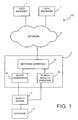
Referring now to the drawings, Figure 1 shows by way of
a block diagram a system 100 in which one or more user
browsers 1 (two are shown although there may be only one
or many more) are coupled via a network N and a search
interface apparatus 2 to a search engine 3 which is
itself coupled to a database 4.
The network N may be the Internet or an Intranet or may
be a local area network (LAN) or wide area network (WAN)
and the user browsers 1, search interface apparatus 2,
search engine 3 and database 4 may be physically located
within the same or different buildings. In this regard,
it will be appreciated that the search engine 3 may be
connected to the search interface apparatus 2 via the
network N or a different network and that, similarly, the
database store may be directly connected to the search
engine 3 or may be connected to the search engine 3 via
the network N or a different network. It will, of
course, be understood that, as used herein, the word
"network" does not necessarily imply the use of any known
or standard networking system or protocol and that the
network N may be any arrangement which enables
communication between the user browser and the search
interface apparatus.
Figure 2 shows a block diagram of a typical computer
system 1a that may form a user browser 1. The computer
system may be, for example, a personal computer, a
portable computer or work station or the like and
comprises a central processor unit (CPU) 11 with
associated memory (ROM and/or RAM) 12, a hard disk drive
16, a removable disk drive (RDD) 13 for receiving a
removable storage medium or disk (RD) 13a, a display 15
for displaying information to a user, a user interface
14 such as a keyboard and/or pointing device such as a
mouse for enabling a user to input instructions to the
CPU 11, and a communications interface 17 for enabling
communication over the network N.
Figure 3 shows a block diagram of a computer system 1b
suitable for forming a search system comprising the
search interface apparatus 2, the search engine 3 and the
database 4. As shown, the computer system comprises a CPU
21 having associated memory (ROM and/or RAM) 22, a hard
disk drive 26, a communications interface 27 for
communicating with user browsers 1 over the network N and
a data store 4a for providing the database 4. As shown
in Figure 3, the computer system may also have a user
interface 24 and display 25 for enabling a systems
operator to communicate with the CPU 21 to, for example,
to configure the computer system to provide the searching
system. The computer system 21 may also include a
removable disk disk drive (RDD) 23 for receiving a
removable disk (RD) 23a for enabling data and/or
processor implementable instructions to be downloaded
from a removable disk such as, for example, a floppy disk
or optical storage medium such as a CD ROM, DVD disk or
the like. The computer system shown in Figure 3 may also
be configurable by processor implementable instructions
and/or data supplied as a signal S via, for example,
communications interface 27 from another computer system.
The computer system shown in Figure 3 may thus be
programmed or configured to provide the searching system
shown in Figure 1 by program instructions and/or data
supplied in at least one of two ways;
Program instructions and data will, of course, be stored
on the hard disk drive 26 and/or in the memory 22 in
known manner.
The computer system 1a shown in Figure 2 is configured
as a user browser by conventional program instructions
which may be supplied on a removable storage medium
and/or as a signal over the communications interface 17.
Typically a user browser 1 may be configured to implement
the Netscape web browser or Microsoft Internet Explorer
web browser.
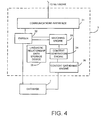
Figure 4 shows a block diagram for illustrating the
functional components of the search engine 3 provided by
the computer system shown in Figure 3 when programmed by
processor implementable instructions. The search engine
3 has the same functional components as the search engine
shown in Figure 1 of EP-A-1033662 (corresponding to
US Application Serial No. 09/511447 the whole contents
of which are hereby incorporated by reference) with
exception that the interface 1 shown in Figure 1 of
EP-A-1033662 is replaced by the communications interface
31 which is arranged to receive, over the network N,
input search queries from a user browser 1 and to
provide, over the network N, search results to a user
browser 1.
A parser 32 is coupled to the communications interface
31 and to the database 4 so as to parse input search
queries and information from the database 4 to generate
semantic and syntactic information. As set out in EP-A-1033662,
the parser may be of any form. For example, the
parser may be a dependency parser which parses natural
language to generate meaning data which comprises meaning
representations for words and links indicating which
meaning representation modifies another meaning
representation. Examples of dependency parsers are
disclosed in GB-A-2269923, EP-A-0737928, a paper by T
Järvinen and P Tapanainen entitled "A Dependency Parser
for English" (Technical Report No. TR-1, Department of
General Linguistics, University of Helsinki, March 1997),
and a paper by P Tapanainen and T Järvinen entitled "A
Non-Projective Dependency Parser" (Proceedings of the 5th
Conference on Applied Natural Language Processing,
Washington DC, April 1997, Association for Computational
Linguistics). As another possibility, the finite state
parser implementing a dependency parser technique
described in the applicants co-pending application
EP-A-1033663 (corresponding to US Application Serial
No. 09/511385 the whole contents of which are hereby
incorporated by reference) may be used.
The parser 32 is thus arranged to generate two sets of
parsed data which are passed to a matching engine 33
which performs matching using both semantic and syntactic
information from the parser 32. Matching to provide a
full set of semantic relationships between words is
described in the applicants co-pending EP-A-0992919
(corresponding to US Application Serial No. 09/400872 the
whole contents of which are hereby incorporated by
reference).
A context generation engine 34 is coupled to the matching
engine 33 to generate context data for the matched data
in accordance with linguistic relationship data stored
in a linguistic relationship data storage device 35. The
output of the context generation engine 34 is supplied
to a context gathering engine 36 which is arranged to
receive the context data from the context generation
engine 34 and to pass the search results and context data
to the communications interface 31 for supply to the
browser 1 of the user who requested the search over the
network N.
The carrying out of a search on the system 100 shown in
Figure 1 will now be described in overview with reference
to Figures 5 to 8.
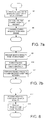
In order to initiate a search, a user connects to his
Internet service provider in usual manner and then enters
the appropriate URL to enable connection to the web
server providing the searching interface apparatus 2 via
the network N. When a log on request is received via a
network interface 2c of the web server 2 from a user
browser 1 at step S1 in Figure 5 the web server 2
forwards, at step S2 in Figure 5, a search query entry
page to the user browser 1 over the network N to cause
a search query entry screen to be displayed on the
display 15 of the user browser 1.
Figure 6 shows the steps that are then carried out by the
user browser 1. Thus, when at step S3 in Figure 6 the
user browser 1 determines that the user has entered a
search request in the search query entry screen, then,
at step S4, the user browser generates, in conventional
manner, a URL consisting of the URL of the web server 2
and incorporating the search details entered by the user
at step S4 and then at step S5 submits the URL to the
network N. Communication over the network is, in this
embodiment, in accordance with standard Internet
protocols and the search query provided by the user
browser 1 is formulated in HTML (hypertext markup
language). When at step S6 in Figure 7a the web server 2
receives the URL incorporating the users search request,
a search query generator 2a of the web server 2 extracts
the search request from the URL and runs a CGI script to
formulate the search query as an XML (extendable Markup
Language) document for supply to the search engine 3 at
step S7. The query generator 2a then forwards the search
request as an XML document to the search engine at step
S8 in Figure 7a. In this example, the connection between
the query generator 2a and the search engine 3 is via a
TCP/IP socket.
When at step S9 in Figure 7b, the web server 2 receives
an XML document from the search engine 3 providing the
results of the requested search, then at step S10, a
search results provider 2b of the web server 2 processes
the search results for supply to the user browser 1 at
step S10 as will be described in greater detail below and
then, at step S11, forwards the search results as an HTML
(Hyper Text Markup Language) document to the user browser
1 over the network N.
When at step S12 in Figure 8, the user browser 1
receives, via the network N, a web page containing the
search results, then, at step S13, the user browser 1
displays the received web page to the user showing the
search results.
The searching procedure will now be described in detail
for the case where the database to be searched is a
database of images each associated with meta data
defining a caption describing that image.
Figure 9 shows very schematically the structure of the
database. As shown, the database 4 comprises a first
store 41 of database items in the form of images 44 each
associated with an image ID 42 and meta data 43 defining
the corresponding caption. As shown in Figure 9, the
database 4 also includes a second store 45 in which each
image ID 42 is associated with a thumbnail image 47 of
the corresponding image.
In order to submit a search query to the
search engine
3 to search in the database 4, the user will initially
log on to the web server in a conventional manner by
inputting the URL of the
web server 2. This URL will have
the format:
where "xxxx.com" represents the address of the
web
server 2. It will be appreciated that "xxxx" is not
intended to represent an actual website address.
As set out above with reference to Figure 5, when a log
on request is received from a user browser, the web
server 2 forwards to the user browser a search query
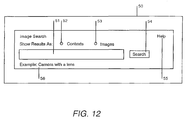
entry web page. Figure 12 shows a screen 50 displaying
an example of such a search query entry page. The screen
50 provides a window 51 into which a user can input a
search query using the keyboard of the user interface 14.
To assist the user, an example 56 ("camera with lens")
of a possible search query is given below the window to
show the search query format. The screen 50 also has
radio buttons 51 and 52 for enabling a context mode and
an images mode of search results presentation to be
selected together with a help button 55 providing, in
known manner, a hyperlink to on-line help and a search
button 54 for initiating a search in accordance with the
search query input to the window 51.
When the user browser 1 determines at step S3 in Figure
6 that the user has clicked on the search button 54 to
initiate the search, then at step S4 the user browser 1
generates from the web page in known manner a URL
incorporating the search details entered by the user and
specifying whether the user has selected the context or
images mode of search result presentation by activating
either the radio button 52 or the radio button 53.
To give an example, where the user enters as the search
query "boats on the sea" and activates the
images radio
button 53, then the
user browser 1 will generate the
following URL:
in which "xxxx.com" represents the base URL of the
web
server 2 and the form data after the base URL are a set
of key/value pairs separated by "&" in conventional
manner. The first key "rtype" indicates whether the radio
button 52 or the
radio button 53 has been selected with,
in the above example, the
radio button 53 selecting the
images mode of results presentation having been selected.
The second key "query" specifies the search query present
in the window 51, in this case "boats+on+the+sea" (where
the %20 sequences have been transformed into their
character equivalents) and the final key "type" specifies
the format of the results with the type being "image"
when the
radio button 53 is selected and the type being
"context" when the radio button 52 is selected. As will
be explained below, in this embodiment, a further results
format consisting of a presentation of a single image is
provided to enable a user to view on a larger scale an
image selected from the images included in the search
results.
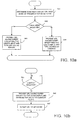
The step S4 in Figure 6 of generating a URL incorporating
the search details entered by a user will now be
described in greater detail with reference to Figure 10a
for the case where the user enters the search query
"mountains" in the window 51. Thus, at step S41, the
browser 1 determines whether context or images mode of
presentation of search results has been selected by
checking whether the radio button 52 or the
radio button
53 has been activated. If the
radio button 53 is
activated, then the answer at step S42 is yes and at step
S43 the
browser 1 generates a URL having a query key
determined by the search query input by the user into the
window 51 and a last key of type images. In this example,
the URL would have the form:
If, however, the answer at step S42 is no, then at step
S44 the
browser 1 generates a URL having as the second
key a query defined by the users search request in the
window 51 and a last key of type context. Thus, in this
case the URL would have the form:
The URL is then submitted to the network as described
above with reference to step S5 of Figure 6. After the
web server 2 has received the URL from the user browser
at step S6 in Figure 7a, the
query generator 2a decodes
the URL and formats a search request in the form of an
XML document by running a CGI script as described above.
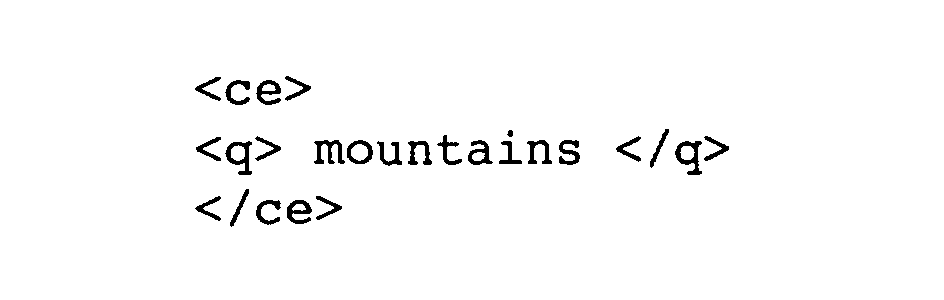
In this embodiment, the XML document will have the
format:
Thus in the particular example given above, the XML
search query document will have the format:
The XML search query document is then forwarded to the
search engine 3 via the TCP/IP socket at step S8 in
Figure 7a.
The search engine 3 then conducts the search as described
in EP-A-1033662 with reference to Figures 3 to 5 of
EP-A-1033662. Thus, in brief, the parser 32 parses the
input search query. Then for each set of caption or meta
data in turn, the parser 32 parses the caption data, the
matching engine 33 matches the parser search query to the
parsed caption data and generates matched data. If there
are any matched words, then the context generation
engine 34 generates context data for that caption data
by selecting the unmatched words in the caption data in
turn and determining for each unmatched word whether the
unmatched word is at the end of a path defined in the
path rules. If the unmatched word is in a valid phrase,
then the context generation engine 34 finds the smallest
valid phrase containing the unmatched word, adds the
phrase to memory referenced to the matched word and
repeats this process until the context generation engine
34 has processed all of the unmatched words for the set
of context data. Then the context gathering engine 36
carries out the steps set out in Figure 5 of EP-A-1033662
to group the data accordingly and supplies to the
communications interface 31 search results in which each
search item or result matching the search request input
into the window 51 by the user is listed together with
its related context data.
It will, of course, be appreciated that, as set out in
EP-A-1033662, the matching process (which is described
in greater detail in EP-A-0992919) uses semantic
broadening so that a matching word need not be the same
word but could be a word having a similar meaning. For
example, the word "boys" may be considered a good match
for the word "children".
The search results are supplied via the
search engine 3
to the
search results provider 2b as an XML document
having the format given below.
For the sake of simplicity, only one search result is
shown above with the ellipsis indicating that further
search results will normally be included within the body
of the document.
Each search result consists of an image ID for the
thumbnail image corresponding to the image identified in
the search followed by its corresponding caption or meta
data, in this case:
followed by a set of context data extracted by the
search
engine 3, in this case the context "snowy" for the word
"mountains" and the context "blue" for the word "lake".
The search results provider 2b then processes the search
results for supply to the user browser at step S10 in
Figure 7b. This process is shown in greater detail in
Figure 11.
Thus, at step S100, the search result provider 2b
determines whether the URL containing the original search
request specified presentation of the search results in
the images or context mode.
When it is determined at step S101 that the images mode
was selected, then, at step S102, the search results
provider 2b generates an HTML document for providing a
web page incorporating, for each search result, the
corresponding thumbnail image provided by the database 4
and the corresponding caption.
If, however, the search results provider 2b determines
that the URL specified the context mode at step S103,
then the search results provider 2b generates, at step
S105, an HTML document representing a web page in which
the search results are grouped according to context and
each context item is associated with thumbnail images
provided by the database 4 for the stored images whose
captions include that context item.
The search results are then forwarded to the user
browser 1 which, as set out in Figure 8, receives the
HTML web page and displays the received page to the user
at step S13.
Figure 13 shows an example of a web page of screen 60
displayed to the user where the user selected
presentation of the search result in the images mode.
As can be seen from Figure 13, the screen 60 includes a
set of seven search items each of which consists of a
thumbnail image 63 and an associated caption 62. It will,
of course, be appreciated that these are only examples
and that many more or different search items may be
retrieved depending upon the content of the database.
Also, for the sake of simplicity, the thumbnail images
63 are shown blank in Figure 13.
Figure 13 also includes a button "show as context" 61
which enables the user to be presented with the search
results sorted by context. If the user clicks on the
"show as context" button 61, then the browser 1 will
resubmit the search query to the web server 2 over the
network N with a modified URL specifying the same search
query but specifying that the context presentation mode
is required as described above with reference to step S44
in Figure 10a.
Where the button 61 in Figure 13 is clicked or the user
initially selected the context mode, then, as explained
above, the search results provider 2b will group the
search results in accordance with the determined context
items and supply an HTML document or web page over the
network N to the user browser 1.
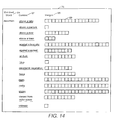
Figure 14 shows an example of a screen 70 that may be
displayed to a user. Again, it will be appreciated that
the actual content of the screen will depend upon the
content of the database 4. The screen 70 provides three
columns 66, 67 and 68 headed "matched word", "context"
and "images" respectively. The search query entered in
the window 51 by the user is given as the matched word
and the context items representing the contexts extracted
by the context generation engine are listed in the column
headed "context". Each context item is associated with
one or more thumbnail images 69. Thus, for example, the
context item "above a lake" is associated with a large
number of thumbnail images each of which has a caption
which includes a semantic match for the word "mountain"
and also includes the context item "above a lake". It
will, of course, be appreciated that, because the
thumbnail images are grouped according to context, the
same image may occur for one or more context items, so
that, for example, an image whose caption reads "snowy
mountains above a lake against a blue sky" would occur
against the context item "above a lake", the context item
"against a blue sky" and the context item "snowy".
The searching, context extraction and presentation of the
search results to the user as so far described is similar
to that described in EP-A-1033662. However, in accordance
with the present invention, when presented in the context
mode of presentation, the search results do not simply
present the context item or items for the associated
images. Rather, each context item represents a hyperlink
as represented by the underlining in Figure 14. Thus
in accordance with the present invention, when step S102
is carried out, the search results provider 2b determines
whether, for any image, a context item is associated with
further context items, that is the caption for at least
one image having that context item also has at least one
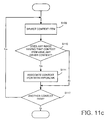
other context item. This is shown in Figure 11c.
Thus at step S109 in Figure 11c the search results
provider 2b selects a first context item and determines
at step S110 whether any image having that context item
also is associated with another context item. If the
answer is yes then the search results provider 2b
associates a hyperlink with that context item at step
S111.
The search results provider 2b then checks at step S112
whether there are any other context items to be checked
and repeats steps S109 to S112 until the answer at step
S112 is no. Thus each context item that is associated
with at least one image having further context is
associated with a corresponding hyperlink which is
included by the search results provider 2b in the HTML
document generated at step S102 in Figure 11a. When the
user receives on the display of his user browser the
search results presented in context mode, the user may,
as will be described below, further refine his search by
selecting a particular context item to activate the
corresponding hyperlink.
As set out in Figure 10b, when the
browser 1 determines
at step S45 that a context item has been selected, then
at step S46 the
browser 1 generates a URL in accordance
with the hyperlink associated with the context item. This
URL is based on the URL generated for the original search
request but modified to include a third key "select"
which specifies a context filter specifying the context
item selected by the user. Where, for example, the
context item selected by the user is "against a blue sky"
in Figure 14 then the URL will have the form:
where %3a represents a colon.
This URL is submitted to the network N at step S47 in
Figure 10b. Upon receipt of the URL at step S6 in Figure
7a, the
query generator 2a generates, using the CGI
script, an XML document representing the search request
for submission to the
search engine 3. In this
embodiment, this search request has the same format as
described above, namely:
Upon receipt of the search request, the search engine 3
carries out the search again as described above, and
returns the search results to the search results
provider 2b.
The action of the search results provider 2b on receipt
of the search results will now be described with
reference to Figure 11b.
Upon receipt of the search results, the search results
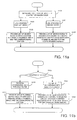
provider 2b determines at step S106 in Figure 11b that
the URL for the search specified a selected context item.
The search results provider 2b, then at step S107,
filters the search results in accordance with the
selected context item and retains only the search results
whose context data includes the selected context item.
Then at step S108, the search results provider 2b groups
the filtered search results according to the context and
incorporates the filtered search results including,
again, the context items and hyperlink information into
a HTML document forming a web page. The filtering process
carried out by the search results provider 2b at step
S107 is, in this embodiment, a simply keyword matching
process so that only those images associated with context
data exactly matching the selected context item will be
retained.
The web page containing the filtered search results is
then forwarded to the user browser 1 and the results are
again displayed to the user.
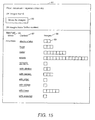
Figure 15 shows a screen 80 representing an example of
the filtered search results obtained for the selected
context "against a blue sky". The format is the same as
that shown in Figure 14 with the search results being
presented with three column headings "matched word",
"context" and "images" 66, 67 and 68, respectively.
As shown in Figure 15, each of the context items listed
represents a hyperlink indicating that further filtering
is possible. The user may, therefore, choose to further
refine his search by clicking on one of the context items
set out in Figure 15. If, for example, the user selects
the context "snowy" then the
browser 1 will be caused to
generate a new URL which incorporates a further filter
"snowy" as shown below:
The process described above is then repeated with the
search requests submitted to the search engine again
being:
However, in this case, the filter applied by the search
results provider 2b at step S107 is Figure 11b is a
matching filter which selects only those images whose
captions include the context item "against a blue sky"
and the context item "snowy". These further filtered
search results are then incorporated into an HTML
document together with the associated context items and
any hyperlink information at step S108 as described above
and forwarded to the user browser 1 to cause the browser
to display the further filtered search results to the
user. Figure 16 shows a typical screen 90 that may be
displayed by the browser. As can be seen, the search
results are presented in a manner similar to that shown
in Figures 14 and 15, with those context items that are
linked to hyperlinks indicating that they have further
context being shown underlined. In the example shown in
Figure 16 only two of the context items "above a lake"
and "with trees" are associated with further context and
so have a hyperlink.
The user may, if desired, then repeat the above process
by selecting one of the hyperlinked context items, for
example, the context item "with trees". The above
described process will then be repeated with, in this
example, the filter applied at step S107 filtering out
only those images whose captions include the context
items "against a blue sky", "snowy" and "with trees".
Figure 17 shows a screen 95 provided to the user with the
results of this further filter of the search. In this
example, a single image having the caption "snowy
mountains with trees against a blue sky and above a lake"
(that is a caption including a word providing a semantic
match to the word "mountain" and including the context
items "against a blue sky", "snowy" and "with trees") has
been found. The context "above a lake" is not associated
with a hyperlink because the image does not have further
context associated with it.
Where a hyperlink for a context item is associated with
only a single image then the filtered search results will
simply be that image and the search results provider 2b
may be configured to provide to the user the full image
rather than the thumbnail image.
Each of the screens shown in Figures 15 to 17 provides
the user with information indicating the applied filter,
the number of located images and the number of images
that have further context. In addition each of these
screens includes a button 83 "show as images". Clicking
on this button causes the browser 1 to supply to the web
server 2 a URL based on the URL used to produce the
filter search but with the type "context" replaced by the
type "image". In this case when search results are
received by the search results provider 2b, the search
results provider 2b will determine at step S106 in Figure
11b that image mode presentation has been selected. Then
at step S120, the search results provider 2b filters the
search results in accordance with the previously defined
filter. Thus, for example, if the "show as images"
button 83 is clicked in screen 90 shown in Figure 16,
then the search results will be filtered to pick out only
those images whose captions include the context items
"against a blue sky" and "snowy". Then at step S121, the
search results provider 2b generates an HTML document
including the thumbnail image for each image and its
associated caption. This document will produce, when
supplied to the user browser 1, a screen similar to the
screen shown in Figure 13 but including only those images
having captions including all the context items present
in the filter, that is, in this case, only those images
with captions including the context item "against a blue
sky".
In each of the screens shown in Figures 13 to 17, a user
may also click on an individual thumbnail image.
Clicking on a thumbnail image causes the
browser 1 to
generate a URL address including the image ID of that
particular image to enable the image rather than the
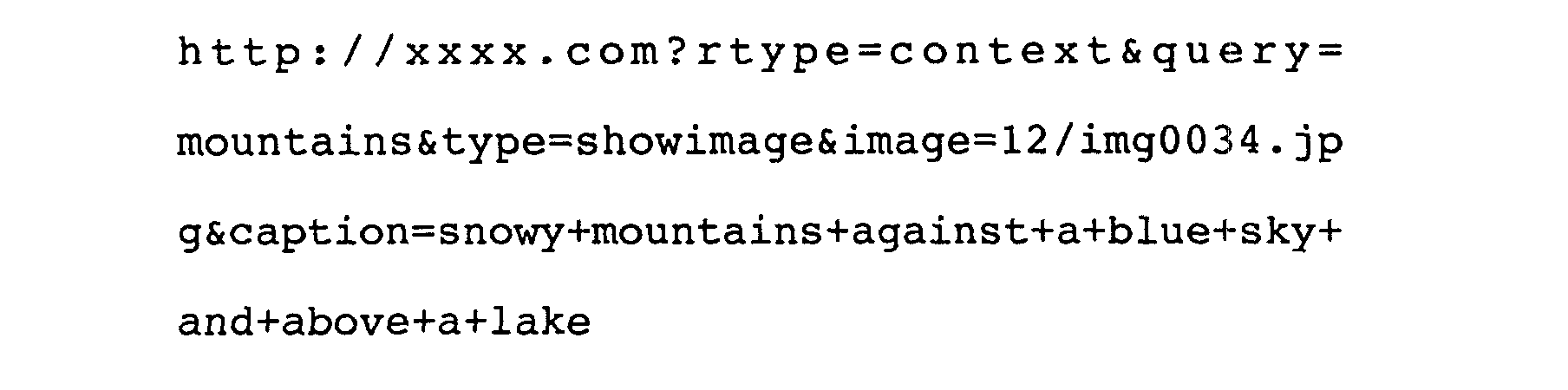
thumbnail image to be retrieved from the database 4. For
example, if an
image 69 shown in Figure 17 is clicked on,
then the URL will have the form set out below:
where 12/img0034.jpg is the image ID.
When this URL is received by the query generator 2a the
query generator will generate a query to the database to
enable the actual image rather than the thumbnail to be
retrieved from the database 4 and supplied in an HTML
document to the user via the network N.
In the above described embodiments, the database to be
search consists of a database of images each associated
with a caption. It will, of course, be appreciated that
the search documents need not necessarily comprise images
but could be for example, text documents, audio or video
files or a combination of these. Where the search
documents are text documents, then the meta data
corresponding to the caption data may constitute an
abstract for the document whereas, where the search
documents are audio or video files, the meta data will
again be caption data describing the video or audio file.
Of course, the meta data may, for example, be derived by
a speech recognition engine from a speech data file.
Thus, for example, where the search documents are audio
or video files, the meta data may be derived by the
speech recognition engine from the audio data of the
audio file or the sound track data of the video file.
This enables, in the case of a video file, searching to
be conducted on the basis of speech or voice data
associated with the moving images or frames of the video
data file enabling a user to search for a particular
series of frames or frame within the sequence of moving
images forming the video data of the video file.
The above described embodiments rely on natural language
techniques to extract the context information from the
meta data or captions. The present invention may,
however, be applied where it is not necessary to extract
the context information because the context information
is already presented in a context table. This may be the
case for any type of database, for example, an images
audio files or video files database. An example of a
database where this may be the case is a film database
where the reference data for each film consists of the
film title and the context data consists of subsidiary
information available in the database for each film, such
as, for example, the year of release, type of movie
(Type) male lead (ML), male support (MS), female lead
(FL), female support (FS), director (D), producer (P),
writer (W), distributor (Dist), country (place), language
(Lang) etc.
As an example, a user may search a film database for
films whose titles include the word "escape". In this
example, the
radio button 53 in Figure 12 would be
labelled "lists" or "search items" rather than "images"
and the search may, dependent upon the content of the
database, result in a list such as the following:
Selecting "show results as context" in Figure 12 would,
provide the user with search results in the form shown
in Table 1 below.
| Matched Word | Context | Number of Films |
| Escape | 20th Century Fox (Dist) | ****** |
| | 60's | ** |
| | 70's | ** |
| | 80's | **** |
| | 90's | ****** |
| | Action (Type) | ** |
| | Clint Eastwood (ML) | *** |
| | Comedy (Type) | * |
| | English (Lang) | ****************** |
| | Ernest Borgnine (MS) | * |
| | French (Lang) | ** |
| | Japanese (Lang) | * |
| | John Carpenter (D) | *** |
| | John Sturges (D) | * |
| | Julia Roberts (FL) | ** |
| | Kim Hunter (FS) | * |
| | Kurt Russel (ML) | * |
| | MGM (Dist) | ***** |
| | Paramount (Dist) | ***** |
| | Paul Dehn (W) | * |
| | Roddy McDowall (MS) | * |
| | Steve McQueen (ML) | ** |
| | War (Type) | **** |
| | Western (Type) | ** |
Where each context item in the context column, is a
hyperlink, that when activated, would cause the search
results to be filtered in accordance with that context.
Thus, for example, if the user clicks on the hyperlink
"Steve McQueen" in Table 1, then the search results
presented to the user may have the form shown in Table
2 below.
| Matched Word | Context | Number of Films |
| Escape | 20th Century Fox (Dist) | ****** |
| | 60's | ** |
| | 70's | ** |
| | Action (Type) | ** |
| | Clint Eastwood (ML) | *** |
| | English (Lang) | ****************** |
| | Ernest Borgnine (MS) | * |
| | John Sturges (D) | * |
| | MGM (Dist) | ***** |
| | Paramount (Dist) | ***** |
| | War (Type) | **** |
| | Western (Type) | ** |
Where the number of films is greater than one, then the
context item will then again represent a hyperlink and
selecting that hyperlink will cause the search results
to be filtered in accordance with that context item.
Thus, for example, selecting John Sturges as the director
will result in the user being presented with search
results including only one film namely
Handling of dates may need special attention because
listing each year separately may clutter the users
display while decade a grouping of years does not allow
more specific filtering when only a few films remain in
the filtered search results. This may be handled by
defining individual decades as individual context items
each of which has subsidiary context items so that
selecting a decade will break that decade up into smaller
year groupings.
In the above described embodiments, the search interface
apparatus or web server 2 and search engine 3 are
provided by a single computer system. These may, however,
be provided by separate computer systems that may be
directly coupled or coupled via the network N or a
different network. Also, in the above described
embodiments, the database 4 is directly connected to the
search engine 3. It may, however, be possible for the
database 4 to be physically located elsewhere on the
network N or on a different network.
In the above described embodiments, the user browser 1
is coupled to the search interface apparatus 2 via a
network N. It is, however, possible for the search
interface apparatus 2 to be provided at the user browser
1 and for the connection to the search engine 3 to be via
a network. In addition, a single computer system may be
provided which provides the user browser, the search
interface apparatus 2 and the search engine 3 and
possibly also the database 4, in which case the network
N will be omitted.
In the above described embodiments, searching according
to context is carried out by the search results provider
2b. However, the query generator 2a may be configured
so as to construct the search query for the search engine
3 so that the search request presented to the search
engine 3 includes the filter causing the search engine
3 to return only those documents which pass the filter.
In the above described embodiments, the search results
are not saved by the search interface apparatus 2 and
accordingly each time the user selects a context item in
any of Figures 14 to 17 above or selects "show as images"
in Figures 15 to 17 above, a fresh search request is
generated. It may, however, be possible (particularly
where the search interface apparatus 2 is provided at the
user browser 1) for the results of the previous search
to be stored so that it is not necessary for the search
to be repeated, rather the context filter may be applied
to the stored results of the previous search.
In the above described embodiments, hyperlinks are used
to initiate context filtering. This need not necessarily
be the case and, for example, clicking or double clicking
on the context may activate a sub-program or application
which causes the required action to be carried out.
In the above described embodiments, the search results
are presented as a list. However, drop down menus may be
used so that, for example, clicking on the word "context"
would present a drop down list of context items from
which the user could then select.
In the above described embodiments, the browser has a
graphical user interface. It may, however, be possible
to apply the present invention where the browser enables
the user to input search instructions verbally.