EP1186986A2 - System und Verfahren zum Orten, von sich auf ein elektronisches Dokument beziehenden Punkten, auf einem physikalischen Dokument - Google Patents
System und Verfahren zum Orten, von sich auf ein elektronisches Dokument beziehenden Punkten, auf einem physikalischen Dokument Download PDFInfo
- Publication number
- EP1186986A2 EP1186986A2 EP01480031A EP01480031A EP1186986A2 EP 1186986 A2 EP1186986 A2 EP 1186986A2 EP 01480031 A EP01480031 A EP 01480031A EP 01480031 A EP01480031 A EP 01480031A EP 1186986 A2 EP1186986 A2 EP 1186986A2
- Authority
- EP
- European Patent Office
- Prior art keywords
- referenced
- document
- electronic document
- coordinates
- physical
- Prior art date
- Legal status (The legal status is an assumption and is not a legal conclusion. Google has not performed a legal analysis and makes no representation as to the accuracy of the status listed.)
- Withdrawn
Links
Images



Classifications
-
- G—PHYSICS
- G06—COMPUTING OR CALCULATING; COUNTING
- G06F—ELECTRIC DIGITAL DATA PROCESSING
- G06F16/00—Information retrieval; Database structures therefor; File system structures therefor
- G06F16/90—Details of database functions independent of the retrieved data types
- G06F16/95—Retrieval from the web
- G06F16/955—Retrieval from the web using information identifiers, e.g. uniform resource locators [URL]
Definitions
- the present invention relates to interactive multimedia systems and more particularly to a method and system for locating on a physical document items referenced in an electronic document.
- the present invention discloses a method and system for highlighting on a paper map the geographic position of places referenced in a Web page.
- the Internet is a global network of computers and computers networks (the "Net”).
- the Internet connects computers that use a variety of different operating systems or languages, including UNIX, DOS, Windows, Macintosh, and others.
- TCP/IP Transmission Control Protocol/Internet Protocol
- TCP/IP protocol supports three basic applications on the Internet :
- the World Wide Web (“WWW” or “the Web”) is a recent superior navigation system.
- the Web is:
- the Web uses hypertext and hypermedia.
- Hypertext is a subset of hypermedia and refers to computer-based "documents" in which readers move from one place to another in a document, or to another document, in a non-linear manner.
- the Web uses a client-server architecture.
- the Web servers enable the user to access hypertext and hypermedia information through the Web and the user's computer. (The user's computer is referred to as a client computer of the Web Server computers.)
- the clients send requests to the Web Servers, which react, search and respond.
- the Web allows client application software to request and receive hypermedia documents (including formatted text, audio, video and graphics) with hypertext link capabilities to other hypermedia documents, from a Web file server.
- the Web then, can be viewed as a collection of document files residing on Web host computers that are interconnected by hyperlinks using networking protocols, forming a virtual "web" that spans the Internet.
- a resource of the Internet is unambiguously identified by a Uniform Resource Locator (URL), which is a pointer to a particular resource at a particular location.
- a URL specifies the protocol used to access a server (e.g. HTTP, FTP,..), the name of the server, and the location of a file on that server.
- Each Web page that appears on client monitors of the Web may appear as a complex document that integrates, for example, text, images, sounds and animation.
- Each such page may also contain hyperlinks to other Web documents so that a user at a client computer using a mouse may click on icons and may activate hyperlink jumps to a new page (which is a graphical representation of another document file) on the same or a different Web server.
- a Web server is a software program on a Web host computer that answers requests from Web clients, typically over the Internet. All Web servers use a language or protocol to communicate with Web clients which is called Hyper Text Transfer Protocol ("HTTP"). All types of data can be exchanged among Web servers and clients using this protocol, including Hyper Text Markup Language (“HTML”), graphics, sound and video. HTML describes the layout, contents and hyperlinks of the documents and pages. Web clients when browsing :
- First version of HTTP is a stateless protocol. That is, with HTTP there is no continuous connection between each client and each server.
- the Web client using HTTP receives a response as HTML data or other data.
- This description applies to version 1.0 of HTTP protocol, while the new version 1.1 breaks this barrier of stateless protocol by keeping the connection between the server and client alive under certain conditions.
- the Web client After receipt, the Web client formats and presents the data or activates an ancillary application such a sound player to present the data. To do this, the server or the client determines the various types of data received.
- the Web Client is also referred to as the Web Browser, since it in fact browses documents retrieved from the Web Server.
- the transcoding software can take a map originally designed for a PC-based browser and can re-size it to fit the screen of the mobile device installed in the car.
- a paper road map of normal size and resolution cannot be read comfortably after having been digitized, minimized, and displayed on the small screen of a cell phone or even on the screen of a hand-held PDA.
- this technique does not solve the problem of displaying, even with the minimum comfort, a digitized version of a full size paper map on a small size and low resolution display of a cell phone.
- None of the methods described in the prior art discloses a method or system that would enable a user to see illuminated, on paper maps, locations of resources or services referenced in an electronic document.
- locations in the world e.g., names of towns, oil posts, motels, buildings, hospitals, monuments, etc.
- the present invention discloses a system and method of creating in an electronic document one or a plurality of hyperlinks to a physical document for locating on said physical document, one or a plurality of items referenced in this electronic document from an user system connected to an opto-touch foil placed on or under the physical document.
- the method comprises the steps of:
- the present invention further discloses an electronic document comprising one or a plurality of referenced items, each referenced item comprising an hyperlink to a physical document, each hyperlink comprising encoded absolute coordinates of the corresponding referenced item, this hyperlink being used for locating the item on said physical document from an user system connected to an opto-touch foil placed on or under this physical document.
- the present invention further discloses a system and method of locating on a physical document one or a plurality of items referenced in an electronic document comprising hyperlinks to this physical document.
- the invention provides a system and a method for locating on physical documents items referenced in electronic documents and for accessing multimedia information and/or services located in a user workstation or in one or a plurality of servers connected to a communication network. More particularly, the invention discloses a system and method for highlighting on a paper map the geographic location of one or a plurality of places cited or referenced in a Web page.
- the invention relates to the creation in electronic documents of hyperlinks to physical documents and more particularly to a system and method for assigning geographic coordinates to items (for example places like towns, oil posts, motels, public buildings, water springs, historic monuments, factories, etc.) cited or referenced in an electronic document (for example cited in a Web page).
- items for example places like towns, oil posts, motels, public buildings, water springs, historic monuments, factories, etc.
- an electronic document for example cited in a Web page.
- the activation of a "geographic link" associated with a particular item results in highlighting the position of this item on a physical document, for example a paper map.
- the system comprises a transparent opto-touch foil placed aligned on a physical map and connected to a user workstation.
- the opto-touch foil generates optical signals highlighting the locations, on the physical map, of all places referenced in the electronic document.
- the system comprises means for computing the coordinates on the opto-touch foil of the locations referenced in the electronic document and for highlighting these locations on the physical map by luminous signals.
- the user places the opto-touch foil on the map.
- the opto-touch foil is calibrated according to the scale of this map and according to the position and alignment of the opto-touch foil placed on or under the map.
- this operation is executed first by entering the scale of the map into the workstation and second by pressing the opto-touch foil on a particular location called calibration location.
- the system comprises means for sending from the opto-touch foil to the user workstation, the opto-touch foil coordinates corresponding to a point pressed by the user, and for associating these coordinates with geographic coordinates and with the address of another electronic document locally stored on the user workstation or accessible on a remote server connected to the network.
- the system comprises :
- the user workstation (100) can be an Internet enabled cell phone (e.g., the NOKIA 7110 or the 9110i Communicator), a PDA, an onboard computer, a network computer, an Internet appliance or any wireless IP enabled device, connected to the opto-touch foil (101).
- the user workstation (100) is connected to the Internet network (103) and comprises a Web Browser application.
- Servers (104) are Web servers and the information or/and the service are Web pages hyperlinked to selected items and triggered from the Web browser. Locations associated to some items selected by the user on a Web page are illuminated by the opto-touch foil (101) placed over or under the physical document (102).
- the opto-touch foil (101) comprises a transparent resistive or capacitive film, of the type commonly used to manufacture touch screens.
- the generated signal is generally proportional to the coordinates of the point pressed.
- On this film is stacked a transparent organic light emitting device film (TOLED film).
- This light emitting device film is a transparent, bright, self-emitting display that can be directed to emit light from either or both surfaces.
- the opto-touch foil may communicate with the user workstation over an infrared link, a wired connection or any other communication means (e.g. by means of a wireless connection operating in the globally available 2.4 Ghz band of the "Bluetooth" specification, as promoted by the "Bluetooth Special Interest Group” and documented on the Official Bluetooth Website http://www.bluetooth.com/ ).
- Physical documents (102) can be of any kind, for example, different types of geographic maps (e.g., topographical maps, political maps, historical maps, route maps, shaded relief maps, city maps, natural resources maps, rail road maps or even any other type of map), novel books, text books, technical plans, commercial catalogs or even any other type of hard-copy, engraved, written, or printed surfaces (e.g., paintings in a museum of art).
- the material of the physical documents can be paper, plastic, wood or any other material.
- the main components of the invention are the following:
- the opto-touch foil (101) comprises two, functionally independent transparent foils, namely:
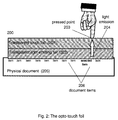
- Figure 2 shows the cross section of an opto-touch foil (200) comprising:
- Figure 2 represents an opto-touch foil placed and aligned over a physical document (205) comprising a plurality of items (206) (i.e., words, pictures, icons, etc.) printed (or written, painted, engraved ...) on its surface.
- items (206) i.e., words, pictures, icons, etc.
- the touch foil component (201) may be made of transparent resistive or capacitive films of the type used commonly to manufacture touch screens.
- the generated signal is generally proportional to the coordinates of the point pressed.
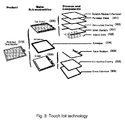
- touch foil technology it would be possible to use, is the TouchTek4 (4-wire Analog Resistive Touchscreens) of MICRO TOUCH company (TouchTekTM is a trademark of the MICRO TOUCH Company).
- TouchTek4 4-wire Analog Resistive Touchscreens of MICRO TOUCH company
- the TouchTeck4 technology is fully described in the Web site of MICRO TOUCH Company at http://www.microtouch.com/.
- TouchTek4 touch screens (310) use a a polyester sheet (301) with a conductive coating (302) as a vertical conductive electrode, providing one-half of a touch coordinate.
- the topsheet (300) is separated from the bottom layer, a glass substrate (304) with a conductive coating (303), by spacer dots (305).
- the bottom sheet (306) is attached to the topsheet (300) by means of an adhesive (309).
- the bottom sheet (306) forms the horizontal conductive electrode, generating the second half of the touch coordinate.
- Silver bussbars located on the topsheet (307) and on the bottom sheet (308) pass the touch coordinates to the touchscreen controller.
- TouchTek4 touchscreens feature hard-coated polyester topsheets (300), available in several surface finishes.
- Spacer dots (305) are available in several dot arrays, optimized for finger, pen and finger, or pen-only input.
- the conductively-coated glass bottom sheet (303, 304) is available in several thicknesses.
- Electronic control is provided by a serial controller, or by 4-wire controllers.
- TouchTek4's specifications include narrow inactive border areas and compact touch sensors which allow system designers and OEMs to provide the largest useable screen area and full mouse emulation without sacrificing functionality or consuming excess power.
- TouchTek4 touchscreens are commonly used in hand-held personal information management systems, PDAs, mobile computing systems, automotive, diagnostics and telecom devices, and Internet appliances. TouchTek4 touchscreens are engineered to accept more than three million touches to any area of the screen.
- the light emitting foil may be made of an array of TOLED's (Transparent Organic Light Emitting Devices), of the type used today to create vision area displays on windshields, cockpits, helmets and eyeglasses.
- TOLED displays which can be up to 85% transparent when not energized are today manufactured with standard silicon semiconductors.
- One example of light emitting foil technology it would be possible to use is the technology used for the TOLEDs manufactured by UNIVERSAL DISPLAY CORPORATION. The TOLED technology is fully described in the Web site of UNIVERSAL DISPLAY CORPORATION at http://www.universaldisplay.com/toled.html .
- a TOLED is a monolithic, solid-state device consisting of a series of "small molecule" organic thin films sandwiched between two transparent, conductive layers.
- TOLEDs are bright, self-emitting displays that can be directed to emit from either or both surfaces. This is possible because, in addition to having transparent contacts, the organic materials are also transparent over their own emission spectrum and throughout most of the visible spectrum.
- a transparent conductive material (402) e.g., indium tin oxide (ITO)
- ITO indium tin oxide
- the first organic layer (403) serves as a hole-transporting layer (HTL) and the second layer (404) serves as both a light-emitting (EL) and electron-transporting layer (ETL).
- a transparent top contact (405) is deposited for electron injection on top of the organic films.
- a voltage (406) is applied across the device, it emits light. This light emission is based upon a luminescence phenomenon wherein electrons and holes are injected and migrate from the contacts toward the organic heterojunction under the applied electric field. When these carriers meet, they form excitons (electron-hole pairs) that recombine radiatively to emit light.
- TOLEDs are thin-film, solid-state devices, they are very thin, lightweight and durable, ideal for portable applications, like the one disclosed in this invention.
- TOLEDs can be bottom, top, or both bottom and top emitting.
- TOLEDs technology has attractive advantages regarding, transparency (TOLED displays can be nearly as clear as the glass or substrate they're on and when built between glass plates, TOLEDs are > 80% transparent when turned off), energy efficiency (for longer battery life), full viewing angle, bright and high contrast light emission, fast response time, and environmental robustness.
- TOLEDs are well suited for manufacturing the light emitting foil component used jointly with the touch foil according to the present of this invention.
- the user workstation (103) is used to access information and/or services stored locally or located on one or a plurality of servers (104) connected to the network (103).
- the user workstation may be, for example, an Internet appliance, a multimedia Personal Computer (PC), a set-top box, a TV monitor, a game console, a WAP protocol enabled cell phone, etc.
- the opto-touch foil may communicate with the user workstation by means of a cable, a wire pair, an infrared link, or a wireless radio link (e.g., a "Bluetooth" link).
- locations or places in the world are referenced in Web pages by means of cartographic coordinates.
- a visual signal illuminates the selected location over a physical map.
- the user workstation 500
- the workstation comprises a user interface (502) including a Web Browser (503) (also called "Web Client").
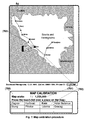
- the method of illuminating on a physical map (506), locations referenced on a Web page comprises the following steps. First, the user takes a map covering the geographic area of the locations he wants to highlight. He places and aligns the map under the opto-touch foil (507) and enters the map scale in the workstation (500). To calibrate the opto-touch foil (507), the user selects on the Web page the "geographic link" of a particular location (calibration location) represented on the paper map. The opto-touch foil is calibrated by pressing the opto-touch foil on said location (508).
- the locations (509) in the Web page for which a geographic link is defined are automatically highlighted on the map by means of spots of light emitted by the opto-touch foil (507).
- These geographic links are stored in a table called “Geo-links Table" (510). Each time the user triggers a geographic link on the Web page, the spot of light corresponding to this location blinks on the map.
- the Web Browser program (503) sends a HTTP request (504) to the identified Web Server (505).
- a response (HTTP response) is sent back by the Web Server (505) in the reverse direction to the Web Browser (503).
- the HTTP response comprises the requested Web page which is associated with the selected illuminated item.
- hyperlinks from an electronic document to a physical document implies the encoding of the absolute coordinates of the items referenced in the electronic document.
- these hyperlinks are defined as “geographic links” (or “geo-links”) and comprise the encoded geographic (cartographic) coordinates of the locations referenced in the electronic document (or Web page).
- This geographic link associates an item related to a location (Location_Name) with the cartographic coordinates ( Latitude and Longitude ) of this location.
- the geographic link associates a location (Location_Name) with the Universal Resource Locator ("hyperlink-URL") of another electronic document.
- HTML source code of a Web page like the page hereunder can appear as follows:
- Fr (mm/unit) be the resolution of the touch foil (i.e., the number of mm over axis X and Y (511) of the touch-foil that correspond to each unit of sensed signal, e.g., mVolts, assuming it is the same for both axis); and
- Ms be the scale of the map (i.e., the number of terrestrial meters over the reference meridian per each mm measured on the map).
- the "geo-links" table is completed with the foil coordinates of all "geo-links” locations referenced in the Web page. These foil coordinates are transmitted from the user workstation to the opto-touch foil that decodes them. They are then used to illuminate the position of the "geo linked” locations on the physical map.
- Calibration Location URL: Map Scale: Foil Resolut. Knin http://www.linder.com/berserk/dalmatia.html 1,250,000 0,2 LOCATION HYPERLINK LAT / LONG FOIL X/Y Zagrev http://www.interconti.
- the method of linking one or a plurality of items referenced in an electronic (soft-copy) document to geometric points on a physical (hard-copy) document, for automatically displaying these points using an opto-touch foil placed over the physical document, and for identifying on this physical document each one of the items referenced in the electronic document comprises the steps of:
- the following example illustrates the method of using the system according to the present invention to help people to locate places of any kind, using conventional paper maps thanks to the information provided by the Web.
- a driver with a WAP enabled cell phone (like the one shown in Figure 1) is traveling across the Balkans.
- the user with his cell phone access a Web page on http://www.linder.com/berserk/dalmatia.html.
- This Web page provides some traveling and tourist information about the region he intends to visit today.
- On this page (on the small alphanumeric display of the device), he finds an interesting reference describing several places on his route.
- the driver takes a paper map that he bought on Zagrev and tries to locate on this map the places referenced on this Web page.
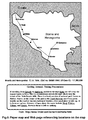
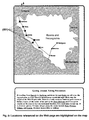
- Figure 6 shows the information provided to the driver and the paper map of the region.
- the driver locates several places referenced on the Web page, like Karlovac, Knin, Udbina and Gracac. However, he cannot locate other referenced places, like Zagrev, Hotel Bellevue, Slunj and Plitvice . Motivated by the tittle and the content of this page "Getting Around, Taking Precautions", the driver is particularly interested to determine the location on his route of the "Hotel Bellevue". But "this place is not represented on the map !.
- the user takes an opto-touch foil (101) , connects it to his cell phone (100) (used as workstation) and places and fixes the map (102) underneath the opto-touch foil. Then the following tasks are performed:
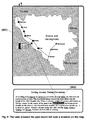
- the locations inside the geographic area covered by the map are automatically highlighted on the map in the form of bright spots of light (801) emitted by the opto-touch foil. These spots of light are used by the user to see at a glance the positions of all referenced items on the map.
- seven locations have been highlighted on the map, five of them are identified by a legend on the map (corresponding to the towns of Karlovac, Knin, Slunj, Udbina and Gracac).
- the other two light spots, not referenced on the map correspond to any one of the remainder three places referenced on the Web page (i.e., Zagrev, Hotel Bellevue or Plitvice). These locations can be identified by the user.
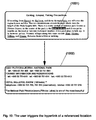
- the user activates the corresponding hyperlink from his workstation or from the physical document.
- the hyperlinked URL if any, is then accessed throughout the Web, and the information on this URL address is retrieved and displayed on the user workstation (1002).
- Figure 10 shows how the user can access information concerning the "Hotel Bellevue" on the Web simply by triggering the corresponding "geographic link” from his workstation.
- Paper maps can be published and used independently of the Web pages placed on the Web servers. Because Web pages comprise the cartographic coordinates (i.e., with the "geographic links") of the locations to highlight on maps, hotels, restaurants, oil posts, pharmacies, shops or businesses of any type can be easily located and identified on these maps when browsing said Web pages, thus attracting the interest of potential customers. Public authorities can help people to locate, by means of hard-copy maps, all kinds of services, resources or places of cultural or economic interest.
Landscapes
- Engineering & Computer Science (AREA)
- Databases & Information Systems (AREA)
- Theoretical Computer Science (AREA)
- Data Mining & Analysis (AREA)
- Physics & Mathematics (AREA)
- General Engineering & Computer Science (AREA)
- General Physics & Mathematics (AREA)
- Document Processing Apparatus (AREA)
- User Interface Of Digital Computer (AREA)
Priority Applications (1)
| Application Number | Priority Date | Filing Date | Title |
|---|---|---|---|
| EP01480031A EP1186986A3 (de) | 2000-08-29 | 2001-05-10 | System und Verfahren zum Orten, von sich auf ein elektronisches Dokument beziehenden Punkten, auf einem physikalischen Dokument |
Applications Claiming Priority (3)
| Application Number | Priority Date | Filing Date | Title |
|---|---|---|---|
| EP00480080 | 2000-08-29 | ||
| EP00480080 | 2000-08-29 | ||
| EP01480031A EP1186986A3 (de) | 2000-08-29 | 2001-05-10 | System und Verfahren zum Orten, von sich auf ein elektronisches Dokument beziehenden Punkten, auf einem physikalischen Dokument |
Publications (2)
| Publication Number | Publication Date |
|---|---|
| EP1186986A2 true EP1186986A2 (de) | 2002-03-13 |
| EP1186986A3 EP1186986A3 (de) | 2005-11-16 |
Family
ID=26073661
Family Applications (1)
| Application Number | Title | Priority Date | Filing Date |
|---|---|---|---|
| EP01480031A Withdrawn EP1186986A3 (de) | 2000-08-29 | 2001-05-10 | System und Verfahren zum Orten, von sich auf ein elektronisches Dokument beziehenden Punkten, auf einem physikalischen Dokument |
Country Status (1)
| Country | Link |
|---|---|
| EP (1) | EP1186986A3 (de) |
Cited By (4)
| Publication number | Priority date | Publication date | Assignee | Title |
|---|---|---|---|---|
| US7574407B2 (en) | 2002-10-10 | 2009-08-11 | International Business Machines Corporation | System and method for selecting, ordering and accessing copyrighted information from physical documents |
| US8196041B2 (en) * | 2003-06-26 | 2012-06-05 | International Business Machines Corporation | Method and system for processing information relating to active regions of a page of physical document |
| US10664153B2 (en) | 2001-12-21 | 2020-05-26 | International Business Machines Corporation | Device and system for retrieving and displaying handwritten annotations |
| CN115599263A (zh) * | 2021-07-09 | 2023-01-13 | 中移(成都)信息通信科技有限公司(Cn) | 页面展示方法、装置、电子设备及计算机可读存储介质 |
Family Cites Families (3)
| Publication number | Priority date | Publication date | Assignee | Title |
|---|---|---|---|---|
| US3760360A (en) * | 1971-11-01 | 1973-09-18 | E Systems Inc | Matrix switch |
| US5010323A (en) * | 1988-05-09 | 1991-04-23 | Hoffman Clifford J | Interactive overlay driven computer display system |
| KR100324989B1 (ko) * | 1993-11-08 | 2002-06-24 | 마츠시타 덴끼 산교 가부시키가이샤 | 입력표시일체형정보처리장치 |
-
2001
- 2001-05-10 EP EP01480031A patent/EP1186986A3/de not_active Withdrawn
Cited By (5)
| Publication number | Priority date | Publication date | Assignee | Title |
|---|---|---|---|---|
| US10664153B2 (en) | 2001-12-21 | 2020-05-26 | International Business Machines Corporation | Device and system for retrieving and displaying handwritten annotations |
| US7574407B2 (en) | 2002-10-10 | 2009-08-11 | International Business Machines Corporation | System and method for selecting, ordering and accessing copyrighted information from physical documents |
| US8112363B2 (en) | 2002-10-10 | 2012-02-07 | International Business Machines Corporation | Selecting, ordering and accessing copyrighted information from physical documents |
| US8196041B2 (en) * | 2003-06-26 | 2012-06-05 | International Business Machines Corporation | Method and system for processing information relating to active regions of a page of physical document |
| CN115599263A (zh) * | 2021-07-09 | 2023-01-13 | 中移(成都)信息通信科技有限公司(Cn) | 页面展示方法、装置、电子设备及计算机可读存储介质 |
Also Published As
| Publication number | Publication date |
|---|---|
| EP1186986A3 (de) | 2005-11-16 |
Similar Documents
| Publication | Publication Date | Title |
|---|---|---|
| US7472338B2 (en) | Method and apparatus for locating items on a physical document and method for creating a geographical link from an electronic document to the physical document | |
| US7027038B2 (en) | System and method for locating on a physical document items referenced in another physical document | |
| US7181502B2 (en) | System and method for locating on electronic documents items referenced in a physical document | |
| US6771283B2 (en) | Method and system for accessing interactive multimedia information or services by touching highlighted items on physical documents | |
| US7373588B2 (en) | Method and system for accessing interactive multimedia information or services by touching marked items on physical documents | |
| US7310779B2 (en) | Method for creating and selecting active regions on physical documents | |
| US6940491B2 (en) | Method and system for generating hyperlinked physical copies of hyperlinked electronic documents | |
| US6785667B2 (en) | Method and apparatus for extracting data objects and locating them in virtual space | |
| JP4081008B2 (ja) | 物理的な文書から電子文書を選択すると共に前記物理的な文書上に重ねて前記電子文書を表示するシステムおよび方法 | |
| US20020089550A1 (en) | Method and apparatus for organizing hierarchical screens in virtual space | |
| US20020075311A1 (en) | Method for viewing information in virtual space | |
| US20020085035A1 (en) | Method and apparatus for creating custom formats for viewing information in virtual space | |
| US20020080177A1 (en) | Method and apparatus for converting data objects to a custom format for viewing information in virtual space | |
| EP1186986A2 (de) | System und Verfahren zum Orten, von sich auf ein elektronisches Dokument beziehenden Punkten, auf einem physikalischen Dokument |
Legal Events
| Date | Code | Title | Description |
|---|---|---|---|
| PUAI | Public reference made under article 153(3) epc to a published international application that has entered the european phase |
Free format text: ORIGINAL CODE: 0009012 |
|
| AK | Designated contracting states |
Kind code of ref document: A2 Designated state(s): AT BE CH CY DE DK ES FI FR GB GR IE IT LI LU MC NL PT SE TR |
|
| AX | Request for extension of the european patent |
Free format text: AL;LT;LV;MK;RO;SI |
|
| RIN1 | Information on inventor provided before grant (corrected) |
Inventor name: INCERTIS CARRO, FERNANDO |
|
| RIN1 | Information on inventor provided before grant (corrected) |
Inventor name: INCERTIS CARRO, FERNANDO |
|
| PUAL | Search report despatched |
Free format text: ORIGINAL CODE: 0009013 |
|
| RIC1 | Information provided on ipc code assigned before grant |
Ipc: 7G 06F 3/00 B Ipc: 7G 09B 29/10 B Ipc: 7G 06F 3/033 B Ipc: 7G 06F 17/30 A |
|
| AK | Designated contracting states |
Kind code of ref document: A3 Designated state(s): AT BE CH CY DE DK ES FI FR GB GR IE IT LI LU MC NL PT SE TR |
|
| AX | Request for extension of the european patent |
Extension state: AL LT LV MK RO SI |
|
| 17P | Request for examination filed |
Effective date: 20060516 |
|
| AKX | Designation fees paid |
Designated state(s): AT BE CH CY DE DK ES FI FR GB GR IE IT LI LU MC NL PT SE TR |
|
| 17Q | First examination report despatched |
Effective date: 20070316 |
|
| STAA | Information on the status of an ep patent application or granted ep patent |
Free format text: STATUS: THE APPLICATION IS DEEMED TO BE WITHDRAWN |
|
| 18D | Application deemed to be withdrawn |
Effective date: 20121201 |