EP0903678B1 - Workflow management system - Google Patents
Workflow management system Download PDFInfo
- Publication number
- EP0903678B1 EP0903678B1 EP19980117821 EP98117821A EP0903678B1 EP 0903678 B1 EP0903678 B1 EP 0903678B1 EP 19980117821 EP19980117821 EP 19980117821 EP 98117821 A EP98117821 A EP 98117821A EP 0903678 B1 EP0903678 B1 EP 0903678B1
- Authority
- EP
- European Patent Office
- Prior art keywords
- user
- workpool
- work
- role
- objects
- Prior art date
- Legal status (The legal status is an assumption and is not a legal conclusion. Google has not performed a legal analysis and makes no representation as to the accuracy of the status listed.)
- Expired - Lifetime
Links
Images
Classifications
-
- G—PHYSICS
- G06—COMPUTING OR CALCULATING; COUNTING
- G06Q—INFORMATION AND COMMUNICATION TECHNOLOGY [ICT] SPECIALLY ADAPTED FOR ADMINISTRATIVE, COMMERCIAL, FINANCIAL, MANAGERIAL OR SUPERVISORY PURPOSES; SYSTEMS OR METHODS SPECIALLY ADAPTED FOR ADMINISTRATIVE, COMMERCIAL, FINANCIAL, MANAGERIAL OR SUPERVISORY PURPOSES, NOT OTHERWISE PROVIDED FOR
- G06Q10/00—Administration; Management
- G06Q10/10—Office automation; Time management
Definitions
- This invention relates to workflow management systems.
- a workflow management system is a computer-implemented system for providing support for business processes.
- such a system may be used in a manufacturing business, to support the process of handling orders from customers.
- a system maintains a work pool, containing work items (such as customer orders) waiting to be processed, and allows a number of individual users (such as sales, accounts and purchasing personnel) to access the work items in the pool.
- the object of the present invention is to provide a novel workflow management system in which changes to the process definition can be made in a safe and efficient manner.
- a workflow management system for supporting a business process in which a plurality of work items are processed by a plurality of user objects in accordance with business rules , wherein
- each of the user objects contains its own set of business rules facilitates the making of changes to the process definition in a safe and efficient manner, even while the system is running, since only those user objects that are affected by the change need be modified.
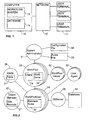
- Figure 1 is a block diagram of a computer system incorporating a workflow management system.
- FIG. 2 is a block diagram showing the workflow management system in more detail.
- Figure 1 shows a computer system comprising a server computer 10, and a number of user terminals 11 connected to the server by way of a network 12.
- the server runs a workflow management system 13, which can access a database 14.
- a case may correspond to a customer order.
- a data item referred to herein as a business object
- the business object contains all the business data relevant to that case (for example, order number, customer name, quantity, price and so on).
- the content of business objects may vary, and different business objects may be held in different database tables.
- a case may have a number of business objects associated with it, logically organised in a tree structure in which each object may have one or more subsidiary (child) objects.
- a business object representing a customer order may have subsidiary business objects representing associated internal purchase orders.
- each case will require a number of operations to be performed on the associated business object, by users or external tools. This is achieved by placing work items in a number of work pools.
- Each business object may have a number of work items associated with it, allowing a number of operations to be performed on a case in parallel. Users can view the contents of the work pools, and select work items for processing, according to predefined business rules. This processing may, in turn, generate further work items for the work pools.
- FIG. 2 shows the workflow management system 13 in more detail.
- the workflow management system comprises a number of active processing objects referred to herein as roles, each of which encapsulates its local data and represents an independent thread of execution. These roles include a SystemAdministrator role 21, an ObjectManager role 22, a number of WorkPool roles 23, a number of WorkPoolUser roles 24, a DBServer role 25, and an Alerts role 26. These various roles may conveniently be built using the role based process technology provided by the ICL Processwise Integrator, as described for example in the following reference:
- the SystemAdministrator role 21 is responsible for the introduction of users to the system, and for the creation, deletion and modification of the other roles.
- the ObjectManager role 22 is responsible for managing the business objects. This role holds an internal table 27 containing a number of item records, one for each business object held in the database. Whenever a business object is created, a corresponding item record is also created, for referencing the business object. The item record contains information about the business object in a standard format. The tree structure of the business objects is represented by parent-child links in the corresponding item records.
- the ObjectManager role also provides a locking mechanism for locking the business objects, so as to allow only one user at a time to update a given object.
- the WorkPool roles 23 are responsible for maintaining the work pools.
- One instance of the WorkPool role is created for each work pool in the system.
- Each WorkPool role instance holds an internal table 28 containing a set of work items, which form the work pool. It also holds an internal table 29, containing details of the users who are assigned to this work pool. For each user, the user table holds the user's full name, login name and password.
- the WorkPoolUser roles 24 are responsible for processing the work items.
- One instance of the WorkPoolUser role is created for each user assigned to each work pool.
- each WorkPool role has a number of WorkPoolUser roles associated with it, one for each user assigned to that work pool, and each user has one WorkPoolUser role for each work pool that can be accessed by that user.
- a WorkPoolUser role may be associated with an external application rather than (or as well as) a human operator.
- Each WorkPoolUser role instance holds a set of business rules tables 30, specifying how this role is to handle work items, including when information about when to pass work to other roles.
- the DBServer role 25 provides a common point of access to the database 14 for the other roles.
- the Alerts role 26 handles deadlines for processing work items. It contains an internal table 31. In response to a registerAlert request from a WorkPoolUser role, it creates a record in this internal table, specifying the deadline date and time, and the work item to which the deadline relates. The Alerts role periodically monitors this table, to check whether any deadlines have expired. When a deadline expires, the Alerts role sends a timerEvent call to the appropriate WorkPool role, which in turn calls the appropriate WorkPoolUser role to handle the alert.
- the system also includes a number of WorkPoolViewer objects 32, one for each user assigned to each work pool.
- Each WorkPoolViewer object enables a user to access a work pool, to view a list of all the work items currently in that work pool, and to select one of the work items for viewing or for action.
- the system also includes a number of user agents 33, which provide interfaces between the workflow management system and the respective users.
- the ObjectManager role holds an item record for each business object in the database.
- the structure of an item record is as follows:
- each WorkPool role holds a number of work items, constituting a work pool.
- the structure of each work item is as follows:
- the "state" field of a work item determines the operations that are to be performed on it when it is selected by a user.
- That user's WorkPoolViewer sends a message to the associated WorkPool role, requesting it to supply a copy of its work pool.
- the WorkPool role copies its current set of work items to the WorkPoolViewer, where the items are displayed to the user.
- the displayed information for each work item is derived from the objID, summary, workType, state, priority, date, and assignedTo fields.
- the WorkPool role changes the content of any work item, it notifies all its associated WorkPoolViewers of the change, so that they can keep their displayed information up to date.
- the WorkPoolViewer allows the user to select any one of the displayed work items, for example by clicking on the item with a mouse. The user may then either accept the selected work item, or simply request to view it. If the user accepts an item, the WorkPoolViewer sends an "accept" message to the WorkPool role. Alternatively, if the user requests to view an item, the WorkPoolViewer sends an "view" message to the WorkPool role. Both of these messages contain the identity of the selected work item.
- a WorkPool role When a WorkPool role receives an "accept" message from a WorkPoolViewer, it performs the following operations.
- the WorkPool role first checks whether the selected work item is available for assignment, i.e. whether the assignedTo field of the work item is empty. If so, the assignedTo field is set to the login name of the user, and the WorkPool role then sends a manageWorkItem request to the WorkPoolUser role for this user.
- the request contains a copy of the work item, and an "assign" command.
- the WorkPool role also sends a copy of the updated work item to all its associated WorkPoolViewers, to notify them of this change.
- the WorkPool role receives a "view" message from a WorkPoolViewer, it performs the following operations.
- the WorkPool role sends a manageWorkItem request to WorkPoolUser role, containing a copy of the work item, and a "view" command. In this case the WorkPool role does not check or set the assignedTo field.
- the WorkPool role can also receive a routeWorkItem request from any of the WorkPoolUser roles, specifying one of the following commands: "add”, “replace”, “release” and “delete”.
- a routeWorkItem request from any of the WorkPoolUser roles, specifying one of the following commands: "add”, “replace”, “release” and “delete”.
- the WorkPool role creates a new work item with a unique identifier in its internal table, and returns the identifier of the new work item to the calling WorkPoolUser role.
- a "replace” command the WorkPool role replaces an identified work item in its internal tables with an updated version of the work item, and sets the assignedTo field of the work item to the empty string.
- the WorkPool role In response to a "release” command, the WorkPool role sets the assignedTo field of an identified work item to the empty string. In response to a "delete” command, the WorkPool role deletes an identified work item from its internal table. In each case, the WorkPool role notifies all the associated WorkPoolViewers of the change. In the case of the "replace”, “release” and “delete” commands, if the identified work item is not present, the WorkPool role returns an error message to the caller.
- the WorkPool role can also receive a timerEvent call from the Alerts role, to notify it that a deadline has expired in relation to a specified work item.
- the Workpool role locks the specified work item (on behalf of an arbitrarily chosen user), and then sends a manageWorkItem request to the WorkPoolUser role.
- the request contains the contents of the work item, and an "alert" command. If the identified work item is not present in the work pool, the alert is ignored.
- a WorkPoolUser role When a WorkPoolUser role receives a manageWorkItem request from a WorkPool role, it performs the following actions.
- the WorkPoolUser role first calls the ObjectManager role, requesting it fetch and lock the item record identified by the objID field of the work item. If the item record is not locked, the ObjectManager role will lock it and return a copy of the item record, including all the related work items. However, if the item record is already locked, an error message is returned.
- the WorkPoolUser role then accesses its locally held business rules tables, using the "state" field of the work item as a key, to obtain the following information:
- the WorkPoolUser role also calls the DBServer role to fetch business data from the business object referenced by the item record, and also to fetch process data relevant to the current state.
- the WorkPoolUser role then calls its associated user agent, requesting it to display the form, message and action list, with the data retrieved from the database in appropriate fields of the form.
- the user may then enter data, update fields, and select actions in the form.
- the form includes "OK” and “Cancel” buttons. If the user presses the "OK” button, the user agent returns the updated fields to the WorkPoolUser role, along with an "action" field specifying the action selected by the user.
- the WorkPoolUser role When the WorkPoolUser role receives this information, it concatenates the "step" field of the work item with the "action” field returned by the user, to form a key. This key is used to access a nextSteps table in the business rules, so as to obtain a series of process steps to be carried out.
- Each process step may involve creating a new work item in a target work pool, or replacing or deleting an existing work item in a target work pool.
- Creating, replacing or deleting a work item is performed by sending a routeWorkItem request containing an "add", "replace” or “delete” command to the appropriate WorkPool role.
- the target work pool may be the current work pool, or may be another specified work pool.
- a request also is sent to the ObjectManager role, requesting it to update the list of work items in the corresponding item record. If the process step specifies a deadline for the work item, a registerAlert request is sent to the Alerts role, so as to set up a new deadline.
- the particular sequence of steps depends on the particular business process being supported by the system. For example, when a work item representing a new sale is processed by a salesperson, the business rules may specify that a further work item, representing an invoicing task, should be created and placed in another work pool for access by an accounts clerk.
- any business objects affected are updated by passing the object identifier, type and data table to the DBServer role, and the corresponding item records are updated by calling the ObjectManager role.
- the WorkPoolUser role is then ready to accept another manageWorkItem request.
- a WorkPoolUser role may also allow its user to create a new case, e.g. a salesperson may be permitted to create a new customer order, while an accounts clerk would not.
- the SystemAdministrator role automatically customises the system for the particular business process being supported.
- the information for customising the system is supplied in a set of configuration files 34 and business rules files 35.
- the configuration files specify the required work pools and the users that are to be assigned to each of these work pools.
- the business rules files specify the business rules for the system.
- the SystemAdministrator role first reads the configuration files, and creates a user agent object 33 for each user. It also creates a WorkPool role 23 for each required work pool, with the names of its users held in its internal table.
- the WorkPool roles are created as instances of a general WorkPool type.
- Each WorkPool role instance then calls the SystemAdministrator role 21, requesting it to create a WorkPoolUser role 24 for each of its users.
- Each WorkPoolUser role is given a copy of the business rules relevant to its part in the behaviour of the overall process.
- the WorkPoolUser roles are created as instances of a general WorkPoolUser type.
- a WorkPoolViewer object 32 is also created for each user.
- the SystemAdministrator role can also be called at any time, by a suitably authorised user, to modify the business rules in any WorkPoolUser role, to create new work pools, to introduce new users to the work pools, or to remove existing users from the work pools.
- specialised roles can readily be created to cater for special requirements.
Landscapes
- Engineering & Computer Science (AREA)
- Business, Economics & Management (AREA)
- Strategic Management (AREA)
- Entrepreneurship & Innovation (AREA)
- Human Resources & Organizations (AREA)
- Operations Research (AREA)
- Economics (AREA)
- Marketing (AREA)
- Data Mining & Analysis (AREA)
- Quality & Reliability (AREA)
- Tourism & Hospitality (AREA)
- Physics & Mathematics (AREA)
- General Business, Economics & Management (AREA)
- General Physics & Mathematics (AREA)
- Theoretical Computer Science (AREA)
- Management, Administration, Business Operations System, And Electronic Commerce (AREA)
- Computer And Data Communications (AREA)
Description
- This invention relates to workflow management systems.
- A workflow management system is a computer-implemented system for providing support for business processes. For example, such a system may be used in a manufacturing business, to support the process of handling orders from customers. Typically, such a system maintains a work pool, containing work items (such as customer orders) waiting to be processed, and allows a number of individual users (such as sales, accounts and purchasing personnel) to access the work items in the pool.
- S.K.Sarin, "Object-oriented workflow technology in InConcert", Proceedings of IEEE COMPCON '96, pages 446-450, describes an object-oriented workflow management system in which a process consists of tasks (the individual units of work that comprise the process), roles (designating the participants that perform the tasks), and references to documents or other data objects that are manipulated by tasks in the process. A Process Manager allows the task structure of a process instance to be modified dynamically.
- The object of the present invention is to provide a novel workflow management system in which changes to the process definition can be made in a safe and efficient manner.
- According to the invention there is provided a workflow management system for supporting a business process in which a plurality of work items are processed by a plurality of user objects in accordance with business rules ,wherein
- (a) the system includes a plurality of workpool objects, responsible for maintaining a plurality of work pools for storing work items waiting to be processed, and
- (b) each of the user objects contains its own set of business rules specifying how this user object is to handle work items, characterised in that : each one of the business rules associated with a user object comprises a next steps table, containing a set of process steps to be carried out by the user object, the next steps table being indexed by a key formed by combining a current process step number and a current user action identifier.
-
- The fact that each of the user objects contains its own set of business rules facilitates the making of changes to the process definition in a safe and efficient manner, even while the system is running, since only those user objects that are affected by the change need be modified.
- Figure 1 is a block diagram of a computer system incorporating a workflow management system.
- Figure 2 is a block diagram showing the workflow management system in more detail.
- One workflow management system in accordance with the invention will now be described by way of example with reference to the accompanying drawings.
- Figure 1 shows a computer system comprising a
server computer 10, and a number ofuser terminals 11 connected to the server by way of anetwork 12. The server runs aworkflow management system 13, which can access adatabase 14. - The work of the system is divided into units referred to herein as cases, which are processed independently of each other. For example, a case may correspond to a customer order. When a new case is introduced into the system, a data item, referred to herein as a business object, is created in the database. The business object contains all the business data relevant to that case (for example, order number, customer name, quantity, price and so on). The content of business objects may vary, and different business objects may be held in different database tables. A case may have a number of business objects associated with it, logically organised in a tree structure in which each object may have one or more subsidiary (child) objects. For example, a business object representing a customer order may have subsidiary business objects representing associated internal purchase orders.
- Typically, each case will require a number of operations to be performed on the associated business object, by users or external tools. This is achieved by placing work items in a number of work pools. Each business object may have a number of work items associated with it, allowing a number of operations to be performed on a case in parallel. Users can view the contents of the work pools, and select work items for processing, according to predefined business rules. This processing may, in turn, generate further work items for the work pools.
- Figure 2 shows the
workflow management system 13 in more detail. - The workflow management system comprises a number of active processing objects referred to herein as roles, each of which encapsulates its local data and represents an independent thread of execution. These roles include a
SystemAdministrator role 21, an ObjectManagerrole 22, a number ofWorkPool roles 23, a number of WorkPoolUserroles 24, aDBServer role 25, and anAlerts role 26. These various roles may conveniently be built using the role based process technology provided by the ICL Processwise Integrator, as described for example in the following reference: - "The Use of a Persistent Language in the Implementation of a Process Support System"
- R.Mark Greenwood et al.
- ICL Technical Journal, May 1992, page 109.
-
- The
SystemAdministrator role 21 is responsible for the introduction of users to the system, and for the creation, deletion and modification of the other roles. - The ObjectManager
role 22 is responsible for managing the business objects. This role holds an internal table 27 containing a number of item records, one for each business object held in the database. Whenever a business object is created, a corresponding item record is also created, for referencing the business object. The item record contains information about the business object in a standard format. The tree structure of the business objects is represented by parent-child links in the corresponding item records. The ObjectManager role also provides a locking mechanism for locking the business objects, so as to allow only one user at a time to update a given object. - The WorkPool
roles 23 are responsible for maintaining the work pools. One instance of the WorkPool role is created for each work pool in the system. Each WorkPool role instance holds an internal table 28 containing a set of work items, which form the work pool. It also holds an internal table 29, containing details of the users who are assigned to this work pool. For each user, the user table holds the user's full name, login name and password. - The WorkPoolUser
roles 24 are responsible for processing the work items. One instance of the WorkPoolUser role is created for each user assigned to each work pool. In other words, each WorkPool role has a number of WorkPoolUser roles associated with it, one for each user assigned to that work pool, and each user has one WorkPoolUser role for each work pool that can be accessed by that user. A WorkPoolUser role may be associated with an external application rather than (or as well as) a human operator. Each WorkPoolUser role instance holds a set of business rules tables 30, specifying how this role is to handle work items, including when information about when to pass work to other roles. - The DBServer
role 25 provides a common point of access to thedatabase 14 for the other roles. - The
Alerts role 26 handles deadlines for processing work items. It contains an internal table 31. In response to a registerAlert request from a WorkPoolUser role, it creates a record in this internal table, specifying the deadline date and time, and the work item to which the deadline relates. The Alerts role periodically monitors this table, to check whether any deadlines have expired. When a deadline expires, the Alerts role sends a timerEvent call to the appropriate WorkPool role, which in turn calls the appropriate WorkPoolUser role to handle the alert. - The system also includes a number of WorkPoolViewer
objects 32, one for each user assigned to each work pool. Each WorkPoolViewer object enables a user to access a work pool, to view a list of all the work items currently in that work pool, and to select one of the work items for viewing or for action. - The system also includes a number of
user agents 33, which provide interfaces between the workflow management system and the respective users. - As mentioned above, the ObjectManager role holds an item record for each business object in the database. The structure of an item record is as follows:
- id
- The record identifier. This is the same as the database key of the corresponding business object.
- type
- The name of the database table in which the business object is held.
- partOf
- The identifier of the parent item record (if any).
- children
- A list of the identifiers of all the child item records (if any) for this record.
- caseId
- The identifier of the topmost parent of this family of item records.
- summary
- A description field.
- workItems
- A table of the work items associated with this business object. For each work item, the table contains a copy of the work item, the identity of the work pool in which the item is located, and the work pool type.
- As mentioned above, each WorkPool role holds a number of work items, constituting a work pool. The structure of each work item is as follows:
- id
- Identifier. This is a reference, local to the work pool, which identifies the work item.
- objID
- Object identifier. This is a reference to the corresponding item record.
- summary
- A copy of the summary field in the corresponding item record.
- workType
- A copy of the type field in the corresponding item record.
- priority
- Indicates whether or not the user is required to take action on this work item.
- date
- Deadline date.
- assignedTo
- The name of the user to whom the work item is currently assigned.
- state
- The current state of the work item.
- As will be described, the "state" field of a work item determines the operations that are to be performed on it when it is selected by a user.
- Whenever a user logs in to the system, that user's WorkPoolViewer sends a message to the associated WorkPool role, requesting it to supply a copy of its work pool. In response to this request, the WorkPool role copies its current set of work items to the WorkPoolViewer, where the items are displayed to the user. The displayed information for each work item is derived from the objID, summary, workType, state, priority, date, and assignedTo fields. As will be described, whenever the WorkPool role changes the content of any work item, it notifies all its associated WorkPoolViewers of the change, so that they can keep their displayed information up to date.
- The WorkPoolViewer allows the user to select any one of the displayed work items, for example by clicking on the item with a mouse. The user may then either accept the selected work item, or simply request to view it. If the user accepts an item, the WorkPoolViewer sends an "accept" message to the WorkPool role. Alternatively, if the user requests to view an item, the WorkPoolViewer sends an "view" message to the WorkPool role. Both of these messages contain the identity of the selected work item.
- When a WorkPool role receives an "accept" message from a WorkPoolViewer, it performs the following operations. The WorkPool role first checks whether the selected work item is available for assignment, i.e. whether the assignedTo field of the work item is empty. If so, the assignedTo field is set to the login name of the user, and the WorkPool role then sends a manageWorkItem request to the WorkPoolUser role for this user. The request contains a copy of the work item, and an "assign" command. The WorkPool role also sends a copy of the updated work item to all its associated WorkPoolViewers, to notify them of this change.
- If the WorkPool role receives a "view" message from a WorkPoolViewer, it performs the following operations. The WorkPool role sends a manageWorkItem request to WorkPoolUser role, containing a copy of the work item, and a "view" command. In this case the WorkPool role does not check or set the assignedTo field.
- The WorkPool role can also receive a routeWorkItem request from any of the WorkPoolUser roles, specifying one of the following commands: "add", "replace", "release" and "delete". In response to an "add" command, the WorkPool role creates a new work item with a unique identifier in its internal table, and returns the identifier of the new work item to the calling WorkPoolUser role. In response to a "replace" command, the WorkPool role replaces an identified work item in its internal tables with an updated version of the work item, and sets the assignedTo field of the work item to the empty string. In response to a "release" command, the WorkPool role sets the assignedTo field of an identified work item to the empty string. In response to a "delete" command, the WorkPool role deletes an identified work item from its internal table. In each case, the WorkPool role notifies all the associated WorkPoolViewers of the change. In the case of the "replace", "release" and "delete" commands, if the identified work item is not present, the WorkPool role returns an error message to the caller.
- The WorkPool role can also receive a timerEvent call from the Alerts role, to notify it that a deadline has expired in relation to a specified work item. In response to this call, the Workpool role locks the specified work item (on behalf of an arbitrarily chosen user), and then sends a manageWorkItem request to the WorkPoolUser role. The request contains the contents of the work item, and an "alert" command. If the identified work item is not present in the work pool, the alert is ignored.
- When a WorkPoolUser role receives a manageWorkItem request from a WorkPool role, it performs the following actions.
- The WorkPoolUser role first calls the ObjectManager role, requesting it fetch and lock the item record identified by the objID field of the work item. If the item record is not locked, the ObjectManager role will lock it and return a copy of the item record, including all the related work items. However, if the item record is already locked, an error message is returned.
- The WorkPoolUser role then accesses its locally held business rules tables, using the "state" field of the work item as a key, to obtain the following information:
- A form to be displayed to the user.
- An explanatory message for the user.
- An action list for the user to select from.
- The WorkPoolUser role also calls the DBServer role to fetch business data from the business object referenced by the item record, and also to fetch process data relevant to the current state.
- The WorkPoolUser role then calls its associated user agent, requesting it to display the form, message and action list, with the data retrieved from the database in appropriate fields of the form. The user may then enter data, update fields, and select actions in the form. The form includes "OK" and "Cancel" buttons. If the user presses the "OK" button, the user agent returns the updated fields to the WorkPoolUser role, along with an "action" field specifying the action selected by the user.
- When the WorkPoolUser role receives this information, it concatenates the "step" field of the work item with the "action" field returned by the user, to form a key. This key is used to access a nextSteps table in the business rules, so as to obtain a series of process steps to be carried out.
- Each process step may involve creating a new work item in a target work pool, or replacing or deleting an existing work item in a target work pool. Creating, replacing or deleting a work item is performed by sending a routeWorkItem request containing an "add", "replace" or "delete" command to the appropriate WorkPool role. The target work pool may be the current work pool, or may be another specified work pool. When a work item is created, replaced or deleted, a request also is sent to the ObjectManager role, requesting it to update the list of work items in the corresponding item record. If the process step specifies a deadline for the work item, a registerAlert request is sent to the Alerts role, so as to set up a new deadline.
- The particular sequence of steps depends on the particular business process being supported by the system. For example, when a work item representing a new sale is processed by a salesperson, the business rules may specify that a further work item, representing an invoicing task, should be created and placed in another work pool for access by an accounts clerk.
- Finally, any business objects affected are updated by passing the object identifier, type and data table to the DBServer role, and the corresponding item records are updated by calling the ObjectManager role.
- The WorkPoolUser role is then ready to accept another manageWorkItem request.
- If permitted by its business rules, a WorkPoolUser role may also allow its user to create a new case, e.g. a salesperson may be permitted to create a new customer order, while an accounts clerk would not.
- When the workflow management system is installed, the SystemAdministrator role automatically customises the system for the particular business process being supported. The information for customising the system is supplied in a set of configuration files 34 and business rules files 35. The configuration files specify the required work pools and the users that are to be assigned to each of these work pools. The business rules files specify the business rules for the system.
- The SystemAdministrator role first reads the configuration files, and creates a
user agent object 33 for each user. It also creates aWorkPool role 23 for each required work pool, with the names of its users held in its internal table. The WorkPool roles are created as instances of a general WorkPool type. - Each WorkPool role instance then calls the
SystemAdministrator role 21, requesting it to create aWorkPoolUser role 24 for each of its users. Each WorkPoolUser role is given a copy of the business rules relevant to its part in the behaviour of the overall process. The WorkPoolUser roles are created as instances of a general WorkPoolUser type. AWorkPoolViewer object 32 is also created for each user. - The SystemAdministrator role can also be called at any time, by a suitably authorised user, to modify the business rules in any WorkPoolUser role, to create new work pools, to introduce new users to the work pools, or to remove existing users from the work pools. For example, specialised roles can readily be created to cater for special requirements. These actions can be performed dynamically, while the application is running. This ability to dynamically modify the system is a consequence of the fact that each of the WorkPool roles stores its own internal list of users, and each of the WorkPoolUser roles stores its own internal business rules.
Claims (5)
- A workflow management system for supporting a business process in which a plurality of work items (28) are processed by a plurality of user objects (24) in accordance with business rules (30), wherein(a) the system includes a plurality of workpool objects (23), responsible for maintaining a plurality of work pools for storing work items (28) waiting to be processed, and(b) each of the user objects (24) contains its own set of business rules (30) specifying how this user object is to handle work item, characterised in that:each one of the business rules (30) associated with a user object comprises a next steps table, containing a set of process steps to be carried out by the user object, the next steps table being indexed by a key formed by combining a current process step number and a current user action identifier.
- A workflow management system according to claim 1 wherein each of the workpool objects (23) maintains its own list (29) of users who are assigned to this workpool object.
- A workflow management system according to either preceding claim wherein each of the workpool objects (23) has a number of workpool viewer objects (32) associated with it, for allowing respective users to view the work items held in that workpool object and to select one of those work items.
- A workflow management system according to Claim 3 wherein, when a work item is selected by a user through a workpool viewer object (32), the workpool viewer object informs the associated workpool object (23), and the workpool object then sends a copy of the selected work item to the user object (24) associated with that user.
- A workflow management system according to any preceding claim 1, including a system administrator object (21) for allowing a user to modify the business rules (30) in any selected user object (24) dynamically, while the system is running.
Applications Claiming Priority (2)
| Application Number | Priority Date | Filing Date | Title |
|---|---|---|---|
| GBGB9720166.9A GB9720166D0 (en) | 1997-09-23 | 1997-09-23 | Workflow management system |
| GB9720166 | 1997-09-23 |
Publications (3)
| Publication Number | Publication Date |
|---|---|
| EP0903678A2 EP0903678A2 (en) | 1999-03-24 |
| EP0903678A3 EP0903678A3 (en) | 2000-06-14 |
| EP0903678B1 true EP0903678B1 (en) | 2003-03-26 |
Family
ID=10819483
Family Applications (1)
| Application Number | Title | Priority Date | Filing Date |
|---|---|---|---|
| EP19980117821 Expired - Lifetime EP0903678B1 (en) | 1997-09-23 | 1998-09-19 | Workflow management system |
Country Status (3)
| Country | Link |
|---|---|
| EP (1) | EP0903678B1 (en) |
| DE (1) | DE69812517T2 (en) |
| GB (1) | GB9720166D0 (en) |
Cited By (2)
| Publication number | Priority date | Publication date | Assignee | Title |
|---|---|---|---|---|
| US7171664B2 (en) | 2002-12-16 | 2007-01-30 | International Business Machines Corporation | Content management system and method of employing extensible workflow entities with user-defined attributes in an object-oriented framework |
| US7392210B1 (en) | 2000-04-07 | 2008-06-24 | Jpmorgan Chase Bank, N.A. | Workflow management system and method |
Families Citing this family (10)
| Publication number | Priority date | Publication date | Assignee | Title |
|---|---|---|---|---|
| WO2001011509A2 (en) * | 1999-08-04 | 2001-02-15 | Portspring Limited | A work flow processing method |
| DE10007563A1 (en) * | 2000-02-18 | 2001-09-06 | Intershop Software Entwicklung | Process for controlling data processing operations |
| AU2001251355A1 (en) * | 2000-04-07 | 2001-10-23 | Jpmorgan Chase Bank | Workflow management system and method |
| EP1278147A1 (en) * | 2001-07-19 | 2003-01-22 | Océ-Technologies B.V. | System for controlling and monitoring a process |
| TWI277005B (en) * | 2001-07-19 | 2007-03-21 | Oce Tech Bv | System for controlling and monitoring a process |
| US7406424B2 (en) * | 2001-08-29 | 2008-07-29 | Hewlett-Packard Development Company, L.P. | Migration of a workflow system to changed process definitions |
| US7693893B2 (en) | 2003-10-10 | 2010-04-06 | Sap Ag | Distributed handling of associated data sets in a computer network |
| EP1522938A1 (en) * | 2003-10-10 | 2005-04-13 | Sap Ag | Distributed handling of associated data sets in a computer network |
| EP1750222A1 (en) * | 2005-07-11 | 2007-02-07 | International Business Machines Corporation | Process instance serialization |
| US8561071B2 (en) | 2005-07-11 | 2013-10-15 | International Business Machines Corporation | Process instance serialization |
Family Cites Families (1)
| Publication number | Priority date | Publication date | Assignee | Title |
|---|---|---|---|---|
| AU7207194A (en) * | 1993-06-16 | 1995-01-03 | Electronic Data Systems Corporation | Process management system |
-
1997
- 1997-09-23 GB GBGB9720166.9A patent/GB9720166D0/en not_active Ceased
-
1998
- 1998-09-19 EP EP19980117821 patent/EP0903678B1/en not_active Expired - Lifetime
- 1998-09-19 DE DE1998612517 patent/DE69812517T2/en not_active Expired - Lifetime
Cited By (2)
| Publication number | Priority date | Publication date | Assignee | Title |
|---|---|---|---|---|
| US7392210B1 (en) | 2000-04-07 | 2008-06-24 | Jpmorgan Chase Bank, N.A. | Workflow management system and method |
| US7171664B2 (en) | 2002-12-16 | 2007-01-30 | International Business Machines Corporation | Content management system and method of employing extensible workflow entities with user-defined attributes in an object-oriented framework |
Also Published As
| Publication number | Publication date |
|---|---|
| GB9720166D0 (en) | 1997-11-26 |
| EP0903678A3 (en) | 2000-06-14 |
| EP0903678A2 (en) | 1999-03-24 |
| DE69812517T2 (en) | 2003-12-24 |
| DE69812517D1 (en) | 2003-04-30 |
Similar Documents
| Publication | Publication Date | Title |
|---|---|---|
| EP0968476B1 (en) | Re-usable database system | |
| US5361199A (en) | Automated procurement system with multi-system data access | |
| US5781911A (en) | Integrated system and method of data warehousing and delivery | |
| US6845378B1 (en) | Integrated data bank combining system | |
| US5758340A (en) | System and method for controlled, multi-tiered subsetting of a data model | |
| US6341279B1 (en) | Method and apparatus for event modeling | |
| US4774661A (en) | Database management system with active data dictionary | |
| US6947959B1 (en) | Digital media asset management system and process | |
| US8874503B2 (en) | Method, system and apparatus for organizing information for managing life affairs | |
| US7167874B2 (en) | System and method for command line administration of project spaces using XML objects | |
| EP0903678B1 (en) | Workflow management system | |
| KR100248525B1 (en) | Groupware system having agent function | |
| US7308704B2 (en) | Data structure for access control | |
| US7418448B2 (en) | Organization structure system | |
| EP0793184A2 (en) | Method and apparatus for distributing work flow processes among a plurality of users | |
| JP2000347921A (en) | Data management method and its implementation device | |
| US20090132605A1 (en) | Handling of data in a data sharing system | |
| Sarin | Workflow and data management in InConcert | |
| Volarevic et al. | A philosophy of the electronic document management | |
| Schlatter et al. | The Business object management system | |
| Novak | Enterprise Data Management | |
| Böhm et al. | Workflow management as teleservice | |
| JP3047398B2 (en) | File processing device | |
| Nijenhuis et al. | Supporting Telecom Business Processes by Means of Workflow Management and Federated Databases | |
| Fortney | The computing information service network in Bell Laboratories |
Legal Events
| Date | Code | Title | Description |
|---|---|---|---|
| PUAI | Public reference made under article 153(3) epc to a published international application that has entered the european phase |
Free format text: ORIGINAL CODE: 0009012 |
|
| AK | Designated contracting states |
Kind code of ref document: A2 Designated state(s): DE FR GB |
|
| AX | Request for extension of the european patent |
Free format text: AL;LT;LV;MK;RO;SI |
|
| PUAL | Search report despatched |
Free format text: ORIGINAL CODE: 0009013 |
|
| AK | Designated contracting states |
Kind code of ref document: A3 Designated state(s): AT BE CH CY DE DK ES FI FR GB GR IE IT LI LU MC NL PT SE |
|
| AX | Request for extension of the european patent |
Free format text: AL;LT;LV;MK;RO;SI |
|
| 17P | Request for examination filed |
Effective date: 20001020 |
|
| AKX | Designation fees paid |
Free format text: DE FR GB |
|
| 17Q | First examination report despatched |
Effective date: 20011203 |
|
| GRAG | Despatch of communication of intention to grant |
Free format text: ORIGINAL CODE: EPIDOS AGRA |
|
| RAP1 | Party data changed (applicant data changed or rights of an application transferred) |
Owner name: FUJITSU SERVICES LIMITED |
|
| GRAG | Despatch of communication of intention to grant |
Free format text: ORIGINAL CODE: EPIDOS AGRA |
|
| GRAH | Despatch of communication of intention to grant a patent |
Free format text: ORIGINAL CODE: EPIDOS IGRA |
|
| GRAH | Despatch of communication of intention to grant a patent |
Free format text: ORIGINAL CODE: EPIDOS IGRA |
|
| GRAA | (expected) grant |
Free format text: ORIGINAL CODE: 0009210 |
|
| AK | Designated contracting states |
Designated state(s): DE FR GB |
|
| REG | Reference to a national code |
Ref country code: GB Ref legal event code: FG4D |
|
| REF | Corresponds to: |
Ref document number: 69812517 Country of ref document: DE Date of ref document: 20030430 Kind code of ref document: P |
|
| ET | Fr: translation filed | ||
| PLBE | No opposition filed within time limit |
Free format text: ORIGINAL CODE: 0009261 |
|
| STAA | Information on the status of an ep patent application or granted ep patent |
Free format text: STATUS: NO OPPOSITION FILED WITHIN TIME LIMIT |
|
| 26N | No opposition filed |
Effective date: 20031230 |
|
| PGFP | Annual fee paid to national office [announced via postgrant information from national office to epo] |
Ref country code: DE Payment date: 20140922 Year of fee payment: 17 |
|
| PGFP | Annual fee paid to national office [announced via postgrant information from national office to epo] |
Ref country code: GB Payment date: 20140919 Year of fee payment: 17 Ref country code: FR Payment date: 20140919 Year of fee payment: 17 |
|
| REG | Reference to a national code |
Ref country code: DE Ref legal event code: R119 Ref document number: 69812517 Country of ref document: DE |
|
| GBPC | Gb: european patent ceased through non-payment of renewal fee |
Effective date: 20150919 |
|
| REG | Reference to a national code |
Ref country code: FR Ref legal event code: ST Effective date: 20160531 |
|
| PG25 | Lapsed in a contracting state [announced via postgrant information from national office to epo] |
Ref country code: DE Free format text: LAPSE BECAUSE OF NON-PAYMENT OF DUE FEES Effective date: 20160401 Ref country code: GB Free format text: LAPSE BECAUSE OF NON-PAYMENT OF DUE FEES Effective date: 20150919 |
|
| PG25 | Lapsed in a contracting state [announced via postgrant information from national office to epo] |
Ref country code: FR Free format text: LAPSE BECAUSE OF NON-PAYMENT OF DUE FEES Effective date: 20150930 |