EP0488570A2 - Tastatur für mehrdimensionalen Entwurf - Google Patents
Tastatur für mehrdimensionalen Entwurf Download PDFInfo
- Publication number
- EP0488570A2 EP0488570A2 EP91310670A EP91310670A EP0488570A2 EP 0488570 A2 EP0488570 A2 EP 0488570A2 EP 91310670 A EP91310670 A EP 91310670A EP 91310670 A EP91310670 A EP 91310670A EP 0488570 A2 EP0488570 A2 EP 0488570A2
- Authority
- EP
- European Patent Office
- Prior art keywords
- display
- key
- recited
- keyboard
- pressed
- Prior art date
- Legal status (The legal status is an assumption and is not a legal conclusion. Google has not performed a legal analysis and makes no representation as to the accuracy of the status listed.)
- Withdrawn
Links
Images


Classifications
-
- G—PHYSICS
- G06—COMPUTING OR CALCULATING; COUNTING
- G06F—ELECTRIC DIGITAL DATA PROCESSING
- G06F3/00—Input arrangements for transferring data to be processed into a form capable of being handled by the computer; Output arrangements for transferring data from processing unit to output unit, e.g. interface arrangements
- G06F3/01—Input arrangements or combined input and output arrangements for interaction between user and computer
- G06F3/048—Interaction techniques based on graphical user interfaces [GUI]
- G06F3/0487—Interaction techniques based on graphical user interfaces [GUI] using specific features provided by the input device, e.g. functions controlled by the rotation of a mouse with dual sensing arrangements, or of the nature of the input device, e.g. tap gestures based on pressure sensed by a digitiser
- G06F3/0489—Interaction techniques based on graphical user interfaces [GUI] using specific features provided by the input device, e.g. functions controlled by the rotation of a mouse with dual sensing arrangements, or of the nature of the input device, e.g. tap gestures based on pressure sensed by a digitiser using dedicated keyboard keys or combinations thereof
Definitions
- the present invention generally relates to improvements in computer aided design (CAD) systems and more particularly to a enhanced keyboard handler for computer display operations.
- CAD computer aided design
- keyboard In certain applications, it is important to be able to communicate information via a keyboard to a computer application. With the advent of the personal computer this capability became increasingly important. Many companies were founded that specialized in keyboard design and alternatives to keyboards were developed. Some of these alternatives included cursor placement devices such as a mouse, joystick and trackball. However, any application that required text entry still required a keyboard.
- TDB IBM Technical Disclosure Bulletin
- Computer applications have become increasingly complex.
- Computer Aided Design applications are prime examples. Functions such as rotation of solid objects to provide a user with various inspections, movement of objects on the display and positioning a cursor are all combined into a single application. Depending on what mode the system is in, each of these capabilities must be accomplished by a single key-board. Because of the increased functionality of advanced technology in computer applications, a new keyboard apparatus and method is necessary.
- apparatus for performing a set of display operations to manipulate information on a display comprising:
- the present invention thus advantageously provides an improved apparatus and method for aiding competer applications in its usage of a keyboard.
- a preferred embodiment of the present invention traps a keyboard interrupt signal and determines, based on the interrupt signal, which key was pressed. If the key was one of the arrow keys, or the PgUp or PgDn key, then, depending on which of a plurality of modes the system is currently in, an appropriate action will be taken. Actions include rotation of the current object on the display, movement of an object, zooming the display in or zooming out. Thus, instead of making the user wade through a plurality of menus and cursor pointings, pressing a single key accomplishes any of a set of functions.
- the apparatus of the subject invention is a standard microprocessor such as that marketed by IBM under the product name of PS/2.
- the CPU 10 can be an 80386 or 80486 processor for example.
- the CPU 10 has Direct Memory Access (DMA) to the RAM 20 , Disk 30 and Diskette 40 .
- the CPU 10 can also transmit information via the Communication Link 50 .
- the CPU 10 also communicates to an attached graphic display to display information in EGA, VGA or other higher resolution modes.
- a mouse 70 is an optional cursor pointing device that is used to supplement the arrow keys of the keyboard 80 for specifying precise pointings on the graphic display 60 .
- the keyboard is controlled by a keyboard adapter 82 , including buffer means, in the CPU 10 .
- a printer or plotter 89 can be attached to the CPU 10 to generate hardcopy of drawings.
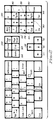
- the keyboard 80 depicted in Figure 2 is a standard IBM Enhanced Keyboard which is currently used on IBM PS/2′s and has been widely adopted by other personal computer manufacturers.
- the arrow keys 120 , 121; 130, 131; 160, 161; and 170, 171 are used to move the cursor in the direction which they point in the move mode.
- Other keys are used to control the graphic display in various ways as set forth below.
- Figure 3 is a block diagram depicting the function keys and their assignments. Of particular interest is label 200 where a description of Function key F4 appears. This function key is used to toggle between two modes affecting the arrow keys shown in Figure 2 . In one mode, the arrow keys work much the way they would in a word processing program; ie., shifting the cursor character one position each time they are pressed. In the alternate mode, the arrow keys perform the functions discussed in Figure 4 . Similarly, the mouse can also be used to move or rotate the object based on the active mode.
- the Home Key 300 in Figure 4 and 100 in the keyboard illustration of Figure 2 , is used to activate a rotation mode to enable the user to rotate a object of interest by pressing the arrow keys.
- the End Key, 305 in Figure 4 and 190 in the keyboard illustration of Figure 2 is used to activate a move mode to enable the user to move the object of interest by pressing the arrow keys or moving the mouse.
- the PgUp key 140 of Figure 2 causes an immediate zoom in on the object of interest on the display by decreasing the amount of total drawing that is displayed on the display.
- the PgDn key 150 performs a zoom-out by increasing the amount of total drawing displayed on the display.
- pressing the End key 180 or 190 puts the system into a move mode and the arrow keys are interpreted as immediate instructions to perform a move in the direction the arrow key points.
- the system enters rotate mode and pressing of the arrow keys causes an immediate rotation of the object of interest in the direction that the arrow faces.
- the up arrow key 120 or 121 is pressed, then the object rotates -1 degree on the X axis.
- the left arrow key 170 or 171 would invoke an immediate rotation of -1 degree on the Y axis.
- the right 130 , 131 and down arrow keys 160 , 161 invoke immediate rotations of +1 degree on the Y and X axis.
- keyboard handler code is presented below to illustrate the logic of the preferred embodiment of the invention to one of ordinary skill in the art. Flow diagrams are also included below to further illuminate the logic of the present invention.
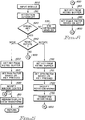
- FIG. 5 processing begins with a user pressing a key on the keyboard. This generates an interrupt signal that is sent to the input module as shown in function block 500 .
- Function block 510 handles the attention interrupt and passes control to decision block 520 to determine if one of the ten special keys have been pressed. This is accomplished by comparing the contents of the keyboard buffer with the scan codes of the ten appropriate keys. If the key is not one of the special keys, then control is passed to the standard keyboard handler as shown in function block 530 .
- the keyboard handler can pass control to one of three sets of logic based on the current mode which is set by pressing the END key (MOVE) or the HOME key (ROTATE) and is stored in the random access memory (RAM). If the current mode is MOVE, then control passes to input block 600 . If the mode is rotate, then control passes to input block 700 . If the mode is not move/rotate, then a zoom operation is processed as indicated by the branch at label 900 .
- MOVE END key
- ROTATE HOME key
- RAM random access memory
- the MOVE operation commences at input block 600 when the key scan code is obtained from the keyboard buffer. Each key has an unique ASCII character associated with it. Based on the code, the panning factor is set. The panning factor is used to determine which way the object should be moved on the display as indicated in function block 610 . So, for example, if the down arrow key is pressed, then deltaY is set equal to +.1. If the up arrow key is pressed, then deltaY is set equal to -.1. Further, if the left arrow key is pressed, then deltaX is set equal to -.1, and finally if if the right arrow key is pressed, then deltaX is set equal to +.1.
- the display is redrawn (view transform affected) as indicated in function block 810 using the standard graphic tools to display graphic information on a display.
- control returns at termination block 820 .
- the ROTATE operation commences at function block 700 where the key pressed is uniquely determined as in the other operations by querying the keyboard buffer. Then, in function block 710 , the spin factor is set based on the particular key that was pressed. For example, if the up arrow key was pressed indicating rotation about the X-axis in a clockwise direction, then deltaX is set equal to +spinfactor (2.0). Similarly, if the down arrow key was pressed, then deltaX is set equal to -spinfactor (-2.0). If the left arrow key was pressed, then deltaY is set equal to -spinfactor (-2.0). If the right arrow was pressed, then deltaY is set equal to +spinfactor (2.0).
- the rotation matrix is modified based on the particular arrow key pressed as reflected in deltaX and deltaY and set forth in function block 720 .
- the actual modification is achieved by setting up variables for inclusion in a transformation matrix.
- the geometries are transformed by performing the following matrix transformation:
- the Scale Up and Down operations are performed by branching at label 900 to input block 910 to obtain the value of the key pressed from the keyboard buffer. Then, based on whether PgUp or PgDn was pressed, the window scale is increased by a scalefactor or decreased by a scale factor as reflected in function bloc 920 . Finally, control is passed to label 800 for redrawing the display with the new window scalefactor.
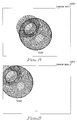
- Figures 7 , 8 and 9 are illustrations of displays generated by a CAD system employing the invention.
- Figure 7 illustrates an object 1000 in a design system currently in the rotate mode 1010 .
- Figure 8 illustrates an object 1020 that has been rotated while in the rotate mode 1030 .
- Figure 9 illustrates an object 1040 that has been moved in the move mode 1050 . The movements and rotate operations were accomplished by appropriate entries via the arrow keys on the keyboard.
Landscapes
- Engineering & Computer Science (AREA)
- General Engineering & Computer Science (AREA)
- Theoretical Computer Science (AREA)
- Human Computer Interaction (AREA)
- Physics & Mathematics (AREA)
- General Physics & Mathematics (AREA)
- Input From Keyboards Or The Like (AREA)
- Digital Computer Display Output (AREA)
Applications Claiming Priority (2)
| Application Number | Priority Date | Filing Date | Title |
|---|---|---|---|
| US61783090A | 1990-11-26 | 1990-11-26 | |
| US617830 | 1990-11-26 |
Publications (2)
| Publication Number | Publication Date |
|---|---|
| EP0488570A2 true EP0488570A2 (de) | 1992-06-03 |
| EP0488570A3 EP0488570A3 (en) | 1993-07-21 |
Family
ID=24475239
Family Applications (1)
| Application Number | Title | Priority Date | Filing Date |
|---|---|---|---|
| EP19910310670 Withdrawn EP0488570A3 (en) | 1990-11-26 | 1991-11-20 | Enhanced multidimensional design keyboard |
Country Status (3)
| Country | Link |
|---|---|
| EP (1) | EP0488570A3 (de) |
| JP (1) | JPH06342331A (de) |
| CA (1) | CA2055544A1 (de) |
Family Cites Families (6)
| Publication number | Priority date | Publication date | Assignee | Title |
|---|---|---|---|---|
| US4460974A (en) * | 1981-11-27 | 1984-07-17 | Hewlett-Packard Company | Electronic computer with access to keyboard status information |
| US4745405A (en) * | 1984-08-31 | 1988-05-17 | International Business Machines Corporation | Object movement feedback |
| US4755808A (en) * | 1986-06-13 | 1988-07-05 | International Business Machines Corporation | Automatic capture of pointing device actions in a keystroke program |
| EP0254156A3 (de) * | 1986-07-18 | 1989-10-18 | Penguin Products, Inc. | Ein-Ausgabegerät für einen Rechner |
| JPH01102615A (ja) * | 1987-10-15 | 1989-04-20 | Fujitsu Ltd | データ処理装置 |
| JPH01116818A (ja) * | 1987-10-30 | 1989-05-09 | Tokyo Electric Co Ltd | カーソル信号入力装置 |
-
1991
- 1991-11-14 CA CA002055544A patent/CA2055544A1/en not_active Abandoned
- 1991-11-20 EP EP19910310670 patent/EP0488570A3/en not_active Withdrawn
- 1991-11-21 JP JP3331629A patent/JPH06342331A/ja active Pending
Also Published As
| Publication number | Publication date |
|---|---|
| CA2055544A1 (en) | 1992-05-27 |
| JPH06342331A (ja) | 1994-12-13 |
| EP0488570A3 (en) | 1993-07-21 |
Similar Documents
| Publication | Publication Date | Title |
|---|---|---|
| EP0243925B1 (de) | Befehlseingabesystem für einen elektronischen Rechner | |
| KR100474724B1 (ko) | 터치스크린을 가지는 장치 및 그 장치에 외부디스플레이기기를 연결하여 사용하는 방법 | |
| US5812117A (en) | Method for inputting information using a selectable soft keyboard | |
| US6441824B2 (en) | Method and apparatus for dynamic text resizing | |
| KR100464194B1 (ko) | 데이타 처리 시스템내의 표시영역에 적합한 아이콘 크기의 자동 조정 | |
| KR100327209B1 (ko) | 첨펜의자취를이용한소프트웨어키보드시스템및그에따른키코드인식방법 | |
| US5526481A (en) | Display scrolling system for personal digital assistant | |
| US6624824B1 (en) | Tilt-scrolling on the sunpad | |
| US5500937A (en) | Method and apparatus for editing an inked object while simultaneously displaying its recognized object | |
| US6983336B2 (en) | Dual pointing device used to control a cursor having absolute and relative pointing devices | |
| EP0192022B1 (de) | Interaktive Drehungsverfahren für angezeigte graphische Objekte | |
| EP0561684A1 (de) | System und Verfahren zur Steuerung von Verschiebung | |
| US5361310A (en) | Handwriting entry processing system using keyboard and mouse interfaces requiring no modification of an application program | |
| US6392676B1 (en) | Method and system for displaying a mouse pointer | |
| EP0653697A2 (de) | Cursor mit vielfachen Anzeigestellen | |
| US6486869B1 (en) | Cursor control method, recording medium and information processing apparatus | |
| EP0488570A2 (de) | Tastatur für mehrdimensionalen Entwurf | |
| EP0281054B1 (de) | Verfahren und Gerät zur Darstellung eines Zeigers | |
| KR100503056B1 (ko) | 컴퓨터 시스템에서의 터치 패드 처리장치 및 그 방법과, 터치패드 모듈 | |
| US5319385A (en) | Quadrant-based binding of pointer device buttons | |
| JPS62156721A (ja) | 表示制御装置 | |
| GB2351817A (en) | A pointing device for controlling a computer application | |
| KR19990059505A (ko) | 휴대 정보 단말기를 이용한 펜입력 방법 및 장치 | |
| KR19980077582A (ko) | 트랙볼을 이용한 휴대폰 사용자 인터페이스장치 | |
| EP0845136A2 (de) | Verbesserte gesteuerte hinweisanordnungen und -verfahren |
Legal Events
| Date | Code | Title | Description |
|---|---|---|---|
| PUAI | Public reference made under article 153(3) epc to a published international application that has entered the european phase |
Free format text: ORIGINAL CODE: 0009012 |
|
| AK | Designated contracting states |
Kind code of ref document: A2 Designated state(s): DE FR GB IT |
|
| 17P | Request for examination filed |
Effective date: 19920917 |
|
| PUAL | Search report despatched |
Free format text: ORIGINAL CODE: 0009013 |
|
| AK | Designated contracting states |
Kind code of ref document: A3 Designated state(s): DE FR GB IT |
|
| STAA | Information on the status of an ep patent application or granted ep patent |
Free format text: STATUS: THE APPLICATION HAS BEEN WITHDRAWN |
|
| 18W | Application withdrawn |
Withdrawal date: 19940726 |