EP0336581A2 - Problemermittlung in Rechnersystemen - Google Patents
Problemermittlung in Rechnersystemen Download PDFInfo
- Publication number
- EP0336581A2 EP0336581A2 EP89302578A EP89302578A EP0336581A2 EP 0336581 A2 EP0336581 A2 EP 0336581A2 EP 89302578 A EP89302578 A EP 89302578A EP 89302578 A EP89302578 A EP 89302578A EP 0336581 A2 EP0336581 A2 EP 0336581A2
- Authority
- EP
- European Patent Office
- Prior art keywords
- record
- user
- parameters
- file
- response
- Prior art date
- Legal status (The legal status is an assumption and is not a legal conclusion. Google has not performed a legal analysis and makes no representation as to the accuracy of the status listed.)
- Withdrawn
Links
Images


Classifications
-
- G—PHYSICS
- G06—COMPUTING OR CALCULATING; COUNTING
- G06F—ELECTRIC DIGITAL DATA PROCESSING
- G06F11/00—Error detection; Error correction; Monitoring
- G06F11/07—Responding to the occurrence of a fault, e.g. fault tolerance
- G06F11/0703—Error or fault processing not based on redundancy, i.e. by taking additional measures to deal with the error or fault not making use of redundancy in operation, in hardware, or in data representation
- G06F11/079—Root cause analysis, i.e. error or fault diagnosis
-
- G—PHYSICS
- G06—COMPUTING OR CALCULATING; COUNTING
- G06F—ELECTRIC DIGITAL DATA PROCESSING
- G06F11/00—Error detection; Error correction; Monitoring
- G06F11/30—Monitoring
- G06F11/32—Monitoring with visual or acoustical indication of the functioning of the machine
- G06F11/324—Display of status information
- G06F11/327—Alarm or error message display
Definitions
- This invention relates generally to the determination of problems in computer systems.
- a method of filtering the retrieval of records from a plurality of records generated internally of and by a computer system having a user interface in response to the operation or otherwise thereof, as opposed to the execution of application programs thereby, and stored in the computer system, the method comprising the steps of: prompting a user, via the user interface, to select one of a plurality of problem determining functions; in response to the selection made, prompting the user, via the user interface, to specify one or more parameters to be used with the selected function; and in response to the parameters selected, indicating and retrieving a record from the stored records as a function of the parameters in the context of the selected problem determining function.
- filtering the retrieval of records from a plurality of records, generated internally of and by a computer system in response to the operation or otherwise thereof and stored in the computer system is achieved by prompting the user to select one of a plurality of problem determining functions and thereafter to specify one or more parameters to be used with the selected function, the record retrieved being identified by the system in response to the parameters selected in the context of the selected problem determining function.
- the user may retrieve selected error data records by specifying criteria and activating an error services utility. Only the error record data which satisfies the specified criteria will be printed or displayed.
- the user may also retrieve selected message data records by specifying criteria and activating an message services utility.
- the user may specify the display of selected messages which are generated by a specified component within the computer system. Moreover, after displaying a selected message, the user may request the system to display more detailed information regarding the displayed message.
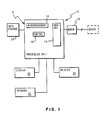
- System 10 includes a central processing unit 12 having a microprocessor 14, a memory system 16 and a control system 18 which functions to control input/output operations in addition to the interaction between the microprocessor and the memory system.
- System 10 also includes a group of conventional peripheral units including a display device 20, a keyboard 22, a printer 24, a data storage unit 26 and a modem 28. Since the details of the above described functional systems form no part of the present invention and can be found in the prior art, only a brief functional description of each of the systems will be set forth.
- the processing unit 12 corresponds to the "system unit" of a personal computer system such as the IBM XT or the IBM AT or the IBM Personal Systems/2 computer systems.
- the central processing unit 12 is provided with a multitasking operating system program such as the IBM Operating System/2 which is normally employed to run the systems.
- the operating system program is stored in memory system 16 along with one or more application programs that the user has selected to run. Depending on the capacity of the memory system 16 and the size of the application programs, portions of these programs, as needed, may be transferred to the memory system 16 from the data storage unit 26 which may include, for example, a hard disk drive and a diskette drive.
- the basic function of the data storage unit 26 is to store programs and data which are employed by the system 10 and which may readily be transferred to the memory system 16 when needed.
- the function of the diskette drive is to provide a removable storage function for entering programs and data into the system, and a vehicle for storing data in a form that is readily transportable for use on other computer systems.
- Display device 20 and keyboard 22 together provide for an interactive operation of the computer system 10 wherein the interpretation that the computer system gives to a specific keystroke by the user depends, in substantially all situations, on what is being displayed to the user at that point in time.
- the user by entering commands into the computer system 10, causes the system to perform a certain function.
- the computer system 10 requests the entry of certain data, generally by displaying a prompt type of menu/message screen.
- the depth of the interaction between the user and the computer system 10 varies by the type of operating system and the application program.
- computer system 10 includes the printer 24 which functions to provide a hard copy output of data developed or stored in the computer system.
- the modem 28 functions to transfer data from the computer system 10 to a remote host system or server system through one or more communication links which may be a commercial type link or a dedicated communications link.
- System 10 includes a communication software sub-system which enables an end user of system 10 to perform various communication task within the operating system.
- the communication sub-system includes problem determination logic which enables the user to request the display of specific errors or to specify parameters for determining messages generated by a specific component of the communication sub-system.
- the problem determination logic enables the user to request all of the errors or messages generated by a specific component of the communication sub-system.
- the communications sub-system and the problem determination logic are implemented by software stored in the memory system 16.
- Messages present user friendly text to the user which sets forth the cause of any interruption of the execution of a process or task within the software system. Error data also presents technical information, which is typically in hexadecimal representation, to the user in a friendly manner.
- These requests become extremely important in a multitasking environment wherein the user may activate a first task, then goes on during the execution of the first task to activate or monitor a second task. If during the time the user is activating or monitoring the second task, the first task fails. The user generally is unaware of the failure of the first task until the user decides to return to the first task.
- the preferred embodiment of the present invention displays a message to the user irrespective of which task the user is presently activating or monitoring. The user may then access a message log or error log for more information. The user may request more detailed information after viewing the message log.
- the error log service utilities provide a common interface for logging error data.
- the error data is typically generated as a result of a communication adapter or communication link type errors occurring at a data link controller (DLC) level.
- the error data facilitates the management of a communication network and provides the necessary data for problem determination in the event of a network failure.
- the error log service utility allows the data to be printed or visually displayed.
- all error data is stored in a file or log which is created when the operating system executing on system 10 is configured.
- the message service utilities provides an interface for displaying and logging messages within the operating system. Primarily, the message service utilities provides a mechanism for relaying message information to the user which may not be related to current screen activity being viewed by the user.
- the message service utilities logs all messages to a log to provide a history of the messages which have been generated by the various components within the operating system. This history is very useful in problem determination in that it provides a sequence of errors which led to a particular failure of the communication system.
- an originator of a message or error may be the failure of a file transfer, a data link being prematurely terminated, or a terminal emulation failure.
- the problem determination program is in program design language from which source code and machine code are derivable.
- system 10 is under mouse and keyboard device control.
- the problem determination program is invoked from a driver program contained in the operating system which facilitates the display of all of the screen panels and the monitoring of the keyboard 22.
- the print sub-routine is called by the error log services sub-routine.
- a print criteria panel is displayed which allows the user to enter specific search parameters. These search parameters facilitate the printing of a record which contains errors matching the specified parameters.
- the display sub-routine is called by the error log services sub-routine.
- a display criteria panel is displayed which allows the user to enter specific search parameters.
- the display sub-routine searches the appropriate error log record for the errors which match the search parameters. These search parameters facilitate the display of a record which only contains errors matching the specified parameters. Thereafter, the record is formatted and displayed to the user. The user after the record is displayed, may scroll through the file by activating the appropriate function keys.
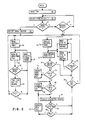
- the PDP After the invoking of the PDP in step 45, the PDP enables the user to select, in step 46, one of a plurality of problem determination utilities, such as the error log services or the message services.
- Step 47 determines whether the error services utility is selected.
- Step 48 determines whether the message services is selected.
- step 50 the user selects either a print function (steps 52-62) or a display function (steps 70-94) from the error log services panel.
- the error log services panel also displays a default error log name to be used with the selected function.
- a print criteria panel is displayed in step 52 wherein the user enters the desired search parameters.
- the search parameters include a starting and ending dates and times and an error log type. If the user specifies the starting date and time, the first error log entry printed will be on or after the date/time specified. However, if the user leaves the starting date and time fields blank, the print sub-routine begins printing with the oldest error log record. If the log type specified is an entry other than "0000", only the error log entries of the specified type will be selected to be printed.
- the print sub-routine reads a record from the selected error log. A determination is made in step 56 whether the record matches the search parameters.
- Step 58 determines whether the record has been reached, if not the next record is read and the comparison is made for a match, otherwise, control is returned to step 52.
- a display criteria panel is displayed to the user in step 70.
- the user enters the appropriate search parameters which includes specifying a log name, if it is different from the default name displayed in the panel, an error log record type, and from date and time. If the user fails to enter a from date and a from time and the log type is "0000", the oldest error log is displayed and the entire specified error log will be available for display. If the entry for the log type an entry other than "0000", and the from date and time are specified, the first error log record displayed will be on or after the date/time specified and only the error log records of the specified type will be available for display.
- step 72 reads a record from the file selected.
- a comparison is made in step 74 to determine whether the record matched the search parameters. If the record matches the search parameters, a determination is made in step 76 whether a file pointer is at the top of the file.
- Step 78 disables a backward key if the pointer is at the top of the file.
- a determination is made in step 80 to determine if the pointer is at the bottom of the selected file.
- Step 82 disables the forward key if the pointer is at the bottom of the file.
- step 84 the record is formatted and displayed to the user.
- step 86 a determination is made whether a message is being displayed. Since the user selected the error services in step 46, control is transferred to step 92.
- step 92 a determination is made whether an escape key is activated. Control is returned to step 70, if the escape key is activated. Otherwise, step 94 determines whether the forward or backward key is activated.
- step 96 if the back-ward key is activated, the pointer is moved to the immediately previous record which is then read and displayed if the record matches the search parameters.
- step 98 if the forward key is activated, the pointer is moved to the immediately subsequent record which is then read and displayed if the record matches the search parameters. The procedure which includes steps 72 through 86 and 92 through 98 are repeated until the escape key is activated and detected in step 92.
- Steps 70 through 86 are identical to those described for the display function of the error services utility noted above. However, since the message services are selected in step 47, the type parameter will be replaced with an originator parameter. The originator identifies the component that generated the message and the record displayed will represent a message. Thus, control is transferred form step 86 to step 88. Step 88 determines whether the user has activated a help function. This activity indicates that the user in viewing a selected message record is requesting more detail information regarding the displayed message record. The additional information is displayed to the user in step 90 and control is returned to step 84. The system 10 will continue to display the additional information until the user activates either the backward key, the forward key or the escape key. Thereafter steps 86, and 92 through 98 are executed in the same manner described for the display function explained above for the error services utility.
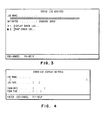
- a error log services panel Shown in Fig. 3 is a error log services panel. This panel is displayed to the user after the error services utility is selected and allows the user to select the type of error log processing desired.
- the log may be printed on printer 24 (Fig. 1) or displayed on the display 20 (Fig. 1).
- an error log display criteria pop-up panel shown in Fig. 4, is displayed which allows the user to enter specific criteria for the records to be processed.
- the error log display criteria pop-up panel which is displayed to the user upon the selection of the display processing option.
- the criteria includes at least the error log record type and the time and/or the date associated with the record to be displayed.
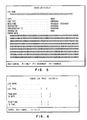
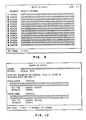
- the criteria fields provide the user with a mechanism for specifying a starting point, from date and/or from time, and a filter, log type for the type of error the user desires to view. If the user fails to specify any criteria, which means that the date and time fields are blank and the log type is equal to "0000", the oldest error log record will be displayed which contains any type of error. If the log type is specified only, the records of the specified type will be available for display. Shown in Fig. 5 is a error log display panel which is displayed in response to the processing of the error log display criteria panel (Fig. 4).
- the panel includes all of the specified errors, if any, which occurred on or after the specified date and time, if specified.
- the "h letters" appearing in the panel indicate that the data is to be interpreted as hexadecimal and the "x letters” indicate the data is to be interpreted as ASCII.
- an error log print criteria pop-up panel shown in Fig. 6 will be displayed to the user. This panel allows the user to enter specific criteria for selecting error log records to be printed.
- the criteria may include the error log record type and the time and/or date associated with the record.
- the user may also enter the name of an error log file other than the one currently being used. If no criteria are specified, all error log records of all types will be printed in chronological order. If the log type is specified, only the error log records of the specified type will be printed.
- Fig. 7 shows an example of an error log printout.
- a display messages panel shown in Fig. 8 will be displayed to the user.
- the criteria fields on the panel allow the user to provide specific selection criteria for the messages to be displayed.
- the criteria includes a message originator, message date, and message time.
- the user may request that system 10 (Fig. 1) display a list of the originators, as shown in Fig. 9, which may be entered in the originator field. If no criteria is specified, the most recent messages from any originator will be displayed in chronological order with the latest message at the bottom of the display screen. If only the originator is specified, only those messages from the specified originator will be displayed. If only the time and date are specified, the first message displayed will be of any originator chronologically following the specified time and date.
- Fig. 10 shows a message log display panel which is displayed to the user subsequent to the processing of the display message panel (Fig. 8). In the event that there are more messages than are displayed, the user may page forward and backward to permit all of the selected messages to be viewed.
Landscapes
- Engineering & Computer Science (AREA)
- Theoretical Computer Science (AREA)
- Quality & Reliability (AREA)
- Physics & Mathematics (AREA)
- General Engineering & Computer Science (AREA)
- General Physics & Mathematics (AREA)
- Health & Medical Sciences (AREA)
- Biomedical Technology (AREA)
- Debugging And Monitoring (AREA)
- Information Retrieval, Db Structures And Fs Structures Therefor (AREA)
- Maintenance And Management Of Digital Transmission (AREA)
- User Interface Of Digital Computer (AREA)
Applications Claiming Priority (2)
| Application Number | Priority Date | Filing Date | Title |
|---|---|---|---|
| US17917888A | 1988-04-08 | 1988-04-08 | |
| US179178 | 1988-04-08 |
Publications (2)
| Publication Number | Publication Date |
|---|---|
| EP0336581A2 true EP0336581A2 (de) | 1989-10-11 |
| EP0336581A3 EP0336581A3 (de) | 1991-05-08 |
Family
ID=22655548
Family Applications (1)
| Application Number | Title | Priority Date | Filing Date |
|---|---|---|---|
| EP19890302578 Withdrawn EP0336581A3 (de) | 1988-04-08 | 1989-03-16 | Problemermittlung in Rechnersystemen |
Country Status (4)
| Country | Link |
|---|---|
| EP (1) | EP0336581A3 (de) |
| JP (1) | JPH0212462A (de) |
| BR (1) | BR8901476A (de) |
| CA (1) | CA1292575C (de) |
Cited By (2)
| Publication number | Priority date | Publication date | Assignee | Title |
|---|---|---|---|---|
| EP1480134A3 (de) * | 2003-05-22 | 2006-07-05 | Cognos Incorporated | Vorrichtung und Methode zur Aufzeichnung von Aktionen zur Transformation eines Datenmodells |
| US20220084517A1 (en) * | 2020-09-17 | 2022-03-17 | Honeywell International Inc. | System and method for providing contextual feedback in response to a command |
Families Citing this family (1)
| Publication number | Priority date | Publication date | Assignee | Title |
|---|---|---|---|---|
| JPH06205083A (ja) * | 1991-09-05 | 1994-07-22 | Mitsubishi Electric Corp | 試験データの仕様記述システム、作成システム、及び、解析システム |
Family Cites Families (3)
| Publication number | Priority date | Publication date | Assignee | Title |
|---|---|---|---|---|
| JPS6197747A (ja) * | 1984-10-18 | 1986-05-16 | Nec Corp | コンソ−ル出力メツセ−ジ収集装置 |
| JPS62219156A (ja) * | 1986-03-20 | 1987-09-26 | Fujitsu Ltd | Tssセシヨンログ収集タスク生成/削除処理方式 |
| JPS62266643A (ja) * | 1986-05-14 | 1987-11-19 | Railway Technical Res Inst | オンライン・ジヤ−ナル取得方式 |
-
1989
- 1989-01-25 CA CA000589119A patent/CA1292575C/en not_active Expired - Lifetime
- 1989-02-13 JP JP1031275A patent/JPH0212462A/ja active Pending
- 1989-03-16 EP EP19890302578 patent/EP0336581A3/de not_active Withdrawn
- 1989-03-30 BR BR898901476A patent/BR8901476A/pt unknown
Non-Patent Citations (4)
| Title |
|---|
| IBM SYSTEMS JOURNAL, vol. 27, no. 2, 1988, pages 119-133, Armonk, New York, US; S.L. WATSON: "OS/2 Query manager overview and prompted interface" * |
| IBM TECHNICAL DISCLOSURE BULLETIN, vol. 23, no. 12, May 1981, pages 5533-5534, New York, US; E.W. EMERICK et al.: "Error log analysis" * |
| IBM TECHNICAL DISCLOSURE BULLETIN, vol. 29, no. 9, February 1987, pages 3823-3824, New York, US; "Error log and analysis supports for user-written analysis programs" * |
| PHILIPS TELECOMMUNICATION REVIEW, vol. 42, no. 3, September 1984, pages 149-169, Hilversum, NL; C.G. GOLDER et al.: "The multifunction operations system" * |
Cited By (3)
| Publication number | Priority date | Publication date | Assignee | Title |
|---|---|---|---|---|
| EP1480134A3 (de) * | 2003-05-22 | 2006-07-05 | Cognos Incorporated | Vorrichtung und Methode zur Aufzeichnung von Aktionen zur Transformation eines Datenmodells |
| US20220084517A1 (en) * | 2020-09-17 | 2022-03-17 | Honeywell International Inc. | System and method for providing contextual feedback in response to a command |
| US12165639B2 (en) * | 2020-09-17 | 2024-12-10 | Honeywell International Inc. | System and method for providing contextual feedback in response to a command |
Also Published As
| Publication number | Publication date |
|---|---|
| CA1292575C (en) | 1991-11-26 |
| JPH0212462A (ja) | 1990-01-17 |
| EP0336581A3 (de) | 1991-05-08 |
| BR8901476A (pt) | 1989-11-14 |
Similar Documents
| Publication | Publication Date | Title |
|---|---|---|
| US5047977A (en) | Methods of generating and retrieving error and task message records within a multitasking computer system | |
| US5121475A (en) | Methods of dynamically generating user messages utilizing error log data with a computer system | |
| JP3117140B2 (ja) | 画像処理装置の遠隔診断装置 | |
| US5465358A (en) | System for enhancing user efficiency in initiating sequence of data processing system user inputs using calculated probability of user executing selected sequences of user inputs | |
| EP0485462B1 (de) | Dateiveränderungsmonitor für rechner-, betriebs- und dateiverwaltungssysteme | |
| US6239800B1 (en) | Method and apparatus for leading a user through a software installation procedure via interaction with displayed graphs | |
| US6968509B1 (en) | Recording of user-driven events within a computer application | |
| US5953010A (en) | User-friendly iconic message display indicating progress and status of loading and running system program in electronic digital computer | |
| EP0322125B1 (de) | Bedienungsverfahren eines elektronischen Datenverarbeitungssystems zum Dokumententransfer zwischen Endbenutzern | |
| US6671691B1 (en) | Method and apparatus for expression building editors | |
| US5479599A (en) | Computer console with group ICON control | |
| Hanson et al. | Interface design and multivariate analysis of UNIX command use | |
| US6335795B1 (en) | Method for customizing print attribute choices based on selected model, media, and printer | |
| US5710922A (en) | Method for synchronizing and archiving information between computer systems | |
| US6565608B1 (en) | Method and system for customizing alert messages | |
| EP0315956A2 (de) | Einrichtung für Rechner oder rechnergesteuerte Systeme zum Erzeugen einer Hilfe-Anzeige | |
| US5821928A (en) | Method and system for controlling individual messages | |
| EP0322130A2 (de) | Verfahren, um ein elektronisches Informationsverarbeitungssystem zur Verwaltung der Dokumentsverhaltung zu betreiben | |
| US6384848B1 (en) | Message handling apparatus and method | |
| EP0528704A2 (de) | Darstellungssystem von Geschichtsinhalt für einen Informationsprozessor | |
| US5291595A (en) | Batch/application program processing | |
| US5787244A (en) | Information retrieval system | |
| US5692194A (en) | Sequential information integration service for automatically transferring a most recent data entity between a plurality of program modules and a storage in a computer | |
| US20030067630A1 (en) | Printer having a thesaurus feature | |
| US6938219B2 (en) | Method and system for displaying actions and historical content in an output view |
Legal Events
| Date | Code | Title | Description |
|---|---|---|---|
| PUAI | Public reference made under article 153(3) epc to a published international application that has entered the european phase |
Free format text: ORIGINAL CODE: 0009012 |
|
| AK | Designated contracting states |
Kind code of ref document: A2 Designated state(s): DE FR GB IT |
|
| 17P | Request for examination filed |
Effective date: 19900224 |
|
| PUAL | Search report despatched |
Free format text: ORIGINAL CODE: 0009013 |
|
| AK | Designated contracting states |
Kind code of ref document: A3 Designated state(s): DE FR GB IT |
|
| 17Q | First examination report despatched |
Effective date: 19931118 |
|
| STAA | Information on the status of an ep patent application or granted ep patent |
Free format text: STATUS: THE APPLICATION HAS BEEN WITHDRAWN |
|
| 18W | Application withdrawn |
Withdrawal date: 19951120 |