EP0176715A2 - A system for automatic adjustment and editing of handwritten text images - Google Patents
A system for automatic adjustment and editing of handwritten text images Download PDFInfo
- Publication number
- EP0176715A2 EP0176715A2 EP85110144A EP85110144A EP0176715A2 EP 0176715 A2 EP0176715 A2 EP 0176715A2 EP 85110144 A EP85110144 A EP 85110144A EP 85110144 A EP85110144 A EP 85110144A EP 0176715 A2 EP0176715 A2 EP 0176715A2
- Authority
- EP
- European Patent Office
- Prior art keywords
- word
- extremity
- new
- input
- words
- Prior art date
- Legal status (The legal status is an assumption and is not a legal conclusion. Google has not performed a legal analysis and makes no representation as to the accuracy of the status listed.)
- Granted
Links
Images

Classifications
-
- G—PHYSICS
- G06—COMPUTING OR CALCULATING; COUNTING
- G06T—IMAGE DATA PROCESSING OR GENERATION, IN GENERAL
- G06T11/00—Two-dimensional [2D] image generation
- G06T11/60—Creating or editing images; Combining images with text
-
- G—PHYSICS
- G06—COMPUTING OR CALCULATING; COUNTING
- G06V—IMAGE OR VIDEO RECOGNITION OR UNDERSTANDING
- G06V30/00—Character recognition; Recognising digital ink; Document-oriented image-based pattern recognition
- G06V30/10—Character recognition
- G06V30/14—Image acquisition
- G06V30/142—Image acquisition using hand-held instruments; Constructional details of the instruments
- G06V30/1423—Image acquisition using hand-held instruments; Constructional details of the instruments the instrument generating sequences of position coordinates corresponding to handwriting
-
- G—PHYSICS
- G06—COMPUTING OR CALCULATING; COUNTING
- G06V—IMAGE OR VIDEO RECOGNITION OR UNDERSTANDING
- G06V30/00—Character recognition; Recognising digital ink; Document-oriented image-based pattern recognition
- G06V30/10—Character recognition
- G06V30/32—Digital ink
Definitions
- This invention relates to a system for providing full function electronic communication relative to hand prepared images such as handwriting and sketches together with key-entered text.
- image communication distinct from image identification, includes the capability of transmitting and receiving hand-prepared images.
- image communication In the context of transmission, such a system must have the capability of providing for original creation of documents, annotation of existing documents, the completion by hand drawn figures. This degree of functionality involves data formatting and editing.
- Such systems must be "user friendly” in creating and editing images as well as in message transmission.
- the creation of images should be done utilising equipment providing users with the ability to capture and display hand drawn images, automatically adjust size and position of various image elements, and, alter the image utilising easy to perform operations.
- such equipment should be available to multiple users at convenient locations, such as at desk sites with hardware which is physically unobtrusive and can be operated utilising simple procedures which do not interfere with the user's concentration on the substantive content of the task at hand.
- a system methodology which allows for information entry and edit operations which are accomplished with at least the same ease as in physically creating the data, i.e., handwriting.
- This functionality includes text and image recording, selective editing such as erasing, insertion and the ability to change the order of the text by strokes of a pen-like device on paper or display.
- the present invention provides a data input and display system comprising:
- An embodiment of the invention described in detail hereinafter employs an electronic tablet and an all-points-addressable display to create handwritten images of documents which may be easily edited and then stored within an information processing system.
- the data may be subsequently transmitted to one or more recipients equipped with suitable all-points addressable displays.
- editing and automatic formatting techniques the representation of the image data in the system and in the output device is altered and presented in a more legible manner consistent with
- Examples of editing carried out by the present invention are deletion and insertion operations on data components.
- Examples of formatting are paragraph indentation, word separation, and baseline drift correction.
- the input device is an electronic tablet utilising apa (all points addressable) techniques to record handwritten images of documents which may be subsequently edited.
- Such tablets are known in this field, generally having either opaque or transparent screens.
- Such devices are high resolution input systems where every point is defined by a pair of co-ordinates. Co-ordinates are collected, generally at the rate of 100-200/second. The sampling rate employed in such apa systems is a function of anticipated movement of the stylus.
- the tablet signals are processed automatically to improve the image display of handwritten words and symbols.
- Typical operations are identifying words as units of presentation for handwritten text, adjusting the interval between consecutive words and lines of text to provide uniform spacing, correcting skew lines of handwriting (baseline drift correction) and presenting handwritten text in paragraphs reflecting the shape the user has created on paper.
- signals are created utilising tablet entry such that a series of digital values corresponding to the co-ordinates of successive positions are generated as the pen moves across the tablet surface under user control.
- Digital data is produced as pen movement occurs across the surface. Such is accomplished by means of frequent sampling and subsequent filtering in a manner designed to retain significant shape and location data.
- a stroke is defined as a sequence of points between the pen initially striking the tablet in a downward motion and the pen being lifted up.
- These co-ordinate pairs form the basic units of tablet output which are subsequently processed.
- Pen strokes may be employed to perform various functions. These are typically information entry, command entry and operand identification.
- a menu point can be predefined such that information is entered by touching it when its co-ordinates are produced, the system is programmed to record a prescribed message. Alternatively, the image information can be entered by drawing it with the pen on the tablet. Commands can be entered by touching menu points or by making characteristic marks on the tablet.
- an image item is an operand for command operation that is being performed, it can be identified by touching the item with the pen where it appears on the tablet. When the pen touches one or more points which fall within an image item, that item is identified for the operation. It is understood that known programming techniques are employed to create menu displays and processing logic operation in response to menu selection.
- Logic is provided to automatically process tablet entered inages for detection of fundamental features of those images. Such images correspond to symbols, words, lines and paragraphs which make up a document image.
- the methodology of such logic is to compare each succeeding tablet signal with the signals that have preceded it. Points where the pen is lifted are detected and displacements between pen down and pen up are used to determine the limits of image features. Running values are retained by the system for feature extremities and a baseline is estimated for text images. The position of each succeeding signal is them compared with preceding extremity information to determine where the previous word or line has ended and a new symbol has begun. By storing these points of segmentation with the recorded signals, boundaries and relative size of symbols, words and lines can be identified in the stored image data.
- tablet image data is them employed to create images which have a more uniform separation between words and additionally fill the image display area effectively.
- words are written such that the characters are significantly larger then others in the document, they can be reduced to fill the space more e effectively.
- additional lines are appended to the image display.
- new display lines will be a part of the same paragraph.
- lines are skipped, or an added word does not fill a prior line, the output image will start as a new paragraph.
- the segmented tablet image data is also used to correct baseline excursions which occur when the writer does not follow a horizontal line across the page. As is well known, handwriting often runs either "uphill” or “downhill”, in either case a deviation from the horizontal. An estimated baseline is determined for each line of words on the tablet. This arrangement allows for position adjustment in both the displacement and rotational orientations with respect to the baseline. The formatting methodology accomplishes these tasks.
- Editing of handwritten text which is retained in non-coded form is another application of segmented tablet image data. Editing operations include the ability to delete, replace, insert or move portions of non-coded text in a handwritten page. These functions can be initiated by utilising the pen to touch a menu point whereby identification of the action to be taken occurs. This is then followed by touching with the pen the text locations where the action is to occur.
- X and Y signals from the writing tablet indicate the current position of the pen on the tablet given the all points addressable nature of the system.
- the D input signal indicates when the pen touches the tablet.
- a pen down signal that is, the initiation of a "D" signal to gate 10.
- X and Y signals are generated and passed to stroke extremity detectors 12, (see Figure 2).
- stroke extremity detectors 12 Four stroke extremity detectors are employed. One is for determining left extremity, a second for right extremity, a third for upward extremity and a fourth for downward extremity.
- the X and Y signals from the tablet are passed to all of these detectors and appropriately stored.
- FIG. 2 a schematic diagram of one such extremity detector is illustrated.
- the example shown is for a right extremity detector, it being understood that the remaining three operate functionally in this same manner.
- its X and Y co-ordinates are compared with those previously stored which have be determined to be extreme values. In this case only X values are considered. If the X value exceeds the stored, predetermined right extreme value by a predetermined threshold (t) thus indicating movement to the right, a new extreme value is detected.
- the threshold (t) is employed to accommodate for pen jitter.
- the input X signal is first subjected to a comparison 22 to determine whether it is greater than the current extreme value (e) by a predetermined amount, that is, is it greater or equal to the threshold (t). If the indication is positive, the X value is gated to the AND gate 24 shown in Figure 2 and stored in register 26 as a new extremity value for X. Subsequent X values are compared and updated with the newly stored right extreme value.
- extreme values of (-X, + Y and -Y) are compared with a threshold and extreme values are stored.
- Stroke extremities are compared with prior word extremities to test whether the new stroke lies outside the proximity zone and therefore a new word is begun.
- a new word signal is generated clearing new word gate 18 to pass extremity values for the new word.
- stroke extremity values are passed to the word extremity detector 17 utilising gate logic such as shown in Figure 2. Updated extreme values for the old word are then stored in the word extremity store 19 shown in Figure 1.
- the word extremity store is erased and extremities of the first stroke of the new word are then passed from the word extremity detector to the word extremity store 19.
- the proximity zone compare 14 is used to determine the beginning of new words for purposes of defining a zone of proximity for each word that is being segmented.
- the zone or proximity may have any arbitrary shape, however, a parallelogram is the easiest to implement.
- An example of a suitable parallelogram shown in Figure 3, is a rectangle.
- Each new stroke is compared with the zone of proximity of the current word. If any part of the stroke falls inside the zone, it is considered to be part of the current word. If it does not fall within the zone, it is considered to be either the beginning of a new word or the continuation of a word previously thought to be completed.
- Figure 3 illustrates segmentation utilising a rectangular proximity zone. It should be understood that any parallelogram may be employed. In some alphabets or in cases where letters are slanted a different zone shape may be used.
- the rectangular zone illustrated in Figure 3 is defined by horizontal lines passing through the upper and lower extremities and vertical lines that pass through the left and right e extremities.
- a new word is detected when a stroke occurs outside the proximity zones of preceding words. The new word strokes must be positioned more than a prescribed threshold distance (denoted herein as "r") beyond the previously stored extreme right position or beyond the stored extreme left threshold distance (denoted herein as "1").
- new word strokes must be positioned relative to previously stored up and down threshold distances (denoted herein as “u” for extreme upward position, and “d” for extreme downward position).
- the values of these prescribed thresholds “r”, “1”, “u” and “d” are based on selected characteristics of the NCI images.
- h is denoted as the height of handwriting. It may be assumed for English handwriting that "r” is approximately 0.5 of "h” while “1” is slightly less than 0.5 of "h” because handwriting progresses from left to right under normal conditions. Similarly, “d” can be established by inspection to be approximately 0.667 of "h” while “u” is slightly less than 0.667 of "h”. These threshold values must be adjusted when different languages are employed. That is, the values described herein are usable for English language handwriting. However, if other languages are employed, the parameters would have to be suitably adjusted.
- word segmentation can also be initiated by the occurrence of prescribed external events.
- segmentation is a function of spatial relationships which in turn are a function of the language employed. Segmentation is not necessarily time limited, however, it can be determined based on the passage of time in which no additional strokes are made. Thus by time monitoring the occurrence of D signals, segmentation of data into assumed words may occur. Segmentation could also occur by having the writer touch a menu point entry when a word is complete. This latter technique, while assuring positive segmentation, slows down data entry.
- Word segmentation as illustrated relative to Figures 1 to 3 could occur on one line of data at a time. If enough processing memory were available, conceivably segmentation could be delayed until the data representing the entire tablet had been loaded into storage.
- NCI images After the NCI images have been segmented into defined areas representing words, they may be assembled with prescribed formatting rules to form documents that can be presented as useful display images, transmitted, or printed-out. Each document is developed as a collection of words that form one or more paragraphs. Formatting rules thus serve to determine the position of each segmented word in the shape of a paragraph in the document. The occurrence of a new word may require that it be placed at the beginning of a new paragraph, appended to the end of an old paragraph or, in some situations, inserted within an existing paragraph. When a word is appended at the end of a paragraph, or inserted into the middle, its closest upstream word in the document image is found and the new word is placed immediately following it. When the word is the first word of a new paragraph, in accordance with the formatting instructions of- this arrangement, it is placed at the beginning of a new line, with an identification that indentation is required.
- a word is the first word of document then it is by definition the beginning of a new paragraph. If a word is the first word of a line that is not the first line of the document, it may be the start of a new paragraph or simply the continuation of the preceding paragraph.
- a new paragraph is generally detected when the word is indented, outdented or is placed well below the prior line, which has not already been determined to the first line of a paragraph, or alternatively, at the beginning of a new line when the previously line space was not filled.
- document content may then be mapped into an image for display or print-out.
- this arrangement provides an algorithm to fill the available space on each line with properly spaced words until all words of the paragraph have been used. It may be necessary to fill out lines with words from a subsequent line on the tablet and at other times it may be necessary to spill extra words from the end of one tablet line into the following lines for purposes of display. Again, it is noted that this arrangement makes no attempt to recognise the substantive content of the words being formatted.
- the logic for positioning NCI words in the display image is illustrated in a schematic diagram.
- the inputs to this logic comprise:
- New Word XY Store 37 After the new word signal occurs, from processing of the preceding word, the new word's x and y co-ordinates are stored in the New Word XY Store 37. As each succeeding new word signal occurs, the contents of New Word XY Store 37 are passed into Tablet Word Position Store 45, where the signals of each word are recorded, together with a document word sequence number which is used for subsequent image editing operations to be described later.
- the New Word Translate Unit 38 also receives new word extremities of x and y from the Word Extremity Store 19 of Figure 1, The New Word Translate unit 38, which is connected to New Word XY Store 37, subtracts the minimum value of x from the x co-ordinates of the new word and the minimum value of y from the y coordinates of the new word in order to produce a new word representations in X' and Y' relative to an origin at the bottom left corner of the new word.
- New word extremities are also passed to the Word Extremity Detector 39, which compares the new word extremities with previously stored left, right and bottom extremities of the preceding words of the document. If a new word extremity exceeds the previously stored corresponding extremity, the new value is stored in Extremity Store 40a, 40b or 40c when the subsequent new word signal occurs. Until then, prior values are stored in 40a, 40b, and 40c.
- New word extremity values are also passed into the New Extremity Store 35.
- the extremity values are held in New Word Extremity Store 35 until the next new word signal occurs. Then they are passed into the Prior Word Extremity Store 36, and extremity values for the subsequent word are stored in New Word Extremity Store 35.
- the new word extremities are compared .. with the contents of:
- Display Image Prosition Control Logic 43 Other inputs to the Display Image Prosition Control Logic 43, include: the line increments for desired separation in the display between left and right margins and for vertical distance between lines; and the display indent increment (if indent is used).
- the Display Image Control Logic 43 determines the word should be indented it adds the appropriate displacement to its horizontal position.
- the Display Image Position Control Logic 43 checks the old or new paragraph status to determine where the words should be positioned. For words in old paragraphs, the Display Image Control Logic 43, determines if the space between the right edge of the prior word and the right margin is large enough to display the new word.
- the word is placed at the left edge of the next line by decrementing the vertical displacement down one line separation, and setting the horizontal displacement at the left margin. If the new word starts a paragraph, the vertical displacement is decremented two lines separations, and the horizontal displacement is at the margin or indented from the margin depending on the display format that is chosen by the users.
- the minimum x and y coordinates for the display word position are passed to the Display Image Assembly Unit 46, where they are attached to the representation of the word in coordinates X' and Y' from New word Translate unit 38. These coordinates are passed to Display Word Position Store 47, where they are stored with the same document word sequence number that was assigned for reference in the Tablet Word Position Store 45.
- the Display Word Position Store 45 also stores new paragraph indications, line increment information, and line indent information with each word that begins a new paragraph. This information is obtained form the Display Image Position Control Logic 43 with the words that begin paragraphs.
- the Display Word Position Store is the source of data that drives the CRT and places the basic word shapes at the desired location in the image display. Referring now to Figure 5, the technique of baseline correction will be explained.
- a common characteristic of handwritten text is the deviation of words an characters from a nominal baseline. When this occurs, both the appearance and the interpretation of the text may be unacceptable. With the NCI images segmented into words, deviations may be corrected for the purpose of image display and subsequent interpretation.
- This arrangement employs a procedure that establishes a left to right sequence of estimates for the Y coordinate of a nominally established baseline. Two levels of baseline correction are accomplished. The first is the correction of the word orientation such that each word becomes horizontal. The second is the correction of the vertical drift such that baselines of the words in one line lie on the same horizontal line. The first is called the baseline slant correction and the second is called the baseline drift correction.
- Baseline correction is based on the observation that most of the symbols used in a particular alphabet sit on a baseline with only a few exceptions. In the case of the English language, lower case letters “ff, g, j, p, q and y" and sometimes "z" have descenders and do not sit on a baseline. Other marks, for purposes of punctuation and the like, such as apostrophes and quotation marks sit above the baseline.
- Baseline correction is also a function of word length.
- a word is short, for example "a, it, of,” the baseline can be assumed to be horizontal, but could be slightly offset from the running baseline of the line being written. Thus, for short words, baseline slant correction is not necessary.
- it must be determined whether the word is to sit on a baseline. Recall that words which descenders do not sit on a baseline. This is accomplished by testing the minimum Y value of the word against the running baseline. If the difference is within a tolerance, for example, approximately 0.33 of the line height, then the word is assumed to sit on a baseline and a new baseline is computed.
- a new baseline for a word may be computed by determining the baseline as equalling WEIGHT * (running baseline) + (1 - weight) * Y min.
- Y min is the minimum Y value of the word and the "weight" is a constant, approximately 0.5. For conservative correction, the weight may be greater than this value and for more correction the weight will be slightly less.
- word orientation With reference to word orientation, when the word is long, whether it contains symbols with descenders or not, symbols without descenders sit on a baseline. The method is then to find the baseline and correct it to conform to the horizontal for purposes of display. The methodology is shown in Figure 5.
- An uncorrected word is supplied to a word length detector 50. A determination is made of the length of the word based on a predetermined number of characters. If the word length falls above the predetermined minimum number of characters, then it is considered a "long word” and a word baseline is established for that word utilising a word baseline determinator 53. This is accomplished by drawing boxes of width about the same as a single symbol and high enough to contain all of the points within this particular width.
- Tall boxes contain ascenders/descenders of the particular alphabet while short boxes contain ligatures. Boxes of medium height contain symbols without ascenders/descenders an those sit on the baseline. A selection is then made of predetermined number or boxes of medium height and a determination is made by curve fitting of the bottom coordinates to provide baseline slant data. With the slant amount thus calculated, Y coordinates are corrected to make the word horizontal.
- the word baseline is supplied to a register 54 of Figure 5 for the determination of a new baseline.
- a first word of a line is written, there is of course no running baseline.
- a lined paper or indication by the writer can be used to provide the initial running baseline. Otherwise, the baseline of the first word (the calculation of which is described below) is used initially, and then may be later modified as more words are written, if it happened to be a short word. This is accomplished by using the running baseline register 56. An approximate initial value is assumed on some basis, lined paper, user indication, or the baseline of the first word. As new words are written, register 56 is repeatedly updated as shown in Figure 5.
- a line may be written on the input tablet with display occurring one line at a time, with sufficient data obtained in that period that line by line baseline correction can be attained. It is also possible to postpone display until several lines are generated such that multiple lines can be corrected at once.
- this arrangement concerns methodology for formatting handwritten characters for display in an organised manner without attempting to recognise the substantive content of those characters.
- This arrangement also provides for algorithms used to edit the NCI text. Editing involves changes that move, delete or replace image segments which have been partitioned by the word segmentation operation shown in Figure 1 and positioned in the display by the operations shown in Figure 4.
- the editing operations to be performed can be specified either by touching a menu point on the tablet or by making specific characteristic marks for the action desired. Editing involves several different types of operations and the characteristic mark method would therefore require a machine recognition of different types of marks, that is to say, the recognition of instructions rather than the recognition of data. Such can be accomplished using well known programming techniques for the input tablet and pen system, such as pattern recognition techniques.
- the system also provides for identification of the segments which are to be operated on, that is the operands. Operands must be identified by pointing to them with the pen, moving a cursor or some other physical technique because the uncoded image segments cannot be identified by their content.
- known programming techniques for editing using the pen or cursor on the writing tablet accomplish this task.
- the identification of the NCI word operand can be made by simply pointing to it with a pen or to the space preceding or following it such that delineation is made of the required operation, that is, delete, insert or move.
- the image on the tablet contains the current representation of the image which is to be edited, the user may simply point to the required operand locations with a pen.
- operands can be identified by calling up the image on the display screen and pointing with the pen if a touch sensitive display panel is employed.
- the system logic relating to the position touched on the overlay as corresponding to a position on the document is known in this technology.
- Direct pointing to the operand provides a natural and fast technique for entering operand information.
- Another editing operation for handwritten text is the addition of missing strokes to a word.
- a common example is the crossing of "t".
- word completion strokes within the word's proximity zone may be recognised and added to that word for display as a part of the completed word. If, however, the stroke goes beyond the proximity zone, it may cause a situation where neighbouring words merge. Word segmentation will still occur after the completion of all strokes.
- Another editing technique is to write over a word for purposes of changing that word once it has been written.
- the arrangement allows this editing operation to occur by a mode of operation wherein a new stroke can be written over all or part of and existing NCI segmented word to replace all or part of the word which is overwritten. This may be used for operations such as correcting spelling or breaking a long sentence into two with capitalisation of the first word of the second sentence.
- a characteristic "scratch-out" stroke which never occurs in handwriting may be reserved for such word deletion operations. This can be made, for example, by recognising a stroke on the top of the word where they are written on the tablet so that the word which has been covered by this stroke will be identified and deleted. This would correspond to the common practice of simply crossing words out when they are handwritten.
- the document word sequence number acts as a pointer to the words in the Display Word Position Store 47, that are to be deleted. If the deleted word was the beginning of a paragraph, the new paragraph indicator is passed to the following word.
- Delete Compare Logic 69 causes the display word positions and the paragraph, indent, and line increment information for the word that precedes the deletion and for the series of words that follow it to pass from Display Word Position Store 47 to the appropriate inputs in Figure 4 for new word extremities and prior word position in the Word Extremity Detectors 39, New Word Extremity Store 35, Display Image Position Control Logic 43 and Prior Word Display Position Store 44.
- Y' Y' coordinates for each of the words that follow the deletion are passed to the Display Image assembly Unit 46.
- Display Image Position Control Logic 43, and the Display Image Assembly Unit 46 record a new display image in Display Word Position Store 47, that does not contain the deleted words.
- Insert Gate 64 is enabled by the output of the Edit Key Co- ordinate Analyser 61 and the following pen output, corresponding to a touch in the tablet composition area representing the point where the insert is to be made, is recorded in the Insert Operand Register 68.
- the Insert Compare Logic 71 determines the word sequence numbers associated with the position of the insert in Tablet Word Position Store 45, and thereby identifies the position in the Display Word Position Store 47 where new images will be inserted. After the insert position has been established, a new image is written in the auxiliary Scratch Pad 83 area of Tablet 80. Edit Key Coordinate Analyser 61 determines that the writing is in the scratch pad area 83 and enables Auxiliary Record Gate 65, to pass the new word ectre- mities from Figure 1, and the X' Y' coordinates from New Word Translate 38 into Auxiliary Word Position Store 73, under control of Auxiliary Record Logic 72.
- the Auxiliary Record Logic 72 translates the lower left extremity coordinates of the first new word to the values of the insert position in the Display Word Position Store 47, and each subsequent word in the auxiliary record is displaced from that initial location by the amount of its displacement in the scratch pad area.
- the information for the new words in the Auxiliary Word Position Store 73 are passed to appropriate inputs in Figure 4 for new word extremities and prior word position, and the Display Image Position Control Logic 43, and the Display Image Assembly Unit 46, position the insertion in Display Word Position Store 47, in the manner indicated in Figure 4.
- the words that were behind the insertion position in the Display Position Store 47, prior to the insertion, must be repositioned to follow the end of the inserted words.
- the Insert Compare Logic 71 translates the lower left extremity coordinates of these words to a position behind the last word of the insertion, and then the modified values for these words in the Display Word Position Store 47, are passed to the Display Image Position Control Logic 43 and Display Image Assembly Unit 46 for repositioning in Display Word Position Store 47.
- Move Gate 63 When the move function key is touched, Move Gate 63 is enabled and coordinates of subsequent touches are collected in Move Operand Register 67.
- the first pair of touches define the segment of the handwritten page that is to be moved.
- the coordinates of the third touch define the location where the moved words are to be inserted.
- the Move Compare Logic 70 determines the word sequence numbers that correspond to these positions by referring to the information stored in Tablet Word Position Store 45. When the move is made, Move Compare Logic 70, translates the lower left extremity of the first word to be moved to the coordinates of the insertion location in Display Word Position Store 47. Each following word to be moved is displaced enough to maintain relative word positions in the Display Word Position Store 47. The words that are not moved by the move operation, per se, are subsequently moved automatically to fill the space voided to restore correct relative positioning. Move Compare Logic 70, then translates the lower left extremity coordinates of the first word after the insert location to a position just beyond the right extremity of the last word that is moved. All subsequent words are displaced a corresponding amount to retain their relative positions in the Display Word Position Store 47.
- this arrangement provides for basic tasks of text editing, that is moving and deleting characters together with basic formatting for organisation of those characters used for subsequent storage and display.
Landscapes
- Engineering & Computer Science (AREA)
- Physics & Mathematics (AREA)
- General Physics & Mathematics (AREA)
- Theoretical Computer Science (AREA)
- Computer Vision & Pattern Recognition (AREA)
- Multimedia (AREA)
- Character Discrimination (AREA)
- Character Input (AREA)
- Processing Or Creating Images (AREA)
- Document Processing Apparatus (AREA)
- User Interface Of Digital Computer (AREA)
Abstract
Description
- This invention relates to a system for providing full function electronic communication relative to hand prepared images such as handwriting and sketches together with key-entered text. In contemporary communications systems, a need exists to accommodate image communication as well as keyed in text. Such image communication, distinct from image identification, includes the capability of transmitting and receiving hand-prepared images. In the context of transmission, such a system must have the capability of providing for original creation of documents, annotation of existing documents, the completion by hand drawn figures. This degree of functionality involves data formatting and editing.
- Such systems must be "user friendly" in creating and editing images as well as in message transmission. Ideally, the creation of images should be done utilising equipment providing users with the ability to capture and display hand drawn images, automatically adjust size and position of various image elements, and, alter the image utilising easy to perform operations. Moreover, such equipment should be available to multiple users at convenient locations, such as at desk sites with hardware which is physically unobtrusive and can be operated utilising simple procedures which do not interfere with the user's concentration on the substantive content of the task at hand.
- In order to fulfil these requirements, without disturbing the users' concentration, a system methodology must be defined which allows for information entry and edit operations which are accomplished with at least the same ease as in physically creating the data, i.e., handwriting. This functionality includes text and image recording, selective editing such as erasing, insertion and the ability to change the order of the text by strokes of a pen-like device on paper or display.
- Reference is made to US Patents 3,761,877 and 3,399,401. These patents broadly disclose the concept of employing a computer based graphic display system employing an X-Y input tablet together with a writing stylus and display on a CRT. In both patents, the computer employs circuitry for converting the data for purposes of display on the screen but does not provide any techniques for formatting such as segmentation, baseline drift correction, and editing. The '877 patent discloses broadly the concept of character recognition; however, recognition per se is not a part of the present invention.
- Consequently, while generalised concepts of employing a X-Y tablet for inputting data onto a CRT screen are known, there exists a requirement in the technology for a system which is capable of separating handwritten data into individual segments or words and treating such segments as a block of data material which can be formatted and edited. The formatted and edited data may be stored, transmitted or later displayed.
- Given the deficiencies in present image communication processors, the present invention provides a data input and display system comprising:
- x-y tablet and stylus means having an input means for inputting a handwritten image and converting into coordinate signals; and
- display means to portray the handwritten image on a display screen or other output device;
- characterised in that the system includes
- means for collocating the coordinate signals into gross discrete groups, without identifying the data significance of such groups, corresponding to the structural grouping of the handwritten image;
- means for determining from the coordinate signals within such groups individually, structural data relating to each such group individually and to sets of such groups; and
- means for adjusting such groups to cause their structural data, individually and by set, to approach conformity with predetermined default criteria whereby, in the eventually displayed image, the structural groupings thereof are uniformly separated and aligned.
- An embodiment of the invention described in detail hereinafter, employs an electronic tablet and an all-points-addressable display to create handwritten images of documents which may be easily edited and then stored within an information processing system. The data may be subsequently transmitted to one or more recipients equipped with suitable all-points addressable displays. By utilising editing and automatic formatting techniques, the representation of the image data in the system and in the output device is altered and presented in a more legible manner consistent with
- conventional text presentation. Examples of editing carried out by the present invention are deletion and insertion operations on data components. Examples of formatting are paragraph indentation, word separation, and baseline drift correction.
- The present invention will be described further by way of example with reference to a preferred embodiment thereof, as illustrated in the accompanying drawings, in which:-
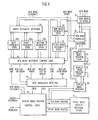
- Figure 1 is a functional block diagram showing the procedure for segmenting uncoded information into component word images;
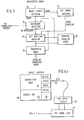
- Figure 2 is a schematic diagram showing the technique of storing extremity information as a part of the word segmentation techniques of Figure 1;
- Figure 3 is an illustration showing segmentation within a zone of proximity employing a parallelogram as the zone definition;
- Figure 4 is a schematic block diagram of the logic for positioning uncoded words in the display image;
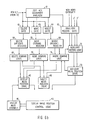
- Figure 5 is a block diagram of the technique for baseline drift correction; and
- Figure 6, in segments 6a and 6b, is a block diagram illustrating NCI * text editing operations.
- In the embodiment of the invention to be described in detail hereinafter, the input device is an electronic tablet utilising apa (all points addressable) techniques to record handwritten images of documents which may be subsequently edited. Such tablets are known in this field, generally having either opaque or transparent screens. Such devices are high resolution input systems where every point is defined by a pair of co-ordinates. Co-ordinates are collected, generally at the rate of 100-200/second. The sampling rate employed in such apa systems is a function of anticipated movement of the stylus.
- Such known electronic tablets have, in the past, been used for a variety of purposes. Typical are the preparation of engineering drawings of mechanical or electrical devices and for the recognition of handwritten characters to produce coded inputs for information processing. It is again pointed out that this invention does not deal with character recognition per se, such as techniques defined in, for example, US Patent 3,111,646, IBM Technical Disclosure Bulletin
Vol 24, No 11A, pages 5404 to 5409, April 1982 and IBM Technical Disclosure Bulletin,Vol 24, No 6, pages 2897 to 2902, November 1981. - The tablet signals are processed automatically to improve the image display of handwritten words and symbols.
- Typical operations are identifying words as units of presentation for handwritten text, adjusting the interval between consecutive words and lines of text to provide uniform spacing, correcting skew lines of handwriting (baseline drift correction) and presenting handwritten text in paragraphs reflecting the shape the user has created on paper.
- In accordance with known techniques, during data creation, signals are created utilising tablet entry such that a series of digital values corresponding to the co-ordinates of successive positions are generated as the pen moves across the tablet surface under user control. Digital data is produced as pen movement occurs across the surface. Such is accomplished by means of frequent sampling and subsequent filtering in a manner designed to retain significant shape and location data.
- The fundamental elements of such tablet input data are the X-Y co-ordinate pairs. These are combined to form a stroke, that is, substantive pen movement. A stroke is defined as a sequence of points between the pen initially striking the tablet in a downward motion and the pen being lifted up. These co-ordinate pairs form the basic units of tablet output which are subsequently processed. Pen strokes may be employed to perform various functions. These are typically information entry, command entry and operand identification. A menu point can be predefined such that information is entered by touching it when its co-ordinates are produced, the system is programmed to record a prescribed message. Alternatively, the image information can be entered by drawing it with the pen on the tablet. Commands can be entered by touching menu points or by making characteristic marks on the tablet. In order to sense these marks the system must be programmed to recognise them. If an image item is an operand for command operation that is being performed, it can be identified by touching the item with the pen where it appears on the tablet. When the pen touches one or more points which fall within an image item, that item is identified for the operation. It is understood that known programming techniques are employed to create menu displays and processing logic operation in response to menu selection.
- Logic is provided to automatically process tablet entered inages for detection of fundamental features of those images. Such images correspond to symbols, words, lines and paragraphs which make up a document image. The methodology of such logic is to compare each succeeding tablet signal with the signals that have preceded it. Points where the pen is lifted are detected and displacements between pen down and pen up are used to determine the limits of image features. Running values are retained by the system for feature extremities and a baseline is estimated for text images. The position of each succeeding signal is them compared with preceding extremity information to determine where the previous word or line has ended and a new symbol has begun. By storing these points of segmentation with the recorded signals, boundaries and relative size of symbols, words and lines can be identified in the stored image data.
- Once segmented, tablet image data is them employed to create images which have a more uniform separation between words and additionally fill the image display area effectively. In instances where words are written such that the characters are significantly larger then others in the document, they can be reduced to fill the space more e effectively. As additional words are added to the written record, additional lines are appended to the image display. In situations where the added words are written directly following prior words on the tablet, new display lines will be a part of the same paragraph. In situations where added words are indented and the priority line did not start a new paragraph, lines are skipped, or an added word does not fill a prior line, the output image will start as a new paragraph. These operations occur as a function of the formatting algorithms hereof.
- The segmented tablet image data is also used to correct baseline excursions which occur when the writer does not follow a horizontal line across the page. As is well known, handwriting often runs either "uphill" or "downhill", in either case a deviation from the horizontal. An estimated baseline is determined for each line of words on the tablet. This arrangement allows for position adjustment in both the displacement and rotational orientations with respect to the baseline. The formatting methodology accomplishes these tasks.
- Editing of handwritten text which is retained in non-coded form is another application of segmented tablet image data. Editing operations include the ability to delete, replace, insert or move portions of non-coded text in a handwritten page. These functions can be initiated by utilising the pen to touch a menu point whereby identification of the action to be taken occurs. This is then followed by touching with the pen the text locations where the action is to occur.
- Referring now to Figure 1, as schematic diagram of the technique for segmenting non-coded information (NCI) line images is depicted. X and Y signals from the writing tablet indicate the current position of the pen on the tablet given the all points addressable nature of the system. The D input signal indicates when the pen touches the tablet. As shown in Figure 1, the beginning of each NCI segment is initiated by a pen down signal, that is, the initiation of a "D" signal to
gate 10. While the pen is down, and in contact with the tablet, X and Y signals are generated and passed tostroke extremity detectors 12, (see Figure 2). Four stroke extremity detectors are employed. One is for determining left extremity, a second for right extremity, a third for upward extremity and a fourth for downward extremity. The X and Y signals from the tablet are passed to all of these detectors and appropriately stored. - Referring to Figure 2, a schematic diagram of one such extremity detector is illustrated. The example shown is for a right extremity detector, it being understood that the remaining three operate functionally in this same manner. As each new point occurs, its X and Y co-ordinates are compared with those previously stored which have be determined to be extreme values. In this case only X values are considered. If the X value exceeds the stored, predetermined right extreme value by a predetermined threshold (t) thus indicating movement to the right, a new extreme value is detected. The threshold (t) is employed to accommodate for pen jitter. Thus, as shown in Figure 2, the input X signal is first subjected to a
comparison 22 to determine whether it is greater than the current extreme value (e) by a predetermined amount, that is, is it greater or equal to the threshold (t). If the indication is positive, the X value is gated to the ANDgate 24 shown in Figure 2 and stored inregister 26 as a new extremity value for X. Subsequent X values are compared and updated with the newly stored right extreme value. - In a compatible manner, extreme values of (-X, + Y and -Y) are compared with a threshold and extreme values are stored.
- Referring back to Figure 1, whenever an end of stroke is detected as a function of pen lift, that is movement of the pen off the tablet, the value stored in each of the stroke extremity storage registers 26 are passed to a proximity zone compare
system 14 throughgate 16. - Stroke extremities are compared with prior word extremities to test whether the new stroke lies outside the proximity zone and therefore a new word is begun. When a new word is begun a new word signal is generated clearing
new word gate 18 to pass extremity values for the new word. When the old word is continued, stroke extremity values are passed to the word extremity detector 17 utilising gate logic such as shown in Figure 2. Updated extreme values for the old word are then stored in theword extremity store 19 shown in Figure 1. When a new word has begun, the word extremity store is erased and extremities of the first stroke of the new word are then passed from the word extremity detector to theword extremity store 19. - As illustrated in Figure 1, the proximity zone compare 14 is used to determine the beginning of new words for purposes of defining a zone of proximity for each word that is being segmented. The zone or proximity may have any arbitrary shape, however, a parallelogram is the easiest to implement. An example of a suitable parallelogram shown in Figure 3, is a rectangle. Each new stroke is compared with the zone of proximity of the current word. If any part of the stroke falls inside the zone, it is considered to be part of the current word. If it does not fall within the zone, it is considered to be either the beginning of a new word or the continuation of a word previously thought to be completed.
- Figure 3 illustrates segmentation utilising a rectangular proximity zone. It should be understood that any parallelogram may be employed. In some alphabets or in cases where letters are slanted a different zone shape may be used. The rectangular zone illustrated in Figure 3 is defined by horizontal lines passing through the upper and lower extremities and vertical lines that pass through the left and right e extremities. A new word is detected when a stroke occurs outside the proximity zones of preceding words. The new word strokes must be positioned more than a prescribed threshold distance (denoted herein as "r") beyond the previously stored extreme right position or beyond the stored extreme left threshold distance (denoted herein as "1"). In a corresponding manner, new word strokes must be positioned relative to previously stored up and down threshold distances (denoted herein as "u" for extreme upward position, and "d" for extreme downward position). The values of these prescribed thresholds "r", "1", "u" and "d" are based on selected characteristics of the NCI images.
- As shown in Figures 3, "h" is denoted as the height of handwriting. It may be assumed for English handwriting that "r" is approximately 0.5 of "h" while "1" is slightly less than 0.5 of "h" because handwriting progresses from left to right under normal conditions. Similarly, "d" can be established by inspection to be approximately 0.667 of "h" while "u" is slightly less than 0.667 of "h". These threshold values must be adjusted when different languages are employed. That is, the values described herein are usable for English language handwriting. However, if other languages are employed, the parameters would have to be suitably adjusted.
- In addition to this technique of word segmentation, word segmentation can also be initiated by the occurrence of prescribed external events. As indicated, segmentation is a function of spatial relationships which in turn are a function of the language employed. Segmentation is not necessarily time limited, however, it can be determined based on the passage of time in which no additional strokes are made. Thus by time monitoring the occurrence of D signals, segmentation of data into assumed words may occur. Segmentation could also occur by having the writer touch a menu point entry when a word is complete. This latter technique, while assuring positive segmentation, slows down data entry.
- Word segmentation as illustrated relative to Figures 1 to 3 could occur on one line of data at a time. If enough processing memory were available, conceivably segmentation could be delayed until the data representing the entire tablet had been loaded into storage.
- After the NCI images have been segmented into defined areas representing words, they may be assembled with prescribed formatting rules to form documents that can be presented as useful display images, transmitted, or printed-out. Each document is developed as a collection of words that form one or more paragraphs. Formatting rules thus serve to determine the position of each segmented word in the shape of a paragraph in the document. The occurrence of a new word may require that it be placed at the beginning of a new paragraph, appended to the end of an old paragraph or, in some situations, inserted within an existing paragraph. When a word is appended at the end of a paragraph, or inserted into the middle, its closest upstream word in the document image is found and the new word is placed immediately following it. When the word is the first word of a new paragraph, in accordance with the formatting instructions of- this arrangement, it is placed at the beginning of a new line, with an identification that indentation is required.
- In order to apply these formatting rules, logic must detect the occurrence of new paragraphs. If a word is the first word of document then it is by definition the beginning of a new paragraph. If a word is the first word of a line that is not the first line of the document, it may be the start of a new paragraph or simply the continuation of the preceding paragraph. A new paragraph is generally detected when the word is indented, outdented or is placed well below the prior line, which has not already been determined to the first line of a paragraph, or alternatively, at the beginning of a new line when the previously line space was not filled.
- Any of these three occurrences can be used to trigger a paragraph start.
- With the words and paragraphs that make up a document detected, document content may then be mapped into an image for display or print-out. To produce the desired output, this arrangement provides an algorithm to fill the available space on each line with properly spaced words until all words of the paragraph have been used. It may be necessary to fill out lines with words from a subsequent line on the tablet and at other times it may be necessary to spill extra words from the end of one tablet line into the following lines for purposes of display. Again, it is noted that this arrangement makes no attempt to recognise the substantive content of the words being formatted. Referring now to Figure 4, the logic for positioning NCI words in the display image is illustrated in a schematic diagram. The inputs to this logic comprise:
- the new word signal of Figure l;
- x and y co-ordinates of the new word obtained from Pn Down Gate. 10 of Figure 1; and
- the new word extremity values from Figure 1.
- After the new word signal occurs, from processing of the preceding word, the new word's x and y co-ordinates are stored in the New
Word XY Store 37. As each succeeding new word signal occurs, the contents of NewWord XY Store 37 are passed into TabletWord Position Store 45, where the signals of each word are recorded, together with a document word sequence number which is used for subsequent image editing operations to be described later. - The New
Word Translate Unit 38 also receives new word extremities of x and y from theWord Extremity Store 19 of Figure 1, The NewWord Translate unit 38, which is connected to NewWord XY Store 37, subtracts the minimum value of x from the x co-ordinates of the new word and the minimum value of y from the y coordinates of the new word in order to produce a new word representations in X' and Y' relative to an origin at the bottom left corner of the new word. - New word extremities are also passed to the
Word Extremity Detector 39, which compares the new word extremities with previously stored left, right and bottom extremities of the preceding words of the document. If a new word extremity exceeds the previously stored corresponding extremity, the new value is stored inExtremity Store - New word extremity values are also passed into the
New Extremity Store 35. The extremity values are held in NewWord Extremity Store 35 until the next new word signal occurs. Then they are passed into the PriorWord Extremity Store 36, and extremity values for the subsequent word are stored in NewWord Extremity Store 35. When a new word signal occurs, the new word extremities are compared .. with the contents of: - Prior
Word Extremity Store 36; - Left Extremity Store 40a;
Right Extremity Store 40b; and -
Bottom Extremity Store 40c, - by the New Word Movement Compare
Logic 41. Comparisons of these values determine if the new word: - follows the preceding word on the same line;
- starts a new line with no indent;
- starts a new line with indentation;
- starts a new line to the left of prior lines; or
- skips a line.
- The conditions for the se occurrences are as follows:
- a) Skip Line
Upper extremity of new word more than "t" beneath lower extremity value inBottom Extremity Store 40c, where "t" is approximately twice line height. - b) New line, no indent.
.Difference between Left Extremity Store 40a contents and left extremity of new word less than "m", and upper extremity of new word is more than "t/4" beneath lower extremity value inBottom Extremity Store 40c, where "m" is a predetermined constant for determining indentation. - c) New line, indent
Difference between Left Extremity Store 40a contents and left extremity of new word less than "-m", and upper extremity of the new word is more than "t/4" beneath lower extremity value inBottom Extremity Store 40c. - d) New line, left of margin
Difference between Left Extremity Store 40a contents and left extremity of the new word more than "m", and upper extremity of the new word is more than "t/4" beneath lower extremity value inBottom Extremity Store 40c. - e) Same line, following prior word.
Absolute value of difference between upper extremity of new word and upper extremity value in PriorWord Extremity Store 36 less than "t/4", and left extremity of the new word is greater than right extremity contents of PriorWord Extremity Store 36 by an amount between "m/8" and "m". - f) New line, no indent, short prior line.
Right extremity value of PriorWord Extremity Store 36 more than "2m" less than right extremity value inRight Extremity Store 40b, the difference between the contents of Left Extremity Store 40a and left extremity of the new word less than"m", and upper extremity of the new word is more than"t/4" beneath lower extremity value inBottom Extremity Store 40c. - If conditions:
- a) skip line; c) new line, indent; d) new line, left of margin;" or f) new line, no indent, short prior line;
- If conditions:
- b) new line, no indent; or c) same line, following prior word; occur,
New Paragraph Detector 42 is reset and its output indicates an old paragraph condition. New paragraph and old paragraph conditions are passed to the Display ImagePosition Control Logic 43, where, with new word extremity information, it determines the proper location for each word in the display presentation. As each position is determined it is stored in the PriorWord Position Store 44, where its coordinates are used by DisplayImage Position Logic 43 to determined the display position of the following word. - Other inputs to the Display Image
Prosition Control Logic 43, include:
the line increments for desired separation in the display between left and right margins and for vertical distance between lines; and
the display indent increment (if indent is used). - These values are set by the choice of display image size and remain constant for a given display geometry. When a new display page image is begun, the first word will be positioned at the left edge of the top line unless the word is designated as the first word of an indented paragraph. If the Display
Image Control Logic 43 determines the word should be indented it adds the appropriate displacement to its horizontal position. When subsequent words occur, the Display ImagePosition Control Logic 43, checks the old or new paragraph status to determine where the words should be positioned. For words in old paragraphs, the DisplayImage Control Logic 43, determines if the space between the right edge of the prior word and the right margin is large enough to display the new word. If the space is not large enough the word is placed at the left edge of the next line by decrementing the vertical displacement down one line separation, and setting the horizontal displacement at the left margin. If the new word starts a paragraph, the vertical displacement is decremented two lines separations, and the horizontal displacement is at the margin or indented from the margin depending on the display format that is chosen by the users. - The minimum x and y coordinates for the display word position are passed to the Display
Image Assembly Unit 46, where they are attached to the representation of the word in coordinates X' and Y' from Newword Translate unit 38. These coordinates are passed to DisplayWord Position Store 47, where they are stored with the same document word sequence number that was assigned for reference in the TabletWord Position Store 45. The DisplayWord Position Store 45, also stores new paragraph indications, line increment information, and line indent information with each word that begins a new paragraph. This information is obtained form the Display ImagePosition Control Logic 43 with the words that begin paragraphs. The Display Word Position Store is the source of data that drives the CRT and places the basic word shapes at the desired location in the image display. Referring now to Figure 5, the technique of baseline correction will be explained. A common characteristic of handwritten text is the deviation of words an characters from a nominal baseline. When this occurs, both the appearance and the interpretation of the text may be unacceptable. With the NCI images segmented into words, deviations may be corrected for the purpose of image display and subsequent interpretation. This arrangement employs a procedure that establishes a left to right sequence of estimates for the Y coordinate of a nominally established baseline. Two levels of baseline correction are accomplished. The first is the correction of the word orientation such that each word becomes horizontal. The second is the correction of the vertical drift such that baselines of the words in one line lie on the same horizontal line. The first is called the baseline slant correction and the second is called the baseline drift correction. Baseline correction is based on the observation that most of the symbols used in a particular alphabet sit on a baseline with only a few exceptions. In the case of the English language, lower case letters "ff, g, j, p, q and y" and sometimes "z" have descenders and do not sit on a baseline. Other marks, for purposes of punctuation and the like, such as apostrophes and quotation marks sit above the baseline. - Baseline correction is also a function of word length. When a word is short, for example "a, it, of," the baseline can be assumed to be horizontal, but could be slightly offset from the running baseline of the line being written. Thus, for short words, baseline slant correction is not necessary. Before a new baseline is estimated, it must be determined whether the word is to sit on a baseline. Recall that words which descenders do not sit on a baseline. This is accomplished by testing the minimum Y value of the word against the running baseline. If the difference is within a tolerance, for example, approximately 0.33 of the line height, then the word is assumed to sit on a baseline and a new baseline is computed. A new baseline for a word may be computed by determining the baseline as equalling WEIGHT * (running baseline) + (1 - weight) * Y min. In this computation, Y min is the minimum Y value of the word and the "weight" is a constant, approximately 0.5. For conservative correction, the weight may be greater than this value and for more correction the weight will be slightly less.
- With reference to word orientation, when the word is long, whether it contains symbols with descenders or not, symbols without descenders sit on a baseline. The method is then to find the baseline and correct it to conform to the horizontal for purposes of display. The methodology is shown in Figure 5. An uncorrected word is supplied to a
word length detector 50. A determination is made of the length of the word based on a predetermined number of characters. If the word length falls above the predetermined minimum number of characters, then it is considered a "long word" and a word baseline is established for that word utilising aword baseline determinator 53. This is accomplished by drawing boxes of width about the same as a single symbol and high enough to contain all of the points within this particular width. Tall boxes contain ascenders/descenders of the particular alphabet while short boxes contain ligatures. Boxes of medium height contain symbols without ascenders/descenders an those sit on the baseline. A selection is then made of predetermined number or boxes of medium height and a determination is made by curve fitting of the bottom coordinates to provide baseline slant data. With the slant amount thus calculated, Y coordinates are corrected to make the word horizontal. - Once long words are made horizontal and baseline for all words are detected, words must be moved vertically to match the running baseline of the line under consideration. Thus, the word baseline is supplied to a
register 54 of Figure 5 for the determination of a new baseline. When a first word of a line is written, there is of course no running baseline. A lined paper or indication by the writer can be used to provide the initial running baseline. Otherwise, the baseline of the first word (the calculation of which is described below) is used initially, and then may be later modified as more words are written, if it happened to be a short word. This is accomplished by using the runningbaseline register 56. An approximate initial value is assumed on some basis, lined paper, user indication, or the baseline of the first word. As new words are written, register 56 is repeatedly updated as shown in Figure 5. - In the case of a short word being the first word of the line, an approximation of the initial running baseline is established using the bottom of the word. As shown in Figure 5, it will be recomputed. after succeeding words are written. If a long word is the first word, its baseline becomes the initial running baseline. This initial baseline is not recomputed. Thus, as shown in Figure 5, based on the estimate of correction of the running baseline, the word is then transformed in
register 58 to conform to the running baseline and the base-line correct word is issued such that it is displayed on the running baseline. As shown in Figure 5, baseline correction occurs on a word by word basis as the line is established. Baseline correction can also be done at the end of a line. Given adequate processing speeds, a line may be written on the input tablet with display occurring one line at a time, with sufficient data obtained in that period that line by line baseline correction can be attained. It is also possible to postpone display until several lines are generated such that multiple lines can be corrected at once. - While these functions have been described using English language as the input, it will be understood that the invention can be used with other languages. The same methodology would be employed but the values of selected constants would be chosen consistent with word length, characters, etc of the particular language.
- As described herein, a portion of this arrangement concerns methodology for formatting handwritten characters for display in an organised manner without attempting to recognise the substantive content of those characters. This arrangement also provides for algorithms used to edit the NCI text. Editing involves changes that move, delete or replace image segments which have been partitioned by the word segmentation operation shown in Figure 1 and positioned in the display by the operations shown in Figure 4. The editing operations to be performed can be specified either by touching a menu point on the tablet or by making specific characteristic marks for the action desired. Editing involves several different types of operations and the characteristic mark method would therefore require a machine recognition of different types of marks, that is to say, the recognition of instructions rather than the recognition of data. Such can be accomplished using well known programming techniques for the input tablet and pen system, such as pattern recognition techniques.
- In addition to techniques to specifying the editing commands to be performed, the system also provides for identification of the segments which are to be operated on, that is the operands. Operands must be identified by pointing to them with the pen, moving a cursor or some other physical technique because the uncoded image segments cannot be identified by their content. Again, known programming techniques for editing using the pen or cursor on the writing tablet accomplish this task. For example, the identification of the NCI word operand can be made by simply pointing to it with a pen or to the space preceding or following it such that delineation is made of the required operation, that is, delete, insert or move. When the image on the tablet contains the current representation of the image which is to be edited, the user may simply point to the required operand locations with a pen.
- However, when the image which was recorded has been stored, operands can be identified by calling up the image on the display screen and pointing with the pen if a touch sensitive display panel is employed.
- The system logic relating to the position touched on the overlay as corresponding to a position on the document is known in this technology. Direct pointing to the operand provides a natural and fast technique for entering operand information.
- Another editing operation for handwritten text is the addition of missing strokes to a word. A common example is the crossing of "t". As long as the word is still found on the input tablet, word completion strokes within the word's proximity zone may be recognised and added to that word for display as a part of the completed word. If, however, the stroke goes beyond the proximity zone, it may cause a situation where neighbouring words merge. Word segmentation will still occur after the completion of all strokes.
- Another editing technique is to write over a word for purposes of changing that word once it has been written. The arrangement allows this editing operation to occur by a mode of operation wherein a new stroke can be written over all or part of and existing NCI segmented word to replace all or part of the word which is overwritten. This may be used for operations such as correcting spelling or breaking a long sentence into two with capitalisation of the first word of the second sentence.
- Another purpose of writing over a recorded word would be to erase it. A characteristic "scratch-out" stroke which never occurs in handwriting may be reserved for such word deletion operations. This can be made, for example, by recognising a stroke on the top of the word where they are written on the tablet so that the word which has been covered by this stroke will be identified and deleted. This would correspond to the common practice of simply crossing words out when they are handwritten.
- Referring to Figures 6a and 6b, the method for three basic NCI text editing operations, delete, insert, and move, are described. In this example the command for each is invoked by touching a "function key"
area 82 on the tablet. The coordinates fromPen Down Gate 10, Figure 1 are evaluated by Edit Key CoordinateAnalyser 61. If the co- ordinates match the values for a delete operation, theDelete Gate 62 is enabled and subsequent pen coordinates are directed to theDelete Operand Register 66. The contents ofDelete Operand Registered 66, are compared with the coordinates stored in TabletWord Position Store 45, by Delete CompareLogic 69, to determine the document word sequence number(s) of the word(s) to be deleted. The document word sequence number acts as a pointer to the words in the DisplayWord Position Store 47, that are to be deleted. If the deleted word was the beginning of a paragraph, the new paragraph indicator is passed to the following word. Delete CompareLogic 69 causes the display word positions and the paragraph, indent, and line increment information for the word that precedes the deletion and for the series of words that follow it to pass from DisplayWord Position Store 47 to the appropriate inputs in Figure 4 for new word extremities and prior word position in theWord Extremity Detectors 39, NewWord Extremity Store 35, Display ImagePosition Control Logic 43 and Prior WordDisplay Position Store 44. Y' Y' coordinates for each of the words that follow the deletion are passed to the DisplayImage assembly Unit 46. - Working in the manner indicated in Figure 4, Display Image
Position Control Logic 43, and the DisplayImage Assembly Unit 46 record a new display image in DisplayWord Position Store 47, that does not contain the deleted words. - When the insert command is invoked by touching the insert function key,
Insert Gate 64 is enabled by the output of the Edit Key Co-ordinate Analyser 61 and the following pen output, corresponding to a touch in the tablet composition area representing the point where the insert is to be made, is recorded in theInsert Operand Register 68. - The Insert Compare
Logic 71 determines the word sequence numbers associated with the position of the insert in TabletWord Position Store 45, and thereby identifies the position in the DisplayWord Position Store 47 where new images will be inserted. After the insert position has been established, a new image is written in theauxiliary Scratch Pad 83 area ofTablet 80. Edit Key CoordinateAnalyser 61 determines that the writing is in thescratch pad area 83 and enablesAuxiliary Record Gate 65, to pass the new word ectre- mities from Figure 1, and the X' Y' coordinates fromNew Word Translate 38 into Auxiliary Word Position Store 73, under control ofAuxiliary Record Logic 72. TheAuxiliary Record Logic 72 translates the lower left extremity coordinates of the first new word to the values of the insert position in the DisplayWord Position Store 47, and each subsequent word in the auxiliary record is displaced from that initial location by the amount of its displacement in the scratch pad area. To complete the insert operation, the information for the new words in the Auxiliary Word Position Store 73, are passed to appropriate inputs in Figure 4 for new word extremities and prior word position, and the Display ImagePosition Control Logic 43, and the DisplayImage Assembly Unit 46, position the insertion in DisplayWord Position Store 47, in the manner indicated in Figure 4. The words that were behind the insertion position in theDisplay Position Store 47, prior to the insertion, must be repositioned to follow the end of the inserted words. The Insert CompareLogic 71, translates the lower left extremity coordinates of these words to a position behind the last word of the insertion, and then the modified values for these words in the DisplayWord Position Store 47, are passed to the Display ImagePosition Control Logic 43 and DisplayImage Assembly Unit 46 for repositioning in DisplayWord Position Store 47. - When the move function key is touched,
Move Gate 63 is enabled and coordinates of subsequent touches are collected inMove Operand Register 67. The first pair of touches define the segment of the handwritten page that is to be moved. The coordinates of the third touch define the location where the moved words are to be inserted. - The Move Compare
Logic 70, determines the word sequence numbers that correspond to these positions by referring to the information stored in TabletWord Position Store 45. When the move is made, Move CompareLogic 70, translates the lower left extremity of the first word to be moved to the coordinates of the insertion location in DisplayWord Position Store 47. Each following word to be moved is displaced enough to maintain relative word positions in the DisplayWord Position Store 47. The words that are not moved by the move operation, per se, are subsequently moved automatically to fill the space voided to restore correct relative positioning. Move CompareLogic 70, then translates the lower left extremity coordinates of the first word after the insert location to a position just beyond the right extremity of the last word that is moved. All subsequent words are displaced a corresponding amount to retain their relative positions in the DisplayWord Position Store 47. - Thus, it is apparent that this arrangement provides for basic tasks of text editing, that is moving and deleting characters together with basic formatting for organisation of those characters used for subsequent storage and display.
- It is apparent that modifications of this invention may be practiced with out departing from the scope of the appended claims. For example, as delineated in Figure 6a, the tablet used for information entry is opaque. In some modes of utilisation entry of information is more easily effected by using a display overlay. Those modifications employ a different data entry technique.
- It should be understood that, in such a scheme, the functions of the Display
Word Position Store 47 and the TabletWord Position Store 45 are nearly identical and could be implemented with a single unit. - The tablet organisation of Figure 6a is illustrative of one format. It is apparent that the command functions could be obtained by use of an auxiliary device, i.e keys outside the tablet area.
occur and the preceding line was not the beginning of a new paragraph, a new paragraph condition is indicated by the
Claims (19)
Applications Claiming Priority (2)
| Application Number | Priority Date | Filing Date | Title |
|---|---|---|---|
| US65517484A | 1984-09-27 | 1984-09-27 | |
| US655174 | 1984-09-27 |
Publications (3)
| Publication Number | Publication Date |
|---|---|
| EP0176715A2 true EP0176715A2 (en) | 1986-04-09 |
| EP0176715A3 EP0176715A3 (en) | 1989-03-22 |
| EP0176715B1 EP0176715B1 (en) | 1992-07-15 |
Family
ID=24627825
Family Applications (1)
| Application Number | Title | Priority Date | Filing Date |
|---|---|---|---|
| EP85110144A Expired - Lifetime EP0176715B1 (en) | 1984-09-27 | 1985-08-13 | A system for automatic adjustment and editing of handwritten text images |
Country Status (5)
| Country | Link |
|---|---|
| US (1) | US4727588A (en) |
| EP (1) | EP0176715B1 (en) |
| JP (1) | JPS6180478A (en) |
| CA (1) | CA1223366A (en) |
| DE (1) | DE3586342T2 (en) |
Cited By (4)
| Publication number | Priority date | Publication date | Assignee | Title |
|---|---|---|---|---|
| GB2199169A (en) * | 1986-12-19 | 1988-06-29 | Sec Dep For Trade & Industry T | Machine editing of free-hand work |
| EP1045312A3 (en) * | 1999-04-12 | 2006-07-05 | Hewlett-Packard Company, A Delaware Corporation | System and method for rendering image based data |
| EP1573651A4 (en) * | 2002-11-05 | 2008-07-23 | Silverbrook Res Pty Ltd | Method/system for estimating the orientation of a segment of digital ink |
| US9013428B2 (en) | 2012-05-25 | 2015-04-21 | Kabushiki Kaisha Toshiba | Electronic device and handwritten document creation method |
Families Citing this family (75)
| Publication number | Priority date | Publication date | Assignee | Title |
|---|---|---|---|---|
| US6002799A (en) * | 1986-07-25 | 1999-12-14 | Ast Research, Inc. | Handwritten keyboardless entry computer system |
| US4972496A (en) * | 1986-07-25 | 1990-11-20 | Grid Systems Corporation | Handwritten keyboardless entry computer system |
| US5157737A (en) * | 1986-07-25 | 1992-10-20 | Grid Systems Corporation | Handwritten keyboardless entry computer system |
| JPH07104909B2 (en) * | 1987-03-04 | 1995-11-13 | シャープ株式会社 | Character recognition method |
| US5073956A (en) * | 1988-10-25 | 1991-12-17 | Brother Kogyo Kabushiki Kaisha | Apparatus for converting image outline data into dot data representative of dots to be formed |
| US5001765A (en) * | 1989-01-05 | 1991-03-19 | International Business Machines Corporation | Fast spatial segmenter for handwritten characters |
| US5010500A (en) * | 1989-01-26 | 1991-04-23 | Xerox Corporation | Gesture-modified diagram for retrieval of image resembling diagram, with parts selectable for further interactive retrieval |
| JP2756301B2 (en) * | 1989-04-10 | 1998-05-25 | キヤノン株式会社 | Image editing method and apparatus |
| US5252951A (en) * | 1989-04-28 | 1993-10-12 | International Business Machines Corporation | Graphical user interface with gesture recognition in a multiapplication environment |
| US5167016A (en) * | 1989-12-29 | 1992-11-24 | Xerox Corporation | Changing characters in an image |
| US5361310A (en) * | 1990-01-19 | 1994-11-01 | Fujitsu Limited | Handwriting entry processing system using keyboard and mouse interfaces requiring no modification of an application program |
| US5029223A (en) * | 1990-02-02 | 1991-07-02 | International Business Machines Corporation | Constraint driven-on line recognition of handwritten characters and symbols |
| USRE34476E (en) * | 1990-05-14 | 1993-12-14 | Norwood Donald D | Hybrid information management system for handwriting and text |
| US5063600A (en) * | 1990-05-14 | 1991-11-05 | Norwood Donald D | Hybrid information management system for handwriting and text |
| US5459796A (en) * | 1990-10-22 | 1995-10-17 | The Watt Stopper | System for entering handwritten data into computer generated forms |
| US5272766A (en) * | 1991-01-14 | 1993-12-21 | Ncr Corporation | OCR system for recognizing user-specified custom fonts in addition to standard fonts using three-layer templates |
| JP3329391B2 (en) * | 1991-01-22 | 2002-09-30 | ソニー株式会社 | Character input device and method |
| US5953735A (en) | 1991-03-20 | 1999-09-14 | Forcier; Mitchell D. | Script character processing method and system with bit-mapped document editing |
| US6434581B1 (en) | 1991-03-20 | 2002-08-13 | Microsoft Corporation | Script character processing method for interactively adjusting space between writing element |
| EP0505621A3 (en) | 1991-03-28 | 1993-06-02 | International Business Machines Corporation | Improved message recognition employing integrated speech and handwriting information |
| US5550930A (en) * | 1991-06-17 | 1996-08-27 | Microsoft Corporation | Method and system for training a handwriting recognizer at the time of misrecognition |
| US5848187A (en) * | 1991-11-18 | 1998-12-08 | Compaq Computer Corporation | Method and apparatus for entering and manipulating spreadsheet cell data |
| US5652806A (en) * | 1992-01-10 | 1997-07-29 | Compaq Computer Corporation | Input device with data targeting to determine an entry field for a block of stroke data |
| CA2089784C (en) * | 1992-04-15 | 1996-12-24 | William Joseph Anderson | Apparatus and method for disambiguating an input stream generated by a stylus-based user interface |
| JP3187151B2 (en) * | 1992-07-31 | 2001-07-11 | キヤノン株式会社 | Graphic processing apparatus and method |
| US6697524B1 (en) | 1992-09-04 | 2004-02-24 | Canon Kabushiki Kaisha | Information processing method and apparatus |
| DE69332555D1 (en) * | 1992-09-04 | 2003-01-23 | Canon Kk | Method and device for displaying characters |
| US5448475A (en) * | 1992-11-18 | 1995-09-05 | Sharp Kabushiki Kaisha | Word processing apparatus with handwriting input function |
| WO1994016408A1 (en) * | 1993-01-06 | 1994-07-21 | Palm Computing, Inc. | Method and apparatus for editing electronic ink |
| US6011865A (en) * | 1993-05-12 | 2000-01-04 | International Business Machines Corporation | Hybrid on-line handwriting recognition and optical character recognition system |
| US7203903B1 (en) | 1993-05-20 | 2007-04-10 | Microsoft Corporation | System and methods for spacing, storing and recognizing electronic representations of handwriting, printing and drawings |
| US5517578A (en) * | 1993-05-20 | 1996-05-14 | Aha! Software Corporation | Method and apparatus for grouping and manipulating electronic representations of handwriting, printing and drawings |
| US5613019A (en) * | 1993-05-20 | 1997-03-18 | Microsoft Corporation | System and methods for spacing, storing and recognizing electronic representations of handwriting, printing and drawings |
| US5710831A (en) * | 1993-07-30 | 1998-01-20 | Apple Computer, Inc. | Method for correcting handwriting on a pen-based computer |
| US5596350A (en) * | 1993-08-02 | 1997-01-21 | Apple Computer, Inc. | System and method of reflowing ink objects |
| US5500937A (en) * | 1993-09-08 | 1996-03-19 | Apple Computer, Inc. | Method and apparatus for editing an inked object while simultaneously displaying its recognized object |
| US5564112A (en) * | 1993-10-14 | 1996-10-08 | Xerox Corporation | System and method for generating place holders to temporarily suspend execution of a selected command |
| US5511135A (en) * | 1993-11-29 | 1996-04-23 | International Business Machines Corporation | Stylus-input recognition correction manager |
| US5774586A (en) * | 1994-05-04 | 1998-06-30 | Ncr Corporation | Method and apparatus for standardization of inputs to word recognition systems |
| JP2939119B2 (en) * | 1994-05-16 | 1999-08-25 | シャープ株式会社 | Handwritten character input display device and method |
| US5737740A (en) * | 1994-06-27 | 1998-04-07 | Numonics | Apparatus and method for processing electronic documents |
| US5897648A (en) * | 1994-06-27 | 1999-04-27 | Numonics Corporation | Apparatus and method for editing electronic documents |
| DE69519548T2 (en) * | 1994-09-09 | 2001-06-13 | Xerox Corp., Rochester | Methods for interpreting handwritten schematic user interface commands |
| US5633957A (en) * | 1994-09-16 | 1997-05-27 | Compaq Computer Corporation | Method and apparatus for determining positional guidelines of handwritten data |
| US5675665A (en) * | 1994-09-30 | 1997-10-07 | Apple Computer, Inc. | System and method for word recognition using size and placement models |
| CA2178959C (en) * | 1994-11-14 | 2000-05-16 | Kenneth J. Guzik | Method of splitting handwritten input |
| US5737443A (en) * | 1994-11-14 | 1998-04-07 | Motorola, Inc. | Method of joining handwritten input |
| JP2939147B2 (en) * | 1994-12-29 | 1999-08-25 | シャープ株式会社 | Handwritten character input display device and method |
| JPH0951422A (en) * | 1995-08-09 | 1997-02-18 | Minolta Co Ltd | Image edit device |
| US5956409A (en) * | 1996-04-29 | 1999-09-21 | Quintet, Inc. | Secure application of seals |
| US6931153B2 (en) * | 2000-04-20 | 2005-08-16 | Matsushita Electric Industrial Co., Ltd. | Handwritten character recognition apparatus |
| KR100449805B1 (en) * | 2001-12-26 | 2004-09-22 | 한국전자통신연구원 | Method for segmenting and recognizing handwritten touching numeral strings |
| US7199804B2 (en) * | 2002-05-14 | 2007-04-03 | Microsoft Corporation | Ink information in image files |
| US7193616B2 (en) * | 2003-05-30 | 2007-03-20 | Hewlett-Packard Development Company, L.P. | Systems and methods for facilitating composition of handwritten documents |
| US7372993B2 (en) * | 2004-07-21 | 2008-05-13 | Hewlett-Packard Development Company, L.P. | Gesture recognition |
| US7761814B2 (en) * | 2004-09-13 | 2010-07-20 | Microsoft Corporation | Flick gesture |
| US7904810B2 (en) | 2004-09-21 | 2011-03-08 | Microsoft Corporation | System and method for editing a hand-drawn list in ink input |
| US7412094B2 (en) * | 2004-09-21 | 2008-08-12 | Microsoft Corporation | System and method for editing a hand-drawn table in ink input |
| US7503015B2 (en) * | 2004-09-21 | 2009-03-10 | Microsoft Corporation | System and method for editing ink objects |
| US7394935B2 (en) | 2004-09-21 | 2008-07-01 | Microsoft Corporation | System and method for editing a hand-drawn chart in ink input |
| US7593574B2 (en) * | 2005-07-01 | 2009-09-22 | Microsoft Corporation | Ink warping for normalization and beautification / ink beautification |
| JP2006350649A (en) * | 2005-06-15 | 2006-12-28 | Nintendo Co Ltd | Program and information processing device |
| JP2007109118A (en) * | 2005-10-17 | 2007-04-26 | Hitachi Ltd | Input instruction processing apparatus and input instruction processing program |
| JP4999938B2 (en) * | 2010-01-07 | 2012-08-15 | シャープ株式会社 | Document image generation apparatus, document image generation method, and computer program |
| US8311331B2 (en) * | 2010-03-09 | 2012-11-13 | Microsoft Corporation | Resolution adjustment of an image that includes text undergoing an OCR process |
| US20130106865A1 (en) * | 2010-07-23 | 2013-05-02 | Sony Ericsson Mobile Communications Ab | Device, method and computer program product |
| US8854321B2 (en) * | 2011-05-02 | 2014-10-07 | Verizon Patent And Licensing Inc. | Methods and systems for facilitating data entry by way of a touch screen |
| TWI470490B (en) * | 2012-02-17 | 2015-01-21 | Wistron Corp | Stroke display method of handwriting input and electronic device |
| EP2770443B1 (en) * | 2013-02-22 | 2023-10-18 | Samsung Electronics Co., Ltd. | Method and apparatus for making contents through writing input on touch screen |
| CN104111914B (en) * | 2013-04-16 | 2017-09-12 | 北大方正集团有限公司 | A kind of document examines and revises method and device |
| KR20150028627A (en) * | 2013-09-06 | 2015-03-16 | 삼성전자주식회사 | Method of coverting user handwriting to text information and electronic device for performing the same |
| KR20160062566A (en) * | 2014-11-25 | 2016-06-02 | 삼성전자주식회사 | Device and method for amend hand-writing characters |
| US10489051B2 (en) * | 2014-11-28 | 2019-11-26 | Samsung Electronics Co., Ltd. | Handwriting input apparatus and control method thereof |
| WO2017066376A1 (en) * | 2015-10-15 | 2017-04-20 | Newell Brands | Generating mechanically rendered objects from digital input |
| US11157166B2 (en) * | 2015-11-20 | 2021-10-26 | Felt, Inc. | Automove smart transcription |
Family Cites Families (7)
| Publication number | Priority date | Publication date | Assignee | Title |
|---|---|---|---|---|
| NL265383A (en) * | 1960-05-31 | |||
| US3133266A (en) * | 1960-06-14 | 1964-05-12 | Bell Telephone Labor Inc | Automatic recognition of handwriting |
| US3712443A (en) * | 1970-08-19 | 1973-01-23 | Bell Telephone Labor Inc | Apparatus and method for spacing or kerning typeset characters |
| JPS55138163A (en) * | 1979-04-12 | 1980-10-28 | Toshiba Corp | Fair documentation unit |
| JPS57150061A (en) * | 1981-03-12 | 1982-09-16 | Fuji Xerox Co Ltd | Character shaping device |
| DE3126886A1 (en) * | 1981-07-08 | 1983-01-27 | Olympia Werke Ag | DEVICE FOR TEXT PROCESSING AND TEXT PROCESSING |
| JPS5890272A (en) * | 1981-11-25 | 1983-05-28 | Ricoh Co Ltd | How to cut out characters |
-
1985
- 1985-05-17 JP JP60104144A patent/JPS6180478A/en active Granted
- 1985-05-17 CA CA000481844A patent/CA1223366A/en not_active Expired
- 1985-08-13 EP EP85110144A patent/EP0176715B1/en not_active Expired - Lifetime
- 1985-08-13 DE DE8585110144T patent/DE3586342T2/en not_active Expired - Fee Related
-
1986
- 1986-10-09 US US06/917,280 patent/US4727588A/en not_active Expired - Lifetime
Cited By (9)
| Publication number | Priority date | Publication date | Assignee | Title |
|---|---|---|---|---|
| GB2199169A (en) * | 1986-12-19 | 1988-06-29 | Sec Dep For Trade & Industry T | Machine editing of free-hand work |
| EP1045312A3 (en) * | 1999-04-12 | 2006-07-05 | Hewlett-Packard Company, A Delaware Corporation | System and method for rendering image based data |
| EP1573651A4 (en) * | 2002-11-05 | 2008-07-23 | Silverbrook Res Pty Ltd | Method/system for estimating the orientation of a segment of digital ink |
| US7630554B2 (en) | 2002-11-05 | 2009-12-08 | Silverbrook Research Pty Ltd | Method/system for estimating the orientation of a segment of digital ink |
| US7630553B2 (en) | 2002-11-05 | 2009-12-08 | Silverbrook Research Pty Ltd | Method/system for estimating the orientation of a segment of digital ink |
| US7894671B2 (en) | 2002-11-05 | 2011-02-22 | Silverbrook Research Pty Ltd | System for estimating digital ink orientation |
| US7894672B2 (en) | 2002-11-05 | 2011-02-22 | Silverbrook Research Pty Ltd | Method of estimating digital ink orientation |
| US8090203B2 (en) | 2002-11-05 | 2012-01-03 | Silverbrook Research Pty Ltd | System for determining digital ink orientation |
| US9013428B2 (en) | 2012-05-25 | 2015-04-21 | Kabushiki Kaisha Toshiba | Electronic device and handwritten document creation method |
Also Published As
| Publication number | Publication date |
|---|---|
| DE3586342T2 (en) | 1993-02-11 |
| EP0176715B1 (en) | 1992-07-15 |
| JPS6180478A (en) | 1986-04-24 |
| EP0176715A3 (en) | 1989-03-22 |
| CA1223366A (en) | 1987-06-23 |
| JPH0552545B2 (en) | 1993-08-05 |
| US4727588A (en) | 1988-02-23 |
| DE3586342D1 (en) | 1992-08-20 |
Similar Documents
| Publication | Publication Date | Title |
|---|---|---|
| EP0176715B1 (en) | A system for automatic adjustment and editing of handwritten text images | |
| US5590257A (en) | Script character processing method and system with bit-mapped document editing | |
| US6434581B1 (en) | Script character processing method for interactively adjusting space between writing element | |
| US6493736B1 (en) | Script character processing method for opening space within text and ink strokes of a document | |
| US6600834B1 (en) | Handwriting information processing system with character segmentation user interface | |
| US7825922B2 (en) | Temporary lines for writing | |
| US5231698A (en) | Script/binary-encoded-character processing method and system | |
| US6535897B1 (en) | System and methods for spacing, storing and recognizing electronic representations of handwriting printing and drawings | |
| US6952803B1 (en) | Method and system for transcribing and editing using a structured freeform editor | |
| US5613019A (en) | System and methods for spacing, storing and recognizing electronic representations of handwriting, printing and drawings | |
| US5517578A (en) | Method and apparatus for grouping and manipulating electronic representations of handwriting, printing and drawings | |
| US6603881B2 (en) | Spatial sorting and formatting for handwriting recognition | |
| EP0739521B1 (en) | Method of splitting handwritten input | |
| US10248880B1 (en) | Method of processing and recognizing hand-written characters | |
| JPH07182446A (en) | Operating method of machine | |
| JP3020223B2 (en) | Device for positioning a block of handwritten data on a display and method for positioning handwritten data on a display | |
| JP2999335B2 (en) | Gesture processing device and gesture processing method | |
| JPH0149998B2 (en) | ||
| JP2723109B2 (en) | Image processing method | |
| JP2831524B2 (en) | Document processing device with gesture editing function | |
| JP3167799B2 (en) | Online handwritten character recognition device | |
| JP3091543B2 (en) | Document processing device | |
| JP3469817B2 (en) | Gesture processing device and gesture processing method | |
| JPH11345071A (en) | Gesture processing device and gesture processing method | |
| JPH06187486A (en) | Handwritten character input device |
Legal Events
| Date | Code | Title | Description |
|---|---|---|---|
| PUAI | Public reference made under article 153(3) epc to a published international application that has entered the european phase |
Free format text: ORIGINAL CODE: 0009012 |
|
| AK | Designated contracting states |
Kind code of ref document: A2 Designated state(s): DE FR GB IT |
|
| 17P | Request for examination filed |
Effective date: 19860704 |
|
| PUAL | Search report despatched |
Free format text: ORIGINAL CODE: 0009013 |
|
| AK | Designated contracting states |
Kind code of ref document: A3 Designated state(s): DE FR GB IT |
|
| 17Q | First examination report despatched |
Effective date: 19910218 |
|
| GRAA | (expected) grant |
Free format text: ORIGINAL CODE: 0009210 |
|
| AK | Designated contracting states |
Kind code of ref document: B1 Designated state(s): DE FR GB IT |
|
| ET | Fr: translation filed | ||
| REF | Corresponds to: |
Ref document number: 3586342 Country of ref document: DE Date of ref document: 19920820 |
|
| ITF | It: translation for a ep patent filed | ||
| PLBE | No opposition filed within time limit |
Free format text: ORIGINAL CODE: 0009261 |
|
| STAA | Information on the status of an ep patent application or granted ep patent |
Free format text: STATUS: NO OPPOSITION FILED WITHIN TIME LIMIT |
|
| 26N | No opposition filed | ||
| PGFP | Annual fee paid to national office [announced via postgrant information from national office to epo] |
Ref country code: FR Payment date: 19960806 Year of fee payment: 12 |
|
| PG25 | Lapsed in a contracting state [announced via postgrant information from national office to epo] |
Ref country code: FR Free format text: LAPSE BECAUSE OF NON-PAYMENT OF DUE FEES Effective date: 19980430 |
|
| REG | Reference to a national code |
Ref country code: FR Ref legal event code: ST |
|
| PGFP | Annual fee paid to national office [announced via postgrant information from national office to epo] |
Ref country code: GB Payment date: 19990728 Year of fee payment: 15 |
|
| PG25 | Lapsed in a contracting state [announced via postgrant information from national office to epo] |
Ref country code: GB Free format text: LAPSE BECAUSE OF NON-PAYMENT OF DUE FEES Effective date: 20000813 |
|
| GBPC | Gb: european patent ceased through non-payment of renewal fee |
Effective date: 20000813 |
|
| PGFP | Annual fee paid to national office [announced via postgrant information from national office to epo] |
Ref country code: DE Payment date: 20020906 Year of fee payment: 18 |
|
| PG25 | Lapsed in a contracting state [announced via postgrant information from national office to epo] |
Ref country code: DE Free format text: LAPSE BECAUSE OF NON-PAYMENT OF DUE FEES Effective date: 20040302 |