CN101166330A - Text input method and mobile terminal thereof - Google Patents
Text input method and mobile terminal thereof Download PDFInfo
- Publication number
- CN101166330A CN101166330A CNA2007101668621A CN200710166862A CN101166330A CN 101166330 A CN101166330 A CN 101166330A CN A2007101668621 A CNA2007101668621 A CN A2007101668621A CN 200710166862 A CN200710166862 A CN 200710166862A CN 101166330 A CN101166330 A CN 101166330A
- Authority
- CN
- China
- Prior art keywords
- touch
- character
- mobile terminal
- characters
- point
- Prior art date
- Legal status (The legal status is an assumption and is not a legal conclusion. Google has not performed a legal analysis and makes no representation as to the accuracy of the status listed.)
- Pending
Links
Images


Classifications
-
- G—PHYSICS
- G06—COMPUTING OR CALCULATING; COUNTING
- G06F—ELECTRIC DIGITAL DATA PROCESSING
- G06F3/00—Input arrangements for transferring data to be processed into a form capable of being handled by the computer; Output arrangements for transferring data from processing unit to output unit, e.g. interface arrangements
- G06F3/01—Input arrangements or combined input and output arrangements for interaction between user and computer
- G06F3/048—Interaction techniques based on graphical user interfaces [GUI]
- G06F3/0487—Interaction techniques based on graphical user interfaces [GUI] using specific features provided by the input device, e.g. functions controlled by the rotation of a mouse with dual sensing arrangements, or of the nature of the input device, e.g. tap gestures based on pressure sensed by a digitiser
- G06F3/0488—Interaction techniques based on graphical user interfaces [GUI] using specific features provided by the input device, e.g. functions controlled by the rotation of a mouse with dual sensing arrangements, or of the nature of the input device, e.g. tap gestures based on pressure sensed by a digitiser using a touch-screen or digitiser, e.g. input of commands through traced gestures
- G06F3/04886—Interaction techniques based on graphical user interfaces [GUI] using specific features provided by the input device, e.g. functions controlled by the rotation of a mouse with dual sensing arrangements, or of the nature of the input device, e.g. tap gestures based on pressure sensed by a digitiser using a touch-screen or digitiser, e.g. input of commands through traced gestures by partitioning the display area of the touch-screen or the surface of the digitising tablet into independently controllable areas, e.g. virtual keyboards or menus
-
- H—ELECTRICITY
- H04—ELECTRIC COMMUNICATION TECHNIQUE
- H04B—TRANSMISSION
- H04B1/00—Details of transmission systems, not covered by a single one of groups H04B3/00 - H04B13/00; Details of transmission systems not characterised by the medium used for transmission
- H04B1/38—Transceivers, i.e. devices in which transmitter and receiver form a structural unit and in which at least one part is used for functions of transmitting and receiving
- H04B1/40—Circuits
Landscapes
- Engineering & Computer Science (AREA)
- General Engineering & Computer Science (AREA)
- Theoretical Computer Science (AREA)
- Human Computer Interaction (AREA)
- Physics & Mathematics (AREA)
- General Physics & Mathematics (AREA)
- Computer Networks & Wireless Communication (AREA)
- Signal Processing (AREA)
- User Interface Of Digital Computer (AREA)
- Input From Keyboards Or The Like (AREA)
- Telephone Function (AREA)
Abstract
提供一种在具有触摸屏的移动终端中输入文本的方法。当检测到向下触摸时,移动终端以放大的大小显示向下触摸点的字符和附近的字符并在放大的显示中指示向下触摸点的字符。当在向上触摸事件之前发生拖曳事件时,移动终端确定拖曳距离和方向,并根据拖曳距离和方向将向下触摸点改变到新位置,并在新位置指示另一字符。当在新位置发生向上触摸事件时,移动终端随后输入在新位置指示的所述另一字符。
A method for inputting text in a mobile terminal with a touch screen is provided. When a touch-down is detected, the mobile terminal displays the character of the touch-down point and nearby characters in an enlarged size and indicates the character of the touch-down point in the enlarged display. When a drag event occurs before the touch-up event, the mobile terminal determines the drag distance and direction, and changes the touch-down point to a new position according to the drag distance and direction, and indicates another character at the new position. When an upward touch event occurs at the new location, the mobile terminal then inputs the other character indicated at the new location.
Description
技术领域technical field
本发明涉及一种在具有触摸屏的移动终端中输入文本的方法以及用于实现该方法的移动终端。The present invention relates to a method for inputting text in a mobile terminal with a touch screen and a mobile terminal for realizing the method.
背景技术Background technique
通常,在具有触摸屏的移动终端中以软键盘方式或手写识别方式输入字符或数字。软键盘是在触摸屏上产生的屏幕键盘(on-screen keyboard),所述软键盘使用户能够使用数字笔输入数据。手写识别软件允许用户通过写在触摸屏上来提供输入。所述手写识别软件识别用户的手写并将手写输入转换为数据代码。移动终端(诸如,电子调度器、移动电话和PDA(个人数字助理))通常设置有触摸屏。由于小型设计的趋势,在移动终端上设置的触摸屏也变得更小。Generally, characters or numbers are input in a soft keyboard mode or a handwriting recognition mode in a mobile terminal with a touch screen. The soft keyboard is an on-screen keyboard generated on the touch screen, which enables the user to input data using a digital pen. Handwriting recognition software allows users to provide input by writing on a touchscreen. The handwriting recognition software recognizes the user's handwriting and converts the handwriting input into data codes. Mobile terminals such as electronic schedulers, mobile phones and PDAs (Personal Digital Assistants) are generally provided with touch screens. Due to the trend of small designs, touch screens provided on mobile terminals are also becoming smaller.
由于在相对较大的触摸屏区域中显示包括用于输入字符或数字的每个键的软键盘,因此显示输入文本的实际区域必然减少。而且,软键盘的每个键具有较小的大小以被显示在较小的触摸屏上。用户在准确使用软键盘的大小较小的键时会有一些困难。用户在输入文本期间经常按压错误的键。Since a soft keyboard including each key for inputting characters or numbers is displayed in a relatively large touch screen area, the actual area where input text is displayed is necessarily reduced. Also, each key of the soft keyboard has a smaller size to be displayed on a smaller touch screen. Users may have some difficulty accurately using the smaller-sized keys of the soft keyboard. Users frequently press the wrong key during text entry.
发明内容Contents of the invention
因此,本发明致力于解决发生在现有技术中的上述问题,并且本发明提供一种在具有触摸屏的移动终端中输入文本的方法以及实现该方法的移动终端。Therefore, the present invention aims to solve the above-mentioned problems occurring in the prior art, and the present invention provides a method of inputting text in a mobile terminal having a touch screen and a mobile terminal implementing the method.
根据本发明的一方面,提供一种移动终端,所述移动终端包括:触摸屏,在文本输入模式下显示软键盘,并且当在键盘上检测到向下触摸(touch-down)时产生触摸信号;控制单元,接收触摸信号,控制触摸屏以放大的大小显示向下触摸点的字符和附近的字符,并在放大的显示中指示向下触摸点的字符,如果在向上触摸事件之前发生拖曳(drag)事件则确定拖曳距离和方向,根据拖曳距离和方向将向下触摸点改变到新位置,并且在新位置指示另一字符。According to an aspect of the present invention, there is provided a mobile terminal comprising: a touch screen displaying a soft keyboard in a text input mode, and generating a touch signal when a touch-down is detected on the keyboard; The control unit receives the touch signal, controls the touch screen to display the character of the downward touch point and nearby characters in an enlarged size, and indicates the character of the downward touch point in the enlarged display, if drag occurs before the upward touch event The event then determines the drag distance and direction, changes the touch down point to a new location based on the drag distance and direction, and indicates another character at the new location.
根据本发明的另一方面,提供一种在具有触摸屏的移动终端中输入文本的方法,所述方法包括:在文本输入模式下,在触摸屏上显示软键盘并在所述键盘上检测向下触摸;以放大的大小显示向下触摸点的字符和附近的字符并在放大的显示中指示向下触摸点的字符;如果在向上触摸事件之前发生拖曳事件则确定拖曳距离和方向,根据拖曳距离和方向将向下触摸点改变到新位置,并且在新位置指示另一字符。According to another aspect of the present invention, there is provided a method for inputting text in a mobile terminal with a touch screen, the method comprising: in text input mode, displaying a soft keyboard on the touch screen and detecting a downward touch on the keyboard ;Displays the character of the down touch point and nearby characters in an enlarged size and indicates the character of the down touch point in the enlarged display; If a drag event occurs before the up touch event, determine the drag distance and direction, according to the drag distance and The direction changes the down touch point to a new location and indicates another character at the new location.
附图说明Description of drawings
通过下面结合附图的详细描述,本发明的上述和其他方面、特点和优点将会变得更加清楚,其中:The above and other aspects, features and advantages of the present invention will become more apparent through the following detailed description in conjunction with the accompanying drawings, wherein:
图1是根据本发明优选实施例的移动终端的框图;FIG. 1 is a block diagram of a mobile terminal according to a preferred embodiment of the present invention;
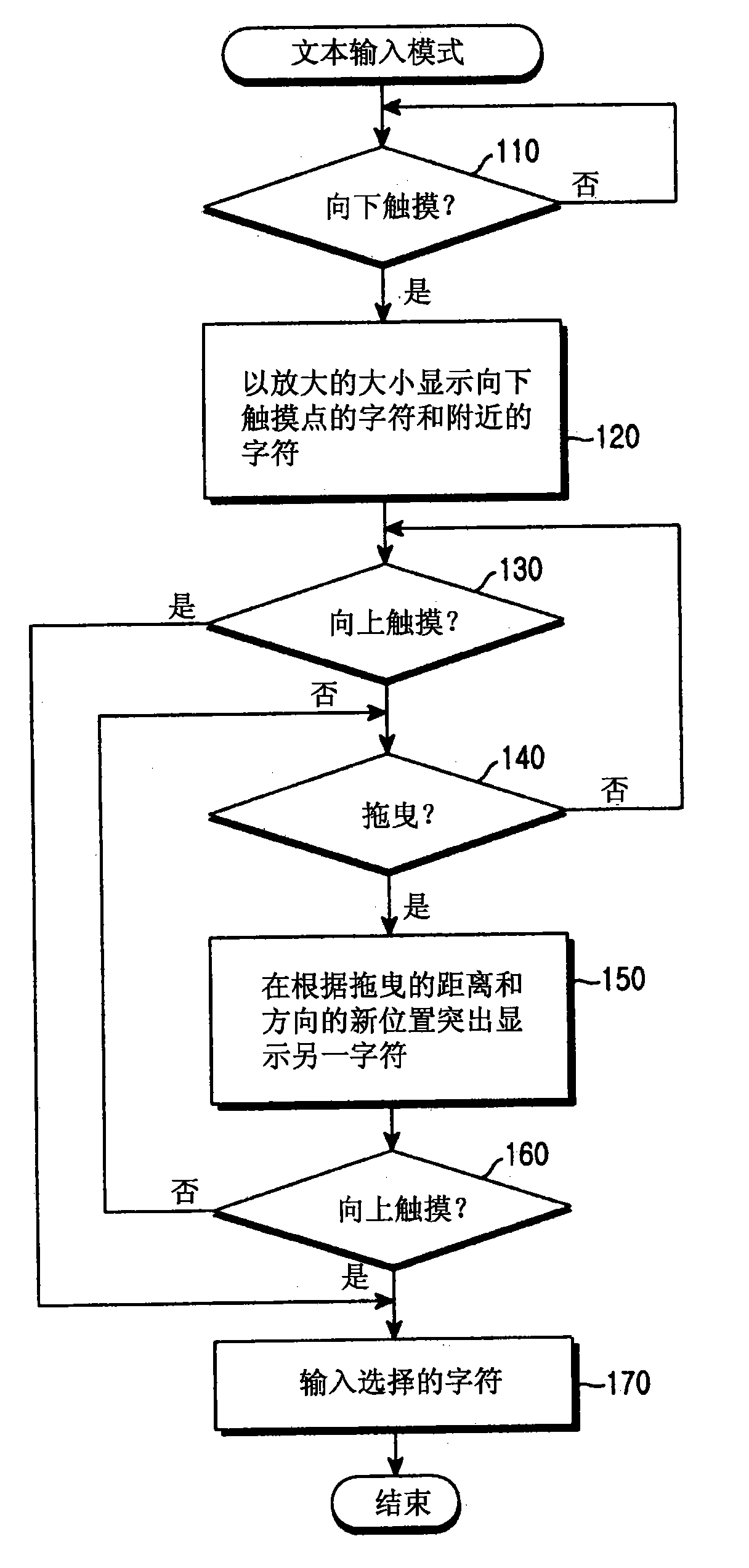
图2是示出根据本发明优选实施例的在移动终端中输入字符的处理的流程图;2 is a flow chart illustrating a process of inputting characters in a mobile terminal according to a preferred embodiment of the present invention;
图3示出根据本发明优选实施例的在文本输入模式下的显示屏幕;以及Figure 3 shows a display screen in text input mode according to a preferred embodiment of the present invention; and
图4示出根据本发明另一实施例的在文本输入模式下的显示屏幕。FIG. 4 illustrates a display screen in a text input mode according to another embodiment of the present invention.
具体实施方式Detailed ways
以下,将参照附图来描述本发明的示例性实施例。在本发明的以下描述中,当在此合并的已知功能和结构的详细描述会使本发明的主题不清楚时,将省略对它们的描述。Hereinafter, exemplary embodiments of the present invention will be described with reference to the accompanying drawings. In the following description of the present invention, when a detailed description of known functions and structures incorporated herein will make the subject matter of the present invention unclear, descriptions thereof will be omitted.
本发明提供一种移动终端,所述移动终端通过在软件中处理的向下触摸/拖曳/向上触摸三个连续事件使用户能够按照在文本输入模式下输入字符。The present invention provides a mobile terminal that enables a user to input characters in a text input mode through three consecutive events of touch down/drag/touch up processed in software.
图1是根据本发明优选实施例的移动终端的框图。移动终端包括:触摸屏10、控制单元20、存储器30、基带信号处理器40和RF模块50。FIG. 1 is a block diagram of a mobile terminal according to a preferred embodiment of the present invention. The mobile terminal includes: a
触摸屏10是在移动终端中的用户界面。在文本输入模式下,在触摸屏10上显示软键盘。The
触摸屏10包括显示单元12和在其上安装的触摸面板14。显示单元12显示在移动终端的操作期间产生的状态信息、运动图像或静止图像。显示单元12可包括LCD(液晶显示器)、TFT(薄膜晶体管)或有机EL(电致发光)。触摸面板14将与用户在其上的触摸相应的信号输出到控制单元20。控制单元20分析从触摸面板14接收的信号并计算触摸点的位置数据。The
控制单元20分析从触摸屏10输出的触摸信号并确定是否发生向下触摸事件、拖曳事件和向上触摸事件中的任何一个。当发生向下触摸事件时,控制单元20可在触摸屏10的显示单元12上指示向下触摸点的字符。根据本发明的优选实施例,控制单元10将向下触摸点的字符和附近的字符放大,并在显示单元12上显示放大的字符。The control unit 20 analyzes the touch signal output from the
由于软键盘的每个键具有较小的大小以在较小触摸屏上显示,因此很难在软键盘上准确触摸期望的键。为了解决该问题,控制单元10在预定区域中将屏幕上分配给由用户向下触摸的键的字符和附近的字符放大,并在显示单元12上显示放大的字符。同时,控制单元10可指示触摸的键或在触摸的键上放置光标,以便指示识别的字符。用于指示字符的方法包括使用光标指示字符的方法、突出显示字符的方法和在正方形内放置字符的方法等。Since each key of the soft keyboard has a small size to be displayed on a small touch screen, it is difficult to accurately touch a desired key on the soft keyboard. To solve this problem, the
如果期望指示的字符被输入,则用户将不得不从触摸屏10上抬起他或她的手指(即,向上触摸)。如果指示的字符不是期望的字符,则用户将不得不在注意键盘的放大部分的同时按照朝向期望的字符的方向在触摸屏10上拖曳手指。The user will have to lift his or her finger from the touch screen 10 (ie, touch up) if the indicated character is desired to be entered. If the indicated character is not the desired character, the user will have to drag the finger across the
当发生这种拖曳事件时,控制单元20确定拖曳距离和方向,并根据拖曳距离和方向将触摸点改变到触摸屏10上的新位置。因此,与新位置相应的字符被指示在触摸屏10上。如果期望指示的字符被输入,则用户将不得不从触摸屏10上抬起手指。控制单元20将识别应输入与抬起(向上触摸)点相应的字符。控制单元20将随后在显示单元14上的输入窗口中显示识别的字符。When such a dragging event occurs, the control unit 20 determines the dragging distance and direction, and changes the touch point to a new position on the
如果指示的字符不是期望的字符,则用户将不得不继续向期望的字符拖曳手指。用户可通过拖曳到与期望的字符相应的键并从所述键向上触摸来输入期望的字符。If the indicated character is not the desired character, the user will have to continue dragging the finger towards the desired character. A user may input a desired character by dragging to a key corresponding to the desired character and touching up from the key.
RF模块50通过天线将RF信号发送到基站并从基站接收RF信号以执行与基站的无线通信。RF模块50将接收的RF信号转换为IF(中频)信号并将IF信号输出到基带信号处理器40。而且,RF模块50将从基带信号处理器40输入的IF信号转换为RF信号并发送RF信号。作为提供控制单元20和RF模块50之间的界面的BAA(基带模拟ASIC(专用集成电路)),基带信号处理器40将从控制单元20应用的基带数字信号转换为模拟IF信号并将该模拟IF信号应用到RF模块50。基带信号处理器40将从RF模块50施加的模拟IF信号转换为基带数字信号,并将该数字信号施加到控制单元20。The
连接到控制单元20的存储器30由存储用于控制移动终端的操作所必需的多个程序和数据的ROM(只读存储器)以及RAM(随机存取存储器)组成。The
图2是示出根据本发明优选实施例的在移动终端中输入字符的处理的流程图。图3示出根据本发明优选实施例在文本输入模式下的显示屏幕。图4示出根据本发明另一实施例的在文本输入模式下的显示屏幕。FIG. 2 is a flowchart illustrating a process of inputting characters in a mobile terminal according to a preferred embodiment of the present invention. Fig. 3 shows a display screen in a text input mode according to a preferred embodiment of the present invention. FIG. 4 illustrates a display screen in a text input mode according to another embodiment of the present invention.
参照图2至图4,控制单元20在文本输入模式下在触摸屏10上显示软键盘。优选地,软键盘应具有QWERTY键盘布局,该布局是当前最普遍的键盘布局。显然,软键盘可具有使任何用户能够容易搜索期望的字符的任何其它键盘布局。参照图3和图4,触摸屏幕200包括:输入窗口210、软键盘显示区域220和选项显示区域230。可选择选项以输入英语字符、韩语字符或符号。用户可触摸软键盘显示区域220以输入期望的字符。控制单元20识别与触摸的键相应的字符并在输入窗口210中显示该字符。Referring to FIGS. 2 to 4 , the control unit 20 displays a soft keyboard on the
在步骤110,在文本输入模式下在触摸屏10上显示软键盘的同时,控制单元20确定在触摸屏10上是否发生了向下触摸事件。In
用户可通过手指触摸被分配期望的字符的键。由于软键盘的键较小,因此用户的手指可能触摸除期望的键之外的一个或更多键。A user may touch a key to which a desired character is assigned with a finger. Since the keys of the soft keyboard are small, the user's finger may touch one or more keys other than desired keys.
当发生这种向下触摸事件时,控制单元20进行步骤120以便放大向下触摸点的字符(即,在触摸的键上的字符)和附近的键上的字符,并在触摸屏10的显示单元12上显示放大的字符。同时,控制单元20可指示触摸的键或在触摸的键上放置光标以便指示分配给该键的字符。When such a downward touch event occurs, the control unit 20 proceeds to step 120 so as to enlarge the characters at the downward touch point (that is, the characters on the touched key) and the characters on the nearby keys, and display them on the display unit of the
参照图3中的(a)和(b),当用户的手指触摸在软键盘上被分配4、5、6、R、T和Y的键的边缘上的区域时,控制单元20将触摸的键和附近的键放大,并在整个软键盘显示区域220中显示这些键。同时,控制单元20将指示的光标放置在手指的较大部分向下触摸的“5”键上。With reference to (a) and (b) in FIG. The key and nearby keys are enlarged and displayed throughout the soft
或者,如图4中的(a)和(b),当用户的手指触摸在软键盘上被分配4、5、6、R、T和Y的键的边缘上的区域时,控制单元20可在显示单元12上产生弹出窗口并以放大的大小在弹出窗口中显示触摸的键和附近的键。同时,控制单元20指示手指的较大部分向下触摸的键。Or, as in (a) and (b) in FIG. A popup window is generated on the
如果期望在指示的键上的字符或数字被输入,则用户将不得不从触摸屏10向上触摸。控制单元20在步骤130检查是否发生向上触摸事件。The user will have to touch up from the
如果指示的键上的字符或数字不是期望的字符或数字,则用户将不得不在注意软键盘的放大部分的同时向期望的字符或数字拖曳手指。换句话说,如果不发生向上触摸事件,则控制单元20将进行步骤140以便检查是否发生拖曳事件。当检测到拖曳事件时,控制单元20进行步骤150以便确定拖曳距离和方向并根据拖曳距离和方向将指示点改变到在触摸屏10上的新位置。更具体地说,控制单元20从当前指示的键计算拖曳距离和方向。用户在注意软键盘的放大部分或在触摸屏10上产生的跳出窗口的同时,可通过拖曳动作选择期望的字符。If the character or number on the indicated key is not the desired character or number, the user will have to drag the finger towards the desired character or number while focusing on the enlarged portion of the soft keyboard. In other words, if no touch-up event occurs, the control unit 20 will proceed to step 140 to check whether a drag event occurs. When a drag event is detected, the control unit 20 proceeds to step 150 to determine the drag distance and direction and change the pointing point to a new position on the
图3中的(c)和图4中的(c)示出通过手指拖曳重新选择并指示的“R”键。如图3中的(c)所示,用户可通过从预先选择的“5”键向西南方向拖曳手指来选择“R”键。如图4中的(c)所示,如果通过向下触摸预先选择“T”键,则用户可通过选择向左方向拖曳手指来选择“R”键。(c) in FIG. 3 and (c) in FIG. 4 show the 'R' key reselected and indicated by finger dragging. As shown in (c) of FIG. 3 , the user may select the 'R' key by dragging the finger from the pre-selected '5' key in the southwest direction. As shown in (c) of FIG. 4 , if the 'T' key is previously selected by touching down, the user may select the 'R' key by dragging the finger in a leftward direction.
如果期望输入在重新指示的键上的字符,则用户将不得不从触摸屏幕10向上触摸。控制单元10在步骤160检查是否发生这种向上触摸事件。如果未发生向上触摸事件,则控制单元20将重复步骤140。换句话说,如果重新指示的键上的字符不是期望的字符,则用户将继续在触摸屏10上拖曳以选择期望的字符。The user will have to touch up from the
如果重新指示的键上的字符是期望的字符,则用户将从触摸屏10向上触摸。随后,控制单元20进行步骤170以便输入相同字符。如图3中的(d)和图4中的(d)所示,输入的字符被显示在输入窗口210中。同时,整个软键盘被再次显示在触摸屏10的显示单元12上。If the character on the re-indicated key is the desired character, the user will touch up from the
当用户触摸时将无需非常准确。即使用户的手指触摸期望的字符的边缘或附近字符,用户也可通过随后的拖曳和向上触摸动作容易地选择期望的字符。It will not need to be very accurate when the user touches. Even if the user's finger touches the edge of the desired character or nearby characters, the user can easily select the desired character through subsequent dragging and upward touching actions.
如上所述,根据本发明的文本输入方法使用户能够容易在具有触摸屏的移动终端中选择并输入期望的字符。所述方法可应用于具有大小较小的触摸屏的所有移动电话或手持计算机以助于用户界面。As described above, the text input method according to the present invention enables a user to easily select and input a desired character in a mobile terminal having a touch screen. The method can be applied to all mobile phones or handheld computers with a touch screen of small size to facilitate the user interface.
尽管参照本发明特定示例性实施例示出和描述了本发明,但是本领域技术人员将理解,在不脱离由权利要求定义的本发明的精神和范围的情况下可对其进行形式和细节上的各种改变。While the invention has been shown and described with reference to certain exemplary embodiments thereof, it will be understood by those skilled in the art that changes may be made in form and detail without departing from the spirit and scope of the invention as defined by the claims. Various changes.
Claims (9)
Applications Claiming Priority (2)
| Application Number | Priority Date | Filing Date | Title |
|---|---|---|---|
| KR1020060102593A KR100770936B1 (en) | 2006-10-20 | 2006-10-20 | Character input method and mobile terminal for same |
| KR1020060102593 | 2006-10-20 |
Publications (1)
| Publication Number | Publication Date |
|---|---|
| CN101166330A true CN101166330A (en) | 2008-04-23 |
Family
ID=38816104
Family Applications (1)
| Application Number | Title | Priority Date | Filing Date |
|---|---|---|---|
| CNA2007101668621A Pending CN101166330A (en) | 2006-10-20 | 2007-10-22 | Text input method and mobile terminal thereof |
Country Status (4)
| Country | Link |
|---|---|
| US (1) | US8044937B2 (en) |
| EP (1) | EP1914623A1 (en) |
| KR (1) | KR100770936B1 (en) |
| CN (1) | CN101166330A (en) |
Cited By (15)
| Publication number | Priority date | Publication date | Assignee | Title |
|---|---|---|---|---|
| CN101996042A (en) * | 2009-08-24 | 2011-03-30 | 索尼公司 | Remote controller, remote control system and program |
| CN102063245A (en) * | 2010-09-03 | 2011-05-18 | 文军 | Three-dimensional virtual keyboard |
| CN102117181A (en) * | 2010-01-04 | 2011-07-06 | 捷讯研究有限公司 | Portable electronic device and method of controlling same |
| CN102207826A (en) * | 2011-05-30 | 2011-10-05 | 中兴通讯股份有限公司 | Method and system for scrawling |
| CN102687101A (en) * | 2009-10-12 | 2012-09-19 | 拉奥纳克斯株式会社 | Multi-touch type input controlling system |
| WO2013174329A3 (en) * | 2012-09-04 | 2014-01-16 | 中兴通讯股份有限公司 | Text processing method and device |
| CN103530057A (en) * | 2013-10-28 | 2014-01-22 | 小米科技有限责任公司 | Character input method, character input device and terminal equipment |
| CN104063163A (en) * | 2013-03-21 | 2014-09-24 | 三星电子(中国)研发中心 | Method and device for regulating size of key of virtual keyboard |
| WO2015021890A1 (en) * | 2013-08-14 | 2015-02-19 | 华为终端有限公司 | Touchscreen-based input method and device |
| CN104461353A (en) * | 2014-11-14 | 2015-03-25 | 深圳市金立通信设备有限公司 | Touch screen operating method |
| CN104461354A (en) * | 2014-11-14 | 2015-03-25 | 深圳市金立通信设备有限公司 | Terminal |
| CN104750702A (en) * | 2013-12-27 | 2015-07-01 | 杭州海康威视数字技术股份有限公司 | Digital video recorder channel quick search method and system |
| CN105808086A (en) * | 2014-12-30 | 2016-07-27 | Tcl集团股份有限公司 | Virtual keyboard input method and device |
| CN107077296A (en) * | 2014-11-03 | 2017-08-18 | 三星电子株式会社 | User terminal equipment and method for controlling user terminal equipment |
| CN107506046A (en) * | 2017-08-23 | 2017-12-22 | 合肥伟语信息科技有限公司 | The character input method of intelligent watch |
Families Citing this family (52)
| Publication number | Priority date | Publication date | Assignee | Title |
|---|---|---|---|---|
| EP2092405A4 (en) * | 2006-11-08 | 2012-10-17 | Cubic Design Studios Llc | Asymmetric shuffle keyboard |
| GB2445372B (en) * | 2007-01-03 | 2009-06-03 | Motorola Inc | Electronic device and method of touch screen input detection |
| US8761846B2 (en) | 2007-04-04 | 2014-06-24 | Motorola Mobility Llc | Method and apparatus for controlling a skin texture surface on a device |
| KR100913962B1 (en) * | 2007-05-14 | 2009-08-26 | 삼성전자주식회사 | Character input method and apparatus of mobile communication terminal |
| KR100933398B1 (en) * | 2007-06-11 | 2009-12-22 | 삼성전자주식회사 | Character input apparatus and method for automatically switching input modes in terminal having touch screen |
| US8018441B2 (en) | 2007-06-11 | 2011-09-13 | Samsung Electronics Co., Ltd. | Character input apparatus and method for automatically switching input mode in terminal having touch screen |
| US20090132093A1 (en) * | 2007-08-21 | 2009-05-21 | Motorola, Inc. | Tactile Conforming Apparatus and Method for a Device |
| KR20090047257A (en) * | 2007-11-07 | 2009-05-12 | 강윤기 | Character input method using software keyboard |
| JP5188148B2 (en) * | 2007-11-09 | 2013-04-24 | キヤノン株式会社 | Display device, method and program |
| US8866641B2 (en) * | 2007-11-20 | 2014-10-21 | Motorola Mobility Llc | Method and apparatus for controlling a keypad of a device |
| JP2009183592A (en) * | 2008-02-08 | 2009-08-20 | Ge Medical Systems Global Technology Co Llc | Operation information input device and ultrasonic imaging device |
| US20090213079A1 (en) * | 2008-02-26 | 2009-08-27 | Microsoft Corporation | Multi-Purpose Input Using Remote Control |
| TW200941293A (en) * | 2008-03-20 | 2009-10-01 | E Ten Information Sys Co Ltd | Virtual key input method and its applications |
| KR100900087B1 (en) * | 2008-03-31 | 2009-06-01 | 박병진 | Button extended character input method using touch screen |
| WO2009134244A1 (en) * | 2008-04-29 | 2009-11-05 | Hewlett-Packard Development Company, L.P. | Touch activated display data entry |
| CN101593055A (en) * | 2008-05-29 | 2009-12-02 | 纬创资通股份有限公司 | Input method of touch screen and related touch screen and touch electronic device |
| KR20100000617A (en) | 2008-06-25 | 2010-01-06 | 삼성전자주식회사 | Character input apparatus and, method thereof |
| US8612271B2 (en) | 2008-10-02 | 2013-12-17 | Certusview Technologies, Llc | Methods and apparatus for analyzing locate and marking operations with respect to environmental landmarks |
| TW201005598A (en) * | 2008-07-18 | 2010-02-01 | Asustek Comp Inc | Touch-type mobile computing device and display method thereof |
| US8769427B2 (en) | 2008-09-19 | 2014-07-01 | Google Inc. | Quick gesture input |
| KR20100062077A (en) * | 2008-12-01 | 2010-06-10 | 삼성전자주식회사 | User interface providing method for enhancing user interface and multimedia apparatus using the same |
| CA2692110C (en) | 2009-02-11 | 2015-10-27 | Certusview Technologies, Llc | Providing a process guide to a locate technician |
| US20100251176A1 (en) * | 2009-03-24 | 2010-09-30 | Microsoft Corporation | Virtual keyboard with slider buttons |
| CA2885962A1 (en) * | 2009-06-25 | 2010-09-01 | Certusview Technologies, Llc | Methods and apparatus for assessing locate request tickets |
| US9372614B2 (en) * | 2009-07-09 | 2016-06-21 | Qualcomm Incorporated | Automatic enlargement of viewing area with selectable objects |
| US8799777B1 (en) * | 2009-07-13 | 2014-08-05 | Sprint Communications Company L.P. | Selectability of objects on a touch-screen display |
| US20110055697A1 (en) * | 2009-08-26 | 2011-03-03 | Wayne Davidson | Alphanumeric keypad for touch-screen devices |
| US8531461B2 (en) * | 2009-09-29 | 2013-09-10 | Blackberry Limited | Portable electronic device and method of controlling same |
| US20110163963A1 (en) * | 2010-01-04 | 2011-07-07 | Research In Motion Limited | Portable electronic device and method of controlling same |
| KR20110082310A (en) * | 2010-01-11 | 2011-07-19 | 삼성전자주식회사 | Character input method |
| US20110302518A1 (en) * | 2010-06-07 | 2011-12-08 | Google Inc. | Selecting alternate keyboard characters via motion input |
| TWI407346B (en) | 2010-07-30 | 2013-09-01 | Ind Tech Res Inst | Track compensation methods and systems for touch-sensitive input devices, and computer program products thereof |
| JP5691310B2 (en) * | 2010-09-06 | 2015-04-01 | 富士ゼロックス株式会社 | Information processing apparatus and program |
| KR20120033918A (en) * | 2010-09-30 | 2012-04-09 | 삼성전자주식회사 | Method and apparatus for inputting in portable terminal having touch screen |
| US8405627B2 (en) * | 2010-12-07 | 2013-03-26 | Sony Mobile Communications Ab | Touch input disambiguation |
| DE102010054859A1 (en) * | 2010-12-17 | 2012-06-21 | Rohde & Schwarz Gmbh & Co. Kg | System with gesture recognition unit |
| JP5718042B2 (en) * | 2010-12-24 | 2015-05-13 | 株式会社ソニー・コンピュータエンタテインメント | Touch input processing device, information processing device, and touch input control method |
| WO2012102159A1 (en) * | 2011-01-27 | 2012-08-02 | シャープ株式会社 | Character input device and character input method |
| JP5787567B2 (en) * | 2011-03-24 | 2015-09-30 | キヤノン株式会社 | Information processing apparatus, information processing apparatus control method, and program |
| JP2012203622A (en) * | 2011-03-25 | 2012-10-22 | Panasonic Corp | Input device |
| US8773374B2 (en) * | 2011-05-13 | 2014-07-08 | Blackberry Limited | Identification of touch point on touch screen device |
| US9389764B2 (en) * | 2011-05-27 | 2016-07-12 | Microsoft Technology Licensing, Llc | Target disambiguation and correction |
| KR101861318B1 (en) * | 2011-06-09 | 2018-05-28 | 삼성전자주식회사 | Apparatus and method for providing interface in device with touch screen |
| DE112011105626B4 (en) * | 2011-09-15 | 2017-11-02 | Mitsubishi Electric Corp. | Ladder program creation device |
| US8812983B2 (en) * | 2012-02-17 | 2014-08-19 | Lenovo (Singapore) Pte. Ltd. | Automatic magnification and selection confirmation |
| US9778829B2 (en) | 2012-02-17 | 2017-10-03 | Lenovo (Singapore) Pte. Ltd. | Magnification based on eye input |
| CN102831104A (en) * | 2012-08-15 | 2012-12-19 | 北京小米科技有限责任公司 | Method, device and terminal for adjusting terminal word |
| US9747025B2 (en) | 2013-03-04 | 2017-08-29 | International Business Machines Corporation | Modifying key size on a touch screen based on fingertip location |
| US8812995B1 (en) | 2013-04-10 | 2014-08-19 | Google Inc. | System and method for disambiguating item selection |
| KR102224338B1 (en) * | 2013-12-10 | 2021-03-08 | 삼성전자 주식회사 | Method and apparatus for control cursor in portable device with touch device |
| CN108475157B (en) * | 2016-03-25 | 2022-04-22 | 华为技术有限公司 | Character input method, device and terminal |
| US12079457B2 (en) * | 2022-08-24 | 2024-09-03 | Huawei Technologies Canada Co., Ltd. | Methods, devices, and media for scaling smart watch GUI based on initial stroke position |
Family Cites Families (20)
| Publication number | Priority date | Publication date | Assignee | Title |
|---|---|---|---|---|
| JPH0981320A (en) | 1995-09-20 | 1997-03-28 | Matsushita Electric Ind Co Ltd | Pen input type selection input device and method thereof |
| US6211856B1 (en) | 1998-04-17 | 2001-04-03 | Sung M. Choi | Graphical user interface touch screen with an auto zoom feature |
| US6169538B1 (en) * | 1998-08-13 | 2001-01-02 | Motorola, Inc. | Method and apparatus for implementing a graphical user interface keyboard and a text buffer on electronic devices |
| US7821503B2 (en) * | 2003-04-09 | 2010-10-26 | Tegic Communications, Inc. | Touch screen and graphical user interface |
| JP2002062966A (en) * | 2000-08-21 | 2002-02-28 | Seiko Epson Corp | Information processing apparatus and control method thereof |
| JP4518955B2 (en) * | 2002-11-29 | 2010-08-04 | コーニンクレッカ フィリップス エレクトロニクス エヌ ヴィ | User interface using moved representation of contact area |
| KR20040057131A (en) | 2002-12-24 | 2004-07-02 | 삼성전자주식회사 | Portable mobile device and method for magnifying the designated position on the touch-screen |
| US7098896B2 (en) * | 2003-01-16 | 2006-08-29 | Forword Input Inc. | System and method for continuous stroke word-based text input |
| SG135918A1 (en) | 2003-03-03 | 2007-10-29 | Xrgomics Pte Ltd | Unambiguous text input method for touch screens and reduced keyboard systems |
| US7230607B2 (en) * | 2003-06-12 | 2007-06-12 | Katsuyasu Ono | 6-key keyboard for touch typing |
| US7057607B2 (en) * | 2003-06-30 | 2006-06-06 | Motorola, Inc. | Application-independent text entry for touch-sensitive display |
| KR100593993B1 (en) * | 2003-10-22 | 2006-06-30 | 삼성전자주식회사 | Character recognition device and method |
| KR100537280B1 (en) * | 2003-10-29 | 2005-12-16 | 삼성전자주식회사 | Apparatus and method for inputting character using touch screen in portable terminal |
| KR100539904B1 (en) * | 2004-02-27 | 2005-12-28 | 삼성전자주식회사 | Pointing device in terminal having touch screen and method for using it |
| WO2005109839A1 (en) * | 2004-05-07 | 2005-11-17 | Min Ho Kim | Function button and method of inputting letter using the same |
| KR101270847B1 (en) | 2004-07-30 | 2013-06-05 | 애플 인크. | Gestures for touch sensitive input devices |
| US20060059437A1 (en) | 2004-09-14 | 2006-03-16 | Conklin Kenneth E Iii | Interactive pointing guide |
| JP2006134184A (en) * | 2004-11-08 | 2006-05-25 | Honda Access Corp | Remote control switch |
| US7443316B2 (en) * | 2005-09-01 | 2008-10-28 | Motorola, Inc. | Entering a character into an electronic device |
| US7646315B2 (en) * | 2006-06-08 | 2010-01-12 | Motorola, Inc. | Method and apparatus for keypad manipulation |
-
2006
- 2006-10-20 KR KR1020060102593A patent/KR100770936B1/en active Active
-
2007
- 2007-10-19 US US11/875,326 patent/US8044937B2/en active Active
- 2007-10-22 CN CNA2007101668621A patent/CN101166330A/en active Pending
- 2007-10-22 EP EP07118950A patent/EP1914623A1/en not_active Withdrawn
Cited By (20)
| Publication number | Priority date | Publication date | Assignee | Title |
|---|---|---|---|---|
| CN101996042A (en) * | 2009-08-24 | 2011-03-30 | 索尼公司 | Remote controller, remote control system and program |
| CN102687101A (en) * | 2009-10-12 | 2012-09-19 | 拉奥纳克斯株式会社 | Multi-touch type input controlling system |
| CN102117181A (en) * | 2010-01-04 | 2011-07-06 | 捷讯研究有限公司 | Portable electronic device and method of controlling same |
| CN102063245A (en) * | 2010-09-03 | 2011-05-18 | 文军 | Three-dimensional virtual keyboard |
| CN102207826A (en) * | 2011-05-30 | 2011-10-05 | 中兴通讯股份有限公司 | Method and system for scrawling |
| CN102207826B (en) * | 2011-05-30 | 2016-05-11 | 中兴通讯股份有限公司 | A kind of method and system of scribble |
| WO2013174329A3 (en) * | 2012-09-04 | 2014-01-16 | 中兴通讯股份有限公司 | Text processing method and device |
| CN104063163A (en) * | 2013-03-21 | 2014-09-24 | 三星电子(中国)研发中心 | Method and device for regulating size of key of virtual keyboard |
| WO2015021890A1 (en) * | 2013-08-14 | 2015-02-19 | 华为终端有限公司 | Touchscreen-based input method and device |
| CN104375769A (en) * | 2013-08-14 | 2015-02-25 | 华为终端有限公司 | Input method and device on basis of touch screens |
| CN103530057A (en) * | 2013-10-28 | 2014-01-22 | 小米科技有限责任公司 | Character input method, character input device and terminal equipment |
| CN104750702A (en) * | 2013-12-27 | 2015-07-01 | 杭州海康威视数字技术股份有限公司 | Digital video recorder channel quick search method and system |
| CN107077296A (en) * | 2014-11-03 | 2017-08-18 | 三星电子株式会社 | User terminal equipment and method for controlling user terminal equipment |
| US10628034B2 (en) | 2014-11-03 | 2020-04-21 | Samsung Electronics Co., Ltd. | User terminal device and method for controlling user terminal device thereof |
| CN104461354A (en) * | 2014-11-14 | 2015-03-25 | 深圳市金立通信设备有限公司 | Terminal |
| CN104461353A (en) * | 2014-11-14 | 2015-03-25 | 深圳市金立通信设备有限公司 | Touch screen operating method |
| CN104461354B (en) * | 2014-11-14 | 2019-05-17 | 深圳市金立通信设备有限公司 | A kind of terminal |
| CN105808086A (en) * | 2014-12-30 | 2016-07-27 | Tcl集团股份有限公司 | Virtual keyboard input method and device |
| CN105808086B (en) * | 2014-12-30 | 2019-04-19 | Tcl集团股份有限公司 | Input method and device of virtual keyboard |
| CN107506046A (en) * | 2017-08-23 | 2017-12-22 | 合肥伟语信息科技有限公司 | The character input method of intelligent watch |
Also Published As
| Publication number | Publication date |
|---|---|
| EP1914623A1 (en) | 2008-04-23 |
| US8044937B2 (en) | 2011-10-25 |
| US20080096610A1 (en) | 2008-04-24 |
| KR100770936B1 (en) | 2007-10-26 |
Similar Documents
| Publication | Publication Date | Title |
|---|---|---|
| CN101166330A (en) | Text input method and mobile terminal thereof | |
| US9678659B2 (en) | Text entry for a touch screen | |
| CN101779188B (en) | Systems and methods for providing a user interface | |
| US9891819B2 (en) | Apparatus and method for inputting character using touch screen in portable terminal | |
| KR101331697B1 (en) | Apparatus and method for inputing characters in terminal | |
| US10373009B2 (en) | Character recognition and character input apparatus using touch screen and method thereof | |
| US8947367B2 (en) | Character input apparatus and character input method | |
| US20110037775A1 (en) | Method and apparatus for character input using touch screen in a portable terminal | |
| KR101636705B1 (en) | Method and apparatus for inputting letter in portable terminal having a touch screen | |
| US9465533B2 (en) | Character input method and apparatus in portable terminal having touch screen | |
| US8766923B2 (en) | Apparatus and method for inputting characters in a terminal | |
| CN103733162A (en) | Method and apparatus for providing character input interface | |
| US20120086663A1 (en) | Mobile terminal, language setting program and language setting method | |
| CN101714049A (en) | Pinyin input method and terminal thereof | |
| KR20140073245A (en) | Method for inputting back surface and an electronic device thereof | |
| CN101593081A (en) | Portable terminal and information display method | |
| KR20080029028A (en) | Character input method of terminal with touch screen | |
| JP6057441B2 (en) | Portable device and input method thereof | |
| KR20140131070A (en) | Apparatus and method for generating a message in a portable terminal | |
| JP5758277B2 (en) | Portable electronic devices | |
| CN102279652A (en) | Electronic device and input method thereof | |
| KR20100024563A (en) | System and method for inputting characters in terminal | |
| US10048771B2 (en) | Methods and devices for chinese language input to a touch screen | |
| US20160103556A1 (en) | Display apparatus and control method thereof | |
| KR101149892B1 (en) | Mobile device, letter input method thereof and |
Legal Events
| Date | Code | Title | Description |
|---|---|---|---|
| C06 | Publication | ||
| PB01 | Publication | ||
| C10 | Entry into substantive examination | ||
| SE01 | Entry into force of request for substantive examination | ||
| C02 | Deemed withdrawal of patent application after publication (patent law 2001) | ||
| WD01 | Invention patent application deemed withdrawn after publication |
Open date: 20080423 |