WO2023171377A1 - 画像処理制御システムおよび画像処理方法、並びにプログラム - Google Patents
画像処理制御システムおよび画像処理方法、並びにプログラム Download PDFInfo
- Publication number
- WO2023171377A1 WO2023171377A1 PCT/JP2023/006372 JP2023006372W WO2023171377A1 WO 2023171377 A1 WO2023171377 A1 WO 2023171377A1 JP 2023006372 W JP2023006372 W JP 2023006372W WO 2023171377 A1 WO2023171377 A1 WO 2023171377A1
- Authority
- WO
- WIPO (PCT)
- Prior art keywords
- image processing
- output
- medical
- control system
- source
- Prior art date
- Legal status (The legal status is an assumption and is not a legal conclusion. Google has not performed a legal analysis and makes no representation as to the accuracy of the status listed.)
- Ceased
Links
Images



Classifications
-
- A—HUMAN NECESSITIES
- A61—MEDICAL OR VETERINARY SCIENCE; HYGIENE
- A61B—DIAGNOSIS; SURGERY; IDENTIFICATION
- A61B6/00—Apparatus or devices for radiation diagnosis; Apparatus or devices for radiation diagnosis combined with radiation therapy equipment
- A61B6/46—Arrangements for interfacing with the operator or the patient
- A61B6/461—Displaying means of special interest
- A61B6/463—Displaying means of special interest characterised by displaying multiple images or images and diagnostic data on one display
-
- A—HUMAN NECESSITIES
- A61—MEDICAL OR VETERINARY SCIENCE; HYGIENE
- A61B—DIAGNOSIS; SURGERY; IDENTIFICATION
- A61B1/00—Instruments for performing medical examinations of the interior of cavities or tubes of the body by visual or photographical inspection, e.g. endoscopes; Illuminating arrangements therefor
- A61B1/00002—Operational features of endoscopes
- A61B1/00004—Operational features of endoscopes characterised by electronic signal processing
- A61B1/00006—Operational features of endoscopes characterised by electronic signal processing of control signals
-
- A—HUMAN NECESSITIES
- A61—MEDICAL OR VETERINARY SCIENCE; HYGIENE
- A61B—DIAGNOSIS; SURGERY; IDENTIFICATION
- A61B1/00—Instruments for performing medical examinations of the interior of cavities or tubes of the body by visual or photographical inspection, e.g. endoscopes; Illuminating arrangements therefor
- A61B1/00002—Operational features of endoscopes
- A61B1/00004—Operational features of endoscopes characterised by electronic signal processing
- A61B1/00009—Operational features of endoscopes characterised by electronic signal processing of image signals during a use of endoscope
- A61B1/000095—Operational features of endoscopes characterised by electronic signal processing of image signals during a use of endoscope for image enhancement
-
- A—HUMAN NECESSITIES
- A61—MEDICAL OR VETERINARY SCIENCE; HYGIENE
- A61B—DIAGNOSIS; SURGERY; IDENTIFICATION
- A61B1/00—Instruments for performing medical examinations of the interior of cavities or tubes of the body by visual or photographical inspection, e.g. endoscopes; Illuminating arrangements therefor
- A61B1/00002—Operational features of endoscopes
- A61B1/00043—Operational features of endoscopes provided with output arrangements
- A61B1/00045—Display arrangement
- A61B1/0005—Display arrangement combining images e.g. side-by-side, superimposed or tiled
-
- A—HUMAN NECESSITIES
- A61—MEDICAL OR VETERINARY SCIENCE; HYGIENE
- A61B—DIAGNOSIS; SURGERY; IDENTIFICATION
- A61B1/00—Instruments for performing medical examinations of the interior of cavities or tubes of the body by visual or photographical inspection, e.g. endoscopes; Illuminating arrangements therefor
- A61B1/04—Instruments for performing medical examinations of the interior of cavities or tubes of the body by visual or photographical inspection, e.g. endoscopes; Illuminating arrangements therefor combined with photographic or television appliances
- A61B1/045—Control thereof
-
- A—HUMAN NECESSITIES
- A61—MEDICAL OR VETERINARY SCIENCE; HYGIENE
- A61B—DIAGNOSIS; SURGERY; IDENTIFICATION
- A61B6/00—Apparatus or devices for radiation diagnosis; Apparatus or devices for radiation diagnosis combined with radiation therapy equipment
- A61B6/46—Arrangements for interfacing with the operator or the patient
- A61B6/461—Displaying means of special interest
- A61B6/465—Displaying means of special interest adapted to display user selection data, e.g. graphical user interface, icons or menus
-
- A—HUMAN NECESSITIES
- A61—MEDICAL OR VETERINARY SCIENCE; HYGIENE
- A61B—DIAGNOSIS; SURGERY; IDENTIFICATION
- A61B6/00—Apparatus or devices for radiation diagnosis; Apparatus or devices for radiation diagnosis combined with radiation therapy equipment
- A61B6/50—Apparatus or devices for radiation diagnosis; Apparatus or devices for radiation diagnosis combined with radiation therapy equipment specially adapted for specific body parts; specially adapted for specific clinical applications
- A61B6/504—Apparatus or devices for radiation diagnosis; Apparatus or devices for radiation diagnosis combined with radiation therapy equipment specially adapted for specific body parts; specially adapted for specific clinical applications for diagnosis of blood vessels, e.g. by angiography
-
- G—PHYSICS
- G16—INFORMATION AND COMMUNICATION TECHNOLOGY [ICT] SPECIALLY ADAPTED FOR SPECIFIC APPLICATION FIELDS
- G16H—HEALTHCARE INFORMATICS, i.e. INFORMATION AND COMMUNICATION TECHNOLOGY [ICT] SPECIALLY ADAPTED FOR THE HANDLING OR PROCESSING OF MEDICAL OR HEALTHCARE DATA
- G16H30/00—ICT specially adapted for the handling or processing of medical images
- G16H30/40—ICT specially adapted for the handling or processing of medical images for processing medical images, e.g. editing
-
- G—PHYSICS
- G16—INFORMATION AND COMMUNICATION TECHNOLOGY [ICT] SPECIALLY ADAPTED FOR SPECIFIC APPLICATION FIELDS
- G16H—HEALTHCARE INFORMATICS, i.e. INFORMATION AND COMMUNICATION TECHNOLOGY [ICT] SPECIALLY ADAPTED FOR THE HANDLING OR PROCESSING OF MEDICAL OR HEALTHCARE DATA
- G16H40/00—ICT specially adapted for the management or administration of healthcare resources or facilities; ICT specially adapted for the management or operation of medical equipment or devices
-
- H—ELECTRICITY
- H04—ELECTRIC COMMUNICATION TECHNIQUE
- H04N—PICTORIAL COMMUNICATION, e.g. TELEVISION
- H04N23/00—Cameras or camera modules comprising electronic image sensors; Control thereof
- H04N23/50—Constructional details
- H04N23/555—Constructional details for picking-up images in sites, inaccessible due to their dimensions or hazardous conditions, e.g. endoscopes or borescopes
-
- H—ELECTRICITY
- H04—ELECTRIC COMMUNICATION TECHNIQUE
- H04N—PICTORIAL COMMUNICATION, e.g. TELEVISION
- H04N5/00—Details of television systems
- H04N5/222—Studio circuitry; Studio devices; Studio equipment
- H04N5/262—Studio circuits, e.g. for mixing, switching-over, change of character of image, other special effects ; Cameras specially adapted for the electronic generation of special effects
- H04N5/2628—Alteration of picture size, shape, position or orientation, e.g. zooming, rotation, rolling, perspective, translation
-
- H—ELECTRICITY
- H04—ELECTRIC COMMUNICATION TECHNIQUE
- H04N—PICTORIAL COMMUNICATION, e.g. TELEVISION
- H04N7/00—Television systems
- H04N7/18—Closed-circuit television [CCTV] systems, i.e. systems in which the video signal is not broadcast
- H04N7/181—Closed-circuit television [CCTV] systems, i.e. systems in which the video signal is not broadcast for receiving images from a plurality of remote sources
Definitions
- the present disclosure relates to an image processing control system, an image processing method, and a program, and in particular, an image processing control system and an image processing method that can easily apply image processing settings suitable for medical images. Regarding processing methods and programs.
- Patent Document 1 medical staff in an operating room use a controller to control which medical equipment's image is displayed on which monitor, and to control the settings of each medical equipment and monitor. Accordingly, a technique is disclosed that performs optimal settings based on the respective settings of a medical device and a monitor.
- the present disclosure has been made in view of this situation, and is intended to enable image processing settings suitable for medical images to be easily applied.
- An image processing control system includes a plurality of medical video sources connected via a network, a plurality of output sources connected via a network, and a plurality of output destinations of the medical video sources. a switching unit for switching to one of the output sources; and a switching unit configured to display an image subjected to image processing suitable for a combination of the medical video source and the output source even when the output destination of the medical video source is switched. and an image processing control unit that controls image processing settings for performing the image processing.
- An image processing method or program according to an aspect of the present disclosure is provided even when the output destination of a plurality of medical video sources connected via a network is switched to one of the plurality of output sources connected via a network. , controlling image processing settings for displaying an image that has been subjected to image processing suitable for the combination of the medical video source and the output source.
- the medical video source Image processing settings are controlled to display an image that has been subjected to image processing suitable for combination with an output source.
- FIG. 1 is a block diagram showing a configuration example of an embodiment of a medical image processing control system to which the present technology is applied. It is a figure which shows an example of a setting table. It is a figure which shows an example of a control screen. 3 is a flowchart illustrating image processing setting processing. 1 is a block diagram showing a configuration example of an embodiment of a computer to which the present technology is applied.
- FIG. 1 is a block diagram showing a configuration example of an embodiment of a medical image processing control system to which the present technology is applied.
- the medical image processing control system 11 shown in FIG. (still images) can be controlled.
- a medical image processing control system 11 includes an endoscope 22, a CT (Computed Tomography) inspection device 23, and a surgical site camera 24 as medical video sources, and a multifunctional It is configured to include a medical monitor 28, a medical monitor 29, and a general monitor 30.
- the medical image processing control system 11 includes vital equipment 21, input side IP converters 25-1 to 25-4, output side IP converters 27-1 to 27-3, storage unit 31, operation terminal 32, and It is configured to include a processing control server 33.
- the vital equipment 21, endoscope 22, CT inspection device 23, and surgical site camera 24 are connected to an IP switcher 26 via input-side IP converters 25-1 to 25-4, respectively.
- the multifunctional medical monitor 28, the medical monitor 29, and the general monitor 30 are connected to the IP switcher 26 via output-side IP converters 27-1 to 27-3, respectively.
- an image processing control server 33 is connected to the IP switcher 26, and a storage section 31 and an operation terminal 32 are connected to the image processing control server 33.
- the vital equipment 21 acquires patient's vital information such as pulse, blood pressure, respiration, and body temperature, and displays a vital screen image (hereinafter referred to as vital image) in which the vital information is arranged on one screen. Output.
- the vital image output from the vital equipment 21 is input to the IP switcher 26 after being subjected to IP conversion by the input side IP converter 25-1.
- the endoscope 22 outputs an image (hereinafter referred to as an endoscopic image) of the internal state of the patient's body, such as the esophagus or digestive tract. Then, the endoscopic image output from the endoscope 22 is input to the IP switcher 26 after being subjected to IP conversion by the input side IP converter 25-2.
- the CT inspection device 23 outputs a cross-sectional image of the inside of a patient's body (hereinafter referred to as a CT image) using, for example, X-rays.
- the CT image output from the CT inspection device 23 is input to the IP switcher 26 after being subjected to IP conversion by the input side IP converter 25-3.
- the operating room camera 24 outputs, for example, an image captured of the inside of the operating room where a patient is being operated on (hereinafter referred to as an operating room image).
- the surgical field image output from the surgical field camera 24 is input to the IP switcher 26 after being subjected to IP conversion by the input side IP converter 25-4.
- the IP switcher 26 outputs the vital images, endoscopic images, CT images, and surgical site images supplied via the input IP converters 25-1 to 25-4 to the output IP converters 27-1 to 27. -3 to output each image. That is, the IP switcher 26 can switch connections between multiple medical video sources and multiple output sources.
- the multifunctional medical monitor 28 is supplied with vital images, endoscopic images, CT images, and surgical field images from the IP switcher 26 via the output side IP converter 27-1.
- the IP-converted image is displayed.
- the multifunctional medical monitor 28 also includes image processing functions, such as image processing that emphasizes the display of blood vessels and image processing that performs gamma correction suitable for medical images.
- the medical monitor 29 is supplied with vital images, endoscopic images, CT images, and surgical field images from the IP switcher 26 via the output side IP converter 27-2, and the output side IP converter 27-2 converts the images into IP images. Display the converted image. Further, the medical monitor 29 is equipped with image processing functions such as a sharpening filter and a brightness enhancement filter suitable for medical images, for example.
- the general monitor 30 receives vital images, endoscopic images, CT images, and surgical site images from the IP switcher 26 via the output IP converter 27-3, and performs IP conversion at the output IP converter 27-3. Display the image. Note that the general monitor 30 does not have an image processing function suitable for medical images.
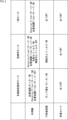
- the storage unit 31 stores a setting table (see FIG. 2) in which setting information for image processing applied to each combination of a plurality of medical video sources and a plurality of output sources is registered. .
- the operating terminal 32 is configured to include, for example, a touch panel, and displays a control screen (see FIG. 3) on the touch panel for switching connections between a plurality of medical video sources and a plurality of output sources. Then, the operation terminal 32 acquires the user's touch operation on the control screen, and supplies operation information indicating the content of the operation to the image processing control server 33.
- the image processing control server 33 refers to the setting table stored in the storage unit 31 according to the operation information supplied from the operation terminal 32, and performs image processing suitable for the combination of the medical video source and the output source. Image processing settings for displaying images can be controlled. As illustrated, the image processing control server 33 includes an acquisition section 41, a determination section 42, a control section 43, and an image processing section 44.
- the acquisition unit 41 acquires information on a medical video source and information on an output source included in the medical image processing control system 11 via the IP switcher 26, and supplies the information to the determination unit 42.
- the determination unit 42 Based on the information supplied from the acquisition unit 41, the determination unit 42 refers to the setting table stored in the storage unit 31 and searches for setting information for the combination of the medical video source and the output source. Then, the determining unit 42 determines whether or not the setting information of the corresponding combination is registered in the setting table, and if it is determined that the setting information of the corresponding combination is registered in the setting table, the setting information is The control unit 43 is notified of the fact that it has been registered.
- the control unit 43 reads the setting information notified from the determination unit 42 from the setting table. Then, the control unit 43 controls settings (on/off) of image processing to be applied to the entire medical image processing control system 11 according to setting information for each combination of a medical video source and an output source.
- the image processing unit 44 includes image processing functions provided by the image processing control server 33, such as a rotation filter and a blood vessel enhancement filter suitable for medical images. Then, the image processing section 44 turns on/off image processing under the control of the control section 43.
- the medical image processing control system 11 is configured in this manner so that even when the output destination of the medical video source is switched to one of a plurality of output sources, an image suitable for the combination thereof is displayed.
- image processing settings can be easily configured.
- the medical image processing control system 11 when information (metadata) about a CT image output from the CT inspection device 23 is described as information on the medical video source acquired by the acquisition unit 41, the output When the destination is the multifunctional medical monitor 28, image processing settings are made to turn on gamma correction of the multifunctional medical monitor 28.
- the medical image processing control system 11 is equipped with an image analysis function, instead of using the information of the medical video source, it can analyze the image output from the medical video source to determine which medical video source is used. You can estimate whether there is.
- the medical image processing control system 11 can be operated by the user operating the operating terminal 32 to specify which medical video source it is, for example, by selecting a medical video source from a category prepared in advance. , may obtain medical video source information.
- the acquisition unit 41 acquires output source information (for example, standard information such as characteristic data) in accordance with the HDMI (registered trademark) (High-Definition Multimedia Interface) standard. can be obtained.
- the medical image processing control system 11 can recognize what functions the output source has if it is a known type of output source. For example, when the medical image processing control system 11 recognizes that the output source is a medical monitor 29 equipped with image processing functions such as a sharpening filter and a brightness enhancement filter, the medical image processing control system 11 converts the endoscopic image into a medical monitor 29. When outputting to 29, image processing settings are made to turn on image processing functions such as a sharpening filter and a brightness enhancement filter in the output source.
- the medical image processing control system 11 if it is possible to analyze that the image output from the medical video source is rotated, that is, if it is an endoscopic image, the image processing unit 44 rotates the image. Image processing settings are made to turn on the filter. Then, when the output source that outputs the image is switched, the medical image processing control system 11 can continue to apply the rotation filter to the switched output source as well.
- FIG. 2 is a diagram showing an example of a setting table stored in the storage unit 31.
- the setting table for a combination of the endoscope 22 and the multifunctional medical monitor 28, image processing that emphasizes the display of blood vessels on the multifunctional medical monitor 28 is turned on, and the rotation filter of the image processing unit 44 is turned on. Setting information for turning off the blood vessel enhancement filter of the image processing unit 44 is registered. Further, regarding the combination of the endoscope 22 and the medical monitor 29, the rotation filter and blood vessel enhancement filter of the image processing unit 44 are turned on, the sharpening filter of the medical monitor 29 is turned on, and the brightness of the medical monitor 29 is improved. Setting information for turning off the filter is registered. Further, for the combination of the endoscope 22 and the general monitor 30, setting information for turning on the rotation filter and blood vessel enhancement filter of the image processing unit 44 is registered.
- setting information for turning on gamma correction of the multifunctional medical monitor 28 is registered for a combination of the CT examination apparatus 23 and the multifunctional medical monitor 28. Further, regarding the combination of the CT examination apparatus 23 and the medical monitor 29, setting information for turning on the brightness enhancement filter of the medical monitor 29 is registered. Further, for the combination of the CT inspection device 23 and the general monitor 30, setting information for turning off all image processing is registered. Further, in the setting table, setting information for turning off all image processing is registered for the surgical field camera 24 in combination with the multifunctional medical monitor 28, the medical monitor 29, and the general monitor 30. .
- image processing settings are controlled in the image processing control server 33 with reference to such a setting table.
- the image processing unit 44 Turn on rotation filter.
- the rotation filter is a correction filter for correcting the rotation of an endoscopic image.
- the image processing unit 44 calculates a rotation angle, and the output side IP converter 27 performs rotation correction according to the rotation angle. be able to.
- settings on the output source side may be changed.
- the multifunctional medical monitor 28 and the image processing unit 44 have an image processing function that emphasizes the display of blood vessels
- the multifunctional medical monitor 28 side is turned on and the image processing unit 44 side is turned off.
- the multifunctional medical monitor 28 side may be turned off and the image processing section 44 may be turned on.
- both image processing that emphasizes the display of blood vessels are turned on, it is assumed that the emphasis will be too high, so it is preferable to turn one of them off.
- the medical image processing control system 11 by acquiring information about what functions an output source has and creating a table, it is possible to understand the image processing functions that the output source is capable of, and to understand the image processing functions that the output source is capable of.
- the image processing function can be turned on automatically when a valid medical video source is connected. That is, the medical image processing control system 11 creates in advance a rule that a specific image processing function is always turned on for a certain medical video source, and creates a table in which these rules are registered. You can leave it there.
- the medical image processing control system 11 has model names of a plurality of output sources and functions for each model registered as presets. Note that if the preset does not exist, or if the output source has a function that is not registered in the preset, you can turn off the function that automatically turns on the image processing function like this, or customize it by the user. It can be turned on/off depending on the situation.
- FIG. 3 is a diagram showing an example of a control screen displayed on the operating terminal 32.
- thumbnail display section 61a for operating field images
- thumbnail display section 61b for endoscopic images
- thumbnail display section 61c for vital images
- 61d is arranged.
- a display control GUI 62-1 of the multifunctional medical monitor 28, a display control GUI 62-2 of the medical monitor 29, and a display control GUI 62-3 of the general monitor 30 are arranged.
- display selection icons 63a-1 to 63d-3 are arranged below the thumbnail display sections 61a to 61d and on the right side of the display control GUIs 62-1 to 62-3 at their respective intersections.
- Thumbnails of the respective images are displayed in the surgical field image thumbnail display section 61a, the endoscopic image thumbnail display section 61b, the vital image thumbnail display section 61c, and the CT image thumbnail display section 61d.
- the display control GUI 62-1 of the multifunctional medical monitor 28, the display control GUI 62-2 of the medical monitor 29, and the display control GUI 62-3 of the general monitor 30 can turn on/off the picture-in-picture function.
- the picture-in-picture function is turned on
- the display control GUI 62-2 of the medical monitor 29 and the display control GUI 62-3 of the general monitor 30 the picture-in-picture function is turned on.
- the in-picture feature is turned off.
- the display selection icons 63a-1 to 63d-3 are images displayed on the multifunctional medical monitor 28, the medical monitor 29, and the general monitor 30, such as a surgical field image, an endoscopic image, a vital image, and a CT image.
- This is a GUI (Graphical User Interface) that is operated when selecting one of the following.
- the color of the display selection icon 63 corresponding to the image selected to be displayed on the multifunctional medical monitor 28, the medical monitor 29, and the general monitor 30 is displayed. is changed and displayed (hatched in the illustrated example).
- the display selection icons 63a-1 to 63d-1 are operated when selecting an image to be displayed on the entire screen of the multifunctional medical monitor 28.
- the display selection icon 63d-1 is hatched, indicating that displaying the CT image on the entire screen of the multifunctional medical monitor 28 has been selected.
- the display selection icons 63a-1P to 63d-1P are operated when selecting an image to be displayed on the picture-in-picture of the multifunctional medical monitor 28.
- the display selection icon 63c-1P is hatched, indicating that display of the vital image in the picture-in-picture of the multifunctional medical monitor 28 has been selected.
- the display selection icons 63a-2 to 63d-2 are operated when selecting an image to be displayed on the entire screen of the medical monitor 29.
- the display selection icon 63a-2 is hatched, indicating that display of the surgical field image on the entire screen of the medical monitor 29 has been selected.
- the display selection icons 63a-3 to 63d-3 are operated when selecting an image to be displayed on the entire screen of the general monitor 30.
- the display selection icon 63b-3 is hatched, indicating that displaying the endoscopic image on the entire screen of the general monitor 30 has been selected.
- control screen 51 allows you to select which medical video source to select by changing the color of the display selection icons 63 located at the intersections of the thumbnail display areas 61a to 61d and the display control GUIs 62-1 to 62-3. You can understand which output source is being output.
- the color of the display selection icon 63 is changed depending on the image processing settings associated with the combination of medical video source and output source.
- a mark corresponding to the image processing settings may be displayed on the display selection icon 63, or the shape of the display selection icon 63 may be changed. Thereby, each image processing setting can be easily recognized using the control screen 51.
- a status screen is displayed that displays image processing settings associated with the combination of the medical video source and the output source.
- the image processing settings can be changed, for example, the image processing settings can be changed to customized image processing settings according to the preferences of the doctor who performs the surgery using the medical image processing control system 11. Can be done. For example, image processing settings associated with a combination of a medical video source and an output source can be selected for each doctor, and the customized image processing settings can be changed all at once.
- the acquisition unit 41 acquires the information of the medical video source and the information of the output source provided in the medical image processing control system 11, It is acquired via the switcher 26.
- the acquisition unit 41 then supplies the medical video source information and the output source information to the determination unit 42 .
- step S12 the determination unit 42 refers to the setting table stored in the storage unit 31 based on the information supplied from the acquisition unit 41 in step S11, and obtains setting information for the combination of the medical video source and the output source. Search for.
- step S13 the determining unit 42 determines whether the corresponding combination of setting information is registered in the setting table, based on the search result in step S12.
- step S13 If it is determined in step S13 that the setting information of the corresponding combination is registered in the setting table, the determining unit 42 notifies the control unit 43 that the setting information of the combination is registered in the setting table. , the process proceeds to step S14.
- step S14 the control unit 43 reads the setting information notified from the determination unit 42 from the setting table. Then, the control unit 43 controls settings (on/off) of image processing to be applied to the entire medical image processing control system 11 according to setting information for each combination of a medical video source and an output source. Then, after the process in step S14, or if it is determined in step S13 that the setting information is not registered in the setting table, the process is ended.
- the medical image processing control system 11 can produce an image suitable for the combination of the medical video source and the output source even when the output destination of the medical video source is switched.
- the processed image can be displayed.
- the medical image processing control system 11 it is possible to set priorities for image processing settings and customize image processing settings. For example, if there is a main medical video source and output source and a sub medical video source and output source, and the processing capacity of the image processing control server 33 is insufficient to apply a rotation filter to both of them, You can customize image processing settings such that the main medical video source and output sources are rotated filtered, and the secondary medical video sources and output sources are not rotated filtered.
- the medical image processing control system 11 can be customized to turn on or turn off image processing even for the same combination of medical video source and output source, depending on the doctor who uses it. I can do it.
- the medical image processing control system 11 can have presets for each user, and the medical video sources and output sources can be adjusted depending on the doctor performing the surgery using the medical image processing control system 11. Image processing settings can be saved for each combination.
- the medical image processing control system 11 can set priorities for image processing settings by combining surgical procedures, patient information, lamp settings (operating lights), and customization for each user. You may also add combinations of sources and output sources. For example, even if the same medical video source and output source are used, if the operating light is set to a warm color, image processing functions such as sharpening filters and brightness enhancement filters are turned off, and the operating light is set to a cool color. At times, you can add image processing settings such as turning on image processing features such as sharpening filters and brightness enhancement filters.
- the medical image processing control system 11 performs image analysis and finds out that gamma correction has not been applied to the endoscopic image or if it is determined that the image is dark, the medical image processing control system 11 performs gamma correction.
- Image processing settings can be added to turn on. For example, for endoscopic images using an electric scalpel, image processing functions such as sharpening filters and brightness enhancement filters should be turned off, and rotation filters should be turned off when the menu screen is open. Processing settings can be added. In other words, if a rotation filter is applied to an endoscopic image while the menu screen is open, it is assumed that the menu screen will shake or the endoscopic image will not be corrected properly. situations can be avoided.
- the settings may be changed based on the status of the medical video source and the output source.
- the output side IP converter 27 it is possible to specify an area to be emphasized in an image processing function such as a sharpening filter or a brightness enhancement filter.
- changing the image processing settings may be prohibited, or an alert may be output when an operation that changes the image processing settings is performed. You can do it. For example, in a specific medical video source, if there is an item that is prohibited from being set in a certain output source, it is possible to prevent the image processing settings from being changed to those settings.
- the image processing settings can be fixed for the main output source, while the image processing settings can be automatically applied to the sub output sources. Furthermore, in the medical image processing control system 11, when the picture-in-picture function is turned on, all image processing is turned off or a filter is applied before the picture-in-picture is generated. It is preferable that Alternatively, image processing settings may be set in detail depending on the combination of two medical video sources and one output source that are picture-in-picture targets.
- the medical image processing control system 11 may change the gamma correction settings at the output source, may change the gamma correction settings at the output side IP converter 27, or may change the gamma correction settings at the output side IP converter 27. You can also change the gamma correction settings with .
- FIG. 5 is a block diagram showing an example of the configuration of an embodiment of a computer in which a program that executes the series of processes described above is installed.
- the program can be recorded in advance on the hard disk 105 or ROM 103 as a recording medium built into the computer.
- the program can be stored (recorded) in a removable recording medium 111 driven by the drive 109.
- a removable recording medium 111 can be provided as so-called package software.
- examples of the removable recording medium 111 include a flexible disk, a CD-ROM (Compact Disc Read Only Memory), an MO (Magneto Optical) disk, a DVD (Digital Versatile Disc), a magnetic disk, and a semiconductor memory.
- the program can also be downloaded to the computer via a communication network or broadcasting network and installed on the built-in hard disk 105.
- a program can be transferred wirelessly from a download site to a computer via an artificial satellite for digital satellite broadcasting, or transferred to a computer by wire via a network such as a LAN (Local Area Network) or the Internet. be able to.
- the computer has a built-in CPU (Central Processing Unit) 102, and an input/output interface 110 is connected to the CPU 102 via a bus 101.
- CPU Central Processing Unit
- the CPU 102 executes a program stored in a ROM (Read Only Memory) 103 in accordance with the command. .
- the CPU 102 loads the program stored in the hard disk 105 into the RAM (Random Access Memory) 104 and executes the program.
- the CPU 102 performs processing according to the above-described flowchart or processing performed according to the configuration of the above-described block diagram. Then, the CPU 102 outputs the processing result from the output unit 106 or transmits it from the communication unit 108 via the input/output interface 110, or records it on the hard disk 105, as necessary.
- the input unit 107 includes a keyboard, a mouse, a microphone, and the like.
- the output unit 106 includes an LCD (Liquid Crystal Display), a speaker, and the like.
- the processing that a computer performs according to a program does not necessarily have to be performed chronologically in the order described as a flowchart. That is, the processing that a computer performs according to a program includes processing that is performed in parallel or individually (for example, parallel processing or processing using objects).
- program may be processed by one computer (processor) or may be processed in a distributed manner by multiple computers. Furthermore, the program may be transferred to a remote computer and executed.
- a system refers to a collection of multiple components (devices, modules (components), etc.), regardless of whether all the components are located in the same casing. Therefore, multiple devices housed in separate casings and connected via a network, and a single device with multiple modules housed in one casing are both systems. .
- the configuration described as one device (or processing section) may be divided and configured as a plurality of devices (or processing sections).
- the configurations described above as a plurality of devices (or processing units) may be configured as one device (or processing unit).
- part of the configuration of one device (or processing unit) may be included in the configuration of another device (or other processing unit) as long as the configuration and operation of the entire system are substantially the same. .
- the present technology can take a cloud computing configuration in which one function is shared and jointly processed by multiple devices via a network.
- the above-mentioned program can be executed on any device. In that case, it is only necessary that the device has the necessary functions (functional blocks, etc.) and can obtain the necessary information.
- each step described in the above flowchart can be executed by one device or can be shared and executed by multiple devices.
- the multiple processes included in that one step can be executed by one device or can be shared and executed by multiple devices.
- multiple processes included in one step can be executed as multiple steps.
- processes described as multiple steps can also be executed together as one step.
- the processing of the steps described in the program may be executed in chronological order according to the order described in this specification, in parallel, or in a manner in which calls are made. It may also be configured to be executed individually at necessary timings such as at certain times. In other words, the processing of each step may be executed in a different order from the order described above, unless a contradiction occurs. Furthermore, the processing of the step of writing this program may be executed in parallel with the processing of other programs, or may be executed in combination with the processing of other programs.
- the present technology can also have the following configuration.
- An image processing control system comprising a control unit and.
- the image processing control section includes: an acquisition unit that acquires information on the medical video source and information on the output source; Based on the information acquired by the acquisition unit, for each combination of the plurality of medical video sources and the plurality of output sources, refer to a setting table in which setting information of image processing applied to each combination is registered. and a determination unit that determines whether or not the configuration information of the corresponding combination is registered in the configuration table;
- the image according to (1) above further comprising: a control unit that controls image processing settings according to the setting information when the determining unit determines that the setting information of the corresponding combination is registered in the setting table. Processing control system.
- the image processing control unit further includes an image processing unit that performs the image processing, The image processing control system according to (3) above, wherein the image processing settings set on/off of the image processing in the output source and the image processing in the image processing section.
- the image processing is image processing that emphasizes the display of blood vessels, When both the output source and the image processing unit are equipped with an image processing function that emphasizes the display of blood vessels, the image processing is performed so that one image processing function is turned on and the other image processing function is turned off.
- the image processing control system according to (4) above in which settings are made.
- the image processing is a rotation filter that corrects rotation of an endoscopic image
- the image processing control system according to (4) above wherein when the output destination of the endoscopic image is switched, the rotation filter is continuously applied to the output source after switching.
- (7) further comprising an operation terminal on which an operation for selecting an output destination of the medical video source is performed;
- a GUI Graphic User Interface
- selecting the output source to which the medical video source is output is displayed on the display unit of the operation terminal, according to any one of (1) to (6) above.
- image processing control system (8) The image processing control system according to (7) above, wherein the display of the GUI is changed according to the image processing settings depending on the combination of the medical video source and the output source.
- the image processing control system Even when the output destination of multiple medical video sources connected via a network is switched to any of the multiple output sources connected via the network, the combination of the medical video source and the output source An image processing method that includes controlling image processing settings to display an image that has undergone suitable image processing. (10) In the computer of the image processing control system, Even when the output destination of multiple medical video sources connected via a network is switched to any of the multiple output sources connected via the network, the combination of the medical video source and the output source A program that executes image processing, including controlling image processing settings to display images that have undergone appropriate image processing.
Landscapes
- Health & Medical Sciences (AREA)
- Engineering & Computer Science (AREA)
- Life Sciences & Earth Sciences (AREA)
- Medical Informatics (AREA)
- Surgery (AREA)
- Public Health (AREA)
- General Health & Medical Sciences (AREA)
- Nuclear Medicine, Radiotherapy & Molecular Imaging (AREA)
- Biomedical Technology (AREA)
- Radiology & Medical Imaging (AREA)
- Molecular Biology (AREA)
- Pathology (AREA)
- Heart & Thoracic Surgery (AREA)
- Optics & Photonics (AREA)
- Biophysics (AREA)
- Animal Behavior & Ethology (AREA)
- Physics & Mathematics (AREA)
- Veterinary Medicine (AREA)
- Signal Processing (AREA)
- High Energy & Nuclear Physics (AREA)
- Multimedia (AREA)
- Human Computer Interaction (AREA)
- Vascular Medicine (AREA)
- Dentistry (AREA)
- Oral & Maxillofacial Surgery (AREA)
- Epidemiology (AREA)
- Primary Health Care (AREA)
- Business, Economics & Management (AREA)
- General Business, Economics & Management (AREA)
- Measuring And Recording Apparatus For Diagnosis (AREA)
- Endoscopes (AREA)
Priority Applications (2)
| Application Number | Priority Date | Filing Date | Title |
|---|---|---|---|
| JP2024506045A JPWO2023171377A1 (https=) | 2022-03-10 | 2023-02-22 | |
| US18/843,346 US20250193346A1 (en) | 2022-03-10 | 2023-02-22 | Image processing control system, image processing method, and program |
Applications Claiming Priority (2)
| Application Number | Priority Date | Filing Date | Title |
|---|---|---|---|
| JP2022-037135 | 2022-03-10 | ||
| JP2022037135 | 2022-03-10 |
Publications (1)
| Publication Number | Publication Date |
|---|---|
| WO2023171377A1 true WO2023171377A1 (ja) | 2023-09-14 |
Family
ID=87935019
Family Applications (1)
| Application Number | Title | Priority Date | Filing Date |
|---|---|---|---|
| PCT/JP2023/006372 Ceased WO2023171377A1 (ja) | 2022-03-10 | 2023-02-22 | 画像処理制御システムおよび画像処理方法、並びにプログラム |
Country Status (3)
| Country | Link |
|---|---|
| US (1) | US20250193346A1 (https=) |
| JP (1) | JPWO2023171377A1 (https=) |
| WO (1) | WO2023171377A1 (https=) |
Citations (2)
| Publication number | Priority date | Publication date | Assignee | Title |
|---|---|---|---|---|
| JP2012166024A (ja) * | 2011-02-10 | 2012-09-06 | Karl Storz Imaging Inc | 医療ディスプレイのための外科医の補助 |
| WO2019176556A1 (ja) * | 2018-03-13 | 2019-09-19 | ソニー株式会社 | 医療機器管理システム及び医療機器管理方法 |
Family Cites Families (3)
| Publication number | Priority date | Publication date | Assignee | Title |
|---|---|---|---|---|
| US7843865B2 (en) * | 2005-12-08 | 2010-11-30 | Intel Corporation | System and method for controlling home network devices using multicast enabled remote controls |
| US20210019921A1 (en) * | 2018-03-29 | 2021-01-21 | Sony Corporation | Image processing device, image processing method, and program |
| WO2021144838A1 (ja) * | 2020-01-14 | 2021-07-22 | オリンパス株式会社 | 表示制御装置、表示制御方法、表示制御プログラム及び内視鏡システム |
-
2023
- 2023-02-22 WO PCT/JP2023/006372 patent/WO2023171377A1/ja not_active Ceased
- 2023-02-22 US US18/843,346 patent/US20250193346A1/en active Pending
- 2023-02-22 JP JP2024506045A patent/JPWO2023171377A1/ja active Pending
Patent Citations (2)
| Publication number | Priority date | Publication date | Assignee | Title |
|---|---|---|---|---|
| JP2012166024A (ja) * | 2011-02-10 | 2012-09-06 | Karl Storz Imaging Inc | 医療ディスプレイのための外科医の補助 |
| WO2019176556A1 (ja) * | 2018-03-13 | 2019-09-19 | ソニー株式会社 | 医療機器管理システム及び医療機器管理方法 |
Also Published As
| Publication number | Publication date |
|---|---|
| JPWO2023171377A1 (https=) | 2023-09-14 |
| US20250193346A1 (en) | 2025-06-12 |
Similar Documents
| Publication | Publication Date | Title |
|---|---|---|
| US12548673B2 (en) | System and method for controlling and selecting sources in a room on a network | |
| CA2679638C (en) | Image capture module | |
| CA2766595C (en) | Surgeon's aid for medical display | |
| CN1939235B (zh) | 外科图像数据的实时集成和记录 | |
| US10972705B2 (en) | Medical display apparatus, endoscopic surgery system, and method of displaying medical image | |
| US20100325546A1 (en) | Method for optimizing and prioritizing video routing operations in conjunction with multiple integrated device controls in an integrated, configurable operation room system | |
| JP2002032068A (ja) | 画像処理装置 | |
| CN110741334A (zh) | 显示控制设备、显示控制方法和显示控制程序 | |
| CN110637458B (zh) | 信息处理装置、信息处理方法以及计算机可读存储介质 | |
| JP7521538B2 (ja) | 医療イメージングシステム、医療イメージング方法及び画像処理装置 | |
| JP6503516B2 (ja) | 集中制御装置 | |
| WO2021010193A1 (ja) | 医療機器制御システム、制御装置、および制御方法 | |
| US20240120073A1 (en) | Medical management system, medical management device, and medical management method | |
| WO2023171377A1 (ja) | 画像処理制御システムおよび画像処理方法、並びにプログラム | |
| US20210314522A1 (en) | Medical image recording control apparatus, medical image recording control system, and medical image recording control method | |
| JP2006000537A (ja) | 内視鏡システム | |
| US20240041557A1 (en) | Apparatus, method and computer program product for controlling operations of devices in a medical system | |
| US20230149100A1 (en) | Control apparatus, medical central control system, and surgery-related information display method | |
| WO2023053524A1 (ja) | 医療情報処理システム、判定方法、およびプログラム | |
| CN120072241A (zh) | 一种手术室控制设备及其显示方法 | |
| CN119356553A (zh) | 一种手术室控制设备及其显示方法、存储介质 | |
| JP2007075519A (ja) | 手術室制御システム |
Legal Events
| Date | Code | Title | Description |
|---|---|---|---|
| 121 | Ep: the epo has been informed by wipo that ep was designated in this application |
Ref document number: 23766555 Country of ref document: EP Kind code of ref document: A1 |
|
| ENP | Entry into the national phase |
Ref document number: 2024506045 Country of ref document: JP Kind code of ref document: A |
|
| WWE | Wipo information: entry into national phase |
Ref document number: 18843346 Country of ref document: US |
|
| NENP | Non-entry into the national phase |
Ref country code: DE |
|
| 122 | Ep: pct application non-entry in european phase |
Ref document number: 23766555 Country of ref document: EP Kind code of ref document: A1 |
|
| WWP | Wipo information: published in national office |
Ref document number: 18843346 Country of ref document: US |