WO2023084775A1 - 体感品質算出装置、体感品質算出方法及び体感品質算出プログラム - Google Patents
体感品質算出装置、体感品質算出方法及び体感品質算出プログラム Download PDFInfo
- Publication number
- WO2023084775A1 WO2023084775A1 PCT/JP2021/041920 JP2021041920W WO2023084775A1 WO 2023084775 A1 WO2023084775 A1 WO 2023084775A1 JP 2021041920 W JP2021041920 W JP 2021041920W WO 2023084775 A1 WO2023084775 A1 WO 2023084775A1
- Authority
- WO
- WIPO (PCT)
- Prior art keywords
- unit
- screen
- quality
- waiting
- application
- Prior art date
- Legal status (The legal status is an assumption and is not a legal conclusion. Google has not performed a legal analysis and makes no representation as to the accuracy of the status listed.)
- Ceased
Links
Images









Classifications
-
- G—PHYSICS
- G06—COMPUTING OR CALCULATING; COUNTING
- G06F—ELECTRIC DIGITAL DATA PROCESSING
- G06F3/00—Input arrangements for transferring data to be processed into a form capable of being handled by the computer; Output arrangements for transferring data from processing unit to output unit, e.g. interface arrangements
- G06F3/01—Input arrangements or combined input and output arrangements for interaction between user and computer
Definitions
- the embodiments of the present invention relate to a quality of experience calculation device, a quality of experience calculation method, and a quality of experience calculation program.
- the QoE Quality of Experience
- the QoE of the user using an application program (hereinafter abbreviated as an application) for providing services to the user on the user terminal is accurately grasped, and the intent is extracted from the changes in the QoE. I have a need.
- operation-type applications that are frequently operated by users and whose screens change depending on the operation.
- operation apps include virtual desktop (VDI: Virtual Desktop Infrastructure) / remote desktop (RDI: Remote Desktop Infrastructure) services, e-commerce (Electric commerce) services, some gaming services, etc. mentioned.
- Non-Patent Document 1 proposes a technique for quantifying the quality of experience of such an operation application.
- Non-Patent Document 1 when the target application changes, for example, when a web browsing application for using an e-commerce service changes to a VDI application, the quality of experience changes. Since the parameters and API (Application Programming Interface) specifications for evaluation are different, the quality of experience evaluation method cannot be diverted.
- API Application Programming Interface
- This invention provides a quality of experience calculation technology that can calculate the quality of experience with high accuracy, that is, close to the actual user experience, without redesigning the method of measuring the quality of experience, even if the target application for the calculation of the quality of experience is different. I am trying to.
- a quality of experience calculation device includes an operation event acquisition unit, a screen acquisition unit, a delay time extraction unit, a waiting screen determination unit, and a experience calculation unit.
- the operation event acquisition unit acquires an operation event of a user who uses an application for which quality of experience is to be calculated.
- the screen acquisition unit acquires a series of application screens provided by the application.
- the delay time extraction unit extracts a delay time from the acquisition of the operation event acquired by the operation event acquisition unit until the application screen changes to the application screen in response to the operation event by image analysis of the application screen acquired by the screen acquisition unit.
- the waiting screen determining unit determines whether or not the application screen is the waiting screen by image analysis of the application screen acquired by the screen acquiring unit.
- the bodily sensation calculator calculates the bodily sensation quality of the user based on the delay time extracted by the delay time extractor and the wait screen determination result by the wait screen determiner.
- the user's QoE is calculated using general-purpose data such as operation events and application screens. It is possible to provide a quality of experience calculation technique that enables calculation of a quality of experience that is highly accurate, that is, is close to the actual user experience, without redesigning.
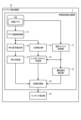
- FIG. 1 is a block diagram showing an example of the configuration of an intent extraction device to which a quality of experience calculation device according to one embodiment of the present invention is applied.
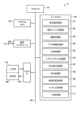
- FIG. 2 is a diagram illustrating an example of a hardware configuration of an intent extraction device;
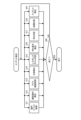
- FIG. 3 is a flow chart showing an example of an intent extraction processing operation by the intent extraction device.
- FIG. 4 is a flow chart showing an example of the operation event acquisition processing operation in FIG.
- FIG. 5 is a flow chart showing an example of the abnormal operation detection processing operation in FIG.
- FIG. 6 is a flowchart showing an example of the operation event corresponding abnormal operation detection processing operation in FIG. 5 when the operation event is a mouse button click operation event.
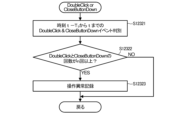
- FIG. 7 shows an example of the operation event corresponding abnormal operation detection processing operation in FIG.
- FIG. 8 is a flowchart showing an example of the application screen acquisition processing operation in FIG.
- FIG. 9 is a flow chart showing an example of the subject detection processing operation in FIG.
- FIG. 10 is a flow chart showing an example of the response time determination processing operation in FIG.
- FIG. 11 is a flowchart showing an example of the operation event corresponding response time determination processing operation in FIG. 10 when the operation event is a mouse double-click operation.
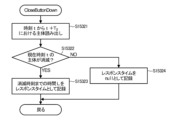
- FIG. 12 is a flowchart showing an example of the operation event corresponding response time determination processing operation in FIG. 10 when the operation event is a close button pressing operation event.
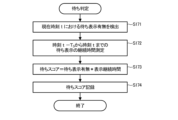
- FIG. 13 is a flow chart showing an example of the waiting display detection processing operation in FIG.
- FIG. 14 is a flow chart showing an example of the waiting determination processing operation in FIG.
- FIG. 15 is a flow chart showing an example of the bodily sensation calculation processing operation in FIG.
- FIG. 16 is a flow chart showing an example of the intent derivation processing operation in FIG.
- FIG. 17 is a schematic diagram showing a display example at time t0 when the VDI application is executed.
- FIG. 18 is a schematic diagram showing a display example at time t 0 +3 when the VDI application is executed.
- FIG. 19 is a schematic diagram showing a display example at times t 0 +3 to t 0 +10 when the VDI application is executed.
- FIG. 20 is a schematic diagram showing a display example at times t 0 +15 to t 0 +20 when the VDI application is executed.
- FIG. 21 is a schematic diagram showing a display example at time t0 when a web browsing application is executed while using an e-commerce service.
- FIG. 22 is a schematic diagram showing a display example at times t 0 to t 0 +5 when the web browsing application is executed.
- FIG. 23 is a schematic diagram showing a display example at time t 0 +6 when the web browsing application is executed.
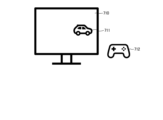
- FIG. 24 is a schematic diagram showing a display example at time t 0 when the gaming application is executed.
- FIG. 25 is a schematic diagram showing a display example at time t 0 +3 when the gaming application is executed.
- FIG. 26 is a schematic diagram showing a display example at times t 0 +7 to t 0 +10 when the game application is executed.
- FIG. 1 is a block diagram showing an example of the configuration of an intent extraction device 10 to which a quality of experience calculation device 1 according to an embodiment of the invention is applied.
- the quality of experience calculation device 1 includes an operation event acquisition unit 11, an abnormal operation detection unit 12, an application screen acquisition unit 13, a subject detection unit 14, a response time determination unit 15, a waiting display detection unit 16, a waiting determination unit 17, and a sensory calculation unit. 18.
- the intent extraction device 10 has a QoE calculation device 1 and an intent derivation unit 19 .
- the operation event acquisition unit 11 has a function of acquiring user input events as operation events.
- the input events include, for example, keyboard events, mouse events, operations of gaming devices such as controllers, etc. in the QOS calculation target application detected in the OS (Operation System).
- the keyboard event includes a downward movement key operation (KeyDown) event, a key press operation (KeyPress) event, an upward movement key operation (KeyUp), and the like.
- Mouse events include a mouse button click operation (MouseClick) event, a mouse button double click operation (DoubleClick) event, and the like.
- the abnormal operation detection unit 12 has a function of detecting, as an abnormal operation, an action that the user often does when he or she feels that the experience has deteriorated, and which is not usually performed. Examples of such actions include repeated hits of the mouse or keyboard within a short period of time, repeated hits of specific key combinations such as simultaneous pressing of the control ("Ctrl") key and the "S" key (Ctrl+S), and continuous use of applications. Including startup/close, etc.
- the abnormal operation detected by the abnormal operation detection unit 12 may be customized in accordance with the characteristics of the application in addition to the combination of such general-purpose operations.
- the application screen acquisition unit 13 has a function of acquiring the application screen, which is the display screen of the target application, as a moving image.
- the subject detection unit 14 has a function of detecting subjects (for example, windows, product subjects, descriptions, etc.) on the screen by image analysis of a series of application screens acquired by the application screen acquisition unit 13 as moving images. have.
- the subject detection unit 14 can detect the detection time of the subject, the position and size of the subject. This subject detection unit 14 can be realized by utilizing or retraining an existing object detection library provided in the market.
- the response time determination unit 15 Based on the subject detected by the subject detection unit 14 and the operation event obtained by the operation event obtaining unit 11, the response time determination unit 15 detects an operation event leading to a screen transition, such as a mouse double-click operation (DoubleClick) event. It has a function to measure the time from occurrence until the subject of the screen changes as response time.
- the response time determination unit 15 is based on the following assumptions.
- the application screen transitions according to the user's operation (mouse double-click operation (DoubleClick) for an icon on the screen, mouse click operation (MouseClick) for pressing a button on the screen, etc.).
- ⁇ There is a possibility that the operation leading to the screen transition may change depending on the application type. For example, in the case of a gaming application, an event such as pressing a key for moving left or right leads to screen transition and can be treated as an operation event.
- the operation targeted by the response time determination unit 15 can be customized according to the application.
- the waiting display detection unit 16 has a function of detecting the occurrence of a waiting display on the screen by image analysis of a series of application screens acquired by the application screen acquisition unit 13 as moving images.
- the waiting display detection unit 16 can detect the detection time of the occurrence of the waiting display, and the position and size of the waiting display.
- This waiting display detection unit 16 can be realized by utilizing or retraining an existing object detection library provided in the market.
- the waiting determination unit 17 has a function of calculating a waiting score based on the presence or absence of a waiting display from the waiting display detection unit 16 and the duration of the waiting display.
- the bodily sensation calculation unit 18 weights the presence or absence of abnormal operation detection by the abnormal operation detection unit 12 and the degree of abnormality, the response time determined by the response time determination unit 15, and the waiting score calculated by the waiting determination unit 17. It has the capability to calculate the user experience quality.
- the intent derivation unit 19 has a function of generating QoE requirements (intent) based on the QoE calculated by the QoE calculation unit 18 .
- FIG. 2 is a diagram showing an example of the hardware configuration of the intent extraction device 10. As shown in FIG.
- the intent extraction device 10 is configured by a computer such as a personal computer or a smart phone, which is a user terminal where a user uses a service, for example.
- the intent extraction device 10 has a hardware processor 100 such as a CPU (Central Processing Unit), as shown in FIG. By using a multi-core and multi-threaded CPU, it is possible to execute a plurality of information processes at the same time. Also, the processor 100 may include multiple CPUs.
- the program memory 200, the data memory 300, the communication interface 400, and the input/output interface (denoted as an input/output IF in FIG. connected through
- the communication interface 400 can include, for example, one or more wired or wireless communication modules.
- the communication interface 400 can communicate with a data processing device that provides services such as other computers and servers connected via a cable or a network such as a LAN (Local Area Network) or the Internet.
- a data processing device that provides services such as other computers and servers connected via a cable or a network such as a LAN (Local Area Network) or the Internet.
- LAN Local Area Network
- the input unit 700 and a display unit 800 are connected to the input/output interface 500 .
- the input unit 700 is an input device such as a keyboard, a pointing device such as a mouse, a gaming device such as a controller, and the like.
- a display unit 800 is a display device such as a liquid crystal display, a CRT (Cathode Ray Tube) display, or the like.
- the input unit 700 and the display unit 800 are a so-called tablet-type input device in which an input detection sheet adopting an electrostatic method or a pressure method is arranged on the display screen of a display device using liquid crystal or organic EL (Electro Luminescence), for example.
- a display device can also be used.
- the input/output interface 500 inputs to the processor 100 the operation information input through the input unit 700 and causes the display unit 800 to display display information generated by the processor 100 .
- the input unit 700 and the display unit 800 may not be connected to the input/output interface 500.
- the input unit 700 and the display unit 800 are provided with a communication unit for connecting to the communication interface 400 directly or via a network, so that information can be exchanged with the processor 100 .
- the input/output interface 500 may have a read/write function for a recording medium such as a semiconductor memory such as a flash memory, or may be connected to a reader/writer having a read/write function for such a recording medium. It may have functions. Furthermore, the input/output interface 500 may have a connection function with other devices.
- the program memory 200 is a non-temporary tangible computer-readable storage medium, for example, a non-volatile memory such as a HDD (Hard Disk Drive) or SSD (Solid State Drive) that can be written and read at any time, and a non-volatile memory such as a ROM. It is used in combination with a static memory.
- the program memory 200 stores a program necessary for the processor 100 to execute various control processes according to one embodiment, such as an intent extraction program including a quality of experience calculation program.
- Each of the processing function units in each unit of the tent deriving unit 19 can be realized by causing the processor 100 to read and execute an intent extraction program including a quality of experience calculation program stored in the program memory 200 .
- Some or all of these processing functions may be implemented in various other forms, including integrated circuits such as Application Specific Integrated Circuits (ASICs) or field-programmable gate arrays (FPGAs). May be.
- ASICs Application Specific Integrated Circuits
- FPGAs field-programmable gate arrays
- the data memory 300 is used as a tangible computer-readable storage medium, for example, by combining the above nonvolatile memory and a volatile memory such as RAM (Random Access Memory).
- This data memory 300 is used to store various data acquired and created in the process of performing various processes. That is, in the data memory 300, an area for storing various data is appropriately secured in the process of performing various processes.
- the data memory 300 includes, for example, a setting value storage unit 301, an operation event recording unit 302, an error recording unit 303, an application screen recording unit 304, a main recording unit 305, a response time recording unit 306, a waiting display A recording unit 307, a waiting recording unit 308, a quality of experience recording unit 309, an intent storage unit 310, and a temporary storage unit 311 can be provided.
- the set value storage unit 301 is used to store various set values used when the processor 100 executes the intent extraction program including the quality of experience calculation program.
- the setting values include, for example, time setting values used when the processor 100 executes the operations as the abnormal operation detection unit 12, the response time determination unit 15, the waiting determination unit 17, and the like; It includes a threshold used when operating as the tent derivation unit 19, and the like. These setting values can be preset by the user. Also, if the intent extraction program including the quality of experience calculation program has these setting values as default values, the setting values can be set in the setting value storage unit 301 at the start of execution of the program.
- the operation event recording unit 302 is used to record operation events acquired when the processor 100 operates as the operation event acquisition unit 11 described above.
- the abnormal recording unit 303 is used to record abnormal operations detected when the processor 100 operates as the abnormal operation detection unit 12 described above, such as presence/absence of abnormal operation detection and the degree of abnormality.
- the application screen recording unit 304 is used to record the application screen acquired as a moving image when the processor 100 operates as the application screen acquisition unit 13 described above.
- the subject recording unit 305 is used to record the detection time of the subject detected when the processor 100 operates as the subject detection unit 14, the location and size of the subject.
- the response time recording unit 306 is used to record the response time measured when the processor 100 operates as the response time determination unit 15 described above.
- the waiting display recording unit 307 is used to record the detection time of waiting display generation, the position and size of the waiting display detected when the processor 100 operates as the waiting display detection unit 16 described above.
- the waiting recording unit 308 is used to record the waiting score calculated when the processor 100 operates as the waiting determination unit 17 described above.
- the QoE recording unit 309 is used to record the user QoE calculated when the processor 100 operates as the QoE calculating unit 18 described above.
- the intent storage unit 310 is used to store QoE requirements (intents) generated when the processor 100 operates as the intent derivation unit 19 described above.
- the temporary storage unit 311 stores the set value storage unit 301, the operation event recording unit 302, the abnormality recording unit 303, the main recording unit 305, the response time recording unit 306, the waiting display recording unit 307, It is used to store various intermediate data that are not stored in the waiting recording unit 308 , quality of experience recording unit 309 and intent storage unit 310 .
- FIG. 3 is a flowchart showing an example of the intent extraction processing operation by the intent extraction device 10.
- the processor 100 of the intent extraction device 10 reads and executes the intent extraction program including the quality of experience calculation program stored in the program memory 200, thereby starting the operation of the intent extraction device 10 shown in this flowchart.
- Execution of the intent extraction program in the processor 100 is performed by receiving an instruction to extract the intent from the input unit 700 via the input/output interface 500 or from an external data processing device via the communication interface 400. be started.
- the processor 100 performs an operation event acquisition unit 11, an abnormal operation detection unit 12, an application screen acquisition unit 13, a subject detection unit 14, a response time determination unit 15, a waiting display detection unit 16, a waiting determination unit 17, It can operate as a bodily sensation calculation unit 18 and an intent derivation unit 19 .
- the processor 100 operates as the operation event acquisition unit 11 and performs operation event acquisition processing (step S11). Further, the processor 100 operates as the abnormal operation detection unit 12 and performs abnormal operation detection processing (step S12). Further, the processor 100 operates as the application screen acquisition unit 13 and performs application screen acquisition processing (step S13). The processor 100 also operates as the subject detection unit 14 and performs subject detection processing (step S14). Further, the processor 100 operates as the response time determination unit 15 and performs response time determination processing (step S15). The processor 100 also operates as the waiting display detection unit 16 to perform waiting display processing (step S16). The processor 100 also operates as the waiting determination unit 17 to perform waiting determination processing (step S17). Processor 100 also operates as bodily sensation calculation unit 18 to perform bodily sensation calculation processing (step S18). Also, the processor 100 operates as the intent derivation unit 19 to perform intent derivation processing (step S19). The processor 100 concurrently executes the processes of steps S11 to S19.
- the processor 100 In any process executing the processing of steps S11 to S19, when the processing ends, the processor 100 outputs the It is determined whether or not an instruction to end intent extraction has been issued from an external data processing device (step S20). When determining that there is no instruction to end, the processor 100 executes the process again.
- the processor 100 ends the operation as the intent extraction device 10 .
- FIG. 4 is a flow chart showing an example of the operation event acquisition processing operation executed as step S11 in FIG.
- processor 100 detects the presence or absence of a user input event at current time t (step S111).
- the current time t is the time when this operation event acquisition processing operation is executed, and does not indicate the same time as the current time t in the description of each processing operation described later. This also applies to the description of each processing operation that will be described later.
- the processor 100 ends this operation event acquisition process.
- the processor 100 acquires the user input event (step S112).
- Processor 100 records the acquired user input event as an operation event in operation event recording section 302 of data memory 300 (step S113). Then, the processor 100 ends this operation event acquisition process.
- FIG. 5 is a flow chart showing an example of the abnormal operation detection processing operation executed as step S12 in FIG.
- the processor 100 reads the operation event at the current time t from the operation event recording unit 302 (step S121).
- Processor 100 determines what the read operation event is (step S122).
- the processor 100 detects an abnormal operation corresponding to the determined operation event by executing the operation event corresponding abnormal operation detection processing operation (step S123). Then, when the operation event corresponding abnormal operation detection processing operation ends, the processor 100 ends this abnormal operation detection processing operation.
- FIG. 6 is a flowchart showing an example of the operation event corresponding abnormal operation detection processing operation in step S123 when the determined operation event is a mouse button click operation (MouseClick) event.
- the processor 100 selects from among the operation events recorded in the operation event recording unit 302 from t ⁇ T 1 , which is the time T 1 before the current time t, to the current time t. ) The event is discriminated (step S12311). The period from time t ⁇ T 1 to time t is the target time period for abnormal operation detection. That is, T 1 can be customized.
- the processor 100 determines whether or not the number of times the interval time between mouse click events is m seconds or less is n times or more (step S12312).
- the variables m and n are also customizable values stored in the setting value storage unit 301 . Then, when determining that the number of times the interval time of the event is m seconds or less is less than n times, the processor 100 terminates the abnormal operation detection processing operation corresponding to the operation event. On the other hand, if the processor 100 determines that the number of times the interval time of the event is m seconds or less is n times or more, the processor 100 records it as an operation error in the error recording section 303 of the data memory 300 ( step S12313). Then, the processor 100 terminates the operation event corresponding abnormal operation detection processing operation.
- FIG. 7 shows the operation event of step S123 when the determined operation event is a mouse button double-click operation (DoubleClick) event or a close button press operation (CloseButtonDown) event that is a click operation on the mouse button close button.
- 9 is a flowchart showing an example of a corresponding abnormal operation detection processing operation;
- the processor 100 selects the double-click operation (DoubleClick) event and the close button press operation (CloseButtonDown) event from among the operation events recorded in the operation event recording unit 302 from time t ⁇ T 1 to the current time t. is determined (step S12321).
- the processor 100 determines whether or not the number of times of the double click operation (DoubleClick) event and the close button pressing operation (CloseButtonDown) event is n times or more (step S12322). When determining that the number of these events is less than n times, the processor 100 terminates this operation event corresponding abnormal operation detection processing operation. On the other hand, if the processor 100 determines that the number of these events is n times or more, it records it as an operation error in the error recording section 303 of the data memory 300 (step S12323). Then, the processor 100 terminates the operation event corresponding abnormal operation detection processing operation.
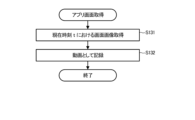
- FIG. 8 is a flowchart showing an example of the application screen acquisition processing operation executed as step S13 in FIG.
- the processor 100 acquires the screen image of the target application at the current time t (step S131). Then, the processor 100 adds this acquired screen image to the moving image, which is a series of screen images acquired up to the time t, to record it as a moving image in the application screen recording unit 304 of the data memory 300 (step S132). Processor 100 then ends this application screen acquisition processing operation.
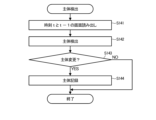
- FIG. 9 is a flow chart showing an example of the subject detection processing operation executed as step S14 in FIG.
- the processor 100 reads out the screen image at the current time t and the screen image at the previous time t ⁇ 1 from the application screen recording unit 304 (step S141).
- the time interval between the current time t and the previous time t ⁇ 1 is stored in the set value storage section 301 of the data memory 300 . That is, one time interval can be customized.
- the processor 100 detects each subject from the read screen images at times t and t-1 (step S142).
- the processor 100 determines whether or not the subject has been changed, that is, whether or not the two detected subjects are different (step S143).
- the processor 100 determines that there is no subject change, the processor 100 ends this subject detection processing operation. On the other hand, if it is determined that the subject has changed, the processor 100 stores the subject detected from the screen image at the current time t, that is, the detection time of the subject, the position and size of the subject, in the data memory 300. It is recorded in the main recording unit 305 (step S144). Processor 100 then ends this subject detection processing operation.
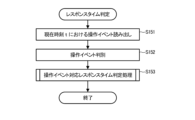
- FIG. 10 is a flow chart showing an example of the response time determination processing operation executed as step S15 in FIG.
- the processor 100 reads the operation event at the current time t from the operation event recording unit 302 (step S151). Processor 100 then determines what the read operation event is (step S152). The processor 100 determines the response time corresponding to the determined operation event by executing the response time determination processing operation corresponding to the operation event (step S153). When the operation event corresponding response time determination processing operation ends, the processor 100 ends the response time determination processing operation.
- step S153 a case of determining a response time for a mouse button double-click operation (DoubleClick) event and a close button pressing operation (CloseButtonDown) event are described. A case of determining the target response time will be described.
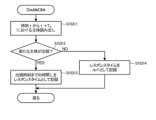
- FIG. 11 is a flow chart showing an example of the operation event corresponding response time determination processing operation in step S153 when the determined operation event is a mouse button double-click operation (DoubleClick) event.
- the processor 100 reads the subjects recorded in the subject recording unit 305 from the current time t to the time t+ T2 , which is the time T2 after the current time t (step S15311).
- the period from time t to time t+T 2 is the subject detection target time zone, and the specific value of T 2 is stored in the set value storage section 301 of the data memory 300 . That is, T2 can be customized.
- the processor 100 determines whether or not a new subject has appeared between this time t and time t+ T2 (step S15312).
- This new entity is the destination entity (for example, window, product, description, etc.) specified by double-clicking.
- This new subject may be any subject set in the setting value storage unit 301 .
- the processor 100 records the time interval L from the current time t to the appearance time of the new subject as a response time in the response time recording unit 306 of the data memory 300 (step S15313).
- the processor 100 records the response time as null in the response time recording unit 306 (step S15314).
- the processor 100 ends this operation event response time determination processing operation.
- FIG. 12 is a flowchart showing an example of the operation event corresponding response time determination processing operation in step S153 when the determined operation event is the close button pressing operation (CloseButtonDown) event.
- the processor 100 reads the subjects from the current time t to the time t+ T2 , which are recorded in the subject recording unit 305 (step S15321). Then, the processor 100 determines whether or not the subject at the current time t has disappeared between this time t and time t+ T2 (step S15322).
- the subject at the current time t is the subject specified to be closed by pressing the close button (for example, window, product, description, etc.). This subject may also be an arbitrary subject set in the set value storage unit 301 .
- Step S15323 when determining that the subject at the current time t has disappeared, the processor 100 records the time interval L from the current time t to the time when the subject disappears as a response time in the response time recording section 306 of the data memory 300.
- the processor 100 records the response time as null in the response time recording unit 306 (step S15324).
- the processor 100 ends this operation event corresponding response time determination processing operation.
- FIG. 13 is a flow chart showing an example of the waiting display detection processing operation executed as step S16 in FIG.
- the processor 100 reads the screen image at the current time t from the application screen recording unit 304 (step S161). Then, the processor 100 detects the waiting display from the read screen image at the time t (step S162). Here, processor 100 determines whether or not a wait display is detected (step S163). If the processor 100 determines that no waiting indication is detected, the processor 100 ends this waiting indication detection processing operation.
- the processor 100 stores the waiting display, that is, the time at which the waiting display was detected, the position and size of the waiting display in the waiting display recording section 307 of the data memory 300 . (step S164). The processor 100 then terminates this waiting display detection processing operation.
- FIG. 14 is a flow chart showing an example of the wait determination processing operation executed in step S17 in FIG.
- the processor 100 refers to the waiting display recording unit 307 to detect whether or not there is a waiting display at the current time t (step S171).
- processor 100 refers to wait display recording unit 307 to determine the duration from current time t to time t ⁇ T 3 , which is time T 3 before current time t, as the duration of the wait display. The duration is measured (step S172).
- the time t ⁇ T 3 is the detection time of the oldest wait display in the wait display recording unit 307 that continues until the current time t.
- the processor 100 records the calculated waiting score in the waiting recording section 308 of the data memory 300 (step S174). The processor 100 then terminates this wait determination processing operation.
- FIG. 15 is a flow chart showing an example of the bodily sensation calculation processing operation executed as step S18 in FIG.
- the processor 100 reads the abnormal operation, the response time, and the waiting score recorded in the abnormal recording unit 303, the response time recording unit 306, and the waiting recording unit 308 at the current time t as indexes (step S181). ). Then, the processor 100 quantifies the QoE by calculating the sum of each index according to the read weight of each index (step S182).
- the weight assigned to each index is stored in the set value storage unit 301 . That is, the weight for each index can be preset for each application by an application developer or the like.
- the processor 100 records the calculated QoE in the QoE recording unit 309 of the data memory 300 (step S183). After that, the processor 100 waits for a certain period of time (step S184). This certain period of time can be preset for each application by an application developer or the like, and is stored in the set value storage unit 301 . Then, after the end of this waiting, the processor 100 ends this bodily sensation calculation processing operation.
- FIG. 16 is a flow chart showing an example of the intent derivation processing operation executed as step S19 in FIG.
- the processor 100 reads the user's QoE at the current time t from the QoE recording unit 309 (step S191).
- the processor 100 determines whether or not the read QoE exceeds the threshold (step S192).
- This threshold value is stored in the set value storage unit 301 . That is, the threshold can be preset for each application by an application developer or the like. If it is determined that the user quality of experience does not exceed the threshold, the processor 100 ends this intent derivation processing operation.
- the processor 100 determines that the QoE has deteriorated, and generates a QoE requirement (intent) requesting improvement of the QoE (step S193).
- Processor 100 stores the generated intent in intent storage unit 310 of data memory 300 (step S194). Processor 100 then ends this intent derivation processing operation.
- VDI application First, a case where the target application is a VDI application will be described.
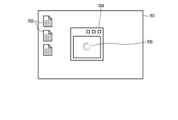
- FIG. 17 is a schematic diagram showing a display example at time t0 during execution of the VDI application.
- a plurality of desktop icons 702 indicating connectable desktops are arranged on the VDI application screen 701 .
- the processor 100 operating as the operation event acquisition unit 11 at this time t0 : Acquire the mouse button double-click operation (DoubleClick) event as an operation event.
- FIG. 18 is a schematic diagram showing a display example at time t 0 +3 when the VDI application is executed.
- Time t 0 +3 is a time three time intervals after time t 0 .
- the VDI application connects to the designated desktop and displays a window 704 for displaying the desktop at this time t 0 +3.
- the processor 100 operating as the subject detection unit 14 detects a new window 704 as a changed subject.
- the processor 100 operating as the response time determination unit 15 determines "3", which is the delay from the double-click time t 0 to the time t 0 +3 when the new main window 704 is opened.
- a response time is determined and recorded in the response time recording unit 306 .
- FIG. 19 is a schematic diagram showing a display example at times t 0 +3 to t 0 +10 when the VDI application is executed.
- Time t 0 +10 is a time after 10 time intervals from time t 0 . Even if the VDI application opens the window 704 at time t 0 +3, it may not be possible to immediately display the specified desktop in that window 704 . In such a case, a waiting display 705 is displayed.
- FIG. 19 shows a case where the waiting display 705 remains even at time t 0 +10.
- the processor 100 operating as the waiting display detection unit 16 detects this waiting display 705, and the processor 100 operating as the waiting determination unit 17 The duration of the waiting display is measured, and the waiting score is recorded in the waiting recording unit 308 .
- the waiting display 705 continues for seven time intervals from time t 0 +3 to time t 0 +10, so "7" is measured as the waiting display duration. be done.
- FIG. 20 is a schematic diagram showing a display example at times t 0 +15 to t 0 +20 when the VDI application is executed.
- the processor 100 operating as the operation event acquisition unit 11 detects a mouse button click operation (MouseClick) event between times t 0 +15 and t 0 +20, and the processor 100 operating as the abnormal operation detection unit 12 100 records the operation abnormality in the abnormality recording unit 303 assuming that the number of times the interval time of the click operation (MouseClick) event is m seconds or less is n times or more.
- MouseClick mouse button click operation
- the processor 100 operating as the bodily sensation calculation unit 18 performs abnormal operation , response time, The user experience quality is calculated from the waiting score. Then, the processor 100 operating as the intent deriving unit 19 compares the QoE with a set threshold, and if the QoE exceeds the threshold, that is, if the QoE is determined to be degraded, the QoE is determined to be degraded. Generate quality of experience requirements (intents) that require improvement.
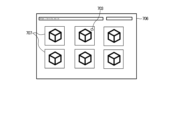
- FIG. 21 is a schematic diagram showing a display example at time t0 when a web browsing application is executed while using an e-commerce service.
- a browser screen 706 for web browsing displays a plurality of product icons 707 to which hyperlinks to product pages for presenting details of each product are assigned.
- the processor 100 operating as the operation event acquisition unit 11
- a mouse hyperlink click operation (MouseHyperlinkClick) event is acquired as an operation event.
- FIG. 22 is a schematic diagram showing a display example at times t 0 to t 0 +5 when the web browsing application is executed.
- Time t 0 +5 is a time five time intervals later than time t 0 . Even if a hyperlink is selected at time t 0 , the web browsing application may not be able to immediately display the linked page on the browser screen 706 . In such a case, a waiting display 705 is displayed.
- FIG. 20 shows a case where the waiting display 705 remains even at time t 0 +5.
- the processor 100 operating as the waiting display detection unit 16 detects this waiting display 705, and the processor 100 operating as the waiting determination unit 17 detects the waiting display 705.
- the display duration time is measured and the waiting score is recorded in the waiting recording unit 308 .
- the waiting display 705 continues for five time intervals from time t 0 to time t 0 +5, so "5" is measured as the waiting display duration. be.
- FIG. 23 is a schematic diagram showing a display example at time t 0 +6 when the web browsing application is executed.
- Time t 0 +6 is a time after 6 time intervals from time t 0 .
- the web browsing application displays the product page at time t 0 +6.
- the processor 100 operating as the subject detection unit 14 detects the product 708 and the description 709 as changed subjects.
- a subject may contain multiple representations.
- the processor 100 operating as the response time determination unit 15 responds with "6", which is the delay from the time t 0 when the product icon 707 is clicked to the time t 0 +6 when this new page is opened. Time can be determined and recorded in the response time recording unit 306 .
- the processor 100 operating as the bodily sensation calculator 18 calculates the abnormal operation, the response time, and the waiting score at regular time intervals (for example, five time intervals) in the time period from time t 0 to this time t 0 +6. to calculate the user experience quality. Then, the processor 100 operating as the intent deriving unit 19 compares the QoE with a set threshold, and if the QoE exceeds the threshold, that is, if the QoE is determined to be degraded, the QoE is determined to be degraded. Generate quality of experience requirements (intents) that require improvement.
- FIG. 24 is a schematic diagram showing a display example at time t 0 when the gaming application is executed.
- a car 711 to be operated is displayed on the gaming application screen 710 . Since this display example is in the middle of the game, the processor 100 operating as the subject detection unit 14 has already detected the car 711 as the subject.
- the processor 100 operating as the operation event acquisition unit 11 moves rightward at this time t 0 . Get the button press (RightButtonDown) event as an operation event.
- FIG. 25 is a schematic diagram showing a display example at time t 0 +3 when the gaming application is executed.
- the gaming application displays the car 711 moving to the right.
- the processor 100 operating as the subject detection unit 14 detects a change in the position of the subject car 711 as a changed subject.
- the processor 100 operating as the response time determination unit 15 determines the delay from time t 0 at which the right direction button 713 of the controller 712 is operated to time t 0 +3 at which the subject's position is updated. 3” is determined as the response time, and is recorded in the response time recording unit 306.
- FIG. 1 is a schematic diagram showing a display example at time t 0 +3 when the gaming application is executed.
- the gaming application displays the car 711 moving to the right.
- the processor 100 operating as the subject detection unit 14 detects a change in the position of the subject car 711 as a changed subject.
- the processor 100 operating as the response time determination unit 15 determines the delay from time t 0 at which the
- FIG. 26 is a schematic diagram showing a display example at times t 0 +7 to t 0 +10 when the game application is executed.
- Time t 0 +7 is a time after 7 time intervals from time t 0 .
- the gaming application may not be able to immediately update the display according to the operation, for example, display the car 711 as it moves.
- a waiting display 705 is displayed.
- FIG. 26 shows a case where the waiting display is displayed from time t 0 +7, and the waiting display 705 remains at time t 0 +10.
- the processor 100 operating as the waiting display detection unit 16 detects this waiting display 705, and the processor 100 operating as the waiting determination unit 17:
- the duration of the waiting display is measured, and the waiting score is recorded in the waiting recording unit 308 .
- the waiting display 705 continues for three time intervals from time t 0 +7 to time t 0 +10, so "3" is measured as the waiting display duration. be done.
- the processor 100 operating as the bodily sensation calculation unit 18 performs abnormal operation, response time, The user experience quality is calculated from the waiting score. Then, the processor 100 operating as the intent deriving unit 19 compares the QoE with a set threshold, and if the QoE exceeds the threshold, that is, if the QoE is determined to be degraded, the QoE is determined to be degraded. Generate quality of experience requirements (intents) that require improvement.
- the operation event acquisition unit 11 acquires an operation event of the user who uses the application for QOS calculation
- the application screen acquisition unit 13 acquires the application Get a set of app screens provided by .
- the quality of experience calculation device 1 uses the subject detection unit 14 and the response time determination unit 15 functioning as a delay time extraction unit to analyze the image of the application screen acquired by the application screen acquisition unit 13, and the operation event acquisition unit 11 acquires
- the application screen acquisition unit 13 extracts the delay time from the time when the operation event is acquired until the application screen changes to the application screen in response to the operation event, and the application screen acquisition unit 13 determines whether or not the application screen is a waiting screen by image analysis of the acquired application screen.
- the QOS calculator 18 calculates the user's QOS based on the delay time and the waiting determination result. Therefore, since the QOS calculation device 1 according to one embodiment calculates the user's QOS using general-purpose data such as operation events and application screens, the user's QOS can be calculated even if the QOS calculation target application is different. Without redesigning the measurement method, it is possible to provide a quality of experience calculation technique that enables calculation of the quality of experience with high accuracy, that is, a quality of experience that is close to the actual user experience. In addition, since the basis for calculation of the user's QoE is extracted from the application screen, the interpretability of the calculated user's QoE can be improved. Furthermore, general user experience quality can be calculated in various operation applications.
- the intent derivation unit 19 calculates QoE requirements (intents) based on the QoE of the user. can be generated. Therefore, intents can be extracted in various operating applications.
- the abnormal operation detection unit 12 detects whether the operation event acquired by the operation event acquisition unit 11 corresponds to an abnormal operation behavior indicating deterioration of the user's experience, and The calculation unit 18 calculates the quality of experience of the user based on the abnormal operation behavior detected by the abnormal operation detection unit 12 in addition to the determination result of the delay time and the waiting screen. In this way, by taking abnormal operation behavior into account, it is possible to calculate the quality of experience with higher accuracy, that is, the quality of experience that is closer to the actual user experience.
- the bodily sensation calculation unit 18 weights the delay time, the waiting screen determination result, and the abnormal operation behavior, and calculates the sum of the weights, thereby calculating the bodily sensation quality of the user. Therefore, the quality of experience of the user can be calculated by adjusting the priority of each of the delay time, the determination result of the waiting screen, and the abnormal operation behavior.
- the QOS calculation device 1 further includes a setting value storage unit 301 that stores the weight of each delay time, waiting screen determination result, and abnormal operation behavior for each of a plurality of applications.
- the calculation unit 18 uses the weight corresponding to the application for which the quality of experience is to be calculated, among the plurality of weights stored in the set value storage unit 301 . In this way, which of the delay time, the judgment result of the waiting screen, and the abnormal operation behavior should be emphasized differs for each application. can be done.
- the delay time extraction unit includes a subject detection unit 14 and a response time determination unit 15.
- the subject detection unit 14 analyzes the image of the application screen acquired by the application screen acquisition unit 13 to determine the main interest of the user on the application screen.
- the response time determination unit 15 measures the time from the acquisition of the operation event acquired by the operation event acquiring unit 11 to the change of the subject detected by the subject detection unit 14 as a delay time. do. In this way, the duration of quality deterioration, which is the time from when the operation event is acquired until the subject changes, can be measured as the delay time.
- the bodily sensation calculation unit 18 calculates the user bodily sensation on such a screen by taking into account the user's interest level and the quality deterioration duration time, thereby calculating the user bodily sensation that is closer to the realistic user bodily sensation.
- the waiting time extraction unit includes a waiting display detection unit 16 and a waiting determination unit 17.
- the waiting display detection unit 16 analyzes the image of the application screen acquired by the application screen acquisition unit 13, and detects the waiting display on the application screen. is detected, and the wait determination unit 17 calculates a wait score indicating the determination result of the wait screen based on the presence or absence of the wait display and the duration of the wait display detected by the wait display detection unit 16 . In this manner, the waiting score can be calculated based on the quality deterioration duration time, which is the duration time of the waiting display.
- the bodily sensation calculation unit 18 can calculate the user bodily sensation that is closer to the realistic bodily sensation of the user by calculating the user bodily sensation taking into account such quality deterioration duration time.
- the intent extraction device 10 does not necessarily have to include the QoE calculation device 1 . That is, the computer that configures the QOS calculation device 1 and the computer that functions as the intent derivation unit 19 may be configured separately.
- the computer that functions as the intent derivation unit 19 may be configured as a data processing device that provides services such as a server that can be accessed by the plurality of QoE calculation devices 1 via a network.
- the method described in the embodiment can be executed by a computer (computer) as a program (software means), such as a magnetic disk (floppy (registered trademark) disk, hard disk, etc.), an optical disk (CD-ROM, DVD, MO, etc.), semiconductor memory (ROM, RAM, flash memory, etc.), or the like, or can be transmitted and distributed via a communication medium.
- the programs stored on the medium also include a setting program for configuring software means (including not only execution programs but also tables and data structures) to be executed by the computer.
- a computer that realizes this apparatus reads a program recorded on a recording medium, and optionally constructs software means by a setting program. The operation is controlled by this software means to execute the above-described processes.
- the term "recording medium” as used herein is not limited to those for distribution, and includes storage media such as magnetic disks, semiconductor memories, etc. provided in computers or devices connected via a network.
- the present invention is not limited to the above embodiments, and can be modified in various ways without departing from the gist of the invention at the implementation stage.
- each embodiment may be implemented in combination as much as possible, in which case the combined effect can be obtained.
- the above-described embodiments include inventions at various stages, and various inventions can be extracted by appropriately combining a plurality of disclosed constituent elements.
- Subject Recording unit 306 Response time recording unit 307 Waiting display recording unit 308 Waiting recording unit 309 Quality of experience recording unit 310
- Intent storage unit 311 Temporary storage unit 400 Communication interface 500 Input/output interface 600 Bus 700 Input unit 701 VDI application screen 702 Desktop icon 703 Mouse cursor 704 Window 705 Wait display 706 Browser screen 707 Product icon 708 Product 709 Description 710 Gaming application screen 711 Car 712 Controller 713 Right direction button 800...Display unit
Landscapes
- Engineering & Computer Science (AREA)
- General Engineering & Computer Science (AREA)
- Theoretical Computer Science (AREA)
- Human Computer Interaction (AREA)
- Physics & Mathematics (AREA)
- General Physics & Mathematics (AREA)
- User Interface Of Digital Computer (AREA)
Abstract
一実施形態に係る体感品質算出装置は、操作イベント取得部と、画面取得部と、遅延時間抽出部と、待ち画面判定部と、体感計算部と、を備える。操作イベント取得部は、体感品質算出対象のアプリケーションを使用するユーザの操作イベントを取得する。画面取得部は、アプリケーションが提供する一連のアプリ画面を取得する。遅延時間抽出部は、画面取得部が取得したアプリ画面に対する画像分析により、操作イベント取得部が取得した操作イベントの取得時点から、操作イベントに応答したアプリ画面に変化するまでの遅延時間を抽出する。待ち画面判定部は、画面取得部が取得したアプリ画面に対する画像分析により、アプリ画面が待ち画面となっているか否か判定する。体感計算部は、遅延時間抽出部が抽出した遅延時間と、待ち画面判定部による待ち画面の判定結果に基づいて、ユーザの体感品質を計算する。
Description
この発明の実施形態は、体感品質算出装置、体感品質算出方法及び体感品質算出プログラムに関する。
近年、ユーザの満足度の向上やリソースの効率化を図るために、インテントに基づいて通信リソース等を制御する方式が検討・実装されている。具体的には、ユーザが体感しているサービスの品質であるユーザ体感品質(QoE:Quality of Experience)要件をユーザのインテントとして捉え、要件を満たすために、ネットワークリソース、サーバリソース、等を適切に割り当てるなどの例が挙げられる。そのため、ユーザ端末においてサービスをユーザに提供するためのアプリケーションプログラム(以下、アプリと略記する。)を使用しているユーザの体感品質を精度良く把握し、体感品質の変化状況からインテントを抽出する必要が有る。
ユーザが使用するアプリとしては、ユーザの操作頻度が高い、操作により画面が遷移するアプリである操作系アプリが有る。このような操作系アプリの例としては、仮想デスクトップ(VDI:Virtual Desktop Infrastructure)/リモートデスクトップ(RDI:Remote Desktop Infrastructure)サービス、Eコマース(Electric commerce)サービス、一部のゲーミングサービス、等のアプリが挙げられる。
このような操作系アプリの体感品質定量化技術は、例えば、非特許文献1に提案されている。
J. Hosek et al., "Predicting user QoE satisfaction in current mobile networks," 2014 IEEE International Conference on Communications (ICC), 2014, pp. 1088-1093, doi: 10.1109/ICC.2014.6883466.
しかしながら、非特許文献1に提案されているような体感品質定量化技術では、対象とするアプリが変わると、例えばEコマースサービスを利用するためのWebブラウジングアプリからVDIアプリに変わると、体感品質を評価するためのパラメータやAPI(Application Programming Interface)仕様が異なるため、体感品質評価方式が流用できない。
そのため、アプリ毎に、体感品質を測定する手法を検討・設計する必要が有り、体感品質要件(インテント)に基づいたリソース制御を実施するために時間とコストがかかっていた。
この発明は、体感品質の算出対象アプリが異なっても、体感品質測定手法を再設計することなく、精度の良いつまり実際のユーザ体感に近い、体感品質を算出可能とする体感品質算出技術を提供しようとするものである。
上記課題を解決するために、この発明の一態様に係る体感品質算出装置は、操作イベント取得部と、画面取得部と、遅延時間抽出部と、待ち画面判定部と、体感計算部と、を備える。操作イベント取得部は、体感品質算出対象のアプリケーションを使用するユーザの操作イベントを取得する。画面取得部は、アプリケーションが提供する一連のアプリ画面を取得する。遅延時間抽出部は、画面取得部が取得したアプリ画面に対する画像分析により、操作イベント取得部が取得した操作イベントの取得時点から、操作イベントに応答したアプリ画面に変化するまでの遅延時間を抽出する。待ち画面判定部は、画面取得部が取得したアプリ画面に対する画像分析により、アプリ画面が待ち画面となっているか否か判定する。体感計算部は、遅延時間抽出部が抽出した遅延時間と、待ち画面判定部による待ち画面の判定結果に基づいて、ユーザの体感品質を計算する。
この発明の一態様によれば、操作イベント及びアプリ画面という汎用的なデータを使用してユーザの体感品質を計算しているので、体感品質の算出対象アプリが異なっても、体感品質測定手法を再設計することなく、精度の良いつまり実際のユーザ体感に近い、体感品質を算出可能とする体感品質算出技術を提供することができる。
[一実施形態]
以下、図面を参照して、この発明に係わる一実施形態を説明する。
以下、図面を参照して、この発明に係わる一実施形態を説明する。
(構成例)
図1は、この発明の一実施形態に係る体感品質算出装置1が適用されたインテント抽出装置10の構成の一例を示すブロック図である。体感品質算出装置1は、操作イベント取得部11、異常操作検出部12、アプリ画面取得部13、主体検出部14、レスポンスタイム判定部15、待ち表示検出部16、待ち判定部17及び体感計算部18を有する。インテント抽出装置10は、体感品質算出装置1とインテント導出部19とを有する。
図1は、この発明の一実施形態に係る体感品質算出装置1が適用されたインテント抽出装置10の構成の一例を示すブロック図である。体感品質算出装置1は、操作イベント取得部11、異常操作検出部12、アプリ画面取得部13、主体検出部14、レスポンスタイム判定部15、待ち表示検出部16、待ち判定部17及び体感計算部18を有する。インテント抽出装置10は、体感品質算出装置1とインテント導出部19とを有する。
操作イベント取得部11は、ユーザの入力イベントを操作イベントとして取得する機能を有する。入力イベントは、例えば、OS(Operation System)において検出される体感品質算出対象アプリでの、キーボードイベントやマウスイベント、コントローラ等のゲーミングディバイスの操作、等を含む。キーボードイベントは、下方向移動キー操作(KeyDown)イベント、キー押下操作(KeyPress)イベント、上方向移動キー操作(KeyUp)、等を含む。マウスイベントは、マウスボタンのクリック操作(MouseClick)イベント、マウスボタンのダブルクリック操作(DoubleClick)イベント、等を含む。
異常操作検出部12は、ユーザが体感劣化したと感じた際に行うことが多い、普段では行わない行動を、異常操作として検出する機能を有する。そのような行動としては、例えば、短時間内でマウスやキーボードの連打、コントロール(「Ctrl」)キーと「S」キーの同時押し(Ctrl+S)等の特定キー組み合わせの連打、アプリの連続起動・閉じ、等を含む。異常操作検出部12が検出する異常操作は、このような汎用な操作の組み合わせだけでなく、アプリ特性に応じてカスタマイズするようにしても良い。
アプリ画面取得部13は、対象アプリの表示画面であるアプリ画面を動画として取得する機能を有する。
主体検出部14は、アプリ画面取得部13が動画として取得した一連のアプリ画面を画像分析することにより、画面上での主体(例えば、ウィンドウ、商品主体、説明文、等)を検出する機能を有する。主体検出部14は、主体の検出時刻、主体の位置及びサイズを検出することができる。この主体検出部14は、市中に提供されている既存の物体検出ライブラリを活用または再訓練することで実現することができる。
レスポンスタイム判定部15は、主体検出部14が検出した主体と、操作イベント取得部11が取得した操作イベントに基づいて、画面遷移につながる操作イベント、例えばマウスのダブルクリック操作(DoubleClick)イベント、が発生してから、画面の主体が変化までの時間をレスポンスタイムとして計測する機能を有する。なお、このレスポンスタイム判定部15は、以下のことを前提としている。
・ユーザの操作(画面上のアイコンに対するマウスのダブルクリック操作(DoubleClick)、画面上のボタンを押すためのマウスのクリック操作(MouseClick)、等)に伴い、アプリ画面が遷移する。
・アプリ種別により、画面遷移につながる操作が変わる可能性が有る。例えば、ゲーミングアプリの場合、左、右を移動させるキーを押す等のイベントも画面遷移につながり、操作イベントとして取り扱える。
・レスポンスタイム判定部15が対象とする操作は、アプリに応じてカスタマイズすることができる。
・ユーザの操作(画面上のアイコンに対するマウスのダブルクリック操作(DoubleClick)、画面上のボタンを押すためのマウスのクリック操作(MouseClick)、等)に伴い、アプリ画面が遷移する。
・アプリ種別により、画面遷移につながる操作が変わる可能性が有る。例えば、ゲーミングアプリの場合、左、右を移動させるキーを押す等のイベントも画面遷移につながり、操作イベントとして取り扱える。
・レスポンスタイム判定部15が対象とする操作は、アプリに応じてカスタマイズすることができる。
待ち表示検出部16は、アプリ画面取得部13が動画として取得した一連のアプリ画面を画像分析することにより、画面上での待ち表示の発生を検出する機能を有する。待ち表示検出部16は、待ち表示発生の検出時刻、待ち表示の位置及びサイズを検出することができる。この待ち表示検出部16は、市中に提供されている既存の物体検出ライブラリを活用または再訓練することで実現することができる。
待ち判定部17は、待ち表示検出部16から待ち表示の有無、待ち表示の継続時間に基づいて、待ちスコアを算出する機能を有する。
体感計算部18は、異常操作検出部12による異常操作検出の有無及び異常の度合、レスポンスタイム判定部15が判定したレスポンスタイム、及び、待ち判定部17が算出した待ちスコアに、重みを加味して、ユーザ体感品質を計算する機能を有する。
インテント導出部19は、体感計算部18が計算したユーザ体感品質に基づいて、体感品質要件(インテント)を生成する機能を有する。
図2は、インテント抽出装置10のハードウェア構成の一例を示す図である。
インテント抽出装置10は、例えばユーザがサービスを利用するユーザ端末である、パーソナルコンピュータ(Personal computer)やスマートホン等のコンピュータにより構成される。インテント抽出装置10は、図2に示すように、CPU(Central Processing Unit)等のハードウェアプロセッサ100を有する。なお、CPUは、マルチコア及びマルチスレッドのものを用いることで、同時に複数の情報処理を実行することができる。また、プロセッサ100は、複数のCPUを備えていても良い。そして、インテント抽出装置10では、このプロセッサ100に対し、プログラムメモリ200と、データメモリ300と、通信インタフェース400と、入出力インタフェース(図2では入出力IFと記す)500とが、バス600を介して接続される。
通信インタフェース400は、例えば一つ以上の有線または無線の通信モジュールを含むことができる。通信インタフェース400は、ケーブルまたはLAN(Local Area Network)やインターネット等のネットワークを介して接続される他のコンピュータやサーバ等のサービスを提供するデータ処理装置との間で通信を行うことができる。
入出力インタフェース500には、入力部700及び表示部800が接続されている。入力部700は、キーボード、マウス等のポインティングデバイス、コントローラ等のゲーミングディバイス、等の入力デバイスである。また、表示部800は、液晶ディスプレイ、CRT(Cathode Ray Tube)ディスプレイ、等の表示デバイスである。入力部700及び表示部800は、例えば液晶または有機EL(Electro Luminescence)を使用した表示デバイスの表示画面上に、静電方式または圧力方式を採用した入力検知シートを配置した、いわゆるタブレット型の入力・表示デバイスを用いたものが用いられることもできる。入出力インタフェース500は、上記入力部700において入力された操作情報をプロセッサ100に入力すると共に、プロセッサ100で生成された表示情報を表示部800に表示させる。
なお、入力部700及び表示部800は、入出力インタフェース500に接続されていなくても良い。入力部700及び表示部800は、通信インタフェース400と直接またはネットワークを介して接続するための通信ユニットを備えることで、プロセッサ100との間で情報の授受を行い得る。
また、入出力インタフェース500は、フラッシュメモリ等の半導体メモリといった記録媒体のリード/ライト機能を有しても良いし、あるいは、そのような記録媒体のリード/ライト機能を持ったリーダライタとの接続機能を有しても良い。さらに、入出力インタフェース500は、他の機器との接続機能を有して良い。
プログラムメモリ200は、非一時的な有形のコンピュータ可読記憶媒体として、例えば、HDD(Hard Disk Drive)またはSSD(Solid State Drive)等の随時書込み及び読出しが可能な不揮発性メモリと、ROM等の不揮発性メモリとが組み合わせて使用されたものである。このプログラムメモリ200には、プロセッサ100が一実施形態に係る各種制御処理を実行するために必要なプログラム、例えば体感品質算出プログラムを含むインテント抽出プログラムが格納されている。すなわち、上記の操作イベント取得部11、異常操作検出部12、アプリ画面取得部13、主体検出部14、レスポンスタイム判定部15、待ち表示検出部16、待ち判定部17、体感計算部18及びインテント導出部19の各部における処理機能部は、何れも、プログラムメモリ200に格納された体感品質算出プログラムを含むインテント抽出プログラムを上記プロセッサ100により読み出させて実行させることにより実現され得る。なお、これらの処理機能部の一部または全部は、特定用途向け集積回路(ASIC:Application Specific Integrated Circuit)またはFPGA(field-programmable gate array)等の集積回路を含む、他の多様な形式によって実現されても良い。
データメモリ300は、有形のコンピュータ可読記憶媒体として、例えば、上記の不揮発性メモリと、RAM(Random Access Memory)等の揮発性メモリとが組み合わせて使用されたものである。このデータメモリ300は、各種処理が行われる過程で取得及び作成された各種データが記憶されるために用いられる。すなわち、データメモリ300には、各種処理が行われる過程で、適宜、各種データを記憶するための領域が確保される。そのような領域として、データメモリ300には、例えば、設定値記憶部301、操作イベント記録部302、異常記録部303、アプリ画面記録部304、主体記録部305、レスポンスタイム記録部306、待ち表示記録部307、待ち記録部308、体感品質記録部309、インテント記憶部310及び一時記憶部311を設けることができる。
設定値記憶部301は、プロセッサ100が体感品質算出プログラムを含むインテント抽出プログラムを実行した際に利用する各種設定値を記憶するために使用される。設定値としては、例えば、プロセッサ100が上記の異常操作検出部12、レスポンスタイム判定部15、待ち判定部17、等としての動作を実行したときに使用する時間設定値、プロセッサ100が上記のインテント導出部19として動作したときに使用する閾値、等を含む。これら設定値は、ユーザが予め設定することができる。また、体感品質算出プログラムを含むインテント抽出プログラムが既定値としてそれら設定値を有している場合には、プログラムの実行開始時に、この設定値記憶部301に設定されることができる。
操作イベント記録部302は、プロセッサ100が上記の操作イベント取得部11として動作したときに取得した操作イベントを記録するために使用される。
異常記録部303は、プロセッサ100が上記の異常操作検出部12として動作したときに検出した、異常操作検出の有無、異常の度合、等の異常操作を記録するために使用される。
アプリ画面記録部304、プロセッサ100が上記のアプリ画面取得部13として動作したときに動画として取得したアプリ画面を記録するために使用される。
主体記録部305は、プロセッサ100が上記の主体検出部14として動作したときに検出した主体の検出時刻、主体の位置及びサイズを記録するために使用される。
レスポンスタイム記録部306は、プロセッサ100が上記のレスポンスタイム判定部15として動作したときに計測したレスポンスタイムを記録するために使用される。
待ち表示記録部307は、プロセッサ100が上記の待ち表示検出部16として動作したときに検出した、待ち表示発生の検出時刻、待ち表示の位置及びサイズを記録するために使用される。
待ち記録部308は、プロセッサ100が上記の待ち判定部17として動作したときに算出した待ちスコアを記録するために使用される。
体感品質記録部309は、プロセッサ100が上記の体感計算部18として動作したときに計算したユーザ体感品質を記録するために使用される。
インテント記憶部310は、プロセッサ100が上記のインテント導出部19として動作したときに生成した体感品質要件(インテント)を記憶するために使用される。
一時記憶部311は、プロセッサ100が動作途中で発生する、上記設定値記憶部301、操作イベント記録部302、異常記録部303、主体記録部305、レスポンスタイム記録部306、待ち表示記録部307、待ち記録部308、体感品質記録部309及びインテント記憶部310に記憶しない種々の中間データを記憶するために使用される。
(動作)
次に、体感品質算出装置1を有するインテント抽出装置10の動作を説明する。
次に、体感品質算出装置1を有するインテント抽出装置10の動作を説明する。
図3は、インテント抽出装置10によるインテント抽出処理動作の一例を示すフローチャートである。インテント抽出装置10のプロセッサ100は、プログラムメモリ200に記憶された体感品質算出プログラムを含むインテント抽出プログラムを読み出して実行することで、このフローチャートに示すインテント抽出装置10としての動作を開始する。プロセッサ100でのインテント抽出プログラムの実行は、入出力インタフェース500を介して入力部700から、あるいは、通信インタフェース400を介して外部のデータ処理装置から、インテント抽出の実施を指示されることで開始される。
プロセッサ100は、それぞれ独立したプロセスにより、操作イベント取得部11、異常操作検出部12、アプリ画面取得部13、主体検出部14、レスポンスタイム判定部15、待ち表示検出部16、待ち判定部17、体感計算部18及びインテント導出部19として動作することができる。
すなわち、プロセッサ100は、操作イベント取得部11として動作して、操作イベント取得処理を実施する(ステップS11)。また、プロセッサ100は、異常操作検出部12として動作して、異常操作検出処理を実施する(ステップS12)。また、プロセッサ100は、アプリ画面取得部13として動作して、アプリ画面取得処理を実施する(ステップS13)。また、プロセッサ100は、主体検出部14として動作して、主体検出処理を実施する(ステップS14)。また、プロセッサ100は、レスポンスタイム判定部15として動作して、レスポンスタイム判定処理を実施する(ステップS15)。また、プロセッサ100は、待ち表示検出部16として動作して、待ち表示処理を実施する(ステップS16)。また、プロセッサ100は、待ち判定部17として動作して、待ち判定処理を実施する(ステップS17)。また、プロセッサ100は、体感計算部18として動作して、体感計算処理を実施する(ステップS18)。また、プロセッサ100は、インテント導出部19として動作して、インテント導出処理を実施する(ステップS19)。プロセッサ100は、これらのステップS11乃至ステップS19の処理を併行して実行する。
上記ステップS11乃至ステップS19の処理を実行している何れかのプロセスにおいて、当該処理が終了したならば、プロセッサ100は、入出力インタフェース500を介して入力部700から、あるいは、通信インタフェース400を介して外部のデータ処理装置から、インテント抽出の終了を指示されたか否か判断する(ステップS20)。終了の指示が無いと判断した場合、プロセッサ100は、当該処理を再度実行する。
そして、何れかのプロセスにおいて、インテント抽出の終了を指示されたと判断したならば、プロセッサ100は、インテント抽出装置10としての動作を終了する。
次に、各プロセスで実行される処理を説明する。
図4は、図3中のステップS11として実行される操作イベント取得処理動作の一例を示すフローチャートである。この操作イベント取得処理において、プロセッサ100は、現在時刻tにおけるユーザ入力イベントの有無を検出する(ステップS111)。なお、現在時刻tは、この操作イベント取得処理動作の実行時点の時刻であり、後述する各処理動作の説明中における現在時刻tと同一時刻を指すものではない。これは、後述する各処理動作の説明においても同様である。ユーザ入力イベントが無いと判断した場合、プロセッサ100は、この操作イベント取得処理を終了する。これに対して、ユーザ入力イベントが有ったと判断した場合、プロセッサ100は、そのユーザ入力イベントを取得する(ステップS112)。そして、プロセッサ100は、その取得したユーザ入力イベントを操作イベントとして、データメモリ300の操作イベント記録部302に記録する(ステップS113)。そして、プロセッサ100は、この操作イベント取得処理を終了する。
図4は、図3中のステップS11として実行される操作イベント取得処理動作の一例を示すフローチャートである。この操作イベント取得処理において、プロセッサ100は、現在時刻tにおけるユーザ入力イベントの有無を検出する(ステップS111)。なお、現在時刻tは、この操作イベント取得処理動作の実行時点の時刻であり、後述する各処理動作の説明中における現在時刻tと同一時刻を指すものではない。これは、後述する各処理動作の説明においても同様である。ユーザ入力イベントが無いと判断した場合、プロセッサ100は、この操作イベント取得処理を終了する。これに対して、ユーザ入力イベントが有ったと判断した場合、プロセッサ100は、そのユーザ入力イベントを取得する(ステップS112)。そして、プロセッサ100は、その取得したユーザ入力イベントを操作イベントとして、データメモリ300の操作イベント記録部302に記録する(ステップS113)。そして、プロセッサ100は、この操作イベント取得処理を終了する。
図5は、図3中のステップS12として実行される異常操作検出処理動作の一例を示すフローチャートである。この異常操作検出処理において、プロセッサ100は、現在時刻tにおける操作イベントを、操作イベント記録部302から読み出す(ステップS121)。そして、プロセッサ100は、この読み出した操作イベントが何であるのかを判別する(ステップS122)。プロセッサ100は、操作イベント対応異常操作検出処理動作を実行することで、その判別した操作イベントに応じた異常操作を検出する(ステップS123)。そして、プロセッサ100は、操作イベント対応異常操作検出処理動作が終了したならば、この異常操作検出処理動作を終了する。
ここで、上記ステップS123の操作イベント対応異常操作検出処理動作の例として、マウスの連打の異常操作を検出する場合と、アプリ連続起動・閉じ異常操作を検出する場合を説明する。
図6は、判別された操作イベントがマウスボタンのクリック操作(MouseClick)イベントである場合の、上記ステップS123の操作イベント対応異常操作検出処理動作の一例を示すフローチャートである。プロセッサ100は、操作イベント記録部302に記録されている、現在時刻tより時間T1だけ前の時刻であるt-T1から現在時刻tまでの間の操作イベントの中から、クリック操作(MouseClick)イベントを判別する(ステップS12311)。この時刻t-T1から時刻tまでが異常操作検出の対象時間帯であり、T1の具体的な値はデータメモリ300の設定値記憶部301に記憶されている。すなわち、T1はカスタマイズすることができる。そして、プロセッサ100は、このクリック操作(MouseClick)イベントの間隔時間がm秒以下である回数がn回以上有るか否か判断する(ステップS12312)。この変数m及びnについても、設定値記憶部301に記憶されるカスタマイズ可能な値である。そして、当該イベントの間隔時間がm秒以下である回数がn回未満であると判断した場合、プロセッサ100は、この操作イベント対応異常操作検出処理動作を終了する。これに対して、当該イベントの間隔時間がm秒以下である回数がn回以上であると判断した場合には、プロセッサ100は、操作異常として、データメモリ300の異常記録部303に記録する(ステップS12313)。そして、プロセッサ100は、この操作イベント対応異常操作検出処理動作を終了する。
図7は、判別された操作イベントがマウスボタンのダブルクリック操作(DoubleClick)イベントまたはマウスボタンの閉じるボタンに対するクリック操作である閉じるボタン押下操作(CloseButtonDown)イベントである場合の、上記ステップS123の操作イベント対応異常操作検出処理動作の一例を示すフローチャートである。プロセッサ100は、操作イベント記録部302に記録されている、時刻t-T1から現在時刻tまでの間の操作イベントの中から、ダブルクリック操作(DoubleClick)イベントと閉じるボタン押下操作(CloseButtonDown)イベントを判別する(ステップS12321)。そして、プロセッサ100は、このダブルクリック操作(DoubleClick)イベントと閉じるボタン押下操作(CloseButtonDown)イベントの回数がn回以上有るか否か判断する(ステップS12322)。それらのイベントの回数がn回未満であると判断した場合、プロセッサ100は、この操作イベント対応異常操作検出処理動作を終了する。これに対して、それらのイベントの回数がn回以上であると判断した場合には、プロセッサ100は、操作異常として、データメモリ300の異常記録部303に記録する(ステップS12323)。そして、プロセッサ100は、この操作イベント対応異常操作検出処理動作を終了する。
図8は、図3中のステップS13として実行されるアプリ画面取得処理動作の一例を示すフローチャートである。このアプリ画面取得処理において、プロセッサ100は、現在時刻tにおける対象アプリの画面画像を取得する(ステップS131)。そして、プロセッサ100は、この取得した画面画像を、当該時刻tまでに取得していた画面画像の連続である動画に追加することで、動画としてデータメモリ300のアプリ画面記録部304に記録する(ステップS132)。そして、プロセッサ100は、このアプリ画面取得処理動作を終了する。
図9は、図3中のステップS14として実行される主体検出処理動作の一例を示すフローチャートである。この主体検出処理において、プロセッサ100は、アプリ画面記録部304から、現在時刻tにおける画面画像と1個前の時刻t-1における画面画像とを読み出す(ステップS141)。ここで、現在時刻tと1個前の時刻t-1との時間間隔は、データメモリ300の設定値記憶部301に記憶されている。すなわち、時間間隔1個分はカスタマイズすることができる。プロセッサ100は、これら読み出した時刻t及びt-1の画面画像から、それぞれの主体を検出する(ステップS142)。そして、プロセッサ100は、主体の変更があったか否か、つまり検出した2つの主体が異なるか否かを判断する(ステップS143)。主体変更が無いと判断した場合、プロセッサ100は、この主体検出処理動作を終了する。これに対して、主体変更が有ったと判断した場合には、プロセッサ100は、現在時刻tの画面画像から検出した主体を、つまり主体の検出時刻、主体の位置及びサイズを、データメモリ300の主体記録部305に記録する(ステップS144)。そして、プロセッサ100は、この主体検出処理動作を終了する。
図10は、図3中のステップS15として実行されるレスポンスタイム判定処理動作の一例を示すフローチャートである。このレスポンスタイム判定処理において、プロセッサ100は、現在時刻tにおける操作イベントを、操作イベント記録部302から読み出す(ステップS151)。そして、プロセッサ100は、この読み出した操作イベントが何であるのかを判別する(ステップS152)。プロセッサ100は、操作イベント対応レスポンスタイム判定処理動作を実行することで、その判別した操作イベントに応じたレスポンスタイムを判定する(ステップS153)。そして、プロセッサ100は、操作イベント対応レスポンスタイム判定処理動作が終了したならば、このレスポンスタイム判定処理動作を終了する。
ここで、上記ステップS153の操作イベント対応レスポンスタイム判定処理動作の例として、マウスボタンのダブルクリック操作(DoubleClick)イベントを対象にしたレスポンスタイムを判定する場合と、閉じるボタン押下操作(CloseButtonDown)イベントを対象にしたレスポンスタイムを判定する場合を説明する。
図11は、判別された操作イベントがマウスボタンのダブルクリック操作(DoubleClick)イベントである場合の、上記ステップS153の操作イベント対応レスポンスタイム判定処理動作の一例を示すフローチャートである。プロセッサ100は、主体記録部305に記録されていく、現在時刻tから、現在時刻tより時間T2だけ後の時刻である時刻t+T2までの間の主体を読み出す(ステップS15311)。この時刻tから時刻t+T2までが主体検出の対象時間帯であり、T2の具体的な値はデータメモリ300の設定値記憶部301に記憶されている。すなわち、T2はカスタマイズすることができる。そして、プロセッサ100は、この時刻tから時刻t+T2までの間に新たな主体が出現したか否か判断する(ステップS15312)。この新たな主体が、ダブルクリックにより指定された遷移先となる主体(例えば、ウィンドウ、商品、説明文、等)である。この新たな主体は、設定値記憶部301に設定した任意主体であっても良い。対象とする操作イベントの種別及び主体をアプリの特徴に基づいて指定しておくことで、レスポンスタイム判定の精度を向上することができる。そして、新たな主体が出現したと判断した場合、プロセッサ100は、現在時刻tから新たな主体の出現時刻までの時間間隔Lをレスポンスタイムとして、データメモリ300のレスポンスタイム記録部306に記録する(ステップS15313)。これに対して、新たな主体が出現しなかったと判断した場合、プロセッサ100は、レスポンスタイムをnullとして、レスポンスタイム記録部306に記録する(ステップS15314)。こうして、ステップS15313またはステップS15314においてレスポンスタイムの記録が終了したならば、プロセッサ100は、この操作イベント対応レスポンスタイム判定処理動作を終了する。
図12は、判別された操作イベントが閉じるボタン押下操作(CloseButtonDown)イベントである場合の、上記ステップS153の操作イベント対応レスポンスタイム判定処理動作の一例を示すフローチャートである。プロセッサ100は、主体記録部305に記録されていく、現在時刻tから時刻t+T2までの間の主体を読み出す(ステップS15321)。そして、プロセッサ100は、この時刻tから時刻t+T2までの間に、現在時刻tにおける主体が消滅したか否か判断する(ステップS15322)。この現在時刻tにおける主体が、閉じるボタン押下により閉じることを指定された主体(例えば、ウィンドウ、商品、説明文、等)である。この主体についても、設定値記憶部301に設定した任意主体であっても良い。そして、現在時刻tにおける主体が消滅したと判断した場合、プロセッサ100は、現在時刻tから当該主体の消滅時刻までの時間間隔Lをレスポンスタイムとして、データメモリ300のレスポンスタイム記録部306に記録する(ステップS15323)。これに対して、現在時刻tにおける主体が消滅しなかったと判断した場合、プロセッサ100は、レスポンスタイムをnullとして、レスポンスタイム記録部306に記録する(ステップS15324)。こうして、ステップS15323またはステップS15324においてレスポンスタイムの記録が終了したならば、プロセッサ100は、この操作イベント対応レスポンスタイム判定処理動作を終了する。
図13は、図3中のステップS16として実行される待ち表示検出処理動作の一例を示すフローチャートである。この待ち表示検出処理において、プロセッサ100は、アプリ画面記録部304から、現在時刻tにおける画面画像を読み出す(ステップS161)。そして、プロセッサ100は、この読み出した時刻tの画面画像から、待ち表示を検出する(ステップS162)。ここで、プロセッサ100は、待ち表示を検出したか否かを判断する(ステップS163)。待ち表示を検出しないと判断した場合、プロセッサ100は、この待ち表示検出処理動作を終了する。これに対して、待ち表示を検出したと判断した場合には、プロセッサ100は、待ち表示を、つまり待ち表示発生の検出時刻、待ち表示の位置及びサイズを、データメモリ300の待ち表示記録部307に記録する(ステップS164)。そして、プロセッサ100は、この待ち表示検出処理動作を終了する。
図14は、図3中のステップS17において実行される待ち判定処理動作の一例を示すフローチャートである。この待ち判定処理において、プロセッサ100は、待ち表示記録部307を参照して、現在時刻tにおける待ち表示の有無を検出する(ステップS171)。また、プロセッサ100は、待ち表示記録部307を参照して、現在時刻tから、現在時刻tより時間T3だけ前の時刻である時刻t-T3までの間の継続時間を、待ち表示の継続時間として測定する(ステップS172)。時刻t-T3は、待ち表示記録部307に、現在時刻tまで連続している待ち表示の記録の内の、最も古い待ち表示の検出時刻である。そして、プロセッサ100は、検出した待ち表示有無と測定した待ち表示の継続時間に基づいて、
待ちスコア=待ち表示有無*表示継続時間
により、待ちスコアを算出する(ステップS173)。プロセッサ100は、算出した待ちスコアを、データメモリ300の待ち記録部308に記録する(ステップS174)。そして、プロセッサ100は、この待ち判定処理動作を終了する。
待ちスコア=待ち表示有無*表示継続時間
により、待ちスコアを算出する(ステップS173)。プロセッサ100は、算出した待ちスコアを、データメモリ300の待ち記録部308に記録する(ステップS174)。そして、プロセッサ100は、この待ち判定処理動作を終了する。
図15は、図3中のステップS18として実行される体感計算処理動作の一例を示すフローチャートである。この体感計算処理において、プロセッサ100は、現在時刻tにおいて、異常記録部303、レスポンスタイム記録部306及び待ち記録部308に記録されている異常操作、レスポンスタイム及び待ちスコアを指標として読み出す(ステップS181)。そして、プロセッサ100は、読み出した各指標の重みに応じて、各指標の和を計算することで、ユーザ体感品質を量化する(ステップS182)。各指標に付けられる重みは、設定値記憶部301に記憶されている。すなわち、指標毎の重みは、アプリ開発者等がアプリ毎に予め設定することができる。プロセッサ100は、計算したユーザ体感品質を、データメモリ300の体感品質記録部309に記録する(ステップS183)。その後、プロセッサ100は、一定期間待機する(ステップS184)。この一定期間は、アプリ開発者等がアプリ毎に予め設定することができ、設定値記憶部301に記憶されている。そして、この待機終了後、プロセッサ100は、この体感計算処理動作を終了する。
図16は、図3中のステップS19として実行されるインテント導出処理動作の一例を示すフローチャートである。プロセッサ100は、体感品質記録部309から現在時刻tにおけるユーザ体感品質を読み出す(ステップS191)。そして、プロセッサ100は、読み出したユーザ体感品質が閾値を超えるか否か判断する(ステップS192)。この閾値は、設定値記憶部301に記憶されている。すなわち、閾値はアプリ開発者等がアプリ毎に予め設定することができる。ユーザ体感品質が閾値を超えていないと判断した場合、プロセッサ100は、このインテント導出処理動作を終了する。これに対して、ユーザ体感品質が閾値を超えていると判断した場合、プロセッサ100は、ユーザ体感劣化と判定して、体感改善を要求する体感品質要件(インテント)を生成する(ステップS193)。プロセッサ100は、生成したインテントを、データメモリ300のインテント記憶部310に記憶する(ステップS194)。そして、プロセッサ100は、このインテント導出処理動作を終了する。
(具体例)
以下、いくつかのアプリを例にして、具体的な動作を説明する。
以下、いくつかのアプリを例にして、具体的な動作を説明する。
<VDIアプリ>
まず、対象アプリがVDIアプリである場合を説明する。
まず、対象アプリがVDIアプリである場合を説明する。
図17は、VDIアプリ実行中の時刻t0における表示例を示す模式図である。VDIアプリ画面701には、接続可能なデスクトップを示すデスクトップアイコン702が複数配置されている。ここで、任意のデスクトップアイコン702にマウスカーソル703が移動されて、ダブルクリック操作により対応するデスクトップが指定されると、操作イベント取得部11として動作しているプロセッサ100は、この時刻t0において、マウスボタンのダブルクリック操作(DoubleClick)イベントを、操作イベントとして取得する。
図18は、VDIアプリ実行時の時刻t0+3における表示例を示す模式図である。時刻t0+3は、時刻t0から時間間隔3個分後の時刻である。VDIアプリは、指定されたデスクトップに接続し、この時刻t0+3において、該当のデスクトップを表示するためのウィンドウ704を表示する。この時刻t0+3において、主体検出部14として動作しているプロセッサ100は、変更された主体として、新たなウィンドウ704を検出する。そして、レスポンスタイム判定部15として動作しているプロセッサ100は、ダブルクリックされた時刻t0から、この新たな主体であるウィンドウ704が開かれた時刻t0+3までの遅延である「3」をレスポンスタイムと判定し、それをレスポンスタイム記録部306に記録する。
図19は、VDIアプリ実行時の時刻t0+3~t0+10における表示例を示す模式図である。時刻t0+10は、時刻t0から時間間隔10個分だけ後の時刻である。VDIアプリは、時刻t0+3においてウィンドウ704を開いたとしても、直ちにそのウィンドウ704内に、指定されたデスクトップを表示することができない場合が有る。そのような場合には、待ち表示705となる。図19では、時刻t0+10になっても、待ち表示705のままである場合を示している。時刻t0+3から時刻t0+10までの間の時間間隔のそれぞれにおいて、待ち表示検出部16として動作するプロセッサ100は、この待ち表示705を検出し、待ち判定部17として動作するプロセッサ100は、待ち表示の継続時間を測定し、待ちスコアを待ち記録部308に記録する。例えば、時刻t0+10においては、時刻t0+3から時刻t0+10までの7個分の時間間隔の間、待ち表示705が継続しているので、待ち表示継続時間としては「7」が測定される。
図20は、VDIアプリ実行時の時刻t0+15~t0+20における表示例を示す模式図である。例えば、この時刻t0+15からt0+20の間、マウスが連続クリック操作されているとする。このような場合、操作イベント取得部11として動作するプロセッサ100は、時刻t0+15からt0+20の間、マウスボタンのクリック操作(MouseClick)イベントを検出し、異常操作検出部12として動作するプロセッサ100は、クリック操作(MouseClick)イベントの間隔時間がm秒以下である回数がn回以上有るとして、操作異常を異常記録部303に記録することになる。
また、体感計算部18として動作するプロセッサ100は、時刻t0からこの時刻t0+20までの時間帯において、一定時間間隔(例えば、時間間隔5個分の間隔)で、異常操作、レスポンスタイム、待ちスコアからユーザ体感品質を算出する。そして、インテント導出部19として動作するプロセッサ100は、このユーザ体感品質を設定されている閾値と比較して、閾値を超えていれば、すなわち、ユーザ体感品質が劣化と判断されれば、体感改善を要求する体感品質要件(インテント)を生成する。
<Webブラウジングアプリ>
次に、対象アプリがWebブラウジングアプリである場合を説明する。
次に、対象アプリがWebブラウジングアプリである場合を説明する。
図21は、Eコマースサービスを利用中のWebブラウジングアプリ実行時の時刻t0における表示例を示す模式図である。Webブラウジングのためのブラウザ画面706には、各商品の詳細を提示するための商品ページへのハイパーリンクが割り当てられた商品アイコン707が複数表示されている。ここで、任意の商品アイコン707にマウスカーソル703が移動されて、クリック操作によって該当商品の商品ページへのハイパーリンクが選択されると、操作イベント取得部11として動作しているプロセッサ100は、この時刻t0において、マウスのハイパーリンククリック操作(MouseHyperlinkClick)イベントを、操作イベントとして取得する。
図22は、Webブラウジングアプリ実行時の時刻t0~t0+5における表示例を示す模式図である。時刻t0+5は、時刻t0から時間間隔5個分だけ後の時刻である。Webブラウジングアプリは、時刻t0においてハイパーリンクが選択されたとしても、直ちにそのリンク先のページをブラウザ画面706に表示することができない場合が有る。そのような場合には、待ち表示705となる。図20では、時刻t0+5になっても、待ち表示705のままである場合を示している。時刻t0から時刻t0+5までの間の時間間隔のそれぞれにおいて、待ち表示検出部16として動作するプロセッサ100は、この待ち表示705を検出し、待ち判定部17として動作するプロセッサ100は、待ち表示の継続時間を測定し、待ちスコアを待ち記録部308に記録する。例えば、時刻t0+5においては、時刻t0から時刻t0+5までの5個分の時間間隔の間、待ち表示705が継続しているので、待ち表示継続時間としては「5」が測定される。
図23は、Webブラウジングアプリ実行時の時刻t0+6における表示例を示す模式図である。時刻t0+6は、時刻t0から時間間隔6個分後の時刻である。Webブラウジングアプリは、時刻t0から時刻t0+5までの間の待ち表示705の後、この時刻t0+6において該当商品ページを表示している。このような場合、この時刻t0+6において、主体検出部14として動作しているプロセッサ100は、変更された主体として、商品708及び説明文709を検出する。このように、主体は複数の表示を含んでいても良い。そして、レスポンスタイム判定部15として動作しているプロセッサ100は、商品アイコン707がクリックされた時刻t0から、この新たなページが開かれた時刻t0+6までの遅延である「6」をレスポンスタイムと判定し、それをレスポンスタイム記録部306に記録することができる。
体感計算部18として動作するプロセッサ100は、時刻t0からこの時刻t0+6までの時間帯において、一定時間間隔(例えば、時間間隔5個分の間隔)で、異常操作、レスポンスタイム、待ちスコアからユーザ体感品質を算出する。そして、インテント導出部19として動作するプロセッサ100は、このユーザ体感品質を設定されている閾値と比較して、閾値を超えていれば、すなわち、ユーザ体感品質が劣化と判断されれば、体感改善を要求する体感品質要件(インテント)を生成する。
<ゲーミングアプリ>
次に、対象アプリがゲーミングアプリである場合を説明する。
次に、対象アプリがゲーミングアプリである場合を説明する。
図24は、ゲーミングアプリ実行時の時刻t0における表示例を示す模式図である。ゲーミングアプリ画面710には、操作対象である車711が表示されている。この表示例は、ゲーム途中であるため、主体検出部14として動作しているプロセッサ100は、主体として、既に車711を検出している。ここで、車711を右へ移動させるための指示として、コントローラ712の右方向ボタン713が操作されると、操作イベント取得部11として動作しているプロセッサ100は、この時刻t0において、右方向ボタン押下(RightButtonDown)イベントを、操作イベントとして取得する。
図25は、ゲーミングアプリ実行時の時刻t0+3における表示例を示す模式図である。ゲーミングアプリは、車711を右方向へ移動表示させる。この時刻t0+3において、主体検出部14として動作しているプロセッサ100は、変更された主体として、主体である車711の位置の変化を検出する。そして、レスポンスタイム判定部15として動作しているプロセッサ100は、コントローラ712の右方向ボタン713が操作された時刻t0から、この主体の位置が更新された時刻t0+3までの遅延である「3」をレスポンスタイムと判定し、それをレスポンスタイム記録部306に記録する。
図26は、ゲーミングアプリ実行時の時刻t0+7~t0+10における表示例を示す模式図である。時刻t0+7は、時刻t0から時間間隔7個分だけ後の時刻である。ゲーミングアプリは、コントローラ712から何らかの操作が有ったとしても、直ちにその操作に応じた表示に更新すること、例えば車711を移動表示させることができない場合が有る。そのような場合には、待ち表示705となる。図26では、時刻t0+7の時点から待ち表示となり、時刻t0+10の時刻になっても、待ち表示705のままである場合を示している。時刻t0+7から時刻t0+10までの間の時間間隔のそれぞれにおいて、待ち表示検出部16として動作するプロセッサ100は、この待ち表示705を検出し、待ち判定部17として動作するプロセッサ100は、待ち表示の継続時間を測定し、待ちスコアを待ち記録部308に記録する。例えば、時刻t0+10においては、時刻t0+7から時刻t0+10までの3個分の時間間隔の間、待ち表示705が継続しているので、待ち表示継続時間としては「3」が測定される。
また、体感計算部18として動作するプロセッサ100は、時刻t0からこの時刻t0+10までの時間帯において、一定時間間隔(例えば、時間間隔5個分の間隔)で、異常操作、レスポンスタイム、待ちスコアからユーザ体感品質を算出する。そして、インテント導出部19として動作するプロセッサ100は、このユーザ体感品質を設定されている閾値と比較して、閾値を超えていれば、すなわち、ユーザ体感品質が劣化と判断されれば、体感改善を要求する体感品質要件(インテント)を生成する。
以上に説明した一実施形態に係る体感品質算出装置1は、操作イベント取得部11により、体感品質算出対象のアプリを使用するユーザの操作イベントを取得し、また、アプリ画面取得部13により、アプリが提供する一連のアプリ画面を取得する。さらに、体感品質算出装置1は、遅延時間抽出部として機能する主体検出部14及びレスポンスタイム判定部15により、アプリ画面取得部13が取得したアプリ画面に対する画像分析により、操作イベント取得部11が取得した操作イベントの取得時点から、操作イベントに応答したアプリ画面に変化するまでの遅延時間を抽出し、待ち画面判定部として機能する待ち表示検出部16及び待ち判定部17により、アプリ画面取得部13が取得したアプリ画面に対する画像分析により、アプリ画面が待ち画面となっているか否か判定する。そして、体感品質算出装置1は、体感計算部18により、遅延時間及び待ちの判定結果に基づいて、ユーザの体感品質を計算する。
従って、一実施形態に係る体感品質算出装置1は、操作イベント及びアプリ画面という汎用的なデータを使用してユーザの体感品質を計算しているので、体感品質の算出対象アプリが異なっても体感測定手法を再設計することなく、精度の良いつまり実際のユーザ体感に近い、体感品質を算出可能とする体感品質算出技術を提供することができる。また、ユーザの体感品質の計算根拠をアプリ画面上から抽出しているため、計算したユーザの体感の解釈性を向上できる。さらに、様々な操作系アプリにおいて、汎用なユーザ体感品質を計算することができる。そして、インテント抽出装置10のインテント導出部19に、この計算したユーザの体感品質を入力することで、インテント導出部19は、このユーザ体感品質に基づいて、体感品質要件(インテント)を生成することができる。よって、様々な操作系アプリにおいて、インテントが抽出可能となる。
従って、一実施形態に係る体感品質算出装置1は、操作イベント及びアプリ画面という汎用的なデータを使用してユーザの体感品質を計算しているので、体感品質の算出対象アプリが異なっても体感測定手法を再設計することなく、精度の良いつまり実際のユーザ体感に近い、体感品質を算出可能とする体感品質算出技術を提供することができる。また、ユーザの体感品質の計算根拠をアプリ画面上から抽出しているため、計算したユーザの体感の解釈性を向上できる。さらに、様々な操作系アプリにおいて、汎用なユーザ体感品質を計算することができる。そして、インテント抽出装置10のインテント導出部19に、この計算したユーザの体感品質を入力することで、インテント導出部19は、このユーザ体感品質に基づいて、体感品質要件(インテント)を生成することができる。よって、様々な操作系アプリにおいて、インテントが抽出可能となる。
さらに、一実施形態に係る体感品質算出装置1では、異常操作検出部12により、操作イベント取得部11が取得した操作イベントが、ユーザの体感劣化を示す異常操作行動に該当するか検出し、体感計算部18が、遅延時間及び待ち画面の判定結果に加えて、この異常操作検出部12が検出した異常操作行動に基づいて、ユーザの体感品質を計算するようにしている。
このように、異常操作行動も加味することで、より精度の良い、つまり、より実際のユーザ体感に近い体感品質を算出できるようになる。
このように、異常操作行動も加味することで、より精度の良い、つまり、より実際のユーザ体感に近い体感品質を算出できるようになる。
ここで、体感計算部18は、遅延時間、待ち画面の判定結果及び異常操作行動のそれぞれに重みを付けて、和を計算することによって、ユーザの体感品質を計算する。
よって、遅延時間、待ち画面の判定結果及び異常操作行動それぞれの重点度を調整して、ユーザの体感品質を算出できる。
よって、遅延時間、待ち画面の判定結果及び異常操作行動それぞれの重点度を調整して、ユーザの体感品質を算出できる。
なお、一実施形態に係る体感品質算出装置1は、複数のアプリそれぞれについての、遅延時間、待ち画面の判定結果及び異常操作行動それぞれの重みを記憶する設定値記憶部301をさらに具備し、体感計算部18は、設定値記憶部301に記憶された複数の重みの内、体感品質算出対象のアプリに応じた重みを使用する。
このように、遅延時間、待ち画面の判定結果及び異常操作行動の何れに重点を置くかはアプリ毎に異なるため、アプリ毎にこの重みを設定しておくことで、最適な重みを利用することができる。
このように、遅延時間、待ち画面の判定結果及び異常操作行動の何れに重点を置くかはアプリ毎に異なるため、アプリ毎にこの重みを設定しておくことで、最適な重みを利用することができる。
また、遅延時間抽出部は、主体検出部14とレスポンスタイム判定部15を備え、主体検出部14は、アプリ画面取得部13が取得したアプリ画面に対する画像分析により、アプリ画面上のユーザの主たる関心先である主体を検出し、レスポンスタイム判定部15は、操作イベント取得部11が取得した操作イベントの取得時点から、主体検出部14が検出する主体が変化するまでの時間を、遅延時間として計測する。
このように、操作イベントの取得時点から主体が変化するまでの時間である品質劣化継続時間を、遅延時間として計測することができる。体感計算部18は、このような画面上でユーザの関心度及び品質劣化継続時間を加味してユーザ体感を計算することで、現実的なユーザの体感により近いユーザ体感を計算することができる。
このように、操作イベントの取得時点から主体が変化するまでの時間である品質劣化継続時間を、遅延時間として計測することができる。体感計算部18は、このような画面上でユーザの関心度及び品質劣化継続時間を加味してユーザ体感を計算することで、現実的なユーザの体感により近いユーザ体感を計算することができる。
また、待ち時間抽出部は、待ち表示検出部16と待ち判定部17を備え、待ち表示検出部16は、アプリ画面取得部13が取得したアプリ画面に対する画像分析により、アプリ画面上での待ち表示を検出し、待ち判定部17は、待ち表示検出部16によって検出される、待ち表示の有無及び待ち表示の継続時間に基づいて、待ち画面の判定結果を示す待ちスコアを算出する。
このように、待ち表示の継続時間である品質劣化継続時間に基づいて待ちスコアを算出することができる。体感計算部18は、このような品質劣化継続時間を加味してユーザ体感を計算することで、現実的なユーザの体感により近いユーザ体感を計算することができる。
このように、待ち表示の継続時間である品質劣化継続時間に基づいて待ちスコアを算出することができる。体感計算部18は、このような品質劣化継続時間を加味してユーザ体感を計算することで、現実的なユーザの体感により近いユーザ体感を計算することができる。
[他の実施形態]
なお、この発明は上記一実施形態に限定されるものではない。
例えば、以上で説明した各処理の流れは、説明した手順に限定されるものではなく、いくつかのステップの順序が入れ替えられても良いし、いくつかのステップが同時並行で実施されても良い。
なお、この発明は上記一実施形態に限定されるものではない。
例えば、以上で説明した各処理の流れは、説明した手順に限定されるものではなく、いくつかのステップの順序が入れ替えられても良いし、いくつかのステップが同時並行で実施されても良い。
また、インテント抽出装置10は、必ずしも体感品質算出装置1を備えていなくても良い。即ち、体感品質算出装置1を構成するコンピュータと、インテント導出部19として機能するコンピュータとに分離して構成しても良い。インテント導出部19として機能するコンピュータは、複数の体感品質算出装置1がネットワークを介してアクセス可能なサーバ等のサービスを提供するデータ処理装置に構成されても良い。
また、実施形態に記載した手法は、計算機(コンピュータ)に実行させることができるプログラム(ソフトウェア手段)として、例えば磁気ディスク(フロッピー(登録商標)ディスク、ハードディスク等)、光ディスク(CD-ROM、DVD、MO等)、半導体メモリ(ROM、RAM、フラッシュメモリ等)等の記録媒体に格納し、また通信媒体により伝送して頒布することもできる。なお、媒体側に格納されるプログラムには、計算機に実行させるソフトウェア手段(実行プログラムのみならずテーブル、データ構造も含む)を計算機内に構成させる設定プログラムをも含む。本装置を実現する計算機は、記録媒体に記録されたプログラムを読み込み、また場合により設定プログラムによりソフトウェア手段を構築し、このソフトウェア手段によって動作が制御されることにより上述した処理を実行する。なお、本明細書でいう記録媒体は、頒布用に限らず、計算機内部あるいはネットワークを介して接続される機器に設けられた磁気ディスク、半導体メモリ等の記憶媒体を含むものである。
要するに、この発明は上記実施形態に限定されるものではなく、実施段階ではその要旨を逸脱しない範囲で種々に変形することが可能である。また、各実施形態は可能な限り適宜組み合わせて実施しても良く、その場合組み合わせた効果が得られる。さらに、上記実施形態には種々の段階の発明が含まれており、開示される複数の構成要件における適当な組み合わせにより種々の発明が抽出され得る。
1…体感品質算出装置
10…インテント抽出装置
11…操作イベント取得部
12…異常操作検出部
13…アプリ画面取得部
14…主体検出部
15…レスポンスタイム判定部
16…待ち表示検出部
17…待ち判定部
18…体感計算部
19…インテント導出部
100…プロセッサ
200…プログラムメモリ
300…データメモリ
301…設定値記憶部
302…操作イベント記録部
303…異常記録部
304…アプリ画面記録部
305…主体記録部
306…レスポンスタイム記録部
307…待ち表示記録部
308…待ち記録部
309…体感品質記録部
310…インテント記憶部
311…一時記憶部
400…通信インタフェース
500…入出力インタフェース
600…バス
700…入力部
701…VDIアプリ画面
702…デスクトップアイコン
703…マウスカーソル
704…ウィンドウ
705…待ち表示
706…ブラウザ画面
707…商品アイコン
708…商品
709…説明文
710…ゲーミングアプリ画面
711…車
712…コントローラ
713…右方向ボタン
800…表示部
10…インテント抽出装置
11…操作イベント取得部
12…異常操作検出部
13…アプリ画面取得部
14…主体検出部
15…レスポンスタイム判定部
16…待ち表示検出部
17…待ち判定部
18…体感計算部
19…インテント導出部
100…プロセッサ
200…プログラムメモリ
300…データメモリ
301…設定値記憶部
302…操作イベント記録部
303…異常記録部
304…アプリ画面記録部
305…主体記録部
306…レスポンスタイム記録部
307…待ち表示記録部
308…待ち記録部
309…体感品質記録部
310…インテント記憶部
311…一時記憶部
400…通信インタフェース
500…入出力インタフェース
600…バス
700…入力部
701…VDIアプリ画面
702…デスクトップアイコン
703…マウスカーソル
704…ウィンドウ
705…待ち表示
706…ブラウザ画面
707…商品アイコン
708…商品
709…説明文
710…ゲーミングアプリ画面
711…車
712…コントローラ
713…右方向ボタン
800…表示部
Claims (8)
- 体感品質算出対象のアプリケーションを使用するユーザの操作イベントを取得する操作イベント取得部と、
前記アプリケーションが提供する一連のアプリ画面を取得する画面取得部と、
前記画面取得部が取得した前記アプリ画面に対する画像分析により、前記操作イベント取得部が取得した前記操作イベントの取得時点から、前記操作イベントに応答したアプリ画面に変化するまでの遅延時間を抽出する遅延時間抽出部と、
前記画面取得部が取得した前記アプリ画面に対する画像分析により、前記アプリ画面が待ち画面となっているか否か判定する待ち画面判定部と、
前記遅延時間抽出部が抽出した前記遅延時間と、前記待ち画面判定部による前記待ち画面の判定結果に基づいて、前記ユーザの体感品質を計算する体感計算部と、
を具備する、体感品質算出装置。 - 前記操作イベント取得部が取得した前記操作イベントが、前記ユーザの体感劣化を示す異常操作行動に該当するか検出する異常操作検出部をさらに具備し、
前記体感計算部は、前記遅延時間及び前記待ち画面の判定結果に加えて、前記異常操作検出部が検出した異常操作行動に基づいて、前記ユーザの体感品質を計算する、請求項1に記載の体感品質算出装置。 - 前記体感計算部は、前記遅延時間、前記待ち画面の判定結果及び前記異常操作行動のそれぞれに重みを付けて、和を計算することによって、前記ユーザの体感品質を計算する、請求項2に記載の体感品質算出装置。
- 複数のアプリケーションそれぞれについての、前記遅延時間、前記待ち画面の判定結果及び前記異常操作行動それぞれの重みを記憶する記憶部をさらに具備し、
前記体感計算部は、前記記憶部に記憶された複数の重みの内、前記体感品質算出対象の前記アプリケーションに応じた重みを使用する、請求項3に記載の体感品質算出装置。 - 前記遅延時間抽出部は、
前記画面取得部が取得した前記アプリ画面に対する画像分析により、前記アプリ画面上の主体を検出する主体検出部と、
前記操作イベント取得部が取得した前記操作イベントの取得時点から、前記主体検出部が検出する前記主体が変化するまでの時間を、前記遅延時間として計測するレスポンスタイム判定部と、
を備える、請求項1乃至4の何れかに記載の体感品質算出装置。 - 前記待ち時間抽出部は、
前記画面取得部が取得した前記アプリ画面に対する画像分析により、前記アプリ画面上での待ち表示を検出する待ち表示検出部と、
前記待ち表示検出部によって検出される、前記待ち表示の有無及び前記待ち表示の継続時間に基づいて、前記待ち画面の判定結果を示す待ちスコアを算出する待ち判定部と、
を備える、請求項1乃至5の何れかに記載の体感品質算出装置。 - プロセッサを有し、アプリケーションを使用するユーザの体感品質を算出する体感品質算出装置における体感品質算出方法であって、
前記プロセッサにより、前記ユーザの操作イベントを取得し、
前記プロセッサにより、前記アプリケーションが提供する一連のアプリ画面を取得し、
前記プロセッサにより、前記取得した前記アプリ画面に対する画像分析を行って、前記取得した前記操作イベントの取得時点から、前記操作イベントに応答したアプリ画面に変化するまでの遅延時間を抽出し、
前記プロセッサにより、前記取得した前記アプリ画面に対する画像分析を行って、前記アプリ画面が待ち画面となっているか否か判定し、
前記プロセッサにより、前記遅延時間及び前記待ち画面の判定結果に基づいて、前記ユーザの体感品質を計算する、
体感品質算出方法。 - 請求項1乃至6の何れかに記載の体感品質算出装置の前記各部としてプロセッサを機能させる体感品質算出プログラム。
Priority Applications (2)
| Application Number | Priority Date | Filing Date | Title |
|---|---|---|---|
| JP2023559381A JP7632683B2 (ja) | 2021-11-15 | 2021-11-15 | 体感品質算出装置、体感品質算出方法及び体感品質算出プログラム |
| PCT/JP2021/041920 WO2023084775A1 (ja) | 2021-11-15 | 2021-11-15 | 体感品質算出装置、体感品質算出方法及び体感品質算出プログラム |
Applications Claiming Priority (1)
| Application Number | Priority Date | Filing Date | Title |
|---|---|---|---|
| PCT/JP2021/041920 WO2023084775A1 (ja) | 2021-11-15 | 2021-11-15 | 体感品質算出装置、体感品質算出方法及び体感品質算出プログラム |
Publications (1)
| Publication Number | Publication Date |
|---|---|
| WO2023084775A1 true WO2023084775A1 (ja) | 2023-05-19 |
Family
ID=86335468
Family Applications (1)
| Application Number | Title | Priority Date | Filing Date |
|---|---|---|---|
| PCT/JP2021/041920 Ceased WO2023084775A1 (ja) | 2021-11-15 | 2021-11-15 | 体感品質算出装置、体感品質算出方法及び体感品質算出プログラム |
Country Status (2)
| Country | Link |
|---|---|
| JP (1) | JP7632683B2 (ja) |
| WO (1) | WO2023084775A1 (ja) |
Citations (2)
| Publication number | Priority date | Publication date | Assignee | Title |
|---|---|---|---|---|
| JP2011221915A (ja) * | 2010-04-13 | 2011-11-04 | Ntt Docomo Inc | 情報処理装置、情報処理方法およびプログラム |
| JP2019079342A (ja) * | 2017-10-25 | 2019-05-23 | 富士通株式会社 | 状態判定方法、状態判定プログラム及び状態判定装置 |
-
2021
- 2021-11-15 JP JP2023559381A patent/JP7632683B2/ja active Active
- 2021-11-15 WO PCT/JP2021/041920 patent/WO2023084775A1/ja not_active Ceased
Patent Citations (2)
| Publication number | Priority date | Publication date | Assignee | Title |
|---|---|---|---|---|
| JP2011221915A (ja) * | 2010-04-13 | 2011-11-04 | Ntt Docomo Inc | 情報処理装置、情報処理方法およびプログラム |
| JP2019079342A (ja) * | 2017-10-25 | 2019-05-23 | 富士通株式会社 | 状態判定方法、状態判定プログラム及び状態判定装置 |
Also Published As
| Publication number | Publication date |
|---|---|
| JPWO2023084775A1 (ja) | 2023-05-19 |
| JP7632683B2 (ja) | 2025-02-19 |
Similar Documents
| Publication | Publication Date | Title |
|---|---|---|
| CN109074166B (zh) | 使用神经数据改变应用状态 | |
| US12184475B2 (en) | Identifying contributing factors to a metric anomaly | |
| US20240346338A1 (en) | Model feature analysis and clustering tools for refining outputs of machine learning models | |
| US20190286995A1 (en) | Methods and systems for optimized policy generation to transform computing analytics frameworks into cross-platform real-time decision-making systems | |
| WO2022000398A1 (en) | Detecting metrics indicative of operational characteristics of network and identifying and controlling based on detected anomalies | |
| US20220214957A1 (en) | Machine learning models applied to interaction data for facilitating modifications to online environments | |
| US20210241158A1 (en) | Machine-learning models applied to interaction data for facilitating experience-based modifications to interface elements in online environments | |
| KR102192461B1 (ko) | 불확정성을 모델링할 수 있는 뉴럴네트워크 학습 장치 및 방법 | |
| KR20200037602A (ko) | 인공 신경망 선택 장치 및 방법 | |
| CN112989146A (zh) | 向目标用户推荐资源的方法、装置、设备、介质和程序产品 | |
| EP3022691B1 (en) | Mobile application optimization platform | |
| US20200341886A1 (en) | Methods and systems for generating a combined metric parameter for a/b testing | |
| US20240248971A1 (en) | Same person detection of end users based on input device data | |
| US20220269935A1 (en) | Personalizing Digital Experiences Based On Predicted User Cognitive Style | |
| CN114791982B (zh) | 对象推荐方法和装置 | |
| CN107250979B (zh) | 应用事件跟踪 | |
| US20250087352A2 (en) | Characteristics of patient influencing disease progression | |
| US20200349582A1 (en) | Method and system for addressing user discontent observed on client devices | |
| CN113420227A (zh) | 点击率预估模型的训练方法、预估点击率的方法、装置 | |
| JP7632683B2 (ja) | 体感品質算出装置、体感品質算出方法及び体感品質算出プログラム | |
| US11675492B2 (en) | Determining user engagement in content based on scrolling events | |
| WO2018098960A1 (zh) | 一种触屏设备操作方法及触屏设备 | |
| US20250238087A1 (en) | Systems and methods of multimodal user interface automation | |
| US20250086095A1 (en) | Machine learning-based test selection for automated code validation | |
| EP4325396A1 (en) | Machine learning model training with privacy and explainability |
Legal Events
| Date | Code | Title | Description |
|---|---|---|---|
| 121 | Ep: the epo has been informed by wipo that ep was designated in this application |
Ref document number: 21964128 Country of ref document: EP Kind code of ref document: A1 |
|
| WWE | Wipo information: entry into national phase |
Ref document number: 2023559381 Country of ref document: JP |
|
| 122 | Ep: pct application non-entry in european phase |
Ref document number: 21964128 Country of ref document: EP Kind code of ref document: A1 |