WO2022019250A1 - 画像読取装置 - Google Patents
画像読取装置 Download PDFInfo
- Publication number
- WO2022019250A1 WO2022019250A1 PCT/JP2021/026912 JP2021026912W WO2022019250A1 WO 2022019250 A1 WO2022019250 A1 WO 2022019250A1 JP 2021026912 W JP2021026912 W JP 2021026912W WO 2022019250 A1 WO2022019250 A1 WO 2022019250A1
- Authority
- WO
- WIPO (PCT)
- Prior art keywords
- document
- job
- control unit
- reading
- transport
- Prior art date
- Legal status (The legal status is an assumption and is not a legal conclusion. Google has not performed a legal analysis and makes no representation as to the accuracy of the status listed.)
- Ceased
Links
Images




Classifications
-
- H—ELECTRICITY
- H04—ELECTRIC COMMUNICATION TECHNIQUE
- H04N—PICTORIAL COMMUNICATION, e.g. TELEVISION
- H04N1/00—Scanning, transmission or reproduction of documents or the like, e.g. facsimile transmission; Details thereof
- H04N1/00681—Detecting the presence, position or size of a sheet or correcting its position before scanning
- H04N1/00742—Detection methods
- H04N1/00745—Detecting the leading or trailing ends of a moving sheet
-
- G—PHYSICS
- G03—PHOTOGRAPHY; CINEMATOGRAPHY; ANALOGOUS TECHNIQUES USING WAVES OTHER THAN OPTICAL WAVES; ELECTROGRAPHY; HOLOGRAPHY
- G03B—APPARATUS OR ARRANGEMENTS FOR TAKING PHOTOGRAPHS OR FOR PROJECTING OR VIEWING THEM; APPARATUS OR ARRANGEMENTS EMPLOYING ANALOGOUS TECHNIQUES USING WAVES OTHER THAN OPTICAL WAVES; ACCESSORIES THEREFOR
- G03B27/00—Photographic printing apparatus
- G03B27/32—Projection printing apparatus, e.g. enlarger, copying camera
- G03B27/52—Details
- G03B27/62—Holders for the original
-
- G—PHYSICS
- G03—PHOTOGRAPHY; CINEMATOGRAPHY; ANALOGOUS TECHNIQUES USING WAVES OTHER THAN OPTICAL WAVES; ELECTROGRAPHY; HOLOGRAPHY
- G03G—ELECTROGRAPHY; ELECTROPHOTOGRAPHY; MAGNETOGRAPHY
- G03G15/00—Apparatus for electrographic processes using a charge pattern
-
- G—PHYSICS
- G03—PHOTOGRAPHY; CINEMATOGRAPHY; ANALOGOUS TECHNIQUES USING WAVES OTHER THAN OPTICAL WAVES; ELECTROGRAPHY; HOLOGRAPHY
- G03G—ELECTROGRAPHY; ELECTROPHOTOGRAPHY; MAGNETOGRAPHY
- G03G21/00—Arrangements not provided for by groups G03G13/00 - G03G19/00, e.g. cleaning, elimination of residual charge
-
- H—ELECTRICITY
- H04—ELECTRIC COMMUNICATION TECHNIQUE
- H04N—PICTORIAL COMMUNICATION, e.g. TELEVISION
- H04N1/00—Scanning, transmission or reproduction of documents or the like, e.g. facsimile transmission; Details thereof
-
- H—ELECTRICITY
- H04—ELECTRIC COMMUNICATION TECHNIQUE
- H04N—PICTORIAL COMMUNICATION, e.g. TELEVISION
- H04N1/00—Scanning, transmission or reproduction of documents or the like, e.g. facsimile transmission; Details thereof
- H04N1/00567—Handling of original or reproduction media, e.g. cutting, separating, stacking
- H04N1/0057—Conveying sheets before or after scanning
-
- H—ELECTRICITY
- H04—ELECTRIC COMMUNICATION TECHNIQUE
- H04N—PICTORIAL COMMUNICATION, e.g. TELEVISION
- H04N1/00—Scanning, transmission or reproduction of documents or the like, e.g. facsimile transmission; Details thereof
- H04N1/00567—Handling of original or reproduction media, e.g. cutting, separating, stacking
- H04N1/0057—Conveying sheets before or after scanning
- H04N1/00588—Conveying sheets before or after scanning to the scanning position
-
- H—ELECTRICITY
- H04—ELECTRIC COMMUNICATION TECHNIQUE
- H04N—PICTORIAL COMMUNICATION, e.g. TELEVISION
- H04N1/00—Scanning, transmission or reproduction of documents or the like, e.g. facsimile transmission; Details thereof
- H04N1/00567—Handling of original or reproduction media, e.g. cutting, separating, stacking
- H04N1/0057—Conveying sheets before or after scanning
- H04N1/00599—Using specific components
- H04N1/00602—Feed rollers
-
- H—ELECTRICITY
- H04—ELECTRIC COMMUNICATION TECHNIQUE
- H04N—PICTORIAL COMMUNICATION, e.g. TELEVISION
- H04N1/00—Scanning, transmission or reproduction of documents or the like, e.g. facsimile transmission; Details thereof
- H04N1/00567—Handling of original or reproduction media, e.g. cutting, separating, stacking
- H04N1/0057—Conveying sheets before or after scanning
- H04N1/00599—Using specific components
- H04N1/00615—Guiding elements, e.g. plates
-
- H—ELECTRICITY
- H04—ELECTRIC COMMUNICATION TECHNIQUE
- H04N—PICTORIAL COMMUNICATION, e.g. TELEVISION
- H04N1/00—Scanning, transmission or reproduction of documents or the like, e.g. facsimile transmission; Details thereof
- H04N1/00681—Detecting the presence, position or size of a sheet or correcting its position before scanning
- H04N1/00684—Object of the detection
- H04N1/00687—Presence or absence
- H04N1/00689—Presence
-
- H—ELECTRICITY
- H04—ELECTRIC COMMUNICATION TECHNIQUE
- H04N—PICTORIAL COMMUNICATION, e.g. TELEVISION
- H04N1/00—Scanning, transmission or reproduction of documents or the like, e.g. facsimile transmission; Details thereof
- H04N1/00681—Detecting the presence, position or size of a sheet or correcting its position before scanning
- H04N1/00684—Object of the detection
- H04N1/00702—Position
- H04N1/00705—Position at a plurality of spaced apart locations, e.g. as a sheet is fed through the apparatus
-
- H—ELECTRICITY
- H04—ELECTRIC COMMUNICATION TECHNIQUE
- H04N—PICTORIAL COMMUNICATION, e.g. TELEVISION
- H04N1/00—Scanning, transmission or reproduction of documents or the like, e.g. facsimile transmission; Details thereof
- H04N1/00681—Detecting the presence, position or size of a sheet or correcting its position before scanning
- H04N1/00684—Object of the detection
- H04N1/00708—Size or dimensions
- H04N1/00716—Thickness
-
- H—ELECTRICITY
- H04—ELECTRIC COMMUNICATION TECHNIQUE
- H04N—PICTORIAL COMMUNICATION, e.g. TELEVISION
- H04N1/00—Scanning, transmission or reproduction of documents or the like, e.g. facsimile transmission; Details thereof
- H04N1/00795—Reading arrangements
- H04N1/00798—Circuits or arrangements for the control thereof, e.g. using a programmed control device or according to a measured quantity
- H04N1/00801—Circuits or arrangements for the control thereof, e.g. using a programmed control device or according to a measured quantity according to characteristics of the original
- H04N1/00806—According to type of the original, e.g. colour paper or transparency, or reading a plurality of different types of original
-
- H—ELECTRICITY
- H04—ELECTRIC COMMUNICATION TECHNIQUE
- H04N—PICTORIAL COMMUNICATION, e.g. TELEVISION
- H04N1/00—Scanning, transmission or reproduction of documents or the like, e.g. facsimile transmission; Details thereof
- H04N1/00795—Reading arrangements
- H04N1/00798—Circuits or arrangements for the control thereof, e.g. using a programmed control device or according to a measured quantity
- H04N1/00814—Circuits or arrangements for the control thereof, e.g. using a programmed control device or according to a measured quantity according to a detected condition or state of the reading apparatus, e.g. temperature
-
- H—ELECTRICITY
- H04—ELECTRIC COMMUNICATION TECHNIQUE
- H04N—PICTORIAL COMMUNICATION, e.g. TELEVISION
- H04N1/00—Scanning, transmission or reproduction of documents or the like, e.g. facsimile transmission; Details thereof
- H04N1/00795—Reading arrangements
- H04N1/00798—Circuits or arrangements for the control thereof, e.g. using a programmed control device or according to a measured quantity
- H04N1/00824—Circuits or arrangements for the control thereof, e.g. using a programmed control device or according to a measured quantity for displaying or indicating, e.g. a condition or state
-
- H—ELECTRICITY
- H04—ELECTRIC COMMUNICATION TECHNIQUE
- H04N—PICTORIAL COMMUNICATION, e.g. TELEVISION
- H04N1/00—Scanning, transmission or reproduction of documents or the like, e.g. facsimile transmission; Details thereof
- H04N1/04—Scanning arrangements, i.e. arrangements for the displacement of active reading or reproducing elements relative to the original or reproducing medium, or vice versa
-
- H—ELECTRICITY
- H04—ELECTRIC COMMUNICATION TECHNIQUE
- H04N—PICTORIAL COMMUNICATION, e.g. TELEVISION
- H04N1/00—Scanning, transmission or reproduction of documents or the like, e.g. facsimile transmission; Details thereof
- H04N1/32—Circuits or arrangements for control or supervision between transmitter and receiver or between image input and image output device, e.g. between a still-image camera and its memory or between a still-image camera and a printer device
- H04N1/32609—Fault detection or counter-measures, e.g. original mis-positioned, shortage of paper
- H04N1/32625—Fault detection
- H04N1/3263—Fault detection of reading apparatus or transmitter, e.g. original jam
Definitions
- the present invention relates to an image reader for reading a document.
- Patent Document 1 an image reading device capable of executing a transport reading job that transports a document and reads the document being transported.
- Such an image reader is disclosed in, for example, Patent Document 1.
- Patent Document 1 has two transport paths for documents. One of the transport paths is partially curved. Therefore, if one of the transport paths is used, the document will be curved. The other transport path extends linearly.
- Patent Document 1 can transport a specific type of original, such as thick paper and plastic cards, which is thicker and stronger than plain paper. That is, in Patent Document 1, a specific type of original can be read by a transport reading job. Reading a particular type of document uses a linearly extending transport path.
- the type of the original to be read by the transfer reading job is a specific type
- a partially curved transfer path is used, there may be an inconvenience that the original is damaged. Therefore, when the type of the original to be read is a specific type, it is preferable to use a transport path that extends linearly.
- the transport route that is partially curved may be mistakenly selected even though the type of the document to be scanned is a specific type. be. In this case, the inconvenience of damaging the original may occur.
- the present invention has been made to solve the above problems, and the specific type of original is damaged in a configuration capable of executing a job of transporting and reading a specific type of original that is thicker and stronger than plain paper. It is an object of the present invention to provide an image reading device capable of suppressing the above.
- the image reading device has an operation panel that accepts the setting of a scanning job that reads a document and generates image data, and a document transport that guides the transport of the job document read by the scanning job. It has a path, and includes a document transfer unit that feeds and conveys job documents to the document transfer path, and a control unit that controls the scanning job based on the setting contents of the scanning job accepted by the operation panel.
- the transport path of the job document includes a first transport path that extends from one side to the other side and then folds back toward one side, and a second transport path that extends linearly without folding back in the middle. If the type of the job document is a specific type other than plain paper and the setting to use the first transport path is made, the control unit displays a warning message on the operation panel before executing the reading job.
- the multifunction device 100 (corresponding to the “image reader”) of the present embodiment includes a reading unit 1.
- the reading unit 1 reads the document D.
- the reading unit 1 includes a light source 11 and an image sensor 12.
- the light source 11 irradiates the document D with light.
- the image sensor 12 receives the reflected light reflected by the document D and performs photoelectric conversion.
- the light source 11 and the image sensor 12 are installed inside the housing of the reading unit 1.
- Contact glasses G1 and G2 are attached to the upper surface of the housing of the reading unit 1.
- the contact glass G1 is used in the transport reading job.
- the contact glass G2 is used in the in-place reading job.
- the multifunction device 100 includes a document transfer unit 2.
- the document transfer unit 2 is rotatably attached to the housing of the reading unit 1.
- the document transport unit 2 has a document tray 200 and a first ejection tray 201. Further, the document transport unit 2 is provided with a second discharge tray 202.
- the document tray 200 is located on one side (on the right side when viewed from the front of the multifunction device 100).
- the first ejection tray 201 is located on one side and below the document tray 200.
- the second discharge tray 202 is located on the other side (left side when viewed from the front of the multifunction device 100) opposite to one side.
- the document transfer unit 2 has a document transfer path 20 that guides the transfer of the document D to be read by the transfer reading job.
- the document transport unit 2 feeds and transports the document D set in the document tray 200 into the document transport path 20. Then, the document transport unit 2 ejects the document D to either the first ejection tray 201 or the second ejection tray 202.
- reference numeral 20A is attached to the paper feed port of the document D from the document tray 200 to the document transport path 20. Further, the reference numeral 20B is attached to the ejection port of the document D from the document transport path 20 to the first ejection tray 201. Reference numeral 20C is attached to the ejection port of the document D from the document transport path 20 to the second ejection tray 202.
- the second ejection tray 202 is rotatably attached to the document transport unit 2.
- the second discharge tray 202 rotates between an open position (position shown in FIG. 2) and a closed position (not shown).
- the discharge port 20C is opened.
- the second discharge tray 202 is closed to close the discharge port 20C. That is, the second discharge tray 202 corresponds to the "cover”.
- the document transport unit 2 transports the document D along either the first transport path R1 (see FIG. 3) or the second transport path R2 (see FIG. 3).
- the first transportation path R1 is indicated by a one-dot chain line
- the second transportation path R2 is indicated by a two-dot chain line.
- FIG. 2 does not show the first transport path R1 and the second transport path R2.
- the first transport path R1 starts at the paper feed port 20A of the document transport path 20 and ends at the discharge port 20B of the document transport path 20.
- the first transport path R1 extends from one side (right side) of the document transport unit 2 toward the other side (left side), is folded back in the middle, and extends toward one side. In other words, the first transport path R1 is partially curved in a U-shape.
- the document transport unit 2 feeds the document D from the document tray 200 to the document transport path 20, and ejects the document D to the first ejection tray 201.
- the second transport path R2 starts at the paper feed port 20A of the document transport path 20 and ends at the discharge port 20C of the document transport path 20.
- the starting points of the first transport path R1 and the second transport path R2 are the same as each other.
- the second transport path R2 extends linearly from one side (right side) of the document transport unit 2 toward the other side (left side). Unlike the first transport path R1, the second transport path R2 does not turn back in the middle.
- the document transport unit 2 feeds the document D from the document tray 200 to the document transport path 20, and ejects the document D to the second ejection tray 202.
- the document transport path 20 has an intersection CP.
- the common portion CP is a portion of the document transport path 20 from the paper feed port 20A to the branch position P.
- the document transport path 20 branches into a first portion P1 and a second portion P2 at the branch position P.
- the first portion P1 reaches the first discharge tray 201 from the branch position P.
- the second portion P2 reaches the second discharge tray 202 from the branch position P.
- the transport path of the document D from the document tray 200 to the first discharge tray 201 via the common portion CP and the first portion P1 is the first transport path R1.
- the transport path of the document D from the document tray 200 to the second discharge tray 202 via the common portion CP and the second portion P2 is the second transport path R2.
- the first transport path R1 passes through the reading positions RP1 and RP in this order.
- the second transport path R2 passes through the reading positions RP1 and RP2 in this order.
- the reading position RP is set on the contact glass G1. At the reading position RP, reading is performed by the reading unit 1.
- Reading positions RP1 and RP2 are provided with reading sensors 21 and 22, respectively.
- the reading sensors 21 and 22 are CIS (Contact Image Sensor).
- the reading sensor 21 reads at the reading position RP1.
- the reading sensor 22 reads at the reading position RP2.
- the document transport unit 2 includes a paper feed roller 23.
- the paper feed roller 23 is installed in the paper feed port 20A of the document transport path 20.
- the paper feed roller 23 comes into contact with the document D set in the document tray 200 and rotates in that state. As a result, the document D is fed from the document tray 200 to the document transport path 20.
- the document tray 200 includes a lift plate 24.
- the document D on the document tray 200 is placed on the lift plate 24.
- the lift plate 24 has a rotation fulcrum at one end (right side) in the paper feeding direction.
- the lift plate 24 rotates so as to swing its end on the other side (left side) in the paper feeding direction up and down. As the lift plate 24 rises, the document D on the document tray 200 comes into contact with the paper feed roller 23.
- a plurality of transport roller pairs 25 are installed in the document transport path 20.
- Each transport roller pair 25 includes a drive roller and a driven roller. The drive roller and the driven roller are in close contact with each other to form a transport nip.
- Each transport roller pair 25 rotates to transport the document D that has entered the transport nip.
- the execution job is a transport reading job
- the document D is set in the document tray 200.
- the document transport unit 2 feeds and transports the document D on the document tray 200 into the document transport path 20.
- the transport scanning job the document D being transported is scanned, and the image data of the document D is generated.
- the execution job is a placement reading job
- the document D is set in the contact glass G2.
- the reading unit 1 reads the document D on the contact glass G2, and the image data of the document D is generated.
- the transfer reading job is executed in either the first mode or the second mode.
- the first mode is a mode in which the first transport path R1 is used.
- the second mode is a mode in which the second transport path R2 is used.
- the document transfer unit 2 transfers the document D along the first transfer path R1.
- the scanning unit 1 reads the surface of the document D (the surface facing upward when set in the document tray 200).
- double-sided reading reading is performed by the reading sensor 21 in addition to the reading unit 1.
- the reading sensor 21 reads the back surface of the document D (the surface facing downward when set in the document tray 200).
- the document transfer unit 2 transfers the document D along the second transfer path R2.
- the reading sensor 22 reads the surface of the document D when the document D being conveyed passes through the reading position RP2. In double-sided reading, reading is performed by the reading sensor 21 in addition to the reading sensor 22.
- the reading sensor 21 reads the back surface of the document D when the document D being conveyed passes through the reading position RP1.
- the user arbitrarily selects the mode of the transport reading job.
- the default mode is the first mode.
- the user selects the first mode.
- the recommended mode when the manuscript D is a specific type other than plain paper is the second mode. Therefore, when the document D is of a specific type, the user selects the second mode.
- Examples of the specific type of manuscript D include thick paper, plastic cards, business cards, glossy paper, and the like. That is, the specific type of manuscript D is thicker and stiffer than plain paper. Therefore, when the document D is of a specific type, a second mode in which the document D can be conveyed without bending is recommended.
- the multifunction device 100 includes a printing unit 3.
- the printing unit 3 transports the paper S along the paper transport path 30 (indicated by a broken line in FIG. 1). Then, the printing unit 3 prints the image on the paper S being conveyed. For example, the printing unit 3 forms an image based on the image data obtained by the reading job as an image to be printed on the paper S.
- the printing unit 3 includes a paper feeding unit 31.
- the paper S used for printing is housed in the paper cassette 301.
- the paper feeding unit 31 feeds the paper S from the paper cassette 301 to the paper transport path 30.
- the printing unit 3 includes a transfer unit 32.
- the transfer unit 32 includes a photoconductor drum and a transfer roller.
- the photoconductor drum carries a toner image on its peripheral surface.
- the transfer roller is pressed against the photoconductor drum to form a transfer nip with the photoconductor drum.
- the transfer unit 32 transfers the toner image to the paper S while conveying the paper S that has entered the transfer nip.
- the printing unit 3 further includes a charging device, an exposure device, and a developing device.
- the charging device charges the peripheral surface of the photoconductor drum.
- the exposure apparatus forms an electrostatic latent image on the peripheral surface of the photoconductor drum.
- the developing device develops an electrostatic latent image on the peripheral surface of the photoconductor drum into a toner image.
- the printing unit 3 includes a fixing unit 33.
- the fixing portion 33 includes a heating roller and a pressure roller.
- the heating roller has a built-in heater.
- the pressure roller is in pressure contact with the heating roller to form a fixing nip with the heating roller.
- the fixing unit 33 fixes the toner image on the paper S while conveying the paper S that has entered the fixing nip.
- the printed paper S is ejected to the paper ejection tray 302.
- the multifunction device 100 includes a control unit 4 and a storage unit 5.
- the control unit 4 includes a CPU.
- the storage unit 5 includes a storage device such as a ROM, a RAM, and an HDD.
- the control unit 4 controls jobs executed by the multifunction device 100, such as a read job and a print job.
- the control unit 4 controls the reading operation of the document D by the reading unit 1.
- the control unit 4 controls the transfer operation of the document D by the document transfer unit 2. That is, the control unit 4 controls the feeding motor M1 that rotates various roller members that feed the document D, such as the paper feeding roller 23.
- the control unit 4 controls the lift motor M2 that raises and lowers the lift plate 24.
- the control unit 4 controls each reading operation of the reading sensors 21 and 22.
- a set sensor SS is connected to the control unit 4.
- the set sensor SS is installed in the document tray 200.
- the set sensor SS changes the output value according to the presence or absence of the document D on the document tray 200.
- the control unit 4 detects whether or not the document D is set in the document tray 200 (whether or not the document D remains in the document tray 200) based on the output of the set sensor SS.
- the thickness sensor TS is connected to the control unit 4.
- the thickness sensor TS is an ultrasonic sensor.
- the thickness sensor TS has a transmitting unit for transmitting ultrasonic waves and a receiving unit for receiving ultrasonic waves.
- the thickness sensor TS changes the output value according to the amount of ultrasonic waves transmitted from the transmitting unit to the receiving unit.
- the thickness sensor TS uses the position DP (see FIG. 2) on the upstream side in the document transport direction from the branch position P of the document transport path 20 as the detection position. That is, the detection position DP of the thickness sensor TS is set to the intersection CP of the document transport path 20. More specifically, the detection position DP of the thickness sensor TS is set at a position upstream of the reading position RP1 of the document transport path 20 in the document transport direction.
- the transmitting unit and the receiving unit of the thickness sensor TS are arranged so as to face each other at intervals. The document D being conveyed passes between the transmitting unit and the receiving unit.
- the control unit 4 detects the thickness of the document D fed into the document transport path 20 based on the output of the thickness sensor TS.
- the control unit 4 completes the thickness detection of the document D by the time the front end of the document D reaches the branch position P. It is also possible to complete the thickness detection of the document D by the time the front end of the document D reaches the reading position RP1.
- the thickness of the document D may be detected on the document tray 200.
- a specific type of original D such as thick paper and a plastic card is often read. That is, in the transport reading job in the second mode, only one document D is often set in the document tray 200. Therefore, when the transport reading job is executed in the second mode, when the lift plate 24 is raised to bring the document D into contact with the paper feed roller 23, the control unit 4 starts raising the lift plate 24. The ascending time until the document D comes into contact with the paper feed roller 23 is measured. Then, the control unit 4 detects the thickness of the document D based on the rising time. The thicker the document D, the shorter the climbing time.
- the transport sensor FS is connected to the control unit 4.
- the transport sensor FS changes the output value according to the transport state of the document D in the document transport path 20.
- the number of transport sensor FSs installed is not particularly limited.
- transport sensors FS are installed at a plurality of locations on the document transport path 20.
- the transport sensor FS is a transmissive optical sensor having a light emitting element and a light receiving element.
- the transport sensor FS targets the actuator as a detection target.
- the actuator is pressed by the document D and rotates in one direction, blocking (or opening) the optical path between the light emitting element and the light receiving element of the transport sensor FS. )do.
- the actuator rotates in the other direction and opens (or shields) the optical path of the transport sensor FS. That is, the transport sensor FS outputs a value according to the presence / absence of the document D at the corresponding detection position.
- the control unit 4 detects the transport state of the document D in the document transport path 20 based on the output of the transport sensor FS. Specifically, the control unit 4 detects the arrival of the front end of the document D at the detection position of the transport sensor FS. The control unit 4 detects the passage of the rear end of the document D at the detection position of the transport sensor FS.
- control unit 4 detects whether or not a jam due to the document D has occurred in the document transfer path 20 based on the output of the transfer sensor FS.
- the control unit 4 stops the transport reading job (transport of the document D by the document transport unit 2). After that, the user performs the work of removing the document D remaining in the document transport path 20.
- the control unit 4 starts timing when the arrival of the front end of the document D is detected at the detection position (referred to here as the first position) of a certain transport sensor FS. Further, the control unit 4 moves from the first position to the second position at the detection position (referred to here as the second position) of another transport sensor FS installed on the downstream side in the document transport direction from the first position. The arrival of the front end of the document D to be conveyed is detected. As a result, when the front end of the document D does not reach the second position even when the margin time for jam detection has elapsed from the theoretical arrival time at the second position, the control unit 4 jams. Is determined to have occurred.
- the front end of the document D is at a predetermined position (predetermined) even after a predetermined time has elapsed from the start of transport of a certain document D by the predetermined roller member, that is, from the start of rotation of the predetermined roller member.
- the control unit 4 stops the rotation of the predetermined roller member. After that, the control unit 4 retries the transfer of the document D by the predetermined roller member. Then, even if the number of retries for transporting the document D by the predetermined roller member reaches a predetermined upper limit, when the front end of the document D does not reach the predetermined position, the control unit 4 causes a jam.
- the control unit 4 causes a jam.
- the predetermined roller member is the paper feed roller 23.
- the predetermined position is a position where the front end of the document D fed into the document transport path 20 first reaches among the detection positions of the plurality of transport sensors FS.
- the cover sensor CS is connected to the control unit 4.
- the cover sensor CS changes the output value depending on whether the second discharge tray 202 is in the open position or the closed position.
- the cover sensor CS is a transmissive optical sensor having a light emitting portion and a light receiving portion.
- the detection piece provided in the second discharge tray 202 shields (or opens) the optical path between the light emitting element and the light receiving element of the cover sensor CS.
- the detection piece of the second discharge tray 202 opens (or shields) the optical path between the light emitting element and the light receiving element of the cover sensor CS.
- the control unit 4 detects whether the second discharge tray 202 is in the open position or the closed position (open / closed state of the second discharge tray 202) based on the output of the cover sensor CS. That is, the control unit 4 detects whether or not the discharge port 20C of the document transport path 20 is blocked by the second discharge tray 202 based on the output of the cover sensor CS.
- the multifunction device 100 includes an operation panel 6.
- the operation panel 6 is provided with a touch screen.
- the touch screen displays a screen with software buttons and accepts touch operations on the display screen from the user.
- the operation panel 6 is provided with a plurality of hardware buttons. Among the multiple hardware buttons, there is a start button that accepts job execution instructions from the user.
- the operation panel 6 is connected to the control unit 4.
- the control unit 4 controls the display operation of the operation panel 6. Further, the control unit 4 detects an operation performed on the operation panel 6.
- the control unit 4 executes the job.
- the control unit 4 causes the document transport unit 2 to transport the document D (that is, the document D set in the document tray 200) to be read by the transport scanning job.
- the multifunction device 100 includes a communication unit 7.
- the communication unit 7 includes a communication circuit.
- the communication unit 7 is communicably connected to the external device 200 via the network NT.
- the external device 200 is a personal computer (user terminal), a server, a fax machine, or the like.
- the communication unit 7 is connected to the control unit 4.
- the control unit 4 uses the communication unit 7 to transmit / receive data to / from the external device 200.
- the image data of the document D obtained by the scanning job can be transmitted to the external device 200.
- the operation panel 6 receives from the user the settings related to the transport reading job. Various settings such as reading resolution setting, reading size setting, and double-sided reading enable / disable setting are accepted.
- the operation panel 6 accepts a setting (route setting) as to which of the first transport path R1 and the second transport path R2 is used in the transport read job as the setting related to the transport read job.
- the default transport route is the first transport route R1.
- the operation panel 6 accepts a setting (type setting) of what kind of document D is read by the transport reading job as a setting related to the transport reading job.
- a predetermined thickness (basis weight) is associated with each of a plurality of types such as plain paper, thick paper, plastic cards, business cards, and glossy paper.
- any one of a plurality of types is set as a reading target.
- the default type is plain paper.
- ⁇ Display warning message> In the transport reading job of the first mode (a job of transporting the document D along the first transport path R1 curved in a substantially U shape), when a specific type of document D such as thick paper and a plastic card is a scanning target. , Abnormalities are likely to occur in the transport of the document D.
- the document D is more likely to have a crease than a transfer reading job in the second mode (a job in which the document D is conveyed along the second transport path R2 extending substantially linearly).
- a transfer reading job in the second mode a job in which the document D is conveyed along the second transport path R2 extending substantially linearly.
- the manuscript D is bent. That is, the document D is easily damaged.
- the document D is too stiff, the document D cannot be transported smoothly. As a result, the arrival timing of the document D to the reading position is delayed, and a reading defect (deterioration of the reading image quality) that a part of the document D cannot be read may occur. In addition, jams are more likely to occur.
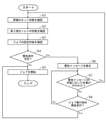
- the control unit 4 determines whether or not the warning condition is satisfied. When the warning condition is satisfied, the control unit 4 displays the warning message MS1 (see FIG. 6) on the operation panel 6 before executing the transport reading job.
- FIG. 5 starts when the operation panel 6 receives an execution instruction of the transport reading job from the user.
- step S1 the control unit 4 confirms the set state of the document D based on the output of the set sensor SS. In other words, the control unit 4 confirms whether or not the job document D, which is the document D conveyed and read by the transfer reading job, is set in the document tray 200.
- step S2 the control unit 4 confirms the state of the second discharge tray 202 based on the output of the cover sensor CS. In other words, the control unit 4 confirms the open / closed state of the second discharge tray 202. In other words, the control unit 4 confirms whether or not the discharge port 20C of the document transport path 20 is blocked.
- step S3 the control unit 4 confirms the setting contents of the transfer reading job received from the user by the operation panel 6.
- the control unit 4 confirms each setting content of the route setting and the type setting.
- control unit 4 confirms which of the first transport path R1 and the second transport path R2 the operation panel 6 has received. In other words, the control unit 4 confirms in which of the first mode and the second mode the operation panel 6 has accepted the execution of the transfer reading job.
- the operation panel 6 when accepting a route setting, accepts a mode selection operation for selecting either the first mode or the second mode from the user.
- the control unit 4 determines that it has received the fact that the transfer reading job is executed in the mode selected by the mode selection operation. If the mode selection operation is not performed, the control unit 4 determines that it has accepted that the transfer reading job is executed in the first mode, which is the default mode.
- control unit 4 confirms which of the plurality of predetermined types is set as the type of the job manuscript D. Then, the control unit 4 recognizes the thickness (basis weight) associated with the set type among the plurality of types as the thickness of the job document D.
- the operation panel 6 when accepting a type setting, accepts a type selection operation for selecting one of a plurality of types from the user.
- the control unit 4 recognizes the thickness (basis weight) associated with the type selected in the type selection operation as the thickness of the job document D. If the type selection operation is not performed, the control unit 4 recognizes the job document D as plain paper (default type).
- the control unit 4 may recognize that the job manuscript D is plain paper.
- step S4 the control unit 4 determines whether or not the warning condition is satisfied. First, the control unit 4 determines whether or not the transfer reading job can be executed. If the transport reading job cannot be executed, the control unit 4 determines that the warning condition is satisfied.
- the control unit 4 determines that the warning condition is satisfied.
- the discharge port 20C of the document transport path 20 is blocked by the second discharge tray 202. If so, the job manuscript D cannot be ejected. That is, the transport read job cannot be executed. Therefore, if the discharge port 20C is blocked by the second discharge tray 202 even though the setting to use the second transport path R2 is made, the control unit 4 satisfies the warning condition. Judge that there is.
- control unit 4 determines whether or not there is a possibility that an abnormality may occur in the transfer of the document D if the transfer reading job is executed as it is. Then, when there is a possibility that an abnormality may occur in the transport of the document D, the control unit 4 determines that the warning condition is satisfied.
- the control unit 4 determines that the warning condition is satisfied.
- the control unit 4 Determines that the warning conditions are met.
- the control unit. 4 determines that the warning condition is not satisfied.
- control unit 4 may use the job document D regardless of the type. , Judge that the warning conditions are not met.
- control unit 4 determines that the warning condition is not satisfied.
- step S4 determines in step S4 that the warning condition is not satisfied. If the control unit 4 determines in step S4 that the warning condition is not satisfied, the process proceeds to step S5. When the process proceeds to step S5, the control unit 4 starts a transfer reading job.
- step S4 determines in step S4 that the warning condition is satisfied
- the process proceeds to step S6.
- the control unit 4 displays the warning screen 61 as shown in FIG. 6 on the operation panel 6.
- a warning message MS1 is arranged on the warning screen 61.
- the warning message MS1 shown in FIG. 6 is displayed when the type of the job manuscript D is a specific type and the first transport path R1 is set to be used. In this case, a message to the effect that the job manuscript D may be damaged, a message to the effect that the job manuscript D may not be read correctly, and the like are included in the warning message MS1. In addition, a message prompting confirmation of the setting contents of the transport reading job is included in the warning message MS1.
- a message prompting to confirm the set state of the document D is displayed as a warning message MS1. If the discharge port 20C is blocked by the second discharge tray 202 even though the setting is made to use the second transport path R2, the state of the second discharge tray 202 (discharge destination). A message prompting you to confirm is displayed as a warning message and MS1.
- step S7 after confirming the warning message MS1, the user takes some measures if necessary. For example, when the warning message MS1 as shown in FIG. 6 is displayed, the user reviews the job settings and changes the transport route to be used from the first transport route R1 to the second transport route R2. When the message prompting to confirm the status of the second discharge tray 202 is displayed, the user opens the second discharge tray 202. When a message prompting to confirm the setting state of the document D is displayed, the user sets the document D in the document tray 200. When the control unit 4 detects that such work (work according to the content of the warning message MS1) has been performed, the process proceeds to step S1.
- step S7 the work according to the content of the warning message MS1 is not performed, and the execution instruction of the transport reading job is given again. In this case, the process proceeds from step S7 to step S8.
- step S8 the control unit 4 determines whether or not the operation panel 6 has re-accepted the execution instruction of the transfer reading job from the user.
- the process proceeds to step S5, and the control unit 4 determines that the operation panel 6 has not accepted the execution instruction of the transport read job. In that case, the process proceeds to step S7.
- step S8 the transfer reading job is started in a state where an abnormality is likely to occur in the transfer of the job document D.
- an error message indicating that the original D is not set is displayed after receiving the execution instruction.
- the execution instruction is given. After the reception, an error message indicating that the second discharge tray 202 is closed is displayed.
- the first transport path R1 can be used. That is, the transport read job can be executed in the first mode. In this case, jam is likely to occur. The thicker the job manuscript D is than plain paper, the more likely it is that jam will occur.
- control unit 5 determines whether or not there is a possibility of jam occurring after the transfer reading job is started. When there is a possibility that jam may occur, the control unit 4 suppresses the occurrence of jam by changing the document transport condition, the jam detection condition, and the like.
- the flow shown in FIG. 7 starts when the transport reading job is started, that is, when the job document D is fed from the document tray 200 to the document transport path 20.
- step S11 the control unit 4 detects the thickness of the job document D based on the output of the thickness sensor TS.
- the thickness (basis weight) associated with the type of the job document D set by the user and the thickness of the job document D detected based on the output of the thickness sensor TS (hereinafter referred to as the detection thickness). Does not always match.
- step S12 the control unit 4 determines whether or not jam may occur based on the detected thickness.
- the method for determining whether or not jam may occur is not particularly limited.
- the control unit 4 may generate a jam. Judge that there is sex.
- the thicker the job manuscript D the more likely it is that jam will occur. Therefore, when the detected thickness of the job document D is equal to or greater than the predetermined thickness, it may be determined that jam may occur regardless of the transport path of the job document D.
- step S12 determines in step S12 that there is no possibility of jam occurring, the process proceeds to step S13.
- the control unit 4 continues the transfer reading job without performing the jam suppression process for changing the document transfer condition, the jam detection condition, and the like.
- step S12 determines in step S12 that jam may occur. If the control unit 4 determines in step S12 that jam may occur, the process proceeds to step S14.
- step S14 the control unit 4 interrupts the transport reading job. That is, the control unit 4 stops the transfer of the job document D by the document transfer unit 2.
- step S15 the control unit 4 displays the confirmation screen 62 as shown in FIG. 8 on the operation panel 6.
- a message MS2 indicating that jam may occur is arranged on the confirmation screen 62.
- a restart button B1 and a cancel button B2 are arranged on the confirmation screen 62.
- control unit 4 When the control unit 4 detects an operation on the restart button B1, it is determined that the operation panel 6 has received from the user that the interrupted transfer reading job is restarted. On the other hand, when the control unit 4 detects an operation on the cancel button B2, it determines that the operation panel 6 has received from the user that the interrupted transfer reading job is cancelled.
- step S16 the control unit 4 determines whether or not the operation panel 6 has accepted that the transfer reading job is restarted.
- the process proceeds to step S17.
- the control unit 4 performs a jam suppression process.
- the control unit 4 performs at least one of the first process and the second process as the jam suppression process.
- the first process is a process of changing the transport speed of the job document D.
- the second process is a process of changing the jam detection setting.
- control unit 4 performs a process of setting the transfer speed of the job document D to a speed slower than before the interruption of the transfer reading job.
- control unit 4 performs a process of setting the margin time for jam detection to a longer time than before the interruption of the transfer reading job as the second process. Further, the control unit 4 sets the upper limit of the number of retries to a larger number than before the interruption of the transport reading job. By performing the second process, it becomes difficult to detect the jam.
- the control unit 4 When the first process is performed, the timing of reaching the front end of the job document D to the detection position of each transport sensor FS is delayed. Therefore, when the control unit 4 performs the first process, the control unit 4 also performs the second process.
- the first process may not be performed and only the second process may be performed. However, in order to suppress the occurrence of jam, it is preferable to slow down the transport speed of the job document D.
- step S18 the control unit 4 restarts the interrupted transfer reading job.
- the transfer speed of the job document D is slower than before the interruption.
- the margin time for jam detection becomes long, and the upper limit of the number of retries increases.
- step S16 determines in step S16 that the transfer reading job is not restarted (to cancel the transfer reading job)
- the process proceeds to step S19.
- step S19 the control unit 4 cancels the transfer reading job.
- the multifunction device 100 of the present embodiment has an operation panel 6 for accepting the setting of the transfer reading job and a document transfer path 20 for guiding the transfer of the job document D, and the job document D is transferred to the document transfer path 20. It is provided with a document transport unit 2 for feeding and transporting a document, and a control unit 4 for controlling a transport reading job based on the setting contents of the transport reading job accepted by the operation panel 6.
- the transport path of the job document D includes a first transport path R1 that extends from one side to the other side and then folds back toward one side, and a second transport path R2 that extends linearly without folding back in the middle. There is.
- the type of the job document D is a specific type (thick paper, plastic card, etc.)
- the job document D may be damaged.
- the timing of reaching the reading position of the job document D may be delayed, and the job document D may not be read normally.
- the control unit 4 may perform the operation panel 6 before executing the transport read job. Displays a warning message MS1.
- the warning message M1 When the warning message M1 is displayed, the user reviews the job settings. That is, the transport path of the job document D is changed from the first transport path R1 to the second transport path R2. As a result, it is possible to prevent the job document D from being damaged. In addition, it is possible to suppress the occurrence of reading defects. Further, jam due to the job manuscript D is less likely to occur.
- the second discharge tray 202 is closed even if the setting is made to use the second transport path R2. If (if the ejection port 20C of the document transport path 20 is blocked), the control unit 4 causes the operation panel 6 to display the warning message MS1 before executing the transport reading job. This makes it possible for the user to recognize that the transport reading job cannot be executed (the discharge port 20C of the document transport path 20 is blocked). The user who confirms the warning message MS1 opens the second discharge tray 202 so that the transport reading job can be executed.
- the control unit 4 when the setting to use the second transport path R2 is made and the second discharge tray 202 is opened as described above, the control unit 4 sends the warning message MS1. Is not displayed. As a result, it is possible to suppress the warning message MS1 from being unnecessarily displayed.
- the control unit 4 determines whether or not there is a possibility of jam due to the job document D. Then, when it is determined that a jam may occur, the control unit 4 interrupts the transport reading job and causes the operation panel 6 to accept whether to restart or cancel the transport reading job. This configuration is convenient because the user can recognize whether or not a jam may occur and can immediately cancel the transport read job if a jam may occur.
- the control unit 4 when the operation panel 6 receives that the transfer reading job is restarted, the control unit 4 performs jam suppression processing and restarts the transfer reading job. From the user's point of view, when the transport reading job is restarted, the jam suppression process is automatically performed without any separate setting, which is convenient.
- the control unit 4 When restarting the transport reading job, the control unit 4 sets the transport speed of the job document D to a speed slower than before the interruption of the transport reading job. Further, the control unit 4 sets the margin time for jam detection to a longer time than before the interruption of the transport reading job. Further, the control unit 4 sets the upper limit of the number of retries to a larger number than before the interruption of the transport reading job. As a result, it is possible to easily prevent jams from occurring.
- the control unit 4 determines whether or not jam may occur based on the thickness of the job manuscript D. Specifically, in a transport reading job in which the first transport path R1 is set to be used, when it is detected that the thickness of the job document D is equal to or larger than a predetermined thickness, the control unit 4 jams. Judge that it may occur. With this configuration, it is possible to improve the accuracy of determining whether or not jam occurs.
Landscapes
- Engineering & Computer Science (AREA)
- Multimedia (AREA)
- Signal Processing (AREA)
- Physics & Mathematics (AREA)
- General Physics & Mathematics (AREA)
- Facsimiles In General (AREA)
- Controlling Sheets Or Webs (AREA)
Priority Applications (2)
| Application Number | Priority Date | Filing Date | Title |
|---|---|---|---|
| JP2022537990A JP7472986B2 (ja) | 2020-07-21 | 2021-07-19 | 画像読取装置 |
| US18/006,114 US11856166B2 (en) | 2020-07-21 | 2021-07-19 | Image reading apparatus which prevents damage to documents to be read which are thicker than regular paper |
Applications Claiming Priority (2)
| Application Number | Priority Date | Filing Date | Title |
|---|---|---|---|
| JP2020-124552 | 2020-07-21 | ||
| JP2020124552 | 2020-07-21 |
Publications (1)
| Publication Number | Publication Date |
|---|---|
| WO2022019250A1 true WO2022019250A1 (ja) | 2022-01-27 |
Family
ID=79729568
Family Applications (1)
| Application Number | Title | Priority Date | Filing Date |
|---|---|---|---|
| PCT/JP2021/026912 Ceased WO2022019250A1 (ja) | 2020-07-21 | 2021-07-19 | 画像読取装置 |
Country Status (3)
| Country | Link |
|---|---|
| US (1) | US11856166B2 (https=) |
| JP (1) | JP7472986B2 (https=) |
| WO (1) | WO2022019250A1 (https=) |
Cited By (1)
| Publication number | Priority date | Publication date | Assignee | Title |
|---|---|---|---|---|
| JP2023120786A (ja) * | 2022-02-18 | 2023-08-30 | セイコーエプソン株式会社 | 読取装置、読取装置の制御方法、プログラム、及び、画像読取システム |
Families Citing this family (1)
| Publication number | Priority date | Publication date | Assignee | Title |
|---|---|---|---|---|
| JP2024000882A (ja) * | 2022-06-21 | 2024-01-09 | 京セラドキュメントソリューションズ株式会社 | 画像読取装置、及び画像形成装置 |
Citations (8)
| Publication number | Priority date | Publication date | Assignee | Title |
|---|---|---|---|---|
| JP2003069792A (ja) * | 2001-08-28 | 2003-03-07 | Oki Data Corp | 用紙厚検出装置及びそれを用いた画像読取り装置 |
| JP2008005278A (ja) * | 2006-06-23 | 2008-01-10 | Murata Mach Ltd | 画像読取装置 |
| JP2008127116A (ja) * | 2006-11-16 | 2008-06-05 | Ricoh Co Ltd | 画像形成装置 |
| JP2012034186A (ja) * | 2010-07-30 | 2012-02-16 | Sharp Corp | 画像読取り装置、及びそれを備える画像形成装置 |
| JP2017218273A (ja) * | 2016-06-06 | 2017-12-14 | 株式会社リコー | 自動原稿搬送装置、画像読取装置および画像形成装置 |
| JP2019033413A (ja) * | 2017-08-09 | 2019-02-28 | 株式会社リコー | 読取装置及び画像形成装置 |
| JP2020015565A (ja) * | 2018-07-23 | 2020-01-30 | 京セラドキュメントソリューションズ株式会社 | 給紙装置および画像形成装置 |
| JP2020108036A (ja) * | 2018-12-27 | 2020-07-09 | キヤノン株式会社 | 画像読取装置、画像読取装置の制御方法、及びプログラム |
Family Cites Families (2)
| Publication number | Priority date | Publication date | Assignee | Title |
|---|---|---|---|---|
| JP2013026874A (ja) | 2011-07-22 | 2013-02-04 | Canon Electronics Inc | 画像読取装置、画像読取装置の制御方法、及びプログラム |
| JP7224929B2 (ja) * | 2019-01-21 | 2023-02-20 | キヤノン株式会社 | 画像読取装置、画像読取装置の制御方法、及びプログラム |
-
2021
- 2021-07-19 JP JP2022537990A patent/JP7472986B2/ja active Active
- 2021-07-19 WO PCT/JP2021/026912 patent/WO2022019250A1/ja not_active Ceased
- 2021-07-19 US US18/006,114 patent/US11856166B2/en active Active
Patent Citations (8)
| Publication number | Priority date | Publication date | Assignee | Title |
|---|---|---|---|---|
| JP2003069792A (ja) * | 2001-08-28 | 2003-03-07 | Oki Data Corp | 用紙厚検出装置及びそれを用いた画像読取り装置 |
| JP2008005278A (ja) * | 2006-06-23 | 2008-01-10 | Murata Mach Ltd | 画像読取装置 |
| JP2008127116A (ja) * | 2006-11-16 | 2008-06-05 | Ricoh Co Ltd | 画像形成装置 |
| JP2012034186A (ja) * | 2010-07-30 | 2012-02-16 | Sharp Corp | 画像読取り装置、及びそれを備える画像形成装置 |
| JP2017218273A (ja) * | 2016-06-06 | 2017-12-14 | 株式会社リコー | 自動原稿搬送装置、画像読取装置および画像形成装置 |
| JP2019033413A (ja) * | 2017-08-09 | 2019-02-28 | 株式会社リコー | 読取装置及び画像形成装置 |
| JP2020015565A (ja) * | 2018-07-23 | 2020-01-30 | 京セラドキュメントソリューションズ株式会社 | 給紙装置および画像形成装置 |
| JP2020108036A (ja) * | 2018-12-27 | 2020-07-09 | キヤノン株式会社 | 画像読取装置、画像読取装置の制御方法、及びプログラム |
Cited By (1)
| Publication number | Priority date | Publication date | Assignee | Title |
|---|---|---|---|---|
| JP2023120786A (ja) * | 2022-02-18 | 2023-08-30 | セイコーエプソン株式会社 | 読取装置、読取装置の制御方法、プログラム、及び、画像読取システム |
Also Published As
| Publication number | Publication date |
|---|---|
| JPWO2022019250A1 (https=) | 2022-01-27 |
| US20230283727A1 (en) | 2023-09-07 |
| JP7472986B2 (ja) | 2024-04-23 |
| US11856166B2 (en) | 2023-12-26 |
Similar Documents
| Publication | Publication Date | Title |
|---|---|---|
| CN101891073B (zh) | 图像形成装置 | |
| JP5815493B2 (ja) | シート搬送装置、原稿搬送装置および画像形成装置 | |
| JP2013082539A (ja) | 給紙装置、原稿搬送装置、画像形成装置 | |
| JP7472986B2 (ja) | 画像読取装置 | |
| US12069208B2 (en) | Image forming apparatus, type information processing method of recording medium, and program for identifying a cause of failure | |
| CN105467791B (zh) | 图像形成装置 | |
| US11825049B2 (en) | Image-reading device | |
| US9146519B2 (en) | Sheet conveying device and image forming apparatus having same | |
| JP2022046977A (ja) | 画像読取装置および画像形成装置 | |
| JP6642514B2 (ja) | 原稿搬送装置、画像読取装置、原稿搬送方法 | |
| JP4898553B2 (ja) | 重送検知装置、画像形成装置 | |
| JP7452218B2 (ja) | 画像読取装置および画像形成装置 | |
| JP2007223688A (ja) | シート搬送装置及び画像形成装置 | |
| JP6589687B2 (ja) | 自動原稿搬送装置、およびそれを備えた画像読取システムと画像形成装置 | |
| CN112299068A (zh) | 输送装置 | |
| JP2017128421A (ja) | 自動原稿搬送装置、およびそれを備えた画像読取システムと画像形成装置 | |
| JP2007137618A (ja) | シート搬送装置 | |
| US10791233B2 (en) | Image forming apparatus capable of performing a print job to print an image on a sheet being conveyed | |
| JP2019134382A (ja) | シート搬送装置、シート搬送方法、及びプログラム | |
| JP6652749B2 (ja) | 原稿搬送装置及び該原稿搬送装置を備えた画像形成装置 | |
| JP4876035B2 (ja) | シート材搬送装置、原稿搬送装置、給紙装置および画像形成装置 | |
| JP2018150148A (ja) | 原稿搬送装置、及び、画像形成装置 | |
| JP6669126B2 (ja) | 原稿搬送装置、画像読取装置、原稿搬送方法 | |
| JP2021027391A (ja) | 搬送装置 | |
| JP2016159997A (ja) | 画像形成装置 |
Legal Events
| Date | Code | Title | Description |
|---|---|---|---|
| 121 | Ep: the epo has been informed by wipo that ep was designated in this application |
Ref document number: 21846773 Country of ref document: EP Kind code of ref document: A1 |
|
| ENP | Entry into the national phase |
Ref document number: 2022537990 Country of ref document: JP Kind code of ref document: A |
|
| NENP | Non-entry into the national phase |
Ref country code: DE |
|
| 122 | Ep: pct application non-entry in european phase |
Ref document number: 21846773 Country of ref document: EP Kind code of ref document: A1 |