WO2021104366A1 - 参数调整方法及终端设备 - Google Patents
参数调整方法及终端设备 Download PDFInfo
- Publication number
- WO2021104366A1 WO2021104366A1 PCT/CN2020/131741 CN2020131741W WO2021104366A1 WO 2021104366 A1 WO2021104366 A1 WO 2021104366A1 CN 2020131741 W CN2020131741 W CN 2020131741W WO 2021104366 A1 WO2021104366 A1 WO 2021104366A1
- Authority
- WO
- WIPO (PCT)
- Prior art keywords
- terminal device
- image
- user
- preview
- parameter
- Prior art date
- Legal status (The legal status is an assumption and is not a legal conclusion. Google has not performed a legal analysis and makes no representation as to the accuracy of the status listed.)
- Ceased
Links
Images




Classifications
-
- H—ELECTRICITY
- H04—ELECTRIC COMMUNICATION TECHNIQUE
- H04N—PICTORIAL COMMUNICATION, e.g. TELEVISION
- H04N23/00—Cameras or camera modules comprising electronic image sensors; Control thereof
- H04N23/60—Control of cameras or camera modules
- H04N23/64—Computer-aided capture of images, e.g. transfer from script file into camera, check of taken image quality, advice or proposal for image composition or decision on when to take image
-
- H—ELECTRICITY
- H04—ELECTRIC COMMUNICATION TECHNIQUE
- H04N—PICTORIAL COMMUNICATION, e.g. TELEVISION
- H04N7/00—Television systems
- H04N7/18—Closed-circuit television [CCTV] systems, i.e. systems in which the video signal is not broadcast
- H04N7/181—Closed-circuit television [CCTV] systems, i.e. systems in which the video signal is not broadcast for receiving images from a plurality of remote sources
Definitions
- the embodiment of the present invention relates to the field of communication technology, and in particular to a parameter adjustment method and terminal equipment.
- the terminal device can take images and videos.
- the second user can first move from its location to The location of the terminal device (that is, the location of the first user). After checking the shooting effect of the image taken by the terminal device, if the second user is not satisfied with the shooting effect, the second user can trigger the terminal device to adjust the shooting parameters, and then Then return to its location, and the first user will take an image for the second user through the terminal device again.
- the process of shooting the image by the terminal device may be cumbersome and time-consuming.
- the embodiment of the present invention provides a parameter adjustment method and a terminal device, so as to solve the problem of cumbersome and time-consuming process of capturing images by the terminal device.
- the present invention is implemented as follows:
- an embodiment of the present invention provides a parameter adjustment method, which may be applied to a first terminal device, and the parameter adjustment method may include: sending a first image to a second terminal device; and receiving a second terminal device The first parameter sent by the device; and according to the first parameter, the shooting parameter of the first terminal device is adjusted; where the first image is a preview image collected by the camera of the first terminal device, and the first parameter is based on the user of the second terminal device For the input of the first image displayed by the second terminal device, the adjusted shooting parameters are triggered.
- an embodiment of the present invention provides a parameter adjustment method, which can be applied to a second terminal device, and the parameter adjustment method may include: receiving a first image sent by a first terminal device and applying it to a camera The first image is displayed in the image preview interface of the program, and the first target input of the user of the second terminal device for the first image is received, and in response to the first target input, the first parameter is sent to the first terminal device;
- the image is a preview image collected by the camera of the first terminal device, and the first parameter is a shooting parameter after triggering adjustment based on the first target input.
- an embodiment of the present invention provides a terminal device, the terminal device may be a first terminal device, and the terminal device may include: a sending module, a receiving module, and a processing module.
- the sending module is used to send the first image to the second terminal device, the first image is a preview image collected by the camera of the first terminal device;
- the receiving module is used to receive the first parameter sent by the second terminal device, the first parameter In order to trigger the adjusted shooting parameters based on the user of the second terminal device;
- the processing module is configured to adjust the shooting parameters of the first terminal device according to the first parameters received by the receiving module.
- an embodiment of the present invention provides a terminal device, the terminal device may be a second terminal device, and the terminal device may include: a receiving module, a display module, and a sending module.
- the receiving module is used to receive the first image sent by the first terminal device, the first image is a preview image collected by the camera of the first terminal device; the display module is used to display the receiving module in the image preview interface of the camera application.
- the receiving module is also used to receive the first target input of the user of the second terminal device for the first image; the sending module is also used to send to the first terminal device in response to the first target input received by the receiving module
- the first parameter is a shooting parameter after triggering adjustment based on the first target input.
- an embodiment of the present invention provides a terminal device, including a processor, a memory, and a computer program stored in the memory and running on the processor.
- the computer program can realize the above-mentioned first aspect when the computer program is executed by the processor. Steps of the parameter adjustment method.
- an embodiment of the present invention provides a terminal device, including a processor, a memory, and a computer program stored in the memory and running on the processor.
- the computer program can implement the above-mentioned second aspect when the computer program is executed by the processor. Steps of the parameter adjustment method.
- an embodiment of the present invention provides a computer-readable storage medium, the computer-readable storage medium stores a computer program, and when the computer program is executed by a processor, the above-mentioned parameter adjustment of the first aspect or the second aspect can be realized Method steps.
- the first terminal device may send the first image (a preview image) collected by its camera to the second terminal device.
- the second terminal device may The first image is displayed, and then the user of the second terminal device can trigger the adjustment of shooting parameters by the first target input for the first image.
- the second terminal device can The user triggers the adjusted shooting parameter to be sent to the first terminal device through the first target input, so that the first terminal device can adjust the shooting parameter of the first terminal device according to the adjusted shooting parameter.
- the first terminal device can send the preview images collected by the camera to the second terminal device in real time
- the user of the second terminal device (for example, the person being photographed) can directly display the preview images in the second terminal device based on these preview images.
- the display effect on the device (the same as the display effect of the preview image on the first terminal device) is triggered to adjust the shooting parameters, so that the second terminal device can send the adjusted shooting parameters triggered by the user to the first terminal device, so that the first terminal device A terminal device adjusts its shooting parameters, and then shoots an image that meets the shooting needs of the person being photographed.
- the user of the second terminal device can directly view the shooting effect of the first terminal device on the second terminal device, and directly trigger the adjustment of the shooting parameters of the first terminal device on the second terminal device, without requiring the user of the second terminal device Only by repeatedly moving the position several times can you view the shooting effect of the first terminal device and trigger the adjustment of the shooting parameters of the first terminal device, thus simplifying the process of capturing images by the terminal device and shortening the time for the terminal device to capture images.
- FIG. 1 is a schematic structural diagram of a possible Android operating system provided by an embodiment of the present invention
- FIG. 2 is one of the schematic flowcharts of a parameter adjustment method provided by an embodiment of the present invention
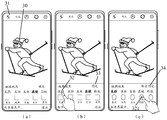
- FIG. 3 is one of the schematic diagrams of the interface of the parameter adjustment method application provided by the embodiment of the present invention.
- FIG. 5 is a second schematic flowchart of a parameter adjustment method provided by an embodiment of the present invention.
- FIG. 6 is the third schematic flowchart of a parameter adjustment method provided by an embodiment of the present invention.
- FIG. 7 is the third schematic diagram of the interface of the application of the parameter adjustment method provided by the embodiment of the present invention.
- FIG. 8 is the fourth schematic diagram of the interface of the parameter adjustment method application provided by the embodiment of the present invention.
- FIG. 9 is the fifth schematic diagram of the interface of the parameter adjustment method application provided by the embodiment of the present invention.
- FIG. 10 is the sixth schematic diagram of the interface of the parameter adjustment method application provided by the embodiment of the present invention.
- FIG. 11 is a fourth schematic flowchart of a parameter adjustment method provided by an embodiment of the present invention.
- FIG. 12 is the fifth schematic flowchart of a parameter adjustment method provided by an embodiment of the present invention.
- Figure 13 is one of the schematic structural diagrams of a terminal device provided by an embodiment of the present invention.
- FIG. 14 is a second schematic structural diagram of a terminal device provided by an embodiment of the present invention.
- FIG. 15 is a schematic diagram of hardware of a terminal device provided by an embodiment of the present invention.
- first and second in this document are used to distinguish different objects, rather than to describe a specific order of objects.
- first input and the second input are used to distinguish different inputs, rather than to describe a specific order of input.
- words such as “exemplary” or “for example” are used to represent examples, illustrations, or illustrations. Any embodiment or design solution described as “exemplary” or “for example” in the embodiments of the present invention should not be construed as being more preferable or advantageous than other embodiments or design solutions. To be precise, words such as “exemplary” or “for example” are used to present related concepts in a specific manner.
- plural means two or more than two, for example, a plurality of elements means two or more elements, and so on.
- the camera application refers to a camera application, and the two have the same meaning and can be interchanged.
- the image preview interface refers to the interface of the camera application. The two have the same meaning and can be interchanged.
- Embodiments of the present invention provide a parameter adjustment method and terminal device.
- the first terminal device can send a first image (a preview image) collected by its camera to a second terminal device, and the second terminal device receives the first image After that, the second terminal device can display the first image, and then the user of the second terminal device can trigger the adjustment of the shooting parameters by the first target input for the first image, after the second terminal device receives the user's first target input
- the second terminal device may send the adjusted shooting parameters triggered by the user through the first target input to the first terminal device, so that the first terminal device may adjust the shooting parameters of the first terminal device according to the adjusted shooting parameters.
- the first terminal device can send the preview images collected by the camera to the second terminal device in real time
- the user of the second terminal device (for example, the person being photographed) can directly display the preview images on the second terminal device based on these preview images.
- the display effect on the device (the same as the display effect of the preview image on the first terminal device) is triggered to adjust the shooting parameters, so that the second terminal device can send the adjusted shooting parameters triggered by the user to the first terminal device, so that the first terminal device A terminal device adjusts its shooting parameters, and then shoots an image that meets the shooting needs of the person being photographed.
- the user of the second terminal device can directly view the shooting effect of the first terminal device on the second terminal device, and directly trigger the adjustment of the shooting parameters of the first terminal device on the second terminal device, without requiring the user of the second terminal device Only by repeatedly moving the position several times can you view the shooting effect of the first terminal device and trigger the adjustment of the shooting parameters of the first terminal device, thus simplifying the process of capturing images by the terminal device and shortening the time for the terminal device to capture images.
- the terminal device in the embodiment of the present invention may be a terminal device with an operating system.
- the operating system may be an Android operating system, an ios operating system, or other possible operating systems, which is not specifically limited in the embodiment of the present invention.
- the following takes the Android operating system as an example to introduce the software environment to which the parameter adjustment method provided by the embodiment of the present invention is applied.
- FIG. 1 it is a schematic structural diagram of a possible Android operating system provided by an embodiment of the present invention.
- the architecture of the Android operating system includes 4 layers, which are: application layer, application framework layer, system runtime library layer, and kernel layer (specifically, it may be the Linux kernel layer).
- the application layer includes various applications (including system applications and third-party applications) in the Android operating system.
- the application framework layer is the framework of the application. Developers can develop some applications based on the application framework layer while complying with the development principles of the application framework.
- the system runtime layer includes a library (also called a system library) and an Android operating system runtime environment.
- the library mainly provides various resources needed by the Android operating system.
- the Android operating system operating environment is used to provide a software environment for the Android operating system.
- the kernel layer is the operating system layer of the Android operating system and belongs to the lowest level of the Android operating system software level.
- the kernel layer is based on the Linux kernel to provide core system services and hardware-related drivers for the Android operating system.
- developers can develop a software program that implements the parameter adjustment method provided by the embodiment of the present invention based on the system architecture of the Android operating system as shown in FIG. 1, so that the interface
- the parameter adjustment method can be run based on the Android operating system as shown in FIG. 1. That is, the processor or the terminal device can implement the parameter adjustment method provided in the embodiment of the present invention by running the software program in the Android operating system.
- the terminal device in the embodiment of the present invention may be a mobile terminal or a non-mobile terminal.
- the mobile terminal may be a mobile phone, a tablet computer, a notebook computer, a palmtop computer, a vehicle-mounted terminal, a wearable device, an ultra-mobile personal computer (UMPC), a netbook, or a personal digital assistant (personal digital assistant
- the non-mobile terminal may be a personal computer (PC), a television (television, TV), a teller machine, or a self-service machine, etc., which are not specifically limited in the embodiment of the present invention.
- the execution subject of the parameter adjustment method provided by the embodiment of the present invention may be the above-mentioned terminal device, or may be a functional module and/or functional entity in the terminal device that can implement the parameter adjustment method.
- the specifics can be determined according to actual usage requirements.
- the embodiments of the present invention are not limited.
- the following takes a terminal device as an example to illustrate the parameter adjustment method provided by the embodiment of the present invention.
- terminal device B1 in the process of user A1 taking an image or video for user A2 through terminal device B1, when user A2 needs to view the shooting effect of the image taken by terminal device B1, terminal device B1 can report to user A2’s terminal device B2 sends the preview image collected by the camera of the terminal device B1 (for example, the first image in the embodiment of the present invention), so that the user A2 can view the preview image collected by the camera of the terminal device B1 on the terminal device B2;
- the display effect of the preview image collected by the terminal device B1 (which can reflect the shooting parameters) is not satisfactory, then the user A2 can trigger the adjustment of the shooting parameters through the input on the terminal device B2, and the terminal device B2 can trigger the user A2 through the input
- the adjusted shooting parameters are sent to the terminal device B1, so that the terminal device B1 can adjust the shooting parameters of the terminal device B1 according to the adjusted shooting parameters, so that the effect of the image captured by the terminal device B1 for the user A2 can satisfy the user The demand of A2.
- the terminal device B1 can send the preview images collected by the camera to the terminal device B2 in real time
- the user A2 of the terminal device B2 (for example, the person being photographed) can be directly based on the display of these preview images on the terminal device B2
- the effect (same as the display effect of the preview image on the terminal device B1) triggers the adjustment of the shooting parameters of the terminal device B1, so that the terminal device B2 can send the adjusted shooting parameters to the terminal device B1, so that the terminal device B1 can adjust its shooting Parameters, and then shoot an image that meets the shooting needs of the person being photographed.
- the user of the second terminal device (such as the aforementioned terminal device B2) can directly view the shooting effect of the first terminal device (such as the aforementioned terminal device B1) on the second terminal device, and directly trigger adjustments on the second terminal device
- the shooting parameters of the first terminal device do not require the user of the second terminal device to repeatedly move the position multiple times to view the shooting effect of the first terminal device when shooting and trigger the adjustment of the shooting parameters of the first terminal device, thus simplifying the terminal device to capture images This process shortens the time for the terminal device to take images.
- an embodiment of the present invention provides a parameter adjustment method, and the method may include the following S201-S207.
- the first terminal device sends a first image to the second terminal device.
- the second terminal device receives the first image.
- the above-mentioned first image may be a preview image collected by the first terminal device through the camera of the first terminal device, that is, the first image may be a preview image collected in real time by the camera of the first terminal device.
- the first image can be used by the user of the second terminal device to trigger the adjustment of the shooting parameters of the first terminal device.
- the second terminal device can use the first The display effect of the image on the first terminal device displays the first image.
- the user of the second terminal device can directly trigger the adjustment of the shooting parameters on the second terminal device by viewing the display effect of the first image on the second terminal device.
- the second terminal device then sends the adjusted shooting parameters triggered by the user of the second terminal device to the first terminal device, so that the first terminal device can adjust the shooting parameters of the first terminal device according to the adjusted shooting parameters.
- the process in which the first terminal device sends the first image to the second terminal device can be understood as a process in which the first terminal device shares the preview image with the second terminal device.
- the first terminal device may be the photographer's terminal device (for example, the aforementioned terminal device B1)
- the user of the first terminal device may be the photographer (for example, the aforementioned user A1)
- the second terminal device may be the photographer's terminal device (for example, the aforementioned user A1).
- the terminal device of the second terminal device (for example, the aforementioned terminal device B2)
- the user of the second terminal device may be the person being photographed (for example, the aforementioned user A2).
- the user operating on the first terminal device may be the user of the first terminal device, that is, the user of the first terminal device
- the user operating on the second terminal device may be the user of the second terminal device, that is, the second terminal device. Terminal device users.
- the shooting parameters of the first terminal device adjusted by the first terminal device may include at least one of the shooting parameters of the camera of the first terminal device and the shooting parameters of the camera application of the first terminal device. item.
- the shooting parameters of the camera may include at least one of shutter response time, aperture size, sensitivity, exposure, activation and deactivation of the flash, backlight value, panorama, and the like.
- the shooting parameters of the camera application may include at least one of beauty parameters, beauty parameters, body parameters, sticker parameters, filter parameters, and the like.
- the specific adjusted parameter items can be determined according to actual use requirements, and the embodiment of the present invention does not limit it.
- the number of the above-mentioned second terminal device may be one or multiple, that is, the first terminal device may send the first image to one second terminal device, or may also send the first image to multiple terminal devices.
- the second terminal device may be specifically determined according to actual use requirements, which is not limited in the embodiment of the present invention.
- the number of the second terminal devices mentioned in the embodiments of the present invention is not limited, that is, the number of the second terminal devices mentioned in the embodiments of the present invention is not limited.
- the terminal device may be one second terminal device or multiple second terminal devices.
- the first terminal device may send the preview image collected by the camera of the first terminal device to the second terminal device in real time.
- the second terminal device can receive the preview image sent by the first terminal device in real time. Therefore, the second terminal user can view the effect of the preview image collected through the camera of the first terminal device in real time through the second terminal device. In this way, the user of the second terminal device does not need to move the position to view the photographing effect when the first terminal device photographs the image, thereby improving the convenience for the person being photographed to view the photographing effect.
- the second terminal device displays the first image in the image preview interface of the camera application.
- the camera application when the second terminal device receives the first image, the camera application can be run in the foreground of the second terminal device, and the first image can be displayed on the image preview interface of the camera application.
- the second terminal device may display the first image in the image preview area of the image preview interface to show the preview image to the user in real time.
- the image preview interface of the second terminal device may be the interface where the preview image is located in the camera application of the second terminal device.
- the image preview interface may also include parameters for adjusting the shooting parameters (including the shooting parameters of the camera and the shooting of the camera application). At least one of the parameters) adjustment control.
- the image preview interface of the second terminal device displays the first image (30 as shown in (a) in FIG. 3) and multiple adjustment controls.
- Multiple adjustment controls can include: shutter control, aperture control, sensitivity control, exposure control, flash control (as shown in Figure 3 (a) 31), backlight control, panoramic control, beauty control, beauty Controls, body control, sticker control, filter control, etc. Specifically, it can be determined according to actual use requirements, and the embodiment of the present invention does not limit it.
- the aforementioned shutter control can be used to trigger adjustment of the shutter response time
- the aforementioned aperture control can be used to trigger adjustment of the aperture size
- the aforementioned sensitivity control can be used to trigger adjustment of sensitivity
- the aforementioned exposure control can be used to trigger adjustment Exposure
- the aforementioned flash control can be used to trigger the adjustment of the flash on and off
- the aforementioned backlight control can be used to trigger the adjustment of the backlight value
- the aforementioned panoramic control can be used to trigger the activation of the panoramic function
- the aforementioned beauty control can be used to trigger the adjustment of the beauty Parameters
- the above-mentioned beauty control can be used to trigger the adjustment of beauty parameters
- the above-mentioned body control can be used to trigger the adjustment of beauty parameters
- the above-mentioned sticker control can be used to trigger the adjustment of sticker parameters
- the above-mentioned filter control can be used to trigger the adjustment of filter parameters .
- the second terminal device receives the first target input of the user of the second terminal device for the first image.
- the above-mentioned first target input can be used to trigger adjustment of shooting parameters.
- the aforementioned first target input may be used to trigger the second terminal device to acquire the adjusted shooting parameters triggered by the user of the second terminal device through the first target input, and send the adjusted shooting parameters to the first terminal device, thereby This allows the first terminal device to adjust the shooting parameters of the first terminal device according to the adjusted shooting parameters.
- the user who performs the first target input may be the user of the second terminal device, that is, the person being photographed.
- the first target input may be an input of the user of the second terminal device to at least one of the above-mentioned multiple adjustment controls.
- the adjustment control targeted by the first target input is different, and the parameter items of the shooting parameters that the first target input triggers the adjustment are also different.
- the first target input can trigger the adjustment of the beauty parameters; if the first target input is the input of the user of the second terminal device to the filter control, Then the first target input can trigger the adjustment of the filter parameters.
- the adjustment control targeted by the first target input is only an exemplary description. In actual implementation, the adjustment control targeted by the first target input may also be any other possible adjustment controls, which can be determined according to actual usage requirements. , The embodiment of the present invention is not limited.
- the above-mentioned first target input may include at least one sub-input.
- the first target input includes a sub-input.
- the user of the second terminal device thinks that the preview image collected by the first terminal device (such as the above-mentioned first image) is dark, as shown in (a) of FIG. 3, the user of the second terminal device can click on the flash control 31 Click to trigger the second terminal device to obtain an instruction to turn on the flash, so that the second terminal device can send the instruction as the adjusted shooting parameter to the first terminal device.
- the first target input including two sub-inputs, the first sub-input and the second sub-input respectively
- the first sub-input is the input of the user of the second terminal device to the beauty control
- the beauty The controls include: dermabrasion options, skin tone options, whitening options, face-lift options, and big-eye options
- the second sub-input is the input of the second terminal device user to the face-lift options (that is, the first target input is used to trigger the adjustment of the beauty parameters , Specifically used to trigger the adjustment of the face-lift parameters in the beauty parameters).
- the user of the second terminal device can first click on the beauty control 32 (that is, the user of the second terminal device executes the first sub Input) to trigger the second terminal device to display the skin refining option, the skin color option, the whitening option, the face-lifting option (321 as shown in (c) in FIG. 3), and the big eye option. Then, as shown in FIG.
- the user of the second terminal device can click on the face-lifting option 321 (that is, the user performs the second sub-input) to trigger the second terminal device to obtain the face-lifting instruction, so that the second terminal
- the device may send the face-lifting instruction as the adjusted shooting parameter (for example, the following first parameter) to the first terminal device.
- the first target input including two sub-inputs, the third sub-input and the fourth sub-input respectively, as an example. It is assumed that the third sub-input is the input of the aperture control by the user of the second terminal device, and the aperture control includes the aperture scale and the aperture value indicating control, and the fourth sub-input is the input of the second terminal device user to the aperture value indicating control.
- the second terminal device can click on the aperture control 35 (that is, the user performs the third sub-input) to trigger the second terminal device to display the aperture ruler (36 shown in Figure 4 (b)) and the aperture value indicator control (as shown in Figure 4). 37) shown in (b) in 4, and the aperture value adjustment control indicates F1 on the aperture scale at this time, that is, the aperture value of the first terminal device at this time is F1.
- the user of the second terminal device can drag the aperture value indicator control to the right (that is, the user performs the fourth sub-input), as shown in Figure 4(c), the first After the user of the terminal device drags the aperture value indicating control 37 to the right, the aperture value indicating control 37 indicates F2 on the aperture scale 36, so that the second terminal device can obtain the aperture value F2 and use the aperture value F2 as the adjusted aperture
- the numerical value (for example, the following first parameter) is sent to the first terminal device.
- the form of the first parameter sent by the second terminal device to the first terminal device is not limited.
- the first parameter may be in the form of the above-mentioned instruction, or in the form of a numerical value, or in any other possible form.
- the form of is specifically determined according to actual usage requirements, and is not limited in the embodiment of the present invention.
- the second terminal device sends the first parameter to the first terminal device in response to the first target input.
- S206 The first terminal device receives the first parameter.
- the above-mentioned first parameter may be a shooting parameter after triggering adjustment based on the first target input. Specifically, after the user performs the first target input on a certain adjustment control, the shooting parameter corresponding to the adjustment control can be triggered to adjust, that is, the shooting parameter at this time is the shooting parameter after the user triggers the adjustment through the first target input.
- the flashlight control displayed on the image preview interface of the second terminal device indicates that the flashlight is turned off
- the flashlight control may be triggered to instruct the flashlight to turn on, that is, the second terminal device may be triggered to instruct the flashlight to turn on.
- the second terminal device acquires an instruction to turn on the flashlight (that is, the user inputs the adjusted shooting parameters through the first target input), and then the second terminal device may send the instruction to the first terminal device.
- the aperture indicated by the aperture control displayed on the image preview interface of the second terminal device is F1
- the aperture indicated by the aperture control may be triggered
- the value is F2, that is, the second terminal device is triggered to obtain the aperture value F2 (that is, the second terminal device user triggers the adjusted shooting parameter through the first target input), and then the second terminal device can send the aperture value F2 to the first terminal device.
- Terminal Equipment the second terminal device is triggered to obtain the aperture value F2 (that is, the second terminal device user triggers the adjusted shooting parameter through the first target input)
- the second terminal device may send N parameters including the M parameters adjusted by the user of the second terminal device as the first parameter to the first terminal device (that is, the second terminal device).
- the device sends all the parameters as a whole to the first terminal device).
- the second terminal device may send the M parameters after the second terminal device user triggers the adjustment as the first parameter to the first terminal device (that is, the second terminal device triggers the adjustment by the second terminal device user).
- Each parameter is sent to the first terminal device).
- the first terminal device adjusts the shooting parameter of the first terminal device according to the first parameter.
- the first terminal device may adjust the shooting parameter of the first terminal device to a parameter corresponding to the first parameter.
- the first terminal device can enable the face-slimming instruction, so that the first terminal device can enable the face-slimming function when shooting.
- the image preview interface in the first terminal device may include a voice control
- the image preview interface of the second terminal device may also include a voice control.
- the user of the first terminal device and the user of the second terminal device can implement voice communication by inputting the above-mentioned voice control.
- the first terminal device can send the preview image collected by the camera to the second terminal device in real time
- the user of the second terminal device for example, the person being photographed
- the display effect of these preview images on the second terminal device the same as the display effect of the preview image on the first terminal device
- trigger adjustment of the shooting parameters so that the second terminal device can trigger the second terminal device user to trigger the adjustment after the adjustment.
- the shooting parameters are sent to the first terminal device, so that the first terminal device adjusts its shooting parameters, and then shoots an image that meets the shooting needs of the person being photographed.
- the user of the second terminal device can directly view the shooting effect of the first terminal device on the second terminal device, and directly trigger the adjustment of the shooting parameters of the first terminal device on the second terminal device, without requiring the user of the second terminal device Only by repeatedly moving the position several times can you view the shooting effect of the first terminal device and trigger the adjustment of the shooting parameters of the first terminal device, thus simplifying the process of capturing images by the terminal device and shortening the time for the terminal device to capture images.
- the first terminal device may send the preview image collected by the camera after adjusting the shooting parameters to The second terminal device, so that the user of the second terminal device again determines whether the effect of the preview image collected by the first terminal device meets his needs.
- the parameter adjustment method provided in the embodiment of the present invention may further include the following S208-210.
- S208 The first terminal device sends the second image to the second terminal device.
- the second terminal device receives the second image.
- the second terminal device displays the second image in the image preview interface.
- the second image is a preview image collected by the camera of the first terminal device after the first terminal device adjusts its shooting parameters. That is, the second image is a preview image collected by the camera after the first terminal device adjusts the shooting parameters according to the first parameter.
- the second terminal device may update and display the first image displayed in the image preview interface of the second terminal device as the second image.
- the preview image may be collected by the camera after the shooting parameters is adjusted, and the preview image is sent to the second terminal device.
- the user of the second terminal device can view the shooting effect after the first terminal device adjusts the shooting parameters on the second terminal device in real time, so that the accuracy of the adjustment of the shooting parameters can be ensured.
- the image preview interface of the second terminal device may include a first lock control, and the first lock control may be used to activate the shooting function of the first terminal device.
- the shooting function of the first terminal device refers to the function of the first terminal device to shoot and obtain an image through the camera of the first terminal device.
- the parameter adjustment method provided in the embodiment of the present invention may further include the following S211-214.
- the second terminal device receives a second target input of the user of the second terminal device on the first lock control.
- the aforementioned second target input may be used to trigger the second terminal device to lock the shooting parameters, that is, it may be used to indicate that the user of the second terminal device has completed the adjustment of the shooting parameters.
- the user who performs the second target input may be the user of the second terminal device, that is, the person being photographed.
- the above-mentioned first lock control may include an unlocked state and a locked state.
- the unlocked state may be used to indicate that the user of the second terminal device has not completed the adjustment of the shooting parameters
- the locked state may be used to indicate that the user of the second terminal device has completed the adjustment of the shooting parameters.
- the first locked control when the first locked control is in the unlocked state, the first locked control may be displayed as a control including the word "locked” (33 as shown in (b) in FIG. 3), which is used to indicate the second terminal The device user has not completed the adjustment of the shooting parameters.
- the first lock control when the first lock control is in the locked state, the first lock control can be displayed as a control including the words "Unlock” (34 shown in Figure 3 (c)), which is used to indicate that the user of the second terminal device has completed Adjustment of shooting parameters.
- the second target input may trigger the first lock control to switch from the unlocked state to the locked state.
- the first locked control is in the unlocked state, and after the user performs the second target input on the first locked control, the first locked control is in the locked state.
- the user of the second terminal device can trigger the first locked control to switch between the unlocked state and the locked state by inputting on the first locked control.
- the adjustment controls displayed in the image preview interface of the second terminal device are all in an inactive state, that is, the second terminal device is in the inactive state.
- the user of the terminal device cannot trigger the adjustment of the shooting parameters by inputting the adjustment control.
- the first lock control can be triggered to switch from the locked state to the unlocked state, that is, the image preview of the second terminal device
- the adjustment controls displayed on the interface are all in an activated state, and then the user of the second terminal device can trigger the adjustment of the shooting parameters by inputting these adjustment controls.
- the second terminal device executes S211 after the first terminal device executes S205 (that is, the second terminal device sends the first parameter to the first terminal device) as an example for illustration.
- the second terminal device may also perform S211 after the first terminal device performs S206 (the first terminal device receives the first parameter).
- the second terminal device In response to the second target input, the second terminal device sends an activation instruction to the first terminal device.
- the first terminal device receives an activation instruction.
- activating the shooting function of the first terminal device refers to activating the shooting function of the first terminal device.
- the user of the second terminal device may perform a second target input on the first lock control to trigger the second terminal device to lock the shooting parameters. Therefore, the second terminal device can send an activation instruction to the first terminal device.
- the first terminal device activates the shooting function of the first terminal device according to the activation instruction.
- the second target input can indicate that the user of the second terminal device has finished adjusting the shooting parameters, it means that the user of the second terminal device has adjusted the shooting parameters, and the second terminal device receives the second terminal device.
- the second terminal device may send an activation instruction to the first terminal device, and then the first terminal device may activate the shooting function of the first terminal device according to the activation instruction.
- the user of the second terminal device can trigger the first terminal device to take an image through the camera of the first terminal device.
- the user of the second terminal device can control the shooting control (which can be understood as a virtual button) in the second terminal device.
- the shooting control (which can be understood as a virtual button) in the second terminal device.
- Input trigger the first terminal device to take an image through the camera of the first terminal device.
- the user of the first terminal device may also trigger the first terminal device to capture an image through the camera of the first terminal device by inputting a shooting shortcut button (ie, a physical button) in the first terminal device.
- a shooting shortcut button ie, a physical button
- the shooting control before the first terminal device activates the shooting function of the first terminal device (that is, the first terminal device executes the above S214), the shooting control is inoperable, and the shooting function of the shooting shortcut button is not activated. (That is, the shooting function of the shooting button is not enabled).
- the shooting control can be operated, and the shooting function of the shooting shortcut button is activated.
- the first terminal device when the number of second terminal devices is multiple, that is, there are multiple second terminal devices, the first terminal device receives each second terminal device from the multiple second terminal devices. Only after the activation instruction sent by the terminal device can the shooting function of the first terminal device be activated.
- the first locked control is displayed as a control including the word "locked”, and when the first locked control is in the locked state, the first locked control is displayed as including "unlocked” ""; and when the first locked control is in the unlocked state, the shooting function of the first terminal device is in an inactive state.
- the shooting function of the first terminal device is in an inactive state, that is, the user of the first terminal device cannot pass the The shooting control of a terminal device (41 in FIG. 7) and the shooting shortcut key input trigger the first terminal device to shoot an image.
- the first lock control 43 displayed in the image preview interface 42 in the second terminal device is in the unlocked state, and the second The user of the terminal device can click on the first lock control 43 (that is, execute the above-mentioned second target input), that is, the second terminal device receives the second target input of the user of the second terminal device on the first lock control, and then the second terminal The device may send an activation instruction to the first terminal device in response to the second target input. Further, after the first terminal device receives the activation instruction, the first terminal device may activate the shooting function of the first terminal device according to the activation instruction. That is, as shown in FIG. 7(c), after the first terminal device executes the above S214, the shooting control 41 displayed in the image preview interface 40 of the first terminal device is operable.
- the adjustment control used to adjust the shooting parameters in the first terminal device may be in an inactive state, that is, in this case
- the user cannot adjust the shooting parameters of the first terminal device by triggering the adjustment controls on the first terminal device (such as the controls in the filled area in FIG. 7, where the filled area indicates that the controls in the coverage area of the area are not operable) adjust the shooting parameters of the first terminal device.
- the first terminal device since the first terminal device can activate the shooting function of the first terminal device according to the activation instruction sent by the second terminal device, that is, after the user of the second terminal device confirms the shooting effect of the first terminal device, the first terminal device Only the user of the terminal device can trigger the first terminal device to capture the image, so it can be ensured that the image captured by the first terminal device through the camera of the first terminal device is confirmed by the user of the second terminal device.
- the satisfaction of the user of the terminal device with the image captured by the camera of the first terminal device can improve the satisfaction of the photographer with the image captured by the photographer.
- the image preview interface of the first terminal device may further include first indication information, and the first indication information is used to indicate the progress of the second terminal device in adjusting the shooting parameters.
- the above activation instruction can also be used to update the first indication information.
- the first terminal device when there are multiple second terminal devices, the first terminal device receives an activation instruction, which means that a user of the second terminal device has completed the adjustment of the shooting parameters, so that the first terminal device
- the first indication information can be updated according to the activation instruction.
- the first indication message 50 may be "There are three other people adjusting the shooting parameters, and the shooting is temporarily unavailable.”
- the first terminal device can update the first instruction information as "There are two more people adjusting the shooting parameters, and the shooting is temporarily unavailable"; and finally
- the first terminal device can update the first indication information 50 as "Everyone is ready, You can shoot!”.
- the image preview interface of the second terminal device may also include first indication information, and the first indication information may be used to indicate the progress of adjusting the shooting parameters of the second terminal device (as shown in (a) in Figure 9).
- first indication information may be used to indicate the progress of adjusting the shooting parameters of the second terminal device (as shown in (a) in Figure 9).
- the first terminal device and the second terminal device can update the first indication displayed respectively in the following two ways (namely, one implementation and the other implementation) according to the activation instruction information.
- each second terminal device may first update the first indication information displayed by itself according to the above activation instruction, and then send the activation instruction To the first terminal device; the first terminal device can update the first indication information it displays according to the activation instruction, and then the first terminal device can send the activation instruction to other second terminal devices, so that other second terminal devices also The first indication information displayed respectively can be updated according to the activation instruction.
- each second terminal device may first update the first indication information displayed by itself according to the above activation instruction, and then send the activation instruction to the first terminal device and other second terminal devices, so that the first A terminal device and other second terminal devices may update the first indication information displayed respectively according to the activation instruction.
- it can be determined according to actual use requirements, and the embodiment of the present invention does not limit it.
- the user of the first terminal device may trigger the first terminal device to take an image through the camera of the first terminal device.
- the first terminal device may also receive the first input of the user of the first terminal device. Then, in response to the first input, the first terminal device captures the third image.
- the above-mentioned first input may be used to trigger the first terminal device to take an image through the camera of the first terminal device.
- the above-mentioned first input may be the input of the user of the second terminal device to the shooting control in the first terminal device, or the user of the first terminal device may be the shortcut of shooting in the first terminal device.
- Key input Specifically, it can be determined according to actual use requirements, and the embodiment of the present invention does not limit it.
- the user who performs the first input may be the user of the first terminal device, that is, the photographer.
- the above-mentioned third image is an image obtained by the first terminal device through the camera of the first terminal device after the first terminal device adjusts the shooting parameters of the first terminal device.
- the third image is an image obtained after activating the shooting function of the first terminal device, that is, the shooting effect of the third image is confirmed by the user of the second terminal device (that is, the person being photographed), Therefore, it is possible to improve the satisfaction of the person who is photographed with the image taken through the terminal device of the photographer.
- the image preview interface of the second terminal device may include a preview control.
- the user of the second terminal device can also trigger the second terminal device to access the preview image by the second terminal device by inputting the preview control. Image.
- the images that have been captured in this shooting process refer to all the images that have been captured by the first terminal device through the camera of the first terminal device since the first terminal device shares the preview image with the second terminal device.
- the second terminal device may also receive a third target input from the user to the preview control;
- the second terminal device sends a first request message to the first terminal device in response to the third target input.
- the first terminal device receives the first request message; and modifies the access right of the fourth image according to the first request message.
- the above-mentioned first request message can be used to request access to the image taken after the first terminal device has recently received the confirmation message for confirming the shared preview image sent by the second terminal device (that is, the image that has been taken during this shooting process). , Which is the fourth image in the following embodiment).
- the above-mentioned first request message may be used to request access to the fourth image
- the fourth image is an image captured after the first terminal device most recently received a confirmation message for confirming the shared preview image sent by the second terminal device.
- the modification of the access authority of the fourth image by the first terminal device can be understood as that the first terminal device modifies the access authority of the fourth image to allow the second terminal device to access.
- the second terminal device before the first terminal device modifies the access authority of the fourth image, the second terminal device cannot access the fourth image, that is, the user of the second terminal device cannot view the fourth image through the second terminal device.
- Four images After the first terminal device modifies the access authority of the fourth image, the second terminal device can access the fourth image, that is, the user of the second terminal device can view the fourth image through the second terminal device.
- the second terminal device can log in to the first terminal device, and then the second terminal device can directly access the fourth image saved in the first terminal device, that is, the user of the second terminal device can view the first terminal device through the second terminal device The fourth image saved in.
- the foregoing fourth image may be one image or multiple images, which may be specifically determined according to actual use requirements, and the embodiment of the present invention does not limit it.
- the foregoing fourth image may include an image captured by the camera of the first terminal device before adjusting the shooting parameters of the first terminal device; it may also include after adjusting the shooting parameters of the first terminal device,
- the image captured by the camera of the first terminal device may also include the image captured by the camera of the first terminal device before and after the shooting parameters of the first terminal device are adjusted.
- it can be determined according to actual use requirements, and the embodiment of the present invention does not limit it.
- the third target input is a click input on the preview control
- the second terminal device has no right to access the first terminal device in the first terminal device.
- Four images, and the number of sheets for the fourth image is one.
- the preview control 61 is displayed in the image preview interface 60 of the second terminal device, and the user of the second terminal device can click on the preview control 61, that is, the second terminal device receives the second terminal.
- the device user inputs the third target of the preview control, so that the second terminal device sends the first request message to the first terminal device in response to the third target input.
- the first terminal device may receive the first request message sent by the second terminal device, and modify the access authority of the fourth image according to the first request message. It can be understood that after the first terminal device modifies the access authority of the fourth image, the second terminal device can access the fourth image; that is, as shown in Figure 9 (b), in this case, the image preview of the second terminal device
- the fourth image 62 may be displayed in the interface 60.
- the first terminal device can modify the permission of the fourth image to allow the second terminal device to access according to the first request message, that is, the user of the second terminal device can view through the first terminal device through the second terminal device.
- the image captured by the camera of the second terminal device does not require the user of the second terminal device to move from its location to the location of the first terminal device before viewing the image captured by the camera of the first terminal device, thus simplifying the viewing by the user of the second terminal device
- the first terminal device may first request whether the second terminal device allows it. Share the preview image. Specifically, in the process of collecting images through the camera of the first terminal device, the first terminal device may run the camera application in the foreground of the first terminal device and display the interface of the camera application.
- the image preview interface of the first terminal device may include a sharing control, and the user of the first terminal device can trigger the first terminal device to send a request message for sharing the preview image to the second terminal device by inputting the sharing control (for example, the following Second request message), so that after the user of the second terminal device confirms that the preview image is shared, the first terminal device can send the first image to the second terminal device (that is, perform the above S201), that is, the first terminal device can send the first image to the second terminal device in real time.
- the second terminal device shares the preview image collected by its camera.
- the parameter adjustment method provided in the embodiment of the present invention may further include: the first terminal device receives a second input from the user of the first terminal device to the shared control in the image preview interface , And then the first terminal device sends a second request message to the second terminal device in response to the second input.
- the second terminal device receives the second request message; and displays the prompt information according to the second request message.
- the second terminal device sends a confirmation message to the first terminal device in the case of receiving the fourth target input of the prompt information by the user of the second terminal device.
- the above-mentioned second request message may be used to request to share the preview image with the second terminal device.
- the above-mentioned image preview interface may be an interface where the preview image is located in the camera application of the first terminal device.
- the above-mentioned prompt information may be used to prompt the user of the second terminal device whether to accept the sharing of the preview image by the first terminal device.
- the above confirmation message may be used to confirm the sharing of the preview image, that is, the user of the second terminal device confirms to receive the first image.
- the above-mentioned fourth target input can be the first option in the prompt message (73 shown in (c) in FIG. 10) by the user of the second terminal device (730 shown in (c) in FIG. 10). )input of.
- the foregoing S201 may be specifically implemented by the following S201a.
- the first terminal device sends the first image to the second terminal device in the case of receiving the confirmation message sent by the second terminal device.
- the first terminal device may permanently display the shared control in the image preview interface, or the first terminal device may display the shared control floating in the image preview interface.
- the embodiment of the present invention does not limit it.
- the user who performs the second input may be the user of the first terminal device, that is, the photographer.
- a shared device list may be pre-stored in the first terminal device, and the shared device list includes at least the device identifier of the second terminal device.
- the above-mentioned second input may include a first sub-input and a second sub-input, where the first sub-input may be the input of the user of the first terminal device to the shared control, which is used to trigger the first terminal device to display the list of shared devices; the second sub-input
- the input may be the input of the device identification of the second terminal device in the shared device list by the user of the first terminal device, and is used to trigger the first terminal device to determine the second terminal device.
- the first terminal device may send the second request information to the second terminal device.
- the above-mentioned prompt information may include prompt content, a first option, and a second option.
- the prompt information may be the information shown in (c) 73 in FIG. 10.
- the prompt content can be the content shown in 74 in Figure 10 (c), such as "whether to accept E's sharing image request"; it can be used to prompt the second terminal device user whether to accept the first terminal device sharing preview image.
- the first option may be the option shown in 730 of (c) in FIG. 10, such as "accept”; it may be used to trigger the reception of the first image.
- the second option may be the option shown in 731 of (c) in FIG. 10, such as "reject”; it may be used to trigger the rejection of receiving the first image.
- the image preview interface of the first terminal device includes a sharing control
- the second input includes a first sub-input and a second sub-input
- the prompt information displayed on the second terminal device includes the first option and the second Option
- the first option may be used to indicate to receive the first image
- the second option may be used to indicate to refuse to receive the first image
- the fourth target input is a click input of the first option by the user of the second terminal device.
- the image preview interface 70 of the first terminal device includes a sharing control 71, and the user of the first terminal device can press and hold on the sharing control 71 (that is, perform the first sub-input), Trigger the first terminal device to display the shared device list, as shown in (b) in Figure 10, and then, the user of the first terminal device can click on the device ID D (that is, perform the second sub-input) to select the device ID D , Thereby triggering the first terminal device to determine the device identifier D from the shared device list, so that the first terminal device can send the second request message to the terminal device (for example, the second terminal device) indicated by the device identifier D.
- the sharing control 71 that is, perform the first sub-input
- the second terminal device may receive the second request message sent by the first terminal device, and as shown in (c) in FIG. 10, the second terminal device may display prompt information 73, and the prompt information 73 includes the prompt content 74.
- the user of the second terminal device can click on the first option 730 (ie, execute the fourth target input) to trigger the second terminal device to send a confirmation message to the first terminal device.
- the first terminal device can send the first image (a preview image collected by the camera of the first terminal device) to the second terminal device upon receiving the confirmation message, so that the second terminal device can view The first image is displayed in the image preview interface.
- the user of the first terminal device needs to trigger the first terminal device to send a request message for sharing the preview image to the second terminal device.
- the first terminal device can share the preview image with the second terminal device. In this way, the waste of network resources caused by the first terminal device directly sharing the preview image with the second terminal device when the user of the second terminal device disagrees with the first terminal device to share the preview image can be avoided, thereby improving the accuracy of sharing the preview image Sex and effectiveness.
- an embodiment of the present invention provides a parameter adjustment method, which may be applied to a first terminal device, and the method may include the following S301-S303.
- S301 The first terminal device sends the first image to the second terminal device.
- the above-mentioned first image may be a preview image collected by a camera of the first terminal device.
- S302 The first terminal device receives the first parameter sent by the second terminal device.
- the above-mentioned first parameter may be a shooting parameter after the adjustment is triggered based on the input of the user of the second terminal device on the first image displayed by the second terminal device.
- the first terminal device adjusts the shooting parameter of the first terminal device according to the first parameter.
- the parameter adjustment method of the embodiment of the present invention may further include: the first terminal device sends the second image to the second terminal device
- the second image may be a preview image collected by the camera of the first terminal device after adjusting the shooting parameters.
- the parameter adjustment method of the embodiment of the present invention may further include: the first terminal device receives an activation instruction sent by the second terminal device ; And according to the activation instruction, activate the shooting function of the first terminal device.
- the parameter adjustment method in the embodiment of the present invention may further include: the first terminal device receives the first terminal device user’s first Input; and in response to the first input, a third image is captured.
- the parameter adjustment method of the embodiment of the present invention may further include: the first terminal device receives the first request message sent by the second terminal device, and modifies the fourth image according to the first request message. access permission.
- the above-mentioned first request message may be used to request access to the fourth image
- the fourth image is an image captured after the first terminal device most recently received a confirmation message for confirming the shared preview image sent by the second terminal device.
- the parameter adjustment method of the embodiment of the present invention may further include: the first terminal device receives the user's response to the image of the first terminal device. Preview the second input of the sharing control in the interface, and in response to the second input, send a second request message to the second terminal device.
- the above-mentioned image preview interface may be the interface where the preview image is located in the camera application; the above-mentioned second request message may be used to request to share the preview image with the second terminal device.
- the foregoing S301 may be specifically implemented by the following S301a.
- the first terminal device sends the first image to the second terminal device in the case of receiving the confirmation message sent by the second terminal device.
- the above confirmation message can be used to confirm the sharing of the preview image.
- the first terminal device can send the first image to the second terminal device (which is the preview image collected by the camera of the first terminal device, the first image can be used for the second terminal device).
- the user triggers the adjustment of the shooting parameter of the first terminal device); and receives the first parameter sent by the second terminal device (it is based on the input of the second terminal device user on the first image displayed by the second terminal device to trigger the adjusted shooting parameter ); and adjust the shooting parameters of the first terminal device according to the first parameter.
- the first terminal device can send the preview image collected by the camera to the second terminal device in real time
- the user of the second terminal device for example, the person who is photographed
- the display effect on the terminal device triggers the adjustment of shooting parameters, so that the first terminal device can receive from the second terminal device and the user of the second terminal device
- the second terminal device triggers the adjusted shooting parameters, adjusts the shooting parameters of the first terminal device, and then shoots an image that meets the shooting needs of the person being photographed.
- the first terminal device can adjust the shooting parameters according to the shooting parameters sent by the second terminal device and the user of the second terminal device triggers the adjustment on the second terminal device
- the user of the second terminal device does not need to repeatedly repeat the shooting parameters. Only by moving the location can you view the shooting effect of the first terminal device and trigger the adjustment of the shooting parameters of the first terminal device, thus simplifying the process of capturing images by the first terminal device and shortening the time for the first terminal device to capture images.
- an embodiment of the present invention provides a parameter adjustment method, which may be applied to a second terminal device, and the method may include the following S401-S404.
- the second terminal device receives the first image sent by the first terminal device.
- the above-mentioned first image may be a preview image collected by a camera of the first terminal device.
- the second terminal device displays the first image in the image preview interface of the camera application.
- the second terminal device receives a first target input of the user of the second terminal device for the first image.
- the second terminal device sends the first parameter to the first terminal device in response to the first target input.
- the above-mentioned first parameter may be a shooting parameter after triggering adjustment based on the first target input.
- the above-mentioned image preview interface may include a first lock control; after the second terminal device sends the first parameter to the first terminal device, it may also include: the second terminal device receives the second terminal The device user inputs a second target of the first lock control; and in response to the second target input, sends an activation instruction to the first terminal device, and the activation instruction may be used to activate the shooting function of the first terminal device.
- the above-mentioned image preview interface may include a preview control
- the parameter adjustment method provided in the embodiment of the present invention may further include: the second terminal device receives a third target of the second terminal device user for the preview control Input; and in response to the third target input, send a first request message to the first terminal device, the first request message can be used to request access to the first terminal device to receive the confirmation of the shared preview image sent by the second terminal device most recently After the message, take the resulting image.
- the second electronic device before receiving the first image sent by the first terminal device, may also receive a second request message sent by the first terminal device, and in response to the second request message, display Prompt information, and in the case of receiving a fourth target input of the prompt information by the user of the second terminal device, sending a confirmation message to the first terminal device.
- the second request message may be used to request to share the preview image with the second terminal device; the above prompt information may be used to prompt the user of the second terminal device whether to accept the first terminal device to share the preview image; the above confirmation message may be used to confirm the sharing of the preview image.
- the second terminal device can receive the preview image collected by the first terminal device through the camera of the first terminal device in real time
- the user of the second terminal device for example, the person being photographed
- the user of the second terminal device can be made Directly according to the display effect of these preview images on the second terminal device (same as the display effect of the preview image on the first terminal device)
- trigger the adjustment of the shooting parameters so that the second terminal device can trigger the adjustment after the user of the second terminal device
- the shooting parameters of is sent to the first terminal device, so that the first terminal device adjusts its shooting parameters, so that the first terminal device shoots an image that meets the shooting needs of the person being photographed.
- the user of the second terminal device can directly view the shooting effect of the first terminal device on the second terminal device, and directly trigger the adjustment of the shooting parameters of the first terminal device on the second terminal device, without requiring the user of the second terminal device Only by repeatedly moving the position multiple times can you view the shooting effect of the first terminal device and trigger the adjustment of the shooting parameters of the first terminal device, thus simplifying the process of capturing images and shortening the time for the terminal device to capture images.
- the foregoing embodiment takes a scene in which an image is taken as an example, and exemplarily describes the parameter adjustment method provided by the embodiment of the present invention.
- the realization idea of the parameter adjustment method provided by the embodiment of the present invention can also be applied to images saved in a certain terminal device (which can be photographed, downloaded or received from other terminal devices) by multiple persons (hereinafter referred to as In the scene where the image parameters of the target image are adjusted (hereinafter referred to as scene A).
- scenario A when the user C2 of the terminal device C1 needs and the user D2 of the terminal device D1 jointly adjust the image parameters of the target image stored in the terminal device C1, the user C2 can trigger the terminal device C1 to set the target The image is saved to the server, and the terminal device C1 is triggered to send a request message for joint adjustment of image parameters to the terminal device D1; after the user D2 confirms the joint adjustment of the image parameters, the user D2 can trigger on the terminal device D1 to adjust the target image saved in the server
- the user C2 can trigger on the terminal device C1 to adjust the image parameters of the target image stored in the server. In this way, the user C1 and the user D1 can jointly adjust the image parameters of the target image stored in the server.
- both the terminal device C1 and the terminal device D1 can access the server, and then both the terminal device C1 and the terminal device D1 can load the target image in the server to the local, and further, the terminal device C1
- the target image can be displayed on its first interface, and the terminal device D1 can display the target image on its second interface.
- both the first interface and the second interface may include target controls for adjusting image parameters.
- the user C2 can input the target control displayed on the first interface of the terminal device C1 to trigger the adjustment of the image parameters of the target image displayed on the first interface of the terminal device C1, and then the terminal device C1 can send the adjusted image parameters to Server, so that the server can adjust the image parameters of the target image saved in the server according to the adjusted image parameters;
- the user D2 can also input the target control displayed in the second interface of the terminal device D1 to trigger the adjustment of the terminal device
- the image parameters of the target image displayed in the second interface of D1, and then the terminal device D1 can send the adjusted image parameters to the server, so that the server can adjust the image of the target image saved in the server according to the adjusted image parameters parameter.
- the target image saved in the server is this
- the image after the two parameters work together. That is, when the server receives the image parameters sent by multiple terminal devices, the server superimposes the adjustment. For example, assuming that the contrast of the target image before adjustment is 100% and the saturation is 50%, the first modified image is obtained after adjustment according to the terminal device C1, and the contrast of the first modified image is 125%. Based on the adjustment according to the terminal device D1, the second modified image is obtained. The contrast of the second modified image is 125% and the saturation is 80%, that is, the second modified image is the target image after adjusting the image parameters.
- the display effect of the target image in the terminal device C1 and the terminal device D1 is the same as the display effect in the server.
- the first interface and the second interface may further include a second lock control, and the second lock control may be used to activate the download function of the target image in the server.
- the user C2 can trigger the terminal device C1 to send an activation instruction to the server by inputting the second lock control displayed on the first interface of the terminal device C1; correspondingly, the user D2 can pass the second lock control on the terminal device D1
- the input of the second lock control displayed on the interface triggers the terminal device D1 to send an activation instruction to the server.
- the server may activate the download function of the target image in the server.
- the user can trigger the terminal device (such as the aforementioned terminal device C1 and the terminal device D1) to download the target image from the server.
- the target image that the user triggers the terminal device to download from the server can be the target image after the image parameter is adjusted by the server.
- each user who participates in adjusting the image parameters can trigger the adjustment of the image parameters of the target image stored in the server through a terminal device, multiple people can adjust the image parameters of the target image at the same time. Therefore, the efficiency of adjusting the image parameters of the target image can be improved on the basis of meeting the adjustment needs of multiple persons.
- an embodiment of the present invention provides a terminal device 800.
- the terminal device 800 may be a first terminal device.
- the terminal device may include a sending module 801, a receiving module 802, and a processing module 803.
- the sending module 801 can be used to send a first image to the second terminal device.
- the first image can be a preview image collected by the camera of the first terminal device.
- the first image can be used by the user of the second terminal device to trigger adjustment of the first image.
- the shooting parameters of the terminal device; the receiving module 802 may be used to receive the first parameter sent by the second terminal device.
- the first parameter may be based on the input of the second terminal device user on the first image displayed by the second terminal device to trigger adjustment Subsequent shooting parameters; the processing module 803 may be used to adjust the shooting parameters of the first terminal device according to the first parameters received by the receiving module 802.
- the sending module 801 may also be used to send a second image to the second terminal device after the processing module 803 adjusts the shooting parameters of the first terminal device.
- the second image may be adjusted shooting After the parameters, the preview image is collected by the camera of the first terminal device.
- the above-mentioned receiving module 802 may also be used to receive the activation instruction sent by the second terminal device after the processing module 803 adjusts the shooting parameters of the first terminal device; the processing module 803 may be used for According to the activation instruction received by the receiving module 802, the shooting function of the first terminal device is activated.
- the above-mentioned receiving module 802 may also be used to receive the first input of the user of the first terminal device after the processing module 803 activates the shooting function of the first terminal device; the processing module 803 may also In response to the first input received by the receiving module 802, a third image is obtained by shooting.
- the receiving module 802 may also be used to receive a first request message sent by the second terminal device.
- the first request message may be used to request access to the fourth image, and the fourth image is the first After the terminal device has recently received the confirmation message sent by the second terminal device confirming the sharing of the preview image, the image is captured; the processing module 803 can also be used to modify the image of the fourth image according to the first request message received by the receiving module 802 access permission.
- the above-mentioned receiving module 802 may also be used to receive the first terminal device user’s preview interface of the image in the first terminal device before the sending module 801 sends the first image to the second terminal device.
- the second input of the shared control in the image preview interface can be the interface where the preview image is located in the camera application of the first terminal device;
- the sending module 801 can also be used to respond to the second input received by the receiving module 802,
- the second terminal device sends a second request message, the second request message can be used to request to share the preview image with the second terminal device;
- the sending module 801 can be specifically used when the receiving module 802 receives the confirmation message sent by the second terminal device Next, the first image is sent to the second terminal device, and the confirmation message can be used to confirm that the preview image is shared.
- the terminal device 800 provided in the embodiment of the present invention can implement each process implemented by the first terminal device shown in the foregoing method embodiment, and to avoid repetition, details are not described herein again.
- the embodiment of the present invention provides a terminal device, the terminal device may be a first terminal device, and the first terminal device may send a first image to a second terminal device (a preview image collected by a camera of the first terminal device, the first The image can be used by the user of the second terminal device to trigger the adjustment of the shooting parameters of the first terminal device; and to receive the first parameter sent by the second terminal device (which is based on the first image displayed by the user of the second terminal device on the second terminal device). Input, trigger the adjusted shooting parameters); and adjust the shooting parameters of the first terminal device according to the first parameters.
- the first terminal device can send the preview image collected by the camera to the second terminal device in real time
- the user of the second terminal device for example, the person who is photographed
- the display effect on the terminal device triggers the adjustment of shooting parameters, so that the first terminal device can receive from the second terminal device and the user of the second terminal device
- the second terminal device triggers the adjusted shooting parameters, adjusts the shooting parameters of the first terminal device, and then shoots an image that meets the shooting needs of the person being photographed.
- the first terminal device can adjust the shooting parameters according to the shooting parameters sent by the second terminal device and the user of the second terminal device triggers the adjustment on the second terminal device
- the user of the second terminal device does not need to repeatedly repeat the shooting parameters. Only by moving the location can you view the shooting effect of the first terminal device and trigger the adjustment of the shooting parameters of the first terminal device, thus simplifying the process of capturing images by the first terminal device and shortening the time for the first terminal device to capture images.
- an embodiment of the present invention provides a terminal device 900.
- the terminal device 900 may be a second terminal device.
- the terminal device may include a receiving module 901, a display module 902, and a sending module 903.
- the receiving module 901 can be used to receive the first image sent by the first terminal device, and the first image can be a preview image collected by the camera of the first terminal device; the display module 902 can be used in the camera application of the second terminal device.
- the image preview interface of the program displays the first image received by the receiving module 901; the receiving module 901 can also be used to receive the first target input of the user of the second terminal device for the first image; the sending module 903 can also be used to respond to The first target input received by the receiving module 901 sends the first parameter to the first terminal device.
- the first parameter may be a shooting parameter after triggering adjustment based on the first target input.
- the above-mentioned image preview interface may include a first lock control; the receiving module 901 may also be used to receive the second terminal device user’s first parameter after sending the first parameter to the first terminal device. A second target input for locking the control; the sending module 903 can also be used to send an activation instruction to the first terminal device in response to the second target input received by the receiving module 901. The activation instruction can be used to activate the shooting of the first terminal device Features.
- the above-mentioned image preview interface may include a preview control; the receiving module 901 may also be used to receive the third target input of the second terminal device user to the preview control; the sending module 903 may also It is used to send a first request message to the first terminal device in response to the third target input received by the receiving module 901.
- the first request message can be used to request access to the first terminal device to receive the confirmation sharing sent by the second terminal device last time. After previewing the confirmation message of the image, take the resulting image.
- the above-mentioned receiving module 901 may also be used to receive a second request message sent by the first terminal device before receiving the first image sent by the first terminal device.
- the second request message may be used For requesting to share the preview image with the second terminal device;
- the display module 902 may also be used to display prompt information in response to the second request message received by the receiving module 901.
- the prompt information may be used to prompt the user of the second terminal device whether to accept the first A terminal device shares the preview image;
- the sending module 903 can also be used to send a confirmation message to the first terminal device when the receiving module 901 receives the fourth target input of the prompt information from the user of the second terminal device.
- the message can be used to confirm the sharing of the preview image.
- the terminal device provided in the embodiment of the present invention can implement the various processes implemented by the terminal device shown in the foregoing method embodiment. In order to avoid repetition, details are not described herein again.
- An embodiment of the present invention provides a terminal device, the terminal device may be a second terminal device, and the second terminal device may receive a first image sent by the first terminal device (a preview image collected by a camera of the first terminal device); And can display the first image in the image preview interface; and receive the first target input of the user of the second terminal device for the first image; and in response to the first target input, send the first parameter (which is the second The user of the terminal device triggers the adjusted shooting parameters through the first target input).
- the second terminal device can receive the preview images collected by the first terminal device through the camera of the first terminal device in real time, the user of the second terminal device (for example, the person being photographed) can directly base on these preview images.
- the display effect on the second terminal device triggers the adjustment of the shooting parameters, so that the second terminal device can send the shooting parameters adjusted by the user of the second terminal device to
- the first terminal device allows the first terminal device to adjust its shooting parameters, so that the first terminal device shoots an image that meets the shooting needs of the person being photographed.
- the user of the second terminal device can directly view the shooting effect of the first terminal device on the second terminal device, and directly trigger the adjustment of the shooting parameters of the first terminal device on the second terminal device, without requiring the user of the second terminal device Only by repeatedly moving the position multiple times can you view the shooting effect of the first terminal device and trigger the adjustment of the shooting parameters of the first terminal device, thus simplifying the process of capturing images and shortening the time for the terminal device to capture images.
- FIG. 15 is a schematic diagram of the hardware structure of a terminal device that implements various embodiments of the present invention.
- the terminal device 100 includes but is not limited to: a radio frequency unit 101, a network module 102, an audio output unit 103, an input unit 104, a sensor 105, a display unit 106, a user input unit 107, an interface unit 108, and a memory 109 , The processor 110, and the power supply 111 and other components.
- the structure of the terminal device shown in FIG. 15 does not constitute a limitation on the terminal device, and the terminal device may include more or fewer components than shown in the figure, or a combination of certain components, or different components Layout.
- terminal devices include, but are not limited to, mobile phones, tablet computers, notebook computers, palmtop computers, vehicle-mounted terminal devices, wearable devices, and pedometers.
- the radio frequency unit 101 is configured to send the first image to the second terminal device; and receive the first parameter sent by the second terminal device.
- the processor 110 is configured to adjust the shooting parameter of the first terminal device according to the first parameter received by the radio frequency unit 11.
- the first image is a preview image collected by the camera of the first terminal device; the first parameter is the adjusted shooting parameter based on the input of the user of the second terminal device on the first image displayed by the second terminal device.
- the sending module 801 and the receiving module 802 in the above-mentioned structural schematic diagram of the terminal device may be implemented by the above-mentioned radio frequency unit 101.
- the processing module 803 in the above-mentioned structural schematic diagram of the terminal device may be implemented by the above-mentioned processor 110.
- the embodiment of the present invention provides a terminal device, the terminal device may be a first terminal device, and the first terminal device may send a first image (a preview image collected by a camera of the first terminal device) to a second terminal device; and receive The first parameter sent by the second terminal device (based on the input of the user of the second terminal device on the first image displayed by the second terminal device, the adjusted shooting parameter is triggered); and according to the first parameter, the adjustment of the first terminal device Shooting parameters.
- the first terminal device can send the preview image collected by the camera to the second terminal device in real time, the user of the second terminal device (for example, the person who is photographed) can be directly based on these preview images in the first terminal device.
- the display effect on the terminal device triggers the adjustment of shooting parameters, so that the first terminal device can receive from the second terminal device and the user of the second terminal device
- the second terminal device triggers the adjusted shooting parameters, adjusts the shooting parameters of the first terminal device, and then shoots an image that meets the shooting needs of the person being photographed.
- the first terminal device can adjust the shooting parameters according to the adjusted shooting parameters sent by the second terminal device and triggered by the second terminal device user on the second terminal device, without the need for the second terminal device user to repeatedly move repeatedly. Only the location can view the shooting effect of the first terminal device and trigger the adjustment of the shooting parameters of the first terminal device, thus simplifying the process of capturing images by the first terminal device and shortening the time for the first terminal device to capture images.
- the radio frequency unit 101 is configured to receive a first image sent by the first terminal device, and the first image is a preview image collected by the camera of the first terminal device
- the display unit 10 is used to display the first image received by the radio frequency unit 101 in the image preview interface of the application;
- the user input unit 107 is used to receive the user's first target input for the first image;
- the processor 110 is used to In response to the first target input received by the user input unit 107, the first parameter is sent to the first terminal device, where the first parameter is a shooting parameter after triggering adjustment based on the first target input.
- An embodiment of the present invention provides a terminal device, the terminal device may be a second terminal device, and the second terminal device may receive a first image sent by the first terminal device (a preview image collected by a camera of the first terminal device); And can display the first image in the image preview interface; and receive the first target input of the user of the second terminal device for the first image; and in response to the first target input, send the first parameter (which is the second The user of the terminal device triggers the adjusted shooting parameters through the first target input).
- the second terminal device can receive the preview images collected by the first terminal device through the camera of the first terminal device in real time, the user of the second terminal device (for example, the person being photographed) can directly base on these preview images.
- the display effect on the second terminal device triggers the adjustment of the shooting parameters, so that the second terminal device can send the shooting parameters adjusted by the user of the second terminal device to
- the first terminal device allows the first terminal device to adjust its shooting parameters, so that the first terminal device shoots an image that meets the shooting needs of the person being photographed.
- the user of the second terminal device can directly view the shooting effect of the first terminal device on the second terminal device, and directly trigger the adjustment of the shooting parameters of the first terminal device on the second terminal device, without requiring the user of the second terminal device Only by repeatedly moving the position multiple times can you view the shooting effect of the first terminal device and trigger the adjustment of the shooting parameters of the first terminal device, thus simplifying the process of capturing images and shortening the time for the terminal device to capture images.
- the radio frequency unit 101 can be used for receiving and sending signals in the process of sending and receiving information or talking. Specifically, the downlink data from the base station is received and processed by the processor 110; in addition, Uplink data is sent to the base station.
- the radio frequency unit 101 includes, but is not limited to, an antenna, at least one amplifier, a transceiver, a coupler, a low noise amplifier, a duplexer, and the like.
- the radio frequency unit 101 can also communicate with the network and other devices through a wireless communication system.
- the terminal device provides users with wireless broadband Internet access through the network module 102, such as helping users to send and receive emails, browse web pages, and access streaming media.
- the audio output unit 103 can convert the audio data received by the radio frequency unit 101 or the network module 102 or stored in the memory 109 into an audio signal and output it as sound. Moreover, the audio output unit 103 may also provide audio output related to a specific function performed by the terminal device 100 (for example, call signal reception sound, message reception sound, etc.).
- the audio output unit 103 includes a speaker, a buzzer, a receiver, and the like.
- the input unit 104 is used to receive audio or video signals.
- the input unit 104 may include a graphics processing unit (GPU) 1041 and a microphone 1042.
- the graphics processor 1041 is used to capture images of still pictures or videos obtained by an image capture device (such as a camera) in a video capture mode or an image capture mode. Data is processed.
- the processed image frame can be displayed on the display unit 106.
- the image frame processed by the graphics processor 1041 may be stored in the memory 109 (or other storage medium) or sent via the radio frequency unit 101 or the network module 102.
- the microphone 1042 can receive sound, and can process such sound into audio data.
- the processed audio data can be converted into a format that can be sent to a mobile communication base station via the radio frequency unit 101 for output in the case of a telephone call mode.
- the terminal device 100 further includes at least one sensor 105, such as a light sensor, a motion sensor, and other sensors.
- the light sensor includes an ambient light sensor and a proximity sensor.
- the ambient light sensor can adjust the brightness of the display panel 1061 according to the brightness of the ambient light.
- the proximity sensor can close the display panel 1061 and the display panel 1061 when the terminal device 100 is moved to the ear. / Or backlight.
- the accelerometer sensor can detect the magnitude of acceleration in various directions (usually three-axis), and can detect the magnitude and direction of gravity when stationary, and can be used to identify the posture of the terminal device (such as horizontal and vertical screen switching, related games) , Magnetometer attitude calibration), vibration recognition related functions (such as pedometer, percussion), etc.; sensor 105 can also include fingerprint sensors, pressure sensors, iris sensors, molecular sensors, gyroscopes, barometers, hygrometers, thermometers, Infrared sensors, etc., will not be repeated here.
- the display unit 106 is used to display information input by the user or information provided to the user.
- the display unit 106 may include a display panel 1061, and the display panel 1061 may be configured in the form of a liquid crystal display (LCD), an organic light-emitting diode (OLED), or the like.
- LCD liquid crystal display
- OLED organic light-emitting diode
- the user input unit 107 may be used to receive inputted numeric or character information, and generate key signal input related to user settings and function control of the terminal device.
- the user input unit 107 includes a touch panel 1071 and other input devices 1072.
- the touch panel 1071 also called a touch screen, can collect user touch operations on or near it (for example, the user uses any suitable objects or accessories such as fingers, stylus, etc.) on the touch panel 1071 or near the touch panel 1071. operating).
- the touch panel 1071 may include two parts: a touch detection device and a touch controller.
- the touch detection device detects the user's touch position, and detects the signal brought by the touch operation, and transmits the signal to the touch controller; the touch controller receives the touch information from the touch detection device, converts it into contact coordinates, and then sends it To the processor 110, the command sent by the processor 110 is received and executed.
- the touch panel 1071 can be implemented in multiple types such as resistive, capacitive, infrared, and surface acoustic wave.
- the user input unit 107 may also include other input devices 1072.
- other input devices 1072 may include, but are not limited to, a physical keyboard, function keys (such as volume control buttons, switch buttons, etc.), trackball, mouse, and joystick, which will not be repeated here.
- the touch panel 1071 can be overlaid on the display panel 1061.
- the touch panel 1071 detects a touch operation on or near it, it transmits it to the processor 110 to determine the type of the touch event, and then the processor 110 determines the type of the touch event according to the touch.
- the type of event provides corresponding visual output on the display panel 1061.
- the touch panel 1071 and the display panel 1061 are used as two independent components to realize the input and output functions of the terminal device, but in some embodiments, the touch panel 1071 and the display panel 1061 can be integrated
- the implementation of the input and output functions of the terminal device is not specifically limited here.
- the interface unit 108 is an interface for connecting an external device with the terminal device 100.
- the external device may include a wired or wireless headset port, an external power source (or battery charger) port, a wired or wireless data port, a memory card port, a port for connecting a device with an identification module, audio input/output (I/O) port, video I/O port, headphone port, etc.
- the interface unit 108 may be used to receive input (for example, data information, power, etc.) from an external device and transmit the received input to one or more elements in the terminal device 100 or may be used to connect to the terminal device 100 and external devices. Transfer data between devices.
- the memory 109 can be used to store software programs and various data.
- the memory 109 may mainly include a storage program area and a storage data area.
- the storage program area may store an operating system, an application program required by at least one function (such as a sound playback function, an image playback function, etc.), etc.; Data created by the use of mobile phones (such as audio data, phone book, etc.), etc.
- the memory 109 may include a high-speed random access memory, and may also include a non-volatile memory, such as at least one magnetic disk storage device, a flash memory device, or other volatile solid-state storage devices.
- the processor 110 is the control center of the terminal device. It uses various interfaces and lines to connect the various parts of the entire terminal device, runs or executes software programs and/or modules stored in the memory 109, and calls data stored in the memory 109 , Perform various functions of the terminal equipment and process data, so as to monitor the terminal equipment as a whole.
- the processor 110 may include one or more processing units; optionally, the processor 110 may integrate an application processor and a modem processor, where the application processor mainly processes the operating system, user interface, and application programs, etc.
- the adjustment processor mainly deals with wireless communication. It can be understood that the foregoing modem processor may not be integrated into the processor 110.
- the terminal device 100 may also include a power source 111 (such as a battery) for supplying power to various components.
- a power source 111 such as a battery
- the power source 111 may be logically connected to the processor 110 through a power management system, so as to manage charging, discharging, and power consumption through the power management system. Management and other functions.
- the terminal device 100 includes some functional modules not shown, which will not be repeated here.
- the embodiment of the present invention also provides a terminal device, including a processor 110 as shown in FIG. 15, a memory 109, a computer program stored in the memory 109 and capable of running on the processor 110, and the computer program is
- the processor 110 implements each process of the above-mentioned parameter adjustment method embodiment when executing, and can achieve the same technical effect. To avoid repetition, details are not described herein again.
- the embodiment of the present invention also provides a computer-readable storage medium, and a computer program is stored on the computer-readable storage medium.
- a computer program is stored on the computer-readable storage medium.
- the computer program is executed by a processor, each process of the above-mentioned parameter adjustment method embodiment is realized, and the same technology can be achieved. The effect, in order to avoid repetition, will not be repeated here.
- the computer-readable storage medium may include read-only memory (ROM), random access memory (RAM), magnetic disk or optical disk, etc.
- the technical solution of the present invention essentially or the part that contributes to the existing technology can be embodied in the form of a software product, and the computer software product is stored in a storage medium (such as ROM/RAM, magnetic disk, The optical disc) includes a number of instructions to enable a terminal device (which can be a mobile phone, a computer, a server, an air conditioner, or a network device, etc.) to execute the methods of the various embodiments of the present invention.
- a terminal device which can be a mobile phone, a computer, a server, an air conditioner, or a network device, etc.
Landscapes
- Engineering & Computer Science (AREA)
- Multimedia (AREA)
- Signal Processing (AREA)
- Studio Devices (AREA)
- User Interface Of Digital Computer (AREA)
Abstract
Description
Claims (24)
- 一种参数调整方法,应用于第一终端设备,所述方法包括:向第二终端设备发送第一图像,所述第一图像为通过所述第一终端设备的摄像头采集的预览图像;接收所述第二终端设备发送的第一参数,所述第一参数为基于第二终端设备用户针对所述第二终端设备显示的所述第一图像的输入,触发调整之后的拍摄参数;根据所述第一参数,调整所述第一终端设备的拍摄参数。
- 根据权利要求1所述的方法,其中,在所述调整所述第一终端设备的拍摄参数之后,所述方法还包括:向所述第二终端设备发送第二图像,所述第二图像为调整拍摄参数后通过所述摄像头采集的预览图像。
- 根据权利要求1或2所述的方法,其中,在所述调整所述第一终端设备的拍摄参数之后,所述方法还包括:接收所述第二终端设备发送的激活指令;根据所述激活指令,激活所述第一终端设备的拍摄功能。
- 根据权利要求3所述的方法,其中,在所述激活所述第一终端设备的拍摄功能之后,所述方法还包括:接收所述第一终端设备用户的第一输入;响应于所述第一输入,拍摄得到第三图像。
- 根据权利要求1所述的方法,其中,所述方法还包括:接收所述第二终端设备发送的第一请求消息,所述第一请求消息用于请求访问第四图像,所述第四图像为所述第一终端设备最近一次接收到所述第二终端设备发送的确认共享预览图像的确认消息之后,拍摄得到的图像;根据所述第一请求消息,修改所述第四图像的访问权限。
- 根据权利要求1所述的方法,其中,在所述向第二终端设备发送第一图像之前,所述方法还包括:接收所述第一终端设备用户对图像预览界面中的共享控件的第二输入,所述图像预览界面为相机应用程序中所述预览图像所在的界面;响应于所述第二输入,向所述第二终端设备发送第二请求消息,所述第二请求消息用于请求向所述第二终端设备共享预览图像;所述向第二终端设备发送第一图像,包括:在接收到所述第二终端设备发送的确认消息的情况下,向所述第二终端设备发送所述第一图像,所述确认消息用于确认共享预览图像。
- 一种参数调整方法,应用于第二终端设备,所述方法包括:接收第一终端设备发送的第一图像,所述第一图像为通过所述第一终端设备的摄像头采集的预览图像;在相机应用程序的图像预览界面中显示所述第一图像;接收所述第二终端设备用户针对所述第一图像的第一目标输入;响应于所述第一目标输入,向所述第一终端设备发送第一参数,所述第一参数为 基于所述第一目标输入触发调整之后的拍摄参数。
- 根据权利要求7所述的方法,其中,所述图像预览界面中包括第一锁定控件;在向所述第一终端设备发送第一参数之后,所述方法还包括:接收所述第二终端设备用户对所述第一锁定控件的第二目标输入;响应于所述第二目标输入,向所述第一终端设备发送激活指令,所述激活指令用于激活所述第一终端设备的拍摄功能。
- 根据权利要求7或8所述的方法,其中,所述图像预览界面中包括预览控件,所述方法还包括:接收所述第二终端设备用户对所述预览控件的第三目标输入;响应于所述第三目标输入,向所述第一终端设备发送第一请求消息,所述第一请求消息用于请求访问所述第一终端设备最近一次接收到所述第二终端设备发送的确认共享预览图像的确认消息之后,拍摄得到的图像。
- 根据权利要求7所述的方法,其中,在所述接收第一终端设备发送的第一图像之前,所述方法还包括:接收所述第一终端设备发送的第二请求消息,所述第二请求消息用于请求向所述第二终端设备共享预览图像;响应于所述第二请求消息,显示提示信息,所述提示信息用于提示所述第二终端设备用户是否接受所述第一终端设备共享预览图像;在接收到所述第二终端设备用户对所述提示信息的第四目标输入的情况下,向所述第一终端设备发送确认消息,所述确认消息用于确认共享预览图像。
- 一种终端设备,所述终端设备为第一终端设备,所述终端设备包括:发送模块、接收模块和处理模块;所述发送模块,用于向第二终端设备发送第一图像,所述第一图像为通过所述第一终端设备的摄像头采集的预览图像;所述接收模块,用于接收所述第二终端设备发送的第一参数,所述第一参数为基于第二终端设备用户针对所述第二终端设备显示的所述第一图像的输入,触发调整之后的拍摄参数;所述处理模块,用于根据所述接收模块接收的所述第一参数,调整所述第一终端设备的拍摄参数。
- 根据权利要求11所述的终端设备,其中,所述发送模块,还用于在所述处理模块调整所述第一终端设备的拍摄参数之后,向所述第二终端设备发送第二图像,所述第二图像为调整拍摄参数后通过所述摄像头采集的预览图像。
- 根据权利要求11或12所述的终端设备,其中,所述接收模块,还用于在所述处理模块调整所述第一终端设备的拍摄参数之后,接收所述第二终端设备发送的激活指令;所述处理模块,还用于根据所述接收模块接收的所述激活指令,激活所述第一终端设备的拍摄功能。
- 根据权利要求13所述的终端设备,其中,所述接收模块,还用于在所述处 理模块激活所述第一终端设备的拍摄功能之后,接收所述第一终端设备用户的第一输入;所述处理模块,还用于响应于所述接收模块接收的所述第一输入,拍摄得到第三图像。
- 根据权利要求11所述的终端设备,其中,所述接收模块,还用于接收所述第二终端设备发送的第一请求消息,所述第一请求消息用于请求访问第四图像,所述第四图像为所述第一终端设备最近一次接收到所述第二终端设备发送的确认共享预览图像的确认消息之后,拍摄得到的图像;所述处理模块,还用于根据所述接收模块接收的所述第一请求消息,修改所述第四图像的访问权限。
- 根据权利要求11所述的终端设备,其中,所述接收模块,还用于在所述发送模块向所述第二终端设备发送第一图像之前,接收所述第一终端设备用户对图像预览界面中的共享控件的第二输入,所述图像预览界面为相机应用程序中所述预览图像所在的界面;所述发送模块,还用于响应于所述接收模块接收的所述第二输入,向所述第二终端设备发送第二请求消息,所述第二请求消息用于请求向所述第二终端设备共享预览图像;所述发送模块,具体用于在所述接收模块接收到所述第二终端设备发送的确认消息的情况下,向所述第二终端设备发送所述第一图像,所述确认消息用于确认共享预览图像。
- 一种终端设备,所述终端设备为第二终端设备,所述终端设备包括:接收模块、显示模块和发送模块;所述接收模块,用于接收第一终端设备发送的第一图像,所述第一图像为通过所述第一终端设备的摄像头采集的预览图像;所述显示模块,用于在相机应用程序的图像预览界面中显示所述接收模块接收的所述第一图像;所述接收模块,还用于接收所述第二终端设备用户针对所述第一图像的第一目标输入;所述发送模块,还用于响应于所述接收模块接收的所述第一目标输入,向所述第一终端设备发送第一参数,所述第一参数为基于所述第一目标输入触发调整之后的拍摄参数。
- 根据权利要求17所述的终端设备,其中,所述图像预览界面中包括第一锁定控件;所述接收模块,还用于在所述发送模块向所述第一终端设备发送第一参数之后,接收所述第二终端设备用户对所述第一锁定控件的第二目标输入;所述发送模块,还用于响应于所述接收模块接收的所述第二目标输入,向所述第一终端设备发送激活指令,所述激活指令用于激活所述第一终端设备的拍摄功能。
- 根据权利要求17或18所述的终端设备,其中,所述图像预览界面中包括预览控件;所述接收模块,还用于接收所述第二终端设备用户对所述预览控件的第三目标输 入;所述发送模块,还用于响应于所述接收模块接收的所述第三目标输入,向所述第一终端设备发送第一请求消息,所述第一请求消息用于请求访问所述第一终端设备最近一次接收到所述第二终端设备发送的确认共享预览图像的确认消息之后,拍摄得到的图像。
- 根据权利要求17所述的终端设备,其中,所述接收模块,还用于在接收所述第一终端设备发送的第一图像之前,接收所述第一终端设备发送的第二请求消息,所述第二请求消息用于请求向所述第二终端设备共享预览图像;所述显示模块,还用于响应于所述接收模块接收的所述第二请求消息,显示提示信息,所述提示信息用于提示所述第二终端设备用户是否接受第一终端设备共享预览图像;所述发送模块,还用于在所述接收模块接收到所述第二终端设备用户对所述提示信息的第四目标输入的情况下,向所述第一终端设备发送确认消息,所述确认消息用于确认共享预览图像。
- 一种终端设备,包括处理器、存储器及存储在所述存储器上并可在所述处理器上运行的计算机程序,所述计算机程序被所述处理器执行时实现如权利要求1至6中任一项或如权利要求7至10中任一项所述的参数调整方法的步骤。
- 一种计算机可读存储介质,所述计算机可读存储介质上存储计算机程序,所述计算机程序被处理器执行时实现如权利要求1至6中任一项或如权利要求7至10中任一项所述的参数调整方法的步骤。
- 一种计算机程序产品,所述程序产品被至少一个处理器执行以实现如权利要求1至6中任一项或如权利要求7至10中任一项所述的参数调整方法。
- 一种电子设备,包括所述电子设备被配置成用于执行如权利要求1至6中任一项如权利要求7至10中任一项所述的参数调整方法。
Applications Claiming Priority (2)
| Application Number | Priority Date | Filing Date | Title |
|---|---|---|---|
| CN201911202433.4 | 2019-11-29 | ||
| CN201911202433.4A CN110971823B (zh) | 2019-11-29 | 2019-11-29 | 一种参数调整方法及终端设备 |
Publications (1)
| Publication Number | Publication Date |
|---|---|
| WO2021104366A1 true WO2021104366A1 (zh) | 2021-06-03 |
Family
ID=70032371
Family Applications (1)
| Application Number | Title | Priority Date | Filing Date |
|---|---|---|---|
| PCT/CN2020/131741 Ceased WO2021104366A1 (zh) | 2019-11-29 | 2020-11-26 | 参数调整方法及终端设备 |
Country Status (2)
| Country | Link |
|---|---|
| CN (1) | CN110971823B (zh) |
| WO (1) | WO2021104366A1 (zh) |
Cited By (1)
| Publication number | Priority date | Publication date | Assignee | Title |
|---|---|---|---|---|
| CN116170571A (zh) * | 2022-12-29 | 2023-05-26 | 凌云光技术股份有限公司 | 相机管理方法、相机管理设备、相机管理系统和存储介质 |
Families Citing this family (15)
| Publication number | Priority date | Publication date | Assignee | Title |
|---|---|---|---|---|
| CN110971823B (zh) * | 2019-11-29 | 2021-06-29 | 维沃移动通信(杭州)有限公司 | 一种参数调整方法及终端设备 |
| CN111710171B (zh) * | 2020-06-11 | 2022-08-30 | 北京筑梦园科技有限公司 | 一种车牌识别方法、服务器及停车管理系统 |
| CN113918442B (zh) * | 2020-07-10 | 2025-02-18 | 抖音视界有限公司 | 图像特效参数处理方法、设备和存储介质 |
| CN116134828B (zh) * | 2020-07-23 | 2025-07-11 | 深圳传音控股股份有限公司 | 一种拍照方法、相关设备及计算机可读存储介质 |
| CN111988528B (zh) * | 2020-08-31 | 2022-06-24 | 北京字节跳动网络技术有限公司 | 拍摄方法、装置、电子设备及计算机可读存储介质 |
| CN112351201B (zh) * | 2020-10-26 | 2023-11-07 | 北京字跳网络技术有限公司 | 多媒体数据处理方法、系统、装置、电子设备和存储介质 |
| CN114449134B (zh) * | 2020-10-30 | 2024-02-13 | 华为技术有限公司 | 一种拍摄方法和终端设备 |
| CN114500822B (zh) * | 2020-11-11 | 2024-03-05 | 华为技术有限公司 | 控制相机的方法与电子设备 |
| CN114615362B (zh) * | 2020-12-09 | 2023-07-11 | 华为技术有限公司 | 相机控制方法、装置和存储介质 |
| CN112601013A (zh) * | 2020-12-09 | 2021-04-02 | Oppo(重庆)智能科技有限公司 | 同步图像数据的方法、电子设备,以及计算机可读存储介质 |
| CN113949816A (zh) * | 2021-11-24 | 2022-01-18 | 维沃移动通信有限公司 | 一种拍摄方法、装置和电子设备 |
| CN114095660B (zh) * | 2021-11-29 | 2024-01-30 | Oppo广东移动通信有限公司 | 图像显示方法、装置、存储介质及电子设备 |
| CN114143463A (zh) * | 2021-11-30 | 2022-03-04 | 北京达佳互联信息技术有限公司 | 共享拍摄方法、装置、设备及存储介质 |
| CN114244996B (zh) * | 2022-01-28 | 2025-01-28 | 维沃移动通信有限公司 | 拍摄方法、拍摄装置和电子设备 |
| CN114390206A (zh) * | 2022-02-10 | 2022-04-22 | 维沃移动通信有限公司 | 拍摄方法、装置和电子设备 |
Citations (8)
| Publication number | Priority date | Publication date | Assignee | Title |
|---|---|---|---|---|
| CN101150668A (zh) * | 2006-09-20 | 2008-03-26 | 導科国际贸易有限公司 | 影像摄影设备及其控制系统、控制方法、控制程序 |
| CN102427508A (zh) * | 2011-10-12 | 2012-04-25 | 陈伟坤 | 无线控制相机工作状态及参数的装置及方法 |
| US20120113399A1 (en) * | 2010-11-10 | 2012-05-10 | Electronics And Telecommunications Research Institute | System for adjusting image of beam projector using camera attached remote controller and method thereof |
| CN102694980A (zh) * | 2012-05-07 | 2012-09-26 | 深圳市中兴移动通信有限公司 | 移动终端、移动终端摄像头的远程控制系统及方法 |
| CN103051840A (zh) * | 2012-12-31 | 2013-04-17 | 广东欧珀移动通信有限公司 | 一种预览拍摄的方法及其系统 |
| CN104092945A (zh) * | 2014-07-24 | 2014-10-08 | 苏州朗昇通信科技有限公司 | 拍摄控制方法及装置 |
| CN104320586A (zh) * | 2014-11-07 | 2015-01-28 | 广东欧珀移动通信有限公司 | 拍照方法、系统及终端 |
| CN110971823A (zh) * | 2019-11-29 | 2020-04-07 | 维沃移动通信(杭州)有限公司 | 一种参数调整方法及终端设备 |
Family Cites Families (13)
| Publication number | Priority date | Publication date | Assignee | Title |
|---|---|---|---|---|
| FR2864401B1 (fr) * | 2003-12-23 | 2006-04-21 | Cit Alcatel | Procede de declenchement de la camera d'un terminal distant |
| CN103458189A (zh) * | 2013-09-02 | 2013-12-18 | 小米科技有限责任公司 | 一种配置拍摄参数的方法、装置及终端设备 |
| US10652504B2 (en) * | 2014-03-28 | 2020-05-12 | Aetonix Systems | Simple video communication platform |
| KR102216246B1 (ko) * | 2014-08-07 | 2021-02-17 | 엘지전자 주식회사 | 이동단말기 및 그 제어방법 |
| CN104796610B (zh) * | 2015-04-20 | 2018-05-29 | 广东欧珀移动通信有限公司 | 一种移动终端的摄像头共享方法、装置、系统及移动终端 |
| AU2015224397A1 (en) * | 2015-09-08 | 2017-03-23 | Canon Kabushiki Kaisha | Methods for adjusting control parameters on an image capture device |
| CN105554594B (zh) * | 2015-10-27 | 2018-11-27 | 东莞酷派软件技术有限公司 | 一种控制处理方法及用户终端 |
| CN105338245A (zh) * | 2015-10-30 | 2016-02-17 | 努比亚技术有限公司 | 拍照共享方法、终端及系统 |
| CN105516598A (zh) * | 2015-12-31 | 2016-04-20 | 上海摩软通讯技术有限公司 | 移动终端的拍摄控制方法及拍摄控制系统 |
| CN105915795B (zh) * | 2016-05-27 | 2019-04-16 | 北京小米移动软件有限公司 | 多终端联动拍照方法及装置 |
| CN107623796B (zh) * | 2016-07-13 | 2021-05-04 | 中兴通讯股份有限公司 | 拍照方法、装置及系统 |
| CN106603642A (zh) * | 2016-12-06 | 2017-04-26 | 乐视控股(北京)有限公司 | 跨终端影像信息共享的方法及系统 |
| CN109361869B (zh) * | 2018-11-28 | 2021-04-06 | 维沃移动通信(杭州)有限公司 | 一种拍摄方法及终端 |
-
2019
- 2019-11-29 CN CN201911202433.4A patent/CN110971823B/zh active Active
-
2020
- 2020-11-26 WO PCT/CN2020/131741 patent/WO2021104366A1/zh not_active Ceased
Patent Citations (8)
| Publication number | Priority date | Publication date | Assignee | Title |
|---|---|---|---|---|
| CN101150668A (zh) * | 2006-09-20 | 2008-03-26 | 導科国际贸易有限公司 | 影像摄影设备及其控制系统、控制方法、控制程序 |
| US20120113399A1 (en) * | 2010-11-10 | 2012-05-10 | Electronics And Telecommunications Research Institute | System for adjusting image of beam projector using camera attached remote controller and method thereof |
| CN102427508A (zh) * | 2011-10-12 | 2012-04-25 | 陈伟坤 | 无线控制相机工作状态及参数的装置及方法 |
| CN102694980A (zh) * | 2012-05-07 | 2012-09-26 | 深圳市中兴移动通信有限公司 | 移动终端、移动终端摄像头的远程控制系统及方法 |
| CN103051840A (zh) * | 2012-12-31 | 2013-04-17 | 广东欧珀移动通信有限公司 | 一种预览拍摄的方法及其系统 |
| CN104092945A (zh) * | 2014-07-24 | 2014-10-08 | 苏州朗昇通信科技有限公司 | 拍摄控制方法及装置 |
| CN104320586A (zh) * | 2014-11-07 | 2015-01-28 | 广东欧珀移动通信有限公司 | 拍照方法、系统及终端 |
| CN110971823A (zh) * | 2019-11-29 | 2020-04-07 | 维沃移动通信(杭州)有限公司 | 一种参数调整方法及终端设备 |
Cited By (1)
| Publication number | Priority date | Publication date | Assignee | Title |
|---|---|---|---|---|
| CN116170571A (zh) * | 2022-12-29 | 2023-05-26 | 凌云光技术股份有限公司 | 相机管理方法、相机管理设备、相机管理系统和存储介质 |
Also Published As
| Publication number | Publication date |
|---|---|
| CN110971823A (zh) | 2020-04-07 |
| CN110971823B (zh) | 2021-06-29 |
Similar Documents
| Publication | Publication Date | Title |
|---|---|---|
| WO2021104366A1 (zh) | 参数调整方法及终端设备 | |
| JP7413525B2 (ja) | 対象追跡方法、電子機器およびコンピュータ可読記憶媒体 | |
| WO2021136268A1 (zh) | 拍摄方法及电子设备 | |
| WO2021104195A1 (zh) | 图像显示方法及电子设备 | |
| WO2020186945A1 (zh) | 界面显示方法及终端设备 | |
| CN108307109A (zh) | 一种高动态范围图像预览方法及终端设备 | |
| WO2021083087A1 (zh) | 截屏方法及终端设备 | |
| CN111050077B (zh) | 拍摄方法及电子设备 | |
| CN110505400A (zh) | 一种预览图像显示调整方法及终端 | |
| WO2019149028A1 (zh) | 应用程序的下载方法及终端 | |
| JP7371254B2 (ja) | 対象表示方法及び電子機器 | |
| CN110830713A (zh) | 一种变焦方法及电子设备 | |
| WO2021082772A1 (zh) | 截屏方法及电子设备 | |
| WO2021057290A1 (zh) | 信息控制方法及电子设备 | |
| WO2021121265A1 (zh) | 摄像头启动方法及电子设备 | |
| CN108833709A (zh) | 一种摄像头的启动方法和移动终端 | |
| CN110769174A (zh) | 视频查看方法及电子设备 | |
| WO2019076373A1 (zh) | 拍摄方法、移动终端和计算机可读存储介质 | |
| WO2020181954A1 (zh) | 应用程序控制方法及终端设备 | |
| WO2020173281A1 (zh) | 界面显示方法及终端设备 | |
| CN110769156A (zh) | 图片显示方法及电子设备 | |
| CN111131930B (zh) | 设备资源控制方法、第一电子设备及计算机可读存储介质 | |
| CN109840126B (zh) | 一种界面显示方法及终端设备 | |
| CN110958387B (zh) | 一种内容更新方法及电子设备 | |
| CN109922256B (zh) | 拍摄方法及终端设备 |
Legal Events
| Date | Code | Title | Description |
|---|---|---|---|
| 121 | Ep: the epo has been informed by wipo that ep was designated in this application |
Ref document number: 20892967 Country of ref document: EP Kind code of ref document: A1 |
|
| NENP | Non-entry into the national phase |
Ref country code: DE |
|
| 122 | Ep: pct application non-entry in european phase |
Ref document number: 20892967 Country of ref document: EP Kind code of ref document: A1 |
|
| 122 | Ep: pct application non-entry in european phase |
Ref document number: 20892967 Country of ref document: EP Kind code of ref document: A1 |
|
| 32PN | Ep: public notification in the ep bulletin as address of the adressee cannot be established |
Free format text: NOTING OF LOSS OF RIGHTS PURSUANT TO RULE 112(1) EPC (EPO FORM 1205A DATED 22/02/2023) |
|
| 122 | Ep: pct application non-entry in european phase |
Ref document number: 20892967 Country of ref document: EP Kind code of ref document: A1 |