WO2020181954A1 - 应用程序控制方法及终端设备 - Google Patents
应用程序控制方法及终端设备 Download PDFInfo
- Publication number
- WO2020181954A1 WO2020181954A1 PCT/CN2020/075367 CN2020075367W WO2020181954A1 WO 2020181954 A1 WO2020181954 A1 WO 2020181954A1 CN 2020075367 W CN2020075367 W CN 2020075367W WO 2020181954 A1 WO2020181954 A1 WO 2020181954A1
- Authority
- WO
- WIPO (PCT)
- Prior art keywords
- input
- identifiers
- terminal device
- content
- identifier
- Prior art date
- Legal status (The legal status is an assumption and is not a legal conclusion. Google has not performed a legal analysis and makes no representation as to the accuracy of the status listed.)
- Ceased
Links
Images



Classifications
-
- G—PHYSICS
- G06—COMPUTING OR CALCULATING; COUNTING
- G06F—ELECTRIC DIGITAL DATA PROCESSING
- G06F9/00—Arrangements for program control, e.g. control units
- G06F9/06—Arrangements for program control, e.g. control units using stored programs, i.e. using an internal store of processing equipment to receive or retain programs
- G06F9/44—Arrangements for executing specific programs
- G06F9/451—Execution arrangements for user interfaces
-
- G—PHYSICS
- G06—COMPUTING OR CALCULATING; COUNTING
- G06F—ELECTRIC DIGITAL DATA PROCESSING
- G06F9/00—Arrangements for program control, e.g. control units
- G06F9/06—Arrangements for program control, e.g. control units using stored programs, i.e. using an internal store of processing equipment to receive or retain programs
- G06F9/46—Multiprogramming arrangements
- G06F9/48—Program initiating; Program switching, e.g. by interrupt
- G06F9/4806—Task transfer initiation or dispatching
- G06F9/4843—Task transfer initiation or dispatching by program, e.g. task dispatcher, supervisor, operating system
Definitions
- the embodiments of the present disclosure relate to the field of communication technologies, and in particular, to an application program control method and terminal equipment.
- a user needs to switch between multiple applications when using a terminal device, for example, switching from one application (called application A) to another application (called application B), the user can trigger the terminal device to exit application A.
- Interface look for the logo of application B on the desktop of the terminal device or find the logo of application B in the program running in the background, and then click on the logo of application B to trigger the terminal device to display the interface of application B, that is, the terminal device switches from application A Go to application B.
- the embodiments of the present disclosure provide an application program control method and terminal device to solve the problem of poor convenience for viewing multiple applications in existing terminal devices.
- the embodiments of the present disclosure provide an application control method, which is applied to a terminal device, and the method includes: receiving a user's first input of a first target identifier when the terminal device displays a first interface, and The first interface includes at least two first identifiers and first content, each of the first identifiers is used to indicate a different application, the first content is the content in the application indicated by the second target identifier, and the first target The identifier and the second target identifier are different identifiers of the at least two first identifiers; and in response to the first input, the first content is updated to the second content, and the second content is the first target identifier indication Content in your application.
- embodiments of the present disclosure provide a terminal device, which includes a receiving module and a display module.
- the receiving module is used to receive the first input of the user to the first target identifier when the terminal device displays the first interface.
- the first interface includes at least two first identifiers and first content, and each first identifier is used To indicate different applications, the first content is content in the application indicated by the second target identifier, and the first target identifier and the second target identifier are different identifiers of the at least two first identifiers.
- the display module is configured to update the first content to the second content in response to the first input received by the receiving module, and the second content is the content in the application indicated by the first target identifier.
- the embodiments of the present disclosure provide a terminal device.
- the terminal device includes a processor, a memory, and a computer program stored on the memory and running on the processor.
- the computer program implements the foregoing first The steps of the application control method in one aspect.
- the embodiments of the present disclosure provide a computer-readable storage medium on which a computer program is stored.
- the steps of the application control method in the first aspect are implemented. .
- the terminal device may receive the first input of the first target identifier when the terminal device displays the first interface.
- the first interface includes at least two first identifiers and first content, each The first identifier is used to indicate different applications, the first content is the content in the application indicated by the second target identifier, and the first target identifier and the second target identifier are different of the at least two first identifiers Identification; and in response to the first input, update the first content to second content, the second content being the content in the application indicated by the first target identification.
- the terminal device can display the content of the application indicated by the logo on the first interface; furthermore, if the user displays the content on the first interface If another logo is selected among the multiple logos, the terminal device can update the content displayed in the first interface to the content of the application indicated by the other logo, so that the multiple applications can be quickly switched and viewed in the first interface .
- the embodiments of the present disclosure can improve the convenience of viewing multiple applications in the terminal device.
- FIG. 1 is a schematic structural diagram of a possible Android operating system provided by an embodiment of the present disclosure
- FIG. 2 is one of the schematic flowcharts of the application program control method provided by the embodiments of the disclosure.
- FIG. 3 is one of the schematic diagrams of the interface of the application control method provided by the embodiment of the disclosure.
- FIG. 5 is a second schematic flowchart of an application program control method provided by an embodiment of the disclosure.
- FIG. 6 is the third schematic flowchart of the application control method provided by the embodiments of the disclosure.
- FIG. 7 is the fourth flowchart of the application control method provided by the embodiments of the disclosure.
- FIG. 10 is the fourth schematic diagram of the interface of the application control method provided by the embodiments of the disclosure.
- FIG. 11 is a sixth schematic flowchart of an application control method provided by an embodiment of the disclosure.
- FIG. 12 is one of schematic structural diagrams of a terminal device provided by an embodiment of the disclosure.
- FIG. 13 is a second structural diagram of a terminal device provided by an embodiment of the disclosure.
- FIG. 14 is a schematic diagram of hardware of a terminal device provided by an embodiment of the disclosure.
- first and second in the specification and claims of the present disclosure are used to distinguish different objects, rather than to describe a specific order of objects.
- first input and the second input are used to distinguish different inputs, not to describe the specific order of input.
- words such as “exemplary” or “for example” are used as examples, illustrations, or illustrations. Any embodiment or design solution described as “exemplary” or “for example” in the embodiments of the present disclosure should not be construed as being more preferable or advantageous than other embodiments or design solutions. To be precise, words such as “exemplary” or “for example” are used to present related concepts in a specific manner.
- multiple refers to two or more than two, for example, multiple processing units refers to two or more processing units, etc.
- Embodiments of the present disclosure provide an application program control method and terminal device, which can receive a user's first input of a first target identifier when the terminal device displays a first interface.
- the first interface includes at least two first targets. Identifier and first content, each first identifier is used to indicate a different application, the first content is the content in the application indicated by the second target identifier, the first target identifier and the second target identifier are the at least The two first identifiers are different; and in response to the first input, the first content is updated to the second content, and the second content is the content in the application indicated by the first target identifier.
- the terminal device can display the content of the application indicated by the logo on the first interface; furthermore, if the user displays the content on the first interface If another logo is selected among the multiple logos, the terminal device can update the content displayed in the first interface to the content of the application indicated by the other logo, so that the multiple applications can be quickly switched and viewed in the first interface .
- the embodiments of the present disclosure can improve the convenience of viewing multiple applications in the terminal device.
- the terminal device in the embodiment of the present disclosure may be a terminal device with an operating system.
- the operating system may be an Android operating system, an ios operating system, or other possible operating systems, which are not specifically limited in the embodiment of the present disclosure.
- the following takes the Android operating system as an example to introduce the software environment to which the application control method provided by the embodiments of the present disclosure is applied.
- FIG. 1 it is a schematic structural diagram of a possible Android operating system provided by an embodiment of the present disclosure.
- the architecture of the Android operating system includes 4 layers, namely: application layer, application framework layer, system runtime library layer, and kernel layer (specifically, it may be the Linux kernel layer).
- the application layer includes various applications (including system applications and third-party applications) in the Android operating system.
- the application framework layer is the framework of the application. Developers can develop some applications based on the application framework layer while complying with the development principles of the application framework.
- the system runtime layer includes a library (also called a system library) and an Android operating system runtime environment.
- the library mainly provides various resources needed by the Android operating system.
- the Android operating system operating environment is used to provide a software environment for the Android operating system.
- the kernel layer is the operating system layer of the Android operating system and belongs to the lowest level of the Android operating system software level.
- the kernel layer is based on the Linux kernel to provide core system services and hardware-related drivers for the Android operating system.
- developers can develop software programs that implement the application control method provided by the embodiments of the present disclosure based on the system architecture of the Android operating system as shown in FIG.
- the application control method can be run based on the Android operating system as shown in FIG. 1. That is, the processor or the terminal device can implement the application program control method provided by the embodiment of the present disclosure by running the software program in the Android operating system.
- the terminal device in the embodiment of the present disclosure may be a mobile terminal or a non-mobile terminal.
- the mobile terminal may be a mobile phone, a tablet computer, a notebook computer, a handheld computer, a vehicle-mounted terminal, a wearable device, an ultra-mobile personal computer (UMPC), a netbook, or a personal digital assistant (personal digital assistant
- the non-mobile terminal may be a personal computer (PC), a television (television, TV), a teller machine or a self-service machine, etc., which are not specifically limited in the embodiment of the present disclosure.
- the execution subject of the application control method provided in the embodiments of the present disclosure may be the above-mentioned terminal device, or may be a functional module and/or functional entity in the terminal device that can implement the application control method, and may be specifically based on actual usage requirements.
- the embodiments of the present disclosure are not limited.
- the following uses a terminal device as an example to illustrate the application control method provided by the embodiment of the present disclosure.
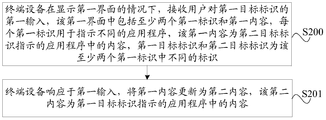
- an embodiment of the present disclosure provides an application program control method, and the application program control method may include the following S200 and S201.
- the terminal device displays the first interface, it receives the user's first input of the first target identifier.
- the first interface includes at least two first identifiers and first content, and each first identifier is used to indicate For different applications, the first content is content in the application indicated by the second target identifier, and the first target identifier and the second target identifier are different identifiers of the at least two first identifiers.
- the terminal device when the terminal device displays the first interface, the user can input the first identifier in the first interface to trigger the terminal device to switch between the applications indicated by the at least two first identifiers.
- the operation is convenient for users to switch between multiple applications.
- the above-mentioned at least two first identifiers and the first content may be respectively located in different areas of the first interface.
- at least two first marks are located in the lower area of the first interface, and the first content is located in the upper area of the first interface.
- at least two first identifiers are located in the left area of the first interface, and the first content is located in the right area of the first interface.
- the relative layout of the above-mentioned at least two first identifiers and the first content in the first interface may be determined according to actual usage requirements, which is not limited in the embodiment of the present disclosure.
- the foregoing first content may be content in the application program indicated by the second target identifier.
- the first content can be the content of the interface of the application (for example, the content after the application is running or opened), or any other possible content of the application, which can be specifically determined according to actual usage requirements.
- the embodiments of the present disclosure Not limited.
- the above-mentioned at least two first identifiers may be the icon of the application program, may also be the name of the application program, or may be other identifiers used to indicate the application program, which may be specifically based on actual usage requirements Certainly, the embodiments of the present disclosure are not limited.
- Application 1 may be referred to simply as Application 1.
- the interface diagram of the first interface is exemplarily described below with reference to FIG. 3.
- the terminal device displays a first interface 30.
- the first interface 30 includes at least two first identifiers, such as the first identifier 31, the first identifier 32, the first identifier 33, and the first identifier in FIG. Logo 34.
- First identifiers such as the first identifier 31, the first identifier 32, the first identifier 33, and the first identifier 34 are used to indicate different applications.
- the first interface 30 further includes a first content 35, and the first content 35 is a content in an application indicated by one of the at least two first identifiers.
- the first content 35 is the content in the application 1 indicated by the first identifier 31 (ie, the second target identifier).
- each of the above-mentioned first identifiers is an exemplary list, that is, the embodiments of the present disclosure include but are not limited to each of the above-mentioned first identifiers.
- the above-mentioned at least two first identifiers may also include any other possible identifiers, which may be specifically determined according to actual use requirements, which are not limited in the embodiment of the present disclosure.
- the first interface includes first identifier 1 (which indicates application 1) and first identifier 2 (which indicates application 1) , Then the user can input the first identification 1 or the first identification 2 to trigger the terminal device to perform the operation of switching between the application 1 and the application 2.
- the user can input the first identifier 2 in the first interface to trigger the terminal device to update the content of application 1 displayed on the first interface to the content of application 2.
- the user can input the first identifier 1 in the first interface to trigger the terminal device to update the content of application 2 displayed in the first interface to the content of application 1.
- the user it is possible to input any one of the first identification 31, the first identification 32, the first identification 33, and the first identification 34 in the first interface to trigger the terminal device to execute the instructions in the at least two first identifications.
- the first input of the user may be a click input (for example, a single-click input or a double-click input), a sliding input, or any other possible form of input.
- the specific input may be based on actual conditions. The use requirements are determined, and the embodiments of the present disclosure are not limited.
- the terminal device In response to the first input, the terminal device updates the first content to the second content, where the second content is the content in the application indicated by the first target identifier.
- the terminal device when the first content (that is, the content of the application indicated by the second target identifier) is currently displayed in the first interface, if the user is A target identifier is input, the terminal device can respond to the input to update the first content in the first interface (that is, the content of the application indicated by the second target identifier) to the second content (that is, the application indicated by the first target identifier) Content of the program).
- the first interface includes a first logo 1 (which indicates application 1) and a first logo 2 (which indicates application 1), and the content of application 1 (ie, the first content) is currently displayed in the first interface
- the terminal device can respond to the input and update the content of application 1 (ie, the first content) displayed on the first interface to the content of application 2 (ie, the second content) ), which realizes the switch from application 1 to application 2.
- the content of application 1 (ie, the first content) is currently displayed in the first interface 30.
- the terminal device can update the first content 35 (that is, the content of application 1) to the second content 36 (that is, the content of application 3) in response to the input. In this way, switch from application 1 to application 3 is realized.
- the application control method provided in the embodiments of the present disclosure may be applicable to general applications, fast applications, or any other possible applications, which can be specifically determined according to actual usage requirements. Not limited.
- the application control method can reduce user operation steps and improve user experience.
- the embodiment of the present disclosure optimizes the application control method, and the specific method can be simplified as "application Group-open application A-open application B". In this way, the embodiments of the present disclosure can realize rapid switching of multiple applications, and improve the convenience of viewing multiple applications in the terminal device.
- the application control method provided by the embodiments of the present disclosure can receive a user's first input of a first target identifier when the terminal device displays a first interface.
- the first interface includes at least two first identifiers and a first target identifier.
- Each first identifier is used to indicate a different application program
- the first content is the content in the application program indicated by the second target identifier
- the first target identifier and the second target identifier are the at least two first Different identifiers in the identifier
- the first content is updated to the second content
- the second content is the content in the application indicated by the first target identifier.
- the terminal device can display the content of the application indicated by the logo on the first interface; furthermore, if the user displays the content on the first interface If another logo is selected among the multiple logos, the terminal device can update the content displayed in the first interface to the content of the application indicated by the other logo, so that the multiple applications can be quickly switched and viewed in the first interface .
- the embodiments of the present disclosure can improve the convenience of viewing multiple applications in the terminal device.
- the application control method provided by the embodiment of the present disclosure may further include the following S202 and S203.
- the above-mentioned S200 can be specifically implemented by the following S200a.
- the terminal device receives a second input from the user to a target object, where the target object is used to indicate at least two first identifiers.
- the above-mentioned target object is an identifier generated after the at least two first identifiers indicated by it are merged.
- the display mode of the above-mentioned target object may be a folder identifier (such as a folder icon), a custom identifier (such as a custom icon), or a preset identifier (such as a preset Set icon), or can be any other possible identification, which can be specifically determined according to actual usage requirements, which is not limited in the embodiment of the present disclosure.
- the folder icon may display the above-mentioned at least two first identifiers, or display simplified identifiers corresponding to the above-mentioned at least two first identifiers.
- the second input of the user may be a click input (for example, a single-click input or a double-click input), a double-click input, or any other possible form of input, which can be specifically based on The actual use requirement is determined, and the embodiment of the present disclosure does not limit it.
- a click input for example, a single-click input or a double-click input
- a double-click input or any other possible form of input, which can be specifically based on The actual use requirement is determined, and the embodiment of the present disclosure does not limit it.
- the user can input the target object to trigger the terminal device to display the first interface
- the first interface includes at least two first icons indicated by the target object
- the user can input one of the first identifiers .
- the terminal device displays a first interface.
- the first interface includes at least two first identifiers and first content. Each first identifier is used to indicate a different application, and the first content is The content in the application indicated by the second target identifier, and the second target identifier is one of the at least two first identifiers.
- the terminal device receives a user's first input of a first target identifier, where the first target identifier is an identifier different from the second target identifier among the at least two first identifiers.
- the terminal device may display the first interface in response to the user's input to the target object.
- the first interface may include at least two first identifiers indicated by the target object, and each first identifier is used to indicate different applications.
- the first interface may further include first content, and the first content may be content in the application indicated by one of the first identifiers (for example, the second target identifier).
- the terminal device may update the content (ie, the first content) in the application indicated by the second target identifier displayed on the first interface to the first target
- the content in the application indicated by the identifier (that is, the second content) can be switched between the above-mentioned at least two applications indicated by the first identifier.
- the terminal device when the terminal device displays the first interface in response to the input to the target object, the first interface may only display at least two first identifiers indicated by the target object without displaying the first content. If the user inputs one of the at least two first identifiers, the terminal device may display the first content on the first interface, and the first content is the content in the application indicated by the first identifier.
- the terminal device can display the first interface in response to the input of the target object (for example, the folder identifier), so that the user can compare the information displayed in the first interface with the target
- the input of each first identifier indicated by the object triggers the terminal device to perform an operation of switching between the applications indicated by each first identifier, which can improve the convenience of viewing multiple applications in the terminal device.
- the application control method provided by the embodiment of the present disclosure may further include the following S204.
- the terminal device In response to the second input, loads data of at least two applications indicated by the first identifier.
- the terminal device may respond to the user's input to the target object, and in the process of displaying the first interface, preload the data of the application indicated by the multiple first identifiers indicated by the target object, thereby improving the software Loading efficiency.
- the terminal device does not need to separately load application data when switching from one application to another, which facilitates the switching efficiency of the terminal device when switching between applications, realizes rapid switching of multiple applications, and effectively reduces operation waiting time .
- the embodiment of the present disclosure may not limit the execution sequence of S204 and S203. That is, in the embodiment of the present disclosure, S204 may be executed first, and then S203 may be executed; S203 may be executed first, and then S204 may be executed; S204 and S203 may also be executed simultaneously. It can be understood that the above-mentioned FIG. 6 is an example of performing S204 and then S203 as an example.
- the application control method provided by the embodiment of the present disclosure may further include the following S205 and S206.
- S205 The terminal device receives a user's third input of at least two second identifiers, each of the second identifiers is used to indicate a different application.
- the above-mentioned at least two second identifiers may be located in the same interface, or may be located in different interfaces, which may be specifically determined according to actual usage requirements, which is not limited in the embodiment of the present disclosure.
- the above-mentioned at least two second identifiers correspond to the above-mentioned at least two first identifiers in a one-to-one correspondence.
- the above at least two second identifiers may be application icons, or application names, or may be used to indicate applications.
- Other identifiers can be specifically determined according to actual usage requirements, which are not limited in the embodiment of the present disclosure.
- the at least two second identifiers and the identifiers indicating the same application in the at least two first identifiers may use the same display mode or different display modes.
- the first identifier and the second identifier indicating the same application may be completely the same.
- it can be determined according to actual use requirements, and the embodiments of the present disclosure are not limited.
- the third input of the user may be a long press input, a double press input, or any other possible form of input, which can be determined according to actual usage requirements.
- the implementation of the present disclosure The examples are not limited.
- the user can input (for example, long press at the same time) at least two second identifiers in the terminal device to trigger the terminal device to merge the at least two second identifiers into a target object (which may be called a combined identifier, For example, folder identification).
- a target object which may be called a combined identifier, For example, folder identification
- the terminal device displays the target object.
- the application programs indicated by the at least two second identifiers are the same as the application programs indicated by the at least two first identifiers.
- the terminal device may, in response to the user's input of at least two second identifiers, merge the at least two second identifiers to generate a target object, and display the target object.
- the terminal device may display the target object in response to the third input, and cancel the display of at least two first identifiers indicated by the target object.
- the terminal device may determine whether the third input is the first preset input after receiving the third input. In the case where it is determined that the third input is the first preset input, the terminal device In response to the third input, the target object is displayed.
- the terminal device determines the length of the third input When the time is greater than or equal to the preset duration, the terminal device displays the target object in response to the third input. If it is determined that the long press time of the third input is less than the preset duration, the third input can be understood as a misoperation, and the terminal device may not respond to the third input.
- the first preset duration for example, 3 seconds
- the terminal device may display first prompt information (for example, a confirmation prompt box) in response to the third input, and the first prompt information is used to prompt the user whether to trigger the terminal device to merge the at least two Second identification, the first prompt message may include an "OK" option and a "Cancel” option. If the user inputs the "OK” option, the terminal device may display the target object in response to the third input. If the user inputs the "cancel” option, the terminal device can cancel the display of the first prompt information (for example, close the above confirmation prompt box), that is, cancel the merging of the at least two second identifiers.
- first prompt information for example, a confirmation prompt box
- the above-mentioned first prompt information may further include an input box for prompting the user to input the name of the target object. If the user enters the name of the target object in the input box and enters the "OK" option, the terminal device may respond to the third input and display the target object and the name of the target object. Of course, if the user does not enter the name of the target object in the input box and directly enters the "OK" option, the terminal device may respond to the third input and display the name of the target object and the randomly generated target object. Specifically, it can be determined according to actual usage requirements, and the embodiment of the present disclosure does not limit it.
- the user can simultaneously long press (ie, third input) at least two second identifiers (for example, the second identifier 41, the second identifier 42, the second identifier 43, and the second identifier) in the terminal device.
- second identifiers for example, the second identifier 41, the second identifier 42, the second identifier 43, and the second identifier
- Three identifiers 44 to trigger the terminal device to merge the at least two second identifiers.
- the terminal device responds to the third input and displays the first prompt message 45 to prompt the user whether to trigger the terminal device to merge the second identification 41, the second identification 42, the second identification 43 and the first Three identification 44, and the combined identification name can be set.
- the user can enter the combined identification name in the input box in the first prompt message 45 and click the "OK" option to trigger the terminal device to merge the second identification 41, the second identification 42, the second identification 43 and the third identification 44.
- the terminal device may respond to the third input to merge the at least two second identifiers into a folder identifier 46 (that is, the aforementioned target object), and display the folder identifier 46.
- the folder identification 46 may display a second identification 41, a second identification 42, a second identification 43, and a third identification 44 for the user to view and identify. Further, the user can input (ie, the second input) to the folder identifier 46 to trigger the terminal device to display the first interface.
- the terminal device may display the first interface 30 in response to the second input. Further, the user can, according to actual usage needs, check the second identifiers 41, 42, 43, 44 displayed in the first interface 30 (that is, each of the second identifiers 41, 42, 43, 44 corresponding to the folder identifier 46 shown in (c) in FIG. 8). The input of the second identifier) triggers the terminal device to switch the application indicated by each first identifier, which can improve the convenience of viewing multiple applications in the terminal device.
- the user can customize and merge the identifiers of related applications according to actual user needs, so as to facilitate user operations.
- the user inputs the merged combination logo to trigger the display of the first interface; the user inputs the first logo in the first interface to realize rapid switching of various applications.
- the terminal device can merge at least two second identifiers corresponding to the user input into one combined identifier according to the actual use requirements of the user. Furthermore, the terminal device may display the above-mentioned first interface in response to the user's input of the combined identifier. Furthermore, the terminal device may perform an operation of switching between different applications in response to the user's input to the first identifier in the first interface. In this way, the efficiency of viewing multiple applications in the terminal device can be improved.
- the aforementioned at least two first identifiers are displayed in the first area of the first interface.
- the application control method provided by the embodiment of the present disclosure may further include the following S207 and S208.
- S207 The terminal device receives the user's fourth input of the third target identifier.
- the third target identifier is the identifier of the at least two first identifiers mentioned above.
- the fourth input of the user may be a long press input, a sliding input, or any other possible form of input, which can be determined according to actual usage requirements. Not limited.
- the user can simultaneously long-press one or more first identifiers in the first area in the first interface to trigger the terminal device to change the one or more first identifiers selected by the user from The first area is removed (ie, unmerged).
- the above-mentioned target object is used to indicate an identifier other than the third target identifier among the at least two first identifiers.
- the terminal device may cancel the display of the third target identifier selected by the user in the first area in response to the user inputting one or more first identifiers (that is, the third target identifier) in the first area, That is, the third target identifier selected by the user is removed from the first area, so that the first area in the first interface includes other identifiers among the at least two first identifiers except the third target identifier.
- the terminal device removes the third target identifier selected by the user from the target object, so that the target object includes identifiers other than the third target identifier among the at least two first identifiers.
- the terminal device can cancel the display of the first interface in response to the input, thereby canceling the combination of the at least two first identifiers.
- the terminal device may determine whether the fourth input is the second preset input after receiving the fourth input. In the case where the fourth input is determined to be the second preset input, the terminal device In response to the fourth input, the target object is displayed.
- the second preset input is a long press input and the long press time is greater than or equal to the second preset duration (for example, 3 seconds)
- the terminal device determines the length of the fourth input If the time is greater than or equal to the preset duration, the terminal device will cancel the display of the third target identifier in the first area in response to the fourth input. If it is determined that the long press time of the fourth input is less than the preset duration, the fourth input can be understood as a misoperation, and the terminal device may not respond to the fourth input.
- the terminal device may display second prompt information in response to the fourth input, and the second prompt information is used to prompt the user whether to trigger the terminal device to change the third target identifier from the first interface of the first interface.
- the second prompt message may include an "OK" option and a "Cancel” option. If the user inputs the "OK” option, the terminal device may cancel displaying the third target identifier in the first area in response to the third input. If the user inputs the "cancel” option, the terminal device may not perform the operation of canceling the display.
- the embodiments of the present disclosure may not limit the execution sequence of S207-S208 and S200a-S201. That is, in the embodiment of the present disclosure, S207-S208 can be executed first, and then S200a-S201; S200a-S201 can be executed first, and then S207-S208 can be executed; S207-S208 and S200a-S201 can also be executed simultaneously. It can be understood that the foregoing FIG. 9 is an example of performing S207-S208 and then S200a-S201 as an example.
- the user can input the first identifier 34 in the first area 51 in the first interface 30 to trigger the terminal device to remove the first identifier 34 from the first area.
- the terminal device can cancel the display of the first logo 34 in the first area 51 in response to the input, that is, the first logo 34 is not included in the first area 51, so that the first logo 34 is removed from the first area.
- the terminal device can remove one or more first identifiers selected by the user from the first interface in response to user input, so that the user can maintain the first
- the first signs in the interface enhance the convenience and flexibility of human-computer interaction, which can improve the convenience of switching between applications on the terminal device.
- the application control method provided by the embodiment of the present disclosure may further include the following S209 and S210.
- the terminal device receives a fifth input of the user to the target object.
- the sixth input of the user may be a long press input, a double press input, or any other possible form of input, which can be determined according to actual usage requirements.
- the implementation of the present disclosure The examples are not limited.
- the terminal device cancels displaying the target object.
- the terminal device may cancel the display of the target object in response to the user's input to the target object, that is, cancel the merging of at least two first identifiers indicated by the target object.
- the terminal device may cancel displaying the target object in response to the user's input to the target object, and resume displaying at least two first identifiers indicated by the target object.
- the terminal device may determine whether the fifth input is the third preset input after receiving the fifth input. In the case of determining that the fifth input is the third preset input, the terminal device In response to the fifth input, the display of the target object is canceled.
- the third preset input is a long press input and the long press time is greater than or equal to the third preset duration (for example, 3 seconds)
- the terminal device determines the length of the fifth input
- the terminal device cancels displaying the target object in response to the fifth input. If it is determined that the long press time of the fifth input is less than the preset duration, the fifth input can be understood as a misoperation, and the terminal device may not respond to the fifth input.
- the terminal device can uncombine at least two first identifiers in response to the user's input according to the actual use needs of the user, which improves the convenience and flexibility of human-computer interaction.
- the terminal device 700 may include a receiving module 701 and a display module 702.
- the receiving module 701 is configured to receive a user's first input of a first target identifier when the terminal device displays a first interface, the first interface includes at least two first identifiers and first content, each of the first identifiers It is used to indicate different applications, the first content is the content in the application indicated by the second target identifier, and the first target identifier and the second target identifier are different identifiers of the at least two first identifiers.
- the display module 702 is configured to respond to the first input received by the receiving module 701 and update the first content to the second content, the second content being the content in the application indicated by the first target identifier.
- the receiving module 701 is further configured to receive a second input from the user to a target object before the display module 702 displays the first interface, and the target object is used to indicate the above-mentioned at least two first identifiers.
- the display module 702 is configured to display the first interface in response to the second input received by the receiving module 701.
- the terminal device 700 provided in the embodiment of the present disclosure may further include a loading module 703.
- the loading module 703 is configured to, after the receiving module 701 receives the second input of the user to the target object, in response to the second input, load the data of the application indicated by the at least two first identifiers.
- the receiving module 701 is further configured to receive the user's third input of at least two second identifiers before receiving the user's second input to the target object, and each second identifier is used to indicate Different applications.
- the display module 702 is further configured to display the target object in response to the third input received by the receiving module 701.
- the application programs indicated by the at least two second identifiers are the same as the application programs indicated by the at least two first identifiers.
- the above-mentioned at least two first identifiers are displayed in the first area in the above-mentioned first interface.
- the receiving module 701 is further configured to receive a fourth input from the user to a third target identifier after the display module 702 displays the first interface, and the third target identifier is the identifier of the at least two first identifiers mentioned above.
- the display module 702 is further configured to cancel the display of the third target identifier in the first area in response to the fourth input received by the receiving module 701.
- the target object is used to indicate other identifiers except the third target identifier among the at least two first identifiers.
- the receiving module 701 is further configured to receive a fifth input from the user to the target object after the display module 702 displays the target object.
- the display module 702 is further configured to display the cancellation of the target object in response to the fifth input received by the receiving module 701.
- the terminal device provided in the embodiment of the present disclosure can implement each process implemented by the terminal device in the foregoing method embodiment, and to avoid repetition, details are not described herein again.
- the terminal device can receive a user's first input of a first target identifier when the terminal device displays a first interface, and the first interface includes at least two first identifiers and first content, Each first identifier is used to indicate a different application, the first content is the content in the application indicated by the second target identifier, and the first target identifier and the second target identifier are in the at least two first identifiers. A different identifier; and in response to the first input, the first content is updated to the second content, and the second content is the content in the application indicated by the first target identifier.
- the terminal device can display the content of the application indicated by the logo on the first interface; furthermore, if the user displays the content on the first interface If another logo is selected among the multiple logos, the terminal device can update the content displayed in the first interface to the content of the application indicated by the other logo, so that the multiple applications can be quickly switched and viewed in the first interface .
- the embodiments of the present disclosure can improve the convenience of viewing multiple applications in the terminal device.
- FIG. 14 is a schematic diagram of the hardware structure of a terminal device that implements various embodiments of the present disclosure.
- the terminal device 800 includes but is not limited to: a radio frequency unit 801, a network module 802, an audio output unit 803, an input unit 804, a sensor 805, a display unit 806, a user input unit 807, an interface unit 808, and a memory 809 , Processor 810, and power supply 811.
- a radio frequency unit 801 includes a radio frequency unit 801, a network module 802, an audio output unit 803, an input unit 804, a sensor 805, a display unit 806, a user input unit 807, an interface unit 808, and a memory 809 , Processor 810, and power supply 811.
- the terminal device may include more or fewer components than shown in the figure, or a combination of certain components, or different components. Layout.
- terminal devices include, but are not limited to, mobile phones, tablet computers, notebook computers, palmtop computers, vehicle-mounted terminals, wearable devices, and ped
- the user input unit 807 is configured to receive a user's first input of a first target identifier when the terminal device displays a first interface, and the first interface includes at least two first identifiers and first content, each The first identifier is used to indicate different applications, the first content is the content in the application indicated by the second target identifier, and the first target identifier and the second target identifier are different in the at least two first identifiers.
- the display unit 806 is also configured to update the first content to the second content in response to the first input received by the user input unit 807, the second content being the application program indicated by the first target identifier content.
- Embodiments of the present disclosure provide a terminal device that can receive a user's first input of a first target identifier when the terminal device displays a first interface, and the first interface includes at least two first identifiers and The first content, each first identifier is used to indicate a different application, the first content is the content in the application indicated by the second target identifier, and the first target identifier and the second target identifier are the at least two A different identifier in the first identifier; and in response to the first input, the first content is updated to the second content, and the second content is the content in the application indicated by the first target identifier.
- the terminal device can display the content of the application indicated by the logo on the first interface; furthermore, if the user displays the content on the first interface If another logo is selected among the multiple logos, the terminal device can update the content displayed in the first interface to the content of the application indicated by the other logo, so that the multiple applications can be quickly switched and viewed in the first interface .
- the embodiments of the present disclosure can improve the convenience of viewing multiple applications in the terminal device.
- the radio frequency unit 801 can be used for receiving and sending signals in the process of sending and receiving information or talking. Specifically, the downlink data from the base station is received and processed by the processor 810; in addition, Uplink data is sent to the base station.
- the radio frequency unit 801 includes, but is not limited to, an antenna, at least one amplifier, a transceiver, a coupler, a low noise amplifier, a duplexer, and the like.
- the radio frequency unit 801 can also communicate with the network and other devices through a wireless communication system.
- the terminal device 800 provides users with wireless broadband Internet access through the network module 802, such as helping users to send and receive emails, browse web pages, and access streaming media.
- the audio output unit 803 can convert the audio data received by the radio frequency unit 801 or the network module 802 or stored in the memory 809 into audio signals and output them as sounds. Moreover, the audio output unit 803 may also provide audio output related to a specific function performed by the terminal device 800 (for example, call signal reception sound, message reception sound, etc.).
- the audio output unit 803 includes a speaker, a buzzer, a receiver, and the like.
- the input unit 804 is used to receive audio or video signals.
- the input unit 804 may include a graphics processing unit (GPU) 8041 and a microphone 8042.
- the graphics processor 8041 is used to capture still pictures or video images obtained by an image capture device (such as a camera) in a video capture mode or an image capture mode. Data is processed.
- the processed image frame may be displayed on the display unit 806.
- the image frame processed by the graphics processor 8041 may be stored in the memory 809 (or other storage medium) or sent via the radio frequency unit 801 or the network module 802.
- the microphone 8042 can receive sound, and can process such sound into audio data.
- the processed audio data can be converted into a format that can be sent to the mobile communication base station via the radio frequency unit 801 for output in the case of a telephone call mode.
- the terminal device 800 also includes at least one sensor 805, such as a light sensor, a motion sensor, and other sensors.
- the light sensor includes an ambient light sensor and a proximity sensor.
- the ambient light sensor can adjust the brightness of the display panel 8061 according to the brightness of the ambient light.
- the proximity sensor can close the display panel 8061 and the display panel 8061 when the terminal device 800 is moved to the ear. / Or backlight.
- the accelerometer sensor can detect the magnitude of acceleration in various directions (usually three-axis), and can detect the magnitude and direction of gravity when it is stationary, and can be used to identify the posture of the terminal device (such as horizontal and vertical screen switching, related games) , Magnetometer attitude calibration), vibration recognition related functions (such as pedometer, tap), etc.; sensor 805 can also include fingerprint sensors, pressure sensors, iris sensors, molecular sensors, gyroscopes, barometers, hygrometers, thermometers, Infrared sensors, etc., will not be repeated here.
- the display unit 806 is used to display information input by the user or information provided to the user.
- the display unit 806 may include a display panel 8061, and the display panel 8061 may be configured in the form of a liquid crystal display (LCD), an organic light-emitting diode (OLED), etc.
- LCD liquid crystal display
- OLED organic light-emitting diode
- the user input unit 807 can be used to receive inputted number or character information, and generate key signal input related to user settings and function control of the terminal device.
- the user input unit 807 includes a touch panel 8071 and other input devices 8072.
- the touch panel 8071 also called a touch screen, can collect user touch operations on or near it (for example, the user uses any suitable objects or accessories such as fingers, stylus, etc.) on the touch panel 8071 or near the touch panel 8071. operating).
- the touch panel 8071 may include two parts: a touch detection device and a touch controller.
- the touch detection device detects the user's touch position, detects the signal brought by the touch operation, and transmits the signal to the touch controller; the touch controller receives the touch information from the touch detection device, converts it into contact coordinates, and then sends it To the processor 810, the command sent by the processor 810 is received and executed.
- the touch panel 8071 can be implemented in multiple types such as resistive, capacitive, infrared, and surface acoustic wave.
- the user input unit 807 may also include other input devices 8072.
- other input devices 8072 may include, but are not limited to, a physical keyboard, function keys (such as volume control buttons, switch buttons, etc.), trackball, mouse, and joystick, which will not be repeated here.
- the touch panel 8071 can cover the display panel 8061.
- the touch panel 8071 detects a touch operation on or near it, it transmits it to the processor 810 to determine the type of the touch event.
- the type of event provides corresponding visual output on the display panel 8061.
- the touch panel 8071 and the display panel 8061 are used as two independent components to implement the input and output functions of the terminal device, in some embodiments, the touch panel 8071 and the display panel 8061 can be integrated
- the implementation of the input and output functions of the terminal device is not specifically limited here.
- the interface unit 808 is an interface for connecting an external device with the terminal device 800.
- the external device may include a wired or wireless headset port, an external power source (or battery charger) port, a wired or wireless data port, a memory card port, a port for connecting a device with an identification module, audio input/output (I/O) port, video I/O port, headphone port, etc.
- the interface unit 808 can be used to receive input (for example, data information, power, etc.) from an external device and transmit the received input to one or more elements in the terminal device 800 or can be used to connect to the terminal device 800 and external devices. Transfer data between devices.
- the memory 809 can be used to store software programs and various data.
- the memory 809 may mainly include a program storage area and a data storage area.
- the program storage area may store an operating system, an application program required by at least one function (such as a sound playback function, an image playback function, etc.), etc.; Data (such as audio data, phone book, etc.) created by the use of mobile phones.
- the memory 809 may include a high-speed random access memory, and may also include a non-volatile memory, such as at least one magnetic disk storage device, a flash memory device, or other volatile solid-state storage devices.
- the processor 810 is the control center of the terminal device. It uses various interfaces and lines to connect the various parts of the entire terminal device, runs or executes the software programs and/or modules stored in the memory 809, and calls the data stored in the memory 809. , Perform various functions of the terminal equipment and process data, so as to monitor the terminal equipment as a whole.
- the processor 810 may include one or more processing units; optionally, the processor 810 may integrate an application processor and a modem processor.
- the application processor mainly processes the operating system, user interface, and application programs, etc.
- the adjustment processor mainly deals with wireless communication. It can be understood that the foregoing modem processor may not be integrated into the processor 810.
- the terminal device 800 may also include a power source 811 (such as a battery) for supplying power to various components.
- a power source 811 such as a battery
- the power source 811 may be logically connected to the processor 810 through a power management system, so as to manage charging, discharging, and power consumption through the power management system. Management and other functions.
- the terminal device 800 includes some functional modules not shown, which will not be repeated here.
- an embodiment of the present disclosure further provides a terminal device, including a processor 810 as shown in FIG. 14, a memory 809, a computer program stored in the memory 809 and running on the processor 810, the computer program being
- the processor 810 implements each process of the foregoing application program control method embodiment when executing, and can achieve the same technical effect. To avoid repetition, details are not described herein again.
- the embodiments of the present disclosure also provide a computer-readable storage medium on which a computer program is stored.
- the computer program is executed by a processor, each process of the above-mentioned application program control method embodiment is realized, and the same Technical effects, in order to avoid repetition, I will not repeat them here.
- the computer-readable storage medium may include read-only memory (ROM), random access memory (RAM), magnetic disk or optical disk, etc.
- the technical solution of the present disclosure essentially or the part that contributes to the related technology can be embodied in the form of a software product, and the computer software product is stored in a storage medium (such as ROM/RAM, magnetic disk, optical disk). ) Includes several instructions to make a terminal device (which can be a mobile phone, a computer, a server, an air conditioner, or a network device, etc.) execute the methods disclosed in the various embodiments of the present disclosure.
- a terminal device which can be a mobile phone, a computer, a server, an air conditioner, or a network device, etc.
Landscapes
- Engineering & Computer Science (AREA)
- Software Systems (AREA)
- Theoretical Computer Science (AREA)
- Physics & Mathematics (AREA)
- General Engineering & Computer Science (AREA)
- General Physics & Mathematics (AREA)
- Human Computer Interaction (AREA)
- User Interface Of Digital Computer (AREA)
- Stored Programmes (AREA)
Abstract
本公开实施例提供了一种应用程序控制方法及终端设备。该方法包括:在终端设备显示第一界面的情况下,接收用户对第一目标标识的第一输入,该第一界面中包括至少两个第一标识和第一内容,每个第一标识用于指示不同的应用程序,该第一内容为第二目标标识指示的应用程序中的内容,该第一目标标识和该第二目标标识为该至少两个第一标识中不同的标识;且响应于该第一输入,将该第一内容更新为第二内容,该第二内容为该第一目标标识指示的应用程序中的内容。该方法可以应用于通过终端设备查看多个应用的场景中。
Description
相关申请的交叉引用
本申请要求于2019年3月14日提交国家知识产权局、申请号为201910195269.2、申请名称为“一种应用程序控制方法及终端设备”的中国专利申请的优先权,其全部内容通过引用结合在本申请中。
本公开实施例涉及通信技术领域,尤其涉及一种应用程序控制方法及终端设备。
随着终端设备的应用范围越来越广,用户对于使用终端设备的便捷性的需求日益提升。
目前,若用户在使用终端设备时需要在多个应用之间切换,例如从一个应用(称为应用A)切换到另一个应用(称为应用B),则用户可以触发终端设备退出应用A的界面,在终端设备的桌面中查找应用B的标识或在后台运行的程序中查找应用B的标识,然后点击应用B的标识,以触发终端设备显示应用B的界面,即终端设备从应用A切换到应用B。
然而,上述过程中,由于需要用户多次操作才能触发终端设备从一个应用切换到另一个应用,因此导致终端设备中查看多个应用的便捷性较差。
发明内容
本公开实施例提供一种应用程序控制方法及终端设备,以解决现有终端设备中查看多个应用的便捷性较差的问题。
为了解决上述技术问题,本公开是这样实现的:
第一方面,本公开实施例提供了一种应用程序控制方法,应用于终端设备,该方法包括:在终端设备显示第一界面的情况下,接收用户对第一目标标识的第一输入,该第一界面中包括至少两个第一标识和第一内容,每个第一标识用于指示不同的应用程序,该第一内容为第二目标标识指示的应用程序中的内容,该第一目标标识和该第二目标标识为该至少两个第一标识中不同的标识;且响应于该第一输入,将该第一内容更新为第二内容,该第二内容为该第一目标标识指示的应用程序中的内容。
第二方面,本公开实施例提供了一种终端设备,该终端设备包括接收模块和显示模块。接收模块用于在终端设备显示第一界面的情况下,接收用户对第一目标标识的第一输入,该第一界面中包括至少两个第一标识和第一内容,每个第一标识用于指示不同的应用程序,该第一内容为第二目标标识指示的应用程序中的内容,该第一目标标识和该第二目标标识为该至少两个第一标识中不同的标识。显示模块用于响应于接收模块接收的该第一输入,将该第一内容更新为第二内容,该第二内容为该第一目标标识指示的应用程序中的内容。
第三方面,本公开实施例提供了一种终端设备,该终端设备包括处理器、存储器及存储在存储器上并可在处理器上运行的计算机程序,该计算机程序被处理器执行时 实现上述第一方面中的应用程序控制方法的步骤。
第四方面,本公开实施例提供了一种计算机可读存储介质,该计算机可读存储介质上存储计算机程序,该计算机程序被处理器执行时实现上述第一方面中的应用程序控制方法的步骤。
在本公开实施例中,可以在终端设备显示第一界面的情况下,接收用户对第一目标标识的第一输入,该第一界面中包括至少两个第一标识和第一内容,每个第一标识用于指示不同的应用程序,该第一内容为第二目标标识指示的应用程序中的内容,该第一目标标识和该第二目标标识为该至少两个第一标识中不同的标识;且响应于该第一输入,将该第一内容更新为第二内容,该第二内容为该第一目标标识指示的应用程序中的内容。通过该方案,若用户在第一界面中显示的多个标识中选中一个标识,则终端设备可以在第一界面中显示该标识指示的应用的内容;进而,若用户在第一界面中显示的多个标识中选中另一标识,则终端设备可以将第一界面中显示的内容更新为该另一标识指示的应用的内容,从而可以在第一界面中实现对多个应用的快速切换和查看。如此,本公开实施例可以提升终端设备中查看多个应用的便捷性。
图1为本公开实施例提供的一种可能的安卓操作系统的架构示意图;
图2为本公开实施例提供的应用程序控制方法的流程示意图之一;
图3为本公开实施例提供的应用程序控制方法应用的界面示意图之一;
图4为本公开实施例提供的应用程序控制方法应用的界面示意图之二;
图5为本公开实施例提供的应用程序控制方法的流程示意图之二;
图6为本公开实施例提供的应用程序控制方法的流程示意图之三;
图7为本公开实施例提供的应用程序控制方法的流程示意图之四;
图8为本公开实施例提供的应用程序控制方法应用的界面示意图之三;
图9为本公开实施例提供的应用程序控制方法的流程示意图之五;
图10为本公开实施例提供的应用程序控制方法应用的界面示意图之四;
图11为本公开实施例提供的应用程序控制方法的流程示意图之六;
图12为本公开实施例提供的终端设备的结构示意图之一;
图13为本公开实施例提供的终端设备的结构示意图之二;
图14为本公开实施例提供的终端设备的硬件示意图。
下面将结合本公开实施例中的附图,对本公开实施例中的技术方案进行清楚、完整地描述,显然,所描述的实施例是本公开一部分实施例,而不是全部的实施例。基于本公开中的实施例,本领域普通技术人员在没有作出创造性劳动前提下所获得的所有其他实施例,都属于本公开保护的范围。
本文中术语“和/或”,是一种描述关联对象的关联关系,表示可以存在三种关系,例如,A和/或B,可以表示:单独存在A,同时存在A和B,单独存在B这三种情况。本文中符号“/”表示关联对象是或者的关系,例如A/B表示A或者B。
本公开的说明书和权利要求书中的术语“第一”和“第二”等是用于区别不同的对象,而不是用于描述对象的特定顺序。例如,第一输入和第二输入等是用于区别不 同的输入,而不是用于描述输入的特定顺序。
在本公开实施例中,“示例性的”或者“例如”等词用于表示作例子、例证或说明。本公开实施例中被描述为“示例性的”或者“例如”的任何实施例或设计方案不应被解释为比其它实施例或设计方案更优选或更具优势。确切而言,使用“示例性的”或者“例如”等词旨在以具体方式呈现相关概念。
在本公开实施例的描述中,除非另有说明,“多个”的含义是指两个或者两个以上,例如,多个处理单元是指两个或者两个以上的处理单元等。
本公开实施例提供一种应用程序控制方法及终端设备,可以在终端设备显示第一界面的情况下,接收用户对第一目标标识的第一输入,该第一界面中包括至少两个第一标识和第一内容,每个第一标识用于指示不同的应用程序,该第一内容为第二目标标识指示的应用程序中的内容,该第一目标标识和该第二目标标识为该至少两个第一标识中不同的标识;且响应于该第一输入,将该第一内容更新为第二内容,该第二内容为该第一目标标识指示的应用程序中的内容。通过该方案,若用户在第一界面中显示的多个标识中选中一个标识,则终端设备可以在第一界面中显示该标识指示的应用的内容;进而,若用户在第一界面中显示的多个标识中选中另一标识,则终端设备可以将第一界面中显示的内容更新为该另一标识指示的应用的内容,从而可以在第一界面中实现对多个应用的快速切换和查看。如此,本公开实施例可以提升终端设备中查看多个应用的便捷性。
本公开实施例中的终端设备可以为具有操作系统的终端设备。该操作系统可以为安卓(Android)操作系统,可以为ios操作系统,还可以为其他可能的操作系统,本公开实施例不作具体限定。
下面以安卓操作系统为例,介绍一下本公开实施例提供的应用程序控制方法所应用的软件环境。
如图1所示,为本公开实施例提供的一种可能的安卓操作系统的架构示意图。在图1中,安卓操作系统的架构包括4层,分别为:应用程序层、应用程序框架层、系统运行库层和内核层(具体可以为Linux内核层)。
其中,应用程序层包括安卓操作系统中的各个应用程序(包括系统应用程序和第三方应用程序)。
应用程序框架层是应用程序的框架,开发人员可以在遵守应用程序的框架的开发原则的情况下,基于应用程序框架层开发一些应用程序。
系统运行库层包括库(也称为系统库)和安卓操作系统运行环境。库主要为安卓操作系统提供其所需的各类资源。安卓操作系统运行环境用于为安卓操作系统提供软件环境。
内核层是安卓操作系统的操作系统层,属于安卓操作系统软件层次的最底层。内核层基于Linux内核为安卓操作系统提供核心系统服务和与硬件相关的驱动程序。
以安卓操作系统为例,本公开实施例中,开发人员可以基于上述如图1所示的安卓操作系统的系统架构,开发实现本公开实施例提供的应用程序控制方法的软件程序,从而使得该应用程序控制方法可以基于如图1所示的安卓操作系统运行。即处理器或者终端设备可以通过在安卓操作系统中运行该软件程序实现本公开实施例提供的应用 程序控制方法。
本公开实施例中的终端设备可以为移动终端,也可以为非移动终端。示例性的,移动终端可以为手机、平板电脑、笔记本电脑、掌上电脑、车载终端、可穿戴设备、超级移动个人计算机(ultra-mobile personal computer,UMPC)、上网本或者个人数字助理(personal digital assistant,PDA)等,非移动终端可以为个人计算机(personal computer,PC)、电视机(television,TV)、柜员机或者自助机等,本公开实施例不作具体限定。
本公开实施例提供的应用程序控制方法的执行主体可以为上述的终端设备,也可以为该终端设备中能够实现该应用程序控制方法的功能模块和/或功能实体,具体的可以根据实际使用需求确定,本公开实施例不作限定。下面以终端设备为例,对本公开实施例提供的应用程序控制方法进行示例性的说明。
如图2所示,本公开实施例提供一种应用程序控制方法,该应用程序控制方法可以包括下述的S200和S201。
S200、终端设备在显示第一界面的情况下,接收用户对第一目标标识的第一输入,该第一界面中包括至少两个第一标识和第一内容,每个第一标识用于指示不同的应用程序,该第一内容为第二目标标识指示的应用程序中的内容,第一目标标识和第二目标标识为该至少两个第一标识中不同的标识。
本公开实施例中,在终端设备显示第一界面的情况下,用户可以对第一界面中的第一标识输入,以触发终端设备执行在至少两个第一标识各自指示的应用程序之间切换的操作,便于用户在多个应用之间切换查看。
本公开实施例中,上述至少两个第一标识和第一内容可以分别位于第一界面中的不同区域。示例性的,至少两个第一标识位于第一界面的下侧区域,第一内容位于第一界面中的上侧区域。又示例性的,至少两个第一标识位于第一界面的左侧区域,第一内容位于第一界面中的右侧区域。具体的,上述至少两个第一标识和第一内容在第一界面中的相对布局,可以根据实际使用需求确定,本公开实施例不作限定。
本公开实施例中,上述第一内容可以为第二目标标识指示的应用程序中的内容。可选的,第一内容可以为应用程序的界面的内容(例如应用运行或打开后的内容),也可以为应用程序的其它任意可能的内容,具体可以根据实际使用需求确定,本公开实施例不作限定。
可选的,本公开实施例中,上述至少两个第一标识可以为应用程序的图标,也可以为应用程序的名称,还可以为用于指示应用程序的其它标识,具体可以根据实际使用需求确定,本公开实施例不作限定。
需要说明的是,为了便于说明和理解,下文中将应用程序简称为应用。例如,应用程序1可以简称为应用1。
下面参考图3示例性的说明第一界面的界面示意图。如图3所示,终端设备显示第一界面30,该第一界面30中包括至少两个第一标识,如图3中的第一标识31、第一标识32、第一标识33和第一标识34。该第一标识31、第一标识32、第一标识33和第一标识34等第一标识用于指示不同的应用。如图3所示,该第一界面30中还包括第一内容35,该第一内容35为上述至少两个第一标识中的一个标识指示的应用中的内容。如图3所示,第一内容35为第一标识31(即第二目标标识)指示的应用1中的内容。
可以理解,上述的各个第一标识均是示例性的列举,即本公开实施例包括但不限于上述列举的各个第一标识。实际实现时,上述至少两个第一标识还可以包括其它任意可能的标识,具体可以根据实际使用需求确定,本公开实施例不作限定。
本公开实施例中,以上述至少两个第一标识包括两个第一标识为例,假设第一界面中包括第一标识1(其指示应用1)和第一标识2(其指示应用1),那么用户可以对第一标识1或第一标识2输入,以触发终端设备执行在应用1和应用2之间切换的操作。
具体的,若用户需要从应用1切换为应用2,则用户可以通过对第一界面中的第一标识2输入,触发终端设备将第一界面中显示的应用1的内容更新为应用2的内容,如此实现从应用1切换为应用2。同理,若用户需要从应用2切换为应用2,则用户可以通过对第一界面中的第一标识1输入,触发终端设备将第一界面中显示的应用2的内容更新为应用1的内容,如此实现从应用2切换为应用1。即,实现在应用1和应用2之间切换。
再参考图3,在第一界面30中包括多于两个第一标识(如图3中的第一标识31、第一标识32、第一标识33和第一标识34)的情况下,用户可以对第一界面中的第一标识31、第一标识32、第一标识33和第一标识34中的任一个第一标识输入,以触发终端设备执行在至少两个第一标识各自指示的应用程序之间切换的操作。
可选的,本公开实施例中,上述用户的第一输入可以为点击输入(例如单击输入或双击输入),也可以为滑动输入,还可以是其它任意可能形式的输入,具体可以根据实际使用需求确定,本公开实施例不作限定。
S201、终端设备响应于第一输入,将第一内容更新为第二内容,该第二内容为第一目标标识指示的应用程序中的内容。
本公开实施例中,在第一界面中当前显示第一内容(即第二目标标识指示的应用程序的内容)的情况下,若用户对第一界面中的至少两个第一标识中的第一目标标识输入,则终端设备可以响应于该输入,将第一界面中的第一内容(即第二目标标识指示的应用程序的内容)更新为第二内容(即第一目标标识指示的应用程序的内容)。
示例性的,仍然假设第一界面中包括第一标识1(其指示应用1)和第一标识2(其指示应用1),在第一界面中当前显示应用1的内容(即第一内容)的情况下,若用户对第一标识2输入,则终端设备可以响应于该输入,将第一界面中显示的应用1的内容(即第一内容)更新为应用2的内容(即第二内容),如此实现从应用1切换为应用2。
下面结合图3,参考图4示例性的说明本公开实施例提供的应用程序控制方法的具体实现方法。如图3所示,第一界面30中当前显示应用1的内容(即第一内容)。如图4所示,若用户单击第一标识33,则终端设备可以响应于该输入,将第一内容35(即应用1的内容)更新为第二内容36(即应用3的内容),如此实现从应用1切换为应用3。
可选的,本公开实施例提供的应用程序控制方法可以适用于一般的应用,也可以适用于快应用,还可以适用于其它任意可能的应用,具体可以根据实际使用需求确定,本公开实施例不作限定。
示例性的,以应用程序控制方法应用于快应用为例。快应用具有无需安装,功能较为单一的特点,针对用户在查看多个应用时频繁切换不同应用查看页面内容的场景,通过该应用程序控制方法,可以减少用户的操作步骤,提升用户的使用体验。
相比于相关技术的应用程序控制方法为“应用分组—打开应用A—退出应用A—找到 应用B—打开应用B”,本公开实施例优化了应用程序控制方法,具体方法可以简化为“应用分组—打开应用A—打开应用B”。如此,本公开实施例可以实现多个应用的快速切换,提升在终端设备中查看多个应用的便捷性。
本公开实施例提供的应用程序控制方法,可以在终端设备显示第一界面的情况下,接收用户对第一目标标识的第一输入,该第一界面中包括至少两个第一标识和第一内容,每个第一标识用于指示不同的应用程序,该第一内容为第二目标标识指示的应用程序中的内容,该第一目标标识和该第二目标标识为该至少两个第一标识中不同的标识;且响应于该第一输入,将该第一内容更新为第二内容,该第二内容为该第一目标标识指示的应用程序中的内容。通过该方案,若用户在第一界面中显示的多个标识中选中一个标识,则终端设备可以在第一界面中显示该标识指示的应用的内容;进而,若用户在第一界面中显示的多个标识中选中另一标识,则终端设备可以将第一界面中显示的内容更新为该另一标识指示的应用的内容,从而可以在第一界面中实现对多个应用的快速切换和查看。如此,本公开实施例可以提升终端设备中查看多个应用的便捷性。
可选的,结合图2,如图5所示,在上述的S200之前,本公开实施例提供的应用程序控制方法还可以包括下述的S202和S203。相应的,上述的S200具体可以通过下述的S200a实现。
S202、终端设备接收用户对目标对象的第二输入,该目标对象用于指示至少两个第一标识。
本公开实施例中,上述目标对象为其指示的至少两个第一标识合并后生成的标识。
可选的,本公开实施例中,上述目标对象的显示方式可以为文件夹标识(例如文件夹图标),也可以为自定义标识(例如自定义图标),还可以为预设标识(例如预设图标),或者可以为其它任意可能的标识,具体可以根据实际使用需求确定,本公开实施例不作限定。
示例性的,以目标对象的显示方式为文件夹图标为例,该文件夹图标中可以显示有上述至少两个第一标识,或者显示有与上述至少两个第一标识对应的简化标识。
可选的,本公开实施例中,上述用户的第二输入可以为点击输入(例如单击输入或双击输入),也可以为重按输入,还可以是其它任意可能形式的输入,具体可以根据实际使用需求确定,本公开实施例不作限定。
本公开实施例中,用户可以对该目标对象输入,以触发终端设备显示第一界面,该第一界面中包括目标对象指示的至少两个第一图标,进而用户可以对其中一个第一标识输入,以触发终端设备在第一界面显示该第一标识指示的应用中的内容,从而可以实现在上述至少两个第一标识指示的应用之间的切换。
S203、终端设备响应于第二输入,显示第一界面,该第一界面中包括至少两个第一标识和第一内容,每个第一标识用于指示不同的应用程序,该第一内容为第二目标标识指示的应用程序中的内容,第二目标标识为该至少两个第一标识中的一个。
S200a、终端设备接收用户对第一目标标识的第一输入,第一目标标识为至少两个第一标识中与第二目标标识不同的标识。
本公开实施例中,终端设备可以响应于用户对目标对象的输入,显示第一界面。 具体的,该第一界面中可以包括目标对象指示的至少两个第一标识,每个第一标识用于指示不同的应用程序。该第一界面中还可以包括第一内容,该第一内容可以为其中一个第一标识(例如第二目标标识)指示的应用程序中的内容。
进一步,若用户对其中一个第一标识(例如第一目标标识)输入,终端设备可以将第一界面中显示的第二目标标识指示的应用中的内容(即第一内容)更新为第一目标标识指示的应用中的内容(即第二内容),从而可以实现在上述至少两个第一标识指示的应用之间的切换。
需要说明的是,终端设备在响应于对目标对象的输入,显示第一界面时,第一界面中可以仅显示目标对象指示的至少两个第一标识,而不显示第一内容。若用户对至少两个第一标识中的一个第一标识输入,则终端设备可以在第一界面显示第一内容,该第一内容为该第一标识指示的应用中的内容。
通过本公开实施例提供的应用程序控制方法,终端设备可以响应于对目标对象(例如文件夹标识)的输入,显示第一界面,以便用户根据实际使用需求,对第一界面中显示的与目标对象指示的各个第一标识输入,触发终端设备执行在各个第一标识指示的应用之间的切换的操作,如此可以提升在终端设备中查看多个应用的便捷性。
可选的,结合图5,如图6所示,在上述的S202之后,本公开实施例提供的应用程序控制方法还可以包括下述的S204。
S204、终端设备响应于第二输入,加载至少两个第一标识指示的应用程序的数据。
本公开实施例中,终端设备可以响应于用户对目标对象的输入,在显示第一界面的过程中,对目标对象指示的多个第一标识指示的应用的数据进行预加载,从而可以提升软件加载效率。如此,终端设备在执行从一个应用切换为另一应用时无需再单独加载应用的数据,从而便于终端设备在切换各个应用时的切换效率,实现了多个应用的快速切换,有效减少操作等待时间。
需要说明的是,本公开实施例可以不限定S204和S203的执行顺序。即本公开实施例可以先执行S204,后执行S203;也可以先执行S203,后执行S204;还可以同时执行S204和S203。可以理解,上述图6是以先执行S204后执行S203为例示意的。
可选的,结合图5,如图7所示,在上述的S202之前,本公开实施例提供的应用程序控制方法还可以包括下述的S205和S206。
S205、终端设备接收用户对至少两个第二标识的第三输入,每个第二标识用于指示不同的应用程序。
本公开实施例中,上述至少两个第二标识可以位于同一界面中,也可以位于不同界面中,具体可以根据实际使用需求确定,本公开实施例不作限定。
本公开实施例中,上述至少两个第二标识与上述至少两个第一标识一一对应。
可选的,本公开实施例中,类似于上述至少两个第一标识的描述,上述至少两个第二标识可以为应用的图标,也可以为应用的名称,还可以为用于指示应用的其它标识,具体可以根据实际使用需求确定,本公开实施例不作限定。
可选的,本公开实施例中,上述至少两个第二标识和上述至少两个第一标识中指示同一应用的标识,可以采用相同的显示方式,也可以采用不同的显示方式。例如,在采用相同的显示方式时,指示同一应用的第一标识和第二标识可以完全相同。具体可以根据实际 使用需求确定,本公开实施例不作限定。
可选的,本公开实施例中,上述用户的第三输入可以为长按输入,也可以为重按输入,还可以是其它任意可能形式的输入,具体可以根据实际使用需求确定,本公开实施例不作限定。
本公开实施例中,用户可以对终端设备中的至少两个第二标识输入(例如同时长按),以触发终端设备将该至少两个第二标识合并为目标对象(可称为组合标识,例如文件夹标识)。
S206、终端设备响应于第三输入,显示目标对象。
其中,上述至少两个第二标识指示的应用程序与上述至少两个第一标识指示的应用程序相同。
本公开实施例中,终端设备可以响应于用户对至少两个第二标识的输入,合并该至少两个第二标识,生成目标对象,并显示该目标对象。
可选的,本公开实施例中,终端设备可以响应于第三输入,显示该目标对象,并取消显示目标对象指示的至少两个第一标识。
可选的,本公开实施例中,终端设备可以在接收到第三输入后,判断第三输入是否为第一预设输入,在确定第三输入为第一预设输入的情况下,终端设备响应于第三输入,显示目标对象。
示例性的,假设第一预设输入为长按输入且长按时间大于或等于第一预设时长(例如3秒),那么终端设备在接收到第三输入后,若确定第三输入的长按时间大于或等于预设时长,则终端设备响应于第三输入,显示目标对象。若确定第三输入的长按时间小于预设时长,第三输入可以理解为误操作,则终端设备可以不响应该第三输入。
可选的,本公开实施例中,终端设备可以响应于第三输入,显示第一提示信息(例如确定提示框),该第一提示信息用于提示用户是否触发终端设备合并该至少两个第二标识,该第一提示信息可以包括“确定”选项和“取消”选项。若用户对“确定”选项输入,则终端设备可以响应于第三输入,显示目标对象。若用户对“取消”选项输入,则终端设备可以取消显示第一提示信息(例如关闭上述确定提示框),即取消对该至少两个第二标识的合并。
可选的,本公开实施例中,上述第一提示信息还可以包括输入框,用于提示用户输入目标对象的名称。若用户在输入框中输入目标对象的名称,并对“确定”选项输入,则终端设备可以响应于第三输入,显示目标对象以及目标对象的名称。当然,若用户未在输入框中输入目标对象的名称,直接对“确定”选项输入,则终端设备可以响应于第三输入,显示目标对象以及随机生成的目标对象的名称。具体可以根据实际使用需求确定,本公开实施例不作限定。
下面参考图8,示例性的说明本公开实施例提供的应用程序控制方法中的S205-S206的具体实现方式。
如图8中的(a)所示,用户可以同时长按(即第三输入)终端设备中的至少两个第二标识(例如第二标识41、第二标识42、第二标识43和第三标识44),以触发终端设备合并该至少两个第二标识。
如图8中的(b)所示,终端设备响应于第三输入,显示第一提示信息45,以提 示用户是否触发终端设备合并第二标识41、第二标识42、第二标识43和第三标识44,并且可以设置合并后的标识名称。用户可以在第一提示信息45中的输入框中输入合并后的标识名称,并点击“确定”选项,以触发终端设备合并第二标识41、第二标识42、第二标识43和第三标识44。
如图8中的(c)所示,终端设备可以响应于第三输入,将该至少两个第二标识合并成文件夹标识46(即上述的目标对象),并显示该文件夹标识46,该文件夹标识46中可以显示有第二标识41、第二标识42、第二标识43和第三标识44,以便用户查看和识别。进一步的,用户可以对该文件夹标识46输入(即第二输入),以触发终端设备显示第一界面。
如图8中的(d)所示,终端设备可以响应于第二输入,显示第一界面30。进一步的,用户可以根据实际使用需求,对第一界面30中显示的第二标识41、42、43、44(即与如图8中的(c)所示的文件夹标识46对应的各个第二标识)的输入,触发终端设备切换各个第一标识指示的应用,如此可以提升在终端设备中查看多个应用的便捷性。
本公开实施例中,用户可以根据实际用户需求,将有关联性的应用的标识,自定义合并到一起,便于用户操作。在合并完成后,用户对合并后的组合标识输入,可触发显示第一界面;用户对第一界面中的第一标识输入,即可实现各个应用的快速切换。
通过本公开实施例提供的应用程序控制方法,终端设备可以根据用户的实际使用需求,将与用户输入对应的至少两个第二标识合并为一个组合标识。进而,终端设备可以响应于用户对该组合标识的输入,显示上述第一界面。进而,终端设备可以响应于用户对第一界面中的第一标识的输入,执行切换不同应用的操作。如此,可以提升在终端设备中查看多个应用的效率。
可选的,本公开实施例中,上述至少两个第一标识显示在第一界面中的第一区域内。结合图5,如图9所示,在上述的S203之后,本公开实施例提供的应用程序控制方法还可以包括下述的S207和S208。
S207、终端设备接收用户对第三目标标识的第四输入。
其中,该第三目标标识为上述至少两个第一标识中的标识。
可选的,本公开实施例中,上述用户的第四输入可以为长按输入,也可以为滑动输入,还可以是其它任意可能形式的输入,具体可以根据实际使用需求确定,本公开实施例不作限定。
示例性的,以长按输入为例,用户可以同时长按第一界面中的第一区域内的一个或多个第一标识,以触发终端设备将用户选中的一个或多个第一标识从第一区域移除(即取消合并)。
S208、终端设备响应于第四输入,在第一区域内取消显示第三目标标识。
在此情况下,上述目标对象用于指示上述至少两个第一标识中除第三目标标识之外的其它标识。
本公开实施例中,终端设备可以响应于用户对第一区域中的一个或多个第一标识(即第三目标标识)的输入,在第一区域内取消显示用户选中的第三目标标识,即将用户选中的第三目标标识从第一区域内移除,从而第一界面中的第一区域内包括上述至少两个第一 标识中除第三目标标识之外的其它标识。相应地,终端设备将用户选中的第三目标标识从目标对象中移除,从而目标对象包括上述至少两个第一标识中除第三目标标识之外的其它标识。
本公开实施例中,若用户长按第一界面中的全部第一标识,则终端设备可以响应于该输入,取消显示第一界面,从而取消上述至少两个第一标识的合并。
可选的,本公开实施例中,终端设备可以在接收到第四输入后,判断第四输入是否为第二预设输入,在确定第四输入为第二预设输入的情况下,终端设备响应于第四输入,显示目标对象。
示例性的,假设第二预设输入为长按输入且长按时间大于或等于第二预设时长(例如3秒),那么终端设备在接收到第四输入后,若确定第四输入的长按时间大于或等于预设时长,则终端设备响应于第四输入,在第一区域内取消显示第三目标标识。若确定第四输入的长按时间小于预设时长,第四输入可以理解为误操作,则终端设备可以不响应该第四输入。
可选的,本公开实施例中,终端设备可以响应于第四输入,显示第二提示信息,该第二提示信息用于提示用户是否触发终端设备将第三目标标识从第一界面的第一区域内移除,该第二提示信息可以包括“确定”选项和“取消”选项。若用户对“确定”选项输入,则终端设备可以响应于第三输入,在第一区域内取消显示第三目标标识。若用户对“取消”选项输入,则终端设备可以不执行取消显示的操作。
需要说明的是,本公开实施例可以不限定S207-S208和S200a-S201的执行顺序。即本公开实施例可以先执行S207-S208,后执行S200a-S201;也可以先执行S200a-S201,后执行S207-S208;还可以同时执行S207-S208和S200a-S201。可以理解,上述图9是以先执行S207-S208后执行S200a-S201为例示意的。
下面参考图10,示例性的说明上述S207-S208的具体方式。
如图10中的(a)所示,用户可以对第一界面30中的第一区域51内的第一标识34输入,以触发终端设备将第一标识34从第一区域中移除。如图10中的(b)所示,终端设备可以响应于该输入,在第一区域51内取消显示第一标识34,即第一区域51中不包括第一标识34,从而将第一标识34从第一区域中移除。
通过本公开实施例提供的应用程序控制方法,终端设备可以响应于用户的输入,将用户选中的一个或多个第一标识从第一界面中移除,以便用户根据实际使用需求,维护第一界面中的各个第一标识,提升了人机交互的便捷性和灵活性,从而可以提升终端设备切换各个应用的便捷性。
可选的,结合图7,如图11所示,在上述的S206之后,本公开实施例提供的应用程序控制方法还可以包括下述的S209和S210。
S209、终端设备接收用户对目标对象的第五输入。
可选的,本公开实施例中,上述用户的第六输入可以为长按输入,也可以为重按输入,还可以是其它任意可能形式的输入,具体可以根据实际使用需求确定,本公开实施例不作限定。
S210、终端设备响应于第五输入,取消显示目标对象。
本公开实施例中,终端设备可以响应于用户对目标对象的输入,取消显示目标对 象,即取消目标对象指示的至少两个第一标识的合并。
可选的,本公开实施例中,终端设备可以响应于用户对目标对象的输入,取消显示目标对象,并恢复显示目标对象指示的至少两个第一标识。
可选的,本公开实施例中,终端设备可以在接收到第五输入后,判断第五输入是否为第三预设输入,在确定第五输入为第三预设输入的情况下,终端设备响应于第五输入,取消显示目标对象。
示例性的,假设第三预设输入为长按输入且长按时间大于或等于第三预设时长(例如3秒),那么终端设备在接收到第五输入后,若确定第五输入的长按时间大于或等于预设时长,则终端设备响应于第五输入,取消显示目标对象。若确定第五输入的长按时间小于预设时长,第五输入可以理解为误操作,则终端设备可以不响应该第五输入。
通过本公开实施例提供的应用程序控制方法,终端设备可以根据用户的实际使用需求,响应于用户的输入,将至少两个第一标识解除合并,提升了人机交互的便捷性和灵活性。
如图12所示,本公开实施例提供一种终端设备700,该终端设备700可以包括接收模块701和显示模块702。接收模块701用于在终端设备显示第一界面的情况下,接收用户对第一目标标识的第一输入,该第一界面中包括至少两个第一标识和第一内容,每个第一标识用于指示不同的应用程序,该第一内容为第二目标标识指示的应用程序中的内容,该第一目标标识和该第二目标标识为该至少两个第一标识中不同的标识。显示模块702用于响应于接收模块701接收的该第一输入,将该第一内容更新为第二内容,该第二内容为该第一目标标识指示的应用程序中的内容。
可选的,本公开实施例中,接收模块701还用于在显示模块702显示第一界面之前,接收用户对目标对象的第二输入,该目标对象用于指示上述至少两个第一标识。显示模块702用于响应于接收模块701接收的第二输入,显示该第一界面。
可选的,结合图12,如图13所示,本公开实施例提供的终端设备700还可以包括加载模块703。加载模块703用于在接收模块701接收用户对目标对象的第二输入之后,响应于该第二输入,加载上述至少两个第一标识指示的应用程序的数据。
可选的,本公开实施例中,接收模块701还用于在接收用户对目标对象的第二输入之前,接收用户对至少两个第二标识的第三输入,每个第二标识用于指示不同的应用程序。显示模块702还用于响应于接收模块701接收的第三输入,显示该目标对象。其中,该至少两个第二标识指示的应用程序与上述至少两个第一标识指示的应用程序相同。
可选的,本公开实施例中,上述至少两个第一标识显示在上述第一界面中的第一区域内。接收模块701还用于在显示模块702显示第一界面之后,接收用户对第三目标标识的第四输入,该第三目标标识为上述至少两个第一标识中的标识。显示模块702还用于响应于接收模块701接收的第四输入,在该第一区域内取消显示该第三目标标识。在此情况下,该目标对象用于指示上述至少两个第一标识中除该第三目标标识之外的其它标识。
可选的,本公开实施例中,接收模块701还用于在显示模块702显示目标对象之 后,接收用户对该目标对象的第五输入。显示模块702还用于响应于接收模块701接收的第五输入,显示取消该目标对象。
本公开实施例提供的终端设备能够实现上述方法实施例中终端设备实现的各个过程,为避免重复,这里不再赘述。
本公开实施例提供的终端设备,可以在终端设备显示第一界面的情况下,接收用户对第一目标标识的第一输入,该第一界面中包括至少两个第一标识和第一内容,每个第一标识用于指示不同的应用程序,该第一内容为第二目标标识指示的应用程序中的内容,该第一目标标识和该第二目标标识为该至少两个第一标识中不同的标识;且响应于该第一输入,将该第一内容更新为第二内容,该第二内容为该第一目标标识指示的应用程序中的内容。通过该方案,若用户在第一界面中显示的多个标识中选中一个标识,则终端设备可以在第一界面中显示该标识指示的应用的内容;进而,若用户在第一界面中显示的多个标识中选中另一标识,则终端设备可以将第一界面中显示的内容更新为该另一标识指示的应用的内容,从而可以在第一界面中实现对多个应用的快速切换和查看。如此,本公开实施例可以提升终端设备中查看多个应用的便捷性。
图14为实现本公开各个实施例的一种终端设备的硬件结构示意图。如图14所示,该终端设备800包括但不限于:射频单元801、网络模块802、音频输出单元803、输入单元804、传感器805、显示单元806、用户输入单元807、接口单元808、存储器809、处理器810、以及电源811等部件。本领域技术人员可以理解,图14中示出的终端设备结构并不构成对终端设备的限定,终端设备可以包括比图示更多或更少的部件,或者组合某些部件,或者不同的部件布置。在本公开实施例中,终端设备包括但不限于手机、平板电脑、笔记本电脑、掌上电脑、车载终端、可穿戴设备、以及计步器等。
其中,用户输入单元807,用于在终端设备显示第一界面的情况下,接收用户对第一目标标识的第一输入,该第一界面中包括至少两个第一标识和第一内容,每个第一标识用于指示不同的应用程序,该第一内容为第二目标标识指示的应用程序中的内容,该第一目标标识和该第二目标标识为该至少两个第一标识中不同的标识;显示单元806,还用于响应于用户输入单元807接收的该第一输入,将该第一内容更新为第二内容,该第二内容为该第一目标标识指示的应用程序中的内容。
本公开实施例提供一种终端设备,该终端设备可以在终端设备显示第一界面的情况下,接收用户对第一目标标识的第一输入,该第一界面中包括至少两个第一标识和第一内容,每个第一标识用于指示不同的应用程序,该第一内容为第二目标标识指示的应用程序中的内容,该第一目标标识和该第二目标标识为该至少两个第一标识中不同的标识;且响应于该第一输入,将该第一内容更新为第二内容,该第二内容为该第一目标标识指示的应用程序中的内容。通过该方案,若用户在第一界面中显示的多个标识中选中一个标识,则终端设备可以在第一界面中显示该标识指示的应用的内容;进而,若用户在第一界面中显示的多个标识中选中另一标识,则终端设备可以将第一界面中显示的内容更新为该另一标识指示的应用的内容,从而可以在第一界面中实现对多个应用的快速切换和查看。如此,本公开实施例可以提升终端设备中查看多个应用的便捷性。
应理解的是,本公开实施例中,射频单元801可用于收发信息或通话过程中,信号的 接收和发送,具体的,将来自基站的下行数据接收后,给处理器810处理;另外,将上行的数据发送给基站。通常,射频单元801包括但不限于天线、至少一个放大器、收发信机、耦合器、低噪声放大器、双工器等。此外,射频单元801还可以通过无线通信系统与网络和其他设备通信。
终端设备800通过网络模块802为用户提供了无线的宽带互联网访问,如帮助用户收发电子邮件、浏览网页和访问流式媒体等。
音频输出单元803可以将射频单元801或网络模块802接收的或者在存储器809中存储的音频数据转换成音频信号并且输出为声音。而且,音频输出单元803还可以提供与终端设备800执行的特定功能相关的音频输出(例如,呼叫信号接收声音、消息接收声音等等)。音频输出单元803包括扬声器、蜂鸣器以及受话器等。
输入单元804用于接收音频或视频信号。输入单元804可以包括图形处理器(graphics processing unit,GPU)8041和麦克风8042,图形处理器8041对在视频捕获模式或图像捕获模式中由图像捕获装置(如摄像头)获得的静态图片或视频的图像数据进行处理。处理后的图像帧可以显示在显示单元806上。经图形处理器8041处理后的图像帧可以存储在存储器809(或其它存储介质)中或者经由射频单元801或网络模块802进行发送。麦克风8042可以接收声音,并且能够将这样的声音处理为音频数据。处理后的音频数据可以在电话通话模式的情况下转换为可经由射频单元801发送到移动通信基站的格式输出。
终端设备800还包括至少一种传感器805,比如光传感器、运动传感器以及其他传感器。具体地,光传感器包括环境光传感器及接近传感器,其中,环境光传感器可根据环境光线的明暗来调节显示面板8061的亮度,接近传感器可在终端设备800移动到耳边时,关闭显示面板8061和/或背光。作为运动传感器的一种,加速计传感器可检测各个方向上(一般为三轴)加速度的大小,静止时可检测出重力的大小及方向,可用于识别终端设备姿态(比如横竖屏切换、相关游戏、磁力计姿态校准)、振动识别相关功能(比如计步器、敲击)等;传感器805还可以包括指纹传感器、压力传感器、虹膜传感器、分子传感器、陀螺仪、气压计、湿度计、温度计、红外线传感器等,在此不再赘述。
显示单元806用于显示由用户输入的信息或提供给用户的信息。显示单元806可包括显示面板8061,可以采用液晶显示器(liquid crystal display,LCD)、有机发光二极管(organic light-emitting diode,OLED)等形式来配置显示面板8061。
用户输入单元807可用于接收输入的数字或字符信息,以及产生与终端设备的用户设置以及功能控制有关的键信号输入。具体地,用户输入单元807包括触控面板8071以及其他输入设备8072。触控面板8071,也称为触摸屏,可收集用户在其上或附近的触摸操作(比如用户使用手指、触笔等任何适合的物体或附件在触控面板8071上或在触控面板8071附近的操作)。触控面板8071可包括触摸检测装置和触摸控制器两个部分。其中,触摸检测装置检测用户的触摸方位,并检测触摸操作带来的信号,将信号传送给触摸控制器;触摸控制器从触摸检测装置上接收触摸信息,并将它转换成触点坐标,再送给处理器810,接收处理器810发来的命令并加以执行。此外,可以采用电阻式、电容式、红外线以及表面声波等多种类型实现触控面板8071。除了触控面板8071,用户输入单元807还可以包括其他输入设备8072。具体地,其他输入设备8072可以包括但不限于物理键盘、功能键(比如音量控制按键、开关按键等)、轨迹球、鼠标、操作杆,在此不再赘述。
进一步的,触控面板8071可覆盖在显示面板8061上,当触控面板8071检测到在其上或附近的触摸操作后,传送给处理器810以确定触摸事件的类型,随后处理器810根据触摸事件的类型在显示面板8061上提供相应的视觉输出。虽然在图14中,触控面板8071与显示面板8061是作为两个独立的部件来实现终端设备的输入和输出功能,但是在某些实施例中,可以将触控面板8071与显示面板8061集成而实现终端设备的输入和输出功能,具体此处不做限定。
接口单元808为外部装置与终端设备800连接的接口。例如,外部装置可以包括有线或无线头戴式耳机端口、外部电源(或电池充电器)端口、有线或无线数据端口、存储卡端口、用于连接具有识别模块的装置的端口、音频输入/输出(I/O)端口、视频I/O端口、耳机端口等等。接口单元808可以用于接收来自外部装置的输入(例如,数据信息、电力等等)并且将接收到的输入传输到终端设备800内的一个或多个元件或者可以用于在终端设备800和外部装置之间传输数据。
存储器809可用于存储软件程序以及各种数据。存储器809可主要包括存储程序区和存储数据区,其中,存储程序区可存储操作系统、至少一个功能所需的应用程序(比如声音播放功能、图像播放功能等)等;存储数据区可存储根据手机的使用所创建的数据(比如音频数据、电话本等)等。此外,存储器809可以包括高速随机存取存储器,还可以包括非易失性存储器,例如至少一个磁盘存储器件、闪存器件、或其他易失性固态存储器件。
处理器810是终端设备的控制中心,利用各种接口和线路连接整个终端设备的各个部分,通过运行或执行存储在存储器809内的软件程序和/或模块,以及调用存储在存储器809内的数据,执行终端设备的各种功能和处理数据,从而对终端设备进行整体监控。处理器810可包括一个或多个处理单元;可选的,处理器810可集成应用处理器和调制解调处理器,其中,应用处理器主要处理操作系统、用户界面和应用程序等,调制解调处理器主要处理无线通信。可以理解的是,上述调制解调处理器也可以不集成到处理器810中。
终端设备800还可以包括给各个部件供电的电源811(比如电池),可选的,电源811可以通过电源管理系统与处理器810逻辑相连,从而通过电源管理系统实现管理充电、放电、以及功耗管理等功能。
另外,终端设备800包括一些未示出的功能模块,在此不再赘述。
可选的,本公开实施例还提供一种终端设备,包括如图14所示的处理器810,存储器809,存储在存储器809上并可在处理器810上运行的计算机程序,该计算机程序被处理器810执行时实现上述应用程序控制方法实施例的各个过程,且能达到相同的技术效果,为避免重复,这里不再赘述。
本公开实施例还提供一种计算机可读存储介质,计算机可读存储介质上存储有计算机程序,该计算机程序被处理器执行时实现上述应用程序控制方法实施例的各个过程,且能达到相同的技术效果,为避免重复,这里不再赘述。其中,该计算机可读存储介质可以包括只读存储器(read-only memory,ROM)、随机存取存储器(random access memory,RAM)、磁碟或者光盘等。
需要说明的是,在本文中,术语“包括”、“包含”或者其任何其他变体意在涵盖非排他性的包含,从而使得包括一系列要素的过程、方法、物品或者装置不仅包括那些要素,而且还包括没有明确列出的其他要素,或者是还包括为这种过程、方法、物品或者装置所固 有的要素。在没有更多限制的情况下,由语句“包括一个……”限定的要素,并不排除在包括该要素的过程、方法、物品或者装置中还存在另外的相同要素。
通过以上的实施方式的描述,本领域的技术人员可以清楚地了解到上述实施例方法可借助软件加必需的通用硬件平台的方式来实现,当然也可以通过硬件,但很多情况下前者是更佳的实施方式。基于这样的理解,本公开的技术方案本质上或者说对相关技术做出贡献的部分可以以软件产品的形式体现出来,该计算机软件产品存储在一个存储介质(如ROM/RAM、磁碟、光盘)中,包括若干指令用以使得一台终端设备(可以是手机,计算机,服务器,空调器,或者网络设备等)执行本公开各个实施例公开的方法。
上面结合附图对本公开的实施例进行了描述,但是本公开并不局限于上述的具体实施方式,上述的具体实施方式仅仅是示意性的,而不是限制性的,本领域的普通技术人员在本公开的启示下,在不脱离本公开宗旨和权利要求所保护的范围情况下,还可做出很多形式,均属于本公开的保护之内。
Claims (14)
- 一种应用程序控制方法,应用于终端设备,所述方法包括:在所述终端设备显示第一界面的情况下,接收用户对第一目标标识的第一输入,所述第一界面中包括至少两个第一标识和第一内容,每个第一标识用于指示不同的应用程序,所述第一内容为第二目标标识指示的应用程序中的内容,所述第一目标标识和所述第二目标标识为所述至少两个第一标识中不同的标识;响应于所述第一输入,将所述第一内容更新为第二内容,所述第二内容为所述第一目标标识指示的应用程序中的内容。
- 根据权利要求1所述的方法,其中,在接收用户对第一目标标识的第一输入之前,所述方法还包括:接收用户对目标对象的第二输入,所述目标对象用于指示所述至少两个第一标识;响应于所述第二输入,显示所述第一界面。
- 根据权利要求2所述的方法,其中,在接收用户对目标对象的第二输入之后,所述方法还包括:响应于所述第二输入,加载所述至少两个第一标识指示的应用程序的数据。
- 根据权利要求2或3所述的方法,其中,在接收用户对目标对象的第二输入之前,所述方法还包括:接收用户对至少两个第二标识的第三输入,每个第二标识用于指示不同的应用程序;响应于所述第三输入,显示所述目标对象;其中,所述至少两个第二标识指示的应用程序与所述至少两个第一标识指示的应用程序相同。
- 根据权利要求2所述的方法,其中,所述至少两个第一标识显示在所述第一界面中的第一区域内;在显示所述第一界面之后,所述方法还包括:接收用户对第三目标标识的第四输入,所述第三目标标识为所述至少两个第一标识中的标识;响应于所述第四输入,在所述第一区域内取消显示所述第三目标标识;其中,所述目标对象用于指示所述至少两个第一标识中除所述第三目标标识之外的其它标识。
- 根据权利要求4所述的方法,其中,在显示所述目标对象之后,所述方法还包括:接收用户对所述目标对象的第五输入;响应于所述第五输入,取消显示所述目标对象。
- 一种终端设备,包括接收模块和显示模块;所述接收模块,用于在所述终端设备显示第一界面的情况下,接收用户对第一目标标识的第一输入,所述第一界面中包括至少两个第一标识和第一内容,每个第一标识用于指示不同的应用程序,所述第一内容为第二目标标识指示的应用程序中的内容,所述第一目标标识和所述第二目标标识为所述至少两个第一标识中不同的标识;所述显示模块,用于响应于所述接收模块接收的所述第一输入,将所述第一内容更新为第二内容,所述第二内容为所述第一目标标识指示的应用程序中的内容。
- 根据权利要求7所述的终端设备,其中,所述接收模块,还用于在接收用户对第一目标标识的第一输入之前,接收用户对目标对象的第二输入,所述目标对象用于指示所述至少两个第一标识;所述显示模块,用于响应于所述接收模块接收的所述第二输入,显示所述第一界面。
- 根据权利要求8所述的终端设备,其中,所述终端设备还包括加载模块;所述加载模块,用于在所述接收模块接收用户对目标对象的第二输入之后,响应于所述第二输入,加载所述至少两个第一标识指示的应用程序的数据。
- 根据权利要求8或9所述的终端设备,其中,所述接收模块,还用于在接收用户对目标对象的第二输入之前,接收用户对至少两个第二标识的第三输入,每个第二标识用于指示不同的应用程序;所述显示模块,还用于响应于所述接收模块接收的所述第三输入,显示所述目标对象;其中,所述至少两个第二标识指示的应用程序与所述至少两个第一标识指示的应用程序相同。
- 根据权利要求8所述的终端设备,其中,所述至少两个第一标识显示在所述第一界面中的第一区域内;所述接收模块,还用于在显示模块显示所述第一界面之后,接收用户对第三目标标识的第四输入,所述第三目标标识为所述至少两个第一标识中的标识;所述显示模块,还用于响应于所述接收模块接收的所述第四输入,在所述第一区域内取消显示所述第三目标标识;其中,所述目标对象用于指示所述至少两个第一标识中除所述第三目标标识之外的其它标识。
- 根据权利要求10所述的终端设备,其中,所述接收模块,还用于在所述显示模块显示所述目标对象之后,接收用户对所述目标对象的第五输入;所述显示模块,还用于响应于所述接收模块接收的所述第五输入,取消显示所述目标对象。
- 一种终端设备,包括处理器、存储器及存储在所述存储器上并可在所述处理器上运行的计算机程序,所述计算机程序被所述处理器执行时实现如权利要求1至6中任一项所述的应用程序控制方法的步骤。
- 一种计算机可读存储介质,所述计算机可读存储介质上存储计算机程序,所述计算机程序被处理器执行时实现如权利要求1至6中任一项所述的应用程序控制方法的步骤。
Applications Claiming Priority (2)
| Application Number | Priority Date | Filing Date | Title |
|---|---|---|---|
| CN201910195269.2 | 2019-03-14 | ||
| CN201910195269.2A CN110058911A (zh) | 2019-03-14 | 2019-03-14 | 一种应用程序控制方法及终端设备 |
Publications (1)
| Publication Number | Publication Date |
|---|---|
| WO2020181954A1 true WO2020181954A1 (zh) | 2020-09-17 |
Family
ID=67316044
Family Applications (1)
| Application Number | Title | Priority Date | Filing Date |
|---|---|---|---|
| PCT/CN2020/075367 Ceased WO2020181954A1 (zh) | 2019-03-14 | 2020-02-14 | 应用程序控制方法及终端设备 |
Country Status (2)
| Country | Link |
|---|---|
| CN (1) | CN110058911A (zh) |
| WO (1) | WO2020181954A1 (zh) |
Families Citing this family (4)
| Publication number | Priority date | Publication date | Assignee | Title |
|---|---|---|---|---|
| CN110058911A (zh) * | 2019-03-14 | 2019-07-26 | 维沃移动通信有限公司 | 一种应用程序控制方法及终端设备 |
| CN111831181A (zh) * | 2020-07-09 | 2020-10-27 | 维沃移动通信有限公司 | 应用的切换显示方法、装置及电子设备 |
| CN113190365B (zh) * | 2021-04-30 | 2023-12-22 | 维沃移动通信有限公司 | 信息处理方法、装置以及电子设备 |
| CN113794920B (zh) * | 2021-08-31 | 2024-08-23 | 维沃移动通信有限公司 | 界面显示方法、装置、电子设备及介质 |
Citations (6)
| Publication number | Priority date | Publication date | Assignee | Title |
|---|---|---|---|---|
| US20180260081A1 (en) * | 2014-07-30 | 2018-09-13 | Google Inc. | Task switching or task launching based on a ranked list of tasks |
| CN108710515A (zh) * | 2018-05-21 | 2018-10-26 | Oppo广东移动通信有限公司 | 应用预加载方法、装置、存储介质及终端 |
| CN108804190A (zh) * | 2018-06-08 | 2018-11-13 | Oppo广东移动通信有限公司 | 用户界面显示方法、装置、终端及存储介质 |
| CN108874485A (zh) * | 2018-06-08 | 2018-11-23 | Oppo广东移动通信有限公司 | 图标显示方法、装置及终端 |
| CN109189298A (zh) * | 2018-08-01 | 2019-01-11 | 维沃移动通信有限公司 | 一种语言切换方法及终端 |
| CN110058911A (zh) * | 2019-03-14 | 2019-07-26 | 维沃移动通信有限公司 | 一种应用程序控制方法及终端设备 |
Family Cites Families (8)
| Publication number | Priority date | Publication date | Assignee | Title |
|---|---|---|---|---|
| US20100146449A1 (en) * | 2008-12-09 | 2010-06-10 | Michael William Brown | Method, apparatus and system for management of application switching in an electronic device |
| CN102207825A (zh) * | 2011-05-23 | 2011-10-05 | 昆山富泰科电脑有限公司 | 在便携式多功能设备上进行多应用切换的方法与用户图形界面 |
| CN105094577A (zh) * | 2014-04-23 | 2015-11-25 | 小米科技有限责任公司 | 应用切换的方法和装置 |
| CN106055369A (zh) * | 2016-06-08 | 2016-10-26 | 维沃移动通信有限公司 | 一种移动终端应用程序的启动方法及移动终端 |
| CN106484104A (zh) * | 2016-09-19 | 2017-03-08 | 深圳市金立通信设备有限公司 | 一种应用程序的运行方法及终端 |
| CN108062190B (zh) * | 2017-12-28 | 2020-06-09 | 维沃移动通信有限公司 | 一种应用运行状态控制方法及移动终端 |
| CN108279950A (zh) * | 2018-01-22 | 2018-07-13 | 维沃移动通信有限公司 | 一种应用程序启动方法及移动终端 |
| CN108829856A (zh) * | 2018-06-21 | 2018-11-16 | 青岛海信电器股份有限公司 | 显示终端中网页应用的资源预加载方法及装置 |
-
2019
- 2019-03-14 CN CN201910195269.2A patent/CN110058911A/zh active Pending
-
2020
- 2020-02-14 WO PCT/CN2020/075367 patent/WO2020181954A1/zh not_active Ceased
Patent Citations (6)
| Publication number | Priority date | Publication date | Assignee | Title |
|---|---|---|---|---|
| US20180260081A1 (en) * | 2014-07-30 | 2018-09-13 | Google Inc. | Task switching or task launching based on a ranked list of tasks |
| CN108710515A (zh) * | 2018-05-21 | 2018-10-26 | Oppo广东移动通信有限公司 | 应用预加载方法、装置、存储介质及终端 |
| CN108804190A (zh) * | 2018-06-08 | 2018-11-13 | Oppo广东移动通信有限公司 | 用户界面显示方法、装置、终端及存储介质 |
| CN108874485A (zh) * | 2018-06-08 | 2018-11-23 | Oppo广东移动通信有限公司 | 图标显示方法、装置及终端 |
| CN109189298A (zh) * | 2018-08-01 | 2019-01-11 | 维沃移动通信有限公司 | 一种语言切换方法及终端 |
| CN110058911A (zh) * | 2019-03-14 | 2019-07-26 | 维沃移动通信有限公司 | 一种应用程序控制方法及终端设备 |
Also Published As
| Publication number | Publication date |
|---|---|
| CN110058911A (zh) | 2019-07-26 |
Similar Documents
| Publication | Publication Date | Title |
|---|---|---|
| CN110083413A (zh) | 一种小程序调用方法及终端设备 | |
| CN110062105B (zh) | 一种界面显示方法及终端设备 | |
| CN109614061B (zh) | 显示方法及终端 | |
| US11658932B2 (en) | Message sending method and terminal device | |
| CN111027030B (zh) | 权限设置方法及终端设备 | |
| WO2020258929A1 (zh) | 文件夹界面切换方法及终端设备 | |
| WO2021083087A1 (zh) | 截屏方法及终端设备 | |
| WO2021083058A1 (zh) | 图像处理方法、服务器及终端设备 | |
| CN109085968B (zh) | 一种截屏方法及终端设备 | |
| WO2020192324A1 (zh) | 界面显示方法及终端设备 | |
| WO2020215932A1 (zh) | 显示未读消息的方法及终端设备 | |
| WO2020215982A1 (zh) | 桌面图标管理方法及终端设备 | |
| WO2021057290A1 (zh) | 信息控制方法及电子设备 | |
| WO2020186964A1 (zh) | 音频信号的输出方法及终端设备 | |
| WO2021129850A1 (zh) | 语音消息播放方法及电子设备 | |
| WO2021121099A1 (zh) | 消息通知方法及电子设备 | |
| WO2020211612A1 (zh) | 信息显示方法及终端设备 | |
| WO2021017738A1 (zh) | 界面显示方法及电子设备 | |
| WO2020181954A1 (zh) | 应用程序控制方法及终端设备 | |
| WO2020199783A1 (zh) | 界面显示方法及终端设备 | |
| WO2020192322A1 (zh) | 显示方法及终端设备 | |
| WO2020168882A1 (zh) | 界面显示方法及终端设备 | |
| WO2020192297A1 (zh) | 屏幕界面切换方法及终端设备 | |
| WO2020192282A1 (zh) | 通知消息显示方法及终端设备 | |
| WO2020258952A1 (zh) | 权限配置方法及终端设备 |
Legal Events
| Date | Code | Title | Description |
|---|---|---|---|
| 121 | Ep: the epo has been informed by wipo that ep was designated in this application |
Ref document number: 20769907 Country of ref document: EP Kind code of ref document: A1 |
|
| NENP | Non-entry into the national phase |
Ref country code: DE |
|
| 122 | Ep: pct application non-entry in european phase |
Ref document number: 20769907 Country of ref document: EP Kind code of ref document: A1 |