WO2019205387A1 - 工作簿监控方法、装置、计算机设备及存储介质 - Google Patents
工作簿监控方法、装置、计算机设备及存储介质 Download PDFInfo
- Publication number
- WO2019205387A1 WO2019205387A1 PCT/CN2018/102385 CN2018102385W WO2019205387A1 WO 2019205387 A1 WO2019205387 A1 WO 2019205387A1 CN 2018102385 W CN2018102385 W CN 2018102385W WO 2019205387 A1 WO2019205387 A1 WO 2019205387A1
- Authority
- WO
- WIPO (PCT)
- Prior art keywords
- task
- execution
- attachment
- workbook
- Prior art date
- Legal status (The legal status is an assumption and is not a legal conclusion. Google has not performed a legal analysis and makes no representation as to the accuracy of the status listed.)
- Ceased
Links
Images




Classifications
-
- G—PHYSICS
- G06—COMPUTING OR CALCULATING; COUNTING
- G06F—ELECTRIC DIGITAL DATA PROCESSING
- G06F11/00—Error detection; Error correction; Monitoring
- G06F11/30—Monitoring
- G06F11/3003—Monitoring arrangements specially adapted to the computing system or computing system component being monitored
- G06F11/302—Monitoring arrangements specially adapted to the computing system or computing system component being monitored where the computing system component is a software system
-
- G—PHYSICS
- G06—COMPUTING OR CALCULATING; COUNTING
- G06F—ELECTRIC DIGITAL DATA PROCESSING
- G06F11/00—Error detection; Error correction; Monitoring
- G06F11/30—Monitoring
- G06F11/3065—Monitoring arrangements determined by the means or processing involved in reporting the monitored data
-
- H—ELECTRICITY
- H04—ELECTRIC COMMUNICATION TECHNIQUE
- H04L—TRANSMISSION OF DIGITAL INFORMATION, e.g. TELEGRAPHIC COMMUNICATION
- H04L51/00—User-to-user messaging in packet-switching networks, transmitted according to store-and-forward or real-time protocols, e.g. e-mail
- H04L51/42—Mailbox-related aspects, e.g. synchronisation of mailboxes
Definitions
- the present application relates to the technical field of workbooks, and in particular, to a workbook monitoring method, apparatus, computer device and storage medium.
- the embodiments of the present application provide a method, a device, a computer device, and a storage medium for monitoring a workbook, and aim to solve the problem that the workbook is not monitored in the prior art, and the abnormal situation is not efficiently processed.
- an embodiment of the present application provides a workbook monitoring method, including:
- the workbook is monitored in real time according to the monitoring plan. If there is a mail task or an attachment generation task to be completed in the current time workbook, the mail task or the attachment generation task is executed;
- the execution process is monitored, and the process of executing the mail task is recorded in the task execution log;
- the execution process is monitored, and the process of executing the attachment generation task is recorded in the task execution log;
- the task execution report is obtained according to the task execution log parsing.
- an embodiment of the present application provides a workbook monitoring apparatus, including:
- the real-time monitoring unit is configured to perform real-time monitoring on the workbook according to the monitoring plan. If there is a mail task or an attachment generating task to be completed in the current time workbook, the mail task or the attachment generating task is executed;
- the mail task execution unit is configured to: if the mail task is executed, monitor the execution process, and record the process of executing the mail task in the task execution log;
- the accessory generation task execution unit is configured to: if the accessory generation task is executed, monitor the execution process, and record the process of the accessory generation task execution in the task execution log;
- the processing result parsing unit is configured to obtain a task execution report according to the task execution log parsing.
- the embodiment of the present application further provides a computer device, including a memory, a processor, and a computer program stored on the memory and executable on the processor, where the processor executes the computer
- the workbook monitoring method described in the above first aspect is implemented at the time of the program.
- the embodiment of the present application further provides a storage medium, wherein the storage medium stores a computer program, where the computer program includes program instructions, and the program instructions, when executed by the processor, cause the processor to execute The workbook monitoring method described in the above first aspect.
- the embodiment of the present application provides a workbook monitoring method, device, computer device, and storage medium.
- the method monitors the mail task and the attachment generation task in the workbook by setting a monitoring plan, records the flow of the mail task and the attachment generation task execution, and obtains the task execution report by obtaining the processing result and the information in the task execution log. It is convenient for the user to view the execution of the mail task and the attachment generation task in the workbook through the task execution report, which can greatly improve the processing speed of the abnormal situation and improve the efficiency of mail sending and attachment generation.
- FIG. 1 is a schematic flowchart of a workbook monitoring method according to an embodiment of the present application
- FIG. 2 is a schematic diagram of a sub-flow of a workbook monitoring method according to an embodiment of the present application
- FIG. 3 is another schematic flowchart of a workbook monitoring method according to an embodiment of the present disclosure
- FIG. 4 is another schematic flowchart of a workbook monitoring method according to an embodiment of the present disclosure.
- FIG. 5 is another schematic flowchart of a workbook monitoring method according to an embodiment of the present application.
- FIG. 6 is a schematic block diagram of a workbook monitoring apparatus according to an embodiment of the present application.
- FIG. 7 is a schematic block diagram of a subunit of a workbook monitoring apparatus according to an embodiment of the present application.
- FIG. 8 is a schematic block diagram of another subunit of the workbook monitoring apparatus according to an embodiment of the present application.
- FIG. 9 is a schematic block diagram of another subunit of the workbook monitoring apparatus according to an embodiment of the present application.
- FIG. 10 is another schematic block diagram of a workbook monitoring apparatus according to an embodiment of the present application.
- FIG. 11 is a schematic block diagram of a computer device according to an embodiment of the present application.
- FIG. 1 is a schematic flow chart of a workbook monitoring method provided by an embodiment of the present application, which is applied to a terminal computer, a laptop computer, a tablet computer, and the like. As shown in FIG. 1, the method includes steps S101 to S104.
- S101 Perform real-time monitoring on the workbook according to the monitoring plan. If there is a mail task or an attachment generating task to be completed in the current time workbook, perform a mail task or an attachment generating task.
- the system monitors the mail task and the attachment generation task in the workbook in real time through a preset monitoring plan, where the monitoring plan includes the name of the mail task to be monitored, the ID number of the mail task to be monitored, and the attachment generation task to be monitored. Name, ID number of the task to be monitored, and the interval between monitoring.
- a workbook is a form that records an employee's daily work plan. The workbook contains the mail tasks and attachment generation tasks that are required to be performed during the employee's daily work.
- the mail task includes the mail task name, the mail task ID number, the mail task creation time, and the mail task update time.
- the task management system automatically generates the mail task creation time and saves it as an unchangeable item.
- the operator can update the mail task at any time after the mail task is created.
- the mail task is updated, and the task management system records the current time of the mail task update as the mail task update time.
- the task management system deletes the time information in the old mail task update time and updates it to new. Time information, which is to ensure that the mail task update time is the last time the mail task was updated.
- the mail task also includes parameters such as the sender of the mail, the recipient of the mail, the initial sending time of the mail, the current sending time of the mail, and the frequency of sending the mail.
- the mail can be sent multiple times within the time period after the initial sending time of the mail, and the mail sending frequency can be According to the specific requirements of use, you can set to send once a day, send multiple times a day, send once a week, send multiple times a week, send once a month, or send multiple times a month.
- the initial sending time of the mail is the time when the mail is sent for the first time.
- the user can choose to send the mail only once according to the actual use demand; or according to the initial sending time of the mail and the sending frequency of the mail, after a certain time interval of the initial sending time of the mail, the certain time is The sending frequency is sent multiple times. For example, when the frequency of sending a user's mail is days, the time when the mail is sent for the first time is the initial sending time of the mail, and the time when the mail is sent for the second time is the time interval of the initial sending of the mail, and the time of sending the mail for the Nth time. In order to initially send a time interval of 24 x (N-1) hours with the mail.
- the current sending time of the mail is the sending time of the mail to be sent, and the task management system automatically calculates the current sending time of the mail according to the initial sending time of the mail and the frequency of mail sending. If the mail task is updated, the mail sending time and mail sending frequency are calculated, and the current sending time of the mail after the mail task is updated is calculated.
- the task management system monitors the current time when the current time is overwritten by the mail, that is, the mail task to be completed in the current time workbook, the mail task is executed.
- the content of the mail task is as shown in Table 1.
- the name of the mail task is mail transmission, and the ID number of the mail task is 2237.
- the mail task creation date is 2017-9-19, 22:08; the mail task update time is 2017-12-4, 12:00; the mail delivery time in the mail task is 2017-9-20, 9:50;
- the current sending time is 2017-12-5, 12:00, and the mail sending frequency is day. Since the mail task has been updated, the current sending time of the mail is calculated by the mail task update time and the mail sending frequency.
- the sender of the email is XXX@xx.com.cn and the recipient of the email is XXXX@xx.com.cn.
- the task management system monitors the current time as 2017-12-5, 12:03, and the current time has covered the current sending time of the mail 2017-12-5, 12:00, that is, the mail task to be completed in the current time workbook, then The mail task is executed.
- the attachment generation task includes the name of the attachment generation task, the ID number of the attachment generation task, the attachment creation task creation time, the attachment generation task update time, the attachment information acquisition time, and the attachment generation frequency.
- the task management system automatically generates the attachment creation task creation time and saves it as an unchangeable item.
- the operator can update the attachment generation task at any time after the attachment generation task is created.
- the attachment generation task is updated, and the task management system records the attachment generation task update time as the attachment generation task update. Time, when the operator updates the attachment generation task again, the task management system deletes the time information in the old attachment generation task update time, and updates the attachment generation task update time to the new time information.
- the attachment information acquisition time is the generation time of the attachment to be generated, and the task management system generates the task creation time and the attachment generation frequency according to the attachment, and automatically obtains the attachment information acquisition. If the attachment generation task is updated, the task update time and the attachment generation frequency are generated through the attachment, and the attachment information acquisition time after the attachment generation task is updated is calculated.
- the content of the attachment generation task is shown in Table 2.
- the name of the attachment generation task is Annex 1 and the ID of the attachment generation task is 1309.
- the attachment creation task creation date is 2018-1-10, 15:24; the attachment generation task update time is 2018-1-18, 15:56; the attachment information acquisition time is 2018-1-29, 15:55, attachment generation frequency
- the attachment information acquisition time is calculated by the attachment generation task update time and the attachment generation frequency.
- the task management system monitors that the current time is 2018-1-29, 16:00, and the current time has covered the attachment information acquisition time 2018-1-29, 15:55, that is, the attachment generation task to be completed in the current time workbook.
- the task is executed for the attachment generation task.
- Real-time monitoring of mail tasks and attachment generation tasks in the workbook through a preset monitoring plan can be set to 20 seconds or 1 minute, and the task management system can be separated by 20 seconds or 1 minute.
- the interval is used to monitor the mail task and the attachment generation task.
- the scope of the monitoring includes the mail task name and the mail task in the mail task corresponding to the mail task ID number, and the name of the attachment generation task and the ID number of the attachment generation task.
- the attachment generation task in the attachment generation task is used to monitor the mail task and the attachment generation task.
- the mail task name or the mail task ID number can be used to find the corresponding mail task, so the mail task name and the mail task ID number need only know one to find the mail task, which is convenient for the user to use, and the task management system monitors If the current time has overwritten the current sending time of the mail, the mail task is executed.
- the attachment generation task can be searched by the name of the attachment generation task or the ID number of the attachment generation task. Therefore, the attachment generation task name and the attachment generation task ID number need only know one to search for the attachment generation task, which is convenient for the user to use.
- the attachment generation task is executed.
- the task management system monitors the execution process of the mail task in real time, and records the process of executing the mail task in the task execution log for subsequent analysis of the process performed by the mail task.
- step S102 includes sub-steps S1021 and S1022.
- S1011 Obtain a mail task delay time during the execution of the mail task, and a mail task takes a long time.
- the mail task delay time is the time between the execution time of the mail task and the current sending time of the mail.
- the execution time at which the mail task begins execution is recorded.
- There is a delay in the process from the trigger to the execution of the mail task, and the interval of monitoring set in the task management system will affect the delay time of the mail task.
- the mail task takes a long time, that is, the elapsed time from the start of the mail task to the completion of the mail task.
- the mail task takes a relatively long time. Short; when the number of files to be sent in the mail task is large or the system space occupied by the file is large, the mail task takes a long time, and the user can understand the mail by recording and analyzing the elapsed time of the mail task. The length of time spent in task execution.
- S1022 Record the mail task delay time and the mail task elapsed time in the task execution log.
- the task management system automatically records the delay time of the mail task and the elapsed time of the mail task, and records the delay time of the mail task and the elapsed time of the mail task in the task execution log for subsequent analysis.
- the mail task delay time threshold and the mail task elapsed time threshold may be set in the task management system, and when the mail task delay time exceeds the threshold or the mail task takes longer than the threshold, the execution of the mail task is interrupted, and Get the task execution log.
- the mail task delay time threshold is 1 hour
- the mail task time duration threshold is 2 hours.
- the task management system monitors the execution flow of the attachment generation task in real time, and records the process of executing the attachment generation task in the task execution log for subsequent analysis of the process of the attachment generation task execution.
- step S103 includes sub-steps S1031 and S1032.
- S1031 Acquire an attachment generation task delay time during the execution of the attachment generation task, and an elapsed time for the attachment generation task.
- the attachment generation task delay time is the interval between the execution time at which the attachment generation task starts executing and the attachment information acquisition time.
- the execution time at which the attachment generation task starts execution is recorded.
- There is a certain delay in the process from the trigger to the execution of the attachment generation task, and the interval of the monitoring set in the task management system will affect the delay time of the attachment generation task.
- the attachment generation task takes a long time, that is, the elapsed time from the start of the attachment generation task to the completion of the attachment generation task.
- the attachment generation is performed.
- the duration of the task is correspondingly shorter; when the number of attachments to be generated in the attachment generation task is large or the system space occupied by the attachment is large, the attachment generation task takes a long time, and the time required for generating the attachment is recorded. And analysis, which enables users to understand how long it takes to perform an attachment generation task.
- S1032 Record the delay time of the attachment generation task and the elapsed time of the attachment generation task in the task execution log.
- the task management system automatically records the attachment generation task delay time and the attachment generation task elapsed time, and records the attachment generation task delay time and the attachment generation task elapsed time in the task execution log for subsequent analysis.
- the attachment generation task delay time threshold and the attachment generation task elapsed time threshold may be set in the task management system, and when the attachment generation task delay time exceeds the threshold or the attachment generation task takes longer than the threshold, the attachment generation is interrupted. Execute the task and get the task execution log. Specifically, the attachment generation task delay time threshold may be set to 1 hour, and the attachment generation task consumption duration threshold is 2 hours.
- the task management system obtains the processing result of the mail task and/or the attachment generating task, and obtains the task execution report according to the task execution log parsing, and the user can view the execution of the mail task number and the attachment generating task through the task execution report.
- the task execution log includes the processing result of the mail task or the attachment generation task.
- the task management system obtains the processing result of the mail task, and obtains the task execution report according to the task execution log parsing.
- the task execution log is parsed to obtain a task execution report.
- the mail task delay time is long or the mail task takes a long time, which makes the mail task execution inefficient and affects the user's work. In this case, the task execution log needs to be performed. Analysis.
- the mail task is executed successfully, the mail task delay time is too long, the user sets the mail sending time to 10:20, and the monitoring time interval set in the task management system is 1 hour.
- the task management system monitors the mail task once and does not find the mail task that needs to be executed at 10:00.
- the task management system monitors that a mail task needs to be 10 before 11:00.
- the mail task delay time of this mail task is 40 minutes, when the mail task delay time threshold set by the user is 20 minutes, the mail task delay time exceeds the set threshold, and the work for the user
- the task execution report includes the delay of the mail task due to the monitoring time, that is, the user can modify the set monitoring according to the content in the task execution report. Intervals. For example, the monitoring interval is set to 15 minutes, that is, every 15 minutes, the task association system monitors the mail task once to meet the actual usage requirements.
- the task execution log is parsed to obtain the task execution report.
- the user can optimize the configuration of the task management system according to the content in the task execution report, and perform the mail task execution again after optimization. .
- the mail task fails to be executed due to the network problem
- the attachment upload in the mail fails
- the mail task execution is unsuccessful.
- the task execution report obtained by the task management system after parsing the task execution log includes If the network fails and the attachment fails to be uploaded, the user can perform related troubleshooting according to the task execution report. At this time, the task management system will perform the mail task again after troubleshooting the network.
- the task management system obtains the processing result of the attachment generation task, and obtains the task execution report according to the task execution log parsing.
- the task execution log is parsed to obtain a task execution report.
- the attachment generation task has a long delay time or the attachment generation task takes a long time, which makes the attachment task execution efficiency inefficient and affects the user's work. Execute the log for parsing.
- the attachment generation task takes too long, and the attachment generated is too large, which requires a long time to generate the attachment, which affects the user's work efficiency.
- the task execution report obtained by parsing the task execution log by the task management system includes the attachment generation task having a long time due to the large attachment, because the content of the attachment generated is too much.
- the user can modify the number of attachments generated in the attachment generation task according to the content in the task execution report to shorten the elapsed time of the attachment generation task, and divide the original larger attachment into multiple parts and generate multiple attachments respectively. It can take a long time to shorten the attachment generation task to meet the actual use requirements.
- the task execution log is parsed to obtain the task execution report.
- the attachment generation task is unsuccessful, the user can optimize the configuration of the task management system according to the content of the task execution report, and perform the attachment generation task again after optimization. Execution.
- step S104 further includes step S1041.
- the task management system attempts to perform the mail task or the attachment generation task again at the next monitoring according to the monitored interval time.
- step S100 is further included before step S101.
- S100 Generate a monitoring plan of the workbook, and obtain information about the activation of the monitoring plan.
- the task management system Before the task management system monitors the workbook, it also needs to generate a monitoring plan for the workbook. After the task management system obtains the activation information of the monitoring plan, the monitoring plan can be enabled.
- the monitoring plan includes the name of the mail task to be monitored, the ID number of the mail task to be monitored, the name of the attachment generating task to be monitored, the ID number of the attachment generating task to be monitored, and the monitoring interval. After the monitoring plan is enabled, the task management system monitors the monitored mail task and the attachment generation task to be monitored at regular intervals according to the monitoring interval.
- the mail task and the attachment generation task in the workbook are monitored by setting a monitoring plan, and the flow of the mail task and the attachment generation task execution is recorded, and the task execution is obtained by obtaining the processing result and the information in the task execution log. report. It is convenient for the user to view the execution of the mail task and the attachment generation task in the workbook through the task execution report, which can greatly improve the processing speed of the abnormal situation and improve the efficiency of mail sending and attachment generation.
- FIG. 6 is a schematic block diagram of a workbook monitoring apparatus provided by an embodiment of the present application.
- the workbook monitoring device 10 can be configured in a desktop computer, a tablet computer, a laptop computer, or the like.
- the workbook monitoring apparatus 10 includes a real-time monitoring unit 101, a mail task execution unit 102, an attachment generation task execution unit 103, and a processing result analysis unit 104.
- the real-time monitoring unit 101 is configured to perform real-time monitoring on the workbook according to the monitoring plan. If there is a mail task or an attachment generating task to be completed in the current time workbook, the mail task or the attachment generating task is executed.
- the mail task execution unit 102 is configured to monitor the execution flow when the mail task is executed, and record the flow of the mail task execution in the task execution log.
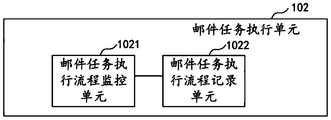
- the mail task execution unit 102 includes a sub-unit mail task execution flow monitoring unit 1021 and a mail task execution flow recording unit 1022.
- the mail task execution process monitoring unit 1021 is configured to obtain a mail task delay time and a mail task elapsed time during the execution of the mail task.
- the mail task execution process recording unit 1022 is configured to record the mail task delay time and the mail task elapsed time in the task execution log.
- the attachment generation task execution unit 103 is configured to monitor the execution flow when the attachment generation task is executed, and record the execution process of the attachment generation task in the task execution log.
- the attachment generation task execution unit 103 includes sub-units: an attachment task execution flow monitoring unit 1031 and an attachment task execution flow recording unit 1032.
- the attachment task execution process monitoring unit 1031 is configured to acquire an attachment generation task delay time and an attachment generation task elapsed time during the execution of the attachment generation task.
- the attachment task execution process recording unit 1032 is configured to record the attachment generation task delay time and the attachment generation task elapsed time in the task execution log.
- the processing result parsing unit 104 is configured to obtain a task execution report according to the task execution log parsing.
- the processing result parsing unit 104 includes a subunit: the re-execution unit 1041.
- the re-execution unit 1041 is configured to attempt to perform the mail task or the attachment generation task again if the processing result of the mail task or the attachment generation task is unsuccessful in execution.
- the workbook monitoring apparatus 10 further includes a monitoring plan generating unit 100.
- the monitoring plan generating unit 100 is configured to generate a monitoring plan of the workbook, and obtain the activation information of the monitoring plan.
- the above workbook monitoring device can be implemented in the form of a computer program that can be run on a computer device as shown in FIG.
- FIG. 11 is a schematic block diagram of a computer device according to an embodiment of the present application.
- the computer device 500 device can be a terminal.
- the terminal can be an electronic device such as a tablet computer, a notebook computer, a desktop computer, or a personal digital assistant.
- the computer device 500 includes a processor 502, a memory, and a network interface 505 that are coupled by a system bus 501, where the memory can include a non-volatile storage medium 503 and an internal memory 504.
- the non-volatile storage medium 503 can store an operating system 5031 and a computer program 5032.
- the computer program 5032 includes program instructions that, when executed, cause the processor 502 to perform a workbook monitoring method.
- the processor 502 is used to provide computing and control capabilities to support the operation of the entire computer device 500.
- the internal memory 504 provides an environment for operation of the computer program 5032 in the non-volatile storage medium 503, which when executed by the processor 502, may cause the processor 502 to perform a workbook monitoring method.
- the network interface 505 is used for network communication, such as sending assigned tasks and the like. It will be understood by those skilled in the art that the structure shown in FIG. 11 is only a block diagram of a part of the structure related to the solution of the present application, and does not constitute a limitation of the computer device 500 to which the solution of the present application is applied, and a specific computer device. 500 may include more or fewer components than shown, or some components may be combined, or have different component arrangements.
- the processor 502 is configured to run a computer program 5032 stored in the memory to implement real-time monitoring of the workbook according to the monitoring plan, and if there is a mail task or an attachment generating task to be completed in the current time workbook, Execute a mail task or an attachment generation task; if the mail task is executed, the execution process is monitored, and the process of executing the mail task is recorded in the task execution log; if the attachment generation task is executed, the execution process is monitored, and the attachment generation task is executed. The process is recorded in the task execution log; the task execution report is obtained according to the task execution log parsing.
- the processor 502 further performs the following operations: acquiring a mail task delay time during the execution of the mail task, and a mail task duration; and recording the mail task delay time and the mail task elapsed time in the task execution log.
- the processor 502 further performs the following operations: acquiring the attachment generation task delay time and the attachment generation task elapsed time during the execution of the attachment generation task; and recording the attachment generation task delay time and the attachment generation task elapsed time in the task. Execution log.
- the processor 502 further performs an operation of attempting to perform a mail task or an attachment generation task again if the processing result of the mail task or the attachment generation task is unsuccessful in execution.
- the processor 502 also performs the operations of generating a monitoring plan of the workbook and obtaining activation information of the monitoring plan.
- the embodiment of the computer device shown in FIG. 11 does not constitute a limitation on the specific configuration of the computer device.
- the computer device may include more or fewer components than illustrated. Or combine some parts, or different parts.
- the computer device may include only a memory and a processor. In such an embodiment, the structure and function of the memory and the processor are the same as those of the embodiment shown in FIG. 11, and details are not described herein again.
- the processor 502 may be a central processing unit (CPU), and the processor 502 may also be another general-purpose processor, a digital signal processor (DSP), Application Specific Integrated Circuit (ASIC), Field-Programmable Gate Array (FPGA) or other programmable logic device, discrete gate or transistor logic device, discrete hardware component, etc.
- the general purpose processor may be a microprocessor or the processor may be any conventional processor or the like.
- a storage medium in another embodiment of the present application, is provided.
- the storage medium can be a non-transitory computer readable storage medium.
- the storage medium stores a computer program, wherein the computer program includes program instructions.
- the workbook monitoring method of the embodiment of the present application is implemented when the program instruction is executed by the processor.
- the storage medium may be an internal storage unit of the aforementioned device, such as a hard disk or a memory of the device.
- the storage medium may also be an external storage device of the device, such as a plug-in hard disk equipped on the device, a smart memory card (SMC), a secure digital (SD) card, and a flash memory card. (Flash Card), etc.
- the storage medium may also include both an internal storage unit of the device and an external storage device.
Landscapes
- Engineering & Computer Science (AREA)
- Theoretical Computer Science (AREA)
- Physics & Mathematics (AREA)
- Quality & Reliability (AREA)
- General Engineering & Computer Science (AREA)
- General Physics & Mathematics (AREA)
- Computing Systems (AREA)
- Mathematical Physics (AREA)
- Computer Networks & Wireless Communication (AREA)
- Signal Processing (AREA)
- Information Transfer Between Computers (AREA)
- Debugging And Monitoring (AREA)
Abstract
本申请公开了工作簿监控方法、装置、计算机设备及存储介质。该方法包括:根据监控计划对工作簿进行实时监控,若当前时间工作簿中有待完成的邮件任务或附件生成任务,执行邮件任务或附件生成任务;若执行邮件任务,对执行流程进行监控,将邮件任务执行的流程记录在任务执行日志中;若执行附件生成任务,对执行流程进行监控,将附件生成任务执行的流程记录在任务执行日志中;根据任务执行日志解析得到任务执行报告。
Description
本申请要求于2018年4月24日提交中国专利局、申请号为201810373386.9、申请名称为“工作簿监控方法、装置、计算机设备及存储介质”的中国专利申请的优先权,其全部内容通过引用结合在本申请中。
本申请涉及工作簿的技术领域,尤其涉及工作簿监控方法、装置、计算机设备及存储介质。
在日常工作过程中,发送邮件或在邮件中插入附件并发送,能够将信息方便快捷地进行传输。
然而,现有技术中所使用的工作簿并未进行监控,因此无法通过对工作簿的监控而进行邮件发送或附件生成,当邮件任务或附件生成任务出现异常而无法成功处理时,在通常情况下异常情况很难被发现,需在邮件发出之后,才能发现邮件中的错误的或邮件任务执行异常。而发现异常情况,并对异常情况进行处理需耗费一定的时间,这期间会对用户的时间造成浪费,因而这一发现和处理异常的环节降低了邮件发送和附件生成的效率,对用户的工作造成影响。
发明内容
本申请实施例提供了工作簿监控方法、装置、计算机设备及存储介质,旨在解决现有技术中工作簿未进行监控,对异常情况进行处理的效率不高的问题。
第一方面,本申请实施例提供了一种工作簿监控方法,其包括:
根据监控计划对工作簿进行实时监控,若当前时间工作簿中有待完成的邮件任务或附件生成任务,执行邮件任务或附件生成任务;
若执行邮件任务,对执行流程进行监控,将邮件任务执行的流程记录在任务执行日志中;
若执行附件生成任务,对执行流程进行监控,将附件生成任务执行的流程记录在任务执行日志中;
根据任务执行日志解析得到任务执行报告。
第二方面,本申请实施例提供了一种工作簿监控装置,其包括:
实时监控单元,用于根据监控计划对工作簿进行实时监控,若当前时间工作簿中有待完成的邮件任务或附件生成任务,执行邮件任务或附件生成任务;
邮件任务执行单元,用于若执行邮件任务,对执行流程进行监控,将邮件任务执行的流程记录在任务执行日志中;
附件生成任务执行单元,用于若执行附件生成任务,对执行流程进行监控,将附件生成任务执行的流程记录在任务执行日志中;
处理结果解析单元,用于根据任务执行日志解析得到任务执行报告。
第三方面,本申请实施例又提供了一种计算机设备,其包括存储器、处理器及存储在所述存储器上并可在所述处理器上运行的计算机程序,所述处理器执行所述计算机程序时实现上述第一方面所述的工作簿监控方法。
第四方面,本申请实施例还提供了一种存储介质,其中所述存储介质存储有计算机程序,所述计算机程序包括程序指令,所述程序指令当被处理器执行时使所述处理器执行上述第一方面所述的工作簿监控方法。
本申请实施例提供了一种工作簿监控方法、装置、计算机设备及存储介质。该方法通过设置监控计划对工作簿中的邮件任务和附件生成任务进行监控,并记录邮件任务和附件生成任务执行的流程,通过获取处理结果及任务执行日志中的信息,得到任务执行报告。方便用户通过任务执行报告对工作簿中的邮件任务和附件生成任务的执行情况进行察看,可大幅提高对异常情况的处理速度,提高了邮件发送和附件生成的效率。
为了更清楚地说明本申请实施例技术方案,下面将对实施例描述中所需要使用的附图作简单地介绍,显而易见地,下面描述中的附图是本申请的一些实施例,对于本领域普通技术人员来讲,在不付出创造性劳动的前提下,还可以根据这些附图获得其他的附图。
图1为本申请实施例提供的工作簿监控方法的示意流程图;
图2为本申请实施例提供的工作簿监控方法的子流程示意图;
图3为本申请实施例提供的工作簿监控方法的另一子流程示意图;
图4为本申请实施例提供的工作簿监控方法的另一子流程示意图;
图5为本申请实施例提供的工作簿监控方法的另一示意流程图;
图6为本申请实施例提供的工作簿监控装置的示意性框图;
图7为本申请实施例提供的工作簿监控装置的子单元示意性框图;
图8为本申请实施例提供的工作簿监控装置的另一子单元示意性框图;
图9为本申请实施例提供的工作簿监控装置的另一子单元示意性框图;
图10为本申请实施例提供的工作簿监控装置的另一示意性框图;
图11为本申请实施例提供的计算机设备的示意性框图。
下面将结合本申请实施例中的附图,对本申请实施例中的技术方案进行清楚、完整地描述,显然,所描述的实施例是本申请一部分实施例,而不是全部的实施例。基于本申请中的实施例,本领域普通技术人员在没有做出创造性劳动前提下所获得的所有其他实施例,都属于本申请保护的范围。
应当理解,当在本说明书和所附权利要求书中使用时,术语“包括”和“包含”指示所描述特征、整体、步骤、操作、元素和/或组件的存在,但并不排除一个或多个其它特征、整体、步骤、操作、元素、组件和/或其集合的存在或添加。
还应当理解,在此本申请说明书中所使用的术语仅仅是出于描述特定实施例的目的而并不意在限制本申请。如在本申请说明书和所附权利要求书中所使用的那样,除非上下文清楚地指明其它情况,否则单数形式的“一”、“一个”及“该”意在包括复数形式。
还应当进一步理解,在本申请说明书和所附权利要求书中使用的术语“和/或”是指相关联列出的项中的一个或多个的任何组合以及所有可能组合,并且包括这些组合。
请参阅图1,图1是本申请实施例提供的工作簿监控方法的示意流程图,该方法应用于台式电脑、手提电脑、平板电脑等终端中。如图1所示,该方法包括步骤S101~S104。
S101、根据监控计划对工作簿进行实时监控,若当前时间工作簿中有待完 成的邮件任务或附件生成任务,执行邮件任务或附件生成任务。
系统通过预先设置的监控计划对工作簿中的邮件任务和附件生成任务进行实时监控,其中,监控计划包括待监控的邮件任务的名称、待监控的邮件任务的ID号、待监控的附件生成任务名称、待监控的附件生成任务的ID号、监控的间隔时间。工作簿即是记录员工日常工作计划的表格,工作簿中包含员工日常工作过程中所需执行的邮件任务和附件生成任务。
其中,邮件任务包括邮件任务名称、邮件任务ID号、邮件任务创建时间和邮件任务更新时间等。在进行邮件任务创建时,任务管理系统自动生成邮件任务创建时间,作为不可更改项进行保存,操作人员可在邮件任务创建后可随时对邮件任务进行更新,当操作人员对邮件任务进行更新时,邮件任务更新,任务管理系统将邮件任务更新的当前时间记录为邮件任务更新时间,当操作人员再次更新邮件任务时,则任务管理系统将旧的邮件任务更新时间中的时间信息删除,更新为新的时间信息,即确保邮件任务更新时间为对邮件任务最近一次更新的时间。
邮件任务中还包括邮件发送人、邮件接收人、邮件初始发送时间、邮件当前发送时间、邮件发送频率等参数,可在邮件初始发送时间之后的时间段内多次进行邮件发送,邮件发送频率可根据使用需求具体设定,可设定每天发送一次、每天发送多次、每周发送一次、每周发送多次、每个月发送一次或每个月发送多次。
邮件初始发送时间为邮件第一次发送的时间,用户可根据实际使用需求,选择只发送一次邮件;或根据邮件初始发送时间和邮件发送频率,在邮件初始发送时间间隔一定的时间后以一定的发送频率多次发送邮件。例如,当用户邮件发送频率为天时,则第一次发送邮件的时间为邮件初始发送时间,第二次发送邮件的时间为与邮件初始发送时间间隔24小时的时间,第N次发送邮件的时间为与邮件初始发送时间间隔24×(N-1)小时的时间。
邮件当前发送时间即待发送邮件的发送时间,任务管理系统根据邮件初次发送时间和邮件发送频率,自动计算得到邮件当前发送时间。若邮件任务发生更新,则通过邮件任务更新时间和邮件发送频率,计算邮件任务更新后的邮件当前发送时间。当任务管理系统监控到当前时间覆盖邮件当前发送时间时,即当前时间工作簿中有待完成的邮件任务,则对邮件任务进行执行。
例如,邮件任务的内容具体如表1所示。

表1
在表1中邮件任务的名称为邮件发送1、邮件任务的ID号为2237。邮件任务创建日期为2017-9-19,22:08;邮件任务更新时间为2017-12-4,12:00;邮件任务中的邮件初始发送时间为2017-9-20,9:50;邮件当前发送时间为2017-12-5,12:00,邮件发送频率为天,由于其中邮件任务已发生更新,则通过邮件任务更 新时间和邮件发送频率计算得到邮件当前发送时间。邮件发件人为XXX@xx.com.cn,邮件接收人为XXXX@xx.com.cn。
任务管理系统监控到当前时间为2017-12-5,12:03,当前时间已覆盖邮件当前发送时间2017-12-5,12:00,即当前时间工作簿中有待完成的邮件任务,则对邮件任务进行执行。
附件生成任务包括附件生成任务的名称、附件生成任务的ID号、附件生成任务创建时间、附件生成任务更新时间、附件情报获取时间和附件生成频率。在进行附件生成任务创建时,任务管理系统自动生成附件生成任务创建时间,作为不可更改项进行保存。操作人员可在附件生成任务创建后可随时对附件生成任务进行更新,当操作人员对附件生成任务进行更新时,附件生成任务更新,任务管理系统将附件生成任务更新的时间记录为附件生成任务更新时间,当操作人员再次更新附件生成任务时,则任务管理系统将旧的附件生成任务更新时间中的时间信息删除,并将附件生成任务更新时间更新为新的时间信息。
附件情报获取时间即待生成附件的生成时间,任务管理系统根据附件生成任务创建时间和附件生成频率,自动计算得到附件情报获取。若附件生成任务发生更新,则通过附件生成任务更新时间和附件生成频率,计算附件生成任务更新后的附件情报获取时间。
其中,附件生成任务的内容具体如表2所示。
| ID_ATTACH_GEN | 1309 |
| WORKBOOK_ID | 2069 |
| GEN_NAME | 附件生成1 |
| WORKBOOK_NAME | 示例超市-站点报表7(提取报表) |
| GEN_TIME | 2018-1-29 15:55 |
| GEN_TYPE | 0 |
| FREQUENCY | day |
| STATE | 0 |
| CREATED_BY | SSSS |
| DATE_CREATED | 2018-1-10 15:24 |
| UPDATED_BY | SSSS |
| DATE_UPDATED | 2018-1-28 15:56 |
表2
在表2中附件生成任务的名称为附件生成1,附件生成任务的ID号为1309。附件生成任务创建日期为2018-1-10,15:24;附件生成任务更新时间为2018-1-18,15:56;附件情报获取时间为2018-1-29,15:55,附件生成频率为天,由 于其中附件生成已发生更新,则通过附件生成任务更新时间和附件生成频率计算得到附件情报获取时间。
例如,任务管理系统监控到当前时间为2018-1-29,16:00,当前时间已覆盖附件情报获取时间2018-1-29,15:55,即当前时间工作簿中有待完成的附件生成任务务,则对附件生成任务进行执行。
通过预先设置的监控计划对工作簿中的邮件任务和附件生成任务进行实时监控,例如,可设置监控的间隔时间为20秒或1分钟,则任务管理系统以20秒的间隔时间或者1分钟的间隔时间对邮件任务和附件生成任务进行监控,监控的范围包括邮件任务名称以及邮件任务ID号所对应的邮件任务中的邮件任务,和附件生成任务的名称以及附件生成任务的ID号所对应的附件生成任务中的附件生成任务。
其中,可通过邮件任务名称或邮件任务ID号查找对应的邮件任务,因此邮件任务名称和邮件任务ID号只需知道一个即可对邮件任务进行查找,方便用户的使用,当任务管理系统监控到当前时间已覆盖邮件当前发送时间,则对邮件任务进行执行。可通过附件生成任务的名称或附件生成任务的ID号查找对应的附件生成任务,因此附件生成任务名称和附件生成任务ID号只需知道一个即可对附件生成任务进行查找,方便用户的使用,当任务管理系统监控到当前时间已覆盖附件情报获取时间,则对附件生成任务进行执行。
S102、若执行邮件任务,对执行流程进行监控,将邮件任务执行的流程记录在任务执行日志中。
当邮件任务开始执行时,任务管理系统对邮件任务的执行流程进行实时监控,并将将邮件任务执行的流程记录在任务执行日志中以供后续对邮件任务执行的流程进行分析。
在一实施例中,如图2所示,步骤S102包括子步骤S1021和S1022。
S1021、获取邮件任务在执行过程中的邮件任务延迟时间、邮件任务耗费时长。
邮件任务延迟时间为邮件任务开始执行的执行时间与邮件当前发送时间之间的间隔时间。当邮件任务开始执行时,记录邮件任务开始执行的执行时间。邮件任务从触发到执行的过程中会存在一定延迟,且任务管理系统中所设置的监控的间隔时间会对邮件任务延迟时间造成影响,通过对邮件任务延迟时间进 行记录和分析,能够使用户了解邮件任务执行过程任务执行的延时情况。
邮件任务耗费时长即邮件任务从开始执行至邮件任务执行完成所耗费的时间,当邮件任务中所需发送的文件数量较少,且文件所占用的系统空间较小时,则邮件任务耗费时长相应较短;当邮件任务中所需发送的文件数量较多或文件所占用的系统空间较大时,则邮件任务耗费时长相应较长,通过对邮件任务耗费时长进行记录和分析,能够使用户了解邮件任务执行过程中所花费的时长。
S1022、将邮件任务延迟时间、邮件任务耗费时长记录在任务执行日志中。
任务管理系统自动记录邮件任务延迟时间和邮件任务耗费时长,并将邮件任务延迟时间、邮件任务耗费时长记录在任务执行日志中,供后续分析使用。
在实际应用过程中,可在任务管理系统中设置邮件任务延迟时间阈值和邮件任务耗费时长阈值,当邮件任务延迟时间超过阈值时或邮件任务耗费时长超过阈值时,则中断邮件任务的执行,并获取任务执行日志。具体的,可设置邮件任务延迟时间阈值为1个小时,邮件任务耗费时长阈值为2个小时。
S103、若执行附件生成任务,对执行流程进行监控,将附件生成任务执行的流程记录在任务执行日志中。
当附件生成任务开始执行时,任务管理系统对附件生成任务的执行流程进行实时监控,并将将附件生成任务执行的流程记录在任务执行日志中以供后续对附件生成任务执行的流程进行分析。
在一实施例中,如图3所示,步骤S103包括子步骤S1031和S1032。
S1031、获取附件生成任务在执行过程中的附件生成任务延迟时间、附件生成任务耗费时长。
附件生成任务延迟时间为附件生成任务开始执行的执行时间与附件情报获取时间之间的间隔时间。当附件生成任务开始执行时,记录附件生成任务开始执行的执行时间。附件生成任务从触发到执行的过程中会存在一定延迟,且任务管理系统中所设置的监控的间隔时间会对附件生成任务延迟时间造成影响,通过对附件生成任务延迟时间进行记录和分析,能够使用户了解附件生成任务执行过程任务执行的延时情况。
附件生成任务耗费时长即附件生成任务从开始执行至附件生成任务执行完成所耗费的时间,当附件生成任务中所需生成的附件数量较少,且附件所占用的系统空间较小时,则附件生成任务耗费时长相应较短;当附件生成任务中所 需生成的附件数量较多或附件所占用的系统空间较大时,则附件生成任务耗费时长相应较长,通过对附件生成任务耗费时长进行记录和分析,能够使用户了解附件生成任务执行过程中所花费的时长。
S1032、将附件生成任务延迟时间、附件生成任务耗费时长记录在任务执行日志中。
任务管理系统自动记录附件生成任务延迟时间和附件生成任务耗费时长,并将附件生成任务延迟时间、附件生成任务耗费时长记录在任务执行日志中,供后续分析使用。
在实际应用过程中,可在任务管理系统中设置附件生成任务延迟时间阈值和附件生成任务耗费时长阈值,当附件生成任务延迟时间超过阈值时或附件生成任务耗费时长超过阈值时,则中断附件生成任务的执行,并获取任务执行日志。具体的,可设置附件生成任务延迟时间阈值为1个小时,附件生成任务耗费时长阈值为2个小时。
S104、根据任务执行日志解析得到任务执行报告。
具体的,任务管理系统获取邮件任务和/或附件生成任务的处理结果,并根据任务执行日志解析得到任务执行报告,用户可通过任务执行报告对邮件任务号和附件生成任务的执行情况进行察看。其中,任务执行日志中包括邮件任务或附件生成任务的处理结果。
任务管理系统获取邮件任务的处理结果,并根据任务执行日志解析得到任务执行报告。对任务执行日志进行解析,得到任务执行报告。在某些情况下,虽然邮件任务执行成功,但邮件任务延迟时间较长或邮件任务耗费时长较长,造成邮件任务执行效率不高,对用户的工作造成影响,此时需要对任务执行日志进行解析。
例如,虽然邮件任务执行成功,但邮件任务延迟时间太长,用户设置邮件发送时间为10:20,任务管理系统中所设置的监控的间隔时间为1小时。在10:00时,任务管理系统对邮件任务进行一次监控,未发现10:00所需执行的邮件任务;在11:00时,任务管理系统监控发现11:00之前有一个邮件任务需在10:20进行邮件发送,则这一邮件任务的邮件任务延迟时间为40分钟,当用户设置的邮件任务延迟时间阈值为20分钟时,则邮件任务延迟时间超出所设定的阈值,对用户的工作造成影响,此时,任务管理系统对任务执行日志进行解析后得到的任 务执行报告中包括由于监控时间导致邮件任务延迟时间较长,即用户可根据任务执行报告中的内容修改所设置的监控的间隔时间。例如,将监控的间隔时间设置为15分钟,即每隔15分钟任务关联系统会对邮件任务进行一次监控,即可满足实际使用需求。
对任务执行日志进行解析得到任务执行报告,在邮件任务执行不成功的情况下,用户可根据任务执行报告中的内容对任务管理系统的配置进行优化,在进行优化后,再次进行邮件任务的执行。
例如,在进行邮件任务执行过程中,由于网络问题导致邮件任务执行失败,邮件中的附件上传失败,导致邮件任务执行不成功,任务管理系统对任务执行日志进行解析后得到的任务执行报告中包括网络故障,附件上传失败,则用户可根据任务执行报告对相关故障进行排除,此时,任务管理系统将在排除网络故障后再次进行邮件任务的执行。
任务管理系统获取附件生成任务的处理结果,并根据任务执行日志解析得到任务执行报告。
对任务执行日志进行解析,得到任务执行报告。在某些情况下,虽然附件生成任务执行成功,但附件生成任务延迟时间较长或附件生成任务耗费时长较长,造成附件任务执行效率不高,对用户的工作造成影响,此时需要对任务执行日志进行解析。
例如,虽然附件生成任务执行成功,但附件生成任务耗费时长太长,由于所需生成的附件过大,造成附件生成时需要耗费较长的时间,对用户的工作效率造成影响。在具体的使用过程中,由于所需生成的附件内容过多,此时,任务管理系统对任务执行日志进行解析后得到的任务执行报告中包括由于附件较大导致附件生成任务耗费时长较长,则用户可根据任务执行报告中的内容修改附件生成任务中的附件生成个数以缩短附件生成任务耗费时长,通过将原先的较大的附件分为多个部分并分别生成为多个附件,可大幅缩短附件生成任务耗费时长,即可满足实际使用需求。
对任务执行日志进行解析得到任务执行报告,在附件生成任务执行不成功的情况下,用户可根据任务执行报告中的内容对任务管理系统的配置进行优化,在进行优化后,再次进行附件生成任务的执行。
在一实施例中,如图4所示,步骤S104之后还包括步骤S1041。
S1041、若邮件任务或附件生成任务的处理结果为执行不成功,尝试再次执行邮件任务或附件生成任务。
若邮件任务或附件生成任务的处理结果为执行不成功,则任务管理系统根据监控的间隔时间,在下一次监控时,尝试再次执行邮件任务或附件生成任务。
在一实施例中,如图5所示,步骤S101之前还包括步骤S100。
S100、生成工作簿的监控计划,并获取监控计划的启用信息。
在任务管理系统对工作簿进行监控之前,还需生成针对工作簿的监控计划,任务管理系统获取监控计划的启用信息后,方可启用监控计划。监控计划包括待监控的邮件任务的名称、待监控的邮件任务的ID号、待监控的附件生成任务名称、待监控的附件生成任务的ID号、监控的间隔时间。在监控计划启用后,根据监控的间隔时间,任务管理系统每隔一定的间隔时间对待监控的邮件任务和待监控的附件生成任务进行一次监控。
在本申请中,通过设置监控计划对工作簿中的邮件任务和附件生成任务进行监控,并记录邮件任务和附件生成任务执行的流程,通过获取处理结果及任务执行日志中的信息,得到任务执行报告。方便用户通过任务执行报告对工作簿中的邮件任务和附件生成任务的执行情况进行察看,可大幅提高对异常情况的处理速度,提高了邮件发送和附件生成的效率。
本申请实施例还提供一种工作簿监控装置,该工作簿监控装置用于执行前述工作簿监控方法的任一实施例。具体地,请参阅图6,图6是本申请实施例提供的工作簿监控装置的示意性框图。工作簿监控装置10可以配置于台式电脑、平板电脑、手提电脑、等终端中。
如图6所示,工作簿监控装置10包括实时监控单元101、邮件任务执行单元102、附件生成任务执行单元103、处理结果解析单元104。
实时监控单元101,用于根据监控计划对工作簿进行实时监控,若当前时间工作簿中有待完成的邮件任务或附件生成任务,执行邮件任务或附件生成任务。
邮件任务执行单元102,用于若执行邮件任务,对执行流程进行监控,将邮件任务执行的流程记录在任务执行日志中。
其他申请实施例中,如图7所示,所述邮件任务执行单元102包括子单元邮件任务执行流程监控单元1021和邮件任务执行流程记录单元1022。
邮件任务执行流程监控单元1021,用于获取邮件任务在执行过程中的邮件 任务延迟时间、邮件任务耗费时长。
邮件任务执行流程记录单元1022,用于将邮件任务延迟时间、邮件任务耗费时长记录在任务执行日志中。
附件生成任务执行单元103,用于若执行附件生成任务,对执行流程进行监控,将附件生成任务执行的流程记录在任务执行日志中。
其他申请实施例中,如图8所示,所述附件生成任务执行单元103包括子单元:附件任务执行流程监控单元1031和附件任务执行流程记录单元1032。
附件任务执行流程监控单元1031,用于获取附件生成任务在执行过程中的附件生成任务延迟时间、附件生成任务耗费时长。
附件任务执行流程记录单元1032,用于将附件生成任务延迟时间、附件生成任务耗费时长记录在任务执行日志中。
处理结果解析单元104,用于根据任务执行日志解析得到任务执行报告。
其他申请实施例中,如图9所示,所述处理结果解析单元104包括子单元:再次执行单元1041。
再次执行单元1041,用于若邮件任务或附件生成任务的处理结果为执行不成功,尝试再次执行邮件任务或附件生成任务。
其他申请实施例中,如图10所示,该工作簿监控装置10还包括监控计划生成单元100。
监控计划生成单元100,用于生成工作簿的监控计划,并获取监控计划的启用信息。
上述工作簿监控装置可以实现为计算机程序的形式,该计算机程序可以在如图11所示的计算机设备上运行。
请参阅图11,图11是本申请实施例提供的计算机设备的示意性框图。该计算机设备500设备可以是终端。该终端可以是平板电脑、笔记本电脑、台式电脑、个人数字助理等电子设备。
该计算机设备500包括通过系统总线501连接的处理器502、存储器和网络接口505,其中,存储器可以包括非易失性存储介质503和内存储器504。该非易失性存储介质503可存储操作系统5031和计算机程序5032。该计算机程序5032包括程序指令,该程序指令被执行时,可使得处理器502执行一种工作簿监控方法。该处理器502用于提供计算和控制能力,支撑整个计算机设备500 的运行。该内存储器504为非易失性存储介质503中的计算机程序5032的运行提供环境,该计算机程序5032被处理器502执行时,可使得处理器502执行一种工作簿监控方法。该网络接口505用于进行网络通信,如发送分配的任务等。本领域技术人员可以理解,图11中示出的结构,仅仅是与本申请方案相关的部分结构的框图,并不构成对本申请方案所应用于其上的计算机设备500的限定,具体的计算机设备500可以包括比图中所示更多或更少的部件,或者组合某些部件,或者具有不同的部件布置。
其中,所述处理器502用于运行存储在存储器中的计算机程序5032,以实现如下功能:根据监控计划对工作簿进行实时监控,若当前时间工作簿中有待完成的邮件任务或附件生成任务,执行邮件任务或附件生成任务;若执行邮件任务,对执行流程进行监控,将邮件任务执行的流程记录在任务执行日志中;若执行附件生成任务,对执行流程进行监控,将附件生成任务执行的流程记录在任务执行日志中;根据任务执行日志解析得到任务执行报告。
在一实施例中,处理器502还执行如下操作:获取邮件任务在执行过程中的邮件任务延迟时间、邮件任务耗费时长;将邮件任务延迟时间、邮件任务耗费时长记录在任务执行日志中。
在一实施例中,处理器502还执行如下操作:获取附件生成任务在执行过程中的附件生成任务延迟时间、附件生成任务耗费时长;将附件生成任务延迟时间、附件生成任务耗费时长记录在任务执行日志中。
在一实施例中,处理器502还执行如下操作:若邮件任务或附件生成任务的处理结果为执行不成功,尝试再次执行邮件任务或附件生成任务。
在一实施例中,处理器502还执行如下操作:生成工作簿的监控计划,并获取监控计划的启用信息。
本领域技术人员可以理解,图11中示出的计算机设备的实施例并不构成对计算机设备具体构成的限定,在其他实施例中,计算机设备可以包括比图示更多或更少的部件,或者组合某些部件,或者不同的部件布置。例如,在一些实施例中,计算机设备可以仅包括存储器及处理器,在这样的实施例中,存储器及处理器的结构及功能与图11所示实施例一致,在此不再赘述。
应当理解,在本申请实施例中,处理器502可以是中央处理单元(Central Processing Unit,CPU),该处理器502还可以是其他通用处理器、数字信号处理 器(Digital Signal Processor,DSP)、专用集成电路(Application Specific Integrated Circuit,ASIC)、现成可编程门阵列(Field-Programmable Gate Array,FPGA)或者其他可编程逻辑器件、分立门或者晶体管逻辑器件、分立硬件组件等。其中,通用处理器可以是微处理器或者该处理器也可以是任何常规的处理器等。
在本申请的另一实施例中提供一种存储介质。该存储介质可以为非易失性的计算机可读存储介质。该存储介质存储有计算机程序,其中计算机程序包括程序指令。该程序指令被处理器执行时实现本申请实施例的工作簿监控方法。
所述存储介质可以是前述设备的内部存储单元,例如设备的硬盘或内存。所述存储介质也可以是所述设备的外部存储设备,例如所述设备上配备的插接式硬盘,智能存储卡(Smart Media Card,SMC),安全数字(Secure Digital,SD)卡,闪存卡(Flash Card)等。进一步地,所述存储介质还可以既包括所述设备的内部存储单元也包括外部存储设备。
所属领域的技术人员可以清楚地了解到,为了描述的方便和简洁,上述描述的设备、装置和单元的具体工作过程,可以参考前述方法实施例中的对应过程,在此不再赘述。
以上所述,仅为本申请的具体实施方式,但本申请的保护范围并不局限于此,任何熟悉本技术领域的技术人员在本申请揭露的技术范围内,可轻易想到各种等效的修改或替换,这些修改或替换都应涵盖在本申请的保护范围之内。因此,本申请的保护范围应以权利要求的保护范围为准。
Claims (20)
- 一种工作簿监控方法,其特征在于,包括:根据监控计划对工作簿进行实时监控,若当前时间工作簿中有待完成的邮件任务或附件生成任务,执行邮件任务或附件生成任务;若执行邮件任务,对执行流程进行监控,将邮件任务执行的流程记录在任务执行日志中;若执行附件生成任务,对执行流程进行监控,将附件生成任务执行的流程记录在任务执行日志中;根据任务执行日志解析得到任务执行报告。
- 根据权利要求1所述的工作簿监控方法,其特征在于,所述若执行邮件任务,对执行流程进行监控,将邮件任务执行的流程记录在任务执行日志中,包括:获取邮件任务在执行过程中的邮件任务延迟时间、邮件任务耗费时长;将邮件任务延迟时间、邮件任务耗费时长记录在任务执行日志中。
- 根据权利要求1所述的工作簿监控方法,其特征在于,所述若执行附件生成任务,对执行流程进行监控,将附件生成任务执行的流程记录在任务执行日志中,包括:获取附件生成任务在执行过程中的附件生成任务延迟时间、附件生成任务耗费时长;将附件生成任务延迟时间、附件生成任务耗费时长记录在任务执行日志中。
- 根据权利要求1所述的工作簿监控方法,其特征在于,所述任务执行日志中包括邮件任务或附件生成任务的处理结果;所述根据任务执行日志解析得到任务执行报告之后,还包括:若邮件任务或附件生成任务的处理结果为执行不成功,尝试再次执行邮件任务或附件生成任务。
- 根据权利要求1所述的工作簿监控方法,其特征在于,所述根据监控计划对工作簿进行实时监控,若当前时间工作簿中有待完成的邮件任务或附件生成任务,则执行邮件任务或附件生成任务之前,还包括:生成工作簿的监控计划,并获取监控计划的启用信息。
- 一种工作簿监控装置,其特征在于,包括:实时监控单元,用于根据监控计划对工作簿进行实时监控,若当前时间工作簿中有待完成的邮件任务或附件生成任务,执行邮件任务或附件生成任务;邮件任务执行单元,用于若执行邮件任务,对执行流程进行监控,将邮件任务执行的流程记录在任务执行日志中;附件生成任务执行单元,用于若执行附件生成任务,对执行流程进行监控,将附件生成任务执行的流程记录在任务执行日志中;处理结果解析单元,用于根据任务执行日志解析得到任务执行报告。
- 根据权利要求6所述的工作簿监控装置,其特征在于,所述邮件任务执行单元,包括:邮件任务执行流程监控单元,用于获取邮件任务在执行过程中的邮件任务延迟时间、邮件任务耗费时长;邮件任务执行流程记录单元,用于将邮件任务延迟时间、邮件任务耗费时长记录在任务执行日志中。
- 根据权利要求6所述的工作簿监控装置,其特征在于,所述附件生成任务执行单元,包括:附件任务执行流程监控单元,用于获取附件生成任务在执行过程中的附件生成任务延迟时间、附件生成任务耗费时长;附件任务执行流程记录单元,用于将附件生成任务延迟时间、附件生成任务耗费时长记录在任务执行日志中。
- 根据权利要求6所述的工作簿监控装置,其特征在于,所述处理结果解析单元,包括:再次执行单元,用于若邮件任务或附件生成任务的处理结果为执行不成功,尝试再次执行邮件任务或附件生成任务。
- 根据权利要求6所述的工作簿监控装置,其特征在于,还包括:监控计划生成单元,用于生成工作簿的监控计划,并获取监控计划的启用信息。
- 一种计算机设备,包括存储器、处理器及存储在所述存储器上并可在所述处理器上运行的计算机程序,其特征在于,所述处理器执行所述计算机程序时实现以下步骤:根据监控计划对工作簿进行实时监控,若当前时间工作簿中有待完成的邮件任务或附件生成任务,执行邮件任务或附件生成任务;若执行邮件任务,对执行流程进行监控,将邮件任务执行的流程记录在任务执行日志中;若执行附件生成任务,对执行流程进行监控,将附件生成任务执行的流程记录在任务执行日志中;根据任务执行日志解析得到任务执行报告。
- 根据权利要求11所述的计算机设备,其特征在于,所述若执行邮件任务,对执行流程进行监控,将邮件任务执行的流程记录在任务执行日志中,包括:获取邮件任务在执行过程中的邮件任务延迟时间、邮件任务耗费时长;将邮件任务延迟时间、邮件任务耗费时长记录在任务执行日志中。
- 根据权利要求11所述的计算机设备,其特征在于,所述若执行附件生成任务,对执行流程进行监控,将附件生成任务执行的流程记录在任务执行日志中,包括:获取附件生成任务在执行过程中的附件生成任务延迟时间、附件生成任务耗费时长;将附件生成任务延迟时间、附件生成任务耗费时长记录在任务执行日志中。
- 根据权利要求11所述的计算机设备,其特征在于,所述任务执行日志中包括邮件任务或附件生成任务的处理结果;所述根据任务执行日志解析得到任务执行报告之后,还包括:若邮件任务或附件生成任务的处理结果为执行不成功,尝试再次执行邮件任务或附件生成任务。
- 根据权利要求11所述的计算机设备,其特征在于,所述根据监控计划对工作簿进行实时监控,若当前时间工作簿中有待完成的邮件任务或附件生成任务,则执行邮件任务或附件生成任务之前,还包括:生成工作簿的监控计划,并获取监控计划的启用信息。
- 一种存储介质,其特征在于,所述存储介质存储有计算机程序,所述计算机程序包括程序指令,所述程序指令当被处理器执行时使所述处理器执行以下操作:根据监控计划对工作簿进行实时监控,若当前时间工作簿中有待完成的邮 件任务或附件生成任务,执行邮件任务或附件生成任务;若执行邮件任务,对执行流程进行监控,将邮件任务执行的流程记录在任务执行日志中;若执行附件生成任务,对执行流程进行监控,将附件生成任务执行的流程记录在任务执行日志中;根据任务执行日志解析得到任务执行报告。
- 根据权利要求16所述的存储介质,其特征在于,所述若执行邮件任务,对执行流程进行监控,将邮件任务执行的流程记录在任务执行日志中,包括:获取邮件任务在执行过程中的邮件任务延迟时间、邮件任务耗费时长;将邮件任务延迟时间、邮件任务耗费时长记录在任务执行日志中。
- 根据权利要求16所述的存储介质,其特征在于,所述若执行附件生成任务,对执行流程进行监控,将附件生成任务执行的流程记录在任务执行日志中,包括:获取附件生成任务在执行过程中的附件生成任务延迟时间、附件生成任务耗费时长;将附件生成任务延迟时间、附件生成任务耗费时长记录在任务执行日志中。
- 根据权利要求16所述的存储介质,其特征在于,所述任务执行日志中包括邮件任务或附件生成任务的处理结果;所述根据任务执行日志解析得到任务执行报告之后,还包括:若邮件任务或附件生成任务的处理结果为执行不成功,尝试再次执行邮件任务或附件生成任务。
- 根据权利要求16所述的存储介质,其特征在于,所述根据监控计划对工作簿进行实时监控,若当前时间工作簿中有待完成的邮件任务或附件生成任务,则执行邮件任务或附件生成任务之前,还包括:生成工作簿的监控计划,并获取监控计划的启用信息。
Applications Claiming Priority (2)
| Application Number | Priority Date | Filing Date | Title |
|---|---|---|---|
| CN201810373386.9 | 2018-04-24 | ||
| CN201810373386.9A CN108595305A (zh) | 2018-04-24 | 2018-04-24 | 工作簿监控方法、装置、计算机设备及存储介质 |
Publications (1)
| Publication Number | Publication Date |
|---|---|
| WO2019205387A1 true WO2019205387A1 (zh) | 2019-10-31 |
Family
ID=63614457
Family Applications (1)
| Application Number | Title | Priority Date | Filing Date |
|---|---|---|---|
| PCT/CN2018/102385 Ceased WO2019205387A1 (zh) | 2018-04-24 | 2018-08-27 | 工作簿监控方法、装置、计算机设备及存储介质 |
Country Status (2)
| Country | Link |
|---|---|
| CN (1) | CN108595305A (zh) |
| WO (1) | WO2019205387A1 (zh) |
Cited By (1)
| Publication number | Priority date | Publication date | Assignee | Title |
|---|---|---|---|---|
| CN111475369A (zh) * | 2020-03-05 | 2020-07-31 | 中国平安人寿保险股份有限公司 | 日志监控的添加方法、装置、计算机设备及存储介质 |
Citations (5)
| Publication number | Priority date | Publication date | Assignee | Title |
|---|---|---|---|---|
| CN101957746A (zh) * | 2009-07-13 | 2011-01-26 | 中兴通讯股份有限公司 | 一种任务管理系统及方法 |
| US8140534B2 (en) * | 2007-08-03 | 2012-03-20 | International Business Machines Corporation | System and method for sorting attachments in an integrated information management application |
| CN105681168A (zh) * | 2016-03-04 | 2016-06-15 | 浙江翼信科技有限公司 | 一种电子邮件附件上传方法和装置 |
| CN105706126A (zh) * | 2015-05-22 | 2016-06-22 | 深圳市博安达信息技术股份有限公司 | 监测任务生成方法及系统 |
| CN106484596A (zh) * | 2016-10-18 | 2017-03-08 | 安徽天达网络科技有限公司 | 一种计算机安全监控系统 |
Family Cites Families (4)
| Publication number | Priority date | Publication date | Assignee | Title |
|---|---|---|---|---|
| US8140975B2 (en) * | 2005-01-07 | 2012-03-20 | Apple Inc. | Slide show navigation |
| CN101072202B (zh) * | 2007-05-25 | 2012-03-21 | 腾讯科技(深圳)有限公司 | 一种电子邮件的监控方法及监控系统 |
| US20160323224A1 (en) * | 2015-04-28 | 2016-11-03 | SmartSheet.com, Inc. | Systems and methods for providing an email client interface with an integrated tabular data management interface |
| CN106406993B (zh) * | 2016-09-06 | 2019-11-15 | 努比亚技术有限公司 | 一种定时任务管理方法和系统 |
-
2018
- 2018-04-24 CN CN201810373386.9A patent/CN108595305A/zh active Pending
- 2018-08-27 WO PCT/CN2018/102385 patent/WO2019205387A1/zh not_active Ceased
Patent Citations (5)
| Publication number | Priority date | Publication date | Assignee | Title |
|---|---|---|---|---|
| US8140534B2 (en) * | 2007-08-03 | 2012-03-20 | International Business Machines Corporation | System and method for sorting attachments in an integrated information management application |
| CN101957746A (zh) * | 2009-07-13 | 2011-01-26 | 中兴通讯股份有限公司 | 一种任务管理系统及方法 |
| CN105706126A (zh) * | 2015-05-22 | 2016-06-22 | 深圳市博安达信息技术股份有限公司 | 监测任务生成方法及系统 |
| CN105681168A (zh) * | 2016-03-04 | 2016-06-15 | 浙江翼信科技有限公司 | 一种电子邮件附件上传方法和装置 |
| CN106484596A (zh) * | 2016-10-18 | 2017-03-08 | 安徽天达网络科技有限公司 | 一种计算机安全监控系统 |
Cited By (1)
| Publication number | Priority date | Publication date | Assignee | Title |
|---|---|---|---|---|
| CN111475369A (zh) * | 2020-03-05 | 2020-07-31 | 中国平安人寿保险股份有限公司 | 日志监控的添加方法、装置、计算机设备及存储介质 |
Also Published As
| Publication number | Publication date |
|---|---|
| CN108595305A (zh) | 2018-09-28 |
Similar Documents
| Publication | Publication Date | Title |
|---|---|---|
| WO2019237586A1 (zh) | 定时任务管理方法、装置、计算机设备及存储介质 | |
| WO2020232871A1 (zh) | 一种微服务依赖分析方法及装置 | |
| CN107590016B (zh) | 掉电重启识别方法及装置 | |
| CN101388038B (zh) | 数据抽取、转换和加载的执行方法和装置 | |
| CN113377791B (zh) | 一种数据处理方法、系统及计算设备 | |
| WO2017114365A1 (zh) | 归档邮件附件的方法和云存储服务器 | |
| CN110058930A (zh) | 任务调度方法及设备 | |
| WO2018210080A1 (zh) | 一种数据同步方法、装置、设备及计算机可读存储介质 | |
| WO2019161620A1 (zh) | 应用依赖关系更新方法、终端、设备及存储介质 | |
| WO2019136797A1 (zh) | Hive表扫描方法、装置、计算机设备及存储介质 | |
| CN110460668B (zh) | 一种文件上传方法、装置、计算机设备和存储介质 | |
| WO2019148657A1 (zh) | 关联环境测试方法、电子装置及计算机可读存储介质 | |
| CN114185804B (zh) | 一种接口测试方法、装置及终端设备 | |
| CN106802821A (zh) | 识别应用程序安装来源的方法及装置 | |
| CN108710606B (zh) | 一种任务进度监控方法、计算机可读存储介质及终端设备 | |
| CN116391177A (zh) | 带优先级的非活动存储器设备更新 | |
| WO2019205387A1 (zh) | 工作簿监控方法、装置、计算机设备及存储介质 | |
| CN105224252A (zh) | 数据存储方法及装置 | |
| CN112835978A (zh) | 一种数据存储方法、装置及计算机设备 | |
| WO2019227719A1 (zh) | 邮件配置方法、装置、计算机设备及存储介质 | |
| CN107766512B (zh) | 一种日志数据存储方法和日志数据存储系统 | |
| CN113094384B (zh) | Sql文件配置方法、装置及终端设备 | |
| CN103761247B (zh) | 一种出错文件的处理方法及装置 | |
| CN112950140A (zh) | 基于计算机的日程安排管理方法及装置 | |
| CN113590017A (zh) | 用于处理数据的方法、电子设备和计算机程序产品 |
Legal Events
| Date | Code | Title | Description |
|---|---|---|---|
| 121 | Ep: the epo has been informed by wipo that ep was designated in this application |
Ref document number: 18916362 Country of ref document: EP Kind code of ref document: A1 |
|
| NENP | Non-entry into the national phase |
Ref country code: DE |
|
| 122 | Ep: pct application non-entry in european phase |
Ref document number: 18916362 Country of ref document: EP Kind code of ref document: A1 |