WO2015045680A1 - 翻訳装置およびその制御プログラム - Google Patents
翻訳装置およびその制御プログラム Download PDFInfo
- Publication number
- WO2015045680A1 WO2015045680A1 PCT/JP2014/071716 JP2014071716W WO2015045680A1 WO 2015045680 A1 WO2015045680 A1 WO 2015045680A1 JP 2014071716 W JP2014071716 W JP 2014071716W WO 2015045680 A1 WO2015045680 A1 WO 2015045680A1
- Authority
- WO
- WIPO (PCT)
- Prior art keywords
- translation
- image
- character
- result
- unit
- Prior art date
- Legal status (The legal status is an assumption and is not a legal conclusion. Google has not performed a legal analysis and makes no representation as to the accuracy of the status listed.)
- Ceased
Links
Images




Classifications
-
- G—PHYSICS
- G06—COMPUTING OR CALCULATING; COUNTING
- G06F—ELECTRIC DIGITAL DATA PROCESSING
- G06F40/00—Handling natural language data
- G06F40/40—Processing or translation of natural language
- G06F40/58—Use of machine translation, e.g. for multi-lingual retrieval, for server-side translation for client devices or for real-time translation
-
- G—PHYSICS
- G06—COMPUTING OR CALCULATING; COUNTING
- G06V—IMAGE OR VIDEO RECOGNITION OR UNDERSTANDING
- G06V30/00—Character recognition; Recognising digital ink; Document-oriented image-based pattern recognition
- G06V30/10—Character recognition
- G06V30/14—Image acquisition
- G06V30/1444—Selective acquisition, locating or processing of specific regions, e.g. highlighted text, fiducial marks or predetermined fields
- G06V30/1456—Selective acquisition, locating or processing of specific regions, e.g. highlighted text, fiducial marks or predetermined fields based on user interactions
-
- G—PHYSICS
- G06—COMPUTING OR CALCULATING; COUNTING
- G06V—IMAGE OR VIDEO RECOGNITION OR UNDERSTANDING
- G06V30/00—Character recognition; Recognising digital ink; Document-oriented image-based pattern recognition
- G06V30/10—Character recognition
- G06V30/26—Techniques for post-processing, e.g. correcting the recognition result
- G06V30/262—Techniques for post-processing, e.g. correcting the recognition result using context analysis, e.g. lexical, syntactic or semantic context
-
- G—PHYSICS
- G06—COMPUTING OR CALCULATING; COUNTING
- G06V—IMAGE OR VIDEO RECOGNITION OR UNDERSTANDING
- G06V30/00—Character recognition; Recognising digital ink; Document-oriented image-based pattern recognition
- G06V30/10—Character recognition
Definitions
- the present invention relates to a translation device that translates a character or character string that has been character-recognized, and a control program thereof.
- Patent Document 1 One method for solving such a problem is a method disclosed in Patent Document 1.
- an evaluation value related to character recognition is calculated for each of a plurality of images including a character or a character string to be character-recognized and images before and after the image, and the evaluation value exceeds a certain threshold value.
- the image with the highest evaluation value is selected from the images or images within a range up to a certain threshold.
- the present invention has been made in view of the above problems, and an object thereof is to provide a translation apparatus and the like that can improve the translation accuracy in a specific image region.
- a translation apparatus acquires an image of a captured image and at least one still image recorded before or after the captured image is captured.
- An acquisition unit a character recognition unit that recognizes characters or character strings included in each acquired image, a translation unit that translates character-recognized characters or character strings, and a result of translation of the characters or character strings.
- a translation evaluation unit that evaluates pass / fail, and a control that displays the result of the translation in an image that best evaluates the result of the translation in a specific image region of each image among the results of the translation in each image.
- a display control unit for performing the operation.
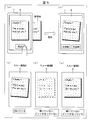
- FIG. 4 is an explanatory diagram for explaining the operation of the translation apparatus, wherein (a) and (b) show states before and after imaging of the translation apparatus, and (c) to (e) show examples of through images. .
- FIGS. 1 to 7 Embodiments of the present invention will be described with reference to FIGS. 1 to 7 as follows.
- FIG. 1 is a block diagram showing a configuration of translation apparatus 1 according to an embodiment of the present invention.
- the translation device 1 includes a control unit 2, a storage unit 3, an imaging unit (image acquisition unit) 4, an operation unit 5, and a display unit 6.
- the translation device 1 performs character recognition processing and translation processing on each image of at least one through image (still image or recorded image) recorded before and after the captured image as well as the captured image at the time of capturing.
- This is an apparatus for performing each process such as a process for evaluating the result of translation and a process for displaying the result of translation.
- the control unit 2 controls the entire translation apparatus 1 in an integrated manner, and can be configured by, for example, a CPU (Central Processing Unit).
- the control unit 2 controls each control block of the storage unit 3, the imaging unit 4, the operation unit 5, and the display unit 6.
- the detailed configuration of the control unit 2 will be described later.
- the storage unit 3 stores various data read when executing a control program of each unit executed by the control unit 2.
- the storage unit 3 is configured by a nonvolatile storage device such as a flash memory.
- the storage unit 3 is a work area for temporarily storing various data generated in the process of executing the above-described program by the control unit 2 by a volatile storage device such as a RAM (Random Access Memory). It has a region that is configured.
- the storage unit 3 is not necessarily provided in the translation device 1 and is connected to the translation device 1 as an external storage device that can be attached to and detached from the translation device 1 or an external storage device on a network that can communicate. It may be configured.
- the storage unit 3 particularly includes a through image data 31 (still image or recorded image), captured image data 32 (captured image), analysis area setting information 33, a character / character string DB (database) 34, a dictionary DB 35, and Various data such as weight setting information 36 is stored.
- the imaging unit 4 includes a function of a normal camera that captures an imaging target such as a signboard or a menu as a subject based on a user operation received by the operation unit 5, for example. Then, the imaging unit 4 outputs the image acquired by the imaging to the control unit 2. In addition, the imaging unit 4 has a function of periodically or continuously recording a through image obtained by imaging the state of the captured image before and after imaging.
- the operation unit 5 receives an operation of the user of the translation apparatus 1 and is typically a physical key, a keyboard, an imaging button, a touch panel, and the like.
- the control unit 2 includes an operation unit IF (interface) 21, a mode setting unit 22, an imaging unit IF 23, an image processing unit 24, a character recognition unit 25, a translation unit 26, a display layout setting unit 27, and A display control unit 28 is provided.
- the display unit 6 displays an image based on an instruction from the control unit 2, displays a result of character recognition of a character or character string included in the image, or translates a character recognized character string or character string. It is a display device that displays. As the display unit 6, a liquid crystal display panel, an EL (Electro Luminescence) display panel, or the like can be applied. The display unit 6 may be a touch panel having both functions of image display and operation input. In the translation apparatus 1, the display unit 6 has a function of displaying a captured image, a through image, a character or character string with character recognition, a result of translation of the character or character string with character recognition, and the like.
- the operation unit IF21 converts a user operation signal input via the operation unit 5 into digital data that can be processed, and transmits the digital data to each unit of the control unit 2.
- the mode setting unit 22 sets or changes the operation mode of the translation apparatus 1 in accordance with a user operation via the operation unit 5, and notifies each unit of the control unit 2 that the operation mode is set or changed to a specific operation mode.
- operation modes include a character recognition mode for recognizing characters or character strings, a translation mode for translating character-recognized characters or character strings into a predetermined language, various display modes (captured image display mode, Through image display mode, recognized character display mode, translation result display mode, etc.).
- the imaging unit IF 23 captures a captured image captured by the user in the imaging unit 4 and stores it in the storage unit 3 as captured image data 32 (hereinafter simply referred to as “captured image”). In addition, the imaging unit IF23 captures a through image that is periodically or continuously captured by the imaging unit 4 before and after capturing a captured image, and stores as a through image data 31 (hereinafter simply referred to as a “through image”). 3 is stored. Further, the imaging unit IF 23 reads the captured image and the through image stored in the storage unit 3 and passes them to the image processing unit 24.
- the captured image is not always captured at the same angle or inclination, but is captured at a specific angle or inclination that is continuously changing.
- the angle or the inclination can be defined as an angle or an inclination with respect to the vertical direction of the memo paper (the same as the vertical direction of the characters included in the memo paper).
- the vertical direction of the memo paper the same as the vertical direction of the characters included in the memo paper.
- FIG. 5 (a) and FIG. 5 (b) respectively show the state before and after imaging of the translation apparatus 1.
- FIG. 5A shows a state at the moment when the user is about to press the imaging button and take an image while viewing the camera preview image of the subject (memo paper) displayed on the display unit 6.
- FIG. 5B the vertical direction of the subject (same as the vertical direction of the characters included in the subject) due to a hand shake or the like caused by the user pressing the imaging button is the same as the longitudinal direction of the display screen.
- a state is shown in which the image is picked up with a slight tilt in the clockwise direction. Until the user shoots, the tilt and focus of the subject change every moment due to camera shake.
- the through image is also stored periodically or continuously, and not only the instantaneous captured image captured by the user.
- the user can capture the captured image without having to be aware of environmental factors such as angles and shadows when capturing a signboard or menu that the user wants to translate. If there is a character that can be recognized in the front and rear through images, the result of translation expected from the user can be displayed. For example, in the through images A and B shown in FIG. 5C and FIG. 5D, the images are captured in a state where the vertical direction of the subject is slightly inclined clockwise with respect to the longitudinal direction of the display screen.
- the subject is not tilted but is imaged without being in focus.
- the vertical direction of the subject happens to be inclined with respect to the longitudinal direction of the display screen, as in the through image C shown in FIG.
- the image is captured in a state where the focus is not achieved. That is, in the case as described above, it is more likely that a correct result will be obtained if the through image C is processed.
- the image processing unit 24 performs image processing on the captured image and the through image received from the imaging unit IF23.
- the image processing unit 24 includes an analysis area setting unit 241 and a character cutout unit 242. Further, the image processing unit 24 transmits the captured image to the display layout setting unit 27 when the captured image display mode is currently set.
- the analysis area setting unit 241 automatically sets an area of a specific size including the vicinity of the center of each image of the captured image and the through image as an analysis area (specific image area), or the user via the operation unit 5
- the image area specified (or selected) is set as an analysis area.
- the analysis area setting unit 241 stores information related to the set analysis area in the storage unit 3 as analysis area setting information 33.
- the character cutout unit 242 generates a cutout image (see, for example, (b) in FIG. 6 and (f) in FIG. 6) obtained by cutting out an image portion including a character or a character string from the captured image and the through image, and the character recognition unit 25. Since the conventional method can be used for the method of generating the cutout image, the description thereof is omitted.
- the character recognition unit 25 compares, for example, a character included in the cut-out image received from the character cut-out unit 242 and a character model recorded in association with the character code in the character / character string DB 34. When the similarity between the character included in the clipped image and the character model exceeds a preset threshold, the character included in the clipped image is recognized as a character having a character code corresponding to the similar character model.
- the recognition rate for character recognition may be determined based on, for example, the degree of similarity between characters included in the cut-out image and the character model.
- the character recognition method is not limited to such a method.
- the character included in the cut-out image may be recognized as a character having a character code associated with a feature amount similar to the feature amount.
- the character recognition unit 25 recognizes a character string
- the character recognition unit 25 recognizes the characters constituting the character string one by one, and a character string in which the character recognition characters are arranged is present in the character / character string DB 34. Check if it is. At this time, for example, an average value of the recognition rates of the characters may be used as the recognition rate of the character string that has been recognized.
- the method of character recognition of a character string is not limited to the above methods, Other known methods can be used. For example, a configuration in which a character string included in the cut-out image is directly compared with a character string model recorded in association with a character string code in the character / character string DB 34 may be employed.
- the character recognition unit 25 includes a recognition result evaluation unit 251, and the recognition result evaluation unit 251 determines that the character recognition is successful when the recognition rate of the character or the character string exceeds a predetermined threshold. To do.
- the character recognition unit 25 transmits the result of character recognition to the display layout setting unit 27 described later.
- the translation unit 26 translates a character or a character string recognized by the character recognition unit 25 (successful character recognition) into a specific language (for example, English to Japanese). More specifically, the translation unit 26 confirms whether or not the translation result corresponding to the character or character string recognized by the character exists in the dictionary DB 35. At this time, the evaluation value indicating the quality of the translation result, that is, the evaluation value of the translation result (translation accuracy) may be determined based on the recognition rate of the character or character string, for example.
- the translation evaluation method is not limited to the above method. For example, the best result may be determined when the translation of the largest number of characters or character strings is successful for all the characters or character strings included in the captured image.
- evaluation value (translation The total number of characters or character strings successfully completed / the total number of all characters or character strings included in the captured image).
- the translation unit 26 of the present embodiment includes a translation evaluation unit 261 and a weighting setting unit 262.
- the translation evaluation unit 261 calculates an evaluation value indicating the degree of quality of the translation result for each of the captured image and the through image, and evaluates the quality of the translation result based on the magnitude of the evaluation value.
- the weight setting unit 262 sets the weight of the evaluation value according to the position on each image. If you want to translate the characters included in the target image, the user does not want to translate all the characters included in the image evenly. There are cases to think. In that case, since it is considered that the user often shoots the character or the like that he / she wants to translate most in the center of the screen, for example, from the translation result shown in FIG. The translation result shown is considered to be the expected result for the user.
- the translation result shown in FIG. 7B is 75%, and FIG. The translation result shown is 25%, and the former is judged to be a better result. Therefore, when “Rest today” present in the vicinity of the center of the screen can be translated, the translation result shown in (c) of FIG. Can be displayed. Such added points are called weighting.
- the place where the weighting is performed is not limited to the center of the screen, but the user may be allowed to specify a place that the user wants to particularly translate.
- the weighting setting unit 262 refers to the weighting setting information 36 recorded in advance in the storage unit 3, and sets the weighting of the evaluation value calculated for the analysis area in each image of the captured image and the through image other than the analysis area. You may set larger than the weighting of the evaluation value calculated about an area
- the weighting method is not limited to the above method.
- the weighting setting information 36 recorded in advance in the storage unit 3 is referred to, and the weighting is reduced according to the distance from the center position of each image of the captured image and the through image (for example, the weighting size).
- the weight setting unit 262 may set the weight to 1 / (number of pixels from the center of the image), for example, depending on how many pixels are away from the center of the image.
- the translation evaluation unit 261 calculates a weighted sum of evaluation values calculated for each image using the weighting set by the weighting setting unit 262, and evaluates the quality of the result of translation based on the magnitude of the weighted sum.
- the translation result in the image having the maximum weighted sum of the evaluation values of the translation results is specified.
- the translation unit 26 transmits the specified translation result to the display layout setting unit 27 described later.
- the translation evaluation unit 261 identifies an image that maximizes the sum of the evaluation values calculated for the analysis area, and the translation unit 26 transmits the result of translation of the identified image to the display layout setting unit 27. May be.
- the character or character string that the user wants to translate is often near the center of the image (or near the center of the image), not at the edge of the image, so when evaluating the results of translation for multiple images
- the evaluation value is weighted according to the position in the image, and the result using the image having a high evaluation value in the vicinity of the center or the image area selected by the user is displayed to the user. This makes it easier to obtain translation results.
- the translation unit 26 does not necessarily include the weight setting unit 262.
- the display layout setting unit 27 displays the captured image received from the image processing unit 24, the character recognition received from the character recognition unit 25, and the translation received from the translation unit 26 according to the currently set display mode type. Based on the result, these various data are integrated to generate display image data to be displayed on the display unit 6.
- the display layout setting unit 27 passes the generated display image data to the display control unit 28.
- the display control unit 28 controls the drive of the display unit 6 to display the display image on the display screen using the display image data. If the display control unit 28 is currently set to the captured image display mode, the display control unit 28 causes the display unit 6 to display the captured image. If the character recognition mode is set, the character recognition result is displayed on the display unit 6.
- the character recognition result may be displayed together with the character recognition target character or character string, or may be displayed by replacing the character recognition target character or character string with the character recognition result.
- the display control unit 28 causes the display unit 6 to display the translation result if the translation result display mode is set.
- the result of translation may be displayed together with the character or character string to be recognized (see FIG. 6D, FIG. 7C, and FIG. 7F), or character recognition. You may display with the result of.
- the character or character string to be recognized may be replaced with the result of translation and displayed (see (h) in FIG. 6, (b) in FIG. 7, and (e) in FIG. 7)).
- the user it is necessary for the user to take an image in consideration of environmental factors such as an angle and a tilt in the imaging of the imaging target, and an expected result cannot be obtained unless the imaging is performed in accordance with the environmental factor.
- environmental factors such as an angle and a tilt in the imaging of the imaging target
- an expected result cannot be obtained unless the imaging is performed in accordance with the environmental factor.
- the translation device 1 of the present embodiment not only the instantaneous image captured by the user but also the through images before and after the image capture are analyzed, so that the analysis obtained until the target is imaged is analyzed. Character recognition and translation results can be displayed with high accuracy from a suitable through image. That is, according to the translation device 1, the user often obtains the expected translation result without performing imaging in consideration of environmental factors when imaging the target.
- the translation apparatus 1 after giving importance to the evaluation result of the analysis area, the translation result having the highest evaluation is displayed to the user. That is, displaying the result of using the image with the best translation evaluation in the analysis area to the user makes it easier to obtain the translation result desired by the user.
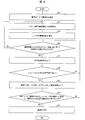
- FIG. 2 is a flowchart showing an aspect of the operation of the translation apparatus 1.
- the translation apparatus 1 is turned on to start operation.
- step S hereinafter, “step” is omitted) 11
- the user operates the operation unit 5 to set the operation mode to, for example, the translation mode (or the translation result display mode), and activates the imaging unit 4. Proceed to S12.
- the imaging unit IF23 starts saving a through image that is periodically or continuously captured by the imaging unit 4, and proceeds to S13. Specifically, the through image captured periodically or continuously by the imaging unit 4 is stored in the storage unit 3. In S ⁇ b> 13, the imaging unit 4 captures a captured image by shutter operation via the user operation unit 5, stores the captured image in the storage unit 3, and proceeds to S ⁇ b> 14.
- the image processing unit 24 confirms whether or not an unanalyzed image exists in the captured image and the through images (still images) before and after the imaging. As a result, when an unanalyzed image exists, the process proceeds to S15, and when an unanalyzed image does not exist, the process returns to S12. At this time, for example, the image processing unit 24 automatically sets a circular area surrounded by a locus of a point separated by a certain distance from the coordinates of the center of the unanalyzed image as the analysis area, or the operation unit 5 Set in the analysis area according to the user's specification via.
- the character recognition unit 25 performs character recognition processing only within the analysis area (near the center of the image or the region selected by the user), and proceeds to S16.
- the analysis area near the center of the image or the region selected by the user
- S16 proceeds to S16.
- S16 if at least one character has been successfully recognized, the process proceeds to S16. On the other hand, if no character has been successfully recognized, the process returns to S14. The details of character recognition are as described above.
- the translation unit 26 performs a translation process on the character or character string that has been successfully recognized, and proceeds to S18. The details of the translation process are as described above.
- the translation unit 26 determines whether the evaluation value (translation accuracy) of the translation result is equal to or greater than a predetermined threshold value, and if the evaluation value of the translation result is equal to or greater than the predetermined threshold value, Proceed to S19. At this time, the translation unit 26 transmits to the display layout setting unit 27 the result of translation of the image having the best translation evaluation among the images subjected to the translation process. On the other hand, if the evaluation value of the result of translation is less than a predetermined threshold value, the process returns to S14. In S19, the display layout setting unit 27 causes the display control unit 28 to control the driving of the display unit 6, and displays the result of translation of the image with the best translation evaluation on the display unit 6 to be “END”.
- the entire image is not used for evaluation of the frame image, but only the analysis area is used to increase the recognition rate of characters or character strings in the analysis area, and processing per frame. Since the time can also be shortened, more images can be used for evaluation without waiting for the user, and the burden on the user during imaging can be reduced.
- FIG. 6 is an explanatory diagram for explaining the operation of the translation apparatus 1 described above.
- FIGS. 6A to 6D show the case where the vicinity of the center (analysis area) of the captured image is cut out. The flow of operation is shown.
- a rectangular image area A1 near the center of the target image is set as the analysis area. If the processing range is limited to the analysis area as in this example, the processing time is shorter than that for the entire image.
- the shape of the analysis area may not be a circle but may be a rectangle or the like, and the shape is not particularly limited.
- the character cutout unit 242 first cuts out only the vicinity of the center of the target image, and the character string “Rest Today” is cut out (extracted). .
- FIG. 6C shows a state where the translation unit 26 translates “Rest Today” and obtains a translation result of “rested today”.
- a character string “Today's holiday” is displayed on the display unit 6 as the translation result TR.
- the character string “Rest Today” that the user most wanted to translate is also displayed as the translation target UR, and the translation result TR is a translation result corresponding to the translation target UR.
- the display is devised so that it can be seen at a glance.
- FIG. 6 shows the operation flow of the translation apparatus 1 when the image area specified by the user is cut out.
- the image area A2 designated by the user who wants to place importance on translation is set as the analysis area.
- the character cutout unit 242 first cuts out only the analysis area portion of the target image, and the character string “RestRToday” is cut out.
- FIG. 6G shows a state where the translation unit 26 translates “Rest Today” and obtains a translation result “today's holiday”.
- FIG. 6H shows an example in which a character string “today's holiday” as the translation result TR is displayed on the display unit 6 instead of “Rest Today” as the translation target UR. ing.
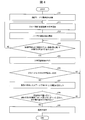
- FIG. 3 is a flowchart showing another aspect of the operation of the translation apparatus 1. Since the operations of S21 to S24, S26, S27, and S29 are substantially the same as the operations of S11 to S14, S16, S17, and S19 described above, description thereof is omitted here.
- the character recognition unit 25 performs character recognition processing not only on the analysis area but also on the entire image.
- the translation evaluation unit 261 determines whether or not a translation result with an accuracy (evaluation value) equal to or higher than a threshold is obtained in the analysis area, and when a translation result with an accuracy equal to or higher than the threshold is obtained. Advances to S29. On the other hand, if a translation result with an accuracy equal to or higher than the threshold is not obtained, the process returns to S24.
- the character recognition range is the entire image, the processing time per frame cannot be shortened, but the character or character string in the analysis area The recognition rate can be increased.
- FIG. 4 is a flowchart showing still another aspect of the operation of the translation apparatus 1. Since each operation of S31 to S37 is almost the same as each operation of S21 to S27 described above, description thereof is omitted here.
- the weight setting unit 262 weights the evaluation value of the translation result according to the position in the image. The details of the weighting method are as described above.
- the translation evaluation unit 261 calculates a weighted sum of the evaluation values calculated for each image using the weighting set by the weighting setting unit 262, and evaluates the quality of the translation result based on the weighted sum. .
- the display control unit 28 drives the display unit 6 to cause the display unit 6 to display the result of translation corresponding to the image having the highest weighted sum of the evaluation values, thereby indicating “END”.
- the display control unit 28 drives the display unit 6 to cause the display unit 6 to display the result of translation corresponding to the image having the highest weighted sum of the evaluation values, thereby indicating “END”.
- Control blocks of translation apparatus 1 (or control unit 2) (in particular, imaging unit IF23, image processing unit 24, character recognition unit 25, translation unit 26, translation evaluation unit 261, weight setting unit 262, etc.) May be realized by a logic circuit (hardware) formed in an integrated circuit (IC chip) or the like, or may be realized by software using a CPU.
- the translation apparatus 1 includes a CPU that executes instructions of a program that is software that implements each function, a ROM (Read Only Memory) in which the program and various data are recorded so as to be readable by a computer (or CPU), or A storage device (these are referred to as “recording media”), a RAM for developing the program, and the like are provided.
- a computer reads the said program from the said recording medium and runs it.
- a “non-temporary tangible medium” such as a tape, a disk, a card, a semiconductor memory, a programmable logic circuit, or the like can be used.
- the program may be supplied to the computer via any transmission medium (such as a communication network or a broadcast wave) that can transmit the program.
- the present invention can also be realized in the form of a data signal embedded in a carrier wave in which the program is embodied by electronic transmission.
- the translation device (1) includes an image acquisition unit that acquires each image of a captured image and at least one still image (through image) recorded before or after the captured image is captured.
- (Imaging unit 4) a character recognition unit (25) for recognizing characters or character strings included in each of the acquired images, a translation unit (26) for translating character-recognized characters or character strings, and the characters
- the translation evaluation unit (261) that evaluates the quality of the result of translation of the character string, and the evaluation of the result of translation in a specific image region of each image is the best among the results of translation in each image.
- a display control unit (28) that performs control to display the result of the translation in the resulting image.
- the character recognition process, the translation process, the process of evaluating the translation result, and the process of displaying the translation result are performed not only on the captured image but also on at least one still image before and after the imaging. For this reason, for example, when imaging a signboard, menu, or the like that is desired to be translated, character recognition processing and translation processing in still images before and after capturing a captured image without being aware of environmental factors such as angle and shadow If there is something that is possible, the result of translation expected by the user can be displayed.
- region can be improved by displaying to a user the result of using the image with the best evaluation value of a specific image area
- the translation evaluation unit calculates an evaluation value indicating a degree of quality of the translation result of the character or the character string for each image.
- the quality of the result of the translation is evaluated based on the magnitude of the evaluation value, and the display control unit displays the result of the translation in the image in which the total sum of the evaluation values calculated for the specific image region is maximum. Control may be performed.
- the translation result in the image in which the total sum of the evaluation results of the translation results calculated for the specific image area is the maximum that is, the image in which the evaluation of the translation result in the specific image area is the highest is obtained. Since it is displayed, the translation accuracy in a specific image region can be improved.
- the translation evaluation unit has an evaluation value indicating a degree of quality of the translation result of the character or the character string for each image.
- a weight setting unit configured to calculate and set the weight of the evaluation value calculated for the specific image region to be larger than the weight of the evaluation value calculated for a region other than the image region; Calculating the weighted sum of the evaluation values calculated for each image using the weight set by the weight setting unit, evaluating the quality of the result of the translation based on the magnitude of the weighted sum, and the display control unit Control for displaying the result of translation in an image that maximizes the weighted sum of the evaluation values of the results of translation may be performed.
- the character or character string that the user wants to translate often exists near the center of the image, not at the edge of the image.
- the weight of the evaluation value of the translation result calculated for the specific image region is set larger than the weight of the evaluation value of the translation result calculated for the region other than the image region, A weighted sum of evaluation values of translation results is calculated for each image, and a result of translation of an image with the maximum weighted sum of evaluation values of translation results is displayed.
- the character recognition unit may recognize only the character or the character string included in the specific image region. good.
- the user does not want to translate all the characters included in the image evenly.
- I think since it is considered that the user often shoots the character or the like that he / she wants to translate most near the center of the screen, for example, near the center of the image (a specific image) without character recognition of the entire image.
- a control program for causing a computer to execute processing in the translation apparatus according to any one of aspects 1 to 4 of the present invention and a computer-readable recording medium on which the control program is recorded also fall within the scope of the present invention.
- the present invention can be used in an information processing apparatus equipped with a character recognition function for recognizing characters or character strings included in a captured image and a translation function for translating characters or character strings recognized.
- a character recognition function for recognizing characters or character strings included in a captured image
- a translation function for translating characters or character strings recognized.
- various information processing apparatuses such as a PC (Personal Computer), a mobile phone, a smartphone, a tablet PC, an electronic dictionary, a digital camera, and a game machine.
Landscapes
- Engineering & Computer Science (AREA)
- Theoretical Computer Science (AREA)
- Physics & Mathematics (AREA)
- General Physics & Mathematics (AREA)
- Computational Linguistics (AREA)
- Computer Vision & Pattern Recognition (AREA)
- Multimedia (AREA)
- General Health & Medical Sciences (AREA)
- Health & Medical Sciences (AREA)
- General Engineering & Computer Science (AREA)
- Audiology, Speech & Language Pathology (AREA)
- Artificial Intelligence (AREA)
- Human Computer Interaction (AREA)
- Machine Translation (AREA)
- Document Processing Apparatus (AREA)
- Character Discrimination (AREA)
- Character Input (AREA)
Abstract
撮像画像および静止画像の各画像に含まれる文字などを文字認識する文字認識部(25)と、文字認識した文字などを翻訳する翻訳部(26)と、翻訳の結果の良否を評価する翻訳評価部(261)と、解析エリアにおける翻訳の結果の評価が最良となる画像における翻訳の結果を表示する制御を行う表示制御部(28)と、を備える。
Description
本発明は、文字認識した文字または文字列を翻訳する翻訳装置およびその制御プログラムに関する。
海外などで看板やメニュー等に記載されている単語や文章の意味を調べる方法として、辞書を引く方法や、翻訳したい単語や文章を手入力してWeb上で翻訳する方法がある。しかし、すぐに調べたいときや、手入力するには大変な量の文章などの場合は、看板やメニュー等を撮像した撮像画像から文字または文字列が記載されている箇所を抽出して自動的に機械翻訳(以下、単に「翻訳」という)し、さらに、その翻訳の結果を表示できれば非常に便利である。ここで、撮像画像から文字または文字列をOCR(Optical Character Reader)等で自動的に読み取る場合、撮像画像のピントが合っていないことや、撮像画像の中で文字または文字列の表示箇所が傾いていること等が原因で文字または文字列の認識率が悪化するという問題がある。
このような問題を解決する方法の一つとして、特許文献1に開示された方法がある。この方法では、文字認識の対象となる文字または文字列を含む画像およびその前後にある画像の複数の画像のそれぞれについて、文字認識に係る評価値を算出し、評価値が或る閾値を超えた画像、もしくは、或る閾値までの範囲内の画像のうち、最も評価値の高い画像を選択している。
しかしながら、上記特許文献1に記載の方法では、文字認識可能な文字を正しく文字認識できるケースは増加すると思われるが、文字が文字として文字認識されないケースが増加する可能性もあり、ユーザが最も文字認識して欲しい文字などを含む特定の画像領域における認識率が改善されない可能性がある。また、上記特許文献1に記載の方法では、文字認識の範囲が画像全体となっているので、仮に従来の翻訳技術を組合せたとしても翻訳範囲も画像全体とならざるを得ない。このため、文字認識と同様に、ユーザが最も翻訳して欲しい文字などを含む特定の画像領域における翻訳精度を向上させることは困難であると考えられる。
本発明は、上記問題点に鑑みて為されたものであり、特定の画像領域における翻訳精度を向上させることができる翻訳装置などを提供することを目的とする。
上記の課題を解決するために、本発明の一態様に係る翻訳装置は、撮像画像、および該撮像画像の撮像前または撮像後に収録される少なくとも1枚の静止画像、の各画像を取得する画像取得部と、取得した上記各画像に含まれる文字または文字列を文字認識する文字認識部と、文字認識した文字または文字列を翻訳する翻訳部と、上記文字または上記文字列の翻訳の結果の良否を評価する翻訳評価部と、上記各画像における上記翻訳の結果のうち、上記各画像の特定の画像領域における上記翻訳の結果の評価が最良となる画像における上記翻訳の結果を表示する制御を行う表示制御部と、を備えることを特徴としている。
本発明の一態様によれば、特定の画像領域における翻訳精度を向上させることができるという効果を奏する。
本発明の他の目的、特徴、および優れた点は、以下に示す記載によって十分分かるであろう。また、本発明の利点は、添付図面を参照した次の説明で明白になるであろう。
本発明の実施の形態について図1~図7に基づいて説明すれば以下のとおりである。
〔翻訳装置1の構成〕
図1は、本発明の実施の一形態に係る翻訳装置1の構成を示すブロック図である。翻訳装置1は、図1に示すように、制御部2、記憶部3、撮像部(画像取得部)4、操作部5、および表示部6を備える。
図1は、本発明の実施の一形態に係る翻訳装置1の構成を示すブロック図である。翻訳装置1は、図1に示すように、制御部2、記憶部3、撮像部(画像取得部)4、操作部5、および表示部6を備える。
翻訳装置1は、撮像した瞬間の撮像画像だけでなく、該撮像画像の撮像前後に収録される少なくとも1枚のスルー画像(静止画像または録画画像)の各画像に対して文字認識処理、翻訳処理、翻訳の結果を評価する処理、および翻訳の結果を表示する処理などの各処理を行う装置である。
制御部2は、翻訳装置1の全体を統括して制御するものであり、例えばCPU(Central Processing Unit)等で構成することができる。制御部2は、記憶部3、撮像部4、操作部5、および表示部6の各制御ブロックを制御する。制御部2の詳細な構成については後述する。記憶部3は、制御部2が実行する各部の制御プログラムなどを実行するときに読み出す各種データを記憶するものである。記憶部3は、フラッシュメモリなどの不揮発性の記憶装置によって構成される。また、記憶部3は、制御部2が上述のプログラムを実行する過程で生成される各種データを一時的に保持するための作業領域として、RAM(Random Access Memory)などの揮発性の記憶装置によって構成される領域を有する。なお、記憶部3は、必ずしも翻訳装置1内に設けられている必要はなく、翻訳装置1に着脱可能な外部記憶装置、または、通信可能なネットワーク上の外部記憶装置として、翻訳装置1に接続される構成であっても良い。そして、記憶部3は、特に、スルー画像データ31(静止画像または録画画像)、撮像画像データ32(撮像画像)、解析エリア設定情報33、文字・文字列DB(データベース)34、辞書DB35、および重み付け設定情報36などの各種データを記憶する。
撮像部4は、例えば、操作部5にて受け付けるユーザの操作に基づき、看板やメニュー等の撮像対象を被写体として撮像する通常のカメラが有する機能を備える。そして、撮像部4は、上記撮像によって取得した画像を制御部2に出力する。また、撮像部4は、撮像画像の撮像前後の状態を撮像したスルー画像を定期的または連続的に収録する機能を備える。操作部5は、翻訳装置1のユーザの操作を受け付けるものであり、典型的には、物理キー、キーボード、撮像ボタン、およびタッチパネルなどである。
次に、制御部2の構成について詳細に説明する。図1に示すように、制御部2は、操作部IF(インターフェース)21、モード設定部22、撮像部IF23、画像処理部24、文字認識部25、翻訳部26、表示レイアウト設定部27、および表示制御部28を備える。
表示部6は、制御部2の指示に基づいて画像を表示したり、画像中に含まれる文字または文字列を文字認識した結果を表示したり、文字認識した文字または文字列を翻訳した結果を表示したりする表示装置である。表示部6として液晶表示パネル、EL(Electro Luminescence)表示パネル等を適用することができる。また、表示部6は、画像表示と操作入力との両機能を備えるタッチパネルであっても良い。翻訳装置1では、表示部6は、撮像画像、スルー画像、文字認識した文字または文字列、および文字認識した文字または文字列の翻訳の結果などを表示する機能を備える。
操作部IF21は、操作部5を介して入力されるユーザの操作信号を情報処理可能なデジタルデータに変換し、制御部2の各部に送信するものである。モード設定部22は、操作部5を介したユーザ操作に従って翻訳装置1の動作モードを設定または変更するものであり、特定の動作モードに設定または変更されたことを、制御部2の各部に通知する。動作モードの例としては、文字または文字列を文字認識する文字認識モード、文字認識した文字または文字列を予め定められた言語に翻訳する翻訳モードの他、各種表示モードなど(撮像画像表示モード、スルー画像表示モード、認識文字表示モード、および翻訳結果表示モードなど)を例示することができる。
撮像部IF23は、撮像部4にてユーザが撮像した撮像画像を取り込み、撮像画像データ32(以下、単に「撮像画像」という)として記億部3に格納するものである。また、撮像部IF23は、撮像画像を撮像する前後において撮像部4によって定期的または連続的に撮像されるスルー画像を取り込み、スルー画像データ31(以下、単に「スルー画像」という)として記億部3に格納する。また、撮像部IF23は、記憶部3に格納した撮像画像およびスルー画像を読み出して、画像処理部24に受け渡す。ここで、ユーザが撮像画像を撮像する場合、常に同じ角度や傾きで撮像されるのではなく、連続的に角度や傾きが変化しながらある特定の角度や傾きのときに撮像される。なお、角度や傾きは、例えば、矩形の被写体(メモ用紙)の場合、メモ用紙の上下方向(メモ用紙に含まれる文字の上下方向と同じ)に対する角度または傾きとして定義することができる。このとき、撮像画像では文字または文字列の表示箇所が傾いていたり、撮像画像のピントが合っていなかったりしても、撮像前後では傾いていない鮮明な画像が撮像されていた可能性がある。
例えば、図5の(a)および図5の(b)は、それぞれ、翻訳装置1の撮像前後の状態を示している。図5の(a)では、表示部6に表示される被写体(メモ用紙)のカメラプレビュー画像を見ながら、ユーザがまさに撮像ボタンを押して撮像しようとしている瞬間の状態を示している。次に、図5の(b)では、ユーザが撮像ボタンを押下したことなどによって生じた手振れ等で被写体の上下方向(被写体に含まれる文字の上下方向と同じ)が表示画面の長手方向に対して時計回りに少し傾いた状態で撮像されている状態が示されている。ユーザが撮影するまでの間にも手振れなどにより被写体の傾きやピントなどは刻々と変化する。そこで、本実施形態では、上述したように、撮像画像(静止画)を撮像する際に、スルー画像も定期的にまたは連続して保存しておき、ユーザが撮像した瞬間の撮像画像だけでなく、該撮像画像の撮像前後のスルー画像も使用することで、ユーザは翻訳して欲しい看板やメニュー等を撮像する際に、角度や影などの環境要因を意識しなくても、撮像画像の撮像前後のスルー画像の中で文字認識が可能なものがあればユーザに期待する翻訳の結果を表示することができる。例えば、図5の(c)および図5の(d)に示すスルー画像AおよびBでは、それぞれ、被写体の上下方向が表示画面の長手方向に対して時計回りに少し傾いた状態で撮像されていたり、被写体は傾いてはいないもののピントがあってない状態で撮像されていたりしている。しかしながら、以上のように刻々と変化している状態も保存しておけば、図5の(e)に示すスルー画像Cのように、たまたま被写体の上下方向が表示画面の長手方向に対して傾いておらず、かつピントが合った状態で撮像される可能性が生じる。すなわち、以上のようなケースでは、スルー画像Cを処理した方が、正しい結果が得られる可能性が高い。
画像処理部24は、撮像部IF23から受け取った撮像画像およびスルー画像に対して画像処理を行うものである。画像処理部24は、解析エリア設定部241および文字切り出し部242を備える。また、画像処理部24は、現在、撮像画像表示モードに設定されている場合、撮像画像を表示レイアウト設定部27に送信する。解析エリア設定部241は、撮像画像およびスルー画像の各画像の中心付近を含む特定の大きさの領域を自動的に解析エリア(特定の画像領域)として設定するか、ユーザが操作部5を介して指定した(または選択した)画像領域を解析エリアとして設定するものである。また、解析エリア設定部241は、設定した解析エリアに係る情報を、解析エリア設定情報33として記憶部3に格納する。文字切り出し部242は、撮像画像およびスルー画像から文字または文字列を含む画像部分を切り出した切り出し画像〔例えば、図6の(b)および図6の(f)参照〕を生成し、文字認識部25に受け渡すものである。この切り出し画像の生成方法については、従来の方法を用いることができるのでその説明を省略する。
文字認識部25は、例えば、文字切り出し部242から受け取った切り出し画像に含まれる文字と、文字・文字列DB34において文字コードと対応付けて記録されている文字モデルと、を比較する。切り出し画像に含まれる文字と文字モデルとの類似度が予め設定した閾値を超えた場合、切り出し画像に含まれる文字は、類似する文字モデルに対応する文字コードの文字であると文字認識する。この文字認識の認識率は、例えば、切り出し画像に含まれる文字と文字モデルとの類似度などに基づいて定めれば良い。なお、文字認識の方法はこのような方法に限定されない。例えば、切り出し画像に含まれる文字から抽出される特徴量と、文字コードと対応付けて予め記録されている同種の文字の特徴量とを比較し、その類似度が特定の閾値を超えた場合に、切り出し画像に含まれる文字が、その特徴量に類似する特徴量に対応付けられた文字コードの文字であると文字認識しても良い。
次に、文字認識部25は、文字列を文字認識する場合、文字列を構成する文字を1文字ずつ文字認識し、文字認識した文字を並べた文字列が、文字・文字列DB34に存在しているか否かを確認する。このとき、文字認識した文字列の認識率は、例えば、各文字の認識率の平均値などを用いれば良い。なお、文字列の文字認識の方法は、以上のような方法に限定されず、その他の公知の方法を用いることができる。例えば、切り出し画像に含まれる文字列と、文字・文字列DB34において文字列コードと対応付けて記録されている文字列モデルと、を直接比較する構成を採用しても良い。また、文字認識部25は、認識結果評価部251を備えており、認識結果評価部251は、文字または文字列の認識率が予め定めた閾値を超えた場合に、文字認識が成功したと判定する。また、文字認識部25は、現在、認識文字表示モードに設定されている場合、文字認識の結果を後述する表示レイアウト設定部27に送信する。
翻訳部26は、文字認識部25が文字認識した(文字認識に成功した)文字または文字列を特定の言語(例えば、英語から日本語)に翻訳するものである。より具体的には、翻訳部26は、文字認識された文字または文字列に対応する翻訳の結果が辞書DB35に存在しているか否かを確認する。このとき、翻訳の結果の良否を示す評価値、すなわち、翻訳の結果の評価値(翻訳の精度)は、例えば、その文字または文字列の認識率に基づいて定めれば良い。なお、翻訳の評価方法は以上のような方法に限定されない。例えば、撮像画像に含まれるすべての文字または文字列に対して最も多くの文字または文字列の翻訳に成功した場合を最も良い結果と判断しても良く、この場合、例えば、評価値=(翻訳に成功した文字または文字列の総数/撮像画像に含まれるすべての文字または文字列の総数)とする。また、撮像画像の解析エリア内において翻訳に成功した文字または文字列が最も多かった場合を良い結果と判断しても良く、この場合、例えば、評価値=(解析エリア内で翻訳に成功した文字または文字列の総数/解析エリア内に含まれるすべての文字または文字列の総数)とする。また、本実施形態の翻訳部26は、翻訳評価部261および重み付け設定部262を備える。
翻訳評価部261は、撮像画像およびスルー画像の各画像について翻訳の結果の良否の程度を示す評価値を算出し、該評価値の大小で翻訳の結果の良否を評価するものである。重み付け設定部262は、各画像上の位置に応じて評価値の重み付けを設定する。対象画像に含まれる文字などを翻訳してほしい場合、ユーザは画像に含まれているすべての文字などを万遍なく翻訳して欲しいのではなく、その中の一部を特に翻訳して欲しいと思うケースがある。その場合、ユーザは最も翻訳してほしい文字などが画面中央にくるように撮影することが多いと考えられるため、例えば、図7の(b)に示す翻訳結果より、図7の(c)に示す翻訳結果のほうがユーザとしては期待する結果と考えられる。しかし、画像全体において翻訳対象の文字などの数に対する翻訳されている文字などの数の割合で結果を評価すると、図7の(b)に示す翻訳結果は75%、図7の(c)に示す翻訳結果は25%で前者のほうが良い結果と判断されてしまう。そこで、画面中央付近に存在する「Rest today」が翻訳できた時は、たとえば加点を行い90%翻訳できているとすることで図7の(c)に示す翻訳結果を最もユーザが求める結果として表示することができる。このような加点のことを重み付けと呼ぶ。なお、この重み付けをおこなう個所は、図7の(d)に示すように、画面中央に限らず、ユーザに特に翻訳してほしいところを指定させるようにしても良い。このとき、ユーザが指定した画像領域に含まれる「Rest today」が翻訳できたときは、たとえば加点を行い90%翻訳できているとすることで、図7の(e)に示す翻訳結果よりも、図7の(f)に示す翻訳結果を最もユーザが求める結果として表示することができる。
すなわち、重み付け設定部262は、記憶部3に予め記録されている重み付け設定情報36を参照し、撮像画像およびスルー画像の各画像における解析エリアについて算出される評価値の重み付けを、解析エリア以外の領域について算出される評価値の重み付けよりも大きく設定しても良い。より具体的には、解析エリア内であれば、重み付けを90%に、解析エリア外であれば、10%に設定する。なお、重み付けの方法は、以上のような方法に限定されない。例えば、記憶部3に予め記録されている重み付け設定情報36を参照し、撮像画像およびスルー画像の各画像の中心の位置からの距離の大きさに応じて重み付けを小さく(例えば、重み付けの大きさを各画像の中心の位置からの距離に反比例させる)設定しても良い。より具体的には、重み付け設定部262は、例えば、画像の中心から何ピクセル離れているかに応じて、重み付けを1/(画像の中心からのピクセル数)に設定しても良い。その後、翻訳評価部261は、重み付け設定部262が設定した重み付けを用いて各画像について算出される評価値の重み付け和を算出し、該重み付け和の大小で翻訳の結果の良否を評価する。このとき、翻訳の結果の評価値の重み付け和が最大となる画像における翻訳の結果を特定する。翻訳部26は、現在、翻訳結果表示モードに設定されている場合、特定された翻訳の結果を後述する表示レイアウト設定部27に送信する。
また、翻訳評価部261は、解析エリア内について算出される評価値の総和が最大となる画像を特定し、翻訳部26は、特定された画像における翻訳の結果を表示レイアウト設定部27に送信しても良い。ここで、ユーザが翻訳して欲しい文字または文字列は画像の端ではなく、画像の中央付近(または画像の中心付近)にあることが多いため、複数の画像に対する翻訳の結果を評価する際に、上記のように、画像内での位置によって評価値に重み付けを行い、中央付近やユーザが選択した画像領域の評価値が高い画像を使った結果をユーザに表示することで、よりユーザが期待する翻訳の結果が得られ易くなる。また、翻訳部26は、必ずしも重み付け設定部262を備えていなくても良い。
表示レイアウト設定部27は、現在設定されている表示モードの種類に応じて、画像処理部24から受け取った撮像画像、文字認識部25から受け取った文字認識の結果、翻訳部26から受け取った翻訳の結果に基づき、これらの各種データを統合し、表示部6に表示する表示用画像データを生成するものである。また、表示レイアウト設定部27は、生成した表示用画像データを表示制御部28に受け渡す。表示制御部28は、表示部6を駆動し、表示用画像データを用いて、表示画面に表示用画像を表示させる制御を行うものである。表示制御部28は、現在、撮像画像表示モードに設定されていれば、表示部6に撮像画像を表示させる。また、文字認識モードに設定されていれば、文字認識の結果を表示部6に表示させる。文字認識の結果は、文字認識の対象の文字または文字列とともに表示しても良いし、文字認識の対象の文字または文字列を文字認識の結果に置き換えて表示しても良い。表示制御部28は、翻訳結果表示モードに設定されていれば、翻訳の結果を表示部6に表示させる。ここで、翻訳の結果は、文字認識の対象の文字または文字列とともに表示しても良いし〔図6の(d)、図7の(c)、図7の(f)参照〕、文字認識の結果とともに表示しても良い。また、文字認識の対象の文字または文字列を翻訳の結果に置き換えて表示しても良い〔図6の(h)、図7の(b)、図7の(e)参照〕。
〈翻訳装置1の効果〉従来は、ユーザが撮像対象の撮像において角度や傾きなどの環境要因を意識した撮像をする必要があり、環境要因に合せた撮像をしないと期待する結果が得られないケースがあった。しかしながら、本実施形態の翻訳装置1によれば、ユーザが撮像した瞬間の画像だけでなく、その撮像前後のスルー画像も解析することにより、対象を撮像するまでの間に得られていた解析に好適なスルー画像から精度の高い文字認識および翻訳の結果の表示が可能となる。すなわち、翻訳装置1によれば、ユーザは対象の撮像の際に環境要因を意識した撮像を行わなくても期待する翻訳の結果が得られるケースが多くなる。また、翻訳装置1によれば、解析エリアの評価結果を重要視した上で、翻訳の結果として最も評価が高いものをユーザに表示する。すなわち、解析エリア内の翻訳の評価が最良となる画像を使用した結果をユーザに表示することで、よりユーザが所望する翻訳結果が得られ易くなる。
〔実施形態1:翻訳装置1の動作(その1)〕
次に、図2に基づき、翻訳装置1の動作の一態様について説明する。図2は、翻訳装置1の動作の一態様を示すフローチャートである。まず、翻訳装置1の電源を入れて動作を開始する。ステップS(以下、「ステップ」は省略する)11では、ユーザが操作部5を操作して動作モードを、例えば、翻訳モード(または翻訳結果表示モード)に設定し、撮像部4を起動してS12に進む。
次に、図2に基づき、翻訳装置1の動作の一態様について説明する。図2は、翻訳装置1の動作の一態様を示すフローチャートである。まず、翻訳装置1の電源を入れて動作を開始する。ステップS(以下、「ステップ」は省略する)11では、ユーザが操作部5を操作して動作モードを、例えば、翻訳モード(または翻訳結果表示モード)に設定し、撮像部4を起動してS12に進む。
S12では、撮像部IF23は、撮像部4によって定期的または連続的に撮像されるスルー画像の保存を開始してS13に進む。具体的には、撮像部4にて定期的または連続的に撮影したスルー画像を記憶部3に格納する。S13では、ユーザの操作部5を介したシャッター操作により、撮像部4は、撮像画像を撮像し、撮像した撮像画像を記憶部3に格納して、S14に進む。
S14では、画像処理部24は、撮像画像および撮像前後のスルー画像(静止画)で未解析の画像が存在するか否かを確認する。その結果、未解析の画像が存在する場合には、S15に進み、未解析の画像が存在しない場合には、S12に戻る。このとき、例えば、画像処理部24は、未解析の画像の中心の座標から一定の距離だけ離れた点の軌跡で囲まれる円形領域を自動的に解析エリアに設定するか、あるいは、操作部5を介したユーザの指定に従って、解析エリアに設定する。
S15では、文字認識部25は、解析エリア(画像の中央付近またはユーザが選択した領域)の範囲内のみに対して、文字認識処理を行い、S16に進む。これにより、解析エリアだけを使うことで特定の文字の認識率を高めるとともに1フレームあたりの処理時間も短縮できるため、ユーザを待たせることなくより多くの画像を評価に使えるようになり、撮像の際のユーザの負担を軽減できる。
S16では、少なくとも1文字の文字認識に成功した場合には、S16に進む。一方、文字認識に成功した文字が全くなかった場合には、S14に戻る。なお、文字認識の詳細については上述したとおりである。S17では、翻訳部26が、文字認識に成功した文字または文字列に対して翻訳処理を行い、S18に進む。なお、翻訳処理の詳細については上述したとおりである。
S18では、翻訳部26は、翻訳の結果の評価値(翻訳の精度)が、予め定めた閾値以上か否かを判定し、翻訳の結果の評価値が、予め定めた閾値以上であれば、S19に進む。このとき、翻訳部26は、翻訳処理を行った画像の中で、翻訳の評価が最良の画像の翻訳の結果を表示レイアウト設定部27に送信する。一方、翻訳の結果の評価値が、予め定めた閾値未満であれば、S14に戻る。S19では、表示レイアウト設定部27は、表示制御部28に表示部6の駆動を制御させて、表示部6に翻訳の評価が最良の画像の翻訳の結果を表示して「END」となる。
翻訳対象の文字などを含む画像を翻訳して欲しい場合、ユーザは画像に含まれているすべての文字などを万遍なく翻訳して欲しいのではなく、その中の一部を特に翻訳して欲しいと思うケースがある。その場合、ユーザは最も翻訳してほしい文字などが画面の中央付近にくるように撮影することが多いと考えられるため、例えば、画像全体を文字認識しなくても画像の中央付近(特定の画像領域内)だけを文字認識するだけでも期待の結果をユーザに表示できることがある。この場合、解析(文字認識および翻訳処理など)する画像領域のサイズが小さくなるため、翻訳結果が出るまでの時間を短縮できる。これにより、短い時間でより多くのスルー画像を解析することができるため、得られる翻訳結果の精度が高くなる効果が期待できる。そこで、以上で説明した動作のように、フレーム画像の評価に画像全体を使うのではなく、解析エリアだけを使うことで解析エリア内の文字または文字列の認識率を高めるとともに1フレームあたりの処理時間も短縮できるため、ユーザを待たせることなくより多くの画像を評価に使用できるようになり、撮像の際のユーザの負担を軽減できる。
ここで、図6に基づき、本実施形態の翻訳装置1の動作の流れの一態様についてより具体的に説明する。図6は、上述した翻訳装置1の動作を説明するための説明図であり、図6の(a)~図6の(d)は、撮像画像の中央付近(解析エリア)を切出す場合の動作の流れを示している。図6の(a)に示す例では、対象画像の中央付近の矩形の画像領域A1が解析エリアに設定されている。この例のように、処理範囲を解析エリア内に限定すれば、その処理時間は、画像全体に対して行うより短くなる。なお、図6の(a)に示す例のように、解析エリアの形状は円形でなく、矩形などであっても良く、その形状は特に限定されない。図6の(b)に示す例では、文字切り出し部242が、まず、対象画像の中央付近だけを切り出し、「Rest Today」の文字列が切り出さている(抽出されている)状態を示している。さらに、図6の(c)に示す例では、翻訳部26が、「Rest Today」を翻訳して、「本日休み」という翻訳結果が得られている状態を示している。また、図6の(d)に示す例では、表示部6に翻訳結果TRとしての「本日休み」の文字列が表示されている。特に、この例では、ユーザが最も翻訳して欲しいと思っていた「Rest Today」との文字列も翻訳対象URとして同時に表示され、翻訳結果TRが翻訳対象URに対応する翻訳結果であることが一目瞭然となるように表示が工夫されている。
一方、図6の(e)~図6の(h)は、ユーザが指定した画像領域を切出す場合の翻訳装置1の動作の流れを示している。図6の(e)に示す例では、ユーザが翻訳上重要視して欲しいと考えて指定した画像領域A2が、解析エリアに設定されている。なお、この形態では、文字列を指したときにその文字列を含む予め定めた大きさの画像領域が解析エリアに設定されるようにしている。図6の(f)に示す例では、文字切り出し部242が、まず、対象画像の解析エリアの部分だけを切り出し、「Rest Today」の文字列が切り出さている状態を示している。さらに、図6(g)に示す例では、翻訳部26が、「Rest Today」を翻訳して、「本日休み」という翻訳結果が得られている状態を示している。また、図6の(h)に示す例では、翻訳対象URとしての「Rest Today」に替えて、翻訳結果TRとしての「本日休み」の文字列が表示部6に表示されている例を示している。
〔変形例〕なお、ユーザが指定した解析エリア内に含まれる文字などの文字認識の結果を重要視したい場合は、上述したS13からS15までの間にユーザが翻訳してほしい文字などを含む解析エリアを指定する処理を追加しても良い。
〔実施形態2:翻訳装置1の動作(その2)〕
次に、図3に基づき、翻訳装置1の動作の別の態様について説明する。図3は、翻訳装置1の動作の別の態様を示すフローチャートである。S21~S24、S26、S27、およびS29の各動作は、上述したS11~S14、S16、S17、およびS19の各動作とほぼ同じなので、ここでは、説明を省略する。S25では、文字認識部25は、上述したS15と異なり、解析エリア内のみならず、画像全体に対して文字認識処理を行う。また、S28では、翻訳評価部261は、解析エリア内で、閾値以上の精度(評価値)の翻訳結果が得られたか否かを判定し、閾値以上の精度の翻訳結果が得られた場合には、S29に進む。一方、閾値以上の精度の翻訳結果が得られなかった場合にはS24に戻る。本実施形態の動作では、実施形態1の動作と異なり、文字認識の範囲が画像全体となっているため、1フレームあたりの処理時間を短縮することはできないが、解析エリア内の文字または文字列の認識率を高めることができる。
次に、図3に基づき、翻訳装置1の動作の別の態様について説明する。図3は、翻訳装置1の動作の別の態様を示すフローチャートである。S21~S24、S26、S27、およびS29の各動作は、上述したS11~S14、S16、S17、およびS19の各動作とほぼ同じなので、ここでは、説明を省略する。S25では、文字認識部25は、上述したS15と異なり、解析エリア内のみならず、画像全体に対して文字認識処理を行う。また、S28では、翻訳評価部261は、解析エリア内で、閾値以上の精度(評価値)の翻訳結果が得られたか否かを判定し、閾値以上の精度の翻訳結果が得られた場合には、S29に進む。一方、閾値以上の精度の翻訳結果が得られなかった場合にはS24に戻る。本実施形態の動作では、実施形態1の動作と異なり、文字認識の範囲が画像全体となっているため、1フレームあたりの処理時間を短縮することはできないが、解析エリア内の文字または文字列の認識率を高めることができる。
〔実施形態3:翻訳装置1の動作(その3)〕
次に、図4に基づき、翻訳装置1の動作のさらに別の態様について説明する。図4は、翻訳装置1の動作のさらに別の態様を示すフローチャートである。S31~S37の各動作は、上述したS21~S27の各動作とほぼ同じなので、ここでは、説明を省略する。S38では、重み付け設定部262が、画像内の位置に応じて翻訳結果の評価値に対して重み付けを行う。重み付けの方法の詳細は上述したとおりである。次に、翻訳評価部261は、重み付け設定部262が設定した重み付けを用いて上記各画像について算出される評価値の重み付け和を算出し、該重み付け和の大小で翻訳の結果の良否を評価する。その結果、重み付け和が最大となった画像があれば、その画像に対応する翻訳の結果を表示レイアウト設定部27に通知してS39に進む。S39では、表示制御部28は、表示部6を駆動して、評価値の重み付け和が最大となった画像に対応する翻訳の結果を表示部6に表示させて「END」となる。本実施形態の動作では、実施形態1の動作と異なり、文字認識の範囲が画像全体となっているため、1フレームあたりの処理時間を短縮することはできないが、実施形態2と比較して、評価値の重み付け和が最大となる画像を使用した結果をユーザに表示することで、よりユーザが所望する翻訳の結果が得られ易くなる。
次に、図4に基づき、翻訳装置1の動作のさらに別の態様について説明する。図4は、翻訳装置1の動作のさらに別の態様を示すフローチャートである。S31~S37の各動作は、上述したS21~S27の各動作とほぼ同じなので、ここでは、説明を省略する。S38では、重み付け設定部262が、画像内の位置に応じて翻訳結果の評価値に対して重み付けを行う。重み付けの方法の詳細は上述したとおりである。次に、翻訳評価部261は、重み付け設定部262が設定した重み付けを用いて上記各画像について算出される評価値の重み付け和を算出し、該重み付け和の大小で翻訳の結果の良否を評価する。その結果、重み付け和が最大となった画像があれば、その画像に対応する翻訳の結果を表示レイアウト設定部27に通知してS39に進む。S39では、表示制御部28は、表示部6を駆動して、評価値の重み付け和が最大となった画像に対応する翻訳の結果を表示部6に表示させて「END」となる。本実施形態の動作では、実施形態1の動作と異なり、文字認識の範囲が画像全体となっているため、1フレームあたりの処理時間を短縮することはできないが、実施形態2と比較して、評価値の重み付け和が最大となる画像を使用した結果をユーザに表示することで、よりユーザが所望する翻訳の結果が得られ易くなる。
〔ソフトウェアによる実現例〕翻訳装置1(または制御部2)の制御ブロック(特に、撮像部IF23、画像処理部24、文字認識部25、翻訳部26、翻訳評価部261および重み付け設定部262など)は、集積回路(ICチップ)等に形成された論理回路(ハードウェア)によって実現しても良いし、CPUを用いてソフトウェアによって実現しても良い。後者の場合、翻訳装置1は、各機能を実現するソフトウェアであるプログラムの命令を実行するCPU、上記プログラムおよび各種データがコンピュータ(またはCPU)で読み取り可能に記録されたROM(Read Only Memory)または記憶装置(これらを「記録媒体」と称する)、上記プログラムを展開するRAMなどを備えている。そして、コンピュータ(またはCPU)が上記プログラムを上記記録媒体から読み取って実行することにより、本発明の目的が達成される。上記記録媒体としては、「一時的でない有形の媒体」、例えば、テープ、ディスク、カード、半導体メモリ、プログラマブルな論理回路などを用いることができる。また、上記プログラムは、該プログラムを伝送可能な任意の伝送媒体(通信ネットワークや放送波等)を介して上記コンピュータに供給されても良い。なお、本発明は、上記プログラムが電子的な伝送によって具現化された、搬送波に埋め込まれたデータ信号の形態でも実現され得る。
〔まとめ〕
本発明の態様1に係る翻訳装置(1)は、撮像画像、および該撮像画像の撮像前または撮像後に収録される少なくとも1枚の静止画像(スルー画像)、の各画像を取得する画像取得部(撮像部4)と、取得した上記各画像に含まれる文字または文字列を文字認識する文字認識部(25)と、文字認識した文字または文字列を翻訳する翻訳部(26)と、上記文字または上記文字列の翻訳の結果の良否を評価する翻訳評価部(261)と、上記各画像における上記翻訳の結果のうち、上記各画像の特定の画像領域における上記翻訳の結果の評価が最良となる画像における上記翻訳の結果を表示する制御を行う表示制御部(28)と、を備える構成である。
本発明の態様1に係る翻訳装置(1)は、撮像画像、および該撮像画像の撮像前または撮像後に収録される少なくとも1枚の静止画像(スルー画像)、の各画像を取得する画像取得部(撮像部4)と、取得した上記各画像に含まれる文字または文字列を文字認識する文字認識部(25)と、文字認識した文字または文字列を翻訳する翻訳部(26)と、上記文字または上記文字列の翻訳の結果の良否を評価する翻訳評価部(261)と、上記各画像における上記翻訳の結果のうち、上記各画像の特定の画像領域における上記翻訳の結果の評価が最良となる画像における上記翻訳の結果を表示する制御を行う表示制御部(28)と、を備える構成である。
上記構成によれば、撮像画像だけでなく、撮像前後の少なくとも1枚の静止画像に対して文字認識処理、翻訳処理、翻訳の結果を評価する処理、および翻訳の結果を表示する処理を行う。このため、例えば、翻訳して欲しい看板やメニュー等を撮像する際に、角度や影などの環境要因を意識しなくても、撮像画像の撮像前後の静止画像の中で文字認識処理および翻訳処理が可能なものがあればユーザが期待する翻訳の結果を表示させることができる。また、上記構成によれば、特定の画像領域の評価値が最良となる画像を使用した結果をユーザに表示することで、特定の画像領域における翻訳精度を向上させることができる。
また、本発明の態様2に係る翻訳装置は、上記態様1において、上記翻訳評価部は、上記各画像について上記文字または上記文字列の上記翻訳の結果の良否の程度を示す評価値を算出し、該評価値の大小で上記翻訳の結果の良否を評価し、上記表示制御部は、上記特定の画像領域について算出される上記評価値の総和が最大となる画像における上記翻訳の結果を表示する制御を行っても良い。上記構成によれば、特定の画像領域について算出される翻訳の結果の評価値の総和が最大となる画像、すなわち、特定の画像領域における翻訳の結果の評価が最も高くなる画像における翻訳の結果を表示するので、特定の画像領域における翻訳精度を向上させることができる。
また、本発明の態様3に係る翻訳装置は、上記態様1または2において、上記翻訳評価部は、上記各画像について上記文字または上記文字列の上記翻訳の結果の良否の程度を示す評価値を算出し、上記特定の画像領域について算出される上記評価値の重み付けを、上記画像領域以外の領域について算出される上記評価値の重み付けよりも大きく設定する重み付け設定部を備え、上記翻訳評価部は、上記重み付け設定部が設定した重み付けを用いて上記各画像について算出される上記評価値の重み付け和を算出し、該重み付け和の大小で上記翻訳の結果の良否を評価し、上記表示制御部は、上記翻訳の結果の評価値の重み付け和が最大となる画像における上記翻訳の結果を表示する制御を行っても良い。一般に、ユーザが翻訳して欲しい文字または文字列は画像の端ではなく、画像の中央付近に存在することが多いと考えられる。また、例えば、看板の最も大きな文字やメニューのリストの一部など画像全体というより特定の画像領域に存在する文字または文字列を翻訳して欲しいケースのほうがユースケースとして多いと考えられる。このため、上記構成では、特定の画像領域について算出される翻訳の結果の評価値の重み付けを、該画像領域以外の領域について算出される翻訳の結果の評価値の重み付けよりも大きく設定して、各画像について翻訳の結果の評価値の重み付け和を算出し、翻訳の結果の評価値の重み付け和が最大となる画像の翻訳の結果を表示する。これにより、評価値の重み付け和が最大となる画像を使用した結果をユーザに表示することで、よりユーザが所望する翻訳の結果が得られ易くなる。
また、本発明の態様4に係る翻訳装置は、上記態様1~3のいずれかにおいて、上記文字認識部は、上記特定の画像領域に含まれる上記文字または上記文字列のみを文字認識しても良い。翻訳対象の文字などを含む画像を翻訳して欲しい場合、ユーザは画像に含まれているすべての文字などを万遍なく翻訳して欲しいのではなく、その中の一部を特に翻訳して欲しいと思うケースがある。その場合、ユーザは最も翻訳してほしい文字などが画面の中央付近にくるように撮影することが多いと考えられるため、例えば、画像全体を文字認識しなくても画像の中央付近(特定の画像領域内)だけを文字認識するだけでも期待の結果をユーザに表示できることがある。この場合、解析(文字認識および翻訳処理など)する画像領域のサイズが小さくなるため、翻訳結果が出るまでの時間を短縮できる。これにより、短い時間でより多くの静止画像を解析することができるため、得られる翻訳結果の精度が高くなる効果が期待できる。
本発明の上記態様1~4のいずれかの翻訳装置における処理をコンピュータに実行させるための制御プログラムおよび上記制御プログラムを記録したコンピュータ読み取り可能な記録媒体も、本発明の範疇に入る。
本発明は上述した各実施形態に限定されるものではなく、請求項に示した範囲で種々の変更が可能であり、異なる実施形態にそれぞれ開示された技術的手段を適宜組み合わせて得られる実施形態についても本発明の技術的範囲に含まれる。さらに、各実施形態にそれぞれ開示された技術的手段を組み合わせることにより、新しい技術的特徴を形成することができる。
本発明は、撮像画像に含まれる文字または文字列を文字認識する文字認識機能および文字認識した文字または文字列を翻訳する翻訳機能を搭載した情報処理装置に利用することができる。特に、PC(Personal Computer)、携帯電話、スマートフォン、タブレットPC、電子辞書、デジタルカメラ、およびゲーム機器などの様々な情報処理装置に幅広く適用することができる。
1 翻訳装置
4 撮像部(画像取得部)
25 文字認識部
26 翻訳部
28 表示制御部
261 翻訳評価部
262 重み付け設定部
4 撮像部(画像取得部)
25 文字認識部
26 翻訳部
28 表示制御部
261 翻訳評価部
262 重み付け設定部
Claims (5)
- 撮像画像、および該撮像画像の撮像前または撮像後に収録される少なくとも1枚の静止画像、の各画像を取得する画像取得部と、
取得した上記各画像に含まれる文字または文字列を文字認識する文字認識部と、
文字認識した文字または文字列を翻訳する翻訳部と、
上記文字または上記文字列の翻訳の結果の良否を評価する翻訳評価部と、
上記各画像における上記翻訳の結果のうち、上記各画像の特定の画像領域における上記翻訳の結果の評価が最良となる画像における上記翻訳の結果を表示する制御を行う表示制御部と、を備えることを特徴とする翻訳装置。 - 上記翻訳評価部は、上記各画像について上記文字または上記文字列の上記翻訳の結果の良否の程度を示す評価値を算出し、該評価値の大小で上記翻訳の結果の良否を評価し、
上記表示制御部は、上記特定の画像領域について算出される上記評価値の総和が最大となる画像における上記翻訳の結果を表示する制御を行うことを特徴とする請求項1に記載の翻訳装置。 - 上記翻訳評価部は、上記各画像について上記文字または上記文字列の上記翻訳の結果の良否の程度を示す評価値を算出し、
上記特定の画像領域について算出される上記評価値の重み付けを、上記画像領域以外の領域について算出される上記評価値の重み付けよりも大きく設定する重み付け設定部を備え、
上記翻訳評価部は、上記重み付け設定部が設定した重み付けを用いて上記各画像について算出される上記評価値の重み付け和を算出し、該重み付け和の大小で上記翻訳の結果の良否を評価し、
上記表示制御部は、上記翻訳の結果の評価値の重み付け和が最大となる画像における上記翻訳の結果を表示する制御を行うことを特徴とする請求項1に記載の翻訳装置。 - 上記文字認識部は、上記特定の画像領域に含まれる上記文字または上記文字列のみを文字認識することを特徴とする請求項1から3までのいずれか1項に記載の翻訳装置。
- 請求項1から4までのいずれか1項に記載の翻訳装置における処理をコンピュータに実行させるための制御プログラムであって、
撮像画像、および該撮像画像の撮像前または撮像後に収録される少なくとも1枚の静止画像、の各画像を取得する処理と、
取得した上記各画像に含まれる文字または文字列を文字認識する処理と、
文字認識した文字または文字列を翻訳する処理と、
上記文字または上記文字列の翻訳の結果の良否を評価する処理と、
上記各画像における上記翻訳の結果のうち、上記各画像の特定の画像領域における上記翻訳の結果の評価が最良となる画像における上記翻訳の結果を表示する処理と、をコンピュータに実行させるための制御プログラム。
Applications Claiming Priority (2)
| Application Number | Priority Date | Filing Date | Title |
|---|---|---|---|
| JP2013202483A JP6144168B2 (ja) | 2013-09-27 | 2013-09-27 | 翻訳装置およびその制御プログラム |
| JP2013-202483 | 2013-09-27 |
Publications (1)
| Publication Number | Publication Date |
|---|---|
| WO2015045680A1 true WO2015045680A1 (ja) | 2015-04-02 |
Family
ID=52742834
Family Applications (1)
| Application Number | Title | Priority Date | Filing Date |
|---|---|---|---|
| PCT/JP2014/071716 Ceased WO2015045680A1 (ja) | 2013-09-27 | 2014-08-20 | 翻訳装置およびその制御プログラム |
Country Status (2)
| Country | Link |
|---|---|
| JP (1) | JP6144168B2 (ja) |
| WO (1) | WO2015045680A1 (ja) |
Citations (4)
| Publication number | Priority date | Publication date | Assignee | Title |
|---|---|---|---|---|
| JP2000023012A (ja) * | 1998-07-06 | 2000-01-21 | Olympus Optical Co Ltd | 翻訳機能付カメラ |
| JP2003178067A (ja) * | 2001-12-10 | 2003-06-27 | Mitsubishi Electric Corp | 携帯端末型画像処理システム、携帯端末およびサーバ |
| JP2003242440A (ja) * | 2002-02-20 | 2003-08-29 | Fujitsu Ltd | 文字認識方法及びその装置 |
| JP2007052613A (ja) * | 2005-08-17 | 2007-03-01 | Fuji Xerox Co Ltd | 翻訳装置、翻訳システムおよび翻訳方法 |
Family Cites Families (1)
| Publication number | Priority date | Publication date | Assignee | Title |
|---|---|---|---|---|
| JP2008054236A (ja) * | 2006-08-28 | 2008-03-06 | Nikon Corp | 撮像装置 |
-
2013
- 2013-09-27 JP JP2013202483A patent/JP6144168B2/ja not_active Expired - Fee Related
-
2014
- 2014-08-20 WO PCT/JP2014/071716 patent/WO2015045680A1/ja not_active Ceased
Patent Citations (4)
| Publication number | Priority date | Publication date | Assignee | Title |
|---|---|---|---|---|
| JP2000023012A (ja) * | 1998-07-06 | 2000-01-21 | Olympus Optical Co Ltd | 翻訳機能付カメラ |
| JP2003178067A (ja) * | 2001-12-10 | 2003-06-27 | Mitsubishi Electric Corp | 携帯端末型画像処理システム、携帯端末およびサーバ |
| JP2003242440A (ja) * | 2002-02-20 | 2003-08-29 | Fujitsu Ltd | 文字認識方法及びその装置 |
| JP2007052613A (ja) * | 2005-08-17 | 2007-03-01 | Fuji Xerox Co Ltd | 翻訳装置、翻訳システムおよび翻訳方法 |
Also Published As
| Publication number | Publication date |
|---|---|
| JP2015069366A (ja) | 2015-04-13 |
| JP6144168B2 (ja) | 2017-06-07 |
Similar Documents
| Publication | Publication Date | Title |
|---|---|---|
| US10803367B2 (en) | Method and apparatus for recognizing characters | |
| US20190057256A1 (en) | Method for recognizing a specific object inside an image and electronic device thereof | |
| US9477138B2 (en) | Autofocus | |
| CN101609505B (zh) | 识别字符的方法和装置 | |
| US10878268B2 (en) | Information processing apparatus, control method thereof, and storage medium | |
| US10291843B2 (en) | Information processing apparatus having camera function and producing guide display to capture character recognizable image, control method thereof, and storage medium | |
| CN101558416A (zh) | 移动通信设备的文本检测 | |
| US10373329B2 (en) | Information processing apparatus, information processing method and storage medium for determining an image to be subjected to a character recognition processing | |
| CN112822394A (zh) | 显示控制方法、装置、电子设备及可读存储介质 | |
| US20200126517A1 (en) | Image adjustment method, apparatus, device and computer readable storage medium | |
| JP6170241B2 (ja) | 文字特定装置、および制御プログラム | |
| KR20200069869A (ko) | 영상 내 문자 자동번역 시스템 및 방법 | |
| JP6251075B2 (ja) | 翻訳装置 | |
| JP2010217997A (ja) | 文字認識装置、文字認識プログラム、および文字認識方法 | |
| JP6144168B2 (ja) | 翻訳装置およびその制御プログラム | |
| CN111784604A (zh) | 图像处理方法、装置、设备及计算机可读存储介质 | |
| WO2015045679A1 (ja) | 情報機器および制御プログラム | |
| KR102071975B1 (ko) | 광학적 문자 인식을 사용하는 카드 결제 장치 및 방법 | |
| JP2005055973A (ja) | 携帯情報端末 | |
| CN113495836A (zh) | 一种页面检测方法、装置和用于页面检测的装置 | |
| US10321089B2 (en) | Image preproduction apparatus, method for controlling the same, and recording medium | |
| KR20140112919A (ko) | 이미지 처리장치 및 방법 | |
| US20090244002A1 (en) | Method, Device and Program for Controlling Display, and Printing Device | |
| US20130022239A1 (en) | Image processing apparatus, image processing method, and storage medium |
Legal Events
| Date | Code | Title | Description |
|---|---|---|---|
| 121 | Ep: the epo has been informed by wipo that ep was designated in this application |
Ref document number: 14849814 Country of ref document: EP Kind code of ref document: A1 |
|
| NENP | Non-entry into the national phase |
Ref country code: DE |
|
| 122 | Ep: pct application non-entry in european phase |
Ref document number: 14849814 Country of ref document: EP Kind code of ref document: A1 |