WO2015045302A1 - ファイル管理システムおよびファイル管理システムに用いる利用者端末 - Google Patents
ファイル管理システムおよびファイル管理システムに用いる利用者端末 Download PDFInfo
- Publication number
- WO2015045302A1 WO2015045302A1 PCT/JP2014/004670 JP2014004670W WO2015045302A1 WO 2015045302 A1 WO2015045302 A1 WO 2015045302A1 JP 2014004670 W JP2014004670 W JP 2014004670W WO 2015045302 A1 WO2015045302 A1 WO 2015045302A1
- Authority
- WO
- WIPO (PCT)
- Prior art keywords
- file
- encapsulated
- encapsulation
- original
- user
- Prior art date
- Legal status (The legal status is an assumption and is not a legal conclusion. Google has not performed a legal analysis and makes no representation as to the accuracy of the status listed.)
- Ceased
Links
Images









Classifications
-
- G—PHYSICS
- G06—COMPUTING OR CALCULATING; COUNTING
- G06F—ELECTRIC DIGITAL DATA PROCESSING
- G06F21/00—Security arrangements for protecting computers, components thereof, programs or data against unauthorised activity
- G06F21/60—Protecting data
- G06F21/602—Providing cryptographic facilities or services
-
- G—PHYSICS
- G06—COMPUTING OR CALCULATING; COUNTING
- G06F—ELECTRIC DIGITAL DATA PROCESSING
- G06F21/00—Security arrangements for protecting computers, components thereof, programs or data against unauthorised activity
- G06F21/60—Protecting data
- G06F21/62—Protecting access to data via a platform, e.g. using keys or access control rules
-
- G—PHYSICS
- G06—COMPUTING OR CALCULATING; COUNTING
- G06F—ELECTRIC DIGITAL DATA PROCESSING
- G06F21/00—Security arrangements for protecting computers, components thereof, programs or data against unauthorised activity
- G06F21/60—Protecting data
- G06F21/62—Protecting access to data via a platform, e.g. using keys or access control rules
- G06F21/6209—Protecting access to data via a platform, e.g. using keys or access control rules to a single file or object, e.g. in a secure envelope, encrypted and accessed using a key, or with access control rules appended to the object itself
-
- G—PHYSICS
- G06—COMPUTING OR CALCULATING; COUNTING
- G06F—ELECTRIC DIGITAL DATA PROCESSING
- G06F21/00—Security arrangements for protecting computers, components thereof, programs or data against unauthorised activity
- G06F21/10—Protecting distributed programs or content, e.g. vending or licensing of copyrighted material ; Digital rights management [DRM]
- G06F21/106—Enforcing content protection by specific content processing
- G06F21/1062—Editing
-
- G—PHYSICS
- G06—COMPUTING OR CALCULATING; COUNTING
- G06F—ELECTRIC DIGITAL DATA PROCESSING
- G06F2221/00—Indexing scheme relating to security arrangements for protecting computers, components thereof, programs or data against unauthorised activity
- G06F2221/21—Indexing scheme relating to G06F21/00 and subgroups addressing additional information or applications relating to security arrangements for protecting computers, components thereof, programs or data against unauthorised activity
- G06F2221/2107—File encryption
Definitions
- the present invention relates to a file management system and a user terminal used for the file management system.
- files In companies, a huge amount of electronic files (hereinafter referred to as files) are created, stored in personal PCs (Personal Computers) and file servers and distributed. It contains a lot of highly confidential information. For example, spreadsheet data with price lists for unpublished products, word profiles with personnel information, presentation files with publicity materials before publication, exchange of confidential information related to collaboration with other companies An e-mail in which is described.
- DRM digital rights management
- the file creator sets the access rights for the file. Then, the file and the access right information are combined and encrypted.
- this operation is referred to as “encapsulation”.
- the access right defines a person who can use the file and an operation that the person can execute on the file. Specifically, for example, only reference is possible, edit / change is possible, and all rights can be exercised.
- the encapsulating server verifies the user's access rights, cancels the encapsulation, and returns the decapsulated file to the user. To do.
- this release operation is also referred to as “decapsulation”. Users can perform file operations according to their own access rights.
- the user terminal needs to have a built-in DRM function for executing the DRM. If it is not built-in, files under the management of DRM cannot be used.
- Patent Document 1 discloses a method for file encapsulation.
- the encapsulation server performs the encapsulation in response to a request from the user terminal.
- the encapsulation server When the user terminal sets the original file and access right information and transmits them to the encapsulation server, the encapsulation server generates and returns the encapsulated file, and the user terminal can receive the encapsulated file.
- Patent Document 1 itself is not based on the premise that the user terminal does not have the DRM function, but by applying this technique, it is possible to perform the encapsulation from the user terminal that does not have the DRM function. is there.
- Patent Document 2 discloses a method of using an encapsulated file using a terminal that does not have a DRM function. If this technology is used, the encapsulated file can be viewed even from a terminal having no DRM function. The process is as follows. 1) First, the user transmits the encapsulated file and its access right information to the encapsulating server. 2) The encapsulation server confirms whether the user has access rights. 3) When the access right is confirmed, the encapsulation is released and the content file is converted into a format that can be viewed by the user. This format can only be viewed, and cannot be copied, pasted, printed, changed, screen captured, etc. at all. Even if the user has authority over viewing such as editing, only viewing is possible. If the access right is not confirmed, the request is rejected and encapsulation is not released.
- Patent Document 1 and Patent Document 2 it is possible to encapsulate a file using DRM and view the encapsulated file even using a terminal that does not have a DRM function.
- Patent Documents 3 and 4 disclose related technologies.
- Patent Document 1 The problem with the technology of Patent Document 1 is that the original file that is the source of the encapsulated file remains on the user terminal. If the original file remains, information will be stolen if there is unauthorized access. There is no problem if the user deletes the original file, but there is a danger of neglect or forget.
- Patent Document 2 has a problem that the user cannot perform operations other than browsing a file.
- a company there are many needs for a plurality of users to edit a file or change an attribute.
- the technology of Patent Document 2 cannot meet this need.
- the present invention has been made in view of the above problems, and an object of the present invention is to provide a method for enabling file encapsulation and decapsulation using a terminal having no DRM function. It is another object of the present invention to provide a method that enables operations other than browsing for an unencapsulated file and a method for reducing the risk of information leakage.
- a file management system includes an intranet including data storage means, and an encapsulation server that generates an encapsulated file by collectively encrypting an original file and access right information for the original file. And a user terminal accessible to the intranet and the encapsulation server, wherein the encapsulation server receives the original file and the access right information from the user terminal and generates the encapsulated file.
- Encapsulation control means for returning the encapsulated file to the user terminal, the encapsulation condition setting means for setting the encapsulation condition by the user terminal, and the encapsulation request for requesting the encapsulation to the encapsulation server Means and the encapsulated file returned
- Encapsulated file storage means for storing the file in the data storage means, and automatic file deletion means for automatically deleting the original file stored in the file storage means in response to the storage of the encapsulated file, ing.
- the effect of the present invention is that information leakage can be prevented by using a terminal that does not have DRM as a base. This is because the original file is encapsulated and the original file is automatically deleted.
- FIG. 16 is a block diagram showing the first embodiment of the present invention.
- the file management system includes an intranet 100, an encapsulation server 300, and a user terminal 200 that can access the intranet 100 and the encapsulation server 300.
- the intranet 100 has data storage means 191 for storing data.
- the encapsulation server 300 includes an encapsulation control unit 391 that collectively encrypts the original file and access right information for the original file to generate an encapsulated file.
- the encapsulation control unit 391 receives the original file and the access right information from the user terminal 200, generates an encapsulated file, and returns the generated encapsulated file to the user terminal 200.
- the access right information is information that defines who is allowed to perform what operation on the original file.
- the user terminal 200 includes an encapsulation condition setting unit 291 that sets an encapsulation condition, and an encapsulation request unit 292 that requests the encapsulation server 300 to perform encapsulation.
- the encapsulation condition setting unit 291 sets access right information to be given to the original file.
- the user terminal 200 includes an encapsulated file storage unit 293 that stores the encapsulated file received from the encapsulation server 300 in the data storage unit 191.
- it has automatic original file deletion means 294 that automatically deletes the original file stored in the data storage means 191 when the encapsulated file is saved.
- FIG. 1 is a block diagram showing a file management system according to the second embodiment. In the present embodiment, details of the configuration and operation of the file management system will be described.
- a data storage unit 101 and an access right information storage unit 102 are provided in the intranet 100.
- a user terminal 200 is connected to the intranet 100.
- An encapsulation server 300 is arranged on a network such as the Internet or an intranet.
- the user terminal 200 is provided with a user ID storage unit 201, an encapsulation condition setting unit 202, an encapsulation request unit 203, an encapsulated file storage unit 204, and an automatic original file deletion unit 205.
- ID is an abbreviation for identifier.
- the encapsulation server 300 is provided with an available user ID storage unit 301 and an encapsulation control unit 302.
- the data storage unit 101 is a storage in the intranet, and stores original files and encapsulated files.
- the access right information storage unit 102 stores access right information used when encapsulating the original file.
- the access right defines users who can access the file and file operations that can be used by each user.
- FIG. 2 shows an example of the access right setting list. There are 5 available users in the list, and each access right can be used for all operations of Shimazu, can be referenced, edited, deleted, encapsulated by Yamada, can be viewed and edited by Takahashi, Kimura and Suzuki Can only be referenced. This is merely an example, and application of the present invention is not limited to the access right setting method.
- the encapsulation server 300 receives an original file and access right information in response to a request from the outside, generates an encapsulated file, and returns it.
- the encapsulation server 300 operates as an independent WEB server on an intranet or the Internet, for example.
- the encapsulation request from the encapsulation request unit 203 to the encapsulation server 300 is transmitted as a request on the Internet, for example, and the encapsulation server 300 accepts the request.
- the request format for example, the HTTP format (Hyper Text Transfer Protocol) can be used.
- the user ID storage unit 301 stores the IDs of users who can use the encapsulation server 300. It also stores authentication information such as passwords. Prior to the execution of encapsulation, the encapsulation control unit 302 refers to the available user ID storage unit 301 and determines whether the user is eligible for use. In order to prevent impersonation of the user, authentication information may be set, for example, by setting a password for each user ID as shown in FIG. In addition, although the password was mentioned as an example here, arbitrary methods can be used for authentication information as needed.
- the encapsulation control unit 302 generates an encapsulated file from the received original file and access right information, and returns it to the user terminal 200.
- the user terminal 200 is a terminal that can access the intranet, and includes a user ID storage unit 201, an encapsulation condition setting unit 202, an encapsulation request unit 203, an encapsulated file storage unit 204, and an automatic original file deletion unit 205.
- the user terminal 200 is, for example, a smartphone or a tablet PC (Personal Computer), and does not have the DRM function. Or you may have, but it is not used in this embodiment.
- the user ID storage unit 201 holds a user ID necessary for using the encapsulation server, a password necessary for authentication, and the like.
- the encapsulation condition setting unit 202 is means for designating an original file to be encapsulated by a user and setting access rights for the original file.
- the encapsulation request unit 203 is a means for requesting the encapsulation server 300 to execute encapsulation and return an encapsulated file in accordance with the set encapsulation conditions.
- the encapsulation request unit 203 retrieves the original file from the data storage unit 101 and transmits it to the encapsulation server 300 together with the set access right information.
- it also has a function of establishing authentication by transmitting a user ID and necessary authentication information.
- the encapsulated file storage unit 204 stores the encapsulated file returned from the encapsulation server 300 in the same path as the original file of the data storage unit 101.
- the automatic original file deletion unit 205 forcibly deletes the original file when the storage of the encapsulated file is completed. As a result, the original file is replaced with the encapsulated file.
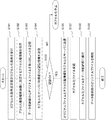
- FIG. 4 is a flowchart showing the operation of the user terminal 200. Note that the same reference numerals as used in FIG.
- the user inputs the original file name to be encapsulated and the access right information to be set, and the encapsulation condition setting unit 202 accepts this (S101) and stores the access right information in the access right information storage unit 102 ( S102).
- the encapsulation request unit 203 retrieves the original file from the data storage unit 101 and stores the path (S103).
- the encapsulation request unit 203 retrieves the user ID and authentication information from the user ID storage unit 201 and transmits them to the encapsulation server 300 (S104).
- S105_NO the authentication of the encapsulation server 300 is not established
- the original file and access right information are set and transmitted to the encapsulation server 300 (S106).
- the encapsulation request unit 203 receives it (S107).
- the encapsulated file storage unit 204 stores the encapsulated file in the same path as the original file of the data storage unit 101 (S108).
- the automatic original file deletion unit 205 deletes the original file (S109). As described above, the replacement of the original file and the encapsulated file is completed.
- the authentication from S104 to S105 can be performed at any timing between S101 and S103.
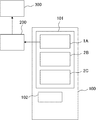
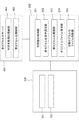
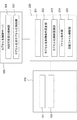
- FIG. 5 is a block diagram showing a specific example.
- an original file starts with 1 and an encapsulated file starts with 2.
- FIG. 5A shows an initial state, and the data storage unit 101 stores an original file 1A and encapsulated files 2B and 2C.
- the user terminal 200 requests the encapsulation server 300 to encapsulate 1A.
- the encapsulation server 300 executes encapsulation and generates an encapsulated file 2A. Next, the encapsulation server 300 returns 2A to the user terminal 200.
- the original file can be surely deleted and securely stored as an encapsulated file.
- FIG. 6 is a flowchart illustrating the operation of the encapsulation request unit 203 according to the present embodiment. Note that the same reference numerals as used in FIG.
- S201 to S207 are the same as S101 to S107 of the first embodiment.
- the encapsulated file is overwritten and saved in the data storage unit 101 with the same name as the original file 1 (S208). In this way, the storage of the encapsulated file 2 and the replacement of the original file 1 are reliable and efficient.
- a terminal that does not have a DRM function releases the encapsulation of an encapsulated file and enables the original use.
- the user terminal 200 requests the decapsulation server 300 to decapsulate the encapsulated file, and receives it as an original file that can be edited as well as viewed.
- FIG. 7 is a block diagram showing the system configuration of the present embodiment.
- a data storage unit 101 and an access right information storage unit 102 are provided in the intranet 100. These configurations are the same as those in the second and third embodiments.
- a user terminal 200 is connected to the intranet 100.
- An unencapsulated server 400 is arranged on a network such as the Internet or an intranet. The unencapsulated server 400 is provided with a user ID storage unit 401 and an unencapsulated control unit 402.
- the unencapsulated server 400 releases the encapsulation of the encapsulated file and generates an original file in response to an external request.
- the user ID storage unit 401 stores IDs and authentication information of users who can use the non-encapsulated server 400.
- the decapsulation control unit 402 executes decapsulation, the user ID storage unit 401 is referred to determine whether or not there is a use qualification. In the determination, not only the user ID but also arbitrary authentication information can be used.
- the decapsulation control unit 402 When the decapsulation control unit 402 receives an encapsulated file from an authenticated user, the decapsulation control unit 402 releases the encapsulation and refers to the access right information in the encapsulated file.
- the access right referred to as full access right
- the original file is extracted from the encapsulated file and returned to the user.
- the user terminal 200 includes a user ID storage unit 201, an unencapsulated condition setting unit 212, an unencapsulation request unit 213, an original file storage unit 214, and an automatic encapsulated file deletion unit 215.
- the decapsulation condition setting unit 212 is a means for the user to specify a file to be decapsulated.
- the decapsulation request unit 213 sends a copy of the encapsulated file stored in the data storage unit 101 to the user ID and necessary authentication information, and requests decapsulation.
- the original file storage unit 214 stores the original file returned from the non-encapsulated server 400 in the same path as the original encapsulated file.
- the automatic encapsulated file deletion unit 215 forcibly deletes the original encapsulated file when the saving of the original file is completed.
- the decapsulation request unit 213 requests the decapsulation server 400 to decapsulate the designated encapsulated file.
- FIG. 8 is a flowchart showing the operation of the user terminal 200 in non-encapsulation.
- symbol of each part used for description uses the same thing as FIG.
- the decapsulation condition setting unit 212 receives this file name (S301).
- the unencapsulation request unit 213 takes out the designated encapsulated file from the data storage unit 101 and stores the path (S302).
- the user ID and necessary authentication information are transmitted to the decapsulation server 400 (S303). If the authentication fails (S304_NO), the decapsulation is stopped. If the authentication is successful (S304_YES), the encapsulated file is transmitted to the non-encapsulated server 400 (S305).
- the unencapsulated server 400 decrypts the encapsulated file, and determines whether the user has authority (full access right) that allows all operations. If the user has the full access right, the original file is extracted from the decrypted file and returned to the unencapsulation request unit 213. The operation of the non-encapsulated server will be described later.
- the decapsulation request unit 213 receives the original file (S306).
- the original file received by the original file storage unit 214 is stored in the same path as the original encapsulated file (S307).
- the automatic encapsulated file deletion unit 215 deletes the original encapsulated file stored in the data storage unit 101 (S308). As described above, the encapsulated file 2 is replaced with the original file 1, and the user can freely operate the original file 1. Also, the confusion caused by the existence of two files with the same name can be avoided.
- FIG. 9 is a flowchart showing the operation of the non-encapsulated server 400.
- symbol of each part used for description uses the same thing as FIG.
- authentication information for authenticating whether the user is a valid user of the non-encapsulated server is received (S401).
- the decapsulation server 400 refers to the available user ID storage unit 401 and checks whether the user is a valid user of the decapsulation server 400 (S402). If the user ID is not registered (S403_NO), the request for non-encapsulation is rejected and the process ends. If the registration of the user ID can be confirmed, the authentication is OK (S403_YES), and an authentication success message is transmitted (S404).
- the encapsulated file is transmitted from the user terminal, and the unencapsulated server 400 receives it (S405).
- the unencapsulated server 400 decrypts the encapsulated file (S406).
- S407 With reference to the decrypted access right information, it is investigated whether the user has a full access right that allows all operations (S407). When there is no full access right (S408_NO), the decrypted file is re-encapsulated, and a message indicating that it cannot be decapsulated is transmitted to the user terminal, and the process is terminated.
- the re-encapsulated encapsulated file is deleted or returned to the non-encapsulation request unit 213. If it is determined that the user has the full access right (S408_YES), the original file is extracted from the decrypted file and returned to the user terminal.
- the user can receive the original file.
- the range of users can be minimized.
- the original encapsulated file is deleted, confusion due to the existence of two files having the same name can be avoided.
- the file can be saved and deleted at the same time, which is reliable and efficient.
- FIG. 10 is a block diagram showing a fourth embodiment of the present invention. In this embodiment, a mechanism for performing both encapsulation and decapsulation is implemented.
- a data storage unit 101 and an access right information storage unit 102 are provided in the intranet 100. These configurations are the same as those in the second to fourth embodiments.
- a user terminal 200 is connected to the intranet 100.
- An encapsulation control server 500 is arranged on a network such as the Internet or an intranet.
- the encapsulation control server 500 is provided with a user ID storage unit 501 and an encapsulation / decapsulation control unit 502.
- the encapsulation control server 500 encapsulates the original file and decapsulates the encapsulated file in response to an external request.
- the encapsulation control server 500 refers to the available user ID storage unit 501 and determines whether the user is eligible for use.
- the user terminal 200 includes an encapsulation control condition setting unit 222, an encapsulation control request unit 223, a file storage unit 224, and an automatic file deletion unit 225.
- the encapsulation control condition setting unit 222 specifies which file processing is requested and whether it is encapsulated or unencapsulated. In the encapsulation, the access right to be set is specified.
- the encapsulation control request unit 223 requests the encapsulation control server 500 to encapsulate the original file or unencapsulate the encapsulated file according to the condition instructed by the encapsulation control condition setting unit 222. Authentication is performed with reference to the encapsulation control server 500 and the user ID storage unit 501, and the encapsulation / decapsulation control unit 502 performs encapsulation or decapsulation processing.
- the file returned after the processing is completed is stored in the data storage unit 101 by the file storage unit 224. When the storage is completed, the original original file or the original encapsulated file is forcibly deleted by the automatic file deletion unit 225.
- FIG. 11 is a block diagram showing the file management system of the present embodiment.
- a data storage unit 101, an access right information storage unit 102, and a standard access right information storage unit 103 are provided in the intranet 100.
- a user terminal 200 is connected to the intranet 100.
- the user terminal 200 includes a user ID storage unit 201, an automatic encapsulation request unit 233, an automatic encapsulated file storage unit 234, an automatic original file deletion unit 235, an automatic file cyclic inspection unit 236, and a cyclic control timer. 237.
- An encapsulation control server 500 is disposed on a network such as the Internet or an intranet.
- the encapsulation control server 500 is provided with a user ID storage unit 501 and an encapsulation / decapsulation control unit 502.
- the encapsulation control server 500 can be replaced with the encapsulation server 300.
- the standard access right information storage unit 103 stores standard access right information used when encapsulating the original file.
- the standard access right is an access right determined in advance as an access right for a file to be automatically encapsulated. For example, “Our employees can perform all operations” or “The user can perform all operations, otherwise only refer to”.
- the automatic file patrol unit 236 checks the files stored in the data storage unit 101 one by one, and when the original file is detected, transmits the file name to the automatic encapsulation request unit 233.
- the automatic encapsulation request unit 233 requests the encapsulation control server 500 to encapsulate the original file.
- the original file is extracted from the data storage unit 101
- the standard access right information is extracted from the standard access right information storage unit 103, and transmitted to the encapsulation control server 500 together with the encapsulation request.
- a user ID is transmitted and necessary authentication is established.
- the automatic encapsulated file storage unit 234 stores the encapsulated file 2 returned from the encapsulation control server 500 in the same path as the original original file 1 of the data storage unit 101.
- the automatic original file deletion unit 235 automatically deletes the original file 1 when the encapsulated file 2 is saved. Note that when the automatic encapsulated file storage unit 234 stores the encapsulated file 2 over the original original file with the same name, the automatic original file deletion unit 235 may not be provided.
- the patrol control timer 237 controls starting and stopping of the automatic file patrol inspection unit 236 using a preset interval. In the patrol control timer 237, two of an activation interval and a continuous interval from activation to end are set from the outside. The patrol control timer 237 records the current time, and activates the automatic file patrol checker 236 at each activation interval. Then, when the time interval of the continuous interval comes, the operation of the automatic file patrol checker 236 is forcibly interrupted.
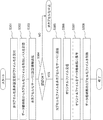
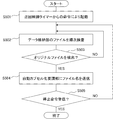
- FIG. 12 is a flowchart showing the operation of the automatic file inspection unit 236.
- symbol of each part used for description uses the same thing as FIG.
- an activation command is received from the patrol control timer 237 and activated (S501).
- the files stored in the data storage unit are inspected one by one (S502). If the checked file is not the original file (S503_NO), the process proceeds to the next file check.
- the original file is detected (S503_YES)
- the file name is transmitted to the automatic encapsulation request unit 233 (S504). If a stop command is received from the patrol control timer 237, it stops (S505_YES). If there is no stop command (S505_NO), the process returns to the file check and the next file is checked.
- the stop command from the patrol control timer 237 is received after S504 (file name transmission to the automatic encapsulation request unit 233).
- the stop command is received at an arbitrary timing, and the automatic file patrol checker 236 is stopped at an arbitrary timing.
- the automatic file patrol checking unit 236 has a program configuration that does not end and continues to run forever.
- a low-priority task is used so as not to disturb the original operation. It is desirable to operate as.
- the patrol control timer 237 works to temporarily suspend the operation at an appropriate timing.
- the interval may be set to infinity and always be operated. Is possible.
- the original file 1 can be replaced with the encapsulated file 2 without being lost. Information can be reliably protected.
- the user terminal 200 is a mobile device such as a smartphone or a tablet PC
- the battery consumption is accelerated as the background program increases, which is not preferred by the user.
- a means for executing automatic file encapsulation without worrying about battery consumption is provided.
- FIG. 13 is a block diagram showing the seventh embodiment.
- the user terminal 200 includes a charging status storage unit 239 in addition to the configuration of the sixth embodiment.
- the patrol control timer is a charging status-dependent patrol control timer 238 that controls patrol depending on the charging status.
- the charging status storage unit 239 always records whether the user terminal 200 is being charged. When the charging process is interrupted, an event “the charging process is stopped” is generated as an interrupt event. These are realized by a control circuit (not shown) of the user terminal 200, and are generally detected as interrupt events at the program level.
- the charging status-dependent patrol control timer 2308 an activation interval for activation and a continuation interval from activation to termination are set from the outside.
- the charging status-dependent cyclic control timer 238 records the current time, checks the charging status storage unit 239 for each activation interval, and activates the automatic file cyclic inspection unit 236 only when charging is in progress. And it operates until the time interval of the continuation interval comes. However, when an interruption event for stopping the charging process is received from the charging status storage unit 239, the operation of the automatic file patrol checking unit 236 is forcibly interrupted.
- FIG. 14 is a block diagram showing an eighth embodiment of the present invention.
- the automatic encapsulation process is performed only for the personal folder provided in the intranet 100.
- the seventh embodiment is applied as an automatic encapsulation mechanism is shown.
- a personal folder 110 is provided in the intranet 100, and a data storage unit 101, an access right information storage unit 102, and a standard access right information storage unit 103 are provided in the personal folder 110.
- Such a form is desirable when the size of the intranet is large, a personal folder is provided in the intranet, and the management of the folder is left to the user.
- the operation is the same as in the seventh embodiment.
- the data storage unit 101, the access right information storage unit 102, and the standard access right information storage unit 103 are placed in the intranet 100. .
- the same form can be applied. This is because this configuration is substantially the same as the state in which the user terminal 200 is always connected to the intranet 100 in the first to seventh embodiments.
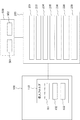
- FIG. 15 is a block diagram showing the present embodiment.
- the user terminal 200 of this embodiment is provided with a data storage unit 251, an access right information storage unit 252, and a standard access right information storage unit 253 in addition to the configuration of the user terminal 200 of the seventh embodiment. ing. The operation is the same as in the seventh embodiment.
Landscapes
- Engineering & Computer Science (AREA)
- Theoretical Computer Science (AREA)
- Software Systems (AREA)
- Computer Hardware Design (AREA)
- Computer Security & Cryptography (AREA)
- Physics & Mathematics (AREA)
- General Engineering & Computer Science (AREA)
- General Physics & Mathematics (AREA)
- General Health & Medical Sciences (AREA)
- Health & Medical Sciences (AREA)
- Bioethics (AREA)
- Multimedia (AREA)
- Technology Law (AREA)
- Storage Device Security (AREA)
- Information Retrieval, Db Structures And Fs Structures Therefor (AREA)
Abstract
Description
1)まず利用者は、カプセル化ファイルと、自身のアクセス権情報をカプセル化サーバに送信する。
2)カプセル化サーバは、利用者がアクセス権を有するか確認する。
3)アクセス権が確認された場合は、カプセル化を解除し、中身のファイルを利用者が閲覧可能な形式に変換する。この形式は、閲覧のみが可能であり、コピー、ペースト、印刷、変更、画面キャプチャなどが一切できないものとする。これは利用者が編集等閲覧より上の権限を有していたとしても同様に閲覧のみ可能とする。なお、アクセス権が確認されなかった場合には、要求を却下しカプセル化を解除しない。
図16は、本発明第1の実施の形態を示すブロック図である。ファイル管理システムは、イントラネット100とカプセル化サーバ300と、イントラネット100およびカプセル化サーバ300にアクセスが可能な利用者端末200と、を有している。
図1は第2の実施の形態のファイル管理システムを示すブロック図である。本実施の形態では、ファイル管理システムの構成および動作の詳細を示す。
2 カプセル化ファイル
100 イントラネット
101、251 データ格納部
102、252 アクセス権情報格納部
103、253 標準アクセス権情報格納部
191 データ格納手段
200 利用者端末
201 利用者ID格納部
202 カプセル化条件設定部
203 カプセル化要請部
204 カプセル化ファイル保存部
205 自動オリジナルファイル削除部
212 非カプセル化条件設定部
213 非カプセル化要請部
214 オリジナルファイル保存部
215 自動カプセル化ファイル削除部
222 カプセル化制御条件設定部
223 カプセル化制御要請部
224 ファイル保存部
225 自動ファイル削除部
233 自動カプセル化要請部
234 自動カプセル化ファイル保存部
235 自動オリジナルファイル削除部
236 自動ファイル巡回検査部
237 巡回制御タイマー
238 充電状況依存型巡回制御タイマー
239 充電状況格納部
291 カプセル化条件設定手段
292 カプセル化要請手段
293 カプセル化ファイル保存手段
294 自動オリジナルファイル削除手段
300 カプセル化サーバ
301、401、501 利用可能者ID格納部
302 カプセル化制御部
391 カプセル化制御手段
400 非カプセル化サーバ
402 非カプセル化制御部
500 カプセル化制御サーバ
502 カプセル化非カプセル化制御部
Claims (10)
- データ格納手段を備えるイントラネットと、オリジナルファイルと前記オリジナルファイルに対するアクセス権情報とをまとめて暗号化してカプセル化ファイルを生成するカプセル化サーバと、前記イントラネットおよび前記カプセル化サーバにアクセス可能な利用者端末と、を有し、前記カプセル化サーバが前記利用者端末から前記オリジナルファイルと前記アクセス権情報とを受け取り前記カプセル化ファイルを生成し前記カプセル化ファイルを前記利用者端末に返送するカプセル化制御手段を有し、前記利用者端末が、カプセル化条件を設定するカプセル化条件設定手段と、前記カプセル化サーバにカプセル化を要請するカプセル化要請手段と、返送された前記カプセル化ファイルを前記データ格納手段に保存するカプセル化ファイル保存手段と、前記カプセル化ファイルの保存を契機として前記ファイル格納手段に格納された前記オリジナルファイルを自動的に削除する自動ファイル削除手段と、を有することを特徴とするファイル管理システム。
- 前記カプセル化サーバが、前記カプセル化サーバの利用資格を有する利用者のID(identifier)を格納する利用可能者ID格納部と、前記利用可能者ID格納部を参照して前記カプセル化サーバにアクセスした利用者IDが前記カプセル化サーバを利用可能であるか判定する利用資格判定部と、を有することを特徴とする請求項1に記載のファイル管理システム。
- 前記カプセル化ファイル保存部が前記カプセル化ファイルを前記オリジナルファイルと同名で前記オリジナルファイルに上書き保存するカプセル化ファイル上書き保存部を有する、ことを特徴とする請求項1に記載のファイル管理システム。
- 前記利用者端末からアクセスが可能であり前記カプセル化ファイルを非カプセル化して前記オリジナルファイルを取り出す非カプセル化サーバを有し、前記非カプセル化サーバが、前記利用者IDが前記オリジナルファイルに対するアクセス権を有している場合に非カプセル化を行う非カプセル化制御手段を有し、前記利用者端末が前記カプセル化ファイルと前記利用者IDとを前記カプセル化解除サーバに送信して非カプセル化を要請する非カプセル化要請手段と、前記オリジナルファイルを受信して前記データ格納手段に保存するオリジナルファイル保存手段と、前記オリジナルファイルの保存を契機として前記データ格納手段に格納された前記カプセル化ファイルを自動的に削除する自動カプセル化ファイル削除手段と、を有していることを特徴とする請求項1乃至請求項3いずれか一項に記載のファイル管理システム。
- 前記カプセル化解除サーバが、前記カプセル化ファイルを復号化して前記カプセル化ファイル中のアクセス権情報を参照し前記利用者IDが前記カプセル化ファイルに対して全ての操作が可能なアクセス権を有しているか判定するアクセス権判定手段を有していることを特徴とする請求項4に記載のファイル管理システム。
- 前記オリジナルファイル保存手段が、前記オリジナルファイルを前記カプセル化ファイルと同名で前記カプセル化ファイルに上書き保存するオリジナルファイル上書き保存手段を有している、ことを特徴とする請求項4または請求項5に記載のファイル管理システム。
- 前記イントラネットが標準アクセス権情報が格納された標準アクセス権情報格納手段を有し、前記利用者端末が、前記データ格納手段を巡回しオリジナルファイルの存在を検出する自動ファイル巡回検査手段と、前記自動ファイル巡回検査部が前記オリジナルファイル検出した場合に前記オリジナルファイルと前記標準アクセス権情報格納部から取り出した前記標準アクセス権情報と前記利用者IDとを自動的に前記カプセル化サーバに送信してカプセル化を要請する自動カプセル化要請部を有する、ことを特徴とする請求項1乃至請求項3いずれか一項に記載のファイル管理システム。
- 前記巡回検査部を予め定められた時間間隔で起動および停止する巡回制御タイマーを有することを特徴とする請求項7に記載のファイル管理システム。
- 前記利用者端末が、電池と、前記電池を充電するための受電手段と、前記受電手段の受電状況を格納する受電状況格納手段と、前記受電状況格手段が受電を検知した時に前記自動ファイル巡回検査手段を起動しかつ前記充電状況検査手段が受電の途絶を検知した時に前記自動ファイル巡回検査手段を停止する充電状況依存型巡回制御タイマーと、を有することを特徴とする請求項7に記載のファイル管理システム。
- イントラネット内に設けられたファイル格納手段および前記ファイル格納手段に格納されたオリジナルファイルに対するアクセス権情報を格納するアクセス権情報格納手段と、ネットワーク上に配置され利用者から利用者IDとオリジナルファイルとアクセス権情報とカプセル化要請とを受け取り前記オリジナルファイルと前記アクセス権情報とをまとめて暗号化したカプセル化ファイルを生成し利用者に返送するカプセル化サーバと、前記イントラネットに接続する利用者端末と、を有するファイル管理システムに用いる利用者端末であって、前記利用者IDと前記オリジナルファイルと前記アクセス権情報とを前記カプセル化装置に送信してカプセル化ファイルの返送を要請するカプセル化要請手段と、前記カプセル化ファイルを前記ファイル格納手段に保存するカプセル化ファイル保存手段と、前記カプセル化ファイルの保存を契機として前記ファイル格納手段から格納された前記オリジナルファイルを自動的に削除する自動オリジナルファイル削除手段と、を有することを特徴とするファイル管理システムに用いる利用者端末。
Priority Applications (3)
| Application Number | Priority Date | Filing Date | Title |
|---|---|---|---|
| CN201480052681.4A CN105580020B (zh) | 2013-09-25 | 2014-09-11 | 文件管理系统和文件管理系统中的用户终端 |
| JP2015538869A JP6050510B2 (ja) | 2013-09-25 | 2014-09-11 | ファイル管理システムおよびファイル管理システムに用いる利用者端末 |
| US14/917,332 US10140431B2 (en) | 2013-09-25 | 2014-09-11 | File management system and user terminal in file management system |
Applications Claiming Priority (2)
| Application Number | Priority Date | Filing Date | Title |
|---|---|---|---|
| JP2013198689 | 2013-09-25 | ||
| JP2013-198689 | 2013-09-25 |
Publications (1)
| Publication Number | Publication Date |
|---|---|
| WO2015045302A1 true WO2015045302A1 (ja) | 2015-04-02 |
Family
ID=52742475
Family Applications (1)
| Application Number | Title | Priority Date | Filing Date |
|---|---|---|---|
| PCT/JP2014/004670 Ceased WO2015045302A1 (ja) | 2013-09-25 | 2014-09-11 | ファイル管理システムおよびファイル管理システムに用いる利用者端末 |
Country Status (4)
| Country | Link |
|---|---|
| US (1) | US10140431B2 (ja) |
| JP (1) | JP6050510B2 (ja) |
| CN (1) | CN105580020B (ja) |
| WO (1) | WO2015045302A1 (ja) |
Families Citing this family (3)
| Publication number | Priority date | Publication date | Assignee | Title |
|---|---|---|---|---|
| CN107145395B (zh) * | 2017-07-04 | 2020-12-08 | 北京百度网讯科技有限公司 | 用于处理任务的方法和装置 |
| US11550931B1 (en) * | 2019-07-11 | 2023-01-10 | Galena Hills Inc. | Data certification system and process for centralized user file encapsulation, encryption, notarization, and verification using a blockchain |
| CN117371026A (zh) * | 2023-09-22 | 2024-01-09 | 杭州来布科技有限公司 | 一种数据安全管控系统及管控方法 |
Citations (3)
| Publication number | Priority date | Publication date | Assignee | Title |
|---|---|---|---|---|
| JP2006048220A (ja) * | 2004-08-02 | 2006-02-16 | Ricoh Co Ltd | 電子ドキュメントのセキュリティ属性付与方法およびそのプログラム |
| WO2011032001A1 (en) * | 2009-09-10 | 2011-03-17 | Symantec Corporation | Viewing content under enterprise digital rights management without a client side access component |
| JP2011170715A (ja) * | 2010-02-19 | 2011-09-01 | Nec System Technologies Ltd | ファイル管理システム、ファイル管理装置、ファイル管理方法、及びファイル管理プログラム |
Family Cites Families (7)
| Publication number | Priority date | Publication date | Assignee | Title |
|---|---|---|---|---|
| US20080091613A1 (en) | 2006-09-28 | 2008-04-17 | Microsoft Corporation | Rights management in a cloud |
| JP4593549B2 (ja) | 2006-11-08 | 2010-12-08 | Necシステムテクノロジー株式会社 | ファイル自動復号暗号化システムおよびプログラム |
| CN100587697C (zh) * | 2007-06-01 | 2010-02-03 | 华中科技大学 | 数字资源版权管理装置 |
| KR100783811B1 (ko) * | 2007-08-28 | 2007-12-10 | 주식회사 파수닷컴 | 압축 파일에 대한 디지털 저작권 관리 방법 |
| US20100023520A1 (en) * | 2008-07-28 | 2010-01-28 | Viewfinity Inc. | Encapsulated file management systems |
| CN101377802A (zh) * | 2008-09-26 | 2009-03-04 | 深圳华为通信技术有限公司 | 一种终端及其文件处理方法和系统 |
| JP5158601B2 (ja) | 2008-11-14 | 2013-03-06 | Necシステムテクノロジー株式会社 | ファイル管理装置、ファイル管理システム、及び、プログラム |
-
2014
- 2014-09-11 CN CN201480052681.4A patent/CN105580020B/zh active Active
- 2014-09-11 US US14/917,332 patent/US10140431B2/en active Active
- 2014-09-11 JP JP2015538869A patent/JP6050510B2/ja active Active
- 2014-09-11 WO PCT/JP2014/004670 patent/WO2015045302A1/ja not_active Ceased
Patent Citations (3)
| Publication number | Priority date | Publication date | Assignee | Title |
|---|---|---|---|---|
| JP2006048220A (ja) * | 2004-08-02 | 2006-02-16 | Ricoh Co Ltd | 電子ドキュメントのセキュリティ属性付与方法およびそのプログラム |
| WO2011032001A1 (en) * | 2009-09-10 | 2011-03-17 | Symantec Corporation | Viewing content under enterprise digital rights management without a client side access component |
| JP2011170715A (ja) * | 2010-02-19 | 2011-09-01 | Nec System Technologies Ltd | ファイル管理システム、ファイル管理装置、ファイル管理方法、及びファイル管理プログラム |
Also Published As
| Publication number | Publication date |
|---|---|
| JPWO2015045302A1 (ja) | 2017-03-09 |
| US10140431B2 (en) | 2018-11-27 |
| CN105580020B (zh) | 2019-05-14 |
| JP6050510B2 (ja) | 2016-12-21 |
| US20160224765A1 (en) | 2016-08-04 |
| CN105580020A (zh) | 2016-05-11 |
Similar Documents
| Publication | Publication Date | Title |
|---|---|---|
| CN102622311B (zh) | Usb移动存储设备访问控制方法、装置及系统 | |
| US10037199B2 (en) | Secure inter-process communication and virtual workspaces on a mobile device | |
| JP5528560B2 (ja) | データ配信装置、データ配信システム、クライアント装置、データ配信方法、データ受信方法、プログラムおよび記録媒体 | |
| CN102592069B (zh) | 通过挂钩内核本地api管理数字权限的设备和方法 | |
| CN110889131A (zh) | 一种文件共享系统 | |
| WO2014192063A1 (ja) | アプリケーション実行プログラム,アプリケーション実行方法及びアプリケーションを実行する情報処理端末装置 | |
| TW201337631A (zh) | 機密資訊洩漏防止系統、機密資訊洩漏防止方法、及電腦可讀取之記錄媒體 | |
| CN105453127A (zh) | 分布式服务器-客户端环境中的文档同步的方法和系统 | |
| EP2840818B1 (en) | Method and device for information security management of mobile terminal, and mobile terminal | |
| JP6050510B2 (ja) | ファイル管理システムおよびファイル管理システムに用いる利用者端末 | |
| TW201514727A (zh) | 檔處理系統及方法 | |
| JP4985438B2 (ja) | 電子ファイルアクセス権管理装置、電子ファイルアクセス権管理方法およびプログラム | |
| TW200905516A (en) | Method and system for protecting file data against divulgence | |
| CN113032042B (zh) | 目标文件的处理方法、装置和终端设备 | |
| US9058493B1 (en) | System, method, and computer program for conditionally implementing protected content | |
| KR20180043676A (ko) | 사용자 단말과 연동된 게이트웨이 서버에서 drm 기능을 제공하는 방법 | |
| JP2009169868A (ja) | 記憶領域アクセス装置及び記憶領域のアクセス方法 | |
| CN107426151B (zh) | 一种文件解密方法及装置 | |
| JP5158601B2 (ja) | ファイル管理装置、ファイル管理システム、及び、プログラム | |
| JP6053182B2 (ja) | トレースシステム及びトレース方法 | |
| JP5835022B2 (ja) | 配信装置、配信処理方法及びプログラム、並びに情報処理装置、情報処理方法及びプログラム | |
| CN114244573B (zh) | 数据传输管控方法、装置、计算机设备和存储介质 | |
| JP2006139475A (ja) | 既存アプリケーションの機密情報保護システム | |
| CN121509422A (zh) | 基于微信小程序的文件存储与共享方法、装置、设备及系统 | |
| CN116070244A (zh) | 一种账本数据的处理方法及装置、存储介质及电子设备 |
Legal Events
| Date | Code | Title | Description |
|---|---|---|---|
| WWE | Wipo information: entry into national phase |
Ref document number: 201480052681.4 Country of ref document: CN |
|
| 121 | Ep: the epo has been informed by wipo that ep was designated in this application |
Ref document number: 14847553 Country of ref document: EP Kind code of ref document: A1 |
|
| WWE | Wipo information: entry into national phase |
Ref document number: 14917332 Country of ref document: US |
|
| ENP | Entry into the national phase |
Ref document number: 2015538869 Country of ref document: JP Kind code of ref document: A |
|
| NENP | Non-entry into the national phase |
Ref country code: DE |
|
| 122 | Ep: pct application non-entry in european phase |
Ref document number: 14847553 Country of ref document: EP Kind code of ref document: A1 |